
SDM-S95FR - Screen SONY - Free user manual and instructions
Find the device manual for free SDM-S95FR SONY in PDF.


| Product type | 19-inch LCD screen |
| Brand | Sony |
| Model | SDM-S95FR |
| Screen size | 19 inches (diagonal) |
| Display technology | a-Si active matrix TFT LCD |
| Maximum resolution | 1280 x 1024 |
| Input frequencies (analog) | Horizontal: 28-80 kHz, Vertical: 48-75 Hz |
| Input frequencies (digital) | Horizontal: 28-64 kHz, Vertical: 60 Hz |
| Video input connectors | DVI-D (digital), HD15 (analog) |
| Audio input | Stereo mini jack 0.5 V rms |
| Audio output | Stereo mini jack |
| Power | 100-240 V AC, 50/60 Hz, max. 1.0 A |
| Power consumption (max.) | 50 W |
| Power consumption (standby) | Less than 1 W (energy saving mode) |
| Dimensions with stand (W x H x D) | 414 x 409.5-519.5 x 277.5 mm |
| Dimensions without stand (W x H x D) | 414 x 348 x 69 mm |
| Weight with stand | 8.7 kg |
| Weight without stand | 5.2 kg |
| Tilt | Approx. 5° forward, 20° backward |
| Height adjustment | Approx. 110 mm (with adjustable stand) |
| Operating temperature | 5 °C to 35 °C |
| Energy saving functions | VESA DPMS, ENERGY STAR, NUTEK, ECO mode (High/Medium/Low/User) |
| Plug & Play | DDC2B |
| Supplied accessories | Power cord, HD15-HD15 cable, DVI-D cable, CD-ROM, warranty card, quick setup guide, stand base |
| Maintenance and cleaning | Unplug before cleaning. Use a soft, dry cloth for the LCD screen, a slightly damp cloth with mild detergent for the chassis. Avoid solvents, alcohol, gasoline. |
| Safety | Do not expose to extreme temperatures, vibrations, dust. Use the appropriate power cord. Dispose of according to local regulations (contains mercury). |
Frequently Asked Questions - SDM-S95FR SONY
User questions about SDM-S95FR SONY
0 question about this device. Answer the ones you know or ask your own.
Ask a new question about this device
Download the instructions for your Screen in PDF format for free! Find your manual SDM-S95FR - SONY and take your electronic device back in hand. On this page are published all the documents necessary for the use of your device. SDM-S95FR by SONY.
USER MANUAL SDM-S95FR SONY
This monitor complies with the TCO'99 guidelines.
(for the black model)

This monitor complies with the TCO'03 guidelines.
(for the silver model)
目次
使用上のご注意 4
ディスプレイの型名を確認する 5
各部の名前とはたらき 5
接続と設定 6
TCO'99 Eco-document (for the black model) .....i
TCO'03 Eco-document (for the silver model) ..... ii
使用上のご注意
電源について
natural_image
Line drawing of a computer monitor with a stand and scroll wheel, no text or symbols present2 本機にビデオ信号ケーブルをつなぐ
natural_image
Line drawing of a computer monitor with cable and stand (no text or symbols)■高さ調整スタンド *
natural_image
Diagram showing a computer monitor connected to a wall-mounted cable, with an inset close-up of the cable being inserted (no text or symbols present)ご注意
flowchart
graph LR
    A["Input Button 1"] --> B["Click-View Icon"]
    C["Input Button 2"] --> D["Arrow to Click-View Icon"]
    E["Input Button 3"] --> F["Arrow to Click-View Icon"]
    G["Input Button 4"] --> H["Arrow to Click-View Icon"]
    I["Input Button 5"] --> J["Arrow to Click-View Icon"]
3 調整する。
4 メニューを消す。
This display is designed for use in Japan only and cannot be used in any other country.
主な仕様
TCO'99 Eco-document (for the black model)

■Congratulations!
You have just purchased a TCO'99 approved and labelled product! Your choice has provided you with a product developed for professional use. Your purchase has also contributed to reducing the burden on the environment and also to the further development of environmentally adapted electronics products.
■Why do we have environmentally labelled computers?
In many countries, environmental labelling has become an established method for encouraging the adaptation of goods and services to the environment. The main problem, as far as computers and other electronics equipment are concerned, is that environmentally harmful substances are used both in the products and during their manufacture. Since it is not so far possible to satisfactorily recycle the majority of electronics equipment, most of these potentially damaging substances sooner or later enter nature.
There are also other characteristics of a computer, such as energy consumption levels, that are important from the viewpoints of both the work (internal) and natural (external) environments. Since all methods of electricity generation have a negative effect on the environment (e.g. acidic and climate-influencing emissions, radioactive waste), it is vital to save energy. Electronics equipment in offices is often left running continuously and thereby consumes a lot of energy.
■What does labelling involve?
This product meets the requirements for the TCO'99 scheme which provides for international and environmental labelling of personal computers. The labelling scheme was developed as a joint effort by the TCO (The Swedish Confederation of Professional Employees), Svenska Naturskyddsforeningen (The Swedish Society for Nature Conservation) and Statens Energimydighet (The Swedish National Energy Administration).
Approval requirements cover a wide range of issues: environment, ergonomics, usability, emission of electric and magnetic fields, energy consumption and electrical and fire safety.
The environmental demands impose restrictions on the presence and use of heavy metals, brominated and chlorinated flame retardants, CFCs (frecons) and chlorinated solvents, among other things. The product must be prepared for recycling and the manufacturer is obliged to have an environmental policy which must be adhered to in each country where the company implements its operational policy.
The energy requirements include a demand that the computer and/or display, after a certain period of inactivity, shall reduce its power consumption to a lower level in one or more stages. The length of time to reactivate the computer shall be reasonable for the user.
Labelled products must meet strict environmental demands, for example, in respect of the reduction of electric and magnetic fields, physical and visual ergonomics and good usability.
Below you will find a brief summary of the environmental requirements met by this product. The complete environmental criteria document may be ordered from:
TCO Development
SE-114 94 Stockholm, Sweden
Fax: +46 8 782 92 07
Email (Internet): development@tco.se
Current information regarding TCO'99 approved and labelled
products may also be obtained via the Internet, using the address:
http://www.tco-info.com/
■Environmental requirements
Flame retardants
Flame retardants are present in printed circuit boards, cables, wires, casings and housings. Their purpose is to prevent, or at least to delay the spread of fire. Up to 30% of the plastic in a computer casing can consist of flame retardant substances. Most flame retardants contain bromine or chloride, and those flame retardants are chemically related to another group of environmental toxins, PCBs. Both the flame retardants containing bromine or chloride and the PCBs are suspected of giving rise to severe health effects, including reproductive damage in fish-eating birds and mammals, due to the bio-accumulative* processes. Flame retardants have been found in human blood and researchers fear that disturbances in foetus development may occur.
The relevant TCO'99 demand requires that plastic components weighing more than 25 grams must not contain flame retardants with organically bound bromine or chlorine. Flame retardants are allowed in the printed circuit boards since no substitutes are available.
Cadmium\*\*
Cadmium is present in rechargeable batteries and in the colour-generating layers of certain computer displays. Cadmium damages the nervous system and is toxic in high doses. The relevant TCO'99 requirement states that batteries, the colour-generating layers of display screens and the electrical or electronics components must not contain any cadmium.
Mercury\*\*
Mercury is sometimes found in batteries, relays and switches. It damages the nervous system and is toxic in high doses. The relevant TCO'99 requirement states that batteries may not contain any mercury. It also demands that mercury is not present in any of the electrical or electronics components associated with the labelled unit.
CFCs (freons)
The relevant TCO'99 requirement states that neither CFCs nor HCFCs may be used during the manufacture and assembly of the product. CFCs (freons) are sometimes used for washing printed circuit boards. CFCs break down ozone and thereby damage the ozone layer in the stratosphere, causing increased reception on earth of ultraviolet light with e.g. increased risks of skin cancer (malignant melanoma) as a consequence.
Lead\*\*
Lead can be found in picture tubes, display screens, solders and capacitors. Lead damages the nervous system and in higher doses, causes lead poisoning. The relevant TCO'99 requirement permits the inclusion of lead since no replacement has yet been developed.
* Bio-accumulative is defined as substances which accumulate within living organisms.
** Lead, Cadmium and Mercury are heavy metals which are Bio-accumulative.
TCO'03 Eco-document (for the silver model)

■Congratulations!
The display you have just purchased carries the TCO'03 Displays label. This means that your display is designed, manufactured and tested according to some of the strictest quality and environmental requirements in the world. This makes for a high performance product, designed with the user in focus that also minimizes the impact on our natural environment.
Ergonomics
- Good visual ergonomics and image quality in order to improve the working environment for the user and to reduce sight and strain problems. Important parameters are luminance, contrast, resolution, reflectance, colour rendition and image stability.
■Energy
- Energy-saving mode after a certain time – beneficial both for the user and the environment
- Electrical safety
■Emissions
- Electromagnetic fields
- Noise emissions
Ecology
- The product must be prepared for recycling and the manufacturer must have a certified environmental management system such as EMAS or ISO 14 001
- Restrictions on
- chlorinated and brominated flame retardants and polymers
- heavy metals such as cadmium, mercury and lead.
The requirements included in this label have been developed by TCO Development in co-operation with scientists, experts, users as well as manufacturers all over the world. Since the end of the 1980s TCO has been
involved in influencing the development of IT equipment in a more user-friendly direction. Our labelling system started with displays in 1992 and is now requested by users and IT-manufacturers all over the world.
For more information, please visit www.tcodevelopment.com
Recycling Information
■Customer in Europe
The collection and recycling of this product has been planned according to your country's relevant legislation. To ensure that this product will be collected and recycled in way that minimizes the impact on the environment, please do the following:
-
If you purchased this product for private use, contact your municipality or the waste collection system and bring the product to this collection point / have the product be picked up by the waste collection system. Alternatively, your retailer might take back this if you purchase new equivalent equipment; please check with your retailer whether he will take back this product before bringing it. For information on your country's recycling arrangements, please contact the Sony representation in your country (contact details at: www.sony-europe.com). Further details on specific recycling systems can be found at the following addresses:
-
Belgium: www.recupel.be
- Norway: www.elretur.no
- Sweden: www.el-kretsen.se
- Switzerland: www.swico.ch
- Netherlands: www.nvmp.nl (consumer electronics) www.ictmilieu.nl (IT equipment)
- If you use this product professionally, check the product's delivery contract for take back / recycling arrangements and follow the procedures described therein. Alternatively, follow the procedures described under point 1.
■Customer in USA
We Sony as a member of EIA recommends to visit URL below http://www.eiac.org/
■Customer in Asia
http://www.sony.co.jp/SonyInfo/Environment/recycle/3R.html
TFT LCD Color Computer Display
SDM-S75 * SDM-S95 **
Owner's Record
The model and serial numbers are located at the rear of the unit. Record these numbers in the spaces provided below. Refer to them whenever you call upon your dealer regarding this product. Model No. ____ Serial No. ____
WARNING
To reduce the risk of fire or electric shock, do not expose this apparatus to rain or moisture.
Dangerously high voltages are present inside the unit. Do not open the cabinet. Refer servicing to qualified personnel only.
FCC Notice
This equipment has been tested and found to comply with the limits for a Class B digital device, pursuant to Part 15 of the FCC Rules. These limits are designed to provide reasonable protection against harmful interference in a residential installation. This equipment generates, uses, and can radiate radio frequency energy and, if not installed and used in accordance with the instructions, may cause harmful interference to radio communications. However, there is no guarantee that interference will not occur in a particular installation. If this equipment does cause harmful interference to radio or television reception, which can be determined by turning the equipment off and on, the user is encouraged to try to correct the interference by one or more of the following measures:
- Reorient or relocate the receiving antenna.
– Increase the separation between the equipment and receiver. - Connect the equipment into an outlet on a circuit different from that to which the receiver is connected.
- Consult the dealer or an experienced radio/TV technician for help. You are cautioned that any changes or modifications not expressly approved in this manual could void your authority to operate this equipment.
IMPORTANTE
If you have any questions about this product, you may call; Sony Customer Information Services Center 1-800-222-7669 or http://www.sony.com/
Declaration of Conformity
Trade Name: SONY
Model : SDM-S75 /S95 * **
Note : means any number or alphanumeric character.
Responsible Party : Sony Electronics Inc.
Address : 16530 Via Esprillo, San Diego, CA
92127 U.S.A.
Telephone Number: 858-942-2230
This device complies with part 15 of the FCC rules. Operation is subject to the following two conditions: (1) This device may not cause harmful interference, and (2) this device must accept any interference received, including interference that may cause undesired operation.
Be sure to confirm the carton that came with your display. The ID label of your display model is located at the rear of the display.
NOTICE
This notice is applicable for USA/Canada only.
If shipped to USA/Canada, install only a UL LISTED/CSA
LABELLED power supply cord meeting the following specifications:
SPECIFICATIONS
Plug Type Nema-Plug 5-15p
Cord Type SVT or SJT, minimum 3 × 18 AWG
Length Maximum 15 feet
Rating Minimum 7 A, 125 V
NOTICE
As an ENERGY STAR Partner, Sony Corporation has determined that this product meets the ENERGY STAR guidelines for energy efficiency.

This monitor complies with the TCO'99 guidelines.
(for the black model)

This monitor complies with the TCO'03 guidelines.
(for the silver model)
Table of Contents
Precautions....4
Checking the model name of the display 5
Identifying parts and controls 5
Setup....6
Setup 1: Assemble the stand....6
Setup 2: Connect the video signal cables....7
Setup 3: Connect the audio cords ..... 8
Setup 4: Connect the power cord .....9
Setup 5: Secure the cords ..... 9
Setup 6: Turn on the display and computer ..... 9
Setup 7: Adjust the tilt and height ..... 10
Selecting the input signal (INPUT1/INPUT2) ..... 11
Customizing Your Display ....12
Navigating the menu....12
Menu options list....13
PICTURE ADJUST menu 14
COLOR menu 14
SHARPNESS menu 14
→← MODE RESET menu (PICTURE ADJUST menu only)....14
ASCREEN menu (analog RGB signal only) 14
MENU POSITION menu 15
INPUT SENSING menu 15
LANGUAGE menu....15
→← RESET menu (reset to the default setting) ..... 15
cMENU LOCK menu....15
Technical Features ....16
Power saving function....16
Reducing the power consumption (ECO mode) 16
Automatic picture quality adjustment function
(analog RGB signal only) 16
Troubleshooting....17
On-screen messages 17
Trouble symptoms and remedies 18
Specifications.....20
TCO'99 Eco-document (for the black model) .....i
TCO'03 Eco-document (for the silver model) ..... ii
• Macintosh is a trademark licensed to Apple Computer, Inc., registered in the U.S.A. and other countries.
- Windows ^ is registered trademarks of Microsoft Corporation in the United States and other countries.
- IBM PC/AT and VGA are registered trademarks of IBM Corporation of the U.S.A.
- VESA and DDC ^™ are trademarks of the Video Electronics Standards Association.
• ENERGY STAR is a U.S. registered mark.
- Adobe and Acrobat are trademarks of Adobe Systems Incorporated.
- All other product names mentioned herein may be the trademarks or registered trademarks of their respective companies.
- Furthermore, “TM” and “®” are not mentioned in each case in this manual.
Precautions
Warning on power connections
- Use the supplied power cord. If you use a different power cord, be sure that it is compatible with your local power supply.
For the customers in the U.S.A.
If you do not use the appropriate cord, this display will not conform to mandatory FCC standards.
For the customers in the UK
If you use the display in the UK, be sure to use the appropriate UK power cord.
Example of plug types

natural_image
Three line drawings of different types of electrical plugs (no text or symbols)for 100 to 120 V AC for 200 to 240 V AC for 240 V AC only
The equipment should be installed near an easily accessible outlet.
Installation
Do not install or leave the display:
- In places subject to extreme temperatures, for example near a radiator, heating vent, or in direct sunlight. Subjecting the display to extreme temperatures, such as in an automobile parked in direct sunlight or near a heating vent, could cause deformations of the casing or malfunctions.
- In places subject to mechanical vibration or shock.
- Near any equipment that generates a strong magnetic field, such as a TV or various other household appliances.
- In places subject to inordinate amounts of dust, dirt, or sand, for example near an open window or an outdoor exit. If setting up temporarily in an outdoor environment, be sure to take adequate precautions against airborne dust and dirt. Otherwise irreparable malfunctions could occur.
Handling the LCD screen
- Do not leave the LCD screen facing the sun as it can damage the LCD screen. Take care when you place the display by a window.
- Do not push on or scratch the LCD screen. Do not place a heavy object on the LCD screen. This may cause the screen to lose uniformity or cause LCD panel malfunctions.
- If the display is used in a cold place, a residual image may appear on the screen. This is not a malfunction. The screen returns to normal as the temperature rises to a normal operating level.
- If a still picture is displayed for a long time, a residual image may appear for a while. The residual image will eventually disappear.
- The LCD panel becomes warm during operation. This is not a malfunction.
Note on the LCD (Liquid Crystal Display)
Please note that the LCD screen is made with high-precision technology. However, black points or bright points of light (red, blue, or green) may appear constantly on the LCD screen, and irregular colored stripes or brightness may appear on the LCD screen. This is not malfunction.
(Effective dots: more than 99.99%)
Maintenance
- Be sure to unplug the power cord from the power outlet before cleaning your display.
- Clean the LCD screen with a soft cloth. If you use a glass cleaning liquid, do not use any type of cleaner containing an anti-static solution or similar additive as this may scratch the LCD screen's coating.
- Clean the cabinet, panel, and controls with a soft cloth lightly moistened with a mild detergent solution. Do not use any type of abrasive pad, scouring powder, or solvent, such as alcohol or benzine.
- Do not rub, touch, or tap the surface of the screen with sharp or abrasive items such as a ballpoint pen or screwdriver. This type of contact may result in a scratched picture tube.
- Note that material deterioration or LCD screen coating degradation may occur if the display is exposed to volatile solvents such as insecticide, or if prolonged contact is maintained with rubber or vinyl materials.
Transportation
- Disconnect all the cables from the display. If you use a height adjustable stand adjust its height to the highest position and hold both sides of the LCD display securely. Be careful not to scratch the screen when transporting. If you drop the display, you may injured or the display may be damaged.
- When you transport this display for repair or shipment, use the original carton and packing materials.
- Replace the stopper pin for the height adjustable stand to fix the stand during the transportation.
Disposal of the display
- Do not dispose of this display with general household waste.
- The fluorescent tube used in this display contains mercury. Disposal of this display must be carried out in accordance to the regulations of your local sanitation authority.
For customers in the United States
This product contains mercury. Disposal of this product may be regulated if sold in the United States. For disposal or recycling information, please contact your local authorities or the Electronics Industries Alliance (http://www.eiae.org).
Checking the model name of the display
Check the model name of the display first.
The model name is located at the rear of the display (Example : SDM-S75A).
You cannot use some of the functions or menu options for certain display models.
Identifying parts and controls
See the pages in parentheses for further details.
The illustration only shows one of all the models that are available for this display.
Front of the display
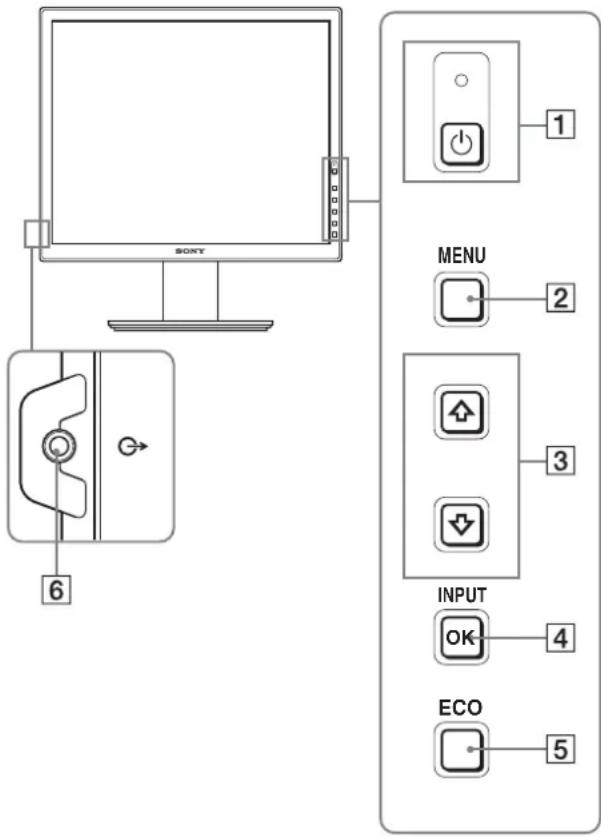
The contents with *mark for specifications vary depending on the models. For details, see “Specifications” (page 20).
1 ⏻ (Power) switch and ⏻ (power) indicator (pages 9, 16)
This switch turns the display on. To turn the display off, press this switch again.
2MENU button (pages 12)
This button turns the menu screen on and off.
3↓/↑ buttons (page 12)
These buttons are used to select the menu items and make adjustments.
4 OK button (page 12)
This button activates the selected menu item and adjustments made using the ↓/↑ buttons (3).
INPUT (page 11)*
These buttons switch the video input signal between INPUT1 and INPUT2 when two computers are connected to the display. (Only available when menu is turned off.)
5 ECO button (page 16)
This button is used to reduce the power consumption. When the menu screen is not displayed, you can also automatically adjust the picture quality for the current input signal while keeping pressing this button for more than 3 seconds (One touch Auto adjust). (analog RGB signal only)
6 Audio output jack (page 8)
This jack outputs audio signals to speakers or other audio equipment.
Real of the display
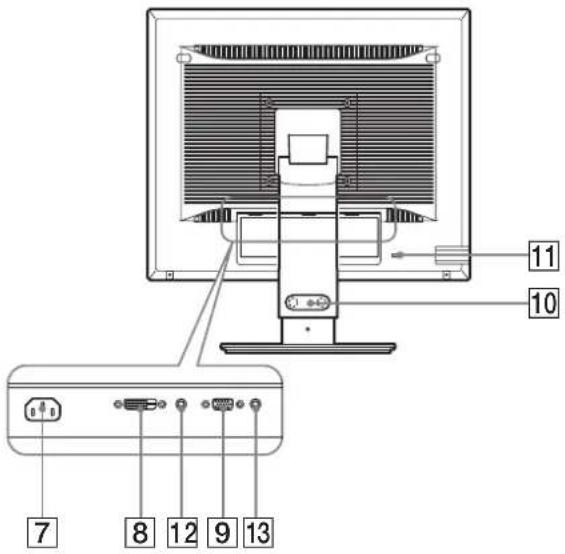
⑦ AC IN connector (page 9)
This connector connects the power cord (supplied).
8 DVI-D input connector (digital RGB) *page 8)
This connector inputs digital RGB video signals that comply with DVI Rev.1.0.
9 HD15 input connector (analog RGB) (page 8)
This connector inputs analog RGB video signals (0.700 Vp-p, positive) and sync signals.
10 Cable holder (page 9)
This part secures cables and cords to the display.
11 Security lock hole
The security lock hole should be used with the Kensington Micro Saver Security System.
Micro Saver Security System is a trademark of Kensington.
12Audio jack for INPUT1 *
This jack inputs audio signals when connected to the audio output jack of a computer or other audio equipment connected to INPUT1.
13Audio jack for INPUT2 *
This jack inputs audio signals when connected to the audio output jack of a computer or other audio equipment connected to INPUT2.
Setup
Before using your display, check that the following items are included in your carton:
- LCD display
- Power cord
- Stand Base *
• HD15-HD15 video signal cable (analog RGB)
• DVI-D video signal cable (digital RGB) * - CD-ROM (utility software for Windows/Macintosh, Operating Instructions, etc.)
- Warranty card
- Quick Setup Guide
The contents with *mark for specifications vary depending on the models. For details, “Specifications” (page 20).
Setup 1: Assemble the stand
Do not press the LCD display when placing or raising the display straight on a desk or a like.
It may affect the uniformity of the screen or damage the LCD display.
■When using supplied stand \*
1 Open the carton and take out the stand base.
2 Confirm the supplied items.
- Stand Base (with the screw at the bottom side)
3 Place a soft mat or a kind on a flat surface like a desk.
You may damage the LCD screen and the display itself if putting the display directly on the desk.
4 Take the display out from the carton and then place the frame of the laid display along the edge of the desk.
The figure shows the height adjustable stand. If you use the fixed stand, your last step of assembling procedure is Step 5.
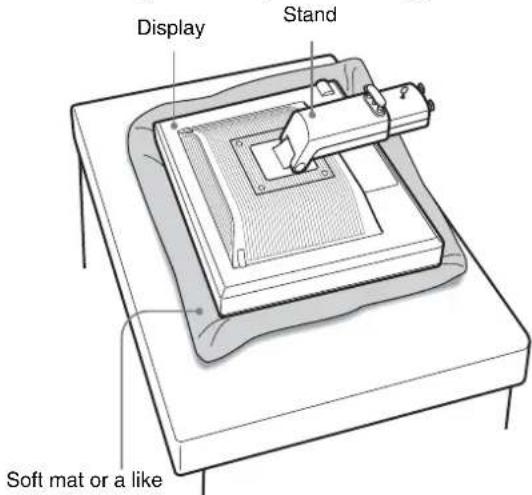
5 Hook the stand base holes onto the prongs of stand to attach. ① Lift the handle of screw to screw the stand base securely. ② Be sure that the screw is secured and turn the screw handle back.
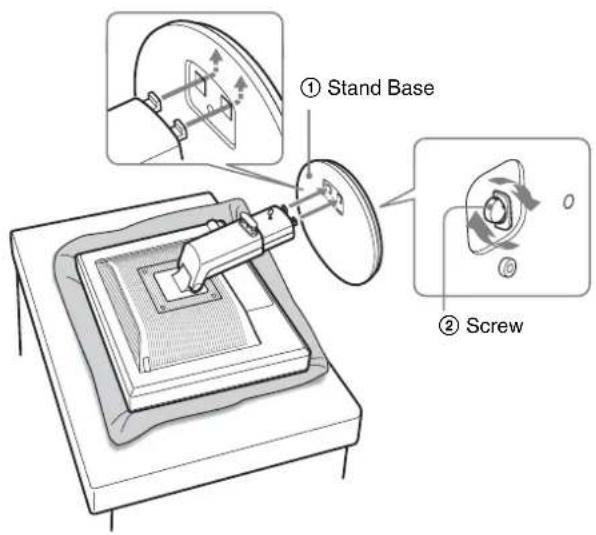
6 If you use the height adjustable stand, remove the stopper pin after raising the height adjustable stand straight.
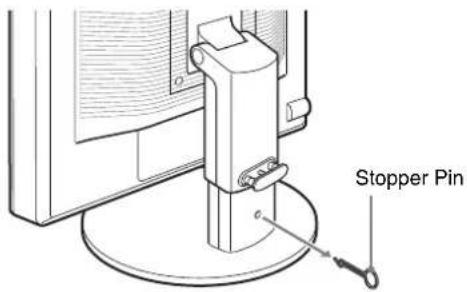
Note
Do not remove the stopper pin while the stand is laid. It may fall or injure you by the stand neck coming off the stand base impetuously.
■ When using VESA Stand *
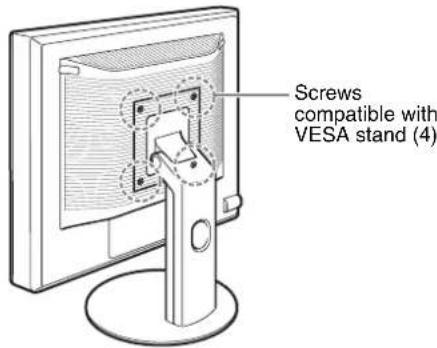
You can attach a VESA stand in other brands by removing the supplied stand attached to the display.
Setup 2: Connect the video signal cables
- Turn off the display and computer before connecting.
Notes
- Do not touch the pins of the video signal cable connector as this might bend the pins.
- Check the alignment of the connector to avoid bending the pins of the video signal cable connector.
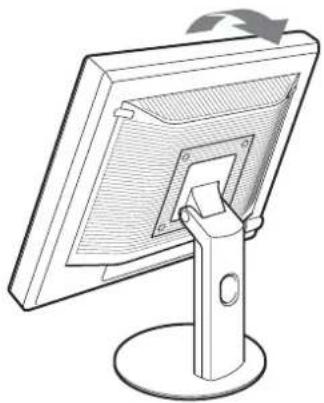
1 Tilt the display up.
When using the height adjustable stand, raise the display higher.*
natural_image
Line drawing of a computer monitor with a stand and scroll wheel (no text or symbols)2 Connect the video signal cables to the display.
If you use the fixed stand, draw the video signal cables through the stand hole first and then connect them to the display. For more details see "Setup 5: Secure the cords."
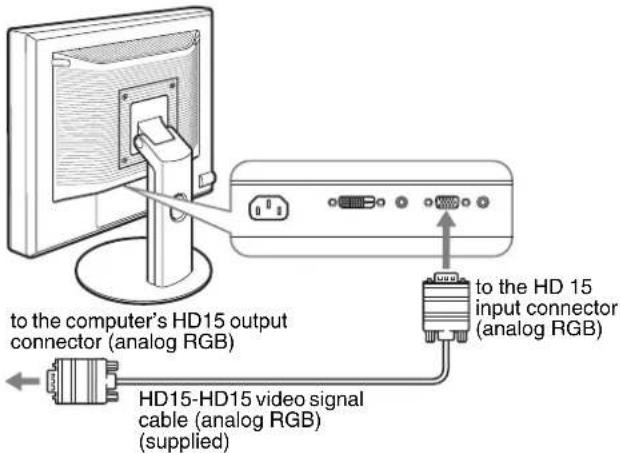
■Connect a computer equipped with an HD15 output connector (analog RGB)
Using the supplied HD15-HD15 video signal cable (analog RGB), connect the computer to the display's HD 15 input connector (analog RGB).
■Connect a computer equipped with a DVI output connector (digital RGB)
Using the supplied DVI-D video signal cable (digital RGB), connect the computer to the display's DVI-D input connector (digital RGB).
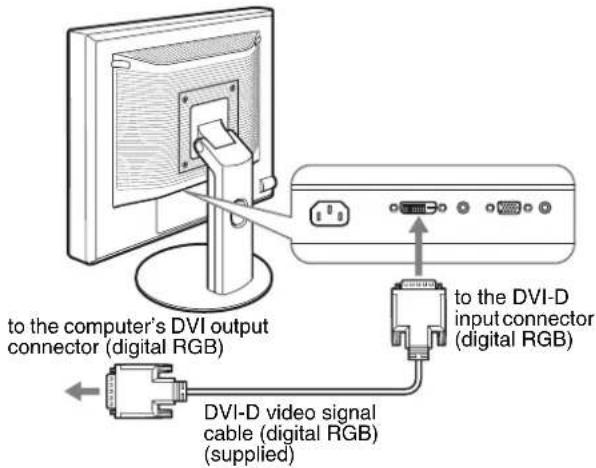
Setup 3: Connect the audio cords
If you are not intended to output audio, you do not need this connection.
If you use the fixed stand, draw the audio cords through the stand hole first and then connect them to the display. For more details see "Setup 5: Secure the cords."
1 Connect the display's audio input jack and audio output jack of the computer or other audio equipment using the audio cord (not supplied).
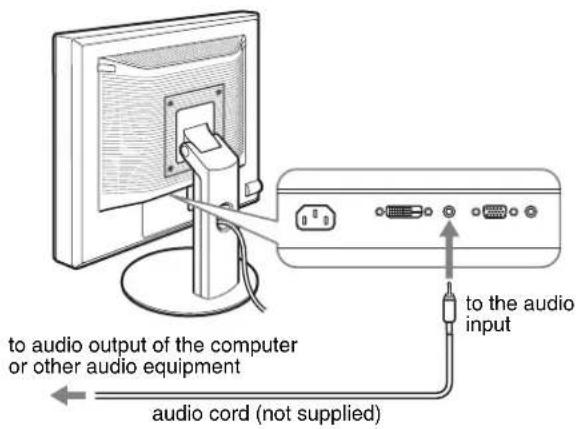
2 Connect the audio cable (not supplied) securely to the display's audio output jack.
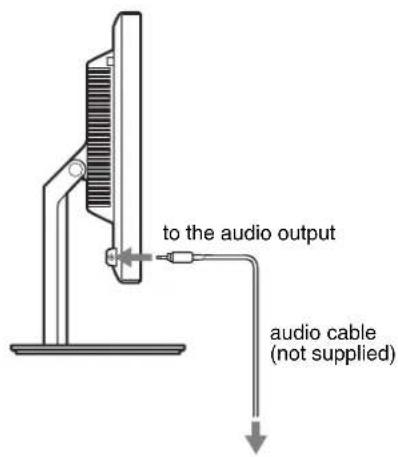
Audio output will be changed when the display's audio input and audio output connection has been completed.*
Connect audio equipment that is within the input range shown in the display's audio input specifications. Too high of an input may cause damage to the display.*
Setup 4: Connect the power cord
If you use the fixed stand, draw the power cord through the stand hole first and then connect them to the display. For more details see "Setup 5: Secure the cords."
1 Connect the supplied power cord securely to the display's AC IN connector.
2 Connect the other end securely to a power outlet.
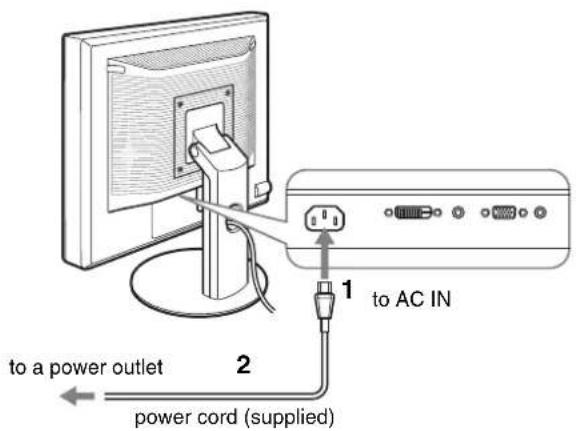
Setup 5: Secure the cords
■ Fixed Stand \*
Be sure that the cords and cables have been drawn into the stand hole as illustrated.
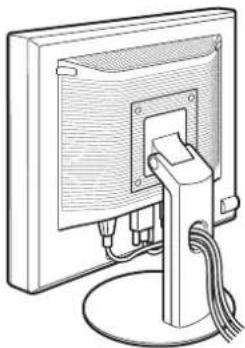
natural_image
Line drawing of a computer monitor with cable and stand (no text or symbols)■ Height adjustable stand \*
Draw the cords and cables through the cable holder as illustrated.
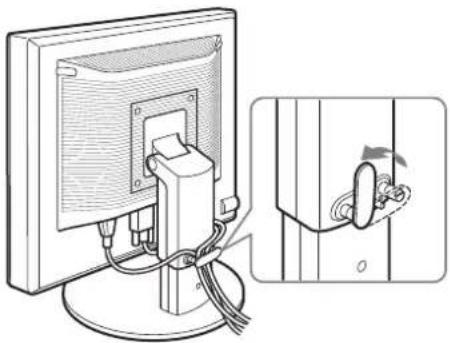
natural_image
Diagram showing a computer monitor connected to a cable with a close-up view of the cable being inserted (no text or symbols present)Note
When bounding the cords and cables, be sure to loosen them a little. If they get pulled hard they may come off from the connectors or plugs as you adjust the screen angle. If you stretch the cords and cables too hard they may get damaged.
Setup 6: Turn on the display and computer
1 Press the ⏻ (power) switch located on the front right of the display.
The ⏻ (power) indicator lights up in green.
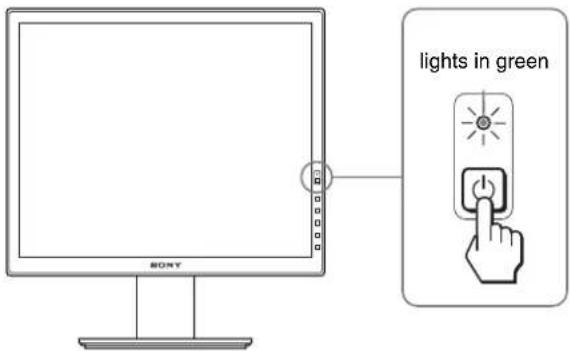
2 Turn on the computer.
If no picture appears on your screen
- Check that the power cord and the video signal cables are properly connected.
- If "NO INPUT SIGNAL" appears on the screen: - The computer is in the power saving mode. Try pressing any key on the keyboard or moving the mouse. - Check that the input signal setting is correct by pressing the OK button (page 11).
- If "CABLE DISCONNECTED" appears on the screen: - Check that the video signal cables are properly connected. - Check that the input signal setting is correct by pressing the OK button (page 11).
- If "OUT OF RANGE" appears on the screen: Reconnect the old display. Then adjust the computer's graphics board within the following ranges.
| Analog RGB Digital RGB | |
| Horizontal frequency | 28–80 kHz 28–64 kHz |
| Vertical frequency | 48–75 Hz 60 Hz |
| Resolution | 1280 × 1024 or less |
For more information about the on-screen messages, see "Trouble symptoms and remedies" on page 18.
No need for specific drivers
The display complies with the "DDC" Plug & Play standard and automatically detects all the display's information. No specific driver needs to be installed to the computer.
The first time you turn on your computer after connecting the display, the setup Wizard may appear on the screen. If this is the case, follow the on-screen instructions. The Plug & Play display is automatically selected so that you can use this display.
The vertical frequency turns to 60 Hz.
Since flickers are unobtrusive on the display, you can use it as is. You do not need to set the vertical frequency to any particular high value.
Setup 7: Adjust the tilt and height
This display can be adjusted within the angles shown below.
Hold both sides of the LCD panel, then adjust screen angles.
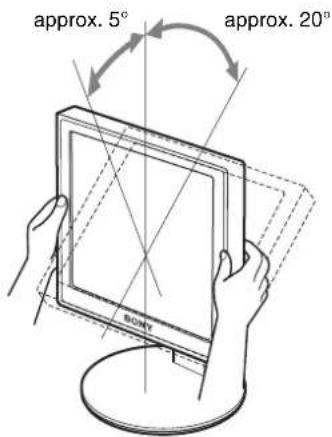
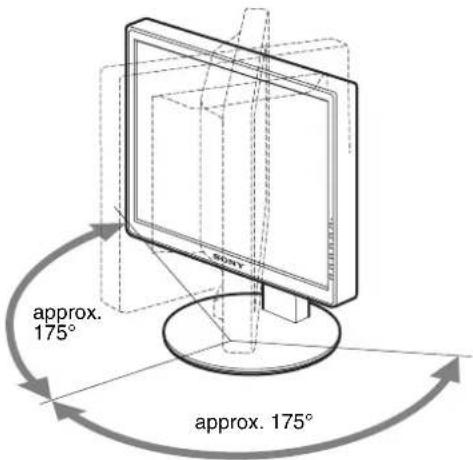
When you use the height adjustable stand, the height adjust is also available as below.
Hold both sides of the LCD panel, then adjust screen height.
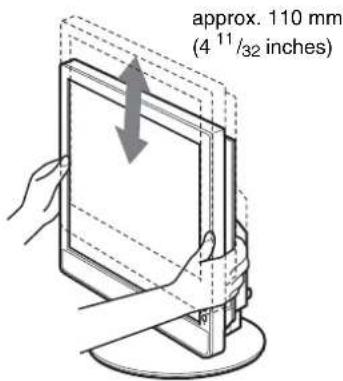
To use the display comfortably
Adjust the viewing angle of your display according to the height of your desk and chair, so that light is not reflected from the screen to your eyes.
Notes
- When adjusting the screen's angle, be sure not to crash it against any objects around the display.
- Do not put any objects under the display when you adjust the height of stand. It may get damaged by accident.
Selecting the input signal (INPUT1/INPUT2)\*
Press the OK button.
The input signal change each time you press this button.

| On-screen message(Appears about 5 seconds onthe upper left corner.) | Input signal configuration |
| INPUT1 : DVI-D*DVI-D input connector(digital RGB) for INPUT1 | |
| INPUT2 : HD15 HD15 input connector(analog RGB) for INPUT2 | |
GB
Customizing Your Display
Before making adjustments
Connect the display and the computer, and turn them on. For the best results, wait for at least 30 minutes before making any adjustments after display is connected to the computer and turned on.
You can make numerous adjustments to your display using the on-screen menu.
Navigating the menu
1 Display the main menu.
Press the MENU button to display the main menu on your screen.

2 Select the menu you want to adjust.
Press the ↓/↑ buttons to display the desired menu. Press the OK button to select the menu item.
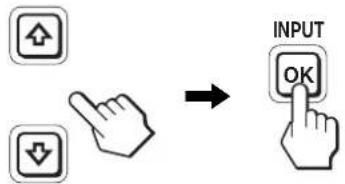
3 Adjust the item.
Press the ↓/↑ buttons to make the adjustment, then press the OK button.
When you press the OK button, the setting is stored, then the display returns to the previous menu.
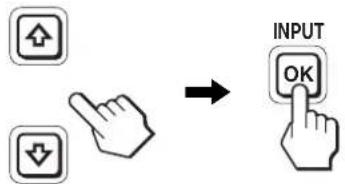
flowchart
graph TD
    A["Input"] --> B["Arrow"]
    C["Hand icon"] --> D["Arrow"]
4 Close the menu.
Press the MENU button once to return to normal viewing. If no buttons are pressed, the menu closes automatically after about 45 seconds.

■ Resetting the adjustments to the default settings
You can reset the adjustments using the RESET menu. For more information about resetting the adjustments, see ⋯ (RESET) on page 15.
Menu options list
Menu options vary depending on the models.
Check your model name on the bottom of the display and refer to the tables below.
| SDM-S75A/S95ARSDM-S75E/S95ER | |
| BACKLIGHT | |
| CONTRAST | 1) |
| BRIGHTNESS | 1) |
| GAMMA | 1) |
| COLOR 9300K | |
| 6500K | |
| sRGB ^1) | |
| USER (gain of R and B) | |
| SHARPNESS | |
| MODE RESET* | |
| SCREEN AUTO | |
| PHASE | |
| PITCH | |
| H CENTER | |
| V CENTER | |
| MENU POSITION | |
| INPUT SENSING* | |
| LANGUAGE ENGLISH | |
| FRANÇAIS | |
| DEUTSCH | |
| ESPAÑOL | |
| ITALIANO | |
| NEDERLANDS | |
| SVENSKA | |
| РУССКИЙ | |
| 日本語 | |
| 中文 | |
| RESET OK | |
| CANCEL | |
| MENU LOCK | ON |
| OFF |
| SDM-S75D/S95DRSDM-S75F/S95FRSDM-S75N/S95NR | |
| PICTURE ADJUST menu* | |
| MODE (ECO mode) | HIGH |
| MIDDLE | |
| LOW | |
| USER | |
| BACKLIGHT | |
| CONTRAST | 1) |
| BRIGHTNESS | 1) |
| GAMMA | 1) |
| COLOR 9300K | |
| 6500K | |
| sRGB1) | |
| USER (gain of R and B) | |
| SHARPNESS | |
| MODE RESET | |
| SCREEN | AUTO |
| PHASE | |
| PITCH | |
| H CENTER | |
| V CENTER | |
| MENU POSITION | ☑ |
| INPUT SENSING* | AUTO ON |
| INPUT1 | |
| INPUT2 | |
| AUTO OFF | |
| LANGUAGE | ENGLISH |
| FRANÇAIS | |
| DEUTSCH | |
| ESPAÑOL | |
| ITALIANO | |
| NEDERLANDS | |
| SVENSKA | |
| РУССКИЙ | |
| 日本語 | |
| 中文 | |
| RESET | OK |
| CANCEL | |
| MENU LOCK | ON |
| OFF | |
1) CONTRAST, BRIGHTNESS, and GAMMA are not adjustable when "sRGB" selected.
PICTURE ADJUST menu\*
For those display with analog inputs, BACKLIGHT, CONTRAST, and BRIGHTNESS can be adjustable when the ECO mode is selected for the USER only.
| Items | Press the ↑ button Press the ↓ button | |
| MODE | Set the ECO mode. | |
| HIGH | Select the brightness of your display from "HIGH," "MIDDLE," "LOW," or "USER" to save power consumption. | |
| MIDDLE | ||
| LOW | ||
| USER | You can adjust the subtle tones of your display brightness when selecting the "USER" mode. You can set a variety of mode by setting an input. | |
| BACKLIGHT | Brightens the screen. Darkens the screen. | |
| 6 CONTRAST | Sharpens the picture contrasts. | Blurs the picture contrasts. |
| 8 BRIGHTNESS | Brightens the picture (Black label). | Darkens the picture (Black label). |
| γ GAMMA Features | ||
| You can adjust your pictures on the screen to the original coloring. | ||
Note
If you select "sRGB," you cannot adjust CONTRAST, BRIGHTNESS, and GAMMA.
COLOR menu
| Items Features | |
| 9300K Bluish hue | |
| 6500K Reddish hue | |
| sRGB1) | When you select “sRGB” the color are adjusted to the sRGB profile. (The sRGB color setting is an industry-standard color space protocol designed for computer products.) When you select “sRGB,” the color settings of your computer must be set to the sRGB profile. |
| USER2) | You can adjust color temperature finely and that color setting is stored in memory. |
1) If a computer or other equipment connected to the display is not sRGB-compliant, color cannot be adjusted to the sRGB profile. When you select "sRGB," you cannot adjust CONTRAST, BRIGHTNESS, and GAMMA. sRGB is unavailable when HIGH or MIDDLE or LOW mode for ECO mode is selected. ("sRGB" would be gray-out)
^2) This adjustment changes the color temperature by increasing or decreasing the R and B components with respect to G (green). G component is fixed.
SHARPNESS menu
| Items Press the ↓/↑ buttons |
| SHARPNESS Adjust to sharpen the edge of images, etc. |
0 MODE RESET menu (PICTURE ADJUST menu only)\*
Items Features
| OK You can reset the adjustments of BACKLIGHT, CONTRAST, BRIGHTNESS, GAMMA, COLOR, and SHARPNESS to the default setting. |
| CANCEL To cancel resetting and return to the menu. |
A SCREEN menu (analog RGB signal only)
■ Automatic picture quality adjustment function
When the display receives an input signal, it automatically adjusts the picture's position and sharpness (phase/pitch), and ensures that a clear picture appears on the screen (page 17).
Note
While the automatic picture quality adjustment function is activated, only the ⏻ (power) switch is operable.
The picture may flicker during this time, but this is not a malfunction. Simply wait a few moments until the adjustment completes.
If the automatic picture quality adjustment function of this display did not seem to adjust the picture completely
You can make further automatic adjustment of the picture quality for the current input signal. (See AUTO below.)
If you still need to make further adjustments to the picture quality
You can manually adjust the picture's sharpness (phase/pitch) and position (horizontal/vertical position).
These adjustments are stored in memory and automatically recalled when the display receives the same input signal. These settings may have to be repeated if you change the input signal after reconnecting your computer.
Items Features
| AUTO Make the appropriate adjustments of the screen’s phase, pitch and horizontal/vertical position for the current input signal and store them. |
■ Adjust the picture's sharpness and position manually (PHASE/PITCH/H CENTER/V CENTER)
You can adjust the picture's sharpness and position as follows.
1 Set the resolution to 1280 × 1024 , on the computer.
2 Load the CD-ROM.
3 Start the CD-ROM, and display the test pattern.
For Windows User
When Auto run operates:
1 Click "DISPLAY ADJUSTMENT TOOL (UTILITY)".
2 Click "Adjust" and confirm the resolution and then click "Next".
3 Test pattern for PITCH, PHASE, H CENTER and V CENTER appears in order.
When Auto run fails to operate:
1 Open "My Computer" and right click the CD-ROM icon. Go to "Explorer" and open the CD-ROM icon.
2 Open [Utility] and then select [Windows].
3 Start [Win_Utility.exe].
Test pattern appears.
For Macintosh user
1 Open | Utility| and then select [Mac].
2 Start [Mac_Utility.exe]
Test pattern appears.
| Items | Press the ↓/↑ buttons |
| PHASE Minimize the horizontal stripes on the screen. | |
| PITCH Vertical stripes become vanished. | |
| H CENTER Adjust the picture position when your picture does not appear on the center of the screen. | |
| V CENTER | |
MENU POSITION menu
| Items Press the ↓/↑ buttons |
| MENU POSITION You can change the menu displayed position on the screen. You can choose one of 9 positions. |
→ INPUT SENSING menu\*
Those models of digital input search any input signals. You can switch the signals back and forth automatically.
| Items Features | |
| AUTO ON When the selected input has no signal, or when you select an input with the OK button and if it has no input signal, an on-screen message appears. Then the display checks the input signal and switch to other input automatically.When an input is changed, the selected input is displayed on the upper left corner of the screen.When there still is no input signal, the display goes into the power saving mode. | |
| INPUT 1 When turning on the display, INPUT1 or INPUT2 will be displayed as priority setting (INPUT SENSING will not function). | |
| INPUT 2 | |
Items Features
AUTO OFF The input is not changed automatically. Press the OK button to change the input.
LANGUAGE menu
Items Press the ↓/↑ buttons
| ENGLISH | |
| FRANÇAIS | French |
| DEUTSCH | German |
| ESPAÑOL | Spanish |
| ITALIANO | Italian |
| NEDERLANDS | Dutch |
| SVENSKA | Swedish |
| РУССКИЙ | Russian |
| 日本語 | Japanese |
| 中文 | Chinese |
→← RESET menu (reset to the default setting)
Items Features
| OK To reset all the adjustment data to the default setting except for the (LANGUAGE) setting. |
CANCEL To cancel resetting and return to the menu screen.
ON MENU LOCK menu
Items Features
| ON Only the ⏻ (power) switch will operate. | |
| If you attempt any other operation, the Ⓞn (MENU LOCK) icon appears on the screen. | |
| OFF | Set Ⓞn (MENU LOCK) to off. If Ⓞn (MENU LOCK) has been set to ON, when you press the MENU button, Ⓞn (MENU LOCK) is automatically selected. |
Technical Features
Power saving function
This display meets the power-saving guidelines set by VESA, ENERGY STAR, and NUTEK. If the display is connected to a computer or video graphics board that is DPMS (Display Power Management Standard) for Analog input / DMPM (DVI Digital Monitor Power Management) for Digital input compliant, the display will automatically reduce power consumption as shown below.
Power mode ⏻ (power) indicator
| normal operation green |
| active off^1) (deep sleep) orange |
| power off off |
^1) When your computer enters the “active off” mode, the input signal is cut and NO INPUT SIGNAL appears on the screen. After 5 seconds, the display enters the power saving mode.
“deep sleep” is the power saving mode defined by the Environmental Protection Agency.
Reducing the power consumption (ECO mode)
If you press the ECO button on the front of the display repeatedly, you can select the screen brightness.
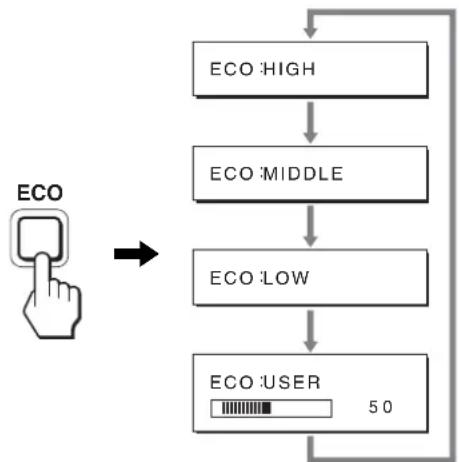
flowchart
graph TD
    A["ECO HIGH"] --> B["ECO MIDDLE"]
    B --> C["ECO LOW"]
    C --> D["ECO USER 50"]
    D --> A
Each mode appears on the screen and the screen brightness is reduced according to the mode. The menu automatically disappears after about 5 seconds.
Screen brightness and power consumption are reduced as the mode changes from HIGH to MIDDLE to LOW.
The default setting of the screen brightness is set to HIGH.
If you select USER, you can adjust the backlight level by pressing the ↓/↑ buttons, the same as when you select BACKLIGHT using the menu.
Note\*
For those displays with analog inputs, only while the ECO mode is set to USER, are the BACKLIGHT, CONTRAST, and BRIGHTNESS items of the menu available (page 14).
Automatic picture quality adjustment function (analog RGB signal only)
When the display receives an input signal, it automatically adjusts the picture's position and sharpness (phase/pitch), and ensures that a clear picture appears on the screen.
The factory preset mode
When the display receives an input signal, it automatically matches the signal to one of the factory preset modes stored in the display's memory to provide a high quality picture at the center of the screen. If the input signal matches the factory preset mode, the picture appears on the screen automatically with the appropriate default adjustments.
If input signals do not match one of the factory preset modes
When the display receives an input signal that does not match one of the factory preset modes, the automatic picture quality adjustment function of this display is activated to ensure that a clear picture always appears on the screen (within the following display frequency ranges):
Horizontal frequency: 28–80 kHz
Vertical frequency: 48–75 Hz
Consequently, the first time the display receives input signals that do not match one of the factory preset modes, the display may take a longer time than normal to display the picture on the screen.
This adjustment data is automatically stored in memory so that next time, the display will function in the same way as when the display receives the signals that match one of the factory preset modes.
If you adjust the phase, pitch, and picture position manually
For some input signals, the automatic picture quality adjustment function of this display may not completely adjust the picture position, phase, and pitch. In this case, you can set these adjustments manually (page 14). If you set these adjustments manually, they are stored in memory as user modes and automatically recalled whenever the display receives the same input signals.
Note
While the automatic picture quality adjustment function is activated, only the ⏻ (power) switch will operate.
The picture may flicker during this time, but this is not a malfunction.
Simply wait a few moments until the adjustment completes.
Troubleshooting
Before contacting technical support, refer to this section.
On-screen messages
If there is something wrong with the input signal, one of the following messages appears on the screen. To solve the problem, see “Trouble symptoms and remedies” on page 18.
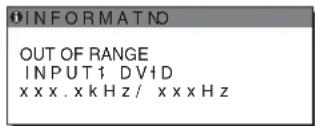
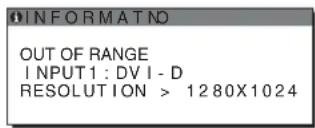
If "OUT OF RANGE" appears on the screen
This indicates that the input signal is not supported by the display's specifications. Check the following items. For more information about on-screen messages, see “Trouble symptoms and remedies” on page 18.
If "xxx.x kHz/xxx Hz" is displayed
This indicates that either the horizontal or vertical frequency is not supported by the display's specifications.
The figures indicate the horizontal and vertical frequencies of the current input signal.
Example
If "RESOLUTION > 1280 × 1024" is displayed
This indicates that the resolution is not supported by the display's specifications (1280 × 1024 or less).
Example
If "NO INPUT SIGNAL" appears on the screen
This indicates that no signal is being input via the currently selected connector.
When INPUT SENSING (page 15) is set to ON, the display finds another input signal and changes the input automatically.
Example
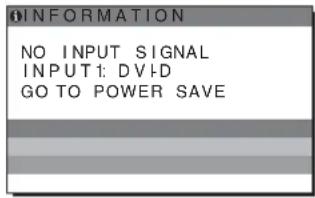
When input signals cannot be found
"GO TO POWER SAVE" message appears.
5 seconds later, the power saving mode starts.
If "CABLE DISCONNECTED" appears on the screen
This indicates that the video signal cable has been disconnected from the currently selected connector.
When INPUT SENSING (page 15) is set to ON, the display finds another input signal and changes the input automatically.
Example
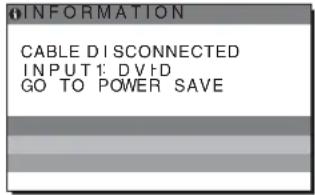
When input signals cannot be found
"GO TO POWER SAVE" message appears.
45 seconds later, the power saving mode starts.
Trouble symptoms and remedies
If a problem occurs as a result of a connected computer or other equipment, refer to the connected computer/equipment's instruction manual.
| Symptom Check these items | |
| No picture | |
| If the ⏻ (power) indicator is not lit, or, ⏻ (power) indicator turns on in orange, | ·Check that the ⏻ (power) switch is on. |
| If the ⏻ (power) indicator will not light up when the ⏻ (power) switch is pressed, | ·Check that the power cord is properly connected. |
| If CABLE DISCONNECTED appears on the screen, | ·Check that the video signal cable is properly connected and all plugs are firmly seated in their sockets (page 7).·Check that the video input connector's pins are not bent or pushed in.·Check that the input select setting is correct (page 11).·A non-supplied video signal cable is connected. If you connect a non-supplied video signal cable, CABLE DISCONNECTED may appear on the screen. This is not a malfunction. |
| If NO INPUT SIGNAL appears on the screen, or, ⏻ (power) indicator turns on in orange, | ·Check that the video signal cable is properly connected and all plugs are firmly seated in their sockets (page 7).·Check that the video input connector's pins are not bent or pushed in.·Check that the input select setting is correct (page 11).■ Problems caused by a computer or other equipment connected, and not caused by the display·The computer is in the power saving mode. Try pressing any key on the keyboard or moving the mouse.·Check that your graphics board is installed properly.·Check that the computer's power is on.·Restart the computer. |
| If OUT OF RANGE appears on the screen (page 17), | ■ Problems caused by a computer or other equipment connected, and not caused by the display·Check that the video frequency range is within that specified for the display. If you replaced an old display with this display, reconnect the old display and adjust the computer's graphics board within the following ranges:Horizontal: 28 – 80 kHz (analog RGB), 28 – 64 kHz (digital RGB)Vertical: 48 – 75 Hz (analog RGB), 60 Hz (digital RGB)Resolution: 1280 × 1024 or less |
| If using Windows, ·If you replaced an old display with this display, reconnect the old display and do the following. Select “SONY” from the “Manufacturers” list and select the desired model name from the “Models” list in the Windows device selection screen. If the model name of this display does not appear in the “Models” list, try “Plug & Play.” | |
| If using a Macintosh system, ·When connecting a Macintosh computer, use an adapter (not supplied) if necessary. Connect the adapter to the computer before connecting the video signal cable. | |
| Picture flickers, bounces, oscillates, or is scrambled | ·Adjust the pitch and phase (analog RGB signal only) (page 14).·Try plugging the display into a different AC outlet, preferably on a different circuit.■ Problems caused by a computer or other equipment connected, and not caused by the display·Check your graphics board manual for the proper display setting.·Confirm that the graphics mode (VESA, Macintosh 19" Color, etc.) and the frequency of the input signal are supported by this display. Even if the frequency is within the proper range, some graphics boards may have a sync pulse that is too narrow for the display to sync correctly.·This display does not process interlace signals. Set for progressive signals.·Adjust the computer's refresh rate (vertical frequency) to obtain the best possible picture. |
| Picture is fuzzy | Adjust the brightness and contrast (page 14).Adjust the pitch and phase (analog RGB signal only) (page 14). |
| ■ Problems caused by a computer or other equipment connected, and not caused by the displaySet the resolution to 1280 × 1024 on your computer. | |
| Picture is ghosting | Eliminate the use of video cable extensions and/or video switch boxes.Check that all plugs are firmly seated in their sockets. |
| Picture is not centered or sized properly (analog RGB signal only) | Adjust the pitch and phase (page 14).Adjust the picture position (page 14). Note that some video modes do not fill the screen to the edges. |
| Picture is too small | ■ Problems caused by a computer or other equipment connected, and not caused by the displaySet the resolution to 1280 × 1024 on your computer. |
| Picture is dark· Adjust the backlight (page 14).Adjust the brightness (page 14).Adjust the gamma using GAMMA menu (page 14).It takes a few minutes for the display to become bright after turning on the display.The screen might turn darker, depends on ECO mode you selected. | |
| Wavy or elliptical pattern (moire) is visible | Adjust the pitch and phase (analog RGB signal only) (page 14). |
| Color is not uniform | Adjust the pitch and phase (analog RGB signal only) (page 14). |
| White does not look white | Adjust the color temperature (page 14). |
| Display buttons do not operate (appears on the screen) | If MENU LOCK is set to ON, set it to OFF (page 15). |
| The display turns off after a while | ■ Problems caused by the connected computer or other equipmentSet the computer’s power saving setting to off. |
| Resolution displayed on the menu screen is incorrect. | Depending on the graphics board setting, the resolution displayed on the menu screen may not coincide with the one set on the computer. |
Displaying this display's information
While the display is receiving a video signal, press and hold the MENU button for more than 5 seconds until the information box appears.
Press the MENU button again to make the box disappear.
- Serial number
• Detailed description of the problem - Date of purchase
- Name and specifications of your computer and graphics board
- Type of input signals (analog RGB/digital RGB)

Example
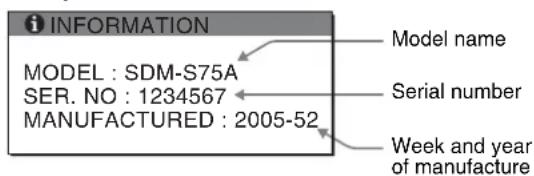
Although the safety standard registered model name of this display is SDM-S75*S95, the name of SDM-S75A/S95AR/S75D/S95DR/S75E/S95ER/S75F/S95FR/S75N/S95NR is used on sale.
If any problem persists, call your authorized Sony dealer and give the following information:
- Model name
Specifications
| Model name SDM-S75A | SDM-S95AR SDM-S75E | SDM-S95ER | ||
| LCD panel Panel type: a-Si TFT Active Matrix | ||||
| Picture size: inch 17.0 19.0 17.0 19.0 | ||||
| Input signal format RGB operating frequency Horizontal: 28 - 80 kHzVertical: 48 - 75 Hz | ||||
| Resolution Horizontal: Max.1280 dots Vertical: Max.1024 lines | ||||
| Type of input signal (Digital/Analog) | Analog ×1 | |||
| Input signal levels | Analog RGB video signal 0.7 Vp-p, 75 Ω, positiveSYNC signal TTL level, 2.2 kΩ, positive or negative | |||
| Audio input Stereo minijack, 0.5 Vrms | ||||
| Audio output | Stereo minijack | |||
| Power requirements | 100 - 240 V, 50 - 60 Hz, Max. 1.0 A | |||
| Power consumption | Max. 45 W | Max. 50 W | Max. 45 W | Max. 50 W |
| Operating temperature | 5 - 35 °C | |||
| Type of the stand Fixed | Fixed | Height adjust | Height adjust | |
| Dimensions (width/height/depth) | Approx. 369 × 423.5 × 225 mm (14 ^5/_8 × 16 ^3/_4 × 8 ^7/_8 inches)(with stand)Approx. 369 × 315 × 66 mm (14 ^5/_8 × 12 ^3/_8 × 2 ^5/_8 inches)(without stand) | Approx. 414 × 439.5 × 225 mm (16 ^3/_8 × 17 ^3/_8 × 8 ^7/_8 inches)(with stand)Approx. 414 × 348 × 69 mm (16 ^3/_8 × 13 ^3/_4 × 2 ^3/_4 inches)(without stand) | Approx. 369 × 393.5 - 503.5 × 253 mm(14 ^5/_8 × 15 ^1/_2 - 19 ^7/_8 × 10 inches)(with stand)Approx. 369 × 315 × 66 mm (14 ^5/_8 × 12 ^3/_8 × 2 ^5/_8 inches)(without stand) | Approx. 414 × 409.5 - 519.5 × 277.5 mm(16 ^3/_8 × 16 ^1/_8 - 20 ^1/_2 × 11 inches)(with stand)Approx. 414 × 348 × 69 mm (16 ^3/_8 × 13 ^3/_4 × 2 ^3/_4 inches)(without stand) |
| Mass | Approx. 6.4 kg (14 lb 1 ^3/_4 oz) (with stand)Approx. 4.3 kg(9 lb 7 ^5/_8 oz)(without stand) | Approx. 7.3 kg (16 lb 1 ^1/_2 oz) (with stand)Approx. 5.2 kg(11 lb 7 ^3/_8 oz)(without stand) | Approx. 7.5 kg (16 lb 8 ^1/_2 oz) (with stand)Approx. 4.3 kg(9 lb 7 ^5/_8 oz)(without stand) | Approx. 8.7 kg (19 lb 2 ^7/_8 oz) (with stand)Approx. 5.2 kg(11 lb 7 ^3/_8 oz)(without stand) |
| Plug & Play | DDC2B | |||
| Accessories | See page 6. | |||
1) Recommended horizontal and vertical timing condition
- Horizontal sync width duty should be more than 4.8% of total horizontal time or 0.8~ s , whichever is larger.
• Horizontal blanking width should be more than 2.5 μsec.
• Vertical blanking width should be more than 450 μsec.
Design and specifications are subject to change without notice.
| Model name SDM-S75D DM-S95DR SDM-S75F | SDM-S95FR | |||
| LCD panel Panel type: a-Si TFT Active Matrix | ||||
| Picture size: inch 17.0 19.0 17.0 19.0 | ||||
| Input signal format RGB operating frequency | 1) Horizontal: 28 - 80 kHz (analog RGB)28 - 64 kHz (digital RGB)Vertical: 48 - 75 Hz (analog RGB)60 Hz (digital RGB) | |||
| Resolution Horizontal: Max.1280 dots | Vertical: Max.1024 lines | |||
| Type of input signal (Digital/Analog) | Digital × 1/Analog × 1 | |||
| Input signal levels | Analog RGB video signal 0.7 Vp-p, 75 Ω, positiveSYNC signal TTL level, 2.2 kΩ, positive or negativeDigital RGB (DVI) signal TMDS (single link) | |||
| Audio input Stereo minijack. | 0.5 Vrms | |||
| Audio output | Stereo minijack | |||
| Power requirements | 100 - 240 V, 50 - 60 Hz, Max. 1.0 A | |||
| Power consumption | Max. 45 W | Max. 50 W | Max. 45 W | Max. 50 W |
| Operating temperature | 5 - 35 °C | |||
| Type of the stand | Fixed | Fixed | Height adjust | Height adjust |
| Dimensions (width/height/depth) | Approx. 369 × 423.5 × 225 mm (14^{5}/_{8}× 16^{3}/_{4}× 8^{7}/_{8}inches)(with stand)Approx. 369 × 315 × 66 mm (14^{5}/_{8}× 12^{3}/_{8}× 2^{5}/_{8}inches)(without stand) | Approx. 414 × 439.5 × 225 mm (16^{3}/_{8}× 17^{3}/_{8}× 8^{7}/_{8}inches)(with stand)Approx. 414 × 348 × 69 mm (16^{3}/_{8}× 13^{3}/_{4}× 2^{3}/_{4}inches)(without stand) | Approx. 369 × 393.5 - 503.5 × 253 mm(14^{5}/_{8}× 15^{1}/_{2}- 19^{7}/_{8}× 10 inches)(with stand)Approx. 369 × 315 × 66 mm (14^{5}/_{8}× 12^{3}/_{8}× 2^{5}/_{8}inches)(without stand) | Approx. 414 × 409.5 - 519.5 × 277.5 mm(16^{3}/_{8}× 16^{1}/_{8}- 20^{1}/_{2}× 11 inches)(with stand)Approx. 414 × 348 × 69 mm (16^{3}/_{8}× 13^{3}/_{4}× 2^{3}/_{4}inches)(without stand) |
| Mass | Approx. 6.4 kg (14 lb 1^{3}/_{4}oz) (with stand)Approx. 4.3 kg (9 lb 7^{5}/_{8}oz)(without stand) | Approx. 7.3 kg (16 lb 1^{1}/_{2}oz) (with stand)Approx. 5.2 kg (11 lb 7^{3}/_{8}oz)(without stand) | Approx. 7.5 kg (16 lb 8^{1}/_{2}oz) (with stand)Approx. 4.3 kg (9 lb 7^{5}/_{8}oz)(without stand) | Approx. 8.7 kg (19 lb 2^{7}/_{8}oz) (with stand)Approx. 5.2 kg (11 lb 7^{3}/_{8}$ oz)(without stand) |
| Plug & Play | DDC2B | |||
| Accessories | See page 6. | |||
1) Recommended horizontal and vertical timing condition
• Horizontal sync width duty should be more than 4.8% of total horizontal time or 0.8 μs, whichever is larger.
• Horizontal blanking width should be more than 2.5 μsec.
• Vertical blanking width should be more than 450 μsec.
Design and specifications are subject to change without notice.
| Model name SDM-S75N | SDM-S95NR | |
| LCD panel Panel type: a-Si TFT Active Matrix | ||
| Picture size: inch 17.0 19.0 | ||
| Input signal format RGB operating frequency Horizontal: 28 - 80 kHz (analog RGB)28 - 64 kHz (digital RGB)Vertical: 48 - 75 Hz (analog RGB)60 Hz (digital RGB) | ||
| Resolution Horizontal: Max.1280 dots Vertical: Max.1024 lines | ||
| Type of input signal (Digital/Analog) | Digital × 1/Analog × 1 | |
| Input signal levels Analog RGB video signal0.7 Vp-p, 75 Ω, positiveSYNC signalTTL level, 2.2 kΩ, positive or negativeDigital RGB (DVI) signal TMDS (single link) | ||
| Audio input Stereo minijack, 0.5 Vrms | ||
| Audio output Stereo minijack | ||
| Power requirements | 100 - 240 V, 50 - 60 Hz, Max. 1.0 A | |
| Power consumption | Max. 45 W | Max. 50 W |
| Operating temperature | 5 - 35 °C | |
| Type of the stand | - | - |
| Dimensions (width/height/depth) | Approx. 369 × 315 × 66 mm (14 ^5/_8 × 12 ^3/_8 × 2 ^5/_8 inches) | Approx. 414 × 348 × 69 mm (16 ^3/_8 × 13 ^3/_4 × 2 ^3/_4 inches) |
| Mass | Approx. 4.3 kg(9 lb 7 ^5/_8 oz) | Approx. 5.2 kg(11 lb 7 ^3/_8 oz) |
| Plug & Play | DDC2B | |
| Accessories | See page 6. | |
1) Recommended horizontal and vertical timing condition
• Horizontal sync width duty should be more than 4.8% of total horizontal time or 0.8 s, whichever is larger.
• Horizontal blanking width should be more than 2.5 μsec.
• Vertical blanking width should be more than 450 μsec.
Design and specifications are subject to change without notice.
TCO'99 Eco-document (for the black model)

■ Congratulations!
You have just purchased a TCO'99 approved and labelled product! Your choice has provided you with a product developed for professional use. Your purchase has also contributed to reducing the burden on the environment and also to the further development of environmentally adapted electronics products.
■ Why do we have environmentally labelled computers?
In many countries, environmental labelling has become an established method for encouraging the adaptation of goods and services to the environment. The main problem, as far as computers and other electronics equipment are concerned, is that environmentally harmful substances are used both in the products and during their manufacture. Since it is not so far possible to satisfactorily recycle the majority of electronics equipment, most of these potentially damaging substances sooner or later enter nature.
There are also other characteristics of a computer, such as energy consumption levels, that are important from the viewpoints of both the work (internal) and natural (external) environments. Since all methods of electricity generation have a negative effect on the environment (e.g. acidic and climate-influencing emissions, radioactive waste), it is vital to save energy. Electronics equipment in offices is often left running continuously and thereby consumes a lot of energy.
■ What does labelling involve?
This product meets the requirements for the TCO'99 scheme which provides for international and environmental labelling of personal computers. The labelling scheme was developed as a joint effort by the TCO (The Swedish Confederation of Professional Employees), Svenska Naturskyddsforeningen (The Swedish Society for Nature Conservation) and Statens Energimydighet (The Swedish National Energy Administration).
Approval requirements cover a wide range of issues: environment, ergonomics, usability, emission of electric and magnetic fields, energy consumption and electrical and fire safety.
The environmental demands impose restrictions on the presence and use of heavy metals, brominated and chlorinated flame retardants, CFCs (frecons) and chlorinated solvents, among other things. The product must be prepared for recycling and the manufacturer is obliged to have an environmental policy which must be adhered to in each country where the company implements its operational policy.
The energy requirements include a demand that the computer and/or display, after a certain period of inactivity, shall reduce its power consumption to a lower level in one or more stages. The length of time to reactivate the computer shall be reasonable for the user.
Labelled products must meet strict environmental demands, for example, in respect of the reduction of electric and magnetic fields, physical and visual ergonomics and good usability.
Below you will find a brief summary of the environmental requirements met by this product. The complete environmental criteria document may be ordered from:
TCO Development
SE-114 94 Stockholm, Sweden
Fax: +46 8 782 92 07
Email (Internet): development@tco.se
Current information regarding TCO'99 approved and labelled
products may also be obtained via the Internet, using the address:
http://www.tco-info.com/
■ Environmental requirements
Flame retardants
Flame retardants are present in printed circuit boards, cables, wires, casings and housings. Their purpose is to prevent, or at least to delay the spread of fire. Up to 30% of the plastic in a computer casing can consist of flame retardant substances. Most flame retardants contain bromine or chloride, and those flame retardants are chemically related to another group of environmental toxins, PCBs. Both the flame retardants containing bromine or chloride and the PCBs are suspected of giving rise to severe health effects, including reproductive damage in fish-eating birds and mammals, due to the bio-accumulative ^® processes. Flame retardants have been found in human blood and researchers fear that disturbances in foetus development may occur.
The relevant TCO'99 demand requires that plastic components weighing more than 25 grams must not contain flame retardants with organically bound bromine or chlorine. Flame retardants are allowed in the printed circuit boards since no substitutes are available.
Cadmium\*\*
Cadmium is present in rechargeable batteries and in the colour-generating layers of certain computer displays. Cadmium damages the nervous system and is toxic in high doses. The relevant TCO'99 requirement states that batteries, the colour-generating layers of display screens and the electrical or electronics components must not contain any cadmium.
Mercury\*\*
Mercury is sometimes found in batteries, relays and switches. It damages the nervous system and is toxic in high doses. The relevant TCO'99 requirement states that batteries may not contain any mercury. It also demands that mercury is not present in any of the electrical or electronics components associated with the labelled unit.
CFCs (freons)
The relevant TCO'99 requirement states that neither CFCs nor HCFCs may be used during the manufacture and assembly of the product. CFCs (freons) are sometimes used for washing printed circuit boards. CFCs break down ozone and thereby damage the ozone layer in the stratosphere, causing increased reception on earth of ultraviolet light with e.g. increased risks of skin cancer (malignant melanoma) as a consequence.
Lead\*\*
Lead can be found in picture tubes, display screens, solders and capacitors. Lead damages the nervous system and in higher doses, causes lead poisoning. The relevant TCO'99 requirement permits the inclusion of lead since no replacement has yet been developed.
* Bio-accumulative is defined as substances which accumulate within living organisms.
** Lead, Cadmium and Mercury are heavy metals which are Bio-accumulative.
TCO'03 Eco-document (for the silver model)

■ Congratulations!
The display you have just purchased carries the TCO'03 Displays label. This means that your display is designed, manufactured and tested according to some of the strictest quality and environmental requirements in the world. This makes for a high performance product, designed with the user in focus that also minimizes the impact on our natural environment.
■ Ergonomics
- Good visual ergonomics and image quality in order to improve the working environment for the user and to reduce sight and strain problems. Important parameters are luminance, contrast, resolution, reflectance, colour rendition and image stability.
■ Energy
- Energy-saving mode after a certain time – beneficial both for the user and the environment
- Electrical safety
■ Emissions
• Electromagnetic fields
- Noise emissions
Ecology
- The product must be prepared for recycling and the manufacturer must have a certified environmental management system such as EMAS or ISO 14 001
- Restrictions on
- chlorinated and brominated flame retardants and polymers
- heavy metals such as cadmium, mercury and lead.
The requirements included in this label have been developed by TCO Development in co-operation with scientists, experts, users as well as manufacturers all over the world. Since the end of the 1980s TCO has been
involved in influencing the development of IT equipment in a more user-friendly direction. Our labelling system started with displays in 1992 and is now requested by users and IT-manufacturers all over the world.
For more information, please visit www.tcodevelopment.com
Recycling Information
■ Customer in Europe
The collection and recycling of this product has been planned according to your country's relevant legislation. To ensure that this product will be collected and recycled in way that minimizes the impact on the environment, please do the following:
-
If you purchased this product for private use, contact your municipality or the waste collection system and bring the product to this collection point / have the product be picked up by the waste collection system. Alternatively, your retailer might take back this if you purchase new equivalent equipment; please check with your retailer whether he will take back this product before bringing it. For information on your country's recycling arrangements, please contact the Sony representation in your country (contact details at: www.sony-europe.com). Further details on specific recycling systems can be found at the following addresses:
-
Belgium: www.recupel.be
- Netherlands: www.nvmp.nl (consumer electronics) www.ictmilieu.nl (IT equipment)
- Norway: www.elretur.no
- Sweden: www.el-kretsen.se
-
Switzerland: www.swico.ch
-
If you use this product professionally, check the product's delivery contract for take back / recycling arrangements and follow the procedures described therein. Alternatively, follow the procedures described under point 1.
■ Customer in USA
We Sony as a member of EIA recommends to visit URL below http://www.eiac.org/
■ Customer in Asia
http://www.sony.co.jp/SonyInfo/Environment/recycle/3R.html
TFT LCD Color Computer Display
SDM-S75 *
SDM-S95 **
Owner's Record
The model and serial numbers are located at the rear of the unit. Record these numbers in the spaces provided below. Refer to them whenever you call upon your dealer regarding this product. Model No. ____ Serial No. ____
WARNING
To reduce the risk of fire or electric shock, do not expose this apparatus to rain or moisture.
Dangerously high voltages are present inside the unit. Do not open the cabinet. Refer servicing to qualified personnel only.
FCC Notice
This equipment has been tested and found to comply with the limits for a Class B digital device, pursuant to Part 15 of the FCC Rules. These limits are designed to provide reasonable protection against harmful interference in a residential installation. This equipment generates, uses, and can radiate radio frequency energy and, if not installed and used in accordance with the instructions, may cause harmful interference to radio communications. However, there is no guarantee that interference will not occur in a particular installation. If this equipment does cause harmful interference to radio or television reception, which can be determined by turning the equipment off and on, the user is encouraged to try to correct the interference by one or more of the following measures:
- Reorient or relocate the receiving antenna.
– Increase the separation between the equipment and receiver. - Connect the equipment into an outlet on a circuit different from that to which the receiver is connected.
- Consult the dealer or an experienced radio/TV technician for help. You are cautioned that any changes or modifications not expressly approved in this manual could void your authority to operate this equipment.
IMPORTANTE
If you have any questions about this product, you may call; Sony Customer Information Services Center 1-800-222-7669 or http://www.sony.com/
Declaration of Conformity
Trade Name : SONY
Model : SDM-S75 /S95 * **
Note : means any number or alphanumeric
character.
Responsible Party : Sony Electronics Inc.
Address : 16530 Via Esprillo, San Diego, CA
92127 U.S.A.
Telephone Number: 858-942-2230
This device complies with part 15 of the FCC rules. Operation is subject to the following two conditions: (1) This device may not cause harmful interference, and (2) this device must accept any interference received, including interference that may cause undesired operation.
This notice is applicable for USA/Canada only.
If shipped to USA/Canada, install only a UL LISTED/CSA
LABELLED power supply cord meeting the following specifications:
SPECIFICATIONS
Plug Type Nema-Plug 5-15p
Cord Type SVT or SJT, minimum 3 × 18 AWG
Length Maximum 15 feet
Rating Minimum 7 A, 125 V
NOTICE
As an ENERGY STAR Partner, Sony Corporation has determined that this product meets the ENERGY STAR guidelines for energy efficiency.

This monitor complies with the TCO'99 guidelines.
(for the black model)

This monitor complies with the TCO'03 guidelines.
(for the silver model)
Table des matières
Précautions....4
TCO'99 Eco-document (for the black model) .....i
TCO'03 Eco-document (for the silver model) ..... ii
Précautions
natural_image
Line drawing of a computer monitor with a stand and scroll wheel (no text or symbols)natural_image
Line drawing of a computer monitor with a stand and cable, no text or symbols presentnatural_image
Diagram showing a computer monitor connected to a cable with a close-up view of the cable being inserted (no text or symbols present)Remarque
4 Refermez le menu.
TCO'99 Eco-document (for the black model)

■ Congratulations!
You have just purchased a TCO'99 approved and labelled product! Your choice has provided you with a product developed for professional use. Your purchase has also contributed to reducing the burden on the environment and also to the further development of environmentally adapted electronics products.
■ Why do we have environmentally labelled computers?
In many countries, environmental labelling has become an established method for encouraging the adaptation of goods and services to the environment. The main problem, as far as computers and other electronics equipment are concerned, is that environmentally harmful substances are used both in the products and during their manufacture. Since it is not so far possible to satisfactorily recycle the majority of electronics equipment, most of these potentially damaging substances sooner or later enter nature.
There are also other characteristics of a computer, such as energy consumption levels, that are important from the viewpoints of both the work (internal) and natural (external) environments. Since all methods of electricity generation have a negative effect on the environment (e.g. acidic and climate-influencing emissions, radioactive waste), it is vital to save energy. Electronics equipment in offices is often left running continuously and thereby consumes a lot of energy.
■ What does labelling involve?
This product meets the requirements for the TCO'99 scheme which provides for international and environmental labelling of personal computers. The labelling scheme was developed as a joint effort by the TCO (The Swedish Confederation of Professional Employees), Svenska Naturskyddsforeningen (The Swedish Society for Nature Conservation) and Statens Energimydighet (The Swedish National Energy Administration).
Approval requirements cover a wide range of issues: environment, ergonomics, usability, emission of electric and magnetic fields, energy consumption and electrical and fire safety.
The environmental demands impose restrictions on the presence and use of heavy metals, brominated and chlorinated flame retardants, CFCs (frecons) and chlorinated solvents, among other things. The product must be prepared for recycling and the manufacturer is obliged to have an environmental policy which must be adhered to in each country where the company implements its operational policy.
The energy requirements include a demand that the computer and/or display, after a certain period of inactivity, shall reduce its power consumption to a lower level in one or more stages. The length of time to reactivate the computer shall be reasonable for the user.
Labelled products must meet strict environmental demands, for example, in respect of the reduction of electric and magnetic fields, physical and visual ergonomics and good usability.
Below you will find a brief summary of the environmental requirements met by this product. The complete environmental criteria document may be ordered from:
TCO Development
SE-114 94 Stockholm, Sweden
Fax: +46 8 782 92 07
Email (Internet): development@tco.se
Current information regarding TCO'99 approved and labelled
products may also be obtained via the Internet, using the address:
http://www.tco-info.com/
■ Environmental requirements
Flame retardants
Flame retardants are present in printed circuit boards, cables, wires, casings and housings. Their purpose is to prevent, or at least to delay the spread of fire. Up to 30% of the plastic in a computer casing can consist of flame retardant substances. Most flame retardants contain bromine or chloride, and those flame retardants are chemically related to another group of environmental toxins, PCBs. Both the flame retardants containing bromine or chloride and the PCBs are suspected of giving rise to severe health effects, including reproductive damage in fish-eating birds and mammals, due to the bio-accumulative ^® processes. Flame retardants have been found in human blood and researchers fear that disturbances in foetus development may occur.
The relevant TCO'99 demand requires that plastic components weighing more than 25 grams must not contain flame retardants with organically bound bromine or chlorine. Flame retardants are allowed in the printed circuit boards since no substitutes are available.
Cadmium\*\*
Cadmium is present in rechargeable batteries and in the colour-generating layers of certain computer displays. Cadmium damages the nervous system and is toxic in high doses. The relevant TCO'99 requirement states that batteries, the colour-generating layers of display screens and the electrical or electronics components must not contain any cadmium.
Mercury\*\*
Mercury is sometimes found in batteries, relays and switches. It damages the nervous system and is toxic in high doses. The relevant TCO'99 requirement states that batteries may not contain any mercury. It also demands that mercury is not present in any of the electrical or electronics components associated with the labelled unit.
CFCs (freons)
The relevant TCO'99 requirement states that neither CFCs nor HCFCs may be used during the manufacture and assembly of the product. CFCs (freons) are sometimes used for washing printed circuit boards. CFCs break down ozone and thereby damage the ozone layer in the stratosphere, causing increased reception on earth of ultraviolet light with e.g. increased risks of skin cancer (malignant melanoma) as a consequence.
Lead\*\*
Lead can be found in picture tubes, display screens, solders and capacitors. Lead damages the nervous system and in higher doses, causes lead poisoning. The relevant TCO'99 requirement permits the inclusion of lead since no replacement has yet been developed.
* Bio-accumulative is defined as substances which accumulate within living organisms.
** Lead, Cadmium and Mercury are heavy metals which are Bio-accumulative.
TCO'03 Eco-document (for the silver model)

■ Congratulations!
The display you have just purchased carries the TCO'03 Displays label. This means that your display is designed, manufactured and tested according to some of the strictest quality and environmental requirements in the world. This makes for a high performance product, designed with the user in focus that also minimizes the impact on our natural environment.
■ Ergonomics
- Good visual ergonomics and image quality in order to improve the working environment for the user and to reduce sight and strain problems. Important parameters are luminance, contrast, resolution, reflectance, colour rendition and image stability.
■ Energy
- Energy-saving mode after a certain time – beneficial both for the user and the environment
- Electrical safety
■ Emissions
• Electromagnetic fields
- Noise emissions
Ecology
- The product must be prepared for recycling and the manufacturer must have a certified environmental management system such as EMAS or ISO 14 001
- Restrictions on
- chlorinated and brominated flame retardants and polymers
- heavy metals such as cadmium, mercury and lead.
The requirements included in this label have been developed by TCO Development in co-operation with scientists, experts, users as well as manufacturers all over the world. Since the end of the 1980s TCO has been
involved in influencing the development of IT equipment in a more user-friendly direction. Our labelling system started with displays in 1992 and is now requested by users and IT-manufacturers all over the world.
For more information, please visit www.tcodevelopment.com
Recycling Information
■ Customer in Europe
The collection and recycling of this product has been planned according to your country's relevant legislation. To ensure that this product will be collected and recycled in way that minimizes the impact on the environment, please do the following:
-
If you purchased this product for private use, contact your municipality or the waste collection system and bring the product to this collection point / have the product be picked up by the waste collection system. Alternatively, your retailer might take back this if you purchase new equivalent equipment; please check with your retailer whether he will take back this product before bringing it. For information on your country's recycling arrangements, please contact the Sony representation in your country (contact details at: www.sony-europe.com). Further details on specific recycling systems can be found at the following addresses:
-
Belgium: www.recupel.be
- Netherlands: www.nvmp.nl (consumer electronics) www.ictmilieu.nl (IT equipment)
- Norway: www.elretur.no
- Sweden: www.el-kretsen.se
-
Switzerland: www.swico.ch
-
If you use this product professionally, check the product's delivery contract for take back / recycling arrangements and follow the procedures described therein. Alternatively, follow the procedures described under point 1.
■ Customer in USA
We Sony as a member of EIA recommends to visit URL below http://www.eiac.org/
■ Customer in Asia
http://www.sony.co.jp/SonyInfo/Environment/recycle/3R.html
TFT LCD Color Computer Display
SDM-S75 * SDM-S95 **
Owner's Record
The model and serial numbers are located at the rear of the unit. Record these numbers in the spaces provided below. Refer to them whenever you call upon your dealer regarding this product. Model No. ____ Serial No. ____
WARNING
To reduce the risk of fire or electric shock, do not expose this apparatus to rain or moisture.
Dangerously high voltages are present inside the unit. Do not open the cabinet. Refer servicing to qualified personnel only.
FCC Notice
This equipment has been tested and found to comply with the limits for a Class B digital device, pursuant to Part 15 of the FCC Rules. These limits are designed to provide reasonable protection against harmful interference in a residential installation. This equipment generates, uses, and can radiate radio frequency energy and, if not installed and used in accordance with the instructions, may cause harmful interference to radio communications. However, there is no guarantee that interference will not occur in a particular installation. If this equipment does cause harmful interference to radio or television reception, which can be determined by turning the equipment off and on, the user is encouraged to try to correct the interference by one or more of the following measures:
- Reorient or relocate the receiving antenna.
– Increase the separation between the equipment and receiver. - Connect the equipment into an outlet on a circuit different from that to which the receiver is connected.
- Consult the dealer or an experienced radio/TV technician for help. You are cautioned that any changes or modifications not expressly approved in this manual could void your authority to operate this equipment.
IMPORTANTE
If you have any questions about this product, you may call; Sony Customer Information Services Center 1-800-222-7669 or http://www.sony.com/
Declaration of Conformity
Trade Name : SONY
Model : SDM-S75 /S95
* **
Note : means any number or alphanumeric character.
Responsible Party : Sony Electronics Inc.
Address : 16530 Via Esprillo, San Diego, CA 92127 U.S.A.
Telephone Number: 858-942-2230
This device complies with part 15 of the FCC rules. Operation is subject to the following two conditions: (1) This device may not cause harmful interference, and (2) this device must accept any interference received, including interference that may cause undesired operation.
This notice is applicable for USA/Canada only. If shipped to USA/Canada, install only a UL LISTED/CSA LABELLED power supply cord meeting the following specifications:
SPECIFICATIONS
Plug Type Nema-Plug 5-15p
Cord Type SVT or SJT, minimum 3 × 18 AWG
Length Maximum 15 feet
Rating Minimum 7 A, 125 V
NOTICE
As an ENERGY STAR Partner, Sony Corporation has determined that this product meets the ENERGY STAR guidelines for energy efficiency.

This monitor complies with the TCO'99 guidelines.
(for the black model)

This monitor complies with the TCO'03 guidelines.
(for the silver model)
Inhalt
TCO'99 Eco-document (for the black model) .....i
TCO'03 Eco-document (for the silver model) ..... ii
natural_image
Line drawing of a computer monitor with a stand and scroll wheel (no text or symbols)natural_image
Line drawing of a computer monitor with cable and stand (no text or symbols)natural_image
Diagram of a computer monitor with cable and lock, showing a close-up of the lock mechanism (no text or symbols present)Hinweis
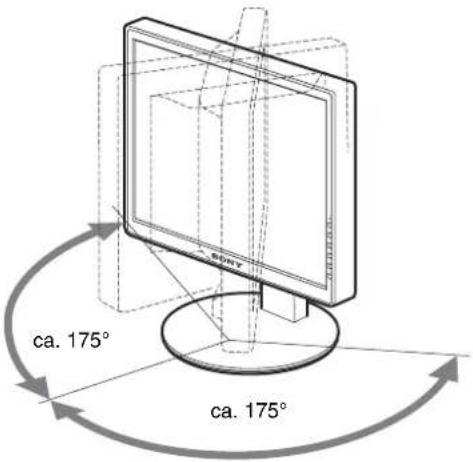
flowchart
graph LR
    A["Hand icon"] --> B["Arrow pointing to 'OK'"]
    C["Hand icon"] --> B
    D["Input"] --> E["OK"]
TCO'99 Eco-document (for the black model)

■ Congratulations!
You have just purchased a TCO'99 approved and labelled product! Your choice has provided you with a product developed for professional use. Your purchase has also contributed to reducing the burden on the environment and also to the further development of environmentally adapted electronics products.
■ Why do we have environmentally labelled computers?
In many countries, environmental labelling has become an established method for encouraging the adaptation of goods and services to the environment. The main problem, as far as computers and other electronics equipment are concerned, is that environmentally harmful substances are used both in the products and during their manufacture. Since it is not so far possible to satisfactorily recycle the majority of electronics equipment, most of these potentially damaging substances sooner or later enter nature.
There are also other characteristics of a computer, such as energy consumption levels, that are important from the viewpoints of both the work (internal) and natural (external) environments. Since all methods of electricity generation have a negative effect on the environment (e.g. acidic and climate-influencing emissions, radioactive waste), it is vital to save energy. Electronics equipment in offices is often left running continuously and thereby consumes a lot of energy.
■ What does labelling involve?
This product meets the requirements for the TCO'99 scheme which provides for international and environmental labelling of personal computers. The labelling scheme was developed as a joint effort by the TCO (The Swedish Confederation of Professional Employees), Svenska Naturskyddsforeningen (The Swedish Society for Nature Conservation) and Statens Energimydighet (The Swedish National Energy Administration).
Approval requirements cover a wide range of issues: environment, ergonomics, usability, emission of electric and magnetic fields, energy consumption and electrical and fire safety.
The environmental demands impose restrictions on the presence and use of heavy metals, brominated and chlorinated flame retardants, CFCs (frecons) and chlorinated solvents, among other things. The product must be prepared for recycling and the manufacturer is obliged to have an environmental policy which must be adhered to in each country where the company implements its operational policy.
The energy requirements include a demand that the computer and/or display, after a certain period of inactivity, shall reduce its power consumption to a lower level in one or more stages. The length of time to reactivate the computer shall be reasonable for the user.
Labelled products must meet strict environmental demands, for example, in respect of the reduction of electric and magnetic fields, physical and visual ergonomics and good usability.
Below you will find a brief summary of the environmental requirements met by this product. The complete environmental criteria document may be ordered from:
TCO Development
SE-114 94 Stockholm, Sweden
Fax: +46 8 782 92 07
Email (Internet): development@tco.se
Current information regarding TCO'99 approved and labelled
products may also be obtained via the Internet, using the address:
http://www.tco-info.com/
■ Environmental requirements
Flame retardants
Flame retardants are present in printed circuit boards, cables, wires, casings and housings. Their purpose is to prevent, or at least to delay the spread of fire. Up to 30% of the plastic in a computer casing can consist of flame retardant substances. Most flame retardants contain bromine or chloride, and those flame retardants are chemically related to another group of environmental toxins, PCBs. Both the flame retardants containing bromine or chloride and the PCBs are suspected of giving rise to severe health effects, including reproductive damage in fish-eating birds and mammals, due to the bio-accumulative ^® processes. Flame retardants have been found in human blood and researchers fear that disturbances in foetus development may occur.
The relevant TCO'99 demand requires that plastic components weighing more than 25 grams must not contain flame retardants with organically bound bromine or chlorine. Flame retardants are allowed in the printed circuit boards since no substitutes are available.
Cadmium\*\*
Cadmium is present in rechargeable batteries and in the colour-generating layers of certain computer displays. Cadmium damages the nervous system and is toxic in high doses. The relevant TCO'99 requirement states that batteries, the colour-generating layers of display screens and the electrical or electronics components must not contain any cadmium.
Mercury\*\*
Mercury is sometimes found in batteries, relays and switches. It damages the nervous system and is toxic in high doses. The relevant TCO'99 requirement states that batteries may not contain any mercury. It also demands that mercury is not present in any of the electrical or electronics components associated with the labelled unit.
CFCs (freons)
The relevant TCO'99 requirement states that neither CFCs nor HCFCs may be used during the manufacture and assembly of the product. CFCs (freons) are sometimes used for washing printed circuit boards. CFCs break down ozone and thereby damage the ozone layer in the stratosphere, causing increased reception on earth of ultraviolet light with e.g. increased risks of skin cancer (malignant melanoma) as a consequence.
Lead\*\*
Lead can be found in picture tubes, display screens, solders and capacitors. Lead damages the nervous system and in higher doses, causes lead poisoning. The relevant TCO'99 requirement permits the inclusion of lead since no replacement has yet been developed.
* Bio-accumulative is defined as substances which accumulate within living organisms.
** Lead, Cadmium and Mercury are heavy metals which are Bio-accumulative.
TCO'03 Eco-document (for the silver model)

■ Congratulations!
The display you have just purchased carries the TCO'03 Displays label. This means that your display is designed, manufactured and tested according to some of the strictest quality and environmental requirements in the world. This makes for a high performance product, designed with the user in focus that also minimizes the impact on our natural environment.
■ Ergonomics
- Good visual ergonomics and image quality in order to improve the working environment for the user and to reduce sight and strain problems. Important parameters are luminance, contrast, resolution, reflectance, colour rendition and image stability.
■ Energy
- Energy-saving mode after a certain time – beneficial both for the user and the environment
- Electrical safety
■ Emissions
• Electromagnetic fields
- Noise emissions
Ecology
- The product must be prepared for recycling and the manufacturer must have a certified environmental management system such as EMAS or ISO 14 001
- Restrictions on
- chlorinated and brominated flame retardants and polymers
- heavy metals such as cadmium, mercury and lead.
The requirements included in this label have been developed by TCO Development in co-operation with scientists, experts, users as well as manufacturers all over the world. Since the end of the 1980s TCO has been
involved in influencing the development of IT equipment in a more user-friendly direction. Our labelling system started with displays in 1992 and is now requested by users and IT-manufacturers all over the world.
For more information, please visit www.tcodevelopment.com
Recycling Information
■ Customer in Europe
The collection and recycling of this product has been planned according to your country's relevant legislation. To ensure that this product will be collected and recycled in way that minimizes the impact on the environment, please do the following:
-
If you purchased this product for private use, contact your municipality or the waste collection system and bring the product to this collection point / have the product be picked up by the waste collection system. Alternatively, your retailer might take back this if you purchase new equivalent equipment; please check with your retailer whether he will take back this product before bringing it. For information on your country's recycling arrangements, please contact the Sony representation in your country (contact details at: www.sony-europe.com). Further details on specific recycling systems can be found at the following addresses:
-
Belgium: www.recupel.be
- Netherlands: www.nvmp.nl (consumer electronics) www.ictmilieu.nl (IT equipment)
- Norway: www.elretur.no
- Sweden: www.el-kretsen.se
-
Switzerland: www.swico.ch
-
If you use this product professionally, check the product's delivery contract for take back / recycling arrangements and follow the procedures described therein. Alternatively, follow the procedures described under point 1.
■ Customer in USA
We Sony as a member of EIA recommends to visit URL below http://www.eiac.org/
■ Customer in Asia
http://www.sony.co.jp/SonyInfo/Environment/recycle/3R.html
TCO'99 Eco-document (for the black model) .....i
TCO'03 Eco-document (for the silver model) ....ii
Precauciones
natural_image
Line drawing of a computer monitor with a stand and scroll wheel (no text or symbols)natural_image
Line drawing of a computer monitor with cable inserted, showing no text or symbolsnatural_image
Diagram of a computer monitor with cable and connector, showing a close-up view of the right side of a door (no text or symbols present)Nota
TCO'99 Eco-document (for the black model)

■ Congratulations!
You have just purchased a TCO'99 approved and labelled product! Your choice has provided you with a product developed for professional use. Your purchase has also contributed to reducing the burden on the environment and also to the further development of environmentally adapted electronics products.
■ Why do we have environmentally labelled computers?
In many countries, environmental labelling has become an established method for encouraging the adaptation of goods and services to the environment. The main problem, as far as computers and other electronics equipment are concerned, is that environmentally harmful substances are used both in the products and during their manufacture. Since it is not so far possible to satisfactorily recycle the majority of electronics equipment, most of these potentially damaging substances sooner or later enter nature.
There are also other characteristics of a computer, such as energy consumption levels, that are important from the viewpoints of both the work (internal) and natural (external) environments. Since all methods of electricity generation have a negative effect on the environment (e.g. acidic and climate-influencing emissions, radioactive waste), it is vital to save energy. Electronics equipment in offices is often left running continuously and thereby consumes a lot of energy.
■ What does labelling involve?
This product meets the requirements for the TCO'99 scheme which provides for international and environmental labelling of personal computers. The labelling scheme was developed as a joint effort by the TCO (The Swedish Confederation of Professional Employees), Svenska Naturskyddsforeningen (The Swedish Society for Nature Conservation) and Statens Energimyndighet (The Swedish National Energy Administration).
Approval requirements cover a wide range of issues: environment, ergonomics, usability, emission of electric and magnetic fields, energy consumption and electrical and fire safety.
The environmental demands impose restrictions on the presence and use of heavy metals, brominated and chlorinated flame retardants, CFCs (frecons) and chlorinated solvents, among other things. The product must be prepared for recycling and the manufacturer is obliged to have an environmental policy which must be adhered to in each country where the company implements its operational policy.
The energy requirements include a demand that the computer and/or display, after a certain period of inactivity, shall reduce its power consumption to a lower level in one or more stages. The length of time to reactivate the computer shall be reasonable for the user.
Labelled products must meet strict environmental demands, for example, in respect of the reduction of electric and magnetic fields, physical and visual ergonomics and good usability.
Below you will find a brief summary of the environmental requirements met by this product. The complete environmental criteria document may be ordered from:
TCO Development
SE-114 94 Stockholm, Sweden
Fax: +46 8 782 92 07
Email (Internet): development@tco.se
Current information regarding TCO'99 approved and labelled
products may also be obtained via the Internet, using the address:
http://www.tco-info.com/
■ Environmental requirements
Flame retardants
Flame retardants are present in printed circuit boards, cables, wires, casings and housings. Their purpose is to prevent, or at least to delay the spread of fire. Up to 30% of the plastic in a computer casing can consist of flame retardant substances. Most flame retardants contain bromine or chloride, and those flame retardants are chemically related to another group of environmental toxins, PCBs. Both the flame retardants containing bromine or chloride and the PCBs are suspected of giving rise to severe health effects, including reproductive damage in fish-eating birds and mammals, due to the bio-accumulative ^® processes. Flame retardants have been found in human blood and researchers fear that disturbances in foetus development may occur.
The relevant TCO'99 demand requires that plastic components weighing more than 25 grams must not contain flame retardants with organically bound bromine or chlorine. Flame retardants are allowed in the printed circuit boards since no substitutes are available.
Cadmium\*\*
Cadmium is present in rechargeable batteries and in the colour-generating layers of certain computer displays. Cadmium damages the nervous system and is toxic in high doses. The relevant TCO'99 requirement states that batteries, the colour-generating layers of display screens and the electrical or electronics components must not contain any cadmium.
Mercury\*\*
Mercury is sometimes found in batteries, relays and switches. It damages the nervous system and is toxic in high doses. The relevant TCO'99 requirement states that batteries may not contain any mercury. It also demands that mercury is not present in any of the electrical or electronics components associated with the labelled unit.
CFCs (freons)
The relevant TCO'99 requirement states that neither CFCs nor HCFCs may be used during the manufacture and assembly of the product. CFCs (freons) are sometimes used for washing printed circuit boards. CFCs break down ozone and thereby damage the ozone layer in the stratosphere, causing increased reception on earth of ultraviolet light with e.g. increased risks of skin cancer (malignant melanoma) as a consequence.
Lead\*\*
Lead can be found in picture tubes, display screens, solders and capacitors. Lead damages the nervous system and in higher doses, causes lead poisoning. The relevant TCO'99 requirement permits the inclusion of lead since no replacement has yet been developed.
* Bio-accumulative is defined as substances which accumulate within living organisms.
** Lead, Cadmium and Mercury are heavy metals which are Bio-accumulative.
TCO'03 Eco-document (for the silver model)

■ Congratulations!
The display you have just purchased carries the TCO'03 Displays label. This means that your display is designed, manufactured and tested according to some of the strictest quality and environmental requirements in the world. This makes for a high performance product, designed with the user in focus that also minimizes the impact on our natural environment.
■ Ergonomics
- Good visual ergonomics and image quality in order to improve the working environment for the user and to reduce sight and strain problems. Important parameters are luminance, contrast, resolution, reflectance, colour rendition and image stability.
■ Energy
- Energy-saving mode after a certain time – beneficial both for the user and the environment
- Electrical safety
■ Emissions
• Electromagnetic fields
- Noise emissions
Ecology
- The product must be prepared for recycling and the manufacturer must have a certified environmental management system such as EMAS or ISO 14 001
- Restrictions on
- chlorinated and brominated flame retardants and polymers
- heavy metals such as cadmium, mercury and lead.
The requirements included in this label have been developed by TCO Development in co-operation with scientists, experts, users as well as manufacturers all over the world. Since the end of the 1980s TCO has been
involved in influencing the development of IT equipment in a more user-friendly direction. Our labelling system started with displays in 1992 and is now requested by users and IT-manufacturers all over the world.
For more information, please visit www.tcodevelopment.com
Recycling Information
■ Customer in Europe
The collection and recycling of this product has been planned according to your country's relevant legislation. To ensure that this product will be collected and recycled in way that minimizes the impact on the environment, please do the following:
-
If you purchased this product for private use, contact your municipality or the waste collection system and bring the product to this collection point / have the product be picked up by the waste collection system. Alternatively, your retailer might take back this if you purchase new equivalent equipment; please check with your retailer whether he will take back this product before bringing it. For information on your country's recycling arrangements, please contact the Sony representation in your country (contact details at: www.sony-europe.com). Further details on specific recycling systems can be found at the following addresses:
-
Belgium: www.recupel.be
- Netherlands: www.nvmp.nl (consumer electronics) www.ictmilieu.nl (IT equipment)
- Norway: www.elretur.no
- Sweden: www.el-kretsen.se
-
Switzerland: www.swico.ch
-
If you use this product professionally, check the product's delivery contract for take back / recycling arrangements and follow the procedures described therein. Alternatively, follow the procedures described under point 1.
■ Customer in USA
We Sony as a member of EIA recommends to visit URL below http://www.eiac.org/
■ Customer in Asia
http://www.sony.co.jp/SonyInfo/Environment/recycle/3R.html
TFT LCD Color Computer Display
SDM-S75 *
SDM-S95 **
Owner's Record
The model and serial numbers are located at the rear of the unit. Record these numbers in the spaces provided below. Refer to them whenever you call upon your dealer regarding this product. Model No. ____ Serial No. ____
WARNING
To reduce the risk of fire or electric shock, do not expose this apparatus to rain or moisture.
Dangerously high voltages are present inside the unit. Do not open the cabinet. Refer servicing to qualified personnel only.
FCC Notice
This equipment has been tested and found to comply with the limits for a Class B digital device, pursuant to Part 15 of the FCC Rules. These limits are designed to provide reasonable protection against harmful interference in a residential installation. This equipment generates, uses, and can radiate radio frequency energy and, if not installed and used in accordance with the instructions, may cause harmful interference to radio communications. However, there is no guarantee that interference will not occur in a particular installation. If this equipment does cause harmful interference to radio or television reception, which can be determined by turning the equipment off and on, the user is encouraged to try to correct the interference by one or more of the following measures:
- Reorient or relocate the receiving antenna.
– Increase the separation between the equipment and receiver. - Connect the equipment into an outlet on a circuit different from that to which the receiver is connected.
- Consult the dealer or an experienced radio/TV technician for help. You are cautioned that any changes or modifications not expressly approved in this manual could void your authority to operate this equipment.
IMPORTANTE
If you have any questions about this product, you may call; Sony Customer Information Services Center 1-800-222-7669 or http://www.sony.com/
Declaration of Conformity
Trade Name : SONY
Model : SDM-S75 /S95
* **
Note : means any number or alphanumeric character.
Responsible Party : Sony Electronics Inc.
Address : 16530 Via Esprillo, San Diego, CA 92127 U.S.A.
Telephone Number: 858-942-2230
This device complies with part 15 of the FCC rules. Operation is subject to the following two conditions: (1) This device may not cause harmful interference, and (2) this device must accept any interference received, including interference that may cause undesired operation.
This notice is applicable for USA/Canada only. If shipped to USA/Canada, install only a UL LISTED/CSA LABELLED power supply cord meeting the following specifications:
SPECIFICATIONS
Plug Type Nema-Plug 5-15p
Cord Type SVT or SJT, minimum 3 × 18 AWG
Length Maximum 15 feet
Rating Minimum 7 A, 125 V
NOTICE
As an ENERGY STAR Partner, Sony Corporation has determined that this product meets the ENERGY STAR guidelines for energy efficiency.

This display complies with the TCO'99 guidelines.
(for the black model)

This monitor complies with the TCO'03 guidelines.
(for the silver model)
Indice
Precauzioni....4
TCO'99 Eco-document (for the black model) .....i
TCO'03 Eco-document (for the silver model) ..... ii
natural_image
Three line drawings of different types of electrical plugs (no text or symbols)da 100 a 120 V CA da 200 a 240 V CA solo 240 V CA
natural_image
Line drawing of a computer monitor with a stand and scroll wheel (no text or symbols)natural_image
Line drawing of a computer monitor with cable routing and a stand (no text or symbols)natural_image
Diagram showing a computer monitor connected to a cable with a close-up view of the cable being inserted (no text or symbols present)Nota
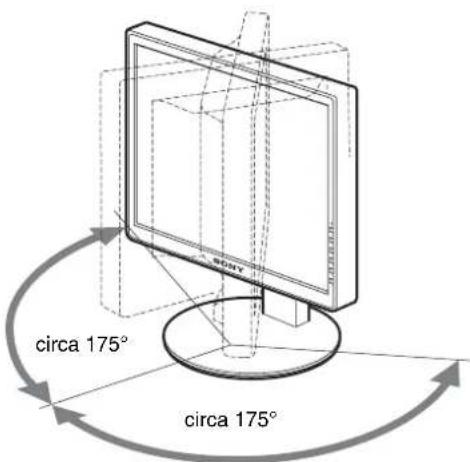
TCO'99 Eco-document (for the black model)

■ Congratulations!
You have just purchased a TCO'99 approved and labelled product! Your choice has provided you with a product developed for professional use. Your purchase has also contributed to reducing the burden on the environment and also to the further development of environmentally adapted electronics products.
■ Why do we have environmentally labelled computers?
In many countries, environmental labelling has become an established method for encouraging the adaptation of goods and services to the environment. The main problem, as far as computers and other electronics equipment are concerned, is that environmentally harmful substances are used both in the products and during their manufacture. Since it is not so far possible to satisfactorily recycle the majority of electronics equipment, most of these potentially damaging substances sooner or later enter nature.
There are also other characteristics of a computer, such as energy consumption levels, that are important from the viewpoints of both the work (internal) and natural (external) environments. Since all methods of electricity generation have a negative effect on the environment (e.g. acidic and climate-influencing emissions, radioactive waste), it is vital to save energy. Electronics equipment in offices is often left running continuously and thereby consumes a lot of energy.
■ What does labelling involve?
This product meets the requirements for the TCO'99 scheme which provides for international and environmental labelling of personal computers. The labelling scheme was developed as a joint effort by the TCO (The Swedish Confederation of Professional Employees), Svenska Naturskyddsforeningen (The Swedish Society for Nature Conservation) and Statens Energimydighet (The Swedish National Energy Administration).
Approval requirements cover a wide range of issues: environment, ergonomics, usability, emission of electric and magnetic fields, energy consumption and electrical and fire safety.
The environmental demands impose restrictions on the presence and use of heavy metals, brominated and chlorinated flame retardants, CFCs (frecons) and chlorinated solvents, among other things. The product must be prepared for recycling and the manufacturer is obliged to have an environmental policy which must be adhered to in each country where the company implements its operational policy.
The energy requirements include a demand that the computer and/or display, after a certain period of inactivity, shall reduce its power consumption to a lower level in one or more stages. The length of time to reactivate the computer shall be reasonable for the user.
Labelled products must meet strict environmental demands, for example, in respect of the reduction of electric and magnetic fields, physical and visual ergonomics and good usability.
Below you will find a brief summary of the environmental requirements met by this product. The complete environmental criteria document may be ordered from:
TCO Development
SE-114 94 Stockholm, Sweden
Fax: +46 8 782 92 07
Email (Internet): development@tco.se
Current information regarding TCO'99 approved and labelled
products may also be obtained via the Internet, using the address:
http://www.tco-info.com/
■ Environmental requirements
Flame retardants
Flame retardants are present in printed circuit boards, cables, wires, casings and housings. Their purpose is to prevent, or at least to delay the spread of fire. Up to 30% of the plastic in a computer casing can consist of flame retardant substances. Most flame retardants contain bromine or chloride, and those flame retardants are chemically related to another group of environmental toxins, PCBs. Both the flame retardants containing bromine or chloride and the PCBs are suspected of giving rise to severe health effects, including reproductive damage in fish-eating birds and mammals, due to the bio-accumulative ^® processes. Flame retardants have been found in human blood and researchers fear that disturbances in foetus development may occur.
The relevant TCO'99 demand requires that plastic components weighing more than 25 grams must not contain flame retardants with organically bound bromine or chlorine. Flame retardants are allowed in the printed circuit boards since no substitutes are available.
Cadmium\*\*
Cadmium is present in rechargeable batteries and in the colour-generating layers of certain computer displays. Cadmium damages the nervous system and is toxic in high doses. The relevant TCO'99 requirement states that batteries, the colour-generating layers of display screens and the electrical or electronics components must not contain any cadmium.
Mercury\*\*
Mercury is sometimes found in batteries, relays and switches. It damages the nervous system and is toxic in high doses. The relevant TCO'99 requirement states that batteries may not contain any mercury. It also demands that mercury is not present in any of the electrical or electronics components associated with the labelled unit.
CFCs (freons)
The relevant TCO'99 requirement states that neither CFCs nor HCFCs may be used during the manufacture and assembly of the product. CFCs (freons) are sometimes used for washing printed circuit boards. CFCs break down ozone and thereby damage the ozone layer in the stratosphere, causing increased reception on earth of ultraviolet light with e.g. increased risks of skin cancer (malignant melanoma) as a consequence.
Lead\*\*
Lead can be found in picture tubes, display screens, solders and capacitors. Lead damages the nervous system and in higher doses, causes lead poisoning. The relevant TCO'99 requirement permits the inclusion of lead since no replacement has yet been developed.
* Bio-accumulative is defined as substances which accumulate within living organisms.
** Lead, Cadmium and Mercury are heavy metals which are Bio-accumulative.
TCO'03 Eco-document (for the silver model)

■ Congratulations!
The display you have just purchased carries the TCO'03 Displays label. This means that your display is designed, manufactured and tested according to some of the strictest quality and environmental requirements in the world. This makes for a high performance product, designed with the user in focus that also minimizes the impact on our natural environment.
■ Ergonomics
- Good visual ergonomics and image quality in order to improve the working environment for the user and to reduce sight and strain problems. Important parameters are luminance, contrast, resolution, reflectance, colour rendition and image stability.
■ Energy
- Energy-saving mode after a certain time – beneficial both for the user and the environment
- Electrical safety
■ Emissions
• Electromagnetic fields
- Noise emissions
Ecology
- The product must be prepared for recycling and the manufacturer must have a certified environmental management system such as EMAS or ISO 14 001
- Restrictions on
- chlorinated and brominated flame retardants and polymers
- heavy metals such as cadmium, mercury and lead.
The requirements included in this label have been developed by TCO Development in co-operation with scientists, experts, users as well as manufacturers all over the world. Since the end of the 1980s TCO has been
involved in influencing the development of IT equipment in a more user-friendly direction. Our labelling system started with displays in 1992 and is now requested by users and IT-manufacturers all over the world.
For more information, please visit www.tcodevelopment.com
Recycling Information
■ Customer in Europe
The collection and recycling of this product has been planned according to your country's relevant legislation. To ensure that this product will be collected and recycled in way that minimizes the impact on the environment, please do the following:
-
If you purchased this product for private use, contact your municipality or the waste collection system and bring the product to this collection point / have the product be picked up by the waste collection system. Alternatively, your retailer might take back this if you purchase new equivalent equipment; please check with your retailer whether he will take back this product before bringing it. For information on your country's recycling arrangements, please contact the Sony representation in your country (contact details at: www.sony-europe.com). Further details on specific recycling systems can be found at the following addresses:
-
Belgium: www.recupel.be
- Netherlands: www.nvmp.nl (consumer electronics) www.ictmilieu.nl (IT equipment)
- Norway: www.elretur.no
- Sweden: www.el-kretsen.se
-
Switzerland: www.swico.ch
-
If you use this product professionally, check the product's delivery contract for take back / recycling arrangements and follow the procedures described therein. Alternatively, follow the procedures described under point 1.
■ Customer in USA
We Sony as a member of EIA recommends to visit URL below http://www.eiac.org/
■ Customer in Asia
http://www.sony.co.jp/SonyInfo/Environment/recycle/3R.html
TFT LCD Color Computer Display
SDM-S75 *
SDM-S95 **
Owner's Record
The model and serial numbers are located at the rear of the unit. Record these numbers in the spaces provided below. Refer to them whenever you call upon your dealer regarding this product. Model No. ____ Serial No. ____
WARNING
To reduce the risk of fire or electric shock, do not expose this apparatus to rain or moisture.
Dangerously high voltages are present inside the unit. Do not open the cabinet. Refer servicing to qualified personnel only.
FCC Notice
This equipment has been tested and found to comply with the limits for a Class B digital device, pursuant to Part 15 of the FCC Rules. These limits are designed to provide reasonable protection against harmful interference in a residential installation. This equipment generates, uses, and can radiate radio frequency energy and, if not installed and used in accordance with the instructions, may cause harmful interference to radio communications. However, there is no guarantee that interference will not occur in a particular installation. If this equipment does cause harmful interference to radio or television reception, which can be determined by turning the equipment off and on, the user is encouraged to try to correct the interference by one or more of the following measures:
- Reorient or relocate the receiving antenna.
– Increase the separation between the equipment and receiver. - Connect the equipment into an outlet on a circuit different from that to which the receiver is connected.
- Consult the dealer or an experienced radio/TV technician for help. You are cautioned that any changes or modifications not expressly approved in this manual could void your authority to operate this equipment.
IMPORTANTE
If you have any questions about this product, you may call; Sony Customer Information Services Center 1-800-222-7669 or http://www.sony.com/
Declaration of Conformity
Trade Name: SONY
Model : SDM-S75 /S95 * **
Note : means any number or alphanumeric character.
Responsible Party : Sony Electronics Inc.
Address : 16530 Via Esprillo, San Diego, CA
92127 U.S.A.
Telephone Number: 858-942-2230
This device complies with part 15 of the FCC rules. Operation is subject to the following two conditions: (1) This device may not cause harmful interference, and (2) this device must accept any interference received, including interference that may cause undesired operation.
This notice is applicable for USA/Canada only.
If shipped to USA/Canada, install only a UL LISTED/CSA
LABELLED power supply cord meeting the following specifications:
SPECIFICATIONS
Plug Type Nema-Plug 5-15p
Cord Type SVT or SJT, minimum 3 × 18 AWG
Length Maximum 15 feet
Rating Minimum 7 A, 125 V
NOTICE
As an ENERGY STAR Partner, Sony Corporation has determined that this product meets the ENERGY STAR guidelines for energy efficiency.

This monitor complies with the TCO'99 guidelines.
(for the black model)

This monitor complies with the TCO'03 guidelines.
(for the silver model)
Índice
Precauções....4
TCO'99 Eco-document (for the black model) .....i
TCO'03 Eco-document (for the silver model) ..... ii
Precauções
natural_image
Line drawing of a computer monitor with a stand and scroll wheel (no text or symbols)natural_image
Line drawing of a computer monitor with a cable inserted, showing no text or symbolsnatural_image
Diagram showing a computer monitor connected to a cable with a close-up view of the cable being inserted (no text or symbols present)Nota
3 Regule o item.
flowchart
graph TD
    A["Input"] --> B["Arrow"]
    C["Hand icon"] --> D["Arrow"]
4 Feche o menu.
TCO'99 Eco-document (for the black model)

■ Congratulations!
You have just purchased a TCO'99 approved and labelled product! Your choice has provided you with a product developed for professional use. Your purchase has also contributed to reducing the burden on the environment and also to the further development of environmentally adapted electronics products.
■ Why do we have environmentally labelled computers?
In many countries, environmental labelling has become an established method for encouraging the adaptation of goods and services to the environment. The main problem, as far as computers and other electronics equipment are concerned, is that environmentally harmful substances are used both in the products and during their manufacture. Since it is not so far possible to satisfactorily recycle the majority of electronics equipment, most of these potentially damaging substances sooner or later enter nature.
There are also other characteristics of a computer, such as energy consumption levels, that are important from the viewpoints of both the work (internal) and natural (external) environments. Since all methods of electricity generation have a negative effect on the environment (e.g. acidic and climate-influencing emissions, radioactive waste), it is vital to save energy. Electronics equipment in offices is often left running continuously and thereby consumes a lot of energy.
■ What does labelling involve?
This product meets the requirements for the TCO'99 scheme which provides for international and environmental labelling of personal computers. The labelling scheme was developed as a joint effort by the TCO (The Swedish Confederation of Professional Employees), Svenska Naturskyddsforeningen (The Swedish Society for Nature Conservation) and Statens Energimydighet (The Swedish National Energy Administration).
Approval requirements cover a wide range of issues: environment, ergonomics, usability, emission of electric and magnetic fields, energy consumption and electrical and fire safety.
The environmental demands impose restrictions on the presence and use of heavy metals, brominated and chlorinated flame retardants, CFCs (frecons) and chlorinated solvents, among other things. The product must be prepared for recycling and the manufacturer is obliged to have an environmental policy which must be adhered to in each country where the company implements its operational policy.
The energy requirements include a demand that the computer and/or display, after a certain period of inactivity, shall reduce its power consumption to a lower level in one or more stages. The length of time to reactivate the computer shall be reasonable for the user.
Labelled products must meet strict environmental demands, for example, in respect of the reduction of electric and magnetic fields, physical and visual ergonomics and good usability.
Below you will find a brief summary of the environmental requirements met by this product. The complete environmental criteria document may be ordered from:
TCO Development
SE-114 94 Stockholm, Sweden
Fax: +46 8 782 92 07
Email (Internet): development@tco.se
Current information regarding TCO'99 approved and labelled
products may also be obtained via the Internet, using the address:
http://www.tco-info.com/
■ Environmental requirements
Flame retardants
Flame retardants are present in printed circuit boards, cables, wires, casings and housings. Their purpose is to prevent, or at least to delay the spread of fire. Up to 30% of the plastic in a computer casing can consist of flame retardant substances. Most flame retardants contain bromine or chloride, and those flame retardants are chemically related to another group of environmental toxins, PCBs. Both the flame retardants containing bromine or chloride and the PCBs are suspected of giving rise to severe health effects, including reproductive damage in fish-eating birds and mammals, due to the bio-accumulative ^® processes. Flame retardants have been found in human blood and researchers fear that disturbances in foetus development may occur.
The relevant TCO'99 demand requires that plastic components weighing more than 25 grams must not contain flame retardants with organically bound bromine or chlorine. Flame retardants are allowed in the printed circuit boards since no substitutes are available.
Cadmium\*\*
Cadmium is present in rechargeable batteries and in the colour-generating layers of certain computer displays. Cadmium damages the nervous system and is toxic in high doses. The relevant TCO'99 requirement states that batteries, the colour-generating layers of display screens and the electrical or electronics components must not contain any cadmium.
Mercury\*\*
Mercury is sometimes found in batteries, relays and switches. It damages the nervous system and is toxic in high doses. The relevant TCO'99 requirement states that batteries may not contain any mercury. It also demands that mercury is not present in any of the electrical or electronics components associated with the labelled unit.
CFCs (freons)
The relevant TCO'99 requirement states that neither CFCs nor HCFCs may be used during the manufacture and assembly of the product. CFCs (freons) are sometimes used for washing printed circuit boards. CFCs break down ozone and thereby damage the ozone layer in the stratosphere, causing increased reception on earth of ultraviolet light with e.g. increased risks of skin cancer (malignant melanoma) as a consequence.
Lead\*\*
Lead can be found in picture tubes, display screens, solders and capacitors. Lead damages the nervous system and in higher doses, causes lead poisoning. The relevant TCO'99 requirement permits the inclusion of lead since no replacement has yet been developed.
* Bio-accumulative is defined as substances which accumulate within living organisms.
** Lead, Cadmium and Mercury are heavy metals which are Bio-accumulative.
TCO'03 Eco-document (for the silver model)

■ Congratulations!
The display you have just purchased carries the TCO'03 Displays label. This means that your display is designed, manufactured and tested according to some of the strictest quality and environmental requirements in the world. This makes for a high performance product, designed with the user in focus that also minimizes the impact on our natural environment.
■ Ergonomics
- Good visual ergonomics and image quality in order to improve the working environment for the user and to reduce sight and strain problems. Important parameters are luminance, contrast, resolution, reflectance, colour rendition and image stability.
■ Energy
- Energy-saving mode after a certain time – beneficial both for the user and the environment
- Electrical safety
■ Emissions
• Electromagnetic fields
- Noise emissions
Ecology
- The product must be prepared for recycling and the manufacturer must have a certified environmental management system such as EMAS or ISO 14 001
- Restrictions on
- chlorinated and brominated flame retardants and polymers
- heavy metals such as cadmium, mercury and lead.
The requirements included in this label have been developed by TCO Development in co-operation with scientists, experts, users as well as manufacturers all over the world. Since the end of the 1980s TCO has been
involved in influencing the development of IT equipment in a more user-friendly direction. Our labelling system started with displays in 1992 and is now requested by users and IT-manufacturers all over the world.
For more information, please visit www.tcodevelopment.com
Recycling Information
■ Customer in Europe
The collection and recycling of this product has been planned according to your country's relevant legislation. To ensure that this product will be collected and recycled in way that minimizes the impact on the environment, please do the following:
-
If you purchased this product for private use, contact your municipality or the waste collection system and bring the product to this collection point / have the product be picked up by the waste collection system. Alternatively, your retailer might take back this if you purchase new equivalent equipment; please check with your retailer whether he will take back this product before bringing it. For information on your country's recycling arrangements, please contact the Sony representation in your country (contact details at: www.sony-europe.com). Further details on specific recycling systems can be found at the following addresses:
-
Belgium: www.recupel.be
- Netherlands: www.nvmp.nl (consumer electronics) www.ictmilieu.nl (IT equipment)
- Norway: www.elretur.no
- Sweden: www.el-kretsen.se
-
Switzerland: www.swico.ch
-
If you use this product professionally, check the product's delivery contract for take back / recycling arrangements and follow the procedures described therein. Alternatively, follow the procedures described under point 1.
■ Customer in USA
We Sony as a member of EIA recommends to visit URL below http://www.eiac.org/
■ Customer in Asia
http://www.sony.co.jp/SonyInfo/Environment/recycle/3R.html
TFT LCD Color Computer Display
SDM-S75 * SDM-S95 **
Owner's Record
The model and serial numbers are located at the rear of the unit. Record these numbers in the spaces provided below. Refer to them whenever you call upon your dealer regarding this product. Model No. ____ Serial No. ____
WARNING
To reduce the risk of fire or electric shock, do not expose this apparatus to rain or moisture.
Dangerously high voltages are present inside the unit. Do not open the cabinet. Refer servicing to qualified personnel only.
FCC Notice
This equipment has been tested and found to comply with the limits for a Class B digital device, pursuant to Part 15 of the FCC Rules. These limits are designed to provide reasonable protection against harmful interference in a residential installation. This equipment generates, uses, and can radiate radio frequency energy and, if not installed and used in accordance with the instructions, may cause harmful interference to radio communications. However, there is no guarantee that interference will not occur in a particular installation. If this equipment does cause harmful interference to radio or television reception, which can be determined by turning the equipment off and on, the user is encouraged to try to correct the interference by one or more of the following measures:
- Reorient or relocate the receiving antenna.
– Increase the separation between the equipment and receiver. - Connect the equipment into an outlet on a circuit different from that to which the receiver is connected.
- Consult the dealer or an experienced radio/TV technician for help. You are cautioned that any changes or modifications not expressly approved in this manual could void your authority to operate this equipment.
IMPORTANTE
If you have any questions about this product, you may call; Sony Customer Information Services Center 1-800-222-7669 or http://www.sony.com/
Declaration of Conformity
Trade Name: SONY
Model : SDM-S75 /S95
* **
Note : means any number or alphanumeric character.
Responsible Party: Sony Electronics Inc.
Address : 16530 Via Esprillo, San Diego, CA 92127 U.S.A.
Telephone Number: 858-942-2230
This device complies with part 15 of the FCC rules. Operation is subject to the following two conditions: (1) This device may not cause harmful interference, and (2) this device must accept any interference received, including interference that may cause undesired operation.
This notice is applicable for USA/Canada only. If shipped to USA/Canada, install only a UL LISTED/CSA LABELLED power supply cord meeting the following specifications:
SPECIFICATIONS
Plug Type Nema-Plug 5-15p
Cord Type SVT or SJT, minimum 3 × 18 AWG
Length Maximum 15 feet
Rating Minimum 7 A, 125 V
NOTICE
As an ENERGY STAR Partner, Sony Corporation has determined that this product meets the ENERGY STAR guidelines for energy efficiency.

This monitor complies with the TCO'99 guidelines.
(for the black model)

This monitor complies with the TCO'03 guidelines.
(for the silver model)
Содержание
TCO'99 Eco-document (for the black model) .....i
TCO'03 Eco-document (for the silver model) ..... ii
natural_image
Line drawing of a computer monitor with a stand and scroll wheel (no text or symbols)natural_image
Line drawing of a computer monitor with cable and stand (no text or symbols)natural_image
Diagram showing a computer monitor connected to a cable with a close-up view of its cable being inserted (no text or symbols present)Примечание
TCO'99 Eco-document (for the black model)

■ Congratulations!
You have just purchased a TCO'99 approved and labelled product! Your choice has provided you with a product developed for professional use. Your purchase has also contributed to reducing the burden on the environment and also to the further development of environmentally adapted electronics products.
■ Why do we have environmentally labelled computers?
In many countries, environmental labelling has become an established method for encouraging the adaptation of goods and services to the environment. The main problem, as far as computers and other electronics equipment are concerned, is that environmentally harmful substances are used both in the products and during their manufacture. Since it is not so far possible to satisfactorily recycle the majority of electronics equipment, most of these potentially damaging substances sooner or later enter nature.
There are also other characteristics of a computer, such as energy consumption levels, that are important from the viewpoints of both the work (internal) and natural (external) environments. Since all methods of electricity generation have a negative effect on the environment (e.g. acidic and climate-influencing emissions, radioactive waste), it is vital to save energy. Electronics equipment in offices is often left running continuously and thereby consumes a lot of energy.
■ What does labelling involve?
This product meets the requirements for the TCO'99 scheme which provides for international and environmental labelling of personal computers. The labelling scheme was developed as a joint effort by the TCO (The Swedish Confederation of Professional Employees), Svenska Naturskyddsforeningen (The Swedish Society for Nature Conservation) and Statens Energimyndighet (The Swedish National Energy Administration).
Approval requirements cover a wide range of issues: environment, ergonomics, usability, emission of electric and magnetic fields, energy consumption and electrical and fire safety.
The environmental demands impose restrictions on the presence and use of heavy metals, brominated and chlorinated flame retardants, CFCs (frecons) and chlorinated solvents, among other things. The product must be prepared for recycling and the manufacturer is obliged to have an environmental policy which must be adhered to in each country where the company implements its operational policy.
The energy requirements include a demand that the computer and/or display, after a certain period of inactivity, shall reduce its power consumption to a lower level in one or more stages. The length of time to reactivate the computer shall be reasonable for the user.
Labelled products must meet strict environmental demands, for example, in respect of the reduction of electric and magnetic fields, physical and visual ergonomics and good usability.
Below you will find a brief summary of the environmental requirements met by this product. The complete environmental criteria document may be ordered from:
TCO Development
SE-114 94 Stockholm, Sweden
Fax: +46 8 782 92 07
Email (Internet): development@tco.se
Current information regarding TCO'99 approved and labelled
products may also be obtained via the Internet, using the address:
http://www.tco-info.com/
■ Environmental requirements
Flame retardants
Flame retardants are present in printed circuit boards, cables, wires, casings and housings. Their purpose is to prevent, or at least to delay the spread of fire. Up to 30% of the plastic in a computer casing can consist of flame retardant substances. Most flame retardants contain bromine or chloride, and those flame retardants are chemically related to another group of environmental toxins, PCBs. Both the flame retardants containing bromine or chloride and the PCBs are suspected of giving rise to severe health effects, including reproductive damage in fish-eating birds and mammals, due to the bio-accumulative ^® processes. Flame retardants have been found in human blood and researchers fear that disturbances in foetus development may occur.
The relevant TCO'99 demand requires that plastic components weighing more than 25 grams must not contain flame retardants with organically bound bromine or chlorine. Flame retardants are allowed in the printed circuit boards since no substitutes are available.
Cadmium\*\*
Cadmium is present in rechargeable batteries and in the colour-generating layers of certain computer displays. Cadmium damages the nervous system and is toxic in high doses. The relevant TCO'99 requirement states that batteries, the colour-generating layers of display screens and the electrical or electronics components must not contain any cadmium.
Mercury\*\*
Mercury is sometimes found in batteries, relays and switches. It damages the nervous system and is toxic in high doses. The relevant TCO'99 requirement states that batteries may not contain any mercury. It also demands that mercury is not present in any of the electrical or electronics components associated with the labelled unit.
CFCs (freons)
The relevant TCO'99 requirement states that neither CFCs nor HCFCs may be used during the manufacture and assembly of the product. CFCs (freons) are sometimes used for washing printed circuit boards. CFCs break down ozone and thereby damage the ozone layer in the stratosphere, causing increased reception on earth of ultraviolet light with e.g. increased risks of skin cancer (malignant melanoma) as a consequence.
Lead\*\*
Lead can be found in picture tubes, display screens, solders and capacitors. Lead damages the nervous system and in higher doses, causes lead poisoning. The relevant TCO'99 requirement permits the inclusion of lead since no replacement has yet been developed.
* Bio-accumulative is defined as substances which accumulate within living organisms.
** Lead, Cadmium and Mercury are heavy metals which are Bio-accumulative.
TCO'03 Eco-document (for the silver model)

■ Congratulations!
The display you have just purchased carries the TCO'03 Displays label. This means that your display is designed, manufactured and tested according to some of the strictest quality and environmental requirements in the world. This makes for a high performance product, designed with the user in focus that also minimizes the impact on our natural environment.
■ Ergonomics
- Good visual ergonomics and image quality in order to improve the working environment for the user and to reduce sight and strain problems. Important parameters are luminance, contrast, resolution, reflectance, colour rendition and image stability.
■ Energy
- Energy-saving mode after a certain time – beneficial both for the user and the environment
- Electrical safety
■ Emissions
• Electromagnetic fields
- Noise emissions
Ecology
- The product must be prepared for recycling and the manufacturer must have a certified environmental management system such as EMAS or ISO 14 001
- Restrictions on
- chlorinated and brominated flame retardants and polymers
- heavy metals such as cadmium, mercury and lead.
The requirements included in this label have been developed by TCO Development in co-operation with scientists, experts, users as well as manufacturers all over the world. Since the end of the 1980s TCO has been
involved in influencing the development of IT equipment in a more user-friendly direction. Our labelling system started with displays in 1992 and is now requested by users and IT-manufacturers all over the world.
For more information, please visit www.tcodevelopment.com
Recycling Information
■ Customer in Europe
The collection and recycling of this product has been planned according to your country's relevant legislation. To ensure that this product will be collected and recycled in way that minimizes the impact on the environment, please do the following:
-
If you purchased this product for private use, contact your municipality or the waste collection system and bring the product to this collection point / have the product be picked up by the waste collection system. Alternatively, your retailer might take back this if you purchase new equivalent equipment; please check with your retailer whether he will take back this product before bringing it. For information on your country's recycling arrangements, please contact the Sony representation in your country (contact details at: www.sony-europe.com). Further details on specific recycling systems can be found at the following addresses:
-
Belgium: www.recupel.be
- Norway: www.elretur.no
- Sweden: www.el-kretsen.se
- Switzerland: www.swico.ch
- Netherlands: www.nvmp.nl (consumer electronics) www.ictmilieu.nl (IT equipment)
- If you use this product professionally, check the product's delivery contract for take back / recycling arrangements and follow the procedures described therein. Alternatively, follow the procedures described under point 1.
■ Customer in USA
We Sony as a member of EIA recommends to visit URL below http://www.eiac.org/
■ Customer in Asia
http://www.sony.co.jp/SonyInfo/Environment/recycle/3R.html
TFT LCD Color Computer Display
SDM-S75 * SDM-S95 **
Owner's Record
The model and serial numbers are located at the rear of the unit. Record these numbers in the spaces provided below. Refer to them whenever you call upon your dealer regarding this product. Model No. ____ Serial No. ____
WARNING
To reduce the risk of fire or electric shock, do not expose this apparatus to rain or moisture.
Dangerously high voltages are present inside the unit. Do not open the cabinet. Refer servicing to qualified personnel only.
FCC Notice
This equipment has been tested and found to comply with the limits for a Class B digital device, pursuant to Part 15 of the FCC Rules. These limits are designed to provide reasonable protection against harmful interference in a residential installation. This equipment generates, uses, and can radiate radio frequency energy and, if not installed and used in accordance with the instructions, may cause harmful interference to radio communications. However, there is no guarantee that interference will not occur in a particular installation. If this equipment does cause harmful interference to radio or television reception, which can be determined by turning the equipment off and on, the user is encouraged to try to correct the interference by one or more of the following measures:
- Reorient or relocate the receiving antenna.
– Increase the separation between the equipment and receiver. - Connect the equipment into an outlet on a circuit different from that to which the receiver is connected.
- Consult the dealer or an experienced radio/TV technician for help. You are cautioned that any changes or modifications not expressly approved in this manual could void your authority to operate this equipment.
IMPORTANTE
If you have any questions about this product, you may call; Sony Customer Information Services Center 1-800-222-7669 or http://www.sony.com/
Declaration of Conformity
Trade Name : SONY
Model : SDM-S75 /S95
* **
Note : means any number or alphanumeric character.
Responsible Party : Sony Electronics Inc.
Address : 16530 Via Esprillo, San Diego, CA 92127 U.S.A.
Telephone Number: 858-942-2230
This device complies with part 15 of the FCC rules. Operation is subject to the following two conditions: (1) This device may not cause harmful interference, and (2) this device must accept any interference received, including interference that may cause undesired operation.
This notice is applicable for USA/Canada only. If shipped to USA/Canada, install only a UL LISTED/CSA LABELLED power supply cord meeting the following specifications:
SPECIFICATIONS
Plug Type Nema-Plug 5-15p
Cord Type SVT or SJT, minimum 3 × 18 AWG
Length Maximum 15 feet
Rating Minimum 7 A, 125 V
NOTICE
As an ENERGY STAR Partner, Sony Corporation has determined that this product meets the ENERGY STAR guidelines for energy efficiency.

This monitor complies with the TCO'99 guidelines.
(for the black model)

This monitor complies with the TCO'03 guidelines.
(for the silver model)
Installation 1: Montera stativet ....6
Installation 2: Anslut bildskärmskablarna ....7
Installation 3: Anslut ljudkablarna....8
Installation 4: Ansluta nätkabeln....9
TCO'99 Eco-document (for the black model) .....i
TCO'03 Eco-document (for the silver model) ..... ii
Installation 1: Montera stativet
Obs!
natural_image
Line drawing of a computer monitor with a stand and scroll wheel (no text or symbols)natural_image
Line drawing of a computer monitor with cable and stand (no text or symbols)natural_image
Diagram of a computer monitor with cable and lock, showing a close-up view of the lock mechanism (no text or symbols present)Obs!
3 Justera menyalternativet.
4 Stäng menyn.
TCO'99 Eco-document (for the black model)

■ Congratulations!
You have just purchased a TCO'99 approved and labelled product! Your choice has provided you with a product developed for professional use. Your purchase has also contributed to reducing the burden on the environment and also to the further development of environmentally adapted electronics products.
■ Why do we have environmentally labelled computers?
In many countries, environmental labelling has become an established method for encouraging the adaptation of goods and services to the environment. The main problem, as far as computers and other electronics equipment are concerned, is that environmentally harmful substances are used both in the products and during their manufacture. Since it is not so far possible to satisfactorily recycle the majority of electronics equipment, most of these potentially damaging substances sooner or later enter nature.
There are also other characteristics of a computer, such as energy consumption levels, that are important from the viewpoints of both the work (internal) and natural (external) environments. Since all methods of electricity generation have a negative effect on the environment (e.g. acidic and climate-influencing emissions, radioactive waste), it is vital to save energy. Electronics equipment in offices is often left running continuously and thereby consumes a lot of energy.
■ What does labelling involve?
This product meets the requirements for the TCO'99 scheme which provides for international and environmental labelling of personal computers. The labelling scheme was developed as a joint effort by the TCO (The Swedish Confederation of Professional Employees), Svenska Naturskyddsforeningen (The Swedish Society for Nature Conservation) and Statens Energimyndighet (The Swedish National Energy Administration).
Approval requirements cover a wide range of issues: environment, ergonomics, usability, emission of electric and magnetic fields, energy consumption and electrical and fire safety.
The environmental demands impose restrictions on the presence and use of heavy metals, brominated and chlorinated flame retardants, CFCs (frecons) and chlorinated solvents, among other things. The product must be prepared for recycling and the manufacturer is obliged to have an environmental policy which must be adhered to in each country where the company implements its operational policy.
The energy requirements include a demand that the computer and/or display, after a certain period of inactivity, shall reduce its power consumption to a lower level in one or more stages. The length of time to reactivate the computer shall be reasonable for the user.
Labelled products must meet strict environmental demands, for example, in respect of the reduction of electric and magnetic fields, physical and visual ergonomics and good usability.
Below you will find a brief summary of the environmental requirements met by this product. The complete environmental criteria document may be ordered from:
TCO Development
SE-114 94 Stockholm, Sweden
Fax: +46 8 782 92 07
Email (Internet): development@tco.se
Current information regarding TCO'99 approved and labelled
products may also be obtained via the Internet, using the address:
http://www.tco-info.com/
■ Environmental requirements
Flame retardants
Flame retardants are present in printed circuit boards, cables, wires, casings and housings. Their purpose is to prevent, or at least to delay the spread of fire. Up to 30% of the plastic in a computer casing can consist of flame retardant substances. Most flame retardants contain bromine or chloride, and those flame retardants are chemically related to another group of environmental toxins, PCBs. Both the flame retardants containing bromine or chloride and the PCBs are suspected of giving rise to severe health effects, including reproductive damage in fish-eating birds and mammals, due to the bio-accumulative ^® processes. Flame retardants have been found in human blood and researchers fear that disturbances in foetus development may occur.
The relevant TCO'99 demand requires that plastic components weighing more than 25 grams must not contain flame retardants with organically bound bromine or chlorine. Flame retardants are allowed in the printed circuit boards since no substitutes are available.
Cadmium\*\*
Cadmium is present in rechargeable batteries and in the colour-generating layers of certain computer displays. Cadmium damages the nervous system and is toxic in high doses. The relevant TCO'99 requirement states that batteries, the colour-generating layers of display screens and the electrical or electronics components must not contain any cadmium.
Mercury\*\*
Mercury is sometimes found in batteries, relays and switches. It damages the nervous system and is toxic in high doses. The relevant TCO'99 requirement states that batteries may not contain any mercury. It also demands that mercury is not present in any of the electrical or electronics components associated with the labelled unit.
CFCs (freons)
The relevant TCO'99 requirement states that neither CFCs nor HCFCs may be used during the manufacture and assembly of the product. CFCs (freons) are sometimes used for washing printed circuit boards. CFCs break down ozone and thereby damage the ozone layer in the stratosphere, causing increased reception on earth of ultraviolet light with e.g. increased risks of skin cancer (malignant melanoma) as a consequence.
Lead\*\*
Lead can be found in picture tubes, display screens, solders and capacitors. Lead damages the nervous system and in higher doses, causes lead poisoning. The relevant TCO'99 requirement permits the inclusion of lead since no replacement has yet been developed.
* Bio-accumulative is defined as substances which accumulate within living organisms.
** Lead, Cadmium and Mercury are heavy metals which are Bio-accumulative.
TCO'03 Eco-document (for the silver model)

■ Congratulations!
The display you have just purchased carries the TCO'03 Displays label. This means that your display is designed, manufactured and tested according to some of the strictest quality and environmental requirements in the world. This makes for a high performance product, designed with the user in focus that also minimizes the impact on our natural environment.
■ Ergonomics
- Good visual ergonomics and image quality in order to improve the working environment for the user and to reduce sight and strain problems. Important parameters are luminance, contrast, resolution, reflectance, colour rendition and image stability.
■ Energy
- Energy-saving mode after a certain time – beneficial both for the user and the environment
- Electrical safety
■ Emissions
• Electromagnetic fields
- Noise emissions
Ecology
- The product must be prepared for recycling and the manufacturer must have a certified environmental management system such as EMAS or ISO 14 001
- Restrictions on
- chlorinated and brominated flame retardants and polymers
- heavy metals such as cadmium, mercury and lead.
The requirements included in this label have been developed by TCO Development in co-operation with scientists, experts, users as well as manufacturers all over the world. Since the end of the 1980s TCO has been
involved in influencing the development of IT equipment in a more user-friendly direction. Our labelling system started with displays in 1992 and is now requested by users and IT-manufacturers all over the world.
For more information, please visit www.tcodevelopment.com
Recycling Information
■ Customer in Europe
The collection and recycling of this product has been planned according to your country's relevant legislation. To ensure that this product will be collected and recycled in way that minimizes the impact on the environment, please do the following:
-
If you purchased this product for private use, contact your municipality or the waste collection system and bring the product to this collection point / have the product be picked up by the waste collection system. Alternatively, your retailer might take back this if you purchase new equivalent equipment; please check with your retailer whether he will take back this product before bringing it. For information on your country's recycling arrangements, please contact the Sony representation in your country (contact details at: www.sony-europe.com). Further details on specific recycling systems can be found at the following addresses:
-
Belgium: www.recupel.be
- Norway: www.elretur.no
- Sweden: www.el-kretsen.se
- Switzerland: www.swico.ch
- Netherlands: www.nvmp.nl (consumer electronics) www.ictmilieu.nl (IT equipment)
- If you use this product professionally, check the product's delivery contract for take back / recycling arrangements and follow the procedures described therein. Alternatively, follow the procedures described under point 1.
■ Customer in USA
We Sony as a member of EIA recommends to visit URL below http://www.eiac.org/
■ Customer in Asia
http://www.sony.co.jp/SonyInfo/Environment/recycle/3R.html
TFT LCD Color Computer Display
SDM-S75 * SDM-S95 **
Owner's Record
The model and serial numbers are located at the rear of the unit. Record these numbers in the spaces provided below. Refer to them whenever you call upon your dealer regarding this product. Model No. ____ Serial No. ____
WARNING
To reduce the risk of fire or electric shock, do not expose this apparatus to rain or moisture.
Dangerously high voltages are present inside the unit. Do not open the cabinet. Refer servicing to qualified personnel only.
FCC Notice
This equipment has been tested and found to comply with the limits for a Class B digital device, pursuant to Part 15 of the FCC Rules. These limits are designed to provide reasonable protection against harmful interference in a residential installation. This equipment generates, uses, and can radiate radio frequency energy and, if not installed and used in accordance with the instructions, may cause harmful interference to radio communications. However, there is no guarantee that interference will not occur in a particular installation. If this equipment does cause harmful interference to radio or television reception, which can be determined by turning the equipment off and on, the user is encouraged to try to correct the interference by one or more of the following measures:
- Reorient or relocate the receiving antenna.
– Increase the separation between the equipment and receiver. - Connect the equipment into an outlet on a circuit different from that to which the receiver is connected.
- Consult the dealer or an experienced radio/TV technician for help. You are cautioned that any changes or modifications not expressly approved in this manual could void your authority to operate this equipment.
IMPORTANTE
If you have any questions about this product, you may call; Sony Customer Information Services Center 1-800-222-7669 or http://www.sony.com/
Declaration of Conformity
Trade Name : SONY
Model : SDM-S75 /S95
* **
Note : means any number or alphanumeric character.
Responsible Party : Sony Electronics Inc.
Address : 16530 Via Esprillo, San Diego, CA 92127 U.S.A.
Telephone Number: 858-942-2230
This device complies with part 15 of the FCC rules. Operation is subject to the following two conditions: (1) This device may not cause harmful interference, and (2) this device must accept any interference received, including interference that may cause undesired operation.
This notice is applicable for USA/Canada only. If shipped to USA/Canada, install only a UL LISTED/CSA LABELLED power supply cord meeting the following specifications:
SPECIFICATIONS
Plug Type Nema-Plug 5-15p
Cord Type SVT or SJT, minimum 3 × 18 AWG
Length Maximum 15 feet
Rating Minimum 7 A, 125 V
NOTICE
As an ENERGY STAR Partner, Sony Corporation has determined that this product meets the ENERGY STAR guidelines for energy efficiency.

This monitor complies with the TCO'99 guidelines.
(for the black model)

This monitor complies with the TCO'03 guidelines.
(for the silver model)
Inhoudsopgave
TCO'99 Eco-document (for the black model) .....i
TCO'03 Eco-document (for the silver model) ..... ii
natural_image
Line drawing of a computer monitor with a stand and scroll wheel (no text or symbols)natural_image
Line drawing of a computer monitor with cable routing (no text or symbols)natural_image
Diagram showing a computer monitor connected to a wall-mounted cable, with an inset close-up of the cable being locked (no text or symbols present)Opmerking
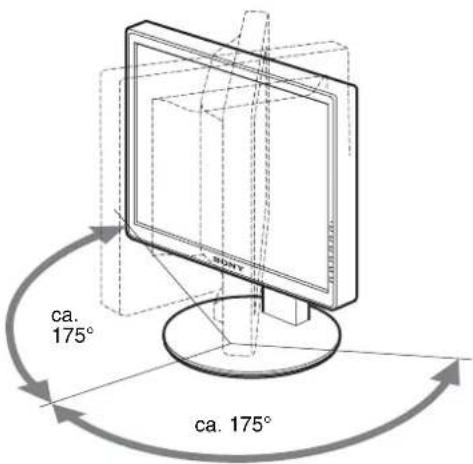
4 Sluit het menu.
TCO'99 Eco-document (for the black model)

■ Congratulations!
You have just purchased a TCO'99 approved and labelled product! Your choice has provided you with a product developed for professional use. Your purchase has also contributed to reducing the burden on the environment and also to the further development of environmentally adapted electronics products.
■ Why do we have environmentally labelled computers?
In many countries, environmental labelling has become an established method for encouraging the adaptation of goods and services to the environment. The main problem, as far as computers and other electronics equipment are concerned, is that environmentally harmful substances are used both in the products and during their manufacture. Since it is not so far possible to satisfactorily recycle the majority of electronics equipment, most of these potentially damaging substances sooner or later enter nature.
There are also other characteristics of a computer, such as energy consumption levels, that are important from the viewpoints of both the work (internal) and natural (external) environments. Since all methods of electricity generation have a negative effect on the environment (e.g. acidic and climate-influencing emissions, radioactive waste), it is vital to save energy. Electronics equipment in offices is often left running continuously and thereby consumes a lot of energy.
■ What does labelling involve?
This product meets the requirements for the TCO'99 scheme which provides for international and environmental labelling of personal computers. The labelling scheme was developed as a joint effort by the TCO (The Swedish Confederation of Professional Employees), Svenska Naturskyddsforeningen (The Swedish Society for Nature Conservation) and Statens Energimydighet (The Swedish National Energy Administration).
Approval requirements cover a wide range of issues: environment, ergonomics, usability, emission of electric and magnetic fields, energy consumption and electrical and fire safety.
The environmental demands impose restrictions on the presence and use of heavy metals, brominated and chlorinated flame retardants, CFCs (frecons) and chlorinated solvents, among other things. The product must be prepared for recycling and the manufacturer is obliged to have an environmental policy which must be adhered to in each country where the company implements its operational policy.
The energy requirements include a demand that the computer and/or display, after a certain period of inactivity, shall reduce its power consumption to a lower level in one or more stages. The length of time to reactivate the computer shall be reasonable for the user.
Labelled products must meet strict environmental demands, for example, in respect of the reduction of electric and magnetic fields, physical and visual ergonomics and good usability.
Below you will find a brief summary of the environmental requirements met by this product. The complete environmental criteria document may be ordered from:
TCO Development
SE-114 94 Stockholm, Sweden
Fax: +46 8 782 92 07
Email (Internet): development@tco.se
Current information regarding TCO'99 approved and labelled
products may also be obtained via the Internet, using the address:
http://www.tco-info.com/
■ Environmental requirements
Flame retardants
Flame retardants are present in printed circuit boards, cables, wires, casings and housings. Their purpose is to prevent, or at least to delay the spread of fire. Up to 30% of the plastic in a computer casing can consist of flame retardant substances. Most flame retardants contain bromine or chloride, and those flame retardants are chemically related to another group of environmental toxins, PCBs. Both the flame retardants containing bromine or chloride and the PCBs are suspected of giving rise to severe health effects, including reproductive damage in fish-eating birds and mammals, due to the bio-accumulative ^® processes. Flame retardants have been found in human blood and researchers fear that disturbances in foetus development may occur.
The relevant TCO'99 demand requires that plastic components weighing more than 25 grams must not contain flame retardants with organically bound bromine or chlorine. Flame retardants are allowed in the printed circuit boards since no substitutes are available.
Cadmium\*\*
Cadmium is present in rechargeable batteries and in the colour-generating layers of certain computer displays. Cadmium damages the nervous system and is toxic in high doses. The relevant TCO'99 requirement states that batteries, the colour-generating layers of display screens and the electrical or electronics components must not contain any cadmium.
Mercury\*\*
Mercury is sometimes found in batteries, relays and switches. It damages the nervous system and is toxic in high doses. The relevant TCO'99 requirement states that batteries may not contain any mercury. It also demands that mercury is not present in any of the electrical or electronics components associated with the labelled unit.
CFCs (freons)
The relevant TCO'99 requirement states that neither CFCs nor HCFCs may be used during the manufacture and assembly of the product. CFCs (freons) are sometimes used for washing printed circuit boards. CFCs break down ozone and thereby damage the ozone layer in the stratosphere, causing increased reception on earth of ultraviolet light with e.g. increased risks of skin cancer (malignant melanoma) as a consequence.
Lead\*\*
Lead can be found in picture tubes, display screens, solders and capacitors. Lead damages the nervous system and in higher doses, causes lead poisoning. The relevant TCO'99 requirement permits the inclusion of lead since no replacement has yet been developed.
* Bio-accumulative is defined as substances which accumulate within living organisms.
** Lead, Cadmium and Mercury are heavy metals which are Bio-accumulative.
TCO'03 Eco-document (for the silver model)

■ Congratulations!
The display you have just purchased carries the TCO'03 Displays label. This means that your display is designed, manufactured and tested according to some of the strictest quality and environmental requirements in the world. This makes for a high performance product, designed with the user in focus that also minimizes the impact on our natural environment.
■ Ergonomics
- Good visual ergonomics and image quality in order to improve the working environment for the user and to reduce sight and strain problems. Important parameters are luminance, contrast, resolution, reflectance, colour rendition and image stability.
■ Energy
- Energy-saving mode after a certain time – beneficial both for the user and the environment
- Electrical safety
■ Emissions
- Electromagnetic fields
- Noise emissions
Ecology
- The product must be prepared for recycling and the manufacturer must have a certified environmental management system such as EMAS or ISO 14 001
- Restrictions on
- chlorinated and brominated flame retardants and polymers
- heavy metals such as cadmium, mercury and lead.
The requirements included in this label have been developed by TCO Development in co-operation with scientists, experts, users as well as manufacturers all over the world. Since the end of the 1980s TCO has been
involved in influencing the development of IT equipment in a more user-friendly direction. Our labelling system started with displays in 1992 and is now requested by users and IT-manufacturers all over the world.
For more information, please visit www.tcodevelopment.com
Recycling Information
■ Customer in Europe
The collection and recycling of this product has been planned according to your country's relevant legislation. To ensure that this product will be collected and recycled in way that minimizes the impact on the environment, please do the following:
-
If you purchased this product for private use, contact your municipality or the waste collection system and bring the product to this collection point / have the product be picked up by the waste collection system. Alternatively, your retailer might take back this if you purchase new equivalent equipment; please check with your retailer whether he will take back this product before bringing it. For information on your country's recycling arrangements, please contact the Sony representation in your country (contact details at: www.sony-europe.com). Further details on specific recycling systems can be found at the following addresses:
-
Belgium: www.recupel.be
- Norway: www.elretur.no
- Sweden: www.el-kretsen.se
- Switzerland: www.swico.ch
- Netherlands: www.nvmp.nl (consumer electronics) www.ictmilieu.nl (IT equipment)
- If you use this product professionally, check the product's delivery contract for take back / recycling arrangements and follow the procedures described therein. Alternatively, follow the procedures described under point 1.
■ Customer in USA
We Sony as a member of EIA recommends to visit URL below http://www.eiae.org/
■ Customer in Asia
http://www.sony.co.jp/SonyInfo/Environment/recycle/3R.html
TFT LCD Color Computer Display
SDM-S75 *
SDM-S95 **
Owner's Record
The model and serial numbers are located at the rear of the unit. Record these numbers in the spaces provided below. Refer to them whenever you call upon your dealer regarding this product. Model No. ____ Serial No. ____
WARNING
To reduce the risk of fire or electric shock, do not expose this apparatus to rain or moisture.
Dangerously high voltages are present inside the unit. Do not open the cabinet. Refer servicing to qualified personnel only.
FCC Notice
This equipment has been tested and found to comply with the limits for a Class B digital device, pursuant to Part 15 of the FCC Rules. These limits are designed to provide reasonable protection against harmful interference in a residential installation. This equipment generates, uses, and can radiate radio frequency energy and, if not installed and used in accordance with the instructions, may cause harmful interference to radio communications. However, there is no guarantee that interference will not occur in a particular installation. If this equipment does cause harmful interference to radio or television reception, which can be determined by turning the equipment off and on, the user is encouraged to try to correct the interference by one or more of the following measures:
- Reorient or relocate the receiving antenna.
– Increase the separation between the equipment and receiver. - Connect the equipment into an outlet on a circuit different from that to which the receiver is connected.
- Consult the dealer or an experienced radio/TV technician for help. You are cautioned that any changes or modifications not expressly approved in this manual could void your authority to operate this equipment.
IMPORTANTE
If you have any questions about this product, you may call; Sony Customer Information Services Center 1-800-222-7669 or http://www.sony.com/
Declaration of Conformity
Trade Name : SONY
Model : SDM-S75 /S95
Note : means any number or alphanumeric character.
Responsible Party : Sony Electronics Inc.
Address : 16530 Via Esprillo, San Diego, CA
92127 U.S.A.
Telephone Number: 858-942-2230
This device complies with part 15 of the FCC rules. Operation is subject to the following two conditions: (1) This device may not cause harmful interference, and (2) this device must accept any interference received, including interference that may cause undesired operation.
This notice is applicable for USA/Canada only.
If shipped to USA/Canada, install only a UL LISTED/CSA
LABELLED power supply cord meeting the following specifications:
SPECIFICATIONS
Plug Type Nema-Plug 5-15p
Cord Type SVT or SJT, minimum 3 × 18 AWG
Length Maximum 15 feet
Rating Minimum 7 A, 125 V
NOTICE
As an ENERGY STAR Partner, Sony Corporation has determined that this product meets the ENERGY STAR guidelines for energy efficiency.

This monitor complies with the TCO'99 guidelines.
(for the black model)

This monitor complies with the TCO'03 guidelines.
(for the silver model)
目录
使用前注意事项 4
检查显示器的型号名称 5
识别部件和控制钮 5
安装....6
步骤 1:底座装配 ……6
TCO'99 Eco-document (for the black model)....i
TCO'03 Eco-document (for the silver model)....ii
使用前注意事项
有关电源连接的警告事项
natural_image
Line drawing of a computer monitor with a stand and scroll wheel (no text or symbols)2将视频信号电缆连接到显示器上。
natural_image
Line drawing of a computer monitor with cable inserted, no text or symbols present■ 高度可调底座 \*
如图所示,将电线和电缆穿过电缆支架。
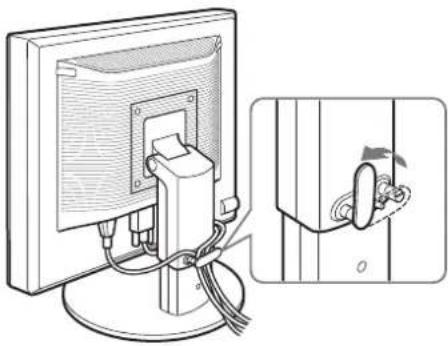
natural_image
Diagram showing a computer monitor connected to a cable with a close-up view of the cable being inserted (no text or symbols present)注意
3调整项目。
4关闭菜单。
2 启动 [Mac_Utility.exe]
显示出测试图案。
项目 按 ↓/↑ 按钮
TCO'99 Eco-document (for the black model)

■ Congratulations!
You have just purchased a TCO'99 approved and labelled product! Your choice has provided you with a product developed for professional use. Your purchase has also contributed to reducing the burden on the environment and also to the further development of environmentally adapted electronics products.
■ Why do we have environmentally labelled computers?
In many countries, environmental labelling has become an established method for encouraging the adaptation of goods and services to the environment. The main problem, as far as computers and other electronics equipment are concerned, is that environmentally harmful substances are used both in the products and during their manufacture. Since it is not so far possible to satisfactorily recycle the majority of electronics equipment, most of these potentially damaging substances sooner or later enter nature.
There are also other characteristics of a computer, such as energy consumption levels, that are important from the viewpoints of both the work (internal) and natural (external) environments. Since all methods of electricity generation have a negative effect on the environment (e.g. acidic and climate-influencing emissions, radioactive waste), it is vital to save energy. Electronics equipment in offices is often left running continuously and thereby consumes a lot of energy.
■ What does labelling involve?
This product meets the requirements for the TCO'99 scheme which provides for international and environmental labelling of personal computers. The labelling scheme was developed as a joint effort by the TCO (The Swedish Confederation of Professional Employees), Svenska Naturskyddsforeningen (The Swedish Society for Nature Conservation) and Statens Energimydighet (The Swedish National Energy Administration).
Approval requirements cover a wide range of issues: environment, ergonomics, usability, emission of electric and magnetic fields, energy consumption and electrical and fire safety.
The environmental demands impose restrictions on the presence and use of heavy metals, brominated and chlorinated flame retardants, CFCs (frecons) and chlorinated solvents, among other things. The product must be prepared for recycling and the manufacturer is obliged to have an environmental policy which must be adhered to in each country where the company implements its operational policy.
The energy requirements include a demand that the computer and/or display, after a certain period of inactivity, shall reduce its power consumption to a lower level in one or more stages. The length of time to reactivate the computer shall be reasonable for the user.
Labelled products must meet strict environmental demands, for example, in respect of the reduction of electric and magnetic fields, physical and visual ergonomics and good usability.
Below you will find a brief summary of the environmental requirements met by this product. The complete environmental criteria document may be ordered from:
TCO Development
SE-114 94 Stockholm, Sweden
Fax: +46 8 782 92 07
Email (Internet): development@tco.se
Current information regarding TCO'99 approved and labelled products may also be obtained via the Internet, using the address: http://www.tco-info.com/
■ Environmental requirements
Flame retardants
Flame retardants are present in printed circuit boards, cables, wires, casings and housings. Their purpose is to prevent, or at least to delay the spread of fire. Up to 30% of the plastic in a computer casing can consist of flame retardant substances. Most flame retardants contain bromine or chloride, and those flame retardants are chemically related to another group of environmental toxins, PCBs. Both the flame retardants containing bromine or chloride and the PCBs are suspected of giving rise to severe health effects, including reproductive damage in fish-eating birds and mammals, due to the bio-accumulative* processes. Flame retardants have been found in human blood and researchers fear that disturbances in foetus development may occur.
The relevant TCO'99 demand requires that plastic components weighing more than 25 grams must not contain flame retardants with organically bound bromine or chlorine. Flame retardants are allowed in the printed circuit boards since no substitutes are available.
Cadmium\*\*
Cadmium is present in rechargeable batteries and in the colour-generating layers of certain computer displays. Cadmium damages the nervous system and is toxic in high doses. The relevant TCO'99 requirement states that batteries, the colour-generating layers of display screens and the electrical or electronics components must not contain any cadmium.
Mercury\*\*
Mercury is sometimes found in batteries, relays and switches. It damages the nervous system and is toxic in high doses. The relevant TCO'99 requirement states that batteries may not contain any mercury. It also demands that mercury is not present in any of the electrical or electronics components associated with the labelled unit.
CFCs (freons)
The relevant TCO'99 requirement states that neither CFCs nor HCFCs may be used during the manufacture and assembly of the product. CFCs (freons) are sometimes used for washing printed circuit boards. CFCs break down ozone and thereby damage the ozone layer in the stratosphere, causing increased reception on earth of ultraviolet light with e.g. increased risks of skin cancer (malignant melanoma) as a consequence.
Lead\*\*
Lead can be found in picture tubes, display screens, solders and capacitors. Lead damages the nervous system and in higher doses, causes lead poisoning. The relevant TCO'99 requirement permits the inclusion of lead since no replacement has yet been developed.
* Bio-accumulative is defined as substances which accumulate within living organisms.
** Lead, Cadmium and Mercury are heavy metals which are Bio-accumulative.
TCO'03 Eco-document (for the silver model)

■ Congratulations!
The display you have just purchased carries the TCO'03 Displays label. This means that your display is designed, manufactured and tested according to some of the strictest quality and environmental requirements in the world. This makes for a high performance product, designed with the user in focus that also minimizes the impact on our natural environment.
■ Ergonomics
- Good visual ergonomics and image quality in order to improve the working environment for the user and to reduce sight and strain problems. Important parameters are luminance, contrast, resolution, reflectance, colour rendition and image stability.
■ Energy
- Energy-saving mode after a certain time – beneficial both for the user and the environment
- Electrical safety
■ Emissions
- Electromagnetic fields
- Noise emissions
Ecology
- The product must be prepared for recycling and the manufacturer must have a certified environmental management system such as EMAS or ISO 14 001
- Restrictions on
- chlorinated and brominated flame retardants and polymers
- heavy metals such as cadmium, mercury and lead
The requirements included in this label have been developed by TCO Development in co-operation with scientists, experts, users as well as manufacturers all over the world. Since the end of the 1980s TCO has been
involved in influencing the development of IT equipment in a more user-friendly direction. Our labelling system started with displays in 1992 and is now requested by users and IT-manufacturers all over the world.
For more information, please visit
www.tcodevelopment.com
Recycling Information
■ Customer in Europe
The collection and recycling of this product has been planned according to your country's relevant legislation. To ensure that this product will be collected and recycled in way that minimizes the impact on the environment, please do the following:
-
If you purchased this product for private use, contact your municipality or the waste collection system and bring the product to this collection point / have the product be picked up by the waste collection system. Alternatively, your retailer might take back this if you purchase new equivalent equipment; please check with your retailer whether he will take back this product before bringing it. For information on your country's recycling arrangements, please contact the Sony representation in your country (contact details at: www.sony-europe.com). Further details on specific recycling systems can be found at the following addresses:
-
Belgium: www.recupel.be
- Netherlands: www.nvmp.nl (consumer electronics) www.ictmilieu.nl (IT equipment)
- Norway: www.elretur.no
- Sweden: www.el-kretsen.se
-
Switzerland: www.swico.ch
-
If you use this product professionally, check the product's delivery contract for take back / recycling arrangements and follow the procedures described therein. Alternatively, follow the procedures described under point 1.
■ Customer in USA
We Sony as a member of EIA recommends to visit URL below http://www.ciac.org/
■ Customer in Asia
http://www.sony.co.jp/SonyInfo/Environment/recycle/3R.html
TFT LCD Color Computer Display
SDM-S75 *
SDM-S95 **
Owner's Record
The model and serial numbers are located at the rear of the unit. Record these numbers in the spaces provided below. Refer to them whenever you call upon your dealer regarding this product. Model No. ____ Serial No. ____
WARNING
To reduce the risk of fire or electric shock, do not expose this apparatus to rain or moisture.
Dangerously high voltages are present inside the unit. Do not open the cabinet. Refer servicing to qualified personnel only.
FCC Notice
This equipment has been tested and found to comply with the limits for a Class B digital device, pursuant to Part 15 of the FCC Rules. These limits are designed to provide reasonable protection against harmful interference in a residential installation. This equipment generates, uses, and can radiate radio frequency energy and, if not installed and used in accordance with the instructions, may cause harmful interference to radio communications. However, there is no guarantee that interference will not occur in a particular installation. If this equipment does cause harmful interference to radio or television reception, which can be determined by turning the equipment off and on, the user is encouraged to try to correct the interference by one or more of the following measures:
- Reorient or relocate the receiving antenna.
– Increase the separation between the equipment and receiver. - Connect the equipment into an outlet on a circuit different from that to which the receiver is connected.
- Consult the dealer or an experienced radio/TV technician for help. You are cautioned that any changes or modifications not expressly approved in this manual could void your authority to operate this equipment.
IMPORTANTE
If you have any questions about this product, you may call; Sony Customer Information Services Center 1-800-222-7669 or http://www.sony.com/
Declaration of Conformity
Trade Name : SONY
Model : SDM-S75 /S95 * **
Note : means any number or alphanumeric
character.
Responsible Party : Sony Electronics Inc.
Address : 16530 Via Esprillo, San Diego, CA
92127 U.S.A.
Telephone Number: 858-942-2230
This device complies with part 15 of the FCC rules. Operation is subject to the following two conditions: (1) This device may not cause harmful interference, and (2) this device must accept any interference received, including interference that may cause undesired operation.
This notice is applicable for USA/Canada only. If shipped to USA/Canada, install only a UL LISTED/CSA LABELLED power supply cord meeting the following specifications:
SPECIFICATIONS
Plug Type Nema-Plug 5-15p
Cord Type SVT or SJT, minimum 3 × 18 AWG
Length Maximum 15 feet
Rating Minimum 7 A, 125 V
NOTICE
As an ENERGY STAR Partner, Sony Corporation has determined that this product meets the ENERGY STAR guidelines for energy efficiency.

This monitor complies with the TCO'99 guidelines.
(for the black model)

This monitor complies with the TCO'03 guidelines.
(for the silver model)
Obsah
TCO'03 Eco-document (for the silver model)....ii
natural_image
Three line drawings of different types of electrical plugs (no text or symbols)natural_image
Line drawing of a computer monitor with a stand and scroll wheel (no text or symbols)natural_image
Line drawing of a computer monitor with cable and stand (no text or symbols)natural_image
Diagram showing a computer monitor connected to a wall-mounted cable, with an inset close-up of the cable being inserted (no text or symbols present)Poznámka
402
TCO'99 Eco-document (for the black model)

■ Congratulations!
You have just purchased a TCO'99 approved and labelled product! Your choice has provided you with a product developed for professional use. Your purchase has also contributed to reducing the burden on the environment and also to the further development of environmentally adapted electronics products.
■ Why do we have environmentally labelled computers?
In many countries, environmental labelling has become an established method for encouraging the adaptation of goods and services to the environment. The main problem, as far as computers and other electronics equipment are concerned, is that environmentally harmful substances are used both in the products and during their manufacture. Since it is not so far possible to satisfactorily recycle the majority of electronics equipment, most of these potentially damaging substances sooner or later enter nature.
There are also other characteristics of a computer, such as energy consumption levels, that are important from the viewpoints of both the work (internal) and natural (external) environments. Since all methods of electricity generation have a negative effect on the environment (e.g. acidic and climate-influencing emissions, radioactive waste), it is vital to save energy. Electronics equipment in offices is often left running continuously and thereby consumes a lot of energy.
■ What does labelling involve?
This product meets the requirements for the TCO'99 scheme which provides for international and environmental labelling of personal computers. The labelling scheme was developed as a joint effort by the TCO (The Swedish Confederation of Professional Employees), Svenska Naturskyddsforeningen (The Swedish Society for Nature Conservation) and Statens Energimyndighet (The Swedish National Energy Administration).
Approval requirements cover a wide range of issues: environment, ergonomics, usability, emission of electric and magnetic fields, energy consumption and electrical and fire safety.
The environmental demands impose restrictions on the presence and use of heavy metals, brominated and chlorinated flame retardants, CFCs (frecons) and chlorinated solvents, among other things. The product must be prepared for recycling and the manufacturer is obliged to have an environmental policy which must be adhered to in each country where the company implements its operational policy.
The energy requirements include a demand that the computer and/or display, after a certain period of inactivity, shall reduce its power consumption to a lower level in one or more stages. The length of time to reactivate the computer shall be reasonable for the user.
Labelled products must meet strict environmental demands, for example, in respect of the reduction of electric and magnetic fields, physical and visual ergonomics and good usability.
Below you will find a brief summary of the environmental requirements met by this product. The complete environmental criteria document may be ordered from:
TCO Development
SE-114 94 Stockholm, Sweden
Fax: +46 8 782 92 07
Email (Internet): development@tco.se
Current information regarding TCO'99 approved and labelled
products may also be obtained via the Internet, using the address: http://www.tco-info.com/
■ Environmental requirements
Flame retardants
Flame retardants are present in printed circuit boards, cables, wires, casings and housings. Their purpose is to prevent, or at least to delay the spread of fire. Up to 30% of the plastic in a computer casing can consist of flame retardant substances. Most flame retardants contain bromine or chloride, and those flame retardants are chemically related to another group of environmental toxins, PCBs. Both the flame retardants containing bromine or chloride and the PCBs are suspected of giving rise to severe health effects, including reproductive damage in fish-eating birds and mammals, due to the bio-accumulative * processes. Flame retardants have been found in human blood and researchers fear that disturbances in foetus development may occur.
The relevant TCO'99 demand requires that plastic components weighing more than 25 grams must not contain flame retardants with organically bound bromine or chlorine. Flame retardants are allowed in the printed circuit boards since no substitutes are available.
Cadmium\*\*
Cadmium is present in rechargeable batteries and in the colour-generating layers of certain computer displays. Cadmium damages the nervous system and is toxic in high doses. The relevant TCO'99 requirement states that batteries, the colour-generating layers of display screens and the electrical or electronics components must not contain any cadmium.
Mercury\*\*
Mercury is sometimes found in batteries, relays and switches. It damages the nervous system and is toxic in high doses. The relevant TCO'99 requirement states that batteries may not contain any mercury. It also demands that mercury is not present in any of the electrical or electronics components associated with the labelled unit.
CFCs (freons)
The relevant TCO'99 requirement states that neither CFCs nor HCFCs may be used during the manufacture and assembly of the product. CFCs (freons) are sometimes used for washing printed circuit boards. CFCs break down ozone and thereby damage the ozone layer in the stratosphere, causing increased reception on earth of ultraviolet light with e.g. increased risks of skin cancer (malignant melanoma) as a consequence.
Lead\*\*
Lead can be found in picture tubes, display screens, solders and capacitors. Lead damages the nervous system and in higher doses, causes lead poisoning. The relevant TCO'99 requirement permits the inclusion of lead since no replacement has yet been developed.
* Bio-accumulative is defined as substances which accumulate within living organisms.
** Lead, Cadmium and Mercury are heavy metals which are Bio-accumulative.
TCO'03 Eco-document (for the silver model)

■ Congratulations!
The display you have just purchased carries the TCO'03 Displays label. This means that your display is designed, manufactured and tested according to some of the strictest quality and environmental requirements in the world. This makes for a high performance product, designed with the user in focus that also minimizes the impact on our natural environment.
Ergonomics
- Good visual ergonomics and image quality in order to improve the working environment for the user and to reduce sight and strain problems. Important parameters are luminance, contrast, resolution, reflectance, colour rendition and image stability.
■ Energy
- Energy-saving mode after a certain time – beneficial both for the user and the environment
- Electrical safety
■ Emissions
- Electromagnetic fields
- Noise emissions
Ecology
- The product must be prepared for recycling and the manufacturer must have a certified environmental management system such as EMAS or ISO 14 001
- Restrictions on
- chlorinated and brominated flame retardants and polymers
- heavy metals such as cadmium, mercury and lead.
The requirements included in this label have been developed by TCO Development in co-operation with scientists, experts, users as well as manufacturers all over the world. Since the end of the 1980s TCO has been
involved in influencing the development of IT equipment in a more user-friendly direction. Our labelling system started with displays in 1992 and is now requested by users and IT-manufacturers all over the world.
For more information, please visit www.tcodevelopment.com
Recycling Information
■ Customer in Europe
The collection and recycling of this product has been planned according to your country's relevant legislation. To ensure that this product will be collected and recycled in way that minimizes the impact on the environment, please do the following:
- If you purchased this product for private use, contact your municipality or the waste collection system and bring the product to this collection point / have the product be picked up by the waste collection system. Alternatively, your retailer might take back this if you purchase new equivalent equipment; please check with your retailer whether he will take back this product before bringing it. For information on your country's recycling arrangements, please contact the Sony representation in your country (contact details at: www.sony-europe.com). Further details on specific recycling systems can be found at the following addresses:
- Belgium: www.recupel.be
- Netherlands: www.nvmp.nl (consumer electronics) www.ictmilieu.nl (IT equipment)
- Norway: www.elretur.no
- Sweden: www.el-kretsen.se
-
Switzerland: www.swico.ch
-
If you use this product professionally, check the product's delivery contract for take back / recycling arrangements and follow the procedures described therein. Alternatively, follow the procedures described under point 1.
■ Customer in USA
We Sony as a member of EIA recommends to visit URL below http://www.ciac.org/
■ Customer in Asia
http://www.sony.co.jp/SonyInfo/Environment/recycle/3R.html
TFT LCD Color Computer Display
SDM-S75 *
SDM-S95 **
Owner's Record
The model and serial numbers are located at the rear of the unit. Record these numbers in the spaces provided below. Refer to them whenever you call upon your dealer regarding this product. Model No. ____ Serial No. ____
WARNING
To reduce the risk of fire or electric shock, do not expose this apparatus to rain or moisture.
Dangerously high voltages are present inside the unit. Do not open the cabinet. Refer servicing to qualified personnel only.
FCC Notice
This equipment has been tested and found to comply with the limits for a Class B digital device, pursuant to Part 15 of the FCC Rules. These limits are designed to provide reasonable protection against harmful interference in a residential installation. This equipment generates, uses, and can radiate radio frequency energy and, if not installed and used in accordance with the instructions, may cause harmful interference to radio communications. However, there is no guarantee that interference will not occur in a particular installation. If this equipment does cause harmful interference to radio or television reception, which can be determined by turning the equipment off and on, the user is encouraged to try to correct the interference by one or more of the following measures:
- Reorient or relocate the receiving antenna.
– Increase the separation between the equipment and receiver. - Connect the equipment into an outlet on a circuit different from that to which the receiver is connected.
- Consult the dealer or an experienced radio/TV technician for help.
You are cautioned that any changes or modifications not expressly approved in this manual could void your authority to operate this equipment.
IMPORTANTE
If you have any questions about this product, you may call; Sony Customer Information Services Center 1-800-222-7669 or http://www.sony.com/
Declaration of Conformity
Trade Name : SONY
Model : SDM-S75 /S95
* **
Note : means any number or alphanumeric
character.
Responsible Party : Sony Electronics Inc.
Address : 16530 Via Esprillo, San Diego, CA
92127 U.S.A.
Telephone Number: 858-942-2230
This device complies with part 15 of the FCC rules. Operation is subject to the following two conditions: (1) This device may not cause harmful interference, and (2) this device must accept any interference received, including interference that may cause undesired operation.
This notice is applicable for USA/Canada only.
If shipped to USA/Canada, install only a UL LISTED/CSA
LABELLED power supply cord meeting the following specifications:
SPECIFICATIONS
Plug Type Nema-Plug 5-15p
Cord Type SVT or SJT, minimum 3 × 18 AWG
Length Maximum 15 feet
Rating Minimum 7 A, 125 V
NOTICE
As an ENERGY STAR Partner, Sony Corporation has determined that this product meets the ENERGY STAR guidelines for energy efficiency.

This monitor complies with the TCO'99 guidelines.
(for the black model)

This monitor complies with the TCO'03 guidelines.
(for the silver model)
Tartalomjegyzék
Óvintézkedések 4
natural_image
Line drawing of a computer monitor with a stand and scroll wheel (no text or symbols)natural_image
Line drawing of a computer monitor with cable and stand (no text or symbols)natural_image
Diagram of a computer monitor with cable and lock, showing a close-up of the lock mechanism (no text or symbols present)Megjegyzés
4 Lépjen ki a menüböl.
TCO'99 Eco-document (for the black model)

■ Congratulations!
You have just purchased a TCO'99 approved and labelled product! Your choice has provided you with a product developed for professional use. Your purchase has also contributed to reducing the burden on the environment and also to the further development of environmentally adapted electronics products.
■ Why do we have environmentally labelled computers?
In many countries, environmental labelling has become an established method for encouraging the adaptation of goods and services to the environment. The main problem, as far as computers and other electronics equipment are concerned, is that environmentally harmful substances are used both in the products and during their manufacture. Since it is not so far possible to satisfactorily recycle the majority of electronics equipment, most of these potentially damaging substances sooner or later enter nature.
There are also other characteristics of a computer, such as energy consumption levels, that are important from the viewpoints of both the work (internal) and natural (external) environments. Since all methods of electricity generation have a negative effect on the environment (e.g. acidic and climate-influencing emissions, radioactive waste), it is vital to save energy. Electronics equipment in offices is often left running continuously and thereby consumes a lot of energy.
■ What does labelling involve?
This product meets the requirements for the TCO'99 scheme which provides for international and environmental labelling of personal computers. The labelling scheme was developed as a joint effort by the TCO (The Swedish Confederation of Professional Employees), Svenska Naturskyddsforeningen (The Swedish Society for Nature Conservation) and Statens Energimyndighet (The Swedish National Energy Administration).
Approval requirements cover a wide range of issues: environment, ergonomics, usability, emission of electric and magnetic fields, energy consumption and electrical and fire safety.
The environmental demands impose restrictions on the presence and use of heavy metals, brominated and chlorinated flame retardants, CFCs (freons) and chlorinated solvents, among other things. The product must be prepared for recycling and the manufacturer is obliged to have an environmental policy which must be adhered to in each country where the company implements its operational policy.
The energy requirements include a demand that the computer and/or display, after a certain period of inactivity, shall reduce its power consumption to a lower level in one or more stages. The length of time to reactivate the computer shall be reasonable for the user.
Labelled products must meet strict environmental demands, for example, in respect of the reduction of electric and magnetic fields, physical and visual ergonomics and good usability.
Below you will find a brief summary of the environmental requirements met by this product. The complete environmental criteria document may be ordered from:
TCO Development
SE-114 94 Stockholm, Sweden
Fax: +46 8 782 92 07
Email (Internet): development@tco.se
Current information regarding TCO'99 approved and labelled products may also be obtained via the Internet, using the address: http://www.tco-info.com/
■ Environmental requirements
Flame retardants
Flame retardants are present in printed circuit boards, cables, wires, casings and housings. Their purpose is to prevent, or at least to delay the spread of fire. Up to 30% of the plastic in a computer casing can consist of flame retardant substances. Most flame retardants contain bromine or chloride, and those flame retardants are chemically related to another group of environmental toxins, PCBs. Both the flame retardants containing bromine or chloride and the PCBs are suspected of giving rise to severe health effects, including reproductive damage in fish-eating birds and mammals, due to the bio-accumulative* processes. Flame retardants have been found in human blood and researchers fear that disturbances in foetus development may occur.
The relevant TCO'99 demand requires that plastic components weighing more than 25 grams must not contain flame retardants with organically bound bromine or chlorine. Flame retardants are allowed in the printed circuit boards since no substitutes are available.
Cadmium\*\*
Cadmium is present in rechargeable batteries and in the colour-generating layers of certain computer displays. Cadmium damages the nervous system and is toxic in high doses. The relevant TCO'99 requirement states that batteries, the colour-generating layers of display screens and the electrical or electronics components must not contain any cadmium.
Mercury\*\*
Mercury is sometimes found in batteries, relays and switches. It damages the nervous system and is toxic in high doses. The relevant TCO'99 requirement states that batteries may not contain any mercury. It also demands that mercury is not present in any of the electrical or electronics components associated with the labelled unit.
CFCs (freons)
The relevant TCO'99 requirement states that neither CFCs nor HCFCs may be used during the manufacture and assembly of the product. CFCs (frecons) are sometimes used for washing printed circuit boards. CFCs break down ozone and thereby damage the ozone layer in the stratosphere, causing increased reception on earth of ultraviolet light with e.g. increased risks of skin cancer (malignant melanoma) as a consequence.
Lead\*\*
Lead can be found in picture tubes, display screens, solders and capacitors. Lead damages the nervous system and in higher doses, causes lead poisoning. The relevant TCO'99 requirement permits the inclusion of lead since no replacement has yet been developed.
* Bio-accumulative is defined as substances which accumulate within living organisms.
** Lead, Cadmium and Mercury are heavy metals which are Bio-accumulative.
TCO'03 Eco-document (for the silver model)

■ Congratulations!
The display you have just purchased carries the TCO'03 Displays label. This means that your display is designed, manufactured and tested according to some of the strictest quality and environmental requirements in the world. This makes for a high performance product, designed with the user in focus that also minimizes the impact on our natural environment.
■ Ergonomics
- Good visual ergonomics and image quality in order to improve the working environment for the user and to reduce sight and strain problems. Important parameters are luminance, contrast, resolution, reflectance, colour rendition and image stability.
■ Energy
- Energy-saving mode after a certain time – beneficial both for the user and the environment
- Electrical safety
■ Emissions
• Electromagnetic fields
- Noise emissions
Ecology
- The product must be prepared for recycling and the manufacturer must have a certified environmental management system such as EMAS or ISO 14 001
- Restrictions on
- chlorinated and brominated flame retardants and polymers
- heavy metals such as cadmium, mercury and lead.
The requirements included in this label have been developed by TCO Development in co-operation with scientists, experts, users as well as manufacturers all over the world. Since the end of the 1980s TCO has been involved in influencing the development of IT equipment in a more user-friendly direction. Our labelling system started with displays in 1992 and is now requested by users and IT-manufacturers all over the world.
For more information, please visit www.tcodevelopment.com
Recycling Information
■ Customer in Europe
The collection and recycling of this product has been planned according to your country's relevant legislation. To ensure that this product will be collected and recycled in way that minimizes the impact on the environment, please do the following:
- If you purchased this product for private use, contact your municipality or the waste collection system and bring the product to this collection point / have the product be picked up by the waste collection system. Alternatively, your retailer might take back this if you purchase new equivalent equipment; please check with your retailer whether he will take back this product before bringing it. For information on your country's recycling arrangements, please contact the Sony representation in your country (contact details at: www.sony-europe.com). Further details on specific recycling systems can be found at the following addresses:
- Belgium: www.recupel.be
- Netherlands: www.nvmp.nl (consumer electronics) www.ictmilieu.nl (IT equipment)
- Norway: www.elretur.no
- Sweden: www.el-kretsen.se
-
Switzerland: www.swico.ch
-
If you use this product professionally, check the product's delivery contract for take back / recycling arrangements and follow the procedures described therein. Alternatively, follow the procedures described under point 1.
■ Customer in USA
We Sony as a member of EIA recommends to visit URL below http://www.eiae.org/
■ Customer in Asia
http://www.sony.co.jp/SonyInfo/Environment/recycle/3R.html
TFT LCD Color Computer Display
SDM-S75 *
SDM-S95 **
Owner's Record
The model and serial numbers are located at the rear of the unit. Record these numbers in the spaces provided below. Refer to them whenever you call upon your dealer regarding this product. Model No. ____ Serial No. ____
WARNING
To reduce the risk of fire or electric shock, do not expose this apparatus to rain or moisture.
Dangerously high voltages are present inside the unit. Do not open the cabinet. Refer servicing to qualified personnel only.
FCC Notice
This equipment has been tested and found to comply with the limits for a Class B digital device, pursuant to Part 15 of the FCC Rules. These limits are designed to provide reasonable protection against harmful interference in a residential installation. This equipment generates, uses, and can radiate radio frequency energy and, if not installed and used in accordance with the instructions, may cause harmful interference to radio communications. However, there is no guarantee that interference will not occur in a particular installation. If this equipment does cause harmful interference to radio or television reception, which can be determined by turning the equipment off and on, the user is encouraged to try to correct the interference by one or more of the following measures:
- Reorient or relocate the receiving antenna.
– Increase the separation between the equipment and receiver. - Connect the equipment into an outlet on a circuit different from that to which the receiver is connected.
- Consult the dealer or an experienced radio/TV technician for help. You are cautioned that any changes or modifications not expressly approved in this manual could void your authority to operate this equipment.
IMPORTANTE
If you have any questions about this product, you may call; Sony Customer Information Services Center 1-800-222-7669 or http://www.sony.com/
Declaration of Conformity
Trade Name : SONY
Model : SDM-S75 /S95 * **
Note : means any number or alphanumeric character.
Responsible Party : Sony Electronics Inc.
Address : 16530 Via Esprillo, San Diego, CA
92127 U.S.A.
Telephone Number: 858-942-2230
This device complies with part 15 of the FCC rules. Operation is subject to the following two conditions: (1) This device may not cause harmful interference, and (2) this device must accept any interference received, including interference that may cause undesired operation.
This notice is applicable for USA/Canada only. If shipped to USA/Canada, install only a UL LISTED/CSA LABELLED power supply cord meeting the following specifications:
SPECIFICATIONS
Plug Type Nema-Plug 5-15p
Cord Type SVT or SJT, minimum 3 × 18 AWG
Length Maximum 15 feet
Rating Minimum 7 A, 125 V
NOTICE
As an ENERGY STAR Partner, Sony Corporation has determined that this product meets the ENERGY STAR guidelines for energy efficiency.

This monitor complies with the TCO'99 guidelines.
(for the black model)

This monitor complies with the TCO'03 guidelines.
(for the silver model)
Spis treści
TCO'03 Eco-document (for the silver model)....ii
ZERO (BOLEC OCHRONNY)
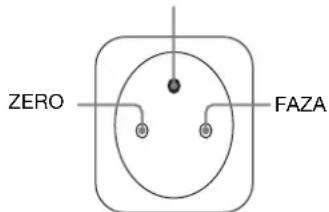
natural_image
Line drawing of a computer monitor with a stand and scroll wheel (no text or symbols)natural_image
Line drawing of a computer monitor with cable and stand (no text or symbols)natural_image
Diagram showing a computer monitor connected to a cable with a close-up view of its cable being inserted (no text or symbols present)Uwaga
TCO'99 Eco-document (for the black model)

■ Congratulations!
You have just purchased a TCO'99 approved and labelled product! Your choice has provided you with a product developed for professional use. Your purchase has also contributed to reducing the burden on the environment and also to the further development of environmentally adapted electronics products.
■ Why do we have environmentally labelled computers?
In many countries, environmental labelling has become an established method for encouraging the adaptation of goods and services to the environment. The main problem, as far as computers and other electronics equipment are concerned, is that environmentally harmful substances are used both in the products and during their manufacture. Since it is not so far possible to satisfactorily recycle the majority of electronics equipment, most of these potentially damaging substances sooner or later enter nature.
There are also other characteristics of a computer, such as energy consumption levels, that are important from the viewpoints of both the work (internal) and natural (external) environments. Since all methods of electricity generation have a negative effect on the environment (e.g. acidic and climate-influencing emissions, radioactive waste), it is vital to save energy. Electronics equipment in offices is often left running continuously and thereby consumes a lot of energy.
■ What does labelling involve?
This product meets the requirements for the TCO'99 scheme which provides for international and environmental labelling of personal computers. The labelling scheme was developed as a joint effort by the TCO (The Swedish Confederation of Professional Employees), Svenska Naturskyddsforeningen (The Swedish Society for Nature Conservation) and Statens Energimyndighet (The Swedish National Energy Administration).
Approval requirements cover a wide range of issues: environment, ergonomics, usability, emission of electric and magnetic fields, energy consumption and electrical and fire safety.
The environmental demands impose restrictions on the presence and use of heavy metals, brominated and chlorinated flame retardants, CFCs (frecons) and chlorinated solvents, among other things. The product must be prepared for recycling and the manufacturer is obliged to have an environmental policy which must be adhered to in each country where the company implements its operational policy.
The energy requirements include a demand that the computer and/or display, after a certain period of inactivity, shall reduce its power consumption to a lower level in one or more stages. The length of time to reactivate the computer shall be reasonable for the user.
Labelled products must meet strict environmental demands, for example, in respect of the reduction of electric and magnetic fields, physical and visual ergonomics and good usability.
Below you will find a brief summary of the environmental requirements met by this product. The complete environmental criteria document may be ordered from:
TCO Development
SE-114 94 Stockholm, Sweden
Fax: +46 8 782 92 07
Email (Internet): development@tco.se
Current information regarding TCO'99 approved and labelled
products may also be obtained via the Internet, using the address:
http://www.tco-info.com/
■ Environmental requirements
Flame retardants
Flame retardants are present in printed circuit boards, cables, wires, casings and housings. Their purpose is to prevent, or at least to delay the spread of fire. Up to 30% of the plastic in a computer casing can consist of flame retardant substances. Most flame retardants contain bromine or chloride, and those flame retardants are chemically related to another group of environmental toxins, PCBs. Both the flame retardants containing bromine or chloride and the PCBs are suspected of giving rise to severe health effects, including reproductive damage in fish-eating birds and mammals, due to the bio-accumulative ^® processes. Flame retardants have been found in human blood and researchers fear that disturbances in foetus development may occur.
The relevant TCO'99 demand requires that plastic components weighing more than 25 grams must not contain flame retardants with organically bound bromine or chlorine. Flame retardants are allowed in the printed circuit boards since no substitutes are available.
Cadmium\*\*
Cadmium is present in rechargeable batteries and in the colour-generating layers of certain computer displays. Cadmium damages the nervous system and is toxic in high doses. The relevant TCO'99 requirement states that batteries, the colour-generating layers of display screens and the electrical or electronics components must not contain any cadmium.
Mercury\*\*
Mercury is sometimes found in batteries, relays and switches. It damages the nervous system and is toxic in high doses. The relevant TCO'99 requirement states that batteries may not contain any mercury. It also demands that mercury is not present in any of the electrical or electronics components associated with the labelled unit.
CFCs (freons)
The relevant TCO'99 requirement states that neither CFCs nor HCFCs may be used during the manufacture and assembly of the product. CFCs (freons) are sometimes used for washing printed circuit boards. CFCs break down ozone and thereby damage the ozone layer in the stratosphere, causing increased reception on earth of ultraviolet light with e.g. increased risks of skin cancer (malignant melanoma) as a consequence.
Lead\*\*
Lead can be found in picture tubes, display screens, solders and capacitors. Lead damages the nervous system and in higher doses, causes lead poisoning. The relevant TCO'99 requirement permits the inclusion of lead since no replacement has yet been developed.
* Bio-accumulative is defined as substances which accumulate within living organisms.
** Lead, Cadmium and Mercury are heavy metals which are Bio-accumulative.
TCO'03 Eco-document (for the silver model)

■ Congratulations!
The display you have just purchased carries the TCO'03 Displays label. This means that your display is designed, manufactured and tested according to some of the strictest quality and environmental requirements in the world. This makes for a high performance product, designed with the user in focus that also minimizes the impact on our natural environment.
■ Ergonomics
- Good visual ergonomics and image quality in order to improve the working environment for the user and to reduce sight and strain problems. Important parameters are luminance, contrast, resolution, reflectance, colour rendition and image stability.
■ Energy
- Energy-saving mode after a certain time – beneficial both for the user and the environment
- Electrical safety
■ Emissions
• Electromagnetic fields
- Noise emissions
Ecology
- The product must be prepared for recycling and the manufacturer must have a certified environmental management system such as EMAS or ISO 14 001
- Restrictions on
- chlorinated and brominated flame retardants and polymers
- heavy metals such as cadmium, mercury and lead.
The requirements included in this label have been developed by TCO Development in co-operation with scientists, experts, users as well as manufacturers all over the world. Since the end of the 1980s TCO has been
involved in influencing the development of IT equipment in a more user-friendly direction. Our labelling system started with displays in 1992 and is now requested by users and IT-manufacturers all over the world.
For more information, please visit www.tcodevelopment.com
Recycling Information
■ Customer in Europe
The collection and recycling of this product has been planned according to your country's relevant legislation. To ensure that this product will be collected and recycled in way that minimizes the impact on the environment, please do the following:
-
If you purchased this product for private use, contact your municipality or the waste collection system and bring the product to this collection point / have the product be picked up by the waste collection system. Alternatively, your retailer might take back this if you purchase new equivalent equipment; please check with your retailer whether he will take back this product before bringing it. For information on your country's recycling arrangements, please contact the Sony representation in your country (contact details at: www.sony-europe.com). Further details on specific recycling systems can be found at the following addresses:
-
Belgium: www.recupel.be
- Netherlands: www.nvmp.nl (consumer electronics) www.ictmilieu.nl (IT equipment)
- Norway: www.elretur.no
- Sweden: www.el-kretsen.se
-
Switzerland: www.swico.ch
-
If you use this product professionally, check the product's delivery contract for take back / recycling arrangements and follow the procedures described therein. Alternatively, follow the procedures described under point 1.
■ Customer in USA
We Sony as a member of EIA recommends to visit URL below http://www.eiac.org/
■ Customer in Asia
http://www.sony.co.jp/SonyInfo/Environment/recycle/3R.html
TFT LCD Color Computer Display
SDM-S75 *
SDM-S95 **
Owner's Record
The model and serial numbers are located at the rear of the unit. Record these numbers in the spaces provided below. Refer to them whenever you call upon your dealer regarding this product. Model No. ____ Serial No. ____
WARNING
To reduce the risk of fire or electric shock, do not expose this apparatus to rain or moisture.
Dangerously high voltages are present inside the unit. Do not open the cabinet. Refer servicing to qualified personnel only.
FCC Notice
This equipment has been tested and found to comply with the limits for a Class B digital device, pursuant to Part 15 of the FCC Rules. These limits are designed to provide reasonable protection against harmful interference in a residential installation. This equipment generates, uses, and can radiate radio frequency energy and, if not installed and used in accordance with the instructions, may cause harmful interference to radio communications. However, there is no guarantee that interference will not occur in a particular installation. If this equipment does cause harmful interference to radio or television reception, which can be determined by turning the equipment off and on, the user is encouraged to try to correct the interference by one or more of the following measures:
- Reorient or relocate the receiving antenna.
– Increase the separation between the equipment and receiver. - Connect the equipment into an outlet on a circuit different from that to which the receiver is connected.
- Consult the dealer or an experienced radio/TV technician for help. You are cautioned that any changes or modifications not expressly approved in this manual could void your authority to operate this equipment.
IMPORTANTE
If you have any questions about this product, you may call; Sony Customer Information Services Center 1-800-222-7669 or http://www.sony.com/
Declaration of Conformity
Trade Name : SONY
Model : SDM-S75 /S95
* **
Note : means any number or alphanumeric character.
Responsible Party : Sony Electronics Inc.
Address : 16530 Via Esprillo, San Diego, CA
92127 U.S.A.
Telephone Number: 858-942-2230
This device complies with part 15 of the FCC rules. Operation is subject to the following two conditions: (1) This device may not cause harmful interference, and (2) this device must accept any interference received, including interference that may cause undesired operation.
This notice is applicable for USA/Canada only.
If shipped to USA/Canada, install only a UL LISTED/CSA
LABELLED power supply cord meeting the following specifications:
SPECIFICATIONS
Plug Type Nema-Plug 5-15p
Cord Type SVT or SJT, minimum 3 × 18 AWG
Length Maximum 15 feet
Rating Minimum 7 A, 125 V
NOTICE
As an ENERGY STAR Partner, Sony Corporation has determined that this product meets the ENERGY STAR guidelines for energy efficiency.

This monitor complies with the TCO'99 guidelines.
(for the black model)

This monitor complies with the TCO'03 guidelines.
(for the silver model)
Kazalo
Varnostni napotki....4
Preverjanje naziva modela zaslona....5
Deli monitorja in elementi za nastavljanje. 5
Namestitev....6
Namestitev 1: Sestavite stojalo....6
Namestitev 2: Priključite video signalne kable .....7
Namestitev 3: Priključite avdio kable .....8
→ Meni INPUT SENSING 15
A Meni LANGUAGE....15
natural_image
Three line drawings of different types of electrical plugs (no text or symbols)natural_image
Line drawing of a computer monitor with a stand and scroll wheel (no text or symbols)natural_image
Line drawing of a computer monitor with cable inserted, showing no text or symbols■ Po višini nastavljivo stojalo \*
natural_image
Diagram showing a computer monitor connected to a wall-mounted cable, with an inset close-up of the cable being inserted (no text or symbols present)Opomba
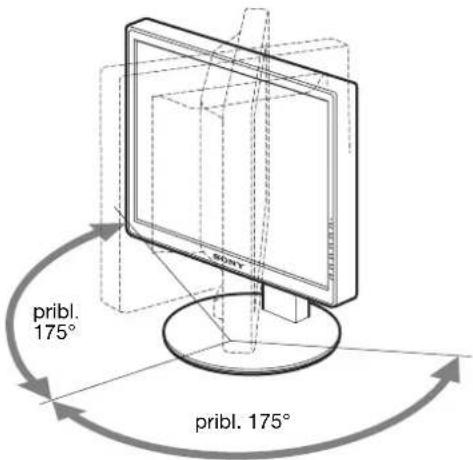
TCO'99 Eco-document (for the black model)

■ Congratulations!
You have just purchased a TCO'99 approved and labelled product! Your choice has provided you with a product developed for professional use. Your purchase has also contributed to reducing the burden on the environment and also to the further development of environmentally adapted electronics products.
■ Why do we have environmentally labelled computers?
In many countries, environmental labelling has become an established method for encouraging the adaptation of goods and services to the environment. The main problem, as far as computers and other electronics equipment are concerned, is that environmentally harmful substances are used both in the products and during their manufacture. Since it is not so far possible to satisfactorily recycle the majority of electronics equipment, most of these potentially damaging substances sooner or later enter nature.
There are also other characteristics of a computer, such as energy consumption levels, that are important from the viewpoints of both the work (internal) and natural (external) environments. Since all methods of electricity generation have a negative effect on the environment (e.g. acidic and climate-influencing emissions, radioactive waste), it is vital to save energy. Electronics equipment in offices is often left running continuously and thereby consumes a lot of energy.
■ What does labelling involve?
This product meets the requirements for the TCO'99 scheme which provides for international and environmental labelling of personal computers. The labelling scheme was developed as a joint effort by the TCO (The Swedish Confederation of Professional Employees), Svenska Naturskyddsforeningen (The Swedish Society for Nature Conservation) and Statens Energimyndighet (The Swedish National Energy Administration).
Approval requirements cover a wide range of issues: environment, ergonomics, usability, emission of electric and magnetic fields, energy consumption and electrical and fire safety.
The environmental demands impose restrictions on the presence and use of heavy metals, brominated and chlorinated flame retardants, CFCs (frecons) and chlorinated solvents, among other things. The product must be prepared for recycling and the manufacturer is obliged to have an environmental policy which must be adhered to in each country where the company implements its operational policy.
The energy requirements include a demand that the computer and/or display, after a certain period of inactivity, shall reduce its power consumption to a lower level in one or more stages. The length of time to reactivate the computer shall be reasonable for the user.
Labelled products must meet strict environmental demands, for example, in respect of the reduction of electric and magnetic fields, physical and visual ergonomics and good usability.
Below you will find a brief summary of the environmental requirements met by this product. The complete environmental criteria document may be ordered from:
TCO Development
SE-114 94 Stockholm, Sweden
Fax: +46 8 782 92 07
Email (Internet): development@tco.se
Current information regarding TCO'99 approved and labelled
products may also be obtained via the Internet, using the address:
http://www.tco-info.com/
■ Environmental requirements
Flame retardants
Flame retardants are present in printed circuit boards, cables, wires, casings and housings. Their purpose is to prevent, or at least to delay the spread of fire. Up to 30% of the plastic in a computer casing can consist of flame retardant substances. Most flame retardants contain bromine or chloride, and those flame retardants are chemically related to another group of environmental toxins, PCBs. Both the flame retardants containing bromine or chloride and the PCBs are suspected of giving rise to severe health effects, including reproductive damage in fish-eating birds and mammals, due to the bio-accumulative ^® processes. Flame retardants have been found in human blood and researchers fear that disturbances in foetus development may occur.
The relevant TCO'99 demand requires that plastic components weighing more than 25 grams must not contain flame retardants with organically bound bromine or chlorine. Flame retardants are allowed in the printed circuit boards since no substitutes are available.
Cadmium\*\*
Cadmium is present in rechargeable batteries and in the colour-generating layers of certain computer displays. Cadmium damages the nervous system and is toxic in high doses. The relevant TCO'99 requirement states that batteries, the colour-generating layers of display screens and the electrical or electronics components must not contain any cadmium.
Mercury\*\*
Mercury is sometimes found in batteries, relays and switches. It damages the nervous system and is toxic in high doses. The relevant TCO'99 requirement states that batteries may not contain any mercury. It also demands that mercury is not present in any of the electrical or electronics components associated with the labelled unit.
CFCs (freons)
The relevant TCO'99 requirement states that neither CFCs nor HCFCs may be used during the manufacture and assembly of the product. CFCs (freons) are sometimes used for washing printed circuit boards. CFCs break down ozone and thereby damage the ozone layer in the stratosphere, causing increased reception on earth of ultraviolet light with e.g. increased risks of skin cancer (malignant melanoma) as a consequence.
Lead\*\*
Lead can be found in picture tubes, display screens, solders and capacitors. Lead damages the nervous system and in higher doses, causes lead poisoning. The relevant TCO'99 requirement permits the inclusion of lead since no replacement has yet been developed.
* Bio-accumulative is defined as substances which accumulate within living organisms.
** Lead, Cadmium and Mercury are heavy metals which are Bio-accumulative.
TCO'03 Eco-document (for the silver model)

■ Congratulations!
The display you have just purchased carries the TCO'03 Displays label. This means that your display is designed, manufactured and tested according to some of the strictest quality and environmental requirements in the world. This makes for a high performance product, designed with the user in focus that also minimizes the impact on our natural environment.
■ Ergonomics
- Good visual ergonomics and image quality in order to improve the working environment for the user and to reduce sight and strain problems. Important parameters are luminance, contrast, resolution, reflectance, colour rendition and image stability.
■ Energy
- Energy-saving mode after a certain time – beneficial both for the user and the environment
- Electrical safety
■ Emissions
• Electromagnetic fields
- Noise emissions
Ecology
- The product must be prepared for recycling and the manufacturer must have a certified environmental management system such as EMAS or ISO 14 001
- Restrictions on
- chlorinated and brominated flame retardants and polymers
- heavy metals such as cadmium, mercury and lead.
The requirements included in this label have been developed by TCO Development in co-operation with scientists, experts, users as well as manufacturers all over the world. Since the end of the 1980s TCO has been
involved in influencing the development of IT equipment in a more user-friendly direction. Our labelling system started with displays in 1992 and is now requested by users and IT-manufacturers all over the world.
For more information, please visit www.tcodevelopment.com
Recycling Information
■ Customer in Europe
The collection and recycling of this product has been planned according to your country's relevant legislation. To ensure that this product will be collected and recycled in way that minimizes the impact on the environment, please do the following:
-
If you purchased this product for private use, contact your municipality or the waste collection system and bring the product to this collection point / have the product be picked up by the waste collection system. Alternatively, your retailer might take back this if you purchase new equivalent equipment; please check with your retailer whether he will take back this product before bringing it. For information on your country's recycling arrangements, please contact the Sony representation in your country (contact details at: www.sony-europe.com). Further details on specific recycling systems can be found at the following addresses:
-
Belgium: www.recupel.be
- Netherlands: www.nvmp.nl (consumer electronics) www.ictmilieu.nl (IT equipment)
- Norway: www.elretur.no
- Sweden: www.el-kretsen.se
-
Switzerland: www.swico.ch
-
If you use this product professionally, check the product's delivery contract for take back / recycling arrangements and follow the procedures described therein. Alternatively, follow the procedures described under point 1.
■ Customer in USA
We Sony as a member of EIA recommends to visit URL below http://www.eiac.org/
■ Customer in Asia
http://www.sony.co.jp/SonyInfo/Environment/recycle/3R.html
TFT LCD Color Computer Display
SDM-S75 *
SDM-S95 **
Owner's Record
The model and serial numbers are located at the rear of the unit. Record these numbers in the spaces provided below. Refer to them whenever you call upon your dealer regarding this product. Model No. ____ Serial No. ____
WARNING
To reduce the risk of fire or electric shock, do not expose this apparatus to rain or moisture.
Dangerously high voltages are present inside the unit. Do not open the cabinet. Refer servicing to qualified personnel only.
FCC Notice
This equipment has been tested and found to comply with the limits for a Class B digital device, pursuant to Part 15 of the FCC Rules. These limits are designed to provide reasonable protection against harmful interference in a residential installation. This equipment generates, uses, and can radiate radio frequency energy and, if not installed and used in accordance with the instructions, may cause harmful interference to radio communications. However, there is no guarantee that interference will not occur in a particular installation. If this equipment does cause harmful interference to radio or television reception, which can be determined by turning the equipment off and on, the user is encouraged to try to correct the interference by one or more of the following measures:
- Reorient or relocate the receiving antenna.
– Increase the separation between the equipment and receiver. - Connect the equipment into an outlet on a circuit different from that to which the receiver is connected.
- Consult the dealer or an experienced radio/TV technician for help. You are cautioned that any changes or modifications not expressly approved in this manual could void your authority to operate this equipment.
IMPORTANTE
If you have any questions about this product, you may call; Sony Customer Information Services Center 1-800-222-7669 or http://www.sony.com/
Declaration of Conformity
Trade Name : SONY
Model : SDM-S75 /S95 * **
Note : means any number or alphanumeric
character.
Responsible Party : Sony Electronics Inc.
Address : 16530 Via Esprillo, San Diego, CA
92127 U.S.A.
Telephone Number: 858-942-2230
This device complies with part 15 of the FCC rules. Operation is subject to the following two conditions: (1) This device may not cause harmful interference, and (2) this device must accept any interference received, including interference that may cause undesired operation.
This notice is applicable for USA/Canada only.
If shipped to USA/Canada, install only a UL LISTED/CSA
LABELLED power supply cord meeting the following specifications:
SPECIFICATIONS
Plug Type Nema-Plug 5-15p
Cord Type SVT or SJT, minimum 3 × 18 AWG
Length Maximum 15 feet
Rating Minimum 7 A, 125 V
NOTICE
As an ENERGY STAR Partner, Sony Corporation has determined that this product meets the ENERGY STAR guidelines for energy efficiency.

This monitor complies with the TCO'99 guidelines.
(for the black model)

This monitor complies with the TCO'03 guidelines.
(for the silver model)
İçindekiler
Uyarılar....4
TCO'99 Eco-document (for the black model) .....i
TCO'03 Eco-document (for the silver model) ..... ii
Uyarılar
natural_image
Line drawing of a computer monitor with a stand and scroll wheel (no text or symbols)natural_image
Line drawing of a computer monitor with cable inserted, no text or symbols presentnatural_image
Diagram showing a computer monitor connected to a wall-mounted cable, with an inset close-up of the cable being inserted (no text or symbols present)Not
2 Bilgisayarı açın.
Dikey frekans: 48–75 Hz
TCO'99 Eco-document (for the black model)

■ Congratulations!
You have just purchased a TCO'99 approved and labelled product! Your choice has provided you with a product developed for professional use. Your purchase has also contributed to reducing the burden on the environment and also to the further development of environmentally adapted electronics products.
■ Why do we have environmentally labelled computers?
In many countries, environmental labelling has become an established method for encouraging the adaptation of goods and services to the environment. The main problem, as far as computers and other electronics equipment are concerned, is that environmentally harmful substances are used both in the products and during their manufacture. Since it is not so far possible to satisfactorily recycle the majority of electronics equipment, most of these potentially damaging substances sooner or later enter nature.
There are also other characteristics of a computer, such as energy consumption levels, that are important from the viewpoints of both the work (internal) and natural (external) environments. Since all methods of electricity generation have a negative effect on the environment (e.g. acidic and climate-influencing emissions, radioactive waste), it is vital to save energy. Electronics equipment in offices is often left running continuously and thereby consumes a lot of energy.
■ What does labelling involve?
This product meets the requirements for the TCO'99 scheme which provides for international and environmental labelling of personal computers. The labelling scheme was developed as a joint effort by the TCO (The Swedish Confederation of Professional Employees), Svenska Naturskyddsforeningen (The Swedish Society for Nature Conservation) and Statens Energimyndighet (The Swedish National Energy Administration).
Approval requirements cover a wide range of issues: environment, ergonomics, usability, emission of electric and magnetic fields, energy consumption and electrical and fire safety.
The environmental demands impose restrictions on the presence and use of heavy metals, brominated and chlorinated flame retardants, CFCs (freons) and chlorinated solvents, among other things. The product must be prepared for recycling and the manufacturer is obliged to have an environmental policy which must be adhered to in each country where the company implements its operational policy.
The energy requirements include a demand that the computer and/or display, after a certain period of inactivity, shall reduce its power consumption to a lower level in one or more stages. The length of time to reactivate the computer shall be reasonable for the user.
Labelled products must meet strict environmental demands, for example, in respect of the reduction of electric and magnetic fields, physical and visual ergonomics and good usability.
Below you will find a brief summary of the environmental requirements met by this product. The complete environmental criteria document may be ordered from:
TCO Development
SE-114 94 Stockholm, Sweden
Fax: +46 8 782 92 07
Email (Internet): development@tco.se
Current information regarding TCO'99 approved and labelled products may also be obtained via the Internet, using the address: http://www.tco-info.com/
■ Environmental requirements
Flame retardants
Flame retardants are present in printed circuit boards, cables, wires, casings and housings. Their purpose is to prevent, or at least to delay the spread of fire. Up to 30% of the plastic in a computer casing can consist of flame retardant substances. Most flame retardants contain bromine or chloride, and those flame retardants are chemically related to another group of environmental toxins, PCBs. Both the flame retardants containing bromine or chloride and the PCBs are suspected of giving rise to severe health effects, including reproductive damage in fish-eating birds and mammals, due to the bio-accumulative * processes. Flame retardants have been found in human blood and researchers fear that disturbances in foetus development may occur.
The relevant TCO'99 demand requires that plastic components weighing more than 25 grams must not contain flame retardants with organically bound bromine or chlorine. Flame retardants are allowed in the printed circuit boards since no substitutes are available.
Cadmium\*\*
Cadmium is present in rechargeable batteries and in the colour-generating layers of certain computer displays. Cadmium damages the nervous system and is toxic in high doses. The relevant TCO'99 requirement states that batteries, the colour-generating layers of display screens and the electrical or electronics components must not contain any cadmium.
Mercury\*\*
Mercury is sometimes found in batteries, relays and switches. It damages the nervous system and is toxic in high doses. The relevant TCO'99 requirement states that batteries may not contain any mercury. It also demands that mercury is not present in any of the electrical or electronics components associated with the labelled unit.
CFCs (freons)
The relevant TCO'99 requirement states that neither CFCs nor HCFCs may be used during the manufacture and assembly of the product. CFCs (freons) are sometimes used for washing printed circuit boards. CFCs break down ozone and thereby damage the ozone layer in the stratosphere, causing increased reception on earth of ultraviolet light with e.g. increased risks of skin cancer (malignant melanoma) as a consequence.
Lead\*\*
Lead can be found in picture tubes, display screens, solders and capacitors. Lead damages the nervous system and in higher doses, causes lead poisoning. The relevant TCO'99 requirement permits the inclusion of lead since no replacement has yet been developed.
* Bio-accumulative is defined as substances which accumulate within living organisms.
** Lead, Cadmium and Mercury are heavy metals which are Bio-accumulative.
TCO'03 Eco-document (for the silver model)

■ Congratulations!
The display you have just purchased carries the TCO'03 Displays label. This means that your display is designed, manufactured and tested according to some of the strictest quality and environmental requirements in the world. This makes for a high performance product, designed with the user in focus that also minimizes the impact on our natural environment.
■ Ergonomics
- Good visual ergonomics and image quality in order to improve the working environment for the user and to reduce sight and strain problems. Important parameters are luminance, contrast, resolution, reflectance, colour rendition and image stability.
■ Energy
- Energy-saving mode after a certain time – beneficial both for the user and the environment
- Electrical safety
■ Emissions
- Electromagnetic fields
- Noise emissions
Ecology
- The product must be prepared for recycling and the manufacturer must have a certified environmental management system such as EMAS or ISO 14 001
- Restrictions on
- chlorinated and brominated flame retardants and polymers
- heavy metals such as cadmium, mercury and lead.
The requirements included in this label have been developed by TCO Development in co-operation with scientists, experts, users as well as manufacturers all over the world. Since the end of the 1980s TCO has been
involved in influencing the development of IT equipment in a more user-friendly direction. Our labelling system started with displays in 1992 and is now requested by users and IT-manufacturers all over the world.
For more information, please visit www.tcodevelopment.com
Recycling Information
■ Customer in Europe
The collection and recycling of this product has been planned according to your country's relevant legislation. To ensure that this product will be collected and recycled in way that minimizes the impact on the environment, please do the following:
-
If you purchased this product for private use, contact your municipality or the waste collection system and bring the product to this collection point / have the product be picked up by the waste collection system. Alternatively, your retailer might take back this if you purchase new equivalent equipment; please check with your retailer whether he will take back this product before bringing it. For information on your country's recycling arrangements, please contact the Sony representation in your country (contact details at: www.sony-europe.com). Further details on specific recycling systems can be found at the following addresses:
-
Belgium: www.recupel.be
- Netherlands: www.nvmp.nl (consumer electronics) www.ictmilieu.nl (IT equipment)
- Norway: www.elretur.no
- Sweden: www.el-kretsen.se
-
Switzerland: www.swico.ch
-
If you use this product professionally, check the product's delivery contract for take back / recycling arrangements and follow the procedures described therein. Alternatively, follow the procedures described under point 1.
■ Customer in USA
We Sony as a member of EIA recommends to visit URL below http://www.eiac.org/
■ Customer in Asia
http://www.sony.co.jp/SonyInfo/Environment/recycle/3R.html
- 目次
- 接続と設定 6
- 使用上のご注意
- 電源について
- 本機にビデオ信号ケーブルをつなぐ
- 調整する。
- メニューを消す。
- TCO'99 Eco-document (for the black model)
- ■Congratulations!
- ■Why do we have environmentally labelled computers?
- ■What does labelling involve?
- TCO Development
- ■Environmental requirements
- Flame retardants
- Cadmium\*\*
- Mercury\*\*
- CFCs (freons)
- Lead\*\*
- TCO'03 Eco-document (for the silver model)
- Ergonomics
- ■Energy
- ■Emissions
- Ecology
- Recycling Information
- ■Customer in Europe
- ■Customer in USA
- ■Customer in Asia
- TFT LCD Color Computer Display
- Owner's Record
- WARNING
- FCC Notice
- IMPORTANTE
- Declaration of Conformity
- NOTICE
- Table of Contents
- Setup....6
- Customizing Your Display ....12
- Technical Features ....16
- Troubleshooting....17
- Specifications.....20
- Precautions
- Warning on power connections
- Installation
- Handling the LCD screen
- Note on the LCD (Liquid Crystal Display)
- Maintenance
- Transportation
- Disposal of the display
- For customers in the United States
- Checking the model name of the display
- Identifying parts and controls
- Setup
- Setup 1: Assemble the stand
- ■When using supplied stand \*
- Note
- Setup 2: Connect the video signal cables
- Notes
- Tilt the display up.
- Connect the video signal cables to the display.
- ■Connect a computer equipped with an HD15 output connector (analog RGB)
- ■Connect a computer equipped with a DVI output connector (digital RGB)
- Setup 3: Connect the audio cords
- Connect the display's audio input jack and audio output jack of the computer or other audio equipment using the audio cord (not supplied).
- Connect the audio cable (not supplied) securely to the display's audio output jack.
- Setup 4: Connect the power cord
- Setup 5: Secure the cords
- ■ Fixed Stand \*
- ■ Height adjustable stand \*
- Setup 6: Turn on the display and computer
- Turn on the computer.
- If no picture appears on your screen
- No need for specific drivers
- Setup 7: Adjust the tilt and height
- To use the display comfortably
- Selecting the input signal (INPUT1/INPUT2)\*
- Customizing Your Display
- Before making adjustments
- Navigating the menu
- Display the main menu.
- Select the menu you want to adjust.
- Adjust the item.
- Close the menu.
- ■ Resetting the adjustments to the default settings
- Menu options list
- PICTURE ADJUST menu\*
- COLOR menu
- SHARPNESS menu
- MODE RESET menu (PICTURE ADJUST menu only)\*
- A SCREEN menu (analog RGB signal only)
- ■ Automatic picture quality adjustment function
- If the automatic picture quality adjustment function of this display did not seem to adjust the picture completely
- If you still need to make further adjustments to the picture quality
- ■ Adjust the picture's sharpness and position manually (PHASE/PITCH/H CENTER/V CENTER)
- For Windows User
- When Auto run operates:
- When Auto run fails to operate:
- For Macintosh user
- MENU POSITION menu
- → INPUT SENSING menu\*
- Items Features
- LANGUAGE menu
- →← RESET menu (reset to the default setting)
- ON MENU LOCK menu
- Technical Features
- Power saving function
- Reducing the power consumption (ECO mode)
- Note\*
- Automatic picture quality adjustment function (analog RGB signal only)
- The factory preset mode
- If input signals do not match one of the factory preset modes
- If you adjust the phase, pitch, and picture position manually
- Troubleshooting
- On-screen messages
- If "OUT OF RANGE" appears on the screen
- If "xxx.x kHz/xxx Hz" is displayed
- If "RESOLUTION > 1280 × 1024" is displayed
- If "NO INPUT SIGNAL" appears on the screen
- If "CABLE DISCONNECTED" appears on the screen
- Trouble symptoms and remedies
- Displaying this display's information
- ■ Congratulations!
- ■ Why do we have environmentally labelled computers?
- ■ What does labelling involve?
- ■ Environmental requirements
- ■ Ergonomics
- ■ Energy
- ■ Emissions
- ■ Customer in Europe
- ■ Customer in USA
- ■ Customer in Asia
- Table des matières
- Précautions
- Remarque
- Refermez le menu.
- Inhalt
- Hinweis
- Precauciones
- Nota
- Indice
- Índice
- Precauções
- Regule o item.
- Feche o menu.
- Содержание
- Примечание
- Installation 1: Montera stativet
- Obs!
- Justera menyalternativet.
- Stäng menyn.
- Inhoudsopgave
- Opmerking
- Sluit het menu.
- 目录
- 安装....6
- 使用前注意事项
- 有关电源连接的警告事项
- ■ 高度可调底座 \*
- 注意
- 3调整项目。
- 4关闭菜单。
- Obsah
- Poznámka
- Tartalomjegyzék
- Megjegyzés
- Lépjen ki a menüböl.
- Spis treści
- Uwaga
- Kazalo
- Namestitev....6
- ■ Po višini nastavljivo stojalo \*
- Opomba
- İçindekiler
- Uyarılar
- Not
- Bilgisayarı açın.
Brand : SONY
Model : SDM-S95FR
Category : Screen