USER MANUAL COMFORT 112 NOISE CANCELLING BLAUPUNKT
Comfort 112 Noise Cancelling
1 031 105 003
Bedienungsanleitung
Operating instructions
Mode d'emploi
natural_image
Black hardcover headphones with brand logo (no visible text or symbols on body)
www.blaupunkt.com
Safety notes and general information....11
Cleaning notes 11
Disposal notes 11
Scope of delivery....12
Product overview 12
Inserting batteries....13
Connecting the headphones....14
Fitting and using the headphones....14
Switching noise cancellation on/off....14
Storing and transporting the headphones....15
Warranty 15
Declaration of conformity....15
Technical data....16
Comfort 112 Noise Cancelling Headphones
The Comfort 112 Noise Cancelling are stereo headphones with active noise cancellation and suitable for use with audio systems in airplanes, stereo systems and portable audio devices. Loudspeakers with a diameter of 40 mm ensure a high-quality sound experience. The active noise cancellation of more than 85 % enables an undisturbed music playback in a noise-filled environment while being comfortable to wear. The noise cancellation effect can manually be adjusted to the noise environment. These headphones can be used as passive headphones if the noise cancellation is switched off and act as pure noise protection when they are used wireless with switched on noise cancellation.
- Read these instructions carefully and completely before using the headphones.
- Using the headphones at a high volume over an extended period of time can result in permanent damage to your hearing. If you perceive auditory noises, reduce the volume or stop using the headphones.
- Ensure that a low volume is set prior to switching on the connected audio device. A sudden high volume can lead to hearing damage.
- Do not use the headphones in situations in which the impaired perception of noises from the environment could lead to an accident, e.g. in traffic or during manual labour.
- Do not expose the headphones to extreme temperatures, direct sunlight, high humidity or mechanical shock. Use the headphones only in clean locations free of sand and dust.
- Store the headphones and the accessories outside the reach of children under the age of 3.
- To avoid damages or deformations, do not drop the headphones and do not place any heavy objects on the headphones.
- Ensure that no liquid enters into the earpiece. It can destroy the electronics and cause a short circuit.
Cleaning notes
- To clean the outside surfaces of the headphones, use only a dry and soft cloth. Do not use any solvents or cleaning agents.
- If necessary, clean the plugs of the audio cable with a soft cloth. Dirty plugs can reduce the sound quality.
Disposal notes

Use the return and collection systems available to dispose of the old device.
Do not discard any batteries in the household trash; instead, return them to the corresponding collection sites.
Scope of delivery
The scope of delivery includes:
1 Comfort 112 Noise Cancelling Headphones
1 transport case
1 headphones audio cable
1 audio adapter (6.3-mm stereo jack plug)
1 airplane adapter (2 x 3.5-mm jack plug)
2 alkaline batteries, size AAA with 1.5 V
1 operating instructions
Product overview
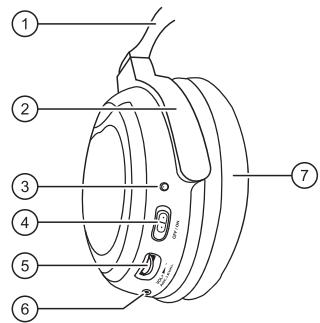
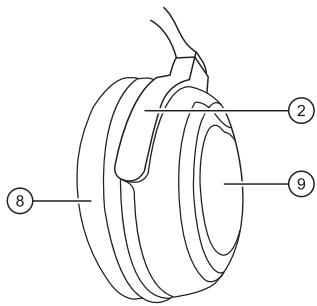
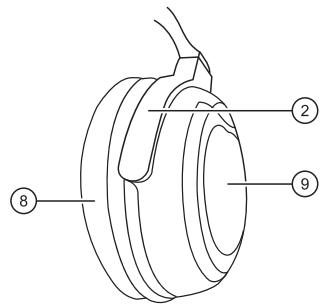
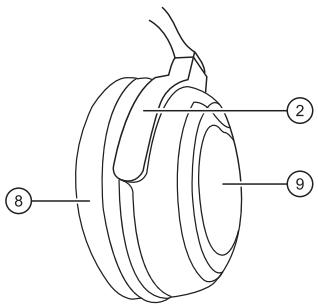
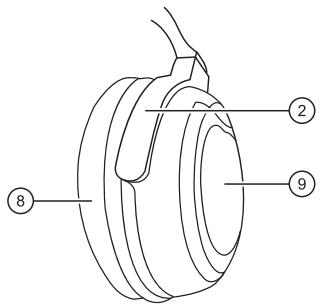
① Adjustable headphone band
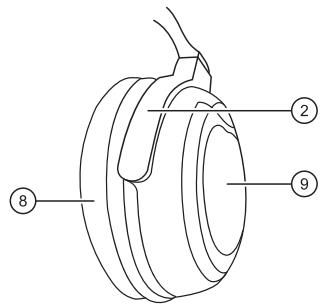
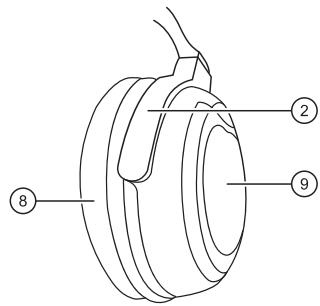
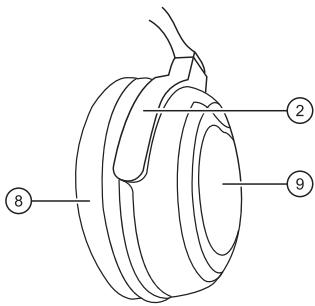
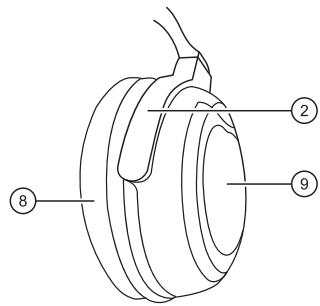
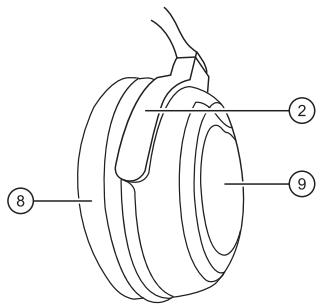
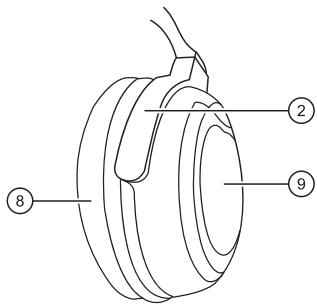
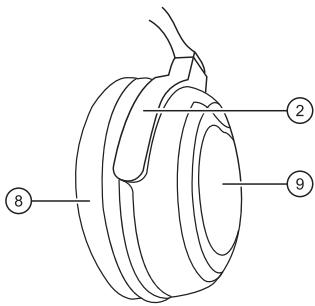
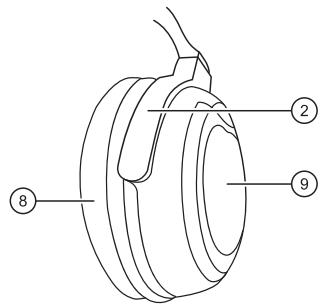
② Rotating earpieces
③ Power-on indicator
Illuminates with switched-on noise cancellation
④ ON/OFF slide switch
Switching noise cancellation on/off
⑤ ANC LEVEL control
Adjusting noise cancellation effect to the noise environment
⑥ Connector for audio cable
⑦ Ear cushion (left)
⑧ Ear cushion (right)
⑨ Battery compartment
Inserting batteries
Without batteries, the headphones can be used like passive headphones. Batteries are required for the noise cancellation function. To replace exhausted batteries, use two AAA alkaline batteries.
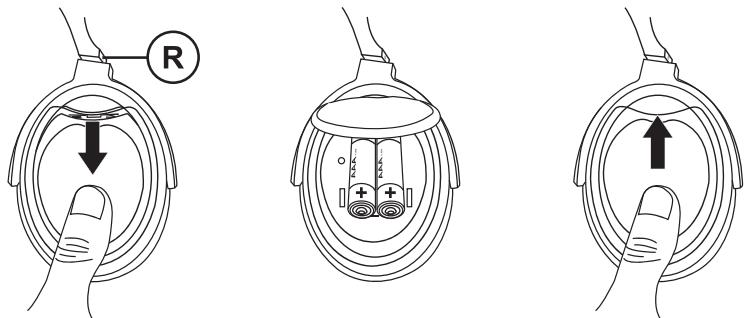
Switch off the noise cancellation before inserting the batteries.
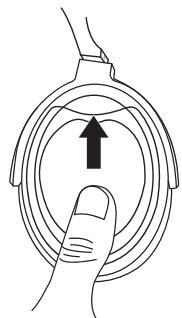
→ Push the cover of the battery compartment on the right earpiece down and fold it up to open the battery compartment.
Insert the batteries. Observe the polarity markings in the battery compartment when you insert the batteries.
Close the cover of the battery compartment and push it up until it audibly engages.
- Take the batteries out of the battery compartment if you do not use the headphones for an extended period of time.
- The batteries must be replaced if the power-on indicator no longer illuminates.
- The power consumption of the headphones is low. When using alkaline batteries, the operating time is approx. 70 hours.
- Batteries may not be deformed, short-circuited or thrown into a fire.
- Batteries may leak if used improperly. This creates an explosion or fire hazard. Remove spent batteries from the battery compartment.
Notes:
Connecting the headphones
The headphones can be connected to portable audio devices, stereo systems and audio systems in airplanes.
Connect the supplied audio cable with the headphone jack of the left earpiece.
Connection to audio devices with 3.5-mm jack socket
Connect the headphones to the headphone jack of the audio source.
Connection to audio devices with 6.3-mm jack socket
Connect the 6.3-mm audio adapter with the audio cable before connecting the headphones with the audio source.
Connection to audio systems with dual socket in airplanes
Plug the airplane adapter onto the audio cable before connecting the headphones to the audio system.
Note:
If you want to use the headphones as pure noise protection, you do not need to connect the headphone cable. To do so, switch on the noise cancellation.
Fitting and using the headphones
The headphones must fit perfectly for high noise cancellation effect, faithful music play-back and comfortable wearing.
Put on the headphones. When putting on the headphones, observe the markings L and R to identify the left and right earpiece.
Adjust the headphone band so that the ear cushions completely enclose the ear and the headphones rests comfortably on the head.
Switch on the audio device and start the playback. Ensure that the volume is set to a low level.
Adjust the volume with the volume control of the audio device.
Switching noise cancellation on/off
Slide the switch on the left earpiece to the position ON.
The noise cancellation switches on and the power-on indicator illuminates in red.
Use the ANC LEVEL control to set a comfortable noise cancellation effect.
Note:
When the batteries become weaker, the noise cancellation does not work properly. Replace the batteries with new ones.
→ Push the switch to the position OFF.
The noise cancellation switches off and the power-on indicator goes out.
Note:
Switch the noise cancellation off after use to save the batteries.
Storing and transporting the headphones
You can store the headphones and the accessories in a space-saving way using the supplied transport case and transport it safely. For this purpose, the headphones are quipped with rotating earpieces.
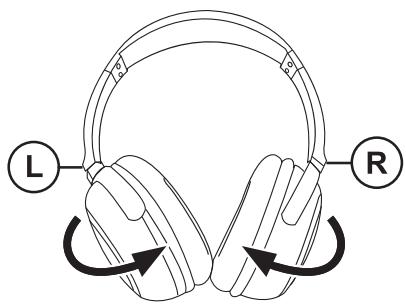
Disconnect the plug of the audio cable from the headphone jack.
Rotate the earpieces by 90° before placing the headphones in the transport case.
Note:
The earpieces can be rotated in one direction only. Rotating in the wrong direction may damage the headphones.
Warranty
We provide a manufacturer's warranty for products bought within the European Union. For devices purchased outside the European Union, the warranty terms issued by our respective responsible domestic agency are valid. The warranty terms can be called up from www.blaupunkt.com.
The Blaupunkt AudioVision GmbH & Co. KG declares that this product complies with the basic requirements and the other relevant regulations of the directive 2004/108/EC. The declaration of conformity can be found on the Internet under www.blaupunkt.com.
Technical data
| Type | dynamic, open, circumaural |
| Driver units | 40 mm |
| Frequency range | 15 Hz – 23,000 Hz |
| Impedance | 32 ohm |
| Sound-pressure level | 102 dB ± 3 dB |
| Active noise cancellation | >16 dB at 150 Hz – 250 Hz |
| Cable plug | 3.5-mm stereo jack plug |
| Audio adapter | 6.3-mm stereo jack plug |
| Airplane adapter | 2 x 3.5-mm jack plug |
| Cable length | approx. 1.5 m |
| Weight without cable and batteries | approx. 205 g |
| Power supply | 2 x 1.5-V alkaline batteries (size AAA) |
| Operating time with alkaline batteries | approx. 70 hours |
Subject to change!
Table des matières
Casque Comfort 112 Noise Cancelling....17
natural_image
Line drawing of a pair of headphones with labeled buttons L and R, showing head rotation arrows (no text or symbols beyond labels)
Colocar as pilhas....34
Ligar os auscultadores....35
natural_image
Line drawing of a pair of headphones with labeled buttons L and R, showing head rotation arrows (no text or symbols beyond labels)
natural_image
Line drawing of a pair of headphones with labeled buttons L and R, showing head rotation arrows (no text or symbols beyond labels)
natural_image
Line drawing of a pair of headphones with labeled buttons L and R, showing head rotation arrows (no text or symbols beyond labels)
natural_image
Line drawing of a mechanical device with a central component and two circular ports (no text or symbols)
natural_image
Illustration of a finger pressing down on a circular component with an upward arrow (no text or symbols)