Reel GM60 - Measurement Ermenrich - Free user manual and instructions
Find the device manual for free Reel GM60 Ermenrich in PDF.


| Product Type | Laser Distance Meter |
| Brand | Ermenrich |
| Model | Reel GM60 |
| Measuring Range | 0.05–60 m |
| Measuring Accuracy | ±2.0 mm |
| Angle Measurement Range | ±50° |
| Units of Measurement | m, ft, in, " |
| Laser Class | Class II, 620–690 nm, <1 mW |
| Auto-Off Laser / Device | 30 seconds / 180 seconds |
| History Records | 100 groups |
| Battery Life | >5,000 measurements |
| Power Supply | 2 × AAA batteries |
| Operating Temperature | 0°C to +40°C (32°F to 104°F) |
| Dimensions | 117 × 53 × 27 mm (4.6 × 2 × 1 in) |
| Weight | 94 g (0.2 lb) |
| Measurement Modes | Single distance, continuous, area, volume, Pythagorean (2/3 additional measurements, with angle), addition/subtraction |
| Reference Point | Bottom (default) or top (toggle with button 10) |
| Care & Maintenance | Store in dry, cool place; protect from impact; clean with soft cloth |
| Safety Class | Class II laser; do not look directly; keep away from children |
| Warranty | Levenhuk International Lifetime Warranty (lifetime for product, 6 months for accessories) |
Frequently Asked Questions - Reel GM60 Ermenrich
User questions about Reel GM60 Ermenrich
0 question about this device. Answer the ones you know or ask your own.
Ask a new question about this device
Download the instructions for your Measurement in PDF format for free! Find your manual Reel GM60 - Ermenrich and take your electronic device back in hand. On this page are published all the documents necessary for the use of your device. Reel GM60 by Ermenrich.
USER MANUAL Reel GM60 Ermenrich
Open the battery compartment cover and insert 2 AAA batteries according to the correct polarity. Close the cover.
Using
Press (4) to turn the device on. The laser beam will switch on automatically and then off after 30 seconds. To switch it off manually, press (7). Aim the laser beam at the target. Press (4) to take a measurement.
Press (10) for 3 seconds to turn the buzzer on/off.
Press (7) for 3 seconds to turn the device off.
Reference point
The default reference point is the bottom end of the device. Press (10) for 3 seconds to change the measurement point from the bottom to the top of the device (Fig. A).
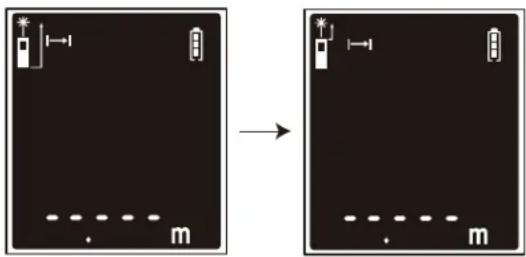
Figure A
Units of measurement
Press (5) for 3 seconds to change the unit of measurement.
Units of measurement options
| Distance Area Volume Angle | ||||
| 1 | 0.000m 0.000m | ^2 | 0.000m ^3 | 000'00'' |
| 2 | 0.00ft 0.00ft | ^2 | 0.00ft ^3 | |
| 3 | 0.0in 0.0in | ^2 | 0.0in ^3 |
Mode selection
Press (8) to change the measurement mode one by one.
The setting order: Single distance measurement mode > Area measurement mode > Volume measurement mode > Calculations with 2 additional measurements (Pythagorean theorem) > Calculations with angle measuring (Pythagorean theorem) > Calculations with angle measuring and 2 additional measurements (Pythagorean theorem) > Calculations with 3 additional measurements (Pythagorean theorem), method 1 – legs summation > Calculations with 3 additional measurements (Pythagorean theorem), method 2 – legs subtraction > History records.
Display information
Single distance measurement mode
Area measurement mode
Volume measurement mode
Calculations with 2 additional measurements (Pythagorean theorem)
| 38.8° | |
Calculations with angle measuring and 2 additional measurements (Pythagorean theorem)
Calculations with 3 additional measurements (Pythagorean theorem), method 1 – legs summation
Calculations with 3 additional measurements (Pythagorean theorem), method 2 – legs subtraction
History records
Single distance measurement
In Single distance measurement mode, aim the laser beam at the target and press (4). The value will be displayed on the screen. The angle will be calculated and displayed on the screen at the same time.
Continuous measurement
In Single distance measurement mode, press (4) for 3 seconds. The device will keep taking measurements one after another. MAX, MIN, and the last measured values (Fig. B) will be displayed on the screen. The angle will be calculated and displayed on the screen at the same time.
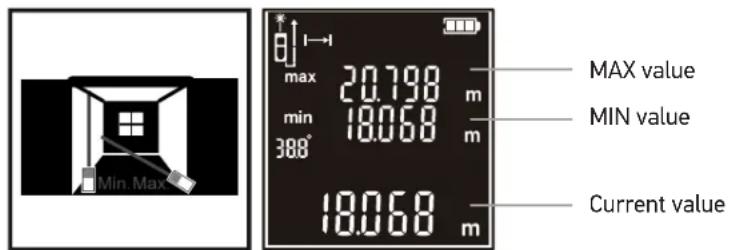
Figure B
Area measurement
Select the Area measurement mode. Aim the laser beam at the target and press (4) to measure 2 sides of the target. The area will be calculated automatically (Fig. C).
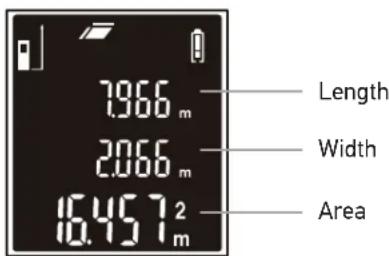
Figure C
Volume measurement
Select the Volume measurement mode. Aim the laser at the target and press (4) to measure the length, width, and height of the three-dimensional target. The volume will be calculated automatically (Fig. D).
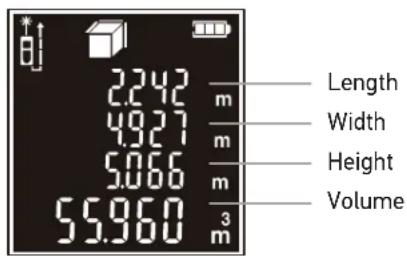
Figure D
Calculations with 2 additional measurements (Pythagorean theorem)
Select the Calculations with 2 additional measurements (Pythagorean theorem) mode. Aim the laser at the target and press (4) to measure the lines A and B (Fig. E). Line C will be calculated automatically.
Calculations with angle measuring (Pythagorean theorem)
Select the Calculations with angle measuring (Pythagorean theorem) mode. Aim the laser at the target and press (4) to measure the line A (Fig. E). Lines B and C will be calculated automatically. The angle will be calculated and displayed on the screen at the same time.
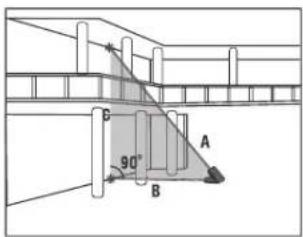
Figure E
Calculations with angle measuring and 2 additional measurements (Pythagorean theorem)
Select the Calculations with angle measuring and 2 additional measurements (Pythagorean theorem) mode. Aim the laser at the target and press (4) to measure lines A and C one by one (Fig. F). Line D will be calculated automatically. The angle will be calculated and displayed on the screen at the same time.
Calculations with 3 additional measurements (Pythagorean theorem), method 1 – legs summation
Select the Calculations with 3 additional measurements (Pythagorean theorem), method 1 – legs summation mode. Aim the laser at the target and press (4) to measure the distance D by making 3 additional measurements. Make measurements of lines A, B and C one by one (Fig. F). Length of line D will appear in the main line on the display.
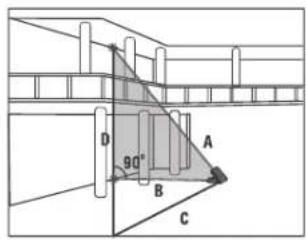
Figure F
Calculations with 3 additional measurements (Pythagorean theorem), method 2 – legs subtraction
Select the Calculations with 3 additional measurements (Pythagorean theorem), method 2 – legs subtraction mode. Aim the laser at the target and press (4) to measure the distance D by making 3 additional measurements. Make measurements of lines A, B and C one by one (Fig. G). Length of line D will appear in the main line on the display.
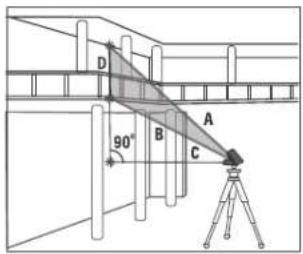
Figure G
Addition and Subtraction
Aim the laser at the target and press (4). Press (9), then press (4) again to plus another value. The summation will be calculated automatically. The subtraction works accordingly with the minus button (6).
Note! The addition and subtraction functions are available in Single, Area, and Volume measurement modes.
History records
Press (9)/(6) to view the recorded values. Press (7) to delete the recorded values one by one.
Specifications
GM60 GM100
Measuring range 0.05–60m 0.05–100m
Measuring accuracy 2.0mm
Angle measurement range ±50°
Units of measurement m, ft, in, "
Laser class class II, 620–690nm, <1mW
Laser beam /device auto-off 30 / 180 seconds
History records 100 groups
Battery life > 5,000 measurements
Power supply 2 AAA batteries
Operating temperature range 0... +40°C (32... 104°F)
Dimensions 117x53x27mm / 4.6x2x1in
Weight 94g / 0.2lb
The manufacturer reserves the right to make changes to the product range and specifications without prior notice.
Care and maintenance
Please carefully read the safety instructions and user manual before using this product. Otherwise, it may result in hazardous laser radiation and electric shock. Keep away from children.
This is a class II laser product. Please DO NOT look directly into the beam with unprotected eyes or through an optical device at any time and never direct it toward other people. Do not remove any safety labels. Do not aim the device directly at the sun. Do not try to disassemble the device on your own for any reason. For repairs and cleaning of any kind, please contact your local specialized service center. Protect the device from sudden impact and excessive mechanical force. Do not use the product in explosive environment or close to flammable materials. Store the device in a dry cool place. Only use accessories and spare parts for this device that comply with the technical specifications. Never attempt to operate a damaged device or a device with damaged electrical parts! If a part of the device or battery is swallowed, seek medical attention immediately.
Battery safety instructions
Always purchase the correct size and grade of battery most suitable for the intended use. Always replace the whole set of batteries at one time; taking care not to mix old and new ones, or batteries of different types. Clean the battery contacts and also those of the device prior to battery installation. Make sure the batteries are installed correctly with regard to polarity (+ and -). Remove batteries from equipment that is not to be used for an extended period of time. Remove used batteries promptly. Never short-circuit batteries as this may lead to high temperatures, leakage, or explosion. Never heat batteries in order to revive them. Do not disassemble batteries. Remember to switch off devices after use. Keep batteries out of the reach of children, to avoid risk of ingestion, suffocation, or poisoning. Utilize used batteries as prescribed by your country's laws.
Levenhuk International Lifetime Warranty
All Levenhuk telescopes, microscopes, binoculars, and other optical products, except for their accessories, carry a lifetime warranty against defects in materials and workmanship. A lifetime warranty is a guarantee on the lifetime of the product on the market. All Levenhuk accessories are warranted to be free of defects in materials and workmanship for six months from the purchase date. The warranty entitles you to the free repair or replacement of the Levenhuk product in any country where a Levenhuk office is located if all the warranty conditions are met.
For further details, please visit: www.levenhuk.com/warranty
If warranty problems arise, or if you need assistance in using your product, contact the local Levenhuk branch.
BG Лазерен измерител Ermenrich Reel GM60/GM100
Да започнем
Фигура А
Мерни единици
Obr. A
Jednotky měření
Abbildung A
Maßeinheiten
Figura A
Unidades de medida
A ábra
Mértékegységek
Figura A
Rysunek A
Jednostki miar
Figura A
Unidades de medida
Рисунок А
Единицы измерения
Şekil A
Ölçü birimleri
- Using
- Reference point
- Units of measurement
- Mode selection
- Single distance measurement
- Continuous measurement
- Area measurement
- Volume measurement
- Calculations with 2 additional measurements (Pythagorean theorem)
- Calculations with angle measuring (Pythagorean theorem)
- Calculations with angle measuring and 2 additional measurements (Pythagorean theorem)
- Calculations with 3 additional measurements (Pythagorean theorem), method 1 – legs summation
- Calculations with 3 additional measurements (Pythagorean theorem), method 2 – legs subtraction
- Addition and Subtraction
- History records
- Specifications
- GM60 GM100
- Care and maintenance
- Battery safety instructions
- Levenhuk International Lifetime Warranty
- BG Лазерен измерител Ermenrich Reel GM60/GM100
- Да започнем
- Мерни единици
- Jednotky měření
- Maßeinheiten
- Unidades de medida
- Mértékegységek
- Jednostki miar
- Единицы измерения
- Ölçü birimleri
Brand : Ermenrich
Model : Reel GM60
Category : Measurement