
Reference 7005A - Audio Receiver INFINITY - Free user manual and instructions
Find the device manual for free Reference 7005A INFINITY in PDF.


| Product Type | Audio Receiver (amplifier) |
| Brand | Infinity |
| Model | Reference 7005A |
| Dimensions (W x H x D) | 360 mm x 56 mm x 180 mm |
| Weight | 4.02 kg |
| Power Supply | 9-16 V DC, 30 A x 3 fuse |
| Output Power (4 Ω) | 4 x 50 W RMS + 1 x 320 W RMS |
| Output Power (2 Ω) | 4 x 75 W RMS + 1 x 500 W RMS |
| Bridged Power (4 Ω) | 2 x 150 W RMS |
| Frequency Response | 10 - 40 kHz (front/rear), 10 - 320 Hz (subwoofer) |
| Crossover Filter | High-pass/Low-pass 32-320 Hz, 12 dB/octave |
| Input Sensitivity (line) | 200 mV - 2.0 V RMS |
| Input Sensitivity (high level) | 2.0 V - 20 V RMS |
| Signal-to-Noise Ratio | 80 dB |
| Total Harmonic Distortion | < 1% |
| Main Functions | Gain adjustment, variable crossover, bass boost, bass remote |
| Safety | Overheat, short-circuit, undervoltage and overvoltage protection |
| Maintenance and Cleaning | Clean with a dry, soft cloth |
| Spare Parts and Reparability | Replaceable fuse, standard wiring |
Frequently Asked Questions - Reference 7005A INFINITY
User questions about Reference 7005A INFINITY
0 question about this device. Answer the ones you know or ask your own.
Ask a new question about this device
Download the instructions for your Audio Receiver in PDF format for free! Find your manual Reference 7005A - INFINITY and take your electronic device back in hand. On this page are published all the documents necessary for the use of your device. Reference 7005A by INFINITY.
USER MANUAL Reference 7005A INFINITY
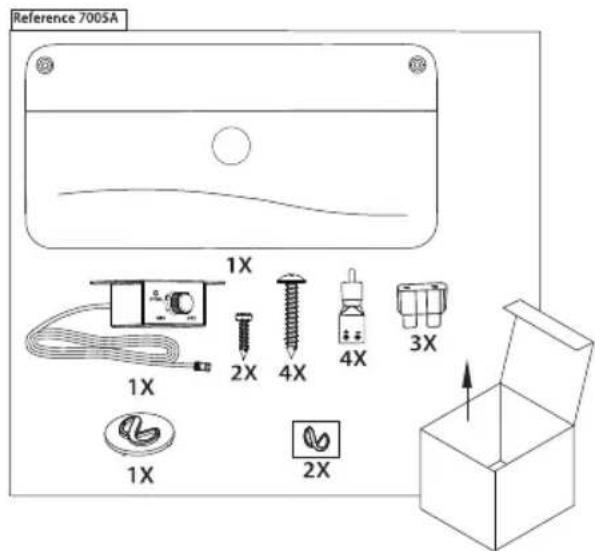
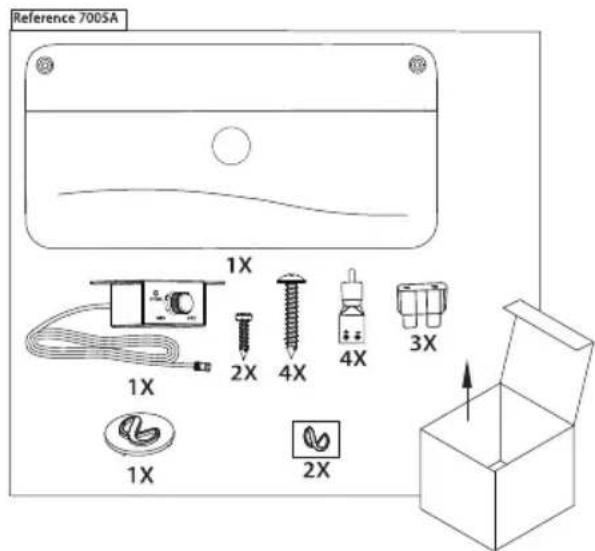
natural_image
Simple line drawing of a rectangular container with a circular logo and curved base (no text or symbols)
Owner's Manual EN
natural_image
Diagram of a device rear panel with labeled ports and a circular icon (no text or symbols)EN
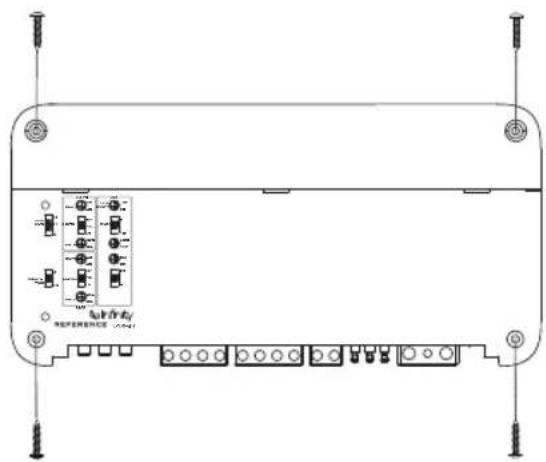
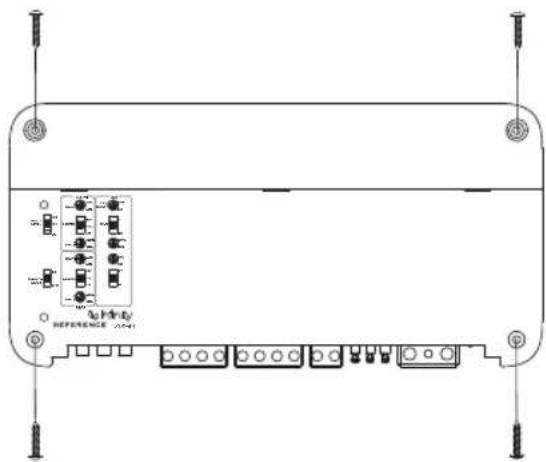
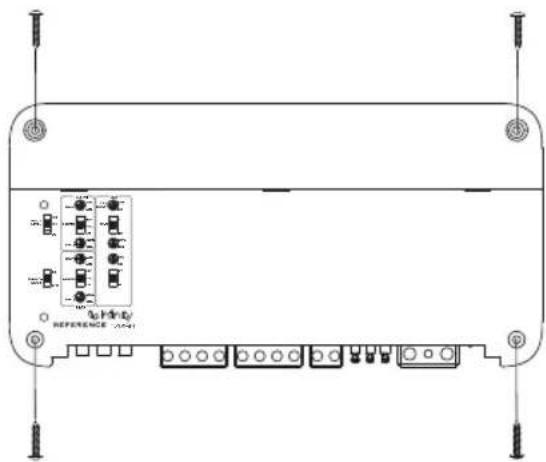
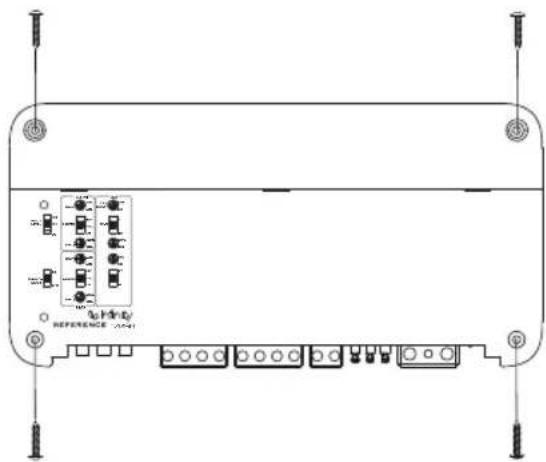
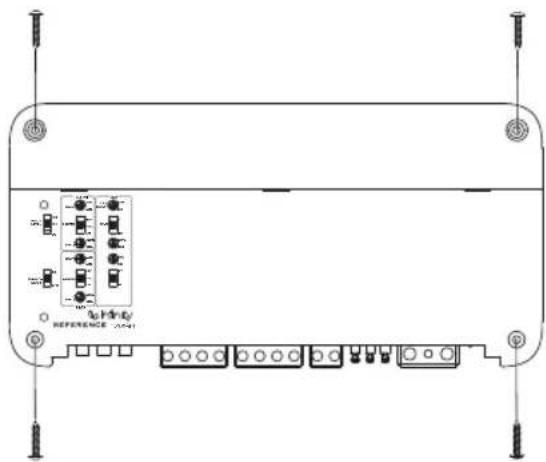
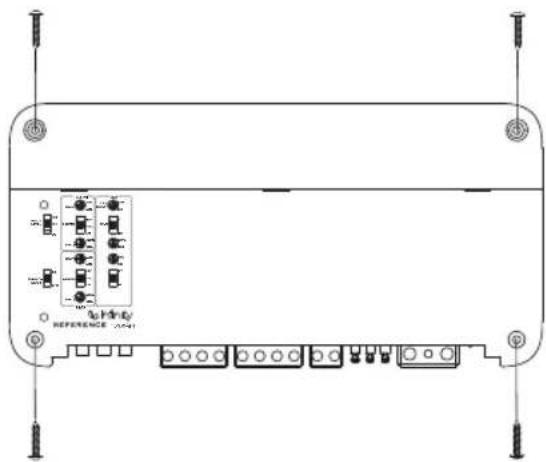
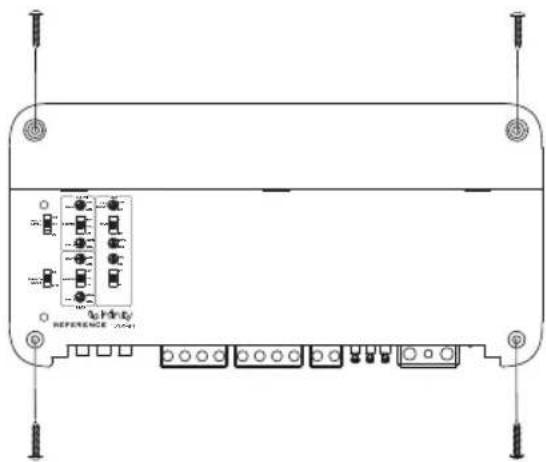
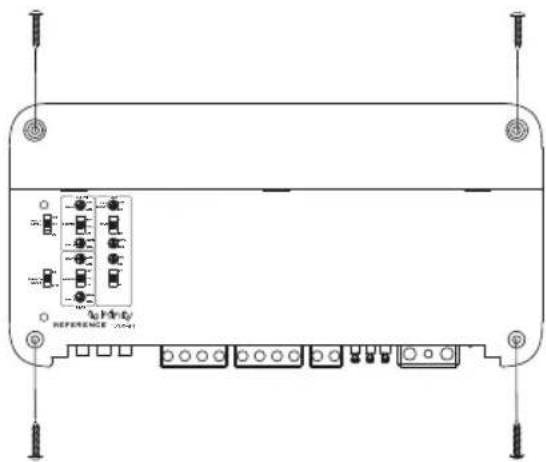
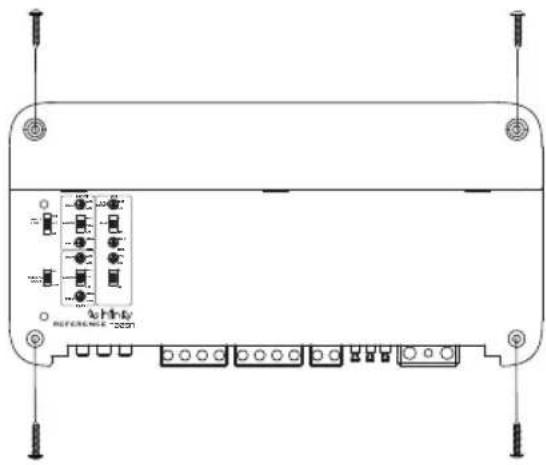
MOUNTING THE AMP
natural_image
Technical line drawing of a rectangular electronic device with multiple ports and connectors (no text or symbols)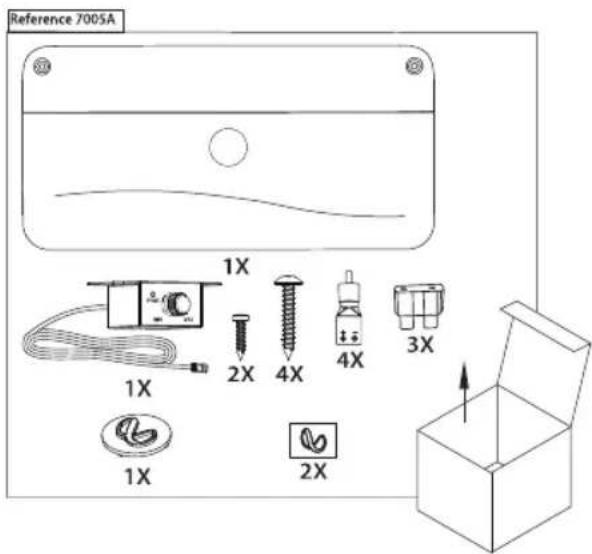
Note: It is recommended that you make all wire connections before mounting the amplifier.
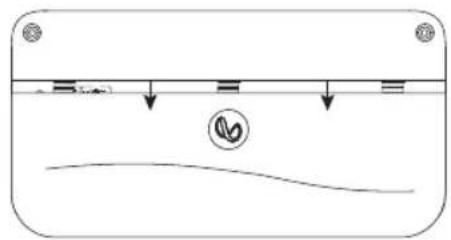
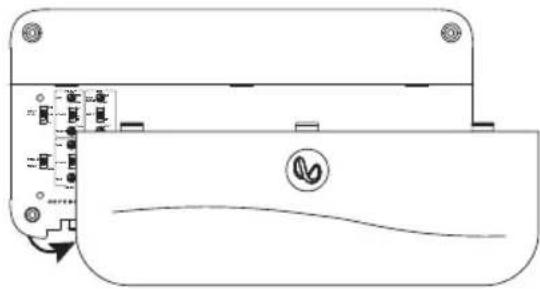
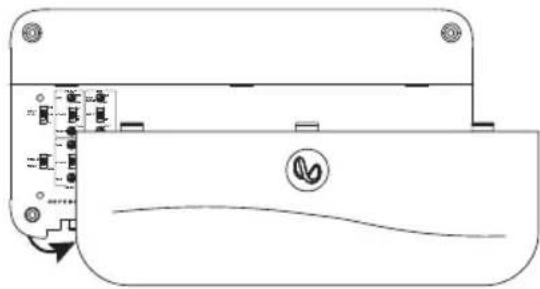
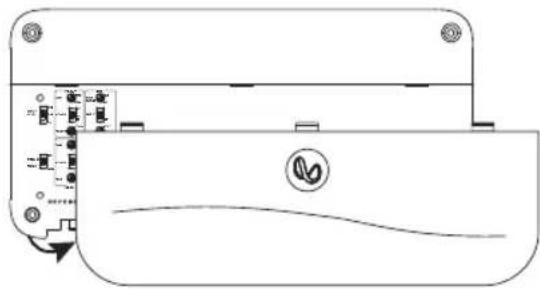
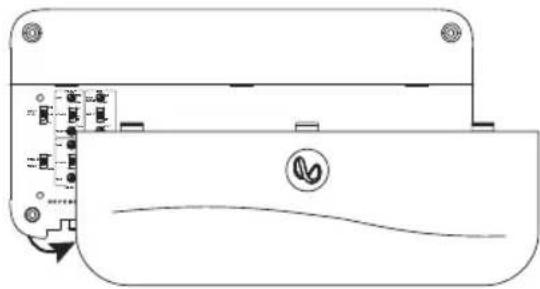
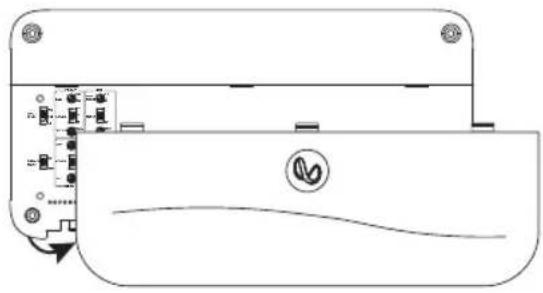
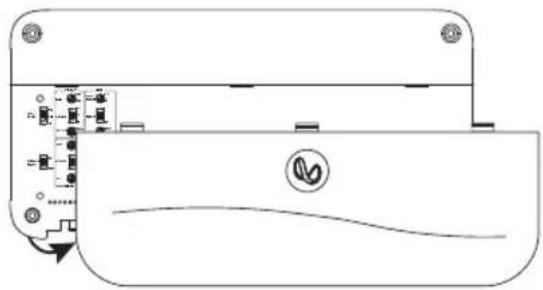
ACCESSING CONNECTORS/ CONTROL PANEL
- Slide the panel cover down
natural_image
Simple line drawing of a container with liquid and a curved base, no text or symbols presentIMPORTANT: Disconnect the vehicle's negative (−) battery terminal before beginning the installation.
• Always wear protective eyewear when using tools.
- Choose a safe mounting location, away from moisture. Check clearances on both sides of a planned mounting surface. Be sure that screws or wires will not puncture brake lines, fuel lines, or wiring harnesses and that wire routing will not interfere with the safe vehicle operation. Use caution when drilling or cutting in the mounting area.
- Choose a location that provides enough air circulation.
- Do not mount the amplifier with the heat sink facing downward, as this interferes with cooling.
- Mount the amplifier so that it will not be damaged by the feet of backseat passengers or shifting cargo in the trunk.
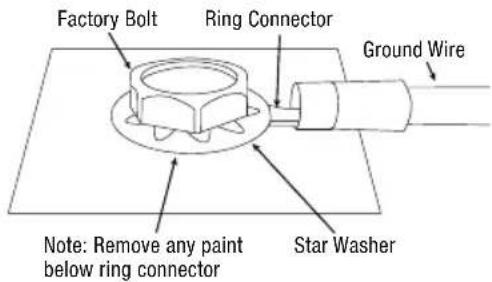
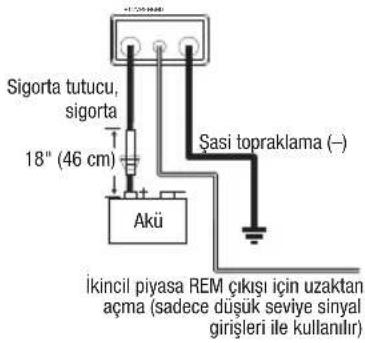
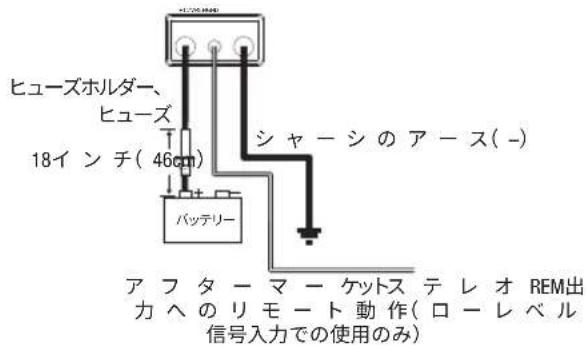
WIRING FOR POWER AND GROUND
At amplifier:
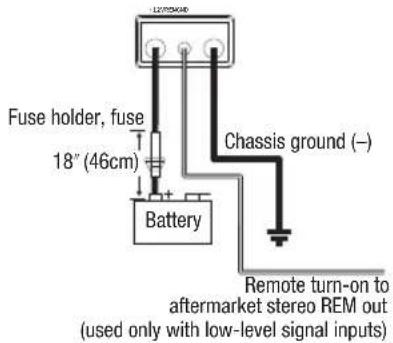
At ground location:
WIRING FOR INPUT SIGNAL
Reference 3004A low-level signals
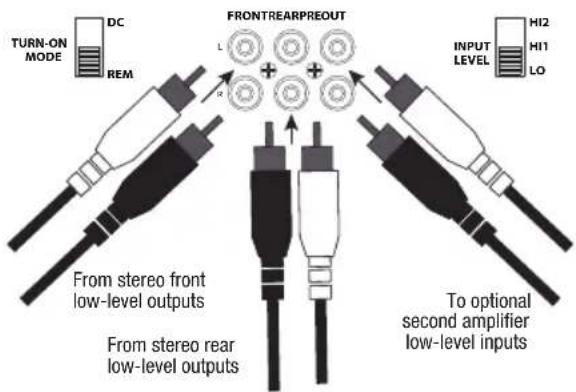
Note: when using low-level signals and remote turn-on lead, set the "TURN ON MODE" and the " " REM INPUT LEVEL switch to "LO
Reference 7005A low-level signals
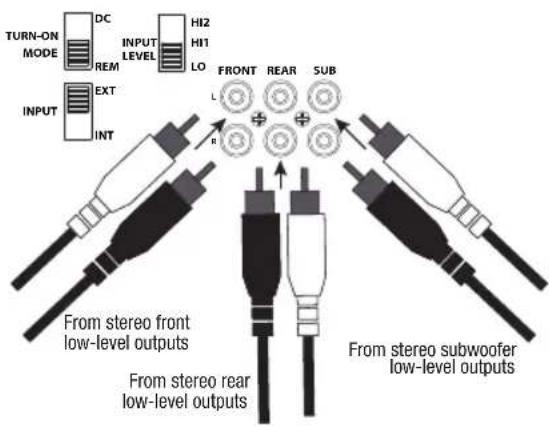
Note: when using low-level signals and remote turn-on lead with the Reference 7005A, set the "TURN-ON-MODE REM" and the SUB "INSMICH to " " and EKG" " INPUT LEVEL switch to "LO
Reference 3004A high-level signals
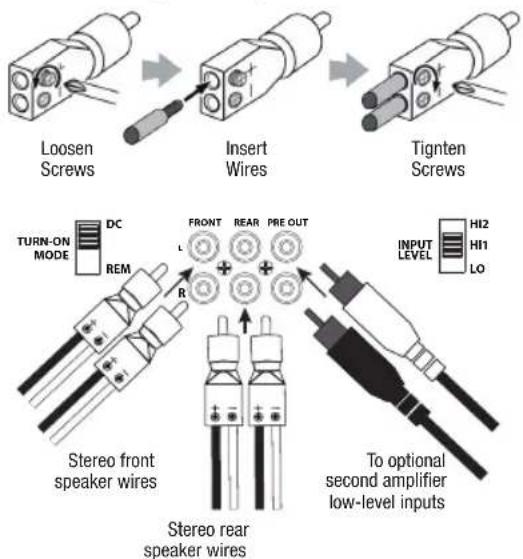
Note: when using high-level signals, set the "TURN-ON MODE switch to "DC" and the "INPUT LEVEL" switch to "HI1". If no sound plays, change the "INPUT LEVEL". HI2
Reference 7005A high-level input signals
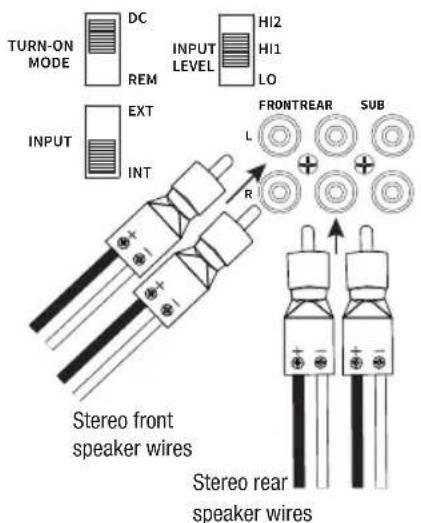
Note: when using high-level signals with the Reference 7005A, set the "TURN-ON-MODE" the SUB " " Switch INPUT to "INT", and the "INPUT LEVEL" switch to "HI1". If no sound plays, change the "INPUT LEVEL". HI2
WIRING FOR OUTPUT
Reference 3004A 4-channel output (4ohm/2ohm)
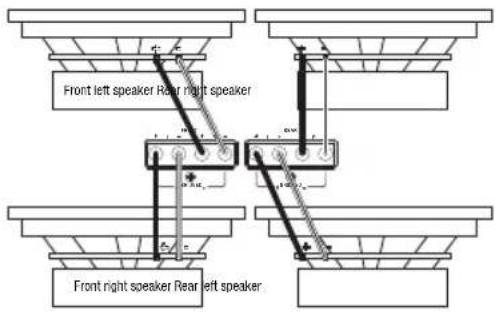
Reference 3004A 3-channel output (Font: 4ohm/2ohm; Rear:4ohm)
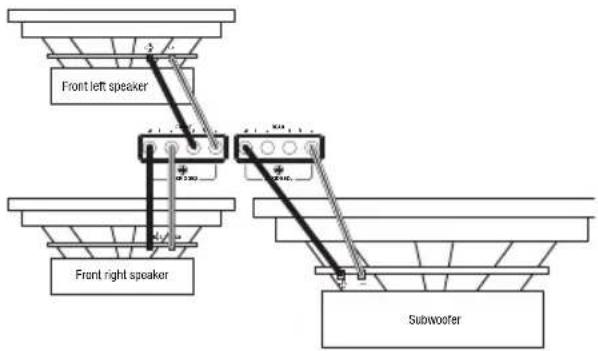
Reference 3004A 2-channel output (4ohm)
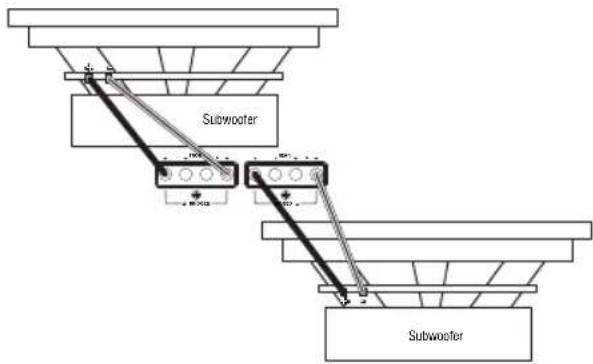
flowchart
graph TD
    A["Terminal Block"] --> B["Subwoofer"]
    B --> C["Terminal Block"]
    C --> D["Subwoofer"]
    style A fill:#f9f,stroke:#333
    style D fill:#bbf,stroke:#333
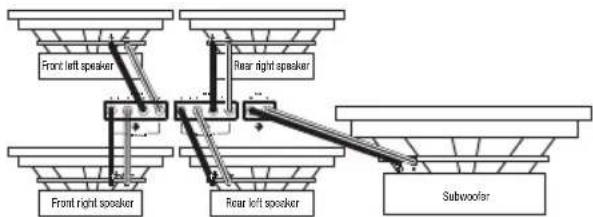
Reference 7005A 5-channel output (4ohm/2ohm)
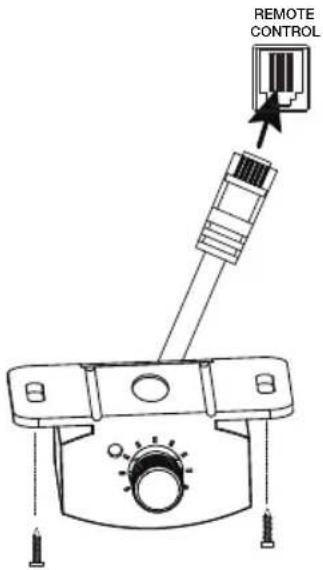
CONNECTING THE REMOTE BASS CONTROLLER (REFERENCE 7005A ONLY)
SETTING GAIN, CROSSOVERS, AND BASS BOOST
Setting the gain
- Start with GAIN control set to minimum, and the crossover control rotated midway.
- For the front and rear channels, choose music you're familiar with. For the subwoofer channel on the Reference 7005A, choose music with substantial bass content.
- Turn the volume control on your receiver to 34 of its total output.
- Adjust the GAIN control clockwise, listening carefully to the bass output. If you hear distortion, turn the GAIN control counterclockwise to decrease the gain.
Selecting the crossover mode
On the front and rear channels, you can select your preferred crossover mode.
Choose HPF to allow only frequencies above a certain point to reach your speakers. Recommended if you're using a subwoofer in your system, as it keeps low base from your full-range speakers.
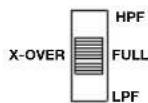
Choose LPF to allow only frequencies below a certain point to reach your speakers. Recommended if you're bridging the front or rear channels to power a subwoofer.
Choose FULL to allow all frequencies to reach your speakers. Recommended if you're not using a subwoofer in your system.
Note: The crossover mode for the subwoofer channel of the Reference 7005A is low-pass only.
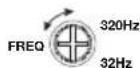
Selecting the crossover frequency
Choose the crossover point to suit listening preferences. Turn the dials to the left to lower the crossover point and to the right to raise the crossover point. Exact crossover settings for coaxial speakers and subwoofers depend on your listening preferences.
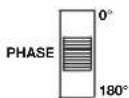
Selecting the subwoofer phase (Reference 7005A only)
Switch the PHASE back and forth to determine which setting provides the most clean bass output.
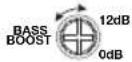
Selecting the bass boost (Reference 7005A only)
Adjust the BASS-BOOST control clockwise or counterclockwise to suit your taste.
SPECIFICATIONS
| Reference 3004A | Reference 7005A | |
| Power output @ 4 ohms | 75 watts RMS x 4 | 50 watts RMS x 4, 320 watts x 1 |
| Power output @ 2 ohms | 100 watts RMS x 4 | 75 watts RMS x 4, 500 watts x 1 |
| Power output in bridged mode | 200 watts RMS x 2 at 4 ohms | 150 watts RMS x 2 at 4 ohms |
| Frequency response | 10-40 K Hz | 10-40 K Hz / 10-320 Hz |
| Crossover frequencies | 32-320 Hz variable, 12 dB/ octave | 32-320 Hz variable high- and low-pass (front and rear); 32-320 Hz low-pass (subwoofer); 12 dB/ octave |
| Line-level input sensitivity | 200 mVrms - 2.0 Vrms | 200 mVrms - 2.0 Vrms |
| High-level input sensitivity | 2.0 Vrms - 20 Vrms | 2.0 Vrms - 20 Vrms |
| Signal-to-noise ratio >80 dB >80 dB | ||
| THD+N @ rated power | <1% <1% | |
| Fuse rating 30 x 2 30 x 3 | ||
| Operating voltage 9~16 V 9~16 V | ||
| Dimensions (W x H x D) | 12-5/8" x 2-3/16" x 7-1/8" (320 mm x 55.5 mm x 180 mm) | 14-3/16" x 2-3/16" x 7-1/8" (360 mm x 56 mm x 180 mm) |
| Weight 3.15 kg 4.02 kg | ||
| Recommended wire gauge | 8 | 4 |
TROUBLESHOOTING
No audio and POWER INDICATOR is off.
- No voltage at BATT+ and/or REM terminals, or bad or no ground connection. Check voltages at amplifier terminals with VOM.
No audio and PROTECT INDICATOR flashes every 4 seconds.
- DC voltage on amplifier output. Amplifier may need service; see enclosed warranty card for service information.
No audio and PROTECT and POWER INDICATORS flash.
- Voltage less than 9V on BATT+ connection. Check vehicle charging system.
No audio and PROTECT INDICATOR is on.
- Amplifier is overheated. Make sure amplifier cooling is not blocked at mounting location. Or, there may be voltage greater than 16V (or less than 8.5V) on BATT+ connection. Check vehicle charging system.
Amplifier fuse keeps blowing.
- The wiring is connected incorrectly or there is a short circuit. Check wiring connections.
Distorted audio.
- Gain is not set properly. Check setting. Check wires for shorts or grounds. Amplifier or source unit may be defective.
Distorted audio and PROTECT INDICATOR flashes.
- Short circuit in speaker or wire. Remove speaker leads one at a time to locate shorted speaker or wire, and repair.
Music lacks dynamics or "punch".
- Speakers are not connected properly. Check speaker connections for proper polarity.
Engine noise—whining or clicking—in system when the engine is on.
- Amplifier is picking up alternator noise. First, check ground connection on the amplifier – a loose or improper ground is one of the main causes for noise. Turn down gain. Move RCA audio cables away from power wires. Installing an alternator noise filter on power line between battery and alternator might also be necessary.
HVAD ER DER I AESKEN
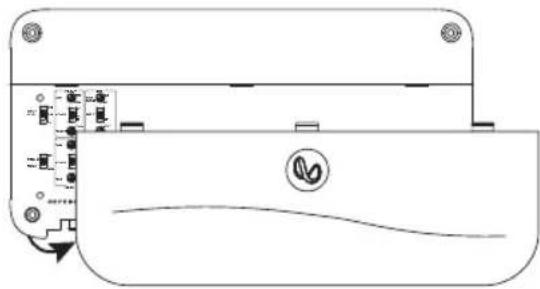
- Fjern paneldækslet
natural_image
Pure technical diagram of a device casing with internal components and no visible text or symbolsDA
MONTERING AF FORSTÆRKEREN
natural_image
Front view of a rectangular electronic device with multiple ports and connectors, no visible text or symbols
natural_image
Simple line drawing of a container with liquid and a curved base, no text or symbols presentnatural_image
Simple line drawing of a container with liquid and a curved base, no text or symbols present- Abdeckung entfernen
natural_image
Pure technical diagram of a device casing with internal components and no visible text or symbolsnatural_image
Front view of a rectangular electronic device with multiple ports and connectors (no visible text or symbols)natural_image
Diagram of a device rear panel with internal components and a curved base line (no text or symbols)MONTAJE DEL AMPLIFICADOR
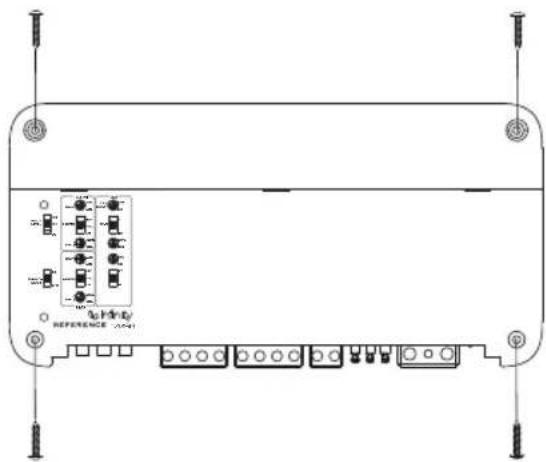
natural_image
Front view of a rectangular electronic device with multiple ports and connectors, no visible text or symbolsnatural_image
Simple line drawing of a container with liquid and a curved base, no text or symbols presentnatural_image
Pure technical diagram of a device casing with internal components and a curved base line (no text or symbols)VAHVISTIMEN ASENTAMINEN
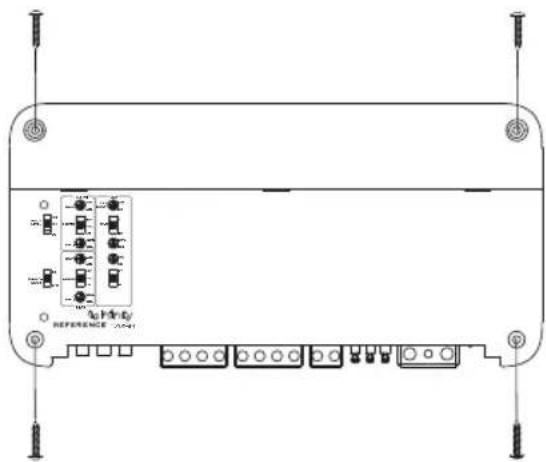
natural_image
Front view of a rectangular electronic device with multiple ports and connectors, no visible text or symbolsnatural_image
Simple line drawing of a container with liquid and a curved base, no text or symbols presentJOHDOTUS, VIRTA JA MAA
Vahvistimessa:
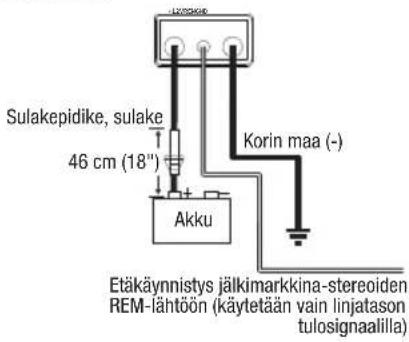
natural_image
Simple line drawing of a container with liquid and a curved base, no text or symbols present- Retirez le couvercle.
natural_image
Pure technical diagram of a device casing with internal components and no visible text or symbolsMONTAGE DE L'AMPLIFICATEUR
natural_image
Front view of a rectangular electronic device with multiple ports and connectors (no visible text or symbols)natural_image
Simple line drawing of a container with liquid and a leaf symbol, no text or labels presentnatural_image
Pure technical diagram of a device casing with internal components and no visible text or symbolsMONTAGGIO DELL'AMPLIFICATORE
natural_image
Front view of a rectangular electronic device with multiple ports and connectors (no visible text or symbols)natural_image
Simple line drawing of a container with liquid and a curved base, no text or symbols present- Verwijder het kapje
natural_image
Pure technical diagram of a device casing with internal components and no visible text or symbolsDE VERSTERKER MONTEREN
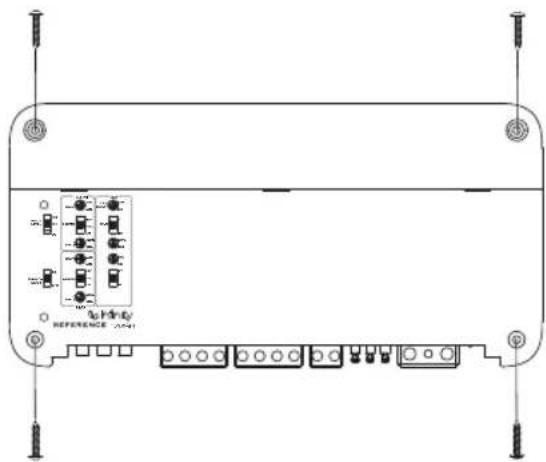
natural_image
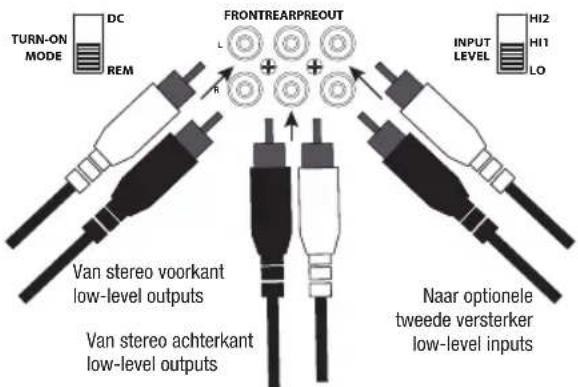
Front view of a rectangular electronic device with multiple ports and connectors (no visible text or symbols)Reference 3004A low-level signals
NL
Reference 3004A high-level signalen
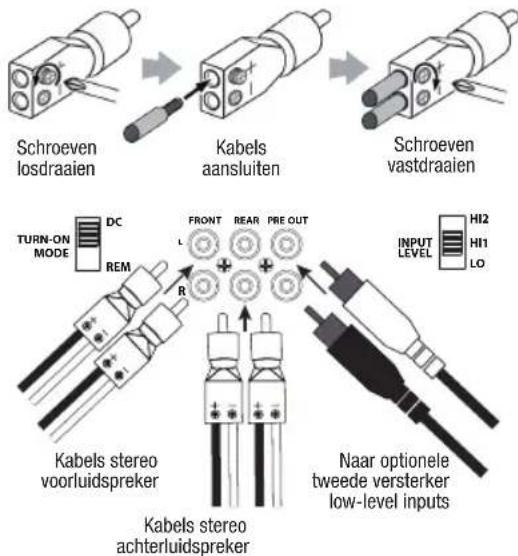
natural_image
Technical line drawing of a mechanical device with no visible text or symbolsVERSTERKING (GAIN), CROSSOVERS EN BASVERSTERKING INSTELLEN
Versterking (gain) instellen
natural_image
Simple line drawing of a container with liquid and a curved base, no text or symbols present- Usuń pokrywę panelu
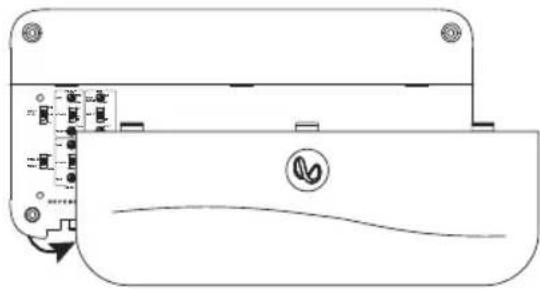
natural_image
Pure technical diagram of a device casing with internal components and no visible text or symbolsMONTAŻ WZMACNIACZA
natural_image
Front view of a rectangular electronic device with multiple ports and connectors (no visible text or symbols)natural_image
Simple line drawing of a container with liquid and a curved base, no text or symbols present- Retire a tampa do painel
natural_image
Pure technical diagram of a device casing with internal components and no visible text or symbolsMONTAGEM DO AMPLIFICADOR
natural_image
Front view of a rectangular electronic device with multiple ports and connectors (no visible text or symbols)natural_image
Simple line drawing of a container with liquid and a curved base, no text or symbols presentnatural_image
Pure technical diagram of a device casing with internal components and no visible text or symbolsMONTERING AV FÖRSTÄRKAREN
natural_image
Front view of a rectangular electronic device with multiple ports and connectors (no visible text or symbols)STÄLLA IN FÖRSTÄRKNING, DELNINGSFILTER OCH BASFÖRSTÄRKNING
natural_image
Pure technical diagram of a device casing with internal components and no visible text or symbolsAMPLIFIKATÖRÜN MONTAJI
natural_image
Front view of a rectangular electronic device with multiple ports and connectors (no visible text or symbols)natural_image
Simple line drawing of a container with liquid and a curved base, no text or symbols presentGÜÇ VE TOPRAKLAMA KABLOLAMA
Amplifikatörde:
- 取下面板盖
natural_image
Diagram of a device rear panel with labeled ports and a circular icon, no readable text or symbols present.安装放大器
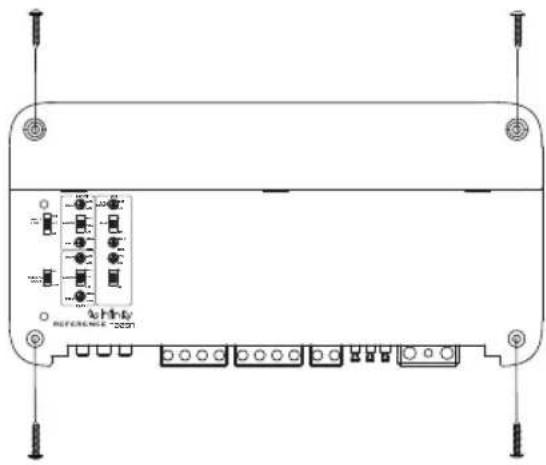
natural_image
Technical line drawing of a device rear panel with labeled ports and connectors (no readable text or symbols)natural_image
Simple line drawing of a horizontal bar with downward arrows and a circular symbol at the center (no text or labels)2.取下面板蓋
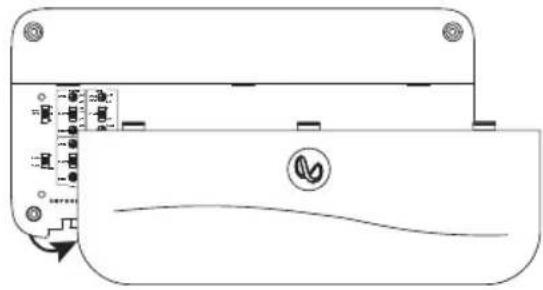
natural_image
Pure technical diagram of a device casing with internal components and no visible text or symbols安装功放
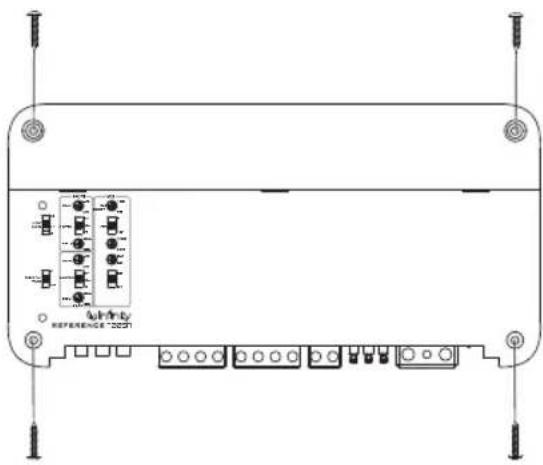
natural_image
Technical line drawing of a device rear panel with terminal blocks and mounting holes (no text or symbols)natural_image
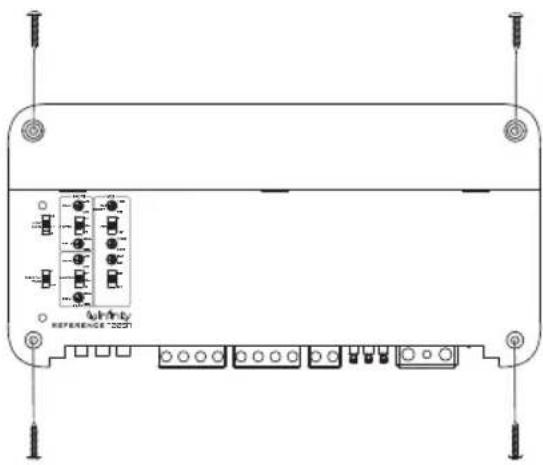
Pure technical diagram of a device casing with internal components and no visible text or symbolsMEMASANG AMPLIFIER
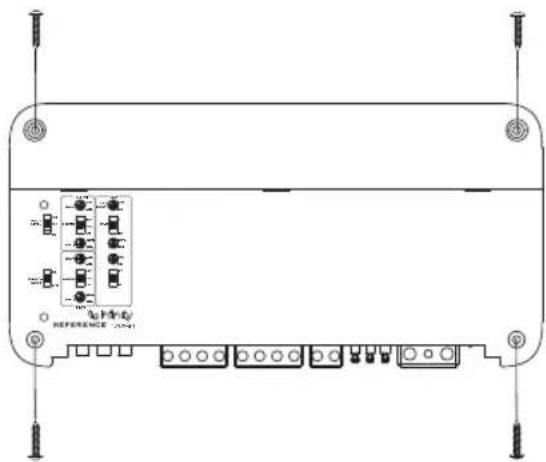
natural_image
Front view of a rectangular electronic device with multiple ports and connectors, no visible text or symbols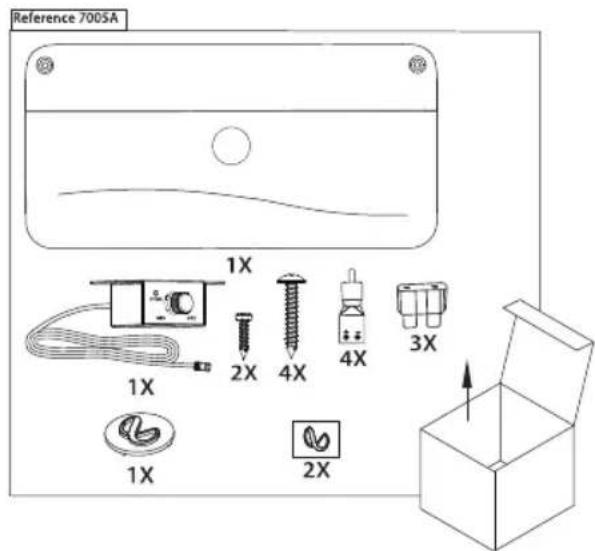
natural_image
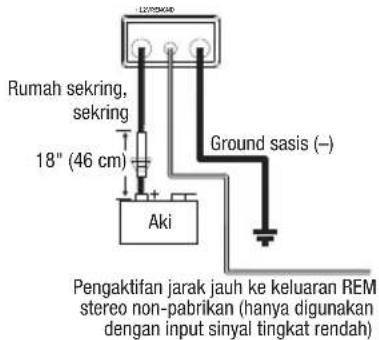
Simple line drawing of a container with liquid and a curved base, no text or symbols presentSAMBUNGAN KABEL DAYA DAN GROUND
Pada amplifier:
natural_image
Pure technical diagram of a device casing with internal components and no visible text or symbolsアンプの取り付け
natural_image
Technical line drawing of a device rear panel with terminal blocks and mounting holes (no text or symbols)natural_image
Simple line drawing of a rectangular container with downward arrows and a circular symbol inside, no text or labels present.電源とアース用配線
アンプでの配線:
2.패널 덮개를 분리합니다.
natural_image
Pure technical diagram of a device casing with internal components and no visible text or symbols앤프 장착
natural_image
Technical line drawing of a rectangular electronic device with multiple ports and connectors (no text or symbols)- ACCESSING CONNECTORS/ CONTROL PANEL
- IMPORTANT: Disconnect the vehicle's negative (−) battery terminal before beginning the installation.
- WIRING FOR POWER AND GROUND
- WIRING FOR INPUT SIGNAL
- WIRING FOR OUTPUT
- CONNECTING THE REMOTE BASS CONTROLLER (REFERENCE 7005A ONLY)
- SETTING GAIN, CROSSOVERS, AND BASS BOOST
- Setting the gain
- Selecting the crossover mode
- Selecting the crossover frequency
- Selecting the subwoofer phase (Reference 7005A only)
- Selecting the bass boost (Reference 7005A only)
- TROUBLESHOOTING
- No audio and POWER INDICATOR is off.
- No audio and PROTECT INDICATOR flashes every 4 seconds.
- No audio and PROTECT and POWER INDICATORS flash.
- No audio and PROTECT INDICATOR is on.
- Amplifier fuse keeps blowing.
- Distorted audio.
- Distorted audio and PROTECT INDICATOR flashes.
- Music lacks dynamics or "punch".
- Engine noise—whining or clicking—in system when the engine is on.
- JOHDOTUS, VIRTA JA MAA
- VERSTERKING (GAIN), CROSSOVERS EN BASVERSTERKING INSTELLEN
- Versterking (gain) instellen
- STÄLLA IN FÖRSTÄRKNING, DELNINGSFILTER OCH BASFÖRSTÄRKNING
- GÜÇ VE TOPRAKLAMA KABLOLAMA
- SAMBUNGAN KABEL DAYA DAN GROUND
- 電源とアース用配線
Brand : INFINITY
Model : Reference 7005A
Category : Audio Receiver