USER MANUAL B.TONE 5710 BT ECG
B.TONE 5710 BT
English
Deutsch
Čeština
Eesti keel
Hrvatski
Bosanski
Latviešu valoda
Lietuvių kalba
Magyar
Polski
Slovenčina
Slovenščina
Srpski
Crnogorski
MP3 PLAYER
INSTRUCTION MANUAL
MP3-PLAYER
BEDIENUNGSANLEITUNG
MP3 PŘEHRÁVAČ
NÁVOD K OBSLUZE
MP3-MÄNGIJA
KASUTUSJUHEND
MP3 PLAYER
UPUTE ZA UPORABU
MP3 ATSKANOTĀJS
ROKASGRÂMÂTA
MP3 GROTUVAS
INSTRUKCIJŲ VADOVAS
MP3 LEJÁTSZÓ
HASZNÁLATI ÚTMUTATÓ
ODTWARZACZ MP3
INSTRUKCJA OBSŁUGI
MP3 PREHRÁVAČ
NÁVOD NA OBSLUHU
MP3 PREDVAJALNIK
NAVODILA
MP3 PLEJER
UPUTSTVO ZA UPOTREBU
SAFETY INSTRUCTIONS
Read carefully and save for future use!
To prevent possible hearing damage, avoid prolonged listening at high volume.
Read carefully and store for future use!
• Make sure you read this manual thoroughly and follow the instructions provided here before you turn the device on and start using it. Keep the manual for eventual future reference.
- Observe all warnings in the documentation supplied with the device.
- Turn off the device before cleaning and disconnect it from the power supply. Do not use liquid cleaners or spray cleaners for cleaning. Use wet cloth for cleaning.
- Use only accessories recommended by the manufacturer. Otherwise there is a risk of injury or damage to the device.
- Do not use the device close to water and in humid locations, e.g. close to a pool, bathtub, kitchen sink. Do not expose the appliance to dripping or splashing water, do not place containers filled with liquids near the appliance.
- The appliance must only be supplied with power from the power supply indicated in the manual. For battery power, follow the instructions in the operating instructions.
- Protect the appliance from the ingress of liquids and foreign objects and do not place objects in the openings in the appliance.
- Do not open the device cover. There are no elements inside that can be configured by the user. Have a qualified service technician perform repairs on the device.
- Do not expose the batteries to excessive heat, e.g. direct sunlight, fire, etc.
- Do not expose the device to heat sources such as radiators, heating or other heat-producing appliances such as amplifiers.
- Changes or modifications not expressly approved and given in the instructions may result in loss of authorization to use the device.
- Excessive sound pressure from earphones can cause hearing damage.
DESCRIPTION
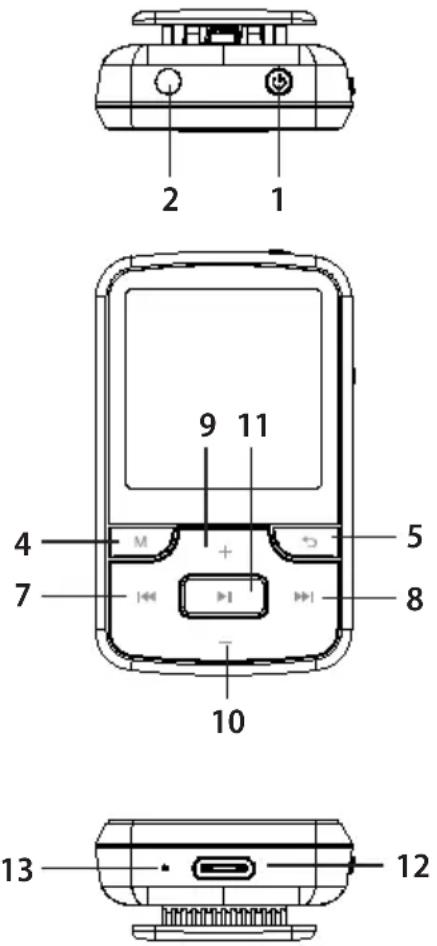
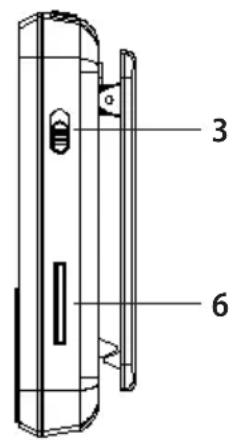
- Main switch
- Headphone connector
- Push button lock
- MENU button to enter the menu
- Back button to return to the previous menu
- Micro SD card slot
- PRE button: Short press to skip to previous track, long press to rewind
- NEXT button: Short press to move to the next track, long press to fast forward
- Volume up button
- Volume down button
- Play/pause button, used to confirm the selection in the menu
- USB-C Connector
- Microphone
PACKAGE CONTENTS
- Player
- Headphones
- USB-C charging cable
USING THE DEVICE
Basic operations
Turning on the player
- Switch on the player by long pressing the main switch.
- Use NEXT (next) or PRE (previous) to select the media you want to play: video/music/pictures/e-book. Confirm your choice with the play/pause button.
- Press the play/pause button again to stop playback.
- Press the MENU button to go to the main menu.
- Press the Back button to go back one step.
Keylock
- Lock: Slide the button lock upwards until the lock symbol appears.
- Unlock: Slide the button lock back to display the unlock symbol.
Battery charging
When the battery appears on the display, it is time to charge the device.
The device offers two charging options:
- Charging via USB connector
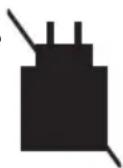
- Charging by using AC USB adapter (not included). We recommend a 5 V / 1 A adapter for this device.
Note: Charging time should not exceed 5 hours. We recommend to turn off the device before charging.
WARNING:
To charge and transfer data to the PC correctly, use only the USB-C cable that comes with the device. Otherwise, there is a risk of damage to the device.
USB power adapter is not included. We recommend a 5 V / 1 A adapter for this device.
Pressing buttons definitions
| Action Description | |
| Brief press Press is shorter than 1–2 seconds | |
| Long press Press is longer than 1–2 seconds | |
| Hold Keeping a button pressed | |
You can insert a micro SD memory card into this player to expand the built-in memory. Cards with capacities up to 128 GB are supported.
- Turn on the player and connect it to your computer using the USB-C cable (included).
- Once connected, the player will appear on the connected computer in the same way as an external drive, USB flash drive or memory card.
- Simply drag and drop the desired media files into the player in File Explorer.
- When the transfer is complete, eject the drive using the Windows toolbar, and then disconnect the USB cable.
MUSIC
Main menu Music
Music playback control:
- Playback (displayed when a song is playing)
- All tracks
- List of files in internal memory (if an SD card is inserted)
- List of files on the card (if an SD card is inserted)
- Reset (displayed after music is played and other audio functions are entered)
- Artist
- Album
- Genre
- Playlist: There are three playlists.
- Create a playlist: Playlist update

natural_image
Pink square icon with white musical notes and play button symbols (no text)
Press the Menu button in the music playback interface to enter the music playback submenu.
Repeat
- Repeat off
- Repeat once
- Repeat all
- Show playback
Random
Repetition settings
- Repeat Mode
- Playback interval (1-10)
• Number of repetitions (1-10)
Audio settings
- Playback speed setting: -8 to +8
• Volume limit: When you set this value, the player volume will not exceed it.
• Equalizer: Off/Rock/Funk/Hip hop/Jazz/Classical/Classical/Techno/Custom
Add to playlist
Add to specific playlist
Remove from playlist
Remove from a specific playlist
Remove
Deleting a track
Bookmark
- Add bookmark
- Go to tab
- Removing a bookmark
Note: Long press the MENU button to enter the lyrics display.
BT WIRELESS CONNECTION
You can change the BT settings in the BT connection menu.
Control
To search for a device: In the BT on state, the available devices will be displayed, select the desired device, click Pair, then click Connect or Cancel pairing.
List of devices: The name of all the searched devices will be displayed.
natural_image
Blue icon depicting a speaker with headphones and a Wi-Fi symbol (no text or numbers)
RADIO FM
Connect the headset as a radio antenna.
FM radio main menu
- Presets: When you select this function, the device will automatically search for channels if you have not already saved them.
- Presets: Displays three specific channels.
- Manual tuning: Select the manual channel setting.
- Auto-tune
• FM recording: FM Record Library
natural_image
Orange square icon with a white radio symbol and 'FM' label (no additional text or symbols)
Press the Menu button in the FM playback interface to enter the FM radio playback submenu.
• To start FM radio recording
- Save preset: Saving the current station to a specific preset
- Delete preset: To delete a specific preset
- Auto-tune
- Tuner band: Band 1 (76-90 MHz) / Band 2 (87.5-108 MHz)
• FM recording: FM Record Library
FOLDERS
List of files in internal memory / on the card (if SD card is inserted)
You can select all files in the player or press the Menu button to deselect or unselect them.
VIDEO
List of files in internal memory / on the card (if SD card is inserted)
Press the Menu button in the video playback interface to enter the video playback submenu.
- Brightness: 0–11
- Repeat: Repeat off/repeat 1/repeat all.
- Removing the video: Deleting a video
- Create a playlist: Playlist update
IMAGES
List of files in internal memory / on the card (if SD card is inserted)
Press the Menu button in the Images interface to enter the Images submenu.
- Brightness: 0–11
- Backlight timer: 30 seconds / 90 seconds / 180 seconds / always active
- Presentation settings
• Time for a picture: 2-30 seconds
- Repeat: On/off
- Random: On/off
- Remove image
- Create a playlist: Playlist update
RECORDINGS
Press the Play/Stop button to enter the recording interface, press the Play/Stop button again to start recording, press the Back button to select whether or not to save the recording. Press the Menu button to enter the submenu:
- Storage: Select whether to save the recording to internal or external memory (if an SD card is inserted).
• Record format: MP3/WAV
- Recording settings: set the recording bitrate (WAV: 512 kbps / 768 kbps / 1024 kbps / 1536 kbps, 32 kbps / 64 kbps / 128 kbps / 192 kbps).
- Record file: Internal memory / SD card (if SD card is inserted)
• AVR monitoring mode: Normal/AVR mode
Voice recording
- Click on the recording icon in the main menu and enter recording.
- Click the Play/Pause button to start recording.
- You can choose whether or not to save this log file by clicking the Back button.
- You can view the recorded audio in the File Recording option in the submenu.

natural_image
Blue square icon with a white folder symbol (no text or numbers)

natural_image
Purple square icon with a white play button and playback line, no text or symbols present.

natural_image
Green square icon with white line art of a photo collage (no text or symbols)
natural_image
Red square icon with white microphone and 'REC' label (no additional text or symbols)

natural_image
Green square icon with white crossed wrench and screwdriver symbols (no text)
Stopwatch
Press the Play/Stop button to start timing and press the Play/Stop button to stop, press the PRE/NEXT button to select the group you want to record, press the Menu button to reset.
Calendar
Press the Menu button to select the Year, Month and Date and use the PRE/ NEXT button to select the date.
E-book
List of files in internal memory / on the card (if SD card is inserted)
Press the Menu button in the e-book interface to enter the E-book submenu.
• Browsing settings: 2-30 seconds (autoplay time)
- Delete e-book: Delete the current e-book.
- Bookmark selection
- Removing a bookmark
- Add bookmark
- Page selection
- Internal storage
- Memory card
WALLPAPER
Press the Play/Pause button to change the wallpaper. There are six wallpapers to choose from.

natural_image
Icon depicting a landscape photo with motion lines, no text or symbols present
SETTINGS
In the Settings menu, you can adjust various player settings.
• Language: There are 28 languages to choose from.
- Display setup
- Brightness: 0–11
- Backlight timer: 30 seconds / 90 seconds / 180 seconds / always active
- Setting up a screensaver with a clock: None/analogue clock/digital clock
- Sleep timer
- Off
- Setting the sleep timer: 1-99 minutes (the player will automatically turn off after this time, whether you are currently controlling it or not).
• Automatic shutdown timer: 0-99 minutes (the player will turn off after this time if the button is not pressed and no file is playing).
- Date & Time Time and date settings.
• Information: Player information / disk space
• Factory settings: factory reset
- Formatting the device: All data will be deleted.
TECHNICAL SPECIFICATIONS
• 32 GB of memory
• LCD display 1.54" TFT
- FM digital tuner

natural_image
Abstract gear icon with interlocking teeth, no text or symbols present
• Support MP3, OGG, APE, FLAC, WAV, AAC-LC
• Support AMV, AVI (240*240)
- MIC record format: MP3, WAV
• Image format: JPG, BMP, GIF
• E-book format: TXT
- Support for synchronous text display
- Multi EQ and repeat modes
• Built-in microphone for long recordings
- Play audio/video/pictures from Micro SD card
- Rechargeable Li-polymer battery 300mAh
• Voice recorder, dictaphone
- Wallpaper background
- Sports clip
- Lock
• Headphone connector
• 30 presets for FM stations
• FM1 band: 76-90MHz
• FM2 band: 87.5-108MHz
Specifications
- USB port 2.0 type C
- USB cable
- Handset
- Silicone case
• 3 sizes of earplugs
- Micro SD card support up to 128GB
• Device dimensions: length 60.7 mm × width 37.2 mm × depth 17.3 mm
- BT connection 5.2
Warning: AMV and AVI formats need to be converted using a dedicated tool. These formats can be played back on a PC using a standard media player.
USE AND DISPOSAL OF WASTE
Wrapping paper and corrugated cardboard - take to paper collection or paper containers. Repackaging film, PE bags, plastic packaging or parts - for plastic collection containers.
DISPOSAL OF THE PRODUCT AT THE END OF LIFE
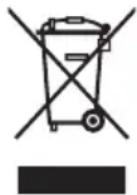
Disposal of electric and electronic equipment (valid in EU member countries and other European countries with an implemented recycling system).
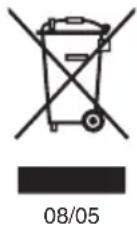
The represented symbol on the product or package means the product shall not be treated as domestic waste. Hand over the product to the specified location for recycling electric and electronic equipment. Prevent negative impacts on human health and the environment by properly recycling your product. Recycling contributes to preserving natural resources. For more information on the recycling of this product, refer to your local authority, domestic waste processing organization or store, where you purchased the product. Improper disposal of this type of waste may be subject to fines under the law.
This product complies with the requirements of the EU directives on electromagnetic compatibility and electrical safety and the issue of heavy metals in electrical and electronic equipment.

K+B Progres, a.s. hereby declares that the ECG B.TONE 5710 BT type of radio equipment complies with Directive 2014/53/EU.
The full Declaration of Conformity is available at www.ecg-electro.eu.
The operating manual is available on internet at www.ecg-electro.eu.
Changes of text and technical parameters reserved.
SICHERHEITSHINWEISE
natural_image
Pink square icon with white musical notes and play button symbols (no text)
natural_image
Blue icon depicting a speaker with headphones and a Wi-Fi symbol, no text or labels present.
natural_image
Orange square icon with a white radio symbol and 'FM' label (no additional text or symbols)
natural_image
Blue square icon with a white folder symbol (no text or numbers)
VIDEO
natural_image
Purple square icon with a white play button and playback line, no text or symbols present.
natural_image
Green square icon with white line art of a photo collage (no text or symbols)
natural_image
Red square icon with white microphone and 'REC' label (no additional text or symbols)
natural_image
Green square icon with white crossed wrench and screwdriver symbols (no text)
Kalender
natural_image
Icon depicting a landscape with a person and mountain, no text or symbols present
EINSTELLUNG
natural_image
Icon of a gear and wrench inside a rounded square (no text or symbols)
natural_image
Pink square icon with white musical notes and play button symbols (no text)
Náhodně
• Vypnuto
- Zapnuto
Nastavení opakování
natural_image
Blue icon depicting a speaker with headphones and a Wi-Fi symbol (no text or labels)
RÁDIO FM
natural_image
Orange square icon with a white radio symbol and 'FM' label (no additional text or symbols)
natural_image
Blue square icon with a white folder symbol (no text or numbers)
VIDEO
natural_image
Purple icon depicting a play button with musical notes, no text or symbols present.
OBRÁZKY
natural_image
Green square icon with white line art of a photo collage (no text or symbols)
NAHRÁVKY
natural_image
Red square icon with a white microphone and 'REC' label (no additional text or symbols)
Hlasový záznam
natural_image
Green square icon with white crossed wrench and screwdriver symbols (no text)
Stopky
natural_image
Icon depicting a landscape photo with a person and mountain silhouette, set against a teal background (no text or symbols)
NASTAVENÍ
natural_image
Icon of a gear and wrench inside a rounded square (no text or symbols)
TECHNICKÉ ÚDAJE
natural_image
Pink square icon with white musical notes and play button symbols (no text)
natural_image
Blue icon depicting a speaker with headphones and a Wi-Fi symbol (no text or labels)
RAADIO FM
natural_image
Orange square icon with a white radio symbol and 'FM' label (no additional text or symbols)
natural_image
Blue square icon with a white folder symbol (no text or numbers)
VIDEO
natural_image
Purple icon depicting a play button with musical notes, no text or symbols present.
PILDID
natural_image
Green square icon with white line art of a photo collage (no text or symbols)
SALVESTUSED
natural_image
Red square icon with white microphone and 'REC' button (no text or symbols beyond the icon design)
natural_image
Green square icon with white crossed wrench and screwdriver symbols (no text)
Stoppkell
Vajutage nuppu Play/Stop, et alustada ajastamist ja vajutage nuppu Play/Stop, et peatada, vajutage nuppu PRE/NEXT, et valida salvestatav grupp, vajutage nuppu Menu, et nullida.
Kalender
natural_image
Icon depicting a landscape photo with motion lines, no text or symbols present
SEADISTUSED
natural_image
Pink square icon with white musical notes and play button symbols (no text)
Nasumično
natural_image
Blue icon depicting a speaker with headphones and a Wi-Fi symbol (no text or numbers)
FM RADIO
natural_image
Orange square icon with a white radio symbol and 'FM' label (no additional text or symbols)
- Pohrana unaprijed postavljenih postavki: Spremanje trenutne postaje na određenu zadanu postavku
- Brisanje unaprijed postavljenih postavki: Brisanje određene zadane postavke
• Automatsko podešavanje
- Traka prijemnika: Pojas 1 (76–90 MHz) / Pojas 2 (87,5–108 MHz)
• FM snimanje: FM biblioteka snimaka
ELEMENTI
Popis datoteka u internoj memoriji / na kartici (ako je umetnuta SD kartica)
Možete odabrati sve datoteke u uređaju ili pritisnuti tipku Menu za poništavanje odabira ili reprodukciju.

natural_image
Blue square icon with a white folder symbol (no text or numbers)
VIDEO
Popis datoteka u internoj memoriji / na kartici (ako je umetnuta SD kartica)
Pritisnite tipku Menu u sučelju za reprodukciju videozapisa za ulazak u podizbornik za reprodukciju videozapisa.
• Svjetlina: 0–11
- Ponavljanje: Ponavljanje isključeno/ponavljanje 1/ponavljanje svih.
• Za brisanje videozapisa: Brisanje videozapisa
- Izrada popisa za reprodukciju: Ažurirajte popis za reprodukciju

natural_image
Purple square icon with a white play button and playback line (no text or symbols)
SLIKE
Popis datoteka u internoj memoriji / na kartici (ako je umetnuta SD kartica)
natural_image
Green square icon with white line art of a photo collage (no text or symbols)
SNIMKE
Pritisnite tipku Reprodukcija/pauza za ulazak u sučelje za snimanje, ponovno pritisnite tipku Reprodukcija/pauza za početak snimanja, pritisnite tipku Natrag za odabir želite li spremiti snimku ili ne.
Pritisnite tipku Menu za ulazak u podizbornik:
- Skladištenje: Odaberite želite li snimku pohraniti u internu ili vanjsku memoriju (ako je umetnuta SD kartica).
- Format snimanja: MP3/WAV
- Postavke snimanja: podesite brzinu bita za snimanje (WAV: 512 kbps / 768 kbps / 1024 kbps / 1536 kbps, 32 kbps / 64 kbps / 128 kbps / 192 kbps).
- Datoteka zapisnika: Interna memorija /SD kartica (ako je umetnuta SD kartica)
- Način rada AVR nadzora: Normalni/AVR način rada
natural_image
Red square icon with white microphone and 'REC' label (no additional text or symbols)
Snimanje glasa
natural_image
Green square icon with white crossed wrench and screwdriver symbols (no text)
Kalendar
natural_image
Icon depicting a landscape photo with a person and mountain silhouette, set against a teal square background (no text or symbols)
POSTAVKE
natural_image
Abstract gear and wrench icon symbol (no text or labels)
TEHNIČKI PODACI
• 32 GB memorije
• TFT LCD zaslon od 1,54 inča
• FM digitalni tuner
- Podrška za reprodukciju MP3, Ogg, Ape, FLAC, WAV, AAC-LC formata
- Podrška AMV, Avi (240*240)
• MIC format snimanja: MP3, WAV
- Format slike: JPG, BMP, GIF
- Format e-knjige: TXT
- Podrška za sinkronizirani prikaz tekstova
• Višestruki EQ načini i načini ponavljanja
- Ugrađeni mikrofon za dugo snimanje
- Reprodukcija audiozapisa/videozapisa/slika s Micro SD kartice
• Punjiva Li-polimer baterija 300mAh
- Diktafon, diktafon
- Pozadina pozadine
- Sportski isječak
- Zaključavanje
- Priključnica za slušalice
• 30 postavki za FM postaje
- Pojas FM1: 76-90MHz
• FM2 pojas: 87,5-108 MHz
Tehnički podaci
• USB 2.0 priključak tipa C
- USB kabel
- Slušalica
- Silikonsko kućište
• 3 veličine čepića za uši
- Podrška za mikro SD kartice do 128 GB
- Dimenzije uređaja: dužina 60,7 mm × širina 37,2 mm × dubina 17,3 mm
• BT priključak 5.2
Upozorenje: AMV i Avi formati moraju se konvertirati pomoću namjenskog alata. Na računalu se ti formati mogu reproducirati pomoću standardnog media playera.
OPORABA I ZBRINJAVANJE OTPADA
Papir za zamatanje i valoviti karton – predaje se prikupljanju sirovina ili papirnatih spremnika. Omotavanje folije, PE vrećica, plastične ambalaže ili dijelova – u posude za prikupljanje plastike.
ODLAGANJE PROIZVODA NAKON ISTEKA RADNOG VIJEKA
natural_image
Pink square icon with white musical notes and play button symbols (no text)
natural_image
Blue icon depicting a speaker with headphones and a Wi-Fi symbol (no text or labels)
RADIO FM
natural_image
Orange square icon with a white radio symbol and 'FM' label (no additional text or symbols)
natural_image
Blue square icon with a white folder symbol (no text or numbers)
VIDEO
natural_image
Purple icon depicting a play button with musical notes, no text or symbols present.
ATTÉLI
natural_image
Green square icon with white line art of a photo collage (no text or symbols)
IERAKSTI
natural_image
Red square icon with white microphone and 'REC' label (no additional text or symbols)
natural_image
Green square icon with white crossed wrench and screwdriver symbols (no text)
Stopsarats
natural_image
Icon depicting a landscape photo with a person and mountain silhouette, set against a teal square background (no text or symbols)
IESTATIJUMI
natural_image
Icon of a gear and wrench inside a rounded square (no text or symbols)
natural_image
Pink square icon with white musical notes and play button symbols (no text)
Atsitiktinis
natural_image
Blue icon depicting a speaker with headphones and a Wi-Fi symbol (no text or numbers)
natural_image
Orange square icon with a white radio symbol and 'FM' label (no additional text or symbols)
natural_image
Blue square icon with a white folder symbol (no text or numbers)
VAIZDAS
natural_image
Purple square icon with a white play button and playback line symbol (no text or numbers)
VAIZDAI
natural_image
Green square icon with white line art of a photo collage (no text or symbols)
- Pašalinti vaizdą
natural_image
Red square icon with white microphone and 'REC' label (no additional text or symbols)
natural_image
Green square icon with white crossed wrench and screwdriver symbols (no text)
Chronometras
natural_image
Icon depicting a landscape photo with diagonal stripes and a human silhouette (no text or symbols)
NUSTATYMAI
natural_image
Abstract gear and wrench icon on gray background (no text or symbols)
TECHNINĖS SPECIFIKACIJOS
natural_image
Pink square icon with white musical notes and play button symbols (no text)
Véletlenszerű
natural_image
Blue icon depicting a speaker with headphones and a Wi-Fi symbol (no text or numbers)
natural_image
Orange square icon with a white radio symbol and 'FM' label (no additional text or symbols)
FM almenü
natural_image
Blue square icon with a white folder symbol (no text or numbers)
VIDEO
natural_image
Purple square icon with a white play button and playback line symbol (no text or numbers)
KÉPEK
natural_image
Green square icon with white line art of a photo collage (no text or symbols)
- Kép eltávolítása
natural_image
Red square icon with white microphone and 'REC' label (no additional text or symbols)
natural_image
Green square icon with white crossed wrench and screwdriver symbols (no text)
Stopperóra
natural_image
Icon depicting a landscape photo with mountain silhouette and diagonal stripes, no text or symbols present.
BEÁLLÍTÁSOK
natural_image
Abstract gear and circuit symbol icon (no text or labels)
- Ébresztő
natural_image
Pink square icon with white musical notes and play button symbols (no text)
natural_image
Blue icon depicting a speaker with 'BT' label and headphones, no text or symbols present
natural_image
Orange square icon with a white radio symbol and antenna (no text or numbers)
natural_image
Blue square icon with a white folder symbol (no text or numbers)
VIDEO
natural_image
Purple square icon with a white play button and playback line symbol (no text or numbers)
OBRAZY
natural_image
Green square icon with white line art of a photo collage (no text or symbols)
NAGRANIA
natural_image
Red square icon with white microphone and 'REC' button (no text or symbols beyond the icon design)
Nagrywanie głosu
natural_image
Green square icon with white crossed wrench and screwdriver symbols (no text)
Stoper
natural_image
Icon depicting a landscape photo with a person and diagonal stripes, no text or symbols present.
USTAWIENIA
natural_image
Abstract gear icon with no text or symbols
natural_image
Pink square icon with white musical notes and play button symbols (no text)
natural_image
Blue icon depicting a speaker with headphones and a Wi-Fi symbol, labeled 'BT' (no text or symbols beyond the icon)
RÁDIO FM
natural_image
Orange square icon with a white radio symbol and 'FM' label (no additional text or symbols)
natural_image
Blue square icon with a white folder symbol (no text or numbers)
VIDEO
natural_image
Purple icon depicting a play button with musical notes, no text or symbols present.
OBRÁZKY
natural_image
Green square icon with white line art of a photo collage (no text or symbols)
NAHRÁVKY
natural_image
Red square icon with white microphone and 'REC' text (no additional symbols or text)
natural_image
Green square icon with white crossed wrench and screwdriver symbols (no text)
Stopky
natural_image
Icon depicting a landscape with a person and diagonal stripes, no text or symbols present.
NASTAVENIE
natural_image
Abstract gear icon with white outline on gray background (no text or symbols)
TECHNICKÉ ÚDAJE
natural_image
Pink square icon with white musical notes and play button symbols (no text)
Naključno
natural_image
Blue icon depicting a speaker with headphones and a Wi-Fi symbol (no text or labels)
RADIO FM
natural_image
Orange square icon with a white radio symbol and 'FM' label (no additional text or symbols)
Podmeni FM
V vmesniku za predvajanje FM pritisnite gumb Meni, da vstopite v podmeni za predvajanje radia FM.
• Začetek snemanja radia FM
natural_image
Blue square icon with a white folder symbol (no text or numbers)
VIDEO
natural_image
Purple square icon with a white play button and playback line symbol (no text or numbers)
SLIKE
natural_image
Green square icon with white line art of a photo collage (no text or symbols)
POSNETKI
natural_image
Red square icon with white microphone and 'REC' label (no additional text or symbols)
natural_image
Green square icon with white crossed wrench and screwdriver symbols (no text)
Štoparica
natural_image
Icon depicting a landscape photo with a person and mountain silhouette, set against a teal background (no text or symbols)
NASTAVITEV
natural_image
Abstract gear icon with interlocking lines, no text or symbols present
TEHNIČNI PODATKI
• 32 GB pomnilnika
• LCD zaslon 1,54" TFT
• Digitalni sprejemnik FM
- Podpora MP3, OGG, APE, FLAC, WAV, AAC-LC
• Podpora za AMV, AVI (240*240)
- Format zapisa MIC: MP3, WAV
- Format slike: JPG, BMP, GIF
- Format e-knjige: TXT
- Podpora za sinhroni prikaz besedila
• Več načinov EQ in ponavljanja
• Vgrajen mikrofon za dolge posnetke
• Predvajanje zvoka/video/slik s kartice Micro SD
- Akumulatorska baterija Li-polymer 300 mAh
- diktafon, diktafon
- Ozadje ozadja
- Športni posnetek
- Ključavnica
- Priključek za slušalke
• 30 pred-izborov za FM postaje
• Pas FM1: 76-90 MHz
• Pas FM2: 87,5-108 MHz
Specifikacije
- Vrata USB 2.0 tipa C
- Kabel USB
- Slušalke
- Silikonski tulec
• 3 velikosti čepkov za ušesa
- Podpora za kartice Micro SD do 128 GB
- Dimenzije naprave: dolžina 60,7 mm × širina 37,2 mm × globina 17,3 mm
- Povezava BT 5.2
BEZBEDNOSNA UPUTSTVA
natural_image
Pink square icon with white musical notes and play button symbols (no text)


Nasumično
natural_image
Blue icon depicting a speaker with headphones and a Wi-Fi symbol (no text or labels)
natural_image
Orange square icon with a white radio symbol and 'FM' label (no additional text or symbols)
- Sačuvaj unapred postavljeno: Čuvanje trenutne stanice na određenom unapred podešenom
- Izbriši unapred postavljeno: Brisanje određenog unapred podešenog
• Automatsko podešavanje
- Traka tjunera: Pojas 1 (76–90 MHz) / Pojas 2 (87,5–108 MHz)
• FM snimanje: FM biblioteka snimaka
IMENICI
Nabrajanje datoteka u internoj memoriji / na kartici (ako je umetnuta SD kartica)
natural_image
Blue square icon with a white folder symbol (no text or numbers)
VIDEO
Nabrajanje datoteka u internoj memoriji / na kartici (ako je umetnuta SD kartica)
Pritisnite taster Meni u interfejsu za reprodukciju video zapisa da biste ušli u podmeni za reprodukciju video zapisa.
natural_image
Purple square icon with a white play button and playback line symbol (no text or numbers)
SLIKE
Nabrajanje datoteka u internoj memoriji / na kartici (ako je umetnuta SD kartica)
Pritisnite taster Meni u interfejsu za pregled slika da biste ušli u podmeni Slike.
• Svetlina: 0–11
natural_image
Green square icon with white line art of a photo collage (no text or symbols)
SNIMCI
Pritisnite dugme Play/Pause da biste ušli u interfejs za snimanje, ponovo pritisnite dugme Play/Pause da biste započeli snimanje, pritisnite dugme Back da biste izabrali da li želite da sačuvate snimak ili ne.
Pritisnite taster Meni da biste ušli u podmeni:
natural_image
Red square icon with white microphone and 'REC' label (no additional text or symbols)
- Skladištenje: Izaberite da li želite da sačuvate snimak u internu ili eksternu memoriju (ako je umetnuta SD kartica).
- Format snimanja: MP3/WAV
- Podešavanja snimanja: podesite brzinu bita za snimanje (WAV: 512 kbps / 768 kbps / 1024 kbps / 1536 kbps, 32 kbps / 64 kbps / 128 kbps / 192 kbps).
- Datoteka evidencije: Interna memorija /SD kartica (ako je SD kartica umetnuta)
- AVR režim praćenja: Normalni/AVR režim
Snimanje glasa
- Kliknite na ikonu za otpremanje u glavnom meniju i unesite otpremanje.
- Kliknite na dugme Reprodukuj/pauziraj da biste započeli snimanje.
- Kliknite na dugme Nazad da biste izabrali da li želite da sačuvate ovu datoteku evidencije.
- Snimljene audio zapise možete pogledati u opciji Otpremanje datoteke u podmeniju.
ALATKE

natural_image
Green square icon with white crossed wrench and screwdriver symbols (no text)
Štoperica
Pritisnite dugme Play/Pause za pokretanje tajminga i pritisnite dugme Play/Pause za zaustavljanje, pritisnite dugme PRE/NEXT za izbor grupe koju želite da snimite, pritisnite dugme Menu za resetovanje.
Kalendar
Pritisnite taster Meni da biste izabrali Godinu, Mesec i Datum i pritisnite taster PRE/ NEXT da biste izabrali datum.
E-knjiga
Nabrajanje datoteka u internoj memoriji / na kartici (ako je umetnuta SD kartica)
Pritisnite dugme Meni u interfejsu za čitanje e-knjige da biste ušli u podmeni E-knjiga.
- Podešavanja pregledanja: 2–30 sekundi (vreme automatske reprodukcije)
- Izbriši e-knjigu: Brisanje trenutne e-knjige.
- Izbor obeleživača
- Brisanje obeleživača
- Dodajte obeleživač
- Izbor stranice
- Interna memorija
- Memorijska kartica
POZADINA
Pritisnite dugme Play/Pause da biste promenili pozadinu. Na raspolaganju vam je šest tapeta.

natural_image
Icon depicting a landscape with a person and diagonal stripes, no text or symbols present.
POSTAVKE
natural_image
Icon of a gear with hand, no text or symbols present
TEHNIČKI PODACI
• 32 GB memorije
• TFT LCD displej od 1,54 inča
• FM digitalni tjuner
- Podrška za reprodukciju MP3, OGG, Ape, FLAC, WAV, AAC-LC formata
- Podrška AMV, Avi (240*240)
- Format snimanja mikrofona: MP3, WAV
- Format slike: JPG, BMP, GIF
- Format e-knjige: Txt
- Podrška za sinhroni prikaz tekstova
- Multi EQ režimi i režimi ponavljanja
- Ugrađeni mikrofon za dugo snimanje
- Reprodukcija audio/video zapisa/slika sa Micro SD kartice
• Punjiva Li-polimer baterija 300mAh
- Diktafon, diktafon
- Pozadina pozadine
- Sportska spajalica
- Zaključaj
- Priključnica za slušalice
• 30 podešavanja za FM stanice
- Bend FM1: 76-90MHz
• FM2 opseg: 87,5-108MHz
Tehnički podaci
- USB 2.0 Type-C port
- USB kabl
- Slušalica
- Silikonsko kućište
• 3 veličine čepova za uši
- Podrška za mikro SD kartice do 128GB
- Dimenzije uređaja: dužina 60,7 mm × širina 37,2 mm × dubina 17,3 mm
• BT priključak 5.2
Pažnja: AMV i Avi formati moraju biti konvertovani pomoću namenskog alata. Na računaru, ovi formati se mogu reprodukovati pomoću standardnog multimedijalnog plejera.
UPOTREBA I ODLAGANJE OTPADA
Papir za pakovanje i valoviti karton – predaje se za sakupljanje sirovina ili papirnih kontejnera. Previjanje folije, PE kesa, plastične ambalaže ili delova – u posude za sakupljanje plastike.
ODLAGANJE PROIZVODA NAKON ISTEKA RADNOG VEKA
Odlaganje otpada električne i elektronske opreme (primenljivo u državama članicama EU i drugim evropskim zemljama koje su uspostavile sisteme razvrstavanja otpada)
Oznaka koja je navedena na proizvodu ili na ambalaži označava da se proizvod ne sme odlagati kao kućni otpad. Proizvod odložite na mesto određeno za recikliranje električne i elektronske opreme. Ispravnim odlaganjem proizvoda sprečavate negativne uticaje na zdravlje ljudi i okolinu. Reciklažom materijala pomažete očuvanje prirodnih resursa. Dodatne informacije o recikliranju ovog proizvoda pružiće vam lokalne vlasti, organizacija za preradu kućnog otpada ili prodajno mesto na kojem ste kupili proizvod. Nepravilno odlaganje ove vrste otpada može biti kažnjivo novčanom kaznom u skladu sa zakonom.
08/05
250 69 Klíčany, Czech Rep. e-post: ECG@kbexpert.cz
Hrvatski
K+B Progres, a.s.
U Expertu 91 tel.: +420 272 122 111
250 69 Kličany, Czech Rep. e-mail: informacije@kbprogres.cz
Bosanski
K+B Progres, a.s.
U Expertu 91 tel.: +420 272 122 111
250 69 Klíčany, Czech Rep. e-mail: informacije@kbprogres.cz
Latviešu valoda
K+B Progres, a.s.
U Expertu 91 tel.: +420 272 122 111
250 69 Kličany, Czech Rep. e-pasts: ECG@kbexpert.cz
Lietuvių kalba
K+B Progres, a.s.
U Expertu 91 tel.: +420 272 122 111
250 69 Klíčany, Czech Rep. el. paštas: ECG@kbexpert.cz
Magyar
K+B Progres, a.s.
U Expertu 91 tel.: +420 272 122 111
250 69 Kličany, Czech Rep. e-mail: ECG@kbexpert.cz
Polski
K+B Progres, a.s.
U Expertu 91 tel.: +420 272 122 111
250 69 Klíčany, Czech Rep. e-mail: ECG@kbexpert.cz
Slovenčina