
ZCL6040 - Fan Zelmer - Free user manual and instructions
Find the device manual for free ZCL6040 Zelmer in PDF.


| Product Type | Air Cooler (Evaporative Cooler) |
| Brand | Zelmer |
| Model | ZCL6040 |
| Max Airflow | 400 m³/min |
| Fan Power Input | 65.0 W |
| Service Value | 6.15 (m³/min)/W |
| Standby Power Consumption | 0.128 W |
| Fan Sound Power Level | 55 dB(A) |
| Max Air Velocity | 7.5 m/s |
| Power Supply | 220-240 V ~ 50 Hz |
| Modes | Normal, Natural, Sleep |
| Speed Settings | Low, Medium, High |
| Oscillation | Yes, with Swing button |
| Cooling Function | Yes, with water tank and ice boxes |
| Water Tank Capacity | Not specified (refer to manual for levels) |
| Ice Boxes Included | 2 |
| Timer | Up to 12 hours |
| Light Button | Yes, turns off indicator lights |
| Filter Type | Honeycomb filter and standard filter |
| Cleaning Interval | Every two weeks for internal parts |
| Safety | Children 8+ with supervision, avoid water contact |
| Warranty | 2 years (EUROGAMA) |
| Standards | IEC 60879:1986 (CORR.1992) |
| Disposal | WEEE compliant, recycle at designated centers |
Frequently Asked Questions - ZCL6040 Zelmer
User questions about ZCL6040 Zelmer
0 question about this device. Answer the ones you know or ask your own.
Ask a new question about this device
Download the instructions for your Fan in PDF format for free! Find your manual ZCL6040 - Zelmer and take your electronic device back in hand. On this page are published all the documents necessary for the use of your device. ZCL6040 by Zelmer.
USER MANUAL ZCL6040 Zelmer
natural_image
White industrial air purifier unit with multiple cooling fans and wheels (no visible text or symbols)PL INSTRUKCJE UŻYTKOWANIA
Klimator
EN USER MANUAL Air cooler
DE BENUTZERHANDBUCH
Luftkühler
CZ NÁVOD K POUŽITÍ
Ochlazovač vzduchu
SK NAVODILA ZA UPORABO
Ochladzovač vzduchu
HU HASZNÁLATI UTASÍTÁS
Léghűtő
RO INSTRUCTIUNI DE UTILIZARE
Răcitor de aer
RU ИНСТРУКЦИЯ ПО ПРИМЕНЕНИЮ
Мини-кондиционер
BG ИНСТРУКЦИИ ЗА УПОТРЕБА
Въздушен охладител
UA ІНСТРУКЦІЯ ПО ЗАСТОСУВАННЮ
Охолоджувач повітря
a b c d e f g
DZIEKUJEMY ZA WYBÓR MARKI ZELMER. ŻYCZYMY SATYSFAKCJI Z UŻYTKOWANIA URZĄDZENIA.
OSTRZEŻENIE
WE WOULD LIKE TO THANK YOU FOR CHOOSING ZELMER. WE WISH THE PRODUCT PERFORMS TO YOUR SATISFACTION AND PLEASURE.
WARNING
Please read the instructions for use carefully prior to using the product. Store these in a safe place for future reference.
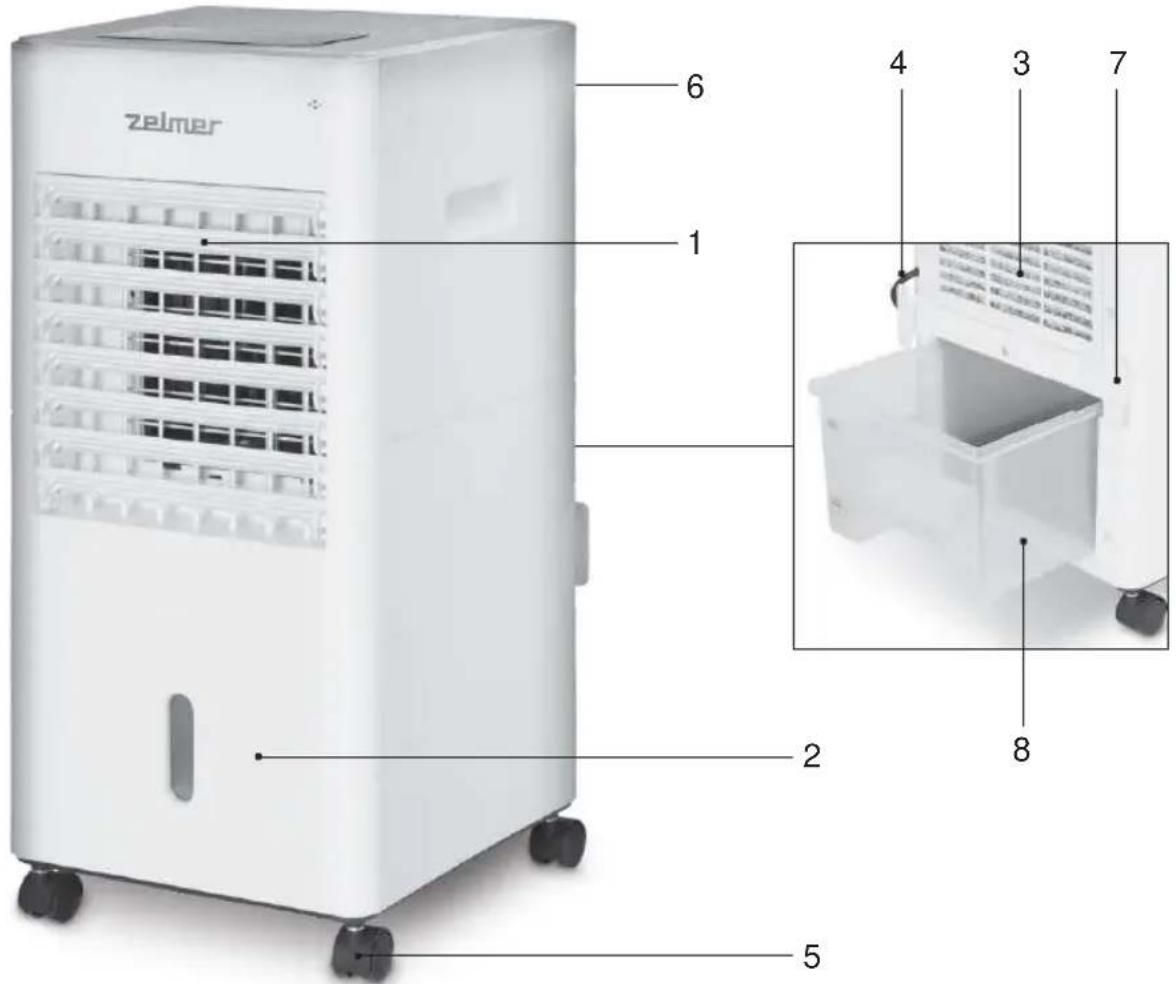
DESCRIPTION
- Air outlet
- Front board
- Filter
- Power cord
- Castors
- Rear board
- Power cord storage
- Water tank
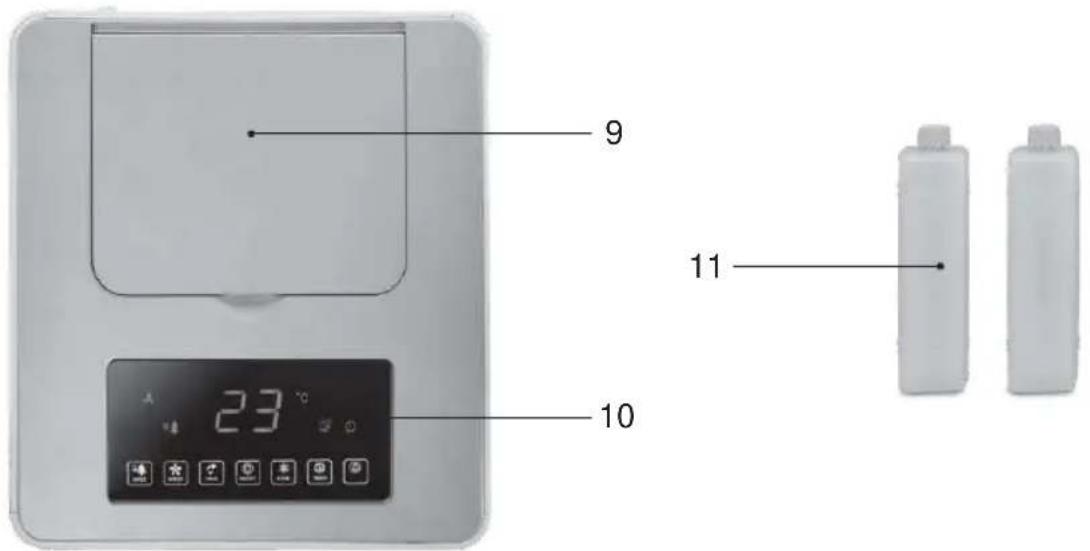
- Water filter cover
- Control box
- Ice box (x2)
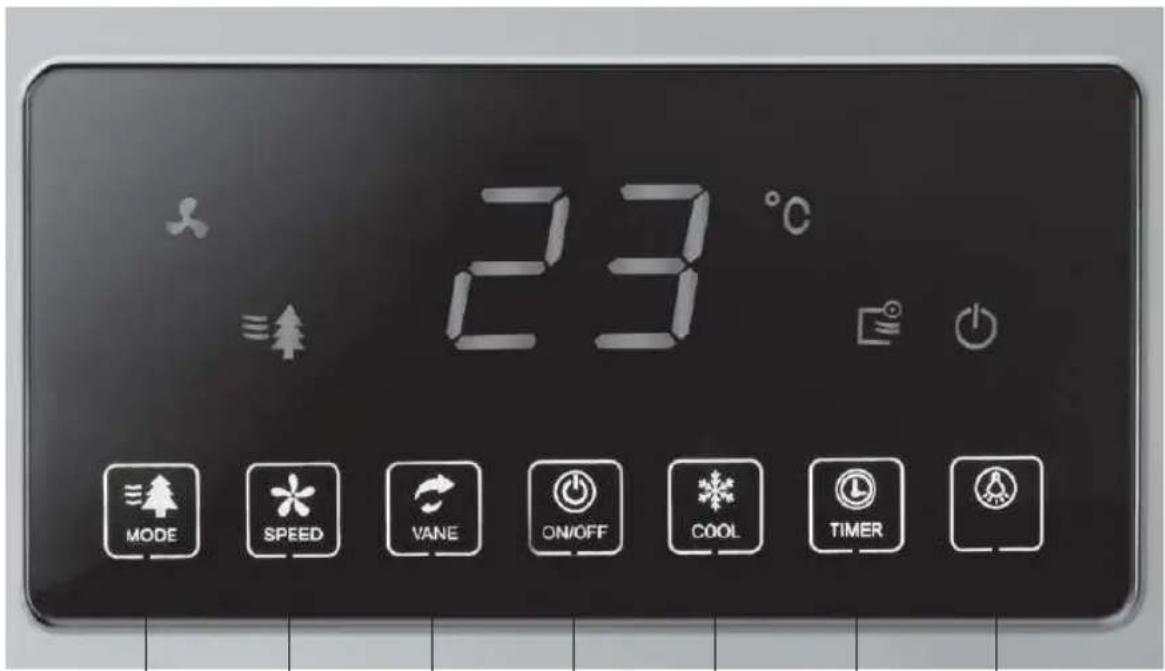
Control panel
a. Mode button
b. Speed button
c. Swing button
d. On/Off button
e. Cool button
f. Timer button
g. Light button
SAFETY INSTRUCTIONS
This appliance can be used by children aged from 8 years and above and persons with reduced physical, sensory or mental capabilities or lack of experience and knowledge if they have been given supervision or instruction concerning use of the appliance in a safe way and understand the hazards involved. Children should not play with the appliance. Cleaning and user maintenance shall not be made by children without supervision.
If the supply cord is damaged, it must be
replaced by the manufacturer, its service agent or similarly qualified persons in order to avoid a hazard.
It is necessary to disconnect the appliance before assembling, disassembling and cleaning. The appliance should be disconnect from the mains during the water filling and cleaning.
IMPORTANT WARNINGS
This appliance is intended exclusively for domestic use for ventilation of rooms: do not use it for other purposes. Any other usage should be considered improper and dangerous. The manufacturer shall not be held responsible for any damage resulting from improper, incorrect and irresponsible use and/or for repairs made by unqualified technicians.
Do not insert fingers or any other objects through the appliance. The appliance must be kept out of the reach of children.
Do not use the appliance if it is not working properly, or if it appears to be damaged; if in doubt, take it to a professional, qualified technician.
Do not move the appliance while it is operating.
When the appliance is not being used, remove the plug from the mains socket. Do not touch the appliance with wet hands or feet.
Do not drag the appliance by the cable to move it.
Do not pull the cable or the appliance itself to remove the plug from the mains socket.
To clean the appliance, follow the instructions in the section of the manual dedicated to cleaning and maintenance.
EUROGAMA will not be held liable for any harm or damage which may occur to people, animals or objects as a result of failure to observe the aforementioned warnings.
INSTALLATION
After removing the packing, check the condition of the appliance; if in doubt, do not use it and take it to a professional, qualified technician. The packaging (plastic bags, polystyrene, fixtures, etc.) should be kept out of the reach of children, since they are a potential source of danger, and they should be disposed of in the appropriate specific containers for selective waste collection.
Before connecting the appliance, check that the voltage values indicated on the characteristics plate correspond to those of the electric mains supply. In the event that the mains socket and the appliance plug are incompatible, have the plug changed to one that is suitable by a professional, qualified technician. They will check that the cable part of the plug is adapted to the power used by the appliance. In general, the use of adapters or extension leads is not advisable; if this is necessary, they must be in accordance with the safety regulations and their amperage capacity must not be less than the maximum for the appliance.
Before each usage, check that the appliance is in good condition and that the power cord is not damaged: if in doubt, check with a professional, qualified technician.
The mains socket must be easily accessible in order to disconnect the appliance with ease in case of emergency.
Position the appliance away from:
- sources of heat (e.g. open flames, gas ovens, etc.)
- deposits of liquids (e.g. sinks, etc.) to avoid falling into or splashing with water (minimum distance 2 metres)
fabrics (curtains, etc.) or loose materials, which may obstruct the ventilation grille; in addition, check that the front part is free of volatile materials (dust, etc.).
The supporting surface must be stable, flat and even (so that the appliance does not tip over).
USE
Before each use check that the appliance is in good condition and that the electric cable is not damaged; if the electric cable is damaged, it must be replaced by the manufacturer or by the technical assistance service or, in the event, by a qualified technician, in order to avoid any type of danger.
CONTROL PANEL
- Mode: when the appliance is working, press the touch "mode" and the corresponding icon will be light up and the mode is cycled as follows: Normal Natural Sleep.
- Speed: press the touch "speed" and it will cycled as follows: Low Medium High.
- Osc: press the touch "Vane", the oscillation function start working and the indicator light will be light up.
- Cool: Touch "cool", cool function start working and the indicator will be light on.
- Timer: When the unit is working, touch “timer” to select the working hours. You can set the timer up to 12h. Each time you press timer, it will increase 1h until 12h.
- Save: When you touch that button, the all the indicator light will be off. Touch again and they will be light on again.
- Temperature and timer share the same display. The ambient temperature is displayed when the power is turned on, and the corresponding icon lights up. Touch "timer", the timer icon lights up. After the timer is set, the ambient temperature will be displayed again.
- Once pressing on/off button twice, the appliance will stop working. If in "Cool" function, the product will be delayed to shut down for about 5 minutes, and then automatically shut down after the filter is dry.
Note: the ice box should be far away from children to avoid eating.
Insert the power cord to the mains, you will hear a bip.
Press the on/off button to start the fan, the purify function will be start working at the same time.
Cooling function: To avoid damaging the appliance, do not press that function if the water tank is empty.
Before operating the unit in Cool mode, make sure the water tank escape valve is properly fixed.
Add clean water respecting the water level indicator (Min and Max).
You can add water from the tank or opening the top lid.
Press the button Cool and the unit should commence to blow cooler air. When you press the button Cool again, it will stop working.
If you found the air not cool enough, you can add additional ice block (11).
Open the ice block and fill them with water. Place the ice blocks filled of water into the freezer for 2 hours and then, place them back to the water tank.
During long periods of inactivity, disconnect the plug from the mains socket.
MANITENANCE AND CLEANING
Warning: before carrying out the normal cleaning operations, remove the plug from the mains socket.
To clean the appliance, use a soft, slightly damp cloth; do not use abrasive or corrosive products.
Do not immerse any part of the appliance in water or any other liquid: if this happens, do not immerse your hand in the liquid and, first of all, remove the plug from the mains socket.
EN
Dry the appliance carefully and check that all the electrical parts are not wet: if in doubt, contact a qualified technician.
In order to avoid the creation of odors and ensure the unit works properly, it must be cleaned internally once every two weeks.
Remove the back panel, by loosening the two attachment pins and lifting the panel upwards, off the 2 upper attachment points. Remove the filter and the honeycomb filter from the unit.
Wash the filter in warm water with a mild, soapy solution; use a soft brush if necessary. Rinse with clean water and leave to dry.
Wash the honeycomb filter with clean water and a soft brush if necessary. Leave to dry.
Empty the water tank and clean with water, a mild soapy solution and a soft brush if necessary. Rinse with clean water and leave to dry.
In case of long periods of non-use store the appliance, protecting it from dust and moisture; we recommend using the original packaging.
If you decide to stop using the appliance, it is advisable to render it in operational by cutting the power cable (first ensuring that the plug has been disconnected from the mains socket) and making sure that parts which could be dangerous to children (e.g. the blade) may cause no harm.
PRODUCT DISPOSAL
This product complies with European Directive 2012/19/EU regarding electrical and electronic devices, known as WEEE (Waste electrical and electronic equipment), which establishes the applicable legal framework in the European Union regarding the elimination and recycling of electrical and electronic devices. Do not put this product in the bin. Take it to your closest electrical and electronic waste treatment centre.

The product may use batteries. Remove them before disposing of the product and deposit them in the special containers approved for this purpose.
We hope you are satisfied with this product.
| Description | Symbol | Value | Unit |
| Maximum fan flow rate | F | 400 | m^3/min |
| Fan power input | P | 65,0 | W |
| Service value | SV | 6,15 | (m^3/min) / W |
| Standby power consumption | P_SB | 0,128 | W |
| Fan sound power level | LWA | 55 | dB(A) |
| Maximum air velocity | C | 7,5 | m/sec |
| Measurement standard for service value | IEC60879:1986(CORR.1992) | ||
WIR MÖCHTEN UNS BEI IHNEN BEDANKEN, DASS SIE SICH FÜR ZELMER ENTSCHIEDEN HABEN. WIR HOFFEN, DASS DAS PRODUKT ZU IHRER ZUFRIEDENHEIT FUNKTIONIERT.
ACHTUNG
ELIMINAREA PRODUSULUI
EUROGAMA Sp. Z o.o. guarantees compliance of this product for the use for which it is intended for a period of two years. In the case of breakdown during the term of this warranty, users are entitled to repair or else the replacement of the product at no charge if the former is unavailable, unless one of these options proves impossible to fulfill or is disproportionate. In this case, you can then opt for a reduction in price or cancellation of the sale, which must be dealt with directly with the sales vendor. This also covers replacement of spare parts provided that the product has been used according to the recommendations specified in this manual for both cases, and has not been tampered with by any third party that is not authorised by EUROGAMA Sp. Z o.o.. The warranty will not cover any parts subject to wear and tear. This warranty does not affect your rights as a consumer in accordance with the provisions in Directive 1999/44/EC for member states of the European Union.
USE OF WARRANTY
Customers must contact a EUROGAMA Sp. Z o.o. authorised Technical Service for repair of the product. Since any tampering of the same by anyone not authorised by EUROGAMA Sp. Z o.o., or the careless or improper use of the same shall render this warranty null and void. The warranty must be fully completed and delivered along with the receipt or delivery docket for the effective exercise of rights under this warranty. This warranty should be retained by the user as well as the invoice, receipt or the delivery docket to facilitate the exercise of these rights. For technical service and after-sales care outside the Polish territory, please submit your query to the point of sale where you purchased the item or check for further aftersales information at www.zelmer.com
GARANTIE-ERKLÄRUNG


Brand : Zelmer
Model : ZCL6040
Category : Fan