G710 S MECHANICAL GAMING KEYBOARD - Gaming Keyboard LOGITECH - Free user manual and instructions
Find the device manual for free G710 S MECHANICAL GAMING KEYBOARD LOGITECH in PDF.



| Brand | LOGITECH |
| Model | G710 S Mechanical Gaming Keyboard |
| Category | Gaming keyboard |
| Connection type | USB 2.0 (two cables) |
| Number of keys | 111 (including 6 programmable G keys, 3 M keys, multimedia keys) |
| Backlighting | 2 zones, 5 intensity levels (100%, 75%, 50%, 25%, off) |
| Wrist rest | Yes, removable |
| USB passthrough port | Yes, USB 2.0 |
| Game mode | Disables Windows and Menu keys, integrated indicator light |
| Macro programming | Up to 18 functions per game via MR and M1-M3 keys |
| Software | Logitech Gaming Software (download at www.logitech.com/support/g710) |
| Dimensions (approx.) | 450 x 150 x 30 mm |
| Weight (approx.) | 1.2 kg |
| Power supply | USB bus |
| Material | Plastic, mechanical keys |
| Maintenance and cleaning | Use a soft, dry cloth. Disconnect before cleaning. |
| Safety | Do not expose to moisture or extreme temperatures. |
| Spare parts / Repairability | Contact Logitech support for any repairs. |
Frequently Asked Questions - G710 S MECHANICAL GAMING KEYBOARD LOGITECH
User questions about G710 S MECHANICAL GAMING KEYBOARD LOGITECH
0 question about this device. Answer the ones you know or ask your own.
Ask a new question about this device
Download the instructions for your Gaming Keyboard in PDF format for free! Find your manual G710 S MECHANICAL GAMING KEYBOARD - LOGITECH and take your electronic device back in hand. On this page are published all the documents necessary for the use of your device. G710 S MECHANICAL GAMING KEYBOARD by LOGITECH.
USER MANUAL G710 S MECHANICAL GAMING KEYBOARD LOGITECH
Logitech® G710+ Mechanical Gaming Keyboard Setup Guide
English. 3 Suomi 43
Deutsch. 7 Elambdaiká. 47
Francais . 11 Pio-pycckn. 51
Italiano. 15 Magyar 55
Espanol 19 Ceska verze. 59
Portugués. 23 Po polsku 63
Nederlands 27 Slovencina. 67
Svenska 31 Turkce 71
Dansk 35 75
Norsk 39
www.logitech.com/support 79
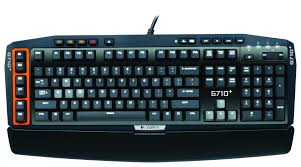
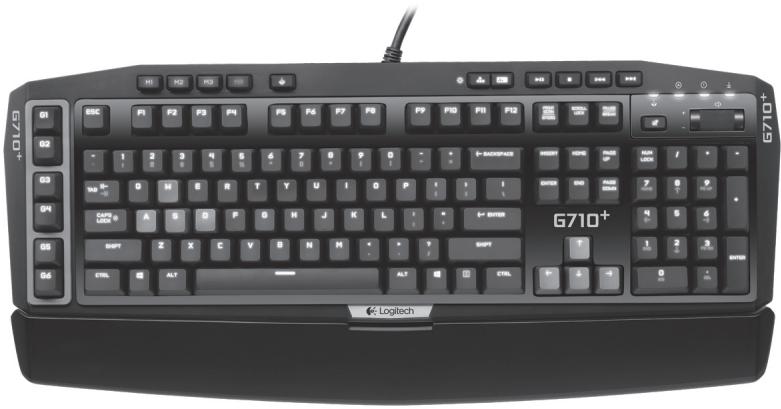
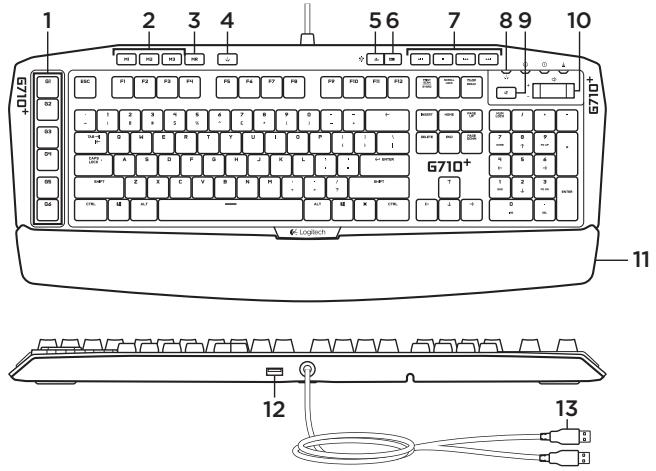
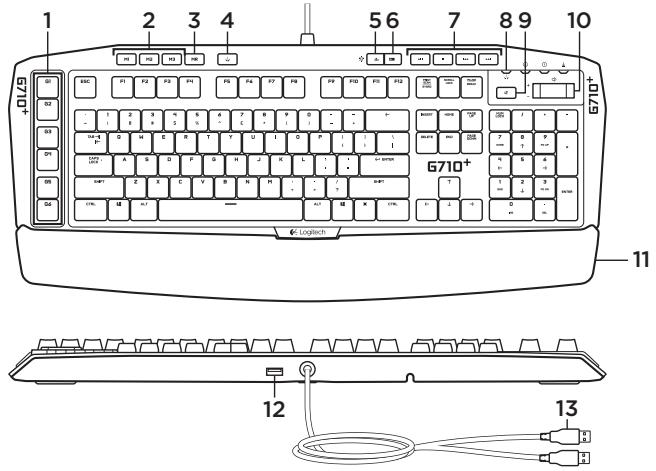
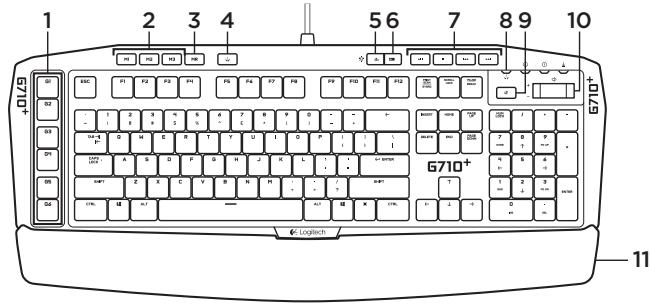
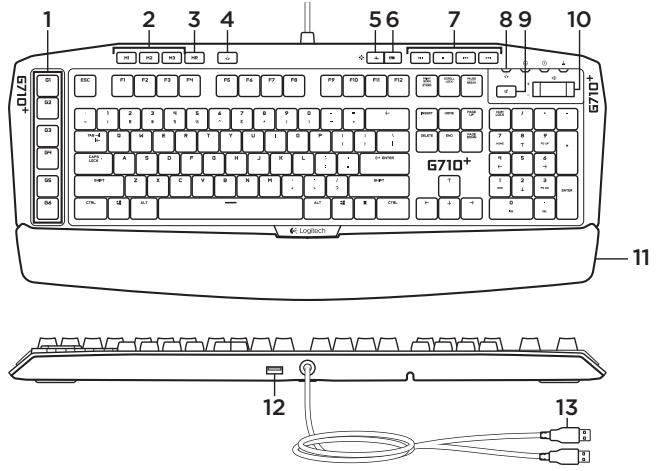
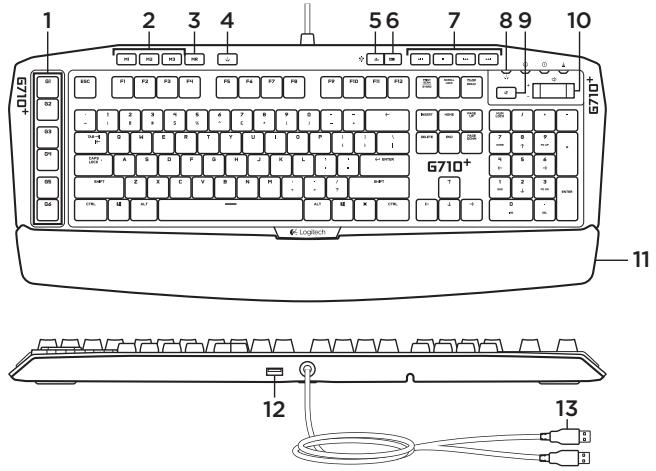
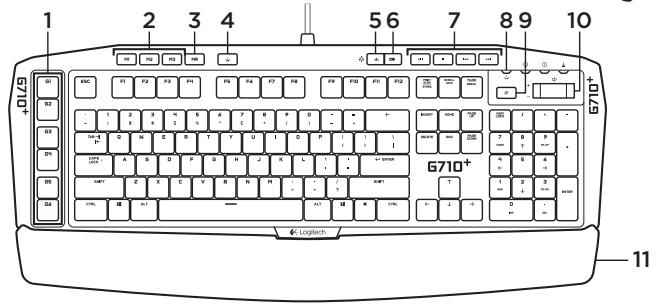
Know your product
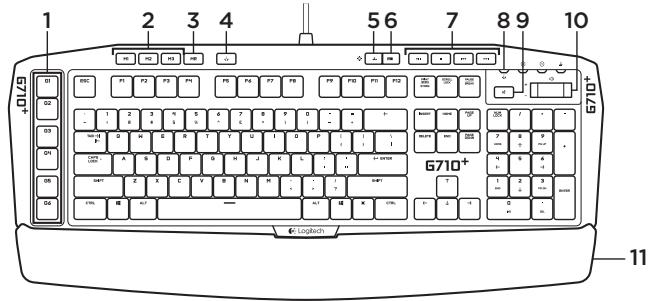
- G-keys (programmable)
- Mkeys
- MR-key
- Game/Windows® key
- Zone 1 backlight key
-
Zone 2 backlight key
-
Media keys
- Game mode LED
- Mute
- Volume
- Palm rest
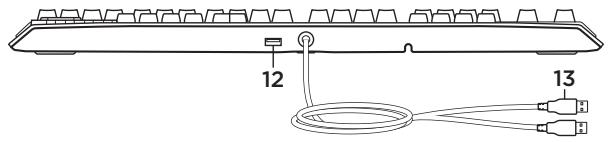
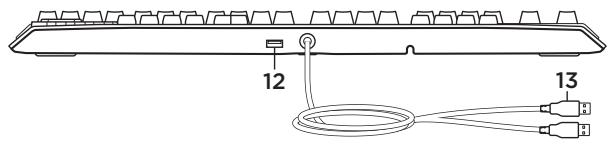
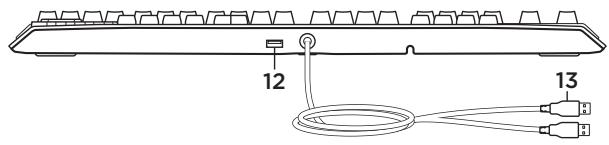
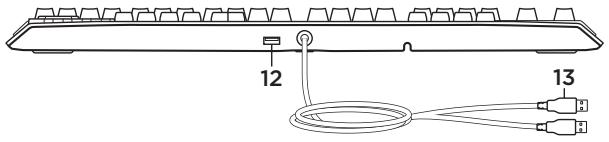
- USB 2.0 pass-through port
- USB cable connectors
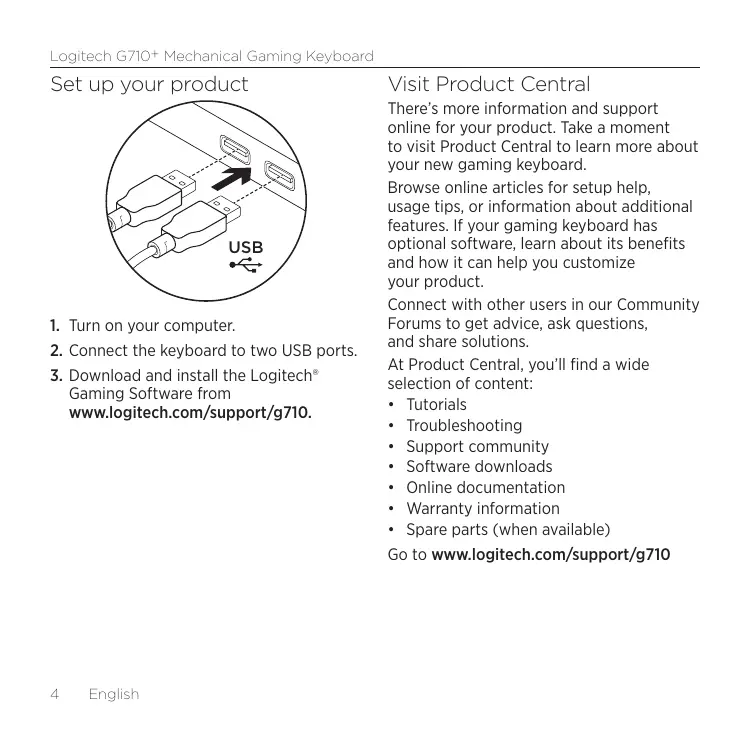
Set up your product
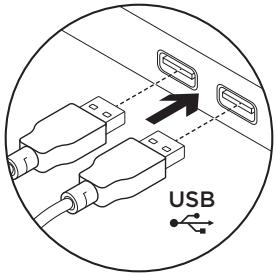
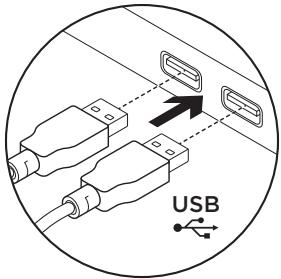
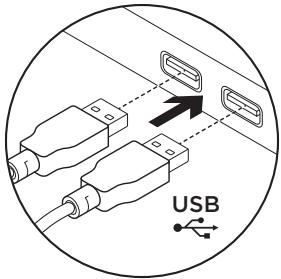
- Turn on your computer.
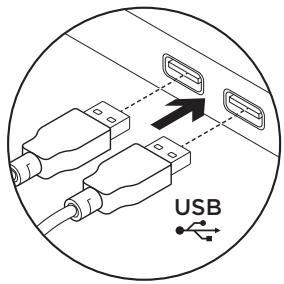
- Connect the keyboard to two USB ports.
- Download and install the Logitech® Gaming Software from www.logitech.com/support/g710.
Visit Product Central
There's more information and support online for your product. Take a moment to visit Product Central to learn more about your new gaming keyboard.
Browse online articles for setup help, usage tips, or information about additional features. If your gaming keyboard has optional software, learn about its benefits and how it can help you customize your product.
Connect with other users in our Community Forums to get advice, ask questions, and share solutions.
At Product Central, you'll find a wide selection of content:
- Tutorials
- Troubleshooting
Support community - Software downloads
Online documentation
Warranty information - Spare parts (when available)
Go to www.logitech.com/support/g710
Product features
Programmable G-keys
- Six programmable G-keys and three M-keys provide up to 18 unique functions per game.
- Customize the G-keys using the Logitech Gaming Software.
To record a macro:
- Press the MR key.
- Press a G-key.
- Type the keys to be recorded.
- Press the MR key.
To record a second macro to the same G-key, press M2 and repeat steps 1-4. For a third macro, press M3 and repeat steps 1-4.
Download and install the Logitech Gaming Software from www.logitech.com/support/g710.
Game/Windows key
This key disables the standard Windows key and Menu key to prevent the Windows Start menu from activating during a game, which might disrupt play. The game mode LED is lit during game mode.
Keyboard backlighting
- There are two backlighting zones:
Zone 1 covers the W, A, S, D and arrow keys.
Zone 2 covers the rest of keyboard (G-Keys, M-Keys, media keys, etc.).
Control backlight brightness with: - Zone 1 backlight key for Zone 1.
- Zone 2 backlight key for Zone 2.
Note: With either key, cycle through five intensity levels: 100%, 75%, 50%, 25% and off.
USB pass-through port
Use this port with any USB device.
Troubleshooting
Gaming keyboard does not work
- Check the USB connection.
- Do not use a USB hub.
Try other USB ports on your computer.
Reboot your system.
Need help programming the G-keys?
- Download and install the Logitech Gaming Software.
- Launch the software.
- Select Help (question mark) for assistance.
www.logitech.com/support/g710
What do you think? Please take a minute to tell us.
ank you for purchasing our product.
www.logitech.com/ithink
www.logitech.com/ithink
www.logitech.com/ithink
www.logitech.com/ithink
www.logitech.com/ithink
www.logitech.com/ithink
Ken uw product
www.logitech.com/ithink
Produktöversikt
www.logitech.com/ithink
Gamingtastaturet fungerer/DD
www.logitech.com/ithink
www.logitech.com/ithink
Tunne tuotteesi
www.logitech.com/ithink
Vvpiia με to ποιόν
Irpobar KlaBnAtya He pa6oTaet
www.logitech.com/ithink
www.logitech.com/ithink
Popis produktu
www.logitech.com/ithink
www.logitech.com/ithink
Popis produktu
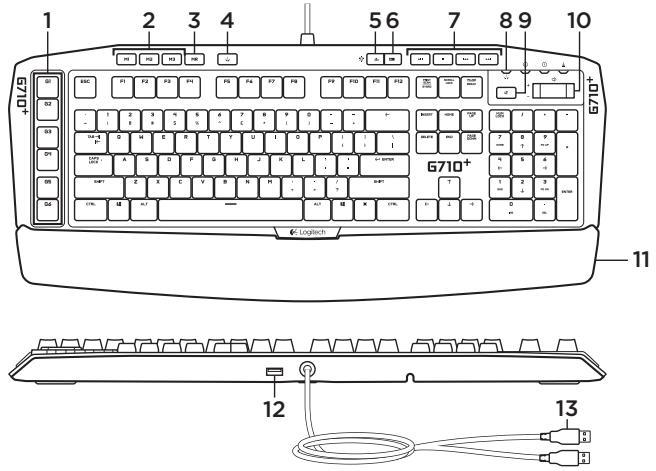
- Klávesy G-key (programovatelné)
- Klavesy M-key
- Klaves MR
- Klaves Game/Windows
- Klaves podsvietenie zony 1
- Klaves podsvietenie zony 2
-
Tlačidla na prácu s mediami
-
Indikator herného režimu
- Stlmenie
- Hlasitost
- Opierka dlani
- Prepájaci port USB 2.0
- Konektory kábla USB
Nastavenie produktu
- Zapnite počitač.
- Pripojte klavesnicu k dvom portom USB.
- Zo stranky www.logitech.com/support/g710 prevezmite a nainstalujte softver Logitech® Gaming Software.
Navstivte produktovu centralu
Najdetu tu viac informaciia podporu online
pre vaes Produkt. Urobte si chvifu a navstivte
produktovu centralu, kde sa dozviete dalsie
informacie o vasej novej hernej klavesnici.
www.logitech.com/ithink
Urūnūnzū taniyīn
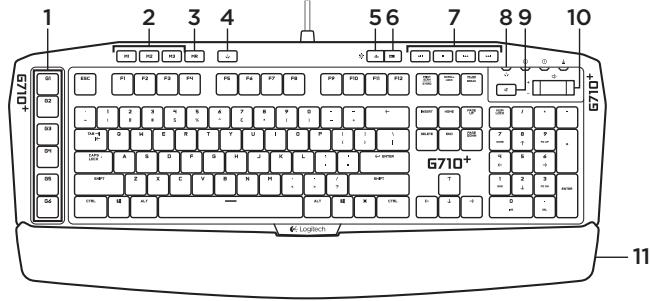
- G tuşlari (programlanabilir)
- Mtuslari
- MR tuşu
- Oyun/Windows® tusu
5.1. Bolge arka plan isik tusu
6.2.Bolge arka plan isik tusu -
Ortam tuşlari
-
Oyun modu LED'i
- Sessiz
- Ses duzeyi
- Avuc ici destegi
- USB 2.0ogrudan baglanti noktasi
- USB baglanti kabolari
Urünüzukurun
- Bilgisayarinizi acin.
- Klavyeyi iki USB baglanti kablosuyla baglayin.
- www.logitech.com/support/g710 adresinden Logitech® Gaming Software'i indirin ve kurun.
www.logitech.com/ithink
ciill 1c y
a 8
gss 9.9
Gg.10
yia 11
USB 2.0 .12
USB 1.13
(aillla)Gc.1
McIa.2
MR C1io.3
Game/Windows C.4
1 aebial aiee aeoln l cio.5
2 aebaill ayell solnly 6
bilwalil.7
Game/Windows
CWindows C
Windows
c 10000000000000000000000000000000000000000
C
:
DSASW 1abial
C
Ciiial 2 2 2
(ALLIgblalglG M G
aalldy aalell eclly lglbaw gse gss
-
a b s i n all a u x i s t s o l v i d e l y c l i d e -
-
a 与 b 相等 au + bd = c0( a + b) ( au + bd) = 1
auii i jaiiy ilkiay laiy cie y plsiuily:
25% 50% 75% 100%
JUB USB
.USB jess
Ciiioi ci j
aaiaiai G
jM G
18 1
caliy plsiuily G ciie uuaa
Logitech
S OBC = S COD + S_ BOC
.MR Cuaal 1
G cuiuai 1c buaol.2
- 3
.MR 1ieill 1e bainl.4
aaii i 1
aill 1-4 1
1.4 C. y = 1 all
g Logitech 1
. www.logitech.com/support/g710
Product Central
Ciiill 121
1
.USB gai jia jia jia jia jia jia jia jia 2
G Logitech 3
. www.logitech.com/support/g710
www.logitech.com/ithink
www.logitech.com/support/g710

Belgié/Belgique Dutch: +32-(0)2 200 64 44; French: +32-(0)2 200 64 40
| Česká Republika | +420 239 000 335 |
| Danmark | +45-38 32 31 20 |
| Deutschland | +49-(0)69-51 709 427 |
| Espana | +34-91-275 45 88 |
| France | +33-(0)1-57 32 32 71 |
| Ireland | +353-(0)1 524 50 80 |
| Italia | +39-02-91 48 30 31 |
| Magyarország | +36 (1) 777-4853 |
| Nederland | +31-(0)-20-200 84 33 |
| Norge | +47-(0)24 159 579 |
| Österreich | +43-(0)1 206 091 026 |
| Polska | 00800 441 17 19 |
| Portugal | +351-21-415 90 16 |
| Ròscia | +7(495) 641 34 60 |
| Schweiz/Suisse | D +41-(0)22 761 40 12 |
| Svizzzera | F +41-(0)22 761 40 16 |
| I +41-(0)22 761 40 20 | |
| E +41-(0)22 761 40 25 |
| South Africa | 0800 981 089 |
| Suomi | +358-(0)9 725 191 08 |
| Sverige | +46-(0)8-501 632 83 |
| Türkiye | 00800 44 882 5862 |
| United Arab Emirates | 8000 441-4294 |
| United Kingdom | +44-(0)203-024-81 59 |
| European, Mid. East., & African Hq. Morges, Switzerland | English: +41-(0)22 761 40 25 Fax: +41-(0)21 863 54 02 |
| Eastern Europe | English: 41-(0)22 761 40 25 |
| United States | +1 646-454-3200 |
| Argentina | +0800 555 3284 |
| Brasil | +0800 891 4173 |
| Canada | +1-866-934-5644 |
| Chile | +1230 020 5484 |
| Colombia | 01-800-913-6668 |
| Latin America | +1 800-578-9619 |
| Mexico | 01.800.800.4500 |
www.logitech.com