
AquaStar AQ500 - Vacuum Cleaner TESLA - Free user manual and instructions
Find the device manual for free AquaStar AQ500 TESLA in PDF.


User questions about AquaStar AQ500 TESLA
0 question about this device. Answer the ones you know or ask your own.
Ask a new question about this device
Download the instructions for your Vacuum Cleaner in PDF format for free! Find your manual AquaStar AQ500 - TESLA and take your electronic device back in hand. On this page are published all the documents necessary for the use of your device. AquaStar AQ500 by TESLA.
USER MANUAL AquaStar AQ500 TESLA
natural_image
Simple line drawing of a cable and plug assembly with a numbered label (15) pointing to it, no text or symbols present.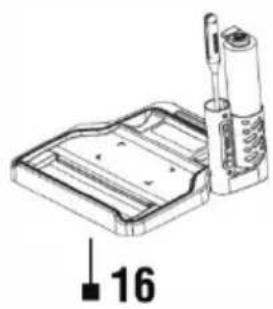
natural_image
Technical line drawing of a mechanical component with a numbered label '16' (no text or symbols on the diagram itself)SESTAVENÍ ZAŘÍZENÍ
text_image
Technical diagram showing a vacuum cleaner with a close-up view of its internal components and a magnified view of its tip.natural_image
Line drawing of a vacuum cleaner with attached power outlet (no text or symbols)natural_image
Diagram of a mechanical device with arrows indicating motion or force (no text or symbols)1
natural_image
Illustration of a hand holding a container with an arrow indicating upward motion (no text or symbols)2
3
text_image
click4
natural_image
Illustration of hands cleaning a glass container with a paper clip (no text or symbols)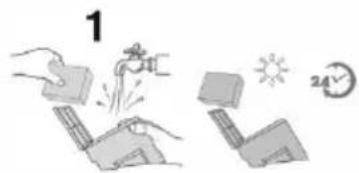
text_image
1 24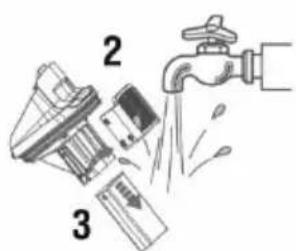
text_image
Diagram showing three steps of cleaning a faucet with labeled parts 2 and 3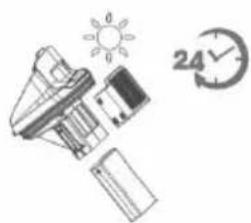
natural_image
Illustration of a battery, sun, and clock icons (no text or symbols)natural_image
Line drawings of four different cleaning or cleaning techniques: a device with a handle, a tool holder, a mechanical component, and a cylindrical pipe being handled (no text or symbols present)text_image
Technical diagram illustrating three-step cleaning process: device opening, roller rolling, and press application with click button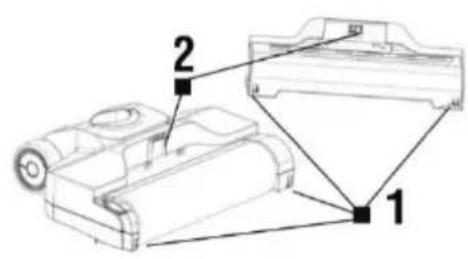
text_image
Technical diagram of a mechanical device with labeled parts 1 and 2natural_image
Simple line drawing of a connected electrical plug with a cable and connector, labeled with number 15 (no text or symbols on the diagram itself)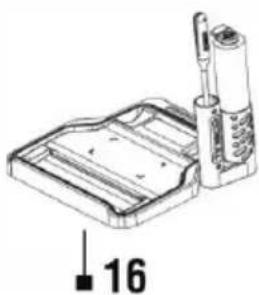
natural_image
Technical line drawing of a mechanical device with a numbered annotation (16), no readable text or symbols present.text_image
Technical diagram showing a vacuum cleaner with a close-up view of its internal components and a warning label 'Sick'.Zasuňte koniec držadla do otvoru v tele zariadenia.
natural_image
Line drawing of a vacuum cleaner with attached power outlet (no text or symbols)natural_image
Diagram of a mechanical device with arrows indicating motion or force (no text or symbols)1
natural_image
Illustration of a hand holding a container with an arrow indicating upward motion (no text or symbols)2
3
text_image
click4
natural_image
Illustration of hands cleaning a spray bottle with a cloth (no text or symbols)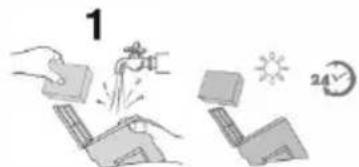
text_image
1 24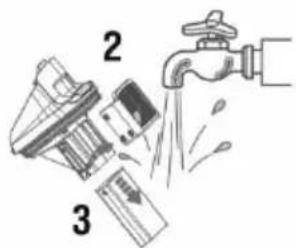
text_image
Diagram showing a hand pouring liquid into a water tap, with labeled parts 2 and 3.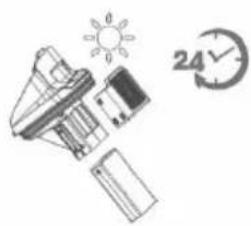
natural_image
Illustration of a battery, sun, and clock icons (no text or symbols)text_image
Technical diagram of a mechanical device with labeled parts 1 and 2Zatlačte háčik (1) do otvoru pre zámok (1), potom zatlačte do otvoru pre zámok (2) hák (2). Kryt kefy vždy zacvaknite na správne miesto, aby ste zabránili strate sania alebo úniku vody.
text_image
Technical diagram showing a vacuum cleaner with a close-up view of its internal components and a warning label 'Sick'.natural_image
Line drawing of a vacuum cleaner with attached power outlet (no text or symbols)natural_image
Illustration of hands using a tool to clean or remove a surface (no text or symbols)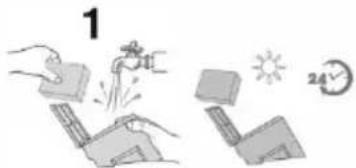
text_image
1 24V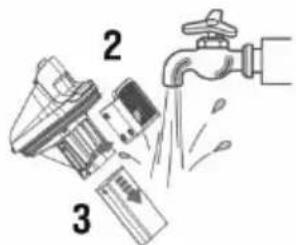
text_image
Diagram illustrating a water tap with labeled parts and flow direction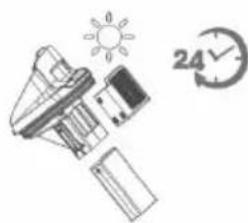
natural_image
Illustration of a solar panel, battery pack, and clock with '24' indicating 24-hour cycle (no text or symbols on main elements)natural_image
Line drawings of four different cleaning or cleaning techniques: a device with a faucet, a tool holder, a mechanical component, and a tool being cleaned (no text or symbols present)natural_image
Three-step line drawings of a vacuum cleaner's internal structure, showing assembly, rolling, and cleaning steps (no text or symbols)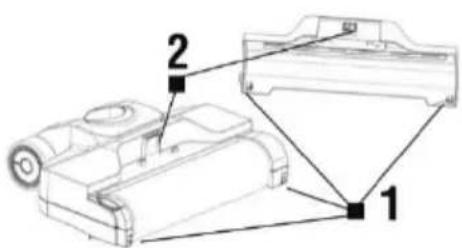
text_image
Technical diagram of a mechanical device with labeled parts 1 and 2text_image
Technical diagram showing a vacuum cleaner with a close-up view of its internal components and a warning label 'Sick'.natural_image
Line drawing of a vacuum cleaner with attached power outlet (no text or symbols)natural_image
Diagram of a hand pressing down a mechanical component with arrows indicating motion (no text or symbols)1
natural_image
Illustration of a hand holding a container with an arrow indicating direction (no text or symbols)2
3
text_image
slick4
natural_image
Illustration of hands cleaning a glass with a paper clip (no text or symbols)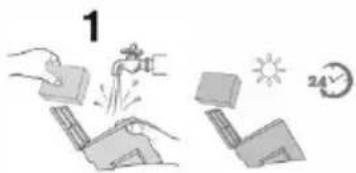
text_image
1 24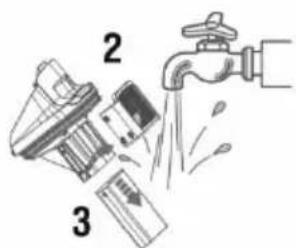
text_image
Diagram showing three steps of a cleaning or cleaning process: dropping a bottle, removing a plastic bag, and spraying water into a faucet.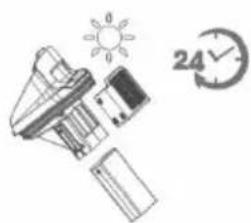
natural_image
Illustration of a battery, sun, and clock icons (no text or symbols)text_image
Technical diagram showing a hand pressing a component with labeled parts in Chinese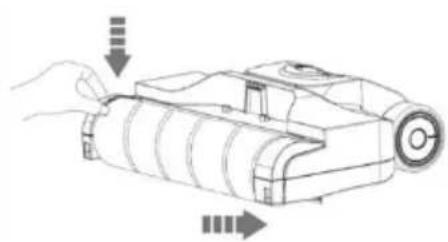
natural_image
Line drawing of a mechanical device with arrows indicating motion or assembly (no text or symbols)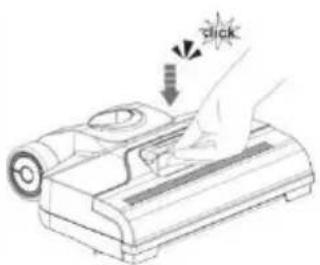
natural_image
Illustration of a hand pressing a button on a device with a 'STICK' label (no text or symbols on the device itself)text_image
Technical diagram of a mechanical device with labeled parts 1 and 2text_image
Technical diagram showing a vacuum cleaner with a close-up view of its internal components and a warning label 'Sick'.natural_image
Line drawing of a vacuum cleaner with attached power outlet (no text or symbols)natural_image
Line drawings of four different cleaning or cleaning techniques: a device with a handle, a tool holder, a mechanical component, and a cylindrical pipe being handled (no text or symbols present)text_image
Technical diagram showing three-step cleaning process: device opening, roller rolling, and press application with click button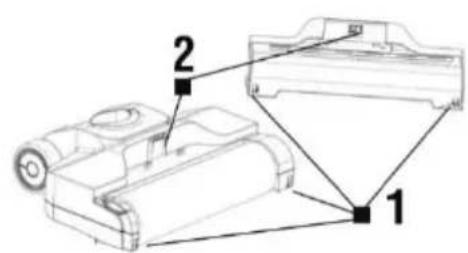
text_image
Technical diagram of a mechanical component with labeled parts 1 and 2natural_image
Simple line drawing of a cable with a plug and connector, no text or symbols present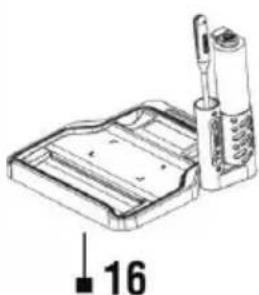
natural_image
Technical line drawing of a mechanical device with a labeled component '16' (no text or symbols on the diagram itself)SASTAVLJANJE APARATA
text_image
Technical diagram showing a vacuum cleaner with a close-up view of its internal components and a warning label 'Sick'.Umetnite kraj drške u otvor na tijelu aparata.
Učvrstite dršku zavrtanjem vijka za pričvršćivanje.
PUNJENJE BATERIJE
natural_image
Line drawing of a vacuum cleaner with attached power outlet (no text or symbols)- Napunite bateriju do kraja prije prve uporabe.
• Temperatura okoline mora biti između 4°C i 40°C. - Prije punjenja baterije provjerite da su spremnici za vodu prazni i da je aparat suh.
- Tijekom punjenja aparat se ne može upotrebljavati za čišćenje.
- Kada je baterija gotovo prazna, pokazatelj stanja baterije počet će treperiti crveno. Priključite kabel za punjenje na aparat i uključite ga u zidnu utičnicu. Ako pokazatelj punjenja treperi plavo, baterija se puni.
- Kada je baterija potpuno napunjena, pokazivač neprekidno svijetli 2 minute, a zatim se isključuje.
• Vrijeme punjenja je oko 3 - 4 sata. - Za optimalna radna svojstva, redovito punite aparat.
- Čuvajte aparat na suhom mjestu.
- Upotrebljavajte samo punjač priložen uz aparat. Provjerite da napon naveden na tipskoj pločici izvora napajanja odgovara mrežnom naponu.
PUNJENJE SPREMNIKA ZA ČISTU VODU
Pritisnite gumb za otpuštanje spremnika za čistu vodu i izvadite ga. Otvorite poklopac i napunite spremnik toplom vodom iz slavine (najviše 60°C). Po potrebi, dodajte sredstvo za čišćenje koje se ne pjeni prikladno za čišćenje tvrdih podova i dobro zatvorite poklopac. Vratite spremnik za čistu vodu u tijelo aparata dok ne začujete klik.
UPOZORENJE: Prije uporabe aparata uvijek provjerite da su u spremnik za prljavu vodu umetnuti svi filtri.
PRVO POKRETANJE
text_image
ON OFF MAX-
Pokrenite aparat pritiskom gumba „ON/OFF“.
-
Pritisnite gumb „MAX“ ako želite očistiti jako prljavo područje većom brzinom okretanja četke za čišćenje, većom snagom usisavanja i jačim prskanjem vode.
Pokazatelj stanja baterije i napunjenosti
Normalni način rada - svijetli plavo.
Način rada „MAX“ - treperi plavo.
natural_image
Diagram of a mechanical device with arrows indicating motion or force (no text or symbols)1
natural_image
Illustration of a hand holding a container with an arrow indicating upward motion (no text or symbols)2
3
text_image
slick4
natural_image
Line drawing of hands cleaning a glass container with a paper clip (no text or symbols)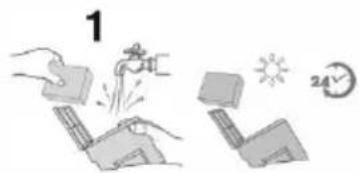
text_image
1 24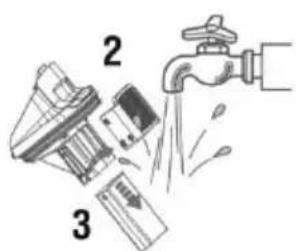
text_image
Diagram showing three steps of a water drain with labeled parts: first, second, and third.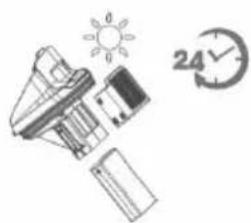
natural_image
Illustration of a battery, sun, and clock icons (no text or symbols)Filtri (1) su smješteni u poklopcu spremnika za prljavu vodu. Izvadite spremnik za prljavu vodu, otvorite poklopac i prstima primite udubljenje sa svake strane filtra, povucite prema gore da biste ga izvadili, a zatim isperite oba filtra vodom. U slučaju jake prljavštine, zamijenite filtre. Ako su predfilter (2) i plovak (3) blokirani, potrebno ih je očistiti. Skinite filter s poklopca spremnika, izvucite plovak i isperite ga vodom. Ostavite filtre da se potpuno osuše prije nego što ih vratite u poklopac spremnika za prljavu vodu.
SAMOČIŠĆENJE ČETKE OD MIKROVLAKANA
text_image
ON OFF MAX- Za optimalna radna svojstva, nakon svakog čišćenja redovito upotrijebite funkciju brzog samočišćenja četke od mikrovlakana.
- Postavite aparat u postolje za odlaganje. Spremnik za čistu vodu treba biti napunjen s najmanje 1/3 vode.
- Pritisnite i 3 sekunde držite gumb „ON“ (UKLJUČENO) za pokretanje načina samočišćenja. Aparat će se automatski isključiti po završetku samočišćenja. Cijeli proces traje približno 40 sekunda.
- Prije i poslije samočišćenja ispraznite spremnik za prljavu vodu.
ČIŠĆENJE ČETKE OD MIKROVLAKANA

natural_image
Line drawings of four different mechanical devices with water spray, showing different states of operation (no text or symbols present)Da biste postigli optimalna radna svojstva, očistite četku od mikrovlakana i njezin poklopac nakon svake uporabe. Primate prednju ručku poklopca, pritisnite gumb za otpuštanje i istodobno izvucite poklopac povlačenjem prema gore. Isperite ga vodom. Primate valjak četke za jezičak i izvucite ju povlačenjem prema gore. Uklonite kosu i prljavštinu koja se omotala oko valjka priborom za čišćenje 3 u 1. Isperite ju vodom. Ostavite da se dobro osuši prije ponovnog montiranja. Umetnite natrag valjak četke i poklopac.

natural_image
Three-step diagram showing a device with internal components, a roller being opened, and a final roller being inserted (no text or symbols present)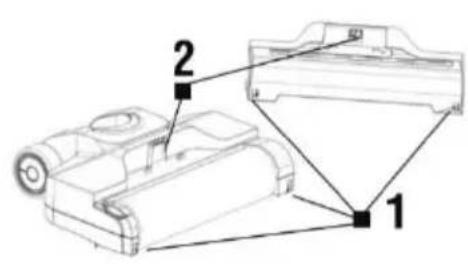
text_image
Technical diagram of a mechanical device with labeled parts 1 and 2natural_image
Simple line drawing of a cable with a plug and a small resistor, no text or symbols present.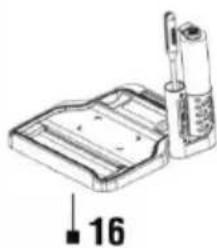
natural_image
Technical line drawing of a mechanical device with a labeled component '16' (no text or symbols on the diagram itself)ASAMBLAREA DISPOZITIVULUI
text_image
Technical diagram showing a vacuum cleaner with a close-up view of its internal components and a warning label 'Sick'.natural_image
Line drawing of a vacuum cleaner with attached power outlet (no text or symbols)natural_image
Line drawings of four different cleaning or cleaning techniques: a device with a handle, a tool holder, a mechanical component, and a cylindrical pipe being handled (no text or symbols present)text_image
Technical diagram showing three-step cleaning process: device opening, roller rolling, and press application with click button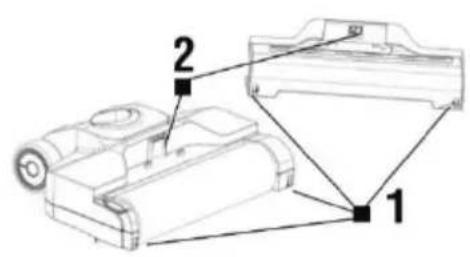
text_image
Technical diagram of a robotic device with labeled parts 1 and 2text_image
Technical diagram showing a vacuum cleaner with a close-up view of its internal components and a warning label 'Sick'.natural_image
Line drawing of a vacuum cleaner with attached power outlet (no text or symbols)natural_image
Diagram of a hand holding a device with arrows indicating motion or force (no text or symbols)1
natural_image
Illustration of a hand holding a device with an arrow indicating motion (no text or symbols)2
3
text_image
click4
natural_image
Illustration of hands using a tool to remove or brush a container (no text or symbols)
text_image
1 24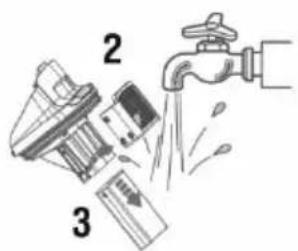
text_image
Diagram showing three steps of a water tap: dropping from a bottle, falling into a container, and exiting a faucet.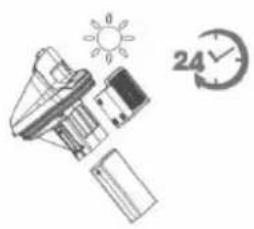
natural_image
Illustration of a lamp, solar panel, and clock with '24' clock (no text or symbols on objects)natural_image
Four line drawings showing different mechanical or electrical components: a device with a faucet, a filter, a device with a handle, and a cylindrical device being handled (no text or symbols present)text_image
Technical diagram showing three-step cleaning process: device assembly, roller rolling, and press release with 'click' annotation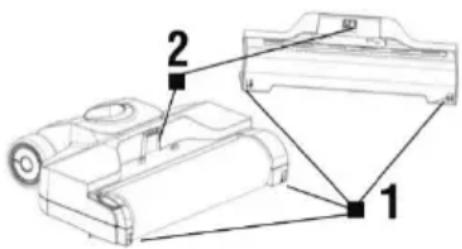
text_image
Technical diagram of a robotic device with labeled parts 1 and 2Thank you for choosing the TESLA AquaStar AQ500.
Please read the „Important Safety Instructions“ carefully before using the appliance and follow all usual safety rules. Keep this user manual for future reference.
IMPORTANT SAFETY INSTRUCTIONS
This appliance is a complex electromechanical device, please note the following instructions:
- Do not use this appliance for any other than its intended use.
- Do not use the appliance in an excessively warm, dusty, humid environment or outdoors.
- The appliance is intended for home use only at room temperature (max. 40°C) and for light cleaning of floors. The appliance is not suitable for commercial use. The manufacturer bears no liability for improper use or use at variance with the instructions. Such use is not covered by the warranty.
- Before setting the appliance into operation, check that all of the filters are correctly inserted. Never operate the appliance without filters.
- This appliance is suitable for use on hard floors. If used on an uneven surface, the optimum cleaning effect may not be achieved. We recommend checking with the manufacturer of the floor covering whether use of the appliance is advised, especially in the case of floating floors.
- Use only original filters and accessories which are designed for this model. Use of non-original accessories may cause injury or damage to the appliance. All other parts or accessories not intended for use with this appliance are prohibited.
- Persons with limited physical, sensory or mental abilities, or persons without experience, may only use this appliance provided that they are supervised or have been properly instructed in safe use. Children should not play with this appliance, clean it or perform maintenance.
- The appliance has an electric roller brush, which could cause injury if used incorrectly. Never vacuum clothing, hair, eyes, fingers or other parts of the body. Never use this appliance to clean people or animals.
- Before starting the appliance, make sure that the cleaning brush is correctly fitted and that the cover of the cleaning brush is properly closed. Never remove the cover or the brush when the appliance is in use.
- Do not allow any water or other liquids to get inside the appliance to avoid electric shock or damage to the appliance.
- Before cleaning or assembling the brush, make sure that the appliance is switched off and is not charging.
- Never use the appliance near explosive or flammable materials.
- Never vacuum hot ash, burning objects such as cigarettes or matches, solvents, printer toner, aggressive cleaners, alcoholic products, paints, explosive gases or flammable liquids.
- Never vacuum sharp or pointed objects such as shards of glass or nails, etc. The filters in the machine can also be damaged by materials which harden when dry, such as plaster or cement.
- A battery is permanently installed in the appliance. There is a risk of injury and explosion if it is improperly handled. Only have the battery replaced at a TESLA service centre.
- Never short-circuit the battery. Only charge it using the included power pack.
- Do not open or repair the appliance. You run the risk of electric shock and loss of the warranty.
- Use of the appliance at variance with the above-mentioned instructions may cause damage to the equipment or injury.
- The manufacturer and the importer to the European Union bears no liability for any damage caused by operation of the appliance such as injury, scalding, fire or damage to other items, etc.
PACKAGE CONTENTS
Carefully check that you have unpacked all of the accessories supplied. We recommend keeping the original cardboard box, user manual and packaging materials for the duration of the warranty period. The plastic bags used to package this appliance can be dangerous. Keep these bags out of reach of children to avoid the risk of suffocation. These bags are not toys.
DESCRIPTION
text_image
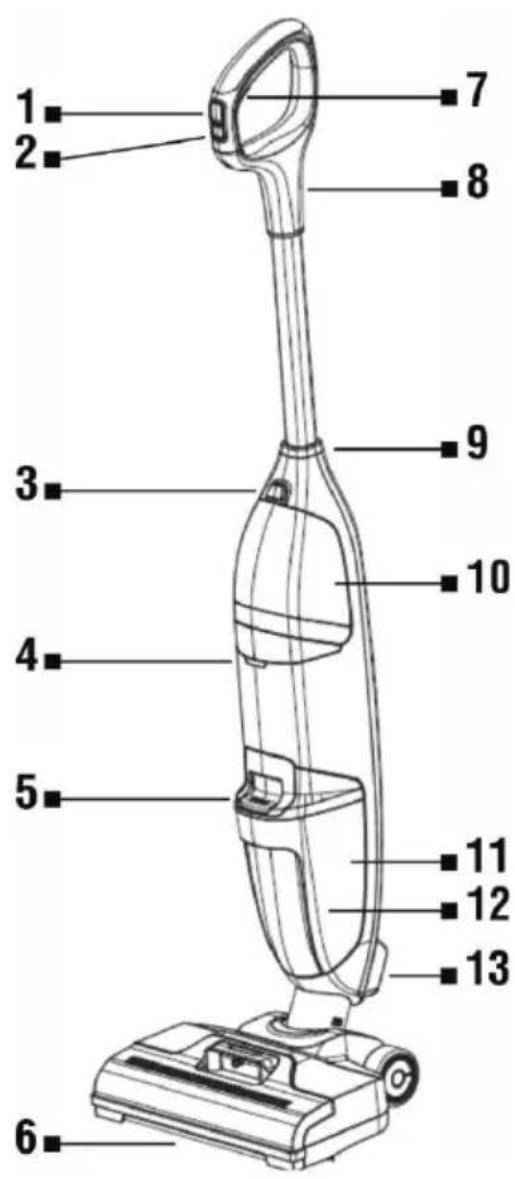
1 2 3 4 5 6 7 8 9 10 11 12 131 ON/OFF
2 Intensive cleaning button
3 Clean water tank release button
4 Battery and charging status indicator
5 Dirty water tank release button
6 Microfibre brush
7 Water application button
8 Handle
9 Handle fastening screw
10 Clean water tank
11 Dirty water tank
12 Float
13 Air outlet cover
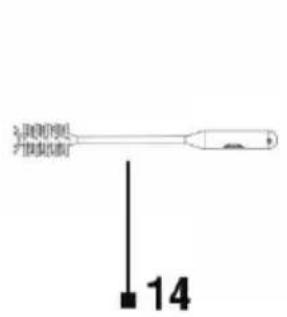
14 3-in-1 cleaning tool
15 Power adapter
16 Storage base
text_image
3.5% (2000) 4.5% (2000) 14
natural_image
Simple line drawing of a cable and plug with a numbered label (15) pointing to it, no text or symbols present.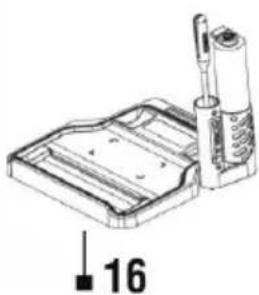
natural_image
Technical line drawing of a mechanical component with a numbered annotation (16), no readable text or symbols present.ASSEMBLING THE APPLIANCE
text_image
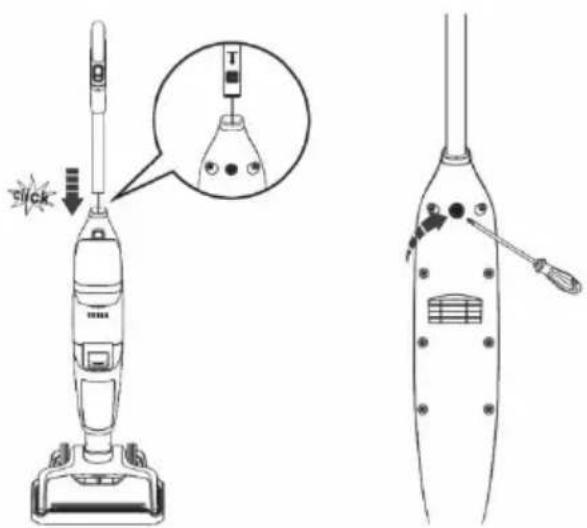
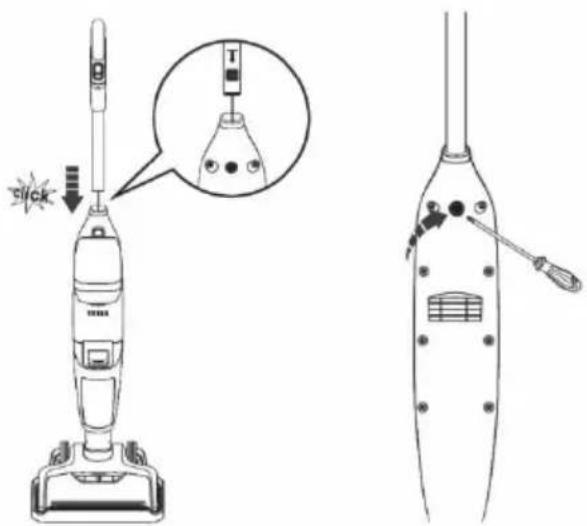
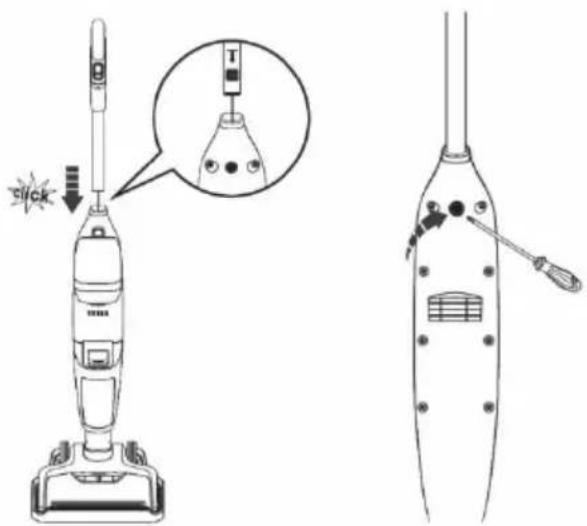
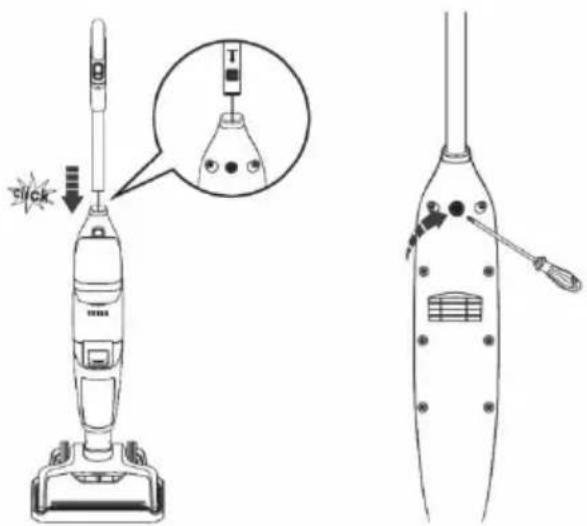
Technical diagram showing a vacuum cleaner with a close-up view of its internal components and a warning label 'Sick'.Insert the end of the handle into the hole in the body of the appliance.
Secure the handle by screwing in the handle fastening screw.
CHARGING THE BATTERY
natural_image
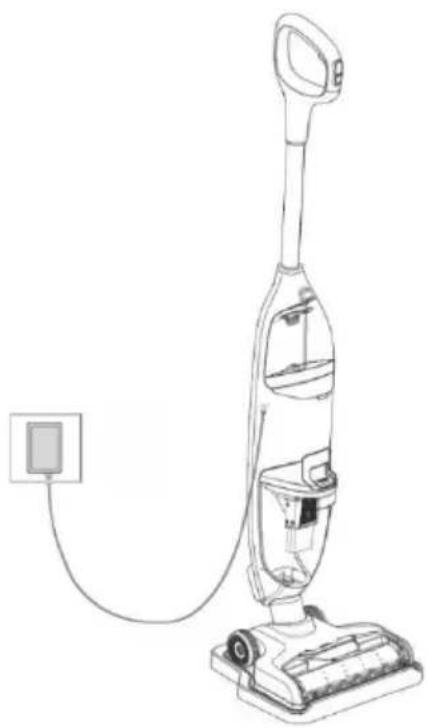
Line drawing of a vacuum cleaner with attached power outlet (no text or symbols)• Fully charge the battery before first use.
• Ambient temperature must be between 4°C and 40°C.
- Before charging the battery, make sure the water tanks are empty and the appliance is dry.
- The appliance cannot be used for cleaning while charging.
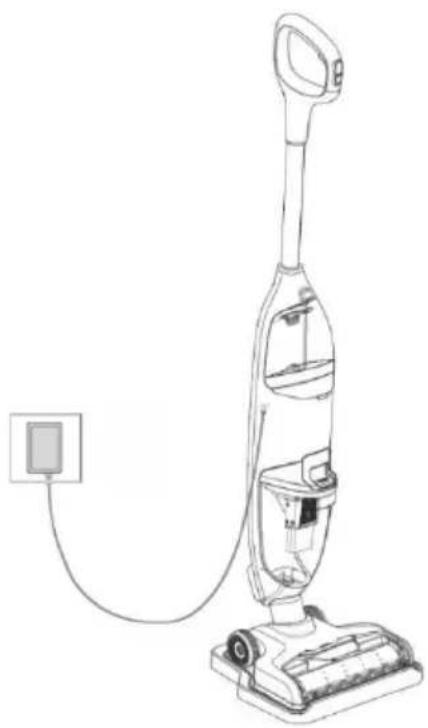
- If the battery is almost empty, the battery status indicator will start to flash red. Connect the charging cable to the appliance and plug it into a wall socket. If the charging indicator flashes blue, the battery is charging.
- When the battery is fully charged, the indicator will be continuously lit blue for 2 minutes and then go out.
- Charging time is approx. 3 - 4 hours.
- Charge the appliance regularly to achieve optimal performance.
• Store the appliance in a dry place.
- Use only the supplied charger. Make sure that the voltage indicated on the type plate of the power pack corresponds to the mains voltage.
FILLING THE CLEAN WATER TANK
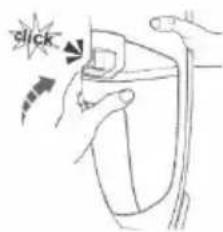
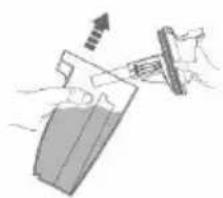
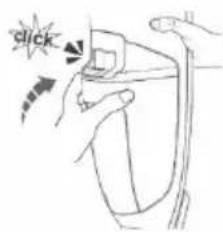
Press the Clean water tank release button and remove the tank. Open the lid and fill the tank with warm tap water (max. 60°C). If necessary, add a non-foaming detergent suitable for cleaning hard floors and close the lid tightly. Insert the Clean water tank back into the body of the appliance until you hear a click.
WARNING! Always make sure that all filters have been inserted in the dirty water tank before using the appliance.
FIRST USE
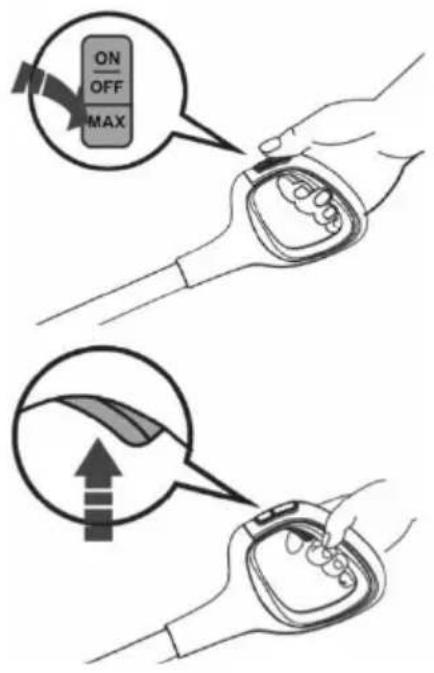
text_image
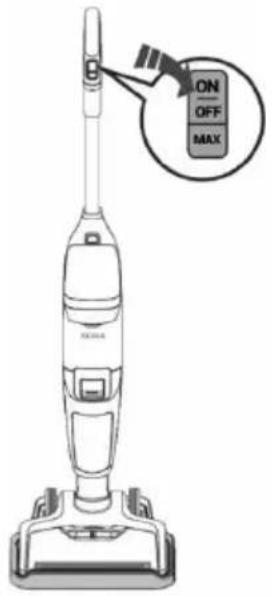
ON OFF MAX-
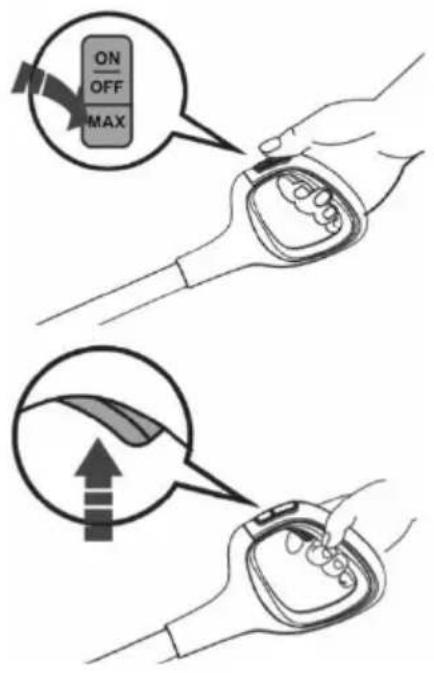
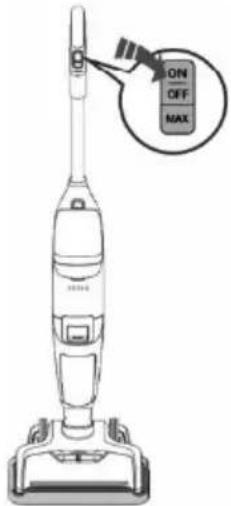
Start the appliance by pressing the "ON/OFF" button.
-
Press the "MAX" button if you want to clean a heavily soiled MAX with higher cleaning brush speed, vacuum power and stronger jet of water.
Battery and charging status indicator
Normal mode - lit blue.
MAX mode - flashes blue.
When moving the appliance backwards, press the Water application button according to the level of soiling. The appliance will collect dirty water while cleaning. You can also use the appliance without water, for example to vacuum up spilled liquids. When you have finished working, switch off the appliance, clean it and place it in the Storage base.
TIP: Overlap strokes on the floor by three centimetres to ensure the whole of the floor is cleaned.
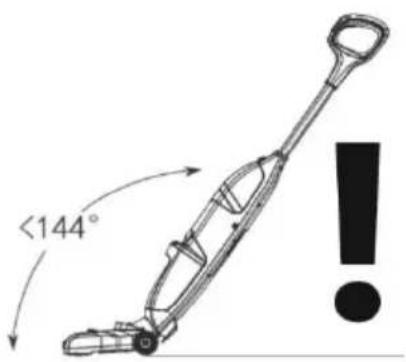
text_image
<144°WARNING!
DO NOT TILT THE APPLIANCE BY MORE THAN 144° AND DO NOT TURN THE APPLIANCE UPWARDS.
NEVER EXCEED THE MAXIMUM POSSIBLE WATER LEVEL IN THE DIRTY WATER TANK.
Water could leak into the internal parts, causing damage to the appliance and voiding the warranty.
CLEANING TIPS
• You can also use the appliance as a conventional vacuum cleaner. Just leave both tanks empty.
- Just before you finish cleaning, do not apply any more water to the floor, but only vacuum the water which is already on the floor. This prevents water from dripping from the appliance when carrying it.
- Remove larger debris from the floor (larger pieces of dirt, grit, pieces of paper, etc.).
• Always switch off the appliance before lifting it off the floor.
- The dirty water tank is equipped with a safety float which closes the suction if the level in the tank reaches the maximum level and prevents water from entering the engine compartment. If the float is activated and the dirty water tank is not yet full, switch off the appliance, empty the dirty water tank and release the float. Then continue working.
EMPTYING THE DIRTY WATER TANK
We recommend that you empty and clean both tanks after each clean. Do not leave water in either of the tanks. Switch off and unplug the appliance from the mains before cleaning and maintenance, this will prevent unintentional activation of the appliance. Do not use any abrasives or alcohol, the outer cover could be damaged. Only clean the appliance with a dry or damp cloth. Never clean the electrical parts with water. We recommend cleaning the appliance and accessories regularly after each use.
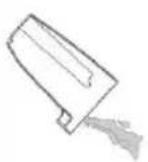
If the dirty water in the tank reaches the MAX level, switch off the appliance and empty the dirty water tank.
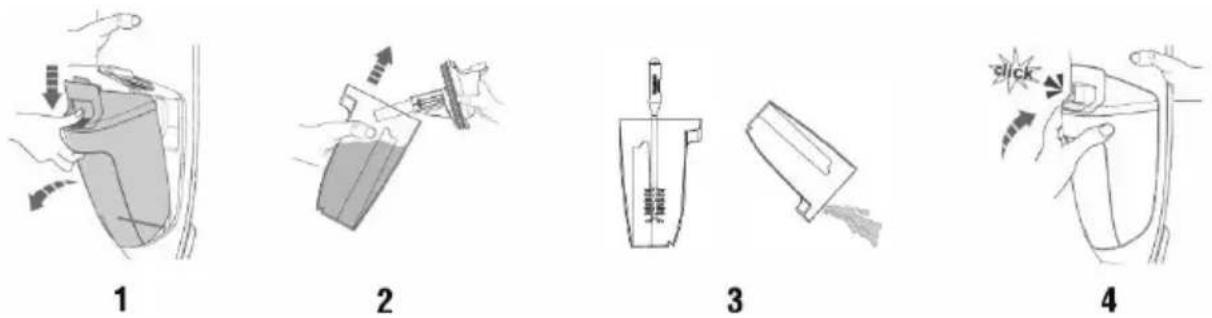
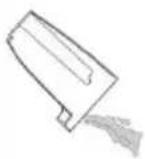
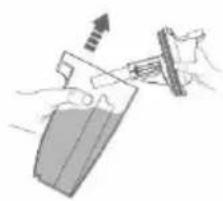
- Press the Dirty water tank release button to remove it from the body of the appliance.
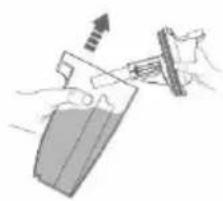
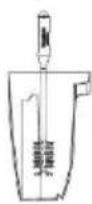
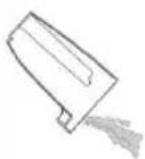
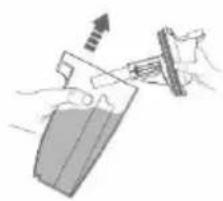
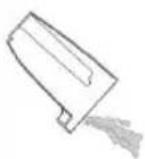
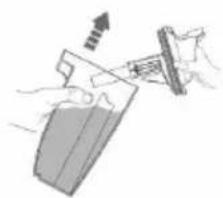
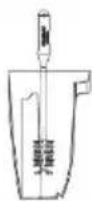
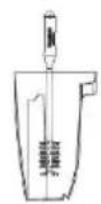
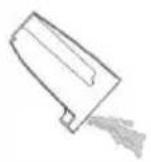
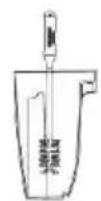
- Remove the lid of the tank, clean any dirt and pour away the dirty water. If necessary, use the 3in1 cleaning tool.
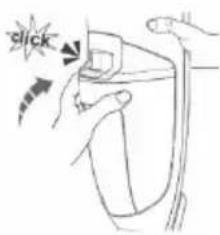
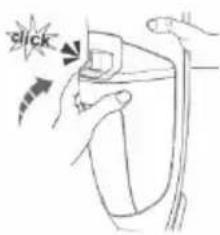
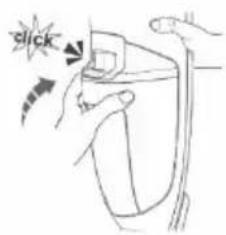
- Then rinse the tank with clean water, close the lid and insert the tank back into the body of the appliance until you hear a click.
- After all of the parts have dried thoroughly, put the parts back together. Also make sure that the filters are not blocked. If they are very dirty or damaged, they must be replaced to avoid damage to the appliance and loss of performance.
CLEANING THE FILTERS
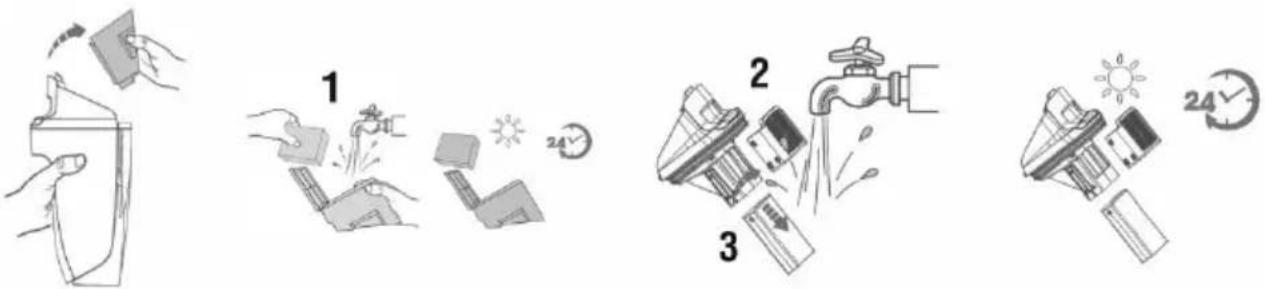
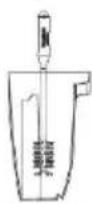
The filters (1) are located in the lid of the Dirty water tank. Remove the Dirty water tank, open the lid and grasp the recessed area on each side of the filter in your fingers, pull upwards to remove it and then rinse both filters with water. If the filters are heavily soiled, replace them. If the pre-filter (2) and float (3) are blocked, they must be cleaned. Remove the filter from the lid of the tank, pull out the float and rinse it with water. Allow the filters to dry completely before reinserting them into the lid of the Dirty water tank.
SELF-CLEANING THE MICROFIBRE BRUSH
text_image
ON OFF MAX- For optimal performance, use the quick self-cleaning function of the microfibre brush regularly after each clean.
- Place the appliance in the Storage base. The clean water tank should be at least 1/3 full of water.
- Press and hold the „ON“ button for 3 seconds to start self-cleaning mode. The appliance will switch off automatically once self-cleaning is complete. The whole process takes approximately 40 seconds.
• Empty the Dirty water tank before and after self-cleaning.
CLEANING THE MICROFIBRE BRUSH
natural_image
Simple line drawing of a faucet spraying water onto a rectangular object (no text or symbols)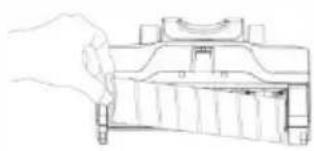
natural_image
Line drawing of a hand holding a mechanical component (no text or symbols)
natural_image
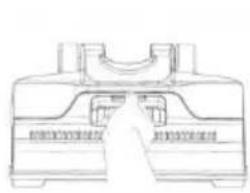
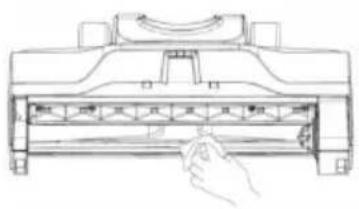
Illustration of hands holding a cylindrical object with a faucet spraying water (no text or symbols)In order to achieve optimal performance, clean the microfibre brush and its cover after each use of the appliance. Grasp the front handle of the cover, simultaneously press the release button and pull upwards to remove the cover. Rinse it with water. Grasp the brush roller by the tab and pull upwards to remove it. Remove hair and dirt wrapped around the roller with the 3in1 cleaning tool. Rinse it with water. Allow it to dry before reinstalling it. Reinsert the brush roller and cover.
text_image
Technical diagram showing a hand pressing a component into a device with labeled parts and directional arrows indicating motion.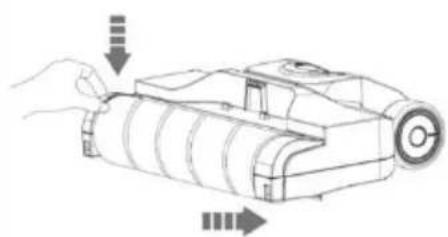
natural_image
Line drawing of a handheld device with arrows indicating motion or assembly (no text or symbols)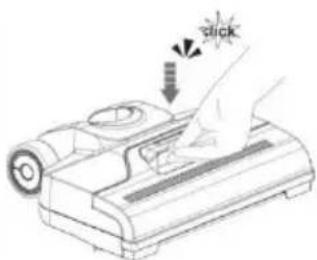
text_image
Click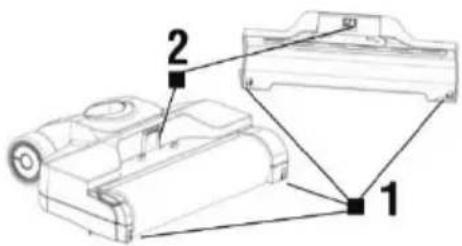
text_image
Technical diagram of a mechanical device with labeled parts 1 and 2Push hook (1) into hole (1) to lock it into place, then push hook (2) into hole (2) to lock it into place. Always snap the brush cover into the right place to prevent loss of suction or water leakage.
Do this carefully to avoid damaging the cover.
WARNING
- Neglecting to clean or replace the filter can lead to appliance failure!
- Do not use any aggressive detergents or hot water to clean the filters.
- Replace the filters if they can no longer be cleaned properly or are damaged.
- Ensure that contact areas and sealing elements are clean and undamaged.
- Make sure that the filters are completely dry before reinserting them into the appliance (ideally wait 24 hours before reinserting them).
All the above-mentioned instructions are very important if you feel that the vacuum cleaner has poor suction power or is not vacuuming dirt from the floor properly. This condition is a clear indication that the vacuum cleaner's filtration system requires cleaning.
TROUBLESHOOTING
| Problem | Cause | Solution |
| The appliance is not working or charging. | Weak battery. | Charge the battery. |
| The adapter is not connected. | Connect the adapter to the appliance and to the mains socket. | |
| The appliance is not charging. | The socket is dead or the 230 V adapter is defective. | |
| The battery and charging status indicator is flashing red | Weak battery. | Charge the battery. |
| The roller of the cleaning brush is blocked. | Remove dirt and debris. | |
| The battery and charging status indicator is permanently lit red | The appliance has overheated. | Allow the appliance to cool down. |
| The battery and charging status indicator is flashing blue and red. | Appliance defect. | Contact the dealer where you purchased the appliance. |
| Weak appliance performance. | The dirty water tank is full. | Empty the dirty water tank and check the float. |
| The filter is dirty. | Clean the appliance filter. | |
| The cleaning brush or air outlet is blocked. | Clean the brush and remove dirt and debris from the air outlet. | |
| The brush cover is not in place. | Fit the brush cover. | |
| The appliance is making unusual noises when used. | The dirt channel or air outlet is blocked. | Remove dirt and debris. |
| The dirty water tank is full. | Empty the dirty water tank. | |
| The appliance is not spraying water. | The clean water tank is empty or is not properly installed. | Fill the clean water tank with water or install it properly. |
| Water is leaking from the air outlet cover. | No filter has been installed or the filter is wet. | Install a dry filter. |
| The float is blocked. | Unblock the float. | |
| The dirty water tank is full. | Empty the dirty water tank. |
WARRANTY REPAIR
For warranty repair, contact the dealer where you purchased the TESLA product.
The warranty DOES NOT APPLY to:
- use of the appliance for purposes other than those it was designed for
- regular wear and tear
- failure to observe the "Important Safety Instructions" contained in the user manual
• electrical or mechanical damage caused by improper use - damage caused by natural elements such as water, fire, static electricity or power surges, etc.
• damage caused by unauthorised repair
• appliances with an illegible serial number - the battery, if the battery capacity drops after more than 6 months of use (6-month battery life warranty)
DECLARATION OF CONFORMITY
We, INTER-SAT LTD, org. složka, declare that this appliance complies with the basic requirements and other relevant provisions of the standards and regulations relevant to the given type of equipment.

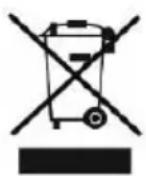
This product meets the requirements of the European Union.
When this crossed-out wheeled bin symbol is attached to a product it means that the product is covered by European Directive 2002/96/EC. Please obtain information about the local separate collection system for electrical and electronic products. Please act in accordance with your local regulations and do not dispose of your old products together with your regular household waste. Correct disposal of your old product helps to prevent potential negative consequences for the environment and human health.
Due to the fact that the product is subject to development and improvement, we reserve the right to alter the user manual. The current version of this user manual can always be found at www.tesla-electronics.eu.
Design and specifications may be subject to change without prior notice, printing errors reserved.