
VCR600W - Vacuum Cleaner TESLA - Free user manual and instructions
Find the device manual for free VCR600W TESLA in PDF.


| Product Type | Bagless Cylinder Vacuum Cleaner |
| Model | VCR600W |
| Brand | Tesla |
| Dimensions (L x W x H) | 350 x 250 x 280 mm |
| Weight | 4.5 kg |
| Power Consumption | 800 W |
| Suction Power | 250 Air Watts |
| Dust Container Capacity | 1.5 L |
| Cord Length | 5 m |
| Radius of Action | 8 m |
| Filtration System | HEPA 13 washable filter |
| Noise Level | 78 dB(A) |
| Power Cord Type | Retractable |
| Floor Types | Hard floors, carpets |
| Adjustable Suction | Electronic slider on handle |
| Attachments Included | Crevice tool, dusting brush, upholstery nozzle |
| Washable Filter | Yes, rinse under water and dry |
| Bagless | Yes, easy empty dustbin |
| Repairability Index | 7.5 / 10 |
| Warranty | 2 years |
Frequently Asked Questions - VCR600W TESLA
User questions about VCR600W TESLA
0 question about this device. Answer the ones you know or ask your own.
Ask a new question about this device
Download the instructions for your Vacuum Cleaner in PDF format for free! Find your manual VCR600W - TESLA and take your electronic device back in hand. On this page are published all the documents necessary for the use of your device. VCR600W by TESLA.
USER MANUAL VCR600W TESLA
natural_image
Illustration of a white robotic vacuum cleaner with black and white panels and tassels (no text or symbols)VCR600W
User Manual
ENGHRBGGRBH/CGHJMKROSLOSHB
SMART ROBOT VACUUM CLEAENER
ENG
INSTRUCTION MANUAL
Household Use only.
Read this instruction manual carefully before using.
Thanks for choosing Smart Robot Vacuum Cleaner!
It is a high-end intelligent planning cleaning robot which combines high accuracy radar and various sensors can realize collaboration through navigation algorithm, draw a room map in real time and plan the cleaning route and features automatic cleaning and automatic charging without manual intervention. It has ultrastrong suction power, high-capacity drawer type dust box, washable HEPA filter screen and split type mopping module and adopts an efficient cleaning mode of first cleaning and then mopping.
You can download the mobile APP by smart phone to check the cleaning map and running status of the robot in APP in real time, define the cleaning area and schedule. You can control the robot remotely. Science and technology makes life better.
May you have a nice usage experience!
PRODUCT INTRODUCTION
Key Function
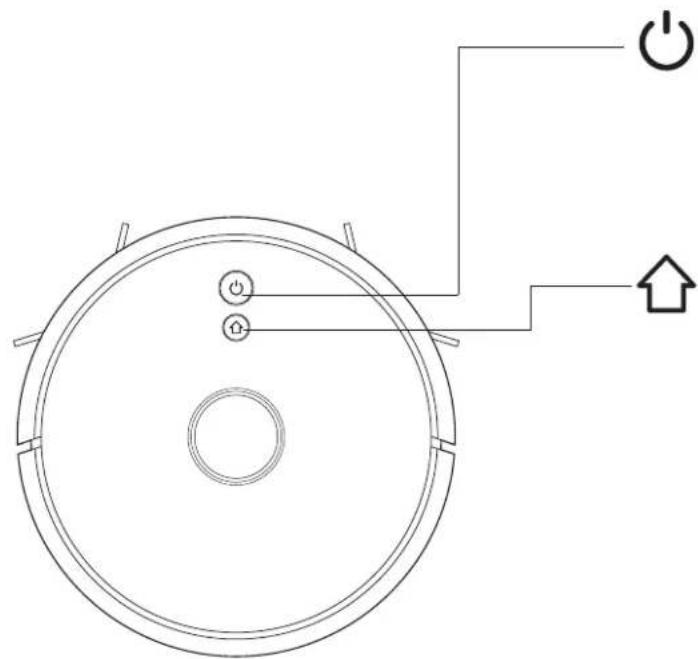
natural_image
Top-down schematic of a circular device with power and current indicators, no text or symbols presentSweep/ON &OFF
- Short press to start Sweep/Pause
- Long press for 3s for ON/OFF
- Long press for 15s for forced shutdown under abnormal circumstances
Recharging/ local cleaning
- Short press Recharge/Pause
- Long press to start local cleaning
Indicator light
• Blue: Normal operation or charging
• Red: Abnormal condition or low battery
• Purple: Equipment is not connected to the network
Reset WiFi
- Press two buttons simultaneously for 3s
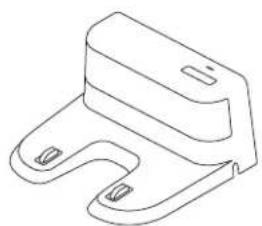
Parts List
natural_image
Line drawing of a mechanical clamp or bracket component (no text or symbols)Charging base x1
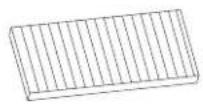
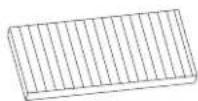
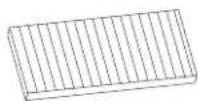
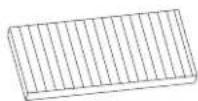
HEPA filter + sponge filter x1
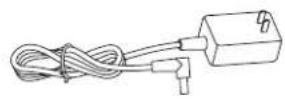
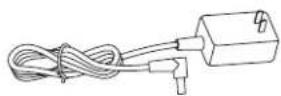
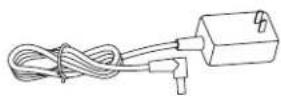
Adapter x1
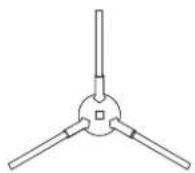
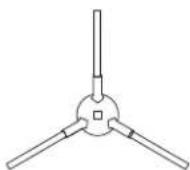
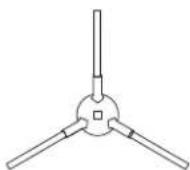
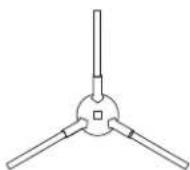
Left side brush x2
Right side brush x2
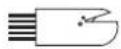
Cleaning brush with knife x1 (optional)
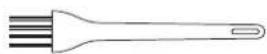
Cleaning brush x1 (optional)
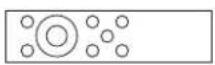
Remote control x1 (optional)
Robot
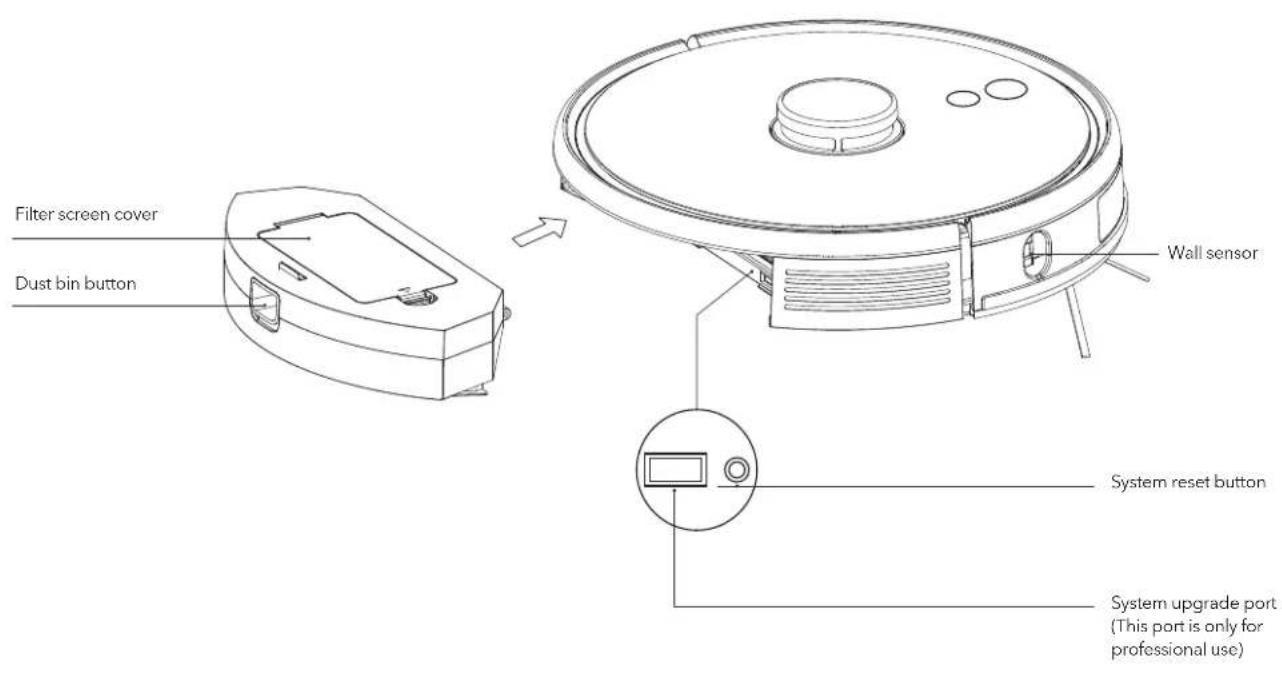
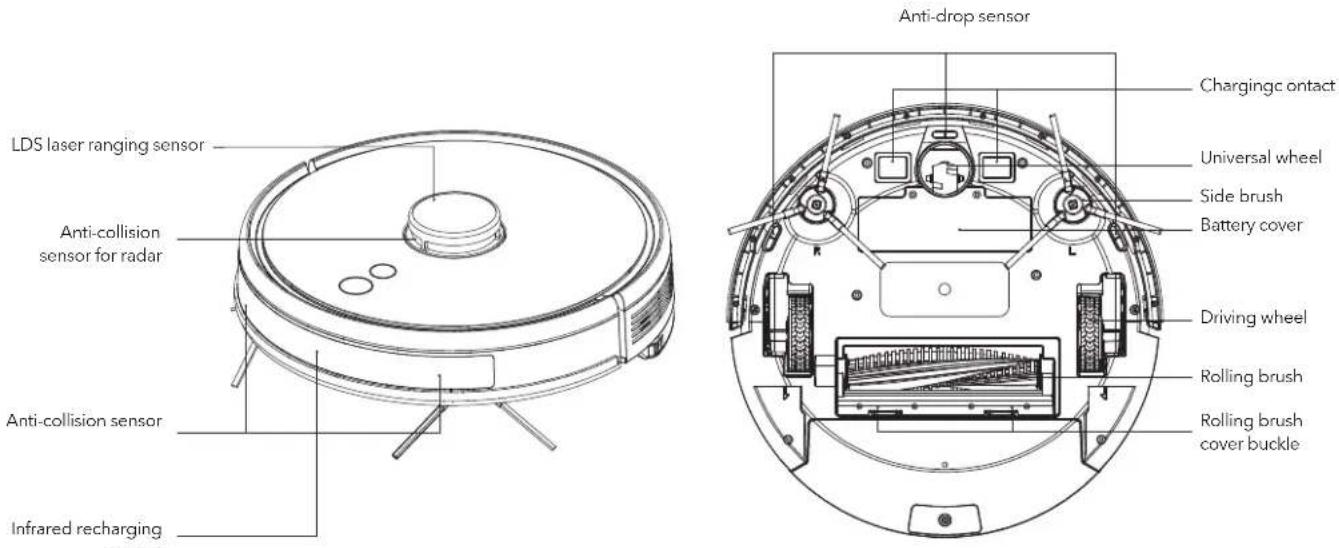
Sensor and Structure
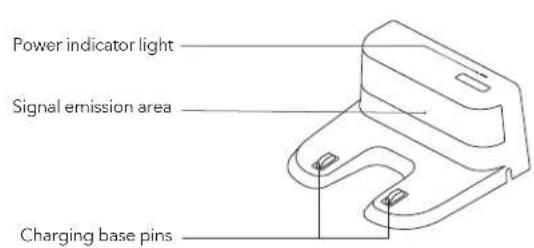
Charging Base
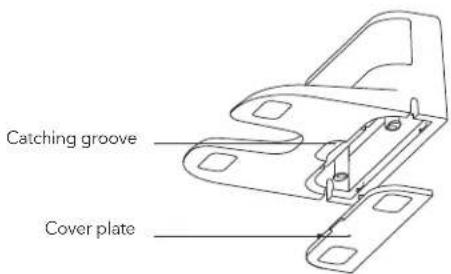
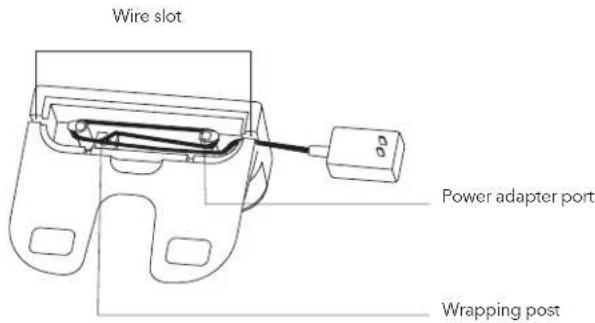
INSTALLATION
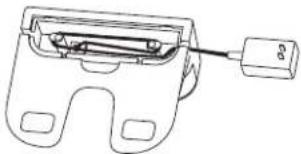
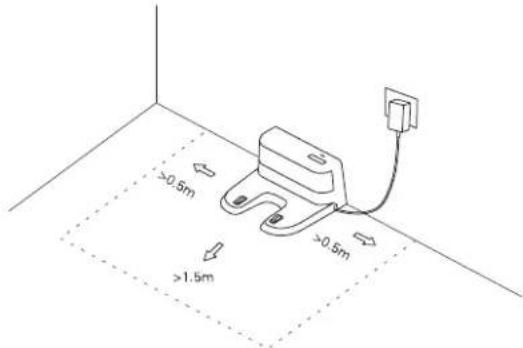
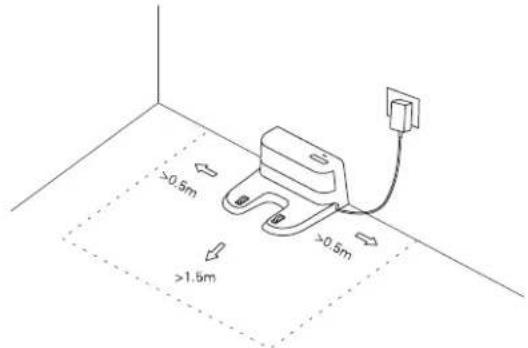
- Connect power line and feed the excess wire into the slot
natural_image
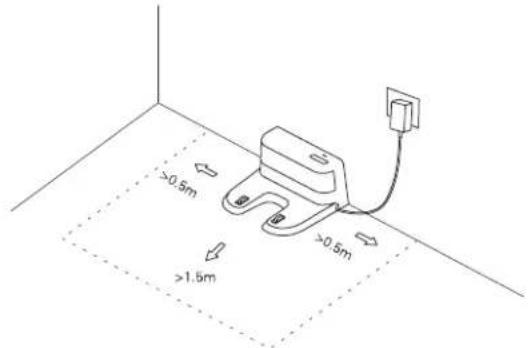
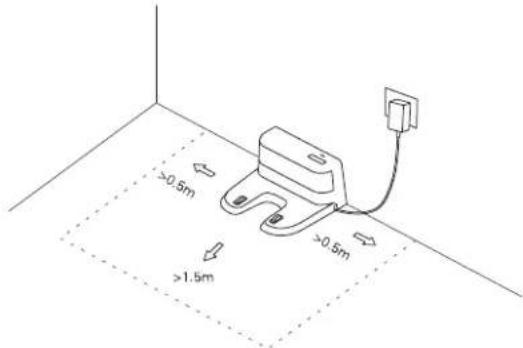
Technical line drawing of a mechanical clamp or bracket with a cable inserted (no text or symbols)- Place charging base against the wall and connect the power

NOTE
- Ensure a space of above 0.5m on both sides of the charging base and a space of above 1.5m in the front
- If the power line is vertical to the ground, it may be dragged by the host and consequently the charging base may be powered off
-
The charging indicator is normally on when powered on and off when charged
-
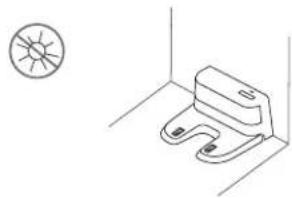
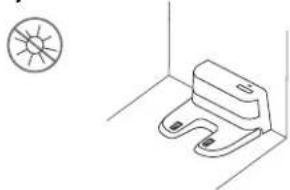
Please do not move the charging base arbitrarily and keep it out of direct sunlight
natural_image
Simple line drawing of a toilet with a no-smooth symbol above it, no text or labels present.
NOTE
- If the charging base is relocated, the host may fail in positioning and lose the map. When restarted, the host will rebuild and memorize the map and the rebuilt map may lose cleaning information of forbidden areas and other areas
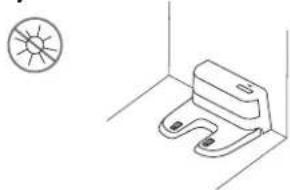
- Direct sunlight will interfere with recharging signal and consequently the host may be unable to return to the charging base
4. Installation of side brush
Make the left side brush (L) and the right side brush (R) correspond to L and R on the bottom casing, press L and R and the side brushes are installed till you hear a "cracking" sound
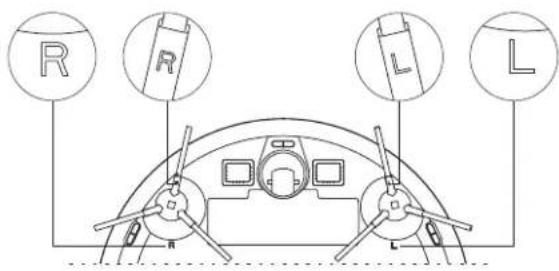
5. Starting up and charging
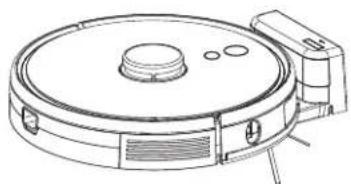
natural_image
Line drawing of a vacuum cleaner with circular housing and attached components (no text or symbols)Long press to switch on the robot. Charge the robot on charging base when the power indicator light is normally on.

If the robot cannot be started due to low battery, please charge the robot on the charging base and the robot will be started automatically. The robot can work normally only when the battery level is ≥ 20%.
6. Connect mobile APP (this step can be skipped)
Please refer to WiFi connection guideline, then connect mobile APP
7. Start cleaning
After the robot is powered on, short press key ⏻ on the robot or use mobile APP to start cleaning. (press any button to pause during using)

- The sweeping robot cannot be used to remove liquids
- If the battery level is less than 20, the robot cannot work. Please charge it
- The robot will return to the charging base automatically if the battery level is less than 20% in use and will be powered off and start cleaning automatically after the battery level reaches 80%
- Please clear various wires (including power line of charging base) on the ground before use so as to avoid outage and damage of objects or wires when wires are dragged by the host.
INSTRUCTIONS
Cleaning mode
After the robot is powered on, it will scan and generate the map and divide it into areas intelligently. Then sweep the areas one by one along the wall orderly, efficiently and thoroughly and plan the cleaning route in a bow/S shape. The robot will return to the charging base automatically after cleaning.
Completed area Completed area
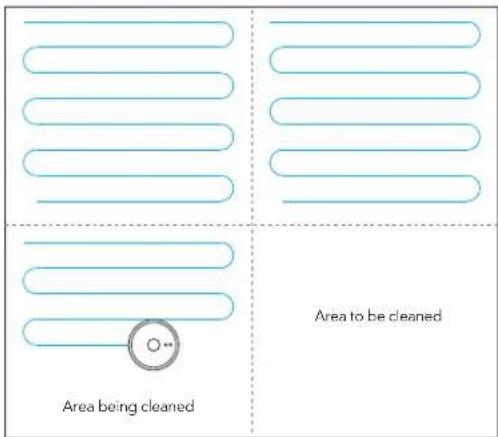

Do not move the robot casually and frequently when it is cleaning. After moving, please put the robot near the original position. When it starts again, it will try to reposition itself. After successful positioning, it would follow the planned path and continue to work. If the positioning fails, the robot will abort previous mission, make a map, and do the cleaning again. Even it may not find the charging base.
Spot cleaning
When a local area needs a deep sweep, the user specifies a point on the map on the APP, the robot will automatically drive to the vicinity of the point, take the point as the center, and clean within 1.5m x 1.5m
Partial cleaning
When the robot cannot be controlled by the mobile APP, please remove the robot to the place you want to clean. Long press the button for 3 seconds, and the robot will clean twice within the scope of 1.8mx1.8m centering on itself
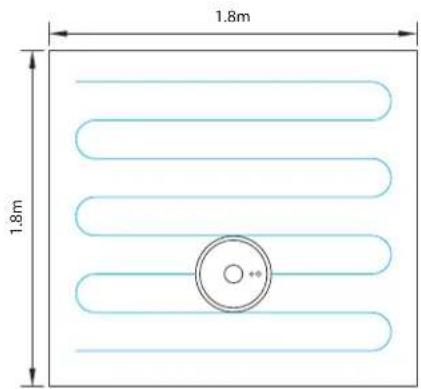
User-defined area cleaning
Use the mobile APP to set the size and location of the area you want to clean. You can set one or more areas. The robot would clean according to the areas you set.
Restricted area
Set one or more forbidden areas using mobile APP. The robot will not sweep forbidden areas but other areas.

NOTE
- The robot may intrude into the restricted area due to positioning errors, abnormal sensors and other reasons.
- The permanent closed zone may become invalid due to the big change of the position of the charging seat and furniture. Therefore, please try not to move or interfere with the robot during cleaning.
- The permanent restricted area would be lost when the map is rebuilt.
Schedule cleaning
Schedule cleaning can be set by mobile APP. The robot will start cleaning automatically at the appointed time and return to the charging base after cleaning.
WiFi reset
If the mobile phone cannot be connected to the robot due to modification of router configuration and password or for other reasons, please press key and ⏻ key simultaneously for 3s till a voice prompt "WiFi has been reset" is given and the indicator light turns purple and flickers slowly.

DND mode (do not disturb)
The robot will neither sweep the floor nor issue a voice automatically under DND mode. The available time of DND mode can be startup or modified using mobile APP.
Adjustment of suction power
You can adjust the suction power to silent level, standard level and high level by mobile APP
DAILY MAINTENANCE
Rolling brush (clean it regularly)
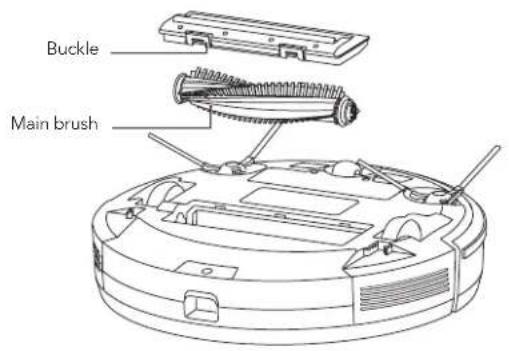
- Turn over the robot and press the buckle on the Rolling brush cover to take out the Rolling brush
- Remove dust outside and inside the Rolling brush using tiny brush and clean the Rolling brush
- Reassemble the Rolling brush and press the Rolling brush cover tightly to fix the buckle
Side brush (clean it regularly)
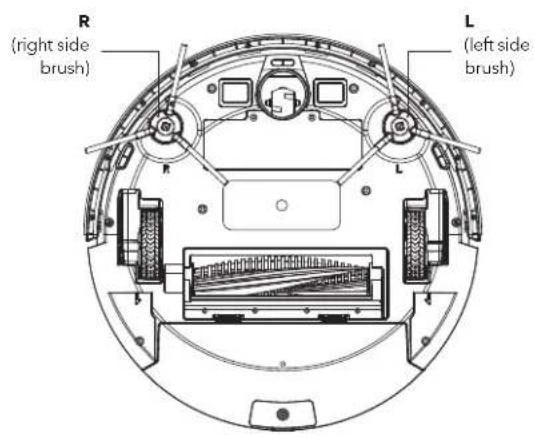
- Turn over the robot and pull out the side brush upwards
- Remove hair and dirt and reassemble the side brush
- Make the left side brush (L) and the right side brush (R) correspond to L and R on the bottom casing, press L and R to reinstall them

Replace the side brush every 3-6 months so as to ensure the cleaning effect.
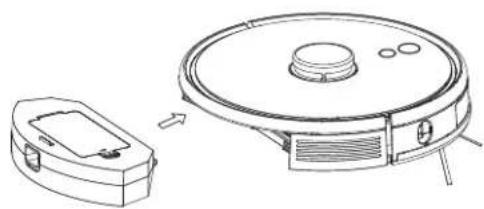
Dust box and filter screen (clean it regularly)
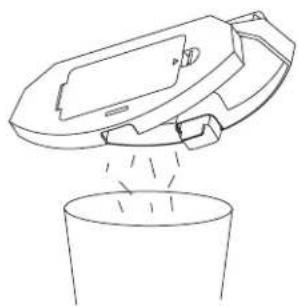
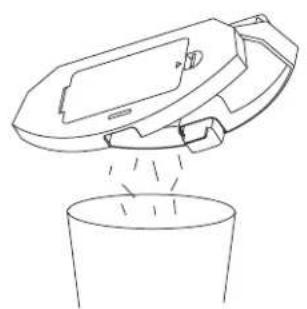
- Press the button and pull out the dustbin backward
natural_image
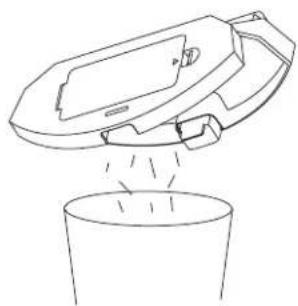
Line drawing of a robotic vacuum cleaner with a small housing and a circular top component (no text or symbols)- Open and clean dustbin
natural_image
Line drawing of a cleaning machine pouring liquid into a bucket (no text or symbols)Filter screen cleaning (clean it regularly)
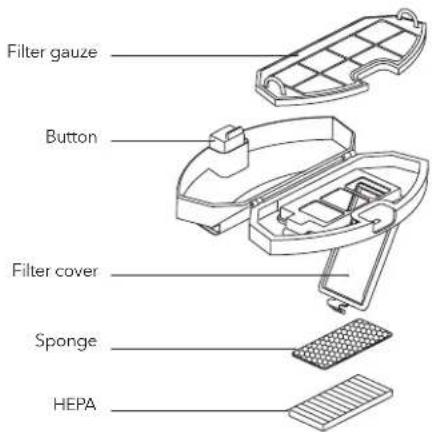
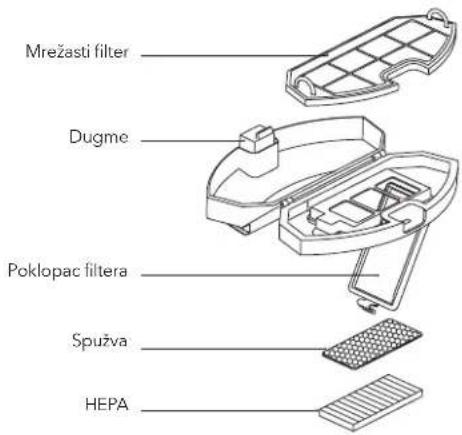
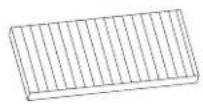
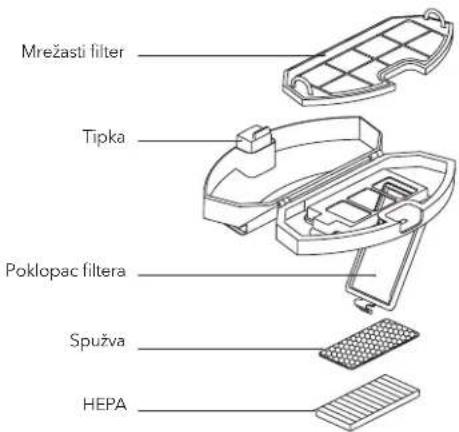
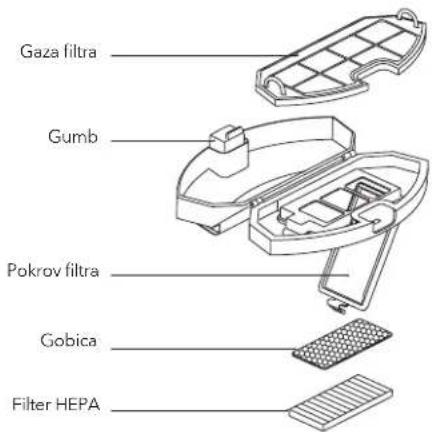
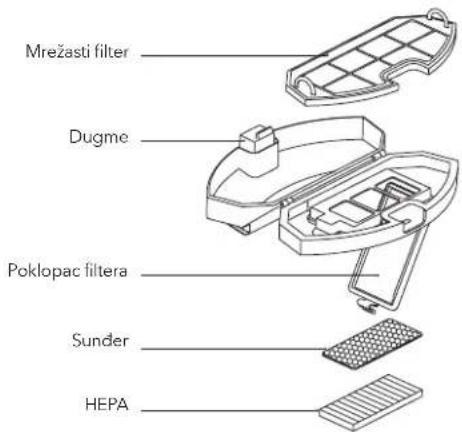
- After a long time usage, remove the filter gauze, sponge and HEPA
- Clean the removed filter gauze, sponge and HEPA under water
- Shake off the water drops and dry it naturally, then use it after completely dried
- After dry, instill it well in sequence, filter gauze - sponge - HEPA
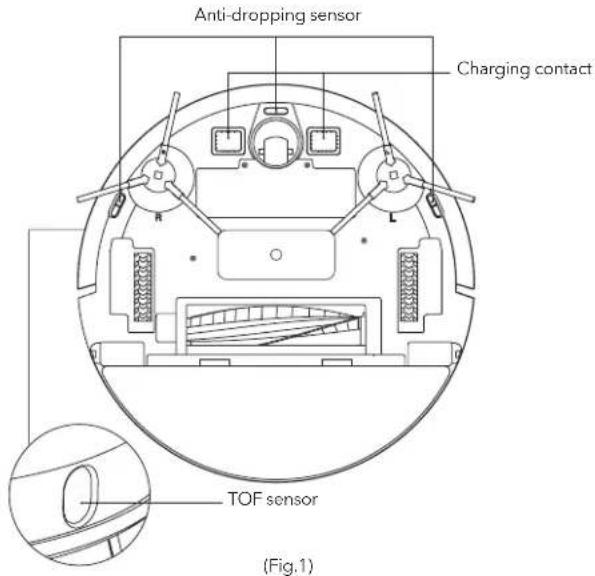
Sensor (clean it regularly) Sensor (cleaned monthly)
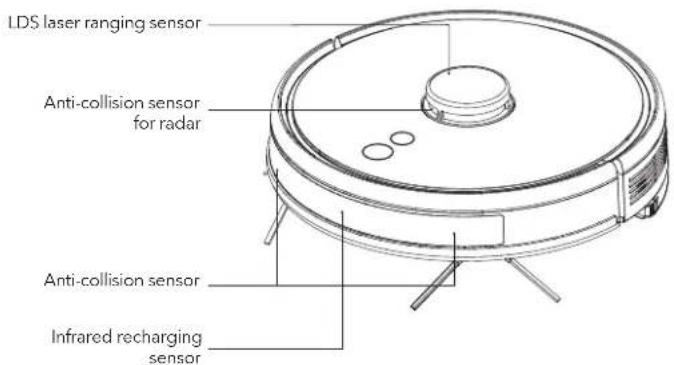
Clean the sensors by soft mop, include:
- Clean the sensors along the wall on the right
- Three anti-dropping sensors at the bottom of the host
- Infrared avoidance sensor in the front of the host
- Radar avoidance sensor on the top of the host
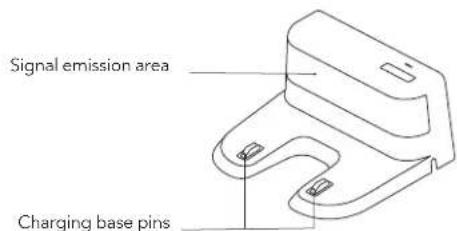
- Electric shock protector and charging base shrapnel at the bottom of the host (please cut of the power during cleaning)
- Signal transmission area of charging base
(Fig.2)
(Fig.3)
Battery
- The host is furnished with high-performance lithium-ion batteries. To maintain battery performance, please keep the host charged in daily use
- If the robot is left unused long, please shut down and keep it properly. Charge it at least every 3 months to avoid damaging batteries due to excessive discharge.
Firmware upgrade
Upgrade firmware using mobile APP. If new firmware is detected, upgrade it according to prompt. The battery level should be ≥50% during firmware upgrade, so the robot should be placed on the charging base
System reset
Take down the dust box, open the rubber plug and press Reset key (refer to page 4). Current map will be lost and timing, WiFi and personalized settings will be reserved after reset
COMMON PROBLEMS
| Problem Solution | |
| The robot cannot be started | In case of a low battery level, please place the robot on the charging base and align it at the electrode plate, the robot will be started automatically (if the robot is completely powered off, it can be started automatically after charged for a while)If the environment temperature is lower than 0°C or higher than 50°C, please use it at a temperature of 0-40°C |
| The robot cannot be charged | Please move the robot away, check whether the indicator light of the charging base lights on and confirm both ends of the power adapter of the charging base are connected wellIn case of poor contact, please clear the charging base shrapnel and the charging contact on the robot or push the side brush aside |
| The robot cannot be recharged | The robot is too far away from the charging base, please put the robot near the charging base and make another try |
| Abnormal behavior Shut down and restart the robot | |
| Abnormal noise in use | Main brush, side brush or wheel may be obtained by foreign matters, please shut down the robot, remove the main brush and remove the foreign matters |
| Cleaning ability declines or dust falls outThe dust box is full, please clear itThe filter screen is blocked, please clear or replace itThe main brush is twined by foreign matters, please remove the main brush and remove the foreign matters | |
| WiFi cannot be connected • WiFi signal is bad, please ensure is covered by WiFi signalWiFi is connected abnormally, please reset WiFi, download the latest APP and try to reconnect itPassword is inputted incorrectlyThe router is available for 5G frequency band, the cleaning robot is available for 2.4G frequency band only | |
| Fixed-time cleaning fails | In case of a low battery level, fixed-time cleaning can be started only when the battery level is no less than 30% |
| Whether the robot consumes power if it is always placed on the charging base | The robot consumes a little power if it is always placed on the charging base and it enables the best performance of battery |
| Whether the robot needs to be charged for 16h for the first three times | The lithium battery can be used immediately after being charged and has no memory effect |
TROUBLESHOOTING
| Prompt Tone Solution | |
| Error 1: I cannot find the dust collector Cleaning is triggered when the dust box is take out | |
| Error 2: Please check if the radar on top has been covered or blocked | The top radar is covered or placed in an open area (there is not obstacle within an area of 6 × 6m^2 ) |
| Error 3: Please place me in a new location and try again Pick the robot up or move it to another location | |
| Error 4: Please clean the cliff sensor, and restart me from a new location | The cliff sensor is covered or placed at height |
| Error 5: Please clean the front sensor, and restart me from a new location | The infrared avoidance sensor is dirty or covered |
| Error 6: Please clean the right-hand sensor, and restart me from a new location The wall sensor is dirty or covered | |
| Error 7: Please clean the radar housing on top, and restart me from a new location | The radar avoidance sensor is dirty or covered |
| Error 8: Please check if the bumper has been blocked in some way The edge or collision sensor is stuck | |
| Error 9: Please clean the dust container and filter The dust box is full or the filter screen needs to be replaced | |
| Error 10: Dust container has been removed, please clean the container and filter | After error 9 is issued, user takes out the duct chamber and error 10 is triggered |
| Error 11: I'm stuck The robot is stuck | |
| Error 12: Please place me correctly! The robot is tilt | |
| Error 13: Please check if my wheels have become blocked somewhere | The driving wheel is stuck or twined, please remove the foreign matters |
| Error 14: Please check if the main brush has become stuck | The main brush is twined or stuck, please remove it and remove the foreign matters |
| Error 15: Please check if the side brushes has become stuck | The side brush is twined or stuck, please remove it and remove the foreign matters |
| Error 16: Where is the docking station | The charging base cannot out found or is not plugged in |
| Error 17: Program error, please restart me | Abnormalities are caused by unknown breakdown, restart the robot |
| Error 18: Error encountered initiating shutdown | The robot reminds the user and shuts down automatically or is recharged |
| Error 19: Low battery, please recharge | When the battery level is to o low and the robot is not on the charging base, cleaning is triggered (the battery level is lower than 10%) |
| Error 20: Remove from charging station for power off | The robot shuts down when charged on the charging base |
CONTENT AND NAME OF HAZARDOUS SUBSTANCES
| Hazardous Substance | Part Name | |||||
| Plastic casing Circuit board Power line Battery Metal part Adapter | ||||||
| Lead (Pb) | O | X X X | O | X | ||
| Mercury (Hg) | O O O O O O | |||||
| Cadmium (Cd) | O O O O O O | |||||
| Chromium VI (Cr (VI)) | O O O O O O | |||||
| Polybrominated biphenyls PBB | O O O O O O | |||||
| Polybrominated diphenyl ethers (PBDE) | O O O O O O | |||||
O: means that the content of hazardous and noxious substances in the component is less than the limit stipulated by SJ/T11363-2006
X: means that the content of hazardous and noxious substances in at least the component exceeds the limit stipulated by SJ/T11363-2006

NOTE
The lead content of a few paster electronic components for special use (such as high voltage resistor, ceramic resistor and diode, etc.) in "X" in the table may be greater than 0.1%. Core of bolt and the lead content of high-performance alloy contained in USB cable also may be greater than 0.1%. Such components comply with exemption clauses of EU ROHS. For technologies and components which cannot be replaced due to restrictions of technological development level, the lead content of external contact elements complies with environmental protection requirements
SAFETY INFORMATION
Usage Limitations
- The product is used for floor cleaning in a home environment only and cannot be used for outdoor(such as open terrace), non-ground (such as sofa) and commercial or industrial environment
- Please do not use the product in midair areas (such as penthouse, open terrace and furniture top) without protective fence
- Please do not use the product at a temperature of above 40^ C or below 0^ C or when there are liquids and sticky substances on the ground
- Please hang cables on the ground before use so as to avoid being dragged by the host
- Please clear fragile objects and impurities (such as vase and plastic bag, etc.) on the ground so as to avoid damaging valuables when the host is stuck or impacted slightly
- People with physical, spiritual or perceptual disorder (including children) are not allowed to use or operate the product
- Children cannot use the product as a toy. Please keep children and pets away when the host is working
- Please keep main brush and other cleaning tools out of reach of children
- Please do not place objects (including children and pets) on a stationary or moving machine.
Battery and Charging
- Please do not use battery, charging base or charger provided by any third parties
- Please do not dismantle, report or refit battery or charging base arbitrarily
- Please keep the charging base away from heat source (such as heating plate)
- Please do not wipe or clean the charging base shrapnel using wet cloth or wet hand
- Please do not abandon used batteries arbitrarily. Used batteries should be disposed of by professional recycling agency
Laser Safety Information
- Laser distance sensor of the product complies with the standard for class1 laser products of IEC60825 and does not produce dangerous laser radiation
- Please keep hair, fingers and other parts of human body or pets away from the suction inlet when the robot is works
- Please do not use the product to sweep burning objects (such as burning cigarette end)
- Please do not use the product to clean long-haired carpet (some dark carpets may not be cleaned normally)
- Please prevent the host from suctioning hard or sharp objects (such as waste decorative materials, glass and iron nail, etc.)
- Please do not move the robot by holding the protective cover of laser distance sensor and collision bumper
- Please clean or maintain the host and the charging base under shutdown or power-off state
- Please do not wipe any part of the product using wet cloth or any liquid
- Please use the product according to User Manual. User should be responsible for any damages and injuries caused by improper use
- Please do not use mopping function for carpet and furniture top
-
Please be sure to remove the water tank when the robot is being charged-
-
If power line is damaged or broken, please disuse it immediately and replace it through official channels
- Please ensure the host shuts down during transportation and the product should be transported original packaging
- If the robot is left unused long, it should be fully charged and then placed in a cool and dry place. Charge the robot at least every 3 months so as to avoid damaging batteries due to excessive discharge
Smart WiFi app user manual can be found at: https://tesla.info/wp-content/uploads/pdf/TeslaVCR600Wapp.pdf

EU DECLARATION OF CONFORMITY
We, Comtrade Distribution doo Beograd, Bulevar Zorana Dindića 125i, hereby declare that the following products listed below to which this declaration relates
TESLA/Comtrade Distribution d.o.o. Beograd
Bulevar Zorana Đindića 125i
11000 Belgrade, Serbia
Description of the appliance
Name of manufacturer
Contact information of the manufacturer
| Tesla model | Laboratory | LVD Certificate No. LVD Test Report No. | EMC Certificate No. EMC Test Report No. | ERP test report no. |
| VCR600W | TUV SUD | 6811020001903 | 6871020003203 | 6891020000 |
conform with the following standards:
| Applicable Harmonized Standards | Title of the relevant legislative act(s) |
| EN 55014-1:2017EN 55014-2:2015EN IEC 61000-3-2:2019EN 61000-3-3:2013/A1:2019 | Electromagnetic Compatibility (EMC)2014/30/EU |
| EN 60335-1:2012/A2:2019EN 60335-2-14:2006/A12:2016EN 62233:2008 | Low Voltage Directive (LVD)2014/35/EU |
PIB: 100000104 Matični broj: 17172140 Šifra delatnosti: 2620
TEKUĆI RAČUNI: UniCredit Bank RSD 170-300346515-65; Vojvođanska banka a.d. Novi Sad RSD 325-9500600009876-07 OTP Banka Srbija a.d. Beograd RSD 275-0000220006014-70; Komercijaina banka RSD 205-147443-79
(1) 2017年,公司与上海浦东发展银行股份有限公司签订了《关于使用部分闲置募集资金进行现金管理的协议》。
COMTRADE DISTRIBUTION
Comtrade Distribution d.o.o. Beograd Address: Bulevar Zorana Dindića 125i
11000 Belgrade, Serbia
Phone: +381 11 201 55 55
E mail: distribution.rs@comtrade.com
(二)本次股东大会的召集和召开程序
www.comtradedistribution.com
| (EC) 1275/2008: 2008-12-17Amended by(EC) 278/2009:2009-04-06,(EC) 642/2009:2009-07-22,(EU) 617/2013:2013-06-26;(EU) 801/2013:2013-08-22Test Method:EN 50564:2011,EN 50242:2016,EN 60350-1:2013+A11:2014.EN 60350-2:2013+A11:2014 | Eco-design of Energy-related Products (ERP)2009/125/EC EU |
This declaration of conformity is issued under the sole responsibility of the manufacturer.
Date: 17.01.2022. Belgrade, Serbia

SIGNATURE & CHOP
NAME: Nebojša Uskoković
POSITION: General Manager
PIB: 100000104 Matični broj: 17172140 Šifra delatnosti: 2620 TEKUĆI RAČUNI: UniCredit Bank RSD 170-300346515-65; Vojvodanska banka a.d. Novi Sad RSD 325-9500600009876-07 OTP Banka Srbija a.d. Beograd RSD 275-0000220006014-70; Komercijalna banka RSD 205-147443-79
natural_image
Top-down schematic of a circular device with power and current indicators, no text or symbols presentSweep/ON &OFF
- Kratak pritisak da započnete Cišćenje/Pauzu
• Dugačak pritisak 3s za UKLJUČENO/ISKLJUČENO - Dugo pritisnite 15s za prinudno isključivanje pod nenormalnim okolnostima
natural_image
Line drawing of a mechanical bracket or clamp (no text or symbols)Baza za punjenje x1
HEPA filter+spužva filter x1
Adapter x1
Lijeva bočna četka x2
Desna bočna četka x2
natural_image
Technical line drawing of a mechanical clamp or bracket component (no text or symbols)- Postavite bazu za punjenje uz zid i priključite napajanje

NAPOMENA
- Osigurajte prostor veći od 0,5 m sa obje strane baze za punjenje i prostor od minimum 1,5m u prednjem dijelu
- Ako je kabal položen na zemlju, robot ga može povući i shodno tome baza za punjenje se može isključiti
-
Indikator punjenja je aktiviran kada je uključujen i isključuje kada se napuni
-
Molimo vas da ne pomjerate podnožje za punjenje proizvoljno i držite ga dalje od direktne sunčeve svjetlosti
natural_image
Simple line drawing of a toilet with a circular symbol and a warning symbol (no text or labels)
NAPOMENA
natural_image
Technical line drawing of a circular vacuum cleaner with mounting bracket (no text or symbols)Dugo pritisnite da uključite robota. Punite robota na bazi za punjenje kada lampica indikatora napajanja normalno gori.

NAPOMENA
Ako se mašina ne može pokrenuti zbog prazne baterije, napunite robot na bazi za punjenje i robot će se automatski pokrenuti. Robot može normalno da radi samo kada je nivo baterije ≥ 20%.
natural_image
Line drawing of a robotic vacuum cleaner with a small inset device (no text or symbols)natural_image
Line drawing of a spray gun dispensing liquid into a container (no text or symbols)Čišćenje filtera (redovno ga čistite)
- Nakon duže upotrebe, uklonite filtar, spužvu i HEPA
- Očišćenu uklonjenu filtarsku gazu, sunder i HEPA pod vodom
- Otresite kapljice vode i osušite ih prirodno, a zatim upotrebite nakon potpunog sušenja
- Nakon što se osuši, sklopite ga redom, mrežasti filtrer- spužva -HEPA
natural_image
Top-down schematic of a circular device with power and current indicators, no text or symbols presentnatural_image
Line drawing of a mechanical clamp or bracket (no text or symbols)natural_image
Technical line drawing of a mechanical clamp or bracket assembly (no text or symbols)
ЗАБЕЛЕЖКА
natural_image
Simple line drawing of a toilet with a circular symbol on the left (no text or labels)
ЗАБЕЛЕЖКА
natural_image
Technical line drawing of a circular vacuum cleaner with attached mechanical components (no text or symbols)Забранена зона
natural_image
Line drawing of a robotic vacuum cleaner with a small housing and a circular top component (no text or symbols)- Отворете и почистете контейнера за боклук
natural_image
Line drawing of a washing machine pouring liquid into a bucket (no text or symbols)natural_image
Line drawing of a mechanical bracket or clamp (no text or symbols)Βάση φόρτισης x1
natural_image
Technical line drawing of a mechanical clamp or bracket component (no text or symbols)
ΣΗΜΕΙΩΣΗ
natural_image
Simple line drawing of a toilet with a circular symbol above it (no text or labels)
ΣΗΜΕΙΩΣΗ
natural_image
Line drawing of a circular robotic vacuum cleaner with attached mechanical components (no text or symbols)natural_image
Line drawing of a robotic vacuum cleaner with a small inset component (no text or symbols)natural_image
Line drawing of a spray gun dispensing liquid into a container (no text or symbols)natural_image
Technical line drawing of a circular device with labeled power and connection points (no text or symbols beyond basic diagram)Sweep/ON &OFF
- Kratak pritisak da započnete Čišćenje/Pauzu
• Dugačak pritisak 3s za UKLJUČENO/ISKLJUČENO - Dugo pritisnite 15s za prisilno isključivanje pod izvanrednim okolnostima
Punjenje/ lokalno čišćenje
- Kratko pritisnite Punjenje / Pauziraj
• Dugo pritisnite da biste započeli lokalno čišćenje
Signalna svjetla
- Plava: normalan rad ili punjenje
• Crvena: Nenormalno stanje ili prazna baterija
• Ljubičasta: Robot nije povezan na mrežu
Reset WiFi-ja
natural_image
Line drawing of a mechanical clamp or bracket component (no text or symbols)Baza za punjenje x1
HEPA filter+spužva filter x1
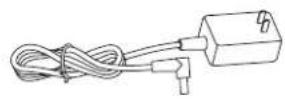
Adapter x1
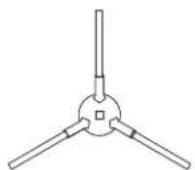
Lijeva bočna četka x2
Desna bočna četka x2
natural_image
Technical line drawing of a mechanical clamp or bracket with a cable inserted (no text or symbols)- Postavite bazu za punjenje uz zid i priključite napajanje

NAPOMENA
- Osigurajte prostor veći od 0,5 m sa obje strane baze za punjenje i prostor od minimum 1,5m u prednjem dijelu
- Ako je kabel položen na zemlju, robot ga može povući i shodno tome baza za punjenje se može isključiti
-
Indikator punjenja je aktiviran kada je uključen i isključuje kada se napuni
-
Molimo vas da ne pomičete podnožje za punjenje proizvoljno i držite ga dalje od direktne sunčeve svjetlosti
natural_image
Simple line drawing of a toilet and a circular icon with a sunburst symbol (no text or labels)
NAPOMENA
natural_image
Line drawing of a vacuum cleaner with circular housing and attached components (no text or symbols)Dugo pritisnite da uključite robot. Punite robot na bazi za punjenje kada lampica indikatora napajanja normalno gori.

NAPOMENA
Ako se uređaj ne može pokrenuti zbog prazne baterije, napunite robot na bazi za punjenje i robot će se automatski pokrenuti. Robot može normalno raditi samo kada je razina baterije ≥ 20%.
natural_image
Line drawing of a robotic vacuum cleaner with a small device and external housing (no text or symbols)- Otvorite i očistite kutiju za prašinu
natural_image
Line drawing of a spray gun dispensing liquid into a cup (no text or symbols)- Nakon duže upotrebe, uklonite filtar, spužvu i HEPA
- Očišćenu uklonjenu filtarsku gazu, sunder i HEPA pod vodom
- Otresite kapljice vode i osušite ih prirodno, a zatim upotrebite nakon potpunog sušenja
- Nakon što se osuši, sklopite ga redom, mrežasti filtrer- spužva -HEPA
natural_image
Top-down schematic of a circular device with power and current indicators, no text or symbols presentTisztítás BE & KI
natural_image
Line drawing of a mechanical bracket or clamp (no text or symbols)Töltőalap x1
Left side brush x2
Right side brush x2
natural_image
Technical line drawing of a mechanical component with a cable or connector (no text or symbols)
MEGJEGYZÉS
natural_image
Simple line drawing of a toilet with a circular icon and a cross symbol (no text or labels)
MEGJEGYZÉS
natural_image
Line drawing of a circular vacuum cleaner with attached mechanical components (no text or symbols)natural_image
Line drawing of a robotic vacuum cleaner with a small housing and a circular top component (no text or symbols)natural_image
Line drawing of a hand washing a cup with liquid, no text or symbols presentnatural_image
Top-down schematic of a circular device with power and current indicators, no text or symbols presentSweep/ON &OFF
natural_image
Line drawing of a mechanical clamp or bracket component (no text or symbols)natural_image
Technical line drawing of a mechanical clamp or bracket with a cable inserted (no text or symbols)
ЗАБЕЛЕШКА
natural_image
Simple line drawing of a toilet and a circular symbol (no text or labels)
ЗАБЕЛЕШКА
natural_image
Technical line drawing of a circular vacuum cleaner with attached mechanical components (no text or symbols)natural_image
Line drawing of a robotic vacuum cleaner with a small housing and a circular top component (no text or symbols)natural_image
Line drawing of a spray gun dispensing liquid into a container (no text or symbols)natural_image
Top-down schematic of a circular device with power and current indicators, no text or symbols presentMāturare/ON &OFF
natural_image
Line drawing of a mechanical bracket or clamp (no text or symbols)Bază încărcare x1
Filtru HEPA + filtru burete x1
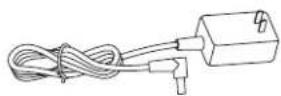
Adaptor x1
natural_image
Technical line drawing of a mechanical clamp or bracket component (no text or symbols)NOTĂ
natural_image
Simple line drawing of a door handle and seat assembly (no text or symbols)
NOTĂ
natural_image
Line drawing of a circular vacuum cleaner with attached mechanical components (no text or symbols)natural_image
Line drawing of a robotic vacuum cleaner with a small inset showing its internal components (no text or symbols)natural_image
Line drawing of a spray gun dispensing liquid into a container (no text or symbols)natural_image
Top-down schematic of a circular device with power and current indicators, no text or symbols presentPometanje/VKLOP IN IZKLOP
natural_image
Line drawing of a mechanical bracket or clamp (no text or symbols)Polnilni podstavek x 1
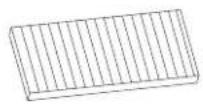
Filter HEPA + filter v obliki gobice x 1
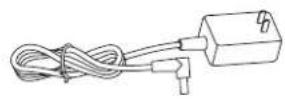
Adapter x 1
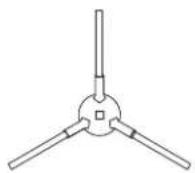
Leva krtača x 2
Desna krtača x 2
natural_image
Technical line drawing of a mechanical clamp or bracket with a cable inserted (no text or symbols)
OPOMBA
natural_image
Simple line drawing of a toilet with a circular icon and a separate symbol (no text or labels)
OPOMBA
natural_image
Line drawing of a robotic vacuum cleaner with circular head and attached sensor (no text or symbols)Za vklop robota dolgo pritiskajte Robota na polnilnem podstavku polnite, ko indikatorska lučka normalno sveti.

OPOMBA
natural_image
Line drawing of a robotic vacuum cleaner with a small housing and a circular top component (no text or symbols)natural_image
Line drawing of a spray gun dispensing liquid into a container (no text or symbols)- Po daljšem času uporabe odstranite gazo filtra, gobico in filter HEPA.
- Z vodo očistite odstranjeno gazo filtra, gobico in filter HEPA.
- Otresite vodne kapljice in pustite, da se gaza filtra, gobica in filter HEPA naravno posušijo, nato pa jih uporabite, ko bodo popolnoma suhi.
- Ko bodo suhi, jih namestite nazaj v pravilnem zaporedju: gaza filtra - gobica - filter HEPA.
natural_image
Top-down schematic of a circular device with power and current indicators, no text or symbols presentSweep/ON &OFF
- Kratak pritisak da započnete Čišćenje/Pauzu
• Dugačak pritisak 3s za UKLJUČENO/ISKLJUČENO - Dugo pritisnite 15s za prinudno isključivanje pod nenormalnim okolnostima
natural_image
Line drawing of a mechanical bracket or clamp (no text or symbols)Baza za punjenje x1
HEPA filter+sunder filter x1
Adapter x1
Leva bočna četka x2
Desna bočna četka x2
natural_image
Technical line drawing of a mechanical clamp or bracket component (no text or symbols)- Postavite bazu za punjenje uz zid i priključite napajanje

NAPOMENA
natural_image
Simple line drawing of a toilet with a circular symbol and a warning symbol (no text or labels)
NAPOMENA
- Ako se baza za punjenje premesti, robot može pogrešiti u pozicioniranju i izgubiti mapu. Kada se ponovo pokrene, robot će ponovo izgraditi i memorisati mapu, obnovljena mapa može izgubiti informacije o čišćenju zabranjenih područja i drugih područja - Direktna sunčeva svetlost ometaće signal za punjenje i posledično robot možda neće moći da se vrati na bazu za punjenje
natural_image
Technical line drawing of a circular vacuum cleaner with mounting bracket (no text or symbols)Dugo pritisnite da uključite robota. Punite robota na bazi za punjenje kada lampica indikatora napajanja normalno gori.

NAPOMENA
Ako se mašina ne može pokrenuti zbog prazne baterije, napunite robota na bazi za punjenje i robot će se automatski pokrenuti. Robot može normalno da radi samo kada je nivo baterije ≥ 20%.
natural_image
Line drawing of a robotic vacuum cleaner with a small housing and a circular top component (no text or symbols)natural_image
Line drawing of a hand washing a cup with liquid, no text or symbols presentČišćenje filtera (redovno ga čistite)
- Nakon duže upotrebe, uklonite filtar, sunder i HEPA
- Očišćenu uklonjenu filtarsku gazu, sunder i HEPA pod vodom
- Otresite kapljice vode i osušite ih prirodno, a zatim upotrebite nakon potpunog sušenja
- Nakon što se osuši, sklopite ga redom, mrežasti filtrer- sunder -HEPA
- ENG
- INSTRUCTION MANUAL
- PRODUCT INTRODUCTION
- Sweep/ON &OFF
- Recharging/ local cleaning
- Indicator light
- Reset WiFi
- Parts List
- Robot
- Sensor and Structure
- Charging Base
- INSTALLATION
- NOTE
- Installation of side brush
- Starting up and charging
- Connect mobile APP (this step can be skipped)
- Start cleaning
- INSTRUCTIONS
- Cleaning mode
- Spot cleaning
- Partial cleaning
- User-defined area cleaning
- Restricted area
- Schedule cleaning
- WiFi reset
- DND mode (do not disturb)
- Adjustment of suction power
- DAILY MAINTENANCE
- Rolling brush (clean it regularly)
- Side brush (clean it regularly)
- Dust box and filter screen (clean it regularly)
- Filter screen cleaning (clean it regularly)
- Sensor (clean it regularly) Sensor (cleaned monthly)
- Battery
- Firmware upgrade
- System reset
- CONTENT AND NAME OF HAZARDOUS SUBSTANCES
- SAFETY INFORMATION
- Usage Limitations
- Battery and Charging
- Laser Safety Information
- EU DECLARATION OF CONFORMITY
- COMTRADE DISTRIBUTION
- Comtrade Distribution d.o.o. Beograd Address: Bulevar Zorana Dindića 125i
- NAPOMENA
- Čišćenje filtera (redovno ga čistite)
- ЗАБЕЛЕЖКА
- Забранена зона
- ΣΗΜΕΙΩΣΗ
- Punjenje/ lokalno čišćenje
- Signalna svjetla
- Reset WiFi-ja
- Tisztítás BE & KI
- MEGJEGYZÉS
- ЗАБЕЛЕШКА
- Māturare/ON &OFF
- NOTĂ
- Pometanje/VKLOP IN IZKLOP
- OPOMBA
Brand : TESLA
Model : VCR600W
Category : Vacuum Cleaner