
MR155 NV - Car camera Navitel - Free user manual and instructions
Find the device manual for free MR155 NV Navitel in PDF.


| Product type | Digital video recorder (DVR) for vehicles |
| Processor | JL5401 |
| Display | 4.5-inch TFT LCD |
| Camera | C2399 with night vision |
| Video resolution | 1080p Full HD (1920x1080) at 30 fps |
| Image resolution | 2 MP |
| Recording format | MOV |
| Image format | JPG |
| Storage | microSD card up to 64 GB (Class 10 or higher) |
| Power supply | DC 5V 1.0A via car charger |
| Battery | 180 mAh 3.7V rechargeable (for emergency/parking use only) |
| Working current | 700 mA |
| Microphone / Speaker | Built-in |
| Rear camera support | Yes (included or optional, with parking lines) |
| Connection | Mini USB 2.0 |
| Loop recording | Yes, selectable duration |
| G-sensor | Yes, automatically locks files on impact |
| Parking monitor | Yes, auto-activates on vibration |
| File protection | Manual lock via Menu button |
| Screen saver | Configurable auto-off timer |
| Languages | 17 languages including English |
| Operating temperature | 0 to +35°C (operating), +5 to +45°C (storage) |
Frequently Asked Questions - MR155 NV Navitel
User questions about MR155 NV Navitel
0 question about this device. Answer the ones you know or ask your own.
Ask a new question about this device
Download the instructions for your Car camera in PDF format for free! Find your manual MR155 NV - Navitel and take your electronic device back in hand. On this page are published all the documents necessary for the use of your device. MR155 NV by Navitel.
USER MANUAL MR155 NV Navitel
natural_image
Exterior view of a modern navigation camera with a digital display showing a city night scene (no readable text or symbols on the device itself)NAVITEL MR155 NV
Digital Video Recorder

NAVITEL
NAVITEL MR155 NV
Úvod

Vážený zákazníku!
Thank you for purchasing this NAVITEL® product.
NAVITEL MR155 NV DVR is a multifunctional high-definition digital video recorder with many functions and features that are described in this User Manual. Please read the manual carefully before using the device and keep it for future reference.
Device layout
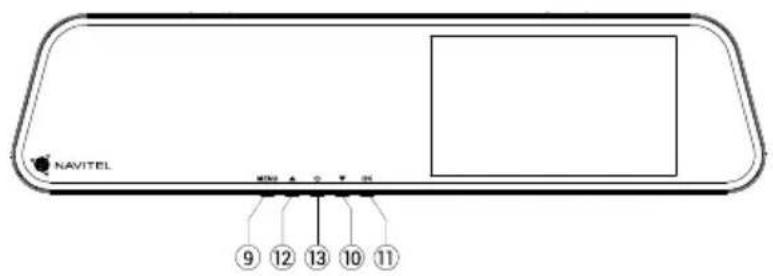
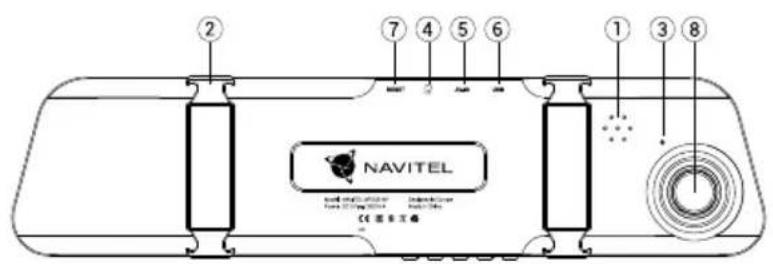
- Speaker 8. Camera
- Clamps 9. Menu
- Microphone 10. Down
- microSD slot 11. OK
- Rear camera port 12. Up
- USB port 13. Power
- Reset

Buttons
| Button Functions | |
| OK | In Video Recording mode, press to start recording; press again to stop.In Capture mode, press to take a picture.In Playback mode, press to select a file, or pause/resume a video. Hold for 3 seconds to switch between the selection of files from the front/rear camera.*In the menu, press to select a menu item. |
| Menu | Press to access Settings menu. Press again to access Setup menu.Press and hold for 3 seconds to switch between Video Recording, Capture, and Playback modes.Press to exit any selected menu.In Video Recording mode, press to lock a file (protected file cannot be deleted or overwritten). |
| Power | Press and hold for 3 seconds to turn the device on/off.Press shortly to switch the screen on/off. |
| Up/Down | In the menu, press to highlight the next/previous menu item or file.In Video Recording mode press Down to turn the microphone on/off.In Video Recording mode press Up to show/hide screen with the view from rear camera.* |
| Reset If the device is not responding, press to reset. | |
Note: The built-in battery is designed only for recording an emergency event in parking mode and turning off the device correctly when the power is turned off. For the full operation of the device in any mode, a constant power connection is required.NAVITEL s.r.o. hereby declares that the device NAVITEL MR155 NV is compatible with the European directive EMC 2014/30/EU.The full text of Declaration of conformity is available at the following internet address:
www.navitel.cz/en/declaration_of_conformity/mr155nv
* With a rear camera connected
Specifications
| CPU JL5401 | Power DC 5 V 1.0 A | ||
| Display 4,5" TFT | Frequency 50 Hz/60 Hz | ||
| Camera C2399 (night vision) | Battery | 180 mAh 3.7V Rechargeable battery | |
| Recording format MOV | Working current 700 mA | ||
| Video resolution | 1080 FHD 1920x1080P/30 fps | Microphone/speaker Supported | |
| Image format JPG | Rear camera Supported | ||
| Image resolution 2MP | Language | Chinese simplified, Chinese traditional, Czech, English, French, German, Hungarian, Italian, Japanese, Korean, Polish, Romanian, Russian, Slovak, Spanish, Ukrainian | |
| Storage microSD card | |||
| microSD card capacity 64 GB max | |||
| USB mini-USB 2.0 | |||
Note: the specifications may change due to upgrades.
Device functions
Format SD-card Formatting a microSD card in the DVR is necessary for the correct operation of the device. Before using a microSD card or in case of data error, please format the microSD card. For formatting the SD-card in Menu mode select Format SD-card and confirm it.

Video Connect the device to an external power supply and it will start recording automatically. Press the OK button to stop recording. Press OK again to record another video. Each video will be saved automatically.
Photo In Video Recording mode, press and hold for 3 seconds Menu button to enter Capture mode, press the OK button to take a photo (it will be saved automatically).
Playback In Capture mode, press and hold the Menu button for 3 seconds to enter Playback mode. Select the file using the Up and Down buttons, then press OK to play/stop the file. You can switch between files from the front/rear camera by holding down the OK button for 3 seconds. The letter in the file name indicates the camera: F - front, R - rear.
Lock file In Video Recording mode, press Menu to protect the current recording. A key symbol will appear at the bottom of the screen. Protected files cannot be deleted or overwritten.
Capture menu Press Up/Down buttons to choose the size of pictures and exposure.
Sound Record Choose this option to record video with or without sound.
Loop recording This feature allows you to save a video as a set of files given in the duration menu. If the memory card runs out of space, the unprotected files will be overwritten in the order in which they were created.
G-sensor If this fuction is on, when vehicle is hit by something, the DVR will automatically lock the current video.
Parking monitor In shutdown state, if vibration is detected, the device will turn on automatically and start recording. The file will be protected (locked). If nothing happens for over a minute, the device will shut down.

NAVITEL
NAVITEL MR155 NV
Stamp This function adds date stamp or device logo to the record. Click OK to select type of stamp or to switch the function off.
Screen saver The device can automatically shut off the screen to reduce power consumption; time interval can be set in the Screen Saver menu.
Rear camera mode * When supplying +12 V to the red wire, the rear camera mode is activated. DVR starts displaying only the view from the rear camera with the parking lines on it.
USB-connection ** When connecting the device to a PC using a USB cable, two connection options will appear:
1) Mass Storage: play, copy and delete files.
2) Record: standard mode.
* With a rear camera connected
** The function is available only for devices manufactured after 01.06.2020.

DVR installation and starting
DVR installation
- Put the SD card into the DVR. Use a high-speed microSD card (Class10 or above); capacity should be within 8-64 GB.


- To avoid malfunctions of the DVR and / or SD-card, don't insert and remove SD-card during DVR operation.
-
Before using a microSD card, please format it inside the DVR to avoid data errors. For formatting the SD-card in Menu mode select Format SD-card and confirm it.
-
Install DVR on your car mirror with the clamps. Do not use excessive force to avoid any damages.
- Connect the car charger to the cigarette lighter socket. Connect mini-USB interface to the car charger with the charger cable.
- Adjust the camera position.
Starting
- Turn the power on; check whether the device is installed correctly.
- If the device is installed correctly, when engine starts, the device will start simultaneously and begin recording automatically.
- When reverse gear is turned on and properly connected, the image from the rear view camera is displayed, at the same time recording from the front camera of the DVR stops and recording starts from the rear camera (With a rear camera connected).
Precautions
- Use only the original charger adapter. Using another adapter may negatively affect the device's battery.
- Do not use the device in humid or hot environment.
- Keep the lens clean.
- Do not disassemble the device and do not perform repairs by yourself.
- Strictly follow the laws and regulatory acts of the region where the device is used. This device can not be used for illegal purposes.
- Permissible ambient temperature in operating mode: 0 to +35 °C. Storage temperature: +5 to +45 °C. Relative humidity: 5% to 90% without condensation (25 °C).

NAVITEL
NAVITEL MR155 NV
Bevezető
Tisztelt Ügyfelünk!
- Difuzor 8. Cameră
- Clame 9. Meniu
- Microfon 10. Jos
- microSD 11. OK
- Port camerā spate 12. Sus
- Mini-USB port 13. Alimentare
- Reset

Butoane
natural_image
Green spherical logo with orbiting rings and starburst elements (no text or symbols)NAVITEL


Brand : Navitel
Model : MR155 NV
Category : Car camera