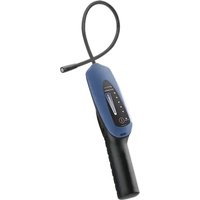
AST100FG - Detector INFICON - Free user manual and instructions
Find the device manual for free AST100FG INFICON in PDF.


| Product Type | Refrigerant Gas Leak Detector |
| Brand | INFICON |
| Model | AST100FG |
| Weight (with batteries) | 1.18 lb (0.53 kg) |
| Power Supply | 2 D alkaline batteries (3.2 V, 125 mA) |
| Battery Life | Approximately 25 hours |
| Sensitivity (methane) | 5 ppm |
| Sensitivity (hydrogenated nitrogen) | 7 g/year R134a equivalent |
| Operating Temperature Range | -20 °C to +50 °C (-4 °F to +122 °F) |
| Storage Temperature Range | -20 °C to +60 °C (-4 °F to +140 °F) |
| Maximum Humidity | 85% RH non-condensing |
| Safety Certification | Class I, Division 1, Groups A-D, T4; ATEX II 3G Ex nA nL IIC T4 X |
| Detectable Gases | Hydrogenated nitrogen (95/5), gasoline, natural gas, cyclopentane, isobutane, methane, propane, ethane, butane, ammonia, ethanol |
| Non-detectable Gases | Carbon monoxide (CO) |
| Main Functions | Leak detection, touch sensitivity adjustment, auto-zero, progressive audio and visual alarm, UV inspection lamp |
| Cleaning | Housing cleanable with household detergent or isopropyl alcohol; avoid any penetration into sensor |
| Spare Parts | Replacement sensor (p/n 706-700-G1), D alkaline batteries (Duracell MN1300 recommended) |
| Repairability | No user-serviceable internal parts; return to dealer for evaluation |
| Warranty | 1 to 2 years depending on region (excluding batteries, sensors, and filters) |
Frequently Asked Questions - AST100FG INFICON
User questions about AST100FG INFICON
0 question about this device. Answer the ones you know or ask your own.
Ask a new question about this device
Download the instructions for your Detector in PDF format for free! Find your manual AST100FG - INFICON and take your electronic device back in hand. On this page are published all the documents necessary for the use of your device. AST100FG by INFICON.
USER MANUAL AST100FG INFICON
natural_image
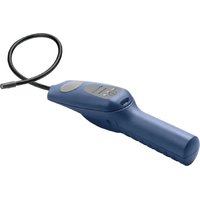
Blue medical endoscope device with black handle and coiled cable (no visible text or symbols)Operating Manual
AST100FG
Forming Gas Leak Detector
English · Español · Deutsch · Français · Italiano · 日本語 · 中文
English.... 3
Deutsch.... 17
Español.... 31
Français.... 45
Italiano 59
日本語 73
中文 86
1 Declaration of Conformity
INFICON
EU DECLARATION
OF CONFORMITY
This declaration is issued under the sole responsibility of the manufacturer INFICON. The object of the declaration is to certify that this equipment, designed and manufactured by:
INFICON Inc.
Two Technology Place
East Syracuse, NY 13057
USA
is in conformity with the relevant Community harmonization legislation. It has been constructed in accordance with good engineering practice in safety matters in force in the Community and does not endanger the safety of persons, domestic animals or property when properly installed and maintained and used in applications for which it was made.
| Equipment Description: | AST100FG Refrigerant Leak Detector | |
| Model Number: | AST100FG | (Applicable to all Group numbers) |
| Applicable Directives: | 2004/108/EC2011/65/EU | General Electromagnetic Compatibility (EMC)as amended by 2015/863/EU RoHS |
| Applicable Standards: | ||
| Safety: | EN 61010-1:2010 | Part 1: General Requirements: Safetyrequirements for electrical equipment formeasurement, control, and laboratory use. |
| Emissions: | EN 55011:2009 | (+A1:2010)/FCC CFR 47 Part 15: Emissionstandard for industrial, scientific, and medical(ISM) radio RF equipment (Class B) |
| Immunity: | EN 50270:2015 | Electromagnetic compatibility –Electricalapparatus for the detection and measurement ofcombustible gases, toxic gases or oxygen |
| RoHS | Compliant | |
CE Implementation Date: September 23, 2020
Brian W. Y
Authorized Representative:
Brian King
INFICON
General Manager - Service Tools
Two Technology Place
East Syracuse, NY USA 13057
EU Authorized Representative
INFICON GmbH
50968 Köln, Bonner Str. 498
ANY QUESTIONS RELATIVE TO THIS DECLARATION OR TO THE SAFETY OF INFICON'S PRODUCTS SHOULD BE DIRECTED, IN WRITING, TO THE AUTHORIZED REPRESENTATIVE AT THE ABOVE ADDRESS.
2 AST100FG
To get the best performance from your AST100FG, please read this manual carefully before you start using the instrument. If you have any questions or need additional assistance, please call 1-800-344-3304. We'll be happy to help you.

WARNING
This symbol is used to alert the user to the presence of important operating and maintenance instructions in the literature accompanying the instrument.
INFICON ^® is a trademark of INFICON Inc.
Duracell® is a trademark of Duracell, Inc. Bethe, Connecticut
AST100FG is Intrinsically Safe for Class I, Division 1, Groups A-D, T4 and rated II 3G Ex nA nL IIC T4 X as per Listing Number E112145 by MET Laboratories, Inc.
3 Introduction
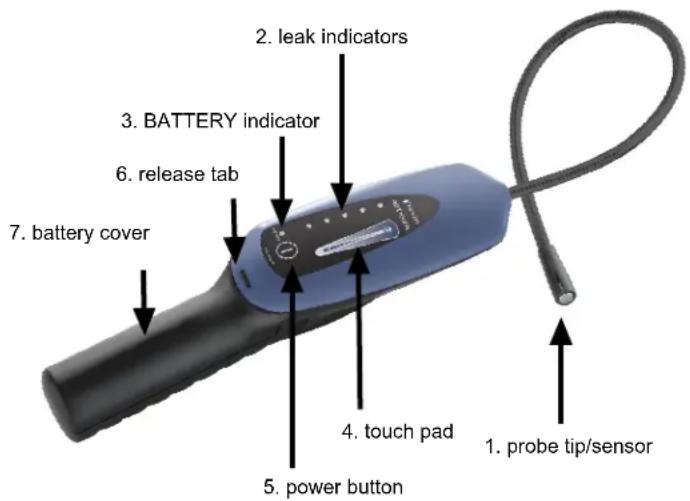
AST100FG is an intrinsically safe instrument designed to detect leaks using forming gas (typically 95% nitrogen/5% hydrogen) as well as a variety of combustible gases and flammable refrigerants.
AST100FG is sensitive to a variety of hydrocarbons and other gases including, but not limited to:
- gasoline
- natural gas
- cyclopentane
- isobutane (R600a)
- methane
• propane (R290) - ethane
- butane
- ammonia
- ethanol
• hydrogen forming gas (95/5)

AST100FG does not detect carbon monoxide (CO).
4 Specifications
| Sensitivity 5 ppm methane (main component of natural gas) | Forming gas - 7 g/yr R134a equivalent |
| Power supply Two "D" cell alkaline batteries (3.2 V at 125 mA) | |
| Battery life Approximately 25 hours | |
| Operating temperature range -4 to +122°F (-20 to +50°C) | |
| Storage temperature range -4 to +140°F (-20 to +60°C) | |
| Humidity 85% RH NC maximum | |
| Pollution degree 2 | |
| Overvoltage category 2 | |
| Weight (with batteries) 1.18 lbs (0.53 kg) |
5 Product Warnings

WARNING
To prevent ignition of a hazardous atmosphere, batteries must only be changed in an area known to be nonhazardous (that is, be completely free of combustible gas).

WARNING
Use only Duracell ^® MN1300 batteries to maintain intrinsically safe approval.

WARNING
Always check the instrument operation with a known combustible leak source before use.

WARNING
AST100FG detects leaks as described below but may not indicate when a hazardous atmosphere is present due to its Auto Zeroing function.
Lack of a reading by AST100FG should not be taken as an indication that the atmosphere is totally safe.

WARNING
There are no user serviceable parts inside.
Do not disassemble AST100FG.
6 How to Install the Alkaline Batteries
- Remove the battery cover by releasing the latch and sliding the cover down and off the handle. You may need a screwdriver, or similar tool, to do this.
- Install two "D" size alkaline batteries.
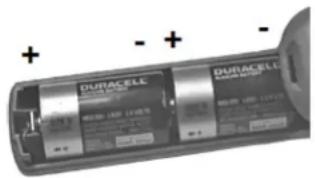
- Reinstall the battery cover by aligning it with the handle and sliding it up until the latch engages.
- A low battery is indicated when the green BATTERY indicator flashes. AST100FG may continue to operate for up to one hour after this occurs.
- A dead battery is indicated by the BATTERY and the highest signal indicator flashing.

Dispose of the depleted alkaline batteries according to the applicable state and local regulations. In the absence of such regulations, recycle and/or dispose of the batteries through a voluntary waste recycling program.
7 Using the Instrument
Turn AST100FG on or off
Long press the power button to turn AST100FG on or off.
- AST100FG warms up and steadily alarms for 30 seconds to two minutes. A rhythmic beep indicates that the warm-up is complete and AST100FG is ready to use.
- AST100FG must always be turned on in an area free of forming gas and combustible gas.
Adjust the Sensitivity
Swipe up or down on the touch pad to adjust the sensitivity.
- The leak indicators illuminate while the sensitivity is being adjusted to indicated the current level.
- AST100FG always starts up in the highest sensitivity, which is generally recommended for most applications.
Alarm Indication
AST100FG beeps steadily during normal operation. If gas is detected, the beeping quickens and the leak indicators illuminate.
A large, sudden exposure to gas may cause AST100FG to alarm for up to 30 seconds before returning to its normal state. Sensitivity may be slightly reduced for up to two minutes after a heavy exposure.
Auto Zero
AST100FG uses an auto zero function to help pinpoint leaks. This means that when forming gas or another combustible gas is detected, AST100FG will alarm initially, then will zero to the background concentration and stop alarming. At this point, only a higher concentration will cause AST100FG to alarm.
To reset the zero point back to default, move the probe tip to an area with clean air for several seconds.
Finding Leaks
- Turn AST100FG on and allow sufficient time for warm-up.
- Slowly (approximately 3 in/s [75 mm/s]) move the probe tip along any potential leak points.
→ Keep the probe tip as close as possible to potential leak points.
⇒ Be careful not to contact the sensor with dirt, oil, grease, water, or contaminants.
- If a leak is found, pull AST100FG away from the leak for several seconds until the beeping becomes steady and check it again to verify the leak.
Refer to the Alarm Indication and Auto Zero sections for more information on leak indications.
Forming Gas Leak Detection
Forming gas (typically 95% nitrogen and 5% hydrogen) is a non-flammable type of tracer gas used to locate leaks in AC systems without the use of refrigerant. Always follow SAE guidelines for automotive AC repair.
Always leak check with the engine off.

WARNING
Never add forming gas to a system containing refrigerant.
Always recover remaining refrigerant using an approved recovery machine.
-
Pressurize the empty system with forming gas to approximately 60 psig (4.1 bar).
-
Follow the steps in Finding Leaks to trace the entire system for potential leak points.
Always trace the entire system in a continuous loop to ensure nothing is missed.
Even if a leak is found, continue to trace the rest of the system.
- When leak checking is complete, remove forming gas from the system before making repairs.
Unlike refrigerant, forming gas can be vented directly into the atmosphere and does not need to be recovered from the system with an approved RRR machine.

Know the density of the gas you're detecting. For example, propane is heavier than air, so it's best to leak check with the probe below the leak site. Forming gas and methane are lighter than air, so leak check above the leak site.
7.1 Change the Sensor
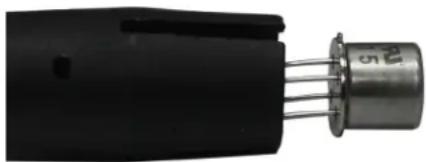
The sensor comes installed in the tip of the AST100FG probe. You only need to insert/remove the sensor when it is time to replace it.

If all leak indicators flash and a steady alarm occurs, the sensor is bad or not installed properly. Ensure the sensor is installed properly or install a new sensor if this occurs.
- Insert a paper clip or a small screwdriver under the sensor through the slot in the probe tip and carefully slide the sensor out of the end of the probe tip as seen in the figure below.
- Remove the new sensor from its packaging.
- Align the tab on the sensor can with the slot in the probe tip.
- Carefully slide the sensor into the probe tip. Ensure the wire leads fit into the matching holes in the sensor socket in the probe tip.

When properly installed, the top of the sensor should be approximately flush with the tip of the probe. It is acceptable if the probe protrudes slightly from the probe tip as long as the sensor is fully seated.
natural_image
Close-up of a black electronic component with three metallic pins and a cylindrical body (no visible text or symbols)7.2 Cleaning and Storage
AST100FG's plastic housing can be cleaned with standard household detergent or isopropyl alcohol. Care should be taken to prevent the cleaner from entering the instrument. Since gasoline and other solvents may damage the plastic, protect AST100FG from contact with these substances.

Do not allow cleaners or isopropyl alcohol to enter the sensor as it may become contaminated. Replace the sensor if contamination occurs.
7.3 UV Inspection Light
The UV inspection light emits a beam of light approximately 400 nm in wavelength, which illuminates the fluorescent dye that is commonly installed in automotive AC systems at the factory. Use the UV inspection light to quickly check an area for leaks in a system known to contain dye, or to verify a leak after locating the leak source with your leak detector. INFICON recommends using multiple leak detection methods to verify a leak.

WARNING
Do not point UV light at people or animals. UV light can cause damage to the eyes or blindness.
8 Troubleshooting
Except for the batteries and the sensor, the internal parts of the AST100FG Forming Gas Leak Detector are not user serviceable. If you experience a problem with AST100FG, see the Troubleshooting Table below to determine how to remedy the problem. If you cannot remedy the problem, take AST100FG to your wholesaler for evaluation or call our technical support line at 1-800-344-3304..
| PROBLEM CAUSE REMEDY | ||
| AST100FG does not power up | The batteries are worn out. | Replace the batteries. |
| The batteries are improperly installed. | Refer to How to Install the Alkaline Batteries for the proper installation orientation. | |
| There is poor sensitivity.AST100FG powers up, but does not detect combustible gas. | The unit is set to low sensitivity | Increase the sensitivity by swiping up on the touch pad. |
| The sensor is worn out and needs to be replaced. | Replace the sensor. | |
| The alarm sounds continuously, even after a few minutes of warm-up. | The sensor is not installed properly or is missing. | Ensure sensor leads are straight and inserted in the holes at the base of the sensor socket and the orientation tab is properly aligned in the probe tip.Refer to Change the Sensor [ ] 11]. |
| The sensor is worn out and needs to be replaced. | Replace the sensor. | |
9 Replacement Parts and Accessories
Replacement parts and accessories for your AST100FG are available through the same dealer you bought the instrument from.
Replacement sensor 706-700-G1
10 Return Authorization Procedure
All defective AST100FGs should be returned to your wholesaler for warranty evaluation. If you have any questions, please contact INFICON at 800-344-3304.

Do not return your defective unit directly to the factory without first contacting your wholesaler.
11 Warranty and Liability-Limitation
INFICON warrants your AST100FG Forming Gas Leak Detector to be free from defects of materials or workmanship for one or two years (depending on region) from the date of purchase. INFICON does not warrant items that deteriorate under normal use, including batteries, sensors, and filters. In addition, INFICON does not warrant any instrument that has been subjected to misuse, negligence, or accident, or has been repaired or altered by anyone other than INFICON. INFICON liability is limited to instruments returned to INFICON, transportation prepaid, not later than thirty (30) days after the warranty period expires, and which INFICON judges to have malfunctioned because of defective materials or workmanship. INFICON liability is limited to, at its option, repairing or replacing the defective instrument or part. This warranty is in lieu of all other warranties, express or implied, whether of MERCHANTABILITY or of FITNESS FOR A PARTICULAR PURPOSE or otherwise. All such other warranties are expressly disclaimed. INFICON shall have no liability in excess of the price paid to INFICON for the instrument plus return transportation charges prepaid. INFICON shall have no liability for any incidental or consequential damages. All such liabilities are EXCLUDED.
Two Technology Place
East Syracuse, NY 13057
USA
General Manager – Service Tools
Two Technology Place
East Syracuse, NY USA 13057
EU-Bevollmächtigter
INFICON GmbH
50968 Köln, Bonner Str. 498
natural_image
Close-up of a black electronic component with three metallic pins inserted (no visible text or symbols)Two Technology Place
East Syracuse, NY 13057
EE. UU.
General Manager – Service Tools
Two Technology Place
natural_image
Close-up of a black electronic component with three metallic pins and a cylindrical body (no visible text or symbols)Two Technology Place
East Syracuse, NY 13057
États-Unis
General Manager – Service Tools
Two Technology Place
natural_image
Close-up of a black electronic component with three metallic pins inserted (no visible text or symbols)Two Technology Place
East Syracuse, NY 13057
USA
Two Technology Place
East Syracuse, NY USA 13057
natural_image
Close-up of a black electronic component with three metallic pins (no visible text or symbols)Two Technology Place
East Syracuse, NY 13057
USA
Two Technology Place
East Syracuse, NY USA 13057
EU認定代理人
INFICON GmbH
50968 Köln, Bonner Str. 498
natural_image
Close-up of a black electronic component with three metallic pins (no visible text or symbols)7.2 清掃および保管
Two Technology Place
East Syracuse, NY 13057
USA
Two Technology Place
East Syracuse, NY USA 13057
EU 授权代表
INFICON GmbH
50968 Köln, Bonner Str. 498
natural_image
Close-up of a black electronic component with three metallic pins (no visible text or symbols)7.2 清洁与储存
Two Technology Place
East Syracuse, NY 13057-9714 USA
Phone: +1.800.344.3304
E-Mail: service.tools@inficon.com
www.inficonservicetools.com
Korea
Phone: +82-31-206-2890
Email:reach.korea@inficon.com
Japan
Phone: +81-44-322-8901
Email: reach.japan@inficon.com
Bonner Strasse 498
D-50968 Cologne, Germany
Phone: +49 221 56788-660
E-Mail: servicetools.europe@inficon.com
www.inficonservicetools-europe.com
Singapore
Phone: +65-6631-0303
Email:reach.singapore@inficon.com
Section A, Building 6
108 Shuya Road, Shanghai, China
Phone: +86-21-62093094
Email: reach.china@inficon.com
Taiwan
Phone: +886-3-5525828
Email: reach.taiwan@inficon.com
Due to our continuing program of product improvements, specifications are subject to change without notice.
All trademarks are the property of their respective owners.
074-742-P16A
©2021 INFICON
- AST100FG
- Declaration of Conformity
- INFICON
- Brian W. Y
- Authorized Representative:
- EU Authorized Representative
- AST100FG
- WARNING
- Introduction
- Product Warnings
- How to Install the Alkaline Batteries
- Using the Instrument
- Turn AST100FG on or off
- Adjust the Sensitivity
- Alarm Indication
- Auto Zero
- Finding Leaks
- Forming Gas Leak Detection
- Change the Sensor
- Cleaning and Storage
- UV Inspection Light
- Troubleshooting
- Replacement Parts and Accessories
- Return Authorization Procedure
- Warranty and Liability-Limitation
- EU-Bevollmächtigter
- EU認定代理人
- 清掃および保管
- EU 授权代表
- 清洁与储存
Brand : INFICON
Model : AST100FG
Category : Detector