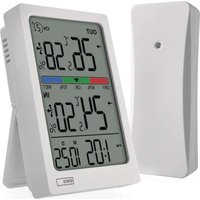
E0558W - Thermometer Emos - Free user manual and instructions
Find the device manual for free E0558W Emos in PDF.


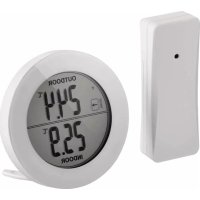
| Product type | Indoor/outdoor thermometer with wireless sensor |
| Brand | Emos |
| Model | E0558W |
| Thermometer power supply | 2 AAA 1.5 V batteries (not included) |
| Sensor power supply | 2 AA 1.5 V batteries (not included) |
| Display | LCD with time, date, indoor/outdoor temperatures, humidity |
| Indoor temperature range | -10 °C to +50 °C |
| Outdoor temperature range | -40 °C to +60 °C |
| Humidity range | 1% to 99% RH |
| Temperature accuracy | ±1 °C from 0 to +50 °C, ±1.5 °C elsewhere |
| Humidity accuracy | ±5% from 30 to 80%, ±8% from 20 to 29% and 81 to 95% |
| Temperature resolution | 0.1 °C |
| Humidity resolution | 1% |
| Radio range (sensor) | Up to 100 m in open space |
| Transmission frequency | 433 MHz, 10 mW e.r.p. max |
| Max number of sensors | 3 |
| Sensor channels | 1, 2, 3 (selectable) |
| Special functions | Clock, alarm, snooze, trends, comfort indicator, min/max |
| Time format | 12/24 h |
| Date format | D/M or M/D |
| Cleaning | Soft slightly damp cloth, no solvents |
| Sensor protection | Splash resistant but not immersion proof |
Frequently Asked Questions - E0558W Emos
User questions about E0558W Emos
0 question about this device. Answer the ones you know or ask your own.
Ask a new question about this device
Download the instructions for your Thermometer in PDF format for free! Find your manual E0558W - Emos and take your electronic device back in hand. On this page are published all the documents necessary for the use of your device. E0558W by Emos.
USER MANUAL E0558W Emos
GB | Wireless thermometer
Safety instructions and warnings

Read the instructions before using the device.

Observe the safety instructions in this manual.
- Do not tamper with the internal electrical circuits of the product - you may damage it and automatically void the warranty. The product should only be repaired by a qualified professional.
- Use a slightly dampened soft cloth for cleaning. Do not use solvents or cleaning products - they could scratch the plastic parts and damage the electrical circuits.
- Do not use the unit near devices that have electromagnetic fields.
- Do not expose the product to excessive pressure, shock, dust, high temperature or humidity - they may cause malfunction of the product, plastic parts.
- Do not put any objects in the openings of the device.
- Do not immerse the device in water.
- Protect the instrument from drops and shocks.
- Do not throw batteries into fire, disassemble or short-circuit.
- Keep out of reach of children. Ingestion can lead to chemical poisoning, soft tissue perforation and death. Severe poisoning may occur within two hours of trouble. Seek immediate medical attention.
- Use the device only in accordance with the instructions in this manual.
- The manufacturer is not liable for any damage caused by improper use of this instrument.
- This appliance is not intended for use by persons (including children) whose physical, sensory or mental incapacity or lack of experience or knowledge prevents them from using the appliance safely unless they have been supervised or instructed in the use of the appliance by a person responsible for their safety. Children must be supervised to ensure that they do not play with the appliance.
Hereby, EMOS spel. s r.o. declares that the radio equipment type E0558W is in compliance with Directive 2014/53/EU. The full text of the EU declaration of conformity is available at the following internet address: http://www.emos.eu/download.
Technical specifications
Quartz crystal controlled clock
Time format: 12/24 h
Internal temperature: -10 °C to +50 °C, 0.1 °C resolution
Outdoor temperature: -40^ to +60^ , 0.1 °C resolution
Indoor and outdoor humidity: 1 % to 99 % RH, 1 % resolution
Temperature measurement accuracy: ± 1^ for the range 0 and +50^,± 1.5^ other ranges
Humidity measurement accuracy: ± 5% for 30% to 80% , ± 8% for 20% to 29%
and 81% to 95% , ± 12% for 1% to 19% and 96% to 99%
Radio range: up to 100 m in open space
Transmission frequency: 433 MHz, 10 mW e.r.p. max.
Number of sensors: 3 max.
Power supply:
Thermometer: 2 × 1.5 V AAA batteries (not included)
Sensor: 2 × 1.5 V AA batteries (not included)
Description of icons and buttons (See Fig. 1)
1 - outdoor temperature
12-date
2 - outdoor humidity
13 - low batteries in the sensor
3 - outdoor temperature trend
14 - low batteries in the thermometer
4 - outdoor humidity trend
15-SET button
5 - sensor number
16-+|CH button
6 - comfort indicator
17 - button -l°C/°F
7 - indoor temperature
18-MINIMAX button
8 - indoor humidity
19 - ALM button
9 - indoor temperature trend
20 - battery compartment stand/cover
10 - indoor humidity trend
21 - hanging hole
11 - time
22-SN0OZE button
Sensor description (See Fig. 2)
1-LED diode
3 - Sensor channel number setting 1/2/3
2-Hanging hole
4 - battery compartment
Commissioning procedure
- First insert the batteries into the thermometer (2× 1.5V AAA), then insert the batteries into the wireless sensor (2× 1.5V AA). When inserting the batteries, ensure that the polarity is correct to avoid damaging the thermometer or sensor.
- The wireless communication icon with the sensor will start flashing (A), indicating that the thermometer is searching for a signal from the outdoor sensor. Place both units next to each other. If the outdoor temperature does not appear within 3 minutes, the thermometer will stop searching for a signal, the wireless communication icon with the sensor will stop flashing and the outdoor temperature/humidity will display ---. If no signal is found from the sensor, repeat from step 1.
We recommend placing the sensor on the north side of the house. In built-up areas, the range of the sensor may decrease rapidly.
The sensor is resistant to dripping water, but do not expose it to continuous rain.
Do not place the sensor on metal objects, as this will reduce its transmission range.
The sensor can be placed vertically or hung on a wall.
If the low battery icon appears in field #13 on the thermometer display, replace the batteries in the sensor.
If the low battery icon appears in field #14 on the thermometer display, replace the batteries in the thermometer.
RESET thermometer
If the thermometer displays incorrect data or does not respond to button presses, remove the batteries and reinsert them. All data will be deleted and you will need to reset the settings.
You can restart the sensor in the same way.
Changing the sensor channel and connecting other sensors
Up to 3 wireless sensors can be paired to the thermometer.
- Long press the +|CH button on the thermometer, the icon will flash.
- Separate the battery compartment cover on the back of the sensor, adjust the sensor number (1, 2, 3) with the slider and insert alkaline batteries (2 × 1.5 ~V AA) .
- The channel number will be displayed in field 5. If the sensor signal is not found, repeat the whole procedure again.
Setting the display of data from multiple sensors, automatic rotation of the values of the connected sensors
Press the +|CH button on the thermometer repeatedly to display the readings from all connected sensors in turn.
You can also activate the automatic rotation of the data from the connected sensors:
1. Switching rotation ON
Press the +|CH button repeatedly until the icon appears on the display.
The data from all connected sensors will be displayed automatically and repeatedly.
2. Switching rotation OFF
Press the +ICH button repeatedly until the icon disappears.
Manual settings
- Press the SET button for a long time, the settings will start flashing.
- Use the +|CH and -|^oC / ^oF buttons to set the following values: time format 12/24h - hour - minute - year - date format (D/M or M/D) - month - day.
- Move between the values by pressing the SET button briefly.
- Hold down the +|CH and -|^0C / ^0F buttons to advance faster.
Hours/year display
Press the SET button repeatedly to set the hour or year display.
Setting the alarm
- Press the ALM button for a long time, the hour indication will flash.
- Press the +|CH or -|^0C / ^0F button repeatedly to set the desired hour, confirm with the ALM button.
- Press the +|CH or -|^0C / ^0F button repeatedly to set the desired minute, confirm with the ALM button. Then press the ALM button, the alarm activation icon will be displayed.
Press the ALM button again to cancel the alarm activation, the bell icon will not be displayed.
Repeat alarm function (SN00ZE)
To delay the alarm ringing by 5 minutes, press the SN00ZE button.
Press this as soon as the ringing starts. The ZZ icon will flash.
To cancel the snooze function, press any other button on the back except SN00ZE - the Z^Z icon will not be displayed.
The alarm will be reactivated the next day.
If you do not press any button during the ringing, the ringing will automatically stop after 2 minutes. The alarm will sound the next day
Temperature unit
Press the -1^ / ^ button repeatedly to set the temperature unit display to ^ C or ^ F
Maximum and minimum temperature and humidity values
Press the MINIMAX button repeatedly to display the maximum and minimum temperature and humidity readings.
To manually clear the memory of the measured values, press the MINIMAX button for a long time.
Comfort indicator
Displays the level and feel of indoor humidity.
| Indicator | RY - dry environment | OK - comfortable environment | WET - moist environment |
| Humidity < 40 % 40 to 70 % > 70 % |
Temperature and humidity trend
| Trend indicator | ↓ | → | ↑ |
| Trend Declining Persistent Rising | |||
Troubleshooting FAQ
The display shows the following instead of temperature/humidity:
- LL.L - measured value outside the lower measurement range
-
HH.H - measured value outside the upper measurement range
-
Move the device to a more suitable location.
Poorly readable display
- Replace batteries
Sensor data not displayed
- Replace the batteries in the sensor
- Pair the sensor with the thermometer again
- Shorten the distance between the sensor and the thermometer
- Do not place the sensor on a metal substrate
Jedinica temperature
Više puta pritisnite tipku -l°C/°F za postavljanje mjerne jedinice temperature na °C ili °F.
IaTmK MoXHa po3MictnB eptnkajbHO a6o nobicntn Ha CTHy.
JaKoHa DnCnPeI TepMometpa 3-RaBtBc3 HaOHc cna6ko6batapei B noJI No 13, zamHITb 6aTapei B daTHNKy.
JaKIO Ha DnCnPeI TepMometpa 3>ABNTbcra 3HaOc Cna6koi 6aTapei B noJI 14, 3amHITb 6aTapei B TepMometpi.
Ipee3aBaHTaXeHHa TepMometpa
KIO TepMometp nka3ye Hnnpabunbhi daHI a6o He pearye Ha HATNCKaHHa KHOIOK, BIMITb 6aTapei Ta BCTABTe ix 3HOy.
Bci dahi 6ydyb Tb BuaJaeH, i notpi6Ho 6yde BnKoHaTH HaaWtYBaHHaHOBO.
TakIM JIe YINHom MOJHa nepe3aNcyTn TdTuHk.
3MiHa KaHaJy DaTcHka Ta NiKlIOueHHI HmX DaTcHkIB
Ito TepMometpa MoKHa NiikNIOuHTn Do 3 6e3pOToBnx DaTnuKIB.
- HatnchItb i ytpmyTe KhoNky +ICHa TePmometpi, iKoHka noyHe 6JIMaTH.
- BiD'EnHaIte KpnUk Ky BaTapeHoro BiDCiKy Ha 3aHnI NaHeni DaTUnKa, BiDperYJIOTe HOMep DaTUnKa (1, 2, 3) 3a DonomorOIO Nob3yHka i BCTABTe LyxHi BaTapeKn (2× 1,5VAA)
- Hmep kaHany BiO6pa3ntbcra B noJI 5. JaKIO cIgHAn DaTcNka He 3HaJdeHo, NOBTOpiTB BCIO npoueDpy ue pa3.
HaiaatybaHH Bido6paXeHH daHx 3 deKilbKOx daTunKIB, aBtOMaTnHe
YepryBaHHa 3HaueHb NiKIOueEHx DaTUnkIB
HaTnCHiB KOnKy +ICH Ha TepMometp KInbKa pa3ib, 106 no cep3i BiIO6pa3HTN noka3aHHBcix niKIIoueHnx DaTuNKIB.
Bn taKoK moKeTe aKTHyBaTu aBtOMaTuHy poTaio daHnx 3 niKIOueHnx DaTuNKiB:
1. YbimKHeHHa potauii
HaTnchHb KhoNky +|CH kInbKa pa3iB,doKn Ha ducnnei He 3-ABNTbcn iKTOrpama DaHi 3 ycix nikKnUoyehnx daTunKIB 6yDyTB BiO6paKaTncA bTOMaTHUHO i NOBTOPiBaTncra.
2.BmKHeHHo6epTaHH
HaTnckaIte KhoNky +|CH kiNbka pa3iB,doKn He 3HnKHe nIKToPpMa
PyuHi HajaawTyBaHHa
- HatnchItb i ytpmyte KhONky SET npotrarom Tpnbaloro yacy, HanaWtbyaHna noHytb 6JImMaTn.
- 3a donomoroIO KhoNOK +|CH Ta -|°C/°F BCTaHOBITb HAcTyHl 3HaueHHr: fOpMaT yacy 12/24h -roDnHa - XBJInHa - pIK - fOpMaT dAtn (I/D a6o M/D) - Micr - DeHb.
- IpepeiataTeecm 3HaueHHaMn, KopoTKoayacHO HaTNCaOuN KhoNky SET.
- UtpmmyTe KhoNk +|CH Ta - ^ / ^ IJI WBNUoro npocyBaHnA.
IHHkaia rOuH/POkIB
HaTnchItb KhoNk Ky SET kInbKa pa3iB, 106 BCtAnOBHTB iDobpaXeHn rOdnHHka a6o poky.
HanaWtyBaHH6yDnIbHNka
-
HatnchItb i ytpmyTe KhoNky ALM npTgrom TpBaIoro Yacy, IHdkatop rOuHn noUhe 6JIMMaTH.
-
KIbka pa3ib haTncHtB KHONky +|CH a6o -|°C/°F, 506 BCTaHOBHTn 6aKaHy rOuHy, nIITBePdITb KhoNkoIO ALM.
-
HatnchItb i ytpmyTe KhoNky ALM npotrrom TpBaIoro yacy, iHdkaTOp roHNH noyHe 6nMaTH
-
KInbka pa3ib HataChItb KhoNky ^+ ICH a6o -^ / ^ , uO6 BcTaHOBHTn baxaHy roINHy, nITBePdITb KhoNkoI ALM.
-
Hatachitb khoNy ^+ |CH a60 - ^ C / ^ 106 BCTaHOHTn notpi6Hy xBNHny, nIITBepdtb khoKIO ALM. Iotim Hatachitb khoNy ALM, Ha dncnei 3'ABNTbcnIKTORpama AKTBAuii bdynbHnka
HaTnchHb KhoNky ALM 1e pa3, 6o6 cKacyBaTu aKTNaCuio 6yDnIbHnka, nIKToIpaMa d3BOHnKa He BIDobpaKaTaMMeTbcra.
Функця noBTopy 6yDnIbHnka (SN0OZE)
Lio6 Biiknactn CnHan 6yDnJbHnka Ha 5 XBnInH, HATNCiTh KhoNky SN0OZE.
HaTnCHiB ii, kT iIbKn noUHeTBcra 3zBiHOK. NoUHe 6nImaTu nIKToPama Z
Lio6ckacybaTn cyHKuo BIDKnaeHHaHtncHiB 6yIb-ky iHuy KhoNky Ha 3aHni naHei, kPIM SN0OZE -3haOK Z He 6yde BiIO6paKaTaNCra.
Будуньнik 6уde nobTOpHo AKTINBOaHo HAcTynHOrO nHЯ.
KIO Bn He HaTNCHe XoHoi KHOIKN NiJ Yac D3BiHka, D3BiHOK ABTomuHNO npnnHtbcrYepe3 2 XBNIHN.
Yacti 3aHnHa yOo yCyHeHH HeCnpabHOCTe
3amictb TemnepaTyPi/BOJorOcTi Ha dncnnei BiIObpaXaetbcHacTynHe:
-
LL.L - BIMiprahe 3haeHHra 3a Mexamn HxHbOro diaana30Hy BmipioBaHHra
HH.H-BmipraHe 3HaueHHa Mekamn BepxHbOro diana3ohy BmipioBaHHa -
IepemictiB npncptiy 6bIbIz3pyHcMicue.
Icnne noraHO uTaTbcra
3amHItb6atapeKu
Dahi dattnka He Bido6paHaoTbcra
- 3amihitb 6atapenB DaTnyK
3HOBy 3'eHaIte DaTtIK 3 TePmOMeTpOM - Ckopotitb biDctaHb mix daTukom i TepMometpom
He knapitb daTnK Ha MetaneBy nikkaIky
1-LED-diod
2 - riputusava
3-anduri kanali numbri seadistus 1/2/3
4-patareipesa
BbtpuHa n BbHua BnaxHoCT: 1%do 99% RH, pa3dJIteJHa cnoc6hoct 1
ToHocT Ha n3MepBaHe Ha TeMnepaTypaTa: ± 1^ 3a nnana3oHa 0 n +50^ ± 1,5^ 3a npynn nnana3oHN
ToHocT Ha n3MePbHe Ha BnAaXHoCTTa: ±5% 3a 30% lo 80%, ±8% 3a 20% lo 29% u 81% do 95%,± 12% 3a 1% lo 19% u 96% lo 99%
Panaoo6xbat:do 100 m B OTKpNTo npocTpaHCTBO
YecToTa Ha npedabane: 433 MHz, MaKc. 10 mW e.r.p.
He noctabrTe ceh30pa Bbpxy MeTaHn IpeMMeTn, TbN KaTO ToBa Iue HAmaN IOxbvATo Ha N3JIbYBaHeTo My.
Cen3opbT MoKe Ja ce Noctabn BepTKaJIHo IIN Ja ce 3akau Ha CTehata.
Ako Ha dincpnne Ha TepMometbpa ce noaBn IKoHa 3a cna6a 6aTepy B nOte N 13, CMeHete 6aTepynte B ceH30pa.
Ako Ha dincpner Ha TepMometbpa ce noaBn IkoHa 3a cna6a 6atepy B nOe Ng 14, CmeHeTe 6atepnte B TepMometbpa.
PECETHaTepmometbpa
Ako TepMometbptn NOKa3Ba HnnpabunH daHHn nHn He pearupa Ha HATnCKaHe Ha 6yToHnTe, n3BaJeTe 6atePnte ng NoCTabeTe OTHBO.
BcunKn daHnn 1e 6bDat n3tpntn HacTpoKnTe 1e Tp8Ba da 6bDat HanpaBeHH OTHOBO.
IIO CbUH NauH MoKeTe Da pecTapTpape CeH3Opa.
IpomraHa Ha KaHaja Ha ceH3opa n Cbbp3BaHe Ha npyru ceh3opn
KbM TepMometbpa Morat da ce CbpxkT do 3 be3xuHn ceh30pa.
- Hatnchete n 3aPbXte 6yToHa +ICH Ha TepMometbpa, IKOHa 7e 3anoHne da Mira.
- OTeIeTe KaIaKa Ha OTdeneHneTo 3a 6aTePnHa TbPbHa cEh3Opa, HacTpoIe Homepa Ha cEH3Opa (1, 2, 3) c nIb3rauHa nocTaBeTe aIIkaJIHn 6aTePn (2× 1,5VAA)
- HomepbT ha KaHana ige ce nokae B none 5. Ako ciHaJIbT OT cEH3opa He 6bJe OTKpuT, NOBTopeTe cnIaT npOeDypa OTHOB.
HactpoBaHe Ha noka3BaHeTo Ha daHHN OT HAKOJIko CeH3opa, ABTomaTHUHO 3aBbPTaHe Ha cTOnHOCTnTe Ha Cbbp3aHHTe CEH3Opn
Upe3 noBtOHO HaTnCKaHe Ha 6yToHa +|CH Ha TepMometbpa nocTeeneHNo Ue ce NOKaKAT daHHnte OT BCNUKN CBbp3aHN CEH3OpN.
MoKeTe CbIoo TaKa Da aKTbBpuTa e ABtOMaTHuHOTo 3aBbPtaHe Ha daHHnte O CBbpHaHte cEH3OpN:
1.BkIIOUbaHe Ha BbPteHeTo
HaTnchete MHOROKpatHO 6byToHa +|CH,doKaTO Ha duCnner ce noBn uKohata
DAHHNTEOTBCNUKCNBp3aHNCEH3OpNCEeNOKa3BaTABTOMaTHUHO MHOROKpaTHO.
2.ИЗКЛIOУBAнеHa BbPteHETO
HaTnchete MHOrOkpatHo 6byToHa +lCH,doKaTo NkoHata n3ye3He Ha dncnJe.
PbUHn HacTpoKu
- HatncheTe npoBJIknteJHO 6yToHa SET, HacTpoKnTe ige 3aNoHAT da MmraT.
2.ИзлгьаиTe 6byToHnTe +|CH n -|°C/°F,3aДа 3aДаTe CneHnTe cToHocTn:фopMaT ha BpeMeTO 12/24h -чac -MHyTa -roMHa -фopMaT Ha DaTaTa (D/M mnn M/D) - Meceu - DeH.
3.Премнаваite Мени CTоинocHTe,кATOHaTиСHTe 3aКраТКо 6уToHa SET. - 3aDpBkTe HATnCHaTH 6yToHnTe +|CH n -1°C/°F, 3a da npemHeTe KbM no-5bP3 xoJ.
HnkaNaHa Yaca/roHNata
HaTnchete MHOrOkpatHo 6yToHa SET, 3a da HAcTpOnTe Noka3BaHeto Ha Yaca nn rOdnHaTa.
HactpoBahe Ha anapMaTa
- Hatachete npoDbjnxTeJHO 6yToHa ALM, Hndkaunra 3a yac ue mira.
- HATINCHETe MHOROKpaTHo 6yToHa +|CH nnn -|°C/°F, 3a da 3aadaTe JekanHn yac, notBbPdTe c 6yToHa ALM.
- Hatnche TE MHOKpaTHo 6yToHa +|CH nIIN - 1^ / ^ , 3a da 3aanaTe xeJHaTa MNHyTa, noTbpeTe c 6yToHa ALM.
CneTToBaHaTnCHete 6yToHa ALM, Ie ce nokaxe IKoHaTa 3a AKTNBupaHe Ha aIapMaTa
HaTnchete OTHO6yToHa ALM, 3a Da OTMeHInTe aKTHBnPaHcTo Ha anapMaTa, IKoHaTa Ha 3BbHeua Hma da Ce Ioka3Ba.
JaHHnte ot ceH3opa He ce noka3BaT
CmeHeTe 6aTeepnTe BceH30pa
Cbpxte OTHOBO cEH30pa C tepMometbpa
CbkaaabaHa pa3ctoHHeTo MeKny ceH3opa n TepMometbpa
He noctabraye ceh3opa Bbpxy MeTaNHa noDnOxxKa
Captor: 2 × 1,5 V piles AA (non incluses)
Antal sensorer: 3 max.
Strömförsörjning:
Termometer: 2 × 1,5 V AAA-batterier (medfoljer ej)
Sensor: 2 × 1.5 V AA-batterier (medfoljer ej)
Antal sensorer: 3 maks.
Strømforsyning:
Termometer: 2 × 1,5 V AAA-batterier (medfølger试点)
- GB | Wireless thermometer
- Safety instructions and warnings
- Technical specifications
- Description of icons and buttons (See Fig. 1)
- Sensor description (See Fig. 2)
- Commissioning procedure
- RESET thermometer
- Changing the sensor channel and connecting other sensors
- Setting the display of data from multiple sensors, automatic rotation of the values of the connected sensors
- Switching rotation ON
- Switching rotation OFF
- Manual settings
- Hours/year display
- Setting the alarm
- Repeat alarm function (SN00ZE)
- Temperature unit
- Maximum and minimum temperature and humidity values
- Comfort indicator
- Temperature and humidity trend
- Troubleshooting FAQ
- Poorly readable display
- Sensor data not displayed
- Jedinica temperature
- Ipee3aBaHTaXeHHa TepMometpa
- 3MiHa KaHaJy DaTcHka Ta NiKlIOueHHI HmX DaTcHkIB
- HaiaatybaHH Bido6paXeHH daHx 3 deKilbKOx daTunKIB, aBtOMaTnHe
- YepryBaHHa 3HaueHb NiKIOueEHx DaTUnkIB
- YbimKHeHHa potauii
- 2.BmKHeHHo6epTaHH
- PyuHi HajaawTyBaHHa
- IHHkaia rOuH/POkIB
- HanaWtyBaHH6yDnIbHNka
- Функця noBTopy 6yDnIbHnka (SN0OZE)
- Yacti 3aHnHa yOo yCyHeHH HeCnpabHOCTe
- 3amictb TemnepaTyPi/BOJorOcTi Ha dncnnei BiIObpaXaetbcHacTynHe:
- Icnne noraHO uTaTbcra
- Dahi dattnka He Bido6paHaoTbcra
- PECETHaTepmometbpa
- IpomraHa Ha KaHaja Ha ceH3opa n Cbbp3BaHe Ha npyru ceh3opn
- HactpoBaHe Ha noka3BaHeTo Ha daHHN OT HAKOJIko CeH3opa, ABTomaTHUHO 3aBbPTaHe Ha cTOnHOCTnTe Ha Cbbp3aHHTe CEH3Opn
- 1.BkIIOUbaHe Ha BbPteHeTo
- 2.ИЗКЛIOУBAнеHa BbPteHETO
- PbUHn HacTpoKu
- HnkaNaHa Yaca/roHNata
- HactpoBahe Ha anapMaTa
- JaHHnte ot ceH3opa He ce noka3BaT
Brand : Emos
Model : E0558W
Category : Thermometer