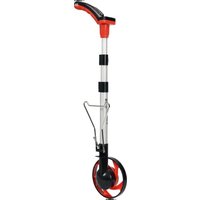
YT-71655 - Rangefinder Yato - Free user manual and instructions
Find the device manual for free YT-71655 Yato in PDF.


| Product type | Measuring wheel distance meter |
| Brand | Yato |
| Model | YT-71655 |
| Maximum measuring distance | 99999.9 m / ft |
| Measuring accuracy | 0.5 % |
| Display resolution | 0.1 m / 0.3 ft |
| Measurement units | Meters / Feet (switchable) |
| Wheel diameter | 160 mm |
| Power supply | 2 AAA batteries (1.5 V each, 3 V total) |
| Weight | 0.67 kg |
| Operating temperature | -10 °C to +45 °C |
| Main functions | Linear measurement, rectangular area calculation, memory (5 banks), zero reset, auto power-off |
| Display | LCD screen with low battery indicator |
| Telescopic handle | Yes, adjustable with latch |
| Parking support | Yes, foldable |
| Maintenance | Clean with a soft, damp cloth; do not immerse |
| Storage | Dry, dark place; remove batteries if storage > 2 weeks |
| Safety | Do not use in rain; avoid uneven surfaces; do not use with vehicle |
| Included accessories | Carrying case |
| Warranty | Lost if used improperly |
Frequently Asked Questions - YT-71655 Yato
User questions about YT-71655 Yato
0 question about this device. Answer the ones you know or ask your own.
Ask a new question about this device
Download the instructions for your Rangefinder in PDF format for free! Find your manual YT-71655 - Yato and take your electronic device back in hand. On this page are published all the documents necessary for the use of your device. YT-71655 by Yato.
USER MANUAL YT-71655 Yato
natural_image
Exterior view of a metal detector with a black handle and circular base (no text or symbols visible)PL EN DE RU UA LT LV CZ SK HU RO ES FR IT NL GR
natural_image
Close-up of a screwdriver inserted into a battery pack, showing internal components (no text or symbols visible)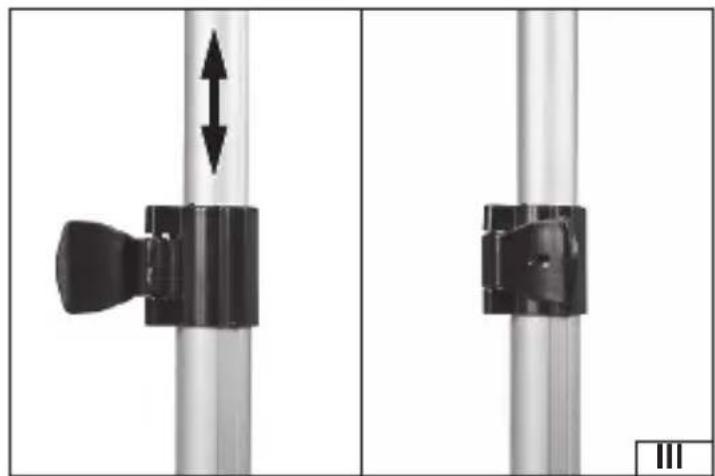
natural_image
Mechanical assembly diagram showing two vertical rods with a black handle and bidirectional arrow, no text or symbols present.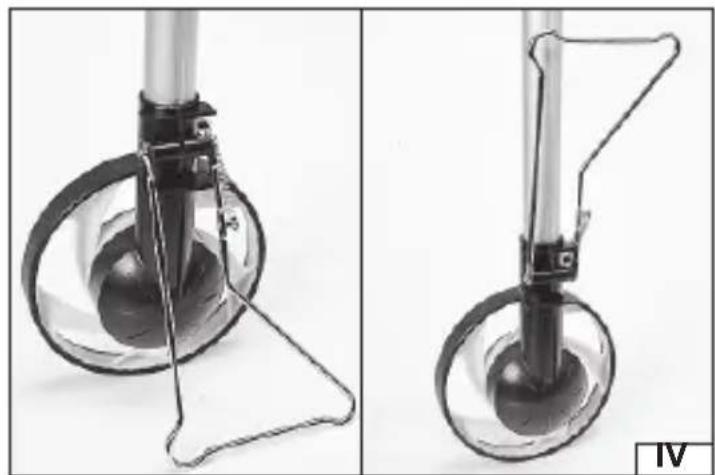
natural_image
Two views of a mechanical device with transparent legs and a handle, shown from different angles (no text or symbols visible)PL
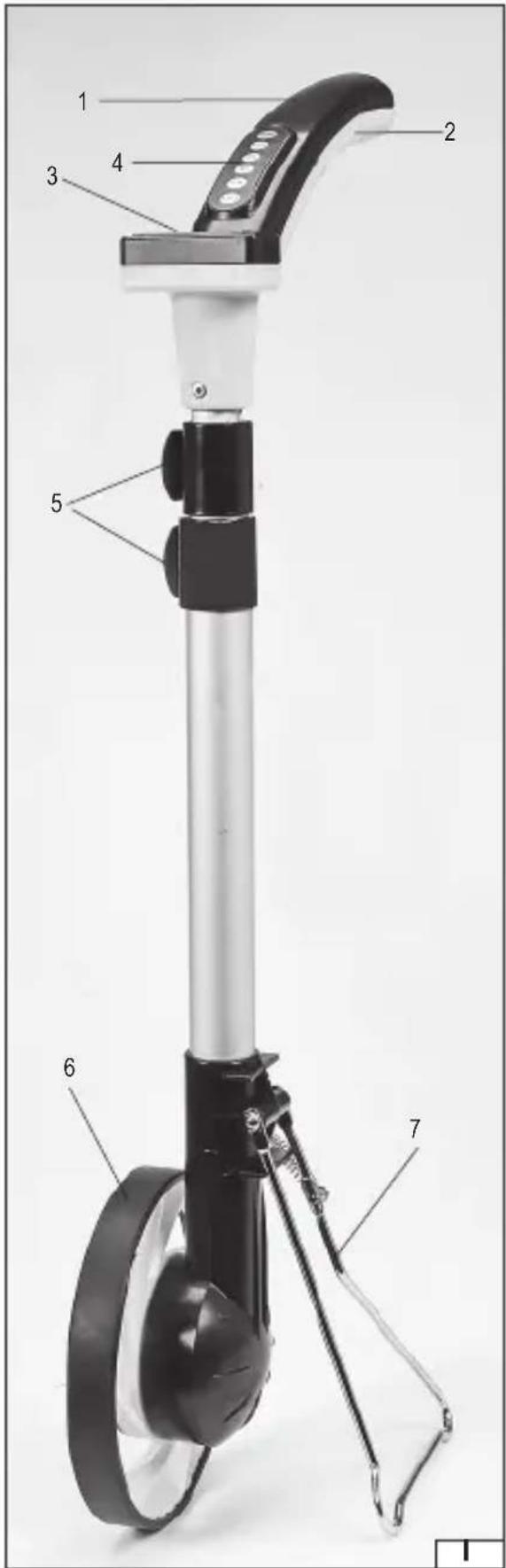
- handle
- battery compartment
- LCD screen
- control panel
- handle latch
- wheel
- stand
DE
This symbol indicates that waste electrical and electronic equipment (including batteries and storage cells) cannot be disposed of with other types of waste. Waste equipment should be collected and handed over separately to a collection point for recycling and recovery, in order to reduce the amount of waste and the use of natural resources. Uncontrolled release of hazardous components contained in electrical and electronic equipment may pose a risk to human health and have adverse effects for the environment. The household plays an important role in contributing to reuse and recovery, including recycling of waste equipment. For more information about the appropriate recycling methods, contact your local authority or retailer.
The measuring wheel is an device which can measure long lengths and distances as well as rectangular areas. Proper, reliable and safe operation of the device depends on appropriate use, that is why you should
Read and keep the entire manual before the first use of the product.
The supplier shall not be held liable for any damage or injury resulting from improper use of the tool, failure to observe the safety regulations and recommendations of this manual. Use of the tool for purposes other than those for which it was intended shall cause the loss of the user's rights under the warranty and incompliance with the sale agreement.
Caution! This device is not a measuring instrument within the meaning of the Metrological Act.
ACCESSORIES
The product is supplied complete without batteries. Before using the product, perform the preparatory actions described in the following section of this manual.
TECHNICAL DATA
| Parameter Units Value | ||
| Catalogue No. YT-71655 | ||
| Maximum measuring distance [m / ft] 99999.9 | ||
| Measurement accuracy 0.5% | ||
| Measuring grain [m / ft] 0.1 / 0.3 | ||
| Units metres / feet | ||
| Measuring wheel diameter [mm] 160 | ||
| Supply voltage [VDC] 3 | ||
| number and type of batteries | 2xAAA | |
| Weight | [kg] | 0.67 |
| Operating temperature | [°C] | -10 ~ +45 |
OPERATING CONDITIONS
Pay attention to the environment during measurement. Do not look at the screen all the time. Vehicles and obstacles can cause serious injuries or death.
The product is not waterproof and should not be used during precipitation. When measuring directly after the rain, be careful not to allow water to get between the wheel and handle. The measuring wheel must not be submerged (partly or completely) in water, snow or other liquids. Care should also be taken when measuring in grass. Dew on the grass can cause damage to the product.
Do not exceed the operating temperature range. At low temperatures (below 5^ C), the LCD screen may react more slowly to changes. This is a natural phenomenon which will disappear when the screen heats up. Slower response of the LCD screen does not affect the accuracy of the measurement. Exposure of the LCD screen to direct sunlight can lead to darkening of the screen, which should disappear when the screen cools down. Too long exposure of the LCD screen to too high a temperature, including from the sunlight, can lead to its irreversible
EN
damage.
The product is not to be used by children. Children should not be allowed to treat it as a toy. Measuring on uneven surfaces can distort the result.
When measuring the lengths needed to determine the surface area of a rectangle, the wheel should be guided in a straight line so as not to lead to any distortion of the measurement results. The wheel should be guided only on foot, with a smooth, not too fast motion, avoid running and sudden changes in the speed of movement. It is forbidden to use any vehicles for measurements. Measuring while driving may lead to loss of control of the vehicle and may result in serious injury or death.
When measuring the distance, the wheel should always be in contact with the ground. Breaking contact between the wheel and the ground can distort the measurement result.
PRODUCT OPERATION
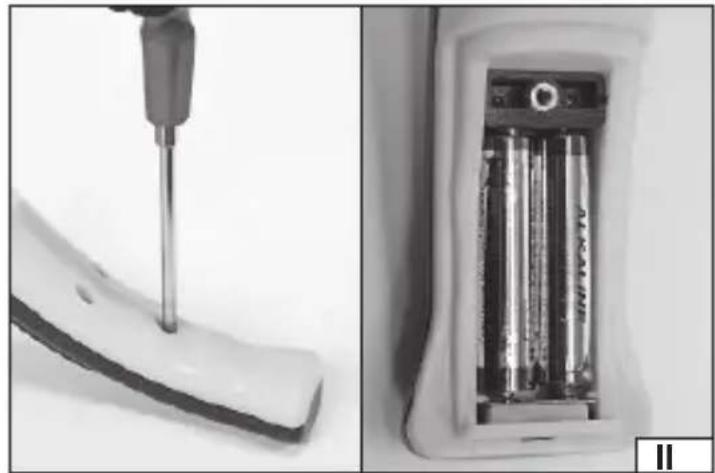
Installation and replacement of batteries (II)
If the product fails to start it may mean that the batteries are depleted.
Unscrew the screw fixing the battery compartment cover, replace the old batteries with new ones. Close the battery compartment with the cover and secure it by screwing in the screw.
When installing the batteries, ensure the correct polarity. The negative pole of the battery should face the contact in the form of a spring and the positive pole of the battery with the contact in the form of a fl at plate.
Always replace all batteries, do not mix new batteries with used ones. It is recommended to use high quality alkaline batteries to power the product.
The LCD screen of the product is equipped with a low battery indicator. If the battery symbol appears on the screen, replace the batteries with new ones as soon as possible.
Do not dispose of used batteries together with other waste as they pose a hazard to the environment. Dispose of the used batteries in accordance with the local regulations.
Extending and shortening the handle (III)
Open the latch, set the desired handle length and close the latch.
The length of the handle should be adjusted to the height of the operator so as to avoid leaning during use.
Fully folded handle makes it easy to store the product.
Unfolding and folding the stand (IV)
The stand must be lowered to allow the product to be upright during breaks in measuring. Lift the stand before starting the measurement. It is not recommended to carry out the measurement with the stand unfolded. The stand may catch on the ground and cause the wheel to lose contact with the ground, which can distort the measurement result.
Control panel operation
The control panel is operated by means of buttons. The effect of pressing a button is visible on the LCD screen.
Button functions:
ON/OFF - on/off switch. Press to turn the product's power supply on or off. When switched on, the screen will briefly show all symbols and then display 0.0. The product is equipped with a self-deactivation function in case it detects inactivity. If approx. 5 minutes have passed since the last measurement (wheel rotation) or pressing a button, the product will automatically switch off.
This will result in the loss of the currently displayed distance measurement result.
EN
CLR - pressing the button will reset the result displayed on the screen.
SM - pressing the button will enter the result displayed on the screen into the memory. It is possible to use one of the five memory banks, indicated by the M1 - M5 symbols on the screen. If the FULL symbol appears on the screen after pressing the button, it means that all memory banks have already been used. Banks store the entered values until the power is turned off, either automatically or by means of a switch.
RM - pressing the button will read values stored in memory banks. This is indicated by the R symbol and the M1 - M5 memory bank symbol visible on the screen. After a few seconds, the screen will return to displaying the current result. Pressing again will read from the next memory bank.
M/ft - change of the measurement unit. Pressing the button changes the symbol next to the display. m - measurement in metres (1 m ≈ 3.281 ft); ft - measurement in feet (1 ft = 0.3048 m) L/W/S - button for calculating the surface area in the shape of a rectangle. If the symbol L is visible before the result, it means the length measurement of one of the sides of the rectangle. When the measurement is complete, press the button, the display will reset and the W symbol will be displayed. Perform the measurement of the length of the other side of the rectangle, and afterwards press the button to display the calculated surface area of the rectangle based on the measured length of its sides. The S and m² symbols are visible. Caution! The surface area of the rectangle can only be displayed in square metres, even when measuring in feet (1 m² ≈ 10.764 ft²). Measurement results are stored in the device memory until the power is turned off automatically or with the switch.
Carrying out measurements
Move the device forward in a manner ensuring that the measuring wheel is in constant contact with the ground. The display of the measurement result is continuously updated on the LCD screen. Moving forward increases the measurement result, moving backwards reduces the measurement result.
Make sure that the front surface of the wheel is not dirty. Contaminants increase the diameter of the wheel, which can distort the measurement result.
MAINTENANCE AND STORAGE
The product does not require any special maintenance activities to be performed. Clean the handle, housing and wheel with a soft cloth slightly soaked in water. Then wipe dry. Never immerse the product in water or any other liquid.
Store the product in dry, shaded places. The place of storage should protect the device from access by unauthorised persons, especially children. Remove the batteries from the compartment during prolonged storage (more than two weeks).
It is recommended to store and transport the product in the included cover.
GERÄTEBESCHREIBUNG
CARACTÉRISTIQUES DU PRODUIT
CONDITIONS D'EXPLOITATION
Brand : Yato
Model : YT-71655
Category : Rangefinder