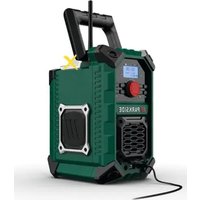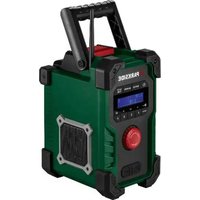
PBR 10 A1 - Portable radio PARKSIDE - Free user manual and instructions
Find the device manual for free PBR 10 A1 PARKSIDE in PDF.


| Product type | Cordless portable jobsite radio |
| Dimensions (W x D x H) | 225 x 170 x 305 mm |
| Weight | 3.1 kg (without battery) |
| Power supply | 12 V DC, 2 A mains adapter; or Parkside 12 V/20 V battery (not included) |
| Connectivity | Bluetooth 5.3, AUX-in (3.5 mm jack), USB-A (5 V, 2 A), DAB+/FM |
| Audio power | 2 x 5 W RMS |
| Protection rating | IP44 |
| Radio reception ranges | DAB: 174.928 – 239.2 MHz; FM: 87.5 – 108 MHz |
| Battery life (at medium volume) | Approx. 5 h with 12 V 2 Ah battery; approx. 10 h with 12 V 4 Ah or 20 V 4 Ah battery |
| Package contents | Radio, mains adapter, AUX cable, quick start guide |
| Warranty | 3 years (parkside-diy.com) |
| Maintenance and cleaning | Disconnect before cleaning; clean with a dry cloth; do not immerse |
| Safety | Do not expose to water, heat or flames; use only the provided adapter |
| Spare parts | Available for the warranty period |
| Repairability | Contains no user-serviceable parts; contact after-sales service |
Frequently Asked Questions - PBR 10 A1 PARKSIDE
User questions about PBR 10 A1 PARKSIDE
0 question about this device. Answer the ones you know or ask your own.
Ask a new question about this device
Download the instructions for your Portable radio in PDF format for free! Find your manual PBR 10 A1 - PARKSIDE and take your electronic device back in hand. On this page are published all the documents necessary for the use of your device. PBR 10 A1 by PARKSIDE.
USER MANUAL PBR 10 A1 PARKSIDE
PDF ONLINE
parkside-diy.com
⚠️ WARNUNG! EXPLOSIONSGEFAHR!
natural_image
Technical line drawing of a mechanical housing or enclosure with mounting brackets and a connector pin (no text or symbols present)B
natural_image
Technical line drawings of two identical mechanical device cases with no visible text or symbolsE2
natural_image
Architectural floor plan of a mobile device showing internal components and a directional arrow (no text or labels)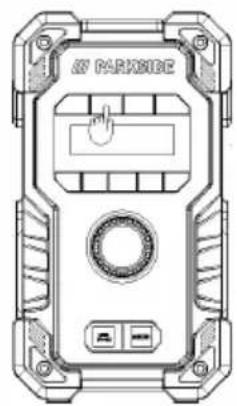
PDF ONLINE
parkside-diy.com
Service
Warnings and symbols used.... Page 20
Short manual.... Page 21
Intended use.... Page 21
Trademark notices ...... Page 21
Scope of delivery ...... Page 21
Technical data.... Page 22
Recommended Battery pack and Battery charger* Page 23
Safety Page 24
Safety instructions for built- in rechargeable batteries (Battery not included). Page 26
Using the product ...... Page 27
Disposal Page 30
Simplified EU declaration of conformity.... Page 31
Warranty.... Page 31
Warranty claim procedure.... Page 31
Service Page 32
| Warnings and symbols usedThe following warnings are used in the instruction manual, short manual, on the packaging, on the product, and on the power adaptor: | |||
 | DANGER! This symbol with the signal word “DANGER” indicates a hazard with a high level of risk which, if not avoided, will result in serious injury or death. |  | Alternating current / voltage |
 | Polarity of barrel connector | ||
 | WARNING! This symbol with the signal word “WARNING” indicates a hazard with a medium level of risk which, if not avoided, could result in serious injury or death. | - - - - | Direct current / voltage |
 | This symbol refers to the special rule of conduct associated with children. | ||
 | CAUTION! This symbol with the signal word “CAUTION” indicates a hazard with a low level of risk which, if not avoided, could result in minor or moderate injury. |  | Symbol for a Protection Class II product |
 | Use the product in dry indoor spaces only. | ||
 | ATTENTION! This symbol with the signal word “ATTENTION” indicates possible property damage. |  | WARNING! EXPLOSION HAZARD! A warning with this symbol and word “WARNING! EXPLOSION HAZARD” indicates the potential threat of explosion. Failure to observe this warning may result in serious or fatal injuries and potential property damage. Follow the instructions in this warning to prevent serious injuries, a danger to life or property damage! |
 | NOTE: This symbol with the signal word “NOTE” provides additional useful information. | ||
 | This mandatory sign indicates to wear suitable protective gloves! Follow the instructions of this warning to avoid hand injuries caused by objects or contact with hot or chemical materials. |  | CE mark indicates conformity with relevant EU directives applicable for this product. |
 | This symbol means that the operating instructions must be observed before using the product. | [7024] | Safety information Instructions for use |
20V / 12V SITE RADIO
● Short manual
This document is a shorter printed version of the complete operating instructions. Scanning the QR code takes you directly to parkside-diy.com. Choose your country and use the search screen to search for the operating instructions. Entering the item number (IAN) 496270_2504 takes you to the operating instructions for your item. The short guide is an integral part of this product. Prior to using the product, familiarize yourself with all operation and safety notes. Store the short guide in a safe place and if you hand the product on to third parties, all documentation should be passed on as well.
Intended use
This 20V / 12V SITE RADIO (hereinafter referred to as “product”) is a consumer electronic intended to render audio transmitted via Bluetooth® or a 3.5 mm jack lead connection.
Any other use is considered improper. Any claims resulting from improper use or due to unauthorised modification of the speaker will be considered unwarranted. Any such use is at your own risk.
The product is not intended for commercial use.
- Trademark notices
- USB is a registered trademark of USB Implementers Forum, Inc.
- The Bluetooth® word mark and logos are registered trademarks owned by Bluetooth® SIG, Inc. and any, use of such marks by OWIM GmbH & Co. KG is under license.
– The Parkside trademark and trade name is the property of their respective owners.
– Any other names and products are trademarks or registered trademarks of their respective owners.
- Scope of delivery
☐ Remove all packaging material and check the contents of the packaging for completeness. Please contact the dealer if parts are missing or damaged.
1 20V / 12V Site Radio
1 Power adaptor
1 AUX cable
1 Short manual
1 Quick start guide
- Technical data
20V / 12V Site Radio
DAB reception
range: 174.928 to 239.2 MHz
FM reception
range: 87.5 to 108 MHz
Station memory: 30 (DAB), 30 (FM)
DC input: 12 V
= 2A,
24.0 W ◇ ◇ ◇
USB-A output: 5 V
==, 2 A
Parkside 12V/20V
12 V ---
battery input:
20 V ---
Audio output: 2 x 5 W RMS
AUX-in jack: 3.5 mm jack plug
Dimensions: Approx. 225 x 170 x
305 mm (W x D x H)
Weight: Approx. 3.1 kg
(without battery)
Ingress protection: IP44
Operating
0^ - 45^,
conditions:
40 % - 85 % rel.
humidity
Storage
temperature: -10°C – 60°C
Operation time:
Approx. 5 hours with
(At medium
12 V battery 2Ah
volume)
Approx. 10 hours with
12 V battery 4Ah
Approx. 10 hours with
20 V battery 4Ah
Wireless standard: Bluetooth ^® 5.3
Frequency band:
2400 MHz –
2483.5 MHz
Max. transmitted
power: <10dBm
Bluetooth ^® range:
Approx. 10m
Bluetooth® protocols:
AVRCP (remotely controls key audio
functions via mobile phone), A2DP
(wireless audio transmission)
AC-DC adaptor
| Description | Value |
| AC-DC adaptor Description | OWIM GmbH & Co. KG HRA 721742 Stiftsbergstraße 1, 74167 Neckarsulm, GERMANY |
| Distributor: | |
| Manufacturer's name or trade mark, commercial registration number and address: | Huizhou Guoaotong Technology Co., Ltd |
| Model identifier: | GA-0061202000V |
| Input voltage and current: | 100 – 240 V~, 0.8 A |
| Input AC frequency: | 50/60 Hz |
| Output voltage DC: | 12.0 V ——, 2.0 A |
| Output power: | 24.0 W |
| Average active efficiency: | 86.5 % |
| Efficiency at low load (10 %): | 82.1 % |
| No-load power consumption: | 0.065 W |
| Protection class: | II / ☑ |
| Operating conditions: | 0 – 35 °C, 40 to 85 % rel. humidity |
| Storage temperature: -10 – 60 °C | |
| Dimensions: | 70 x 30 x 87 mm (W x D x H) |
| Weight: | 123 g |
- Recommended Battery pack and Battery charger\*
12V battery pack\*
Battery packs
Model number: PARK 12 A4
Type: Lithium ion
Rated voltage: 12 V ---
Capacity: 2000 mAh
Number of cells: 3
Model number: PARK 12 B4
Type: Lithium ion
Rated voltage: 12 V
Capacity: 4000 mAh
Number of cells: 6
12V Battery charger\*
Battery charger
Model number: PLGK 12 A2
Input
Rated voltage: 220 - 240V\~ 50 - 60Hz
Rated power: 50 W
Output
Rated voltage: 12 V ---
Rated current: 2.4 A
Device fuse: T2A /
Protection class: II /
Model number: PDSLG 12 A1
Input
Rated voltage: 220 - 240V\~ 50 - 60Hz
Rated power: 150 W
Output 1
Rated voltage: 12 V
Rated current: 4.5 A
Output 2
Rated voltage: 12 V ---
Rated current: 4.5 A
Device fuse: T3.15A /
Protection class: II / ☐
Off mode power
consumption: <0.30 W
Standby
mode power
consumption: <0.80 W
Time automatically
reaches power
saving mode/
Standby mode: <20 min
⚠️ ATTENTION! This charger is only designed for charging the battery pack types:
Parkside 12 V battery pack
| PARK 12 A4 | 2.0 Ah | 3 cells |
| PARK 12 B4 | 4.0 Ah | 6 cells |
* Battery pack and battery charger are not included.
20 V battery pack\*
Battery pack PAP 20 B3
Type: Lithium-Ion
Rated voltage: 20 V = max
Capacity: 4.0 Ah
Energy value: 80 Wh
Number of cells: 10
20 V battery Charger\*
Rapid battery charger PLG 20 C3
Input:
Rated voltage: 230 - 240 V\~
Rated frequency: 50 Hz
Rated power: 120 W
Fuse (internal): 3.15 A/T3.15A
* Battery pack and battery charger are not included.
⚠️ Only used the battery sources specified in the user manual.
⚠️ CAUTION! Risk of fire or explosion if the battery is replaced by an incorrect type.

Safety
This chapter provides important safety information for handing the product. Improper use can result in personal injury and property damage. Before using the product, please familiarise yourself with all of the safety instructions and instructions for use! When passing this product on to others, please also include all the documents!

DANGER!
■ DANGER TO LIFE AND RISK OF ACCIDENT FOR INFANTS AND CHILDREN!

DANGER!

RISK OF SUFFOCATION!
Packaging material (i.e film or polystyrene) should not be used to play with. Always keep children away from the packaging material. The packaging material is not a toy.
This product can be used by children aged from 8 years and above and persons with reduced physical, sensory or mental capabilities or lack of experience and knowledge if they have been given supervision or instruction concerning use of the product in a safe way and understand the hazards involved. Children shall not play with the product. Cleaning and user maintenance shall not be made by children without supervision. The product is not a toy.

ATTENTION! RISK OF DAMAGE
- Check that the product is secured properly. There is a risk of injury if the device falls down.
This product does not contain any parts which can be serviced by the user.
- Check the product before every use! Discontinue use if any damage to the product or the charging cable is detected!
If you notice anything unusual during use (e.g. unusual noise, strange odour or smoke), switch the product off immediately and disconnect all cables. Do not use the product anymore.
■ Sudden temperature changes may cause condensation inside the product. In this case, allow the product to acclimatise for some time before using it again. - Do not place burning candles or open fire on or next to the product.
- Do not use the product near heat sources such as radiators or other devices emitting heat!
- Do not throw the product into fire and do not expose to high temperatures.
- Do not leave the product inside a vehicle on a hot day. High temperatures can cause irreversible damage to the product, and in some cases even cause it to combust.
The product must not be exposed to dripping or splashing water when the cover is open.

WARNING! EXPLOSION HAZARD!
- Do not throw the product into fire and do not expose to high temperatures.
- Never open the housing of the product as there is a risk of explosion! The product has no internal parts requiring maintenance.
RISK OF ELECTRIC SHOCK!

WARNING! Risk of electric shock! Never open the housing of the product or of the power adaptor. In case of malfunction, repairs are to be conducted by qualified personnel only.

WARNING! Protect the product and the power adaptor from dripping and splashing water. Do not place containers filled with liquids (such as vases or drinks) on or near the product or the power adaptor. Do not immerse any product components in liquids. Never hold the product under running water.
- To avoid fire, do not place burning candles on or near the product.
■ WARNING! Do not touch the power adaptor with wet hands.
■ CAUTION! Never use a damaged product. If you notice any damage, disconnect the power adaptor immediately from the mains network. Contact your retailer if the product is damaged.
■ Always turn the product off before disconnecting it from the power supply.
Only use this product with the supplied power adaptor. Only use the supplied power adaptor with this product. Contact your retailer if the power adaptor is damaged. Refer to the technical data of this product.
To avoid damaging the cord, do not place any objects on it or chafe it on sharp edges. Keep it away from hot surfaces and open flames as well. - Lay out the cord in such a way that no unintentional pulling or tripping over is possible. Keep the power adaptor and its cord out of reach of children.
- When disconnecting the power adaptor from the electrical outlet, do not pull by the connection cord but by the power adaptor.
- Do not wrap the connection cord around the product.
■ Connect the power adaptor to an electrical outlet that is always easily reachable so that in case of an emergency the plug can be unplugged immediately.
■ Pull the power adaptor out of the power supply to completely disconnect the product from the mains network.
The power adaptor continues to draw a small amount of electricity, even without the radio being operated, as long as the power adaptor is connected to the power supply. To completely switch off the power adaptor, it must be disconnected from the mains network.
- Do not subject the product to physical shock or strong vibrations.
If smoke or unusual sounds are observed, immediately unplug the power adaptor from the power supply.
■ The power adaptor shall not be covered.
- Disconnect the power adaptor from the power supply when the product is not in use and before cleaning.
- Let the product dry completely before connecting it to the mains supply and before storage. Allow the product to cool down completely before storage.
- Do not insert any foreign objects into the product.
- Do not expose the product to high temperatures (e.g. in the direct vicinity of a heater).

WARNING!
Wireless interference?
Switch the product off on airplanes, in hospitals, service rooms, or near medical electronic systems. The wireless signals transmitted could impact the functionality of sensitive electronics. Keep the product at least 20 cm from pacemakers or implantable cardioverter defibrillators, as the electromagnetic radiation may impair the functionality of pacemakers. The radio waves transmitted could cause interference in hearing aids. Do not place the product near flammable gasses or potentially explosives areas (e.g. paint shops) with the wireless components on, as the radio waves emitted can cause explosions and fire.
NOTE: When using the product it is recommended that ALL cables (USB / AUX) are less than 3 meters in length to avoid any interference.
ATTENTION!
The range of the radio waves varies by environmental conditions. In the event of wireless data transmission, unauthorised third parties receiving the data cannot be excluded. The OWIM GmbH & Co. KG is not responsible for interference with radios or televisions due to unauthorised modification of the device. The OWIM GmbH & Co. KG further assumes no liability for using or replacing cables and devices not distributed by OWIM. The user of the device is fully responsible for correcting interference caused by such unauthorised modification of the device, as well as replacement of such devices.

Safety instructions for built- in rechargeable batteries (Battery not included)
If liquids leak from the product, these may not come into contact with the skin, eyes or the mucous membranes, there exists the danger of chemical burns. Corresponding protective gloves have to be used.
If the skin, eyes or the mucous membranes have come into contact with the liquid, the concerned spots have to be washed with water and a doctor has to be sought immediately.

WEAR PROTECTIVE GLOVES!
Leaked or damaged batteries / rechargeable batteries can cause burns on contact with the skin. Wear suitable protective gloves at all times if such an event occurs.
Special safety directions for battery-operated products
- Ensure that the product is switched off before inserting the battery. Inserting a battery into a product that is switched on may result in accidents.
- Do not use any accessories that are not recommended by PARKSIDE. This can result in electric shock or fire.
⚠ Observe the safety information and notes on charging and proper use as shown in the instruction manual for your battery and charger from the Parkside X 20 V TEAM series and Parkside X 12 V TEAM series. A detailed description of the charging process and further information can be found in the separate operating instructions.
Product use and care
- Recharge only with the charger specified by the manufacturer. A charger that is suitable for one type of battery pack may create a risk of fire when used with another battery pack.
- Use product only with specifically designated battery packs.
- Use of any other battery packs may create a risk of injury and fire.
- When battery pack is not in use, keep it away from other metal objects, like paper clips, coins, keys, nails, screws or other small metal objects, that can make a connection from one terminal to another. Shorting the battery terminals together may cause burns or a fire.
-
Do not use a battery pack that is damaged or modified. Damaged or modified batteries exhibit unpredictable behaviour resulting in fire, explosion or risk of injury.
-
Do not expose a battery pack or product to fire or excessive temperature. Exposure to fire or temperature above 130 °C may cause explosion.
-
Follow all charging instruction and do not charge the battery pack or product outside the temperature range specified in the instruction. Charging improperly or at temperatures outside the specified range may damage the battery and increase the risk of the fire.
Battery charger safety warnings
- This appliance can be used by children aged from 8 years and above and persons with reduced physical, sensory or mental capabilities or lack of experience and knowledge if they have been given supervision or instruction concerning use of the appliance in a safe way and understand the hazards involved.
Children shall not play with the appliance.
Cleaning and user maintenance shall not be made by children without supervision.
-
Do not charge regular or non-rechargeable batteries. Disregarding this instruction is hazardous.
-
If the supply cord is damaged, it must be replaced by the manufacturer, its service agent or similarly qualified persons in order to avoid a hazard.
-
Protect the electrical parts against moisture. Do not immerse such parts in water or other liquids to avoid electrical shock. Never hold the appliance under running water. Pay attention to the instructions provided for cleaning, maintenance and repair.
-
The appliance is suitable for indoor use only.
* Battery pack and battery charger are not included.
● Using the product
A
Initial setup
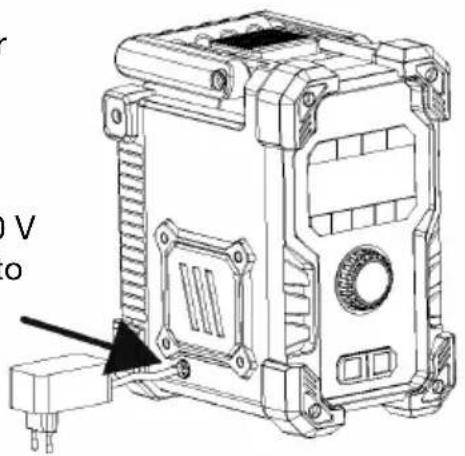
1) Insert the 12 V DC plug of the power adapter into the DC socket of speaker charging port. And then plug the AC power adapter into mains outlet.
2) Alternatively, you can insert 12 V/20 V battery into battery socket of speaker to power up this speaker.
natural_image
Technical line drawing of a mechanical housing or enclosure with mounting holes and internal components (no text or symbols)B
Turning on the product
Press the Power ON/OFF button approx. 2 seconds to enter display interface, and enter into DAB mode to auto start searching broadcast DAB+ station. Press ON/OFF button again to turn into standby mode and will turn to date and time display.
C
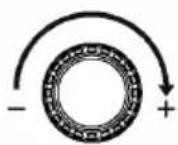
Volume adjustment
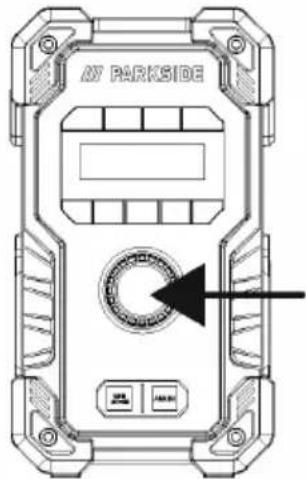
You can also turn volume up/down via this rotator knob button. Turn clockwise to increase volume, and anti-clockwise to reduce volume.
D
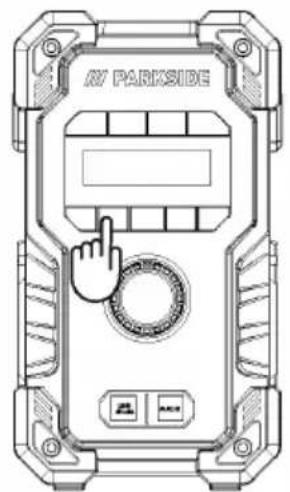
Using FM function
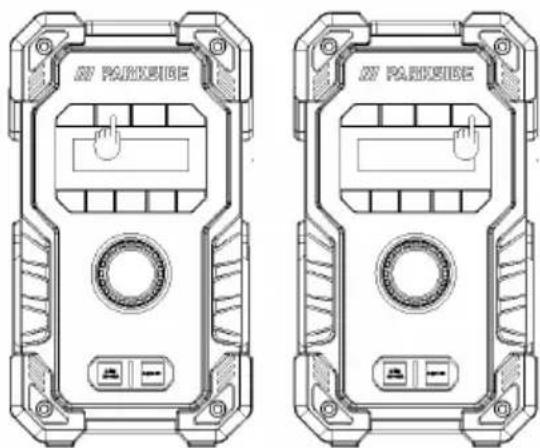
natural_image
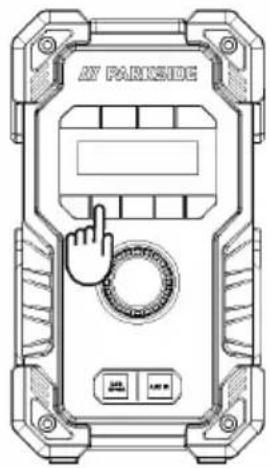
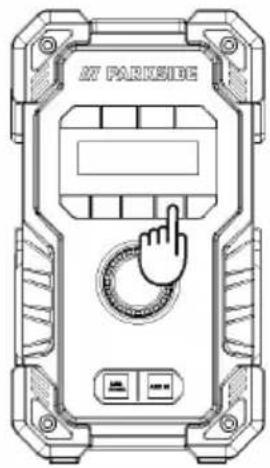
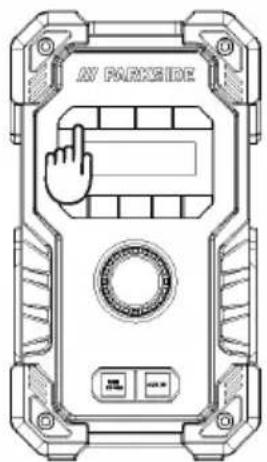
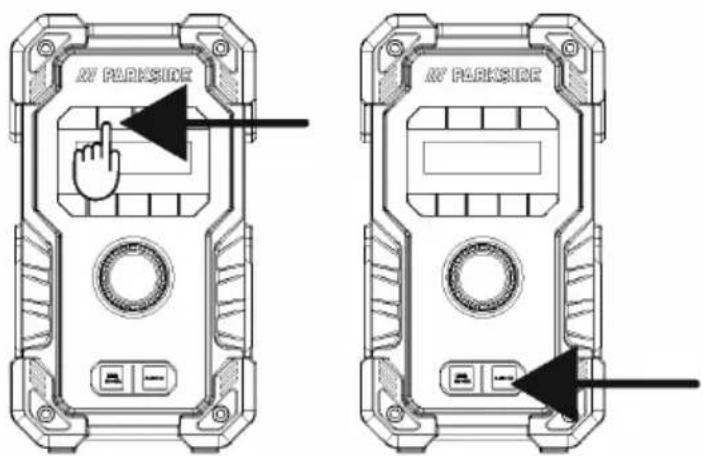
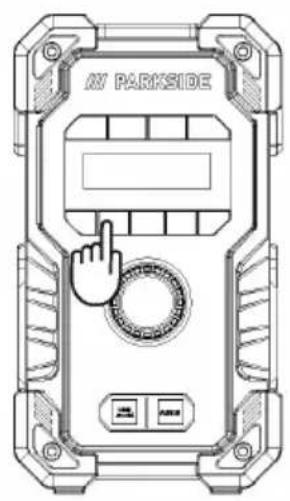
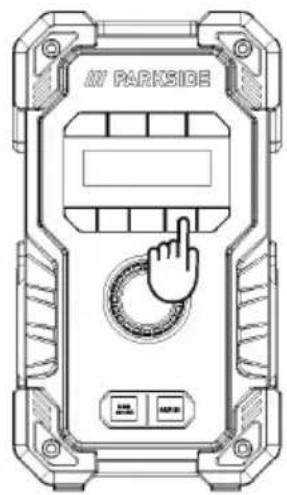
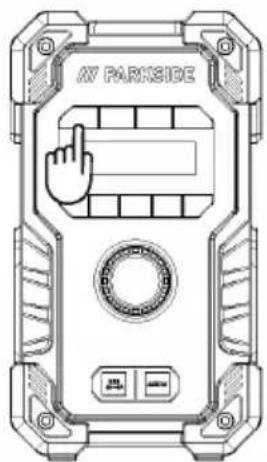
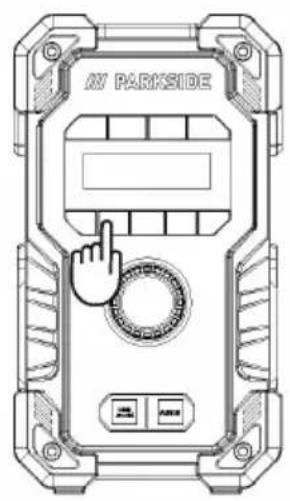
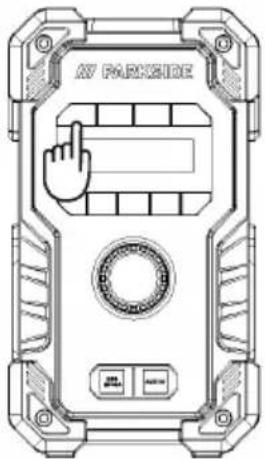
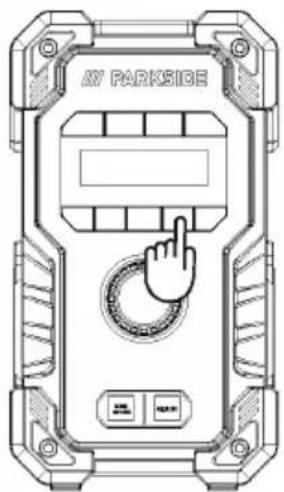
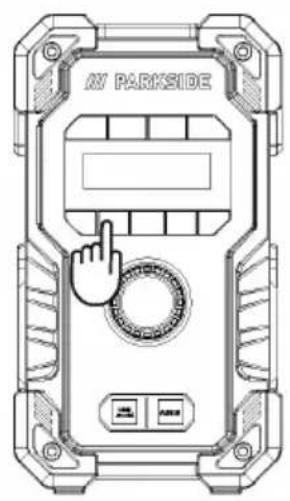
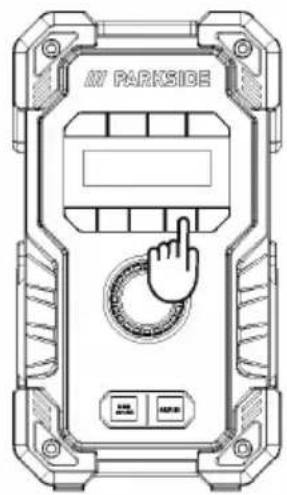
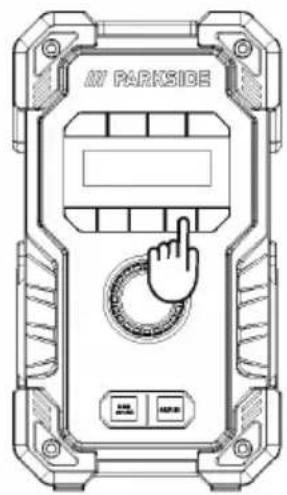
Technical line drawings of two identical 3D device enclosures with control buttons and a hand cursor (no text or symbols)Put out the antenna, press the SOURCE button to switch into the FM mode, hold the AUTO TUNE button to active the FM station search.
E1
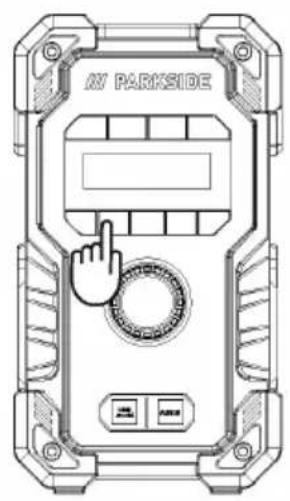
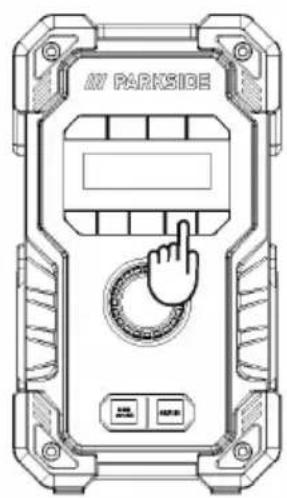
Connecting to playback device via Bluetooth
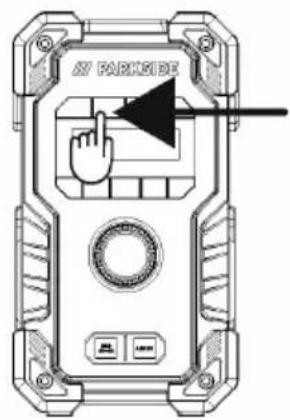
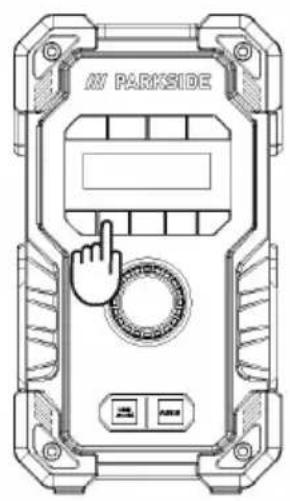
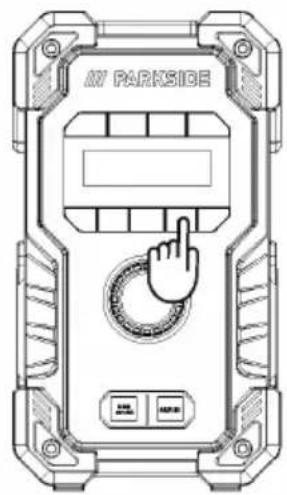
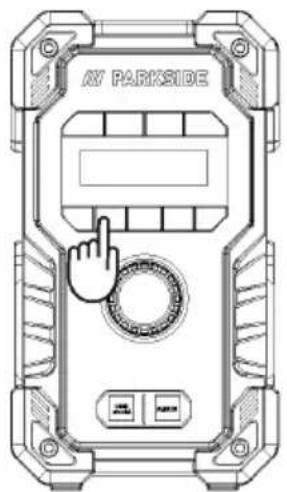
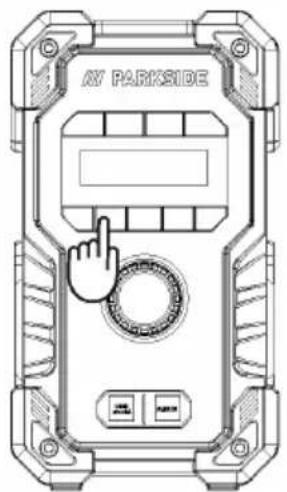
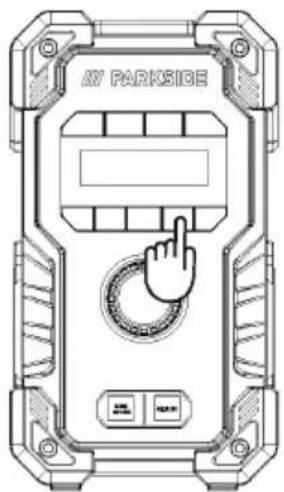
Press the SOURCE button to switch into Bluetooth mode and enable a Bluetooth connection. ACCEPT the product identification "PBR 10 A1" on the playback device. Then you can start to stream your music to this speaker via Bluetooth once connection ready.
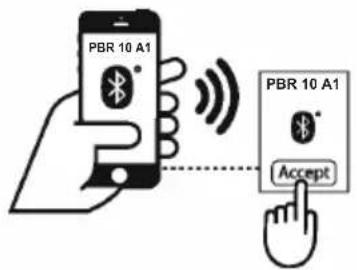
E2

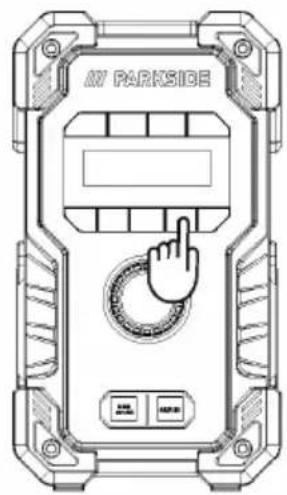
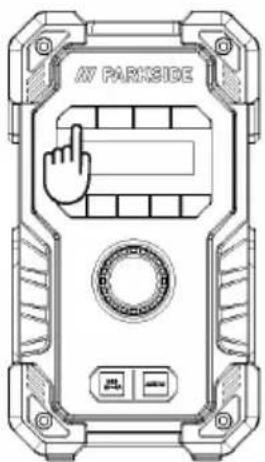
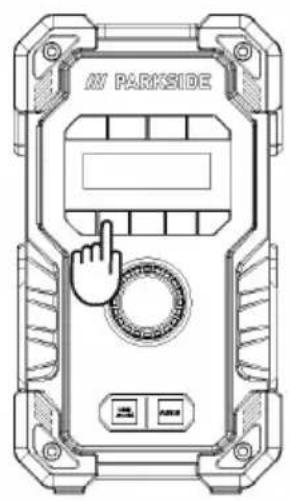
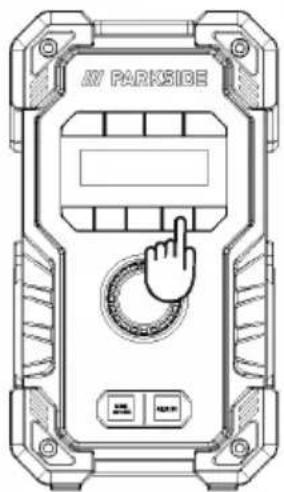
You can also use the Bluetooth control button "1" to "4" on speaker to playback music. Press briefly the Pause/Playback button to start play back. Press again briefly during playback to pause or continue playing.
F
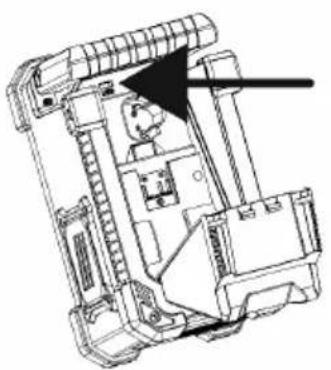
Play back from a USB stick
natural_image
Technical line drawing of a mechanical device with internal components and an arrow indicating direction (no text or symbols)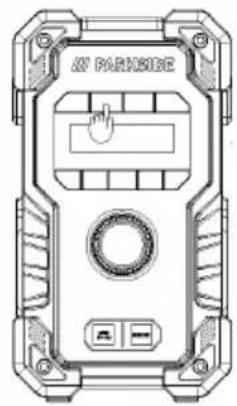
Open the battery compartment cover, insert the USB contains music and close the battery compartment cover.
Music control button "1" to "4" on speaker to playback music. Press briefly the Pause/Playback button to start play back. Press again briefly during playback to pause or continue playing.

AUX IN
Press the SOURCE button to switch into AUX IN mode, and then plug in the AUX cable at the front AUX IN socket to start use this function.
- Disposal
Packaging:
The packaging is made of environmentally friendly materials, which you be disposed through your local recycling facilities.

Observe the marking of the packaging materials for waste separation, which are marked with abbreviations (a) and numbers (b) with following meaning: 1–7: plastics/20–22: paper and fibreboard/80–98: composite materials.
Product:

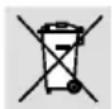
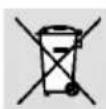
Contact your local refuse disposal authority for more details of how to dispose of your worn-out product. The adjacent symbol of a crossed out dustbin on wheels indicates this product is subject to directive 2012/19/EU. This directive states at the end of the life this product must not be disposed of through regular household refuse but must be returned to special collection sites, recycling depots or waste management companies.
This disposal is free of charge to you.
Protect the environment and dispose of properly.
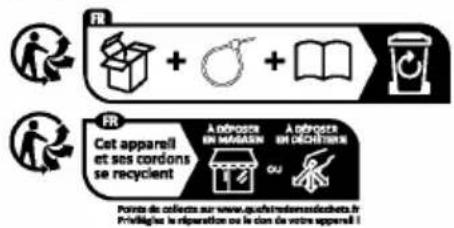
The product incl. accessories, manual and packaging materials are recyclable and are subject to extended producer responsibility. Dispose them separately, following the illustrated Info-tri (sorting information), for better waste treatment. The Triman logo is valid in France only.
Batteries/accumulators:
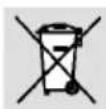
Environmental damage through incorrect disposal of the batteries/accumulators!
Defective or exhausted batteries/rechargeable batteries must be recycled in accordance with Regulation 2023 / 1542. Return batteries/rechargeable batteries to the appropriate local collection facilities.
The symbol showing the crossed-out bin on batteries or rechargeable batteries means that such batteries must not be disposed of in domestic waste. Remove the batteries/battery pack from the product before disposing of them/it. They may contain toxic heavy metals and are subject to hazardous waste regulations.
The chemical symbols of the heavy metals are: Cd = cadmium, Hg = mercury, Pb = lead.
● Simplified EU declaration of conformity
OWIM GmbH & Co. KG, Stiftsbergstraße 1, 74167 Neckarsulm, GERMANY hereby declares that the product 20V / 12V SITE RADIO HG12056 conforms to the directives 2014/53/EU, 2011/65/EU and 2009/125/EC.
The full text of the EU declaration of conformity is available at the following internet address: www.owim.com

● Warranty
The product has been manufactured to strict quality guidelines and meticulously examined before delivery. In the event of material or manufacturing defects you have legal rights against the retailer of this product. Your legal rights are not limited in any way by our warranty detailed below.
The warranty for this product is 3 years from the date of purchase. The warranty period begins on the date of purchase. Keep the original sales receipt in a safe location as this document is required as proof of purchase.
Any damage or defects already present at the time of purchase must be reported without delay after unpacking the product. Should the product show any fault in materials or manufacture within 3 years from the date of purchase, we will repair or replace it – at our choice – free of charge to you. The warranty period is not extended as a result of a claim being granted. This also applies to replaced and repaired parts.
This warranty becomes void if the product has been damaged, or used or maintained improperly.
The warranty covers material or manufacturing defects. This warranty does not cover product parts subject to normal wear and tear, thus considered consumables (e.g. batteries, rechargeable batteries, tubes, cartridges), nor damage to fragile parts, e.g. switches or glass parts.
● Warranty claim procedure
So that your request can be processed quickly, please observe the following instructions:
For all inquiries, please have the receipt and item number (e.g., IAN 496270_2504) ready as proof of purchase.
The article number can be taken from the identification label on the product, engraving on the product, the front cover of your manual (at the bottom left), or the sticker on the back or bottom of the product.
If malfunctions or other defects arise, first contact the service department indicated below by phone or email.
You can then send a product recorded as defective to the communicated service address postage-free, making sure to enclose proof of purchase (receipt) and information on the details of the defect and when it occurred.
You can download and view this and numerous other manuals at parkside-diy.com. This QR code takes you directly to parkside-diy.com. Choose your country and use the search screen to search for the operating instructions. Entering the item number (IAN) 496270_2504 takes you to the operating instructions for your item.

PDF ONLINE parkside-diy.com
Service
GB Service Great Britain
Tel.:08000518970
Contact form on parkside-diy.com
IAN 496270_2504
IE Service Ireland
Tel.:1800851251
Contact form on parkside-diy.com
IAN 496270_2504
stations: 30 (DAB), 30 (FM)
natural_image
Technical line drawing of a mechanical housing or enclosure with mounting points and a connector (no text or symbols)B
natural_image
Technical line drawings of two identical outdoor device enclosures with buttons and a central display (no text or symbols)E2
natural_image
Technical line drawing of a device casing with internal components and a right-side view showing a hand pressing a button (no text or symbols present)Piles/accumulateurs:
Nominale spanning: 12 V ---
Nominale spanning: 12 V ---
Capaciteit: 4000 mAh
Aantal cellen: 6
12V acculader\*
Acculader
Modelnummer: PLGK 12 A2
Ingang
Nominale spanning: 220 – 240V\~ 50 – 60Hz
Nominale spanning: 12 V ---
Nominale stroom: 2,4 A
Zekering van het
apparaat: T2A /
Nominale spanning: 12 V ---
Nominale stroom: 4,5 A
Uitgang 2
Nominale spanning: 12 V
Nominale stroom: 4,5 A
Zekering van het
apparaat: T3,15A /
Parkside 12 V accupack
| PARK 12 A4 | 2,0 Ah | 3 cellen |
| PARK 12 B4 | 4,0 Ah | 6 cellen |
Nominale spanning: 20 V --- max
Capaciteit: 4,0 Ah
⚠ WAARSCHUWING! EXPLOSIEGEVAAR!
natural_image
Technical line drawing of a mechanical housing component with mounting holes and a connector (no text or symbols)B
natural_image
Technical line drawings of two identical outdoor device enclosures with buttons and a central display (no text or symbols)E2
natural_image
Technical line drawing of a mechanical device interior with no visible text or symbols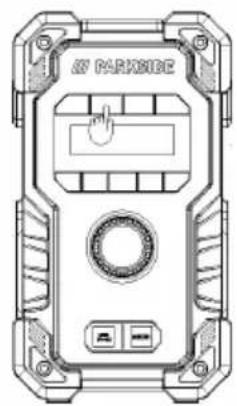
Parkside 12 V / 12 V ---
20 V: 20 V =
PARK 12 A4 2,0 Ah 3 ogniwa
PARK 12 B4 4,0 Ah 6 ogniw
Akumulator PAP 20 B3
Typ: Litowo-jonowy
NOŚ RĘKAWICE OCHRONNE!
natural_image
Technical line drawing of a mechanical housing component with mounting holes and a connector (no text or symbols)B
Włączanie produktu
natural_image
Technical line drawings of two identical outdoor security camera modules with buttons and display panels (no text or symbols)E2
natural_image
Technical line drawing of a mechanical device interior with no visible text or symbols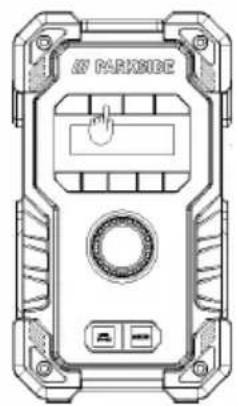
natural_image
Technical line drawing of a device casing with labeled ports and an arrow pointing to a component (no readable text or symbols)● Utylizacja
Opakowanie:
PDF ONLINE parkside-diy.com
Serwis

Serwis Polska
Tel.:008004912069
Parkside 12 V / 12 V ---
20 V: 20 V ---
POUŽÍVEJTE OCHRANNÉ RUKAVICE!
natural_image
Technical line drawing of a mechanical housing or enclosure with a connector inserted (no text or symbols visible)B
Zapnutí výrobku
E2

natural_image
Technical line drawing of a mechanical device interior with no visible text or symbols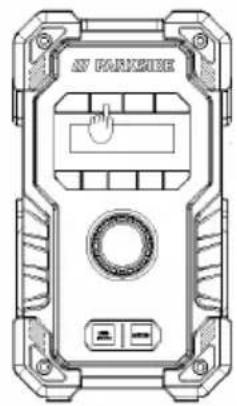
PDF ONLINE parkside-diy.com
Servis

POUŽÍVAJTE OCHRANNÉ RUKAVICE!
natural_image
Technical line drawing of a mechanical housing component with mounting holes and a connector (no text or symbols)B
Zapnutie výrobku
natural_image
Technical line drawings of two identical outdoor security camera modules with buttons and display panels (no text or symbols)E2
natural_image
Technical line drawing of a mechanical device interior with no visible text or symbols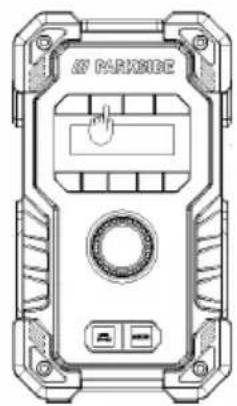
Otvorte kryt priestoru pre batérie, vložte USB obsahuje hudbu a zatvorte kryt priestoru pre batérie.
natural_image
Technical line drawing of a mechanical housing component with mounting holes and a connector (no text or symbols)B
natural_image
Technical line drawings of two identical outdoor device enclosures with buttons and a central display (no text or symbols)E2
natural_image
Technical line drawing of a mechanical device interior with no visible text or symbols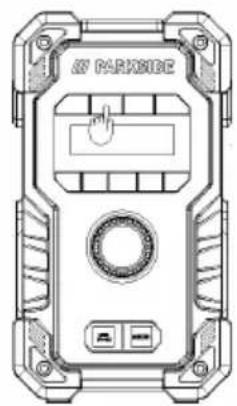
ADVARSEL! EXPLOSIONSFARE!
natural_image
Technical line drawing of a mechanical housing or enclosure with mounting hardware and a connector (no text or symbols)B
natural_image
Technical line drawings of two identical parking enclosures with control buttons and a hand cursor (no text or symbols)E2
natural_image
Technical line drawing of a mechanical device interior with no visible text or symbols
Batterier/akkumulatorer:
Ingresso CC: 12 V ——/2 A / 24,0 W ◇◆◆
Uscita USB-A: 5 V --- / 2 A
Ingresso batteria
Parkside 12 V / 12 V ---
20 V: 20 V=
Uscita audio: 2 x 5 W RMS
Interferenze wireless
natural_image
Technical line drawing of a mechanical housing or enclosure with mounting brackets and a connector (no text or symbols)B
natural_image
Technical line drawings of two identical parking enclosures with control buttons and a hand cursor (no text or symbols)E2
natural_image
Technical line drawing of a mechanical device interior with no visible text or symbols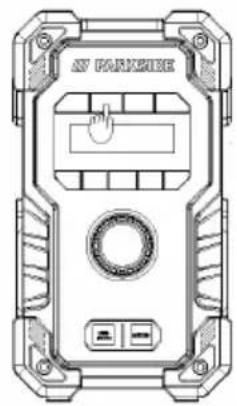
natural_image
Technical line drawing of a mechanical housing or enclosure with mounting holes and internal components (no text or symbols)B
natural_image
Technical line drawings of two identical outdoor device enclosures with buttons and a central display (no text or symbols)E2
natural_image
Technical line drawing of a mechanical or architectural interior with no visible text or symbols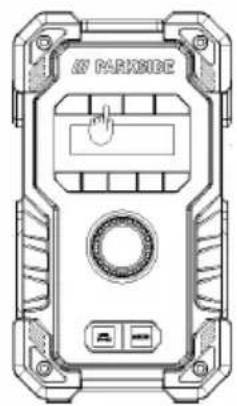
PDF ONLINE parkside-diy.com
Szerviz