PHLA 20-Li A1 - Flashlight PARKSIDE - Free user manual and instructions
Find the device manual for free PHLA 20-Li A1 PARKSIDE in PDF.


| Product Type | Cordless LED Floodlight |
| Brand | Parkside |
| Model | PHLA 20-Li A1 |
| Dimensions (L x W x H) | 140 x 105 x 242 mm |
| Weight (with battery PAP 20 B1) | ≈1.04 kg |
| Power Supply | Li-Ion 20 V battery (X 20 V TEAM) or 12 V power cord (cigarette lighter plug) |
| Rated Power | ≤ 21 W |
| Luminous Flux (2 levels) | 1000 lm / 2500 lm |
| Light Color | 6500 K (cold white) |
| Number of LEDs | 7 x 3 W |
| Battery life (1000 lm) with 2 Ah battery | 160 min |
| Battery life (1000 lm) with 4 Ah battery | 350 min |
| Battery life (1000 lm) with 8 Ah battery | 720 min |
| Battery life (1000 lm) with 12 Ah battery | 1050 min |
| Protection Rating | IP20 |
| Protection Class | III |
| Tripod Thread | 1/4" |
| Lighting Functions | Permanent lighting 1000 lm / 2500 lm, Flashing |
| Battery Charge Indicator | 3 LEDs (red, orange, green) |
| Suspension | Eyelet for hook |
| Compatible Batteries (X 20 V TEAM) | PAP 20 B1, PAP 20 B3, Smart PAPS 204 A1, Smart PAPS 208 A1 |
| Compatible Chargers (X 20 V TEAM) | PLG 20 A3, A4, C1, C2, C3, PLG 201 A1, PDSLG 20 A1, B1, Smart PLGS 2012 A1 |
| Main Spare Parts | Power cord for cigarette lighter socket (ref. 91110669) |
| Warranty | 3 years |
| Cleaning | Dry, soft cloth, brush for slots |
Frequently Asked Questions - PHLA 20-Li A1 PARKSIDE
User questions about PHLA 20-Li A1 PARKSIDE
0 question about this device. Answer the ones you know or ask your own.
Ask a new question about this device
Download the instructions for your Flashlight in PDF format for free! Find your manual PHLA 20-Li A1 - PARKSIDE and take your electronic device back in hand. On this page are published all the documents necessary for the use of your device. PHLA 20-Li A1 by PARKSIDE.
USER MANUAL PHLA 20-Li A1 PARKSIDE
natural_image
Black outdoor flashlight with a cross-shaped base (no text or symbols visible)Akku-LED-Handlampe /'Cordless LED Hand Light / Lampe torche LED sans fil PHLA 20-Li A1
DE AT CH
Akku-LED-Handlampe
Cordless LED Hand Light
Translation of the original instructions
NL BE
Accu-LED-handlamp
Before reading, unfold the page containing the illustrations and familiarise yourself with all functions of the device.
FR BE
natural_image
Close-up of a black plastic object with a numbered label '8' pointing to a small circular feature (no text or symbols on the object itself)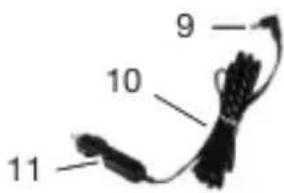
A
B
DE AT CH
Inhaltsverzeichnis
Einleitung......4
Bestimmungsgemäße
Verwendung...... 5
Recyclingsymbol: Wellpappe
Christian Frank
Scope of delivery/accessories..... 18
Overview.... 18
Description of functions...... 18
Technical data.... 19
Safety information....20
Meaning of the safety information.... 20
Pictograms and symbols......20
General safety instructions for handlamps.... 21
Special safety instructions for battery-powered devices.... 21
Special safety instructions for the vehicle connection cable..... 21
Preparation......22
Connecting the vehicle connection cable....22
Replacing the fine-wire fuse......22
Checking the battery charge level....22
Charging the battery.... 23
Hanging up the device.... 23
Tripod thread....23
Operation....23
Working instructions...... 23
Inserting and removing the battery into/from the cordless device....24
Switching on and off.... 24
Used batteries....24
Cleaning, maintenance and storage....24
Cleaning.... 24
Maintenance....24
Storage....25
Disposal/environmental protection.... 25
Disposal instructions for rechargeable batteries.... 25
Service.... 26
Guarantee....26
Repair service.... 27
Service Centre......28
Importer....28
Spare parts and accessories..... 28
Translation of the original EU declaration of conformity......29
Exploded view.... 153
Introduction
Congratulations on purchasing your new battery-powered LED handlamp (hereafter referred to as device or power tool).
You have chosen a high-quality device. This device was quality-tested and subjected to a final inspection during production, therefore ensuring proper functioning of your device.

The instruction manual forms part of this device. It contains important information on safety, use and disposal. Read the instruction manual carefully. Familiarise yourself with the controls and how to use the device correctly. Use the device only as described and for the stated fields of application. Store the instruction manual carefully and ensure that all documents are handed over in the event that the device is passed on to another user.
Proper use
This device is only intended for the following uses:
GB MT
- mobile, spatial and time-limited illumination of indoor areas.
The device is not intended to be used as room lighting.
The device is only intended for use in-doors.
The device is not suitable for harsh operating conditions.
Any other use that is not expressly permitted in this instruction manual may pose a serious hazard to the user and result in damage to the device. The operator or user of the machine is responsible for any accidents or personal injury and/or material damage to third parties or their property. The machine is intended to be used by do-it-yourselfers. It was not designed for heavy commercial use. The warranty is void in the case of commercial use. The manufacturer is not liable for damage caused by improper use or incorrect operation.
The device is part of the X 20 V TEAM series and can be operated with batteries of the X 20 V TEAM series. Batteries of the X 20 V TEAM series may only be charged using chargers of the X 20 V TEAM series.
Scope of delivery/accessories
Unpack the device and check that everything is present.
Dispose of the packaging material properly.
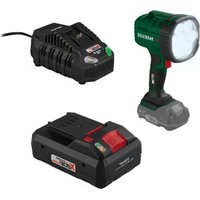
- Cordless LED Hand Light
• Vehicle connection cable
• Translation of the original instructions
The vehicle connection cable may only be used for the battery-powered LED hand lamp.
The rechargeable battery and charger are not included in delivery.
Overview
The illustrations for the device can be found on the front fold-out page.
1 Eyelet
2 Button (Charge level indicator)
3 Charge level indicator
4 Battery
5 Battery release
6 On/Off switch
7 Lamp head
8 Internal thread ( 14 )
9 Plug
10 Vehicle connection cable (12 V)
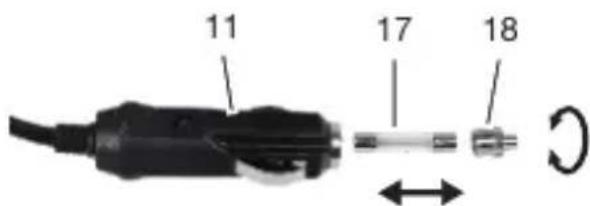
11 Charging adapter (Vehicle connection cable)
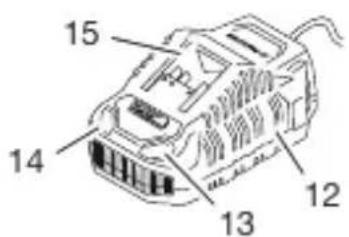
12 Charger
13 Control display (red)
14 Control display (green)
15 Charging slot
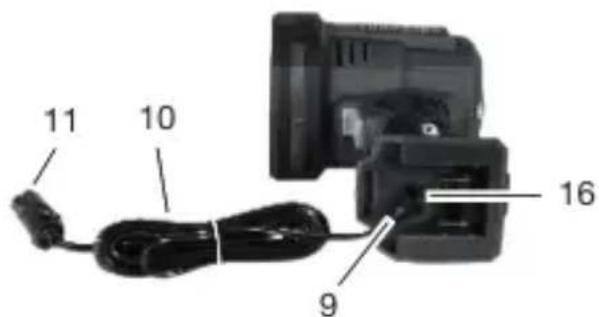
16 Power connection
17 Fine-wire fuse
18 Tip (Charging adapter)
Description of functions
Please refer to the descriptions below for information on how the operating elements work.
Technical data
Cordless LED Hand Light
PHLA 20-Li A1
Rated voltage U_1 (Battery) .....20 V = Rated voltage U_2 (Vehicle connection cable) .....12 V = Rated output P .....≤ 21 W
Protection class ....... III ◇ Protection type ....... IP20 Number of lamps (LED) ....... 7×3 W Light output .......1000 lm / 2500 lm Light colour ....... 6500 K (Cold white) Energy efficiency class .......E Lighting duration (1000 lm)
- Battery 2 Ah .... 160 min
- Battery 4 Ah .... 350 min
- Battery 8 Ah .... 720 min
- Battery 12 Ah .... 1050 min
Dimensions
-length 140 mm
-width 105 mm - Height 242 mm
Internal thread .... 1/4" Weight with battery (PAP 20 B1)
·s·s≈1.04 kg
Battery ...... Li-Ion PARKSIDE Performance Smart battery Smart PAPS 204 A1/ Smart PAPS 208 A1
- frequency band ..2400–2483.5 MHz - transmitted power ....≤ 20 dBm
Charging time
We recommend that you operate this appliance with the following batteries only: PAP 20 B1, PAP 20 B3, Smart PAPS 204 A1, Smart PAPS 208 A1
We recommend charging these batteries with the following chargers: PLG 20 A3, PLG 20 A4, PLG 20 C1, PLG 20 C2, PLG 20 C3, PLG 201 A1, PDSLG 20 A1, PDSLG 20 B1, Smart PLGS 2012 A1
Rechargeable battery and charger technical data: See separate manual. The charging time is influenced by factors such as the temperature of the environment and the battery, as well as the mains voltage applied, and may therefore deviate from the specified values.
| Charging time (min.) | PAP 20 A1PAP 20 A2PAP 20 B1 | PAP 20 A3PAP 20 B3SmartPAPS 204 A1 | SmartPAPS 208 A1 |
| PLG 20 A1PLG 20 A4PLG 20 C1 | 60 120 240 | ||
| PLG 20 C2 45 80 165 | |||
| PLG 20 A2PLG 20 A3PLG 20 C3PDSLG 20 A1PDSLG 20 B1 | 35 60 120 | ||
| PLG 201 A1 135 250 500 | |||
| SmartPLGS 2012 A1 | 35 45 50 |
Safety information
Meaning of the safety information
DANGER! If you do not observe this safety instruction, an accident will occur. The result of which is severe bodily injury or death.
WARNING! If you do not observe this safety instruction, an accident may occur. The result of which is likely severe bodily injury or death.
CAUTION! If you do not observe this safety instruction, an accident will occur. The result of which is likely minor or moderate bodily injury. NOTICE! If you do not observe this safety instruction, an accident will occur. The result of which is possible damage to property.
Pictograms and symbols Symbols on the device

The device is part of the X 20 V TEAM series and can be operated with batteries of the X 20 V TEAM series. Batteries of the X 20 V TEAM series may only be charged using chargers of the X 20 V TEAM series.

Read the instruction manual
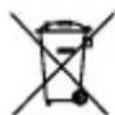
Waste electrical and electronic equipment (WEEE) must not be disposed of with domestic waste.

Protection class III

Direct voltage
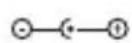
Polarity

Attention! Do not stare into the active light source.
Symbols used in the instruction manual

Attention!
Symbols on the packaging

Dispose of the packaging in an environmentally friendly manner.

Recycling symbol: Corrugated cardboard
General safety instructions for handlamps
- Do not cover the device when in use. The device will become hot during use and can cause burns.
- Do not look into the light beam. Do not aim the light beam at people and animals.
- Do not allow children to use the device. They could inadvertently blind other people or themselves.
- Check that the device is secured properly. There is a risk of injury if the device falls down.
- The luminaire housing protects against accidental contact with active parts. Do not open the housing.
- The light sources can only be replaced by the manufacturer without permanently damaging the surrounding product.
Special safety instruc- tions for battery-powered devices
- Ensure that the device is switched off before inserting the battery. Inserting a battery into a device that is switched on can lead to accidents.
- Only use accessories recommended by PARKSIDE. Unsuitable accessories may cause electric shock or fire.
⚠ WARNING! Injury and property damage due to improper handling of battery. Observe the safety information and notes on charging and proper use as shown in the instruction manual for your battery and charger from the series X 20 V TEAM. A detailed description of the charging process and further information can be found in these separate operating instructions.
Special safety instructions for the vehicle connection cable
- If the cable or connections are damaged, have them replaced by authorised experts or customer service.
- Protect the device from moisture and penetration by liquids.
-
Do not expose the device to extreme heat or high humidity. This applies in particular to storage in the car. Extreme temperatures occur in the interior and glove compartment during long periods of inactivity. Remove electrical and electronic devices from the vehicle.
-
⚠ WARNING! Risk of accident! Danger to driver and vehicle occupants. Do not use the device while travelling in the vehicle. Store and secure the device in such a way that there is no risk of injury from the device and it cannot be damaged, even in the event of emergency braking.
- WARNING! Risk of injury! If inflated, the airbag can propel the connecting cable through the vehicle interior and cause serious injuries. Keep the connection cable and charging adapter away from areas where airbags will inflate when activated.
• BAUTION! Vehicle engine no longer starts. Do not connect the device to the on-board socket of your vehicle if the vehicle battery is already old or worn out. - When charging via the on-board socket, the charging adapter must always be fully plugged into the vehicle's on-board socket. Otherwise there is a risk of fire due to overheating.
- Disconnect the device from the on-board socket immediately if you notice the smell of burning or smoke.
Preparation
Connecting the vehicle connection cable
⚠ WARNING! Only operate the device with mains power using the vehicle connection cable (10).
Procedure (Fig. A)
- If necessary, remove the cigarette lighter from the vehicle's on-board socket.
- Connect the charging adapter (11) of the vehicle connection cable (10) to the vehicle socket.
- Insert the connector plug (9) into the power connection (16) on the device.
Notes
The charging adapter (11) of the vehicle connection cable (10) contains a F15A/250V fine-wire fuse (17), which can be replaced if necessary.
Replacing the fine-wire fuse
Requirements
- Fine-wire fuse F15A/250V (not included)
Notes
Make sure that you do not lose any small parts when replacing the fine-wire fuse (17) and that everything is in the right place.
Procedure (Fig. B)
- Unscrew the tip (18) from the charging adapter (11) ∪.
- Remove the tip (18) and the old fuse (17).
- Insert a new fine-wire fuse with the same voltage (F15A/250V).
- Assemble everything in reverse order.
Checking the battery charge level
LEDs Meaning
red, orange, green Battery charged
LEDs Meaning
red, orange Battery partially charged
red Battery needs to be charged
-
Press the button (2) next to the charge level indicator button (3) on the battery (4).
The LEDs of the charge level indicator show how much charge remains in the battery. -
Charge the battery (4) when only the red LED on the charge level indicator (3) is illuminated.
Charging the battery
See also the charger instruction manual.
Notes
- If warm, allow the battery to cool before charging.
- Do not expose the battery to direct sunlight for long periods and do not place it on a radiator (max. 50°C).
Procedure
- If necessary, remove the battery (4) from the cordless device.
- Slide the battery (4) into the charging slot (15) of the charger (12).
- Plug the charger (12) into an power outlet.
- Once charging is complete, disconnect the charger (12) from the mains supply.
- Pull the battery (4) charging slot out (15).
Control LEDs on the charger (12):
| green red Meaning | ||
| lights up — • Battery | is fully charged• stand-by (No bat-tery inser-ted) | |
| — lights up Battery is | charging | |
| — flashes Battery is | overheated | |
| flashes flashes Battery is | defective | |
Hanging up the device
Requirements
- The hanging location must be suitable for the weight of the product.
Tools and aids required
- Hook (not included)
Procedure
- Guide a hook through the eyelet (1).
- Hang the device horizontally.
Tripod thread
You can use the 14 " internal thread (8) to screw the device onto a tripod (not included).
Operation
Working instructions
WARNING! Do not look into the light source.
Inserting and removing the battery into/from the cord-less device
WARNING! Risk of injury due to unintentional start-up. Only insert the battery into the device once the device is fully prepared for use.
NOTICE! Risk of damage! An incorrect battery can damage the device and battery.
Inserting the battery
- Push the battery (4) along the guide into the battery holder. You will hear the battery click into place.
Removing the battery
- Press and hold the battery release (5) on the battery (4).
- Pull the battery out of the battery holder.
Switching on and off
Switching on
- Press the On/Off switch (6) once. The LED light illuminates with reduced brightness.
- Change the light levels by pressing the On/Off switch (6) again.
Switching off
- Press the On/Off switch (6) four times. The LED light goes out and the device switches off.
Changing the lighting mode
Press the On/Off switch (6) repeatedly until the desired light mode is activated.
Press Mode / Light output
1× Permanent light - 1000 lm
Press Mode / Light output
2× Permanent light - 2500 lm
3× Flashing
4× Switching off
Used batteries
- If the operating time is considerably shortened despite charging, this shows that the rechargeable battery is depleted and must be replaced. Only use an original replacement battery of the series X 20 V TEAM, which can be purchased from the online shop (see Spare parts and accessories, p. 28).
- Always observe the safety information in addition to the regulations and information about environmental protection (see Disposal/environmental protection, p. 25).
Cleaning, maintenance and storage
Switch the device off before cleaning and remove the battery from the device.
Cleaning
- Clean the device with a soft, dry cloth to avoid scratching the cover of the LED lamp.
- Use a brush to clean the gaps on the device.
- Do not use any abrasive cleaning agents or solvents. You can damage the device irreparably.
- Do not use water or metallic aids. Risk of short circuit.
Maintenance
The device is maintenance free.
Storage
Always store the device and accessories:
- clean
-
dry
• protected against dust
• protected against frost
• out of the reach of children
Devices with battery: -
The storage temperature for the battery and device is between 0 °C and 45 °C. Avoid extreme cold or heat during storage to ensure the battery output is not adversely affected.
- Remove the battery from the device before storage over a longer period (see separate operating instructions for battery and charger).
Disposal/environmental protection
Remove the battery from the device and recycle the device, battery, accessories and packaging in an environmentally-friendly manner.
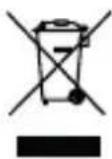
Waste electrical and electronic equipment (WEEE) must not be disposed of with domestic waste.
The symbol of the crossed-out wheeled bin means that this product must not be disposed of as unsorted municipal waste at the end of its useful life.
Directive 2012/19/EU on waste electrical and electronic equipment:
Consumers are legally obliged to recycle electrical and electronic equipment in an environmentally sound manner at the end of its life. In this way, environmentally friendly and resource-saving recycling is ensured. Depending on the implementation in national law, you may have the following options:
- Return to a shop,
- Hand over to an official collection point,
- Return to the manufacturer/distributor.
This does not affect accessories enclosed with the old devices or tools without any electrical components.
Disposal instructions for rechargeable batteries
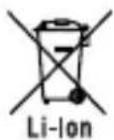
Do not throw batteries into domestic waste, fire (risk of explosion) or water. Damaged batteries can harm the environment and your health if poisonous fumes or liquids escape.
Dispose of the batteries according to local standards. Defective or used batteries must be recycled. Hand in the batteries at a used battery collection point where they are recycled in an environmentally friendly manner. For more information, please contact your local waste management provider or our service centre. Dispose of batteries in a discharged state. We recommend covering the contacts with an
adhesive strip to protect against short circuits. Do not open the battery.
Service
Guarantee
Dear Customer,
This product is provided with a 3 year guarantee from the date of purchase. In case of defects, you have statutory rights against the seller of the product. These statutory rights are not restricted by our guarantee presented below.
Terms of Guarantee
The guarantee period begins on the date of purchase. Please retain the original receipt. This document is required as proof of purchase. If a material or manufacturing defect occurs within three years of the date of purchase of this product, we will repair or replace – at our choice – the product for you free of charge. This guarantee requires the defective product and proof of purchase to be presented within the three-year period with a brief written description of what constitutes the defect and when it occurred. If the defect is covered by our guarantee, you will receive either the repaired product or a new product. No new guarantee period begins on repair or replacement of the product.
Guarantee Period and Statutory Claims for Defects
The guarantee period is not extended by the guarantee service. This also applies for replaced or repaired parts. Any damages and defects already present at the time of purchase must be reported immediately after unpacking. Repairs arising after expiry of the guarantee period are chargeable.
Guarantee Cover
The product has been carefully produced in accordance with strict quality guidelines and conscientiously checked prior to delivery.
The guarantee applies for all material and manufacturing defects. This guarantee does not extend to cover product parts that are subject to normal wear and may therefore be considered as wearing parts (e.g. Battery capacity) or to cover damage to breakable parts.
This guarantee shall be invalid if the product has been damaged, used incorrectly or not maintained. Precise adherence to all of the instructions specified in the operating manual is required for proper use of the product. Intended uses and actions against which the operating manual advises or warns must be categorically avoided. The product is designed only for private and not commercial use. The guarantee will be invalidated in case of misuse or improper handling, use of force, or interventions not undertaken by our authorised service branch.
Processing in Case of Guarantee
To ensure efficient handling of your query, please follow the directions below:
- Please have the receipt and product number (IAN 465779_2404) ready as proof of purchase for all enquiries.
- Please refer for the product number to the type plate on the product, an engraving on the product, the title
page of the operating instructions (bottom left) or the sticker on the back or underside of the product.
- Should functional errors or other defects occur, please initially contact the service centre specified below by telephone or use the contact form available on parkside-diy.com in the category Service.
- After consultation with our customer service, a product recorded as defective can be sent postage paid to the service address communicated to you, with the proof of purchase (receipt) and specification of what constitutes the defect and when it occurred. In order to avoid acceptance problems and additional costs, please be sure to use only the address communicated to you. Ensure that the consignment is not sent carriage forward or by bulky goods, express or other special freight. Please send the appliance inc. all accessories supplied at the time of purchase and ensure adequate, safe transport packaging.

You can view and download these and many other manuals on parkside-diy.com. This QR code will take you directly to parkside-diy.com. Select your country and search for the operating instructions via the search mask. You can open your operating instructions by entering the article number (IAN) 465779_2404.
Repair service
For repairs that are not covered by warranty, contact the service centre. They will gladly create a cost estimate for you.
- We can only work on devices which are sent in properly packed and with postage paid.
Note: Please send your device cleaned and with an indication of the defect to the address named for the service centre.
- The following are not accepted: devices sent in without prepaid postage, sent as bulky goods, sent as an Express shipment, or devices sent as any other form of special freight.
GB MT
• We will dispose of defective devices you ship to us free of charge.
Service Centre

Service Great Britain
Tel.: 0800 051 8970
Contact form on
parkside-diy.com
IAN 465779_2404

Service Malta
Tel.: 800 65168
Contact form on
parkside-diy.com
IAN 465779_2404
Importer
Please note that the address below is not a service address. Contact the service centre named above first.
Spare parts and accessories
You can get spare parts and accessories from www.grizzlytools.shop. If you have any problems with your order, contact us via our online shop. If you have any other questions, contact: Service Centre, p. 28
Pos. nr. Name Order No.
10 Vehicle connection cable (12 V) 91110669
Translation of the original EU declaration of conformity
Product: Cordless LED Hand Light
Model: PHLA 20-Li A1
Serial number: 000001 - 148000
The object of the declaration described above is in conformity with the relevant Union harmonisation legislation:
2014/35/EU • 2014/30/EU • 2009/125/EC • 2011/65/EU & (EU) 2015/863
Product with battery Smart PAPS 204 A1/Smart PAPS 208 A1: 2014/53/EU
The object of the declaration described above is in conformity with Directive 2011/65/EU of the European Parliament and of the Council of 8 June 2011 on the restriction of the use of certain hazardous substances in electrical and electronic equipment.
To ensure conformity, the following harmonised standards and national standards and regulations have been applied:
EN IEC 60598-1:2021/A11:2022 • EN 60598-2-8:2013
EN 62493:2015/A1:2022 • EN 61547:2009
EN IEC 55015:2019/A11:2020 • EN 50498:2010
IEC 62471:2006 • EN IEC 63000:2018
Product with battery Smart PAPS 204 A1/Smart PAPS 208 A1:
EN 301 489-1 V2.2.3:2019 • Draft EN 301 489-17 V3.2.5:2022
EN 300 328 V2.2.2:2019 • EN 50663:2017
This declaration of conformity is issued under the sole responsibility of the manufacturer:

Authorised representative of documentation
Sommaire
Introduction...... 30
Garantie (France)......41
Christian Frank
Product: Accu-LED-handlamp
Model: PHLA 20-Li A1
Serienummer: 000001 - 148000
Service-Center....71
Importador....71
Christian Frank
Reparationsservice......148
Service-Center 148
Importør......148
informativ • informative • informatif • informatief • informativo • informatív • informacyjny • informační • informatívny

PDF ONLINE
parkside-diy.com

GRIZZLY TOOLS GMBH & CO. KG