USER MANUAL K20 MOVA
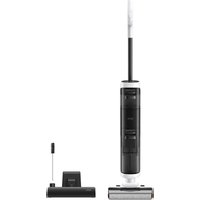
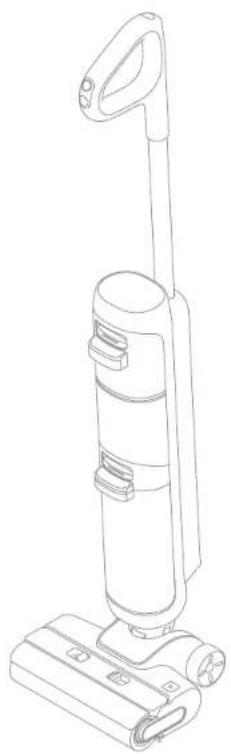
Dreame MOVA K20 Wet and Dry Vacuum
User Manual

C∈
Website: https://global.dreametech.com
Manufactured by: Drame Trading (Tianjin) Co., Ltd.
Made in China
The illustrations in this manual are for reference only. Please refer to the actual product.
DREAME
THANK YOU
FOR PURCHASING THIS DREAM WET AND DRY VACUUM.
Registration Quick Start
Welcome to register a Dreame account by scanning the QR code. You are available for the User Manual and Special Offers.
The high-quality product is engineered for optimal performance. If you have any questions on the product, please contact us: aftersales@dreame.tech.
Contents
EN User Manual 001
DE Benutzerhandbuch 019
FR Manuel d'utilisation 037
Manuale utente 055
ES Manual de usuario 073
NL Gebruikershandleiding 091
PT Manual do utiliser 109
pt-BF Manual de usuario 127
Important Safety Instructions Important Safety Instructions
Please read this manual carefully before use and retain it for future reference. When using an electrical appliance, basic precautions should always be followed, including the following:
READ ALL INSTRUCTIONS BEFORE USING (THIS APPLIANCE). Failure to follow the warnings and instructions may result in electric shock, fire and/or serious injury.
WARNING - To reduce the risk of fire, electric shock, or injury:
Usage Restrictions
This appliance should not be used by children younger than 8 years old nor persons with physical, sensory, intellectual deficiencies, or limited experience or knowledge without the supervision of a parent or guardian to ensure safe operation and to avoid any risks. Cleaning and maintenance shall not be performed by children without super vision.
- Plastic film can be dangerous. To avoid the danger of suffocation, keep it away from children.
Children shall not play with the appliance.
- Use indoors only, on non-carpeted floor surfaces such as vinyl, tile, sealed wood, etc. Be careful not to run over loose objects or the edges of area rugs. Stalling the brush may result in premature belt failure.
- Use only as described in this user guide. Use only manufacturer's recommended attachments.
- Do not expose the appliance to fire or excessive temperature. Exposure to fire or excessive temperature may cause an explosion.
- Do not use in extremely hot or cold environments (below 5^ / 41^ or above 40^ / 104^ ). Please charge the appliance in temperature above 5^ / 41^ and below 40^ / 104^ .
- Do not immerse the appliance in liquid.
- Do not use to pick up flammable or combustible liquids, such as gasoline. Do not use in areas where flammable or combustible liquids may be present.
- Do not put any object into openings. Do not use the appliance when any opening is blocked. Keep free of dust, lint, hair, and anything that may inhibit air flow.
- Do not pick up toxic material (chlorine bleach, ammonia, drain cleaner, etc.). Do not pick up hard or sharp objects such as glass, nails, screws, coins, etc.
- Do not use the appliance in an enclosed space filled with vapor given off by oil-based paint, paint thinner, some moth-proofing substances, flammable dust, or other explosive or toxic vapour. Do not pick up anything that is burning or smoking, such as cigarettes, matches or hot ashes.
- Do not use the appliance without filters in place.
- Keep hair, loose clothing, fingers, and all parts of the body away from openings and moving parts of the appliance and its accessories.
- Keep ground cables away from the appliance when using it. A hazard may occur if the appliance runs over a supply cord.
Use extra care when cleaning on stairs.
Maintenance and Storage
- Prevent unintentional starting. Ensure the switch is in the OFF-position before picking up or carrying the appliance. Carrying the appliance with your finger on the switch or turning on the appliance may result in an accident.
- Ensure that the appliance is placed on a horizontal surface. Do not use the appliance at the same position if the appliance is equipped with a brush roller and the handle is not completely upright. Do not store the appliance in a place where it may freeze.
- Switch off and unplug the appliance when not in use, before cleaning, maintaining or servicing it, and before connecting or disconnecting it with a moving brush.
- Do not use an appliance that is damaged or modified. A damaged or modified appliance may exhibit unpredictable behavior resulting in fire, explosion, or risk of injury.
- Do not modify or attempt to repair the appliance excepts as indicated in the instructions for use and care.
- Do not use the appliance with a damaged attachment (eg: charging base, supply cord etc.). If the appliance or attachment has been dropped, damaged, left outdoors, dropped into water, or is not working as it should, never attempt to operate it. Please have it repaired at an authorized service center.
- Have servicing performed by a qualified repair person using only identical replacement parts. This will ensure that the safety of the appliance is maintained.
Battery and Charging
- For the purposes of recharging the battery, only use the detachable adapter provided with this appliance. Use only with adapter.
- Follow all charging instructions and do not charge the appliance outside of the temperature range specified in the battery as doing so increases the risk of fire.
- Keep ground cables away from the appliance when using it, because a hazard may occur if the appliance runs over a supply cord.
- Do not pull or carry adapter by cable, use cable as a handle, close door on cable, or pull cable around sharp edges or corners.
- This appliance contains batteries that can only be replaced by qualified technicians once after-sales service.
- The lithium-ion battery pack contains substances that are hazardous to the environment. Before disposing of the appliance, please first remove the battery pack, then discard, or recycle it in accordance with local laws and regulations of the country or region it is used in.
- The appliance must be disconnected from the power supply when removing the battery. Keep batteries out of the reach of children. Never put batteries in mouth. If swallowed, contact your physician or local poison control.
- Under abusive conditions, never contact the battery from which the liquid may be ejected. If contact accidentally occurs, rinse with water. If liquid contacts eyes, seek medical help immediately. Liquid ejected from the battery may cause irritation or burns.
EN Important Safety Instructions
Symbols

Read operator's manual
D□K
Detachable supply unit

All products bearing this symbol are waste electrical and electronic equipment (WEEE as in directive 2012/19/EU) which should not be mixed with unsorted household waste. Instead, you should protect human health and the environment by handing over your waste equipment to a designated collection point for the recycling of waste electrical and electronic equipment, appointed by the government or local authorities. Correct disposal and recycling will help prevent potential negative consequences to the environment and human health. Please contact the installer or local authorities for more information about the location as well as terms and conditions of such collection points.
Product Overview
Packing List
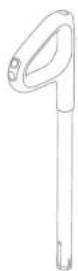
Handle
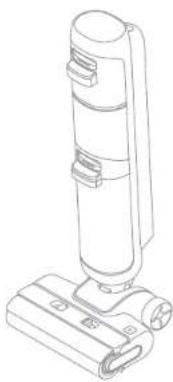
Main Body

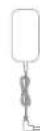
We, Dreame Trading (Tianjin) Co., Ltd., hereby declares that this equipment is in compliance with the applicable Directives, European Norms, and amendments. The full text of the EU declaration of conformity is available at the following internet address: https://global.dreametech.com
For detailed e-manual, please go to
https://global.dreametech.com/pages/user-manuals-and-faqs
Vacuum
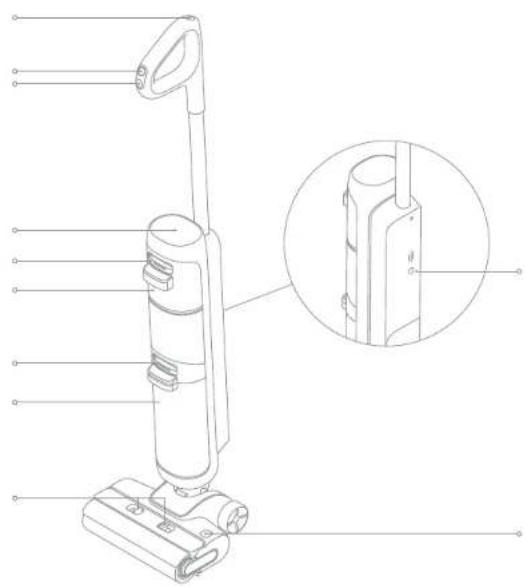
Self-Cleaning Button
2 Made Switch
3 Power Switch
4 Display Screen
5. Clean Water Tank Release Button
6 Clean Water Tank
7 Used water tank Release Button
8 Used Water Tank
9 Brush Roller Cover Release Buttons
10 Voice Prompt Button
Press briefly to activate the voice prompt or adjust the volume
Press and hold for 3 seconds to switch between languages
11 Brush Roller Release Button
Product Overview Product Overview
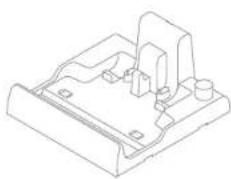
Charging Base
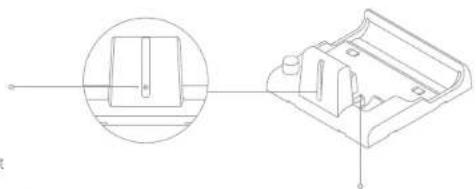
Display Screen
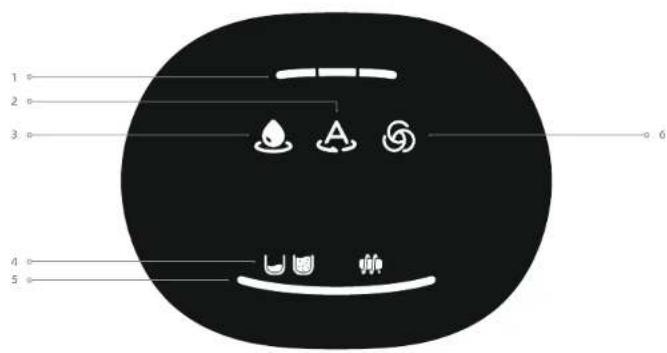
Battery Level Indicator1 Turbo NooBor Messages
Auto Mode2
Suction Mode3
Dust Concentration Indicator5
The color of the indicator changes with the amount of dirt in real time.
Note: If the appliance is not working properly, the display screen will show an error message. Please refer to the Error Prompts and Solutions table to find your solution.
EN Installation
Insert the end of the handle vertically into the port on the top of the appliance as indicated until you hear a click.
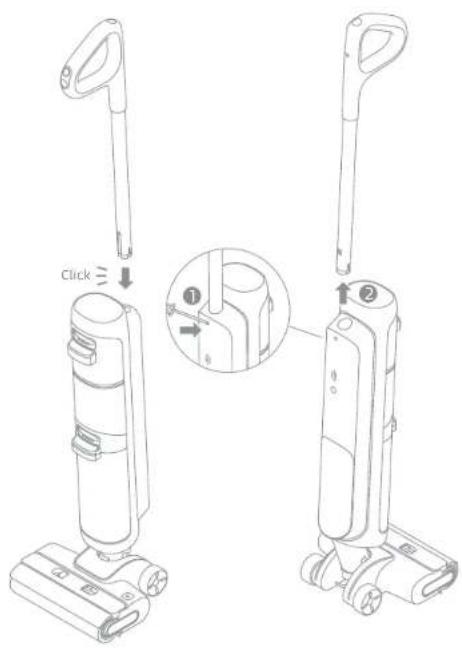
Note: To disassemble, extend a hard object into the hole of the appliance as indicated to press in the contacts and pull the handle upwards at the same time.
Charging
-
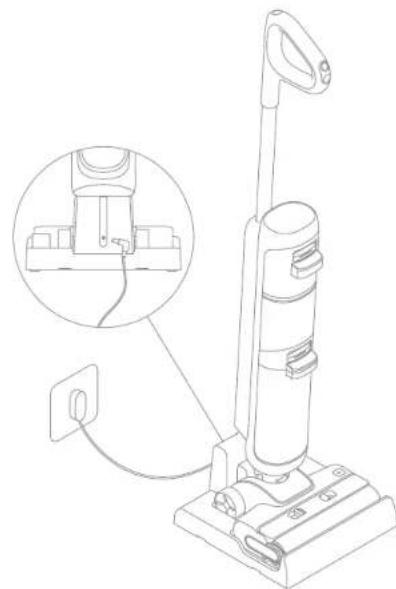
Place the charging base against a wall on level ground and connect it to a power source. Fully charge the appliance before first use.
-
Place the appliance on the charging base. When charging, the battery level indicator turns from breathing to solid light according to the battery level. When the indicator remains solid, the battery is fully charged.
-
When in use, the first indicator light is solid red: battery level < 15%
- When in use, the indicator is solid green: battery level ≥ 15%
- When charging, the first indicator light is breathing red: battery level < 15%
Note:
- If there is no operation within 10 minutes of being fully charged, the vacuum will enter sleep mode. Please restart the appliance if you need to use it.
- To extend the battery life time, the battery keeps cooling down automatically after you have used the appliance for a long time.
How to Use How to Use
Filling the Clean Water Tank
-
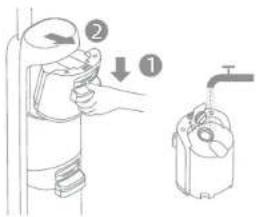
Press the Clean Water Tank release button to remove the tank. Open the tank cover and fill the tank with clean water.
-
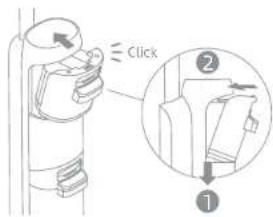
Install the Clean Water Tank and ensure it clicks into place.
Starting Cleaning
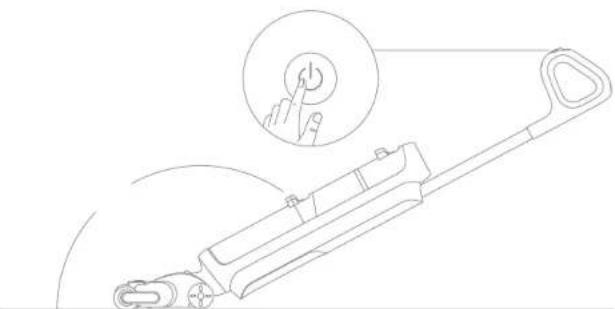
Gently step on the brush cover and recline the appliance backwards. Press the power switch to start/stop operating.
Note:
Do not vacuum any foamy liquids.
- Make sure the appliance is in upright position before turning off the power while the appliance is lying flat.
- Do not recline the appliance backwards more than 160^ to prevent the appliance from leaking water.
The appliance is suitable for cleaning floors, marble, tiles and other hard surfaces.
- When the appliance is in operation, do not lift it off the ground, move it or tilt it. Otherwise, the used water may flow into the motor.
Switching Modes
Press the mode switch to switch modes according to your needs.

Auto Mode
The appliance will automatically adjust the suction power according to the stains on the ground.

Turbo Mode
If Turbo Mode is selected, the appliance will vacuum the stubborn stains on the floor.

Suction Mode
If suction Mode is selected, the appliance will vacuum water only and the brush roller will not be dampened. No water is coming out of the Clean Water Tank.
Emptying the Used Water Tank
-
Press the Used Water Tank release button to remove the tank.
-
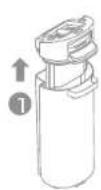
Pull up the tank cover and remove it to pour out the used water.

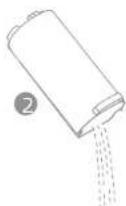
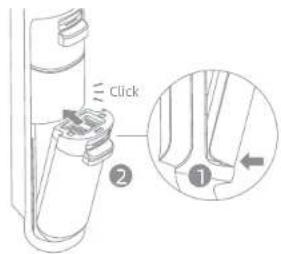
- Close the tank cover and re-install the tank before use.
EN How to Use
One-Click Self-Cleaning
- Place the appliance back onto the base. Ensure that the water in the Clean Water Tank is sufficient for self-cleaning.
- Briefly press the self-cleaning button on the top of the handle to start/stop self-cleaning.
- Empty the Used Water Tank while self-cleaning is completed.
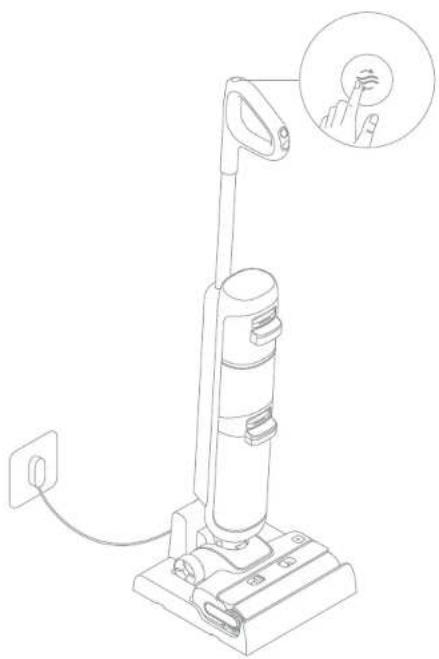
Note: The self-cleaning function can be enabled only when the appliance is being charged and the battery level indicator is green, if the battery level is lower, please charge the appliance before starting the self-cleaning.
11211121112
Care & Maintenance
- Turn off the appliance before maintenance. Do not touch the power switch,
- Replace parts if needed. The parts must be replaced by those available from the manufacturer or its service agent.
- If the appliance is not used for an extended period, fully charge it, unplig the power plug, and store the appliance in a cool, low-humidity environment away from direct sunlight. To avoid over-discharge of the battery, charge the appliance at least once every 3 months.
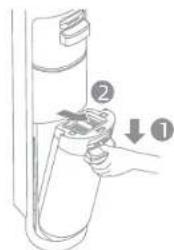
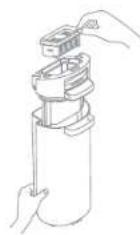
Cleaning the Used Water Tank
-
Press the Used Water Tank release button to remove the tank.
-
Pull up the tank cover and remove the filter from the Used Water Tank cover.
-
Rinse the Used Water Tank with water, the provided cleaning brush can be used to clean the inner wall of the tank.
-
Re-install the filter and the Used Water Tank cover. Then re-install the Used Water Tank until you hear a click.
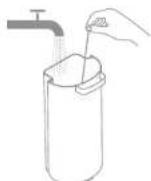
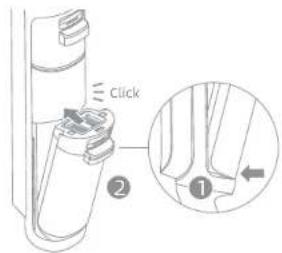
Note: The Used Water Tank Cover contains electronic components. Do not rinse the cover with water.
Note: It is recommended to clean the Used Water Tank in time after each use, as well as before and after the self-cleaning.
Cleaning the filter
-
Remove the filter and gently knock off the floating dust on the surface.
-
When the filter is dirty and needs washing, rinse it with water. It must be completely dry before use.
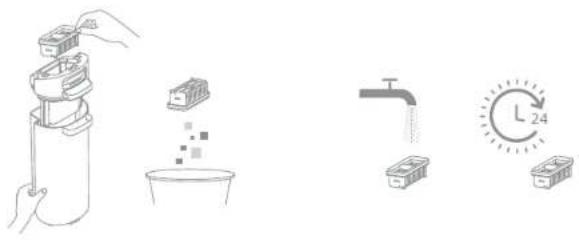
Note: Replacing the filter every 3 to 6 months is recommended.
Cleaning the Tube and the Dirt Sensor
Remove the Used Water Tank. Wipe the tube and the dirt sensor with a wet cloth before use.
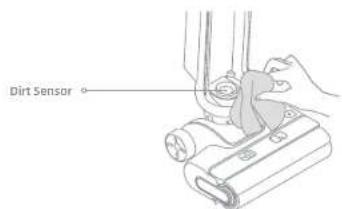
Note: Do not rinse the tube or the dirt sensor.
131413141314
Care & MaintenanceCare & Maintain
Cleaning the Brush Assembly
-
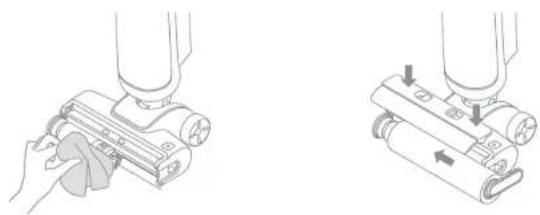
Press the brush roller cover release button to remove the brush roller cover. Then press the brush roller release button and pull the handle to take out the brush roller.
-
Clear any hair and debris caught on the brush roller with the provided cleaning brush. Rinse the brush roller and the cover with clean water and dry it completely.
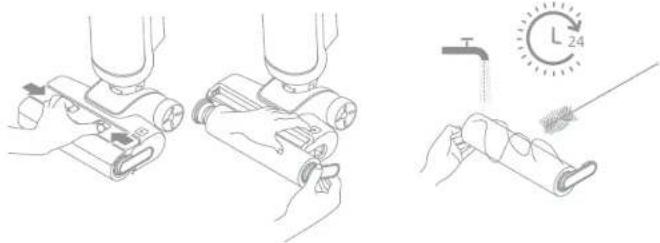
-
Wipe the suction inlet with a dry cloth or wet tissue.
-
After cleaning the brush roller, reinstall the brush roller and the brush roller cover. You will hear a click to indicate that they are installed in place.
Note:
- Do not rinse the brush assembly with water.
Clean as needed. Replacing the brush roller every 3 to 6 months is recommended.
EN Troubleshooting Troubleshooting
If an error occurs, the appliance will stop working. Please refer to the following table for troubleshooting. If the problem persists, please contact the customer service.
| Error Possible Cause | Solution | |
| The appliance does not work. | The appliance is out of battery or its battery level is low. | Fully charge its battery before use. |
| The appliance is in the upright position. | Recline the appliance backwards. |
| Blockage activated overheat protection mode. | Clear the blockage and wait until the temperature returns normal. |
| Used Water Tank Full Empty the Used Water Tank. |
| The Clean Water Tank is empty. | Fill the Clean Water Tank with sufficient water. |
| The parts are not installed in place. | Ensure all parts are all properly in place. |
| The appliance charges slowly. | The temperature of the battery is too low or too high. | Wait until the battery's temperature returns normal. |
| The suction power of the appliance is weak. | The filter is clogged. Clean the filter. |
| The suction inlet or tube is blocked by a foreign object. | Clean the tube and the suction inlet. |
| The motor is making a strange noise. | There is too much dirty water in the Used Water Tank. | Empty the Used Water Tank. |
| The suction inlet is blocked. | Clear any blockage in the suction inlet. |
| The battery level indicator on the display screen does not light up while charging. | The charging base plug is not inserted into the electrical outlet properly. | Make sure the charging base plug is inserted in place. |
| The appliance is not placed onto the charging base properly. | Make sure the appliance is placed onto the charging base properly. |
| No water is coming out of the appliance. | The Clean Water Tank is not properly installed in place, or the water in the Clean Water Tank is insufficient. | Re-install or fill the Clean Water Tank. |
| It takes 30 seconds to dampen the brush roller. | Turn on the appliance and check again after a while. |
| The vent leaks water. | A collision or a sharp pull causes water to enter the motor. | Move the appliance gently back and forth while it is turned on. |
| The filter is not completely dry after being cleaned. | Dry the filter completely before use. |
| Self-cleaning fails. | The brush roller may be jammed by large debris. | Remove the brush roller cover to check and clean the brush roller. |
| The appliance is not placed onto the charging base properly. | Make sure the appliance is being charged before enabling the self-cleaning function. |
| Self-cleaning cannot be enabled if the battery level is low. | Self-cleaning can only be enabled while the appliance is being charged and the battery level indicator is green. |
| The Used Water Tank is not installed in place, or the Used Water Tank is full. | Re-install or empty the Used Water Tank. |
| The Clean Water Tank is not installed in place, or the water in the Clean Water Tank is insufficient. | Re-install or fill the Clean Water Tank. |
Error Prompts and Solutions
If the appliance is not working properly, the screen display will show an error message. Please refer to the below table to find your solution.
| Error Icon | Possible Cause Solution | |
| Insufficient Water in the Clean Water Tank | Fill the Clean Water Tank. |
| Used Water Tank Full Empty | the Used Water Tank. |
| Brush Roller Stuck | Clean the brush roller with the provided cleaning brush. |
| The brush roller and tube are dirty | Place the appliance back onto the base for self-cleaning. |
Specifications
| Vacuum |
| Model HMHT0A | Rated Power 200 W |
| Rated Voltage 25 | 2 V --- |
| Clean Water Tank Capacity | 600 mL | Used Water Tank Capacity | 500mL |
| Charging Time Approx. 5 hours |
| Power Adapter |
| Model KL-WE300080-S1 | | 87.85% |
| Input | 100-240 V ~ 50/60 Hz 0.8 A | Output 30 V | --- 0.8 A |
| Efficiency at Low Load (10%) | 81.02% | No-load Power Consumption | 0.08 W |
Specifications
| Power Adapter |
| Model YLS025 | 1B-E300080 | | 88.53% |
| Input | 100-240 V ~ 50/60 Hz 0.8 A Max | Output 30 V | \( = = \) 0.8 A |
| Efficiency at Low Load (10%) | 80.72% | No-load Power Consumption | 0.09 W |
Battery Disposal and Removal
The built-in lithium-ion battery contains substances that are hazardous to the environment. Before disposing of the battery, make sure the battery is removed by qualified technicians and discarded at an appropriate recycling facility. - the battery must be removed from the appliance before it is scrapped;
- the appliance must be disconnected from the supply mains when removing the battery;
the battery is to be disposed of safely.
Removal Guide
- Remove the screws on the back of the appliance using a screwdriver and remove the back cover.
- Remove the cables at both ends of the battery pack.
- Remove the screws from the battery pack using a screwdriver and remove the battery pack.
CAUTION:
- Before removing the battery, disconnect the power and run out the battery as much as possible.
- Unneeded batteries should be discarded at an appropriate recycling facility.
- Do not expose to high temperature environment to avoid risks of explosion.
- Under abusive conditions, liquid may be ejected from the battery. If contact occurs, flush with water and seek medical help.
Nass- & Trockensauger