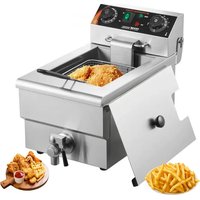
SC-101V - Deep fryer Vevor - Free user manual and instructions
Find the device manual for free SC-101V Vevor in PDF.


| Brand | Vevor |
| Model | SC-101V |
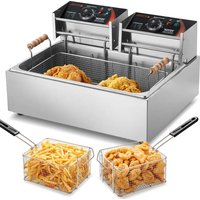
| Product type | Single-tank electric deep fryer |
| Power supply | 220–240 V ~ 50 Hz (European version) / 110–120 V ~ 60 Hz (US version) |
| Power | 3000 W (Europe) / 1500 W (USA) |
| Temperature range | 50 °C to 200 °C |
| Timer | 0 to 60 minutes or continuous operation (ON position) |
| Tank material | Stainless steel |
| Housing material | Lacquered steel |
| Controls | Temperature knob and timer knob |
| Indicator lights | Green (power on) and red (heating) |
| Included accessories | Frying basket with handle and hook, lid, rear protective plate |
| Overheat protection | Reset button for thermal cut-off |
| Safety | Automatic shut-off, do not immerse, hot surface indicator |
| Cleaning and maintenance | Wipe the exterior with a soft dry cloth; regularly clean oil residue from the heating tube; do not use abrasive cleaners |
| Intended use | Indoor, household use only |
| Certification | CE (conforms to British standards) |
| Technical support | www.vevor.com/support |
Frequently Asked Questions - SC-101V Vevor
User questions about SC-101V Vevor
0 question about this device. Answer the ones you know or ask your own.
Ask a new question about this device
Download the instructions for your Deep fryer in PDF format for free! Find your manual SC-101V - Vevor and take your electronic device back in hand. On this page are published all the documents necessary for the use of your device. SC-101V by Vevor.
USER MANUAL SC-101V Vevor
Technical Support and E-Warranty Certificate
www.vevor.com/support
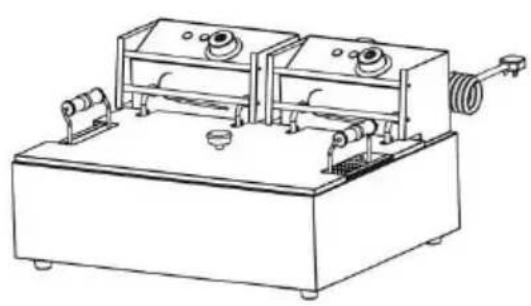
DUAL TANK ELECTRIC
DEEP FRYER
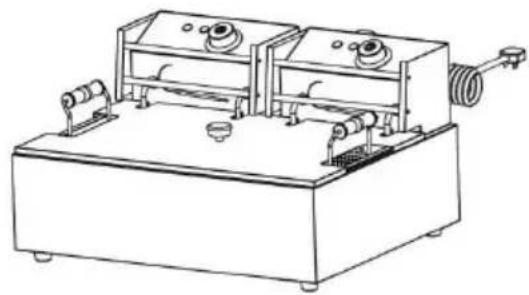
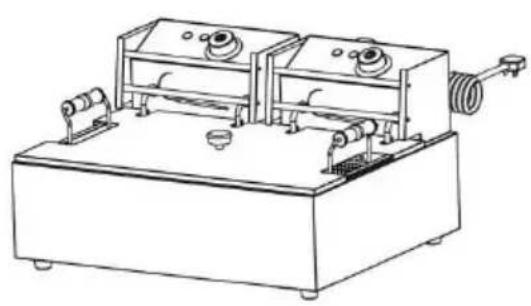
MODEL:SC-82 / SC-83 / SC-101V / SC-102V
We continue to be committed to provide you tools with competitive price. "Save Half", "Half Price" or any other similar expressions used by us only represents an estimate of savings you might benefit from buying certain tools with us compared to the major top brands and does not necessarily mean to co all categories of tools offered by us. You are kindly reminded to verify carefully when you are placing an order with us if you are actually Saving Half in comparison with the top major brands.
VEVOR®
TOUGH TOOLS, HALF PRICE
DUAL TANK ELECTRIC
DEEP FRYER
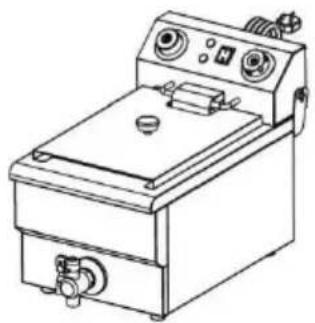
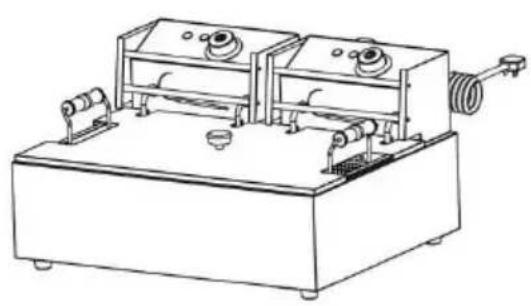
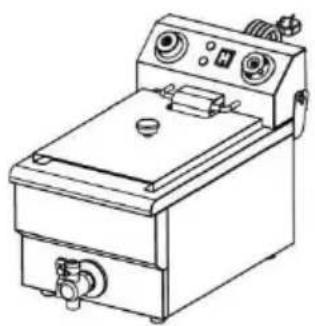
MODEL: SC-82 MODEL: SC-101V
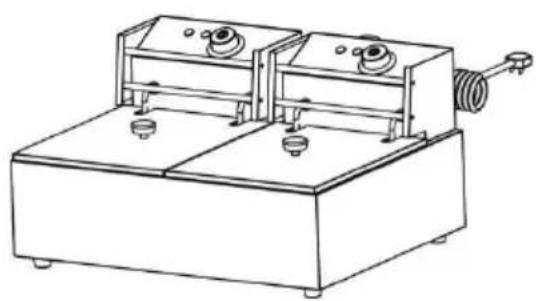
natural_image
Line drawing of a laboratory apparatus with two rectangular chambers and a coiled tube, no text or symbols present.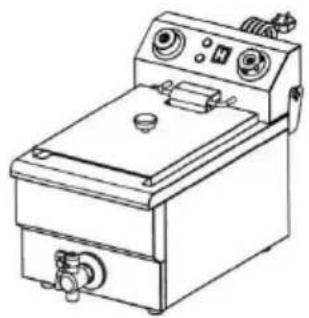
natural_image
Line drawing of a portable electrical appliance with control panel and buttons (no text or symbols)MODEL: SC-83 MODEL: SC-102V
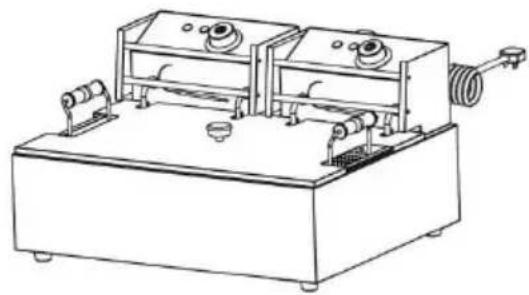
natural_image
Line drawing of a mechanical device with two rectangular chambers and a coiled spring (no text or symbols)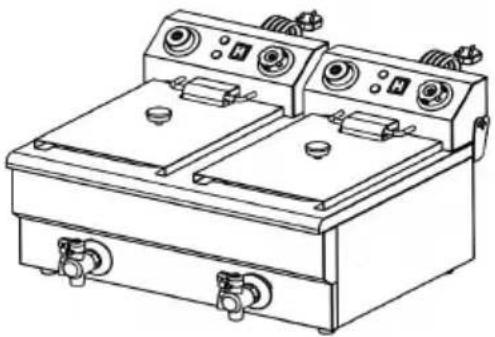
natural_image
Line drawing of a dual-bay electric stove with control panel and side gauges (no text or symbols)NEED HELP? CONTACT US!
Have product questions? Need technical support? Please feel free to contact us:
Technical Support and E-Warranty Certificate www.vevor.com/support
This is the original instruction, please read all manual instructions carefully before operating. VEVOR reserves a clear interpretation of o user manual. The appearance of the product shall be subject to the product you received. Please forgive us that we won't inform you ag there are any technology or software updates on our product.
 | Warning-To reduce the risk of injury, user must rea instructions manual carefully. |
 | Pay attention to high temperatures to prevent burns |
 | CORRECT DISPOSALThis product is subject to the provision of Europea Directive 2012/19/EC. The symbol showing a wheeli crossed through indicates that the product requires separate refuse collection in the European Union. T applies to the product and all accessories marked this symbol. Products marked as such may not be discarded with normal domestic waste, but must be to a collection point for recycling electrical and ele devices |
 | Compliance is a EC & UK security certification. |
 | HOUSE HOLD USE ONLY. |
 | WARNING! The water in the oil tank must be wipe and the oil residue must be cleaned before use. It prohibited to add water or frozen objects to the oil during use, otherwise the oil will splash. |
IMPORTANT SAFEGUARD
Thank you for using this product. In order to make sure that y operate the machine correctly, read this instruction carefully before operating it and keep it properly for future reference. Please rea
page's precautions and safety rules to ensure your safe use. The manual will outline safety warnings, precautions, and operating, maintenance, and cleaning. The warnings and instructions review in this manual cannot cover all possible conditions and situations that may occur. Caution and common sense are not built into the product since the uses will comply with these codes. Please consider a doctor before starting a training program or engaging in strong endurance activity on the device.
Please read ALL the instructions before using your machine.
Please read ALL the instructions before using your machine.
- Make sure the voltage in your outlet is the same as the vc indicated on the appliance's rating label.
- Do not let children and minors and pet get close to or touch machine.
- Do not touch the hot surface directly with your hands. Alway the handle or knob for operation.
- To prevent electrical shock, do not immerse the cord or plug water or other liquids.
- Do not immerse the appliance in water or any other liquid.
- Unplug the machine from the outlet when not in use and be cleaning. Cool the appliance before installing or removing parts a before cleaning.
- Cool down the HOT parts before operation and cleaning.
- Do not operate the device with damaged cord or plug, malfu or with any mechanical damage. Send it to your nearest authori service centre for examination and repair (ONLY technicians shot open up the unit).
- Using any accessories or attachments that are not provided (recommended by the manufacturer may cause injury.
- If the machine is not to be used for a long period of time, it, clean and cover it and store it in a dry and safe place.
-
Do not leave the power cord hanging over the edge of tab counter or let it come into contact with any hot surfaces.
-
Do not place the unit on or near hot air, electric burners of heaters.
- Always switch off the power to the socket before plugging in unplugging. Hold the plug instead of pulling on the cord.
- Do not apply this unit to any other purposes than the indic usage. Do not use it outdoors.
- KEEP IT OUT OF CHILDREN'S REACH. Never leave it unattended while in use.
- DO NOT CLEAN IT WITH ANY ABRASIVE MATERIAL.
- Always check that this machine is plugged into a grounded with the appropriate electrical supply. Ensure that the wall outlet being used is properly grounded. If not, you must install a grou outlet. Have the work performed only by a certified electrician w properly qualified to meet local safety and electrical codes.
- Ensure that the power outlet, plug and cord being used are good working condition. Damaged components should be repaired by a certified electrician who is qualified to meet local safety and electrical codes. Even if your power cord is functioning properly, keep it away from water and avoid letting it run over carpets or heating devices.
- Avoid using it in the presence of flammable liquids, gases, or other explosive situations.
- Do not move the machine before cooling and during heating
- Do not operate the machine in an appliance garage or und wall cabinet. Always unplug the unit from the electrical outlet wh storing in an appliance garage. Otherwise, it would cause a risk fire, especially if the machine touches the garage wall or the dc touches it as it closes.
- Type Y attachment: If the supply cord is damaged, it must replaced by the manufacturer, its service agent or similarly qualified persons in order to avoid a hazard.
- Children shall not play with the appliance. Cleaning and use maintenance shall not be made by children without supervision.
- When user uses it, user should keep OIL OVER HALF OIL
AND OIL DO NOT EXCEED THE HIGHEST LINE. BE CAREFUL OF OIL SPLASHING DURING OPERATION.
- This appliance can be used by children aged from 8 years above and persons with reduced physical, sensory or mental capabilities or lack of experience and knowledge if they have been given supervision or instruction concerning use of the appliance safe way and understand the hazards involved. Children shall not play with the machine alone. Cleaning and user maintenance should not be made by children without supervision. Pets should stay away from the product.
IMPORTANT SAFEGUARD
| MODEL | Region | Voltage | Input Power | Plug Type |
| SC-82 | American | 1500W+1500W | AC110-120V 60Hz | American PLUG |
| European | 2500W+2500W | AC220-240V 50Hz | European PLUG | |
| SC-83 | American | 1500W+1500W | AC110-120V 60Hz | American PLUG |
| European | 2500W+2500W | AC220-240V 50Hz | European PLUG | |
| SC-101V | American | 1500W | AC110-120V 60Hz | American PLUG |
| European | 3000W | AC220-240V 50Hz | European PLUG | |
| SC-102V | American | 1500W+1500W | AC110-120V 60Hz | American PLUG |
| European | 3000W+3000W | AC220-240V 50Hz | European PLUG |
Attention:
- The voltage used for this device must be the same as the supply voltage.
- Users need to install it near the power switch and fuse.
- The equipment grounding bolt back with the application of not than 2.5 ~mm^2 copper wire and meet safety requirements and reliance ground
- If the product is not powered on, please unplug the power cord and wait for the machine to cool down before checking Reset protecting button!
PRODUCT COMPONENTS
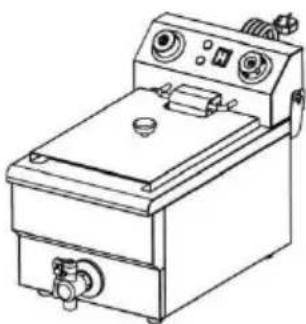
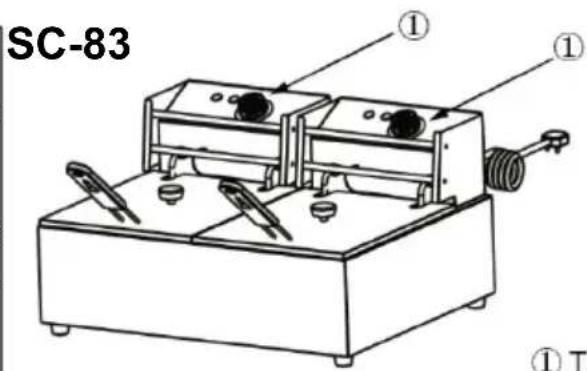
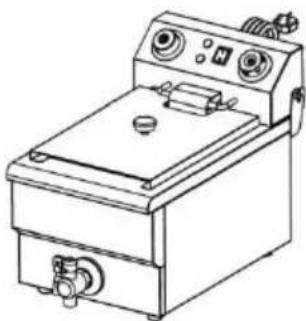
MODEL: SC-101V
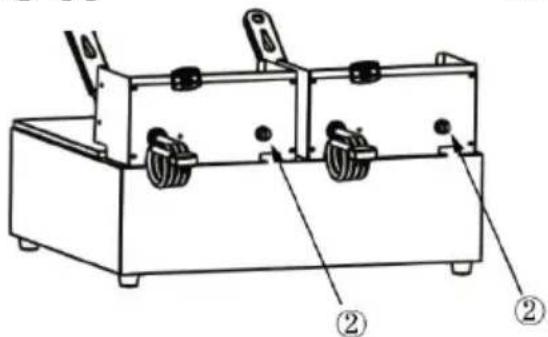
Attention:
If the product is not powere on, please unplug the power cord and wait for the mach to cool down before checkin the Reset protecting button
natural_image
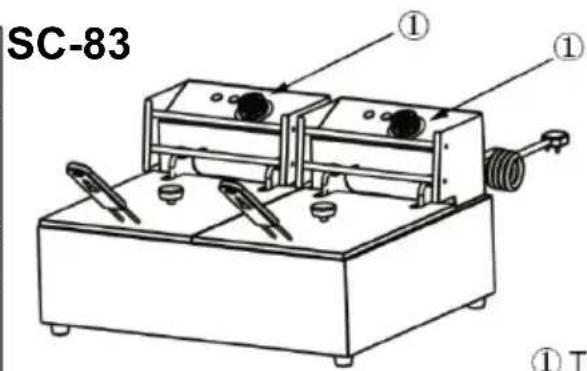
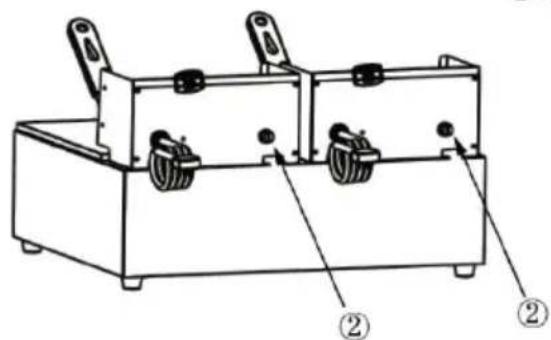
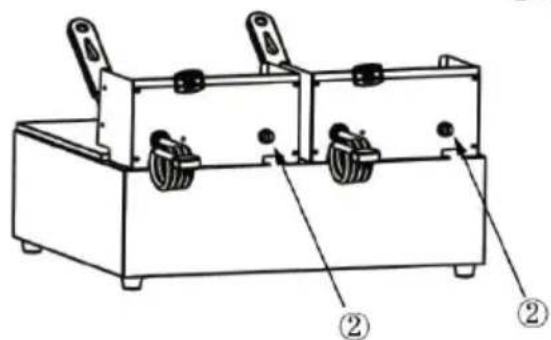
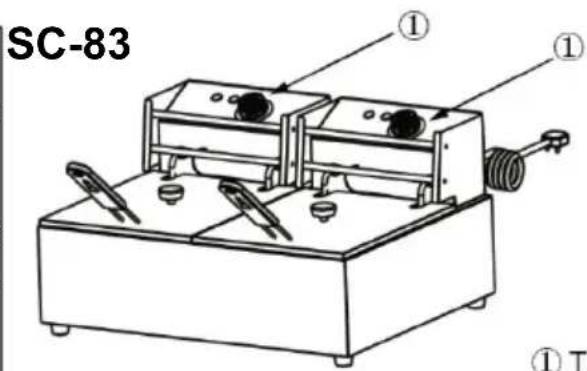
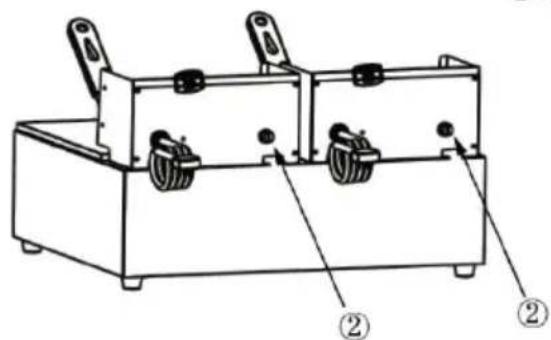
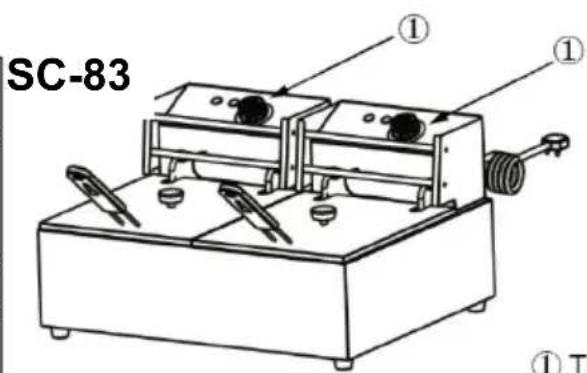
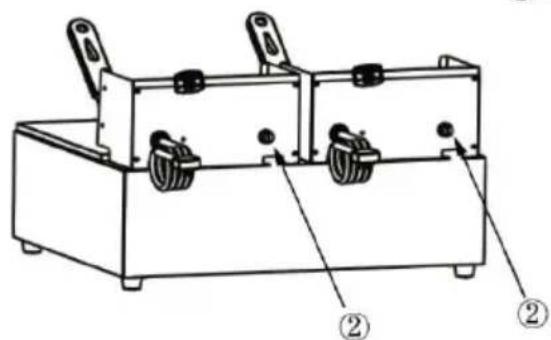
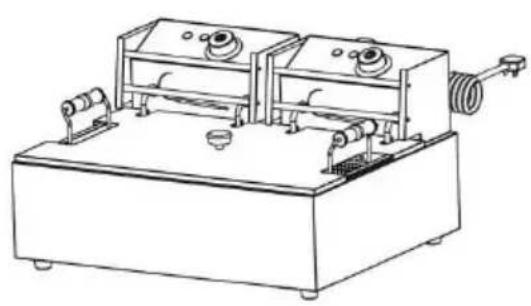
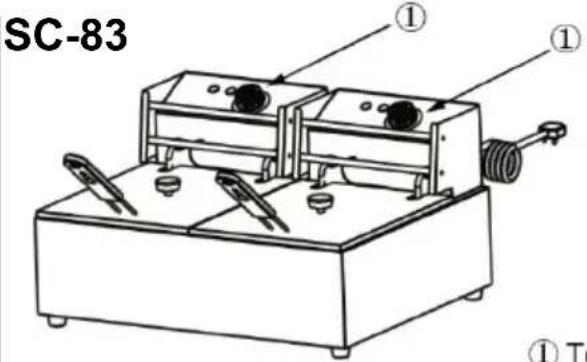
Line drawing of a portable electrical appliance with control panel and buttons (no text or symbols)MODEL: SC-82 / Attention: If the product is not powered on, please unplug the power cord and wait for the machine to cool down before checking the Reset protecting button !
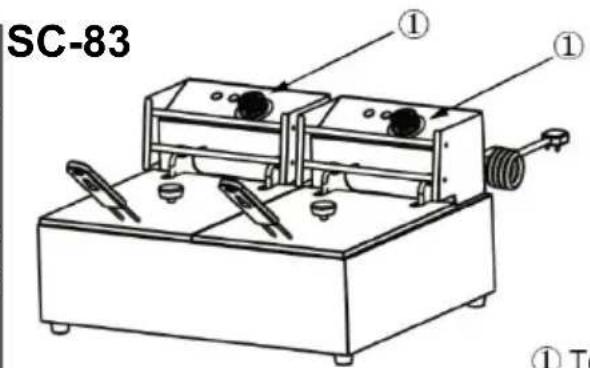
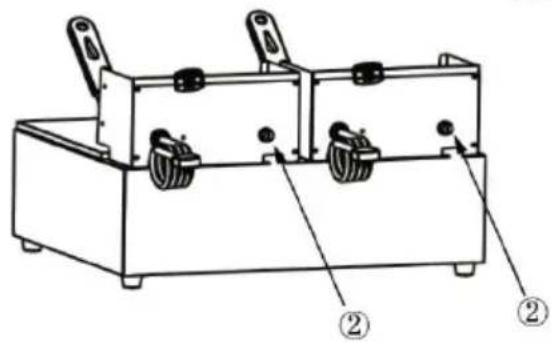
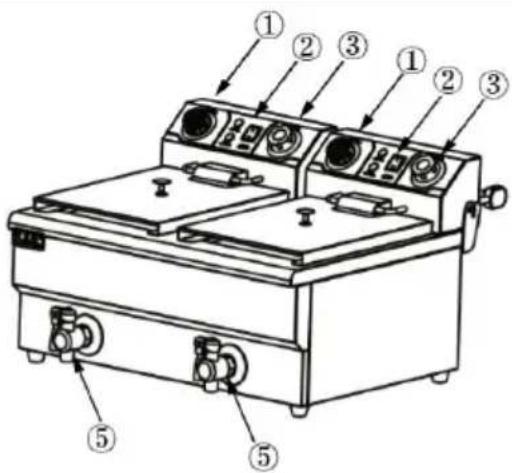
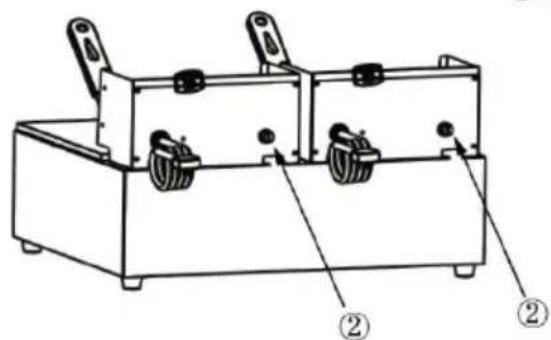
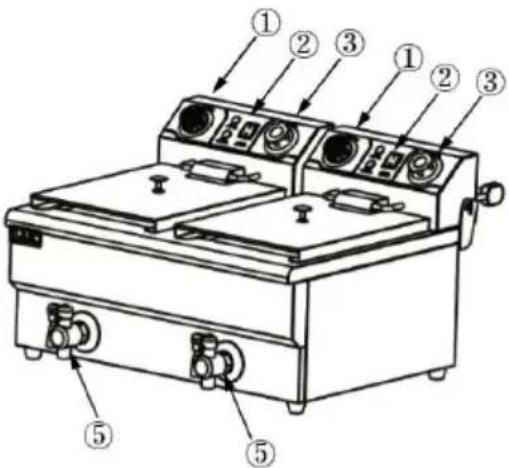
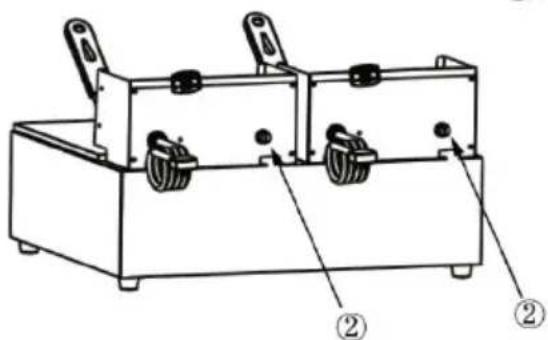
① Temperature knob
② Reset protecting button
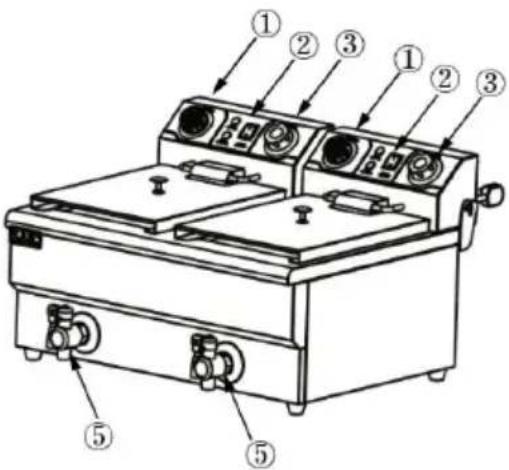
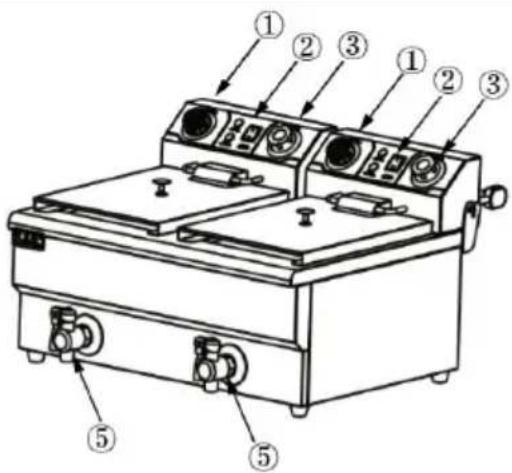
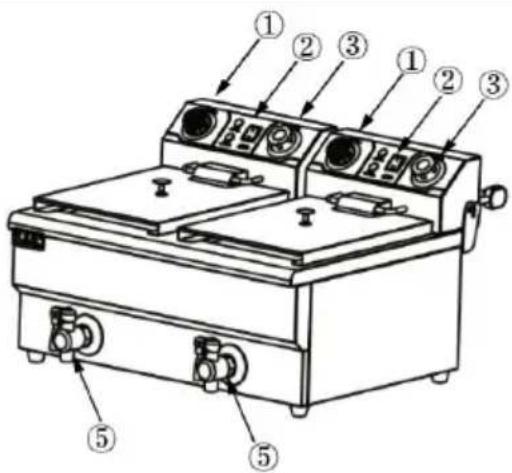
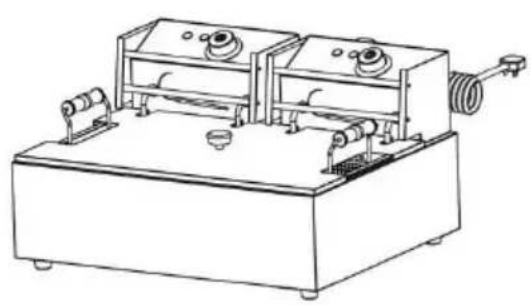
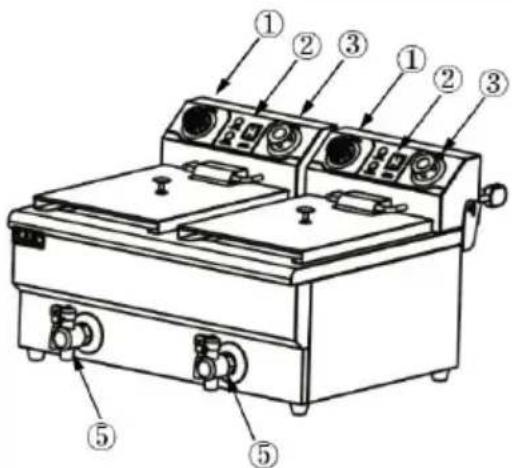
MODEL: SC-102V
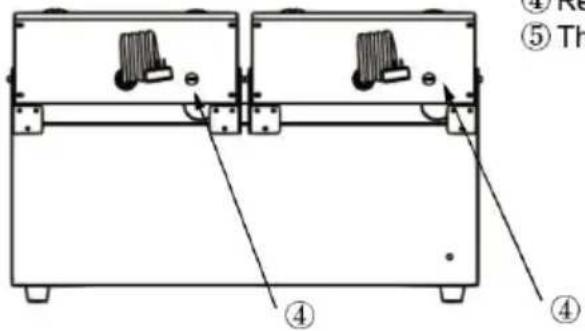
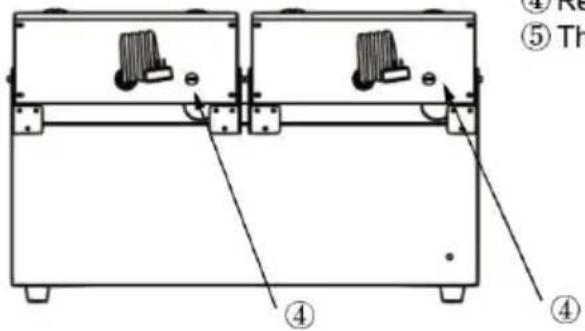
Attention:
If the product is not powered on, please unplug the power core and wait for the machine to cool down before checking the Reset protecting button and timer set
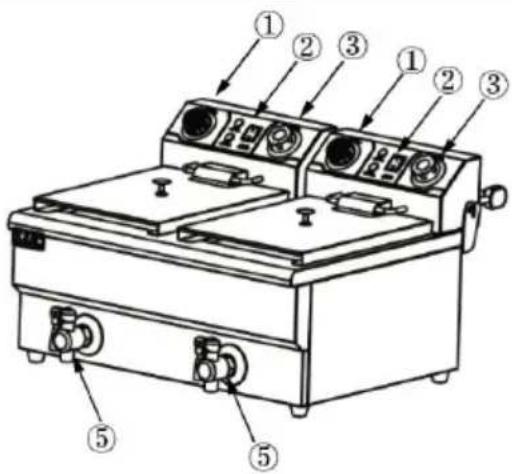
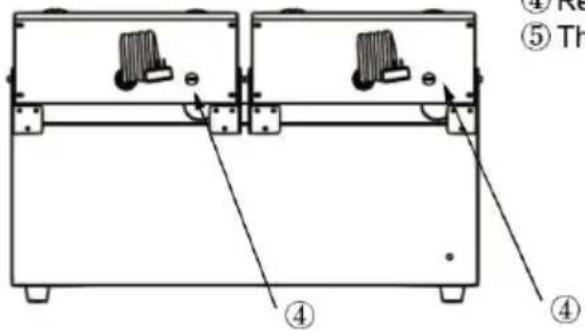
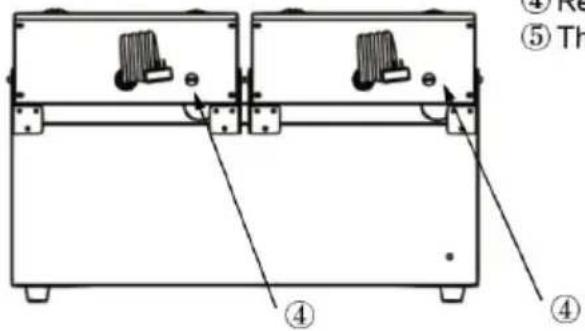
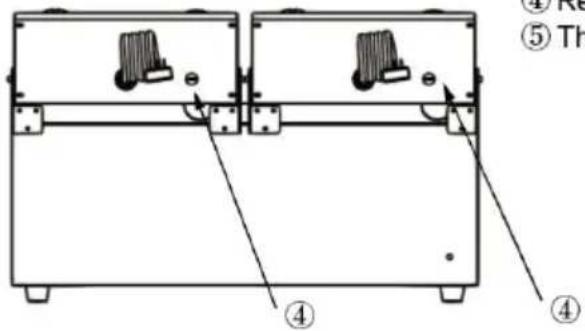
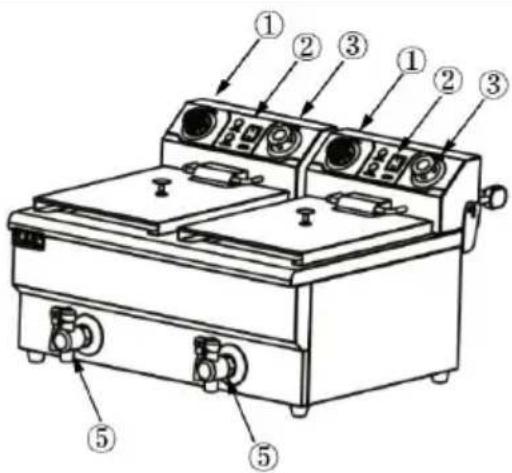
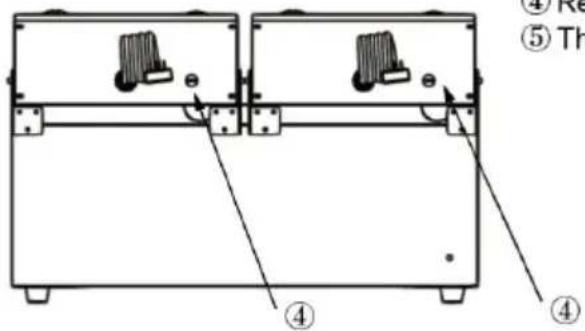
① Temperature knob
② Power switch
③ Time knob
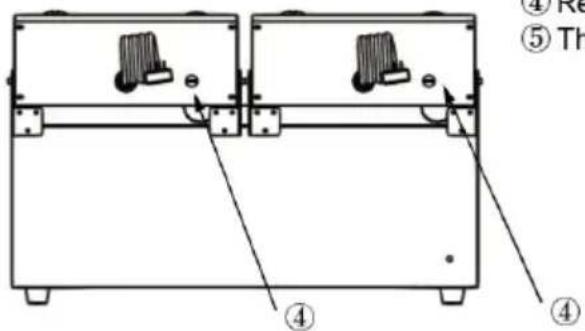
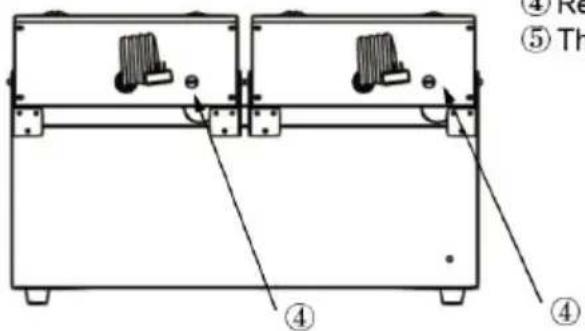
④ Reset protecting button
⑤ The tap
OPERATING INSTRUCTIONS
Before using the appliance for the first time, peel off any promote materials and packaging materials, and check that the cooking plates are clean and free of dust. If necessary, wipe them over damp cloth. Spread over with an absorbent kitchen towel and w off any excess oil. When your appliance is heated for the first may emit slight smoke or odor, which is normal for many heat appliances, and will not affect the safety of your appliance.
Please dispose of all plastic bags carefully and keep them away children and pet.
- Place the machine on a clean, dry, level surface near a plu outlet.
- Plug the cord into the wall outlet.
- The user should place the oil on the half fryer when in use
- Turn on the power switch (SC-82 has no power switch), and green indicator light will be on while power is supplied to the turn the temperature knob clockwise to adjust the temperature to the desired temperature. At the same time, the red indicator light on, indicating that the electric heater begins to heat up and the temperature of the oil starts to rise.
- When the temperature rises to the desired level, the heat controller will automatically cut off, while the red indicator light g out and the electric heater stops heating.
- When the temperature is slightly lower, the heat controller will automatically energize, the red indicator light and the green indicator light will be on, the electric heater will work again and the temperature will rise.
- After finished, for safety, please turn the temperature knob counterclockwise to the limit position and cut off the power.
NOTE: It works in this way repeatedly in order to make sure temperature is certain in a range.
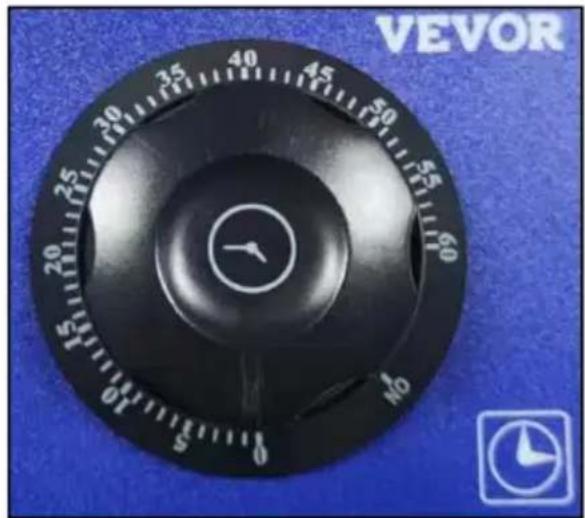
Only SC-101V/SC-102V requires setting a timer, SC-82/SC-83 does not require it.
- If you turn the time knob to the machine will remain powered.
- If you adjust the time knob "0-60 minute" range, the timer v start counting down and the power will be cut off after the time is completed.
Attention:
Never leave it unattended while the "0-60min" countdown function cooking failures.
natural_image
Close-up of a black VEVOR analog dial with rotary knob and scale, set against blue background (no text or symbols on dial face)to avoid safety accidents and
TIPS & HINTSIONS
- Cover is designed for keeping warm and clean. When user cover, user should make sure there is no water on it in case of draws into pot and hot oil splashes.
- Enclosed special basket is used for frying small piece of foo There is a hanger and a handle on the basket. Put basket in producing. After finishing, hang up the basket and filter out the excess oil.
- The back plate is designed to protect the electric heating tube. When frying food, the back plate must be placed in the oil pan
-
When user uses it, user should keep OIL OVER HALF OIL I AND OIL DO NOT EXCEED THE HIGHEST LINE.
-
BE CAREFUL OF OIL SPLASHING DURING OPERATION.
-
The tap can be used to drain the cooling oil, but please er that the tap is TURNED OFF when the power is turned on.---O FOR SC-102V
NOTE: Each fryer with a temperature range of 50-200°C
(122°F-392°F) has an "overheat reset protection button" which will function to protect the machine when the temperature is higher the set value. When used again, the user should press the pro button to reset it and then the user can use it normally.
CLEANING AND MAINTENANCE
- Once you have finished using, remove the plug from the ele outlet. Leave the top lid open and allow the grids to cool down completely before cleaning.
- If user wants to pour oil out of pot, user should do it after temperature of oil lowers to normal. First, the user takes out the basket and back plate, then cut off electricity and turnover control box (at this moment electric heating tubes in pot are erect) or u takes out controlling box and puts it on a dry place so that us take out oil pot and clean it.
- User should clean residue in oil and filth on electric heating a regular time.
- For the exterior, wipe with a soft, dry cloth. dry cloth. Never abrasive cleanser or harsh pad.
- Any other servicing should be provided by an Authorized Ser Representative.
CAUTION:
- Never immerse cord, plug or unit in water or other liquid
- In order to avoid a hazard due to inadvertent resetting of thermal cutout, this appliance must not be supplied through external switching device, such as a timer, or connected to circuit that is regularly switched on and off by the utility.
STORAGE
- Always unplug the machine before storage.
- Always make sure the machine is cleaning cool and dry before string.
VEVOR®
TOUGH TOOLS, HALF PRICE
Technical Support and E-Warranty Certificate
www.vevor.com/support
VEVOR®
TOUGH TOOLS, HALF PRICE
natural_image
Line drawing of two industrial machines with control knobs and a coiled spring (no text or symbols)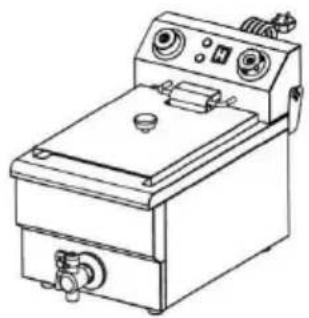
natural_image
Line drawing of a portable electrical or gas stove with control panel and buttons (no text or symbols)MODÈLE : SC-83 MODÈLE : SC-102V
natural_image
Line drawing of a mechanical device with two rectangular chambers and a coiled spring (no text or symbols)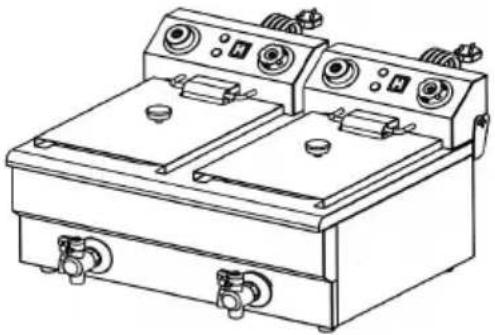
natural_image
Line drawing of a dual-bay electrical stove with control panel and side gauges (no text or symbols)BESOIN D'AIDE? CONTACTEZ-NOUS!
If the product is not powere on, please unplug the power cord and wait for the mach to cool down before checking the Reset protecting button
MODEL: SC-82 / Attention:
If the product is not powered on, please unplug the power cord and wait for the machine to cool down before checking the Reset protecting button !
① Temperature knob
② Reset protecting button
MODEL: SC-102V
Attention:
If the product is not powered on, please unplug the power core and wait for the machine to cool down before checking the Reset protecting button and timer set
① Temperature knob
② Power switch
③ Time knob
④ Reset protecting button
⑤ The tap
OPERATING INSTRUCTIONS
natural_image
Close-up of a black VEVOR analog dial with rotary knob and scale, set against blue background (no readable text or symbols beyond branding)CLEANING AND MAINTENANCE
www.vevor.com/support
natural_image
Line drawing of a laboratory apparatus with two rectangular chambers and a coiled tube, no text or symbols present.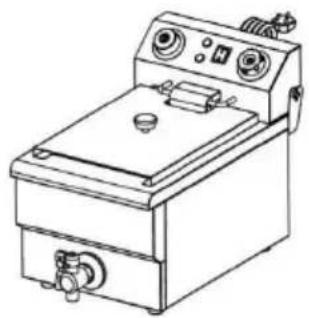
natural_image
Line drawing of a portable electrical appliance with control panel and buttons (no text or symbols)MODELL: SC-83 MODELL: SC-102V
natural_image
Line drawing of a laboratory apparatus with two rectangular chambers and a coiled tube, no text or symbols present.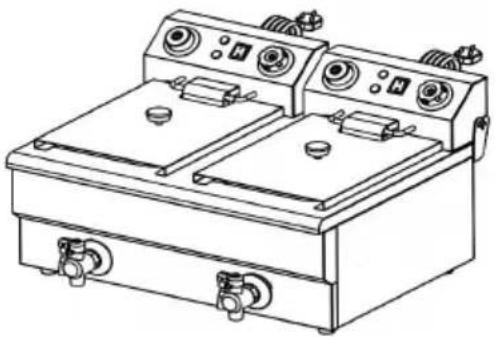
natural_image
Line drawing of a dual-bay electric stove or gas stove with control panels and buttons (no text or symbols)If the product is not powere on, please unplug the power cord and wait for the mach to cool down before checkin the Reset protecting button
natural_image
Line drawing of a simple gas stove or pressure vessel with control panel and side gauges (no text or symbols)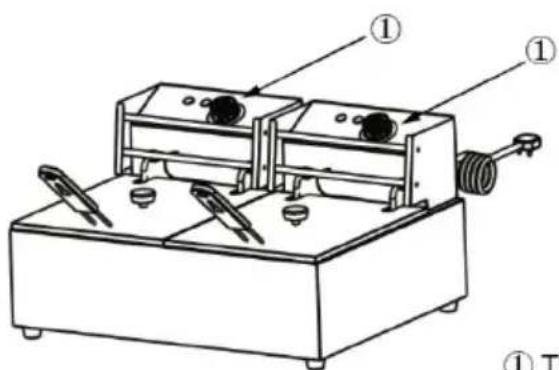
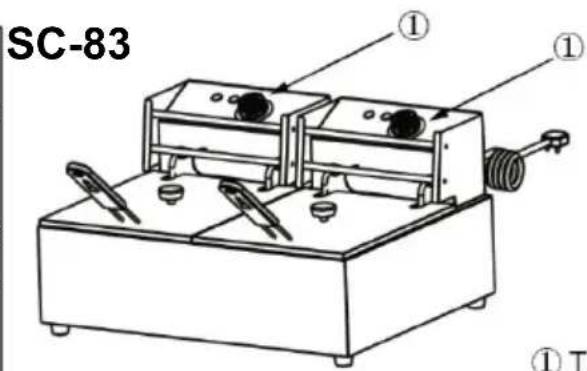
MODEL: SC-82 / Attention: If the product is not powered on, please unplug the power cord and wait for the machine to cool down before checking the Reset protecting button.
SC-83
① Temperature knob
② Reset protecting button
MODEL: SC-102V
Attention:
If the product is not powered on, please unplug the power core and wait for the machine to cool down before checking the Reset protecting button and timer set
① Temperature knob
② Power switch
③ Time knob
④ Reset protecting button
⑤ The tap
OPERATING INSTRUCTIONS
natural_image
Close-up of a black VEVOR analog dial with a white clock face on the dial, set against a blue background (no readable text or symbols beyond brand name)Aufmerksamkeit:
CLEANING AND MAINTENANCE
www.vevor.com/support
VEVOR®
TOUGH TOOLS, HALF PRICE
natural_image
Line drawing of a laboratory apparatus with two rectangular chambers and a coiled tube, no text or symbols present.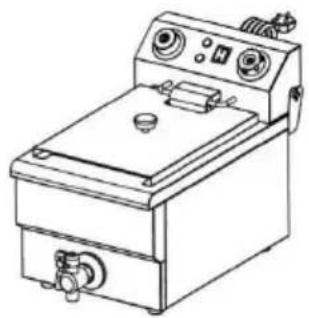
natural_image
Line drawing of a portable electrical appliance with control panel and buttons (no text or symbols)natural_image
Line drawing of a laboratory apparatus with two rectangular chambers and a coiled tube, no text or symbols present.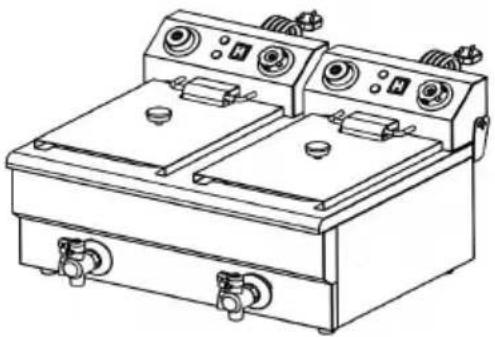
natural_image
Line drawing of a dual-bay electric stove or gas stove with control panels and buttons (no text or symbols)HO BISOGNO DI AIUTO? CONTATTACI!
If the product is not powere on, please unplug the power cord and wait for the mach to cool down before checking the Reset protecting button
MODEL: SC-82 / Attention:
If the product is not powered on, please unplug the power cord and wait for the machine to cool down before checking the Reset protecting button !
① Temperature knob
② Reset protecting button
MODEL: SC-102V
Attention:
If the product is not powered on, please unplug the power core and wait for the machine to cool down before checking the Reset protecting button and timer set
① Temperature knob
② Power switch
③ Time knob
④ Reset protecting button
⑤ The tap
OPERATING INSTRUCTIONS
natural_image
Close-up of a black VEVOR analog dial with rotary knob and minute hand (no text or symbols on dial face)CLEANING AND MAINTENANCE
www.vevor.com/support
VEVOR®
TOUGH TOOLS, HALF PRICE
natural_image
Line drawing of a laboratory apparatus with two rectangular chambers and a coiled tube, no text or symbols present.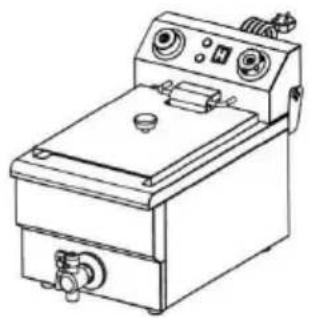
natural_image
Line drawing of a portable electrical or gas stove with control panel and buttons (no text or symbols)MODELO: SC-83 MODELO: SC-102V
natural_image
Line drawing of a laboratory apparatus with two rectangular chambers and a coiled tube, no text or symbols present.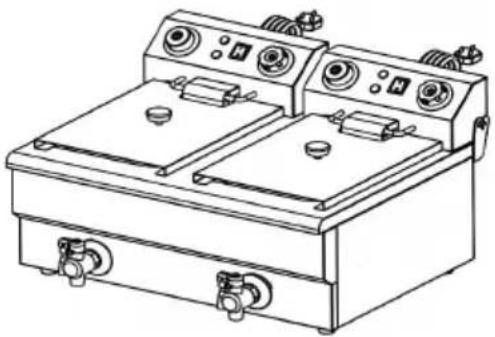
natural_image
Line drawing of a dual-bay electric stove or gas stove with control panels and buttons (no text or symbols)If the product is not powere on, please unplug the power cord and wait for the mach to cool down before checking the Reset protecting button
MODEL: SC-82 / Attention:
If the product is not powered on, please unplug the power cord and wait for the machine to cool down before checking the Reset protecting button !
① Temperature knob
② Reset protecting button
MODEL: SC-102V
Attention:
If the product is not powered on, please unplug the power core and wait for the machine to cool down before checking the Reset protecting button and timer set
① Temperature knob
② Power switch
③ Time knob
④ Reset protecting button
⑤ The tap
OPERATING INSTRUCTIONS
natural_image
Close-up of a black VEVOR analog dial with rotary knob and minute hand (no text or symbols on dial face)CLEANING AND MAINTENANCE
www.vevor.com/support
VEVOR®
TOUGH TOOLS, HALF PRICE
www.vevor.com/support
ELEKTRYCZNY Z PODWÓJNYM ZBIORNIKIEM
FRYTKOWNICA
natural_image
Line drawing of a laboratory apparatus with two rectangular chambers and a coiled tube, no text or symbols present.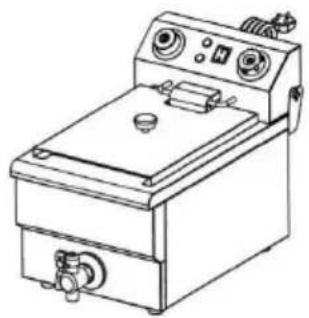
natural_image
Line drawing of a portable electrical appliance with control panel and buttons (no text or symbols)MODEL: SC-83 MODEL: SC-102V
natural_image
Line drawing of a laboratory apparatus with two rectangular chambers and a coiled tube, no text or symbols present.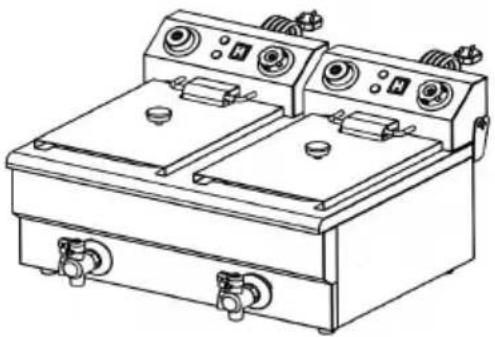
natural_image
Line drawing of a dual-bay electric stove or gas stove with control panels and buttons (no text or symbols)POTRZEBUJE POMOCY? SKONTAKTUJ SIĘ Z NAMI!
If the product is not powere on, please unplug the power cord and wait for the mach to cool down before checking the Reset protecting button
MODEL: SC-82 / Attention:
If the product is not powered on, please unplug the power cord and wait for the machine to cool down before checking the Reset protecting button !
① Temperature knob
② Reset protecting button
MODEL: SC-102V
Attention:
If the product is not powered on, please unplug the power core and wait for the machine to cool down before checking the Reset protecting button and timer set
① Temperature knob
② Power switch
③ Time knob
④ Reset protecting button
⑤ The tap
OPERATING INSTRUCTIONS
natural_image
Close-up of a black VEVOR analog dial with no visible text or symbols on the dial face, set against a blue background (no readable text beyond brand name and dial number)CLEANING AND MAINTENANCE
www.vevor.com/support
VEVOR®
TOUGH TOOLS, HALF PRICE
Technisch Ondersteuning en e-garantiecertificaat www.vevor.com/support
natural_image
Line drawing of a laboratory apparatus with two rectangular chambers and a coiled tube, no text or symbols present.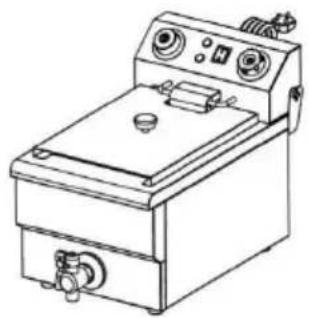
natural_image
Line drawing of a portable electrical appliance with control panel and buttons (no text or symbols)MODEL: SC-83 MODEL: SC-102V
natural_image
Line drawing of a laboratory apparatus with two rectangular chambers and a coiled tube, no text or symbols present.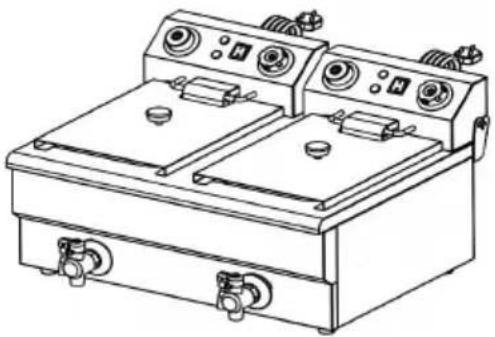
natural_image
Line drawing of a dual-bay electric stove or gas stove with control panels and buttons (no text or symbols)HULP NODIG? NEEM CONTACT MET ONS OP!
If the product is not powere on, please unplug the power cord and wait for the mach to cool down before checkin the Reset protecting button
natural_image
Line drawing of a simple gas stove or oven with control panel and side gauges (no text or symbols)MODEL: SC-82 / Attention:
If the product is not powered on, please unplug the power cord and wait for the machine to cool down before checking the Reset protecting button !
① Temperature knob
② Reset protecting button
MODEL: SC-102V
Attention:
If the product is not powered on, please unplug the power core and wait for the machine to cool down before checking the Reset protecting button and timer set
① Temperature knob
② Power switch
③ Time knob
④ Reset protecting button
⑤ The tap
OPERATING INSTRUCTIONS
natural_image
Close-up of a black VEVOR instrument dial with no visible text or symbols on the dial, set against a blue background (no readable text beyond branding)CLEANING AND MAINTENANCE
www.vevor.com/support
VEVOR®
TOUGH TOOLS, HALF PRICE
natural_image
Line drawing of a laboratory apparatus with two rectangular chambers and a coiled tube, no text or symbols present.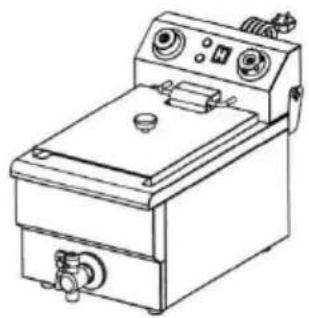
natural_image
Line drawing of a portable electrical or gas stove with control panel and buttons (no text or symbols)MODELL: SC-83 MODELL: SC-102V
natural_image
Line drawing of a laboratory apparatus with two rectangular chambers and a coiled tube, no text or symbols present.
natural_image
Line drawing of a dual-bay electric stove or gas stove with control panels and buttons (no text or symbols)BEHÖVS HJÄLP? KONTAKTA OSS!
If the product is not powere on, please unplug the power cord and wait for the mach to cool down before checkin the Reset protecting button
natural_image
Line drawing of a portable electric stove or gas stove with control panel and side gauges (no text or symbols)MODEL: SC-82 / Attention:
If the product is not powered on, please unplug the power cord and wait for the machine to cool down before checking the Reset protecting button !
① Temperature knob
② Reset protecting button
MODEL: SC-102V
Attention:
If the product is not powered on, please unplug the power core and wait for the machine to cool down before checking the Reset protecting button and timer set
① Temperature knob
② Power switch
③ Time knob
④ Reset protecting button
⑤ The tap
OPERATING INSTRUCTIONS
natural_image
Close-up of a black VEVOR analog dial with a white clock face on the knob, set against a blue background (no readable text or symbols beyond brand and scale)CLEANING AND MAINTENANCE
www.vevor.com/support