
TLM2310-4S - Heat press Vevor - Free user manual and instructions
Find the device manual for free TLM2310-4S Vevor in PDF.
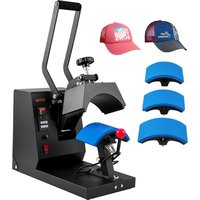


| Product Type | Heat Press |
| Brand | Vevor |
| Model | TLM2310-4S |
| Dimensions (package) | 56 × 31 × 40.5 cm (L × W × H) |
| Net Weight | 12.3 kg |
| Gross Weight | 13.7 kg |
| Power Supply (US) | 120 V ~ 50/60 Hz, 580 W |
| Power Supply (Europe) | 220-240 V ~ 50/60 Hz, 555 W |
| Adjustable Temperature Range | 0-299 °C (0-570 °F) |
| Timer Range | 0-999 seconds |
| Display | Digital (temperature and time) |
| Celsius/Fahrenheit Switch | Yes |
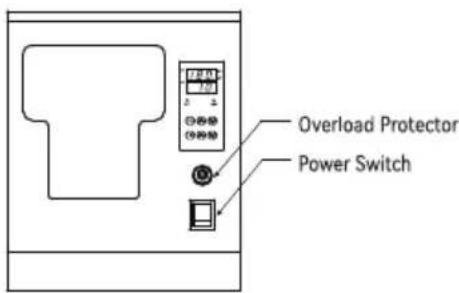
| Overload Protection | Fuse |
| On/Off Switch | Yes |
| Main Use | Transfer of patterns onto textiles, cups, plates |
| Safety Instructions | Do not disassemble, use a proper outlet, avoid moisture |
| Maintenance | Clean with a soft cloth, do not use abrasive products |
| Spare Parts | Heating plate, relay, fuse |
| Compliance | FCC Part 15, WEEE Directive 2012/19/EC |
Frequently Asked Questions - TLM2310-4S Vevor
User questions about TLM2310-4S Vevor
0 question about this device. Answer the ones you know or ask your own.
Ask a new question about this device
Download the instructions for your Heat press in PDF format for free! Find your manual TLM2310-4S - Vevor and take your electronic device back in hand. On this page are published all the documents necessary for the use of your device. TLM2310-4S by Vevor.
USER MANUAL TLM2310-4S Vevor
Technical Support and E-Warranty Certificate www.vevor.com/support
HEAT PRESS MACHINE USER MANUAL
We continue to be committed to provide you tools with competitive price. "Save Half", "Half Price" or any other similar expressions used by us only represents an estimate of savings you might benefit from buying certain tools with us compared to the major top brands and does not necessarily mean to cover all categories of tools offered by us. You are kindly reminded to verify carefully when you are placing an order with us if you are actually saving half in comparison with the top major brands.
TLM2310-4S
NEED HELP? CONTACT US!
Have product questions? Need technical support? Please feel free to contact us:
Technical Support and E-Warranty Certificate
www.vevor.com/support
This is the original instruction, please read all manual instructions carefully before operating. VEVOR reserves clear interpretation of our user manual. The appearance of the product shall be subject to the product you received. Please forgive us that we won't inform you again if there is any technology or software updates on our product.
CONTENTS
Safety Precautions 02
Introduction of Heat Press Machine 04
Internal Parts 04
Assembly and Disassembly of the Machine 05
Switch Between Fahrenheit and Celsius 05
Operation of the Device 06
Accessory Replacement 07
Application Range 08
Analysis of Common Faults 09
SAFETY INSTRUCTION
When using electrical appliances, basic safety precautions should always be followed including the following:

Warning - To reduce the risk of injury, the user must read the instruction manual
carefully and save these instructions.
 | This symbol, placed before a safety comment, indicates a kind of precaution, warning, or danger. Ignoring this warning may lead to an accident. To reduce the risk of injury, fire, or electrocution, please always follow the recommendation shown below. |
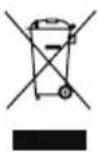 | This product is subject to the provision of European Directive 2012/19/EC. The symbol showing a wheelie bin crossed through indicates that the product requires separate refuse collection in the European Union. This applies to the product and all accessories marked with this symbol. Products marked as such may not be discarded with normal domestic waste, but must be taken to a collection point for recycling electrical and electronic devices |
 | This device complies with Part 15 of the FCC Rules.Operation is subject to the following two conditions:(1)This device may not cause harmful interference, and (2)this device must accept any interference received,including interference that may cause undesired operation. |

Warning:
- Warnings must be followed carefully to avoid bodily injury. Improper use may result in electric shock, fire, personal injury, and other damage;
1) Keep unplugged when moving the machine. 2) Keep unplugged when installing accessories. 3) Place on a flat and stable platform and operate under ventilated conditions. 4) Wear special protective equipment when operating the machine. 5) Do not use this machine in a hazardous location. 6) Do not use when the machine is not working properly. 7) Do not disassemble or repair this machine. 8) Do not use an unsuitable AC outlet. 9) Do not touch the heating plate when the machine is heating. 10) Do not use in a humid environment or contact with water. Do not allow liquid to infiltrate the machine to prevent fire or electric shock caused by short circuit. 11) Do not use a power supply that does not meet the rated voltage. A power supply that does not meet the specified voltage may cause fire or electric shock. 12) Ensure that the machine is grounded so as not to cause harm to the body. 13) Do not touch the rotating rod or bearing parts with your fingers during use to avoid injury. 14) If the machine is not in use for a long time, unplug the power cord from the socket. 15) Do not use the machine during thunderstorms or lightning to avoid damage to the machine. 16) Place the machine smoothly on a flame-retardant table and keep it away from flammable and explosive items. 17) If the machine smokes, emits a peculiar smell, becomes noisy, or shows other abnormal conditions, stop using it. 18) This appliance can be used by children aged 8 years and above and persons with reduced physical, sensory, or mental capabilities or lack of experience and knowledge if they have been given supervision or instruction concerning use of the appliance in a safe way and understand the hazards involved. Children shall not play with the appliance. Cleaning and user maintenance shall not be made by children without supervision. 2) Type Y attachment: If the supply cord is damaged, it must be replaced by the manufacturer, its service agent, or similarly qualified persons in order to avoid a hazard. 3) In order to avoid a hazard due to inadvertent resetting of the thermal cutout, this appliance must not be supplied through an external switching device, such as a timer, or connected to a circuit that is regularly switched on and off by the utility.
INTRODUCTION OF HEAT PRESS MACHINE
| Mode | TLM2310-4S |
| Temperature Range | 0-570°F/0-299°C |
| Timer Range | 0-999s |
| Rated voltage/frequency | 120V~ 50/60Hz 580W For US users |
| 220-240V~ 50/60Hz 555W For European users | |
| Package Size | 22×12.2×16 in / 56×31×40.5 cm |
| Product Weight | GW 13.7kg 30.2lbs | NW 12.3kg 27.1 lbs |

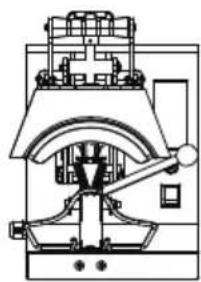
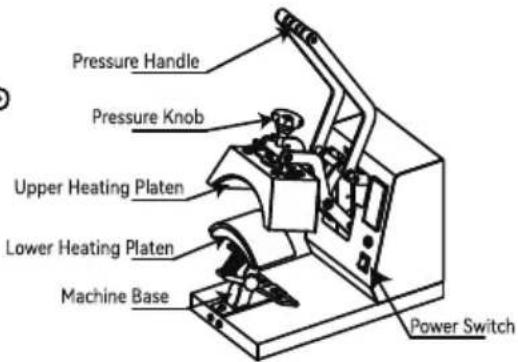
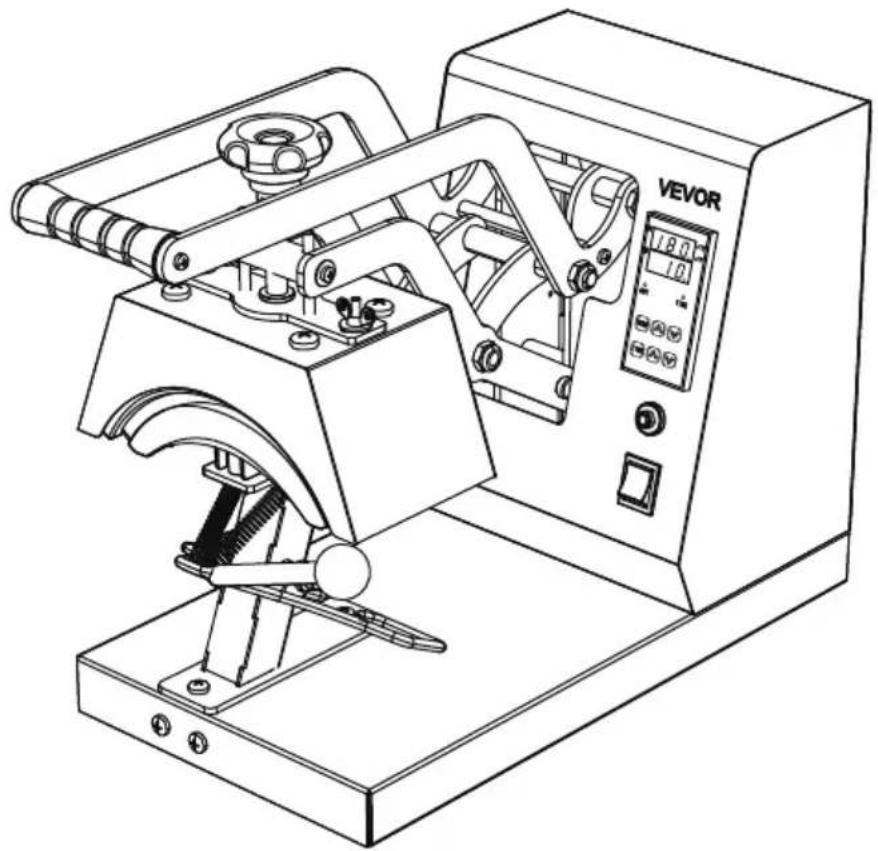
INTERNAL PARTS
A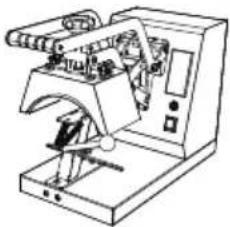 | B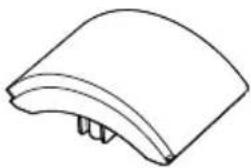 170x98mm (6.7x3.86 in) 170x98mm (6.7x3.86 in) | C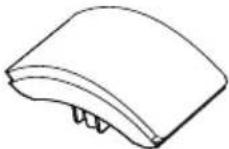 151x76mm (6x3 in) 151x76mm (6x3 in) |
D 170x69mm (6.7x2.7 in) 170x69mm (6.7x2.7 in) | E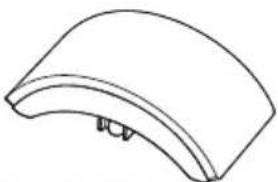 206x90mm (8.1x3.5 in) 206x90mm (8.1x3.5 in) | F Instruction manual Instruction manual |
Note: The cap press base has been installed in Machine A before delivery.
ASSEMBLY AND DISASSEMBLY OF THE MACHINE
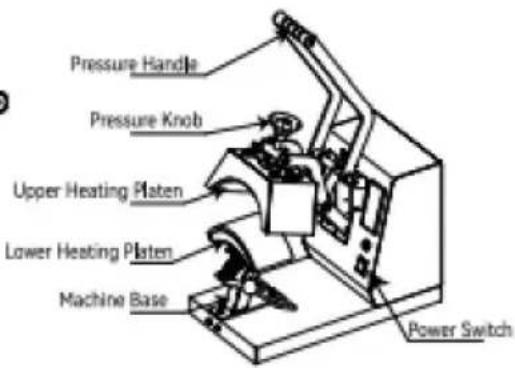
a. Connect the power supply
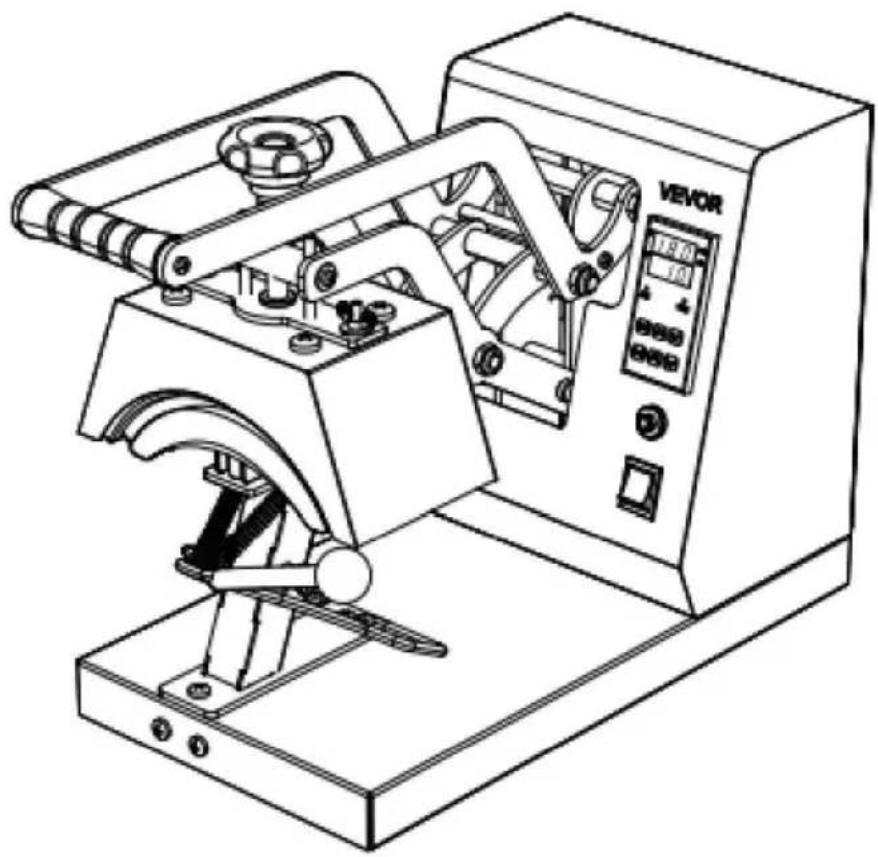
- Connect the plug to the power supply according to the voltage marked on the equipment package. Turn on the main switch and the power indicator lights up.
Type Y Connection :
If the power cable is damaged, it must be replaced by the manufacturer, service agency or a similarly qualified organization to avoid danger.
b. Parameter Setting
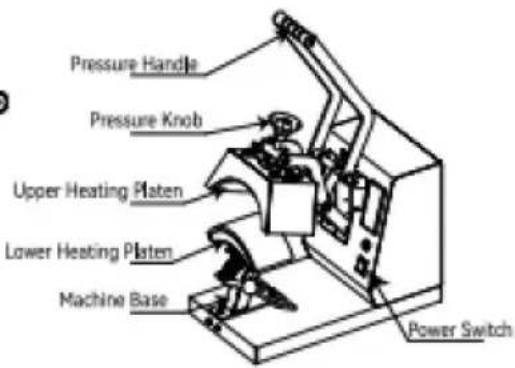
Temperature setting: On the initial state, click the “TEMP” key, and the temperature indicator starts to blink. Press the “A” or “V” key to set the required working temperature, and click the “TEMP” key to return to the initial screen.
TIME setting: Click the “TIME” key on the initial interface, and the indicator will blink. Press the “☐” or “☐” key to set the required working time, and click the “TIME” key to return to the initial interface.
SWITCHING BETWEEN CELSIUS AND FAHRENHEIT
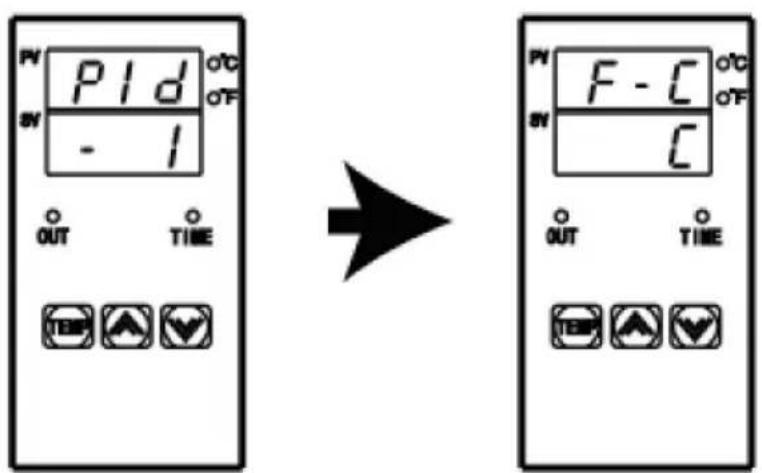
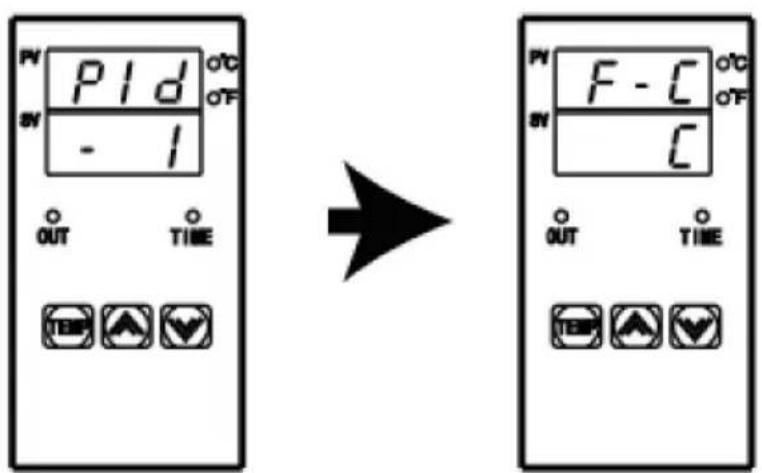
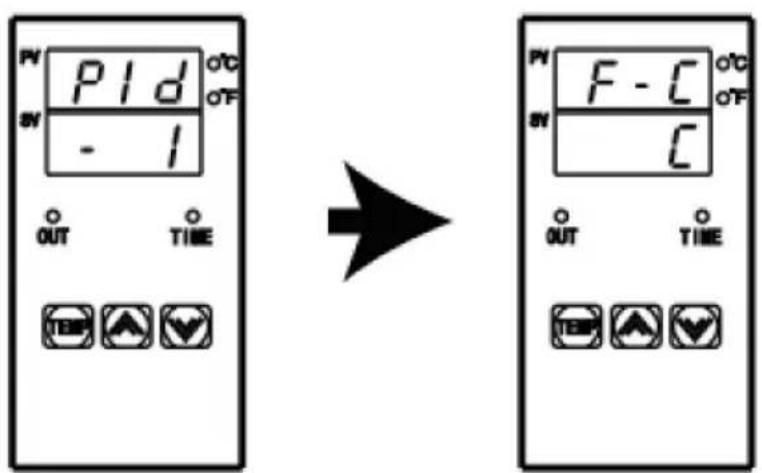
Long press the “☐” and “☑” key for 4 seconds at the same time to appear the interface as shown in the left picture, then click the “TEMP” key to appear the interface as shown in the second picture, then click “☐” to switch to Fahrenheit, and click “☑” to switch to Celsius. Finally, double-click “TEMP” to exit the setting mode and return to the initial state.
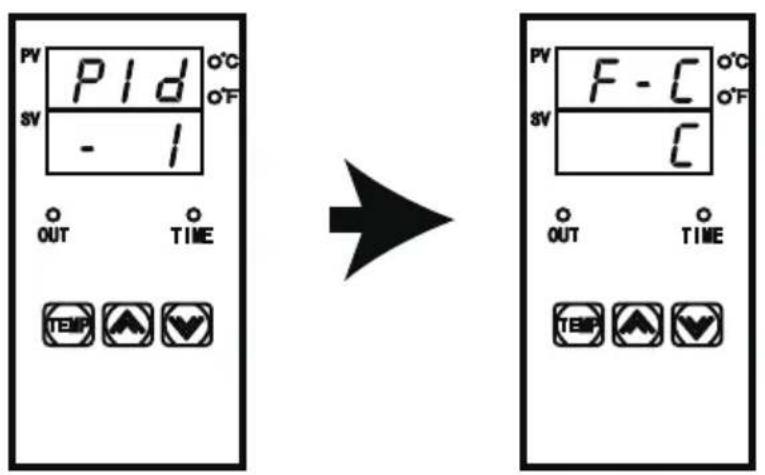
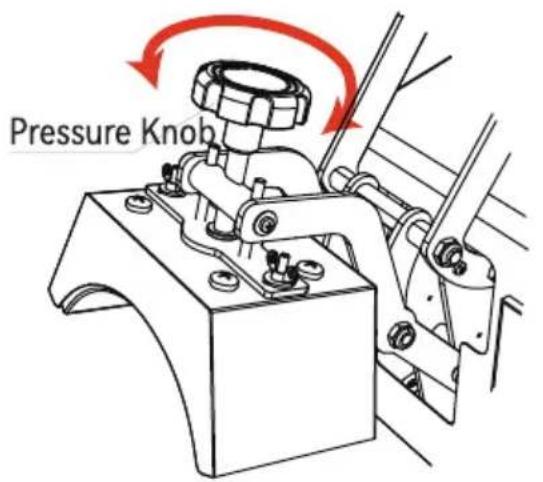
Fig 1
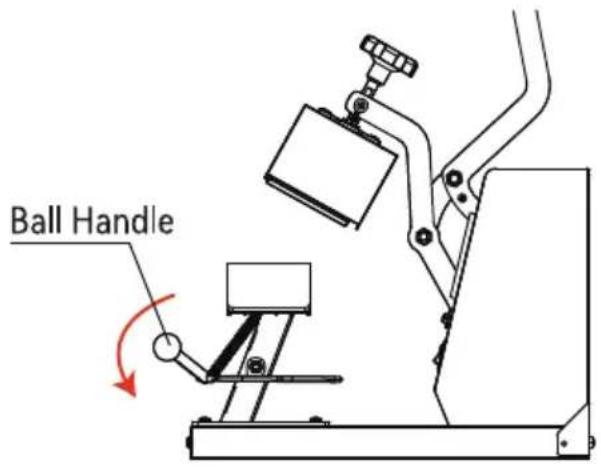
Fig 2
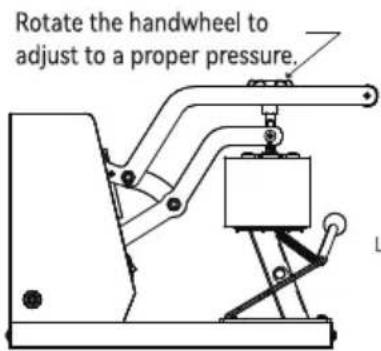
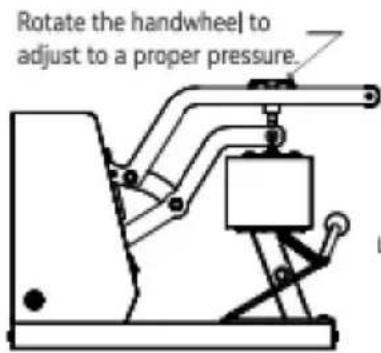
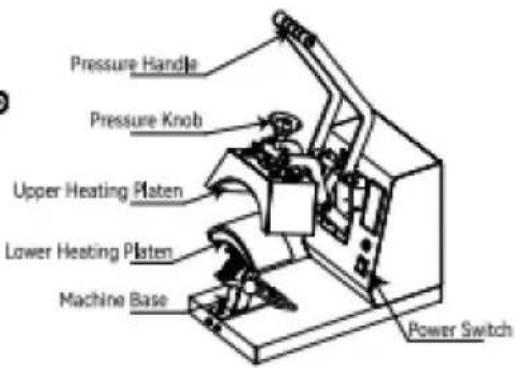
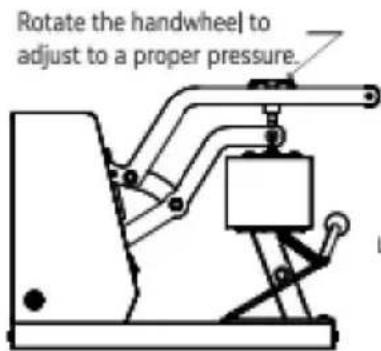
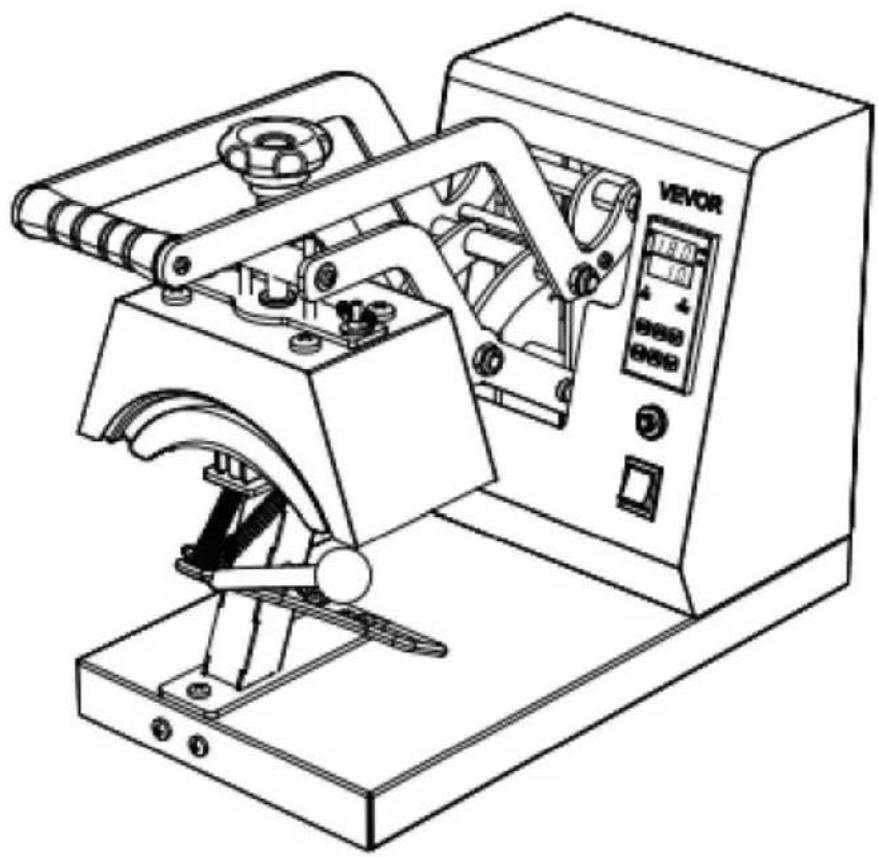
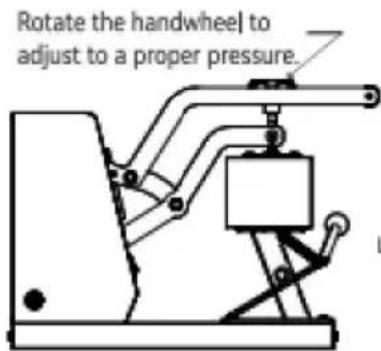
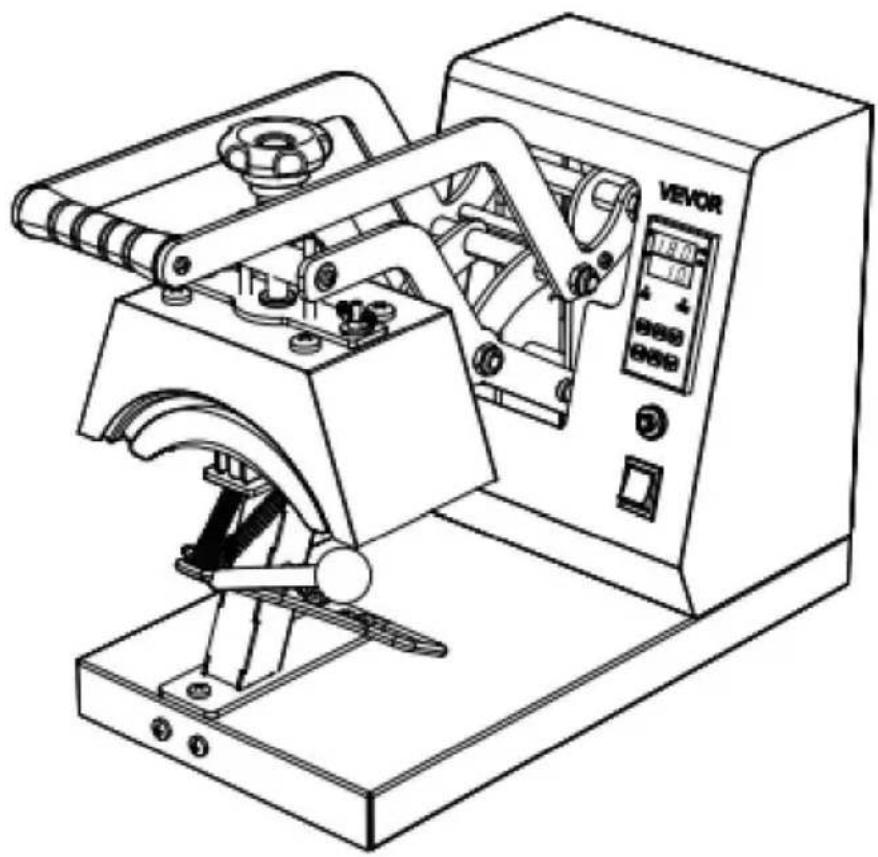
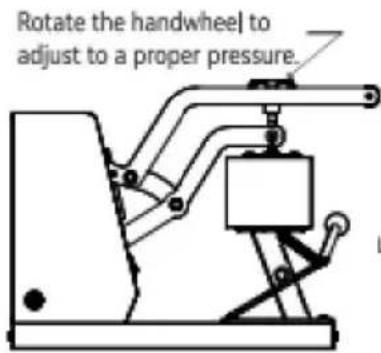
- Adjust the knob to the appropriate pressure. Turning the knob clockwise can increase the pressure of the equipment; Turning the knob counterclockwise can reduce the pressure of the device to the appropriate pressure.
- Press down the ball handle to open the cap press.
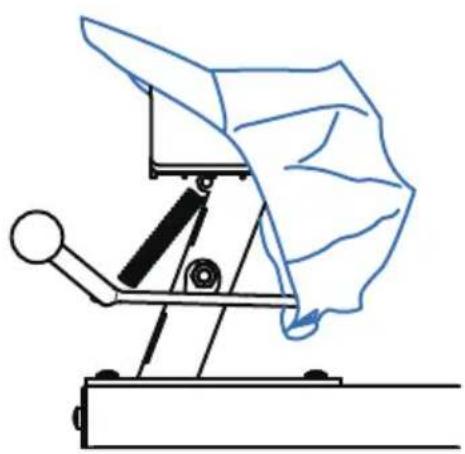
Fig 3
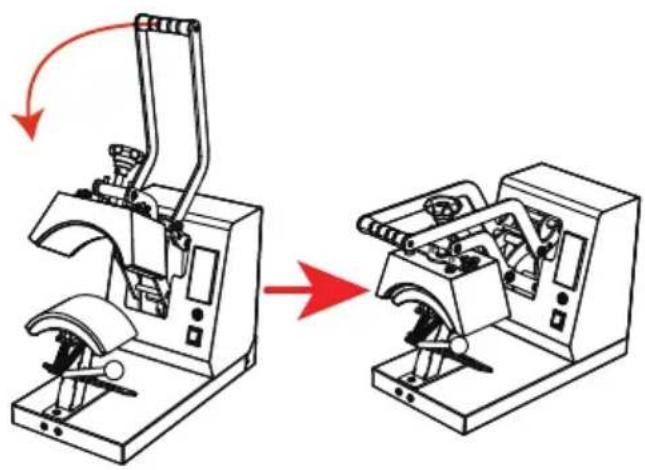
Fig 4
- Place the hat flat on the cap press, press down on the handle, and use the cap holder to smooth and fix the hat.
- When the machine reaches the set temperature, press the handle down to the bottom, and the timer will start counting. When the countdown is over, the machine will emit a beeping sound of "drip, drip, drip", at this time, lift the handle to complete the work.
ACCESSORY REPLACEMENT
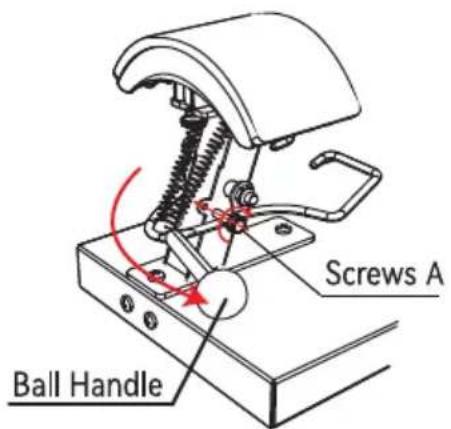
Fig 1
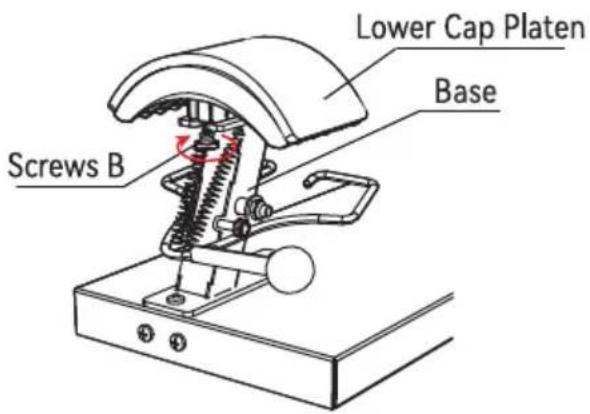
Fig 2
- Press down the Ball Handle and lock Screws A clockwise into the limit hole.
- Turn Screws B clockwise about 5-7 turns to loosen the Lower Cap Platen from the Base.
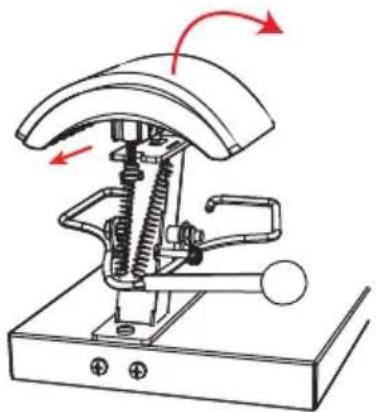
Fig 3
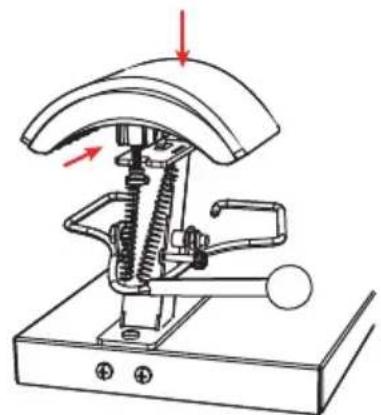
Fig 4
- Disconnect the Lower Cap Platen forward, and then remove this accessory upward.
- Install the Lower Cap Platen to be installed in Base from top to bottom and push back 1cm to snap into Mount.
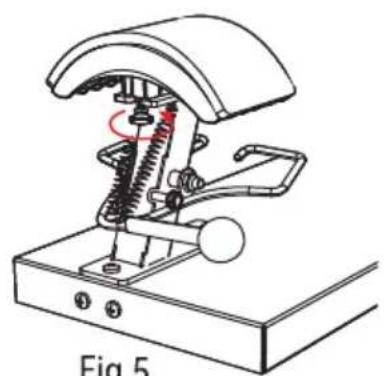
Fig 5
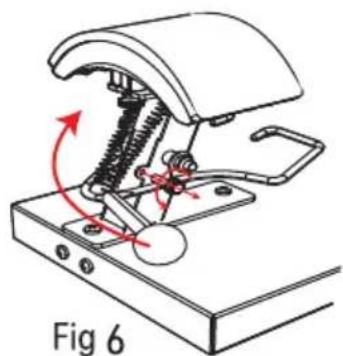
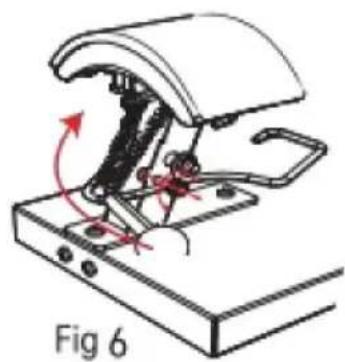
- Turn counterclockwise to lock Screws B.
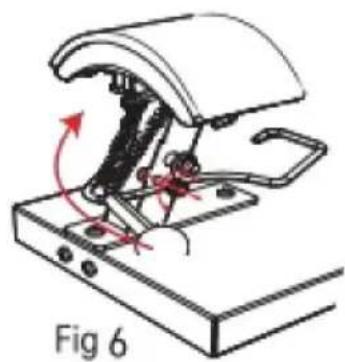
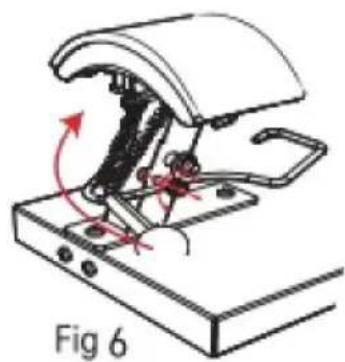
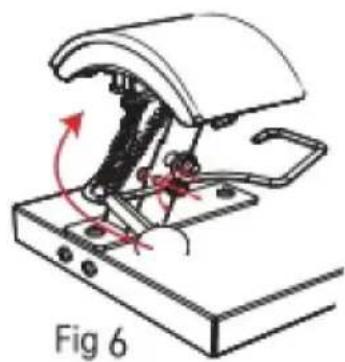
- With Screws A out of the restriction hole counterclockwise, lift up the Ball Handle and the accessory replacement is completed.
APPLICATION RANGE
| Example |  |  |  |
| Consumables | Dye Sublimation Paper | HTV | Vinyl |
| Temp | 180°C/356°F | 180°C/356°F | 170°C/338°F |
| Time | 60s | 7s | 15s |
| Common Faults | Fault Causes | Solution | |
| 1 | Unable to heat, but display works. | The heating platen or relay is damaged. | Contact the after-sales service to check whether the heating plate or relay is damaged. |
| 2 | Light color or faded image. | Insufficient heating time or temperature. | Adjust the temperature and/or increase the heating time. |
| 3 | Dark color or Fuzzy image. | Pressing time is too long or temperature is too high. | Adjust heating temperature and time. |
| 4 | Does not work after startup. | Whether the plug is in good contact. | Check that the plug is in good contact. |
| Whether the fuse is fused. | Check whether the fuse is fused. | ||
| 5 | The actual temperature exceeds the setting temperature. | Relay is disconnected. | Contact the after-sales service to replace the relay. |
VEVOR®
TOUGH TOOLS, HALF PRICE
Technical Support and E-Warranty Certificate
www.vevor.com/support
VEVOR®
TOUGH TOOLS, HALF PRICE
Technical Support and E-Warranty Certificate www.vevor.com/support
HEAT PRESS MACHINE USER MANUAL
We continue to be committed to provide you tools with competitive price. "Save Half", "Half Price" or any other similar expressions used by us only represents an estimate of savings you might benefit from buying certain tools with us compared to the major top brands and does not necessarily mean to cover all categories of tools offered by us. You are kindly reminded to verify carefully when you are placing an order with us if you are actually saving half in comparison with the top major brands.
VEVOR®
HEAT PRESS MACHINE
USER MANUAL
TLM2310-4S
NEED HELP? CONTACT US!
Have product questions? Need technical support? Please feel free to contact us:
This is the original instruction. Please read all manual instructions carefully before operating. VEVOR reserves the right to interpret our user manual. The appearance of the product shall be subject to the product you received. Please forgive us that we won't inform you again if there is any technology or software updates on our product.
CONTENTS
INTERNAL PARTS
A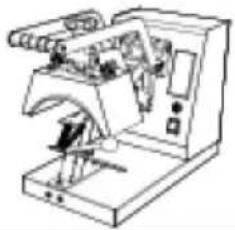 | B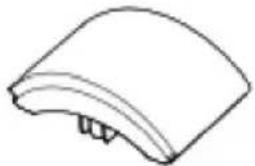 170x98mm (6.7x3.86 in) 170x98mm (6.7x3.86 in) | C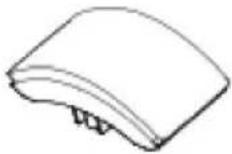 151x76mm (6x3 in) 151x76mm (6x3 in) |
D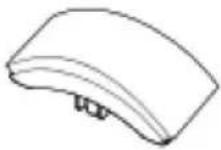 170x59mm (6.7x2.7 in) 170x59mm (6.7x2.7 in) | E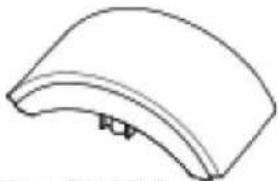 206x90mm (8.1x3.5 in) 206x90mm (8.1x3.5 in) | F Instruction manual Instruction manual |
Note: The cap press base has been installed in Machine A before delivery.
ASSEMBLY AND DISASSEMBLY OF THE MACHINE
a. Connect the power supply
- Connect the plug to the power supply according to the voltage marked on the equipment package. Turn on the main switch and the power indicator lights up.
Type Y Connection:
If the power cable is damaged, it must be replaced by the manufacturer, service agency, or a similarly qualified organization to avoid danger.
b. Parameter Setting
Temperature setting: On the initial state, click the “TEMP” key, and the temperature indicator starts to blink. Press the “A” or “V” key to set the required working temperature, and click the “TEMP” key to return to the initial screen.
TIME setting: Click the “TIME” key on the initial interface, and the indicator will blink. Press the “A” or “V” key to set the required working time, and click the “TIME” key to return to the initial interface.
SWITCHING BETWEEN CELSIUS AND FAHRENHEIT
Long press the “☐” and “☑” keys for 4 seconds at the same time to appear the interface as shown in the left picture, then click the “TEMP” key to appear the interface as shown in the second picture, then click “☐” to switch to Fahrenheit, and click “☑” to switch to Celsius. Finally, double-click “TEMP” to exit the setting mode and return to the initial state.
ADJUSTMENT AND USE OF EQUIPMENT
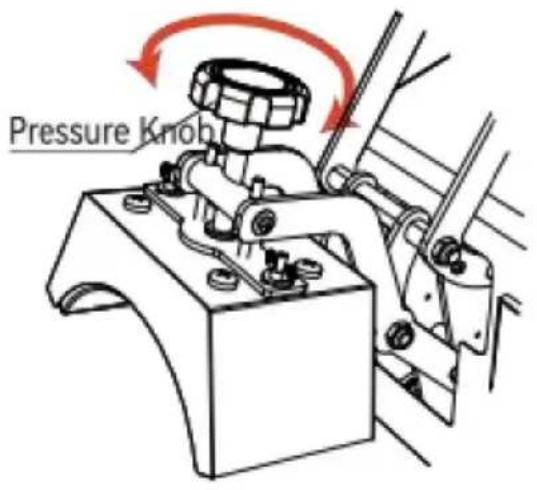
Fig 1
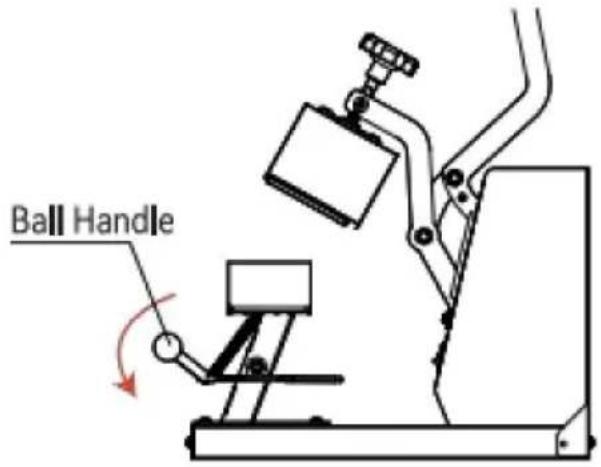
Fig 2
- Adjust the knob to the appropriate pressure. Turning the knob clockwise can increase the pressure of the equipment; turning the knob counterclockwise can reduce the pressure of the device to the appropriate pressure.
- Press down the ball handle to open the cap press.
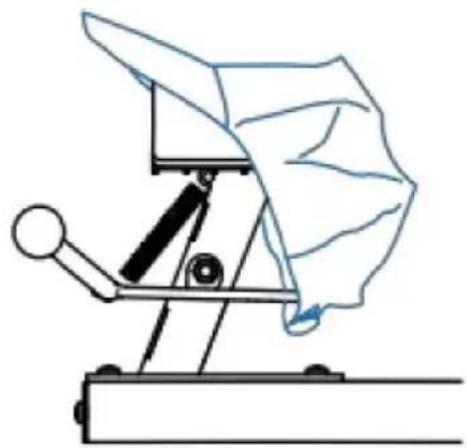
Fig 3
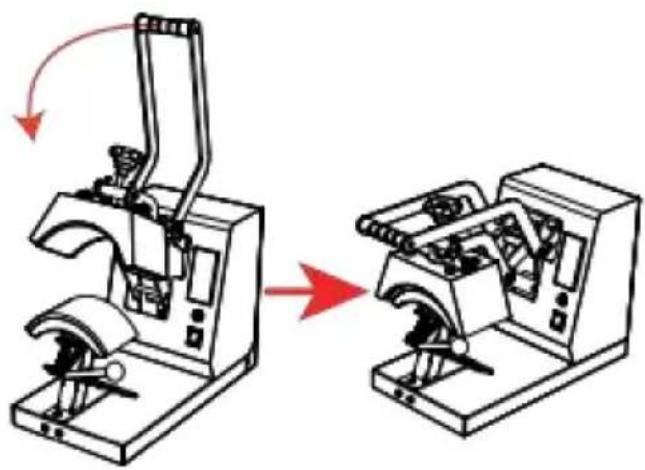
Fig 4
- Place the hat flat on the cap press, press down on the handle, and use the cap holder to smooth and fix the hat.
- When the machine reaches the set temperature, press the handle down to the bottom, and the timer will start counting. When the countdown is over, the machine will emit a beeping sound of "drip, drip, drip", at this time, lift the handle to complete the work.
ACCESSORY REPLACEMENT
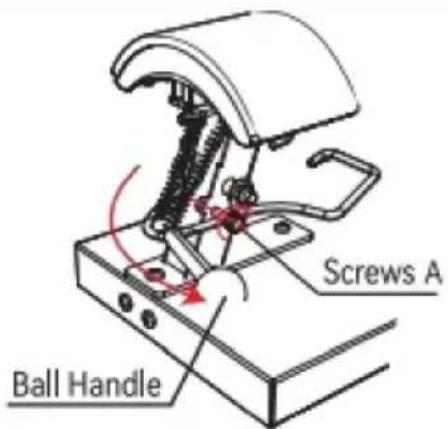
Fig 1
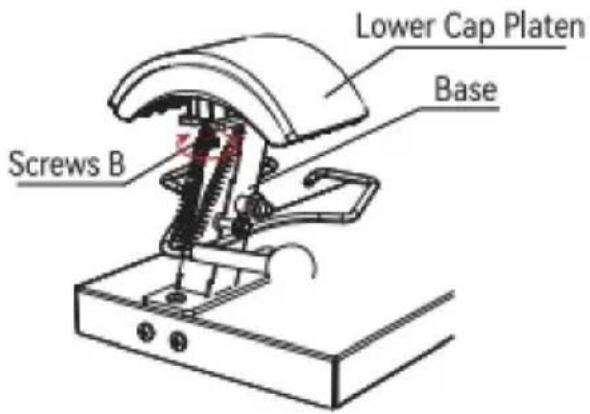
Fig 2
- Press down the Ball Handle and lock Screws A clockwise into the limit hole.
- Turn Screws B clockwise about 5-7 turns to loosen the Lower Cap Platen from the Base.
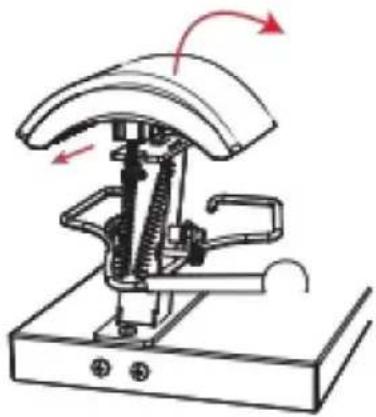
Fig 3
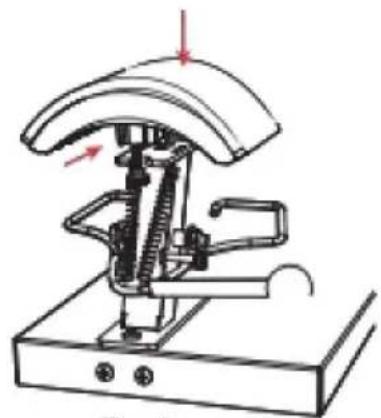
Fig 4
- Disconnect the Lower Cap Platen forward, and then remove this accessory upward.
- Install the Lower Cap Platen to be installed in Base from top to bottom and push back 1cm to snap into Mount.
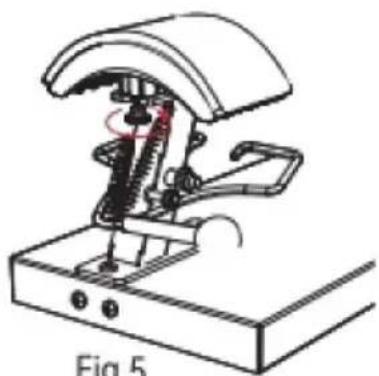
Fig 5
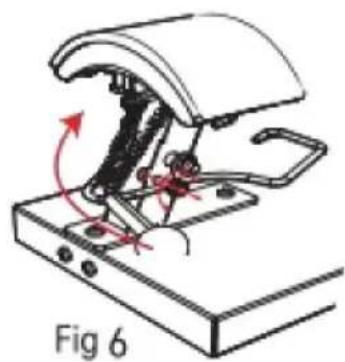
- Turn counterclockwise to lock Screws B.
- With Screws A out of the restriction hole counterclockwise, lift up the Ball Handle and the accessory replacement is completed.
Technical Support and E-Warranty Certificate
www.vevor.com/support
VEVOR®
TOUGH TOOLS, HALF PRICE
Technical Support and E-Warranty Certificate www.vevor.com/support
HEAT PRESS MACHINE INSTRUCTION MANUAL
We continue to be committed to provide you tools with competitive price. "Save Half", "Half Price" or any other similar expressions used by us only represents an estimate of savings you might benefit from buying certain tools with us compared to the major top brands and does not necessarily mean to cover all categories of tools offered by us. You are kindly reminded to verify carefully when you are placing an order with us if you are actually saving half in comparison with the top major brands.
VEVOR®
HEAT PRESS MACHINE
USER MANUAL
TLM2310-4S
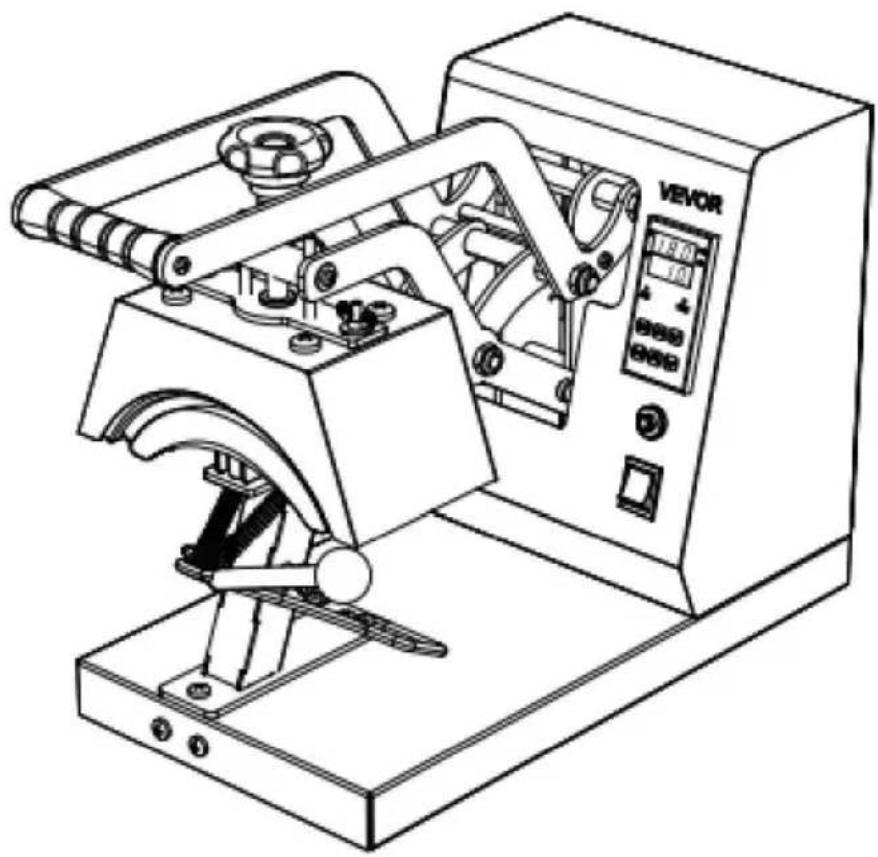
NEED HELP? CONTACT US!
Have product questions? Need technical support? Please feel free to contact us:
This is the original instruction. Please read all manual instructions carefully before operating. VEVOR reserves clear interpretation of our user manual. The appearance of the product shall be subject to the product you received. Please forgive us that we won't inform you again if there is any technology or software updates on our product.
CONTENTS

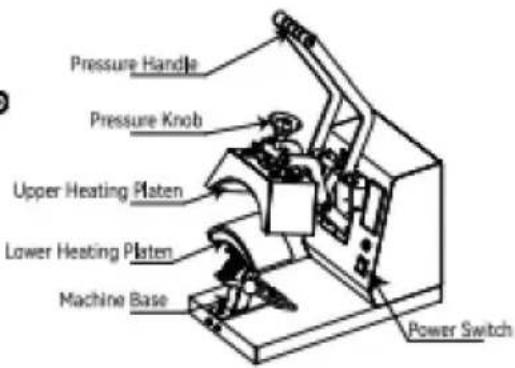
INTERNAL PARTS
| A | B170x98mm (6.7x3.86 in) | C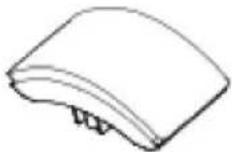 151x76mm (6x3 in) 151x76mm (6x3 in) |
| D170x59mm (6.7x2.7 in) | E206x90mm (8.1x3.5 in) | FInstruction manual |
Note: The cap press base has been installed in Machine A before delivery.
ASSEMBLY AND DISASSEMBLY OF THE MACHINE
a. Connect the power supply
- Connect the plug to the power supply according to the voltage marked on the equipment package. Turn on the main switch and the power indicator lights up.
Type Y Connection:
If the power cable is damaged, it must be replaced by the manufacturer, service agency or a similarly qualified organization to avoid danger.
b. Parameter Setting
Temperature setting: On the initial state, click the “TEMP” key, and the temperature indicator starts to blink. Press the “A” or “V” key to set the required working temperature, and click the “TEMP” key to return to the initial screen.
TIME setting: Click the “TIME” key on the initial interface, and the indicator will blink. Press the “A” or “V” key to set the required working time, and click the “TIME” key to return to the initial interface.
SWITCHING BETWEEN CELSIUS AND FAHRENHEIT
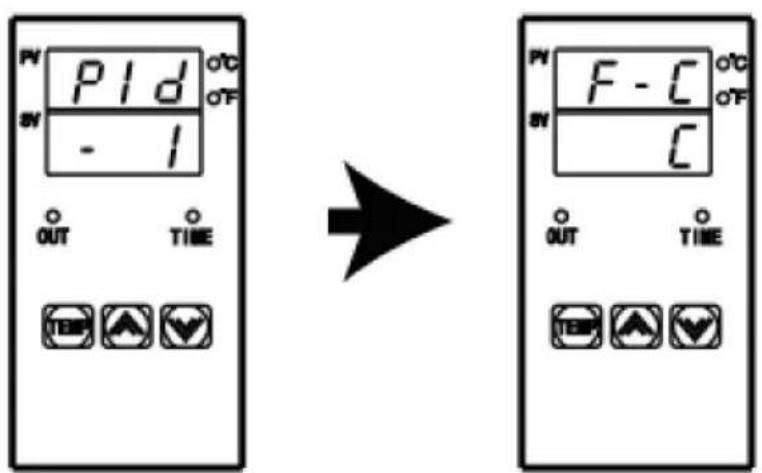
Long press the “☐” and “☑” key for 4 seconds at the same time to appear the interface as shown in the left picture, then click the “TEMP” key to appear the interface as shown in the second picture, then click “☐” to switch to Fahrenheit, and click “☑” to switch to Celsius. Finally, double-click “TEMP” to exit the setting mode and return to the initial state.
ADJUSTMENT AND USE OF EQUIPMENT
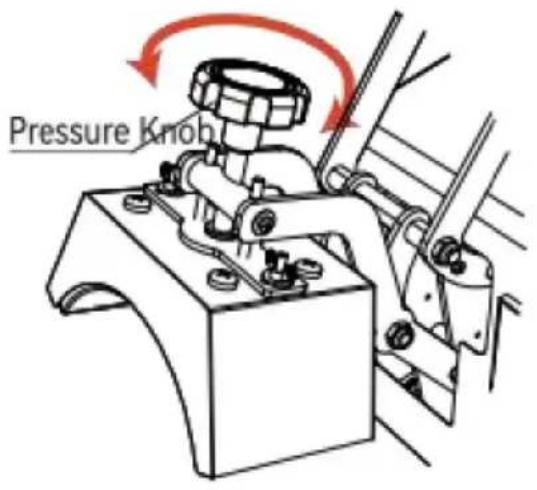
Fig 1
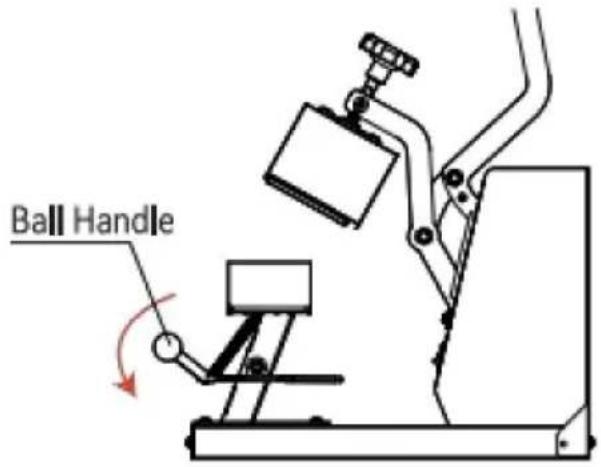
Fig 2
- Adjust the knob to the appropriate pressure. Turning the knob clockwise can increase the pressure of the equipment; Turning the knob counterclockwise can reduce the pressure of the device to the appropriate pressure.
- Press down the ball handle to open the cap press.
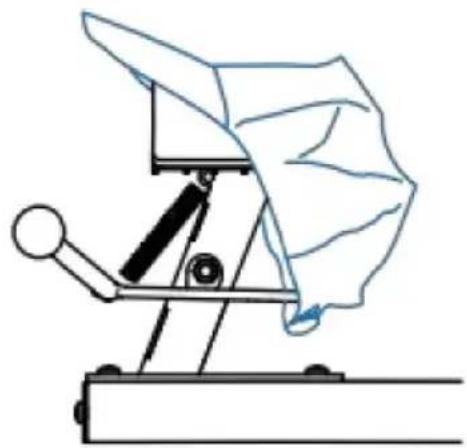
Fig 3
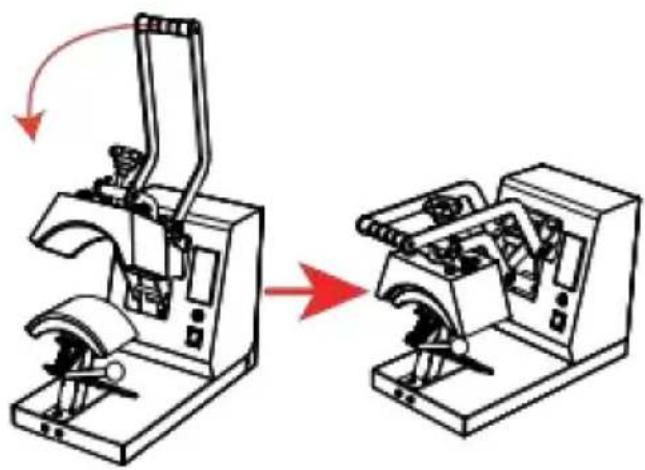
Fig 4
- Place the hat flat on the cap press, press down on the handle, and use the cap holder to smooth and fix the hat.
- When the machine reaches the set temperature, press the handle down to the bottom, and the timer will start counting. When the countdown is over, the machine will emit a beeping sound of "drip, drip, drip", at this time, lift the handle to complete the work.
ACCESSORY REPLACEMENT
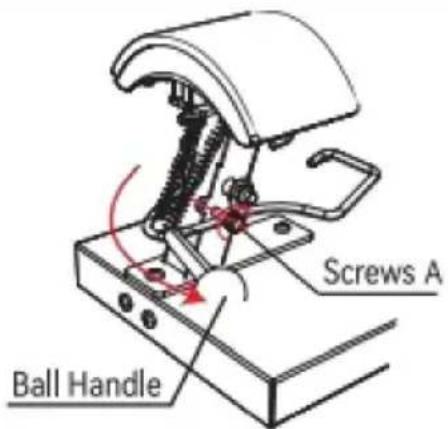
Fig 1
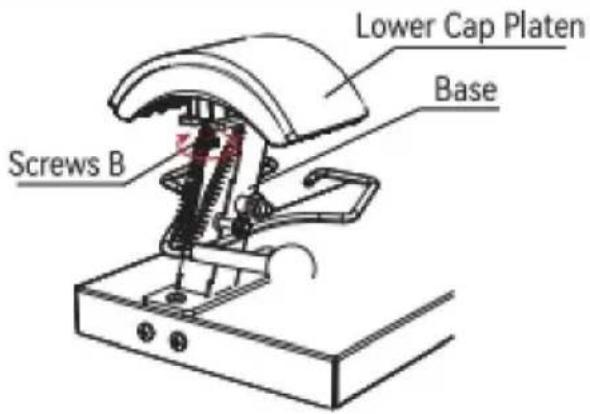
Fig 2
- Press down the Ball Handle and lock Screws A clockwise into the limit hole.
- Turn Screws B clockwise about 5-7 turns to loosen the Lower Cap Platen from the Base.
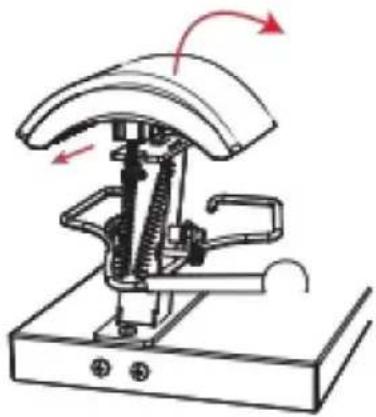
Fig 3
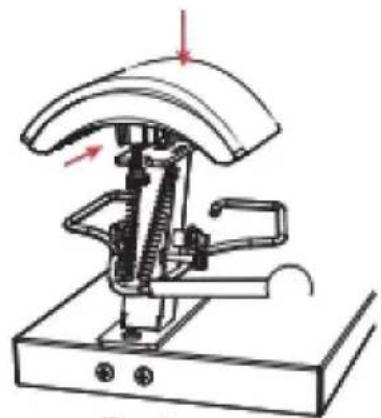
Fig 4
- Disconnect the Lower Cap Platen forward, and then remove this accessory upward.
- Install the Lower Cap Platen to be installed in Base from top to bottom and push back 1cm to snap into Mount.
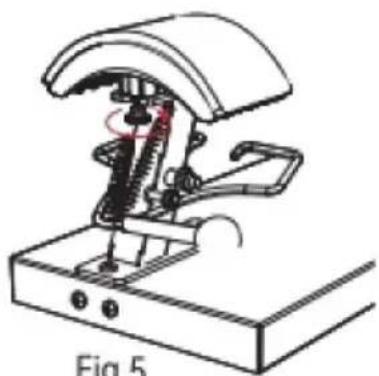
Fig 5
- Turn counterclockwise to lock Screws B.
- With Screws A out of the restriction hole counterclockwise, lift up the Ball Handle and the accessory replacement is completed.
Technical Support and E-Warranty Certificate
www.vevor.com/support
VEVOR®
TOUGH TOOLS, HALF PRICE
Technical Support and E-Warranty Certificate www.vevor.com/support
Heat Press Machine User Manual
We continue to be committed to provide you tools with competitive price. "Save Half", "Half Price" or any other similar expressions used by us only represents an estimate of savings you might benefit from buying certain tools with us compared to the major top brands and does not necessarily mean to cover all categories of tools offered by us. You are kindly reminded to verify carefully when you are placing an order with us if you are actually saving half in comparison with the top major brands.
VEVOR®
HEAT PRESS MACHINE
USER MANUAL
TLM2310-4S
NEED HELP? CONTACT US!
Have product questions? Need technical support? Please feel free to contact us:
www.vevor.com/support
This is the original instruction, please read all manual instructions carefully before operating. VEVOR reserves clear interpretation of our user manual. The appearance of the product shall be subject to the product you received. Please forgive us that we won't inform you again if there is any technology or software updates on our product.
CONTENTS
INTERNAL PARTS
| A | B170x98mm (6.7x3.86 in) | C151x76mm (6x3 in) |
| D170x59mm (6.7x2.7 in) | E206x90mm (8.1x3.5 in) | FInstruction manual |
Note: The cap press base has been installed in Machine A before delivery.
ASSEMBLY AND DISASSEMBLY OF THE MACHINE
a. Connect the power supply
- Connect the plug to the power supply according to the voltage marked on the equipment package. Turn on the main switch and the power indicator lights up.
Type Y Connection:
If the power cable is damaged, it must be replaced by the manufacturer, service agency, or a similarly qualified organization to avoid danger.
b. Parameter Setting
Temperature setting: On the initial state, click the “TEMP” key, and the temperature indicator starts to blink. Press the “A” or “V” key to set the required working temperature, and click the “TEMP” key to return to the initial screen.
TIME setting: Click the “TIME” key on the initial interface, and the indicator will blink. Press the “A” or “V” key to set the required working time, and click the “TIME” key to return to the initial interface.
SWITCHING BETWEEN CELSIUS AND FAHRENHEIT
Long press the “☐” and “☑” keys for 4 seconds at the same time to appear the interface as shown in the left picture, then click the “TEMP” key to appear the interface as shown in the second picture, then click “☐” to switch to Fahrenheit, and click “☑” to switch to Celsius. Finally, double-click “TEMP” to exit the setting mode and return to the initial state.
ADJUSTMENT AND USE OF EQUIPMENT
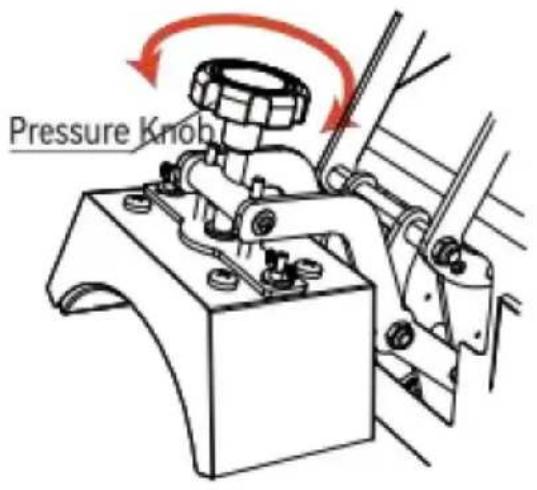
Fig 1
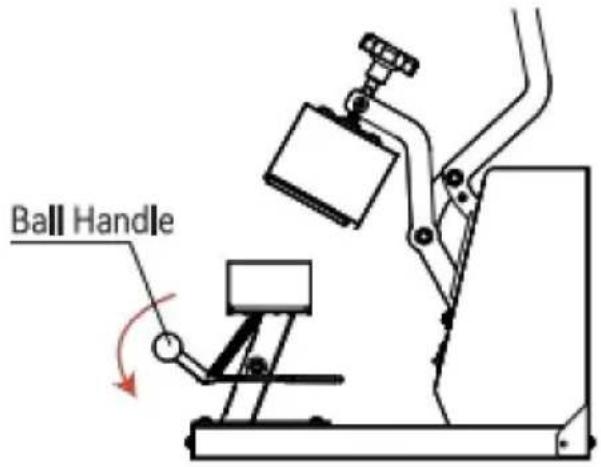
Fig 2
- Adjust the knob to the appropriate pressure. Turning the knob clockwise can increase the pressure of the equipment; turning the knob counterclockwise can reduce the pressure of the device to the appropriate pressure.
- Press down the ball handle to open the cap press.
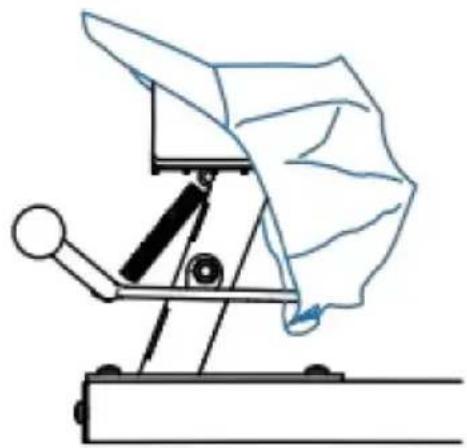
Fig 3
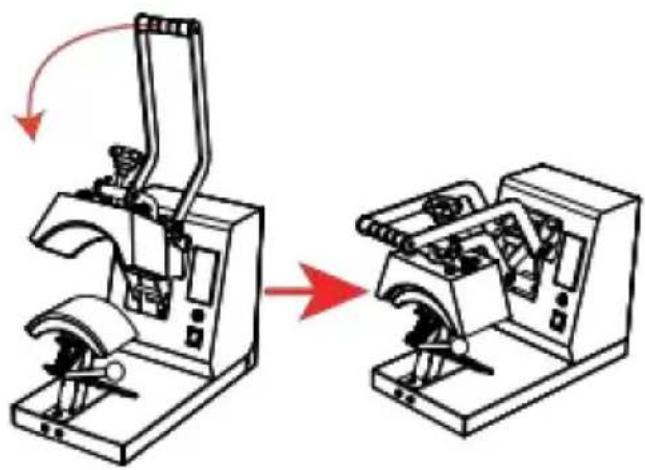
Fig 4
- Place the hat flat on the cap press, press down on the handle, and use the cap holder to smooth and fix the hat.
- When the machine reaches the set temperature, press the handle down to the bottom, and the timer will start counting. When the countdown is over, the machine will emit a beeping sound of "drip, drip, drip", at this time, lift the handle to complete the work.
ACCESSORY REPLACEMENT
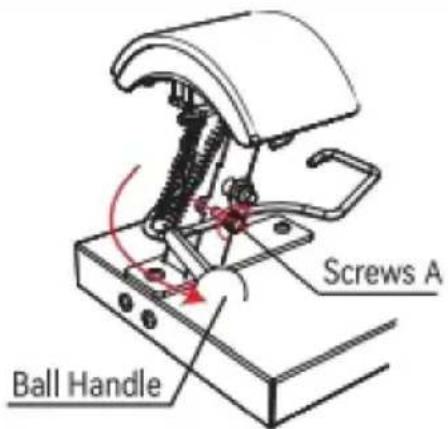
Fig 1
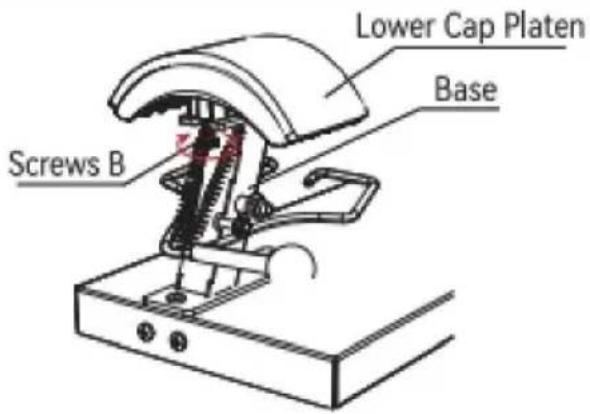
Fig 2
- Press down the Ball Handle and lock Screws A clockwise into the limit hole.
- Turn Screws B clockwise about 5-7 turns to loosen the Lower Cap Platen from the Base.
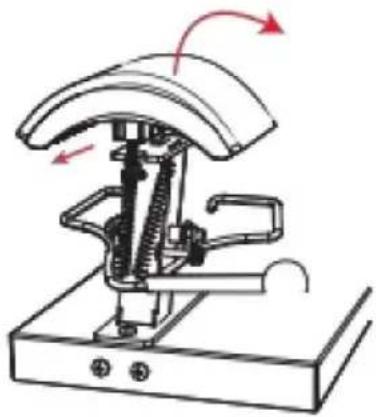
Fig 3
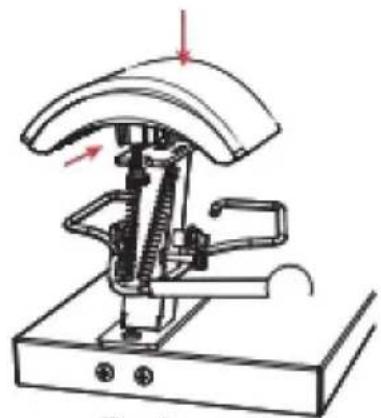
Fig 4
- Disconnect the Lower Cap Platen forward, and then remove this accessory upward.
- Install the Lower Cap Platen to be installed in Base from top to bottom and push back 1cm to snap into Mount.
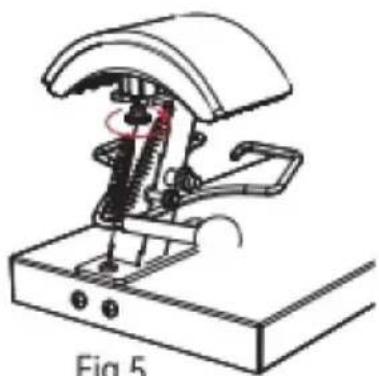
Fig 5
- Turn counterclockwise to lock Screws B.
- With Screws A out of the restriction hole counterclockwise, lift up the Ball Handle and the accessory replacement is completed.
APPLICATION AREA
Technical Support and E-Warranty Certificate
www.vevor.com/support
VEVOR®
TOUGH TOOLS, HALF PRICE
Technical Support and E-Warranty Certificate www.vevor.com/support
HEAT PRESS
USER MANUAL
We continue to be committed to provide you tools with competitive price. "Save Half", "Half Price" or any other similar expressions used by us only represents an estimate of savings you might benefit from buying certain tools with us compared to the major top brands and does not necessarily mean to cover all categories of tools offered by us. You are kindly reminded to verify carefully when you are placing an order with us if you are actually saving half in comparison with the top major brands.
VEVOR®
HEAT PRESS MACHINE
USER MANUAL
TLM2310-4S
NEED HELP? CONTACT US!
Have product questions? Need technical support? Please feel free to contact us:
This is the original instruction, please read all manual instructions carefully before operating. VEVOR reserves clear interpretation of our user manual. The appearance of the product shall be subject to the product you received. Please forgive us that we won't inform you again if there is any technology or software updates on our product.
CONTENTS
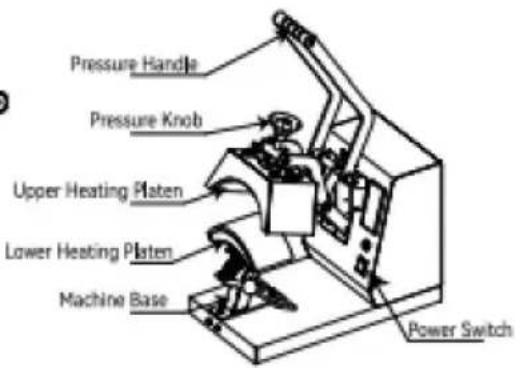
INTERNAL PARTS
| A | B170x98mm (6.7x3.86 in) | C151x76mm (6x3 in) |
| D170x59mm (6.7x2.7 in) | E206x90mm (8.1x3.5 in) | FInstruction manual |
Note: The cap press base has been installed in Machine A before delivery.
ASSEMBLY AND DISASSEMBLY OF THE MACHINE
a. Connect the power supply
- Connect the plug to the power supply according to the voltage marked on the equipment package. Turn on the main switch and the power indicator lights up.
Type Y Connection:
If the power cable is damaged, it must be replaced by the manufacturer, service agency or a similarly qualified organization to avoid danger.
b. Parameter Setting
Temperature setting: On the initial state, click the “TEMP” key, and the temperature indicator starts to blink. Press the “A” or “V” key to set the required working temperature, and click the “TEMP” key to return to the initial screen.
TIME setting: Click the “TIME” key on the initial interface, and the indicator will blink. Press the “A” or “V” key to set the required working time, and click the “TIME” key to return to the initial interface.
SWITCHING BETWEEN CELSIUS AND FAHRENHEIT
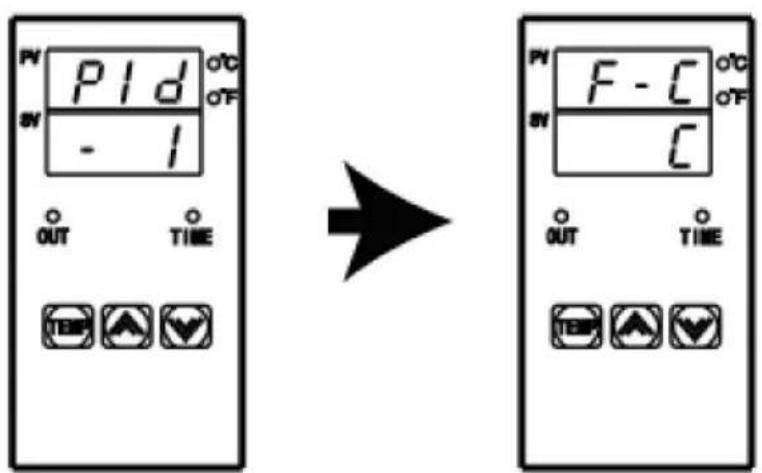
Long press the “☐” and “☑” key for 4 seconds at the same time to appear the interface as shown in the left picture, then click the “TEMP” key to appear the interface as shown in the second picture, then click “☐” to switch to Fahrenheit, and click “☑” to switch to Celsius. Finally, double-click “TEMP” to exit the setting mode and return to the initial state.
ADJUSTMENT AND USE OF EQUIPMENT
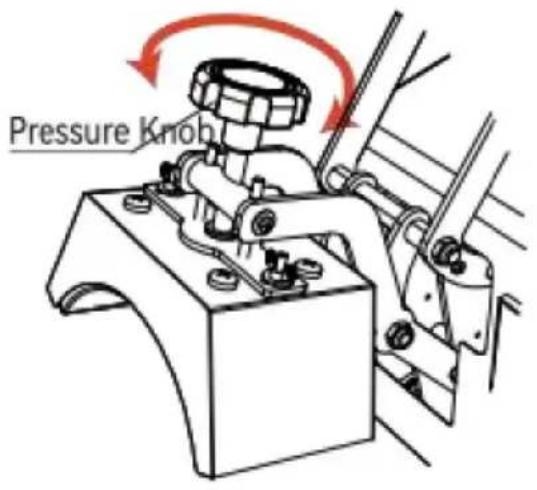
Fig 1
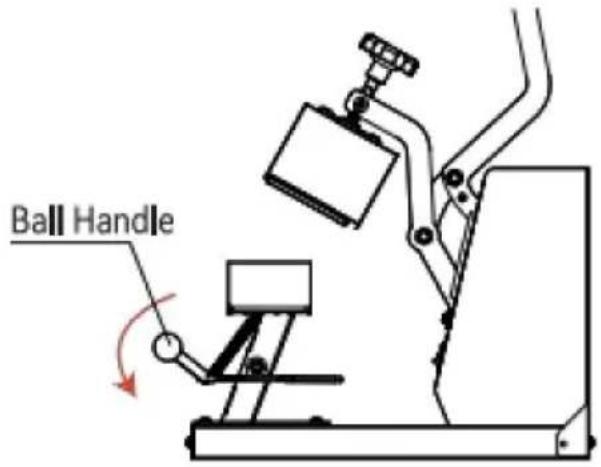
Fig 2
- Adjust the knob to the appropriate pressure. Turning the knob clockwise can increase the pressure of the equipment; turning the knob counterclockwise can reduce the pressure of the device to the appropriate pressure.
- Press down the ball handle to open the cap press.
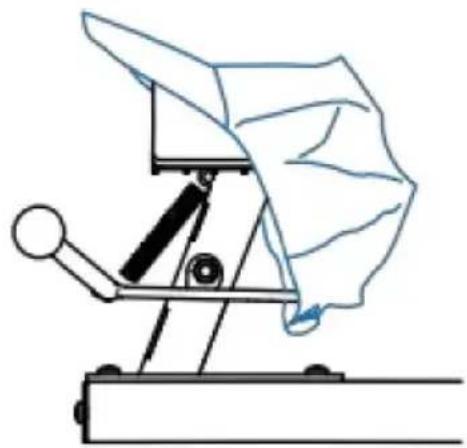
Fig 3
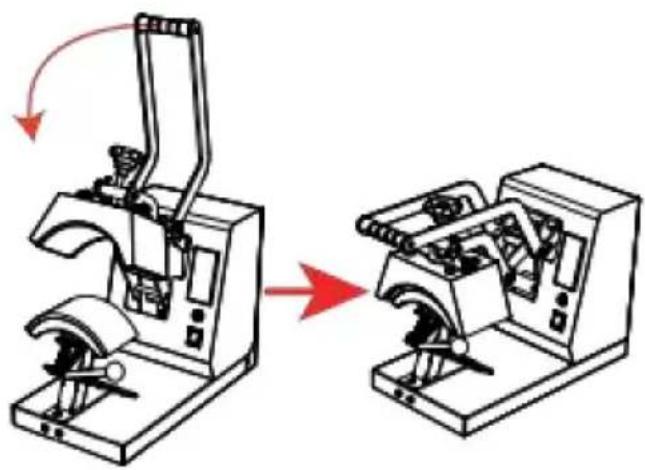
Fig 4
- Place the hat flat on the cap press, press down on the handle, and use the cap holder to smooth and fix the hat.
- When the machine reaches the set temperature, press the handle down to the bottom, and the timer will start counting. When the countdown is over, the machine will emit a beeping sound of "drip, drip, drip", at this time, lift the handle to complete the work.
ACCESSORY REPLACEMENT
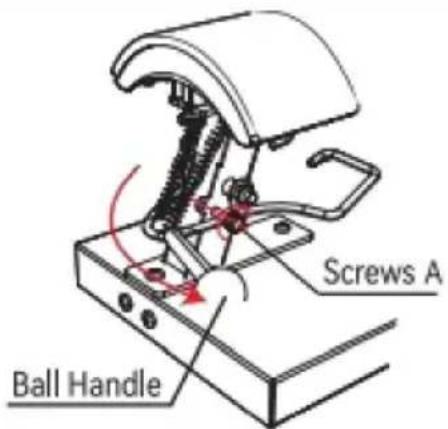
Fig 1
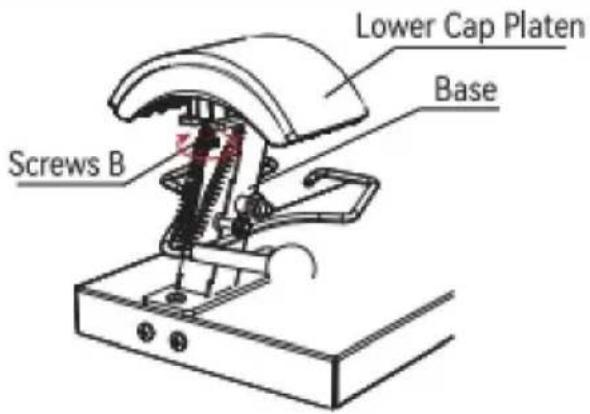
Fig 2
- Press down the Ball Handle and lock Screws A clockwise into the limit hole.
- Turn Screws B clockwise about 5-7 turns to loosen the Lower Cap Platen from the Base.
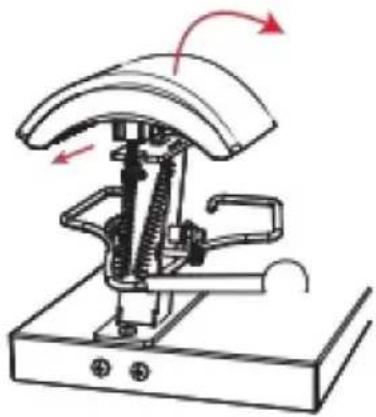
Fig 3
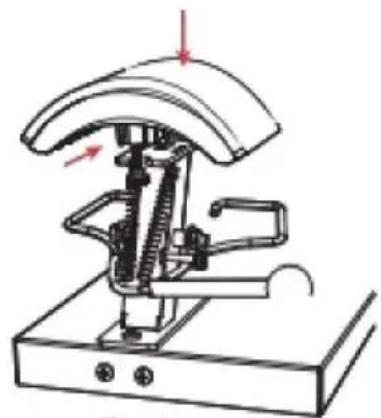
Fig 4
- Disconnect the Lower Cap Platen forward, and then remove this accessory upward.
- Install the Lower Cap Platen into the Base from top to bottom, then push it back 1 cm to snap into the Mount.
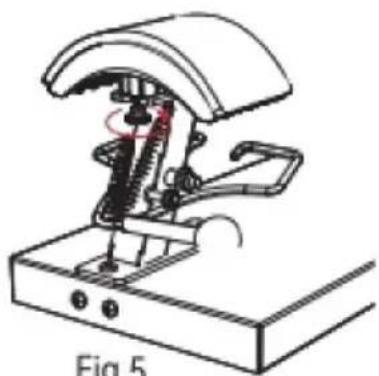
Fig 5
- Turn counterclockwise to lock Screws B.
- With Screws A out of the restriction hole counterclockwise, lift up the Ball Handle and the accessory replacement is completed.
SCOPE OF APPLICATION
| Exemple |  |  |  |
| consommables | Dye Sublimation Paper | HTV | vinyle |
| Température | 170 /338F180 /356F180 /356F | ||
| Temps | ### | 7S | 15S |
ANALYSIS OF COMMON DEFECTS
Technical Support and E-Warranty Certificate
www.vevor.com/support
VEVOR®
TOUGH TOOLS, HALF PRICE
Technical Support and E-Warranty Certificate www.vevor.com/support
WARMTEPERSMACHINE
USER MANUAL
We continue to be committed to providing you with tools at competitive prices. "Save Half", "Half Price", or any other similar expressions used by us only represent an estimate of savings you might benefit from buying certain tools with us compared to the major top brands and do not necessarily mean to cover all categories of tools offered by us. You are kindly reminded to verify carefully when placing an order with us if you are actually saving half in comparison with the top major brands.
VEVOR®
HEAT PRESS MACHINE
USER MANUAL
TLM2310-4S
NEED HELP? CONTACT US!
Have product questions? Need technical support? Please feel free to contact us:
www.vevor.com/support
This is the original instruction, please read all manual instructions carefully before operating. VEVOR reserves clear interpretation of our user manual. The appearance of the product shall be subject to the product you received. Please forgive us that we won't inform you again if there is any technology or software updates on our product.
CONTENTS
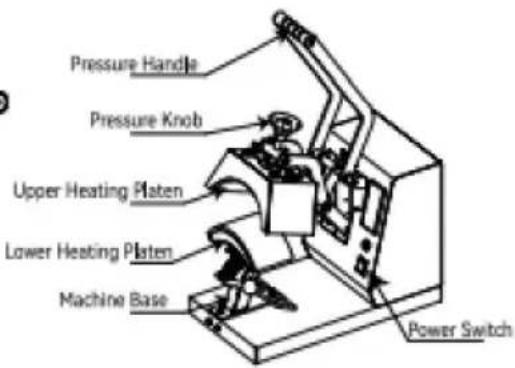
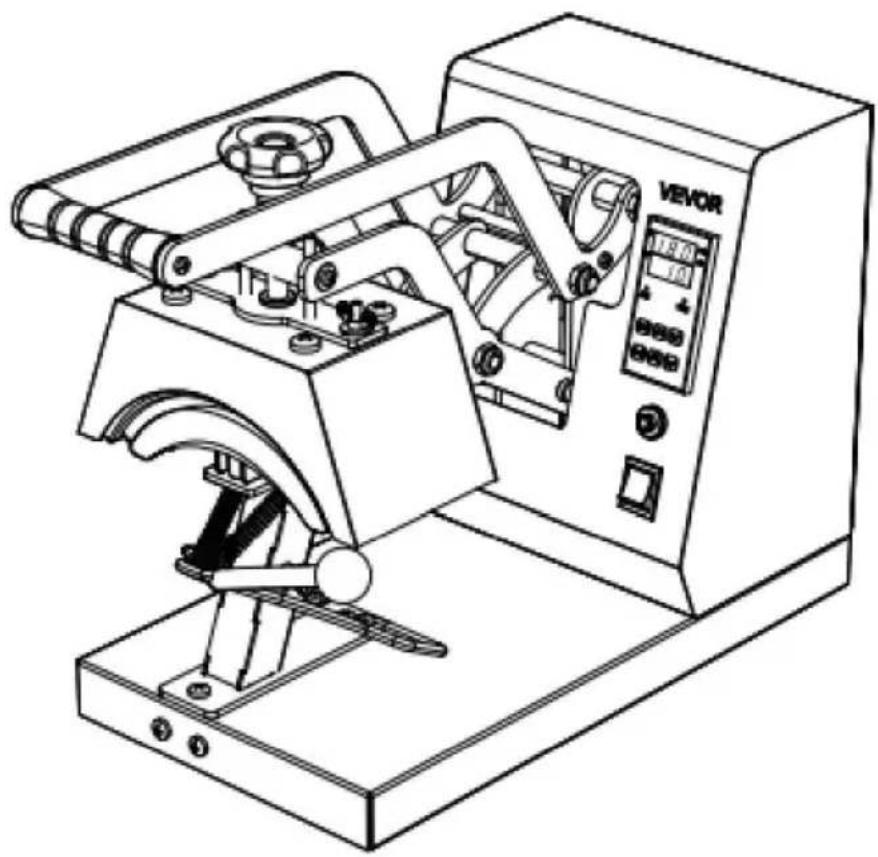
INTERNAL PARTS
| A | B170x98mm (6.7x3.86 in) | C151x76mm (6x3 in) |
| D170x59mm (6.7x2.7 in) | E206x90mm (8.1x3.5 in) | FInstruction manual |
Note: The cap press base has been installed in Machine A before delivery.
ASSEMBLY AND DISASSEMBLY OF THE MACHINE
a. Connect the power supply
- Connect the plug to the power supply according to the voltage marked on the equipment package. Turn on the main switch and the power indicator lights up.
Type Y Connection:
If the power cable is damaged, it must be replaced by the manufacturer, service agency or a similarly qualified organization to avoid danger.
b. Parameter Setting
Temperature setting: On the initial state, click the “TEMP” key, and the temperature indicator starts to blink. Press the “A” or “V” key to set the required working temperature, and click the “TEMP” key to return to the initial screen.
TIME setting: Click the “TIME” key on the initial interface, and the indicator will blink. Press the “A” or “V” key to set the required working time, and click the “TIME” key to return to the initial interface.
SWITCHING BETWEEN CELSIUS AND FAHRENHEIT
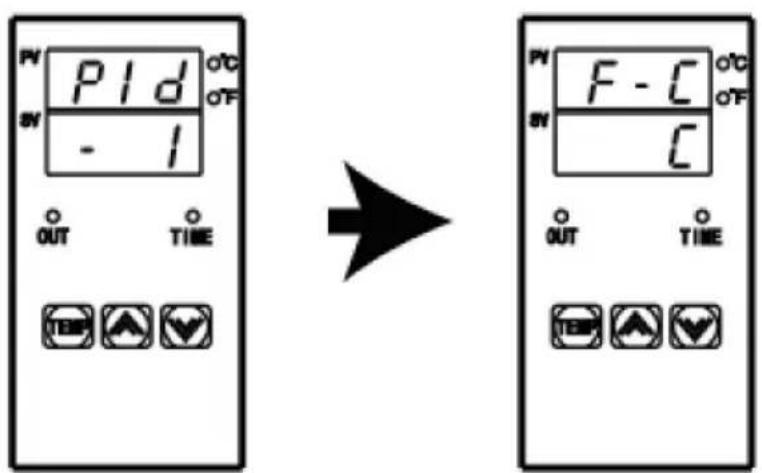
Long press the “☐” and “☑” key for 4 seconds at the same time to appear the interface as shown in the left picture, then click the “TEMP” key to appear the interface as shown in the second picture, then click “☐” to switch to Fahrenheit, and click “☑” to switch to Celsius. Finally, double-click “TEMP” to exit the setting mode and return to the initial state.
ADJUSTMENT AND USE OF EQUIPMENT
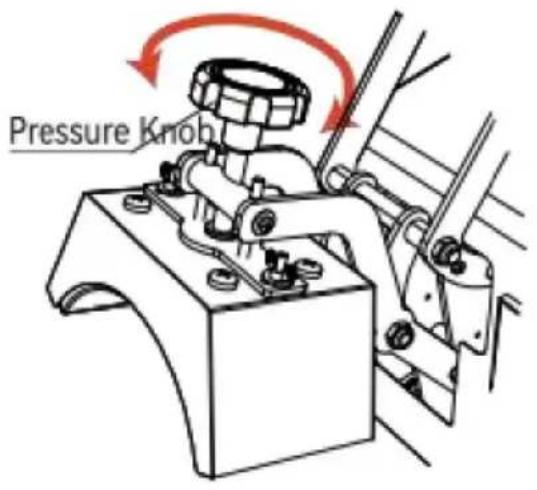
Fig 1
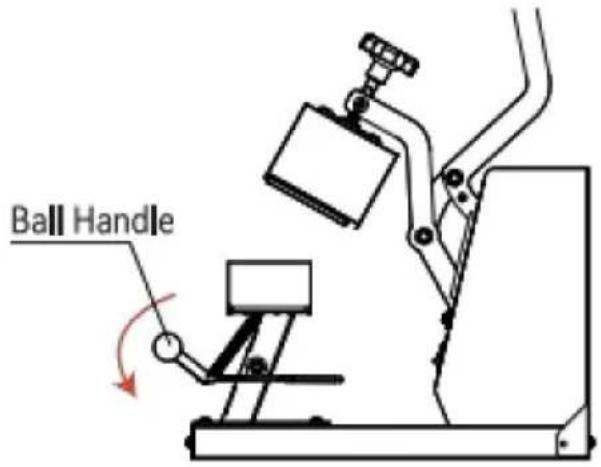
Fig 2
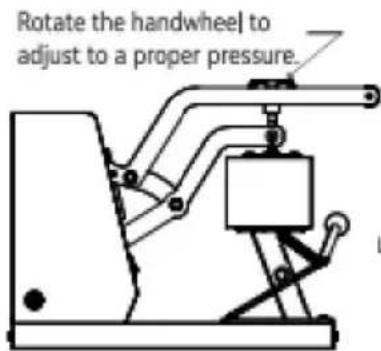
- Adjust the knob to the appropriate pressure. Turning the knob clockwise can increase the pressure of the equipment; Turning the knob counterclockwise can reduce the pressure of the device to the appropriate pressure.
- Press down the ball handle to open the cap press.
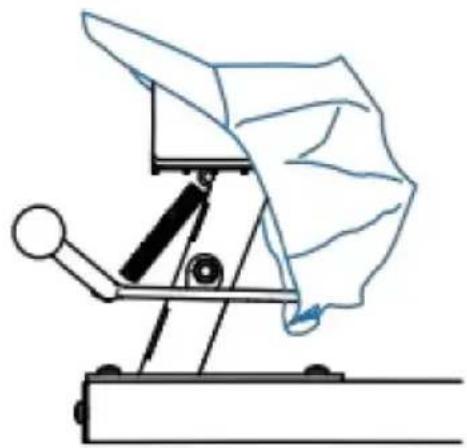
Fig 3
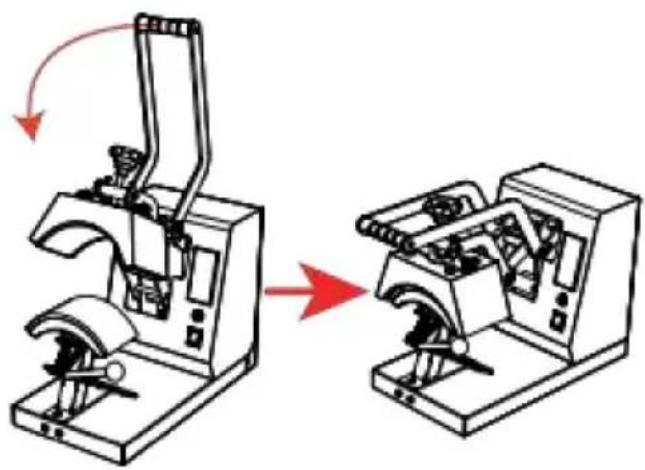
Fig 4
- Place the hat flat on the cap press, press down on the handle, and use the cap holder to smooth and fix the hat.
- When the machine reaches the set temperature, press the handle down to the bottom, and the timer will start counting. When the countdown is over, the machine will emit a beeping sound of "drip, drip, drip", at this time, lift the handle to complete the work.
ACCESSORY REPLACEMENT
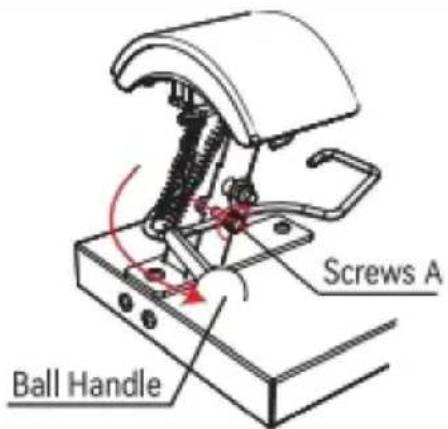
Fig 1
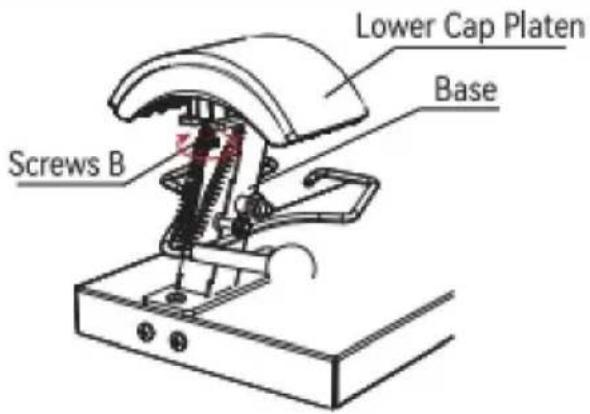
Fig 2
- Press down the Ball Handle and lock Screws A clockwise into the limit hole.
- Turn Screws B clockwise about 5-7 turns to loosen the Lower Cap Platen from the Base.
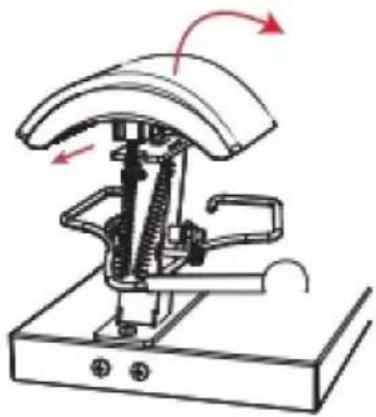
Fig 3

Fig 4
- Disconnect the Lower Cap Platen forward, and then remove this accessory upward.
- Install the Lower Cap Platen to be installed in Base from top to bottom and push back 1cm to snap into Mount.
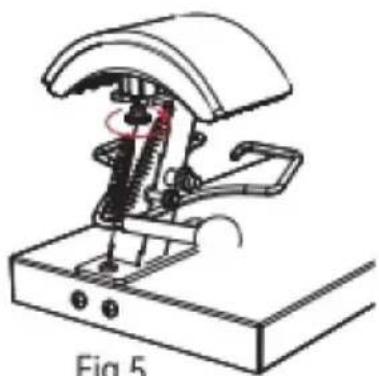
Fig 5
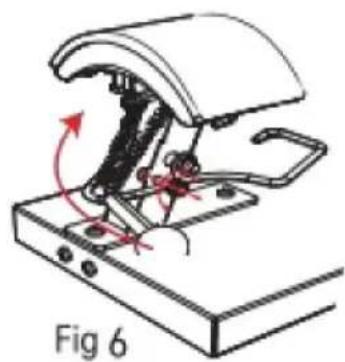
- Turn counterclockwise to lock Screws B.
- With Screws A out of the restriction hole counterclockwise, lift up the Ball Handle and the accessory replacement is completed.
Technical Support and E-Warranty Certificate
www.vevor.com/support
VEVOR®
TOUGH TOOLS, HALF PRICE
Technical Support and E-Warranty Certificate www.vevor.com/support
HEAT PRESS MACHINE USER MANUAL
We continue to be committed to provide you tools with competitive price. "Save Half", "Half Price" or any other similar expressions used by us only represents an estimate of savings you might benefit from buying certain tools with us compared to the major top brands and does not necessarily mean to cover all categories of tools offered by us. You are kindly reminded to verify carefully when you are placing an order with us if you are actually saving half in comparison with the top major brands.
VEVOR®
HEAT PRESS MACHINE
USER MANUAL
TLM2310-4S
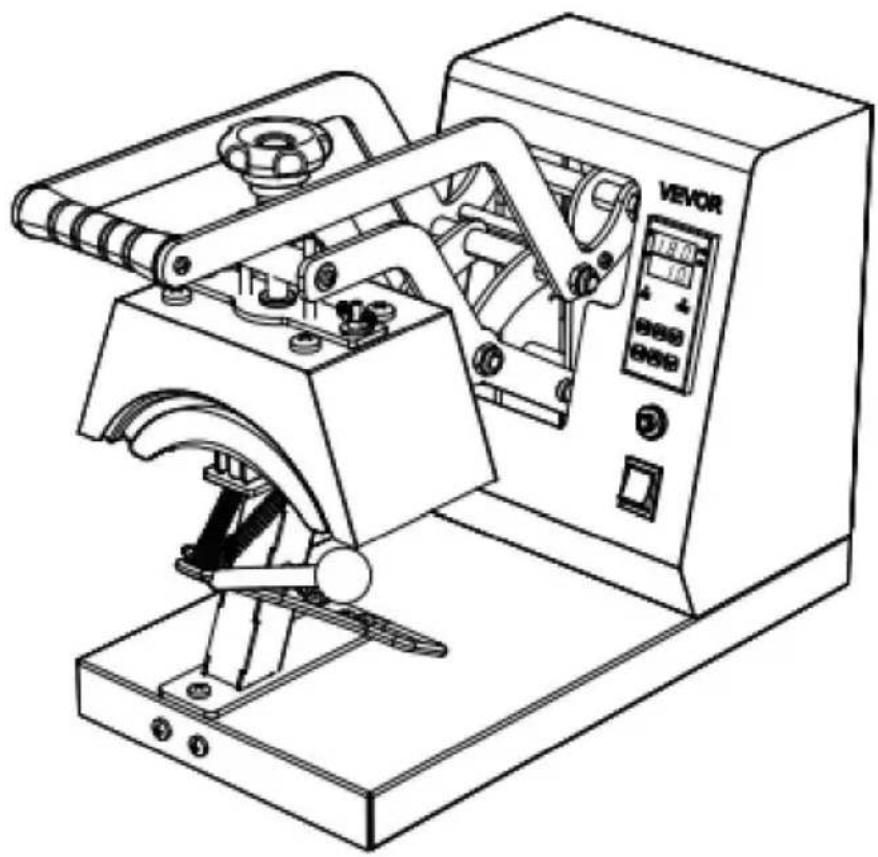
NEED HELP? CONTACT US!
Have product questions? Need technical support? Please feel free to contact us:
www.vevor.com/support
This is the original instruction, please read all manual instructions carefully before operating. VEVOR reserves clear interpretation of our user manual. The appearance of the product shall be subject to the product you received. Please forgive us that we won't inform you again if there is any technology or software updates on our product.
CONTENTS
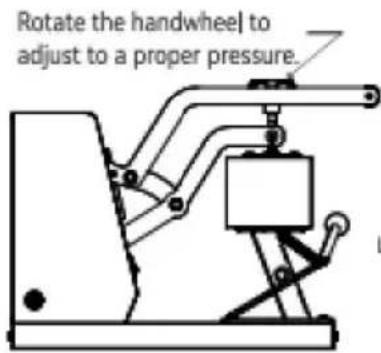
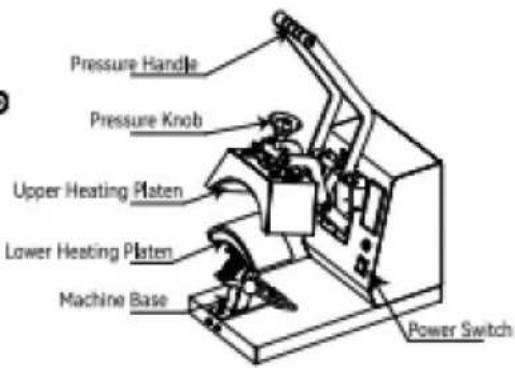
INTERNAL PARTS
| A | B170x98mm (6.7x3.86 in) | C151x76mm (6x3 in) |
| D170x59mm (6.7x2.7 in) | E206x90mm (8.1x3.5 in) | FInstruction manual |
Note: The cap press base has been installed in Machine A before delivery.
ASSEMBLY AND DISASSEMBLY OF THE MACHINE
a. Connect the power supply
- Connect the plug to the power supply according to the voltage marked on the equipment package. Turn on the main switch and the power indicator lights up.
Type Y Connection:
If the power cable is damaged, it must be replaced by the manufacturer, service agency or a similarly qualified organization to avoid danger.
b. Parameter Setting
Temperature setting: On the initial state, click the “TEMP” key, and the temperature indicator starts to blink. Press the “A” or “V” key to set the required working temperature, and click the “TEMP” key to return to the initial screen.
TIME setting: Click the “TIME” key on the initial interface, and the indicator will blink. Press the “A” or “V” key to set the required working time, and click the “TIME” key to return to the initial interface.
SWITCHING BETWEEN CELSIUS AND FAHRENHEIT
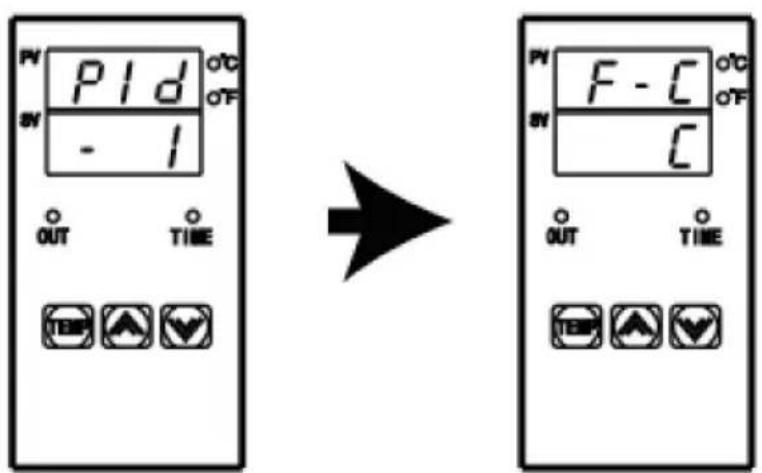
Long press the “☐” and “☑” keys for 4 seconds at the same time to appear the interface as shown in the left picture, then click the “TEMP” key to appear the interface as shown in the second picture, then click “☐” to switch to Fahrenheit, and click “☑” to switch to Celsius. Finally, double-click “TEMP” to exit the setting mode and return to the initial state.
ADJUSTMENT AND USE OF EQUIPMENT
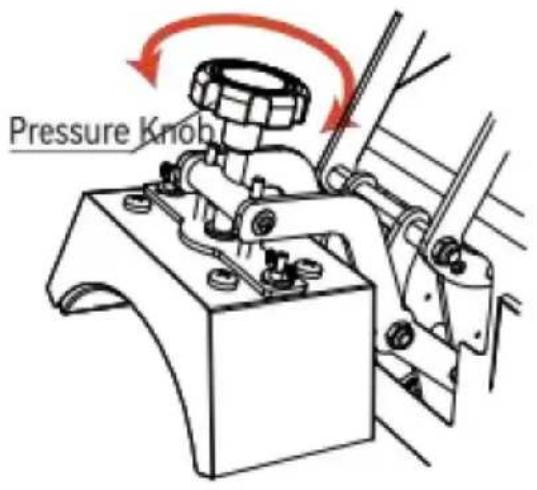
Fig 1
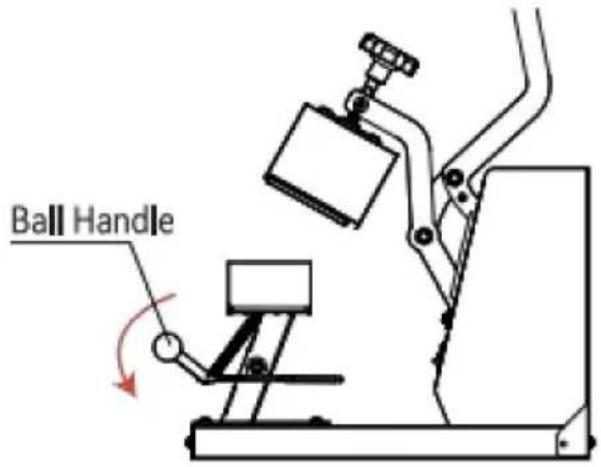
Fig 2
- Adjust the knob to the appropriate pressure. Turning the knob clockwise can increase the pressure of the equipment; Turning the knob counterclockwise can reduce the pressure of the device to the appropriate pressure.
- Press down the ball handle to open the cap press.
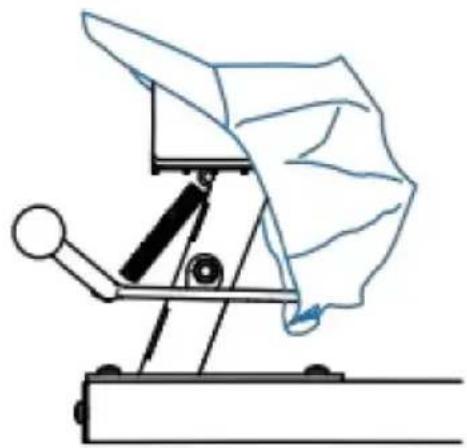
Fig 3
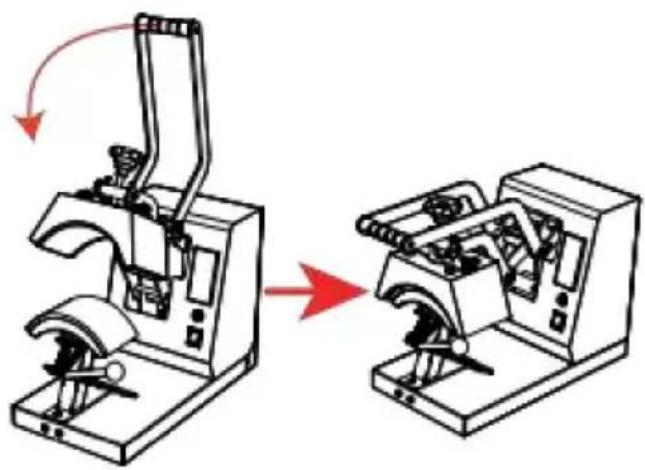
Fig 4
- Place the hat flat on the cap press, press down on the handle, and use the cap holder to smooth and fix the hat.
- When the machine reaches the set temperature, press the handle down to the bottom, and the timer will start counting. When the countdown is over, the machine will emit a beeping sound of "drip, drip, drip", at this time, lift the handle to complete the work.
ACCESSORY REPLACEMENT
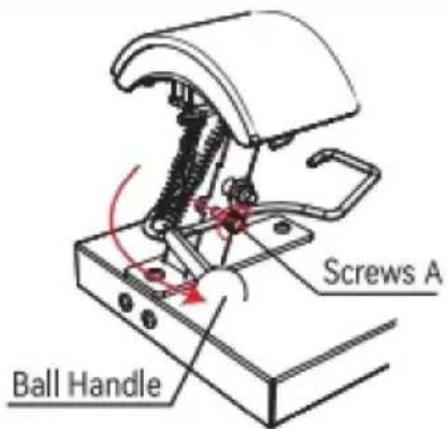
Fig 1
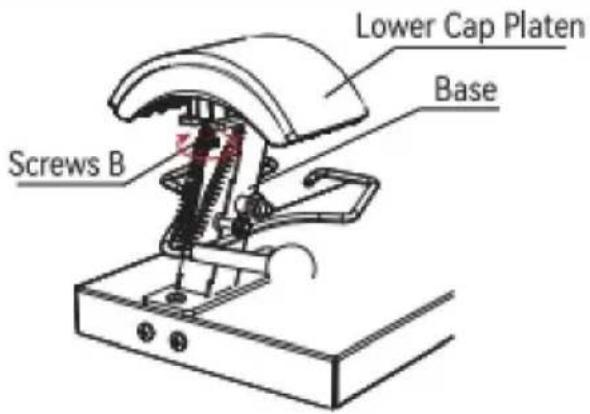
Fig 2
- Press down the Ball Handle and lock Screws A clockwise into the limit hole.
- Turn Screws B clockwise about 5-7 turns to loosen the Lower Cap Platen from the Base.
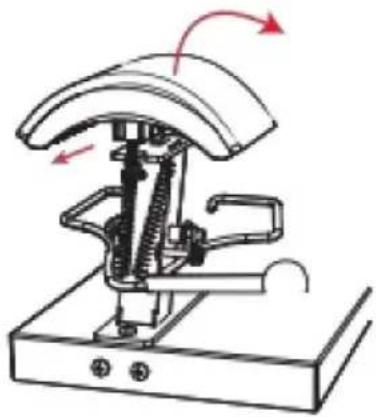
Fig 3
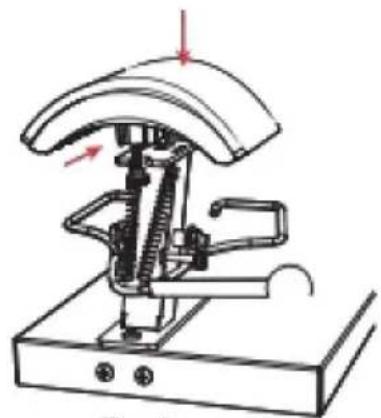
Fig 4
- Disconnect the Lower Cap Platen forward, and then remove this accessory upward.
- Install the Lower Cap Platen to be installed in Base from top to bottom and push back 1cm to snap into Mount.
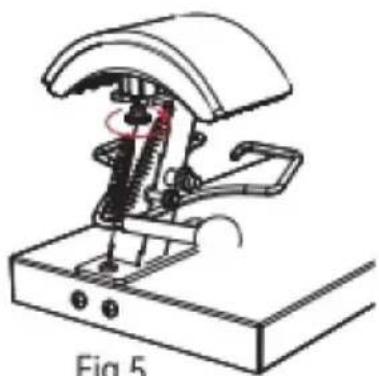
Fig 5
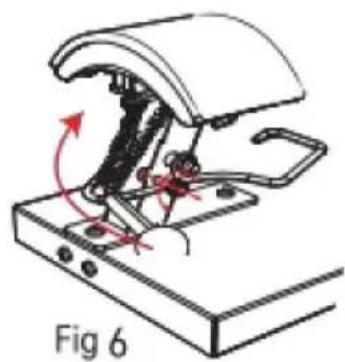
- Turn counterclockwise to lock Screws B.
- With Screws A out of the restriction hole counterclockwise, lift up the Ball Handle and the accessory replacement is completed.
INTENDED USE
| Exempel | | | |
| förbrukningsvaror | Dye Sublimation Paper | HTV | vinyl |
| Temp | 170 y/338F180 y/356 F180 y/356 | ||
| Tid | 60S | 7S | 15S |
TROUBLESHOOTING
Technical Support and E-Warranty Certificate
www.vevor.com/support
VEVOR®
TOUGH TOOLS, HALF PRICE
Technical Support and E-Warranty Certificate www.vevor.com/support
HEAT PRESS MACHINE USER MANUAL
We continue to be committed to provide you tools with competitive price. "Save Half", "Half Price" or any other similar expressions used by us only represents an estimate of savings you might benefit from buying certain tools with us compared to the major top brands and does not necessarily mean to cover all categories of tools offered by us. You are kindly reminded to verify carefully when you are placing an order with us if you are actually saving half in comparison with the top major brands.
VEVOR®
HEAT PRESS MACHINE
USER MANUAL
TLM2310-4S
NEED HELP? CONTACT US!
Have product questions? Need technical support? Please feel free to contact us:
This is the original instruction. Please read all manual instructions carefully before operating. VEVOR reserves clear interpretation of our user manual. The appearance of the product shall be subject to the product you received. Please forgive us that we won't inform you again if there is any technology or software updates on our product.
CONTENTS
INTERNAL PARTS
| A | B170x98mm (6.7x3.86 in) | C151x76mm (6x3 in) |
| D170x59mm (6.7x2.7 in) | E206x90mm (8.1x3.5 in) | FInstruction manual |
Note: The cap press base has been installed in Machine A before delivery.
ASSEMBLY AND DISASSEMBLY OF THE MACHINE
a. Connect the power supply
- Connect the plug to the power supply according to the voltage marked on the equipment package. Turn on the main switch and the power indicator lights up.
Type Y Connection:
If the power cable is damaged, it must be replaced by the manufacturer, service agency or a similarly qualified organization to avoid danger.
b. Parameter Setting
Temperature setting: On the initial state, click the “TEMP” key, and the temperature indicator starts to blink. Press the “A” or “V” key to set the required working temperature, and click the “TEMP” key to return to the initial screen.
TIME setting: Click the “TIME” key on the initial interface, and the indicator will blink. Press the “A” or “V” key to set the required working time, and click the “TIME” key to return to the initial interface.
SWITCHING BETWEEN CELSIUS AND FAHRENHEIT
Long press the “☐” and “☑” key for 4 seconds at the same time to appear the interface as shown in the left picture, then click the “TEMP” key to appear the interface as shown in the second picture, then click “☐” to switch to Fahrenheit, and click “☑” to switch to Celsius. Finally, double-click “TEMP” to exit the setting mode and return to the initial state.
ADJUSTMENT AND USE OF EQUIPMENT
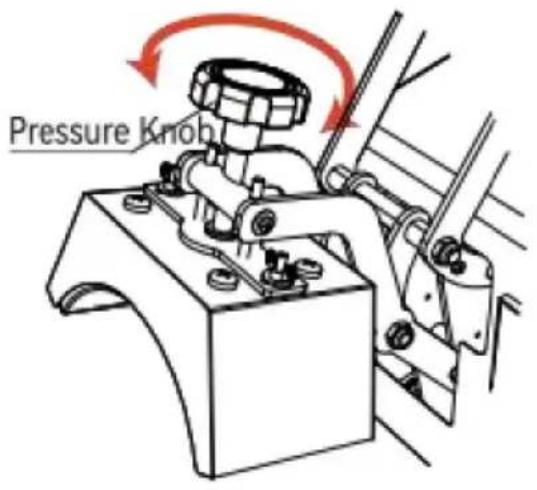
Fig 1
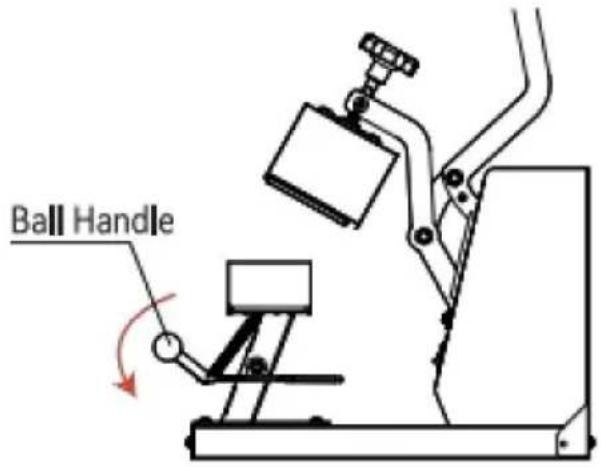
Fig 2
- Adjust the knob to the appropriate pressure. Turning the knob clockwise can increase the pressure of the equipment; turning the knob counterclockwise can reduce the pressure of the device to the appropriate pressure.
- Press down the ball handle to open the cap press.
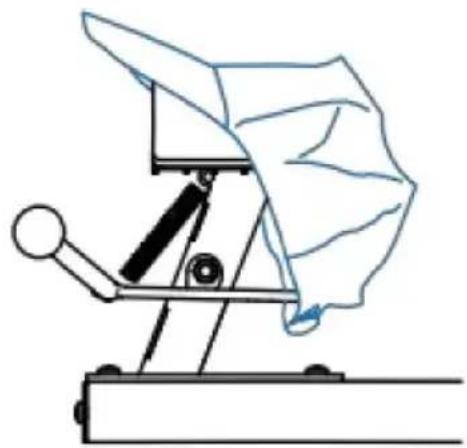
Fig 3
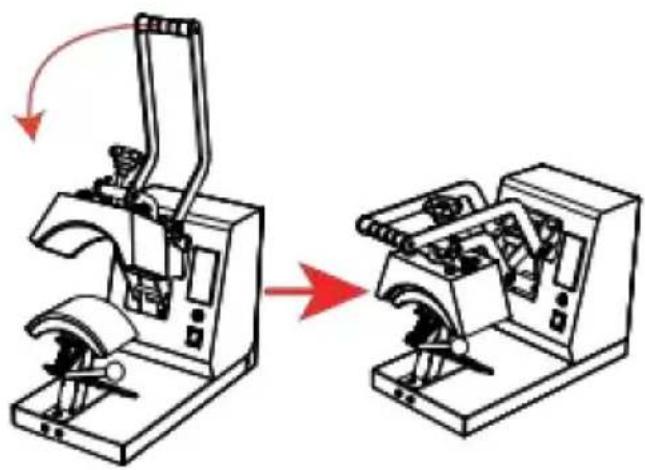
Fig 4
- Place the hat flat on the cap press, press down on the handle, and use the cap holder to smooth and fix the hat.
- When the machine reaches the set temperature, press the handle down to the bottom, and the timer will start counting. When the countdown is over, the machine will emit a beeping sound of "drip, drip, drip", at this time, lift the handle to complete the work.
ACCESSORY REPLACEMENT
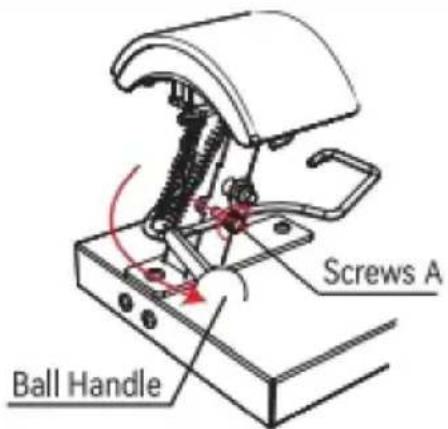
Fig 1
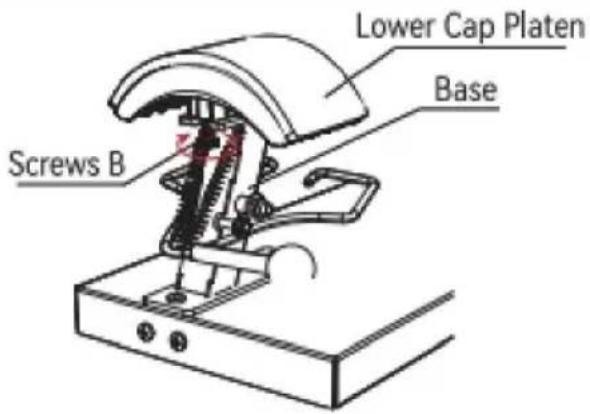
Fig 2
- Press down the Ball Handle and lock Screws A clockwise into the limit hole.
- Turn Screws B clockwise about 5-7 turns to loosen the Lower Cap Platen from the Base.

Fig 3
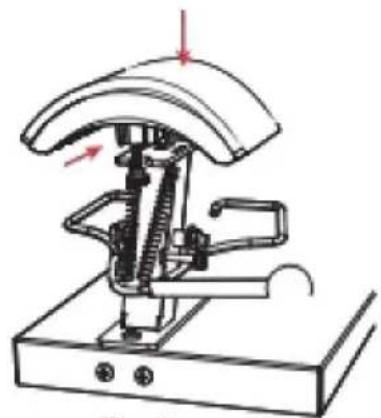
Fig 4
- Disconnect the Lower Cap Platen forward, and then remove this accessory upward.
- Install the Lower Cap Platen to be installed in Base from top to bottom and push back 1cm to snap into Mount.
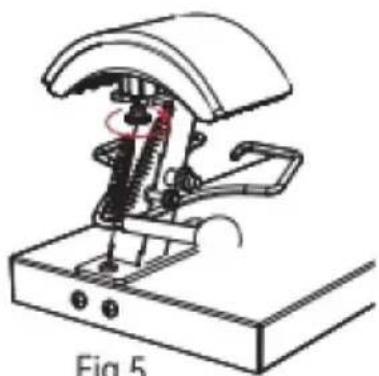
Fig 5
- Turn counterclockwise to lock Screws B.
- With Screws A out of the restriction hole counterclockwise, lift up the Ball Handle and the accessory replacement is completed.
Application Range
| Ejemplo | |  |  |
| consumibles | Dye Sublimation Paper | vinilo | |
| Temperatura | 180 /356 F 170 | 338 F180 /356 F | |
| Tiempo | Años 60 | 7S | 15S |
Common Fault Analysis
Technical Support and E-Warranty Certificate
www.vevor.com/support

- HEAT PRESS MACHINE USER MANUAL
- TLM2310-4S
- NEED HELP? CONTACT US
- CONTENTS
- SAFETY INSTRUCTION
- WARNING
- ASSEMBLY AND DISASSEMBLY OF THE MACHINE
- SWITCHING BETWEEN CELSIUS AND FAHRENHEIT
- ACCESSORY REPLACEMENT
- APPLICATION RANGE
- VEVOR®
- HEAT PRESS MACHINE
- USER MANUAL
- CONNECT THE POWER SUPPLY
- TYPE Y CONNECTION
- PARAMETER SETTING
- ADJUSTMENT AND USE OF EQUIPMENT
- APPLICATION AREA
- SCOPE OF APPLICATION
- ANALYSIS OF COMMON DEFECTS
- TOUGH TOOLS, HALF PRICE
- TECHNICAL SUPPORT AND E-WARRANTY CERTIFICATE WWW.VEVOR.COM/SUPPORT
- INTENDED USE
- TROUBLESHOOTING
- COMMON FAULT ANALYSIS
Brand : Vevor
Model : TLM2310-4S
Category : Heat press