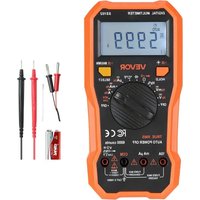
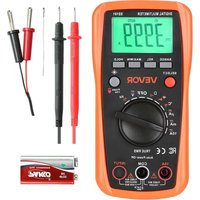
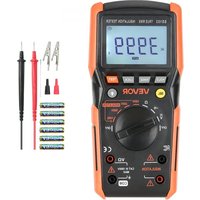
USER MANUAL SS102 Vevor
Digital Multimeter
Model: SS102
Model: SS102
This is the original instruction manual. Please read all manual instructions carefully before operating. VEVOR reserves the right to interpret our user manual. The appearance of the product shall be subject to the product you received. Please forgive us that we won't inform you again if there are technology or software updates on our product.
 | Warning-To reduce the risk of injury, user must read instruction manual carefully. |
 | CORRECT DISPOSALThis product is subject to the provision of european Directive 2012/19/EU. The symbol showing a wheelie bin crossed through indicates that the product requires separate refuse collection in European Union. This applies to the product and all accessories marked with this symbol. Products marked as such may not be discarded with normal domestic waste, but must be taken to a collection point for recycling electrical and electronic devices. |
| FCC Information | FCC Information:CAUTION: Changes or modifications not expressly approved by the party responsible for compliance could void the user's auto to operate the equipment!This device complies with Part 15 of the FCC Rules. Operation subject to the following two conditions:1) This product may cause harmful interference.2) This product must accept any interference received, including interference that may cause undesired operation.WARNING: Changes or modifications to this product not expre approved by the party.responsible for compliance could void the user's authority to operate the product.Note: This product has been tested and found to comply with limits for a Class B digital device pursuant to Part 15 of the Rules, These limits are designed to provide reasonable protec against harmful interference in a residential installation.This product generates, uses and can radiate radio frequency energy, and if not installed and used in accordance with the instructions, may cause harmful interference to radio communications. However, there is no guarantee that interferer will not occur in a particular installation. If this product does harmful interference to radio or television reception,which can determined by turning the product off and on, the user isencouraged to try to correct the interference by one or more following measures.Reorient or relocate the receiving antenna.Increase the distance between the product and receiver.Connect the product to an outlet on a circuit different from which the receiver is connected.Consult the dealer or an experienced radio/TV technician for assistance. |
WARRANTY
This instrument is warranted to be free from defects in material and workmanship for a period of one year. Any instrument found defective within one year from the delivery date and returned to the factory with transportation charges prepaid, will be repaired, adjusted, or replaced at no charge to the original purchaser. This warranty does not cover expendable items such as battery or fuse. If the defect has been caused by misuse or abnormal operating conditions, the repair will be billed at a nominal cost.
INTRODUCTION
The product is a compact 6000-count true-RMS autorange digital multimeter. It is designed to measure DC and AC voltage, DC and AC current, resistance, continuity, diode, capacitance, frequency, duty cycle, and temperature. In addition, non-contact AC voltage detection and live AC wire detection are also available.
The meter features MAX MIN recording, Data Hold, backlight, low battery indication, overrange indication, automatic power-off, etc. It is easy to operate and is a useful test tool.
The meter complies with Measurement Categories II (CAT II 1000V) and Pollution Degree 2.
To avoid possible electric shock or personal injury, follow these guidelines:
- Do not use the meter if it is damaged. Before you use the meter, inspect the case. Pay particular attention to the insulation surrounding the connectors.
- Inspect the test leads for damaged insulation or exposed metal. Check the test leads for continuity. Replace damaged test leads before you use the meter.
- Do not use the Meter if it operates abnormally. Protection may be impaired. When in doubt, have the Meter serviced.
- Do not operate the Meter around explosive gas, vapor, or dust.
- Do not apply more than the rated voltage, as marked on the Meter, between terminals or between any terminal and earth ground.
- Before use, verify the Meter's operation by measuring a known voltage.
- When servicing the Meter, use only specified replacement parts.
- Use caution when working with voltages above 30V ac rms, 42V ac peak, or 6 dc. Such voltages pose a shock hazard.
- When using the probes, keep your fingers behind the finger guards on the probes.
- When making connections, connect the common test lead before you connect the live test lead. When you disconnect test leads, disconnect the live test lead first.
- Remove the test leads from the Meter before you open the battery cover or the case.
- Do not operate the Meter with the battery cover or portions of the case removal or loosened.
- To avoid false readings which could lead to possible electric shock or personal injury, replace the battery as soon as the low battery in □ appears.
- Do not use the Meter in a manner not specified by this manual, or the safety features of the Meter may be impaired.
- When measuring current, turn off circuit power before connecting the Meter in the circuit. Remember to place the Meter in series with the circuit.
- Do not operate the Meter if your hand or the Meter is wet.
- Do not touch any naked conductor with hand or skin, and do not ground yours
- Remaining endangerment:
When an input terminal is connected to a dangerous live potential, it is to be noted that this potential can occur at all other terminals!
- CAT II - Measurement Category II is for measurements performed on circuits directly connected to low voltage installation. Examples are measurements on household appliances, portable tools and similar equipment.
Do not use the Meter for measurements within Measurement Categories III and IV.
Caution
To avoid possible damage to the Meter or to the equipment under test, follow these guidelines:
- Disconnect circuit power and discharge all capacitors thoroughly before testing resistance, continuity, diode, capacitance or temperature.
- Use the proper terminals, function and range for your measurements.
- Before measuring current, check the Meter's fuses.
- Before turning the rotary switch to change function/range, remove the test leads from the circuit under test.
Symbols
 | Alternating Current |
 | Direct Current |
 | Both Alternating and Direct current |
 | Caution, risk of danger, refer to the operating manual before |
 | Caution, risk of electric shock. |
 | Earth (ground) Terminal |
 | Fuse |
| CE | Conforms to European Union directives |
| The equipment is protected throughout by double insulation of reinforced insulation. |
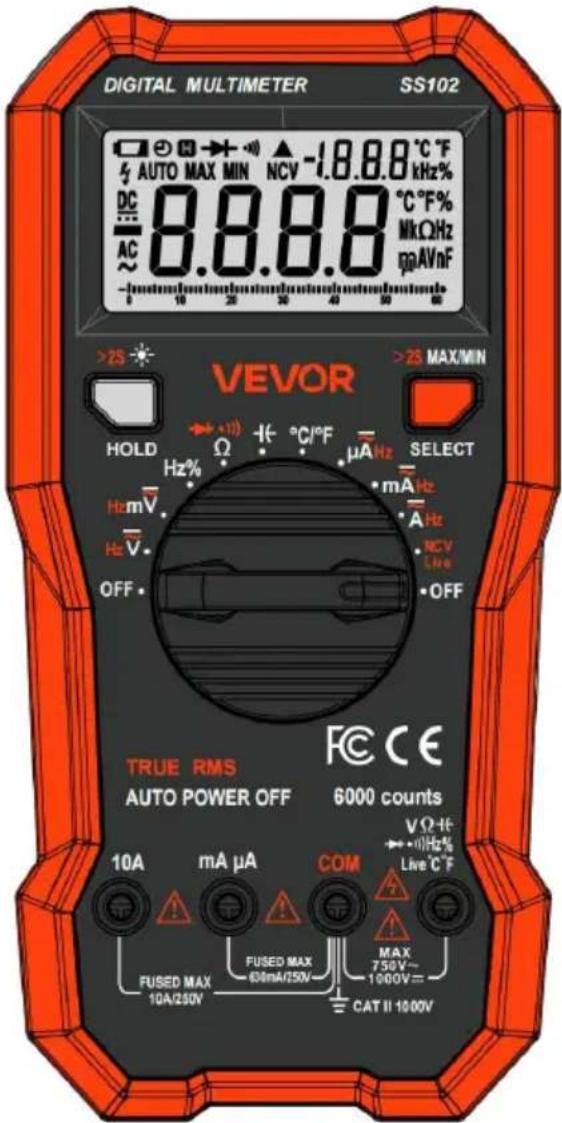
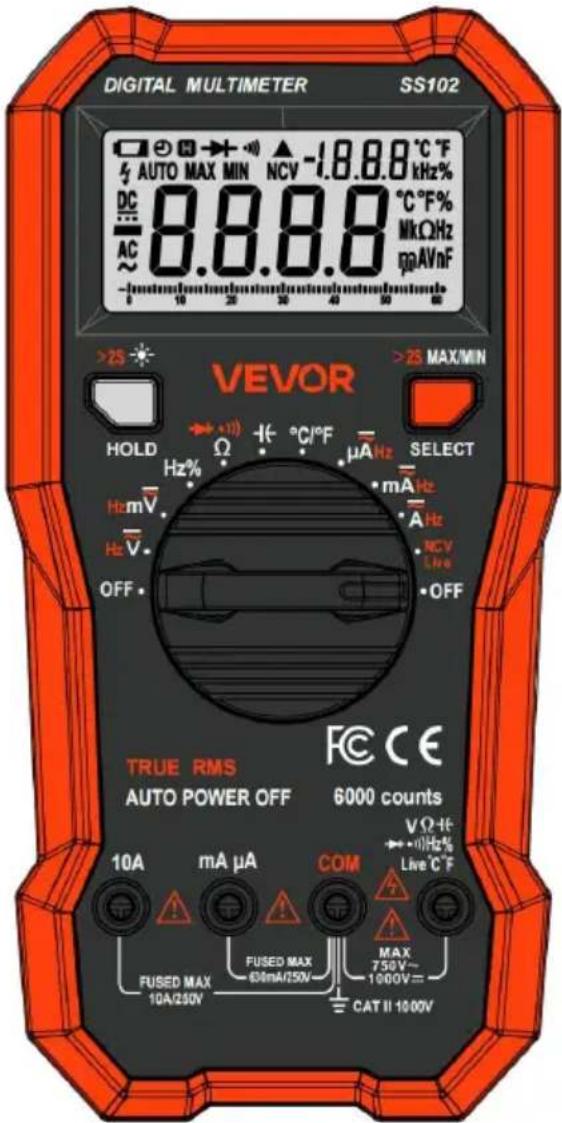
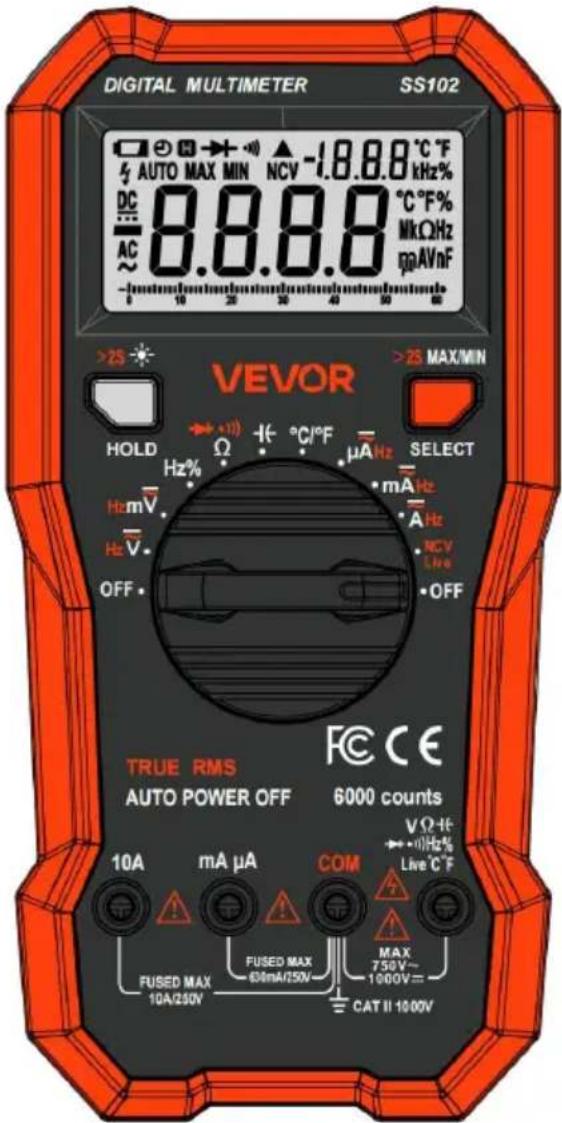
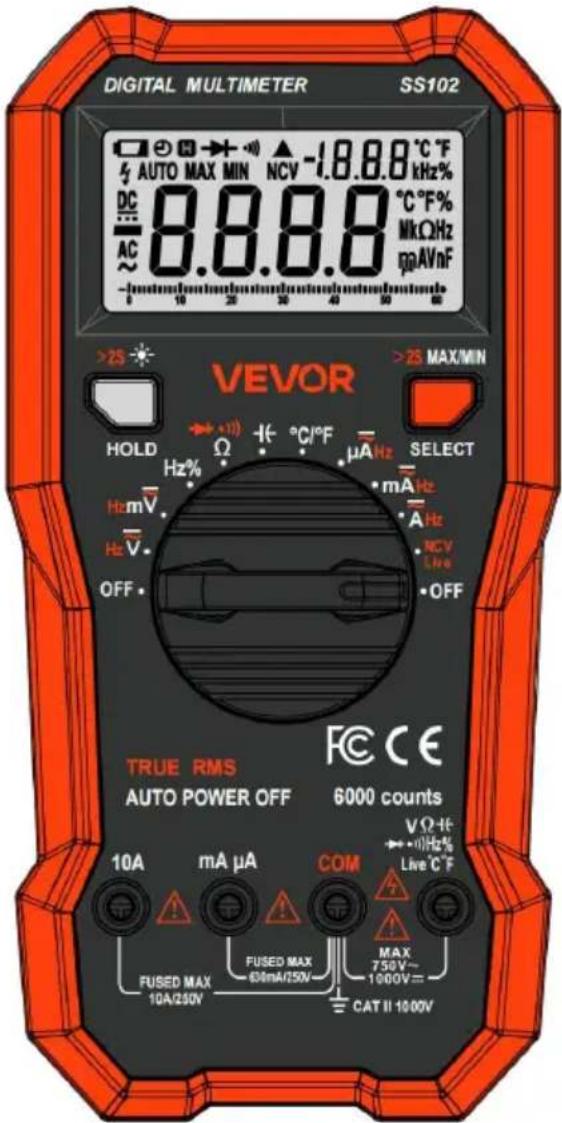
Product Description and Specifications

Read all safety warnings and all instructions. Failure to follow the warnings and instructions may result in electric shock, fire and/or serious injury.
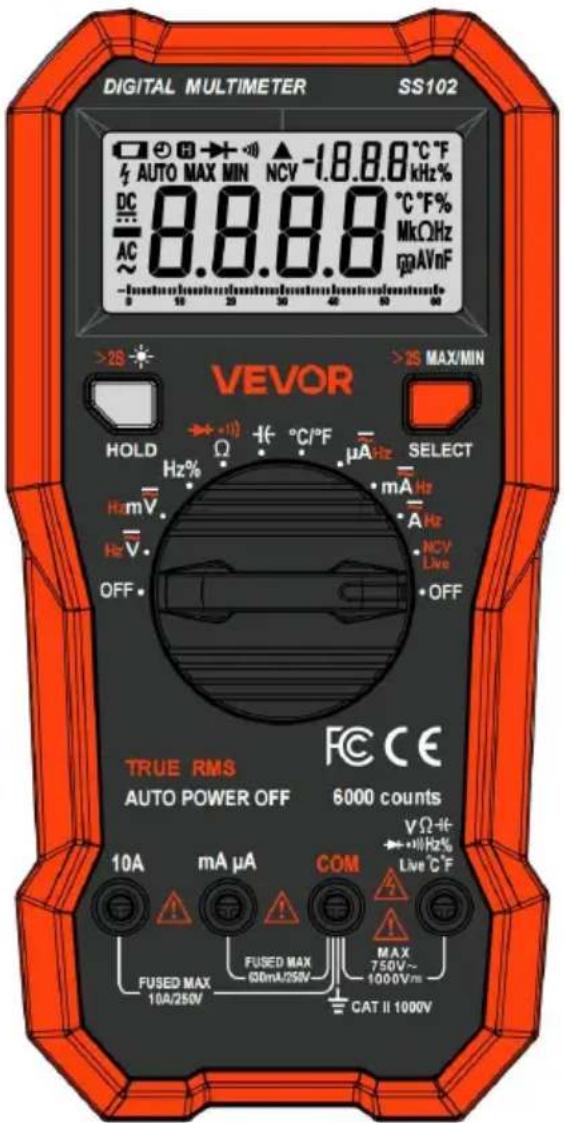
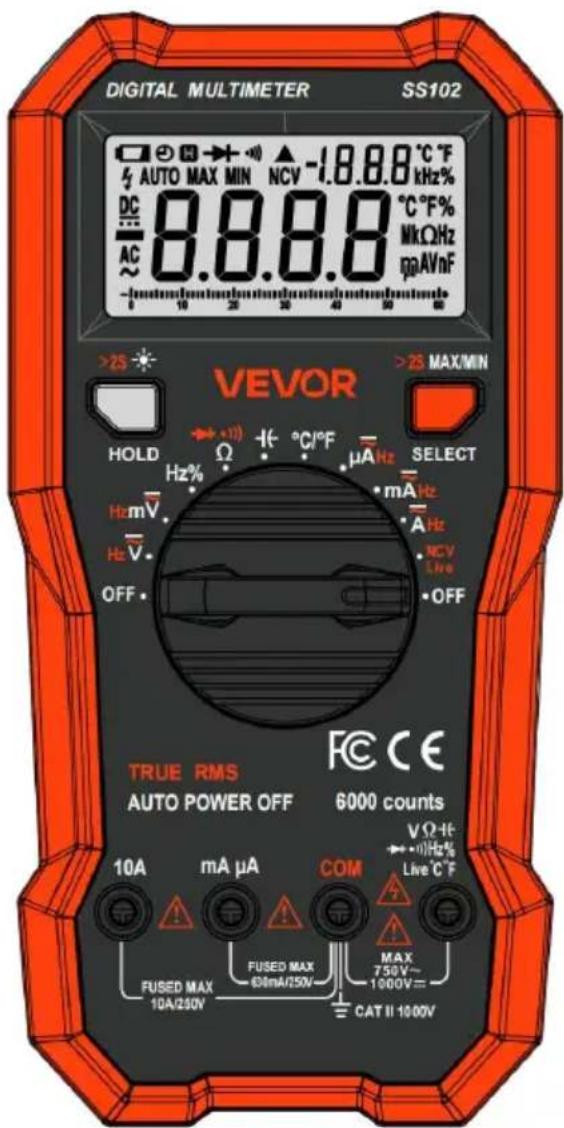
FRONT PANEL
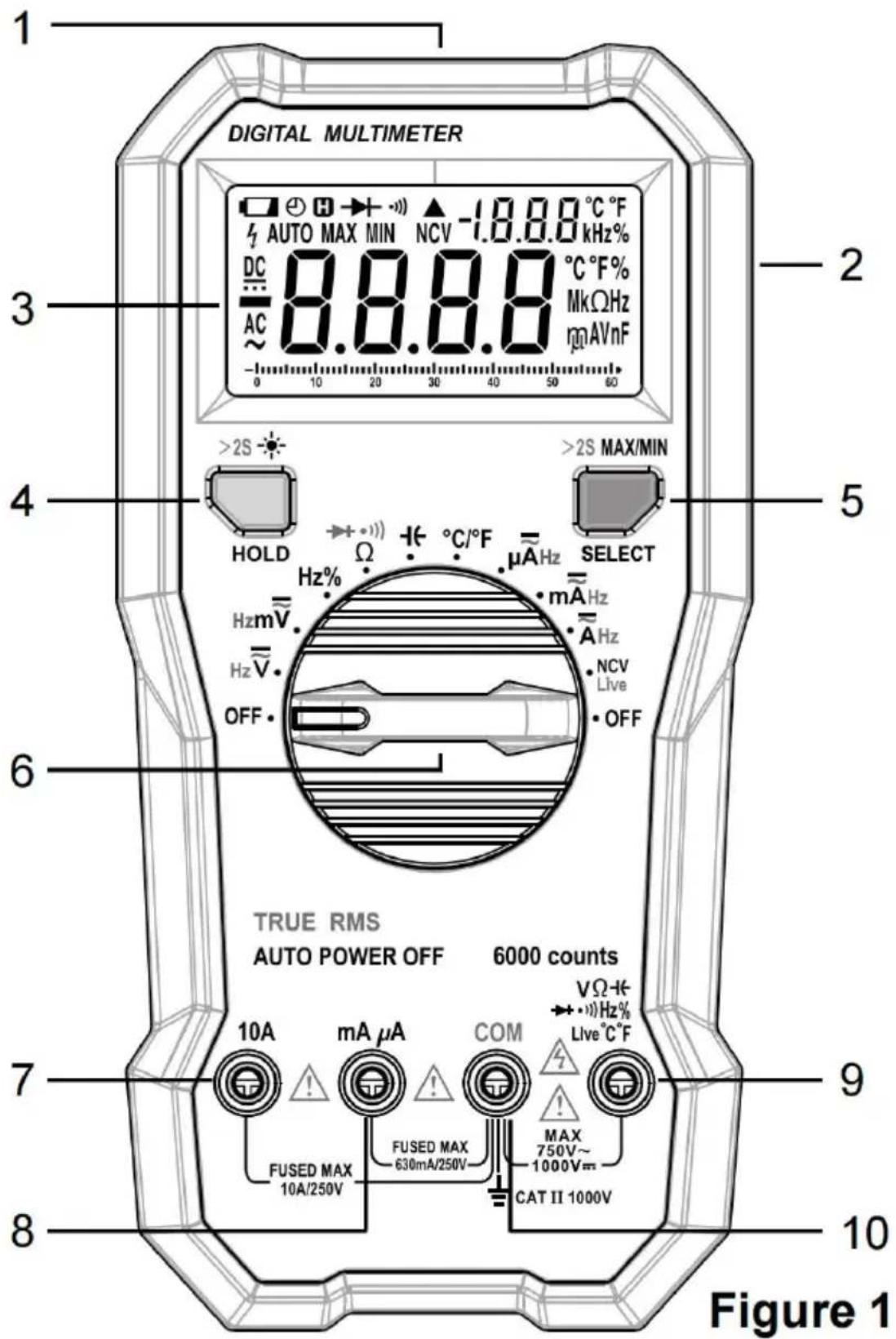
- NCV Sensor
- Holster
- LCD Display
- "HOLD" Button
- Short press to enable/disable Data Hold.
- Long press for more than 2 seconds to turn on/off the backlight. The backlight goes off after approximately 60 seconds.
- "SELECT" / "MAX/MIN" Button
- Short press to switch between:
a. DC and AC voltage functions.
b. DC and AC current functions.
c. Resistance, continuity and diode functions.
d. Non-contact AC voltage and live AC wire detection functions.
- Long press for more than 2 seconds to enter/exit MAX MIN recording mode. In this mode, short press to switch the displayed reading between maximum and minimum.
- Rotary Switch
Used to select the desired function as well as to turn on/off the Meter.
When the Meter is not in use, set this switch in the OFF position.
- " 10A " Terminal
Plug-in connector for the red test lead for 600mA to 10A current measurements.
- " mA μA " Terminal
Plug-in connector for the red test lead for <600mA current measurements.
- " "Live T Terminal
Plug-in connector for the red test lead for voltage, resistance, continuity, diode, frequency, duty cycle, capacitance, and live AC wire detection functions.
For temperature measurements, this terminal is for the positive plug of the K Typ thermocouple.
- " COM " Terminal
Plug-in connector for the black test lead for voltage, current, resistance, continuity, diode, frequency, duty cycle, and capacitance.
For temperature measurements, this terminal is for the negative plug of the K-type thermocouple.
UNDERSTANDING THE DISPLAY
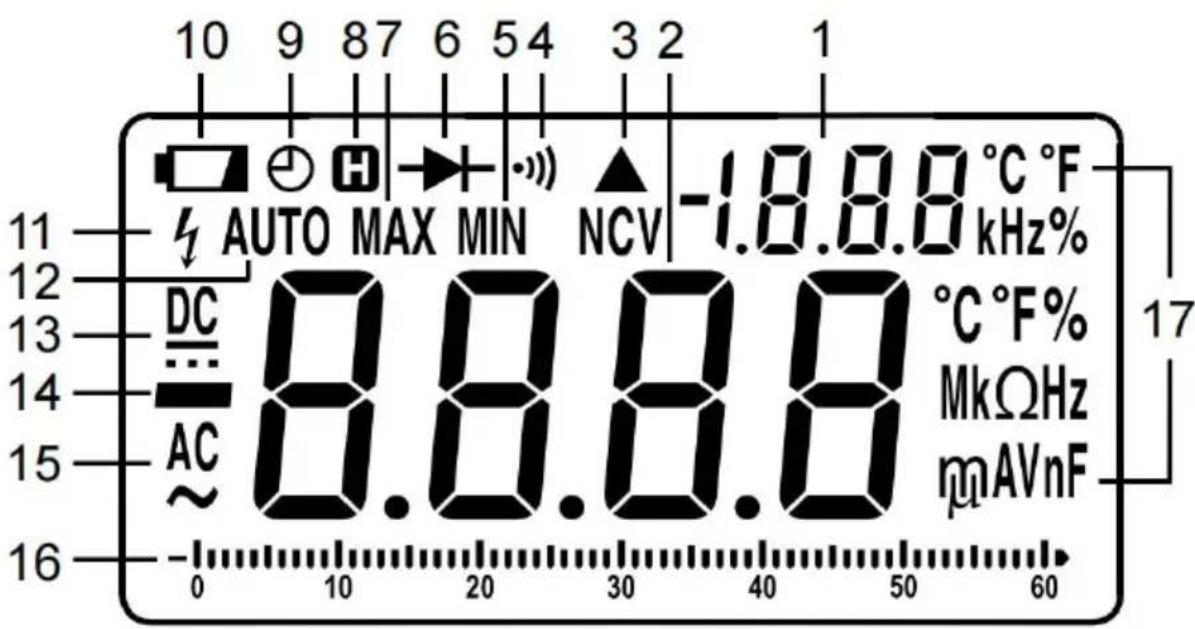
Figure 2
Explanations:
| NO. | Symbol | Description |
| 1 | | Secondary Display |
| 2 | | Primary Display |
| 3 |  | Non-contact AC voltage detection is selected. |
| 4 |  | Continuity test is selected. |
| 5 | MIN | The minimum reading is being displayed. |
| 6 |  | Diode test is selected |
| 7 |  | The maximum reading is being displayed. |
| 8 |  | Data Hold is enabled. |
| 9 |  | Automatic power-off is enabled. |
| 10 | 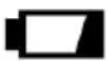 | The battery is low and should be replaced immediat |
| 11 | [82ST] | The absolute value of the detected input voltage is This icon is intended to remind you to use extreme caution when measuring a hazardous voltage. |
| 12 |  | Autoranging |
| 13 |  | Direct Current |
| 14 |  | -Negative sign |
| 15 |  | Alternating Current |
16. Analog bar graph
The bar graph at the bottom of the LCD is an analog display. The length of its lit segments is proportional to the displayed reading in the middle of the LCD.
The bar graph is like the needle on an analog meter. It has an overload indicator to its right and a negative polarity indicator to its left.
The number of lit segments indicates the measured value and is relative to the full-scale value of the selected range.
In the 600V range, for example, the major divisions on the scale represent 0, 100, 200, 300, 400, 500, and 600V, respectively. An input of -100V lights the negative sign, and the lit segments up to the 10 on the scale.
17. Units
| mV, V | Units of voltagemV: Millivolt; V: Volt 1V = 3 ΩnV |
| μA, mA, A | Units of currentμA: Microamp; mA: Milliamp; A: Ampere 1A 3 =mA0 = 10μA |
| Ω, kΩ, MΩ | Units of resistanceΩ : Ohm; k Ω : Kilohm; M Ω : Megohm 1M 3 Ω=10Ω |
| nF, μF | Units of capacitancenF: Nanofarad; μF: Microfarad 1μF = 10F |
| °C, °F | Units of temperature°C: Celsius degree; °F: Fahrenheit degreef (°F) = 32 + 1.8 X c (°C) |
| Hz, kHz, MHz | Units of frequencyHz: Hertz; kHz: Kilohertz MHz: Megahertz1MHz = 10kHz=10 6 Hz |
| % | Unit of duty cycle %: Percent |
GENERAL SPECIFICATION
Display: Primary display: 6000 counts
Secondary display: 2000 counts
Negative Polarity Indication: Negative sign shown on the display
Overrange Indication: OL or -OL shown on the display
Sampling Rate: About 2 to 3 times/sec
IP Degree: IP40
Temperature Coefficient: 0.15 x (specified accuracy) /°C (<18°C or >28°C)
Operating Environment: Temperature: 0°C to 40°C
Relative Humidity: <75%
Storage Environment: Temperature: -10°C to 50°C
Relative Humidity: <85%
Operating Altitude: 0 to 2000 meters
Battery: 9V battery, 6F22 or equivalent, 1 piece
Low Battery Indication: shown on the display
SPECIFICATION
Accuracy is specified for a period of one year after calibration and at 18°C to 28°C with humidity < 75%RH.
Accuracy specifications take the form of:
± [% of Reading] + [number of Least Significant Digits]
Except for the ranges specified specially, accuracy is specified from 5% to 100% of range.
DC Voltage
| Range | Resolution | Accuracy |
| 600mV | 0.1mV | ± (0.8% + 5) |
| 6V | 0.001V | ± (0.5% + 5) |
| 60V | 0.01V | ± (0.8% + 5) |
| 600V | 0.1V |
| 1000V | 1V |
Input Impedance: About 10MΩ
Max. Allowable Input Voltage: 1000V dc
Note:
- In the 600mV range, the primary display may show an unstable reading before measuring. This is normal and does not affect measurements.
- When the measured voltage is ≥1000V, the built-in buzzer beeps. When the voltage is > 1010V, the primary display shows OL.
- When the measured voltage is ≥80V, the backlight lights up orange.
AC Voltage
| Range | Resolution | Accuracy |
| 600mV | 0.1mV | |
| 6V | 0.001V | ± (1.2% + 5) |
| 60V | 0.01V |
| 600V | 0.1V |
| 750V | 1V |
Input Impedance: About 10MΩ
Max. Allowable Input Voltage: 750V ac
Frequency Range: 40Hz to 1kHz (Note: Except for sine wave signal and triangular wave signal measurements, accuracy specifications for ac voltage measurements do not apply to signals with frequency >200Hz.)
Reading: True rms
For frequency measurements shown on the secondary display, the input signal amplitude should be > 100mV.
Note:
- In the 600mV range, the primary display may show an unstable reading before measuring. This is normal and does not affect measurements.
- When the measured voltage is ≥750V, the built-in buzzer beeps. When the voltage is >760V, the primary display shows OL.
- When the measured voltage is ≥80V, the backlight lights up orange.
DC Current
| Range | Resolution | Accuracy |
| 600μA | 0.1μA | ± (1.2% + 5) |
| 6000μA | 1μA |
| 60mA | 0.01mA |
| 600mA | 0.1mA |
| 6A | 0.001A | ± (2.0% + 7) |
| 10A | 0.01A |
Overload Protection:
630mA/250V FAST fuse for mA μA terminal inputs; 10A/250V FAST fuse for 10A terminal inputs.
mA μA terminal: 600mA
10A terminal: 10A (For inputs >2A: duration <10 seconds, interval > 15 minutes)
Note:
When the measured current is ≥10A, the built-in buzzer beeps, and the backlight lights up orange. When the current is >10.10A, the primary display shows OL.
AC Current
| Range | Resolution | Accuracy |
| 600μA | 0.1μA | ± (1.5% + 5) |
| 6000μA | 1μA |
| 60mA | 0.01mA |
| 600mA | 0.1mA |
| 6A | 0.001A | ± (2.5% + 10) |
| 10A | 0.01A |
Overload Protection:
630mA/250V FAST fuse for mA μA terminal inputs; 10A/250V FAST fuse for 10A terminal inputs.
mA μA terminal: 600mA
10A terminal: 10A (For inputs >2A: duration <10 seconds, interval > 15 minutes)
Frequency Range: 40Hz to 1kHz (Note: Except for sine wave and triangular wave signal measurements, accuracy specifications for AC
current measurements do not apply to signals with frequency >200Hz.)
Reading: True rms
For frequency measurements shown on the secondary display, the input signal amplitude should be >100 μA.
Note: When the measured current is 10A, the built-in buzzer beeps, and the backlight lights up orange. When the current is >10.10A, the primary display shows OL.
Resistance
| Range | Resolution | Accuracy |
| 600Ω | 0.1Ω | ± (1.0% + 5) |
| 6kΩ | 0.001kΩ |
| 60kΩ | 0.01kΩ |
| 600kΩ | 0. 1kQΩ |
| 6MΩ | 0.001MΩ | ± (1.5% + 5) |
| 60MΩ | 0.01MΩ | ± (3.0% + 10) |
Continuity
| Range | Description | Remark |
| •1)) | The built-in buzzer will beep if the resistance is less than about 50Ω. If the resistance is between 50Ω and 150 the buzzer may or may not beep. If the resistance is more than 150Ω, the buzzer will not beep. | Open Circuit Voltage: about 2V |
Diode
| Range | Description | Remark |
| The approx. Forward voltage droof the diode will be displayed. | Open Circuit Voltage: about 4 V |
Capacitance
| Range | Resolution | Accuracy |
| 60nF | 0.01nF | ± (4.0% + 10) |
| 600nF | 0.1nF |
| 6μF | 0.001μF |
| 60μF | 0.01μF |
| 600μF | 0.1μF | ± (5.0% + 20) |
| 6mF | 0.001mF |
| 60mF | 0.01mF |
| 100mF | 0.1mF | ± 10.0% |
Duty Cycle
| Range | Resolution | Accuracy |
| 1% to 99% | 0.1% | 1Hz to 10kHz: ± (2.0% + 7) >10kHz: not specified |
Input Voltage: 1V rms to 30V rms
Input Voltage: 1V rms to 30V rms Frequency
| Range | Resolution | Accuracy |
| -40°C to 40°C | 1°C | ± 4°C |
| 40°C to 1000°C | ± (1.0% + 4°C) |
| -40°F to 104°F | 1°F | ± 7°F |
| 104°F to 1832°F | ± (1.0% + 7°F) |
Temperature Sensor: K Type thermocouple
Note:
- Accuracy does not include error of the thermocouple probe.
- Accuracy specifications assume ambient temperature changes are stable to ±1°C. For ambient temperature changes of ±5°C, rated accuracy applies after an hour.
- The Meter's operating temperature must be between 18°C and 28°C; otherwise measurement accuracy will not be guaranteed.
- When the measured temperature is higher than 1100°C (1850°F), the display shows OL. When the temperature is lower than -50°C (-58°F), the display shows -OL.
Data Hold
Briefly press the HOLD button once to activate Data Hold. The present reading is locked, and the symbol H appears. To deactivate Data Hold, briefly press the HOLD button again. The symbol H disappears.
Note: When the rotary switch is set to the position, the HOLD button is disabled.
MAX MIN Recording
MAX MIN recording mode captures maximum and minimum values. When the input goes below the recorded minimum value or above the recorded maximum value, the Meter records the new value.
To capture maximum and minimum values:
- Set the Meter to the desired function.
- Press and hold the MAX/MIN button for more than 2 seconds to enter MAX/M recording mode. The display shows the maximum value and the symbol MAX first.
- Briefly press the MAX/MIN button to switch the displayed reading between maximum and minimum.
- To exit MAX MIN recording mode, press and hold the MAX/MIN button for more than 2 seconds.
Note:
- After entering MAX MIN recording mode, the symbol AUTO disappears and the meter retains its previous range setting.
- If the display shows OL, it means overrange.
- When the rotary switch is set to the +← or NCV Live position, the MAX/MIN button is disabled.
Measuring DC or AC Voltage
- Connect the black test lead to the COM terminal and the red test lead to the VΩHz terminal.
- Set the rotary switch to V or V.
- The Meter defaults to DC voltage function. The symbol is displayed. To perform AC voltage measurements, briefly press the SELECT button once. The symbol AC appears.
- Connect the test leads across the circuit to be measured.
- Read the primary display. For DC voltage measurements, the polarity of the red test lead connection is indicated as well. For AC measurements, the secondary display shows the frequency of the input signal.
Note:
- When the primary display shows OL, it means overrange.
- If the magnitude of the voltage to be measured is not known beforehand
Set the rotary switch to the first position. Then change it as needed to
display the highest available resolution.
- In the low range, the primary display may show an unstable reading before connecting the test leads to the circuit to be measured. This is normal and does not affect measurements.
- To avoid electric shock to you or damage to the Meter, do not apply a voltage higher than 750V AC or 1000V DC between terminals.
- In any voltage range, the input impedance of the Meter is about 10MΩ. This load effect may cause error when measuring a high resistance circuit. The error can be ignored if the impedance of the circuit being measured is 10kΩ or less.
Measuring DC or AC Current
- Connect the black test lead to the COM terminal. If the current to be measured is <600mA, connect the red test lead to the mA/μA terminal; if it is ≥600mA (but not exceeding 10A), connect the red test lead to the 10A terminal instead.
- Set the rotary switch to μA, mA, or 10A.
Note: If the red test lead is connected to the 10A terminal, the rotary switch must be set to the 10A position. If it is connected to the mA/μA terminal, never set the rotary switch
to the A position.
- The Meter defaults to DC current function. The symbol DC is displayed.
To perform AC current measurements, briefly press the SELECT button once. The
symbol AC appears.
- Turn off power to the circuit to be measured. Then connect the test leads in series with the circuit.
- Turn on power to the circuit.
- Read the primary display. For DC current measurements, the polarity of the red test lead connection is indicated as well. For AC measurements, the secondary display shows the frequency of the input signal.
Note:
If the magnitude of the current to be measured is not known beforehand, set the rotary switch to first. Then gradually change to or as needed to display the highest available resolution.
Measuring Resistance
- Connect the black test lead to the COM terminal and the red test lead to the terminal.
- Set the rotary switch to .
- The Meter defaults to resistance function, with the unit MΩ shown on the display.
- Connect the test leads across the resistor to be measured.
- Allow the reading to stabilize, then read the display.
Note:
- When input terminals are open, the display shows OL as an overrange indication.
- Before measuring, disconnect all power to the circuit under test and discharge all capacitors thoroughly.
Continuity Test
- Connect the black test lead to the COM terminal and the red test lead to the terminal.
- Set the rotary switch to .
- The Meter defaults to resistance function. Briefly press the SELECT button once, the symbol appears.
- Connect the test leads across the circuit under test.
- If the resistance reading shown on the primary display is less than about 50Ω, the built-in buzzer will beep.
Note: Before test, disconnect all power to the circuit to be tested and discharge all capacitors thoroughly.
Diode Test
- Connect the black test lead to the COM terminal and the red test lead to the terminal. V Ω - H ↔ + 10 Hz % Live °C 'F
- Set the rotary switch to .
- The Meter defaults to capacitance function. Briefly press the SELECT button once, the symbol ➤ appears.
- Connect the red test lead to the anode of the diode to be tested and the black test lead to the cathode of the diode.
- The primary display shows the approximate forward voltage drop of the diode. If the connections are reversed, it will show OL.
Note: Before test, disconnect all power to the circuit to be tested and discharge capacitors thoroughly.
Measuring Capacitance
Measuring Capacitance
- Connect the black test lead to the COM terminal and the red test lead to the VΩ+Hz% terminal.
- Set the rotary switch to .
- Connect the test leads across the capacitor to be measured.
Note: The red test lead is connected to the anode of the capacitor, and the black one is connected to the cathode.
- Allow the reading to stabilize, then read the primary display.
Note:
- Before measuring, disconnect all power to the circuit to be tested and discharge all capacitors thoroughly.
- For high capacitance measurements, it may take a few seconds for the Meter to stabilize readings.
Measuring Frequency/ Duty Cycle
- Connect the black test lead to the COM terminal and the red test lead to the VΩ+Hz% terminal.
- Set the rotary switch to Hz%
- Connect the test leads across the circuit to be measured.
- The signal frequency is shown on the primary display while the duty cycle appears on the secondary display.
Note:
- The frequency of the input signal should be higher than 1Hz.
- Input voltage: 1V rms to 30V rms. The higher the frequency of the input signal, the higher the required input voltage.
Temperature
Note:
To avoid possible damage to the meter or other equipment, remember that while the meter is rated for -40°C to 1000°C and -40°F to 1832°F, the K Type Thermocouple provided with the meter is rated to 250°C.
The K Type Thermocouple is not professional and can only be used for non-critical measurements. For accurate measurements, use a professional thermocouple.
- Set the rotary switch to °C/°F.
- Connect the negative plug of the K Type thermocouple to the COM terminal and the positive plug to the VΩHz terminal.
- Connect the sensing end of the thermocouple to the object to be measured.
- Wait until thermal equilibrium between the thermocouple probe and the object is reached. The primary display shows temperature in Celsius while the secondary display shows temperature in Fahrenheit.
- Set the rotary switch to the NCV position. The Meter defaults to non-contact AC voltage detection function. The primary display shows the electric field strength.
- Move the Meter top (where the NCV sensor is located, refer to Figure 1) close to
the object under test. The Meter will indicate the electric field strength detected. The electric field strength is indicated by the primary display, the flashing rate of the orange backlight, and the beeping rate of the built-in buzzer.
The primary display shows a strong electric field when detected, and --LO for weak fields. The stronger the electric field detected, the faster the flashing rate of the orange backlight and the beeping rate of the buzzer.
Note:
- Detection Range: 90V to 750V Response Frequency: 50HZ/60Hz
- The Meter's electric field strength indication is affected by the magnitude of the AC voltage of the conductor under test, the distance between the Meter and the conductor, the insulation of the conductor, etc.
- Because of the Meter's detection limit, a conductor under test may be electrically live even if the Meter does not indicate the presence of an electric field.
- Before use, verify the Meter's operation by detecting a known AC voltage. Do not use the Meter if it operates abnormally.
- To avoid electric shock, do not touch any conductor with hand or skin.
Live AC Wire Detection
- Set the rotary switch to .
- Briefly press the SELECT button until is displayed.
- Connect the red test lead to → +10 Hz% Live°C°F terminal and the probe tip of this test lead to the socket or bare wire under test. When detecting a live wire, the secondary display shows-, the orange backlight flashes, and the buzzer beeps continuously.
Note:
- Because of the Meter's detection limit, a wire under test may be live even if the Meter does not give any indication.
- Before use, verify the Meter's operation by detecting a known AC voltage. Do not use the Meter if it operates abnormally.
- To avoid electric shock, do not touch any conductor with hand or skin.
- To avoid interference, do not use the Meter in an environment with intense electromagnetic field.
Automatic Power-Off
The Meter automatically turns off if the rotary switch is not moved or a button is not pressed for 15 minutes. Pressing a button or turning the rotary switch will turn the Meter back on after it is powered off automatically. To disable automatic power-off, press and hold the SELECT button while turning the rotary switch from the OFF setting to other switch settings. The symbol is absent from the display.
MAINTENANCE
Except replacing the battery and fuses, never attempt to repair or service the Meter.
Store the Meter in a dry place when not in use. Don't store it in an environment with intense electromagnetic field.
General Maintenance
Periodically wipe the case with a damp cloth and a little mild detergent. Do not use abrasives or solvents.
Dirt or moisture in terminals can affect readings. Clean terminals as follows:
- Set the rotary switch to OFF and remove all the test leads from the Meter.
- Shake out any dirt which may exist in terminals.
- Soak a new swab with alcohol.
- Work the swab around in each terminal.
Note: If the Meter fails, check and replace (as needed) the battery and fuses and/or review this manual to verify proper use of the Meter.
Battery and Fuse Replacement
Warning
- To avoid false readings which could lead to possible electric shock or personal injury, replace the battery as soon as the low battery indicator appears.
- To prevent damage or injury, install only specified fuses.
- Remove the test leads and turn off the Meter before opening the battery cover or the case.
To replace the battery:
Remove the holster and the screw on the battery cover. Slide the battery cover in the direction of the arrow indicated on the battery cover. Replace the exhausted battery with a new one of the same type, making sure that the polarity connections are correct. Reinstall the battery cover, the screw, and the holster.
To replace the fuses:
Remove the battery cover as described above. Remove the screws on the back cover and move the back cover aside gently. Replace the blown fuse with a new one of the same ratings. Reinstall the back cover and secure all the screws. Return the battery cover and the holster.
This meter uses two fuses:
F1: 500mA/250V FAST fuse 5 x 20mm
F2: 10A/250V FAST fuse, 5 x 20mm
Accessories
ACCESSORIES
Manual: 1 piece
Test Lead: 1 pair
K Type Thermocouple: 1 piece
DECLARATION
- This manual is subject to change without notice.
- Our company will not take the other responsibilities for any loss.
- The contents of this manual can not be used as the reason to use the Meter any special application.
Manufacturer: Shanghaimuxinmuyeyouxiangongsi
Address: Shuangchenglu 803nong11hao1602A-1609shi, baoshanqu, shanghai 200000 CN.
Imported to AUS: SIHAO PTY LTD. 1 ROKEVA STREETEASTWOOD NSW 2122 Australia
Imported to USA: Sanven Technology Ltd. Suite 250, 9166 Anaheim Place, Rancho Cucamonga, CA 91730
YH CONSULTING LIMITED.
C/O YH Consulting Limited Office 147,
Centurion House, London Road,
Staines-upon-Thames, Surrey, TW18 4AX
E-CrossStu GmbH
Mainzer Landstr.69,
60329 Frankfurt am Main.

VEVOR
Affordable. Reliable. Home Improvement.
Product Description and Specifications

C/O YH Consulting Limited Office 147,
Centurion House, London Road,
Staines-upon-Thames, Surrey, TW18 4AX
E-CrossStu GmbH
Mainzer Landstr.69,
60329 Frankfurt am Main.

VEVOR
Affordable. Reliable. Home Improvement.
Digital multimeter
Model: SS102
Model: SS102
Product Description and Specifications

C/O YH Consulting Limited Office 147,
Centurion House, London Road,
Staines-upon-Thames, Surrey, TW18 4AX
E-CrossStu GmbH
Mainzer Landstr.69,
60329 Frankfurt am Main.

VEVOR
Affordable. Reliable. Home Improvement.
Digital multimeter
Model: SS102
Model: SS102
Product Description and Specifications

Imported in AUS: SIHAO PTY LTD. 1 ROKEVA STREETEASTWOOD NSW 2122 Australia
Imported in the USA: Sanven Technology Ltd. Suite 250, 9166 Anaheim Place, Rancho Cucamonga, CA 91730
YH CONSULTING LIMITED.
C/O YH Consulting Limited Office 147,
Centurion House, London Road,
Staines-upon-Thames, Surrey, TW18 4AX
E-CrossStu GmbH
Mainzer Landstr.69,
60329 Frankfurt am Main.

VEVOR
Affordable. Reliable. Home Improvement.
Digital multimeter
Model: SS102
Model: SS102
Product Description and Specifications

C/O YH Consulting Limited Office 147,
Centurion House, London Road,
Staines-upon-Thames, Surrey, TW18 4AX
E-CrossStu GmbH
Mainzer Landstr.69,
60329 Frankfurt am Main.

VEVOR
Affordable. Reliable. Home Improvement.
Digital Multimeter
Model: SS102
Model: SS102
Product Description and Specifications

STREET EASTWOOD NSW 2122 Australia
Imported to USA: Sanven Technology Ltd. Suite 250, 9166 Anaheim Place, Rancho Cucamonga, CA 91730
YH CONSULTING LIMITED.
C/O YH Consulting Limited Office 147,
Centurion House, London Road,
Staines-upon-Thames, Surrey, TW18 4AX
E-CrossStu GmbH
Mainzer Landstr.69,
60329 Frankfurt am Main.

VEVOR
Affordable. Reliable. Home Improvement.
Digital multimeter
Model: SS102
Model: SS102
Product Description and Specifications

C/O YH Consulting Limited Office 147,
Centurion House, London Road,
Staines-upon-Thames, Surrey, TW18 4AX
E-CrossStu GmbH
Mainzer Landstr.69,
60329 Frankfurt am Main.

VEVOR
Affordable. Reliable. Home Improvement.
Digital multimeter
Model: SS102
VEVOR
Affordable. Reliable. Home Improvement.
Digital Multimeter
Model: SS102
Product Description and Specifications

C/O YH Consulting Limited Office 147,
Centurion House, London Road,
Staines-upon-Thames, Surrey, TW18 4AX
E-CrossStu GmbH
Mainzer Landstr. 69,
60329 Frankfurt am Main.