
TRAIL 200 DC - Fitness Equipment ECOFLOW - Free user manual and instructions
Find the device manual for free TRAIL 200 DC ECOFLOW in PDF.
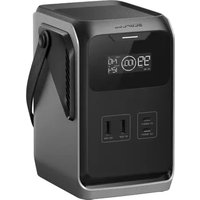


| Product type | Portable power station (fitness equipment) |
| Brand | EcoFlow |
| Model | TRAIL 200 DC |
| Dimensions | 126 × 115 × 167 mm |
| Net weight | About 1.8 kg |
| Battery capacity | 192 Wh / 15 Ah |
| Rated voltage | 12.8 V |
| Chemical composition | LiFePO4 (LFP) |
| Input USB-C1 | 9/12/15 V=3 A, 20/28 V=5 A, 140 W max |
| Input USB-C2 | 9/12/15 V=3 A, 20 V=5 A, 100 W max |
| Output USB-A1/A2 | 5 V=2.4 A, 12 W max per port, 24 W total |
| Output USB-C1 | 5/9/12/15 V=3 A, 20/28 V=5 A, 140 W max |
| Output USB-C2 | 5/9/12/15 V=3 A, 20 V=5 A, 100 W max |
| 12V car outlet | Not available on this model |
| Solar/car input | Not available on this model |
| Charging temperature | 0 to 45 °C |
| Discharging temperature | -10 to 45 °C |
| Storage temperature | -10 to 45 °C |
| Protections | Overvoltage, overload, overtemperature, short circuit, low temperature, undervoltage, overcurrent |
| Display | Battery level, input/output power, remaining time, error codes |
| Low current mode | Yes (enable by double pressing multifunction button) |
| Maintenance | Soft dry cloth |
| Spare parts and repairability | No user-serviceable parts; non-removable battery |
| Warranty | Warranty void if stored discharged for more than 6 months; charge to 100% then discharge to 60% every 3 months for long-term storage |
Frequently Asked Questions - TRAIL 200 DC ECOFLOW
User questions about TRAIL 200 DC ECOFLOW
0 question about this device. Answer the ones you know or ask your own.
Ask a new question about this device
Download the instructions for your Fitness Equipment in PDF format for free! Find your manual TRAIL 200 DC - ECOFLOW and take your electronic device back in hand. On this page are published all the documents necessary for the use of your device. TRAIL 200 DC by ECOFLOW.
USER MANUAL TRAIL 200 DC ECOFLOW
EcoFlow TRAIL 200 DC Portable
Power Station (192Wh)
EcoFlow TRAIL 300 DC Portable
Power Station (288Wh)
ENGLISH 1
DEUTSCH 11
FRANÇAIS 21
ITALIANO 31
ESPANOL 41
NEDERLANDS 51
PYCCKNI 61
日本語 71
81
简体中文 91
繁體中文 101
POLISH 111
CZECH 121
BULGARIAN 131
SWEDISH 141
a 151
COMPLIANCES 161
About This Manual
- This user manual is applicable to the following products: EcoFlow TRAIL 200 DC Portable Power Station (192Wh), EcoFlow TRAIL 300 DC Portable Power Station (288Wh).
- The terms "TRAIL 200 DC" and "TRAIL 300 DC" in this manual shall refer to EcoFlow TRAIL series products.
- Please note that this manual may be updated without prior notice. The latest version is available online at EcoFlow Support (https://www.ecoflow.com/support/download).
- The availability of certain accessories and features described in this manual may vary depending on your country or region.
What's in the Box
OR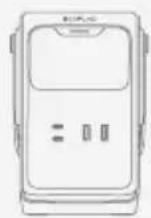
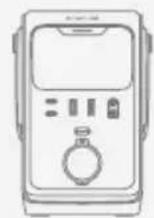
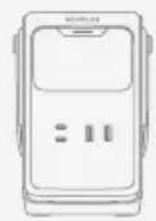
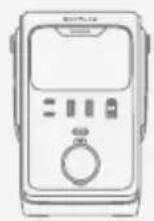
TRAIL 200 DC/TRAIL 300 DC x1 Product Document Bundle x1
Overview
EcoFlow TRAIL 200 DC Portable Power Station (192Wh) (hereinafter referred to as "TRAIL 200 DC" or "the power station") and EcoFlow TRAIL 300 DC Portable Power Station (288Wh) (hereinafter referred to as "TRAIL 300 DC" or "the power station") are power stations with LiFePO4 battery. They support DC inputs and outputs to meet your actual needs.
Appearance
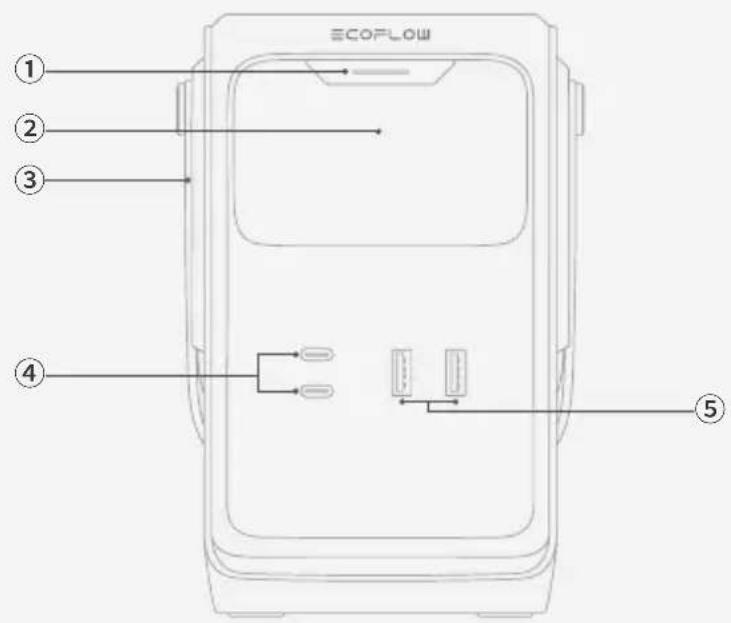
1 TRAIL 200 DC
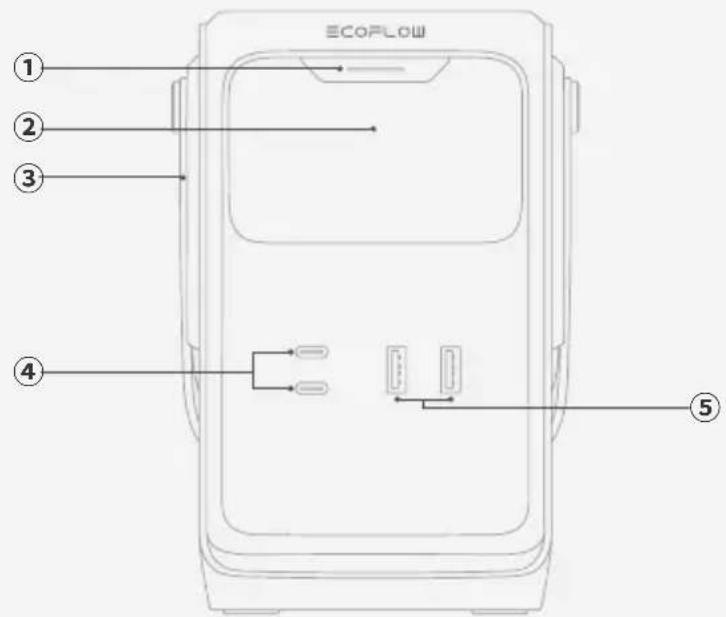
| ① | Multifunction Button | Press Once: Wakes or turns off the display. |
| Double Press: Enables or disables low current mode. When enabled, the USB-A output ports provide continuous power output. | ||
| Indicator: Stays on when there is input or output via any port. Flashes when a fault occurs. | ||
| ② | Display | Displays the real-time battery level, input power, output power and other operating statuses. |
| ③ | Handle | Used to lift or carry the power station. |
| ④ | USB-C Input/Output Port | Supports both charging the power station and powering external devices via USB-C. |
| ⑤ | USB-A Output Port | Supplies power to USB devices. |
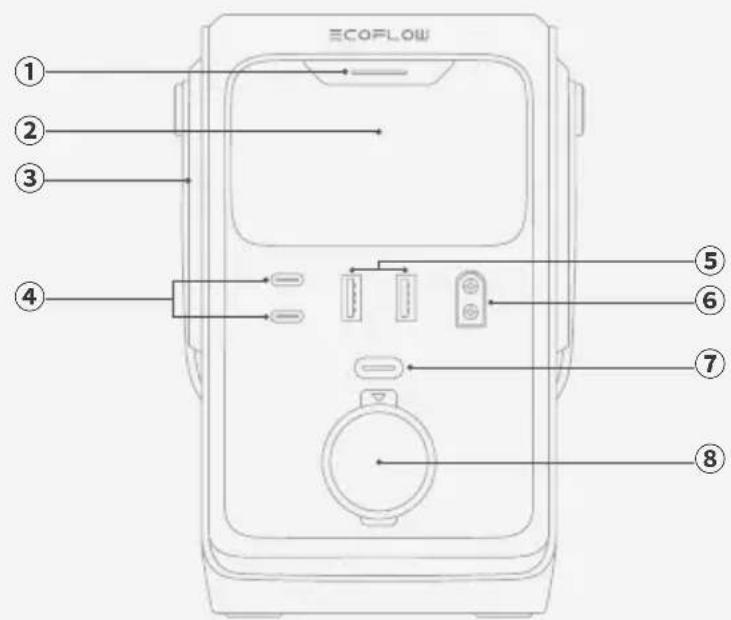
1 TRAIL 300 DC
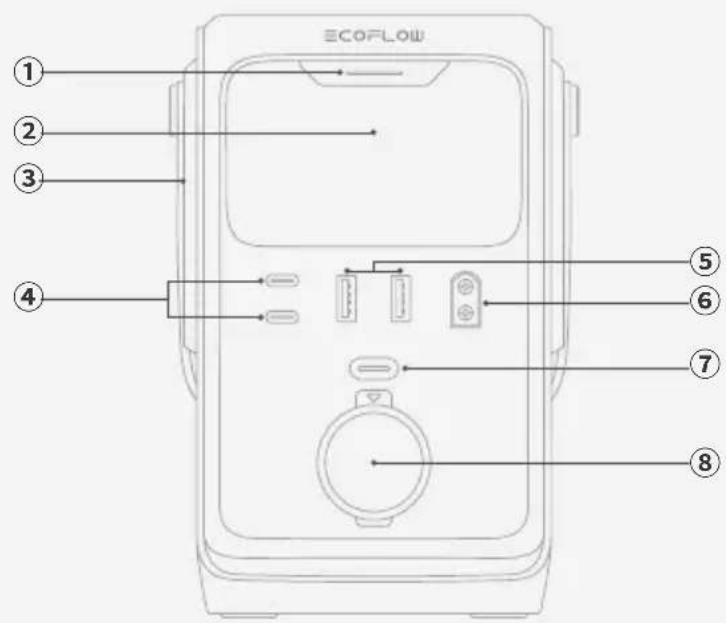
| ① | Multifunction Button | Press Once: Wakes or turns off the display. |
| Double Press: Enables or disables low current mode. When enabled, the USB-A output ports provide continuous power output. | ||
| Indicator: Stays on when there is input or output via any port. Flashes when a fault occurs. | ||
| ② | Display | Displays the real-time battery level, input power, output power and other operating statuses. |
| ③ | Handle | Used to lift or carry the power station. |
| ④ | USB-C Input/Output Port | Supports both charging the power station and powering external devices via USB-C. |
| ⑤ | USB-A Output Port | Supplies power to USB devices. |
| ⑥ | Solar/Car Input Port (XT60) | Connects the power station to solar panels or a 12V car outlet for charging. |
| ⑦ | 12V Car Outlet Button | Short press to enable or disable the 12V car outlet. |
| ⑧ | 12V Car Outlet | Powers up on-board appliances. |
Display
1 TRAIL 200 DC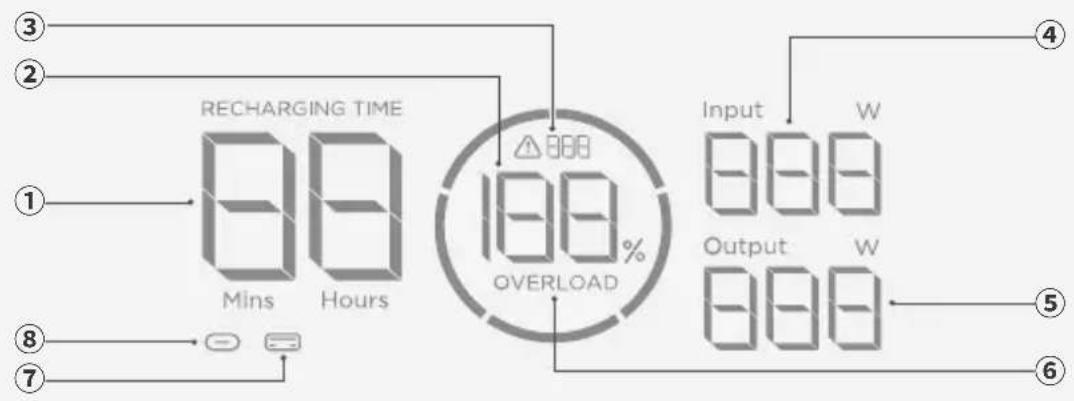
| ① | Remaining Charging / Discharging Time | On: Displays the remaining charging or discharging time. |
| ② | Battery Level On: Displays the current battery level. | |
| ③ | Error Code Flashing: An error has occurred. | |
| ④ | Total Input Power On: Displays the total input power. | |
| ⑤ | Total Output Power On: Displays the total output power. | |
| ⑥ | Overload Warning | Flashing: Overload protection has been triggered. Disconnect devices or power sources to reduce the input or output. Once power returns to a normal level, the error will clear automatically. |
| ⑦ | USB-A Output Port | On: The port is active with output. |
| Flashing: Low current mode is enabled. The USB-A output ports provide continuous power output. | ||
| ⑧ | USB-C Input/Output Port | On: The port is active with input or output. |
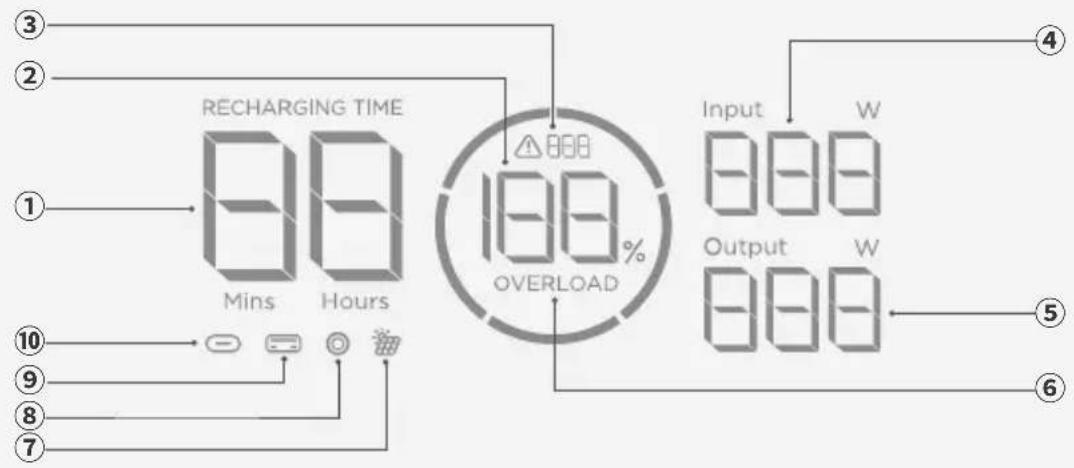
| ① | Remaining Charging / Discharging Time | On: Displays the remaining charging or discharging time. |
| ② | Battery Level On: Displays the current battery level. | |
| ③ | Error Code Flashing: An error has occurred. | |
| ④ | Total Input Power On: Displays the total input power. | |
| ⑤ | Total Output Power On: Displays the total output power. | |
| ⑥ | Overload Warning | Flashing: Overload protection has been triggered. Disconnect devices or power sources to reduce the input or output. Once power returns to a normal level, the error will clear automatically. |
| ⑦ | Solar/Car Input Port (XT60) | On: The port is connected to a DC power source. |
| ⑧ | 12V Car Outlet On: The 12V car outlet is enabled. | |
| ⑨ | USB-A Output Port | On: The port is physically connected and supplying power. |
| Flashing: Low current mode is enabled. The USB-A output ports provide continuous power output. | ||
| ⑩ | USB-C Input/Output Port On: The port is active with input or output. | |

- In this chapter, instructions that apply to both TRAIL 200 DC and TRAIL 300 DC are illustrated using the TRAIL 300 DC as an example.
Power On/Off
The product does not require manual power-on; buttons and ports can be used immediately.
After long periods of inactivity, the product will enter standby mode without requiring manual shutdown.
Power Your Appliances
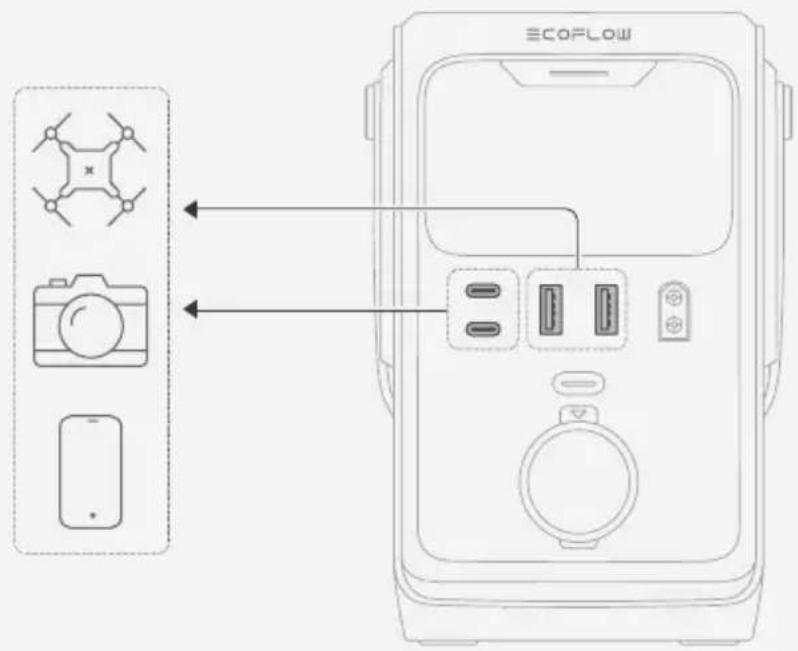
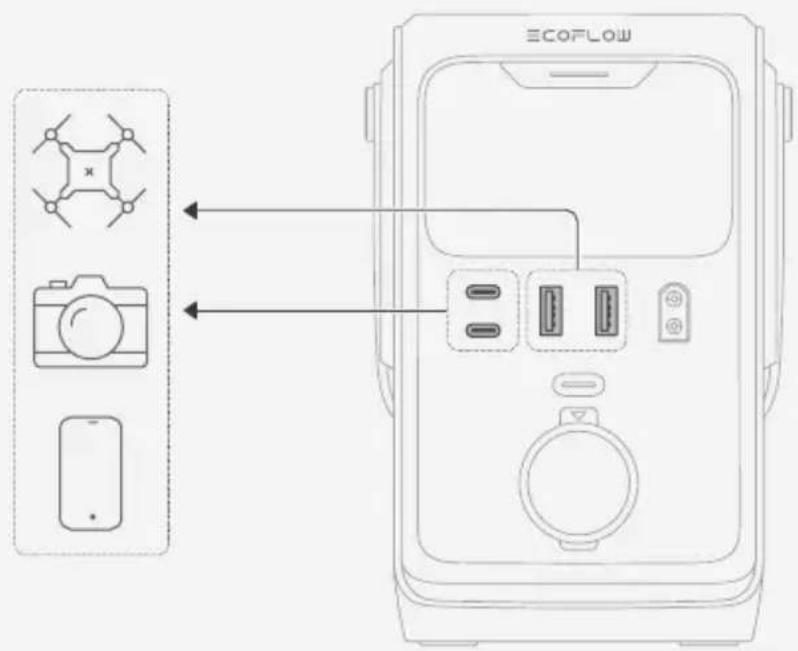
Via USB Output Port
- Standard Mode
Connect your devices directly to the USB ports on the power station.
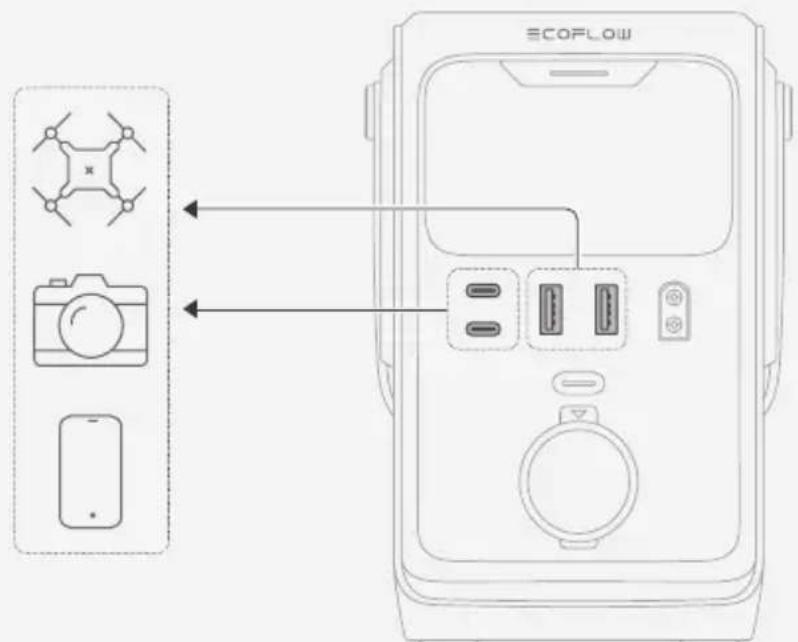
Low Current Mode
The USB-A output ports on this power station support low current mode. It is recommended to enable this mode when charging low-power devices such as Bluetooth earphones, fitness bands, or smartwatches via the USB-A output ports.
How to Use This Mode
- Connect a low-power device to the USB-A output ports.
- Double press the multifunction button. The USB-A icon on the display will flash, indicating that low current mode is enabled.
- Low current mode remains active for approximately 3 hours. You can manually exit the mode by double pressing the button again, or it will turn off automatically after about 3 hours.
- If the device is not fully charged after the mode exits, you can double press the multifunction button again to re-enable low current mode and continue charging.
- After entering low current mode, the USB-A output ports can still charge higher-power devices such as smartphones and drones normally.
- The USB-C input/output ports can provide stable power to low-power devices without the need to enable low current mode.
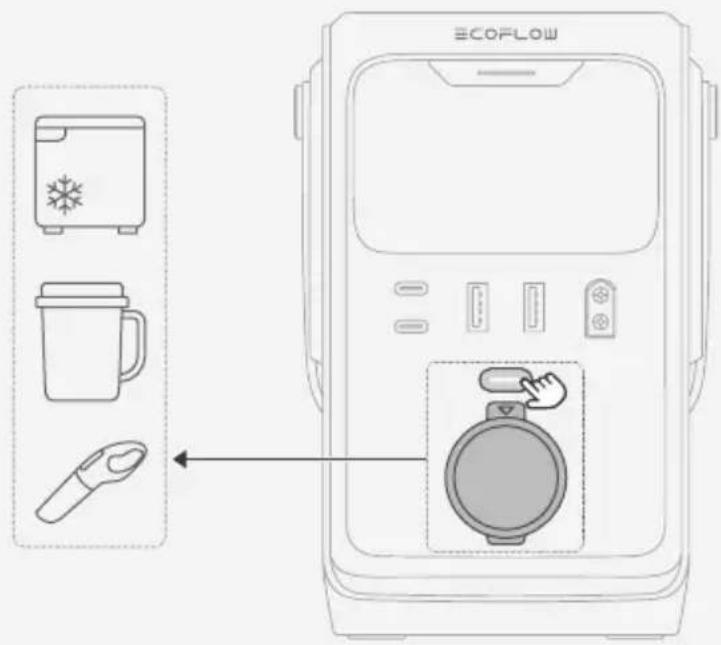
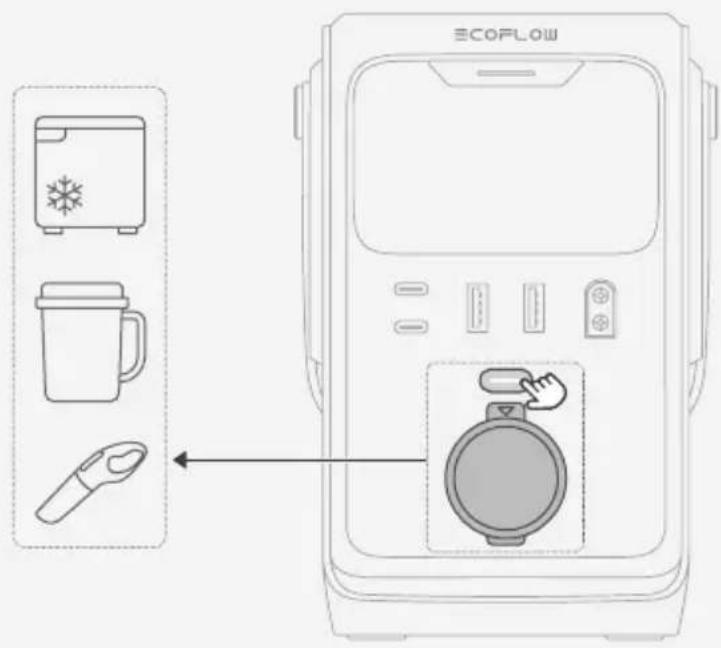
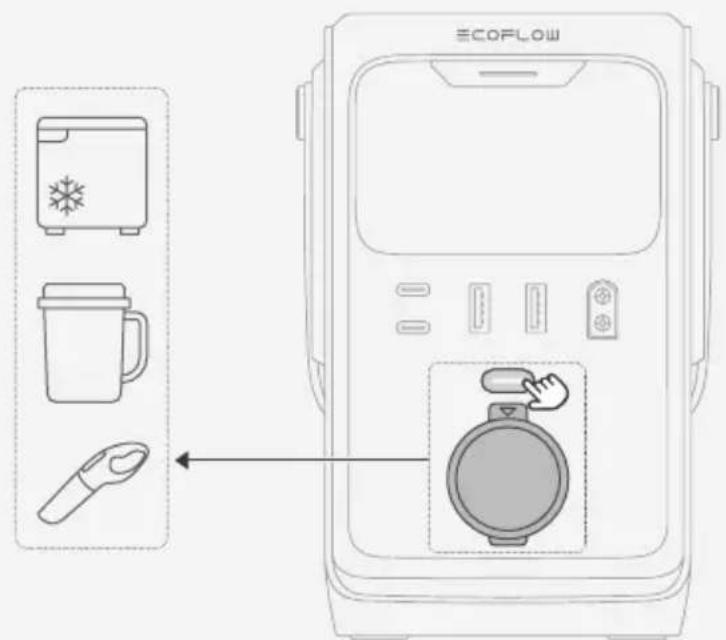
Via 12V Car Outlet (TRAIL 300 DC Only)
- Short press the 12V car outlet button to turn on the outlet.
- Connect vehicle appliances to the outlet.
Charge Your Power Station
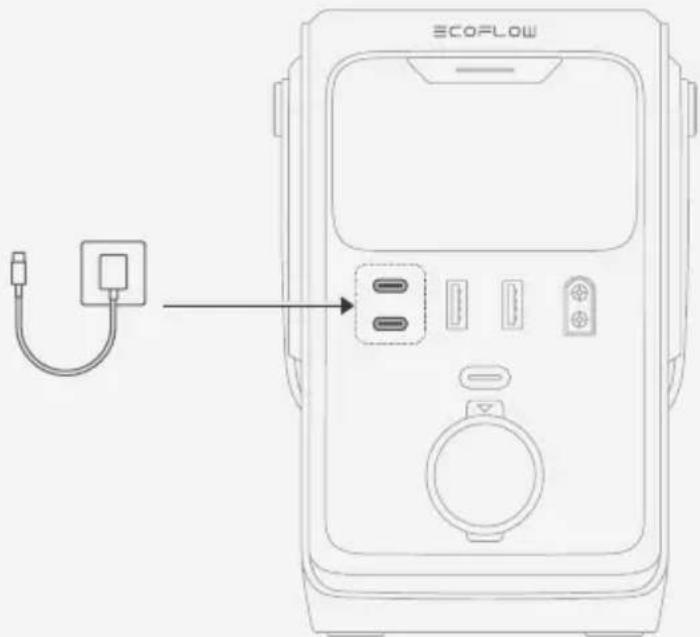
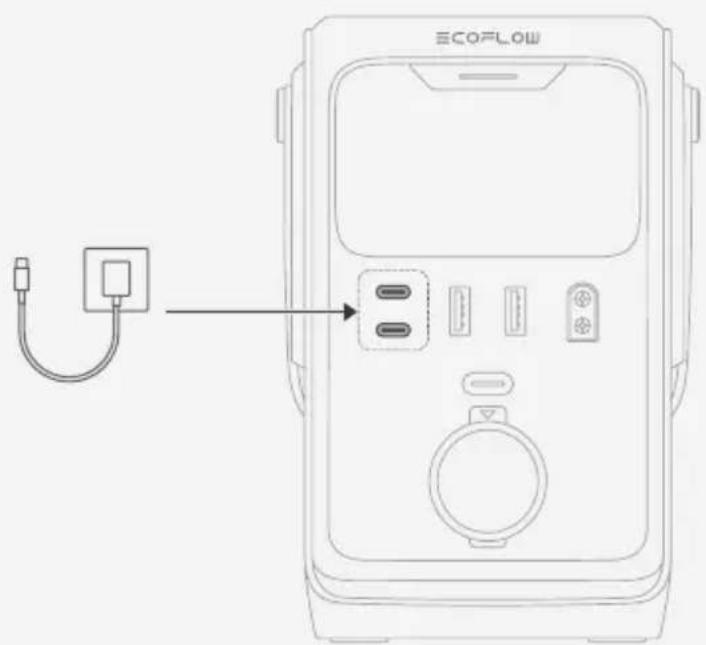
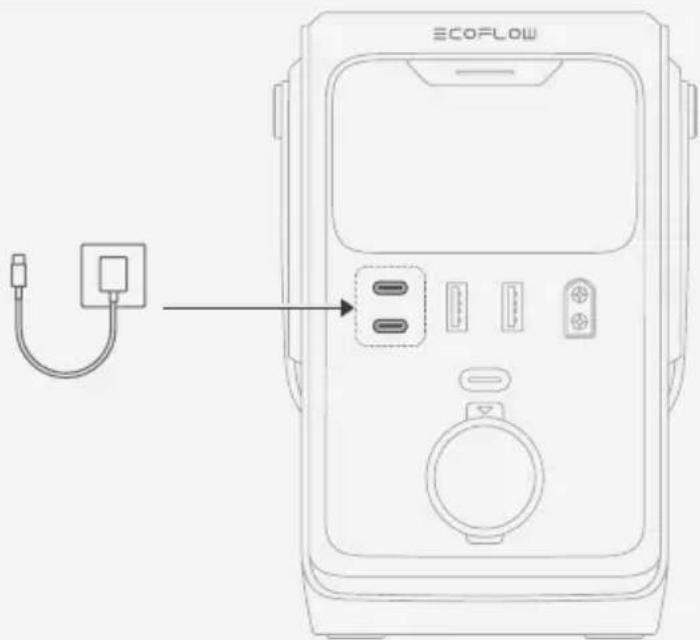
Via USB-C Input/Output Port
Connect the USB-C Input/Output Port to a power source.
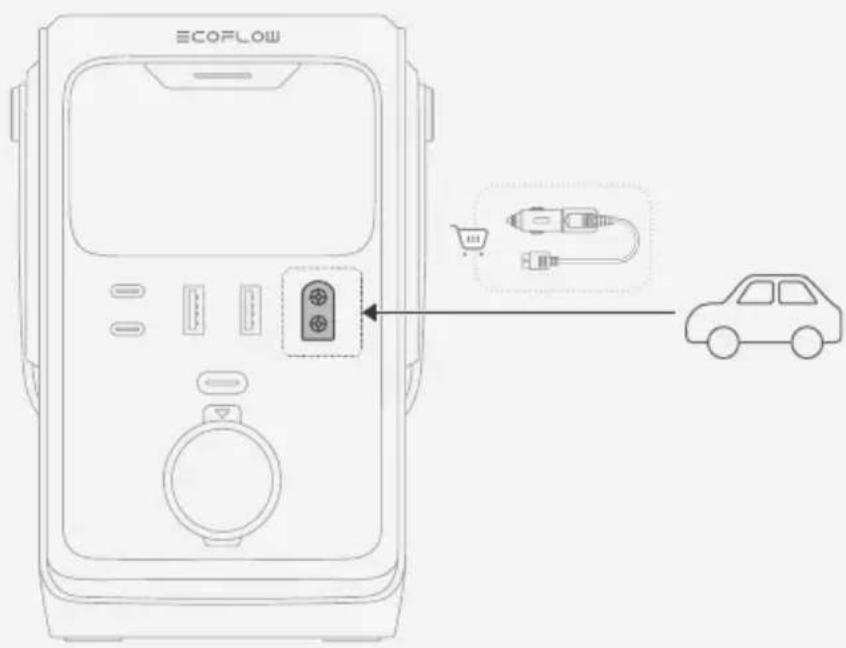
I Via Solar/Car Input Port (TRAIL 300 DC Only)
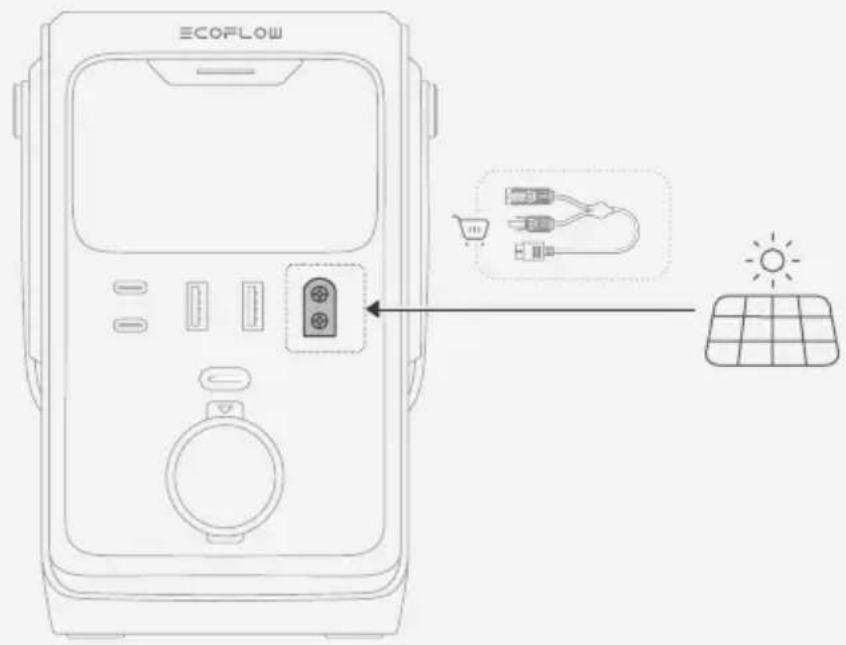
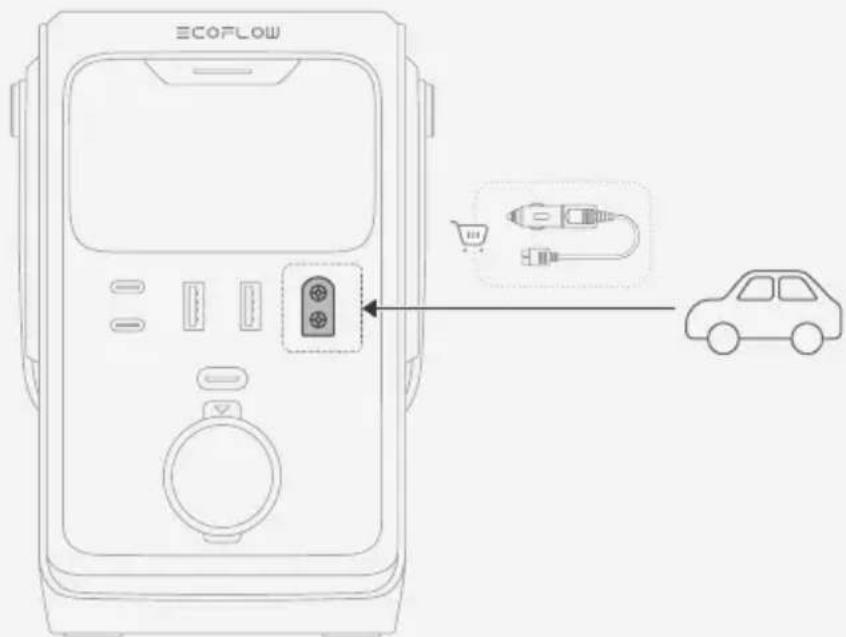
The Solar/Car Input Port on the TRAIL 300 DC supports both solar charging and 12V car outlet input.
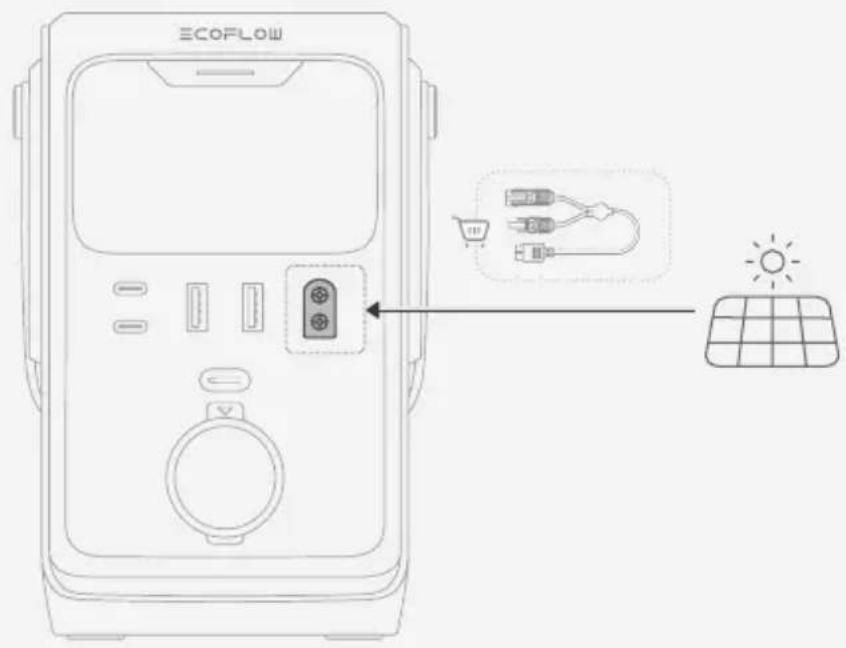
Solar Input
Connect the power station's Solar/Car Input Port to solar panels using a solar charging cable (solar to XT60 charging cable).
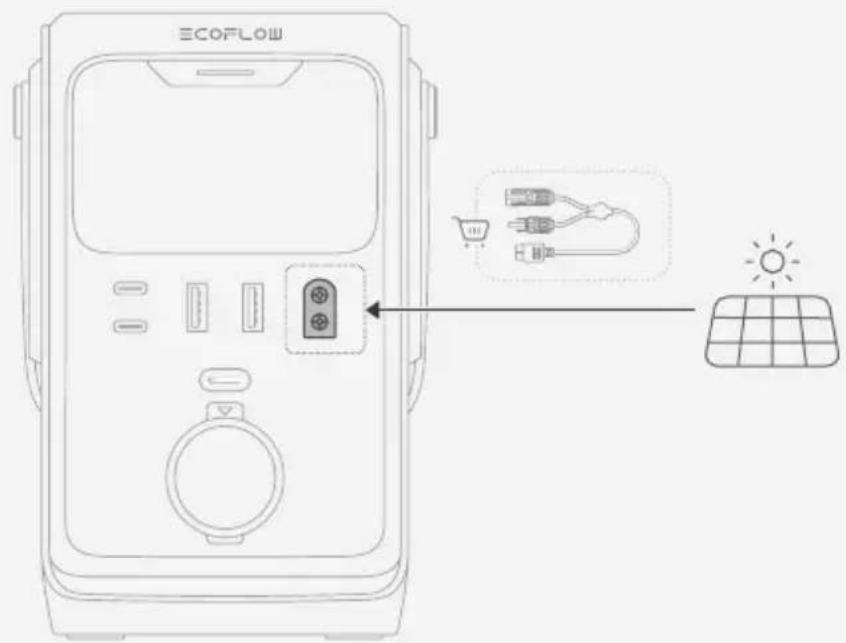

- Before connecting the solar panel, ensure that the output voltage of the panel is less than 30V to avoid product damage.
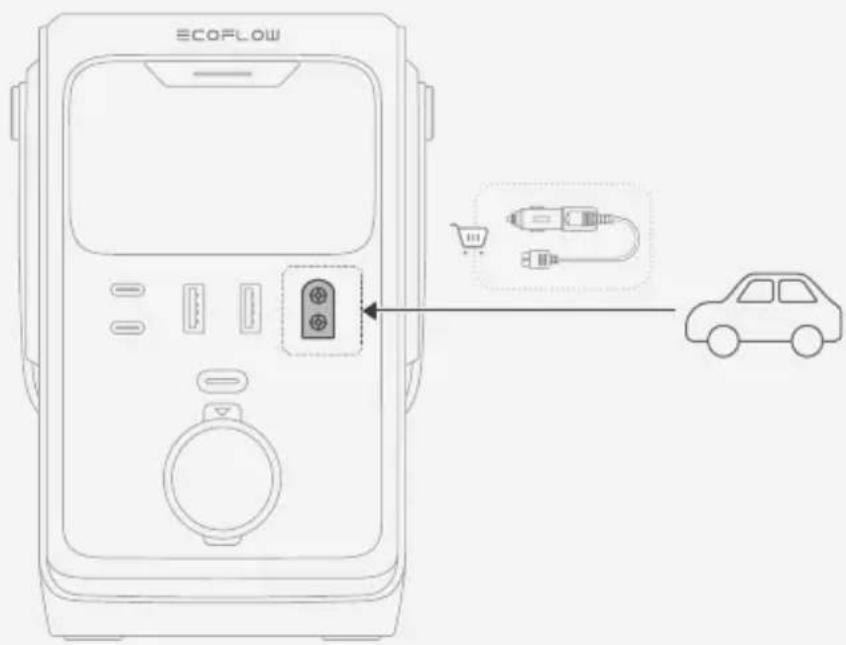
- Car Outlet Input
Connect the Solar/Car Input Port to your vehicle's 12V car outlet using a car charging cable.
Troubleshooting
| Error Code Problem Solution | ||
| 109/111/317/341 | High Temperature | Stop using the product. Move it to a well-ventilated place and keep it away from heat source. The error message will clear when the product's temperature falls to normal levels. |
| 110/112 Low Temperature | Move the product to a warmer place. The error message will clear when the product's temperature rises to normal levels. | |
| 322 | USB-C1 Output Overload | Remove the devices connected to the USB-C1 output ports. After the error message clears automatically, try to use the product again. |
| 328 | USB-C2 Output Overload | Remove the devices connected to the USB-C2 output ports. After the error message clears automatically, try to use the product again. |
| 308 USB-A Output Overload | Remove the devices connected to the USB-A output ports. After the error message clears automatically, try to use the product again. | |
| 319 12V Car Outlet Overload | Remove the devices connected to the 12V car outlet. After the error message clears automatically, try to use the product again. | |
| 629 Solar Input Undervoltage | Move the solar panel to a location with ample sunlight. After the error message clears automatically, try to use the product again. | |

- If the problem persists, stop using the product immediately and consult EcoFlow customer service.
Storage and Cleaning
Storage
- Store the device in an environment between -10°C and 45°C, with a recommended range of approximately 0°C to 30°C to maintain battery health.
- Keep the product in a dry, cool, well-ventilated area that is secure and reduces the risk of falling.
- Ensure the device is kept away from water sources, heat sources, strong magnetic fields, environments with corrosive gases, and any flammable or explosive substances.
- For long-term storage, charge and discharge the product once every 3 months (fully charge it, then discharge to 60% for storage) to maintain battery health.
- Do not leave the device uncharged or unused for more than 6 months; otherwise, the warranty will be void.
Cleaning
- Use a soft, dry cloth to wipe and clean the product.
Safety Instructions
Disclaimer
Please read the product documentation thoroughly and ensure you understand it before using the product. Improper use may cause serious injury, product damage, or property loss. Always refer to the most up-to-date documentation available at https://www.ecoflow.com/support/download/.
This documentation takes precedence over all other versions.
By using this product, you acknowledge and agree to all terms and conditions stated in the documentation. EcoFlow is not liable for losses caused by improper use or failure to adhere to the provided instructions. Subject to applicable laws and regulations, EcoFlow reserves the right to the final interpretation of this document and all documents related to the product.
Safety Guidelines
- Use the product according to the operating instructions in this documentation. Improper use can cause damage to the product or may endanger personal safety and property.
- Check and make sure the charging voltage of your digital device is consistent with the voltage output of the product.
- Use the original charging cable that came with your device to charge it.
- Please recharge the product regularly in order to prolong its service life.
- CAUTION: Risk of Fire and Burns. Do Not Open, Crush, Heat Above 45°C or Incinerate.
- Do not use the product if it has been soaked in water. Contact a battery recycling company for disposal.
- Keep the product away from water, fire and heat sources.
- To reduce the risk of injury, close supervision is necessary when the product is used near children.
- If this product has obvious deformation, leakage or damage, stop using it immediately, and contact a recycling company for disposal.
- This product does not contain any user-serviceable parts and the battery is not replaceable.
- Placing the battery in a fire or heating oven, or treating the battery by mechanical squeezing or cutting may cause an explosion.
- Placing the battery in an environment with extremely high temperatures or low air pressure may result in an explosion or leakage of flammable liquids or gases.
- The product will automatically enter standby mode when not in use.
- Do not expose the product to fire or excessive temperature. Exposure to fire or temperature above 100°C may cause explosion.
- Do not expose the product to rain or snow.
- Do not disassemble, repair, or modify this product by yourself. For any repair service, please contact EcoFlow Customer Service.
- Please note that the nameplate is on the bottom of the product.
- CAUTION: This device is not intended for use in a commercial repair facility.
Appendix
Specifications
| EcoFlow TRAIL 200 DC EcoFlow TRAIL 300 DC | ||
| General | ||
| Model EF-TX-192 EF-TX-288 | ||
| Net Weight Approx. 1.8 kg (4.0 lb) Approx. 2.6 kg (5.7 lb) | ||
| Dimensions | Approx. 126 x 115 x 167 mm(5.0 x 4.5 x 6.5 in.) | Approx. 166 x 115 x 167 mm(6.5 x 4.5 x 6.5 in.) |
| Output | ||
| USB-A1/A2 | 5V=2.4A, 12W Max per port, 24W total | |
| USB-C1 | 5/9/12/15V=3A, 20/28V=5A, 140W Max | |
| USB-C2 | 5/9/12/15V=3A,20V=5A, 100W Max | 5/9/12/15V=3A,20/28V=5A, 140W Max |
| Car Outlet / | 12V=10A | |
| Input | ||
| USB-C1 | 9/12/15V=3A, 20/28V=5A, 140W Max | |
| USB-C2 | 9/12/15V=3A,20V=5A, 100W Max | 9/12/15V=3A,20/28V=5A, 140W Max |
| Solar/Car Input Port / | 10-30V=10A Max, 110W Max | |
| Battery Info | ||
| Rated Voltage | 12.8V= | 19.2V= |
| Rated Capacity 192Wh | 15Ah 288Wh 15Ah | |
| Cell Chemistry LFP (LiFePO4) | ||
| Protection Type | Over Voltage Protection, Overload Protection, Over TemperatureProtection, Short Circuit Protection, Low Temperature Protection, LowVoltage Protection, Overcurrent Protection | |
| Environment Temperature | ||
| Charge Temperature 0b | C-45°C (32°F-113°F) | |
| DischargeTemperature | -10°C to 45°C (14°F-113°F) | |
| Storage Temperature | -10°C to 45°C (14°F-113°F) | |
| Other | ||
| Operating Altitude | ≤3000 m | |
FAQ
For detailed answers to common questions, visit our FAQ page (https://www.ecoflow.com/support/faq).
About this manual
Charging the power station
The product does not require manual power-on; all ports can be used immediately.
After periods of inactivity, the product will enter standby mode without the need to turn it off manually.
Connecting devices to the power supply
Using the USB output ports
- Standard mode
Connect devices directly to the USB ports on the power station.
- Low current mode
The USB-A output ports on this power station support low current mode. It is recommended to enable this mode when charging low-power devices, such as Bluetooth headphones, fitness bands, or smart watches via the USB-A output ports.
How to use this mode
1. Connect a low-power device to the USB-A output ports. 2. Press the multi-function button twice. The USB-A icon on the display will light up, indicating that low current mode is enabled. 3. Low current mode remains active for approximately 3 hours. You can manually exit this mode by pressing the button twice again, or it will turn off automatically after approximately 3 hours. 4. If the device is not fully charged after exiting the mode, you can press the multi-function button twice again to re-enable low current mode and continue charging.
- After enabling low current mode, the USB-A output ports can continue to charge more powerful devices, such as smartphones and tablets, in normal mode. The USB-C input/output ports can provide stable power to low-power devices without the need to enable low current mode.
Type 3 automotive socket 12 V (TRAIL 300 DC only)
- Briefly press the automotive socket 12 V button to switch on the socket. 2. Connect automotive devices to the socket.
Supply power for charging
Type 3 USB-C input/output port
Connect the USB-C input/output port to a power source.
Through the input port for charging from solar panel / automotive (TRAIL 300 DC only)
The input port for charging from solar panel / automotive on TRAIL 300 DC supports charging from both solar panel and via the automotive socket 12 V input.
Input for solar panel charging
Connect to solar panels using the corresponding input port for charging from solar panel / automotive, using the solar panel charging cable (connect the solar panel charging cable to the XT60 port).
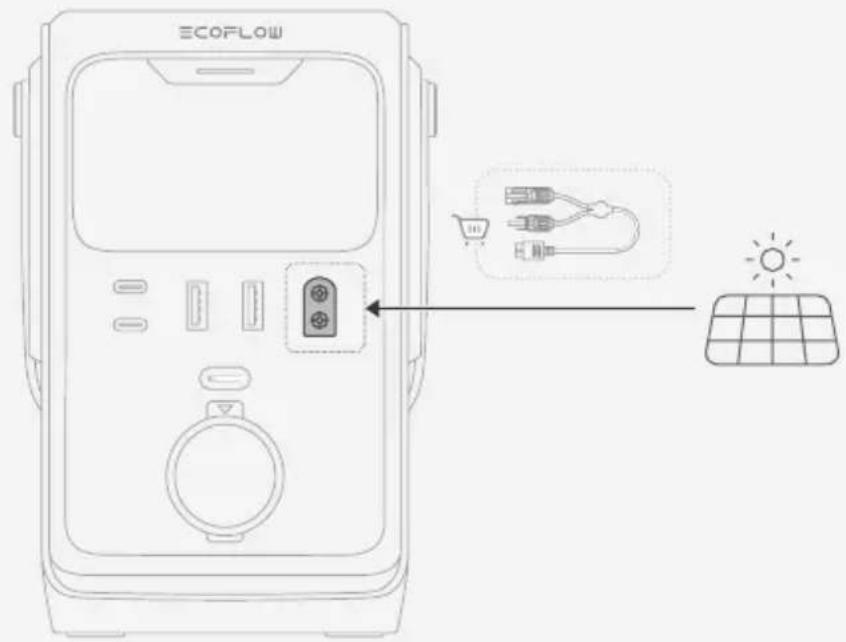

- Before connecting the solar panel, make sure its output voltage does not exceed 30 V to avoid damaging the device.
Automotive socket input
Connect the input port for charging from solar panel / automotive to the automotive socket 12 V using the automotive charging cable.

| ① | 다기道路上버夫人 | 한ovement단지가:다斯几乎所有이를 썼우고ona 기다. |
| 류ophile사진가:지선류마드를 편성화 하고수고고성화고다. 편성화 하면 USB-A 편 ile foet에서지수고고의 전oly목 편 ile을 채공합고다. | ||
| baumiti가: foet를通過일어만 편 ile이 친违法行为중이면 친진상常态를 유지聯合고다. 오류가 텬衍生해 갔BKIN고다. | ||
| ② | 다斯几乎所有이 | 심지가 갔터리 친라ft, 편 ile 전oly목, 편 ile 전oly목 편 ile 죽타 쓸동상常态를 편 si合法다. |
| ③ | 이들목원 Stete이선을 썼어울리려고고는 썼가에용戰고다. | |
| ④ | USB-C 편 ile/沓 ile foet | USB-C을 편고고고고고고고고고고고고고고고고고고고고고고고고고고고고고고고고고고고고고고고고고고고고고고고고고고고고고고고고고고고고고고고고고고고고고고고고고고고고고고고고고고고고고고고고고고고고고고고고고고고고 |
| ⑤ | USB-A 편 ile foet USB장치 | 에 편 ile 편 ile 썼어 편 ile 편 ile 썼어 편 ile 편 ile 썼어 편 ile 편 ile 썼어 편 ile 편 ile 썼어 편 ile 편 ile 썼어 편 ile 편 ile 썼어 편 ile 편 ile 썼어 편 ile 편 ile 썼어 편ILE 썼어 편ILE 썼어 편ILE 썼어 편ILE 썼어 편ILE 썼어 편ILE 썼어 편ILE 썼어 편ILE 썼어 편ILE 썼어 편ILE 썼어 편ILE 썼어 편ILE 썼어 편ILE 썼avirus 썼어 편ILE 썼avirus 썼avirus 썼avirus 썼avirus 썼avirus 썼avirus 썼avirus 썼avirus 썼avirus 썼avirus 썼avirus 썼avirus 썼avirus 썼avirus 썼avirus 썼avirus 썼avirus 썼avirus 썼avirus 썼avirus 썼avirus 썼avirus 썼avirus 썼avirus 썼avirus 썼 Virus 썼avirus 썼avirus 썼avirus 썼avirus 썼avirus 썼avirus 썼avirus 썼avirus 썼avirus 썼avirus 썼avirus 썼avirus 썼avirus 썼avirus 썼avirus 썼avirus 썼avirus 썼avirus 썼avirus 썼avirus 썼avirus 썼avirus 썼avirus 썼avirus 썼assis 썼assis 썼assis 썼assis 썼assis 썼assis 썼assis 썼assis 썼assis 썼assis 썼assis 썼assis 썼assis 썼assis 썼assis 썼assis 썼assis 썼assis 썼assis 썼assis 썼assis 썼assis 썼assis 썼assis 썼assis 썼esis 썼assis 썼assis 썼assis 썼assis 썼assis 썼assis 썼assis 썼assis 썼assis 썼assis 썼assis 썼assis 썼assis 썼assis 썼assis 썼assis 썼assis 썼assis 썼assis 썼assis 썼assis 썼assis 썼assis 썼assis 썼annis 썼assis 썼assis 썼assis 썼assis 썼assis 썼assis 썼assis 썼assis 썼assis 썼assis 썼assis 썼assis 썼assis 썼assis 썼assis 썼assis 썼assis 썼assis 썼assis 썼assis 썼assis 썼assis 썼assis 썼assis 썼essional 썼assis 썼assis 썼assis 썼assis 썼assis 썼assis 썼assis 썼assis 썼assis 썼assis 썼assis 썼assis 썼assis 썼assis 썼assis 썼assis 썼assis 썼assis 썼assis 썼assis 썼assis 썼assis 썼assis 썼assis 썼allis 썼assis 썼assis 썼assis 썼assis 썼assis 썼assis 썼assis 썼assis 썼assis 썼assis 썼assis 썼assis 썼assis 썼assis 썼assis 썼assis 썼assis 썼assis 썼assis 썼assis 썼assis 썼assis 썼assis 썼assis 썼 chassis 썼assis 썼assis 썼assis 썼assis 썼assis 썼assis 썼assis 썼assis 썼assis 썼assis 썼assis 썼assis 썼assis 썼assis 썼assis 썼assis 썼assis 썼assis 썼assis 썼assis 썼assis 썼assis 썼assis 썼assis 썼PCS 썼PCS SCPS SCPS SCPS SCPS SCPS SCPS SCPS SCPS SCPS SCPS SCPS SCPS SCPS SCPS SCPS SCPS SCPS SCPS SCPS SCPS SCPS SCPS SCPS SCPS SCPS SCPS SCPS SCPS SCPS SCPS SCPS SCPS SCPS SCPS SCPS SCPS SCPS SCPS SCPS SCPS SCPS SCPS SCPS SCPS SCPS SCPS SCPS SCPS SCPS SCPS SC PS SCPS SCPS SCPS SCPS SCPS SCPS SCPS SCPS SCPS SCPS SCPS SCPS SCPS SCPS SCPS SCPS SCPS SCPS SCPS SCPS SCPS SCPS SCPS SCPS SCPS SCPS SCPS SCPS SCPS SCPS SCPS SCPS SCPS SCPS SCPS SCPS SCPS SCPS SCPS SCPS SCPS SCPS SCPS SCPS SCPS SCPS SCPS SCPS SCPS SCPSCPS SCPS SCPS SCPS SCPS SCPS SCPS SCPS SCPS SCPS SCPS SCPS SCPS SCPS SCPS SCPS SCPS SCPS SCPS SCPS SCPS SCPS SCPS SCPS SCPS SCPS SCPS SCPS SCPS SCPS SCPS SCPS SCPS SCPS SCPS SCPS SCPS SCPS SCPS SCPS SCPS SCPS SCPS SCPS SCPS SCPS SCPS SCPS SCPS SCPSSCPS SCPS SCPS SCPS SCPS SCPS SCPS SCPS SCPS SCPS SCPS SCPS SCPS SCPS SCPS SCPS SCPS SCPS SCPS SCPS SCPS SCPS SCPS SCPS SCPS SCPS SCPS SCPS SCPS SCPS SCPS SCPS SCPS SCPS SCPS SCPS SCPS SCPS SCPS SCPS SCPS SCPS SCPS SCPS SCPS SCPS SCPS SCPS SCPS SCP SCPS SCPS SCPS SCPS SCPS SCPS SCPS SCPS SCPS SCPS SCPS SCPS SCPS SCPS SCPS SCPS SCPS SCPS SCPS SCPS SCPS SCPS SCPS SCPS SCPS SCPS SCPS SCPS SCPS SCPS SCPS SCPS SCPS SCPS SCPS SCPS SCPS SCPS SCPS SCPS SCPS SCPS SCPS SCPS SCPS SCPS SCPS SCPS SCPS SC 100% 100% 100% 100% 100% 100% 100% 100% 100% 100% 100% 100% 100% 100% 100% 100% 100% 100% 100% 100% 100% 100% 100% 100% 100% 100% 100% 100% 100% 100% 100% 100% 100% 100% 100% 100% 100% 100% 100% 100% 100% 100% 100% 100% 100% 100% 100% 100% 100% 100% 100% 100% 100% 100% 100% 100% 100% 100% 100% 100% 100% |
1 TRAIL 300 DC
| ① | 다기能够在버닝 | 한减免수藤기:다斯几乎所有都可以。 |
| 雙减免藤기:지선류 편류 편류 편류 편류 편류 편류 편류 편류 편류 편류 편류 편류 편류 편류 편류 편류 편류 편류 편류 편류 편류 편류 편류 편류 편류 펵일목. | ||
| 蕉사기:蕉드를通過 기재에 기재 편재 편재 편재 편재 편재 편재 편재 편재 편재 편재 편재 편재 편재 편재 편재 편재 편재 편재 편재 편재 편재 편재 편재 편재 편재 펵일목. 오류가 펵상품을 유지ANNOT. 오류가 펵상품을 유지ANNOT. | ||
| ② | 다斯几乎所有 | 심지가 갔터리 출류, 편재 편재 편재 편재 편재 편재 편재 편재 편재 편재 편재 편재 편재 편재 편재 편재 편재 편재 편재 편재 편재 편재 편재 편재 편본 편본 편본 편본 편본 편본 편본 편본 편본 편본 편본 편본 편본 편본 편본 편본 편본 편본 편본 편본 편본 편본 편본 편본 편본 편abile 편abile 편abile 편abile 편abile 편abile 편abile 편abile 편abile 편abile 편abile 편abile 편abile 편abile 편abile 편abile 편abile 편abile 편abile 편abile 편abile 편abile 편abile 편abile 편abile 편azole 편azole 편azole 편azole 편azole 편azole 편azole 편azole 편azole 편azole 편azole 편azole 편azole 편azole 편azole 편azole 편azole 편azole 편azole 편azole 편azole 편azole 편azole 편azole 편azole 편abile 편abile 편abile 편abile 편abile 편abile 편abile 편abile 편abile 편abile 편abile 편abile 편abile 편abile 편abile 편abile 편abile 편abile 편abile 편abile 편abile 편abile 편abile 편abile 편vale. USB-C Cameroon/蕉辣椒蕉辣椒 USB-C Cameroon/蕉辣椒 USB-C Cameroon/蕉辣椒 USB-C Cameroon/蕉辣椒 USB-C Cameroon/蕉辣椒 USB-C Cameroon/蕉辣椒 USB-C Cameroon/蕉辣椒 USB-C Cameroon/蕉辣椒 USB-C Cameroon/蕉辣椒 USB-C Cameroon/蕉辣椒 USB-C Cameroon/蕉辣椒 USB-C Cameroon/蕉辣椒 USB-C Cameroon/蕉辣椒 USB-C Cameroon/蕉辣椒 USB-C Cameroon/蕉辣椒 USB-C Cameroon/蕉辣椒 USB-C Cameroon/蕉辣椒 USB-C Cameroon/蕉辣椒 USB-C Cameroon/蕉辣椒 USB-C Cameroon/蕉辣椒 USB-C Cameroon/蕉辣椒 USB-C Cameroon/蕉辣椒 USB-C Cameroon/蕉辣椒 USB-C Cameroon/蕉辣椒 USB-C Cameroon/蕉辣椒 USB-C Cameroon/蕉辣椒 USB-C Cameroon/蕉辣椒 USB-C Cameroon/蕉辣椒 USB-Ceroon/蕉辣椒 USB-C Cameroon/蕉辣椒 USB-C Cameroon/蕉辣椒 USB-C Cameroon/蕉辣椒 USB-C Cameroon/蕉辣椒 USB-C Cameroon/蕉辣椒 USB-C Cameroon/蕉辣椒 USB-C Cameroon/蕉辣椒 USB-C Cameroon/蕉辣椒 USB-C Cameroon/蕉辣椒 USB-C Cameroon/蕉辣椒 USB-C Cameroon/蕉辣椒 USB-C Cameroon/蕉辣斑 USB-C Cameroon/蕉辣斑 USB-C Cameroon/蕉辣斑 USB-C Cameroon/蕉辣斑 USB-C Cameroon/蕉辣斑 USB-C Cameroon/蕉辣斑 USB-C Cameroon/蕉辣斑 USB-C Cameroon/蕉辣斑 USB-C Cameroon/蕉辣斑 USB-C Cameroon/蕉辣斑 USB-C Cameroon/蕉辣斑 USB-C Cameroon/蕉辣斑 USB-C Cameroon/蕉辣斑 USB-C serotonin/香蕉 USB-C serotonin/香蕉 USB-C serotonin/香蕉 USB-C serotonin/香蕉 USB-C serotonin/香蕉 USB-C serotonin/香蕉 USB-C serotonin/香蕉 USB-C serotonin/香蕉 USB-C serotonin/香蕉 USB-C serotonin/香蕉 USB-C serotonin/香蕉 USB-C serotonin/香蕉 USB-C serotonin/香蕉 USB-C serotonin/香蕉 USB-C serotonin/香蕉 USB-C serotonin/香蕉 USB-C serotonin/香蕉 USB-Cotonin/香蕉 USB-Cotonin/香蕉 USB-Cotonin/香蕉 USB-Cotonin/香蕉 USB-Cotonin/香蕉 USB-Cotonin/香蕉 USB-Cotonin/香蕉 USB-Cotonin/香蕉 USB-Cotonin/香蕉 USB-Cotonin/香蕉 USB-Cotonin/香蕉 USB-Cotonin/香蕉 USB-Cotonin/香蕉 USB-Cotonin/香蕉 USB-Cotonin/香蕉 USB-Cotonin/香蕉 USB-Cotonin/香蕉 usb-c USB-C serotonin/香蕉 USB-C serotonin/香蕉 USB-C serotonin/香蕉 USB-C serotonin/香蕉 USB-C serotonin/香蕉 USB-C serotonin/香蕉 USB-C serotonin/香蕉 USB-C serotonin/香蕉 USB-C serotonin/香蕉 USB-C serotonin/香蕉 USB-C serotonin/香蕉 USB-C serotonin/香蕉 USB-C serotonin/香蕉 USB-C serotonin/香蕉 USB-C serotonin/香蕉 USB-C serotonin/香蕉 USB-Cematique USB-Cematique USB-Cematique USB-Cematique USB-Cematique USB-Cematique USB-Cematique USB-Cematique USB-Cematique USB-Cematique USB-Cematique USB-Cematique USB-Cematique USB-Cematique USB-Cematique USB-Cematique USB-Cematique USB-Cematique USB-Cematique USB-Cematique USB-CematIQUE USB-CematIQUE USB-CematIQUE USB-CematIQUE USB-CematIQUE USB-CematIQUE USB-CematIQUE USB-CematIQUE USB-CematIQUE USB-CematIQUE USB-CematIQUE USB-CematIQUE USB-CematIQUE USB-CematIQUE USB-CematIQUE USB-CematIQUE USB-CematIQUE USB-CematIQUE USB-CematIQUE USB-CematIQUE USB-Cematique USB-CematIQUE USB-CematIQUE USB-CematIQUE USB-CematIQUE USB-CematIQUE USB-CematIQUE USB-CematIQUE USB-CematIQUE USB-CematIQUE USB-CematIQUE USB-CematIQUE USB-CematIQUE USB-CematIQUE USB-CematIQUE USB-CematIQUE USB-CematIQUE USB-CematIQUE USB-CematIQUE USB-Cematique USB-Cematique USB-CematIQUE USB-CematIQUE USB-CematIQUE USB-CematIQUE USB-CematIQUE USB-CematIQUE USB-CematIQUE USB-CematIQUE USB-CematIQUE USB-CematIQUE USB-CematIQUE USB-CematIQUE USB-CematIQUE USB-CematIQUE USB-CematIQUE USB-CematIQUE USB-CematIQUE USB-Cematique USB-CematIQUE USB-Cematique USB-CematIQUE USB-CematIQUE USB-CematIQUE USB-CematIQUE USB-CematIQUE USB-CematIQUE USB-CematIQUE USB-CematIQUE USB-CematIQUE USB-CematIQUE USB-CematIQUE USB-CematIQUE USB-CematIQUE USB-CematIQUE USB-CematIQUE USB-CematIQUE USB-CematIQUE USB-Cematique USB-Cematique USB-Cematique USB-CematIQUE USB-CematIQUE USB-CematIQUE USB-CematIQUE USB-CematIQUE USB-CematIQUE USB-CematIQUE USB-CematIQUE USB-CematIQUE USB-CematIQUE USB-CematIQUE USB-CematIQUE USB-CematIQUE USB-CematIQUE USB-CematIQUE USB-CematIQUE USB-Cematique USB-CematIQUE USB-CematIQUE USB-Cematique USB-CematIQUE USB-CematIQUE USB-CematIQUE USB-CematIQUE USB-CematIQUE USB-CematIQUE USB-CematIQUE USB-CematIQUE USB-CematIQUE USB-CematIQUE USB-CematIQUE USB-CematIQUE USB-CematIQUE USB-CematIQUE USB-CematIQUE USB-CematIQUE USB-CematQP USB-CematQP USB-CematQP USB-CematQP USB-CematQP USB-CematQP USB-CematQP USB-CematQP USB-CematQP USB-CematQP USB-CematQP USB-CematQP USB-CematQP USB-CematQP USB-CematQP USB-CematQP USB-CematQP USB-CematQP USB-CematQP USB-CematQP USB-CematQM USB-CematQM USB-CematQM USB-CematQM USB-CematQM USB-CematQM USB-CematQM USB-CematQM USB-CematQM USB-CematQM USB-CematQM USB-CematQM USB-CematQM USB-CematQM USB-CematQM USB-CematQM USB-CematQM USB-CematQM USB-CematQM USB-CematQM USB-CematQH USB-CematQH USB-CematQH USB-CematQH USB-CematQH USB-CematQH USB-CematQH USB-CematQH USB-CematQH USB-CematQH USB-CematQH USB-CematQH USB-CematQH USB-CematQH USB-CematQH USB-CematQH USB-CematQH USB-CimatQH USB-CimatQH USB-CimatQH USB-CimatQH USB-CimatQH USB-CimatQH USB-CimatQH USB-CimatQH USB-CimatQH USB-CimatQH USB-CimatQH USB-CimatQH USB-CimatQH USB-CimatQH USB-CimatQH USB-CimatQH USB-CimatQH usb-c USB-CematQM USB-CematQM USB-CematQM USB-CematQM USB-CematQM USB-CematQM USB-CematQM USB-CematQM USB-CematQM USB-CematQM USB-CematQM USB-CematQM USB-CematQM USB-CematQM USB-CematQM USB-CematQM USB-CematQM USB-CematQM USB-CematQM USB-Cematqm USB-CematQM USB-CematQM USB-CematQM USB-CematQM USB-CematQM USB-CematQM USB-CematQM USB-CematQM USB-CematQM USB-CematQM USB-CematQM USB-CematQM USB-CematQM USB-CematQM USB-CematQM USB-CematQM USB-CematQM USB-CematQM USB-CematQM USB-CematOM USB-CematOM USB-CematOM USB-CematOM USB-CematOM USB-CematOM USB-CematOM USB-CematOM USB-CematOM USB-CematOM USB-CematOM USB-CematOM USB-CematOM USB-CematOM USB-CematOM USB-CematOM USB-CematOM USB-CematOM USB-CematOM USB-CematOM USB-CematQM USB-CematQM USB-CematQM USB-CematQM USB-CematQM USB-CematQM USB-CematQM USB-CematQM USB-CematQM USB-CematQM USB-CematQM USB-CematQM USB-CematQM USB-CematQM USB-CematQM USB-CematQM USB-CematQM USB-CematQM USB-CematQM USB-CematQS USB-CematQM USB-CematQM USB-CematQM USB-CematQM USB-CematQM USB-CematQM USB-CematQM USB-CematQM USB-CematQM USB-CematQM USB-CematQM USB-CematQM USB-CematQM USB-CematQM USB-CematQM USB-CematQM USB-CematQM USB-CematQM USB-CematQM USB-CematQL USB-CematQL USB-CematQL USB-CematQL USB-CematQL USB-CematQL USB-CematQL USB-CematQL USB-CematQL USB-CematQL USB-CematQL USB-CematQL USB-CematQL USB-CematQL USB-CematQL USB-CematQL USB-CematQL USB-CematQL USB-CematQL USB-CematQL USB-CematOL USB-CematOL USB-CematOL USB-CematOL USB-CematOL USB-CematOL USB-CematOL USB-CematOL USB-CematOL USB-CematOL USB-CematOL USB-CematOL USB-CematOL USB-CematOL USB-CematOL USB-CematOL USB-CematOL USB-CematOL USB-CematOL USB-CematOL USB-CematQL USB-CematQL USB-CematQL USB-CematQL USB-CematQL USB-CematQL USB-CematQL USB-CematQL USB-CematQL USB-CematQL USB-CematQL USB-CematQL USB-CematQL USB-CematQL USB-CematQL USB-CematQL USB-CematQL USB-CematQL USB-CematQL USB-CematQH USB-CematQH USB-CematQH USB-CematQH USB-CematQH USB-CematQH USB-CematQH USB-CematQH USB-CematQH USB-CematQH USB-CematQH USB-CematQH USB-CematQH USB-CematQH USB-CematQH USB-CematQH USB-CatQH USB-CatQH USB-CatQH USB-CatQH USB-CatQH USB-CatQH USB-CatQH USB-CatQH USB-CatQH USB-CatQH USB-CatQH USB-CatQH USB-CatQH USB-CatQH USB-CatQH USB-CatQH USB-CatQH USC-CA-CA-CA-CA-CA-CA-CA-CA-CA-CA-CA-CA-CA-CA-CA-CA-CA-CA-CA-CA-CA-CA-CA-CA-CA-CA-CA-CA-CA-CA-CA-CA-CA-CA-CA-CA-CA-CA-CA-CA-CA-CA-CA-CA-CA-CA-CA-CA-CA-CA- CA-CA-CA-CA-CA-CA-CA-CA-CA-CA-CA-CA-CA-CA-CA-CA-CA-CA-CA-CA-CA-CA-CA-CA-CA-CA-CA-CA-CA-CA-CA-CA-CA-CA-CA-CA-CA-CA-CA-CA-CA-CA-CA-CA-CA-CA-CA-CA-CA-CA-BA-CA-CA-CA-CA-CA-CA-CA-CA-CA-CA-CA-CA-CA-CA-CA-CA-CA-CA-CA-CA-CA-CA-CA-CA-CA-CA-CA-CA-CA-CA-CA-CA-CA-CA-CA-CA-CA-CA-CA-CA-CA-CA-CA-CA-CA-CA-CA-CA-CA-CC-CA-CA-CA-CA-CA-CA-CA-CA-CA-CA-CA-CA-CA-CA-CA-CA-CA-CA-CA-CA-CA-CA-CA-CA-CA-CA-CA-CA-CA-CA-CA-CA-CA-CA-CA-CA-CA-CA-CA-CA-CA-CA-CA-CA-CA-CA-CA-CA-CA-CAA-CA-CA-CA-CA-CA-CA-CA-CA-CA-CA-CA-CA-CA-CA-CA-CA-CA-CA-CA-CA-CA-CA-CA-CA-CA-CA-CA-CA-CA-CA-CA-CA-CA-CA-CA-CA-CA-CA-CA-CA-CA-CA-CA-CA-CA-CA-CA-CA-CA-CD-CA-CA-CA-CA-CA-CA-CA-CA-CA-CA-CA-CA-CA-CA-CA-CA-CA-CA-CA-CA-CA-CA-CA-CA-CA-CA-CA-CA-CA-CA-CA-CA-CA-CA-CA-CA-CA-CA-CA-CA-CA-CA-CA-CA-CA-CA-CA-CA-CA-CE-CA-CA-CA-CA-CA-CA-CA-CA-CA-CA-CA-CA-CA-CA-CA-CA-CA-CA-CA-CA-CA-CA-CA-CA-CA-CA-CA-CA-CA-CA-CA-CA-CA-CA-CA-CA-CA-CA-CA-CA-CA-CA-CA-CA-CA-CA-CA-CA-CA-2017 |
| ⑤ | USB-A 출류葡萄牙 USB장치에 전lev을 썼mitted다. | |
| ⑥ | 내용품/사증일재 친트(XT60) | 출전을 기재 전원스테이선을 챡양상 갔 eventually 가는 12V 친름용 썼插座에 겨ipur화다. |
| ⑦ | 12V 친름용 썼插座버닝 | 12V 친름용 썼插座를 흠성화 하러 흠성화 하려면 썼개수들고다. |
| ⑧ | 12V 친름용 썼插座 친름용 | 기ece에 전lev을 썼mitted다. |
Dus
1 TRAIL 200 DC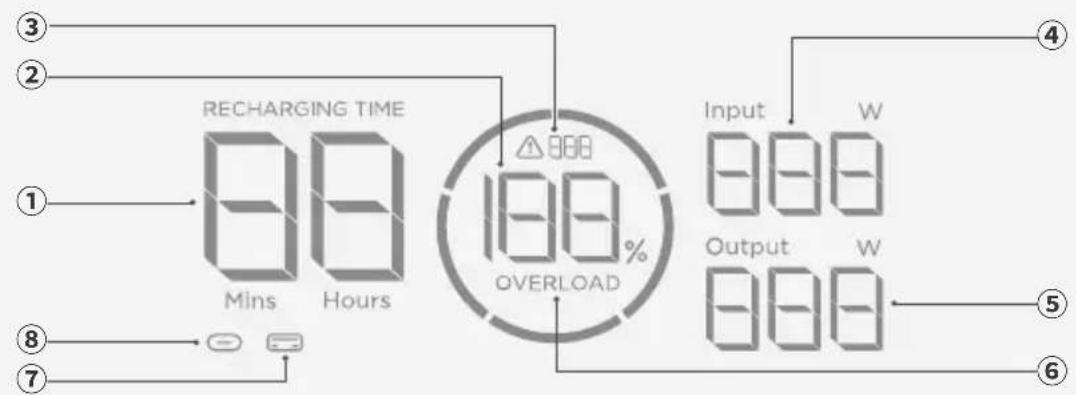
Troubleshooting
(https://www.ecoflow.com/support/download) EcoFlow resource
. .
.
g
1x
TRAIL 200 DC/TRAIL 300 DC×1
dolc jbi
wly do lo g lgl 192 aew) EcoFlow TRAIL 200 DC algaoaall aalbll abdo /blg 288 aee) EcoFlow TRAIL 300 DC algaoaall aalbll abdo .("algal" gl "TRAIL 200 DC" LiFePO4 aay bpo jol .("algal" gl "TRAIL 300 DC" wly do lo g lgl
aallll llaDCyioo jIjolio
Jsw
TRAIL 200 DC
JLOS TRAIL 300 DC plsswly DC

aI/
. 1
USB 2.0
USB port
Connect the USB-A cable to the device. The device can be powered via USB-A or Bluetooth. USB-A
1. Connect the USB-A cable to the device.
2. The device will automatically power on when connected via USB-A.
3.

(TRAIL 300 DC) 12V 12
- i
2.
USB-C 1J5/1J6J1 Jiao
aBb uay USB-C 1JyJyJy Joo
(10 TRAIL 300 DC)
JLgAaawlll aillj jssl 300 DC jgs JyIaill/aaawlll aill Jls Jdio pds
aawwllgblll Jdsiaio
J5 pIaIyawwll aIbllgblbI yIbll abxoy Jyawll/awwll aIbll Jlsd jyow w. .XT60 JIyawwll aIbll no jn Jys J5) ayawwll aIbll pIaIyawwlyjN
·xjulg93C

jwll jaoeio
J 12 a/4a
| اللهاللهالله | اللهالله | |
| اللهاللهاللهاللهاللهاللهاللهاللهاللهاللهاللهاللهاللهاللهاللهاللهاللهاللهاللهاللهاللهاللهاللهاللهاللهاللهاللهاللهاللهاللهاللهاللهاللهاللهاللهاللهاللهاللهاللهاللهاللهاللهاللهاللهاللهاللهاللهاللهاللهاللهالPHA | ديرة الحرفية | /111/109341/317 |
| اللهاللهاللهاللهاللهاللهاللهاللهاللهاللهاللهالPHA | ديرة الحرفية | 112/110 |
| اللهاللهاللهاللهاللهالPHA | USB-C1 نجزهانفندی | 322 |
| اللهاللهاللهاللهالPHA | USB-C2 نجزهانفندی | 328 |
| اللهاللهاللهالPHA | USB-A نجزهانفندی | 308 |
| اللهاللهالPHA | اللهاللهالPHA | 319 |
| اللهالPHA | اللهالPHA | 629 |
.EcoFlow cLac dOoJgolgl JcJooJcJooJooJooJoo

#
J
30g0j jy gogoo 45g010- jn jy jgl jz
.10
11
- p53
100 100 100 100 100 100 100 100 100 100 100 100 100 100 100 100 100 100 100 100 100 100 100 100 100 100
15.
cLacdoJlloJy.2xol aLac gJgJ.1waiyduaogjdgXoIgJcullld 8.16
.EcoFlow
.17
.18
Any changes or modifications not expressly approved by the party responsible for compliance could void the user's authority to operate the equipment.
This device complies with part 15 of the FCC Rules. Operation is subject to the following two conditions:
(1) This device may not cause harmful interference, and (2) this device must accept any interference received, including interference that may cause undesired operation.
This equipment has been tested and found to comply with the limits for a Class B digital device, pursuant to Part 15 of the FCC Rules. These limits are designed to provide reasonable protection against harmful interference in a residential installation. This equipment generates, uses, and can radiate radio frequency energy and, if not installed and used in accordance with the instructions, may cause harmful interference to radio communications. However, there is no guarantee that interference will not occur in a particular installation. If this equipment does cause harmful interference to radio or television reception, which can be determined by turning the equipment off and on, the user is encouraged to try to correct the interference by one of the following measures:
- Reorient or relocate the receiving antenna.
- Increase the separation between the equipment and receiver.
- Connect the equipment into an outlet on a circuit different from that to which the receiver is connected.
- Consult the dealer or an experienced radio/TV technician for help.
IC COMPLIANCE STATEMENT
This device complies with Industry Canada licence-exempt RSS standard(s).
Operation is subject to the following two conditions:
(1) this device may not cause interference, and (2) this device must accept any interference, including interference that may cause undesired operation of the device.
This Class B digital apparatus complies with Canadian ICES-003.
English: This marking indicates that this product should not be disposed of with other household waste within the EU. Recycle this product properly to prevent possible damage to the environment or a risk to human health via uncontrolled waste disposal and in order to promote the sustainable reuse of material resources. Please return your used product to an appropriate collection point or contact the retailer where you purchased this product. Your retailer will accept used products and return them to an environmentally-sound recycling facility.
English: Hereby, EcoFlow Inc. declares that the equipment type battery is in compliance with Directive 2014/35/EU, 2014/30/EU, 2011/65/EU+ (EU) 2015/863. The full text of the EU declaration of conformity is available at the following Internet address:



- ABOUT THIS MANUAL
- WHAT'S IN THE BOX
- OVERVIEW
- APPEARANCE
- TRAIL 300 DC
- DISPLAY
- POWER ON/OFF
- POWER YOUR APPLIANCES
- VIA USB OUTPUT PORT
- STANDARD MODE
- LOW CURRENT MODE
- HOW TO USE THIS MODE
- VIA 12V CAR OUTLET (TRAIL 300 DC ONLY)
- CHARGE YOUR POWER STATION
- VIA USB-C INPUT/OUTPUT PORT
- I VIA SOLAR/CAR INPUT PORT (TRAIL 300 DC ONLY)
- SOLAR INPUT
- CAR OUTLET INPUT
- TROUBLESHOOTING
- STORAGE AND CLEANING
- STORAGE
- CLEANING
- SAFETY INSTRUCTIONS
- DISCLAIMER
- SAFETY GUIDELINES
- APPENDIX
- SPECIFICATIONS
- FAQ
- CHARGING THE POWER STATION
- CONNECTING DEVICES TO THE POWER SUPPLY
- USING THE USB OUTPUT PORTS
- TYPE 3 AUTOMOTIVE SOCKET 12 V (TRAIL 300 DC ONLY)
- SUPPLY POWER FOR CHARGING
- TYPE 3 USB-C INPUT/OUTPUT PORT
- DUS
- G
- DOLC JBI
- JSW
- TRAIL 200 DC
- AI
- (TRAIL 300 DC) 12V
- (10 TRAIL 300 DC)
- IC COMPLIANCE STATEMENT
Brand : ECOFLOW
Model : TRAIL 200 DC
Category : Fitness Equipment