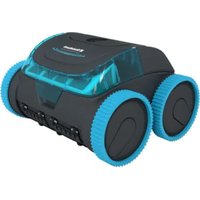
Poolrunner Battery Pro Performance - Robot vacuum Steinbach - Free user manual and instructions
Find the device manual for free Poolrunner Battery Pro Performance Steinbach in PDF.


| Product type | Robotic pool cleaner |
| Brand | Steinbach |
| Model | Poolrunner Battery Pro Performance |
| Reference | 061207PP |
| Battery type | Lithium-ion, 15,300 mAh |
| Battery life | Up to 120 minutes |
| Charging time | 9 to 10 hours |
| Cleaning width | 270 mm |
| Maximum speed | 11 m/min |
| Maximum immersion depth | 2.0 m |
| Filtration fineness | 180 μm |
| Protection rating (cleaner) | IPX8 |
| Protection rating (charger) | IP20 |
| Maximum pool surface | 50 m² |
| Recommended water temperature | 10°C to 35°C |
| Maximum salt content | < 0.5% |
| Connectivity | Bluetooth via Battery Pro Line app |
| Cleaning programs | Bottom, walls, walls and bottom (standard or bottom priority) |
| Charger | Model XSG1263000EU, 100-240 V~, 50/60 Hz, output 12.6 V ⎓ |
| Status indicator | Blue (running/operational), pink (app connection), yellow (end/empty), red (stop/out of water) |
| Spare parts | 24 references listed in the manual (wheels, filters, seals, etc.) |
| Maintenance | Clean with a bathroom cleaner and a lint-free cloth |
| Safety | Automatic shutdown at end of cycle, do not use in presence of bathers |
Frequently Asked Questions - Poolrunner Battery Pro Performance Steinbach
User questions about Poolrunner Battery Pro Performance Steinbach
0 question about this device. Answer the ones you know or ask your own.
Ask a new question about this device
Download the instructions for your Robot vacuum in PDF format for free! Find your manual Poolrunner Battery Pro Performance - Steinbach and take your electronic device back in hand. On this page are published all the documents necessary for the use of your device. Poolrunner Battery Pro Performance by Steinbach.
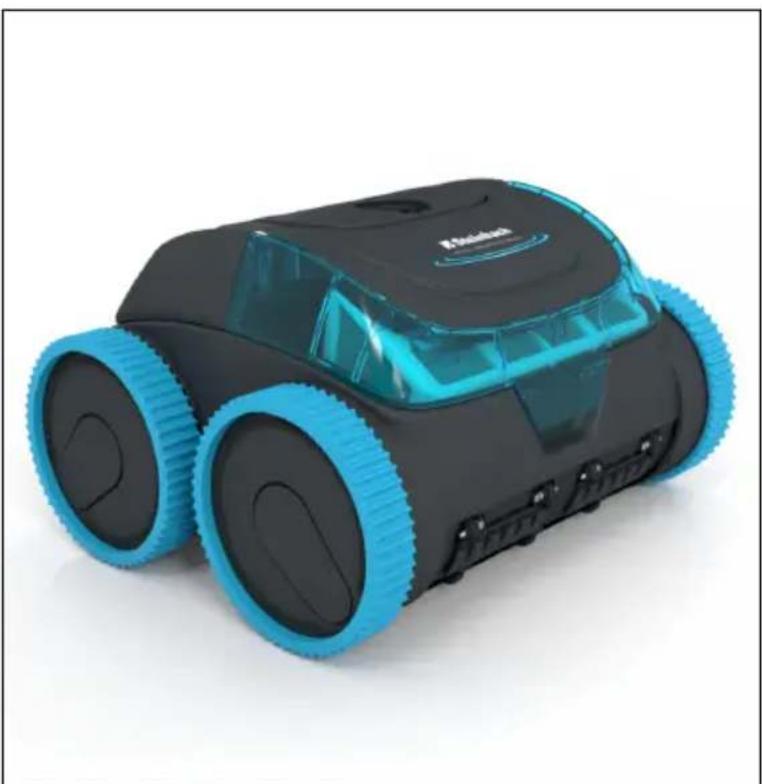
USER MANUAL Poolrunner Battery Pro Performance Steinbach
Poolrunner Battery Pro Performance
natural_image
Black and blue robotic robot with transparent head cover (no visible text or symbols)| de | Schwimmbadreiniger......4 | en | Pool cleaner......18 |
| fr | Nettoyeur de piscine......32 | it | Pulitore per piscina......47 |
| es | Limpiafondos de piscina......61 | cs | Čistič bazénů......76 |
| hu | Úszómedence tisztító......90 | sl | Čistilnik bazena......104 |
| sk | Čistič bazénu......119 | pl | Odkurzacz basenowy......133 |
| ro | Dispozitiv de curățare a piscinei......148 | hr/bs | Čistač bazena......163 |
| bg | Уред за почистване на басейни......178 | tr | Yüzme havuzu temizleyicisi......193 |
natural_image
Line drawing of a robotic device with a downward arrow indicating a component or operation (no text or symbols present)natural_image
Technical line drawing of a wheeled vehicle with visible engine and structural components (no text or symbols)natural_image
Diagram showing two robotic car wheels approaching a surface with bubbles, no text or symbols presentnatural_image
Simple line drawing of a submerged object with a rod inserted into a container, no text or symbols present
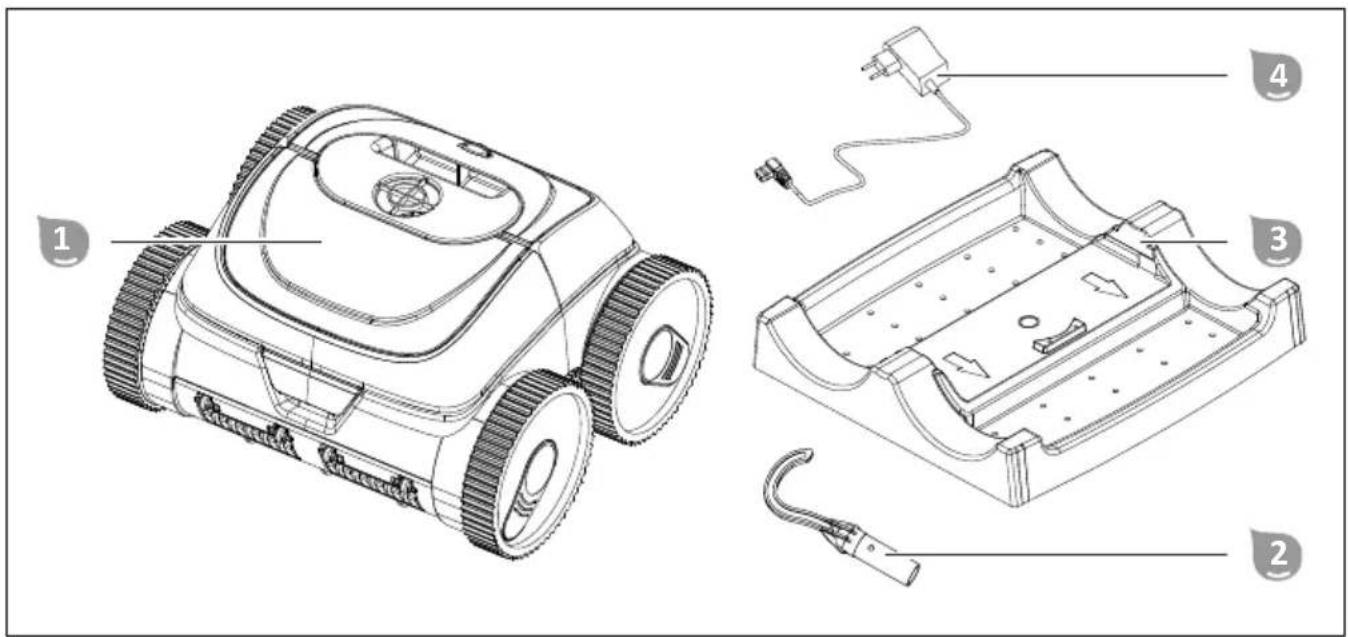
Package contents/components
1 Cleaner
2 Hook
3 Charging station
4 Charger
Instruction manual (not shown)
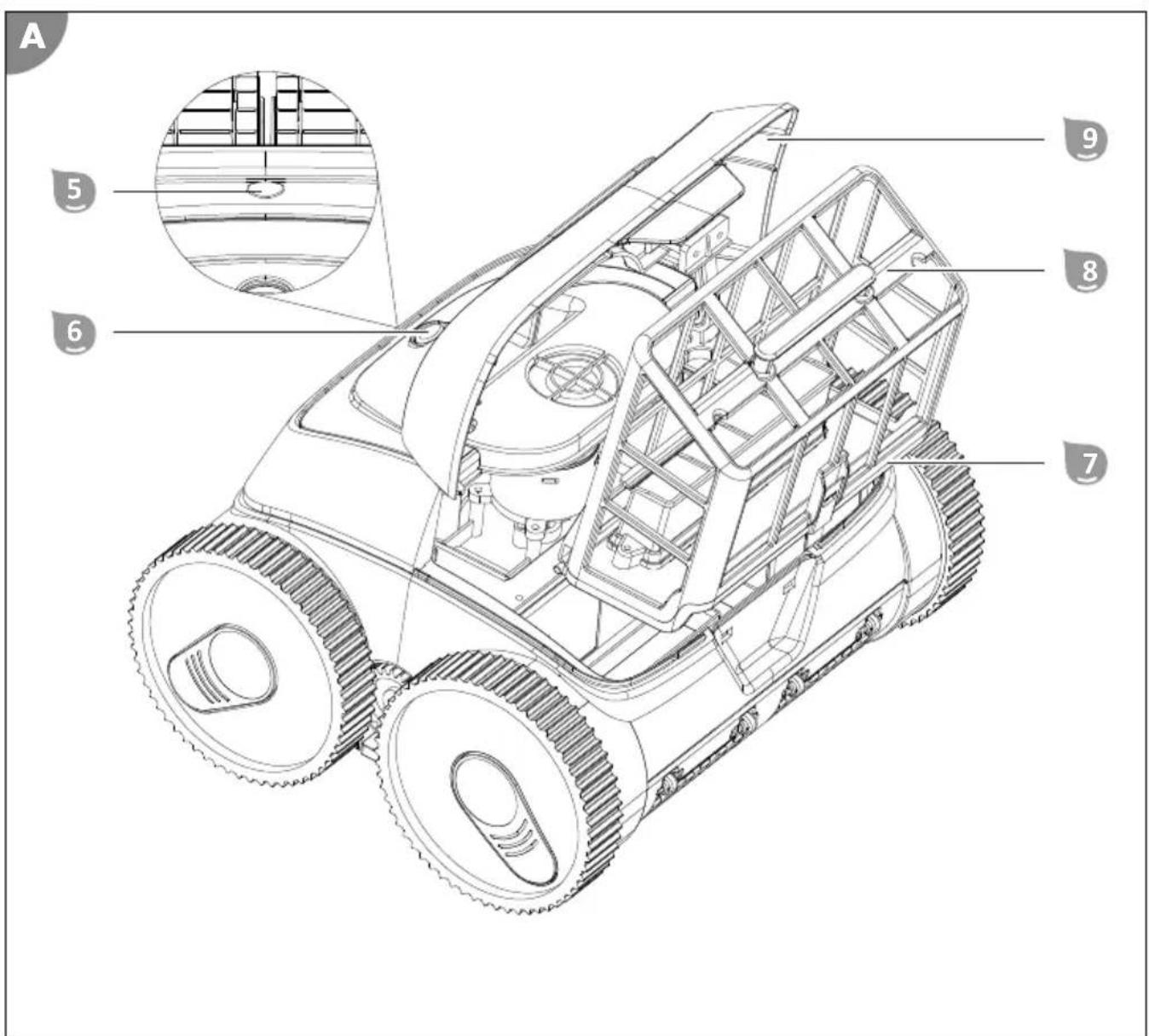
Components
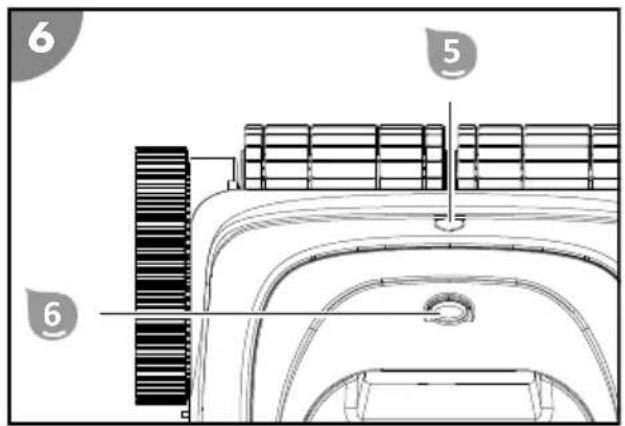
5 Status indicator
6 ON/OFF switch
7 Filter unit cover
8 Filter unit
9 Hatch for filter unit
Contents
Overview....2
Package contents/components....17
General Information....19
Explanation of Symbols....19
Safety....20
Unpacking and checking the package contents....21
Description....21
Description of the pool cleaner....21
Status indicator....21
Functions of the app control via Bluetooth (optional)....22
Preparation....22
Charging the rechargeable battery....22
Installing the app....23
Operation....23
Cleaning the pool....24
Configuring the cleaning program via the app....25
Switching off the device....25
Cleaning....26
Storage....27
Troubleshooting....27
Technical data....28
Spare parts....29
Declaration of Conformity....30
Disposal....30
General Information
Read and keep the operating instructions

These operating instructions are part of the "Battery Pro" pool cleaner (in the following also called "device"). They contain important information about start-up and operation.
Read the operating instructions and especially the safety instructions carefully before using the device. Non-observance of these operating instructions can lead to severe injuries or damage to the device.
Keep the operating instructions for further use. If you pass on the device to a third party, you must pass on these operating instructions as well.
Intended use
This device is exclusively intended for the maintenance cleaning of private foil pools with a foil thickness of >0.4 mm (0.02 in)
- and a smooth and level floor without any obstacles (such as folds, floor drains, steps or stairs),
- level, smooth and vertical walls (e.g. pools without top ring) and whose water level is below the edge of the pool (no overflow pools, for example).
The cleaning performance may be limited in pools made of alternative materials (such as fiberglass, stainless steel or tiles) due to the surface structure.
The device is not suitable for the removal of large sediment quantities that occur in pools with biological water treatment (such as eco swimming pools or natural pools).
This product is exclusively intended for private use and not suited for the commercial sector. Only use the device as described in these operating instructions. Any other use is considered inappropriate and may lead to material damage or even injury. The device is not a toy.
The manufacturer or retailer will not assume any liability for damage caused by inappropriate or incorrect use.
Explanation of Symbols
The following symbols are used in these operating instructions, on the device or on the packaging.

Here you will find useful additional information.

Risk of damage!
Do not open the packaging with sharp or pointed objects, such as cutters

Lithium-ion batteries in equipment or lithium-ion batteries packaged with equipment. Pool cleaner
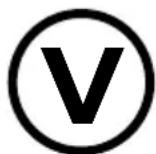
This symbol provides information about the energy efficiency of external power adapters.

Only use the charger indoors

Electrical device with double insulated housing (protection class II)
Safety
The following signal words are used in these operating instructions.

WARNING!
This signal symbol/word denotes a hazard with an average risk level that could lead to death or severe injury if it is not avoided.

CAUTION!
This signal symbol/word denotes a hazard with a low risk level that could lead to mild or moderate injury if it is not avoided.
NOTICE!
This signal word provides a warning about potential material damage.
General safety instructions
Safety instructions for persons

WARNING!
Danger to children and persons with reduced physical, sensory or mental capacities (such as partially disabled persons/older persons with reduced physical and mental capacities) or persons lacking experience and knowledge (such as older children).
Improper handling of the device can lead to severe injury or damage to the device.
- Only allow others to access the device after they have read and comprehended the entire manual or have been instructed about the intended use and the associated risks.
- Never let persons with reduced physical, sensory or mental capacities (such as children or drunk people) or a lack of experience and knowledge unsupervised near the device.
- Never allow children and persons with limited physical, sensory or mental capacities or persons lacking the respective experience and knowledge to operate the device.
- Do not let children clean or service the device.
- Children are not allowed to play with the device or with the power cable.
- Do not operate the device when impaired (e.g. under the influence of drugs, alcohol or medication).

WARNING!
Risk of injury through insufficient qualification!
Insufficient experience or skills for handling the required tools and insufficient knowledge of regional or normative regulations for the required work can lead to severe injuries or material damage.
- Assign all work whose risks you cannot estimate due to insufficient personal experience to a qualified expert.
Additional safety instructions for chargers
Use and handling of the charger
- Only connect the charger if the mains voltage of the socket matches that on the type plate.
- Only connect the charger to an easily accessible socket so that you can quickly disconnect it in the case of a fault.
- Always ensure sufficient ventilation while charging the rechargeable battery. Gases might be released.
- Only use the charger to recharge rechargeable batteries approved by the manufacturer.
-
Do not recharge non-rechargeable batteries.
-
A cracked or otherwise damaged rechargeable battery must not be connected to the charger.
- Protect the charger from any kind of moisture.
- Only use the charger indoors. Never operate it in damp rooms or in the rain.
- Never use the charger in environments with explosive or flammable materials. Risk of fire and explosion.
- Do not place any objects on the charger and do not cover the charger.
- Do not install the charger close to a heat source.
- Regularly check the charger for damage.
- Do not use a damaged charger until it has been repaired.
- Do not take the charger apart. Repairs must only be carried out through a licensed technical customer service.
- Do not use the charger if it has been subjected to blows or knocks or if it was dropped.
- Disconnect the charger from the mains after each use.
- Disconnect the charger from the mains before cleaning, servicing, storing and transporting it and let it cool down completely.
- Only charge the rechargeable battery with chargers recommended by the manufacturer. A charger that is suited for a certain type of rechargeable battery poses a risk of fire if it is used with other types of rechargeable batteries.
Unpacking and checking the package contents

WARNING!
Packaging materials pose a risk of suffocation!
Catching your head in the packaging foil or swallowing other packaging materials can cause death. There is a higher risk for children and mentally challenged persons who cannot estimate the hazard potential due to lack of knowledge and experience.
- Prevent children and mentally challenged persons from playing with the packaging materials.
Description
Description of the pool cleaner
The battery-operated pool cleaner cleans the bottom and the walls of your pool for maintenance. Cleaning rollers dislodge the accumulated biofilm.
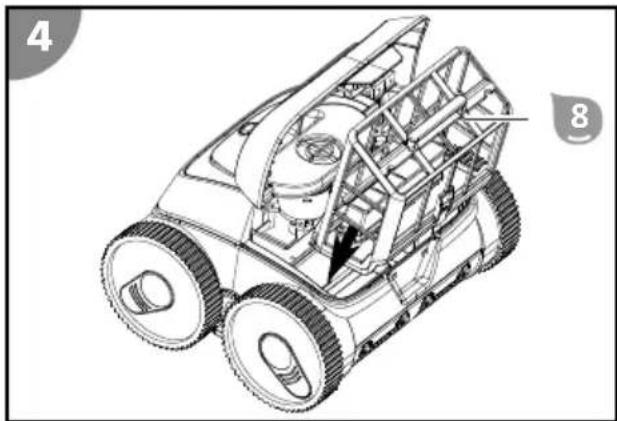
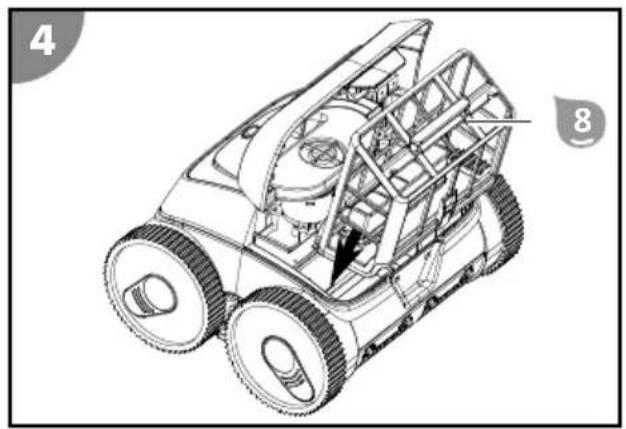
The removable filter unit 8 filters suspended deposits and floating substances out of the water. If the rechargeable battery dies, the pool cleaner stops cleaning.
Status indicator
The status indicator 5 informs you about the operating state of the device:
lit blue
The device is switched on and ready for operation.
blinking blue
The device is in operation (and cleans the pool).
lit pink
The device is connected to the app via Bluetooth. The device can be configured in this operating state but it cannot clean!
blinking pink
The device is ready to connect to the app via Bluetooth.
lit yellow
The device is done cleaning.
blinking yellow
The rechargeable battery is almost discharged (and the device moves to the pool wall).
lit red
The ON/OFF switch 6 was actuated and the device switches itself off.
blinking red
The device is out of the water.
Functions of the app control via Bluetooth (optional)
"Battery Pro Line" is a free app for your smartphone or tablet. This app allows you to set up the cleaning program on designated pool cleaners via Bluetooth. By entering parameters such as the shape and dimensions of the pool, you can individually adapt and optimize the cleaning process.
At delivery, the cleaning program "Wall/bottom cleaning - focus on bottom" is preset for rectangular pools with a size of 3 m x 6 m (9.8 ft. x 19.7 ft.).
(1) Bottom cleaning
The device only cleans the bottom of the pool.
(2) Wall cleaning
The device only cleans the pool wall.
(3) Wall/bottom cleaning
The device cleans the wall and bottom of the pool.
(4) Wall/bottom cleaning - focus on bottom
The device cleans the wall and bottom of the pool and invests more time in cleaning the bottom.
Preparation
Charging the rechargeable battery

WARNING!
Risk of fire!
Charging at a temperature below 10 °C leads to chemical damage to the cell and can cause a fire.
- Charge the rechargeable battery at room temperature.
NOTICE!
Charging the rechargeable battery in a wet or moist charging socket leads to corrosion of the contacts.
- Only connect the charger to the device if the charging socket is dry.
Charging process
- Switch off the device before charging. The status indicator 5 has gone off.
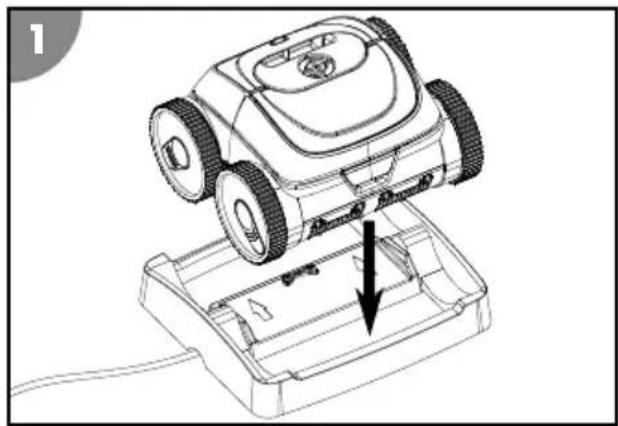
- Connect the charger 4 to the charging station 3.
- Plug the charger into a socket. The charge control indicator of the charger is lit green. The charging station is ready for operation.
- Place the device on the charging station. The charge control indicator is lit red. The rechargeable battery is charging.
- Wait until the rechargeable battery is completely charged. The charge control indicator is lit green.
The rechargeable battery is charged.
natural_image
Line drawing of a robotic arm with a downward arrow indicating movement or repair (no text or symbols present)Installing the app
You have to install the app to use all functions of the device.
iOS / Android
or look for "Battery Pro Line" in the app store

Install updates at regular intervals to keep the app up to date. This is the only way to guarantee fault-free operation of the control via Bluetooth.
Operation

WARNING!
Do not operate while swimming! Mortal danger!
Hair or clothing can be sucked in or trapped by the cleaning element, hold persons under water and, in extreme cases, prevent them from resurfacing.
- Never operate the device while there are persons in the pool.
- Prevent any access to the pool as long as the device is in operation.
Check the following before each use:
- Is there visible damage on the device?
- Is there visible damage on the control elements?
- Do all individual parts function?
- Are the accessories in perfect condition?
- Are all cables in perfect condition?
Do not start up a damaged device or damaged accessories. Have them checked by the manufacturer or its customer service or a qualified service technician.
Cleaning the pool
Observe the following before cleaning your pool:
- Remove any cover or foil from the pool.
- Remove obstacles (such as a ladder) from the pool.
- Switch off the filter system at least one hour before the start of cleaning so that particles in the water can settle on the floor.
Proceed as follows to clean your pool:
- Insert the filter unit.
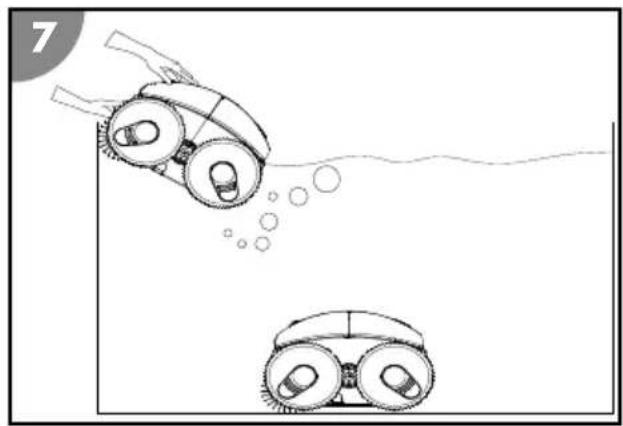
- Place the device in the pool and switch it on.
Inserting the filter
natural_image
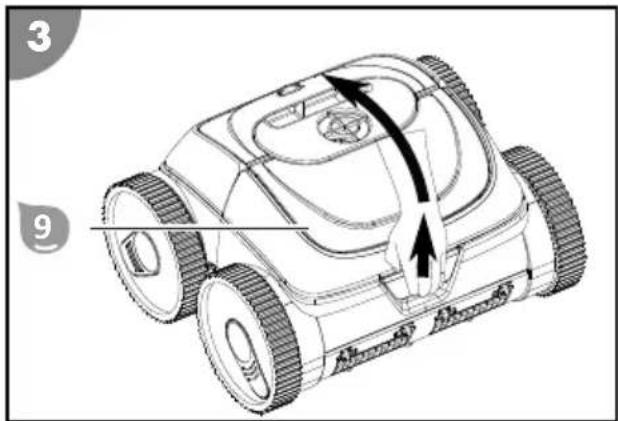
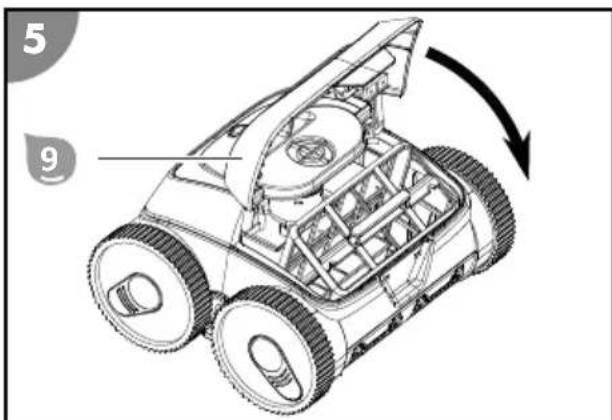
Technical line drawing of a wheeled vehicle with visible internal components and mounting holes (no text or symbols)- Open the hatch 9.
- Position the filter unit 8 on the suction channel.
- Close the hatch 9 so that it locks in place. The filter is inserted.
Placing the device in the pool and starting cleaning
You can use the device as delivered without using the app. Optionally, you can also optimize the preset cleaning program to suit your individual requirements (see section "Description"). The desired settings must be made before operation and outside the water; they are saved and can be used afterwards.
natural_image
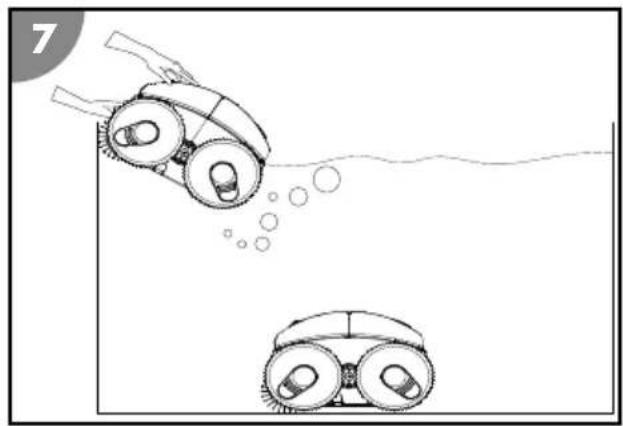
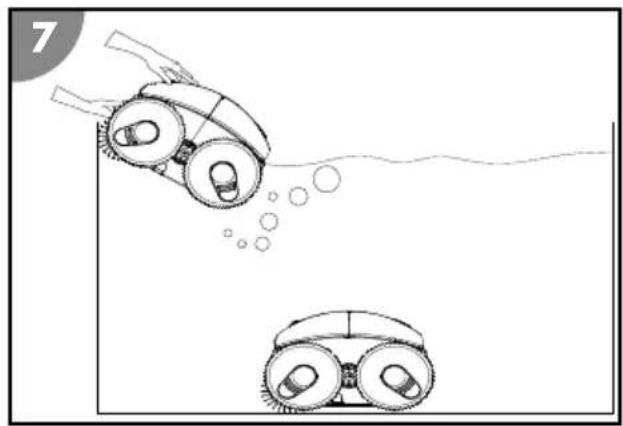
Diagram showing two robotic car wheels approaching a surface with bubbles, no text or symbols present- Press the ON/OFF switch 6.
The status indicator 5 is lit blue. The device is switched on and ready for operation.
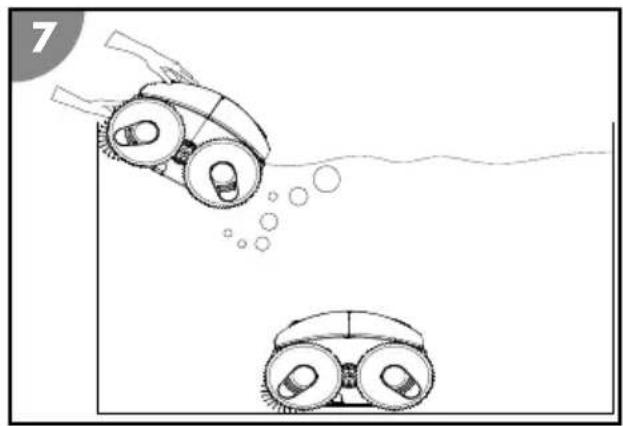
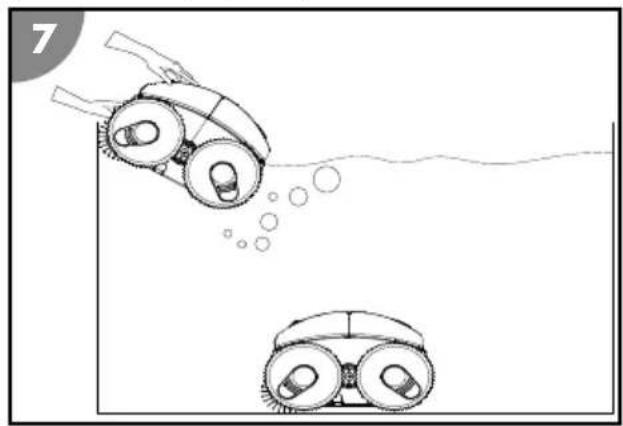
- Hold the device by the handle and lower it slowly into the water until all the air has escaped.
- Then let the device sink to the bottom of the pool.
Make sure that the device lands on the bottom of the pool on its underside and that cleaning can start without obstruction towards the center of the pool.
The status indicator 5 blinks blue.
The device is in the pool and starts cleaning with a time delay.
Configuring the cleaning program via the app
You must pair the device with the app and configure the cleaning program while the device is out of the water before placing the device in the pool and starting cleaning. Any settings you have made are saved and applied in future operation.
- Activate Bluetooth. If you use an Android device, you might have to activate GPS as well.
- Press the ON/OFF switch 6.
The status indicator 5 is lit blue. The device is ready for operation.
- Press the ON/OFF switch a second time (within max. 2 seconds).
The status indicator 5 blinks pink. The device is ready to connect to the app via Bluetooth.
- Start the "Battery Pro Line" app.
- Search for available devices.
- Select your device to connect it to the app.
The app signals the successfully established connection. The status indicator 5 is lit pink. The device is connected to the app.
- Follow the instructions of the app and select the desired parameters.
- Check and confirm the set values.
- Press the ON/OFF switch 6 to switch it off.
The status indicator 5 is lit red and goes off as soon as the device has switched itself off.
The cleaning program has been configured and saved.
Switching off the device
Proceed as follows to switch off the device:
- Lift the device out of the pool and switch it off.
- Clean the filter unit and the device.
Stopping cleaning
The device stops cleaning automatically as soon as the rechargeable battery is almost discharged. The status indicator 5 blinks yellow while the device moves to the pool wall and stays yellow as soon as it has reached its end position.
Lifting the device out of the pool
- Attach the hook 2 to a telescopic rod and thread it into the handle of the device.
- Slowly pull the device towards the water surface until you can reach the handle.
- Slowly lift the device out of the water and hold it above the water surface.
After 10 to 15 seconds, most of the water that has collected in the housing has drained back into the pool. -
Switch off the ON/OFF switch 6.
The status indicator 5 is lit red and goes off as soon as the device has switched itself off. -
Set down the device next to the pool.
The device is lifted out of the pool.
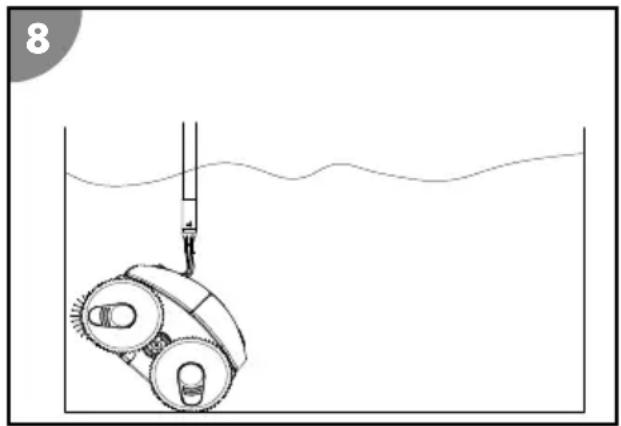
natural_image
Simple line drawing of a submerged object with a rod inserted into a container, no text or symbols present
Clean the device after each use to ensure continued trouble-free operation.
Cleaning
Only clean the device with a standard bathroom cleaner, clear tap water and a lint-free cloth. Aggressive cleaning agents can damage the device. Dry the device with a lint-free cloth.
Storage
-
Thoroughly clean the device (see section "Cleaning").
-
Let all parts dry completely.
-
Then store the device and its accessories in a dry and frost-free place ( ≥ +5^ ) without direct sunlight.
Troubleshooting
| Fault description Cause Remedy | ||
| Charger blinks red. Low rechargeable | battery voltage or faulty rechargeable battery. | Contact customer service. |
| The status indicator 5 blinks red. Device is out of the water. Place the device in the water or switch it off if you are not going to use it at present. | ||
| The device cannot reach all places in the pool. | The water circuit of the pool is switched on. | Switch off the filter system of the pool. |
| The device becomes stuck on the drain grate. | Switch off the filter system of the pool. | |
| The device does not completely move up the wall. | The filter is clogged. Clean the filter. | |
| Algae grows on the walls. Manually pre-clean the pool walls. Investigate and remedy the cause of algae growth (e.g., pH value). Use the pool cleaner more frequently. | ||
| The water temperature is too high or too low. | Operate the device at water operating temperature (see section "Technical data"). | |
| The tires or the cleaning roller are/is worn. | Check the tires and the cleaning roller for wear and replace them if necessary. | |
| The device is too light and topples. Switch off the device and let all the air escape. | ||
| The pH value and the chlorine quantity are not properly set. | Adjust the pH value and the chlorine value to the correct value (see section "Technical data"). | |
| The device does not sink. There is air in the device. Switch off the device and let all the air escape. | ||
| The device rises to the surface. The device climbs too high or there is air trapped in the device. | Switch off the device and let all the air escape. | |
If the problem cannot be solved, contact the customer service listed on the last page.
Technical data
POOL CLEANER RECHARGEABLE
| BATTERY | |||
| Model: HJ3182 Type of rechargeable | Lithium-ion | ||
| battery: | |||
| Item number: 061207PP Rechargeable battery | 15,300 mAh | ||
| capacity: | |||
| Width of cleaning element: 270 mm (10.6 inches) Charging time: 9 to 10 hours | |||
| Speed: max. 11 m/min (36 ft/min) Battery running time: up to 120 min. | |||
| Immersion depth: max. 2.0 m (6.5 ft.) RADIO CONTROL | |||
| Filter mesh: | 180 μm | App: | Battery Pro Line |
| Safety class: | IPX8 | Signal frequency: 2402-2480 MHz | |
| CHARGER | Effective radiated power (ERP): | 4 dBm | |
| Model: XSG1263000EU | POOL | ||
| Rated power: | 81 W | Pool size - floor area: | max. 50 m2 (108 sq. ft.) |
| Operating voltage and frequency: | 100-240 V~, 50/60 Hz | Salt content in water (salt electrolysis): | <0.5% |
| Output voltage: | 12.6 V === | Water temperature: | 10 °C to 35 °C (50 °F to 95 °F) |
| Safety class: | IP20 | Ambient temperature: | 10 °C to 40 °C (50 °F to 104 °F) |
Spare parts
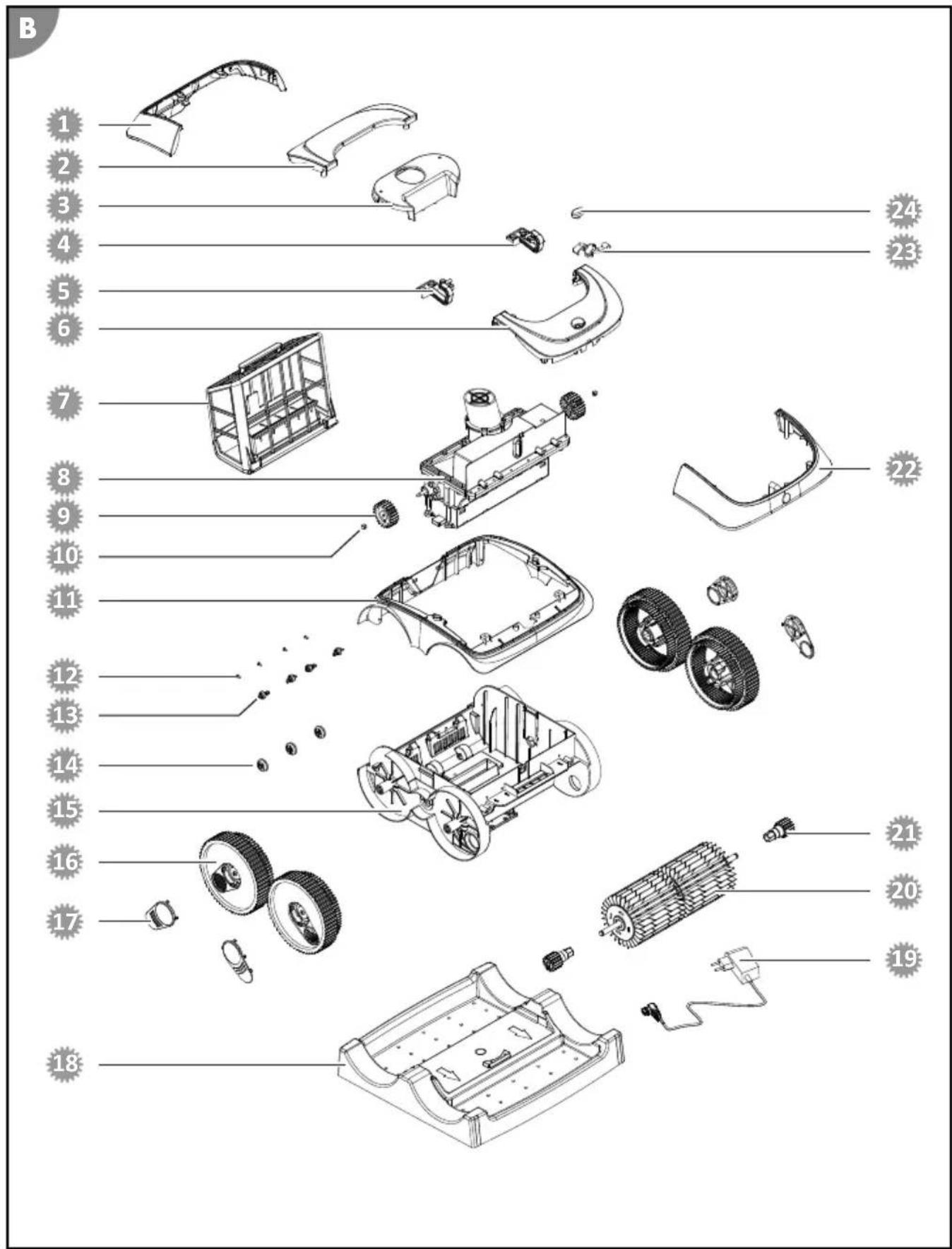
1 061380 - Rear cover
2 061381 - Inside rear cover
3 061382 - Top part of housing
4 061389 - Left deflection block
5 061388 - Right deflection block
6 061383 - Inside front cover
7 061395 - Filter unit
8 061385 - Motor unit
9 061367 - Drive wheel
10 061368 - Union nut for drive wheel
11 061386 - Housing frame
12 061377 - Screw
13 061376C8 - Support wheel 2
14 061375C8 - Support wheel 1
15 061379C8 - Bottom part of housing
16 061372C8 - Wheel
17 061373C8 - Wheel cover
18 061387 - Charging station
19 061392 - Charger
20: 061369 - Cleaning roller
21 061370C8 - Cleaning roller drive wheel
22 061384 - Front cover
23 061391 - Magnetic clamp
24 061390 - ON/OFF switch
Declaration of Conformity

Steinbach International GmbH hereby declares that the wireless system type pool cleaner Poolrunner Battery Pro Performance (061207PP) complies with Directive 2014/53/EU.
The full text of the EU Declaration of Conformity is available at the following internet
address: www.steinbach-group.com
Disposal
Disposing of the packaging
Sort the packaging before you dispose of it. Dispose of paperboard and cardboard with the recycled paper service and wrappings with the appropriate collection service.
Disposing of used appliances
Applicable in the European Union and other European countries with separate collection systems for recyclable materials.
Used appliances do not belong in the household waste!
If the device can no longer be used, each consumer is obligated by law to drop off used appliances separate from the household waste at a municipal collection point. This ensures that used appliances are recycled properly and negative effects on the environment are avoided. Therefore electrical appliances are marked with the above symbol.
natural_image
Symbol of a trash bin with crossed lines indicating no waste or discharge (no text or labels)Batteries and rechargeable batteries must not be disposed of in the household waste!
You, the consumer, are obligated by law to deposit all batteries and rechargeable batteries, regardless of whether they contain hazardous substances* or not, at a collection point in your community/your district or at a retailer so that these can be disposed of in an environmentally-friendly fashion.
* marked with: Cd = cadmium, Hg = mercury, Pb = lead, Li = lithium
natural_image
Line drawing of a robotic arm with a downward arrow indicating force or movement (no text or symbols present)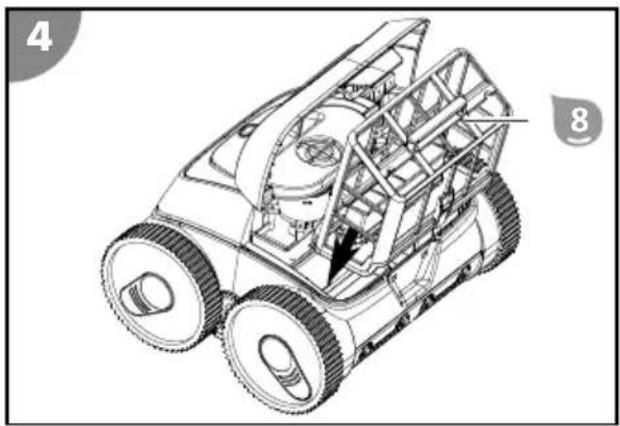
natural_image
Technical line drawing of a tracked vehicle with visible structural components and no text or symbolsnatural_image
Diagram showing two robotic car wheels approaching a surface with bubbles, no text or symbols presentnatural_image
Simple line drawing of a submerged object with a rod inserted into a container, no text or symbols presentnatural_image
Line drawing of a robotic arm with a downward arrow indicating motion or repair (no text or symbols present)natural_image
Technical line drawing of a wheeled vehicle with visible engine and structural components (no text or symbols)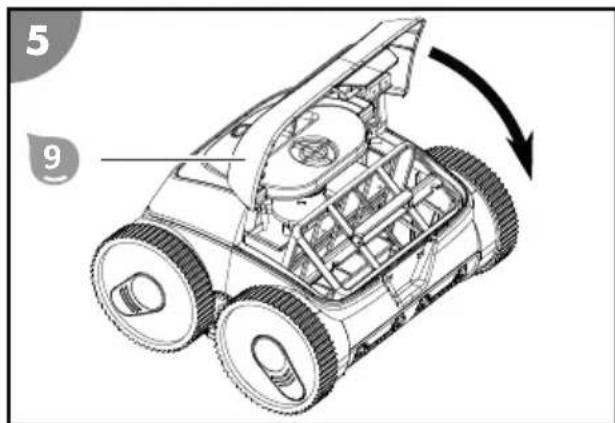
natural_image
Diagram showing two robotic car wheels approaching a surface with bubbles, no text or symbols presentnatural_image
Simple line drawing of a submerged object with a rod inserted into a container, no text or symbols presentApp: Battery Pro Line
natural_image
Line drawing of a robotic arm with a downward arrow indicating movement or repair (no text or symbols present)natural_image
Technical line drawing of a wheeled vehicle with visible internal components and mounting holes (no text or symbols)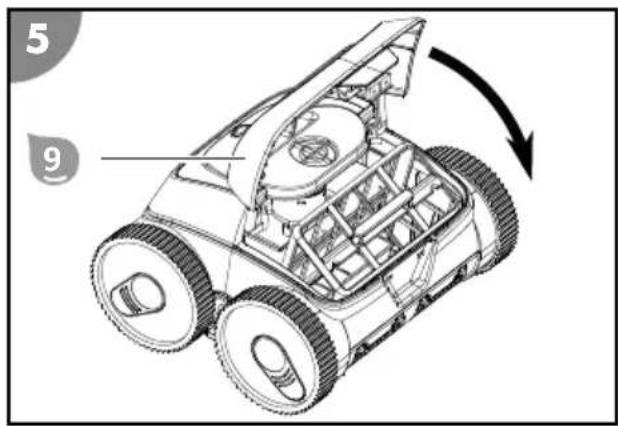
natural_image
Diagram showing two robotic car wheels approaching a surface with bubbles, no text or symbols presentnatural_image
Simple line drawing of a device submerged in liquid with a pipette inserted (no text or symbols)natural_image
Line drawing of a robotic arm with a downward arrow indicating motion or repair (no text or symbols present)Baterie je nabita.
Instalace aplikace
natural_image
Technical line drawing of a wheeled vehicle with visible engine and wheels (no text or symbols)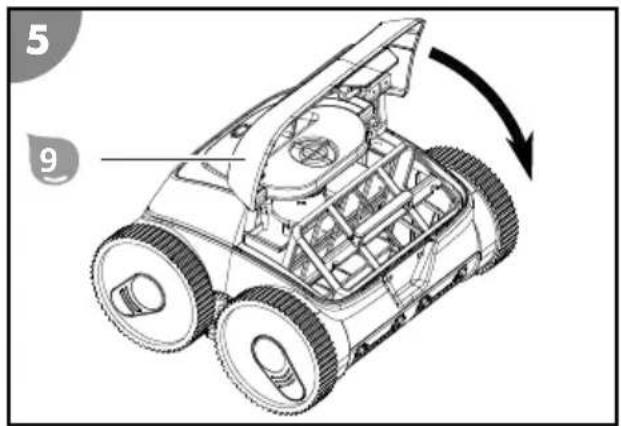
natural_image
Illustration of two robotic car wheels with water spray and bubbles, no text or symbols presentnatural_image
Simple line drawing of a submerged object with a rod inserted into a container, no text or symbols present
www.steinbach-group.com
Likvidace
Likvidace obalu

natural_image
Line drawing of a robotic arm with a downward arrow indicating motion or repair (no text or symbols present)natural_image
Technical line drawing of a wheeled vehicle with visible engine and wheels (no text or symbols)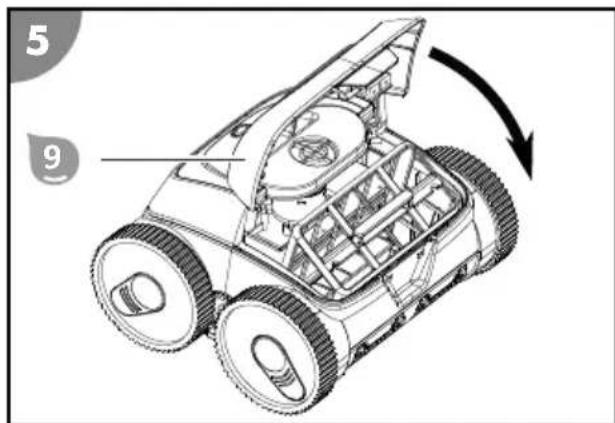
natural_image
Diagram showing two robotic car wheels approaching a surface with bubbles, no text or symbols presentnatural_image
Simple line drawing of a submerged object with a rod inserted into a container, no text or symbols present
el: www.steinbach-group.com
Leselejtezés
natural_image
Line drawing of a robotic arm with a downward arrow indicating motion or repair (no text or symbols present)-
Odprite loputo
-
Filtrsko enoto
-
Zaprite loputo
natural_image
Technical line drawing of a wheeled vehicle with visible engine and wheels (no text or symbols)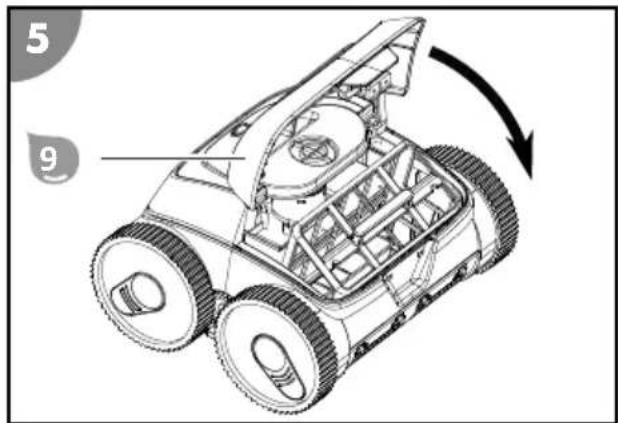
natural_image
Diagram showing two robotic car wheels approaching a surface with bubbles, no text or symbols present- Pritisnite stikalo ON/OFF 6.
natural_image
Simple line drawing of a submerged object with a rod inserted into a container, no text or symbols present
Izdelek očistite po vsaki uporabi, da poskrbite za njegovo nadaljnje brezhibno delovanje.
Čiščenje
natural_image
Two identical line-drawn icons of a trash bin with cross-hatching, no text or symbols present.natural_image
Line drawing of a robotic arm with a downward arrow indicating motion or repair (no text or symbols present)natural_image
Technical line drawing of a wheeled vehicle with visible internal components and mounting holes (no text or symbols)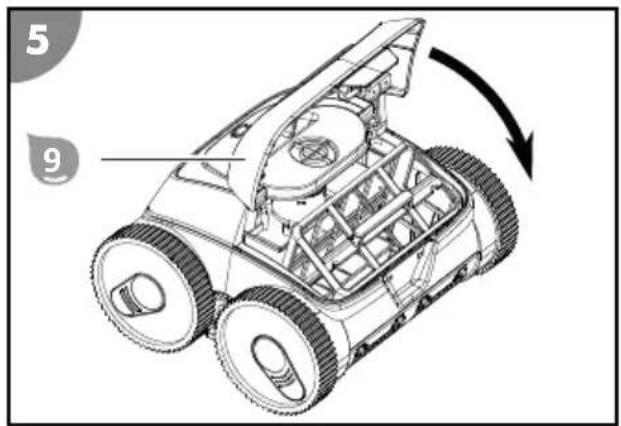
Ponorenie zariadenia do bazéna a spustenie čistenia
natural_image
Diagram showing two robotic car wheels approaching a surface with bubbles, no text or symbols presentnatural_image
Simple line drawing of a submerged object with a rod inserted into a container, no text or symbols present
adrese: www.steinbach-group.com
Likvidácia
Likvidácia obalu

natural_image
Line drawing of a robotic arm with a downward arrow indicating force or movement (no text or symbols present)natural_image
Technical line drawing of a wheeled vehicle with visible engine and wheels (no text or symbols)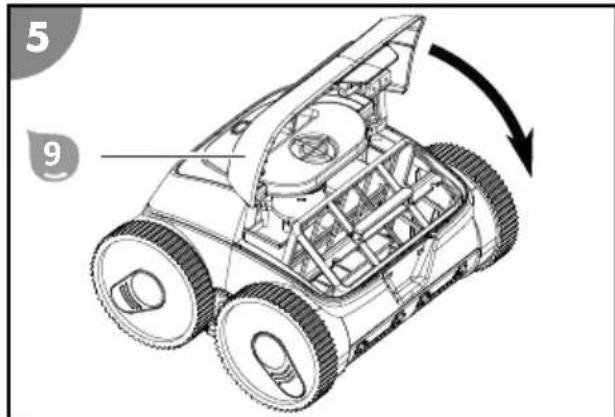
natural_image
Diagram showing two robotic car wheels approaching a surface with bubbles, no text or symbols presentnatural_image
Simple line drawing of a submerged object with a rod inserted into a container, no text or symbols present
www.steinbach-group.com
Utylizacja
natural_image
Technical line drawing of a wheeled vehicle with visible engine and structural components (no text or symbols)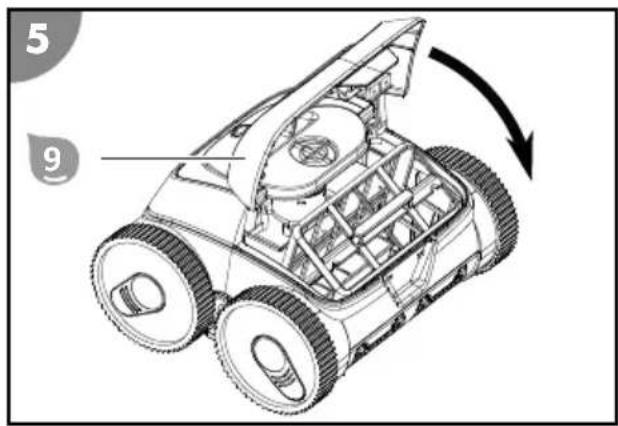
natural_image
Diagram showing two robotic car wheels approaching a surface with bubbles, no text or symbols presentnatural_image
Simple line drawing of a submerged object with a rod inserted into a container, no text or symbols present
natural_image
Line drawing of a robotic arm with a downward arrow indicating movement or repair (no text or symbols present)- Otvorite zaklopku
- Postavite filtarsku jedinicu 8 na usisni kanal.
- Zatvarajte zaklopku 9 dok se ne uklopi. Filtar je umetnut.

natural_image
Technical line drawing of a wheeled vehicle with visible engine and wheels (no text or symbols)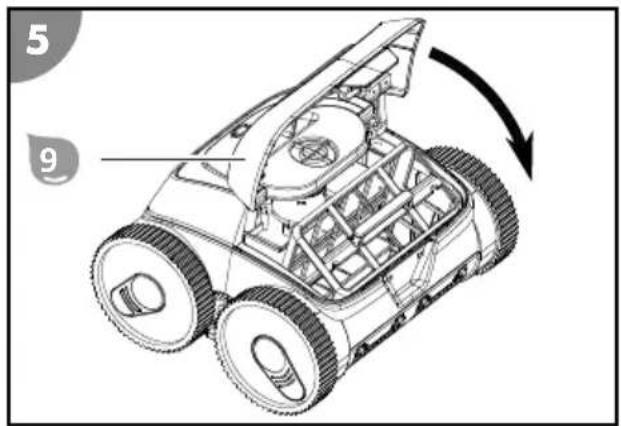
natural_image
Illustration of two robotic car wheels approaching a surface with bubbles, no text or symbols present- Pritisnite prekidač ON/OFF 6.
natural_image
Simple line drawing of a submerged object with a rod inserted into a container, no text or symbols present
www.steinbach-group.com
Odlaganje
Odlaganje pakovanja

natural_image
Line drawing of a robotic arm with a downward arrow indicating movement or repair (no text or symbols present)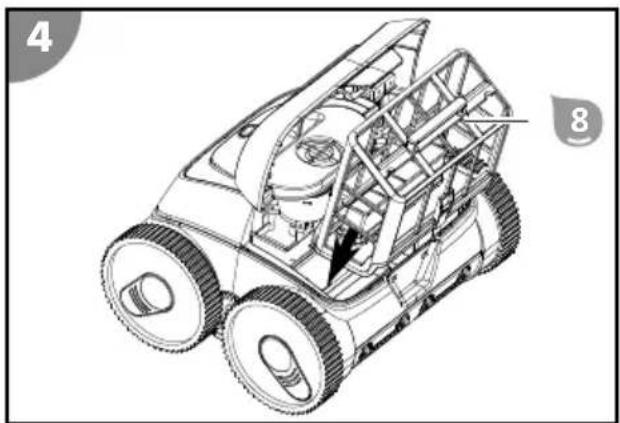
natural_image
Technical line drawing of a wheeled vehicle with visible engine and structural components (no text or symbols)natural_image
Diagram showing two robotic car wheels approaching a surface with bubbles, no text or symbols presentnatural_image
Simple line drawing of a submerged object with a rod inserted into a container, no text or symbols present- Поставете уреда до басейна.
natural_image
Line drawing of a robotic arm with a downward arrow indicating movement or repair (no text or symbols present)Uygulama kurulumu
natural_image
Technical line drawing of a wheeled vehicle with visible engine and wheels (no text or symbols)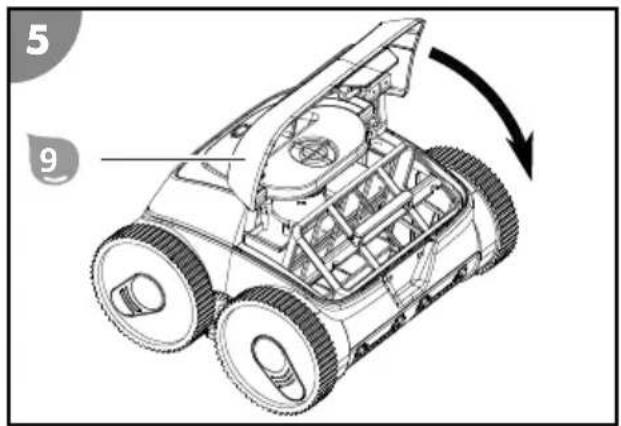
natural_image
Illustration of two robotic car wheels with water spray and bubbles, no text or symbols presentnatural_image
Simple line drawing of a submerged object with a rod inserted into a container, no text or symbols present
www.steinbach-group.com
Ürünü bertaraf etme


Ersatzteile/ Spare parts/ Pièces de rechange/ Parti di ricambio/ Nadomestni deli/ Piese de schimb/ Náhradní díly/ Zamjenski dijelovi/ Pótalkatrészek/ Náhradné diely/ Pезервни части/ Yedek parçalar/ Części zamienne/ Piezas de recambio
- Package contents/components
- Components
- Contents
- General Information
- Read and keep the operating instructions
- Intended use
- Explanation of Symbols
- Safety
- General safety instructions
- Risk of injury through insufficient qualification!
- Additional safety instructions for chargers
- Use and handling of the charger
- Unpacking and checking the package contents
- WARNING!
- Packaging materials pose a risk of suffocation!
- Description
- Description of the pool cleaner
- Status indicator
- lit blue
- blinking blue
- lit pink
- blinking pink
- lit yellow
- blinking yellow
- lit red
- blinking red
- Functions of the app control via Bluetooth (optional)
- Bottom cleaning
- Wall cleaning
- Wall/bottom cleaning
- Wall/bottom cleaning - focus on bottom
- Preparation
- Charging the rechargeable battery
- Risk of fire!
- NOTICE!
- Charging process
- Installing the app
- Operation
- Do not operate while swimming! Mortal danger!
- Cleaning the pool
- Placing the device in the pool and starting cleaning
- Configuring the cleaning program via the app
- Switching off the device
- Stopping cleaning
- Lifting the device out of the pool
- Cleaning
- Storage
- Technical data
- POOL CLEANER RECHARGEABLE
- Spare parts
- Declaration of Conformity
- Disposal
- Disposing of the packaging
- Disposing of used appliances
- Instalace aplikace
- Likvidace
- Likvidace obalu
- Leselejtezés
- Čiščenje
- Ponorenie zariadenia do bazéna a spustenie čistenia
- Likvidácia
- Likvidácia obalu
- Utylizacja
- Odlaganje
- Odlaganje pakovanja
- Uygulama kurulumu
- Ürünü bertaraf etme
Brand : Steinbach
Model : Poolrunner Battery Pro Performance
Category : Robot vacuum