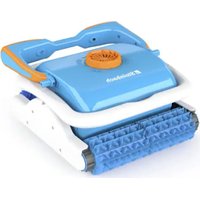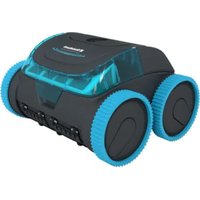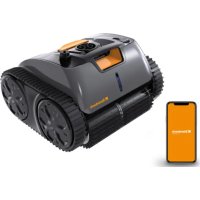
Poolrunner SMART RXB 450 - Robot vacuum Steinbach - Free user manual and instructions
Find the device manual for free Poolrunner SMART RXB 450 Steinbach in PDF.


| Product type | Robotic pool cleaner |
| Brand | Steinbach |
| Model | Poolrunner SMART RXB 450 |
| Category | Robotic vacuum |
| Cleaning element width | 360 mm |
| Travel speed | Up to 11 m/min |
| Maximum immersion depth | 2.0 m |
| Filtration fineness | 180 µm |
| Battery type | Lithium-ion |
| Battery capacity | 4,600 mAh |
| Charging time | 2 to 3 hours |
| Operating time | Up to 150 minutes |
| Maximum pool surface area | 40 m² |
| Maximum water salt content | < 0.5 % |
| Recommended water temperature | 10 °C to 35 °C |
| Charging ambient temperature | 10 °C to 40 °C |
| Protection rating (device) | IPX8 |
| Protection rating (charger) | IP20 |
| Bluetooth | Yes (Robo Control app) |
| Transmission frequency | 2400 MHz |
| Effective radiated power (ERP) | 20.5 dBm |
| Cleaning programs | Standard (floor + walls + waterline), Floor only, Walls only |
| LED status indicator | Blue (on/standby), Blue flashing (running), Purple (Bluetooth connected), Green flashing (charging), Green steady (charged), Yellow flashing (low battery), Red (malfunction) |
| Auto-parking | Yes (moves to wall when battery is low) |
| Automatic stop function | Yes (battery empty) |
| Included charger | Model GM65-252260-D, input 100-240 V~, output 25.2 V |
| Filter maintenance | Rinse with clean water after each use |
| Recommended storage | Dry place, frost-free (≥+5 °C), away from direct sunlight |
| Spare parts available | Cleaning roller, wheels, belt, filtration unit, cap, etc. |
Frequently Asked Questions - Poolrunner SMART RXB 450 Steinbach
User questions about Poolrunner SMART RXB 450 Steinbach
0 question about this device. Answer the ones you know or ask your own.
Ask a new question about this device
Download the instructions for your Robot vacuum in PDF format for free! Find your manual Poolrunner SMART RXB 450 - Steinbach and take your electronic device back in hand. On this page are published all the documents necessary for the use of your device. Poolrunner SMART RXB 450 by Steinbach.
USER MANUAL Poolrunner SMART RXB 450 Steinbach
cs Cistic bazenu.. 85
s! Cistilnik bazena. 117
Model: GM65-252260-D POOL
Package contents/components
1 Cleaner
2 Hook
3 Charger
4 Buoyancy aid
Instruction manual (not shown)
Components
5 Cap for charging socket
6 Status indicator
7 Hatch for filter unit
8 Filter unit
9 Filter unit cover
10 ON/OFF switch
11 Cleaning modes Display
Contents
Overview 2
Package contents/components 20
General Information 22
Explanation of Symbols 22
Safety 23
Unpacking and checking the package contents 24
Description 24
Description of the pool cleaner. 24
Status indicator. 24
Functions of the app control via Bluetooth (optional) 25
Preparation 25
Charging the rechargeable battery. 25
Installing the app 26
Operation 26
Cleaning the pool 26
Set the cleaning programme manually via the device. 28
Configuring the cleaning program via the app 28
Switching off the device 29
Cleaning 29
Cleaning the device 29
Storage 31
Troubleshooting 32
Technical data. 33
Spare parts. 34
Declaration of Conformity 35
Disposal 35
General Information
Read and keep the operating instructions

These operating instructions are part of the "SMART RXB 450" pool cleaner (in the following also called "device"). They contain important information about start-up and operation.
Read the operating instructions and especially the safety instructions carefully before using the device. Non-observance of these operating instructions can lead to severe injuries or
damage to the device.
Keep the operating instructions for further use. If you pass on the device to a third party, you must pass on these operating instructions as well.
Intended use
This device is exclusively intended for the maintenance cleaning of private foil pools with a foil thickness of >0.4 mm (0.02 in)
- and a smooth and level floor without any obstacles (such as folds, floor drains, steps or stairs),
level, smooth and vertical walls (e.g. pools without top ring) and whose water level is below the edge of the pool (no overflow pools, for example).
The cleaning performance may be limited in pools made of alternative materials (such as fiberglass, stainless steel or tiles) due to the surface structure.
The device is not suitable for the removal of large sediment quantities that occur in pools with biological water treatment (such as eco swimming pools or natural pools).
This product is exclusively intended for private use and not suited for the commercial sector. Only use the device as described in these operating instructions. Any other use is considered inappropriate and may lead to material damage or even injury. The device is not a toy.
The manufacturer or retailer will not assume any liability for damage caused by inappropriate or incorrect use.
Explanation of Symbols
The following symbols are used in these operating instructions, on the device or on the packaging.

Here you will find useful additional information.

Risk of damage! Do not open the packaging with sharp or pointed objects, such as cutters
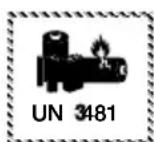
Lithium-ion batteries in equipment or lithium-ion batteries packaged with equipment. Pool cleaner
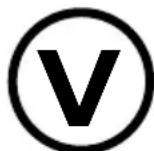
This symbol provides information about the energy efficiency of external power adapters.
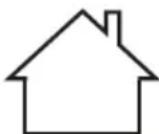
Only use the charger indoors
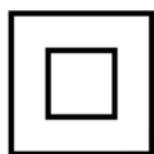
Electrical device with double insulated housing (protection class II)
Safety
The following signal words are used in these operating instructions.

WARNING!
This signal symbol/word denotes a hazard with an average risk level that could lead to death or severe injury if it is not avoided.

CAUTION!
This signal symbol/word denotes a hazard with a low risk level that could lead to mild or moderate injury if it is not avoided.
NOTICE!
This signal word provides a warning about potential material damage.
General safety instructions
Safety instructions for persons

WARNING!
Danger to children and persons with reduced physical, sensory or mental capacities (such as partially disabled persons/older persons with reduced physical and mental capacities) or persons lacking experience and knowledge (such as older children).
Improper handling of the device can lead to severe injury or damage to the device.
- Only allow others to access the device after they have read and comprehended the entire manual or have been instructed about the intended use and the associated risks.
- Never let persons with reduced physical, sensory or mental capacities (such as children or drunk people) or a lack of experience and knowledge unsupervised near the device.
- Never allow children and persons with limited physical, sensory or mental capacities or persons lacking the respective experience and knowledge to operate the device.
- Do not let children clean or service the device.
- Children are not allowed to play with the device or with the power cable.
- Do not operate the device when impaired (e.g. under the influence of drugs, alcohol or medication).

WARNING!
Risk of injury through insufficient qualification!
Insufficient experience or skills for handling the required tools and insufficient knowledge of regional or normative regulations for the required work can lead to severe injuries or material damage.
- Assign all work whose risks you cannot estimate due to insufficient personal experience to a qualified expert.
Additional safety instructions for chargers
Use and handling of the charger
- Only connect the charger if the mains voltage of the socket matches that on the type plate.
- Only connect the charger to an easily accessible socket so that you can quickly disconnect it in the case of a fault.
- Always ensure sufficient ventilation while charging the rechargeable battery. Gases might be released.
- Only use the charger to recharge rechargeable batteries approved by the manufacturer.
-
Do not recharge non-rechargeable batteries.
-
A cracked or otherwise damaged rechargeable battery must not be connected to the charger.
- Protect the charger from any kind of moisture.
- Only use the charger indoors. Never operate it in damp rooms or in the rain.
- Never use the charger in environments with explosive or flammable materials. Risk of fire and explosion.
- Do not place any objects on the charger and do not cover the charger.
- Do not install the charger close to a heat source.
- Regularly check the charger for damage.
- Do not use a damaged charger until it has been repaired.
- Do not take the charger apart. Repairs must only be carried out through a licensed technical customer service.
- Do not use the charger if it has been subjected to blows or knocks or if it was dropped.
- Disconnect the charger from the mains after each use.
- Disconnect the charger from the mains before cleaning, servicing, storing and transporting it and let it cool down completely.
Only charge the rechargeable battery with chargers recommended by the manufacturer. A charger that is suited for a certain type of rechargeable battery poses a risk of fire if it is used with other types of rechargeable batteries.
Unpacking and checking the package contents

WARNING!
Packaging materials pose a risk of suffocation!
Catching your head in the packaging foil or swallowing other packaging materials can cause death. There is a higher risk for children and mentally challenged persons who cannot estimate the hazard potential due to lack of knowledge and experience.
- Prevent children and mentally challenged persons from playing with the packaging materials.
Description
Description of the pool cleaner
The battery-operated pool cleaner cleans the bottom and the walls of your pool for maintenance.
Cleaning rollers dislodge the accumulated biofilm.
The removable filter unit 8 filters suspended deposits and floating substances out of the water.
If the rechargeable battery dies, the pool cleaner stops cleaning.
Status indicator
The status indicator 6 informs you about the operating state of the device:
lit blue
The device is switched on and ready for operation.
blinking blue
The device is in operation (and cleans the pool).
lit purple
The device is connected to the app via Bluetooth. The device can be configured in this operating state but it cannot clean!
blinking green
The battery is charging.
lit green
The battery is fully charged
blinking yellow
The rechargeable battery is almost empty (and the appliance moves to the pool wall - self-parking mode).
lit or blinking red
The device indicates a defect.
Functions of the app control via Bluetooth (optional)
"Robo Control" is a free app for your smartphone or tablet. This app allows you to set up the cleaning program on designated pool cleaners via Bluetooth and use the full range of functions of the device. The cleaning programme 'Standard full pool - wall + floor + waterline' is preset on delivery.
(1) Bottom cleaning / *Eco bottom cleaning
The device only cleans the bottom of the pool. / *Additional setting only possible in the APP. Energy-saving mode to enable longer running time.
(2) Wall cleaning
The device only cleans the pool wall.
(3) Standard full pool / *Wall then floor
Wall + floor + waterline / *Additional setting only possible in the APP. The cleaning sequence can be defined here with the APP.
Preparation
Charging the rechargeable battery

WARNING!
Risk of fire!
Charging at a temperature below 10^ leads to chemical damage to the cell and can cause a fire.
- Charge the rechargeable battery at room temperature.
NOTICE!
Charging the rechargeable battery in a wet or moist charging socket leads to corrosion of the contacts.
- Only connect the charger to the device if the charging socket is dry.
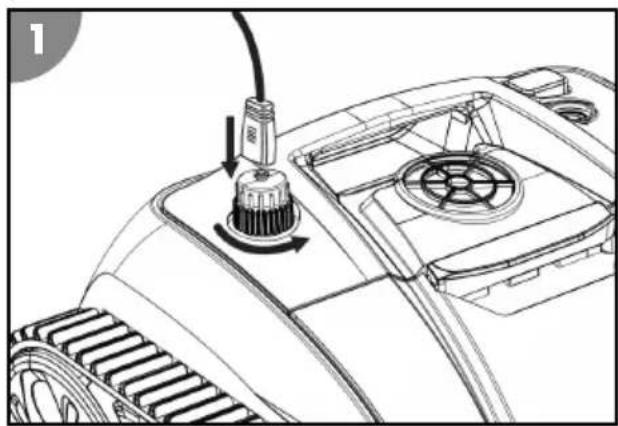
Charging process
- Switch off the device before charging.
- Unscrew the cap 5 counterclockwise from the charging socket.
- Connect the charger to the device.
- Plug the charger into a socket.
The status indicator on the device flashes green. The rechargeable battery is charging.
- When the charge control indicator is lit green, disconnect the charger from the power supply and the device.
- Screw the cap clockwise onto the charging socket.
The rechargeable battery is charged.
Installing the app
You have to install the app to use all functions of the device.
iOS Android
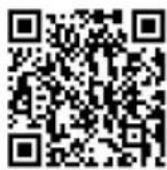
or look for "Robo Control" in the app store

Install updates at regular intervals to keep the app up to date. This is the only way to guarantee fault-free operation of the control via Bluetooth.
Operation

WARNING!
Do not operate while swimming! Mortal danger!
Hair or clothing can be sucked in or trapped by the cleaning element, hold persons under water and, in extreme cases, prevent them from resurfacing.
- Never operate the device while there are persons in the pool.
- Prevent any access to the pool as long as the device is in operation.
Check the following before each use:
- Is there visible damage on the device?
Is there visible damage on the control elements? - Do all individual parts function?
Are the accessories in perfect condition? - Are all cables in perfect condition?
Do not start up a damaged device or damaged accessories. Have them checked by the manufacturer or its customer service or a qualified service technician.
Cleaning the pool
Observe the following before cleaning your pool:
- Remove any cover or foil from the pool.
- Remove obstacles (such as a ladder) from the pool.
- Switch off the filter system at least one hour before the start of cleaning so that particles in the water can settle on the floor.
Proceed as follows to clean your pool:
- Insert the filter unit.
- Place the device in the pool and switch it on.
Inserting the filter
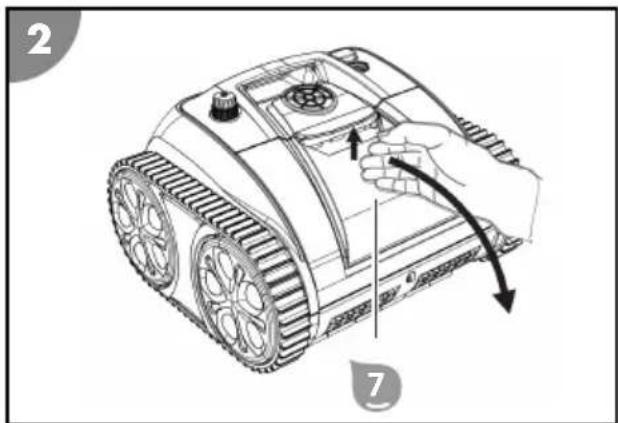
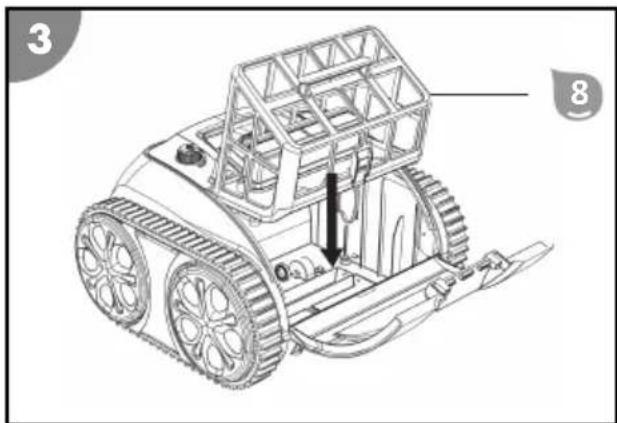
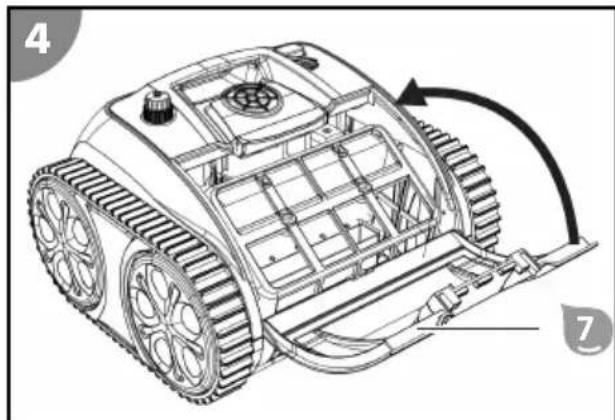
- Open the hatch
- Position the filter unit on the suction channel.
- Close the hatch so that it locks in place.
The filter is inserted.
Installing the buoyancy aids
- Open the flap for the filter unit
- Stick the self-adhesive buoyancy aids 4 to the inside of the flap for the filter unit 7.
- Close the flap for the filter unit until it snaps into place.
The buoyancy aids are fitted.
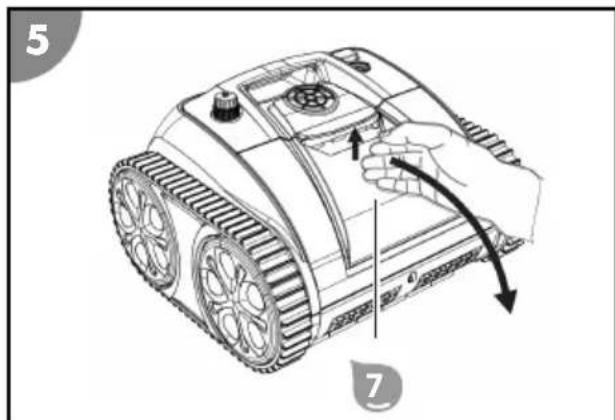
Placing the device in the pool and starting cleaning
You can use the device as delivered without using the app. Optionally, you can also optimize the preset cleaning program to suit your individual requirements (see section "Description"). The desired settings must be made before operation and outside the water; they are saved and can be used afterwards.
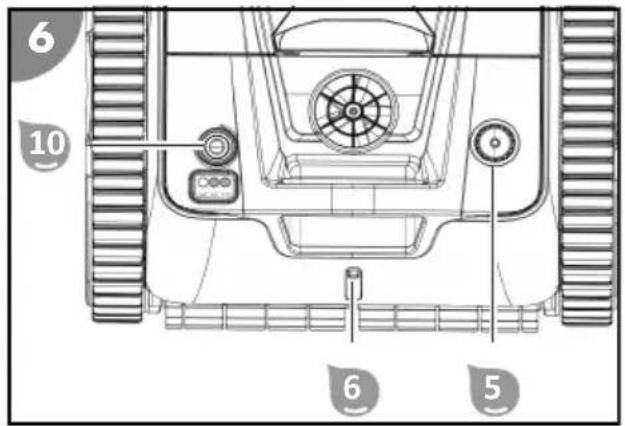
- Check that the cap is firmly screwed onto the charging socket.
- Press the ON/OFF switch 10 for approx. 2 seconds.
The status indicator lights up green briefly, then the status indicator lights up blue continuously. The device is switched on and ready for operation. The device must be placed in the water within 3 minutes, otherwise it will switch off automatically.
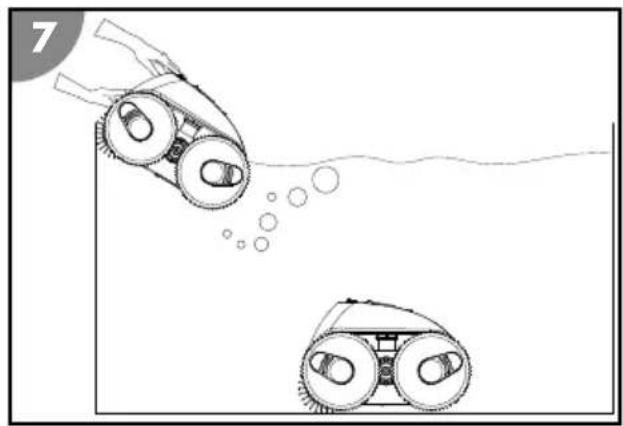
- Hold the device by the handle and lower it slowly into the water until all the air has escaped.
- Then let the device sink to the bottom of the pool.
Make sure that the device lands on the bottom of the pool on its underside and that cleaning can start without obstruction towards the center of the pool.
The status indicator ⑤ blinks blue.
The device is placed in the pool and starts cleaning with a time delay of around 20 seconds after automatic calibration.
Set the cleaning programme manually via the device
The device can be used in the factory settings without using the app. The standard mode is the complete cleaning of the pool "Standard full pool".
There are 3 cleaning modes that you can set manually directly on the device: Standard full pool, floor, wall. (see chapter "Description").
- Briefly press the ON/OFF switch on the appliance to switch manually between the cleaning modes.
The display of the selected cleaning mode lights up blue.
The manually set cleaning programme is configured and saved.
Configuring the cleaning program via the app
When using the app, both WLAN and Bluetooth must be activated on your mobile phone. You must pair the device with the app and configure the cleaning program while the device is out of the water before placing the device in the pool and starting cleaning. Any settings you made are saved and applied in future operation.
- Activate Bluetooth and WLAN.
If you use an android device, you might have to activate GPS as well.
- Press the ON/OFF switch 10 for approx. 2 seconds.
The status indicator is lit blue. The device is ready for operation and ready to connect to the app via Bluetooth.
- Start the "Robo Control" app.
- Search for available devices.
- Select your device to connect it with the app.
The app signals the successfully established connection.
The status indicator 6 is lit purple. The device is connected to the app.
- Follow the instructions of the app and select the desired parameters.
- Check and confirm the set values.
The cleaning program has been configured and saved.
Switching off the device
Proceed as follows to switch off the device:
- Lift the device out of the pool and switch it off.
- Clean the filter unit and the device.
Stopping cleaning
The device stops cleaning automatically as soon as the rechargeable battery is almost discharged. The status indicator 6 flashes yellow while the appliance is moving towards the pool wall and has assumed the park position.
Lifting the device out of the pool
- Attach the hook 2 to a telescopic rod and threat it into the handle of the device.
Never attempt to lift the device by the charging cap strap 5!
- Slowly pull the device towards the water surface until you can reach the handle.
- Slowly lift the device out of the water and hold it above the water surface.
After 10 to 15 seconds, most of the water that has collected in the housing has drained back into the pool.
- Switch off the ON/OFF switch 10
The status indicator 6 is lit red and goes off as soon as the device has switched itself off.
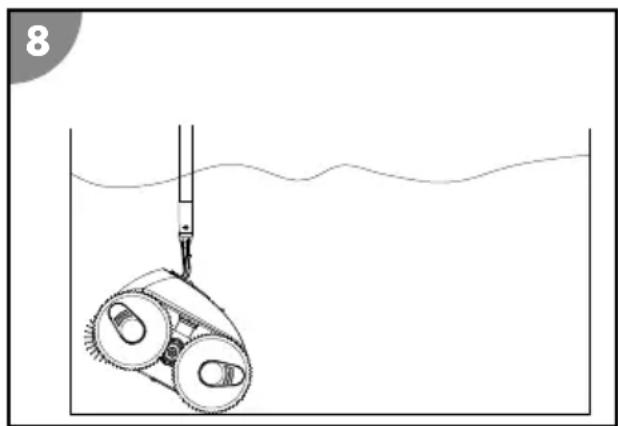
- Set down the device next to the pool.
The device is lifted out of the pool.

Clean the device after each use to ensure continued trouble-free operation.
Cleaning
Only clean the device with a standard bathroom cleaner, clear tap water and a lint-free cloth. Aggressive cleaning agents can damage the device. Dry the device with a lint-free cloth.
Cleaning the device
- Remove and clean the filter.
- Rinse the device after each use with plain tap water inside and out.
The device is clean.
Removing the filter
- Open the hatch
2.Pull the filter unit vertically up and out of the device.
The filter is removed.
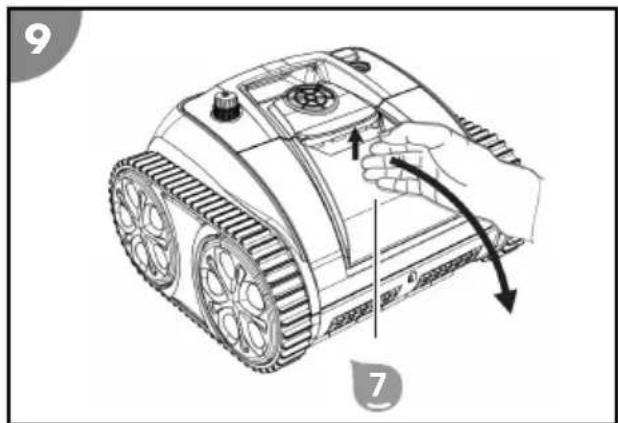
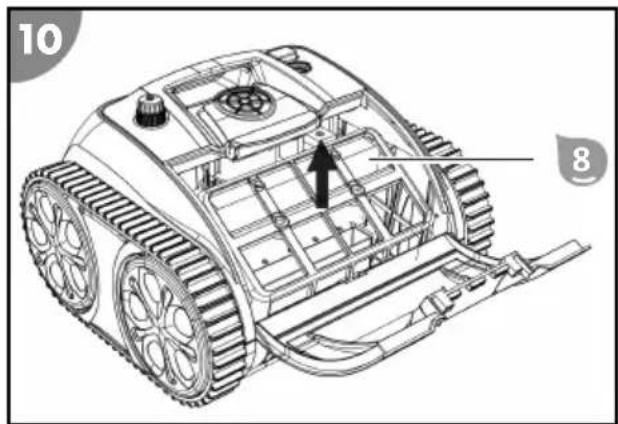
Cleaning the filter
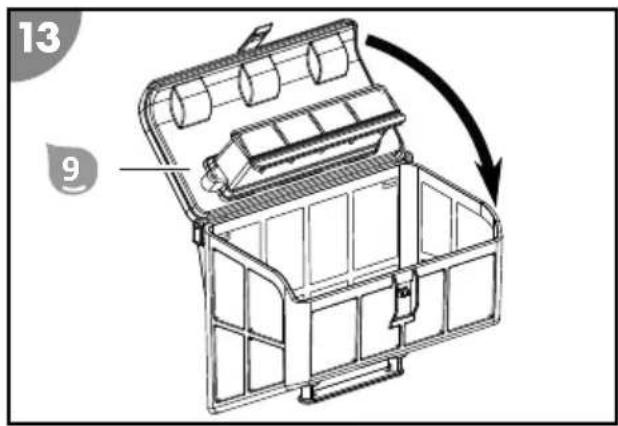
1.Pull the tap and open the cover of the filter unit.
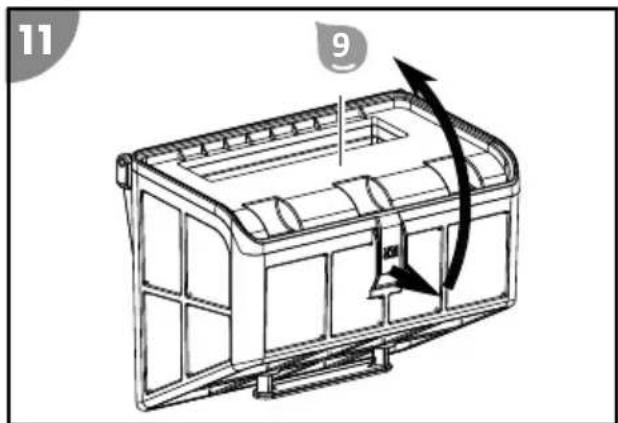
- Thoroughly rinse the filter unit with plain tap water.
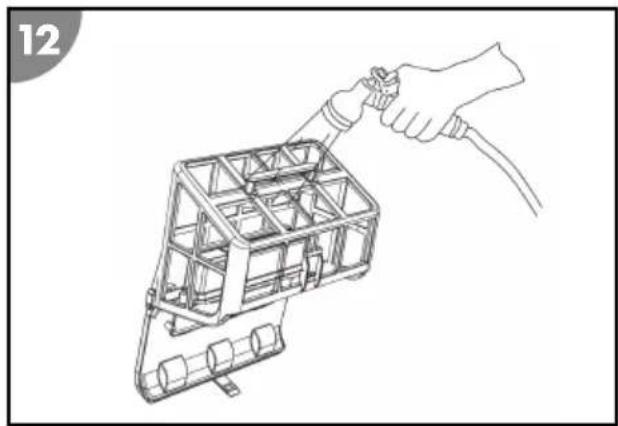
- Close the cover of the filter unit so that it locks in place.
The filter is cleaned.
Storage
- Thoroughly clean the device (see section "Cleaning").
- Let all parts dry completely.
- Fully charge the device. Recharging is required after at latest 3 months due to self-discharge.
- Then store the device and its accessories in a dry and frost-free place (≥ +5^) without direct sunlight.
Troubleshooting
| Fault description Cause Remedy | ||
| Charger blinks red. Low rechargeable | battery voltage or faulty rechargeable battery. | Contact customer service. |
| The device cannot reach all places in the pool. | The water circuit of the pool is switched on. | Switch off the filter system of the pool. |
| The device becomes stuck on the drain grate. | Switch off the filter system of the pool. | |
| The device does not completely move up the wall. | The filter is clogged. Clean the filter. | |
| Algae grows on the walls. Manually pre-clean the pool walls. Investigate and remedy the cause of algae growth (e.g., pH value). Use the pool cleaner more frequently. | ||
| The water temperature is too high or too low. | Operate the device at water operating temperature (see section "Technical data"). | |
| The tires or the cleaning roller are/is worn. | Check the tires and the cleaning roller for wear and replace them if necessary. | |
| The device is too light and topples. Switch off the device and let all the air escape. | ||
| The device has too little buoyancy. Fit the additional buoyancy aids included in the scope of delivery. See 'Fitting buoyancy aids'. | ||
| The device does not sink. There is air in the device. Switch off the device and let all the air escape. | ||
| The salt content is too high and the device has more buoyancy. | Set the correct salt content. See section "Technical data". | |
| The device rises to the surface. The device climbs too high or there is air trapped in the device. | Switch off the device and let all the air escape. | |
| The salt content is too high and the device has more buoyancy. | Set the correct salt content. See section "Technical data". | |

If the fault cannot be rectified, please contact an authorized specialist or the Steinbach support team.
Technical data POOL CLEANER RECHARGEABLE
| BATTERY | |||
| Model: OS7010 Type of rechargeable | Lithium-ion | ||
| battery: | |||
| Item number: 061502Y Rechargeable battery | 4,600 mAh | ||
| capacity: | |||
| Width of cleaning element: 360 mm (14.2 in.) Charging time: 2 to 3 hours | |||
| Speed: max. 11 m/min (36 ft/min) Battery running time: up to 150 min. | |||
| Immersion depth: max. 2.0 m (6.5 ft.) RADIO CONTROL | |||
| Filter mesh: | 180 μm | App: | Robo Control |
| Safety class: | IPX8 | Signal frequency: 2400 MHz | |
| CHARGER | Effective radiated power (ERP): | 20.5 dBm | |
| Model: GM65-252260-D | POOL | ||
| Rated power: | 45 W | Pool size - floor area: | max. 40 m² (430 sq. ft.) |
| Operating voltage and frequency: | 100-240 V~, 50/60 Hz | Salt content in water (salt electrolysis): | <0.5% |
| Output voltage: | 25.2 V --- | Water temperature: | 10 °C to 35 °C (50 °F to 95 °F) |
| Safety class: | IP20 | Ambient temperature: | 10 °C to 40 °C (50 °F to 104 °F) |
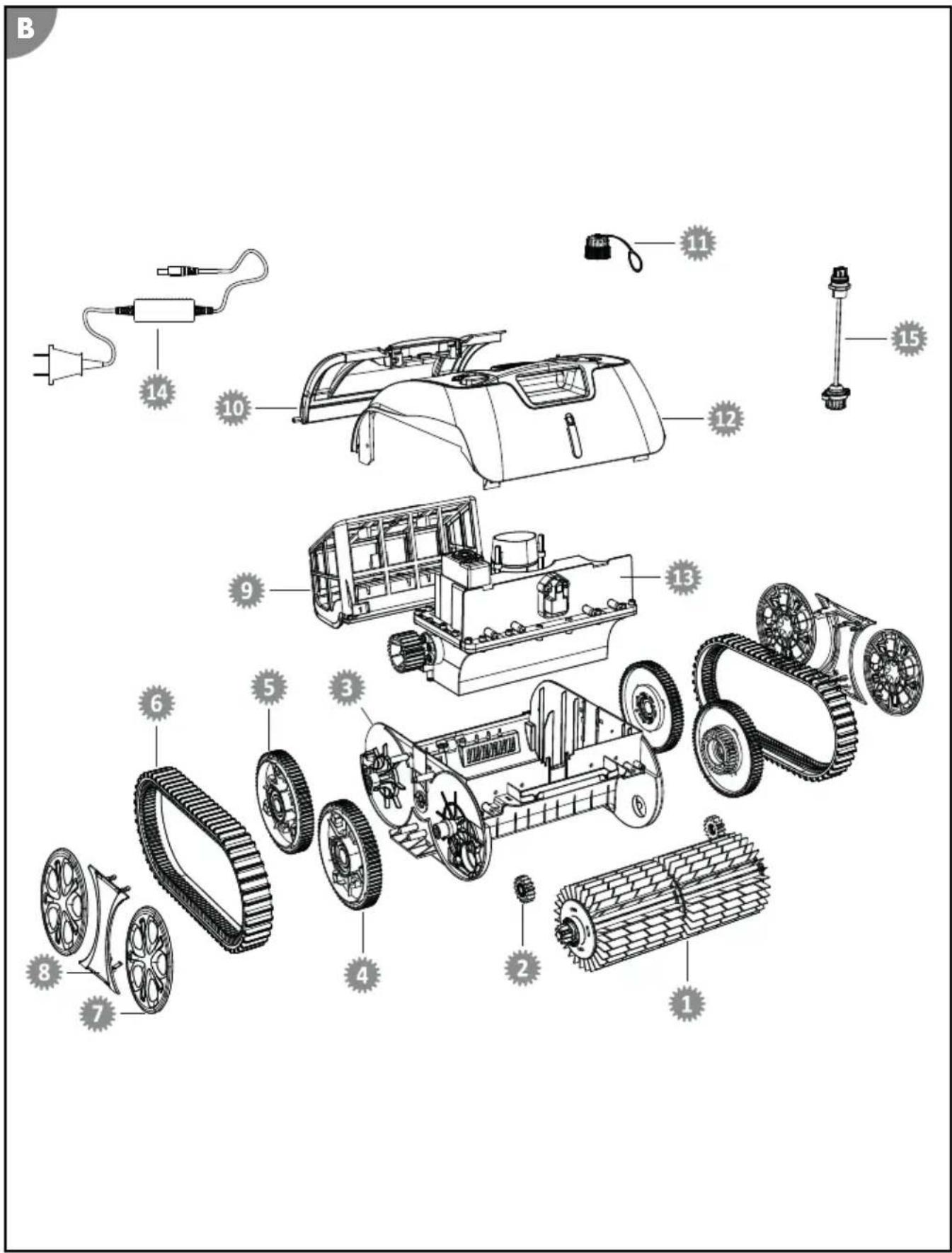
Spare parts
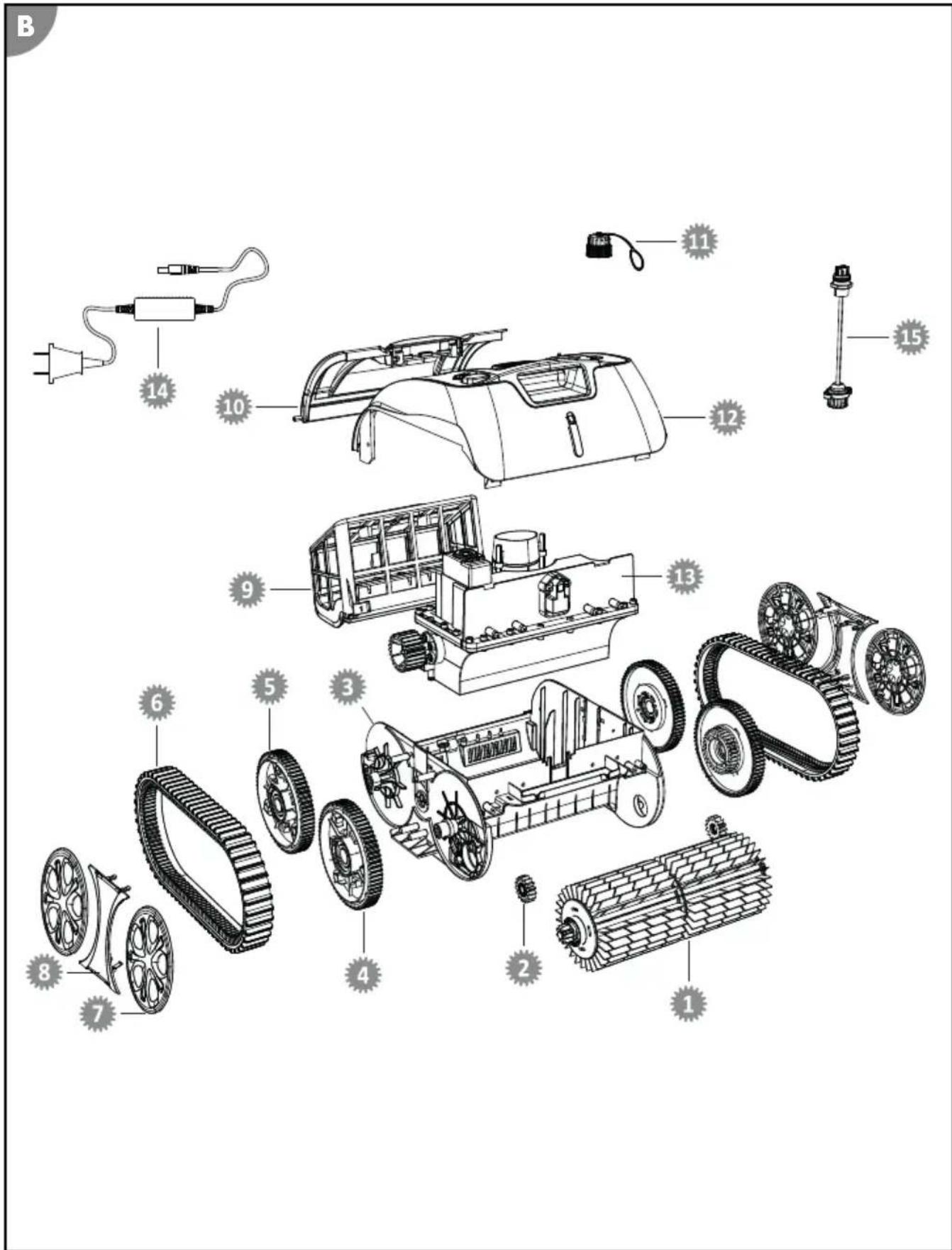
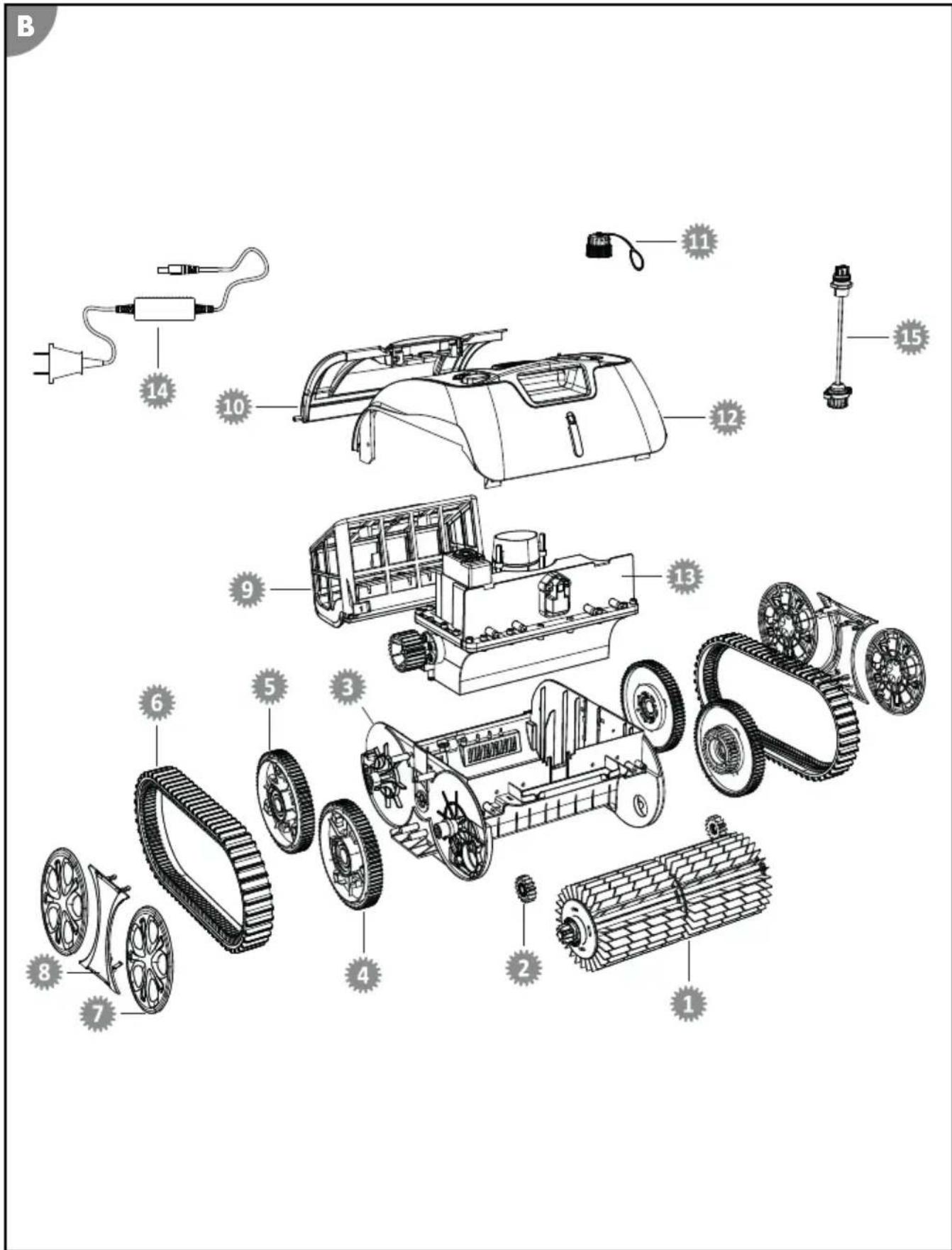
061420 - Cleaning roller with drive wheel
061429 - Hatch for filter unit
061421 - Drive wheel
061430 - Cap for charging socket
061422 - Bottom part of housing
061431 - Top part of housing
4 061423 - Front wheel
13 061432 - Motor unit
061424 - Rear wheel
061433 - Charger
6 061425 - Drive belt
061434 - Connection cable with charging socket
061426 - Wheel cover
061427 - Side cover
061428 - Filter unit
Declaration of Conformity
CE Steinbach International GmbH hereby declares that the wireless system type Poolrunner SMART RXB 450 (061502Y) complies with Directive 2014/53/EU. The full text of the EU Declaration of Conformity is available at the following internet address: www.steinbach-group.com
Disposal
Disposing of the packaging
Sort the packaging before you dispose of it. Dispse of paperboard and cardboard with the recled paper service and wrappings with the appropriate collection service.
Disposing of used appliances
Applicable in the European Union and other European countries with separate collection systems for recyclable materials.
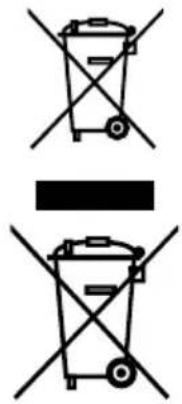
Used appliances do not belong in the household waste!
If the device can no longer be used, each consumer is obligated by law to drop off used appliances separate from the household waste at a municipal collection point. This ensures that used appliances are recycled properly and negative effects on the environment are avoided. Therefore electrical appliances are marked with the above symbol.
Batteries and rechargeable batteries must not be disposed of in the household waste!
You, the consumer, are obligated by law to deposit all batteries and rechargeable batteries, regardless of whether they contain hazardous substances* or not, at a collection point in your community/your district or at a retailer so that these can be disposed of in an environmentally-friendly fashion.
- marked with: Cd = cadmium, Hg = mercury, Pb = lead, Li = lithium
Application: Robo Control
www.steinbach-group.com
Likvidace
Likvidace obalu

el: www.steinbach-group.com
Leselejtezés
* a kovetkez jellel van eflatva: Cd = Kadmium, Hg = Higany, Pb = Olom, Li = Lftium
Model: GM65-252260-D
BAZEN
Nazivna moč: 45 W Velikost bazena - površina najv. 40 m² dna:
Obratovalna napetost in 100-240 V~, 50/60 Hz Vsebst soli v vodi <0,5% frekvenca: (elektroliza soli):
Izhodna napetost: 25,2 V - Temperature vode: 10^ - 35^
Stopnja zaščite: IP20 Temperatura okolice: 10 °C-40 °C
Nadomestni deli
Model: GM65-252260-D
BASEN
Mocznamionowa: 45W
www.steinbach-group.com
Utylizacja
Model: GM65-252260-D
www.steinbach-group.com
Odlaganje
Odlaganje pakovanja

Odložite pakovanje prema vrsti. Debeli papir i karton stavite u OTPadni papir, folije u dio za recikliranje.
Odlaganje starog uredaja
Ako akymylaTopHaTa 6aTePnE e n3ToUeHa, ypeTbT 3a NOuNCTBaHe Ha 6aceHn IpeKpaTBA NOuNCTBaHETO.
Инд�示аТорна Лампа
INHnKaTOpHaTa lamna 6 daBa HnΦopMaζηa 3a pa6oTHoTo cBCTOHaHe Ha ypeJa:
CBETN CnHbO
UpeBbTe BkIIOueH I roTOB ynoTpe6a.
Mnra B CnHbO
UpeTpa60Tu (nNouchTa 6aceHa).
CBETNJIINAB
UpeBcE Cbbp3aH c npnIOxKeHneTo Upe3 Bluetooth. IIO BpeMe Ha TOBa pa6oTHO cbCTOHNue ypeBt MOKe Da 6bJe KOHpIgnpuHa, Ho He nNouchTaH!
Miraio 3eJeno
BaTepeTae 3apeKja.
CBetBa B 3eNeHo
BaTePraTa e HanbIHo 3apeDeHa.
MnraBKbJTO
AkyMnyaTopHaTa 6aTePnE noTu npa3Ha (u ypeDbT ce npnDbNkBa KbM CTeHaTa Ha 6aceHb - peKIM Ha caMonapKnpaHe).
CBETBaB3eJEnHOIMMra
YcTpoIcTBOTo NOKa3Ba NOBpeJa.
Mодел: GM65-252260-D
HomHaJIHa MoIcHocT: 45 W
BACEH
Pa3mep Ha 6aceHa - mKc. 40 m²
ПLOUн ДьHOTO:
Pa6oTHo HAnpeXeHne I
100-240 V\~, 50/60 Hz
CbDpKaHHe Ha coB BB <0,5%
pa6oTHa yecToTa:
BOdaTa (COnHa
eNeKtpOnn3a):
I3xoJHO HappeKeHne:
25,2V = = =
Tempepatya Ha Boda: 10^ - 35^
CTeENHa 3aunTa:IP20
TemnepaTpaHa OKoJHata 10°C - 40°C
cpea:
Pe3epBHy qacTn
061420 -Почиствац валяк сбс 3адвижваши КОлно
061421 - 3aADBbBauo KoJeNo
061422 -kopnycdoJHa yacT
4 061423 - Праздно кoleло
061424 - 3aHNo kOleJo
6 061425 -Задвжваши ремьк
7 061426 - kanaquka 3a koJeNo
061427 - cTpaHnueH kanaK
061428 -ФИNTьренблOK
061429 - kaak 3a pfntbpeh 6nok
061430 - kanauka 3a 6yka 3a 3apekdahe
12 061431 -kopnyc ropna yact
13 061432 - MOTOPEN arperat
14 061433 - 3apЯДHo yctpoIcTBO
061434-Cbbp3BaU Ka6eI c rHe3do 3a 3apeXdaHe
Model: GM65-252260-D HAVUZ
Nominal guc: 45 W
Havuz buyukluğ - taban maks. 40m^2
alani:
Isletim voltaj ve frekansi: 100-240 V\~, 50/60 Hz
Su tuz iceriigi (tuz < % 0,5
elektrolizi):
Cikis gerilimi: 25,2V=
Su sicakligi: 10^ - 35^
Koruma turu: IP20
Gevre sicaklig: 10^ - 40^
Yedek parçalar
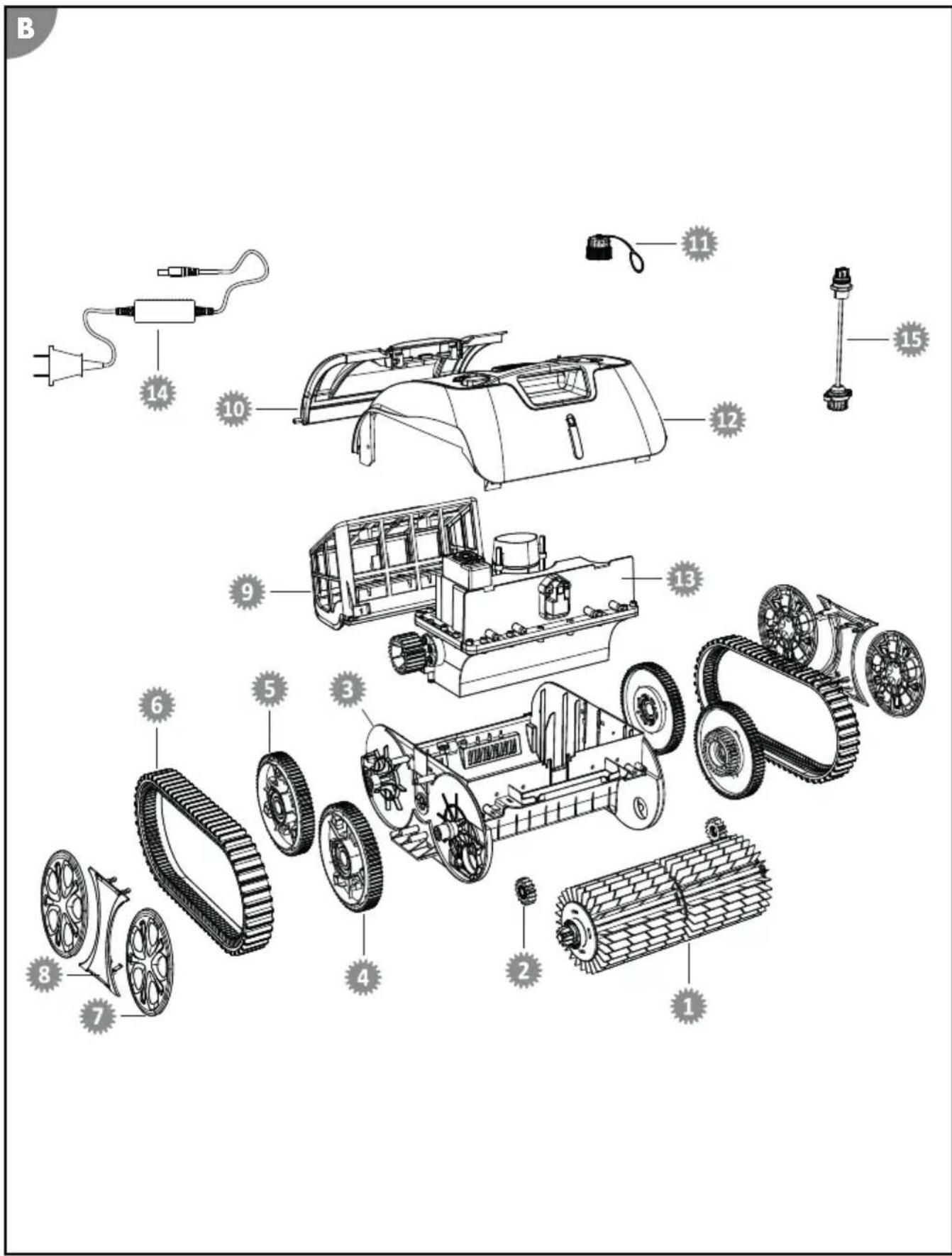
061420 - Tahrik tekerleigi ile temizlemesilindiri
061421 - Tahrik tekerlei
3 061422 - Gövde alt kism
4 061423 - On tekerlek
5 061424 - Arka tekerlek
6 061425 - Tahrik kayisi
061426 - Tekerlek kapaği
8 061427 - Yan kapak
061428 - Filtre unitesi
061429 - Filtre ünitesi icin kapak
061430 - Sarj soketi icin kapak
061431 - Gövde üst kismi
061432 - Motor unitesi
061433 - Sarj cihazi
061434 - Sarj soketli baglanti kablosu
Uygunluk beyani

www.steinbach-group.com
Urünü bertaraf etme
Ambalaji bertaraf etme

Ambalaji turüne gore bertaraf edin. Kartonu ve mukavayi atik kagit, ambalaj filmini ise geridonusturulebilir malzeme bolumune atin.