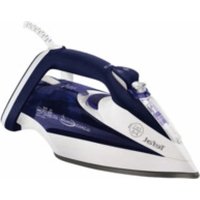
Ultimate Autoclean FV9547 - Iron TEFAL - Free user manual and instructions
Find the device manual for free Ultimate Autoclean FV9547 TEFAL in PDF.


| Product type | Steam iron |
| Brand | Tefal |
| Model | Ultimate Autoclean FV9547 |
| Water tank capacity | 350 ml (MAX mark) |
| Soleplate type | Gliss/Glide Protect™ autoclean or Autoclean Catalys (depending on model) |
| Steam functions | Spray, Superpress, Vertical steaming |
| Control system | Autosteam Control with 8 programs (synthetic, acrylic, silk, wool, cotton, linen, jeans, power) |
| Anti-scale technology | Integrated Anti-Calc Plus system with removable anti-scale rod |
| Anti-drip | Yes, thanks to Autosteam Control |
| Safety | Auto-Stop: 8 min on heel, 30 s flat or on side |
| Power supply | 220-240 V ~ 50/60 Hz (standard estimate) |
| Steam control | Steam/dry slider |
| Thermostat | Rotary under the handle with program display |
| Indicators | Thermostat (heating), Auto-Stop (flashing) |
| Power cord | With rear cord winder |
| Water advice | Tap water or 50% demineralized water mixture |
| Maintenance | Monthly anti-scale rod cleaning (soak in vinegar/lemon) and monthly self-cleaning |
| Soleplate cleaning | Soft damp cloth (do not use abrasive pad) |
| Included accessories | Removable anti-scale rod |
| Dry use | Possible in DRY position |
| Storage position | On the heel, cord wound |
| Temperature setting | Automatic according to selected program |
| Warranty | Standard (see conditions) |
Frequently Asked Questions - Ultimate Autoclean FV9547 TEFAL
User questions about Ultimate Autoclean FV9547 TEFAL
0 question about this device. Answer the ones you know or ask your own.
Ask a new question about this device
Download the instructions for your Iron in PDF format for free! Find your manual Ultimate Autoclean FV9547 - TEFAL and take your electronic device back in hand. On this page are published all the documents necessary for the use of your device. Ultimate Autoclean FV9547 by TEFAL.
USER MANUAL Ultimate Autoclean FV9547 TEFAL
DE * je nach Modell
EN * depending on model
FR * selon modèle
NL * al naar gelang het model
IT * a seconda del modello
ES * según el modelo
PT * consoante modelo
DA * afhængig af model
NO * avhengig av modell
SV * beroende på modell
FI * mallista riippuen
EL * ανάλογα με το μοντέλο
CS * podle modelu
HU * modelltöl függöen
SK * v závislosti od modelu
HR * ovisno o modelu
SL * Odvisno od modela
RO * în funcție de model
SR* u zavisnosti od modela
BG* В зависимост от моделиа
PL * zależnie od modelu
TR* modele göre
RU * в зависимости от модели
UK * залежно від моделі
ET * söltuvalt mudelist
LV * atbilstoši modelim
LT * pagal modeli
natural_image
Illustration of a car inside a seatbelt with directional arrow indicating rotation (no text or symbols)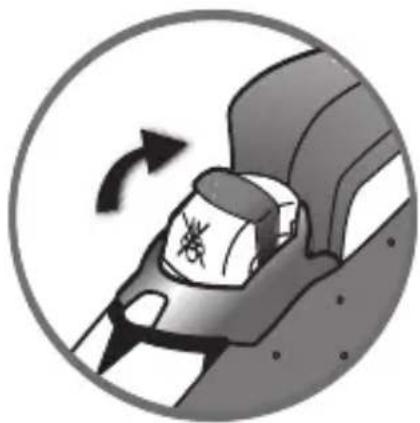
natural_image
Circular icon showing a car seatbelt with a warning symbol, indicating clockwise rotation (no text or symbols present)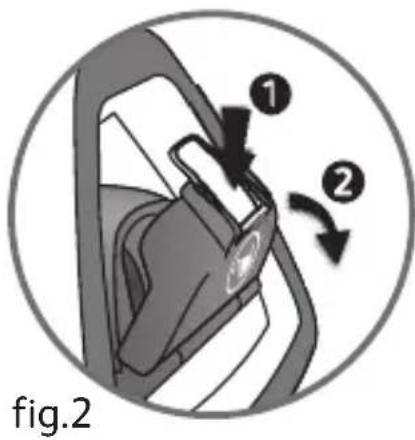
natural_image
Diagram of a car interior showing steering wheel, dashboard, and steering wheel (no text or symbols)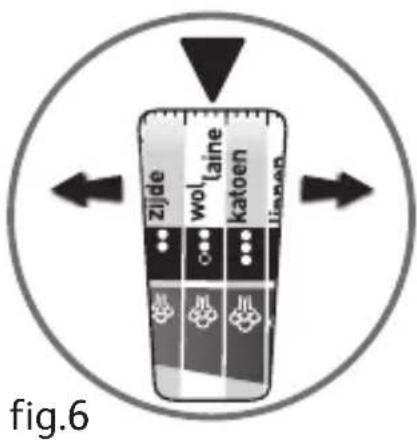
natural_image
Illustration of a car interior with exhaust lines and a vehicle, labeled 'fig.7' (no text or symbols on the diagram itself)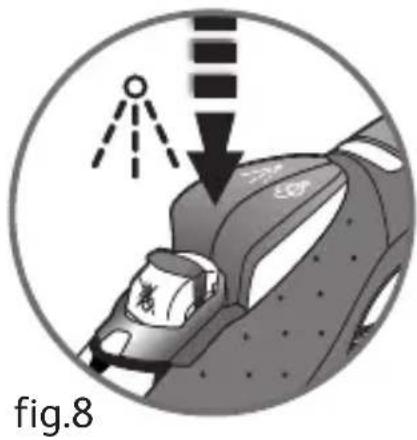
natural_image
Illustration of a car interior with a downward arrow and a small object, labeled 'fig.8' (no text or symbols on the diagram itself)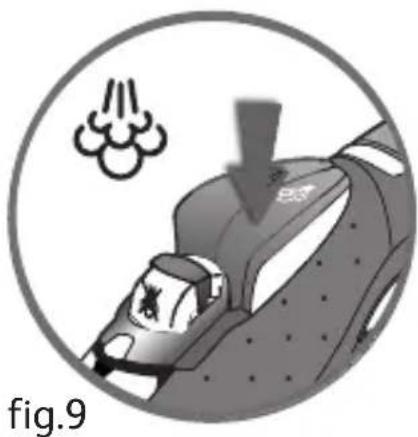
natural_image
Illustration of a car with exhaust smoke and exhaust cloud, labeled 'fig.9' (no text or symbols on the diagram itself)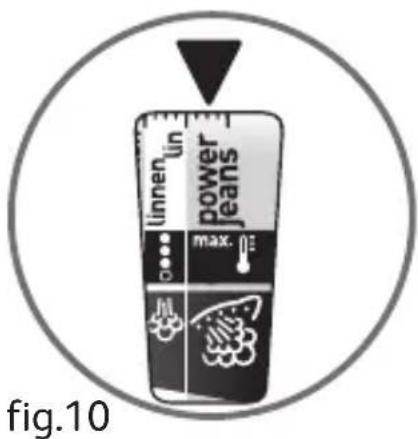
natural_image
Illustration of hands using a tool to interact with a device, no text or symbols present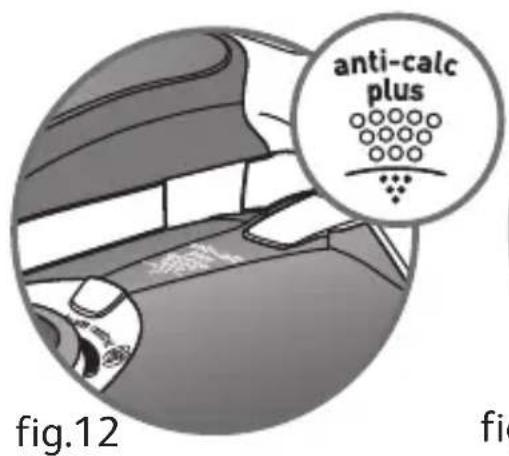
fig.13*
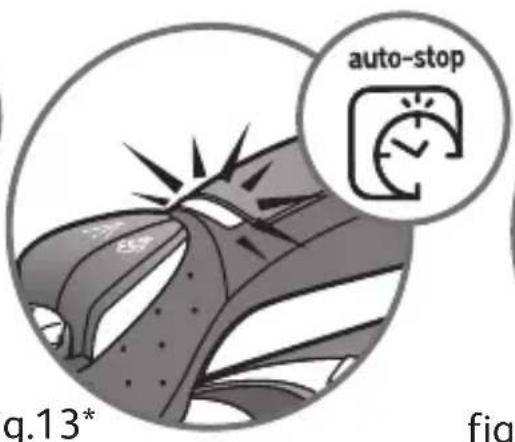
fig.14*
natural_image
Diagram of a biological structure resembling a seed or larva, enclosed in a circle (no text or labels)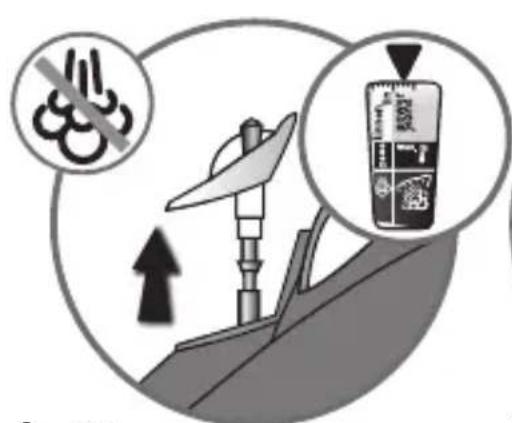
fig.15
natural_image
Illustration of a pipette dispensing liquid into a glass (no text or symbols)fig.16
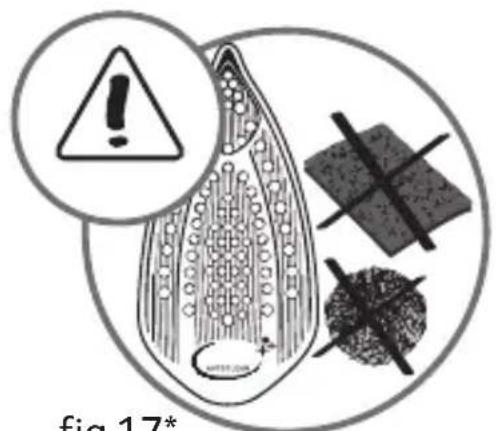
fig.17*
EN Please refer to safety booklet before using your appliance.
DE Bitte lesen Sie sich vor der Benutzung Ihres Geräts die Sicherheitshinweise der Broschüre durch.
FR Merci de lire les recommandations de sécurité avant toute utilisation du produit.
NL Raadpleeg het veiligheidsboekje vóór het gebruik van uw apparaat.
IT Consultare il libretto di istruzioni prima di utilizzare l'apparecchio.
ES Por favor, consulte el folleto de seguridad antes de usar su aparato
PT Queira consultar o folheto de segurança antes de utilizar o aparelho.
DA Læs venligst sikkerhedsbrochuren, før apparatet tages i anvendelse.
NO Se sikkerhetsheftet før du begynner å bruke apparatet.
SV Läs igenom häftet om säkerhet innan du använder apparaten.
FI Lue turvaohjevihko ennen laitteen käyttöä.
EL Ανατρέξτε στο εγχειρίδιο ασφαλείας πριν να χρησιμοποιήσετε τη συσκευή σας.
CS Předtím, než budete zařízení používat, si přečtěte bezpečnostní brožuru.
HU Kérjük, hogy a készülék használatát megelőzően olvassa el a biztonsági tájékoztatót.
SK Pred použitím prístroja si prečítajte brožúru o bezpečnosti.
HR Molimo pogledajte knjižicu o sigurnosti prije uporabe aparata.
SL Prosimo vas, da pred uporabo naprave preberete varnostna navodila.
RO Vă rugăm să consultați manualul de instrucțiuni înainte de a folosi aparatul.
SR Molimo vas da pre upotrebe aparata pročitate brošuricu o sigurnosti.
BG Моля, направете справка с брошурата за безопасност преди да използвате уреда.
PL Przed rozpoczęciem użytkowania urządzenia prosimy przeczytać informacje dotyczące bezpieczeństwa.
TR Lütfen, kullanmadan önce güvenlik bilgileri kitapçığına bkz.
RU Перед использованием устройства обратитесь к руководству по технике безопасности.
UK Перед використанням пристрою ознайомтесь із довідником із техніки безпеки.
ET Enne oma seadme kasutamist tutvuge palun ohutusjuhistega.
LV Pirms ierīces izmantošanas, lūdzu, skatiet drošības bukletu.
LT Prieš naudojantis prietaisu prašome perskaityti saugos instrukcijas.
Beschreibung
1 Spray
2 Thermostat indicator
3 Antiscale valve grip
4 Dry/Steam control
5 Spray Button
6 Shot of Steam Button
7 Auto-Stop safety warning light (depending on model)
8 Gel comfort handle (depending on model)
9 Electric power cord
10 Extra-large heel with non-slip pad
11 Opening button to water tank
12 Integral anti-scale system
13 Thermostat indicator light
14 Autosteam Control Thermostat
15 Gliss/Glide Protect ^™ autoclean soleplate (according to model) Ultraglide ^® Diffusion soleplate (according to model) Autoclean Catalys soleplate (according to model)
16 Water tank filler hole
EN
Before using for the first time
Warning!
Remove any labels from the soleplate before heating up the iron (depending on model).
Warning! Before using your iron with the steam function for the first time, we recommend that you operate it in a horizontal position for a few moments, away from your linen, i.e. press the Shot of Steam button a few times.
During the first few uses, a harmless odour and a small amount of smoke may be given off.
This has no effect on the use of the iron and will disappear quickly.
What water to use?
Your appliance has been designed to function with untreated tap water. However, it is necessary to operate the Self-Clean function regularly in order to eliminate hard water deposits from the steam chamber.
If your water is very hard (check with your local water authority), it is possible to mix tap water with store-bought distilled or demineralised water in the following proportions: - 50% tap water, - 50% distilled or demineralised water.
-Types of water not to use?
Heat concentrates the elements contained in water during evaporation. The types of water listed below contain organic waste or mineral elements that can cause spitting, brown staining, or premature wear of the appliance: water from dothes dryers, scented or softened water, water from refrigerators, batteries or air conditioners, pure distilled or demineralised water or rain water should not be used in your Tefal iron. Also do not to use boiled, filtered or bottled water.
Use
Steam ironing
- Filling the water tank
- Unplug your iron before filling it.
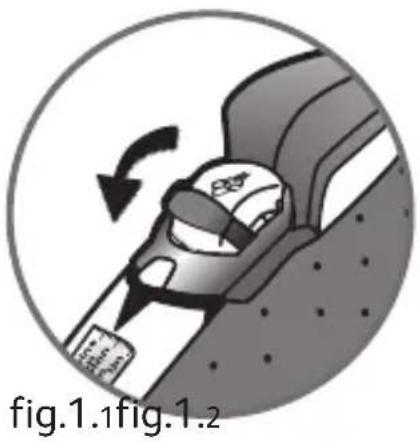
- Set the steam control to DRX - fig. 1.1.
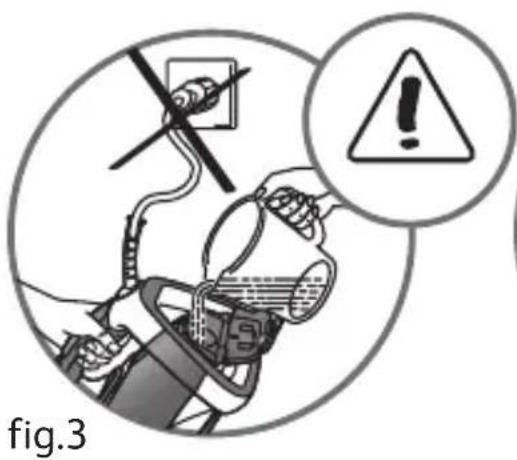
- Take the iron in one hand and tilt it slightly, so that you can see the water tank filling fige 3.
- To open the water tank, press the button fig. 2.
- Fill the water tank fig. 3 up to the mark "MAX". The mark MAX corresponds to a capacity of 350 ml
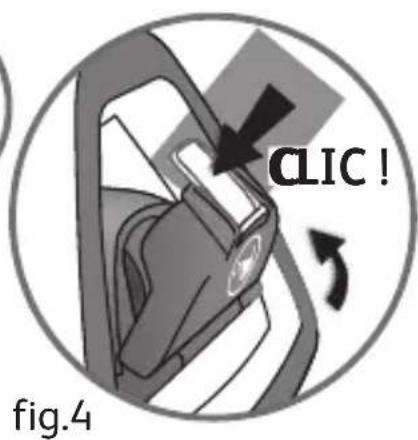
- Close the water tank cover until you hear a click fig. 4.
- You can now plug in your iron.
- Choose your ironing programme
- Your iron has the Autosteam Control function, which recommends 8 different ironing programmes:
- Set the Autosteam Control Thermostat to match the type of textile you wish iron. Your iron accurately determines the exact temperature and steam flow that are suitable, in order to guarantee the best results.
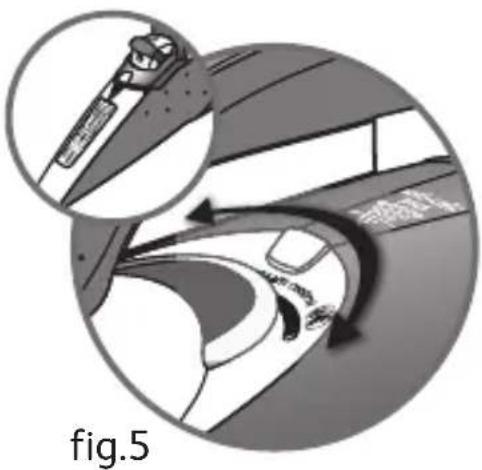
- To select the appropriate ironing programme, activate the thermostat located under the handle- fig. 5.
- Rotation left selects the programs requiring low temperature and steam levels.
- Rotation right selects the programs requiring high temperature and steam levels.
- The program selected appears automatically on the indicator panel at the front of the iron-fig. 6.
- Set the steam control to STEAM - fig. 1.2.
- When your iron reaches the required temperature, the thermostat indicator goes out- fig. 7. You can start ironing.
- Spray Function
- While ironing, press a few times in succession on the Spray button to dampen the fabric
- fig. 8 and iron out awkward creases.
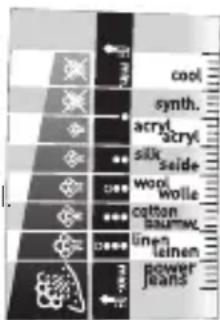
Recommendations: Fabrics and ironing temperatures:
- Your iron heats up quickly: so begin by ironing fabrics that are ironed at low temperatures first, then go on to those requiring a higher temperature,
- if you change to a program requiring lower temperatures, wait for the thermostat light to come on again before continuing to iron.
when ironing fabrics with mixed fibres, set the ironing temperature for the most delicate fibre. For delicate fabrics we recommend testing the fabric first on an inconspicious place eg (inside them).
- For best results we recommend you use a vented ironing board to allow the powerful steam to penetrate through the fabric more efficiently.
4. For more steam (shot of steam button)
- Press the Shot of Steam button from time to time fig. 9.
- Wait a few seconds between each shot before pressing the button again.
5. Vertical steam ironing
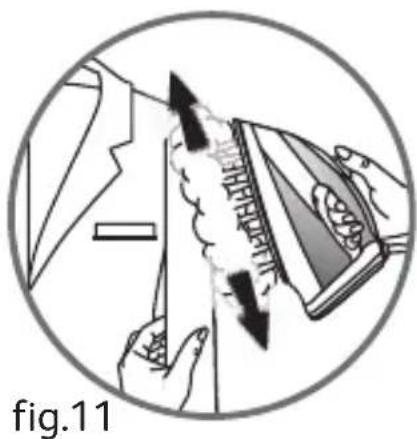
- Ideal for removing creases from suits, jackets, skirts, hanging curtains etc
- Hang the garment on a hanger and hold the fabric slightly taut with one hand. The steam is very hot, so you should always do this with the garment on a hanger – never while someone is wearing it.
- Set your thermostat to MAX fig. 10.
- Press the Shot of Steam button( ) repeatedly fig. 9 moving the iron from top to bottom fig. 11.
- Hold the iron a few centimetres from the fabric to avoid burning delicate fabrics.
6. Anti-Calc Plus System
- You iron is equipped with an integral anti-scale system. fig. 12.
- This system will help to provide :
- a better ironing quality with a constant flow of steam,
- a longer life for your iron.
7. Anti-drip function
- Autosteam Control, i.e. the automatic selection of the ironing programme depending on the fabrics selected, makes it possible to reduce steam flow at low temperatures and prevents your iron from dripping water onto your linen.
8. Auto-Stop safety feature (depending on model)
- For your safety, the electronic system cuts off the power and the autostop indicator light. When the Auto-Stop flashes- fig. 13 when: warning light is on, it is
- The iron remains motionless for more than 8 minutes on its heel.
- The iron remains flat or on its side for more than 30 seconds.
- To restart the iron, just move it gently until the warning light stops flashing.
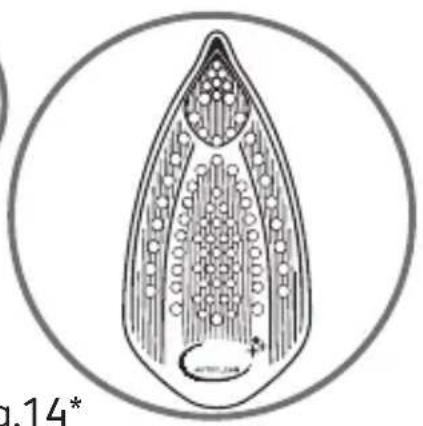
9. Gliss/Glide Protectautoclean - Autoclean Catalys soleplate (depending on model)
- Your iron is equipped with a catalytic self-cleaning soleplate.
- Its exclusive coating removes all impurities generated by normal use.
- It is recommended that you always rest your iron on its support base to preserve its self-cleaning coating.
- Choose your ironing program.
- Set the steam control to DR - fig. 1.1.
- You may start ironing when the thermostat light goes out.
Caring for your iron
BE CAREFUL! Unplug your iron and let it cool down before cleaning it.
Cleaning the anti-calc valve (once per month)
- Unplug your iron and empty the water tank.
- To remove the antiscale valve, set your thermostat on the position May 10, place the steam control on STEAM-, fig. 1.2 and the valve can now be removed from your iron-fig. 15.
Warning! the steam control must be set to STEAM (fig.1.2) during the cleaning phase and the thermostat must be set to MAX (fig.10).
Never touch the end of the valve
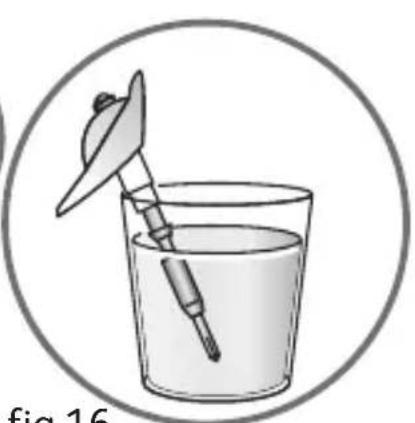
- Soak the valve in a cup of white vinegar or plain lemon juice for 4 hofig. 16.
- Rinse the valve under running water.
- Replace the anti-calc valve.
The iron will not function without the anti-calc valve
1. Self-cleaning
In order to extend the life of your iron, use the Self-Cleaning function once a month.
- Set the iron to DRY※ - fig. 1.1.
- Fill the water tank to maximum.
- Set the iron on his heel, with the water tank full, and set the thermostat to May 10.
- When the thermostat light goes out, unplug the iron and hold it in a horizontal position, over a sink.
- Set the steam control to STEAM, - fig. 1.2
- Remove the anti-calc valve.
- Shake the iron gently, over the sink, until some of the water in the water tank (with the impurities) has flowed out through the soleplate.
- At the end of the operation, push the anti-calc valve back into position.
- Turn the iron back on for 2 minutes, setting it on its heel, to dry the soleplate.
- Unplug the iron, and when the soleplate is just warm, wipe it with a soft cloth.
2. Cleaning the soleplate
Your iron has a self-clean soleplate (according to the model):
Recommendations: the self-cleaning function helps to slow down the scaling up of your iron.
- Warning! Use of an abrasive cloth will damage the self-cleaning coating on the soleplate. - Its exclusive active coating eliminates all impurities that can be Note! The steam control position must necessarily be on STEAM (fig.1.2) in order to remove or replace the iron's antiscale rod.
- Its exclusive active coating eliminates all impurities that can be generated under normal conditions of use.
- Ironing with an incorrect program can however leave traces that may require manual cleaning. In this case, it is recommended that you use a soft damp cloth on the still warm soleplate so as not to damage the coating.
Your steam iron is fitted with an Ultraglide soleplate (depending on model):
- Never use aggressive or abrasive products.
- When the soleplate is still warm, wipe with a damp cloth
Attention! The use of a scouring pad will cause damage to your soleplate's self-cleaning coating (fig.17)
EN
Storing your iron
- Unplug the iron and wait for the soleplate to cool down.
- Empty the water tank and set the steam control to DRY- fig. 1.1. A little water may remain in the tank.
- Wind the cord not too tightly around the heel at the back of the iron.
- Store the iron on its heel.
Environment

Environment protection first!
①Your appliance contains valuable materials which can be recovered or recycled.
Leave it at a local civic waste collection point.
If there is a problem?
| Problem Possible causes | Solutions | |
| Water drips from the holes in the soleplate. | You are using the Shot of Steam button too often.You have stored the iron horizontally, without emptying it and without setting it to DRY. | Wait a few seconds between each use of the button.See the section "Storing your iron". |
| Brown streaks come through the holes in the soleplate and stain the linen. | You are using chemical descaling agents.You are using pure distilled/demineralised or softened water.Your linen is not rinsed sufficiently or you have ironed a new garment before washing it. | Do not add any descaling agents to the water in the water tank.See section "Types of water not to use?".See section "Cleaning the soleplate".Ensure linen is rinsed thoroughly to remove any soap deposits or chemicals on new garments which may be sucked up by the iron. |
| The soleplate is dirty or brown and can stain the linen. | You have ironed with an unsuitable programme (temperature too high).You are using starch. | Select the appropriate program.Refer to the chapter "Clean the soleplate"Spray starch on the underside of the fabric to be ironed. |
| There is little or no steam. | The water tank is empty.The anti-calc valve is dirty.Your iron has a build-up of scale.Your iron has been used dry for too long. | Fill it.Clean the anti-calc valve.Clean the anti-calc valve and carry out a self-clean.Carry out a self-clean.Wait for the soleplate to reach the correct temperature. |
| The soleplate is scratched or damaged. | You have placed your iron flat on a metallic rest-plate or ironed over a zip.You have cleaned your soleplate with an abrasive or metal pad. | Always set your iron on its heel.Try to avoid ironing over zips.Refer to the chapter "Clean the soleplate". |
| Water is leaking out through the water tank cover. | You have not closed the water tank cover properly. | Make sure the water tank cover has clicked shut. |
| Steam or water come from the iron as you finish filling the tank. | The steam control is not set to the DRY position | Check that the steam control is set to the DRY position |
| The spray and/or shot of steam do not work. | The water is empty. Fill the water. | |
| Water leaks out of the front of the iron. | You have exceeded the level MAX when filling the water tank. | Empty the surplus water out of the water tank. |
Name of manufacturer : CALOR S.A.S 3.12 104
220-240V a.c. 2010-2400W
220-240 V a.c. 2185-2600W
50/60Hz
Made in France
If you have any problem or queries, please contact our Customer Relations
team first for expert help and advice.
845 602 1454 - UK / (01) 677 4003 - Ireland
or consult our website - www.tefal.co.uk
Description
6. Anti-Calc Plus system
- Dette system giver:
- Izberite program zá likanje
- Likalnik razpolaga s funkcijo Autosteam Control, ki omogoča 8 programov likanja:
Tkanine in temperature likanja:

- Beschreibung
- Before using for the first time
- What water to use?
- -Types of water not to use?
- Use
- Steam ironing
- For more steam (shot of steam button)
- Vertical steam ironing
- Anti-Calc Plus System
- Anti-drip function
- Auto-Stop safety feature (depending on model)
- Gliss/Glide Protectautoclean - Autoclean Catalys soleplate (depending on model)
- Caring for your iron
- Cleaning the anti-calc valve (once per month)
- Never touch the end of the valve
- The iron will not function without the anti-calc valve
- Self-cleaning
- Cleaning the soleplate
- Storing your iron
- Environment
- If there is a problem?
- Description
Brand : TEFAL
Model : Ultimate Autoclean FV9547
Category : Iron