
RODULF 004.973.78 - Office IKEA - Free user manual and instructions
Find the device manual for free RODULF 004.973.78 IKEA in PDF.
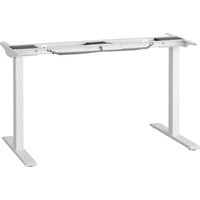


| Product type | Height adjustable sit-stand desk |
| Brand | IKEA |
| Model | RODULF 004.973.78 |
| Table top dimensions | 140 × 80 cm |
| Height adjustment range | 68 - 115 cm |
| Power supply | 100-240 V AC, 50/60 Hz, 3.2-1.5 A |
| Standby power consumption | < 0.1 W |
| Maximum load | 70 kg |
| Main functions | Electronic height adjustment, simple memory, collision detection |
| Collision detection | Stop and reverse on about 50 mm in case of obstacle |
| Intended use | Indoor, dry rooms (office or similar) |
| Operating temperature | 10 - 40 °C |
| Storage temperature | -18 - 70 °C |
| Humidity | 20 - 90 % RH at 40 °C |
| Noise level | < 50 dB(A) |
| Main material | Steel for the frame, particle board for the table top |
| Safety | Do not use to lift people; maintain a safe distance during adjustment |
| Maintenance | Check the tightness of screws after one week of use |
| Repairability | Do not repair yourself; contact IKEA store or customer service |
| Compliance | EU Declaration of Conformity included |
| Package contents | Frame, table top, control device, assembly instructions |
Frequently Asked Questions - RODULF 004.973.78 IKEA
User questions about RODULF 004.973.78 IKEA
0 question about this device. Answer the ones you know or ask your own.
Ask a new question about this device
Download the instructions for your Office in PDF format for free! Find your manual RODULF 004.973.78 - IKEA and take your electronic device back in hand. On this page are published all the documents necessary for the use of your device. RODULF 004.973.78 by IKEA.
USER MANUAL RODULF 004.973.78 IKEA
English 4 Latviešu 49 Deutsch 7 Lietuvių 52 Français 10 Portugues 55 Nederlands 13 Româna 58 Dansk 16 Slovensky 61 Íslenska 19 Български 64 Norsk 22 Hrvatski 67 Suomi 25 Ελληνικά 70 Svenska 28 Русский 73 Česky 31 Українська 76 Español 34 Srpski 79 Italiano 37 Slovenščina 82 Magyar 40 Türkçe 85 Polski 43 عربی 88 Eesti 46
An electro-mechanically height adjustable work-surface with control interface to adjust height up and down.
This appliance can be used by children aged from 8 years and above and persons with reduced physical, sensory or mental capabilities or lack of experience and knowledge if they have been given supervision or instruction concerning use of the appliance in a safe way and understand the hazards involved by a person responsible for their safety. Children shall not play with the appliance.
Cleaning and user maintenance shall not be made by children without supervision.
Translated from the original instructions.
Advice and instructions for RODULF.
This desk shall only be used together with the controller included.
It is the responsibility of every person who installs, uses, repairs or services this desk to carefully read these instructions. Keep these instructions close to your sit/stand desk.
Installation instructions
- The desk is assembled according to separate assembly instructions.
- Connect the cable from one leg to the other.
- Connect the electrical cable to a wall socket.
NOTE! The electrical cable must have full mobility.
- The desk is now ready for use.
- The motors stop automatically when the desk reaches its lowest or highest position.
Use of the desk
The desk shall only be used as a work desk that can be continuously adjusted between sitting and standing position. The desk shall only be used indoors and in a dry premises (office environment or similar).
The desk must not be overloaded – the maximum load is 70 kg/154 lb. The system may be run continuously for maximum 1 minute. The motors must rest for approximately 9 minutes before it can be used again.
QUICK GUIDE
Manual reset / first use:
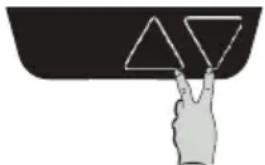
- Perform a reset by simultaneously pressing the up and down buttons for at least 8 seconds. Keep holding the buttons and the desk will slowly move to the lowest possible point. Reset is complete when the desk has stopped at the lowest point.
Follow these instructions when adjusting desk height:
- Make sure no objects are in the way of the desk height adjustment range.
- In order to run the desk up or down, press the man oeuvre button up or down, respectively.
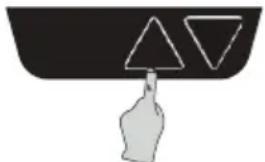
Press the up button and continue to hold until desired desktop height is reached.
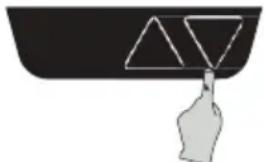
Press the down button and continue to hold until desired desktop height is reached.
To access full stroke
- Release the down button at the lowest safe point and then press the down button again for 5 seconds. The desk will move to the mechanical lowest height to have full stroke access.
Simple memory
• To set memory/end positions: - Move your desk to the level you want to store. - Press both buttons three times (0.5-1 second between each press). - Then press "up" or "down" to set the position (0.5-1 second). - Do the same for your second stored setting.
Collision detection
- The system is designed to avoid possible damage to equipment due to collision. When the desk detects a sudden change in resistance, it will stop the movement and reverse approximately 50mm. 25mm of travel is required to activate in both directions.
Safety regulations
- When the desk is run up/down, keep the necessary safety distance to avoid being trapped between the moving desk top and fixed objects in the surrounding area.
- When the desk is run up/down, the user should keep watch so that nobody is injured or no object is damaged. The desk top must not bump into a fixed object in case it overturns. Remove any office chair before the desk is run up/down, each time.
- The desk legs must not be altered or reconstructed in any way. During service and repair work of the desk, the electrical cable must always be disconnected from the wall socket.
- Modifications to the legs are absolutely prohibited.
- The desk must not be used as a hoisting device for people.
Maintenance and repair instructions
After approximately 1 week of use, check that the screws are properly tightened.
- If the desk cannot be lowered or raised, check the connections between the control box and the wall socket.
- If any part of the electrical system is to be replaced, the electrical cable must first be disconnected from the wall socket.
- Replace the electrical part and then reconnect the electrical cable to the wall socket. The desk is now ready for use.
If the desk still does not work, please contact your nearest IKEA store or customer service.
Product servicing
Do not attempt to repair this product yourself, as opening or removing covers may expose you to dangerous voltages or other risks.
EU Declaration of Conformity is included in the packaging as a separate document.
Manufacturer: IKEA of Sweden AB
Address: Box 702, SE-343 81 Älmhult, SWEDEN
Telephone no.: +46(0)476-648500
SAVE THESE INSTRUCTIONS
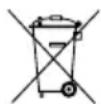
The crossed-out wheeled bin symbol indicates that the item should be disposed of separately from household waste. The item should be handed in for recycling in accordance with local environmental regulations for waste disposal. By separating a marked item from household waste, you will help reduce the volume of waste sent to incinerators or land-fill and minimize any potential negative impact on human health and the environment. For more information, please contact your IKEA store.
Technical data
| Model name RODULF si/st desk 140x80 | |
| Type number RODULF-GF-470 | |
| Input 100–240 V AC 50/60 Hz, 3.2-1.5 A | |
| Standby power consumption <0.1 W | |
| Temperature interval at usage: 50–104 °F or 10–40 °C | |
| Temperature interval at storage: 0–158 °F or -18–70 °C | |
| Operating humidity 20–90 % RH at 40 °C | |
| Sound level: <50 dB(A) | |
| Height setting interval: 68–115 cm or 26.8–45.3 inches | |
| Maximum load: 70 kg or 154 lb | |
Trouble shooting guide
NOTE!
Do always disconnect the cable from the wall socket before maintenance!
| Symptom Check Try | ||
| The desk does not move. | Make sure that all cable are connected. | Connect the cables.Follow installation instructions and perform a reset. |
| Unplug the desk from the wall socket for roughly 1 minute and reconnect. | ||
| Only one column is moving. | Perform a reset. If there's still only one column moving, replace the column that is not moving. | |
| The columns are moving at different speeds. | It is possible to move the slower column by pulling/pushing. | Replace the column that is moving slower. |
| It is not possible to move the slower column by pulling/ pushing. | Replace the column that is moving faster. | |
| The desk only moves short distances. | Make sure that the desk is not overloaded. | Unload the desk. If the problem remains, replace the control box. |
| The desk stops and reverse during operation. | Make sure that nothing is blocking the desk movement. | Remove the obstacle. If the problem remains replace the whole underframe. |
| The desk is not able to drive all the way up or all the way down. | Check all connections.Perform a reset. | |
| The desk can only drive in one direction (up or down). | ||
| The desk is not horizontal. |
Manufacturer: IKEA of Sweden AB
Address: Box 702, SE-343 81 Älmhult, SWEDEN
Telephone no.: +46(0)476-648500
SAVE THESE INSTRUCTIONS
Manufacturer: IKEA of Sweden AB
Manufacturer: IKEA of Sweden AB
Address: Box 702, SE-343 81 Älmhult, SWEDEN
Manufacturer: IKEA of Sweden AB
Address: Box 702, SE-343 81 Älmhult, SWEDEN
Telephone: +46(0)476-648500
SAVE THESE INSTRUCTIONS

Manufacturer: IKEA of Sweden AB
Address: Box 702, SE-343 81 Älmhult, SWEDEN
Telephone: +46 (0) 476-648500
SAVE THESE INSTRUCTIONS
Manufacturer: IKEA of Sweden AB
Address: Box 702, SE-343 81 Älmhult, SWEDEN
Telephone: +46(0)476-648500
KEEP THESE INSTRUCTIONS
- The product restarts by simultaneously pressing the up and down buttons for at least 8 seconds. Keep the buttons pressed and the table will slowly move to the lowest position. The restart is complete when the table stops at the lowest position.
- Reset the product by simultaneously holding the up and down buttons for at least 8 seconds. Continue holding the buttons, and the table will slowly lower to the lowest position. The reset is complete when the table stops at the lowest position.
Follow these instructions when adjusting the height of the work table:
- Make sure there are no obstacles blocking the table's movement path.
- To move the table up or down, press the corresponding button for the desired direction.
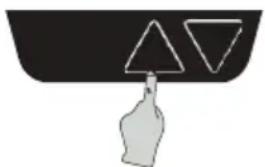
Press and hold the up button and continue holding it until the table rises to the desired height.
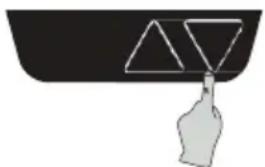
Press and hold the down button and continue holding it until the table lowers to the desired height.
To activate movement across the full range
- Release the down button at the lowest safe position, then press and hold the same button for 5 seconds. The table will begin to move to the mechanically lowest point, providing you with the full range.
Press the up button and hold it until the table is at the appropriate height.
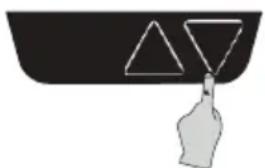
Press the down button and hold it until the table is at the appropriate height.
Full range

- INSTALLATION INSTRUCTIONS
- USE OF THE DESK
- QUICK GUIDE
- FOLLOW THESE INSTRUCTIONS WHEN ADJUSTING DESK HEIGHT
- TO ACCESS FULL STROKE
- SIMPLE MEMORY
- COLLISION DETECTION
- SAFETY REGULATIONS
- MAINTENANCE AND REPAIR INSTRUCTIONS
- PRODUCT SERVICING
- MANUFACTURER: IKEA OF SWEDEN AB
- SAVE THESE INSTRUCTIONS
- TROUBLE SHOOTING GUIDE
- NOTE
- KEEP THESE INSTRUCTIONS
- FOLLOW THESE INSTRUCTIONS WHEN ADJUSTING THE HEIGHT OF THE WORK TABLE
- TO ACTIVATE MOVEMENT ACROSS THE FULL RANGE
- FULL RANGE
Brand : IKEA
Model : RODULF 004.973.78
Category : Office