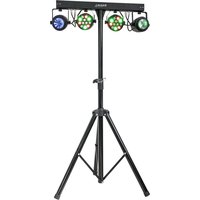
DJLIGHT60 - Lamp IBIZA SOUND - Free user manual and instructions
Find the device manual for free DJLIGHT60 IBIZA SOUND in PDF.


| Brand | Ibiza Sound |
| Model | DJLIGHT60 |
| Product type | Effect light lamp |
| Power supply | 220-240 V~, 50/60 Hz |
| Power consumption | 60 W |
| Light source | PAR: 12 x 1 W (RGBW) x 2 ; MOON: 60 x 50 mm RGBWA x 2 |
| DMX channels | 9 or 19 channels |
| Operating modes | Auto, Master/Slave, DMX, remote control |
| Safety distance | At least 50 cm from surfaces |
| Protection | Class I (grounded) |
| Usage | Indoor use only |
| Package dimensions | 75 x 25 x 14 cm |
| Weight | 5.6 kg |
| Power cord length | 4 m |
| Remote control | Wireless, range 6 m, angle 30° |
| Remote control battery | CR2032 |
| Main functions | DMX, auto and audio modes, remote control, RGBW/A colors, strobe |
| Maintenance and cleaning | Clean lenses with a soft cloth and glass cleaner; external optics every 3 weeks, internal optics every 1-2 months |
| Safety | Do not open the housing, risk of electric shock; do not look directly into the beam; disconnect before maintenance; ambient temperature max 40 °C |
| Spare parts and repairability | Light source non-replaceable; fuse replaceable (identical characteristics); repair by authorized service only |
| General information | CE compliant; do not dispose of with household waste (recycle) |
Frequently Asked Questions - DJLIGHT60 IBIZA SOUND
User questions about DJLIGHT60 IBIZA SOUND
0 question about this device. Answer the ones you know or ask your own.
Ask a new question about this device
Download the instructions for your Lamp in PDF format for free! Find your manual DJLIGHT60 - IBIZA SOUND and take your electronic device back in hand. On this page are published all the documents necessary for the use of your device. DJLIGHT60 by IBIZA SOUND.
USER MANUAL DJLIGHT60 IBIZA SOUND
natural_image
Black tripod-mounted outdoor lighting fixture with multiple green and red spotlights mounted on a stand (no visible text or symbols)MANUAL
DMX Channel Chart - p. 2
EN- Instruction Manual - p. 3
The triangle containing a lightning symbol is used to indicate whenever your health is at risk (due to electrocution, for example).
An exclamation mark in a triangle indicates particular risks in handling or operating the appliance.
UK CA The unit complies with UK standards
For indoor use only
Minimum distance between the appliance and other objects
Protection class I. Requires an earth connection
Don't stare into the light beam

SAFETY INSTRUCTIONS
- Please read these instructions carefully, they include important information about the installation, usage and maintenance of this product.
- Please keep this User Guide for future reference. If you sell the unit to another user, be sure that he also receives this instruction booklet.
• Always make sure that you are connecting to the proper voltage, and that the line voltage you are connecting to is not higher than that stated on the decal or rear panel of the fixture.
• This product is intended for indoor use only!
- It is essential that the device is earthed. A qualified person must carry out the electric connection.
- To prevent risk of fire or shock, do not expose fixture to rain or moisture. Make sure there are no flammable materials close to the unit while operating.
- The unit must be installed in a location with adequate ventilation, at least 20in (50cm) from adjacent surfaces. Be sure that no ventilation slots are blocked.
- Always disconnect from power source before servicing or replacing fuse and be sure to replace with same fuse size and type.
- Secure fixture to fastening device using a safety chain. Never carry the fixture solely by its head. Use its carrying handles.
• Maximum ambient temperature (Ta) is 104^ F ( 40^ C). Do not operate the fixture at temperatures higher than this.
- In the event of a serious operating problem, stop using the unit immediately. Never try to repair the unit by yourself. Repairs carried out by unskilled people can lead to damage or malfunction. Please contact the nearest authorized technical assistance center. Always use the same type of spare parts.
- Don't connect the device to a dimmer pack.
- Make sure the power cord is never crimped or damaged.
- Never disconnect the power cord by pulling or tugging on the cord.
- Avoid direct eye exposure to the light source while it is on.
• The product is for decorative purposes only and not suitable as a household room illumination.
- The light source of this device is not replaceable. If it is defective, the entire unit must be discarded.
- DISCONNECT DEVICE: Where the MAINS plug or an appliance coupler is used as the disconnect device, the disconnect device shall remain readily operable.
INSTALLATION OF THE UNITS
Before positioning the light, ensure the stability of the installation site. Drive the screw into the screw hole on the stand. Make sure that the units can't fall from the stand. The manufacturer cannot be held responsible for damages due to bad installation of the units.
WARNING: Carry the lights only by the handle.
POWER SUPPLY CONNECTION
Plug the IEC connector of the supplied mains lead into the IEC socket on the bar and the other end into an appropriate earthed mains outlet.
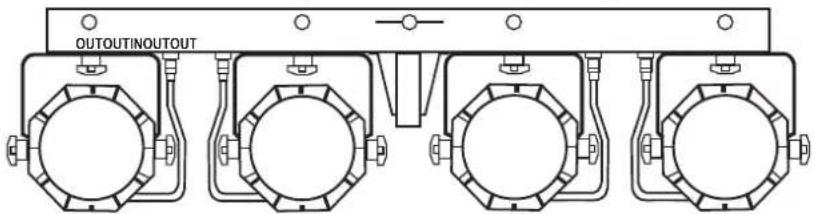
CONNECTION OF THE SIGNAL CABLE
Connect the lead of every unit to the corresponding connector on the light bar, as shown below:
HOW TO CONTROL THE UNIT
Access control panel functions using the four panel buttons located directly underneath the LCD Display.
Button Function
MENU Used to access the menu or to return to a previous menu option
UP Scrolls through menu options in ascending order
DOWN Scrolls through menu options in descending order
ENTER Used to select and store the current menu or option within a menu
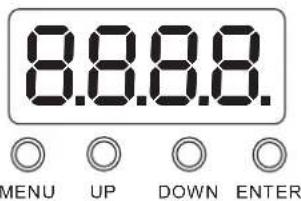
1) When power is on, the digital LED display works with red dots. When a DMX signal is present, the dot will be shiny.
2) DMX address code setting: Press "MENU" button. When the digital LED displays d001-d512, press "UP" or "Down" to set the address code. The code ranges from 001-512.
| Aut ↔ AutP ↔ AP01/AP.08 | |||
| ↓ | AutF ↔ AF0.1/AF.03 | ||
| AutN | ↔ Au0.1/Au.03 | ||
| Sou | ↔ SouP ↔ SP01/SP.08 | ||
| ↓ | SouF | ↔ SF.01/SF.03 | |
| SouN | ↔ SN.01/SN.03 | ||
| dnH | ↔ | D001/d512 | ↔ 09CH |
| ↓ | |||
| SLA | ↔ SLAu | ||
REMOTE CONTROL
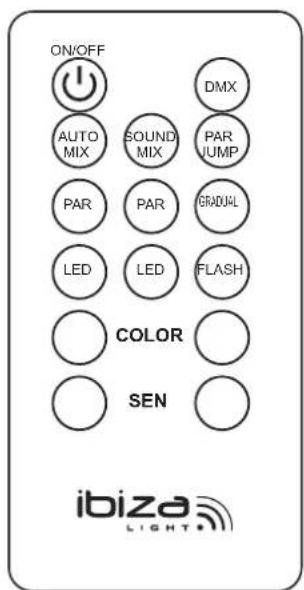
ON/OFF: ON/OFF
DMX: DMX Mode
AUTO MIX: Auto Mode with PAR-Moon Effects
SOUND MIX: Sound Mode with PAR-Moon Effects
PAR JUMP: Color Jump of PAR can
PAR (red): Auto Mode of PAR can
PAR (green): Sound Mode of PAR can
GRADUAL: Gradual Change of PAR Light
LED (red): Auto Mode of Moon Light Effects
LED (green): Sound Mode of Moon Light Effects
FLASH: Flash Effects of Par Light
COLOR -/+: Browses through the colors
SEN -/+: Increases/decreases the sound sensitivity in sound controlled mode
IR REMOTE CONTROLLER
Please operate the remote control within a distance of 6m and 30° between the remote and the appliance. Aim the remote at the sensor. Remove all obstacles between the remote and the sensor.
The remote control might not work properly if the sensor is exposed to strong sunshine. If the remote control doesn't work properly, please check the batteries.
INSTALLING THE BATTERIES IN THE REMOTE CONTROL
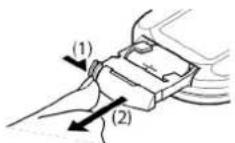
- Place the remote face down on a flat surface.
- Push the compartment cover into the direction of the arrow.
- Slide the battery compartment open.
- Remove the old battery and install the new one (CR2032) with the plus (+) symbol facing up.
- Gently close the battery compartment. It locks automatically.
RECOMMENDATIONS FOR BATTERIES

This symbol indicates that used batteries should not be disposed of with household waste but deposed correctly in accordance with your local regulations..
Batteries shall not be exposed to excessive heat such as sunshine, fire or the like.
When the internal batteries are not to be used, remove them to avoid damage caused by battery leakage or corrosion.
ATTENTION: Danger of explosion if battery is incorrectly placed. Only replace by the same or equivalent type.
WARNING : Do not swallow the battery. Danger of chemical burns. Keep new and old batteries out of the reach of children.
If the battery compartment doesn't close properly, stop using the product and keep it out of the reach of children.
If you are in doubt whether the batteries have been swallowed or introduced into any other part of the body, contact immediately a doctor.
FIXTURE CLEANING
The cleaning of internal and external optical lenses and/or mirrors must be carried out periodically to optimize light output. Cleaning frequency depends on the environment in which the fixture operates: damp, smoky or particularly dirty surrounding can cause greater accumulation of dirt on the unit's optics.
- Clean with soft cloth using normal glass cleaning fluid.
• Always dry the parts carefully. - Clean the external optics at least every 20 days. Clean the internal optics at least every 30/60 days.
TROUBLE-SHOOTING
| Problem Solution | |
| No display when power is on | 1. Check if the power is correctly connected.2. Check the outlet is powered |
| Light is out of control | 1. Check if the DMX address code is correctly set.2. Check if the DMX cable is correctly connected. |
| The light is off after working for a while | 1. Check if the sensor is soldered on the LED PCB2. Check if the temperature is too high or not.3. Check if Power supply is damaged. |
| The beam is dark | 1. Check if the temperature is too high and cause a fast fade.2. Check if there are too much dust on the surface of light. |
SPECIFICATIONS
| Voltage | 220-240V~50/60Hz |
| Consumption | 60W |
| PAR light source: | 12 x 1W (RGBW) x 2 |
| MOON light source: | 60 x 50mm RGBWA x 2 |
| DMX channels | 9/19 |
| Control modes | Auto, Master/Slave, DMX, Remote |
| Power cable | 4m |
| Packing Size | 75 x 25 x 14cm |
| Weight | 5.6kg |

IMPORTANT NOTE: Electric products must not be put into household waste. Please bring them to a recycling centre. Ask your local authorities or your dealer about the way to proceed.
MANUEL D'UTILISATION
EXPLICATION DES SYMBOLES
LED lamp: PAR: 12 x 1W (RGBW) x 2; MOON: 60 x 50mm RGBWA x 2
DMX kanalen....9/19
Controle modi ....Auto, Master/Slave, DMX, afstandsbediening
Voedingskabel....4m
Afmetingen (verpakking) 75 x 25 x 14cm
Gewicht....5,6kg
CORRECTE VERWIJDERING VAN DIT PRODUCT

MANUAL DE INSTRUÇÕES
POVEZAVA SIGNALNEGA KABLA
KAKO UPORABLJATI ENOTO
MANUAL DE INSTRUCTIUNI
EXPLICAREA SEMNELOR

1) When power is on, the digital LED display works with red dots. When a DMX signal is present, the dot will be shiny.
2) DMX address code setting: Press "MENU" button. When the digital LED displays d001-d512, press "UP" or "Down" to set the address code. The code ranges from 001-512.
| Aut ↔ AutP ↔ AP01/AP.08 | |||
| ↓ | AutF ↔ AF0.1/AF.03 | ||
| AutN ↔ Au0.1/Au.03 | |||
| Sou | ↔ SouP ↔ SP01/SP.08 | ||
| ↓ | SouF ↔ SF.01/SF.03 | ||
| SouN ↔ SN.01/SN.03 | |||
| dnH | ↔ D001/d512 ↔ 09CH | ||
| ↓ | 19CH | ||
| SLA | ↔ SLAu | ||
INSTALLATION AV PRODUKTEN
Watch the video on YouTube
Download the manual in other languages
Any questions or problems?
Contact us
IBIZALIGHTSOUND
Follow us on Instagram
Join us on facebook
Assembled in PRC • Designed by LOTRONIC S.A. •
https://ibizashop.eu/
©Copyright LOTRONIC 2024
- MANUAL
- SAFETY INSTRUCTIONS
- INSTALLATION OF THE UNITS
- POWER SUPPLY CONNECTION
- CONNECTION OF THE SIGNAL CABLE
- HOW TO CONTROL THE UNIT
- Button Function
- REMOTE CONTROL
- IR REMOTE CONTROLLER
- INSTALLING THE BATTERIES IN THE REMOTE CONTROL
- RECOMMENDATIONS FOR BATTERIES
- FIXTURE CLEANING
- MANUEL D'UTILISATION
- EXPLICATION DES SYMBOLES
- CORRECTE VERWIJDERING VAN DIT PRODUCT
- MANUAL DE INSTRUÇÕES
- POVEZAVA SIGNALNEGA KABLA
- KAKO UPORABLJATI ENOTO
- MANUAL DE INSTRUCTIUNI
- EXPLICAREA SEMNELOR
- INSTALLATION AV PRODUKTEN
Brand : IBIZA SOUND
Model : DJLIGHT60
Category : Lamp