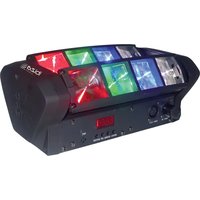
LED8-MINI - Lamp IBIZA SOUND - Free user manual and instructions
Find the device manual for free LED8-MINI IBIZA SOUND in PDF.


| Product type | Spider light effect lamp |
| Brand | Ibiza Sound |
| Model | LED8-MINI |
| Dimensions | 283 x 151 x 110 mm |
| Weight | 2.5 kg |
| Power supply | 100-240V~ 50/60Hz |
| Power consumption | 39 W |
| Light source | 8x 3W LED (2 red, 2 green, 2 blue, 2 white) |
| Individual beam angle | 4° |
| DMX channels | 10 or 14 channels |
| DMX address | 001-512 |
| Operating modes | DMX, master/slave, automatic, demo (0-15), audio, test |
| Additional functions | PAN/TILT inversion, display inversion, backlight, audio sensitivity |
| Maintenance and cleaning | Clean the lenses with glass cleaner and a soft cloth every 3 weeks |
| Light source replacement | Non-replaceable, the entire luminaire must be replaced |
| Fuse | Replaceable, use a fuse identical to the original specifications |
| Electrical class | Class I (requires grounded outlet) |
| Minimum safety distance | 50 cm from surfaces |
| Maximum ambient temperature | 40°C |
| Use | Indoor only, decorative use (not normal household lighting) |
| Epilepsy warning | Some people may experience seizures when looking at flashing lights |
| Package contents | 1 Spider light effect, 1 power cord, 1 user manual |
Frequently Asked Questions - LED8-MINI IBIZA SOUND
User questions about LED8-MINI IBIZA SOUND
0 question about this device. Answer the ones you know or ask your own.
Ask a new question about this device
Download the instructions for your Lamp in PDF format for free! Find your manual LED8-MINI - IBIZA SOUND and take your electronic device back in hand. On this page are published all the documents necessary for the use of your device. LED8-MINI by IBIZA SOUND.
USER MANUAL LED8-MINI IBIZA SOUND
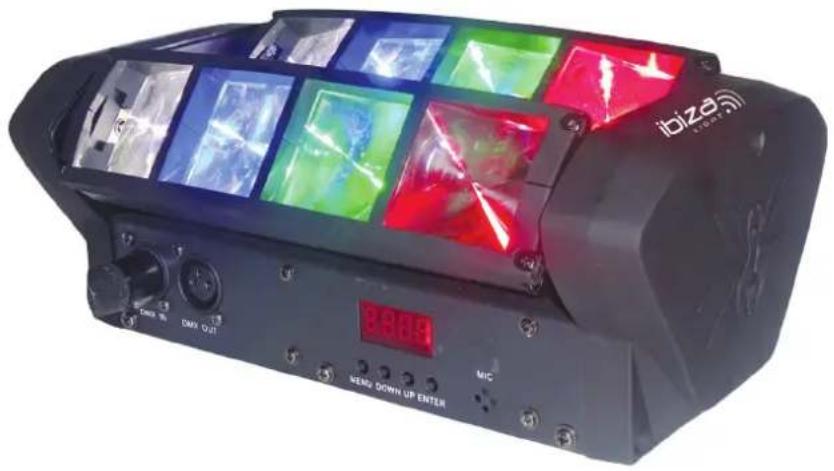
MINI-SPIDER LIGHT EFFECT
Ref.: LED8-MINI
Code: 15-1430
natural_image
Black IBIZ 800 Bhobet VR headset with multiple colorful laser screens and control knobs (no readable text or symbols)MANUAL
DMX CHANNEL TABLE - p. 2-3
EN- Instruction Manual - p. 4
The triangle containing a lightning symbol is used to indicate whenever your health is at risk (due to electrocution, for example).
An exclamation mark in a triangle indicates particular risks in handling or operating the appliance.
Class I protection: Connect only to an earthed mains outlet
Minimum distance between the appliance and other objects
Don't stare into the light beam
CA In accordance with the requirements of UK standards
The product is for indoor use only
This marking indicates that this product should not be disposed with other household wastes throughout the EU. To prevent possible harm to the environment or human health from uncontrolled waste disposal, recycle it responsibly to promote the sustainable reuse of material resources. To return your used device, please use the return and collection systems or contact the retailer where the product was purchased. They can take this product for environmentally safe recycling.
IMPORTANT SAFETY INSTRUCTIONS AND DANGER WARNINGS
- Please read these instructions carefully, they include important information about the installation, usage and maintenance of this product.
- Please keep this User Guide for future reference. If you sell the unit to another user, be sure that he also receives this instruction booklet.
- Always make sure that you are connecting to the proper voltage, and that the line voltage you are connecting to is not higher than that stated on the decal or rear panel of the fixture.
- This product is intended for indoor use only!
- It is essential that the device is earthed. A qualified person must carry out the electric connection.
- To prevent risk of fire or shock, do not expose fixture to rain or moisture. Make sure there are no flammable materials close to the unit while operating.
- The unit must be installed in a location with adequate ventilation, at least 20in (50cm) from adjacent surfaces. Be sure that no ventilation slots are blocked.
- Always disconnect from power source before servicing or replacing fuse and be sure to replace with same fuse size and type.
- Secure fixture to fastening device using a safety chain. Never carry the fixture solely by its head. Use its carrying handles.
- Maximum ambient temperature (Ta) is 104^ (40^) . Do not operate the fixture at temperatures higher than this.
- In the event of a serious operating problem, stop using the unit immediately. Never try to repair the unit by yourself. Repairs carried out by unskilled people can lead to damage or malfunction. Please contact the nearest authorized technical assistance center. Always use the same type of spare parts.
- Don't connect the device to a dimmer pack.
- Make sure the power cord is never crimped or damaged.
- Never disconnect the power cord by pulling or tugging on the cord.
- Avoid direct eye exposure to the light source while it is on.
- The product is for decorative purposes only and not suitable as a household room illumination.
- The light source of this luminaire is not replaceable. When it reaches the end of its life time, the whole unit
must be discarded.
- Caution: Flashing lights can cause epileptic seizures in sensitive people.
- Auto Sensing Voltage: This fixture contains an automatic voltage switch which will auto sense the voltage when it is plugged into the power source.
DISCONNECT DEVICE: The power outlet must be installed near the equipment and be easily accessible.
CONTENTS OF THE CARTON:
- 1 x Spider light effect
- 1x Mains lead
- 1x User Manual
UNPACKING INSTRUCTIONS
Immediately upon receiving a fixture, carefully unpack the carton, check the contents to ensure that all parts are present and have been received in good condition. Notify the freight company immediately and retain packing material for inspection if any parts appear to be damaged from shipping or the carton itself shows signs of mishandling. Keep the carton and all packing materials. If a fixture must be returned to the factory, it is important that the fixture be returned in the original factory box and packing.
INSTALLATION
The unit should be mounted via its screw holes on the bracket. Always ensure that the unit is firmly fixed to avoid vibration and slipping while operating. Always ensure that the structure to which you are attaching the unit is secure and able to support a weight of 10 times of the unit's weight. Also always use a safety cable that can hold 12 times the weight of the unit when installing the fixture.
The equipment must be fixed by professionals at a place where is out of the reach of people and where nobody can pass by or under it.
FUSE REPLACEMENT
Disconnect the power cord before replacing a fuse and always replace with the same type of fuse
- With a flat head screwdriver wedge the fuse holder out of its housing.
- Remove the damaged fuse from its holder and replace with exactly the same type of fuse.
- Insert the fuse holder back in its place and reconnect power.
FIXTURE LINKING
You will need a serial data link to run light shows of one or more fixtures using a DMX-512 controller or to run synchronized shows on two or more fixtures set to a master/slave operating mode. The combined number of channels required by all fixtures on a serial data link determines the number of fixtures that the data link can support.

flowchart
graph TD
    A["ConsoleLight1"] --> B["Light2Light3"]
    C[" "] --> D[" "]
    E[" "] --> F[" "]
Important: Fixtures on a serial/data link must be daisy chained in one single line.
CABLE CONNECTORS
Cabling must have a male XLR connector on one end and a female XLR connector on the other end.
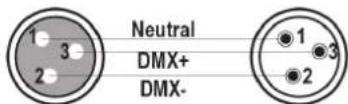
DMX CONNECTOR CONFIGURATION
Termination reduces signal errors. To avoid signal transmission problems and interference, it is always advisable to connect a DMX signal terminator.
CAUTION
Do not allow contact between the common and the fixture's chassis ground. Grounding the common can cause a ground loop, and your fixture may perform erratically. Test cables with an ohm meter to check correct polarity and to make sure the pins are not grounded or shorted to the shield or each other.
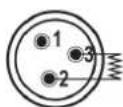
120Ω 1/4W resistance between pin 2 (DMX-) and pin 3 (DMX+) of the last unit
NAVIGATION THROUGH THE CONTROL PANEL
Access control panel functions using the four panel buttons located directly underneath the LCD Display.
| Button Function |
| MENU Used to access the menu or to return to a previous menu option |
| UP Scrolls through menu options in ascending order |
| DOWN Scrolls through menu options in descending order |
| ENTER Used to select and store the current menu or option within a menu |
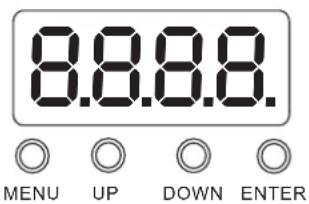
To access the main menu, press the MENU button. Press the UP or DOWN buttons until you reach the function you wish to change. When you reach the function, you wish to change, press the ENTER button. When a function is selected, use the UP or DOWN buttons to change the function settings. Once your changes are made, press the ENTER button, and then press and hold the MENU button for at least three seconds to confirm and lock the change into the system memory. To exit without making any adjustments, press the MENU BUTTON. The display will lock after 30 seconds. Press the MENU button for 3 seconds to unlock.
FUNCTION MENU
| ADDR 001 - 512, DMX Address setting | |
| CHND | 10 channels |
| 14 channels, select the channel mode | |
| SLND | Mast |
| SL 1 | |
| SL 2 ( MASTER, SLAVEC OPTION) | |
| SHND SHOW 0 | - SHOW 15, Select the show mode |
| AUTO OFF | |
| ON (Auto Mode) | |
| SOUN On - Off | (SOUND CONTROL) |
| SENS 000 - 100 | Sound sensitivity control (0 close, 100 The most sensitive) |
| LED On - Off (Background LIGHT ON/OFF) | |
| DISP Disp | |
| Dsip (Reverse Display) | |
| PINT Yes - No (PAN Reverse) | |
| TINT Yes - No (TIL Reverse) | |
| TEST Test | |
| RSET | Reset |
SETTINGS
DMX ADDRESS SETTING
- Press the MENU, UP or DOWN button until "ADDR" is displayed, press ENTER.
- The current address will now be displayed and flashing. Press the UP or DOWN buttons to find your desired address.
- Press ENTER to confirm.
DMX CHANNEL MODE
- Press the MENU button until "CHND" is displayed, press ENTER. Either "10CH", "14CH" will be displayed
- Press the UP or DOWN buttons to find your desired DMX channel mode and press ENTER to confirm and exit.
SHOW MODES 0-15 (FACTORY PROGRAMS).
Show mode can run with or without sound active mode active.
- Press the MENU button until "SHND" is displayed, press ENTER.
- "Sh X" will now be displayed, "X" representing a number between 0-15. Programs 1-15 are factory programs, while "Sh 0" is random mode. Press the UP or DOWN buttons to find your desired show.
- When you have found your desired show press ENTER, then press and hold the MENU button for at least 3 seconds to activate. After you have set your desired show, it can be changed at any time using the UP or DOWN buttons.
AUTO PROGRAM
- Press the MENU button until "AUTO" is displayed, press ENTER.
- The Display will show either "ON" or "OFF". Press the UP or DOWN buttons to select "ON" or "OFF".
SOUND ACTIVE MODE
- Press the MENU button until "SOUN" is displayed, press ENTER.
- The display will show either "ON" or "OFF". Press the UP or DOWN buttons to select "ON" to activate sound active mode, or "OFF" to deactivate sound active mode.
- Press ENTER, then press and hold the MENU button for at least 3 seconds to activate.
SOUND SENSITIVITY
- Press the MENU button until "SENS" is displayed, press ENTER.
- A number between 0-100 will be displayed. Press the UP or DOWN buttons to adjust the sound sensitivity. 0 being the least sensitive and 100 being the most sensitive. When you have found your desired setting press ENTER to confirm.
DISPLAY BACK LIGHT
- Press the MENU button until "LED" is displayed, press ENTER.
- The display will show either "ON" or "OFF". Press the UP or DOWN buttons to select "ON" to always keep the LED display on, or "OFF" to switch to have the LED display switch off after 10 seconds.
- Press ENTER and then press and hold the MENU button for at least three seconds to confirm.
DISPLAY REVERSE 180°
- Press the MENU button until "DISP" is displayed, press ENTER.
- Press the UP button to select "DSIP" to reverse the display, or "DISP" to change the display back.
- Press ENTER to confirm.
PAN INVERSION
- Press the MENU button until "PINT" is displayed, press ENTER. Either "YES" or "NO" will be displayed.
- To activate the Tilt inversion, press the UP or DOWN buttons until YES is displayed, press ENTER to confirm. To deactivate Tilt inversion, select NO and press Enter.
TILT INVERSION
- Press the MENU button until "TILT" is displayed, press ENTER. Either "YES" or "NO" will be displayed.
- To activate the Tilt inversion, press the UP or DOWN buttons until YES is displayed, press ENTER to confirm. To deactivate Tilt inversion, select NO and press Enter.
SELF-TEST PROGRAM
- Press the MENU button until "TEST" is displayed, press ENTER.
- The fixture will now run a self-test. Press MENU to exit.
RESET
Press the MENU button until "Reset" is displayed. Press the ENTER button and the unit will reset itself.
CLEANING
Due to fog residue, smoke, and dust cleaning the internal and external lenses should be carried out periodically to optimize light output.
- Use a normal glass cleaner and a soft cloth to wipe down the outside casing.
- Clean the external optics with glass cleaner and a soft cloth every 20 days.
- Always be sure to dry all parts completely before plugging the unit back in.
SPECIFICATIONS
Power supply....100-240V\~50/60Hz
Consumption....39W
Light source 8x 3W LED (2x red, 2x green, 2x blue, 2x white)
Single beam angle 4°
Dimensions 283 x 151 x 110mm
Weight....2.5kg
MANUEL D'UTILISATION
AVERTISSEMENTS

ATTENTION NE PAS OUVRIR LE BOITIER RISQUE DE CHOC ELECTRIQUE
EXPLICATION DES SYMBOLES

REPLACEMENT DU FUSIBLE
flowchart
graph TD
    A["ConsoleLight1"] --> B["Light2Light3"]
    B --> C["..."]
    C --> D["..."]
CONNECTEURS DE CÂBLE
MANUAL DE INSTRUÇÕES
AVISO

ATENÇÃO
MANUAL DE INSTRUCTIUNI
AVERTIZARE

ATENTIE
NU DESCHIDETI CARCASA PERICOL DE ELECTROCUTARE

Download the manual in other languages
Any questions or problems?
Contact us
IBIZALIGHTSOUND
Follow us on Instagram
Join us on facebook
Assembled in PRC • Designed by LOTRONIC S.A. •
https://ibizashop.eu/
©Copyright LOTRONIC 2024
- MANUAL
- IMPORTANT SAFETY INSTRUCTIONS AND DANGER WARNINGS
- CONTENTS OF THE CARTON:
- UNPACKING INSTRUCTIONS
- INSTALLATION
- FUSE REPLACEMENT
- FIXTURE LINKING
- CABLE CONNECTORS
- DMX CONNECTOR CONFIGURATION
- CAUTION
- NAVIGATION THROUGH THE CONTROL PANEL
- SETTINGS
- DMX ADDRESS SETTING
- DMX CHANNEL MODE
- SHOW MODES 0-15 (FACTORY PROGRAMS).
- AUTO PROGRAM
- SOUND ACTIVE MODE
- SOUND SENSITIVITY
- DISPLAY BACK LIGHT
- DISPLAY REVERSE 180°
- PAN INVERSION
- TILT INVERSION
- SELF-TEST PROGRAM
- RESET
- CLEANING
- SPECIFICATIONS
- MANUEL D'UTILISATION
- AVERTISSEMENTS
- ATTENTION NE PAS OUVRIR LE BOITIER RISQUE DE CHOC ELECTRIQUE
- EXPLICATION DES SYMBOLES
- REPLACEMENT DU FUSIBLE
- CONNECTEURS DE CÂBLE
- MANUAL DE INSTRUÇÕES
- AVISO
- MANUAL DE INSTRUCTIUNI
- AVERTIZARE
- ATENTIE
- NU DESCHIDETI CARCASA PERICOL DE ELECTROCUTARE
Brand : IBIZA SOUND
Model : LED8-MINI
Category : Lamp