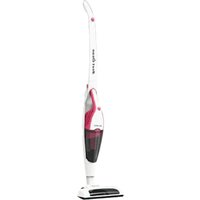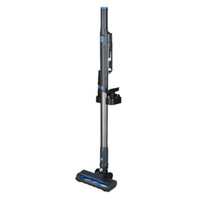
LIFE P200 (MD 11515) - Vacuum Cleaner MEDION - Free user manual and instructions
Find the device manual for free LIFE P200 (MD 11515) MEDION in PDF.


User questions about LIFE P200 (MD 11515) MEDION
0 question about this device. Answer the ones you know or ask your own.
Ask a new question about this device
Download the instructions for your Vacuum Cleaner in PDF format for free! Find your manual LIFE P200 (MD 11515) - MEDION and take your electronic device back in hand. On this page are published all the documents necessary for the use of your device. LIFE P200 (MD 11515) by MEDION.
USER MANUAL LIFE P200 (MD 11515) MEDION
natural_image
Exterior view of a black and gray vacuum cleaner with blue control panel (no text or symbols visible)2in1 Handstaubsauger mit Bodendüse Aspirateur à main 2 en 1 avec brosse de sol 2-in-1 handstofzuiger met vloermondstuk Aspiradora de mano 2 en 1 con boquilla para suelos Aspirapolvere 2 in 1 con bocchett a per pavimenti 2-in-1 handheld vacuum cleaner with fl oor nozzle MEDION LIFE P200 (MD 11515)
Inhaltsverzeichnis
DE
text_image
Technical diagram showing exploded views of a vacuum cleaner with labeled parts 12 through 17Abb. 2 – Zubehör
natural_image
Line drawing of a mechanical component with two ports and rotational arrows indicating motion (no text or symbols)natural_image
Line drawing of a handheld electric toothbrush with a scroll wheel and adjustment knob (no text or symbols)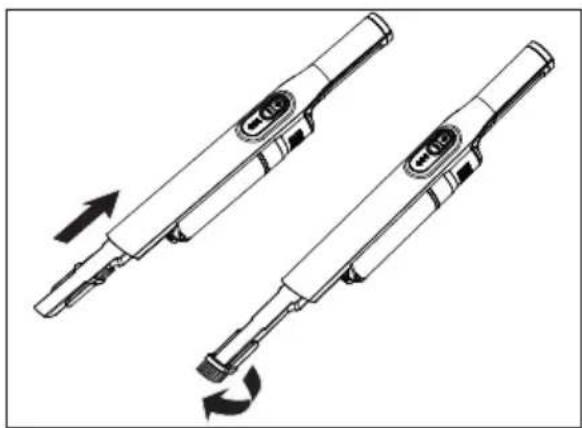
natural_image
Technical line drawing of two handheld electronic devices with directional arrows indicating motion (no text or symbols)Abb. 5 - Polsterdüse Abb. 6 - Fugendüse
natural_image
Line drawing of a vacuum cleaner with a downward arrow indicating motion, no text or symbols presentnatural_image
Line drawing of a vacuum cleaner with attached circuit board (no text or symbols)natural_image
Line drawing of a mechanical device with a downward arrow indicating motion or assembly (no text or symbols)natural_image
Line drawing of a handheld vacuum cleaner with a downward arrow indicating motion (no text or symbols)Abb. 10 - Aufladen
natural_image
Technical line drawing of a handheld device with a black arrow pointing to a component (no text or symbols present)natural_image
Line drawing of a vacuum cleaner with a pointed tip and dotted particles, no text or symbols presentAbb. 12 - Staub entleeren
natural_image
Two identical mechanical device diagrams showing a lever mechanism with arrows indicating motion (no text or symbols)text_image
Technical diagram showing a device with rotating components and labeled parts A and B, illustrating mechanical assembly or assembly.text_image
QR code image containing encoded data, no visible human-readable texttext_image
Technical diagram showing exploded views of a vacuum cleaner with labeled parts 12 through 17Fig. 2 - Accessoires
natural_image
Line drawing of a mechanical component with two ports and rotational arrows indicating motion (no text or symbols)Fig. 4 - Support mural
natural_image
Line drawing of a handheld electronic device with a scroll wheel and directional arrow (no text or symbols)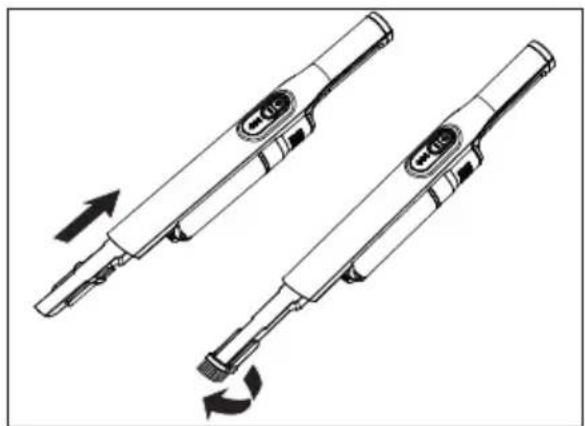
natural_image
Technical line drawing of two handheld electronic devices with arrows indicating rotation or movement (no text or symbols)natural_image
Line drawing of a vacuum cleaner with attached device, showing mechanical components and assembly steps (no text or symbols)natural_image
Line drawing of a vacuum cleaner with attached circuit board and power cord (no text or symbols)natural_image
Line drawing of a mechanical device with a downward arrow indicating force or movement (no text or symbols)Fig. 9 – Installation de la station de charge
natural_image
Line drawing of a handheld device with a downward arrow indicating compression or disassembly (no text or symbols)Fig. 10 - Charger
natural_image
Technical line drawing of a handheld device with a black arrow indicating a component (no text or symbols present)natural_image
Technical line drawing of a vacuum cleaner with a pointed tip and dotted particles (no text or symbols)natural_image
Two technical line drawings of a mechanical device with arrows indicating motion or assembly (no text or symbols)text_image
Technical diagram showing a device with labeled components A and B, illustrating a mechanical assembly or assembly process.Cd = cadmium, Hg = mercure, Pb = plomb.
text_image
QR code image containing encoded data, no visible human-readable texttext_image
Technical diagram showing exploded views of various household appliances and accessories with numbered labelsAfb. 2 - Accessoires
natural_image
Technical line drawing of a mechanical component with two ports and rotational arrows indicating motion (no text or symbols)Afb. 4 - Wandhouder
natural_image
Technical line drawings of a two-step electric toothbrush tool assembly (no text or symbols)natural_image
Line drawing of a vacuum cleaner with a downward arrow indicating motion, no text or symbols presentnatural_image
Line drawing of a vacuum cleaner with attached circuit board (no text or symbols)natural_image
Line drawing of a mechanical device with a downward arrow indicating motion or assembly (no text or symbols)natural_image
Line drawing of a handheld vacuum cleaner with a downward arrow indicating motion (no text or symbols)Afb. 10 - Opladen
natural_image
Technical line drawing of a mechanical device with a black arrow indicating a component (no text or symbols present)natural_image
Technical line drawing of a mechanical device with no visible text or symbolsnatural_image
Two mechanical device diagrams showing a lever mechanism with arrows indicating motion (no text or symbols)text_image
Technical diagram showing a device with labeled components A and B, illustrating a mechanical assembly or assembly process.Netadapter TYGSDC1800500
Changzhou Taiyu Electric Co., Ltd..
Ingangsspanning 100 - 240 V\~
Stroom max. 0,4 A
Ingangswisselstroomfrequentie 50/60 Hz
Cd = cadmium, Hg = kwikzilver, Pb = lood.
text_image
QR code image containing encoded data, no visible human-readable texttext_image
Technical diagram showing exploded views of various household appliances and accessories with numbered labelsFig. 2 - Accesorios
natural_image
Technical line drawing of a mechanical component with two ports and rotational arrows indicating motion (no text or symbols)Fig. 4 - Soporte de pared
natural_image
Line drawing of a handheld electronic device with a scroll wheel and lever mechanism (no text or symbols)natural_image
Technical line drawing of two mechanical components with directional arrows indicating motion (no text or symbols)Fig. 6 - Boquilla para ranuras
natural_image
Line drawing of a vacuum cleaner with a downward arrow indicating process (no text or symbols)natural_image
Line drawing of a vacuum cleaner with attached circuit board and power cord (no text or symbols)Fig. 8 - Carga de la aspiradora
natural_image
Line drawing of a mechanical device with a downward arrow indicating motion or assembly (no text or symbols)natural_image
Line drawing of a handheld vacuum cleaner with a downward arrow indicating motion (no text or symbols)Fig. 10 - Carga
natural_image
Technical line drawing of a handheld device with a black arrow pointing to a component (no text or symbols present)natural_image
Technical line drawing of a vacuum cleaner with internal components and exhaust plume (no text or symbols)natural_image
Two mechanical device diagrams showing lever mechanism (no text or symbols)text_image
Technical diagram showing a device with labeled components A and B, illustrating a mechanical assembly or assembly process.text_image
QR code image containing encoded data, no visible human-readable texttext_image
Technical diagram showing exploded views of a vacuum cleaner with labeled parts 12 through 17Fig. 2 - Accessori
natural_image
Technical line drawing of a mechanical component with two ports and rotational arrows indicating motion (no text or symbols)Fig. 4 - Supporto a parete
natural_image
Line drawing of a handheld electric toothbrush with a circular sensor and directional arrow (no text or symbols)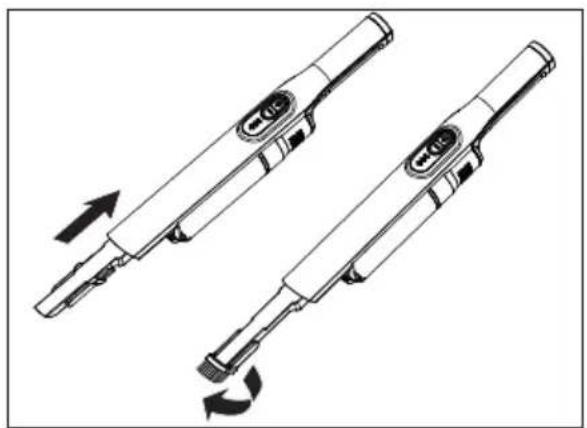
natural_image
Two identical electric shaver designs with arrows indicating rotation direction (no text or symbols)natural_image
Line drawing of a vacuum cleaner with a downward arrow indicating motion, no text or symbols presentnatural_image
Line drawing of a vacuum cleaner with attached circuit board (no text or symbols)natural_image
Line drawing of a mechanical device with a downward arrow indicating force or movement (no text or symbols)natural_image
Line drawing of a handheld vacuum cleaner with a downward arrow indicating motion (no text or symbols)Fig. 10 - Caricamento
natural_image
Technical line drawing of a handheld device with a black arrow pointing to a component (no text or symbols present)natural_image
Technical line drawing of a handheld vacuum cleaner with dotted particles, no text or symbols presentnatural_image
Technical line drawing of two mechanical components with directional arrows indicating movement (no text or symbols)text_image
Technical diagram showing a device with labeled components A and B, illustrating a mechanical or electrical assembly.Tensione in uscita 18,0 V

Corrente
Potenza in uscita 9,0 W
text_image
QR code image containing encoded data, no visible human-readable text- Information about this user manual ....129
1.1. Explanation of symbols ...... 129 FR - Proper use 129
- Safety instructions ...... N130
3.1. Safe operation 130
3.2. Handling the rechargeable batteries 132 ES - Package contents 133
- Appliance overview 134
- Installing the wall mount ....136
- Preparing the appliance for use 137
7.1. Hand-held vacuum cleaner 137
7.2. Floor vacuum cleaner 138
7.3. Charging the battery on the device 139
7.4. Assembling and setting up the docking station....140
7.5. Charging the battery in the docking station 140 - Using the vacuum cleaner 141
- Cleaning and care....141
9.1. Emptying the dust container 142
9.2. Cleaning the dust container and dust filter 142
9.3. Cleaning the suction opening 144
9.4. Cleaning the suction pipe and floor nozzle 144
9.5. Storage....144 - Troubleshooting 144
- Technical specifications....145
- Declaration of conformity ....147
- Disposal 147
- Service information....148
- Legal Notice....149
EN
1. Information about this user manual

Thank you for choosing our product. We hope you enjoy using this appli-ance.
Read the safety instructions carefully before using the appliance for the first time. Note the warnings on the appliance and in the user manual.
Always keep the user manual close to hand. If you sell the appliance or give it away, please ensure that you also pass on this user manual. It is an essential component of the product.
1.1. Explanation of symbols
If a block of text is marked with one of the warning symbols listed below, the hazard described in that text must be avoided to prevent the potential consequences described there from occurring.

DANGER!
Warning: risk of fatal injury!

DANGER!
Warning: risk of electric shock.

WARNING!
Warning: risk of possible fatal injury and/or serious irreversible injuries!

WARNING!
Warning: risk of explosive materials!

CAUTION!
Warning: risk of minor and/or moderate injuries!

NOTICE!
Follow these instructions to prevent damage to the appliance.

More detailed information about using the appliance.

Follow the instructions in the user manual.

Symbol for protection class II
2. Proper use
The vacuum cleaner is intended for vacuuming dry dirt such as dust, crumbs or fluff indoors or in cars. It is also suitable for vacuuming small amounts of liquid.
This appliance is designed for use in private households. The appliance is not intended for commercial or industrial use.
Please note that we shall not be liable in cases of improper use:
- Do not modify the appliance without our consent and do not use any auxiliary equipment that we have not approved or supplied.
▶ Only use replacement parts or accessories that we have supplied or approved.
▶ Comply with all the information in this user manual, especially the safety instructions. Any other use is considered improper and can cause personal injury or property damage.
3. Safety instructions 3.1. Safe operation
- Keep the appliance and its accessories out of the reach of children.
■ This appliance can be used by children of 8 years and older, and by people with reduced physical, sensory or mental capacity, or with a lack of experience and/or knowledge, but only with proper supervision, or if they have been told how to use the appliance safely, and have understood the risks involved if they use it improperly.
■ Children must not be allowed to play with the appliance.
■ Cleaning and user maintenance must not be carried out by children, unless they are aged 8 or over and are supervised.
■ Children younger than 8 should be kept away from the appliance and the connection cable.

DANGER! Risk of electric shock!
Live parts. There is a risk of electric shock/short circuit.
■ Use only the mains adapter supplied to charge the vacuum cleaner.
■ Charge only the vacuum cleaner and no other appliances, rechargeable batteries or batteries using the mains adapter.
■ The appliance must not be connected to the mains adapter during use.
■ Only connect the appliance to a properly installed power socket. The local mains voltage must correspond to the technical specifications for the mains adapter.
■ The socket must be easily accessible so that you can unplug the appliance from the mains quickly if necessary.
■ Never pull on the cable in order to pull the plug out of the mains socket.
■ Do not use an extension cable.
■ The mains adapter may only be used in dry rooms.
■ Only use the vacuum cleaner in enclosed spaces and never expose the appliance to water droplets or spray.
■ Do not touch the appliance with wet hands while the appliance is charging.
■ Before using for the first time and after each use, check the appliance, mains adapter and connecting cable for damage.
■ Do not use if the appliance, the mains adapter or the cable is visibly damaged.
A damaged connecting cable cannot be replaced. If the cable or mains adapter is damaged, the mains adapter must be scrapped and replaced by a mains adapter of the same type.
■ Before cleaning, unplug the mains adapter from the socket and the appliance plug from the appliance.
■ Never immerse the vacuum cleaner in water to clean it.
■ Contact our Service team without delay if the appliance has been damaged during transport.
Do not, under any circum- stances, make any unauthor- ised modifications to the appliance or try to open a component and/or repair it yourself. FR NL ES
■ Ensure that the connecting cable does not come into contact with hot appliance parts or other heat sources.
■ Do not expose the appliance to extreme conditions. Avoid:
– high humidity or wet conditions
– extremely high or low temperatures
- direct sunlight
- naked flames.

DANGER! Risk of explosion!
There is a risk of fire or explosion when vacuuming up flammable liquids or certain solid materials.
■ Never use the appliance near highly flammable materials. Do not vacuum up sharp-edged or highly flammable objects such as matches or hot ashes and do not vacuum up liquids.
■ Do not vacuum up toner dust (carbon black from laser printers, photocopiers) under any circumstances.

CAUTION!
Harmful to health!
If you inhale the dust when emptying the vacuum cleaner, this can be hazardous to health or trigger allergies.
■ Empty the dust container outdoors, directly over a dustbin.
■ Empty the dust container regularly.
■ Clean the dust filter regularly.
Th

CAUTION!
Risk of injury/possible material damage!
There is a risk of injury or damage to the appliance due to improper use.
- Keep hair and loose items of a fire.
clothing away from the suction opening.
■ Always use the vacuum cleaner with the filters and dust container inserted.
■ Do not cover the suction and exhaust openings, or the appliance will overheat.
■ Always switch off the vacuum cleaner before changing the accessories, emptying the dust container or cleaning the filters.
■ Do not store the appliance near heat sources such as ovens, radiators etc.
■ When cleaning stairs, take particular care to avoid falling.
■ Do not vacuum chemical products, plaster, stone dust, cement or similar.
3.2. Handling the rechargeable batteries
The appliance contains a lithium-ion battery.

DANGER!
Risk of explosion!
Batteries could explode if exposed to extreme heat.
■ Never throw the battery into
■ Never expose the battery to excessive heat such as direct sunlight, fire, strong artificial light or similar!

NOTICE!
Risk of damage to bat- tery!
Improper handling of the battery can completely destroy it.
■ Avoid heavy impacts and vibrations.
■ Charge the battery regula and as fully as possible. Do not leave the battery discharged for a long period of time.
■ If the battery no longer charges or only charges partially, contact our customer service team.
■ Do not use chargers that are damaged in any way.
■ Do not take the battery apart or deform it. You could injure your hands or fingers, or battery fluid could get into your eyes or onto your skin. If you do come into contact with the battery fluid, rinse the affected area with plenty of water and contact your doctor immediately.
- Do not leave the battery in hot or cold places. Extreme temperatures impair the battery’s charging capacity.
■ Dispose of used batteries in an environmentally friendly manner (see chapter entitled "Disposal").
4. Package contents

DANGER!
Risk of choking and suffocation!
where is a risk of choking and suffocation due to swallowing or inhaling small parts or plastic wrap.
- Keep the plastic packaging out of the reach of children.
▶ Remove the product from the packaging and remove all packaging material.
▶ Please check the package contents to ensure that all items are included. If anything is missing, please contact us within 14 days of purchase.
The following items are supplied with your product:
- Hand-held vacuum cleaner
• Floor nozzle with brush roller - Upholstery nozzle
- Crevice nozzle with folding brush
- Mains adapter
- Wall mount
- Docking station
- Short manual
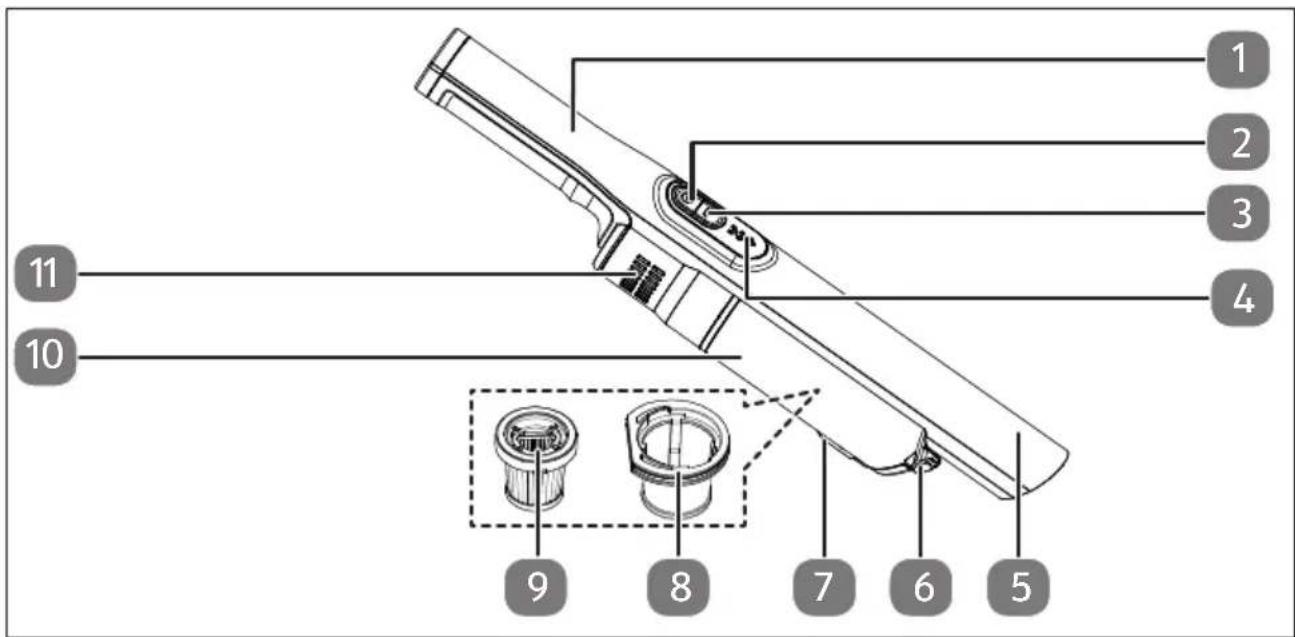
5. Appliance overview
text_image
1 2 3 4 11 10 9 8 7 6 5Fig. 1 - Appliances
- Motor block with handle
- On/off switch
- MAX vacuum power setting
- Suction strength/charge level display
- Suction opening
-
Release button for the dust container
-
Release button for the dust container cover
- Coarse filter (in the dust container)
- Fine dust filter (in the coarse filter)
- Dust container
- Exhaust air opening
text_image
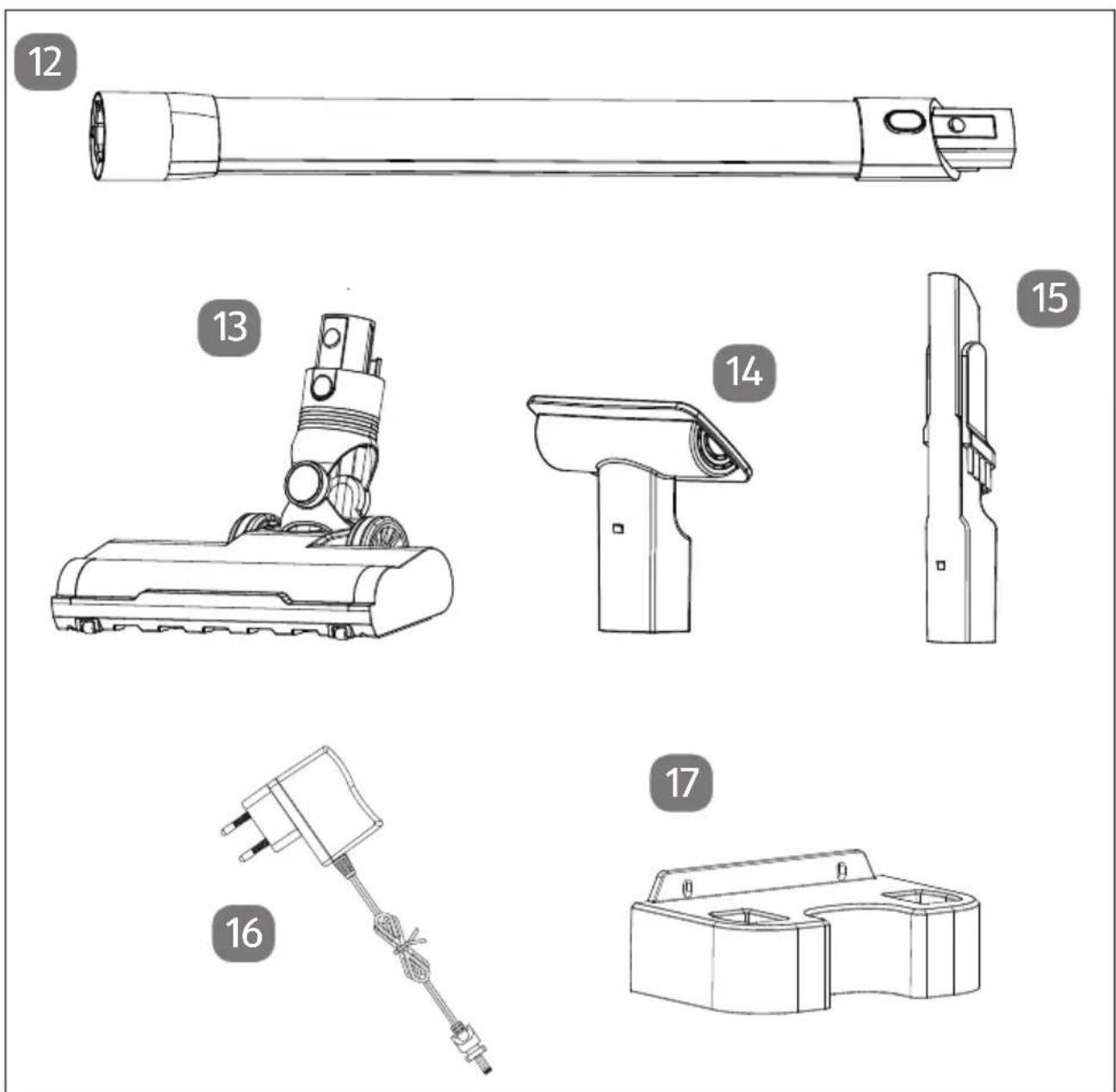
Technical diagram showing exploded views of a vacuum cleaner with labeled parts 12 through 17Fig. 2 - Accessories
- Suction pipe
- Floor nozzle with brush roller
- Upholstery nozzle
-
Crevice nozzle with folding brush
-
Mains adapter
- Wall mount
- Fastening material (not shown)
text_image
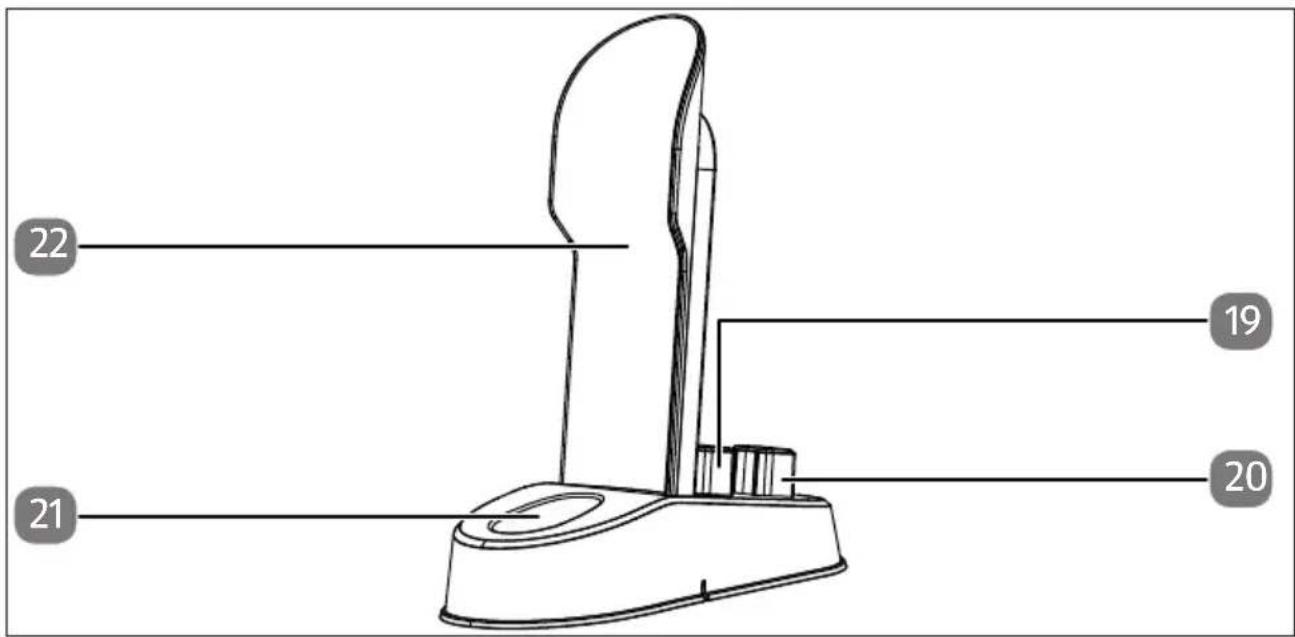
22 19 21 20Fig. 3 - Docking station
- Crevice nozzle storage
-
Upholstery nozzle storage
-
Charging cradle
- Hand-held vacuum cleaner support
6. Installing the wall mount

DANGER!
Risk of electric shock!
Risk of electric shock when drilling holes into a wall!
■ When mounting the wall bracket on the wall, install it in a suitable location and take care not to hit any hidden electrical cables or pipework when drilling.
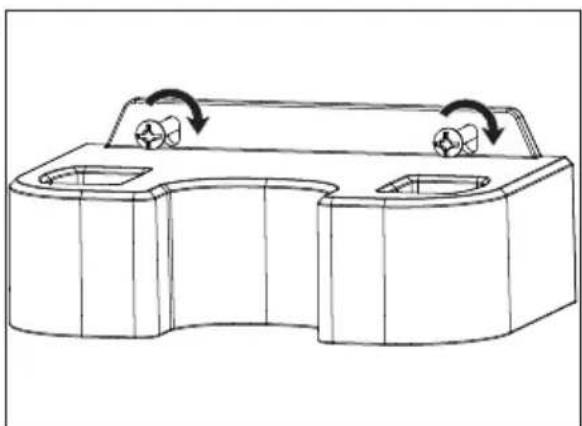
The supplied wall mount can be used to store the vacuum cleaner safely on a wall.
▶ Select a position in a dry location close to a mains socket, where the vacuum cleaner is not exposed to direct sunlight.
▶ Make sure there are no hidden electrical cables or pipework.
▶ Mark the two drill holes for the wall mount.
▶ Drill the 2 holes where you made your markings, so you can insert the screws in them.
▶ Push the wall plugs into the drilled holes.
▶ Screw the wall mount securely into the two drill holes using the screws provided.
natural_image
Technical line drawing of a mechanical component with two ports and rotational arrows indicating motion (no text or symbols)Fig. 4 - Wall mount
You can place the upholstery nozzle and crevice nozzle in the wall mount for safe storage.
7. Preparing the appliance for use
7.1. Hand-held vacuum cleaner
Remove all packaging materials from the appliance and accessories.
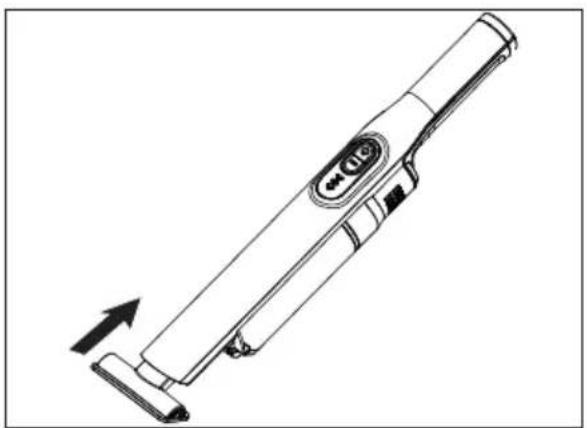
▶ Select the attachment best-suited to your needs:
natural_image
Line drawing of a handheld electric toothbrush with an arrow indicating motion (no text or symbols)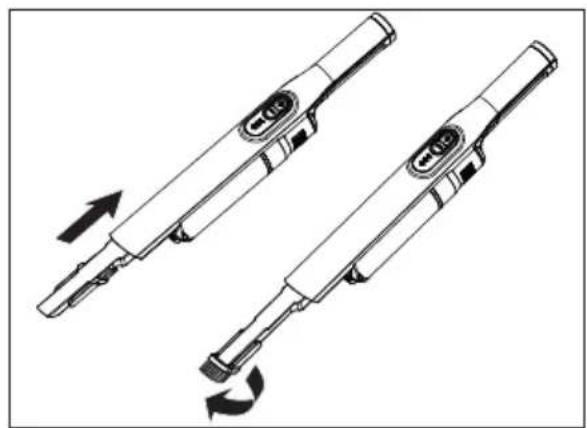
natural_image
Technical line drawing of two handheld electronic devices with directional arrows indicating motion (no text or symbols)Fig. 5 - Upholstery nozzle Fig. 6 - Crevice nozzle
- Upholstery nozzle for vacuuming upholstery or smaller smooth surfaces
- Crevice nozzle for vacuuming hard-to-reach areas; the brush head can be folded down depending on the application.
– Floor nozzle for vacuuming large, smooth surfaces
Place the required attachment onto the suction opening and press on as shown in the illustrations above.
7.2. Floor vacuum cleaner
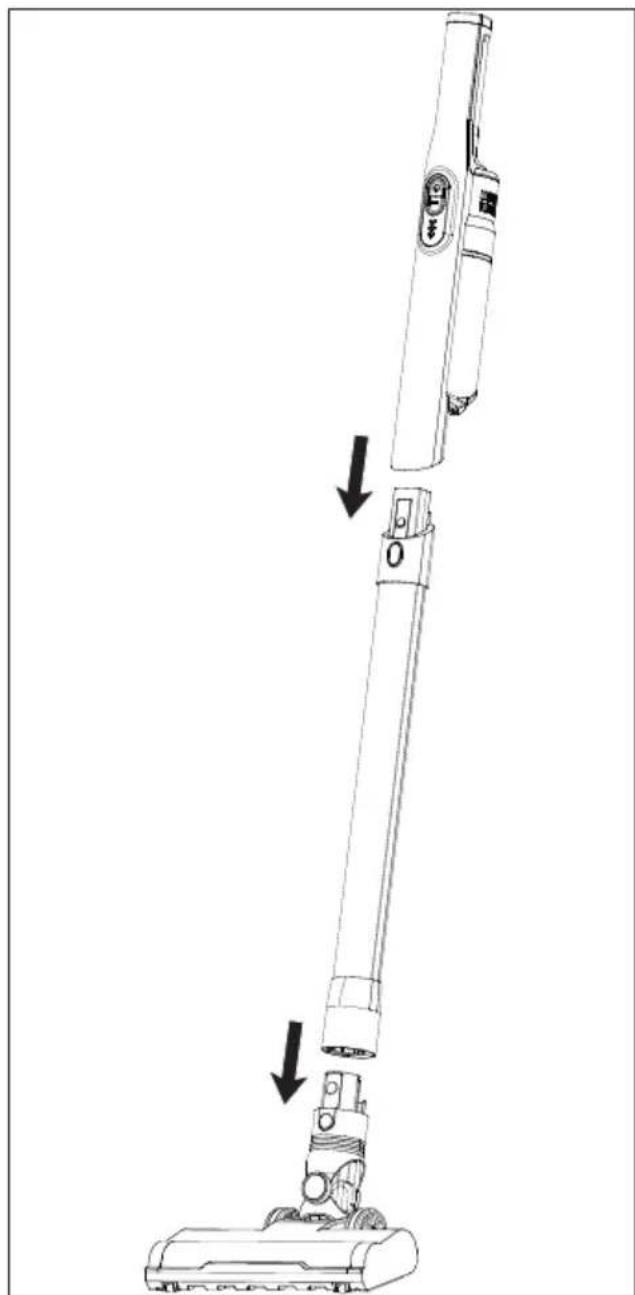
Place the suction pipe on the hand-held vacuum cleaner until it audibly clicks into place.
▶ Push the floor nozzle onto the suction pipe until it audibly clicks into place.
The floor vacuum cleaner is now ready for use.
natural_image
Line drawing of a vacuum cleaner with a downward arrow indicating motion, no text or symbols presentFig. 7 – Assembling the stick vacuum cleaner
7.3. Charging the battery on the device

Switch off the appliance before charging.

Before using the vacuum cleaner for the first time, charge the battery for at least 24 hours.
Always charge the battery if the vacuum power decreases significantly or only one bar of the operating light is lit up.
The appliance cannot be used during the charging process.
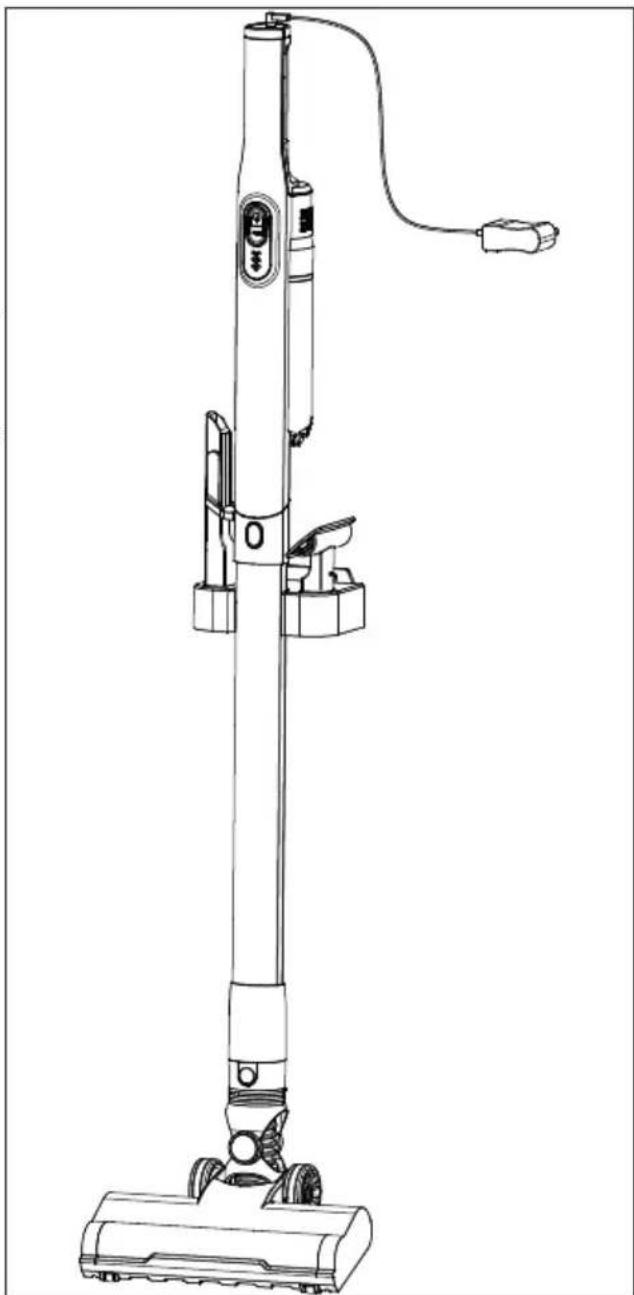
To ensure that the vacuum cleaner can be charged without interruption and no faults occur, we recommend always storing and charging the vacuum cleaner assembled in the wall mount.
▶ Hang the floor vacuum cleaner in the wall mount.
Connect the mains adapter to the charging socket in the handle of the hand-held vacuum cleaner.
Connect the mains adapter to a properly installed mains socket.
natural_image
Line drawing of a vacuum cleaner with attached circuit board (no text or symbols)Fig. 8 - Charging the vacuum cleaner
The appliance is charged and the operating light flashes blue continuously. When the battery is fully charged, all bars on the operating light light up blue permanently.
▶ After charging, remove the power adapter plug from the socket again.
7.4. Assembling and setting up the docking station
natural_image
Line drawing of a mechanical device with a downward arrow indicating motion or assembly (no text or symbols)Fig. 9 – Setting up the charging station
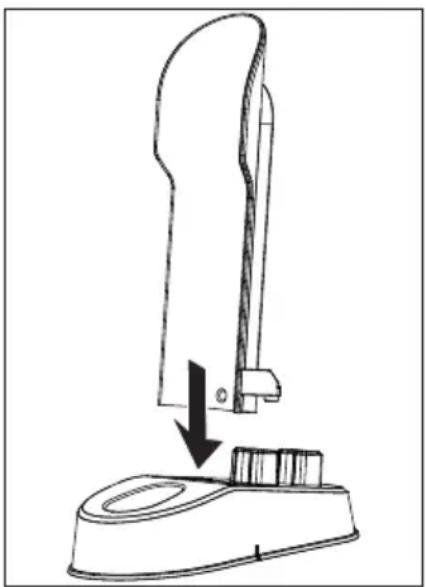
The supplied docking station can be used to store the vacuum cleaner and to conveniently charge it.
Insert the support for the hand-held vacuum cleaner into the base plate of the docking station.
▶ Choose a space near to a mains power socket and plug the mains adapter into the mains power socket.
▶ Make sure that the docking station is secure and level.
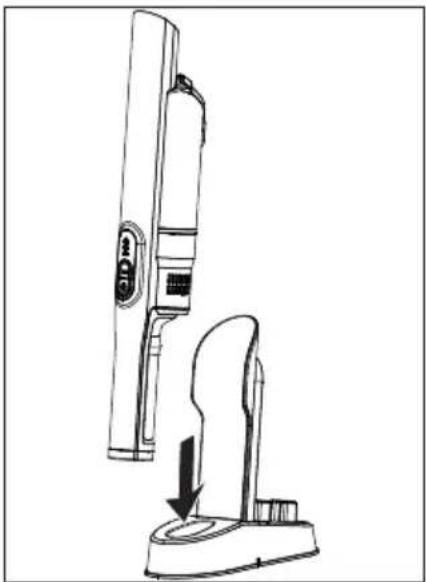
7.5. Charging the battery in the docking station
Charge the appliance in the docking station.

Switch off the appliance before charging.

Before using the vacuum cleaner for the first time, charge the battery for at least 24 hours.
Always charge the battery if the vacuum power decreases significantly or only one bar of the operating light is lit up.
The appliance cannot be used during the charging process.
Plug the mains adapter into the socket.
Place the hand-held vacuum cleaner into the charging cradle with the suction opening facing upwards.
natural_image
Line drawing of a handheld vacuum cleaner with a downward arrow indicating motion (no text or symbols)Fig. 10 - Charging
The appliance is charged and the operating light flashes blue continuously. When the battery is fully charged, all bars on the operating light light up blue permanently.
▶ After charging, remove the power adapter plug from the socket again.
8. Using the vacuum cleaner
Make sure that the dust filter and dust container are firmly secured to the motor block.
Put on the appropriate vacuum attachment.
▶ Switch on the vacuum cleaner by pressing the on/off switch.
▶ Press the MAX button to set a higher vacuum power.
▶ Switch off the vacuum cleaner by pressing the on/off switch again.
9. Cleaning and care

DANGER!
Risk of electric shock!
Live parts. There is a risk of electric shock/short circuit.
■ Switch off the appliance and, if necessary, disconnect the mains adapter from the socket and the appliance plug from the appliance.
Empty the dust container and clean the dust filter ideally after every use.
Clean the suction opening as required.
Do not use any solvents or caustic/gaseous cleaning agents to clean the appliance's surfaces and accessories. Wipe the surface with a damp cloth.
9.1. Emptying the dust container
We recommend emptying the dust container after every use.
▶ Disconnect the hand-held vacuum cleaner from the suction pipe.
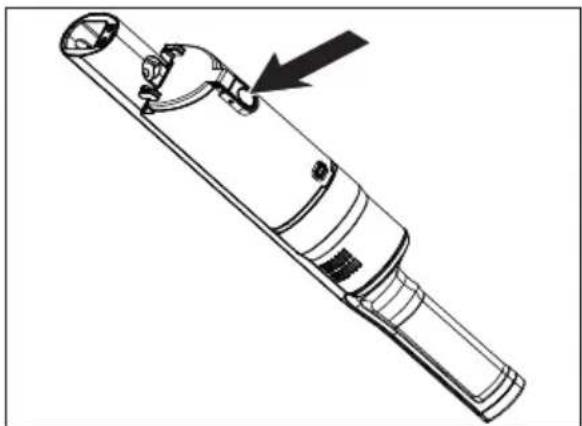
▶ Press the release button on the dust container to open the dust container cover.
natural_image
Technical line drawing of a mechanical device with a black arrow pointing to a component (no text or symbols present)Fig. 11 - Opening the dust container
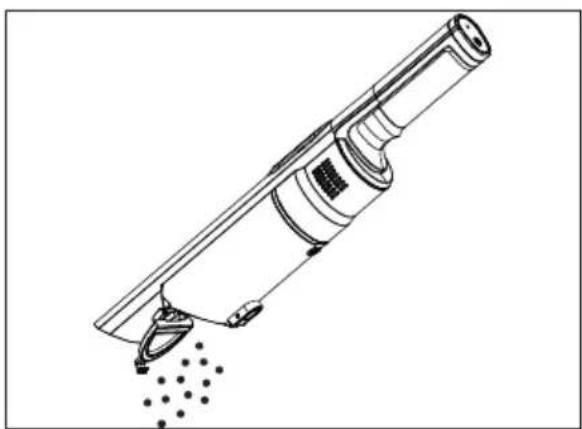
▶ Empty the dust container over a dustbin.
natural_image
Technical line drawing of a mechanical device with no visible text or symbolsFig. 12 - Emptying dust
9.2. Cleaning the dust container and dust fi Iter
We recommend cleaning the dust container and the dust filter after every use. Carry out the following steps:
The appliance is switched off.
▶ Disconnect the hand-held vacuum cleaner from the suction pipe.
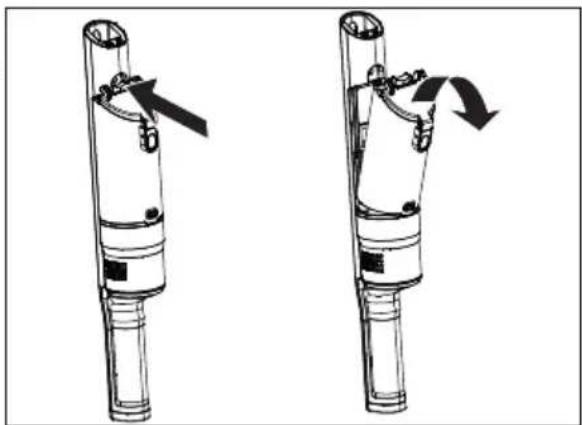
Remove the dust container from the motor base by pressing the release button for the dust container.
▶ Tilt the dust container forwards out of the appliance.
natural_image
Two mechanical device diagrams showing a lever mechanism with arrows indicating motion (no text or symbols)Fig. 13 - Removing the dust container
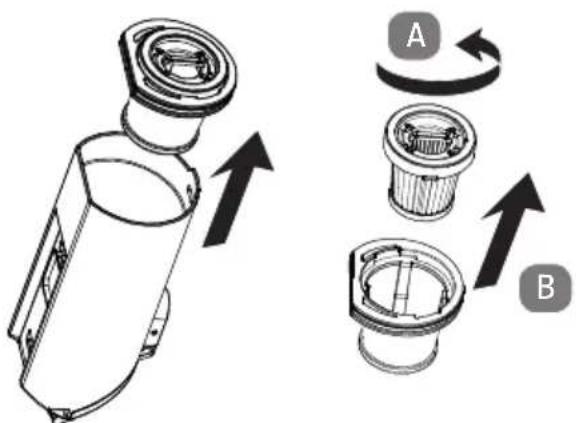
▶ Pull the coarse filter upwards out of the dust container.
▶ Turn the HEPA H13 filter anti-clockwise (A) and pull the filter upwards and out (B).
text_image
Technical diagram showing a device with labeled components A and B, illustrating a mechanical assembly or assembly process.Fig. 14 - Removing the dust filter

NOTICE!
Possibility of damage to the appliance!
Improper cleaning can damage the filters and the dust container.
■ Never clean the dust container in the dishwasher.
■ Never clean the coarse and fine filters under running water.
Clean the dust container and the coarse filter with a damp cloth. If the dust container is very dirty, you can also wash it out under running water.
Tap out the fine filter regularly and remove large accumulations of dust by hand.

Allow the dust filter and the dust container to dry completely before reassembling the parts.
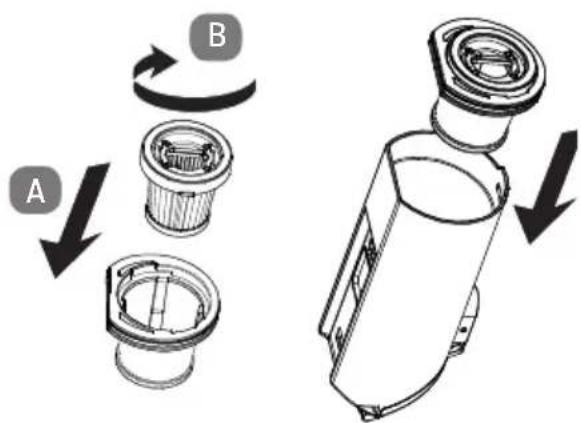
▶ First insert the fine filter back into the coarse filter (A) and turn the filter clockwise to tighten it.
Ensure that the locking tabs engage in the recesses on the edge.
Insert the coarse filter into the dust container and press it down lightly.
The flattened sides can only be inserted in one way.
text_image
A BFig. 15 - Inserting the dust filter
▶ Replace the dust container on the motor block and tilt the dust container back into the appliance.
Carefully press the dust container into the appliance until you hear it click into place. If this is not possible or can only be done with great difficulty, press the release button for the dust container and then click the dust container into place.

NOTICE!
Possibility of damage to the appliance!
Inserting the filters incorrectly may damage the appliance.
■ Before using the appliance for the first time, ensure that the dust filter has been inserted correctly in the dust container.
9.3. Cleaning the suction opening
After a while, dirt and dust can collect around the suction opening on the hand-held vacuum cleaner and can reduce the vacuum power. To avoid this, the suction opening should be cleaned regularly.
▶ Switch off the appliance.
Remove dust and dirt on and in the suction opening.
9.4. Cleaning the suction pipe and floor nozzle
Dirt and dust can collect in and on the suction pipe and the floor nozzle and reduce the vacuum power. To avoid this, the suction pipe and the floor nozzle should be cleaned at regular intervals.
▶ Switch off the appliance.
Remove dirt and dust on and in the suction pipe and the floor nozzle.
9.5. Storage
▶ Store the appliance in the wall mount.
When you do not intend to use the appliance for a longer period of time, disconnect the mains plug from the socket and store the appliance in a dry, dust-free and frost-free environment that is not exposed to direct sunlight.
10. Troubleshooting
If the appliance stops working properly, please refer to the troubleshooting table shown below to see if you can resolve the problem yourself.
Never attempt to repair the appliance yourself. If a repair is necessary, please contact our Service Centre or a suitable authorised repair workshop.
| Problem Solution | |
| The vacuum cleaner is not working. | Battery is not sufficiently charged.Fully charge the appliance.Suction nozzle is blocked.Switch off the appliance.Remove the blockage. |
| The suction power is reduced. | Suction nozzle is blocked.Switch off the appliance.Remove the blockage.Dust filter is dirty.Clean the dust filter.Dust container is full and must be emptied. |
| The vacuum cleaner makes unusual noises during operation. | Switch off the vacuum cleaner immediately.Suction nozzle is blocked.Switch off the appliance.Remove the blockage. |
▶ Only use replacement parts or accessories that we have supplied or approved. Contact our Service Centre.
11. Technical specifications
Appliance
| Battery DC 14,8 V , 2200 mA, 32,56 Wh | —— |
| Input DC 18,0 V | ——500 mA |
Dust container capacity Approx. 200 ml
Dimensions Approx. 450 x 70 x 87 mm
Integrated battery
| Manufacturer Suzhou Atbest Electrical Technology Co, Ltd. | |
| No. 3 Xitai Road, Beiqiao Street,Xiangcheng District, Suzhou, China | |
| Model | ATBS608-4S |
| Type | Li-ion, DC 14.8 V——2200 mAh |
| Output power | 32.56 Wh |
| Charging time | 4.5 hours |
| Operating duration | 35 min. |
Mains adapter
Manufacturer Importer:
MEDION AG
Am Zehnthof 77
45307 Essen
Germany
HR number: HRB 13274
Model name MD 11515
Mains adapter TYGSDC1800500
Changzhou Taiyu Electric Co., Ltd..
Input voltage 100–240 V\~
Current Max. 0.4 A
Input AC frequency 50/60 Hz
Output voltage 18.0 V

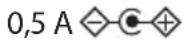
Current

Output power 9.0 W
Average efficiency during operation 86,30 %
Efficiency with low load (10%) 83,09%
Power consumption with zero load ≤ 0,010 W
Protection class


Mains adapter only
Motorised brush attachment
Input: 14.8 V, 10 W

12. Declaration of conformity

Medion AG hereby declares that product MD 11515 complies with the following European directives:
• EMC Directive 2014/30/EU
• Low Voltage Directive 2014/35/EU
• Ecodesign Directive 2009/125/EC
• RoHS Directive 2011/65/EU
13. Disposal

PACKAGING
Your appliance has been packaged to protect it from damage in transit. The packaging is made of materials that can be recycled in an environmentally friendly manner.

APPLIANCE
Old appliances that carry the symbol illustrated may not be disposed of in ordinary household waste.
In accordance with Directive 2012/19/EU, the appliance must be properly disposed of at the end of its service life.
This involves separating the materials in the appliance for the purpose of recycling as well as minimising the environmental impact and negative effects on human health.
Take old appliances to an electrical scrap collection point or a recycling centre.
Contact your local waste disposal company or your local authority for more information on this subject.
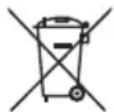
BATTERIES
Batteries that carry the symbol illustrated must not be disposed of in ordinary household waste.
In accordance with Regulation 2023/1542, rechargeable batteries must be disposed of properly at the end of their service life.
They may contain toxic heavy metals and are subject to hazardous waste treatment.
The chemical symbols of the heavy metals are as follows:
Cd = cadmium, Hg = mercury, Pb = lead.
You are legally obliged to return old batteries and rechargeable batteries after use. Therefore, please return used batteries and rechargeable batteries free of charge to a retailer or a municipal collection point.
Batteries and rechargeable batteries may contain substances that are harmful to human health and the environment. The negative effects can only be avoided if old batteries and rechargeable batteries are collected and recycled separately.
Take particular care when handling batteries and rechargeable batteries containing lithium, as there is an increased risk of fire if they are used incorrectly. Tape the poles to prevent an external short circuit.
Use batteries with a long service life or rechargeable batteries to reduce the generation of waste from old batteries.
Follow the storage instructions and avoid completely discharging and recharging the battery to extend its service life.
In addition, batteries or electrical and electronic devices with batteries or rechargeable batteries must not be left in public areas in order to avoid littering. Check options for reusing batteries instead of disposing of them, for example by repairing the battery.
14. Service information
Please contact our Customer Service team if your device ever stops working the way you want or expect it to. There are several ways for you to contact us:
- In our Service-Community, you can meet other users, as well as our staff, and you can exchange your experiences and pass on your knowledge there.
You will find our Service-Community at community.medion.com.
• Alternatively, use our contact form at www.medion.com/contact. - You can also contact our Service team via our hotline or by post.
| Opening times Hotline number UK | |
| Mon – Fri: 08.00 – 20.00Sat – Sun: 10.00 – 16.00 | 0333 3213106 |
| Service address | |
| MEDION Electronics Ltd.120 Faraday Park, Faraday Road, DorcanSwindon SN3 5JF, WiltshireUnited Kingdom | |

text_image
QR code image containing encoded data, no visible human-readable textYou can download this and many other sets of operating instructions from our service portal at www.medionservice.com.
We have stopped providing printed copies of our warranty terms and conditions as part of our commitment to sustainability, but you can access the warranty terms and conditions on our service portal.
You can also scan the QR code on the side of the screen, to download the operating instructions onto your mobile device from the service portal.
15. Legal Notice
Copyright 2025
Date: 07. May 2025
All rights reserved.
These operating instructions are protected by copyright.
Mechanical, electronic and any other forms of reproduction are prohibited without the written permission of the manufacturer.
Copyright is owned by the company:
MEDION AG
Am Zehnthof 77
45307 Essen
Germany
Please note that you cannot use the address above for returns. Please always contact our Customer Service team first.
DE
FR
NL
ES
IT
EN
DE
FR
NL
ES
IT
EN