
LIFE P4000 - Vacuum Cleaner MEDION - Free user manual and instructions
Find the device manual for free LIFE P4000 MEDION in PDF.


| Appliance type | Bagless cyclonic vacuum cleaner |
| Brand | MEDION |
| Model | LIFE P4000 |
| Use | Domestic use for hard floors, carpets, rugs and upholstery |
| Power supply | 220-240 V ~ 50/60 Hz, 900 W |
| Suction power | 220 W ±10% - 22 kPa |
| Noise level | 75 dB ±5 dB |
| Dust container capacity (net/gross) | 2.2 l / 4.3 l |
| Cord length | approx. 8 m |
| Weight | approx. 7.6 kg |
| Dimensions (L x W x H) | approx. 46.5 x 31 x 36.5 cm |
| Telescopic tube length | approx. 86 cm |
| Filtration | Washable MIF filter and HEPA 13 filter |
| Included accessories | Universal floor nozzle, crevice tool/brush, upholstery brush, telescopic tube |
| Main functions | Power regulator, automatic cord rewind pedal, secondary air valve |
| Maintenance | Emptying the container, filters washable with warm water |
| Safety | Double insulation, protection against electric shock, automatic shutdown in case of problem |
| Protection class | II |
| Repairability | Spare parts available through MEDION after-sales service |
| Recycling | Compliant with WEEE, recyclable materials |
Frequently Asked Questions - LIFE P4000 MEDION
User questions about LIFE P4000 MEDION
0 question about this device. Answer the ones you know or ask your own.
Ask a new question about this device
Download the instructions for your Vacuum Cleaner in PDF format for free! Find your manual LIFE P4000 - MEDION and take your electronic device back in hand. On this page are published all the documents necessary for the use of your device. LIFE P4000 by MEDION.
USER MANUAL LIFE P4000 MEDION
natural_image
Black and blue compact vacuum cleaner with handle and ventilation slots (no visible text or symbols)Bagless cyclonic vacuum cleaner
MEDION LIFE P4000 (MD 11906)
Inhaltsverzeichnis
DE
natural_image
Technical illustration of a robotic device with a hand holding a cable, showing mechanical components and motion arrows (no text or symbols)natural_image
Technical line drawing of a mechanical device with no visible text or symbolsnatural_image
Technical line drawing of a mechanical device with internal components and directional arrows (no text or symbols)natural_image
Technical illustration of a mechanical component with cross-sectional views showing internal structure (no text or symbols)natural_image
Three-step diagram showing hands holding circular components with a tool, no text or symbols presentAbb. 9 - MIF-Filter reinigen
natural_image
Technical line drawing of a mechanical device with a circular component and directional arrows indicating motion (no text or symbols)natural_image
Three-step illustration showing hands using a tool to adjust a circular component, with no visible text or symbols.Abb. 11 - HEPA-Filter reinigen
natural_image
Technical line drawing of a mechanical device with a circular component and directional arrows indicating motion (no text or symbols)natural_image
Technical illustration showing a hand holding a cable with a belt switch, and a close-up of the cable being adjusted (no text or symbols present)natural_image
Technical line drawing of a mechanical device with no visible text or symbolsnatural_image
Technical line drawing of a mechanical device with no visible text or symbolsnatural_image
Technical illustration of a mechanical component with cross-sectional views showing internal structure (no text or symbols)natural_image
Three-step diagram showing hands holding circular components with a tool, no text or symbols presentnatural_image
Technical line drawing of a mechanical device with rotating components and a close-up view of the internal structure (no text or symbols)natural_image
Three-step illustration showing hands using a tool to adjust a circular component, with no visible text or symbols.natural_image
Technical line drawing of a mechanical device with a circular component and directional arrows indicating motion (no text or symbols)WAARSCHUWING! Explosiegevaar!
natural_image
Technical illustration showing a hand holding a cable or hose with a device, and a close-up of the device's cable being adjusted (no text or symbols present)natural_image
Technical line drawing of a mechanical device with no visible text or symbolsnatural_image
Technical line drawing of a mechanical device with internal components and directional arrows (no text or symbols)natural_image
Technical illustration of a mechanical component with cross-sectional views showing internal structure (no text or symbols)natural_image
Three-step diagram showing hands holding circular components with a tool, no text or symbols presentAfb. 9 - MIF-filter reinigen
natural_image
Technical line drawing of a mechanical device with rotating components and directional arrows indicating motion (no text or symbols)natural_image
Three-step illustration showing hands using a tool to adjust a circular component, with arrows indicating motion (no text or symbols)Afb. 11 - HEPA-filter reinigen
natural_image
Technical line drawing of a mechanical device with a circular component and directional arrows indicating motion (no text or symbols)natural_image
Technical illustration of a medical device with a hand holding a cable, showing internal components and motion arrows (no text or symbols)natural_image
Technical line drawing of a mechanical device with no visible text or symbolsnatural_image
Technical line drawing of a mechanical device with internal components and directional arrows (no text or symbols)natural_image
Technical illustration of a mechanical component with two views showing internal structure and rotation (no text or symbols)natural_image
Three-step illustration showing hands holding circular components with a tool, no text or symbols presentFig. 9 - Limpieza del filtro MIF
natural_image
Technical line drawing of a mechanical device with two circular components, showing internal components and directional arrows (no text or symbols)natural_image
Three-step illustration showing hands using a tool to adjust a circular component, with no visible text or symbols.natural_image
Technical line drawing of a mechanical device with a circular component and directional arrows indicating motion (no text or symbols)Volumen: 75 dB ± 5 dB
natural_image
Technical illustration of a medical device with a hand holding a cable, showing internal components and motion arrows (no text or symbols)natural_image
Technical line drawing of a mechanical device with no visible text or symbolsnatural_image
Technical line drawing of a mechanical device with no visible text or symbolsnatural_image
Technical illustration of a mechanical component with cross-sectional views showing internal structure (no text or symbols)natural_image
Three-step illustration showing hands holding circular components with a tool, no text or symbols presentnatural_image
Technical line drawing of a mechanical device with rotating components and a close-up view of the internal gear (no text or symbols)natural_image
Three-step illustration showing hands using a tool to adjust a circular component, with arrows indicating motion (no text or symbols)Fig. 11 - Pulizia del filtro HEPA
natural_image
Technical line drawing of a mechanical device with a circular component and directional arrows indicating motion (no text or symbols)- Information about this user manual .... 109
1.1. Explanation of symbols ......109 FR - Proper use 109
- Safety instructions ....110-
- Package contents 113
- Appliance overview ...... ESI14
- Preparing the vacuum cleaner 117
- Vacuuming IT8
7.1. After vacuuming 118 - Cleaning and care....119
8.1. Emptying the dust container .....120
8.2. Cleaning the dust filter....121
8.3. Cleaning the exhaust air/motor filter 122 - Troubleshooting 123
- Disposal 124
- Technical specifications....125
- EU – Declaration of Conformity ......125
- Service information....125
- Legal Notice ....126
EN
1. Information about this user manual

Thank you for choosing our product. We hope you enjoy using this appli-ance.
Please read the safety instructions and the user manual carefully before using the appliance for the first time. Note the warnings on the appliance and in the user manual.
Always keep the user manual close to hand. If you sell the appliance or give it away, please ensure that you also pass on this user manual. It is an essential component of the product.
1.1. Explanation of symbols
If a block of text is marked with one of the warning symbols listed below, the hazard described in that text must be avoided to prevent the potential consequences described there from occurring.

DANGER!
Warning: risk of fatal injury!

WARNING!
Warning: risk of possible fatal injury and/or serious irreversible injuries!

CAUTION!
Warning: risk of minor and/or moderate injuries!

WARNING!
Warning: risk of electric shock!

NOTICE!
Follow these instructions to prevent damage to the appliance!

More detailed information about using the appliance!

Follow the instructions in the user manual!

Symbol for protection class II

Symbol for alternating current (AC)

Indoor use
Appliances with this symbol are intended exclusively for use indoors.
2. Proper use
The vacuum cleaner is intended for vacuuming dry dirt such as dust, crumbs or fluff from flat floors, carpets and upholstery indoors (or in cars). It is not suitable for vacuuming liquids.
This appliance is designed for use in private households. The appliance is not intended for commercial use.
Please note that we shall not be liable in cases of improper use:
▶ Do not modify the appliance without our consent and do not use any auxiliary equipment that we have not approved or supplied.
▶ Only use replacement parts or accessories that we have supplied or approved.
Comply with all the information in this user manual, especially the safety instructions. Any other use is considered improper and can cause personal injury or property damage.
3. Safety instructions

WARNING! Risk of injury!
Risk of injury due to improper use.
- Keep the appliance and its accessories out of the reach of children.
■ This appliance can be used by children over the age of 8 and by persons with reduced physical, sensory or mental abilities or by those without experience and/or knowledge, if they are supervised or have been instructed in the safe use of the appliance and have understood the dangers that result from it.
■ Children must not be allowed to play with the appliance.
■ Cleaning and user maintenance must not be carried out by children.
■ Children younger than 8 should be kept away from the appliance and the connection cable.

WARNING! Risk of electric shock/ short circuit!
There is a risk of electric shock/short circuit from live parts.
■ Only connect the appliance to a properly installed and easily accessible power socket. The local mains voltage must correspond to the technical specifications for the appliance.
■ The socket must be easily accessible so that you can unplug the appliance from the mains quickly if necessary.
■ Unplug the appliance from the socket:
- when you are cleaning the appliance
– when the appliance is un- attended
– the appliance is damp or wet - when you are no longer using the appliance
■ Always hold the plug to pull it out and never pull the mains cable.
■ Do not allow the power cord to come into contact with
hot objects or surfaces (e.g. cooker hob).
■ Do not use if the appliance or the power cord is visibly damaged or if the appliance has been dropped.
■ Appliances connected to the mains during a thunderstorm may be damaged by power surges. You should therefore always unplug the mains plug during thunderstorms.
■ Check the appliance and thedo not use it.
mains cable for damage be- fore using the appliance for the first time and after each use.
■ Completely unwind the mains cable.
■ Do not kink or crush the mains cable.
■ Do not use the appliance if you notice that it, or its mains cable, is damaged.
■ Contact our Service team without delay if the appliance has been damaged during transport.
■ Do not, under any circumstances, make any unauthorised modifications to the appliance or try to open a
component and/or repair it yourself.
■ To avoid risks, the mains carble should only be repaired by an authorised repair workshop. Alternatively, contact our customer service team.
■ If the appliance produces smoke, gives off a burnt smell or makes unusual noises, switch it off immediately, unplug the mains plug and
aR
NL
ES
IT
EN
The appliance must not be submerged in water or other liquids, nor exposed to running water or used in damp environments, as this may result in an electric shock.
■ Do not let the appliance come into contact with water or other liquids.
- Keep the appliance, the mains cable and the mains plug away from wash basins, sinks and similar.
■ Never expose the appliance to water drops or water spray.
■ Never touch the appliance or the mains cable with wet hands.
DE
■ Use the appliance indoors only.
■ Unplug the plug from the socket before emptying the dust container or cleaning the filter. Do not use the appliance without the filter elements.

WARNING!
Risk of explosion!
There is a risk of fire or explosion when vacuuming up flammable liquids or certain solid materials.
■ Never use the appliance near highly flammable materials. Do not vacuum up sharp-edged or highly flammable objects such as matches or hot ashes and do not vacuum up liquids.
■ Do not vacuum up toner dust (carbon black from laser printers, photocopiers) under any circumstances.

CAUTION!
Risk of injury/risk of damage to the appli- ance!
There is a risk of injury or damage to the appliance due to improper use.
■ Never use the vacuum cleaner to vacuum people or animals.
■ Never leave the vacuum cleaner unattended while switched on.
■ Never use the vacuum cleaner on damp surfaces or to vacuum up liquids. Before vacuuming a freshly shampooed carpet, wait until the cleaning agent is completely dry. The motor could otherwise be damaged.
■ Do not use the vacuum cleaner on uneven surfaces and ensure that the vacuum cleaner cannot fall (e.g. when cleaning stairs).
■ Do not use the appliance to collect small parts.
- Keep hair and loose items of clothing away from the suction opening.
■ Always use the vacuum cleaner with the filters and dust container inserted.
■ Do not tread on the suction hose.
■ Do not place any objects on the vacuum cleaner.
■ Do not cover the suction and exhaust openings.
4. Package contents

DANGER!
Risk of choking and suffocation!
There is a risk of choking and suffocation due to swallowing or inhaling small parts or plastic wrap.
- Keep the plastic packaging out of the reach of children.
Remove the product from the packaging and remove all packaging material.
▶ Check whether all the items in the delivery are present. Contact us within 14 days after purchase if any items are missing.
The following items are supplied with your product:
- Vacuum cleaner
• Universal floor nozzle - Crevice/brush nozzle
- Upholstery nozzle
- Telescopic tube
- Short manual
5. Appliance overview
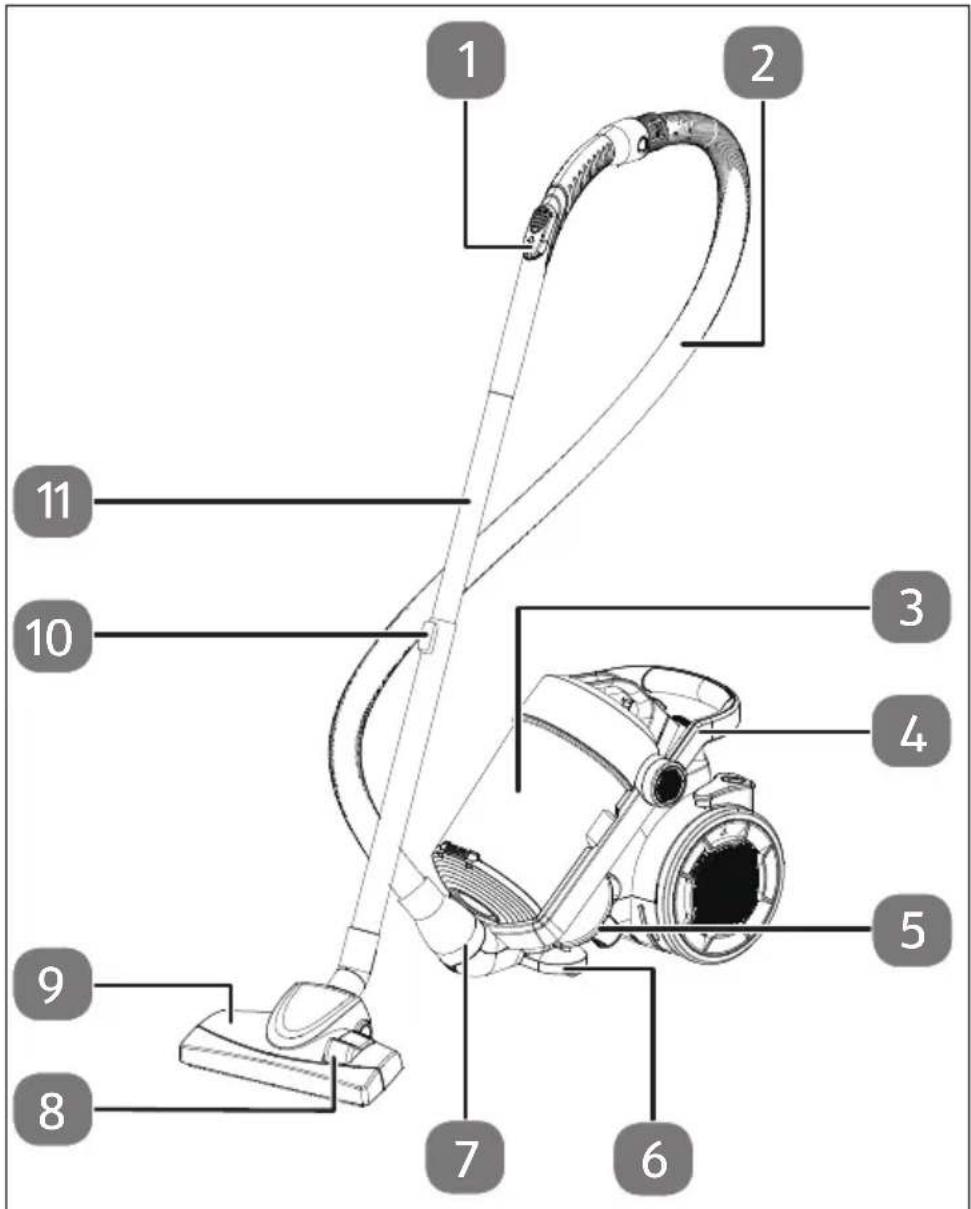
Fig. 1 – Appliance overview
- Suction piece with air inlet valve
- Vacuum hose
- Dust container with filter system
- Handle
- Storage compartments for accessories (already fitted: upholstery nozzle on the left/crevice/brush nozzle on the right)
- Swivel castor
- Suction hose opening
- Foot lever for adjusting the universal floor nozzle: with brush/without brush
- Universal floor nozzle
- Locking button for suction pipe extension
- Telescopic tube
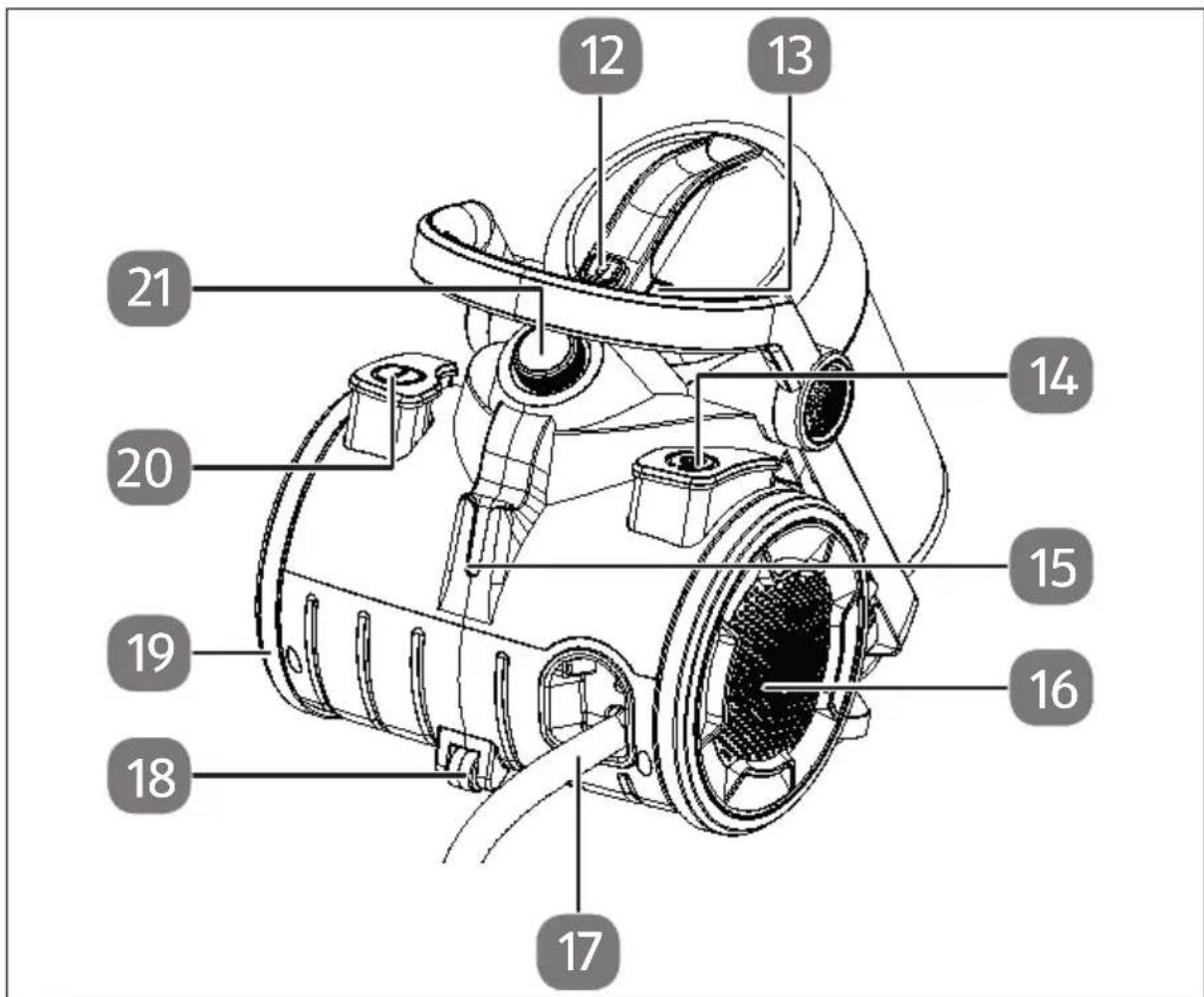
Fig. 2 - Back
- Release button for the dust container
- Release button for the lower dust container cover
- Foot switch: wind up cable
- Suction pipe holder
- Right wheel
- Mains cable with mains plug
- Rollers
- Left wheel with motor filter cover
- Foot switch①: Switch on/off
- Suction control
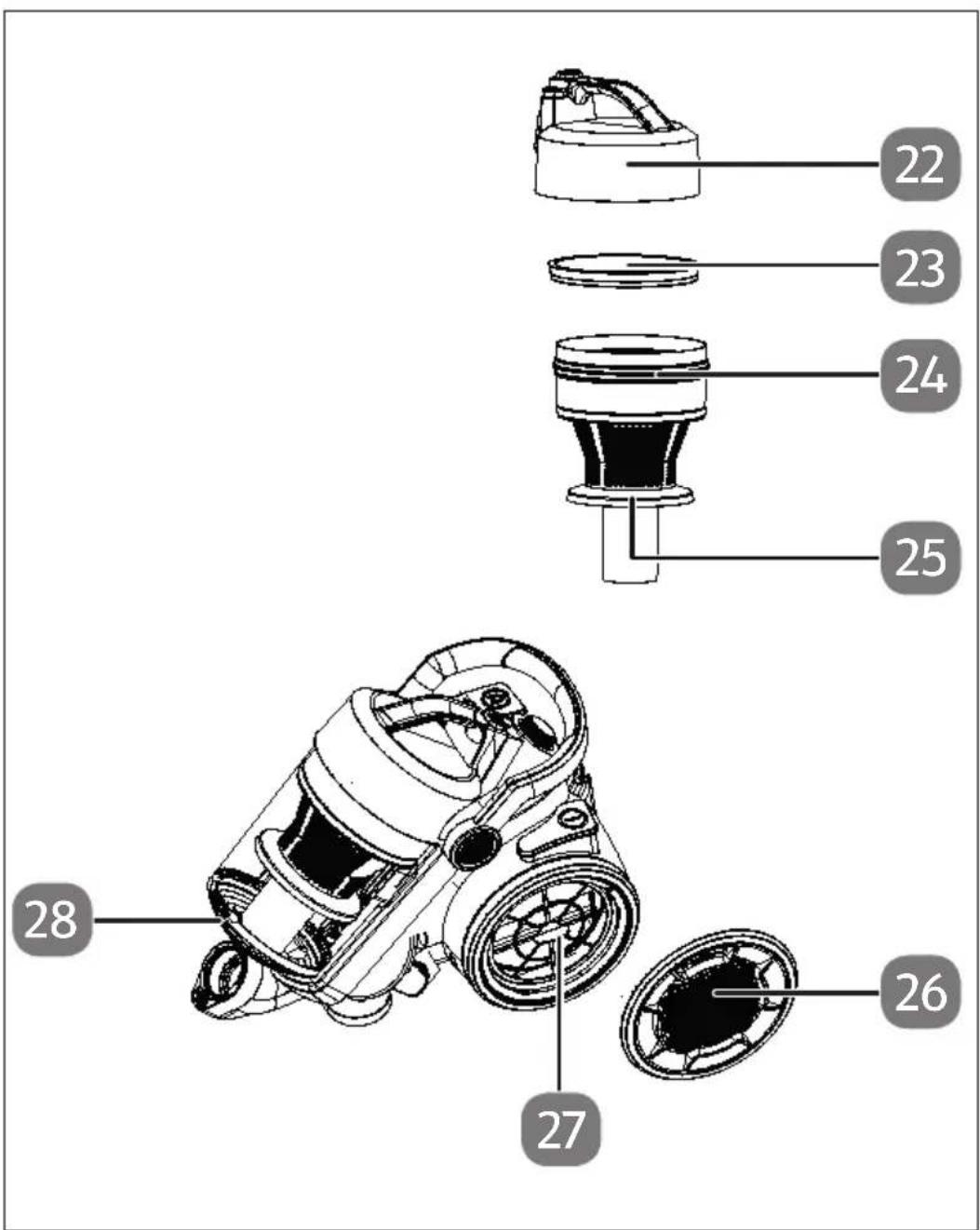
Fig. 3 - Filter systems
- Dust container/filter system cover
- MIF filter for the intake air
- Intake air filter
- Coarse particle collector
- Motor filter cover
- HEPA 13 exhaust air filter
- Lower dust container cover
6. Preparing the vacuum cleaner
Connect the suction piece and the telescopic extension together.
Adjust the telescopic extension to your height by pressing the locking button and extending or retracting the tube.
Insert the suction hose into the suction hose opening until you hear it click into place.
▶ To remove the suction hose, press the two side release buttons and pull off the suction hose.
▶ Attach a suitable suction nozzle to the telescopic extension:
| Suction nozzle Application | |
| Universal floor nozzle • Pressed foot switch: short pile carpet and smooth floors• Foot switch up: high pile carpets | |
| Crevice/brush nozzle Crevice nozzle:Vacuuming corners and places the floor nozzle cannot reach, folds in fabric etc.Brush nozzle:Vacuuming sensitive objects such as books, picture frames etc. | |
| Upholstery nozzle Vacuuming upholstery or mattresses |
▶ Make sure that the dust container is inserted correctly.
▶ Unwind the mains cable to the yellow mark by pulling the handle of the mains plug. When the red mark is visible, the cable is fully unwound and further pulling can damage the cable drum. You should therefore unwind the cable carefully and slowly as soon as the yellow mark is visible.
- Plug the mains plug into a properly installed earthed power socket.
Your vacuum cleaner is now ready for use.
7. Vacuuming
▶ Press the foot switch Ⓘ to switch the vacuum cleaner on.
▶ To vacuum, push or pull the nozzle over the area to be cleaned.
To increase or decrease the suction power, e.g. when vacuuming car seats or curtains, turn the suction power control clockwise or anti-clockwise until the desired suction power is set.
▶ Move the cover of the secondary air valve for more precise adjustment of the suction power. The further you open the valve, the lower the suction power at the bottom of the nozzle.
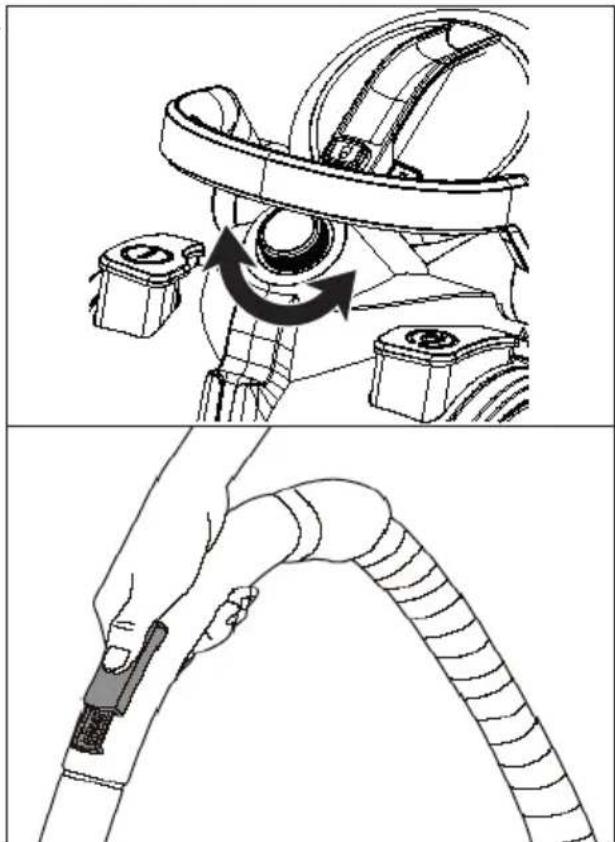
natural_image
Technical illustration of a medical device with a hand holding a cable, showing internal components and motion arrows (no text or symbols)Fig. 4 - Regulating the suction power
7.1. After vacuuming
▶ Press the foot switch ⏻ to switch off the vacuum cleaner.
▶ Unplug the mains plug from the socket, do not pull on the cable, but pull the plug instead.
▶ Press the foot switch to wind up the cable.

CAUTION!
Risk of injury!
There is a risk of injury from the cable swinging wildly.
■ Hold the cable firmly to prevent the cable from swinging back and forth.
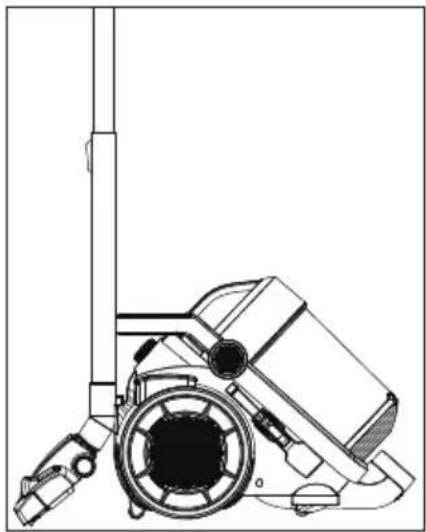
▶ Push the fixture on the nozzle onto the suction pipe holder on the appliance.
natural_image
Technical line drawing of a mechanical device with no visible text or symbolsFig. 5 - Suction pipe holder
To store the vacuum cleaner, place it in a dry place without exposure to direct sunlight.
8. Cleaning and care
Empty the dust container and clean the filter regularly.

WARNING!
Risk of electric shock!
There is a risk of electric shock due to live parts.
■ Always unplug the mains plug from the socket before cleaning the vacuum cleaner, do not pull on the cable, but pull the plug instead.

NOTICE!
Possibility of damage to the appliance!
The wrong cleaning agents can damage the surfaces or the printing on them.
■ Never use acidic, abrasive or granular, acetic-acid-, soda- or solvent-based cleaning agents. These may damage the appliance surfaces or the printing on it.
8.1. Emptying the dust container
▶ Press the release button on the dust container and pull the dust container upwards by the handle.
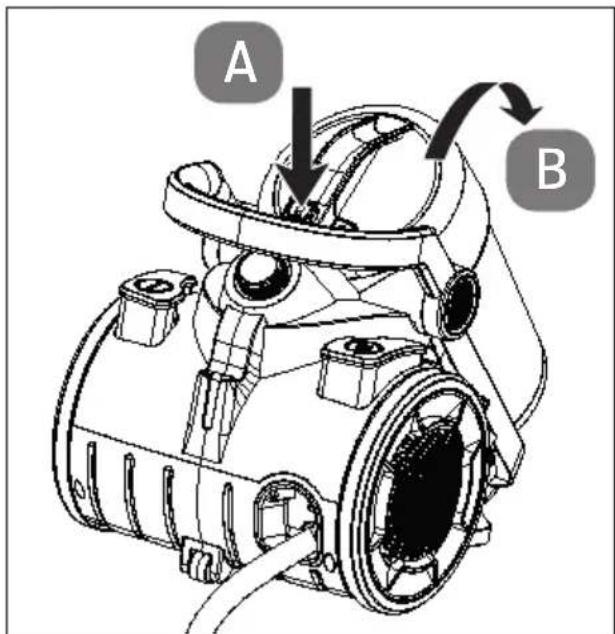
Fig. 6 - Removing the dust container
▶ Hold the dust container over a bin bag or dustbin.
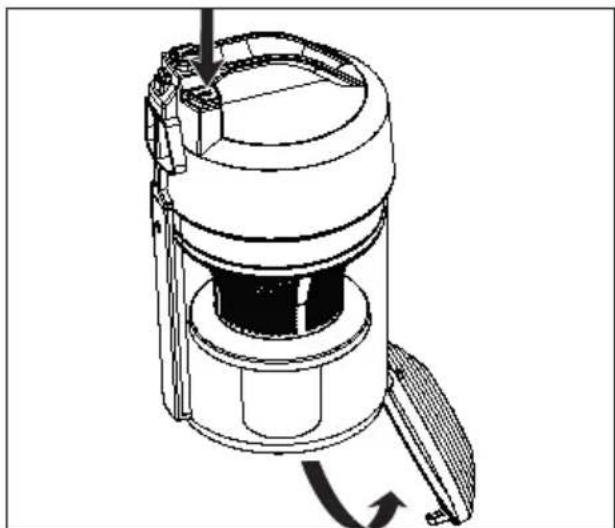
▶ Press the release button for the lower dust container cover.
The lower dust container cover folds down and the collected dust falls out.
natural_image
Technical line drawing of a mechanical device with no visible text or symbolsFig. 7 - Opening the dust container

CAUTION!
Harmful to health!
If you inhale the dust when emptying the vacuum cleaner, this can be hazardous to health or trigger allergies.
■ Empty the dust container outdoors, directly over a dustbin.
■ Empty the dust container regularly.
■ Clean the dust filter regularly.
8.2. Cleaning the dust fi Iter
The vacuum cleaner has an MIF filter. Clean this regularly to ensure fault-free operation.

CAUTION!
Harmful to health!
If you inhale the dust, this can be hazardous to health or trigger allergies.
■ Do not operate the vacuum cleaner with a damaged filter or without a filter! Vacuumed dust can get into the air in the room. Replace a damaged filter without delay.
Remove the dust container from the appliance as described in the previous section.
To clean the dust filter, the MIF filter and the dust container, you can remove the entire filter insert and wash it under lukewarm water.
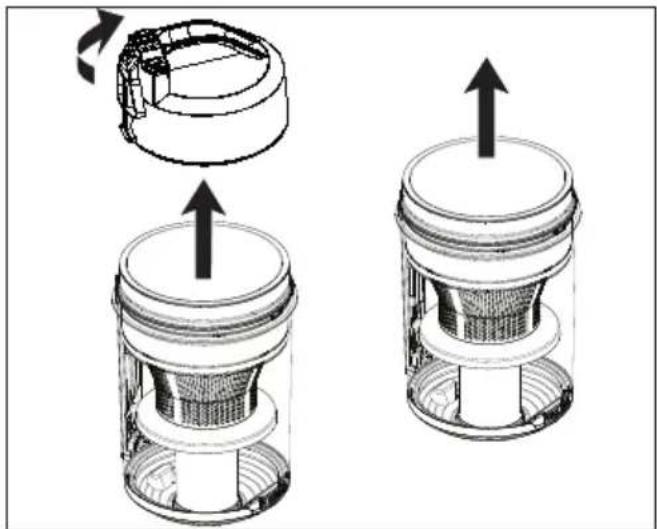
To do this, turn the upper part of the dust container clockwise. The marking ▼ on the upper part points to the marking 🔍 in the dust container. Lift off the upper dust container cover.
▶ Pull the MIF filter out of the dust filter and clean it.
natural_image
Technical illustration of a mechanical component with two views showing internal structure and rotation (no text or symbols)Fig. 8 - Removing the dust filter
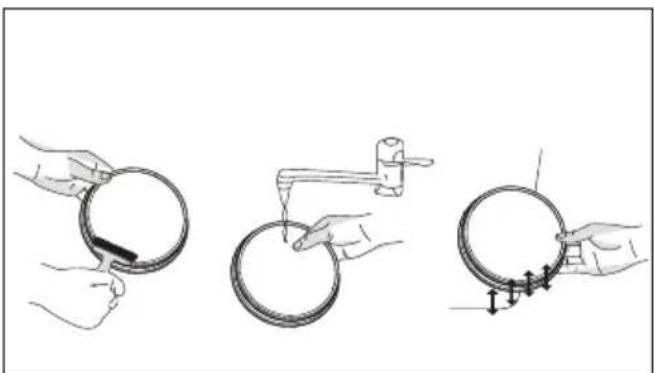
▶ Tap or brush light soiling out of the MIF filter.
▶ If the MIF filter is heavily soiled, wash it under lukewarm water.
Then allow the MIF filter to dry completely for at least 24 hours.
natural_image
Three-step diagram showing hands holding circular components with a tool, no text or symbols presentFig. 9 - Cleaning the MIF filter
To clean the dust filter, you can remove the entire filter insert and rinse it out under lukewarm water.
▶ Lift the dust filter out of the dust container.
To make cleaning easier, the coarse particle collector can also be unscrewed, turn the ring clockwise then pull it downwards and remove.
- Rinse out the dust filter under lukewarm water.
Leave all parts to dry completely for at least 24 hours.
To reassemble the dust filter, proceed in reverse order:
Place the coarse particle collector on the dust filter so that the spring on the dust filter engages in the groove of the coarse particle collector. Turn it to the left until it clicks into place.
Insert the dust filter into the dust container so that the springs of the dust container engage in the grooves of the upper part of the dust container.

Any discolouration that may remain will not affect the filter function.
▶ Turn the dust container lid anti-clockwise until you hear it click into place and markings ▼ and 🔒 are aligned.
8.3. Cleaning the exhaust air/motor fi Iter
The vacuum cleaner has an exhaust air/motor filter. Clean this regularly every 6–12 months to ensure fault-free operation.

NOTICE!
Damage to the appliance!
Vacuumed up dust can get inside the appliance and damage the motor.
■ Do not operate the vacuum cleaner with a damaged filter or without a filter! Replace a damaged filter without delay.
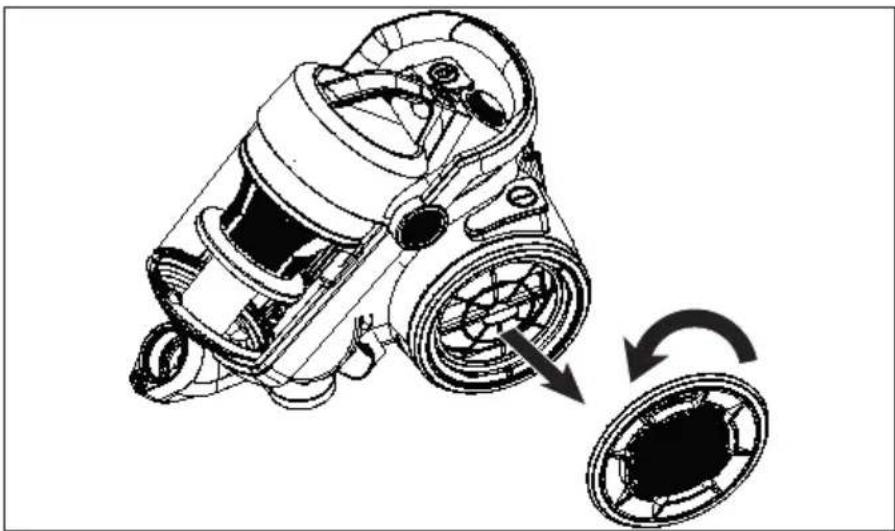
▶ Turn the right-hand motor cover anti-clockwise from the back in the direction of the symbol. Remove the cover.
▶ Hold the motor filter by the handle and remove it from the appliance.
natural_image
Technical line drawing of a mechanical device with two circular components, showing internal components and directional arrows (no text or symbols)Fig. 10 - Removing motor filter
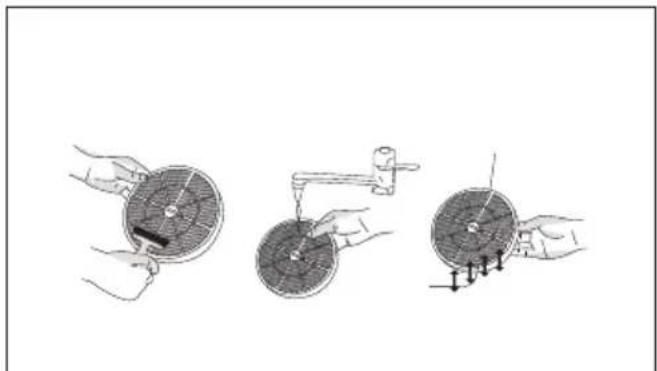
▶ Tap or brush light soiling out of the HEPA filter.
▶ If the HEPA filter is heavily soiled, wash it under lukewarm water.
Then allow the HEPA filter to dry completely for at least 24 hours.
natural_image
Three-step illustration showing hands using a tool to adjust a circular component, with no visible text or symbols.Fig. 11 - Cleaning the HEPA filter
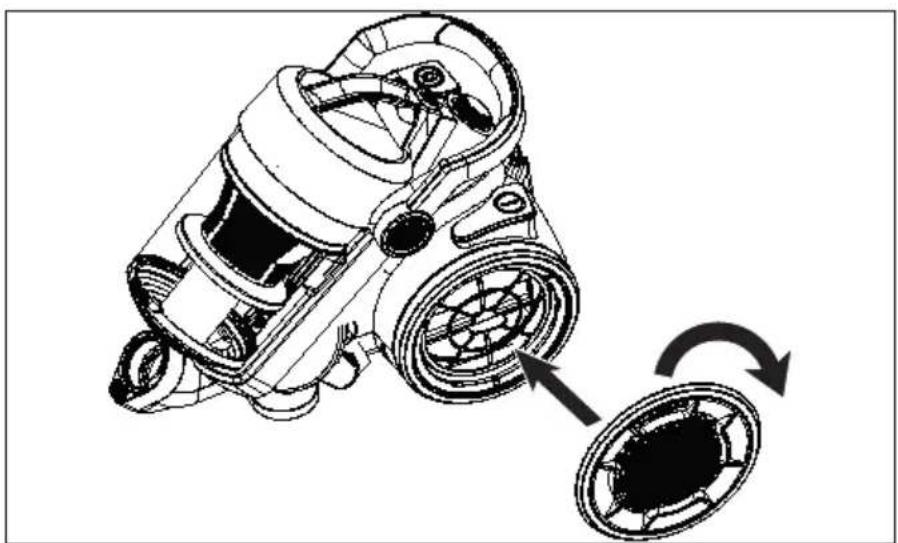
▶ Hold the motor filter by the handle and insert it back into the appliance.
Replace the motor cover and turn the cover clockwise in the direction of the symbol until you hear it click into place.
natural_image
Technical line drawing of a mechanical device with a rotating wheel and fan assembly (no text or symbols)Fig. 12 - Inserting the motor filter
9. Troubleshooting
If the appliance stops working properly, please refer to the troubleshooting table shown below to see if you can resolve the problem yourself.
Never attempt to repair the appliance yourself. If a repair is necessary, please contact our Service Centre or a suitable authorised repair workshop.
| Problem Solution | |
| The vacuum cleaner is not working. | ▸ Check the mains plug/socket.▸ Press the foot switch. |
| The suction power is reduced. | Suction pipe, hose, or nozzle is blocked.▸ Unplug the mains plug and remove the blockage.Dust filter is dirty.▸ Unplug the mains plug and clean the filters. |
| The vacuum cleaner makes unusual noises during operation. | ▸ Switch off the vacuum cleaner immediately.▸ Unplug the mains plug.▸ Check whether there is a blockage or the filters are dirty.▸ If necessary, clean the filters and/or remove the blockage. |
10.Disposal


PACKAGING
Your appliance has been packaged to protect it from damage in transit. The packaging is made of materials that can be recycled in an environmentally friendly manner.

Observe the following labels on the packaging materials regarding waste separation with the abbreviations (a) and numbers (b):
1–7: plastics/20–22: paper and cardboard/80–98: composite materials

(France only)
The “Triman” symbol tells the consumer that the product can be recycled, is covered by an extended system of manufacturer’s responsibility and must be sorted by material type in France.
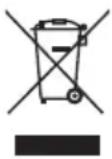
APPLIANCE
All old appliances marked with the symbol shown must not be disposed of in normal household waste.
In accordance with Directive 2012/19/EU, the appliance must be properly disposed of at the end of its service life.
This involves separating the materials in the appliance for the purpose of recycling as well as minimising the environmental impact and negative effects on human health.
Take old appliances to an electrical scrap collection point or a recycling centre.
Contact your local waste disposal company or your local authority for more information on this subject.
11. Technical specifications
Output:
900
Input: 220–240 V\~ 50/60 Hz
Noise level: 75 dB ± 5 dB
Vacuum power: 220 W ± 10% – 22 kPa
Dust capacity (net/gross): 2.2 l/4.3 l
Cable length: Approx. 8 m
Weight: Approx. 7.6 kg
Dimensions: Approx. 46.5 x 31 x 36.5 cm
Aluminium telescopic extension Approx. 86 cm
Filter system Washable MIF and HEPA 13 filter
DE
FR
NL
ES
IT
EN
12. EU – Declaration of Conformity

MEDION AG hereby declares that this appliance complies with the fundamental requirements and the other relevant provisions of:
• EMC Directive 2014/30/EU
• Low Voltage Directive 2014/35/EU
• Ecodesign Directive 2009/125/EC
• RoHS Directive 2011/65/EU
13. Service information
Please contact our Customer Service team if your device ever stops working the way you want or expect it to. There are several ways for you to contact us:
- In our Service-Community, you can meet other users, as well as our staff, and you can exchange your experiences and pass on your knowledge there.
You will find our Service-Community at community.medion.com.
• Alternatively, use our contact form at www.medion.com/contact.
• You can also contact our Service team via our hotline or by post.
| Opening times Hotline number UK | |
| Mon – Fri: 08.00 – 20.00Sat – Sun: 10.00 – 16.00 | 0333 3213106 |
| Service address | |
| MEDION Electronics Ltd.120 Faraday Park, Faraday Road, DorcanSwindon SN3 5JF, WiltshireUnited Kingdom | |

You can download this and many other sets of operating instructions from our service portal at www.medionservice.com.
We have stopped providing printed copies of our warranty terms and conditions as part of our commitment to sustainability, but you can access the warranty terms and conditions on our service portal.
You can also scan the QR code on the side of the screen, to download the operating instructions onto your mobile device from the service portal.
14. Legal Notice
Copyright 2024
Date: 17. June 2024
All rights reserved.
These operating instructions are protected by copyright.
Mechanical, electronic and any other forms of reproduction are prohibited without the written permission of the manufacturer.
Copyright is owned by the company:
MEDION AG
Am Zehnthof 77
45307 Essen
Germany
Please note that you cannot use the address above for returns. Please always contact our Customer Service team first.
DE
FR
NL
ES
IT
EN


- Inhaltsverzeichnis
- WAARSCHUWING! Explosiegevaar!
- Information about this user manual
- Explanation of symbols
- DANGER!
- WARNING!
- CAUTION!
- NOTICE!
- Indoor use
- Proper use
- Safety instructions
- WARNING! Risk of injury!
- WARNING! Risk of electric shock/ short circuit!
- Risk of explosion!
- Risk of injury/risk of damage to the appli- ance!
- Package contents
- Risk of choking and suffocation!
- Appliance overview
- Preparing the vacuum cleaner
- Vacuuming
- After vacuuming
- Risk of injury!
- Cleaning and care
- Risk of electric shock!
- Possibility of damage to the appliance!
- Emptying the dust container
- Harmful to health!
- Cleaning the dust fi Iter
- Cleaning the exhaust air/motor fi Iter
- Damage to the appliance!
- Troubleshooting
- 10.Disposal
- PACKAGING
- APPLIANCE
- Technical specifications
- EU – Declaration of Conformity
- Service information
- Legal Notice
Brand : MEDION
Model : LIFE P4000
Category : Vacuum Cleaner