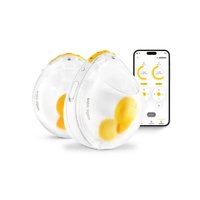
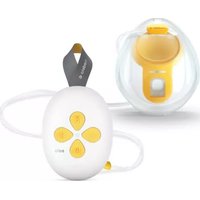
Magic InBra - Breast pump MEDELA - Free user manual and instructions
Find the device manual for free Magic InBra MEDELA in PDF.


| Product type | Personal electric breast pump |
| Brand | Medela |
| Model | Magic InBra |
| Dimensions | 126 x 112 x 71 mm |
| Weight | 200 g ±10 g |
| Power supply | Rechargeable Li-ion battery 3.7 V, 970 mAh, charging via USB-A (USB-A to USB-C cable included, 5V/1A adapter) |
| Battery life | Not specified, but full charge in about 1 hour |
| Technologies | FluidFeel Technology™, 2-Phase Expression Technology™, Bluetooth Low Energy 4.2 |
| Expression modes | Stimulation phase (5 vacuum levels) and expression phase (10 vacuum levels) |
| Maximum vacuum | -75 mmHg to -300 mmHg |
| Cycles per minute | 45 to 70 cpm |
| Collection container capacity | 150 ml (max fill line at 130 ml) |
| Available breast shield sizes | 18 mm, 21 mm, 24 mm, 27 mm (comes with 21 mm, 24 mm supplied separately) |
| Materials in contact with milk | BPA-free: Polypropylene (breast shield, collection container, cover), Silicone (membrane, valves) |
| Maintenance and cleaning | Wash with soapy water or dishwasher (parts except motor unit); disinfect by boiling 5 min or using Quick Clean™ microwave bags; motor unit wipe only |
| Protection rating | IP22 (protected against solid objects >12.5 mm and dripping water) |
| Useful life | 500 hours for breast pump, 6 months for washable parts |
| Connectivity | Bluetooth Low Energy 4.2, compatible with Medela Family Pump Control app |
| Warranty | International warranty available at www.medela.com/ewarranty |
| Spare parts and repairability | Spare parts available: breast shields, collection containers, membranes, valves. No user repair; contact Medela. |
Frequently Asked Questions - Magic InBra MEDELA
User questions about Magic InBra MEDELA
0 question about this device. Answer the ones you know or ask your own.
Ask a new question about this device
Download the instructions for your Breast pump in PDF format for free! Find your manual Magic InBra - MEDELA and take your electronic device back in hand. On this page are published all the documents necessary for the use of your device. Magic InBra by MEDELA.
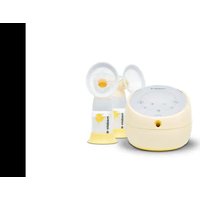
USER MANUAL Magic InBra MEDELA
Electric breast pump Instructions for use
natural_image
Yellow square icon with a white heart and sound waves symbol (no text or numbers)The Medela Family Pump Control app offers you the ability to control your breast pump remotely and view the active pumping session information. The app is free and not mandatory for the use of your breast pump. Do not attempt to pair the pump with the app during the pumping session. The Bluetooth ^® word mark and logos are registered trademarks owned by Bluetooth SIG, Inc., and any use of such marks by Medela AG is under license.
For more information and to download the Pump Control app scan the QR code.
1. Important safety information

Please read all instructions before using this product. Keep these instructions for future reference.
For a patient/user/third party in the European Union and in countries with identical regulatory regime (Regulation 2017/745/EU on Medical Devices); if, during the use of this device or as a result of its use, a serious incident has occurred, please report it to the manufacturer and/or its authorised representative and to your national authority.
Warnings identify all instructions that are important for safety. Failure to observe these instructions can lead to personal injury or damage to the product. The following symbols and signal words show the significance of the warnings:

WARNING
Can lead to serious injury or death.

CAUTION
Can lead to minor injury.
NOTICE
Can lead to material damage (not related to personal injury).

Information
Useful or important information that is not related to safety.
When using electrical products, especially when children are present, basic safety precautions must always be followed.

WARNING
To avoid fire, electric shock, or serious burns:
- Never clean the breast pump during charging.
- Do not place the breast pump charging where it can fall or be pulled into water.
To avoid health risks and reduce the risk of severe injury:
- Use the breast pump only for its intended purpose as described in these instructions for use.
- This is a single-user product. Powered breast pumps that are designed for single users should never be rented or shared. Use by more than one person may present a health risk and voids the warranty.
- Pregnant women should not use the breast pump, as pumping can induce contractions or premature labor.
- If you suffer from any viral or infectious disease, please be aware that pumping breast milk will not reduce or remove the risk of transmitting the disease to your baby through your breast milk. Please seek medical advice from a licensed healthcare professional.
- If you have an active implanted device that would be affected by magnetic field (e.g. pacemaker or implantable cardioverter defibrillator), consult a licensed health care professional before use.
- Close supervision is necessary when the breast pump or accessories are used in the vicinity of children.
- Clean all parts that come into contact with your breast and breast milk prior to first use and after every use. See chapter 8 for cleaning instructions.
- Do not use the breast pump while operating a moving vehicle.

CAUTION
To avoid fire or burns:
- The breast pump and accessories are not heat-resistant. Keep away from heated surfaces or open flames.
To avoid health risks and reduce the risk of injury:
- This product cannot be serviced or repaired. Do not repair yourself. Do not modify the breast pump.
- Never operate the breast pump
- if it is not working properly,
- if it has been dropped, damaged or if mildew has been found on the parts.
-
if it has been dropped into or exposed to water or other liquids.
-
Do not use the breast pump while sleeping or overly drowsy.
- Only use Medela recommended parts including the USB power cable with the breast pump.
- Avoid using the pump during sudden pressure changes such as during take-off and landing of aircrafts. In high altitude environments, including pressurized aircraft cabins, the performance of the pump may be affected.
i Information
Please follow airline rules for the use of portable electronic devices when flying.
Note: All pictures shown in these instructions are for illustration purpose only. The actual product may vary due to product enhancement. Medela reserves the right to substitute any component or accessory with a replacement of equivalent performance.
Contents
1. Important safety information 3
2. Indications and contraindications 6
2.1 Intended Use / Purpose 6
2.2 Indications for use 6
2.3 Contraindications 6
3. Product description 6
3.1 Breast pump parts 7
3.2 Buttons and status lights 7
4. Getting started 8
5. Charging the breast pump 8
6. Disassembling your breast pump 9
7. Selecting the correct breast shield size 10
8. Cleaning 11
8.1 Cleaning overview 11
8.2 Washing and disinfecting 12
9. Assembling your breast pump 13
10. Expressing your breast milk 14
10.1 Operating your breast pump 14
10.2 Realigning the nipple or switching the side ____ 16
10.3 Finishing your pumping session 16
11. Pouring milk from the container 17
12. Maintenance and care 17
12.1 Long-term storage 17
13. Troubleshooting 18
13.1 Vibrations and Notifications 18
13.2 Problems and Solutions 18
14. Accessories available for purchase 21
15. Warranty 21
16. Disposal 21
17. Meaning of symbols 22
18. International regulations 23
18.1 Electromagnetic compatibility (EMC) 23
18.2 Simplified EU Declaration of Conformity 24
19. Technical specifications 24
20. Cybersecurity information 25
2. Indications and contraindications
2.1 Intended Use / Purpose
The Magic InBra ^™ breast pump is a powered breast pump to be used by lactating women to express and collect milk from their breasts.
2.2 Indications for use
The Magic InBra™ breast pump is also indicated to support a mother's milk supply to enable the provision of human milk for infants who are not able to directly or effectively breastfeed (e.g. latch-on problems such as flat or inverted nipples). The breast pump removes milk from affected breast/s to alleviate the symptoms of engorgement and milk stasis as well as support the healing process of sore or cracked nipples and mastitis. The Magic InBra™ powered breast pump is intended for a single user. The breast pump is intended to be used in a home environment.
2.3 Contraindications
There are no known contraindications for the Magic InBra ^™ breast pump.
3. Product description
The Magic InBra ^™ breast pump is a personal-use electric breast pump with FluidFeel Technology ^™ and 2-Phase Expression Technology ^™ . Mode of operation: continuous. The operating life of the Magic InBra ^™ breast pump is 500 hours. The expected operating life of the washable parts (container, container lid, breast shield, membrane and valves) is six months.
Your Magic InBra™ breast pump system includes the following:
| Replacement Parts | ||||||
| Magic InBraTM | Fully assembled breast pump with 150 ml container and 21 mm breast shield | 24 mm breast shield | Yellow membrane | Yellow valve | Grey shield valve | USB power cable |
| Double Pump | 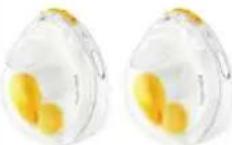 | 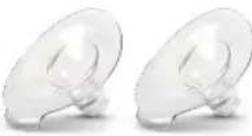 |  | 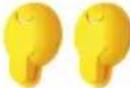 |  | 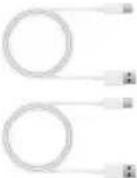 |
| Single Pump | 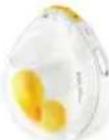 | 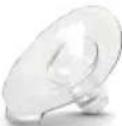 |  |  |  |  |
For ordering information about accessories see chapter 14.
3.1 Breast pump parts
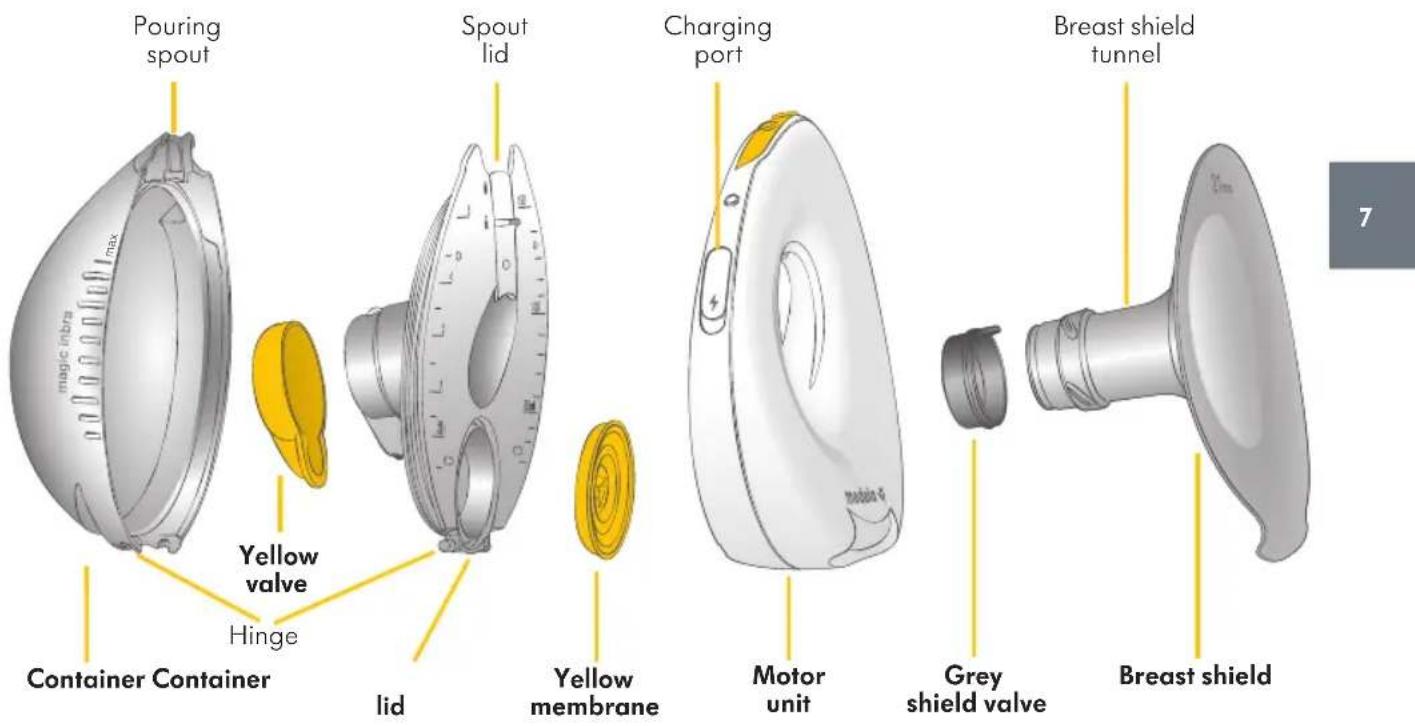
3.2 Buttons and status lights
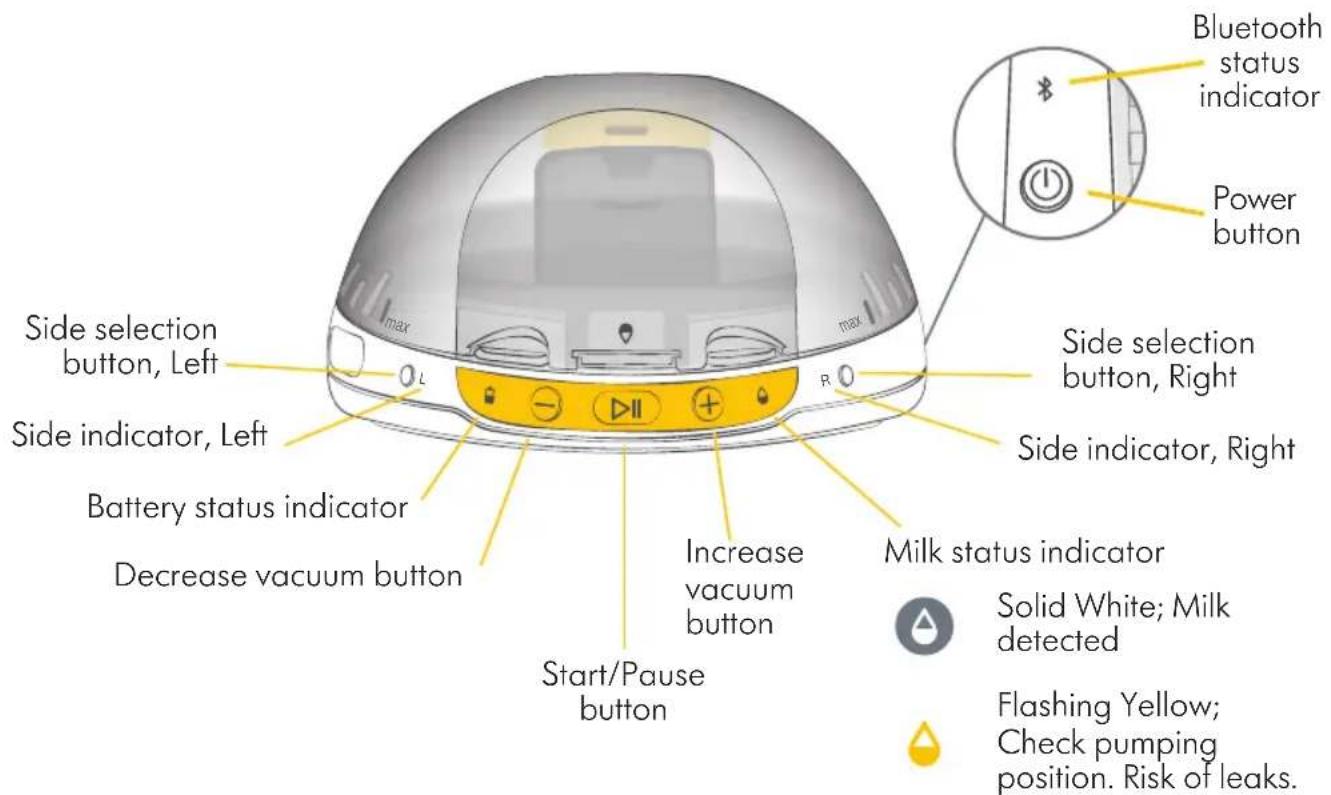
4. Getting started
Before first use, it is important you do the following to ensure optimal performance of the breast pump and safety for you and your baby:
- Charge the breast pump - chapter 5.
- Disassemble the breast pump - chapter 6.
- Select the correct breast shield size - chapter 7.
- Clean the motor unit by wiping - chapter 8.
- Wash and boil the parts (except for the motor unit) - chapter 8.
- Assemble the breast pump - chapter 9.
5. Charging the breast pump
- Charge the breast pump for one hour prior to first use.
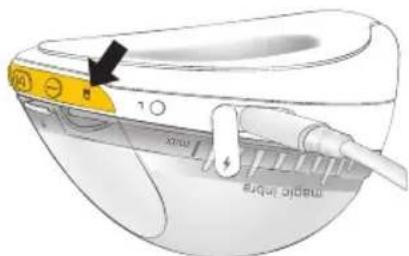
When the power cable is plugged in:

Flashing Green; the breast pump is charging

Solid Green; the breast pump is fully charged
- When fully charged, disconnect the power cable and close the charging port.
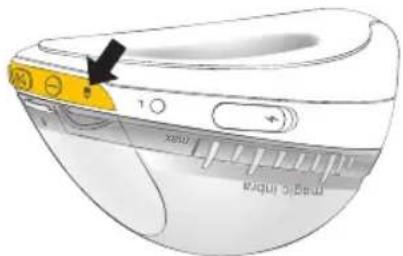
When the power cable is not plugged in and the breast pump is switched on:

Solid green; the breast pump is charged

Solid yellow; charging after one/current pumping session advised

Solid red; inadequate charge for pumping
NOTICE
- Never charge the breast pump with a damaged USB power cable.
- Do not charge the breast pump with the milk in the container.
- Do not charge the breast pump while wearing the device in bra.
- Make sure the voltage of the power adaptor is compatible with the power source. See chapter 19 for technical specifications.
i Information
- The breast pump cannot be turned on or operated when connected to the power adaptor.
- Charging is also possible when the breast pump is disassembled.
6. Disassembling your breast pump
natural_image
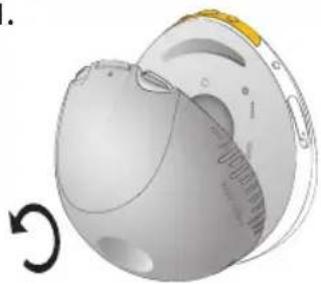
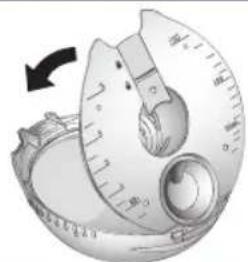
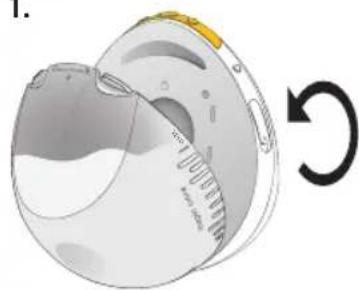
3D rendering of a mechanical component with circular features and a rotational arrow indicator (no text or symbols)Rotate the container anti-clockwise to detach it.
natural_image
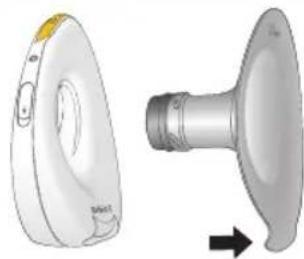
Two views of a medical device: one showing a circular device with a label, the other showing a metallic connector with a curved handle (no text or symbols visible)Detach the breast shield from the motor unit by grasping the tab at the bottom. This may require some force.
natural_image
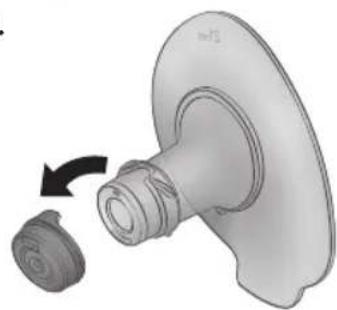
3D rendered mechanical component with a curved arrow indicating rotation (no text or symbols)Remove the grey shield valve from the breast shield.
natural_image
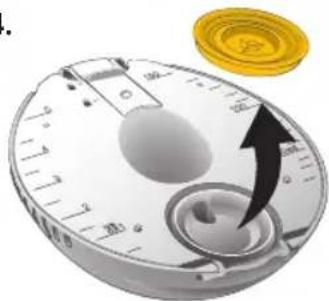
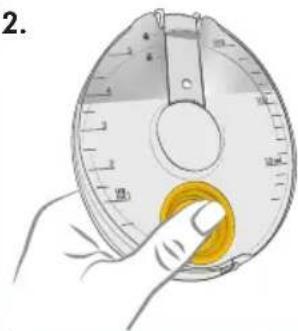
Close-up of a circular mechanical dial with a black arrow pointing to the dial, next to a gold coin (no text or symbols visible)Remove the yellow membrane from the container lid.
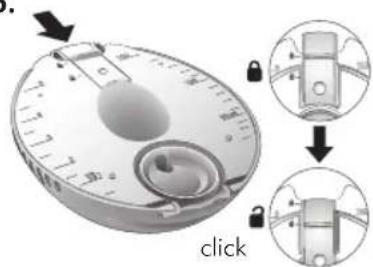
Slide the spout lid down to open position.
natural_image
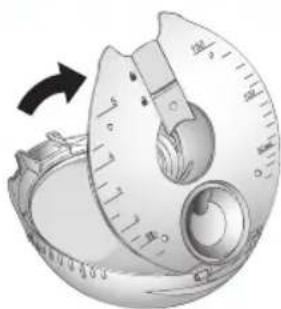
Close-up of a mechanical dial with a circular head and scale markings, showing a curved arrow indicating rotation (no text or symbols present)Lift the container lid open. This may require some force due to the sealing feature.
natural_image
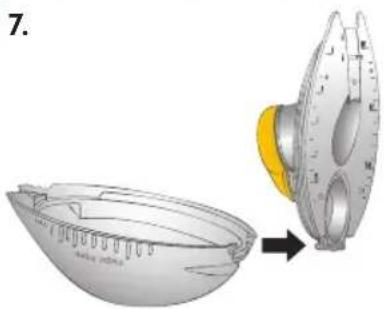
Diagram showing a spacecraft capsule being processed into a smaller spacecraft module (no text or symbols present)Detach the container lid from the hinge.
natural_image
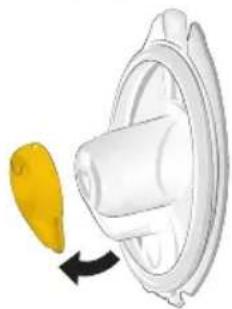
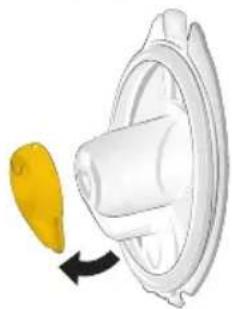
Diagram of a white plastic component with a yellow arrow indicating rotation or movement (no text or symbols)Remove the yellow valve from the container lid.
7. Selecting the correct breast shield size

CAUTION
To avoid health risks and reduce the risk of injury:
- It is important to determine your optimal breast shield size for maximum comfort and pumping efficiency. Incorrect breast shield size can cause trauma to the nipple/breast and decrease milk output.
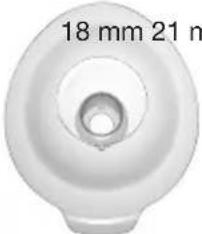
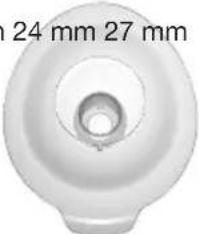
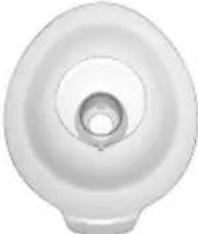
The Magic InBra™ breast pump comes assembled with the 21 mm breast shield. The 24 mm breast shield is included in the packaging separately. If needed, a smaller size (18 mm) and a larger size (27 mm) are available for purchase.
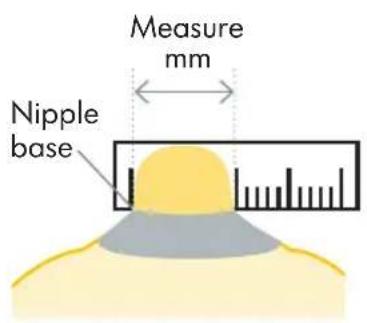
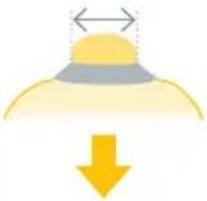
- Using a ruler or measuring tape measure the diameter of your nipple at base in millimeters (mm).
- Based on your measurement, select the breast shield that is slightly larger than your nipple.
- Test your breast shield size to ensure pumping feels comfortable.
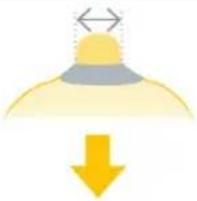
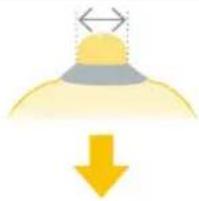
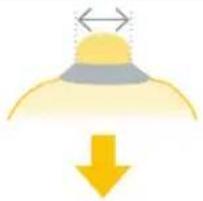
| Your nipple diameter (mm) | |||
| 14 mm or smaller 1 | 5 mm, 16 mm or 17 mm | 18 mm, 19 mm or 20 mm | 21 mm, 22 mm or 23 mm |
 |  |  |  |
 |  |  | 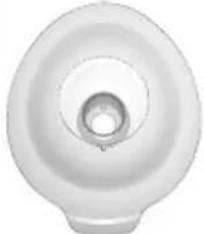 |
| *To be purchased Provided *To be purchased | |||
*To be purchased Provided Provided *To be purchased
*For ordering information about accessories see chapter 14.
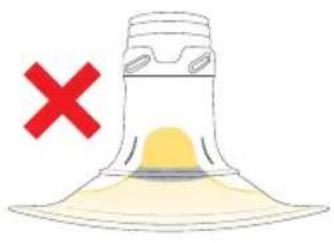
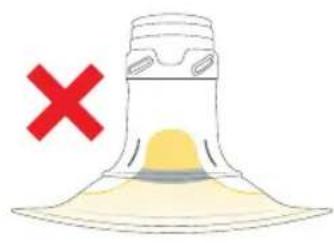
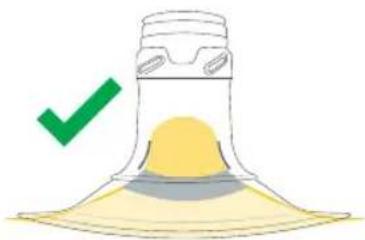
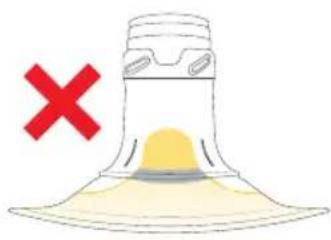
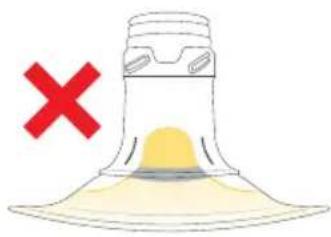
You can use the lines on the breast shield to help you find the right size as described in the images below.
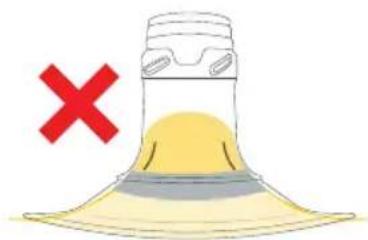
natural_image
Illustration of a yellow conical object with a red 'X' symbol and a blue cross mark, no text or symbols present.Breast shield is too small.
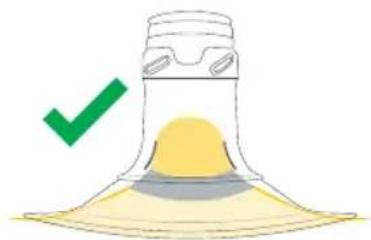
natural_image
Illustration of a yellow conical object with a green checkmark and a small protrusion, no text or symbols present.Correct fit.
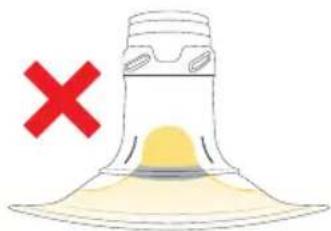
natural_image
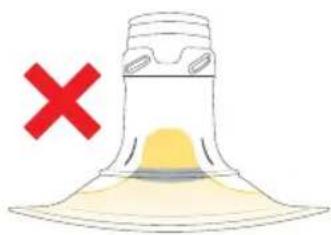
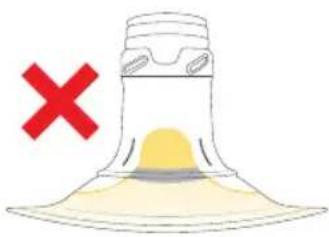
Illustration of a conical object with a yellow base and a red X mark, no text or symbols present.Breast shield is too big.
If you are unsure about correct breast shield sizing please visit www.medela.com/fittingguide or see a lactation consultant/breastfeeding specialist who can help you find the proper fit.
8. Cleaning

CAUTION
To keep the pump parts clean and hygienic:
- Disassemble and wash all parts that are exposed to breast milk immediately after use. This will help to remove breast milk residue and prevent growth of bacteria.
- Only use drinking-quality tap water or bottled water for washing and disinfecting.
- Do not place pump parts directly in the sink to rinse or wash. Use a clean wash basin and a soft sponge used only for infant feeding items.
- Wash your hands thoroughly with soap before washing and disinfecting the device.
- Inspect the parts for any residue after dishwashing. Repeat the washing steps, if necessary.
NOTICE
Take care not to damage parts of the breast pump during cleaning:
- Do not immerse the motor unit in water, pour or spray liquid directly on the motor unit.
- Distilled water is recommended when boiling parts to prevent substantial mineral build-up over time, which may compromise your parts.
- If you notice a white residue on the parts after boiling, your water may have a high mineral content.

Information
By using the dishwasher, parts may become discolored. This will not impact the functioning of the parts.
8.1 Cleaning overview
Motor Unit
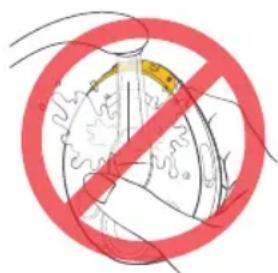
The motor unit is not waterproof. Do not immerse in water.
Wipe before first use and as needed by following the steps below:
- Unplug the breast pump from the power outlet and close the cap of the charging port. Confirm that the breast pump is switched off before cleaning.
- Wipe with a clean towel dampened with warm soapy water.
- Wipe with a clean towel dampened with cold water.
- Wipe dry with a clean, dry towel.
Container, container lid, membrane, valves and breast shields
natural_image
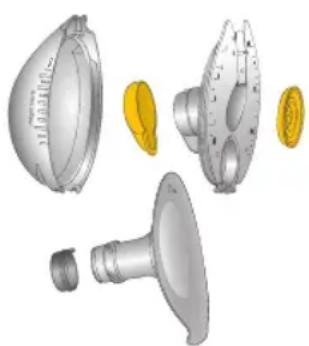
3D renderings of mechanical parts including a dome-shaped component, flange, and threaded shaft (no text or symbols)Always disassemble and wash all parts before first use and after each use.
Disinfect the washed parts before first use and once per day after use.
See chapter 8.2 for detailed cleaning guidance.
8.2 Washing and disinfecting
Washing and disinfecting are two different activities. They must be done separately to protect you and your baby, and to maintain the performance of your breast pump.
Wash (before first use and after each use)
– to clean the parts by physically removing milk residues and other possible contaminants.

Disinfect (before first use and once per day after use) – to effectively lower the number of germs that may be present on the surfaces of the washed parts.
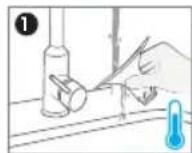
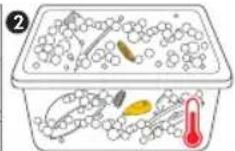
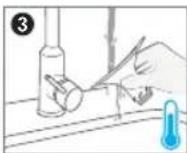
- Rinse the disassembled parts, except for the motor unit, with cold water (approx. 20 °C).
- Wash the parts thoroughly with plenty of warm, soapy water (approx. 30 °C). Use a mild dish soap.
- Rinse the parts with cold water for 10 to 15 seconds (approx. 20 °C).
OR
natural_image
Illustration of a food tray with egg and bowl, no text or symbols present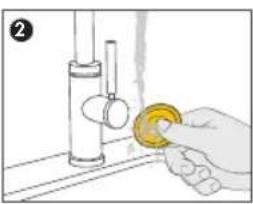
natural_image
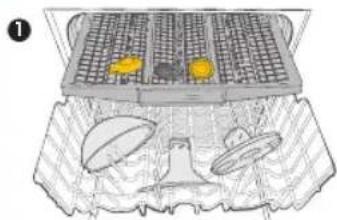
Illustration of a hand holding a yellow object next to a cylindrical tube (no text or symbols)- Wash in dishwasher. Place on the top rack or in the cutlery section in an orientation that prevents the parts from collecting water. Use a commercially available detergent.
- Rinse the soft silicone parts (the yellow membrane, the grey shield valve and the yellow valve) under running water after dishwashing.
natural_image
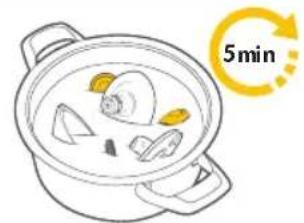
Illustration of a cooking pot with food items and a 5-minute rotation arrow (no text or symbols on the pot itself)Boil the washed parts for at least 5 minutes. Make sure the parts are fully immersed in water and that they are not in direct contact with the bottom of the pot.

Disinfect in microwave using Quick Clean™* bags in accordance with the instructions on the bags.
* Refer to local website/shops for availability in your country.

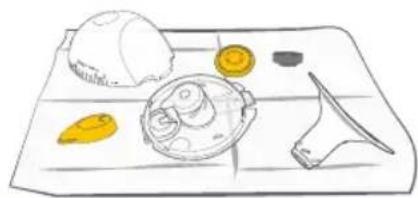
Dry – allow the washed and disinfected parts to completely dry before using or storing them.
natural_image
Illustration of a food tray with a bowl, cheese, and knife (no text or symbols)Allow the parts to air-dry on a clean and dry dish towel or paper towel. It is important that all residual moisture dries completely.
9. Assembling your breast pump
CAUTION
To keep the pump parts clean and hygienic:
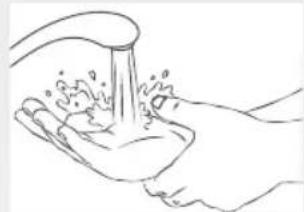
- Wash your hands thoroughly with soap and water before touching any part of the Magic InBra™ breast pump or breasts.
- Dry your hands with a clean hand towel or a single-use paper towel.
- Avoid touching the inside of the milk containers and lids.
natural_image
Line drawing of a hand washing a cup with water splashing (no text or symbols)To avoid health risks and reduce the risk of injury:
- Before each use, visually inspect the individual components for cracks, chips, tears, deterioration and cleanliness. In the event of damage, refrain from using the Magic InBra™ breast pump until the defective part(s) has been replaced.
- Only use clean and dry parts for assembly. Refer to chapter 8 for cleaning.
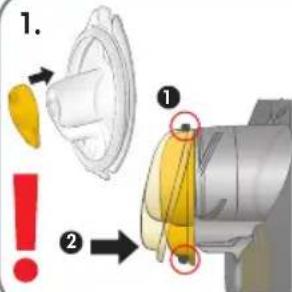
Assemble the yellow valve securely on the container lid.
-
Engage the top hook.
-
Push firmly at the bottom to engage the bottom hook.
-
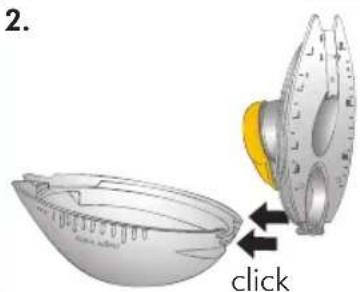
Engage the hinge of the container lid to the container. The yellow valve faces the inside of the container.
natural_image
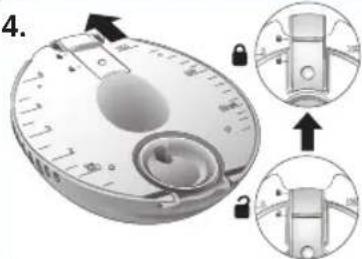
Close-up of a mechanical component with a circular dial and gear mechanism, no visible text or symbolsClose the container lid by pushing it firmly against the container.
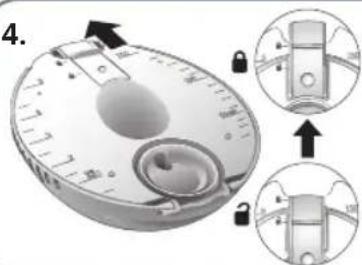
Slide the spout lid along the groove to the closed position.
natural_image
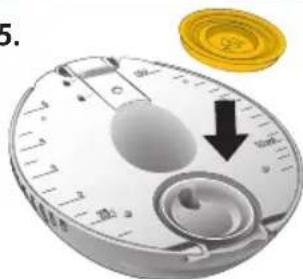
Close-up of a circular dial with a black arrow pointing downward and a gold coin in the corner (no text or symbols)Push the yellow membrane against the container lid to fit it evenly in the groove.
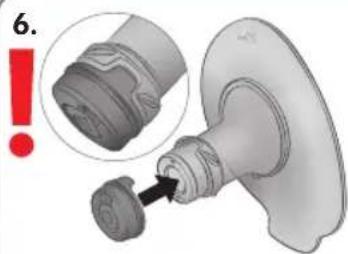
Ensuring that the flap is in the correct position, place the grey shield valve on the breast shield of your size.

Insert the breast shield into the motor unit and press it in on both sides until it clicks into place.
natural_image
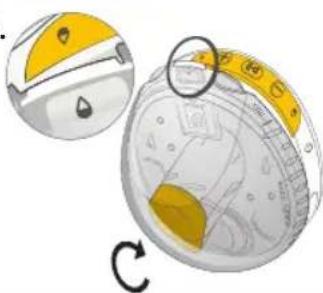
Illustration of a mechanical device with a circular component and a rotating arrow, showing no text or symbols.Place the closed container against the motor unit so that the two drop icons are aligned. Rotate the container clockwise to attach it.
10. Expressing your breast milk
CAUTION
To avoid health risks and reduce the risk of injury:
- Milk expression should not be uncomfortable. Very powerful vacuum, misaligned nipple or incorrect breast shield size can cause trauma to the nipple/breast and decrease milk output. Adjust the breast shield size (see chapter 7) and vacuum as needed.
- Stop using the breast pump if discomfort persists or in the event of negligible milk output. Please contact your healthcare professional or breastfeeding specialist.
- If you experience pain during pumping, break the seal between the breast and the breast shield with your finger and remove the breast pump from your breast.
i Information
- Stimulation phase is a fast pumping mode to stimulate milk flow.
- Expression phase is a slower pumping mode for gentle and efficient milk removal.
- Maximum Comfort Vacuum (MCV) is the highest vacuum setting where pumping still feels comfortable. This is different for every mother and will result in the most efficient milk expression.
- When in Expression phase, increase the vacuum with the + button until pumping feels slightly uncomfortable (not painful). Then decrease the vacuum with one press of the - button. This is your MCV level.
- It is important to identify the MCV during the first pumping session as this vacuum level will be remembered by the breast pump. The breast pump will adjust the vacuum automatically to the MCV level during the next session. While the breast pump adjusts to the MCV level, the + button will be flashing.
- Consider reassessing your MCV each week to ensure you are pumping at your optimal vacuum level.
10.1 Operating your breast pump
The Magic InBra™ breast pump may be worn with your regular nursing bra. Ensure that the bra you are wearing supports the breast pump securely in place while avoiding excessive compression on your breast. Try loosening the bra strap or switching to a more stretchy bra if you experience discomfort.
natural_image
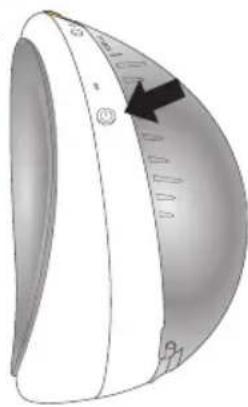
Close-up of a white electronic device with a curved top and circular base, showing a black arrow pointing to the left side (no text or symbols visible)Ensure to turn on the breast pump before inserting the pump in your bra.
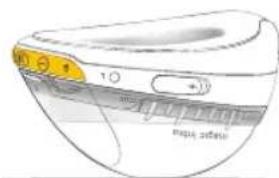
To turn on your breast pump, press and hold the power button until the lights switch on.
natural_image
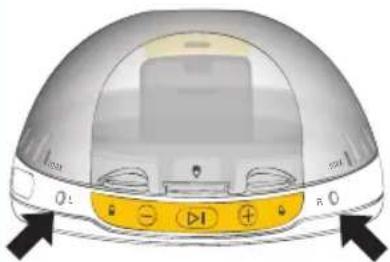
Diagram of a computer monitor with control buttons and indicator lights (no text or symbols)The breast pump can be used on the left breast or the right breast. Press the Left selection button or the Right selection button to select which breast you are going to pump.
LR Flashing white; pumping side to be selected LR Solid white; side has been selected
natural_image
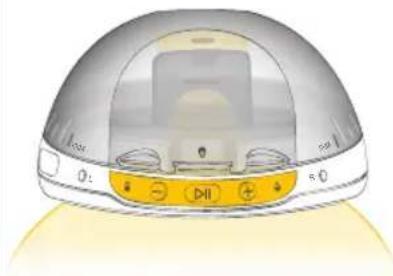
Illustration of a smart home control device with a dome-shaped head and control buttons (no text or symbols)Position the pump on your breast. Ensure that your nipple is centered in the breast shield tunnel.

Tunnel light is on to help you align the nipple.
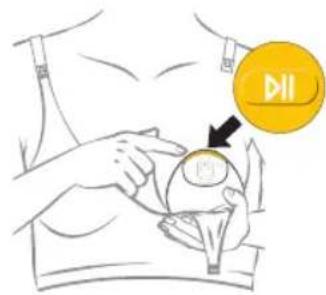
Hold the pump firmly against your breast and press the Start/Pause button. The pump begins in the Stimulation phase. The + button will be flashing while the vacuum is ramping up.

Tunnel light will switch off after 10 sec of pumping.
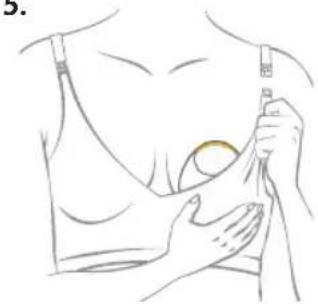
natural_image
Line drawing of a person receiving chest compressions with a bandage (no text or symbols)Secure the pump in place by hooking nursing bra flap over the pump or by adjusting the bra strap.
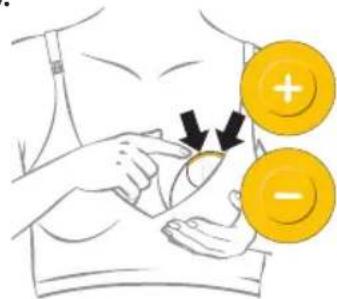
Adjust the vacuum with the + button or the - button.
There are 5 levels available in the Stimulation phase.
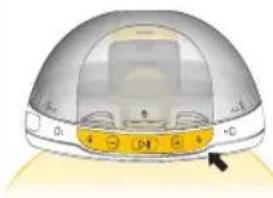
natural_image
Illustration of a dome-shaped electronic device with control buttons and an arrow pointing to the bottom (no text or symbols)When the milk is detected, the pump will switch from the Stimulation to the Expression phase. The + button will be flashing while the vacuum is ramping up. A small noise will be heard when the system fills with milk. This is normal.

Solid white: Milk detected
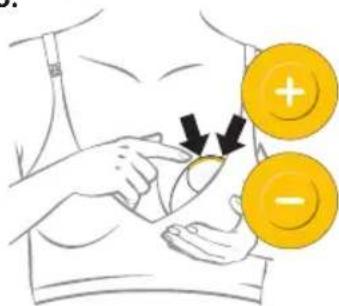
Adjust the vacuum with the + button and the - button to your Maximum Comfort Vacuum level.
There are 10 levels available in the Expression phase.
i Information
- In both Stimulation and Expression phase, the + button and the - button are lit up only when it is possible to adjust the vacuum higher or lower. When the lowest or the highest vacuum level is already reached, the breast pump indicates it with one short vibration.
- Please note, for your comfort, the highest vacuum levels in the Expression phase are available only when there is milk expressed.
- The breast pump will switch automatically to the expression phase as soon as milk is detected. If no milk is detected, the breast pump will switch to the Expression phase after 2 min of pumping in the Stimulation phase. If after 15 min of pumping no milk has been detected the pump will pause automatically.
- Magic InBra™ should not be used while lying down, or engaging in strenuous exercise. The pump will notify with two short vibrations and milk status indicator flashing yellow when there is a risk of leakage.
10.2 Realigning the nipple or switching the side
If you need to realign the nipple or switch the side when milk has not yet been expressed:
- Pause the breast pump by pressing the Start/Pause button.
- Break the latch with your fingers.
- Switch the side (if needed) and press the Left selection button or the Right selection button accordingly.
- Realign the breast pump on your breast.
- Resume pumping by pressing the Start/Pause button again.
If you need to realign the nipple or switch the side while there is already milk expressed follow the steps in section 10.3 to confirm all the milk is collected into the container. Empty the milk from the container before switching the side and starting a new pumping session.
10.3 Finishing your pumping session
i Information
The maximum volume of the container is 150ml. To avoid the container overflowing, it is recommended to finish your pumping session when the milk fill level reaches the max line on the container (130ml). Please note that up to 20ml will be in the breast shield tunnel until collected into the container during step 3 and 4.
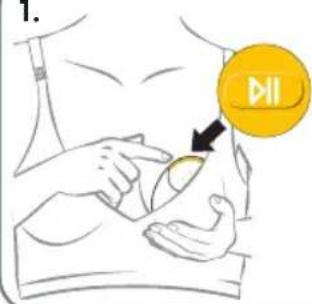
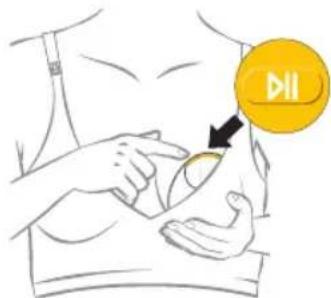
For finishing, first press the Start/Pause button ▷II A slight vacuum remains to prevent leakage.
natural_image
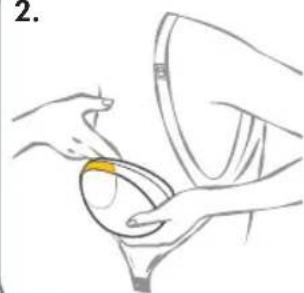
Illustration of hands holding a bowl with a yellow substance inside, no text or symbols presentUnclip your bra supporting the pump against your breast. Lean forward and break the latch with your fingers to gently release your nipple from the pump.
natural_image
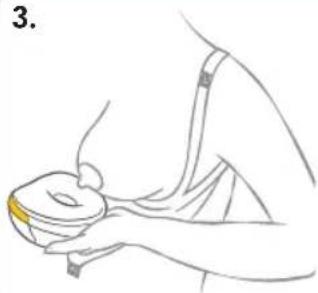
Line drawing of a person holding a cup and bowl, no text or symbols presentHold the pump as shown in the image while removing it from your breast. There will be milk in the breast shield tunnel.
natural_image
Line drawing of a computer monitor with scroll wheel and indicator lights (no text or symbols)Place the pump on a flat surface in a horizontal position for a few seconds. The tunnel light will flash and the remaining milk from the breast shield tunnel will drain into the container. The pump will switch off automatically.
11. Pouring milk from the container
i Information
Do not use the container for milk storage or transportation as it is not designed for this purpose.
natural_image
Diagram of a mechanical component with a circular arrow indicating rotation (no text or symbols present)Once the pump is switched off and no lights are on, rotate the container anti-clockwise to detach it.
natural_image
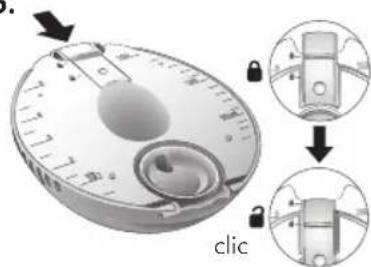
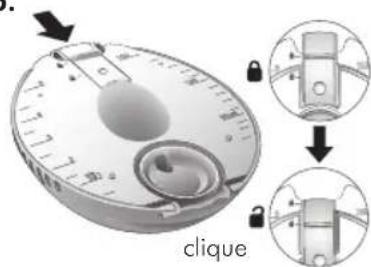
Illustration of a hand holding a yellow circular object with measurement markings (no text or symbols)You can use the volume scale markings on the container lid to read the estimated collected milk volume while holding the container upright.
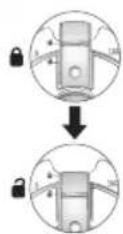
Slide the spout lid down to open position.
click
Ensure to pour the milk from the container into a bottle or breast milk storage bag within few minutes after detaching the container.
natural_image
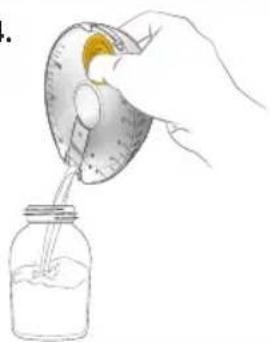
Hand pouring liquid into a jar with a lid (no text or symbols visible)Tilt the container and pour the milk through the pouring spout. After pouring milk from container, disassemble according to the instructions in chapter 6 and clean parts as described in chapter 8.
12. Maintenance and care
12.1 Long-termstorage
When not in use for an extended amount of time, the breast pump will automatically transition into storage mode. To remove from storage mode, plug your breast pump into an external power source and charge it.
Before storing your breast pump for an extended amount of time remember to:
natural_image
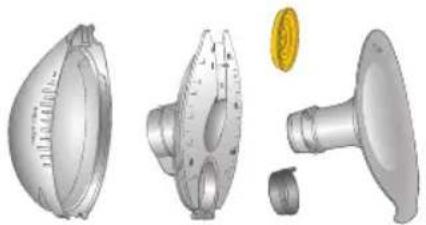
3D mechanical parts including a dome-shaped housing, a gear-like component with a central dial, and a metallic coin (no text or symbols visible)Clean the containers, breast shields, membranes and valves (refer to chapter 8).
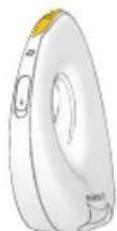
Clean the motor unit (refer to section 8.1).
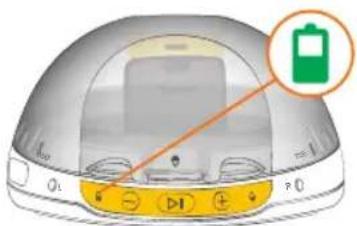
Make sure that the battery status indicator is green.
13. Troubleshooting
13.1 Vibrations and Notifications
One short vibration: When adjusting the vacuum by pressing the + button or the - button Max/Min Vacuum has been reached.
Two short vibrations: The breast pump will pause automatically after 30 minutes. And also, if the pumping session has not been restarted within 8 min of pausing.

Two short vibrations and milk status indicator flashing yellow: Check pumping position. Risk of leaks. Move to upright position.

Two short vibrations and battery status indicator flashing red: Minimum charge level reached. The breast pump will pause automatically. Finish the pumping session and charge the breast pump afterwards.

Flashing blue; ready to be paired with the app

Solid blue; breast pump is connected to the app
13.2 Problems and Solutions
In case of an unexpected behavior of your breast pump check with the troubleshooting table below. Find the issue in bold text, then follow the instructions listed below.
Problem Solution
Power button not working The breast pump does not switch on:
Press the power button for 1 second until the lights turn on.
- Ensure that the breast pump is not on the breast before switching on.
- Ensure that the breast pump is charged and the charging cable is not plugged to a power source.
- Ensure that the breast pump is not overheated. Allow the breast pump to cool down before switching it on.
If the breast pump still doesn't turn on, proceed with a factory reset by pressing and holding the Power and the Start/Pause button for 10 seconds.
NOTE: a factory reset will erase the breast pump memory but all data stored on the app will remain accessible.
The breast pump does not switch off:
The breast pump cannot be switched off during the pumping session. Press Start/pause button to pause the session, break the latch with your fingers and place the breast pump in a horizontal position until the breast pump turns off automatically (could take up to 5 mins).
| Problem Solution | |
| Start/pause button not working | ·Ensure that the breast pump is sufficiently charged (battery status indicator green or yellow).·If the L and R indicators are flashing, select the side. |
| Increase Vacuum (+) button not working | ·The highest vacuum levels can only be reached when milk has completely filled up the breast shield tunnel.·Ensure that the breast shield is completely sealed against the breast and that there is nothing in between the breast and the shield (for eg. clothes, bra etc.)·Ensure to boil all parts except the motor unit before first use for proper sealing.·If the solutions above do not work, disassemble the breast pump. Ensure all parts are clean, dry and not damaged. Reassemble the breast pump correctly, following instructions in chapter 9. |
| Vacuum does not feel strong enough even at high vacuum levels | ·The highest vacuum levels cannot be reached until the milk has filled up the breast shield tunnel completely.·It is possible that the membranes and valves are not assembled correctly. Ensure to assemble all parts according to chapter 9. |
| Yellow valve Grey shield valve | |
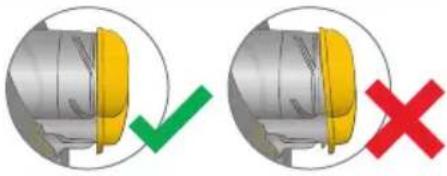 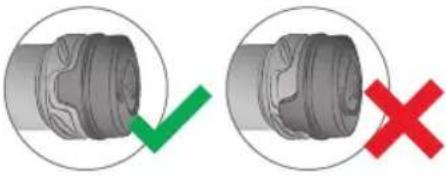 | |
| L or R side selection button not working | ·Switching the side is not possible once milk has been expressed. Refer to chapter 10.2. |
| Pumping is painful or uncomfortable | ·If you experience pain during pumping, break the seal between the breast and the breast shield with your finger and remove the breast pump from your breast.·Ensure that your optimal breast shield size has been selected for maximum efficiency and comfort [see chapter 7].·Ensure you are using your maximum comfort vacuum while pumping [see chapter 10].·Ensure the nipple is centered in the breast shield tunnel.·Ensure that the bra you are wearing supports the breast pump securely in place while avoiding excessive compression on your breast. Try loosening the bra strap or switching to a more stretchy bra if you experience discomfort. |
| The breast pump pauses unexpectedly | ·Ensure that the breast pump is sufficiently charged (battery status indicator green or yellow).·Ensure that the breast shield is completely sealed against the breast and that there is nothing in between the breast and the shield (eg. clothes, bra etc.)·Ensure to boil all parts except for the motor unit before first use for proper sealing.·If after 15 min of pumping no milk has been detected the pump will pause automatically. Break the latch with your fingers and remove the pump from your breast.·If the solutions above do not work, disassemble the breast pump. Ensure all parts are clean, dry and not damaged. Reassemble the breast pump correctly, following instructions in chapter 9. |
| Battery is not charging | ·Ensure the charging cable is plugged in correctly.·Check if the breast pump is overheated. If yes, let it cool down and try to charge again.·Check the charging port for damage. If damaged, do not charge. Please contact Medela Customer Service.·If the breast pump was not used for a long period of time, it will take longer than usual for the breast pump to start charging (battery status indicator flashing green). |
| Unable to detach the container from the motor unit | ·Switch the breast pump on and off and try again. |
| Milk still in the tunnel after finishing pumping session | ·To collect milk from the tunnel into the container, follow the instructions in chapter 10.3.·If a little milk is still left in the tunnel, detach the container from the motor unit holding it in horizontal position. Open the spout lid and pour the milk from the container into the bottle. The remaining milk in the breast shield tunnel will be directed into the bottle while pouring. |
| The motor unit exterior got wet with / or has been submerged in any liquid | ·If a device has been exposed to water or other liquids, do not touch, unplug the device from electrical outlet, turn off and contact manufacturer.·Contact Medela Customer Service. |
| The breast pump exterior got wet | ·If plugged, unplug the breast pump from the power source and turn it off.·Dry off the exterior of the breast pump. |
| Breast pump lights flashing unexpectedly (3 or more flashing at the same time) | The Magic InBraTM breast pump regularly checks its system to ensure everything is working correctly and to detect any unauthorized changes or security breaches. In case of a failure, the pump generates an error and may stop working.·Turn the pump off and proceed with a factory reset by pressing and holding the Power and the Start/Pause button for 10 seconds.·If you have not resolved the problem with your breast pump or you have further questions, please contact Medela Customer Service for assistance. |
Problem Solution
The breast pump battery gets depleted prematurely or unexpected changes in settings occur (e.g. vacuum level changes)
- Turn the pump off and proceed with a factory reset by pressing and holding the Power and the Start/Pause button for 10 seconds.
- If you have not resolved the problem with your breast pump or you have further questions, please contact Medela Customer Service for assistance.
If the device is not functioning as expected, turn the pump off and proceed with factory reset by pressing and holding the Power and the Start/Pause button for 10 seconds.
If you have not resolved the problem with your breast pump or you have further questions, please contact Medela Customer Service. For contact data visit www.medela.com. Under "Country" choose your country.
14. Accessories available for purchase
In case of difficulties in finding your desired accessory, please contact Medela Customer Service. For contact data visit www.medela.com and choose your country. For replacement of lost or defective parts please contact Medela Customer Service. Other Medela products are available at www.medela.com.
Accessories
Article number Product
| Depending on your region, check local website/shops for availability. |
| Magic InBraTM | Breast shields 18mm* |
| Magic InBraTM | Breast shields 21mm* |
| Magic InBraTM | Breast shields 24mm* |
| Magic InBraTM | Breast shields 27mm* |
| Magic InBraTM | Containers |
| Magic InBraTM | Membranes |
| Magic InBraTM | Valves |
| Magic InBraTM | Shield Valves |
* If the result of expression is unsatisfactory or expression is painful, contact your lactation consultant or breast-feeding specialist. A different size of breast shield may help make expression more comfortable and effective.
15. Warranty
Find information on the international warranty on www.medela.com/ewarranty.
16. Disposal
Disposal of your breast pump
At the end of its operating life, separate all the parts of your breast pump.
Breast shields, container, container lid, membranes and valves are made of plastics and may follow separate collection according to local collection and recycling systems.
Motor unit and power adaptor (electronic equipment) may contain hazardous substances and are not allowed to dispose of together with unsorted municipal waste. Electronical and electronic products (EEE) are indicated with the following symbol:

In the European Union, United Kingdom and Switzerland the manufacturer or its vendor must take back EEE waste equipment, other countries may have similar collection and recycling systems. This appliance contains batteries that are non-replaceable and must not be removed for disposal.
NOTICE
Dispose of waste equipment according to local regulations. Inquire at the point of sale or contact your local authority for appropriate collection points for waste equipment. The separate collection and recycling of your waste equipment at the time of disposal will help conserve natural resources and ensure that it is recycled in a manner that protects human health and the environment.
17. Meaning of symbols
The following tables explain the meaning of the symbols found on the product parts and its packaging.
| Indicates the location of the Power button |  | Indicates Start/Pause button | |
| [DD26] | Keep away from rain. Keep in dry conditions. |  | Indicate increase/decrease vacuum buttons |
 | Indicates milk status |  | General safety alert symbol, points to information related to safety |
| [27Y] | Indicates battery status | [87X7] | Indicates the selection of left/right breast for pumping |
| IP22 | Indicates the degree of protection against ingress of foreign objects and moisture. |   | Indicates that this device contains Bluetooth wireless technology. (Trademarks of Bluetooth Special Interest Group (SIG)) |
| [28XV] | Indicates the manufacturer | Indicates compliance with international requirements for protection from electric shock (Type BF applied parts). | |
 | Indicates the authorized representative in the European Community / European Union |  | Indicates the importer |
 | Indicates that the package is capable of being recycled |  | Indicates the date of manufacture |
 | Indicates the catalogue number | [HXX8] | Indicates that the contents of the transport package are fragile and the package shall be handled with care. |
 | Indicates the serial number |  | Indicates the batch code / lot number |
[MKWZ] | The packaging contains products intended to come in contact with food according to Regulation (EC) No 1935/2004Read and follow the instructions for use. |   | Indicates the item is a medical deviceDefines a relative humidity range |
| Defines a temperature range | 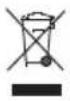 | Do not dispose of electric/electronic devices together with unsorted municipal waste (dispose of the device in accordance with local regulations). | |
 | Defines an atmospheric pressure range |  | Keep away from sunlight |
 | Indicates the material from which an item is made |  | Indicates a carrier that contains unique device identifier information. |
 | Indicates direct current. |  | The Regulatory Compliance Mark indicates the compliance with Australian EMC and safety requirements. |
Country specific
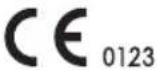 | Indicates compliance with the EU requirements for medical devices |  | Indicates that an item can technically be recycled according to the French AGEC law. |
| [TCAY] | Indicates that the product in the package meets the requirements of Standard GB4806 and is intended to be in direct contact with food. |  | Indicates that an item can be technically recycled according to the Royal Decree 1055/2022 (Spain) |
18. International regulations
18.1 Electromagnetic compatibility (EMC)
The Magic InBra ^™ breast pump complies with all requirements of the relevant standards and regulations with regard to electromagnetic emission and immunity to interference.
WARNING
- Portable wireless communications equipment such as wireless home network devices, mobile phones, cordless telephones and their base stations, walkie-talkies, RFID, other electrical equipment and also including peripherals such as antenna cables and external antennas can affect the electric breast pump and should be kept at a distance of at least 30 cm away from the breast pump including cables. Otherwise, degradation of the performance of this equipment could result.
- Use of USB cables other than those provided by the manufacturer of this device could result in increased electromagnetic emissions or decreased electromagnetic immunity of this equipment and result in improper operation.
18.2 Simplified EU Declaration of Conformity
Hereby, Medela declares that the radio equipment type Magic InBra ^™ is in compliance with Directive 2014/53/EU. The full text of the EU declaration of conformity is available at the following internet address: medela.com/eu-conformity-magic-inbra-pump
19. Technical specifications
Summary of important technical specifications
Vacuum performance:
-75 mmHg to -300 mmHg
45 to 70 cpm
Transmission standard: Bluetooth ^® Low Energy 4.2
Frequency range: 2400-2483.5 MHz
Max. power output: +4 dBm
| Battery capacity and type | 3.7V, 970 mAh (rated) Li-ion |
| Size 126 x 112 x 71 mm | |
| Weight 200 g ±10 g | |
| Ingress protection level IP22 | |
Materials touching skin or coming in contact with milk
- Breast shield: Polypropylene
- Container: Polypropylene
- Container lid: Polypropylene, thermoplastic elastomer
- Yellow membrane, grey shield valve and yellow valve: silicone
- Motor unit: PC/ABS (polycarbonate/acrylonitrile butadiene styrene)
- Yellow buttons area: silicone
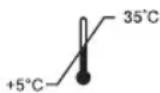
Operating temperature range 5°C to 35°C
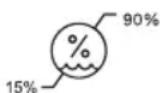
Operating humidity range (15% to 90% relative humidity)
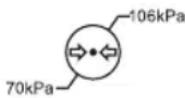
Operating ambient pressure range (70 kPa to 106 kPa)
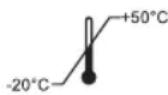
Transport/storage temperature range -20°C to 50°C
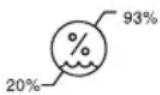
Transport/storage humidity range (20% to 93% relative humidity)
All parts that come in contact with breast milk are not intentionally made of BPA (Bisphenol A).
Recommended power adaptor specifications
USB-A Power supply (USB-A to USB-C cable provided)
5V / 1A DC
Compliant with IEC 62368-1 standard and corresponding to the regional power source regulations.
Battery Information
Battery Type: Rechargeable Li-Ion Battery
Manufacturer: Chongqing VDL Electronics Co., LTD.
Building 1-4, Puli Industrial New Area, Zhaojia Street, Kaizahou District, Chongqing, 405401 China
Email: vdl@gdvdl.com
Capacity: Rated capacity 970mA, Nominal voltage 3.7V, Rated Energy 3.59Wh
Weight: 17g
Made in China
20. Cybersecurity information
This section provides essential information about the security features of the Magic InBra™ breast pump.
i Information
- The charging port on the breast pump is intended for charging purposes only.
- Do not connect the breast pump to any device other than the recommended power adaptor (see Chapter 19 for technical specifications).
- Only use the supplied USB power cable to charge your breast pump.
Scan for the Security Information website.
Note: The information provided via the QR code
supplements but does not replace the Instructions for Use.

Factory reset
You can perform a factory reset by pressing and holding the Power and Start/Pause buttons for 10 seconds. The factory reset allows you to restore your Magic InBra ^™ breast pump to its original factory settings if the device is not functioning as expected and/or other troubleshooting steps have failed.
Note: A factory reset will erase all breast pump memory. If the app is being used, all data stored in the app will remain accessible. For further information on data stored in the app, please refer to the Instructions for Use of the Medela Family Pump Control app.
Software Bill of Materials (SBOM)
To ensure transparency and security, Medela provides upon request a SBOM detailing the components used in the device. Please contact Medela Customer Service for assistance.
Secure firmware updates and patches
The breast pump supports secure firmware updates to address potential security vulnerabilities. Firmware updates are provided through Medela Customer Service. To maintain the device security, it is recommended to check for routine security updates and patches at the following website regularly:
https://www.medela.com/en/footer-content/magic-inbra-security-information.
End of support
Medela will provide device support, including secure firmware updates during the device lifetime. Users can find detailed information about this policy on our website at
https://www.medela.com/en/footer-content/magic-inbra-security-information.
Mobile app compatibility
To ensure optimal performance and security, it is essential to use the mobile app version compatible with your device's operating system. You can check your Medela Family Pump Control app's compatibility by visiting the following website:
https://www.medela.com/en/footer-content/magic-inbra-security-information.
Ensure that your Medela Family Pump Control app is updated to the latest version to benefit from security patches and feature enhancements.
Bluetooth security
The Magic InBra™ breast pump utilizes Bluetooth Low Energy to securely transmit data, enabling remote control of the breast pump's operations and sharing of pump session information through the Medela Family Pump Control app. The Bluetooth Low Energy connection is secured with industry-standard encryption to prevent unauthorized access and data interception, ensuring user privacy and data security, and that the pump can only be controlled within a limited distance. In case the app is being used, and the breast pump has an unstable connection with the app, please refer to the Instructions for Use of the Medela Family Pump Control app to further assistance.
natural_image
3D rendering of a mechanical component with circular features and a rotational arrow indicator (no text or symbols)natural_image
Illustration of a white electronic device with a side view showing its internal structure and an arrow indicating direction (no text or symbols present)natural_image
3D rendered mechanical component with a curved arrow indicating rotation (no text or symbols)natural_image
Close-up of a circular mechanical dial with a black arrow pointing to the dial, next to a gold coin (no text or symbols visible)natural_image
Close-up of a mechanical dial with a circular head and scale markings, showing a rotating knob (no text or symbols visible)natural_image
Diagram showing a spacecraft's internal components being processed into a yellow component (no text or symbols present)natural_image
Diagram of a mechanical component with a yellow arrow indicating rotation (no text or symbols)natural_image
Illustration of a yellow conical object with a red X mark, no text or symbols presentnatural_image
Illustration of a yellow funnel-shaped object with a green checkmark indicating selection (no text or symbols present)Richtiger Sitz.
natural_image
Illustration of a conical object with a yellow base and a red X mark, no text or symbols present.natural_image
3D renderings of mechanical components including a dome-shaped housing, flange, and a conical component (no text or symbols visible)natural_image
Illustration of a food tray with egg yolks and a bowl, no text or symbols present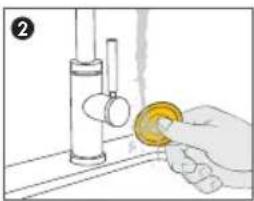
natural_image
Illustration of a hand using a tool to clean or wash a yellow object on a surface (no text or symbols)natural_image
Illustration of a cooking pot with food items and a 5-minute rotation indicator (no text or symbols on the pot itself)natural_image
Illustration of a kitchen utensil with bread, cheese, and knife (no text or symbols)natural_image
Line drawing of a hand washing a cup with water splashing (no text or symbols)natural_image
Close-up of a mechanical dial with a circular head and scale markings, showing a curved arrow indicating rotation (no text or symbols present)natural_image
Mechanical component diagram showing a disassembled part with a magnified inset highlighting a detail (no text or symbols present)natural_image
Illustration of a hand holding a small object with yellow highlights, showing internal components and a circular arrow indicating rotation (no text or symbols)natural_image
Close-up of a white electronic device with a curved body and indicator lights, no visible text or symbols.natural_image
Diagram of a computer monitor with control buttons and indicator lights (no text or symbols)natural_image
Illustration of a dome-shaped device with control buttons and indicator lights (no text or symbols)natural_image
Line drawing of a person applying a cotton swab to another person's chest (no text or symbols)natural_image
3D rendered dome-shaped object with yellow control buttons and a black arrow pointing to the bottom (no text or symbols)natural_image
Illustration of hands holding a small bowl with a yellow object, no text or symbols presentnatural_image
Line drawing of a person receiving a cup on a bottle (no text or symbols)natural_image
Illustration of a mechanical device with a circular component and a curved arrow indicating rotation (no text or symbols)natural_image
Illustration of a hand holding a yellow circular object with measurement markings (no text or symbols)natural_image
Hand pouring liquid into a jar with a yellow object on top (no text or symbols visible)natural_image
Exploded view diagram of a mechanical component showing cross-sections and assembly (no text or labels)Building 1-4, Puli Industrial New Area, Zhaojia Street, Kaizahou District, Chongqing, 405401 China
E-Mail: vdl@gdvdl.com
https://www.medela.com/en/footer-content/magic-inbra-security-information.
Ende des Supports
https://www.medela.com/en/footer-content/magic-inbra-security-information.
https://www.medela.com/en/footer-content/magic-inbra-security-information.
natural_image
3D rendering of a mechanical component with circular features and a rotational arrow indicator (no text or symbols)natural_image
Illustration of a white electronic device with a side view showing its internal structure and an arrow indicating direction (no text or symbols present)natural_image
3D rendered mechanical component with a curved arrow indicating rotation (no text or symbols)natural_image
Close-up of a mechanical dial with a black arrow indicating rotation, next to a gold coin (no text or symbols visible)natural_image
Close-up of a mechanical dial with a black arrow indicating rotation (no text or symbols)natural_image
Illustration of a spacecraft capsule with a yellow highlighted section, shown from an open view (no text or symbols)natural_image
Diagram of a mechanical component with a yellow knob and directional arrow (no text or symbols)natural_image
Illustration of a yellow conical object with a red 'X' symbol and a cross mark, no text or symbols present.natural_image
Illustration of a yellow conical object with a green checkmark indicating selection (no text or symbols present)Taille correcte.
natural_image
Illustration of a conical object with a yellow base and a red X mark, no text or symbols present.natural_image
Exploded view of mechanical components including a flange, housing, and coins (no text or symbols visible)natural_image
Diagram of a cage-like structure with internal compartments and small objects (no text or symbols)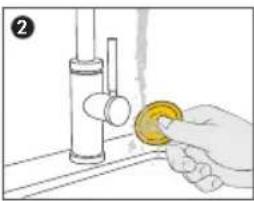
natural_image
Hand cleaning a faucet with a yellow sponge (no text or symbols visible)natural_image
Illustration of a cooking pot with food items and a 5-minute rotation indicator (no text or symbols on the pot itself)natural_image
Illustration of a meal tray with a bowl, coins, cheese, and knife (no text or symbols)natural_image
Line drawing of a hand washing a cup with water splashing (no text or symbols)natural_image
Close-up of a mechanical component with a circular dial and central hub, showing a curved arrow indicating rotation (no text or symbols)natural_image
Mechanical component diagram showing a disassembled part with a magnified inset highlighting a detail (no text or symbols present)natural_image
Illustration of a hand holding a yellow object with a circular arrow indicating rotation (no text or symbols)natural_image
Close-up of a white ergonomic device with a curved handle and control buttons, no visible text or symbols.natural_image
Illustration of a modern computer monitor with control buttons and indicator lights (no text or symbols)natural_image
Illustration of a dome-shaped electronic device with control buttons and indicator lights (no text or symbols)natural_image
Illustration of a person receiving chest compressions with a yellow bandage (no text or symbols)natural_image
Close-up of a transparent dome-shaped device with yellow control buttons and a black arrow pointing to the bottom (no visible text or symbols)natural_image
Illustration of hands holding a bowl with a yellow tag, no text or symbols presentnatural_image
Line drawing of a person holding a bowl, no text or symbols presentnatural_image
Illustration of a helmet with a yellow tag and a circular arrow indicating rotation (no text or symbols)natural_image
Illustration of a hand holding a yellow circular object with measurement markings (no text or symbols)natural_image
Hand pouring liquid into a jar with a lid (no text or symbols visible)natural_image
Three views of a mechanical component: a dome-shaped housing, a cross-section with a dial indicator, and a cylindrical part with a coin for scale (no text or symbols)Building 1-4, Puli Industrial New Area, Zhaojia Street, Kaizahou District, Chongqing, 405401 Chine
E-mail: vdl@gdvdl.com
https://www.medela.com/en/footer-content/magic-inbra-security-information.
Fin d'assistance
https://www.medela.com/en/footer-content/magic-inbra-security-information.
https://www.medela.com/en/footer-content/magic-inbra-security-information.
natural_image
3D rendering of a mechanical component with circular features and a rotational arrow indicator (no text or symbols)natural_image
Illustration of a white electronic device with a side view showing its internal structure and an arrow indicating direction (no text or symbols present)natural_image
3D rendered mechanical component with a curved arrow indicating rotation (no text or symbols)natural_image
Close-up of a circular dial with measurement markings and a gold coin beside it (no readable text or symbols)Retire la membrana amarilla de la tapa del contenedor.
natural_image
Close-up of a mechanical dial with a curved arrow indicating rotation (no text or symbols)natural_image
Diagram showing a spacecraft module being processed into a larger spacecraft (no text or symbols present)Separe la tapa del contenedor de la bisagra.
natural_image
Diagram of a mechanical component with a yellow knob and arrow indicating rotation (no text or symbols)natural_image
Illustration of a yellow dome-shaped object with a red 'X' symbol and a blue cross mark, no text or symbols present.natural_image
Illustration of a yellow conical object with a green checkmark indicating selection (no text or symbols present)Corregir ajuste.
natural_image
Illustration of a conical object with a yellow base and a red X mark, no text or symbols present.natural_image
3D rendered mechanical parts including a dome-shaped component, flange, and a conical nozzle (no text or symbols visible)natural_image
Diagram of a food delivery tray with grating and kitchen utensils (no text or labels)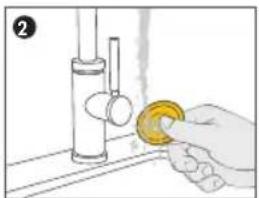
natural_image
Illustration of a hand holding a yellow object over a kitchen sink (no text or symbols)natural_image
Illustration of a cooking pot with three toppings and a 5-minute rotation indicator (no text or symbols on the pot itself)natural_image
Illustration of a food tray with bread, cheese, and utensils (no text or symbols)natural_image
Line drawing of a hand washing a cup with water splashing (no text or symbols)natural_image
Close-up of a mechanical dial with a circular head and scale, showing a curved arrow indicating rotation (no text or symbols)natural_image
Close-up of a circular mechanical dial with a black arrow pointing downward and a gold coin in the corner (no text or symbols)natural_image
3D illustration of a mechanical component with a magnified inset showing a detailed cross-section (no text or symbols)natural_image
Illustration of a hand holding a mechanical component, showing part assembly and close-up view (no text or symbols)clic
natural_image
Illustration of a mechanical component with a circular arrow indicating rotation (no text or symbols)natural_image
3D rendered image of a curved device with control buttons and a black arrow pointing to the side (no text or symbols)natural_image
Diagram of a computer monitor with control buttons and indicator lights (no text or symbols)natural_image
Illustration of a transparent dome-shaped device with control buttons and indicator lights (no text or symbols)natural_image
Line drawing of a person receiving a medical or cosmetic procedure on a chest (no text or symbols)natural_image
Illustration of a computer monitor with a yellow control panel and indicator lights (no text or symbols)natural_image
Illustration of hands holding a small bowl with a yellow band, no text or symbols presentnatural_image
Line drawing of a person performing a medical procedure on a patient's arm (no text or symbols)natural_image
Line drawing of a computer mouse with a yellow scroll wheel and control buttons (no text or symbols)natural_image
Diagram of a mechanical component with a circular arrow indicating rotation (no text or symbols present)natural_image
Hand holding a circular device with a yellow button, no visible text or symbolsnatural_image
Hand pouring liquid into a jar with a lid (no text or symbols visible)natural_image
Exploded view of a mechanical component showing internal parts and a coin for scale (no text or symbols)Building 1-4, Puli Industrial New Area, Zhaojia Street, Kaizahou District, Chongqing, 405401 China
https://www.medela.com/en/footer-content/magic-inbra-security-information.
https://www.medela.com/en/footer-content/magic-inbra-security-information.
https://www.medela.com/en/footer-content/magic-inbra-security-information.
2.3 Contra-indicaties
natural_image
3D rendering of a mechanical component with circular features and a rotational arrow indicator (no text or symbols)natural_image
Illustration of a white electronic device with a side view showing its internal structure and an arrow indicating direction (no text or symbols present)natural_image
3D rendered mechanical component with a curved arrow indicating rotation (no text or symbols)natural_image
Close-up of a circular mechanical dial with a black arrow pointing to the dial, next to a gold coin (no text or symbols visible)natural_image
Close-up of a mechanical dial with measurement scale and directional arrow (no text or symbols)natural_image
Diagram showing a spacecraft's internal components being processed into a larger spacecraft (no text or symbols present)natural_image
Diagram of a mechanical component with a yellow knob and black arrow indicating rotation (no text or symbols)natural_image
Illustration of a yellow dome-shaped object with a red 'X' symbol and a gray band, no text or symbols present.Borstschild is te klein.
natural_image
Illustration of a yellow conical object with a green checkmark indicating selection (no text or symbols present)Goede pasvorm.
natural_image
Illustration of a conical device with a yellow base and red X mark, no text or symbols presentnatural_image
Exploded view of mechanical components including a dome-shaped component, flange, and coins (no text or symbols)natural_image
Illustration of a food delivery tray with egg and dish items (no text or symbols)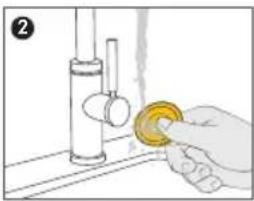
natural_image
Hand cleaning a kitchen sink with a yellow circular object on the surface (no text or symbols visible)natural_image
Simple line drawing of a cooking pot with food items and a 5-minute rotation indicator (no text or symbols on the pot itself)natural_image
Illustration of a meal tray with a bowl, coins, cheese, and knife (no text or symbols)natural_image
Line drawing of a hand washing a cup with water splashing (no text or symbols)natural_image
Close-up of a mechanical dial caliper with a rotating arrow indicating rotation (no text or symbols)natural_image
Mechanical component diagram showing a pin inserted into a housing, with an inset highlighting a detailed detail (no text or symbols present)natural_image
Diagram of a mechanical device with yellow highlighted sections and a circular arrow indicating rotation (no text or symbols)natural_image
3D rendered image of a curved device with a black arrow pointing to its side (no text or symbols visible)natural_image
Top-down view of a modern electronic device with a dome and control buttons (no visible text or symbols)natural_image
Illustration of a dome-shaped electronic device with control buttons and indicator lights (no text or symbols)natural_image
Illustration of a person receiving breast surgery with bandages (no text or symbols)natural_image
Close-up of a transparent dome-shaped device with yellow control buttons and a black arrow pointing to the bottom-right corner (no text or symbols visible)natural_image
Illustration of hands holding a bowl with a yellow substance, no text or symbols presentnatural_image
Line drawing of a person holding a cup and bowl, no text or symbols presentnatural_image
Line drawing of a washing machine with control panel and buttons (no text or symbols)natural_image
Diagram of a mechanical component with a circular base and internal channels, showing a rotation arrow (no text or symbols)natural_image
Hand holding a circular device with a yellow button, no visible text or symbolsnatural_image
Hand pouring liquid into a jar with a yellow object on top (no text or symbols)natural_image
Exploded view of a mechanical component showing internal parts and a coin for scale (no text or symbols)Controleer of de accustatusindicator groen is.
13. Problemen oplossen
13.1 Trillingen en meldingen
Gebouw 1-4, Puli Industrial New Area, Zhaojia Street, Kaizahou County, Chongqing, 405401 China
E-mail: vdl@gdvdl.com
Inhoud: Nominaal vermogen 970mA, nominale spanning 3,7 V, nominale energie 3,59 Wh
Gewicht: 17 g
Software Bill of Materials (SBOM)
https://www.medela.com/en/footer-content/magic-inbra-security-information.
https://www.medela.com/en/footer-content/magic-inbra-security-information.
https://www.medela.com/en/footer-content/magic-inbra-security-information.
natural_image
3D rendering of a mechanical component with circular features and a rotational arrow indicator (no text or symbols)natural_image
Illustration of a white electronic device with a side view showing its internal structure and an arrow indicating direction (no text or symbols present)natural_image
3D rendered mechanical component with a curved arrow indicating rotation (no text or symbols)natural_image
Close-up of a circular mechanical dial with a black arrow pointing to the dial, next to a gold coin (no text or symbols visible)natural_image
Close-up of a mechanical dial with a circular head and scale markings, showing a curved arrow indicating rotation (no text or symbols present)natural_image
Diagram showing a spacecraft's internal components being processed from a yellow component, with no visible text or symbols.natural_image
Diagram of a mechanical component with a yellow knob and directional arrow (no text or symbols)natural_image
Illustration of a yellow dome-shaped object with a red 'X' symbol and a cross mark, no text or symbols present.natural_image
Illustration of a yellow conical object with a green checkmark indicating selection (no text or symbols present)Dimensioni giuste.
natural_image
Illustration of a conical device with a yellow base and red X mark, no text or symbols presentnatural_image
3D rendered mechanical parts including a dome-shaped component, flange, and a conical tool (no text or symbols visible)natural_image
Diagram of a food delivery container with labeled components (no text or symbols)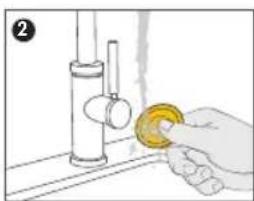
natural_image
Hand cleaning a faucet with a yellow sponge (no text or symbols visible)natural_image
Illustration of a cooking pot with food items and a 5-minute rotation indicator (no text or symbols on the pot itself)natural_image
Illustration of a food tray with a bowl, coins, bread, and knife (no text or symbols)natural_image
Line drawing of a hand washing a cup with water splashing (no text or symbols)natural_image
Close-up of a mechanical dial caliper with a circular head and arrow indicating rotation (no text or symbols)natural_image
Mechanical component diagram showing a disassembled part with a magnified inset highlighting a detail (no text or symbols present)natural_image
Illustration of a circular device with a dial and a magnified view showing internal components (no text or symbols)natural_image
Close-up of a white electronic device with a curved body and a black arrow pointing to the left side (no visible text or symbols)natural_image
Illustration of a computer monitor with control buttons and indicator lights (no text or symbols)natural_image
Illustration of a transparent dome-shaped device with control buttons and indicator lights (no text or symbols)natural_image
Line drawing of a person receiving breast surgery with bandages (no text or symbols)natural_image
Illustration of a dome-shaped electronic device with control buttons and an arrow pointing to the bottom (no text or symbols)natural_image
Illustration of hands pouring liquid into a container (no text or symbols)natural_image
Line drawing of a person holding a cup and a bowl, no text or symbols presentnatural_image
3D rendering of a mechanical component with a circular base and internal cutouts, showing a circular arrow indicating rotation (no text or symbols present)natural_image
Illustration of a hand holding a yellow circular object with measurement markings (no text or symbols)natural_image
Illustration of a hand pouring liquid into a jar with a yellow object inside (no text or symbols)natural_image
Exploded view of a mechanical component showing internal parts and a separate view with a gold coin (no text or symbols)Building 1-4, Puli Industrial New Area, Zhaojia Street, Kaizahou District, Chongqing, 405401 Cina
E-mail: vdl@gdvdl.com
https://www.medela.com/en/footer-content/magic-inbra-security-information.
https://www.medela.com/en/footer-content/magic-inbra-security-information.
https://www.medela.com/en/footer-content/magic-inbra-security-information.
natural_image
3D rendering of a mechanical component with circular features and a rotational arrow indicator (no text or symbols)natural_image
Illustration of a white electronic device with a side view showing its internal structure and an arrow indicating direction (no text or symbols present)natural_image
3D rendered mechanical component with a curved arrow indicating rotation (no text or symbols)natural_image
Close-up of a mechanical dial with a black arrow indicating rotation, next to a gold coin (no text or symbols visible)Retire a membrana amarela da tampa do recipiente.
natural_image
Close-up of a mechanical dial with a circular head and scale markings, showing a curved arrow indicating rotation (no text or symbols present)natural_image
Diagram showing a spacecraft's internal components being processed from a yellow component, with no visible text or symbols.natural_image
Diagram of a mechanical component with a yellow-handled knob and arrow indicating rotation (no text or symbols)Separe a válvula amarela da tampa do recipiente.
natural_image
Illustration of a yellow dome-shaped object with a red X mark, no text or symbols presentnatural_image
Illustration of a yellow conical object with a green checkmark and a gray base, no text or symbols present.Tamanho correto.
natural_image
Illustration of a conical object with a yellow base and a red X mark, no text or symbols present.natural_image
3D rendered mechanical parts including a dome-shaped component, flange, and a threaded fitting (no text or symbols visible)natural_image
Diagram of a food delivery container with grating and kitchen items (no text or labels)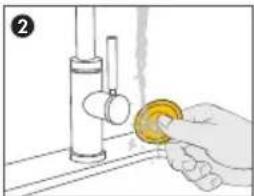
natural_image
Hand washing a yellow object from a sink (no text or symbols visible)natural_image
Simple line drawing of a pot with food items and a 5-minute rotation indicator (no text or symbols on the pot itself)Desinfete no microondas usando sacos
natural_image
Illustration of a food tray with a bowl, coins, cheese, and knife (no text or symbols)natural_image
Line drawing of a hand washing a cup with water splashing (no text or symbols)natural_image
Close-up of a mechanical dial with a circular head and scale, showing a curved arrow indicating rotation (no text or symbols)Fecha a tampa do recipiente empurrando-a firmemente contra o recipiente.
natural_image
3D mechanical component diagram showing a pin inserted into a housing, with an inset highlighting a detail (no text or symbols present)natural_image
Illustration of a mechanical device with yellow components and a circular arrow indicating rotation (no text or symbols)natural_image
3D rendered image of a white computer mouse with control knob and indicator lights (no text or symbols)natural_image
Diagram of a computer monitor with control buttons and indicator lights (no text or symbols)natural_image
Close-up of a modern, dome-shaped electronic device with control buttons and an arrow pointing to the bottom (no visible text or symbols)natural_image
Illustration of hands holding a bowl with a yellow object, no text or symbols presentnatural_image
Line drawing of a person receiving breast surgery with a cup (no text or symbols)natural_image
Diagram of a computer monitor with control buttons and display screen (no text or symbols)natural_image
Diagram of a mechanical device with a circular component and a curved arrow indicating rotation (no text or symbols)natural_image
Hand holding a yellow circular object with a dial, no text or symbols visiblenatural_image
Illustration of a hand pouring liquid from a container into a jar (no text or symbols)natural_image
3D mechanical parts including a dome-shaped component, a cross-section of a mechanical part, and a separate view with a coin for scale (no text or symbols)https://www.medela.com/en/footer-content/magic-inbra-security-information.
Fim da assistência
https://www.medela.com/en/footer-content/magic-inbra-security-information.
6340 Baar, Switzerland
Phone: +41 41 562 51 51
www.medela.com

85386 Eching, Germany

UK Responsible Person:
Medela UK Ltd.
Unit 3, Huntsman Drive,
Northbank Industrial Park, Irlam,
Manchester M44 5EG
United Kingdom
Phone +44 161 776 0400
Fax +44 161 776 0444
info@medela.co.uk
www.medela.co.uk
International Sales
Medela AG
Lättichstrasse 4b
6340 Baar
Switzerland
Phone +41 41 562 51 51
www.medela.com
Germany
Netherlands & Belgium
Medela Benelux BV
Uilenwaard 31
5236 WB 's-Hertogenbosch
The Netherlands
Phone +31 73 690 40 40
Fax +31 73 690 40 44
info@medela.nl
info@medela.be
www.medela.nl
www.medela.be
Spain & Portugal
© Medela AG ref. master doc. 101046628/D,
101046631/2025-03/C
Subject to modifications

101046806



- Important safety information
- Please read all instructions before using this product. Keep these instructions for future reference.
- WARNING
- CAUTION
- NOTICE
- Information
- To avoid fire, electric shock, or serious burns:
- To avoid health risks and reduce the risk of severe injury:
- To avoid fire or burns:
- To avoid health risks and reduce the risk of injury:
- i Information
- Contents
- Important safety information 3
- Indications and contraindications 6
- Product description 6
- Getting started 8
- Charging the breast pump 8
- Disassembling your breast pump 9
- Selecting the correct breast shield size 10
- Cleaning 11
- Assembling your breast pump 13
- Expressing your breast milk 14
- Pouring milk from the container 17
- Maintenance and care 17
- Troubleshooting 18
- Accessories available for purchase 21
- Warranty 21
- Disposal 21
- Meaning of symbols 22
- International regulations 23
- Technical specifications 24
- Cybersecurity information 25
- Indications and contraindications
- Intended Use / Purpose
- Indications for use
- Contraindications
- Product description
- Getting started
- Charging the breast pump
- Disassembling your breast pump
- Selecting the correct breast shield size
- Cleaning
- To keep the pump parts clean and hygienic:
- Take care not to damage parts of the breast pump during cleaning:
- Cleaning overview
- Motor Unit
- Container, container lid, membrane, valves and breast shields
- Washing and disinfecting
- Wash (before first use and after each use)
- Assembling your breast pump
- Expressing your breast milk
- Operating your breast pump
- Realigning the nipple or switching the side
- Finishing your pumping session
- Pouring milk from the container
- Maintenance and care
- Long-termstorage
- Troubleshooting
- Vibrations and Notifications
- Problems and Solutions
- Problem Solution
- The breast pump does not switch off:
- Accessories available for purchase
- Accessories
- Warranty
- Disposal
- Disposal of your breast pump
- Meaning of symbols
- International regulations
- Electromagnetic compatibility (EMC)
- Simplified EU Declaration of Conformity
- Technical specifications
- Summary of important technical specifications
- Materials touching skin or coming in contact with milk
- Recommended power adaptor specifications
- Battery Information
- Cybersecurity information
- Factory reset
- Software Bill of Materials (SBOM)
- Secure firmware updates and patches
- End of support
- Mobile app compatibility
- Bluetooth security
- Ende des Supports
- Fin d'assistance
- Contra-indicaties
- Problemen oplossen
- Trillingen en meldingen
- Fim da assistência
- UK Responsible Person:
- International Sales
- Germany
- Netherlands & Belgium
- Spain & Portugal
Brand : MEDELA
Model : Magic InBra
Category : Breast pump