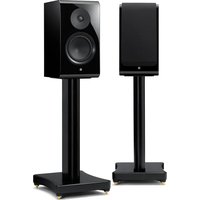
SPS-800A - Speaker Stand YAMAHA - Free user manual and instructions
Find the device manual for free SPS-800A YAMAHA in PDF.


| Product Type | Speaker Stand |
| Brand | Yamaha |
| Model | SPS-800A |
| Dimensions (W × H × D) | 320 × 625 × 404 mm (spikes included) |
| Weight | 11.1 kg |
| Material | Wood |
| Compatible Speakers | Yamaha NS-800A, NS-600A |
| Supplied Accessories | Speaker mounting screws × 2, spikes × 4 |
| Mounting Method | Hand-tighten speaker mounting screws |
| Adjustable Feet | Yes, with spikes or rubber feet |
| Stability | Improved by spikes on carpet; foot adjustment for leveling |
| Safety | Do not sit or hang; secure cables; two-person assembly |
| Care and Cleaning | Soft dry cloth; avoid chemicals |
| Condensation Precautions | Wipe immediately if condensation occurs |
| Avoid Moisture | Do not expose to rain, water sources, or damp environment |
| Operating Temperature | Avoid direct sunlight, extreme temperatures |
| Repairability | Have inspected by a Yamaha dealer or qualified technician |
| Warranty | Refer to supplied documentation |
| Rating Plate Location | Under the mounting plate |
| Intended Use | Speaker stand for domestic use |
Frequently Asked Questions - SPS-800A YAMAHA
User questions about SPS-800A YAMAHA
0 question about this device. Answer the ones you know or ask your own.
Ask a new question about this device
Download the instructions for your Speaker Stand in PDF format for free! Find your manual SPS-800A - YAMAHA and take your electronic device back in hand. On this page are published all the documents necessary for the use of your device. SPS-800A by YAMAHA.
USER MANUAL SPS-800A YAMAHA
Read this first....3
PRECAUTIONS ....3
Part names, accessories and specifications....6
Installing the spikes....7
Installation....8
Thank you for selecting this Yamaha product. SPS-800A is a speaker stand for use with Yamaha speakers NS-800A and NS-600A.
NOTE
- The contents of this manual apply to the latest specifications as of the publishing date.
- The latest manual (PDF) can be downloaded from the following Yamaha website.
https://download.yamaha.com/
PRECAUTIONS
PLEASE READ CAREFULLY BEFORE USE. BE SURE TO FOLLOW THESE INSTRUCTIONS.
The precautions listed below are to prevent risk of harm to the user and others, as well as to prevent property damage, and to help the user use this product properly and safely. Be sure to follow these instructions.
After reading this manual, be sure to keep it in a safe place where it can be referenced at any time.
- Be sure to request inspections or repairs from the dealer where you purchased the unit or from qualified Yamaha service personnel.
- Yamaha cannot be held responsible for injury to you or damage of the products caused by improper use or modifications to the product.
- This product is for ordinary homes. Do not use for applications requiring high reliability, such as managing lives, health care or high-value assets.

WARNING
This content indicates “risk of serious injury or death.”
If you notice any abnormality
- If there is a crack or damage in the product, immediately request an inspection or repair from the dealer where you purchased the product or from qualified Yamaha service personnel. Continued use may cause the product to fall or tip over, resulting in injuries or damage.
Installation
- Assemble and install in the manner instructed in the manual. Falling or toppling may result in injury or damage.
- Confirm that the finished installation is safe and secure. Also, carry out safety inspections periodically. Failure to observe this may cause devices to fall and result in injury.
- Always fix the speaker cable to a wall or similar. If you catch your feet or hands on the cable, the speakers may fall or overturn, causing malfunctions or injuries.
Do not disassemble
- Do not modify this product. Failure to observe this may cause injury, or damage.
Fire warning
- Do not place any burning items or open flames near the product, since they may cause a fire.
Handling
- Keep small parts out of the reach of infants. Your children may accidentally swallow them.
- Be careful not to drop or apply strong impact to this product. Failure to observe this may cause damage.
- Do not use for purposes other than speaker stand. Otherwise, damage or injuries may result.

CAUTION
This content indicates "risk of injury."
Installation
- Do not place the product in an unstable position where it might accidentally drop or fall over and cause injuries.
- Do not install the product in other ways than indicated. Failure to observe this may cause damage or for the product to fall and cause injury.
- Avoid being near the product during a disaster, such as an earthquake. Since the product may turn over or fall and cause injury, quickly move away from the product and go to a safe place.
- When transporting or moving the product always use two or more people. Attempting to lift the product by yourself may damage your back, result in other injury, or cause damage to the product itself.
Handling caution
- Do not do the following:
- Stand on or sit on the product.
- Place the product in a stack.
- Apply unreasonable force to the product.
– Hang on the product.
– Lean against the product.
Failure to observe this may cause injuries or damage to the product.
NOTICE
Indicates points that you must observe in order to prevent product deformation or damage to the product and so on.
Installation
- Do not use this product in a location that is exposed to direct sunlight that becomes extremely hot, such as near a heater, or extremely cold, or that is subject to excessive dust or vibration. Failure to observe this may cause the product's panel to become deformed, the internal components to malfunction, or for operation to become unstable.
- Do not install the product in places where it may come into contact with corrosive gases or salt air or places that have excessive smoke or steam. Doing so may result in deformation or damage to the product.
- Do not expose the product to rain, use it near water or in damp or wet conditions. Doing so may result in damage to the product.
- Do not place on the product any containers (such as vases, bottles or glasses) containing liquids. Doing so may result in damage to the product.
Handling
- Do not place vinyl, plastic, or rubber products on this product. Failure to observe this may cause discoloration or deformation of this product.
Maintenance
- If the temperature or humidity changes drastically, water droplets (condensation) may form on the product surface. If water droplets form, immediately wipe them off with a soft cloth. If water droplets are left on the product, they may be absorbed into the wooden parts, causing deformation.
- When cleaning the product, use a dry, soft cloth. Using chemicals such as benzine or thinner, cleaning agents, or chemical scrubbing cloths can cause discoloration or deformation.
Disposal or transfer
- If you plan to transfer ownership of this product, include this document and the supplied accessories along with the product.
- Follow the rules of your local authority to dispose of this product and its accessories.
Information
About content in this manual
- This manual is for the users of this unit.
- This manual uses the following signal words for the important information:

WARNING
This content indicates “risk of serious injury or death.”

CAUTION
This content indicates “risk of injury.”
NOTICE
Indicates points that you must observe in order to prevent product failure, damage or malfunction and data loss, as well as to protect the environment.
NOTE
Indicates notes on instructions, restrictions on functions, and additional information that may be helpful.
About the name plate of this product
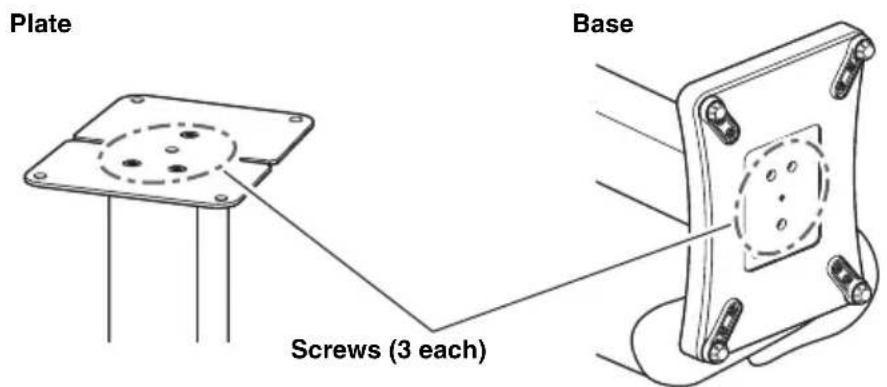
Product information, such as the model name (product number), manufacturing number (serial number), and power requirements, is displayed on or near the name plate on the underside of the speaker mounting plate (page 6).
You should note this serial number in the space provided below and retain this manual as a permanent record of your purchase to aid identification in the event of theft.
Model No.
Serial No.
The illustrations in this manual are for instructional purposes only.
Part names, accessories and specifications
■ Part names
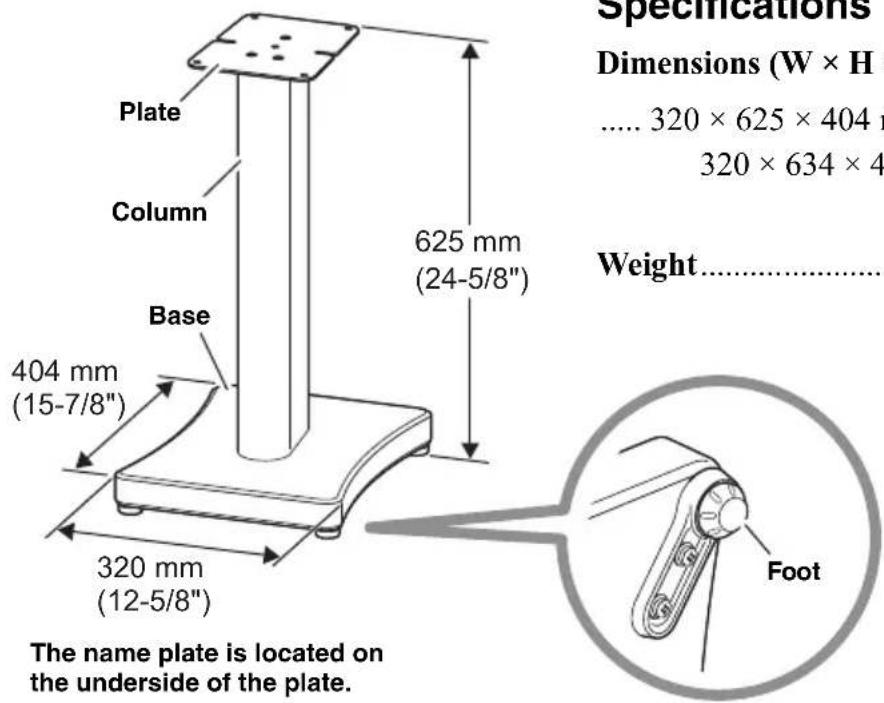
Specifications
Dimensions (W × H × D)
$$ \dots 3 2 0 \times 6 2 5 \times 4 0 4 \mathrm{mm} (1 2 - 5 / 8 ^ {\prime \prime} \times 2 4 - 5 / 8 ^ {\prime \prime} \times 1 5 - 7 / 8 ^ {\prime \prime}) $$
$$ 3 2 0 \times 6 3 4 \times 4 0 4 \mathrm{mm} (1 2 - 5 / 8 ^ {\prime \prime} \times 2 5 ^ {\prime \prime} \times 1 5 - 7 / 8 ^ {\prime \prime}) $$
(including spikes)
Weight....11.1 kg (24.6 lb)
* The contents of this manual apply to the latest specifications as of the publishing date. To obtain the latest manual, access the Yamaha website then download the manual file.
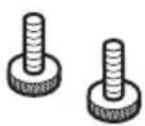
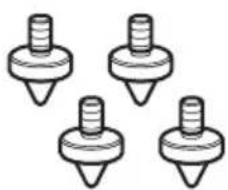
■ Accessories
Speaker mounting screw × 2 Spike × 4
natural_image
Four identical screwdrivers arranged in a row (no text or symbols)
CAUTION
• To prevent accidental ingestion, keep spikes that are not used out of the reach of children.
Check before use
- This product is made with wooden parts. Screws may become loose due to expansion/contraction of the wood caused by environmental changes or due to vibration during transportation. If a screw becomes loose, retighten it with a Phillips screwdriver.
Installing the spikes
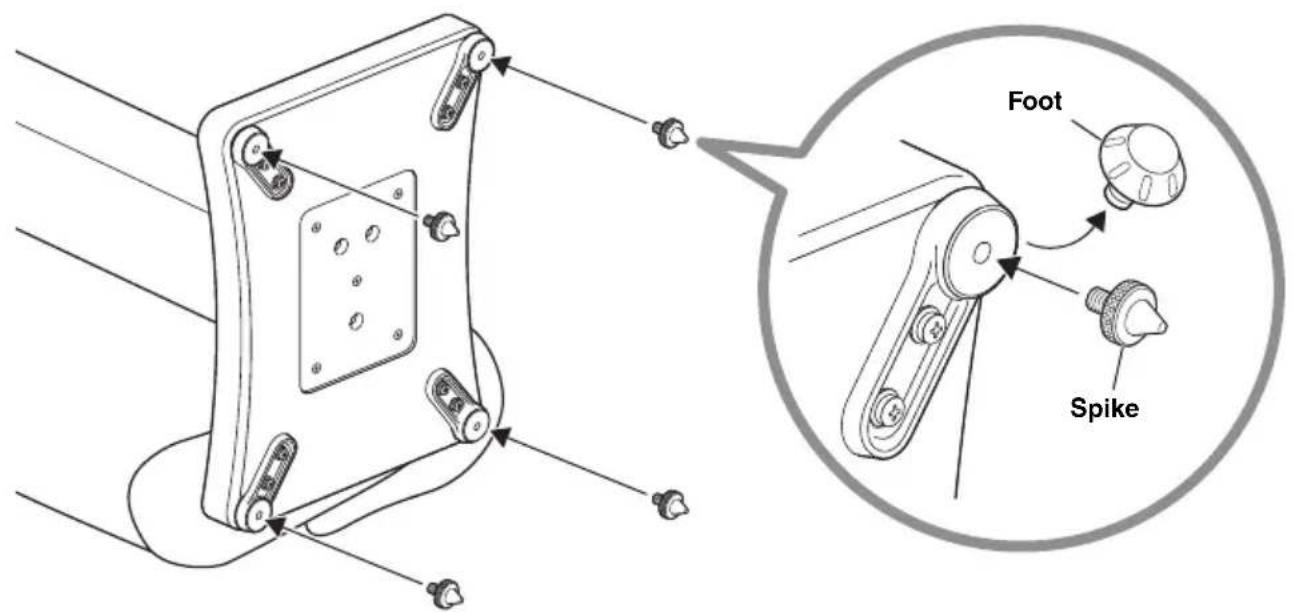
When setting up this speaker stand on a thick carpet, etc., installing the spikes can improve the sound quality and reduce wobbling. Follow the steps below to install the spikes.
1 Lay the speaker stand on its side.
First, spread out a blanket or soft cloth on a level surface. Next, place the speaker stand on top, and then lay it on its side.
2 Remove the feet from the base.
3 Screw the spikes into the screw holes in the base.
Since wobbling is reduced by adjusting how much the spikes are screwed in, do not screw them in too tightly.
NOTICE
- Allowing the tips of the spikes to drag may scratch the floor. Be careful when installing the speaker or moving the speaker stand.
- Due to the weight of the speaker stand and speaker, marks may be left on the floor or carpet.
Installation
Place the speaker stand at the setup location, and then install the speaker. When installing the speaker, also refer to its owner's manual.

CAUTION
- Observe the following to prevent damage or injuries caused by the speaker stand tipping over.
- Two people should grip the column when moving the speaker stand to its setup location.
- Install the speaker after setting up the speaker stand. Then, connect the speaker cables to the speaker.
- Be sure to remove the speaker from the speaker stand before moving it to or setting it up in a different location.
1 Place the speaker stand at the setup location.
The stand has a front and back.
If the speaker stand wobbles, slightly tilt it and turn the feet/spikes to adjust them so that it no longer wobbles.

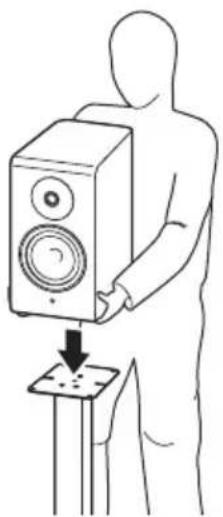
2 Place the speaker on the plate of the speaker stand.
natural_image
Line drawing of a person using a speaker to press a small electronic device (no text or symbols present)
CAUTION
- When placing the speaker on the speaker stand, be sure not to pinch your fingers. Otherwise, injuries may result.
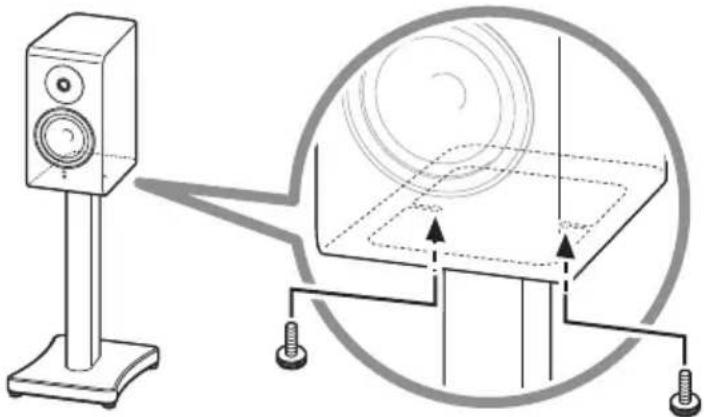
3 Secure the speaker with the speaker mounting screws.
Align the screw holes in the bottom of the speaker with the holes in the plate, and then insert the speaker mounting screws into the screw holes from the underside of the plate and tighten them. Tighten the two screws (one on the left and one on the right) by hand.
natural_image
Diagram showing a speaker mounted on a stand next to a circular diagram with arrows indicating motion or alignment (no text or symbols present)NOTICE
- During this procedure, hold the speaker to prevent it from falling off the speaker stand.
- Be sure to use the included speaker mounting screws to prevent the speaker from falling off.
- Do not overtighten the speaker mounting screws. (Do not use tools, etc.) Otherwise, the speaker stand or speaker may become damaged or deformed.
- Do not drag the speaker across the plate. Otherwise, the bottom surface of the speaker or top surface of the plate may become scratched or peel off.
This completes the installation of the speaker stand.
NOTE
- Due to the material characteristics, the wood of the NS-800A and NS-600A will shrink. In addition, the speaker mounting screws may become loose due to vibrations caused by music playback. If that occurs, retighten the screws.
To adjust the feet/spikes after the speaker has been installed
If the speaker stand wobbles after the speaker has been installed, turn the feet/spikes to adjust them so that it no longer wobbles.
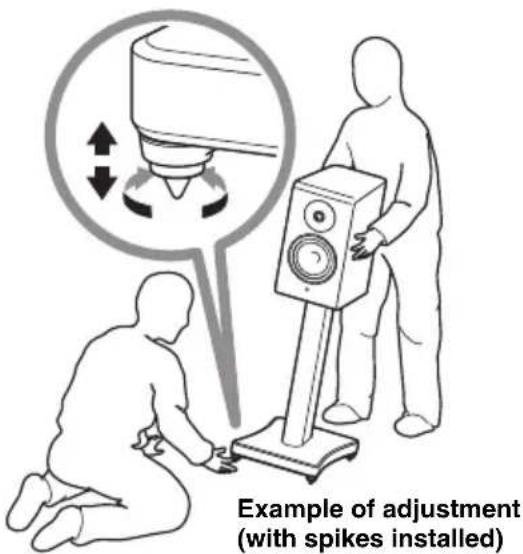

CAUTION
- Tilting the speaker and stand to adjust the feet/spikes requires two or more people to support the assembly. Otherwise, the speaker and stand may fall or tip over, causing injuries or damage.
- Do not loosen the feet/spikes too much. If they are loosened too much, they may come off during use, causing the speaker and stand to fall or tip over, resulting in injuries or damage.
À lire en priorité
Table des matières
natural_image
Four identical screwdrivers arranged in a row (no text or symbols)
ATTENTION
AVIS
natural_image
Line drawing of a person using a speaker to press down an electronic device (no text or symbols present)
ATTENTION
natural_image
Diagram showing a speaker mounted on a stand next to a circular diagram with arrows indicating motion or alignment (no text or symbols present)AVIS
Spikes anbringen....23
Montage 24
natural_image
Five identical screwdrivers arranged in a row (no text or symbols)
VORSICHT
natural_image
Line drawing of a person using a speaker to press down an electronic device (no text or symbols present)
VORSICHT
natural_image
Diagram showing a speaker mounted on a stand next to a circular diagram with arrows indicating motion or alignment (no text or symbols present)ACHTUNG
https://download.yamaha.com/
FÖRSIKTIGHETSÅTGÄRDER
LÄS NOGGRANT INNAN ANVÄNDNING. FÖLJ DESSA INSTRUKTIONER.
natural_image
Four identical screwdrivers arranged in a row (no text or symbols)
FÖRSIKTIGHET
natural_image
Line drawing of a person using a speaker to press down an electronic device (no text or symbols present)
FÖRSIKTIGHET
natural_image
Diagram showing a speaker mounted on a stand next to a circular diagram with arrows indicating motion or alignment (no text or symbols present)MEDDELANDE
Dimensioni (L × A × P)....320 × 625 × 404 mm
320 × 634 × 404 ~mm
(inclusi i punzoni)
Peso 11,1 kg
natural_image
Five identical screwdrivers arranged in a row (no text or symbols)
ATTENZIONE
natural_image
Line drawing of a person using a speaker to press down an electronic device (no text or symbols present)
ATTENZIONE
natural_image
Diagram showing a speaker mounted on a stand next to a circular diagram with arrows indicating motion or alignment (no text or symbols present)AVVISO
https://download.yamaha.com/
PRECAUCIONES
ANTES DE USAR EL PRODUCTO, ASEGÚRESE DE LEER DETENIDAMENTE Y SEGUIR ESTAS INSTRUCCIONES.
natural_image
Four identical screwdrivers arranged in a row (no text or symbols)
ATENCIÓN
natural_image
Line drawing of a person using a speaker to press down an electronic device (no text or symbols present)
ATENCIÓN
natural_image
Diagram showing a speaker mounted on a stand next to a circular diagram with arrows indicating motion or alignment (no text or symbols present)AVISO
natural_image
Four identical mechanical components with threaded ends, arranged in a 2x2 grid (no text or symbols)
VOORZICHTIG
LET OP
natural_image
Line drawing of a person using a speaker to press down an electronic device (no text or symbols present)
VOORZICHTIG
natural_image
Diagram showing a speaker mounted on a stand next to a circular diagram with arrows indicating motion or alignment (no text or symbols present)LET OP
https://download.yamaha.com/
PRECAUÇÕES
LEIA ATENTAMENTE ANTES DE USAR. CERTIFIQUE-SE DE SEGUIR ESTAS INSTRUÇÕES.
natural_image
Four identical screwdrivers arranged in a row (no text or symbols)
CUIDADO
natural_image
Line drawing of a person using a speaker to press down an electronic device (no text or symbols present)
CUIDADO
natural_image
Diagram showing a speaker mounted on a stand next to a circular diagram with arrows indicating motion or alignment (no text or symbols present)AVISO
natural_image
Four identical mechanical components with threaded ends, arranged in a 2x2 grid (no text or symbols)
ВНИМАНИЕ
natural_image
Line drawing of a person using a speaker to press down an object on a stand (no text or symbols)
ВНИМАНИЕ
natural_image
Diagram showing a speaker mounted on a stand next to a circular diagram with arrows indicating motion or alignment (no text or symbols present)УВЕДОМЛЕНИЕ
https://download.yamaha.com/
안전 주의사항
natural_image
Four identical screwdrivers arranged in a row (no text or symbols)
주의
natural_image
Line drawing of a person using a speaker to press a small electronic device (no text or symbols present)
주의
natural_image
Diagram showing a speaker mounted on a stand next to a circular diagram with concentric circles and arrows indicating alignment or measurement (no text or symbols present)주의사항
https://download.yamaha.com/
注意事项
natural_image
Line drawing of a person using a speaker to press down an electronic device (no text or symbols present)
注意
natural_image
Diagram showing a speaker mounted on a stand next to a circular diagram with arrows indicating alignment or connection points (no text or symbols present)须知
https://download.yamaha.com/
注意事項
使用前請詳閱。確實遵循這些指示。
natural_image
Four identical screwdrivers arranged in a row (no text or symbols)
注意
natural_image
Line drawing of a person using a speaker to press a small electronic device (no text or symbols present)
注意
natural_image
Diagram showing a speaker mounted on a stand next to a circular diagram with arrows indicating motion or alignment (no text or symbols present)須知
https://download.yamaha.com/
安全上のご注意
ご使用の前に、必ずよくお読みください。
必ずお守りください
natural_image
Five identical screwdrivers arranged in a row (no text or symbols)
注意
natural_image
Line drawing of a person using a speaker to press down an electronic device (no text or symbols present)
注意
natural_image
Diagram showing a speaker mounted on a stand next to a circular diagram with arrows indicating motion or alignment (no text or symbols present)ご注意
https://download.yamaha.com/
© 2023 Yamaha Corporation
Published 06/2023
2023年6月 发行
IPEI-A0
VFZ4770
- NOTE
- PRECAUTIONS
- PLEASE READ CAREFULLY BEFORE USE. BE SURE TO FOLLOW THESE INSTRUCTIONS.
- WARNING
- This content indicates “risk of serious injury or death.”
- If you notice any abnormality
- Installation
- Do not disassemble
- Fire warning
- Handling
- CAUTION
- This content indicates "risk of injury."
- Handling caution
- NOTICE
- Indicates points that you must observe in order to prevent product deformation or damage to the product and so on.
- Maintenance
- Disposal or transfer
- Information
- About content in this manual
- About the name plate of this product
- Part names, accessories and specifications
- ■ Part names
- Specifications
- ■ Accessories
- Check before use
- Installing the spikes
- Lay the speaker stand on its side.
- Remove the feet from the base.
- Screw the spikes into the screw holes in the base.
- Place the speaker stand at the setup location.
- Place the speaker on the plate of the speaker stand.
- Secure the speaker with the speaker mounting screws.
- To adjust the feet/spikes after the speaker has been installed
- À lire en priorité
- Table des matières
- ATTENTION
- AVIS
- VORSICHT
- ACHTUNG
- FÖRSIKTIGHETSÅTGÄRDER
- LÄS NOGGRANT INNAN ANVÄNDNING. FÖLJ DESSA INSTRUKTIONER.
- FÖRSIKTIGHET
- MEDDELANDE
- ATTENZIONE
- AVVISO
- PRECAUCIONES
- ANTES DE USAR EL PRODUCTO, ASEGÚRESE DE LEER DETENIDAMENTE Y SEGUIR ESTAS INSTRUCCIONES.
- ATENCIÓN
- AVISO
- VOORZICHTIG
- LET OP
- PRECAUÇÕES
- LEIA ATENTAMENTE ANTES DE USAR. CERTIFIQUE-SE DE SEGUIR ESTAS INSTRUÇÕES.
- CUIDADO
- ВНИМАНИЕ
- УВЕДОМЛЕНИЕ
- 안전 주의사항
- 주의
- 주의사항
- 注意事项
- 注意
- 须知
- 注意事項
- 使用前請詳閱。確實遵循這些指示。
- 須知
- 安全上のご注意
- 必ずお守りください
- ご注意
Brand : YAMAHA
Model : SPS-800A
Category : Speaker Stand