C31VGAHDMIADA - Video adapter i-TEC - Free user manual and instructions
Find the device manual for free C31VGAHDMIADA i-TEC in PDF.


| Product type | USB-C to HDMI/VGA video adapter |
| Brand | i-TEC |
| Model | C31VGAHDMIADA |
| Video outputs | 1x HDMI 4K (3840x2160/30Hz), 1x VGA Full HD (1920x1080/60Hz) |
| Simultaneous use | No, only one active output at a time (HDMI or VGA) |
| Host connector | USB-C 3.1 with DisplayPort Alternate Mode or Thunderbolt 3 support |
| Integrated cable | Yes, 15 cm |
| Chipset | Algoltek AG9320 |
| Maximum HDMI resolution | 4K Ultra HD (3840x2160) at 30 Hz |
| Maximum VGA resolution | Full HD (1920x1080) at 60 Hz |
| Display modes | Extend, Mirror, Primary screen |
| Color depth | 16 / 32 bits |
| Power supply | Via USB bus (no external adapter needed), compatible with USB-C PD for simultaneous charging |
| Supported operating systems | Windows 10 (32/64 bit), macOS X, Chrome OS, Android 6 and above |
| Dimensions (L x W x H) | 62 x 40 x 15 mm |
| Weight | 48 g |
| Material | Plastic (estimated) |
| Package contents | Adapter, Quick start guide |
| Warranty | 2 years (estimated) |
| Care instructions | Clean with a soft, dry cloth. Do not expose to moisture or extreme temperatures. |
| Safety | Do not use outdoors or near water. Avoid shocks. |
Frequently Asked Questions - C31VGAHDMIADA i-TEC
User questions about C31VGAHDMIADA i-TEC
0 question about this device. Answer the ones you know or ask your own.
Ask a new question about this device
Download the instructions for your Video adapter in PDF format for free! Find your manual C31VGAHDMIADA - i-TEC and take your electronic device back in hand. On this page are published all the documents necessary for the use of your device. C31VGAHDMIADA by i-TEC.
USER MANUAL C31VGAHDMIADA i-TEC
USB-C to HDMI and VGA Adapter
1x 4K HDMI or 1x VGA
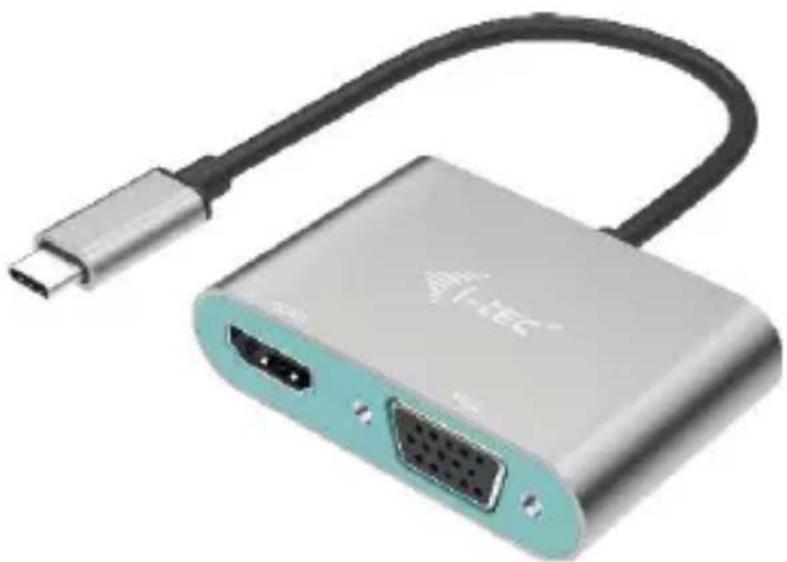
natural_image
Exterior view of a silver I-TEC device with USB cable and two ports (no text or symbols visible)User guide • Gebrauchsanweisung • Mode d'emploi Manual de instrucciones • Manuale • Uživatelská príručka Instrukcje obsługi • Užívatel'ská príručka Vartotojo vadovas • Handleiding
P/N: C31VGAHDMIADA
ENGLISH
Please read the entire instruction manual carefully. Detailed manual i website www.i-tec.cz/en/ in the tab „Manuals, drivers“. In case of any issues, please contact our technical support at: support@itecproduct.com
DEUTCH
USB-C to HDMI and VGA Adapter
ENGLISH....04-06
DEUTSCH....07-09
FRANÇAIS....10-13
ESPAÑOL....14-16
ITALIANO....17–19
ČESKY....20–22
POLSKI.... 23-25
SLOVENSKY....26-28
LIETUVOS....29-31
NEDERLANDS....32-34
WEEE 35-36
Declaration of Conformity ....37–38
FCC....39
INTRODUCTION
Thank you for purchasing i-tec adapter, which allows you to easily and quickly connect the external screen to notebook, tablet or smartphone with USB-C port. The docking station provides 1x HDMI 4K port, 1x VGA Full HD.
TERMINOLOGY
Interface / port / connector / input / slot - a place where two devices are physically connected.
Chipset – a semiconductor device in a laptop, tablet or PC controlling the function of a port.
USB-C - is a new symmetrical connector which allows faster charging, energizing, double-function (a host and a guest), support for alternative modes (DisplayPort, MHL and Thunderbolt).
Alternative modes (Alt modes) – special modes for USB-C connector, which can be supported. Currently the most popular ones include DisplayPort / DockPort, MHL and Thunderbolt. Devices with this feature, connector and cables allow transmission of images and at the same time preserve other functions of the connector (for data transfers and charging).
DisplayPort/DockPort Alt mode - this mode allows transmission of imag through USB-C connector and a cable.
USB-C Power Delivery (USB-C PD) – optional property of the USB-C connector. A connector with this support can charge and be charged at the same time and it supports loads from 10W to 100W (depending on profiles 1-5).
USB 3.1 / 3.0 / 2.0 – a standard for USB interface / port for connection of various USB devices. Various USB devices can be connected to the docking station or adapter using the USB interface type A. USB type B is used for connecting the docking station or adapter to a laptop, tablet or PC.
HDMI - a standard for digital graphical interface / port for connection of monitors and other graphical display devices.
VGA – a standard for analog graphical interface / port for connection of monitors and other graphical display devices.
PACKAGE CONTENTS
• i-tec USB-C HDMI/VGA Adapter
- Quick Start
SPECIFICATION
- Graphic interface: 1x HDMI (max. resolution 4K 3840x2160/30Hz, for connecting a HDMI monitor), 1x VGA (max. resolution Full HD 1980x1080/60Hz, for connecting a VGA monitor). It is not possible to use both graphic outputs simultaneously, a single monitor only can be connected to the adapter (HDMI or VGA).
• Mode: Extend, Mirror and Primary Display
• Supported colors 16 / 32 bit
- 1x integrated USB-C 3.1 cable (15 cm) for connecting the docking station to laptop, tablet or smartphone
- Powered through USB bus (no power adapter is needed) or through USB-C PD / Data port
- Chipset: Algoltek AG9320
- OS: Requires USB-C interface with „DisplayPort Alternate Mode“ and „Power Delivery“ support (not all devices / systems with USB-C interface support this as standard) or Thunderbolt 3 port – Windows 10 32/64bit, macOS X, Chrome OS and Android 6 (Google) with Intel Broadwell
Processor and R51 and higher
• Product dimensions: 62 x 40 x 15 mm
- Cable length: 15 cm
• Product weight: 48 g
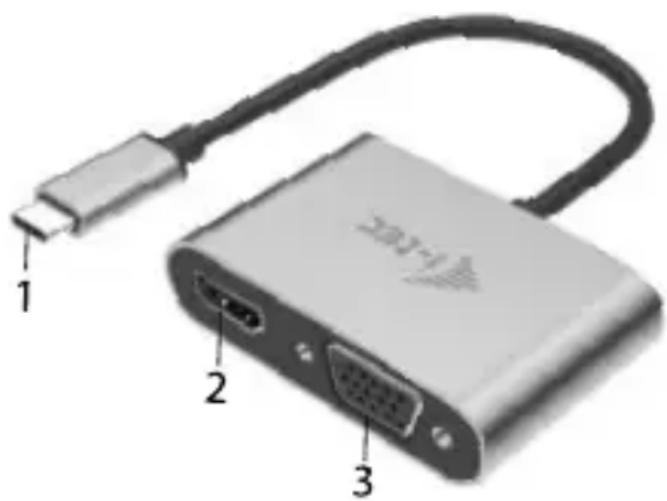
DESCRIPTION OF THE ADAPTER
- USB-C kabel
- HDMI port
- VGA port
SYSTEM REQUIREMENTS
Hardware requirements:
Requires USB-C interface with „DisplayPort Alternate Mode“ and „Power Delivery“ support (not all devices / systems with USB-C interface support this as standard) or Thunderbolt 3 port
Operating system: Windows 10 32/64bit, macOS X, Google (Chrome OS and Android 6 and higher) with latest updates
DRIVER INSTALLATION
Windows 10 32/64bit: After connection, the drivers for the docking station are installed automatically on the system. Before installation make sure that your system has installed the latest drivers for your device and updated BIOS.
macOS X: Installation of the drivers in macOS X is automatic. Before installation make sure that your Mac has installed the latest OS for your device.
CONNECTING A HDMI MONITOR
The adapter provides 1x HDMI 4K Ultra HD port for connecting external screen or projector with HDMI interface. For displaying y can use a modern plazma or LCD monitors and TVs. The graphic chip, which is the heart of the docking station, supports up to 4K resolu 3840x2160/30Hz. Connect the monitor to the docking station using a high-quality HDMI cable. During installation of an additional mon screen of the notebook or tablet can flicker which is a standard condition.
CONNECTION A VGA MONITOR
The adapter provides 1x VGA Full HD port for connecting external screen or projector with VGA interface. For displaying your images you can use a plazma or LCD monitors and TVs. Connect the monitor to the docking station using a VGA cable. During installation of an additional monitor the screen of the notebook or tablet can flicker which is a standard condition.
It is not possible to use both graphic outputs simultaneously, a single monitor only can be connected to the docking station (HDMI or VGA)
SAFETY INSTRUCTIONS
- Do not expose to extreme temperatures and air humidity
- Use the device on flat surfaces – you will prevent it from slipping and falling to the ground.
- Save the user manual for a possible use later.
In cooperation with the service department:
- Check functionality after falling to water or to the ground.
- Check functionality when the cover is broken.
- Send the device back if it does not work in accordance with the user manual.
FREQUENTLY ASKED QUESTIONS
Available on our website www.i-tec.cz/en on the "FAQ" tab of this product.
EINLEITUNG
USB-C to HDMI and VGA Adapter
SPEZIFIKATION
USB-C to HDMI and VGA Adapter
INSTALLATION DU PILOTE
INSTRUCTIONS DE SÛRETÉ
USB-C to HDMI and VGA Adapter
INTRODUCCIÓN
USB-C to HDMI and VGA Adapter
USB-C to HDMI and VGA Adapter
SPECIFICAZIONI TECNICHE
USB-C to HDMI and VGA Adapter
ÚVOD
USB-C to HDMI and VGA Adapter
INLEIDING
This equipment is marked with the above recycling symbol. It means that at the end of the life of the equipment you must dispose of it separately at an appropriate collection point and not place it in the normal domestic unsorted waste stream. This will benefit the environment for all. (European Union only)
DEUTSCH
i-tec USB-C to HDMI and VGA Adapter
Model, Modell, Modèle, Modelo, Modello, Model, Model, Model, Modelis, Model: C31VGAHDMIADA
Determination, Bestimmung, La détermination, Determinación, Determinazione, Určení, Určenie, Opcje, Ustatymas, Doel:
Product is determined for using in PC as equipment. Das Produkt ist für Austattung und als Zubehör von Computern bestimmt. Le produit est déterminé pour une utilisation sur PC comme équipement. El producto se determina para usar en PC como equipo. Destinato per essere usato come attrezzatura informatica o come accessorio per computer. Výrobek je určen pro prístrojové vybavení a jako príslušenství do počítačů. Výrobok je určený pre prístrojové vybavenie a jako príslušenstvo do počítačov. Produkt jest przeznaczony do współpracy z komputerem jako akcesorium. Gaminys yra skirtas įrangai papildyti ir naudojamas kaip priedas kompiuteriams. Het product is bedoeld als uitrusting voor apparaten en als computeraccessoire.
Meets the essential requirements according to / Es entspricht den Anforderungen der Richtlinien / Répond aux exigences essentielles selon / Cumple los requisitos esenciales según / Soddisfa i requisiti essenziali secondo / Splňuje tyto požadavky / Spĺňa tieto požadavky / Spełnia następujace wymagania / Atitinka esminius reikalavimus pagal / Het voldoet aan de volgende vereisten:
EC Directive 2014/30/EU, and 2011/65/EU:
This equipment has been tested and found to comply within the limits of a Class B digital device pursuant to Part 15 of the FCC Rules. These limits are designed to provide reasonable protection against harmful interference in a residential installation.
www.i-tec.cz/en