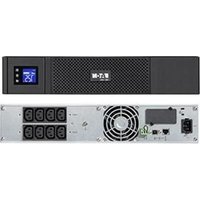
5SC1500i - Uninterruptible power supply EATON - Free user manual and instructions
Find the device manual for free 5SC1500i EATON in PDF.


| Product type | Uninterruptible Power Supply (UPS) |
| Brand | Eaton |
| Model | 5SC1500i |
| Apparent power | 1500 VA |
| Active power | 1050 W |
| Dimensions (W x D x H) | 410 x 150 x 210 mm |
| Weight | 15.20 kg |
| Input voltage | 220-240 V single-phase |
| Input voltage range | 184-276 V |
| Input frequency | 45-55 Hz (50 Hz) / 55-65 Hz (60 Hz) |
| Output voltage (battery mode) | 220/230/240 V (-10/+6 %) |
| Output frequency (battery mode) | 50/60 Hz ±0.1 Hz |
| Battery type | Sealed lead-acid, maintenance-free |
| Number and capacity of batteries | 3 x 12 V / 9 Ah |
| Communication ports | USB, RS232 |
| Display | Backlit LCD with 3 buttons |
| Main functions | AVR, battery startup, audible alarm, automatic shutdown |
| Operating temperature | 0 to 35 °C |
| Relative humidity | 0-90 % (non-condensing) |
| Noise level | < 40 dBA |
| Maintenance | Battery replacement by a professional |
| Cleaning | Dust with a dry cloth |
| Safety | Grounding, overload and short-circuit protection |
| Standards | IEC 62040-1 (safety), IEC 62040-2 (EMC), IEC 62040-3 (performance) |
| Spare parts | Replacement battery module (Eaton part number) |
| Repairability | Contact Eaton after-sales service |
Frequently Asked Questions - 5SC1500i EATON
User questions about 5SC1500i EATON
0 question about this device. Answer the ones you know or ask your own.
Ask a new question about this device
Download the instructions for your Uninterruptible power supply in PDF format for free! Find your manual 5SC1500i - EATON and take your electronic device back in hand. On this page are published all the documents necessary for the use of your device. 5SC1500i by EATON.
USER MANUAL 5SC1500i EATON
Certification Standards
UPS directives:
Safety: IEC 62040-1: 2008
EMC: IEC 62040-2: 2005
Performance: IEC 62040-3: 2010
CE mark (EN 62040-1: 2008 and EN 62040-2: 2006 (C1))
Class B emission level CISPR 22: 2005 + A2 2006 (EN 55022)
Harmonics emission: IEC 61000-3-2 edition 3.2: 2009
Flickers emission: IEC 61000-3-3 edition 2: 2008
The EC Declaration of Conformity is available upon request for products with a CE mark.
For copies of the EC Declaration of Conformity, contact Eaton Power Quality or check Eaton website:
www.powerquality.eaton.com
Special Symbols
The following are examples of symbols used on the UPS or accessories to alert you to important information:

RISK OF ELECTRIC SHOCK - Observe the warning associated with the risk of electric shock symbol.

Important instructions that must always be followed.
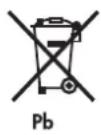
Do not discard the UPS or the UPS batteries in the trash.
This product contains sealed lead acid batteries and must be disposed as it's explain in this manual.
For more information, contact your local recycling/reuse or hazardous waste center.

This symbol indicates that you should not discard waste electrical or electronic equipment (WEEE)
in the trash. For proper disposal, contact your local recycling/reuse or hazardous waste center.

Information, advice, help.
- Introduction 4
1.1 Environmental protection 4
- Presentation 5
2.1 Standard installation 5
2.2 Rear panels 5
2.3 Control panel 6
2.4 LCD description 6
2.5UPS setting through the LCD 6
3.Installation 7
3.1 Unpacking and contents check. 7
3.2 Communication ports 8
- Operation 9
4.1 Start-up and Normal operation 9
4.2 Starting the UPS on Battery 9
4.3UPS Shutdown 9
4.4 Operation on Battery Power 9
4.5 Return of AC Input Power 9
5.Maintenance 10
5.1 Troubleshooting 10
5.2 Battery-module replacement 11
- Appendices 12
6.1 Technical specifications 12
1. Introduction
Thank you for selecting an EATON product to protect your electrical equipment.
The 5SC range has been designed with the utmost care.
We recommend that you take the time to read this manual to take full advantage of the many features of your UPS (Uninterruptible Power System).
Before installing 5SC, please read the booklet presenting the safety instructions.
Then follow the instructions in this manual.
To discover the entire range of EATON products and the options available for the 5SC range,
we invite you to visit our web site at www.eaton.com/powerquality or contact your EATON representative.
1.1 Environmental protection
EATON has implemented an environmental-protection policy.
Products are developed according to an eco-design approach.
Substances
This product does not contain CFCs, HCFCs or asbestos.
Packing
To improve waste treatment and facilitate recycling, separate the various packing components.
The cardboard we use comprises over 50% of recycled cardboard.
-
Sacks and bags are made of polyethylene.
-
Packing materials are recyclable and bear the appropriate identification symbol

| Materials Abbreviations Number in | the symbols | |
| Polyethylene terephthalat PET 01 | ||
| High-density polyethylene HDPE 02 | ||
| Polyvinyl chloride PVC 03 | ||
| Low-density polyethylene LDPE 04 | ||
| Polypropylene PP | 05 | |
| Polystyrene | PS | 06 |
Follow all local regulations for the disposal of packing materials.
End of life
EATON will process products at the end of their service life in compliance with local regulations.
EATON works with companies in charge of collecting and eliminating our products at the end of their service life.
Product
The product is made up of recyclable materials.
Dismantling and destruction must take place in compliance with all local regulations concerning waste.
At the end of its service life, the product must be transported to a processing centre for electrical and electronic waste.
Battery
The product contains lead-acid batteries that must be processed according to applicable local regulations concerning batteries.
The battery may be removed to comply with regulations and in view of correct disposal.
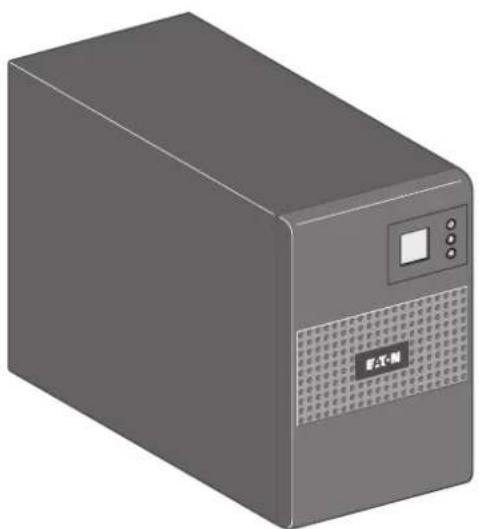
2.1 Standard installation
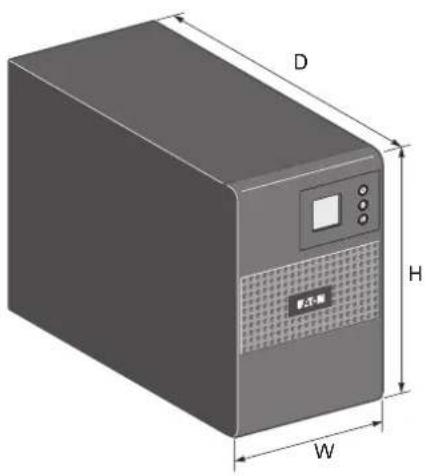
| Description | Weights (kg/lb) | Dimensions (mm/inch) D x W x H |
| 5SC 500i 6.60 / | 14.60 240 x 150 x | 210 / 9.4 x 5.9 x 8.3 |
| 5SC 750i 10.40 / | 22.90 340 x 150 x | 210 / 13.4 x 5.9 x 8.3 |
| 5SC 1000i 11.10 / | 24.50 340 x 150 | x 210 / 13.4 x 5.9 x 8.3 |
| 5SC 1500i 15.20 / | 33.50 410 x 150 | x 210 / 16.1 x 5.9 x 8.3 |
2.2 Rear panels
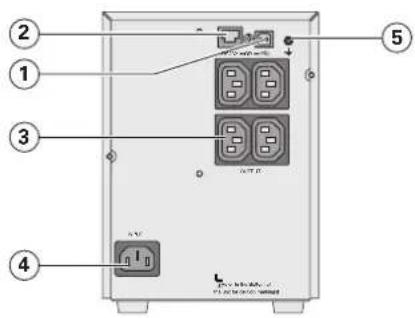
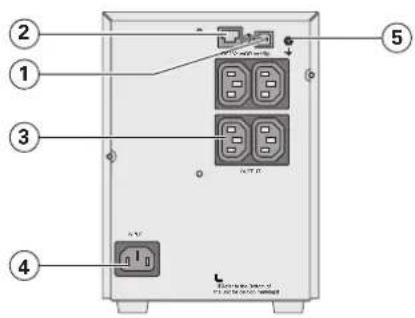
5SC 500i 5SC 750i
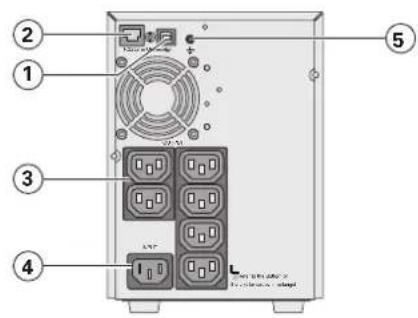
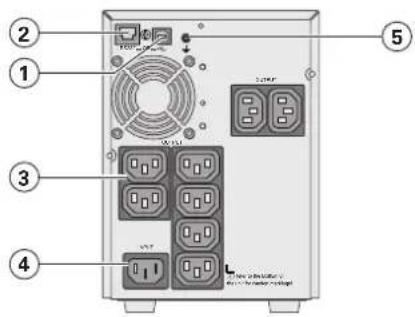
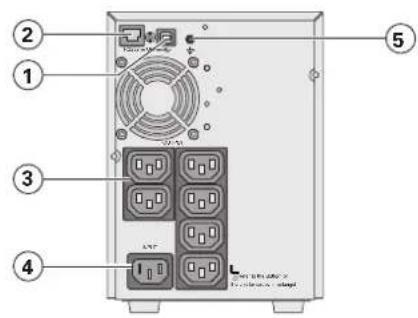
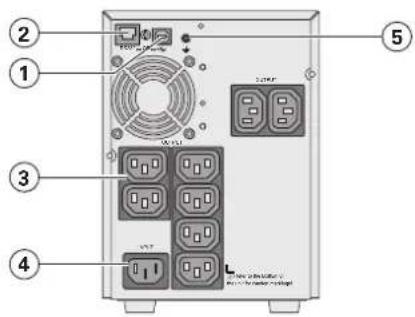
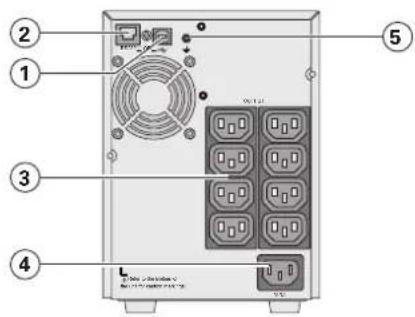
5SC 1000i 5SC 1500i
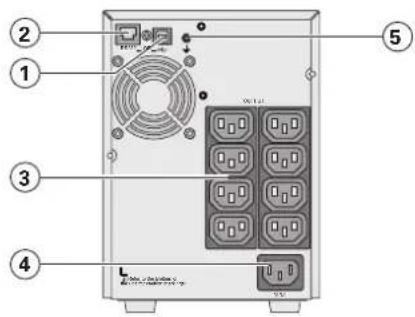
(1) USB communication port
(2) RS232 communication port
(3) Outlets for connection of critical equipment
(4) Socket for connection to AC-power source
(5)Groundscrew
2. Presentation
2.3 Control panel
The UPS has a three-button LCD. It provides useful information about the UPS itself, load status, events, measurements and settings.
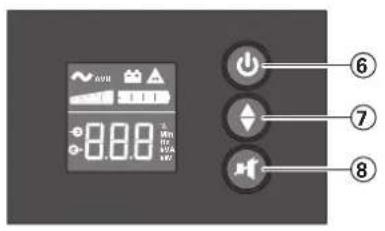
⑥ ON/OFF button
⑦ Scroll down
Mute alarm
2.4 LCD description
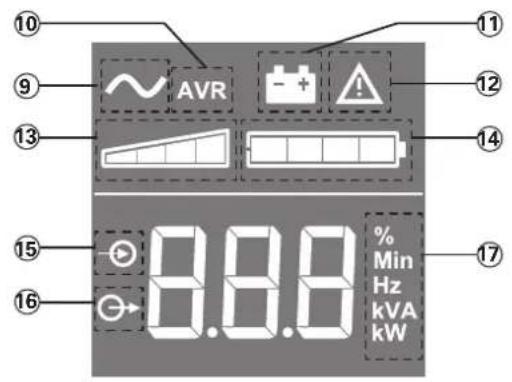
⑨ UPS ON
AVR mode
1 Battery mode
12 Internal fault
13 Output load level
14 Battery level
15 Input measurements
16 Output measurements
⑦ Measuring unit
2.5 UPS setting through the LCD
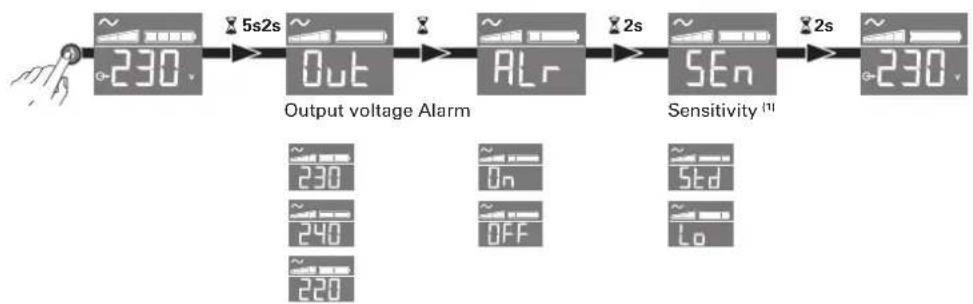
Release scroll down button to select menu
Example of setting

LCD will shut off if there is no activity for 3 minutes.
(1) In low sensitivity mode (Lo) UPS will tolerate more fluctuations in power and will go on battery power less often. If the connected load is sensitive to power disturbances, keep the sensitivity as Standard (Std).
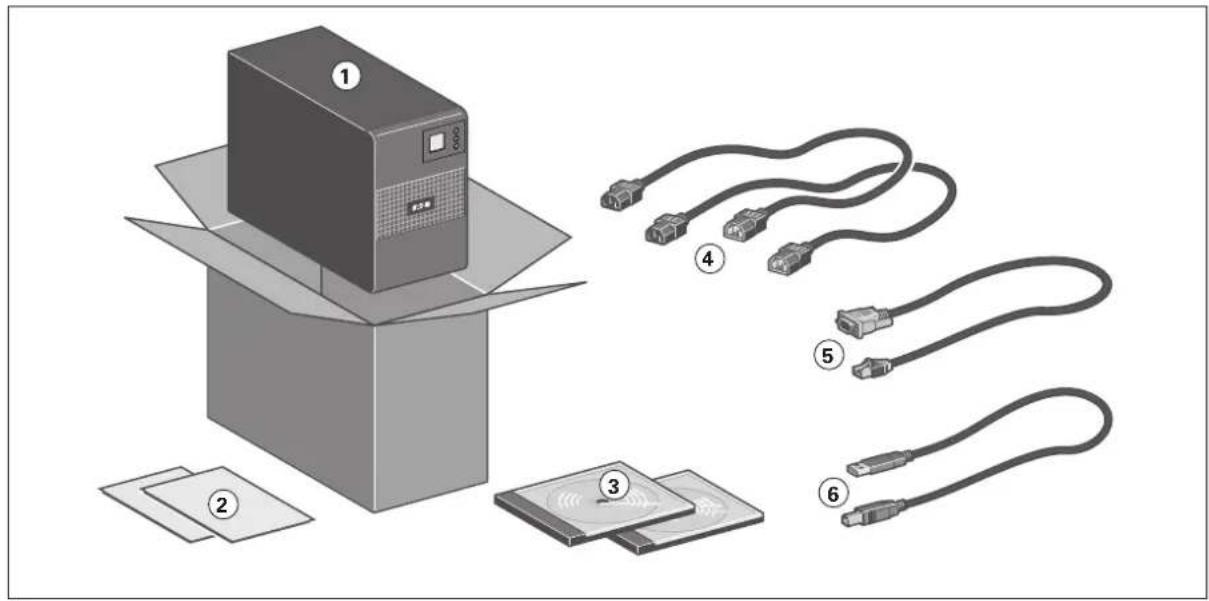
3.1 Unpacking and contents check
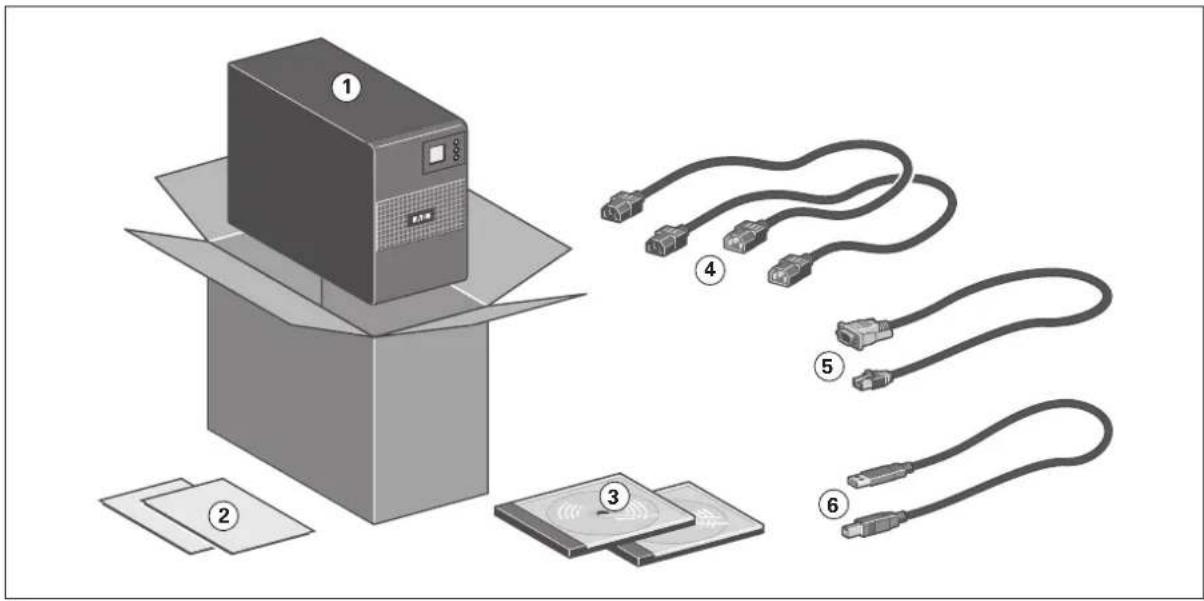
(1)5SCUPS
(2) Quick start and safety instructions
(3) User manual and IPSS (Intelligent Power Software Suite) CDROM
(4) 2 connection cables for the protected equipment
(5) RS232 communication cable
(6) USB communication cable

Packing materials must be disposed of in compliance with all local regulations concerning waste. Recycling symbols are printed on the packing materials to facilitate sorting.
3. Installation
3.2 Communication ports
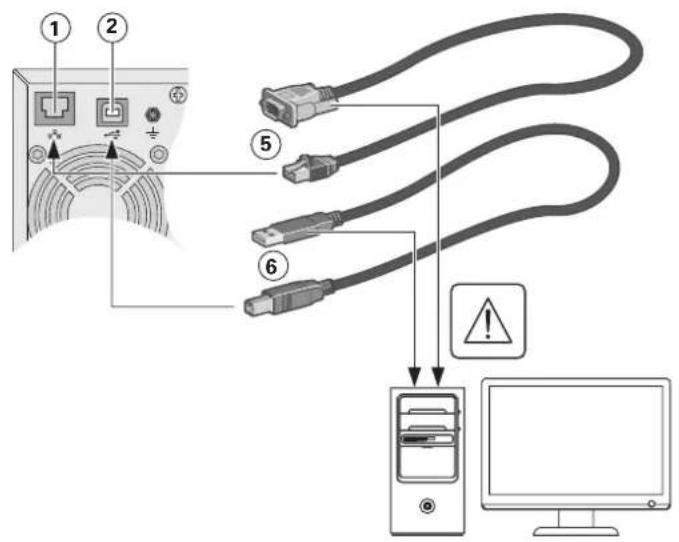
Connection of RS232 or USB communication port
The RS232 and USB communication ports cannot operate simultaneously.

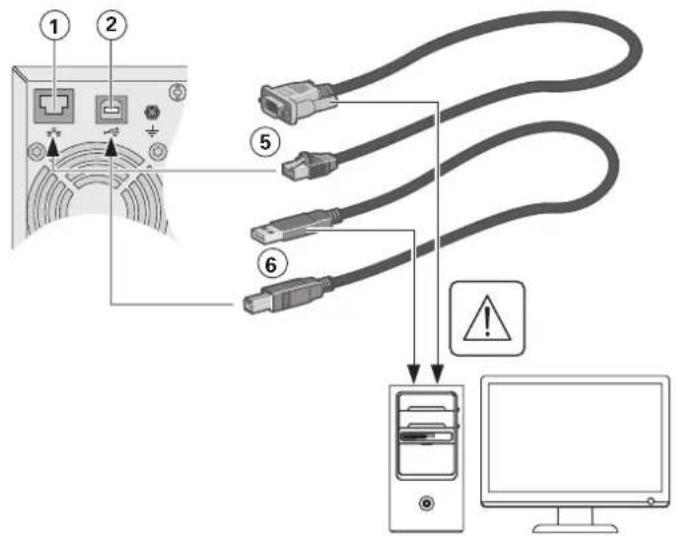
- Connect the RS232 (5) or USB (6) communication cable to the serial or USB port on the computer equipment.
- Connect the other end of the communication cable (5) or (6) to the USB (1) or RS232 (2) communication port on the UPS.
The UPS can now communicate with EATON power management software.
4.1 Start-up and Normal operation
To start the UPS:
- Verify that the UPS power cord is plugged in.
- Press the button on the UPS front panel for at least 2 seconds.
- Check the UPS front panel display for active alarms. Ifthe indicator is on, do not proceed until all alarms are cleared. Correct the alarms and restart if necessary.
- Verify that the indicator illuminates solid, indicating that the UPS is operating normally and any loads are powered and protected.
4.2 Starting the UPS on Battery

Before using this feature, the UPS must have been powered by utility power with output enabled at least once.
To start the UPS on battery:
1.Pressthe button on the UPS front panel until the UPS front panel display illuminates. The UPS cycles through Standby mode to Battery mode. The indicator illuminates solid. The UPS supplies power to your equipment.
- Check the UPS front panel display for active alarms. Resolve any active alarms before continuing. See "Troubleshooting" on page 10.
4.3 UPS Shutdown
To shut down the UPS:
- Press the button on the front panel for three seconds. The UPS starts to beep. The UPS then transfers to Standby mode, and the indicator turns off.
4.4 Operation on Battery Power
Transfer to battery power
- The connected devices continue to be supplied by the UPS when AC input power is no longer available. The necessary energy is provided by the battery.
The indicator illuminates solid.
The audio alarm beeps every ten seconds.

The connected devices are supplied by the battery.
Low-battery warning
The indicator illuminates solid.
The audio alarm beeps every three seconds.

The remaining battery power is low. Shut down all applications on the connected equipment because automatic UPS shutdown is imminent.
End of battery backup time
All the LEDs go OFF.
The audio alarms stops.
4.5 Return of AC Input Power
Following an outage, the UPS restarts automatically when AC input power returns (unless the restart function has been disabled) and the load is supplied again.
5. Maintenance
5.1 Troubleshooting
| Operation status Possible cause | Action | |
| OverloadOL | Power requirement exceeds theUPS capacity (greater than 105 % ofnominal). | Remove some of the equipmentfrom the UPS.The UPS continuesto operate, but may shutdownif the load increases.The alarmresets when the condition becomesinactive. |
| Short-circuit faultSC | A short-circuit occurred. Check device | connection orintegrity.If error persists, note the alarmmessage and the UPS serialnumber, and then contact yourservice representative. |
| Battery faultBAH | The batteries in the UPS aredisconnected. | Verify that all batteries are properlyconnected.If error persists, note the alarmmessage and the UPS serialnumber, and then contact yourservice representative. |
| The end of battery life is reached. Cont | contact your service representativefor battery replacement. | |
| Fan faultFAn | The UPS has a fan fault. Check that no | object is blocking thefan.If error persists, note the alarmmessage and the UPS serialnumber, and then contact yourservice representative. |
| Charger fault The UPS has a charger fault. The UPS does not chargethebattery anymore.Note the alarm message andthe UPS serial number, and thencontact your service representative. | ||
5.2 Battery-module replacement
Safety recommendations
The battery can cause electrocution and high short-circuit currents. The following safety precautions are required before servicing the battery components:
- remove watches, rings, bracelets and all other metal objects from the hands and arms.
- use tools with an insulated handle.
Battery tray removal on tower models
This operation must be performed when the UPS is switched OFF, and unplugged from AC source.
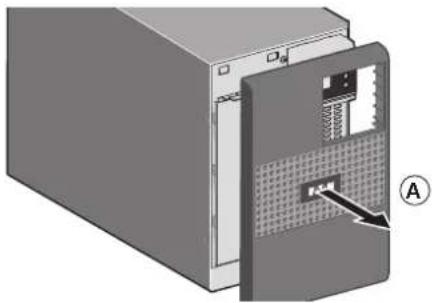
A - Remove the front panel.
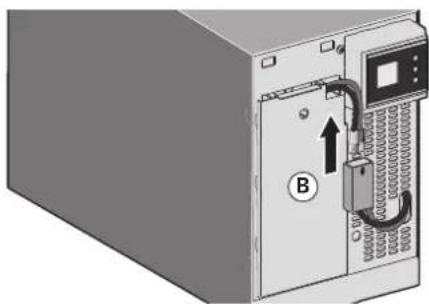
B - Disconnect the battery block by separating the two connectors (never pull on the wires).
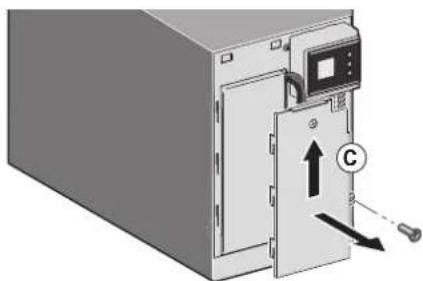
C- Remove the plastic protection cover in front of the battery (one screw).
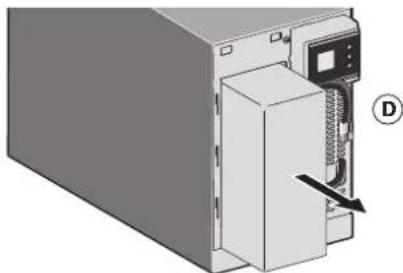
D - Pull the plastic tab to remove the battery block and replace it.
Mounting the new battery module
Carry out the above instructions in reverse order.

- To ensure safety and high performance, use only batteries supplied by EATON.
Take care to firmly press together the two parts of the connector during remounting.
6. Appendices
6.1 Technical specifications
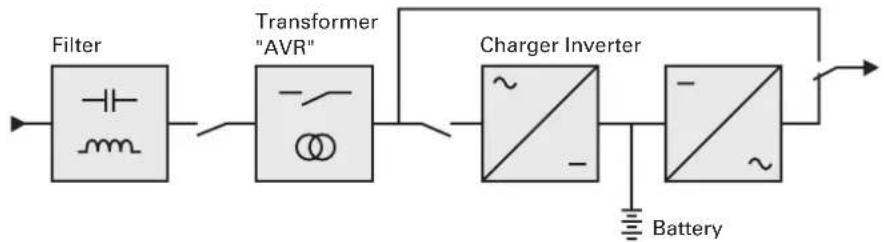
| 5SC 500i 5SC 750i 5SC 1000i 5SC 1500i | ||||
| Output Power@ 230 V | 500 VA350 W | 750 VA525 W | 1000 VA700 W | 1500 VA1050 W |
| AC Input power | ||||
| • Rated input voltage $ingle phase 220-240 V | ||||
| • Input voltage range | 184 to 276 V | |||
| • Inputfrequencyrange | 45 to 55 Hz (50 Hz system), 55 to 65 Hz (60 Hz system) | |||
| Output on battery power | ||||
| • Voltage 220/230/240V (-10/+6 %) (1) | ||||
| • Frequency 50/60 Hz ±0.1 Hz | ||||
| Battery (sealed lead acid, maintenance free) | ||||
| • Standard 1 x 12 V | 9 Ah | 2 x 12 V7 Ah | 2 x 12 V9 Ah | 3 x 12 V9 Ah |
| Environment | ||||
| • Operatingtemperature range | 0 to 35 °C / 32 to 95 °F | |||
| • Storagetemperature range | -15 to +40 °C / 5 to 104 °F | |||
| • Relative humidity 0 to 90% (without condensation) | ||||
| • Noise level < 40 dBA in normal mode | ||||
(1) Adjustable to 220/230/240 V, must be set to the identical AC power source value.
When the appliance is used in EU area, use an external circuit breaker in front of line with rating 16 A, 250 V which is IEC/EN 60898-1 standard compliant;
When the appliance is used in America area, use an external circuit breaker in front of line with rating 20 A, 250 V.
This product is designed for IT power distribution system.
Copyright © 2013 EATON
Informations, consels, aide.
- Introduction 4
6.1 Specifications techniques 12
1. Introduction
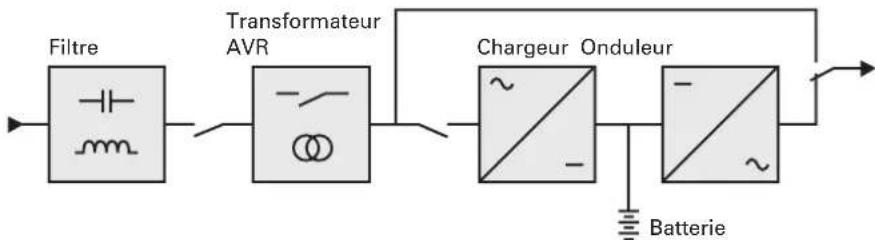
6.1 Specifications techniques
Copyright © 2013 EATON
Copyright © 2013 EATON
Copyright © 2013 EATON
Bce npaba 3aunuenebl.
KoMaHaEATON BeTeI NoJIInKy OxaHbI OkpyKaIOuei Cpebl.
Haunn3dienpa3pa6oTaHbCyyTeOM npuHcUNOB 3KoNOrueckO uCTOTbl.
BpeHbIe BeuecTba
Hactoan annapat He coepknt HxlopftyTopyrgnepoOB (CFC), Hn fTopcoepkaux yrleboopdoB (HCFC), Hn ac6ecta.
YnaKOBka
OTdennTb 3JemeHbI ynaKOBn npyOr npyra IaI o6nerHeHn o6pa60Kn OTOxOobNnx yTNIN3auHn.
- KapToHHa Kopo6ka coCToNT 6OJee Yem Ha 50% n3 yTuJIIn3nPoBaHHOro KapToHa.
- MeuKn n NaKeTbI n3rOToBnEhBi n3 nonn3TnneHa.
- MaTePnAbly ynaKOBKn Moryt yTuJIn3npoBaTbcr NOTMeuHaTcR CNeDyUOzIM NDeHTNΦnKaUOHHbIM
CHMBOJOM

2.1 CtahdapThbIe BapnAHTbI yctaHOBKn
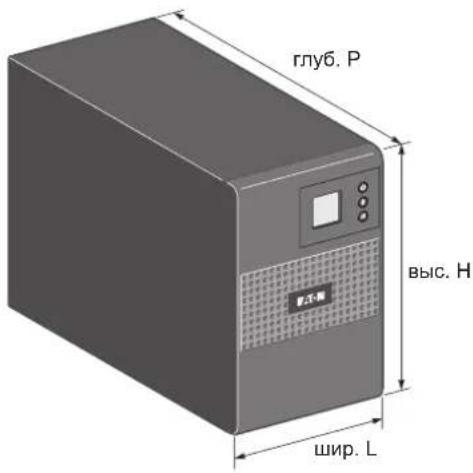
| Описане Вес | (кг/фнт) | Раимерсы (МM/Дюйм) rлуб. Рхшир. Lхвic. H |
| 5SC 500i 6.60 / | 14.60 240 x 150 x 2 | 210 / 9.4 x 5.9 x 8.3 |
| 5SC 750i 10.40 | 22.90 340 x 150 x | 210 / 13.4 x 5.9 x 8.3 |
| 5SC 1000i 11.10 | / 24.50 340 x 150 | x 210 / 13.4 x 5.9 x 8.3 |
| 5SC 1500i 15.20 | / 33.50 410 x 150 | x 210 / 16.1 x 5.9 x 8.3 |
2.2 3aHne naHeJI
5SC 500i 5SC 750i
5SC 1000i 5SC 1500i
(1) IopT CBra3n USB
(2)ПорТСВИЗR5232
(3)PozetknIynoKIOUOeHnObOpyDobAHn
(4) Pozetka Д�� сединеня с сетью щенип
(5) BnHT 3a3emneHn
2.ObuaHΦopMaζη
2.3Паньуправлия
IaHHbI N5P OcHaueH TpexKHOOnOHyIM K-3KpaHOM. 3decb BBIOHTcra NoIe3Ha IINΦopMaua O cAmOM IVI, COCToHHN Harpy3KN, CoBbITnX, I3MepeHnX I NaCTpoKax.
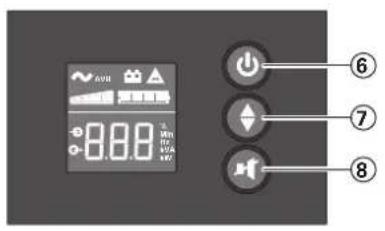
⑥ KHONKa BKNIOUeHnBbIKNIOUeHn
⑦ IpoKpyKa Bn3
⑧ OTKINHOHTB 3BYK TpeBOH
2.4 OnncanHe KnkokpncTaJIHueckoro DnCnpe
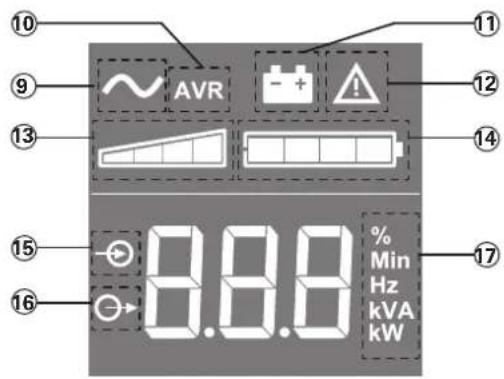
BKN. N6N
10 PeKIM AVR
1) PexnmpaobtbyOT6atapenn aKKymyIATOPOB
12 BnytpenHry oWn6ka
13 YpOBeHb BbIXoDHOHaIpy3KN
14 YPOBHe 3aepda6atapen aKKMyIaTOPOB
15 V3mpehenBxOda
16 13MepeHnBbIXOda
17 13MepuTeNbHbIb6nOK
2.5 Hactpoja N6Pi c nOmoIbIO CBeToIIOIOB
OTnycntte KhoNk npokpyTKBHN3, YTO6bI BbIbpaT MeHIO
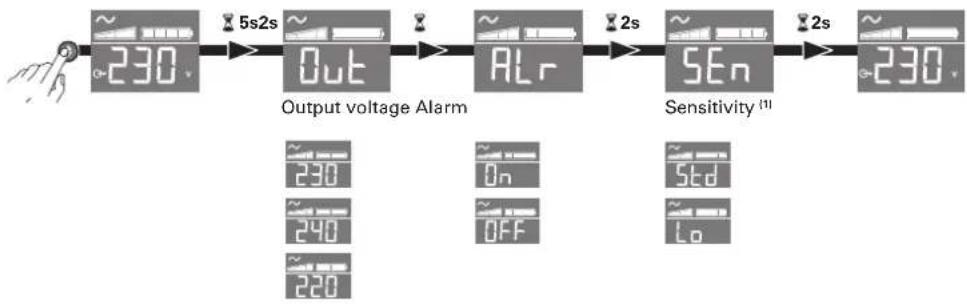
Ppimep Hactpoyn
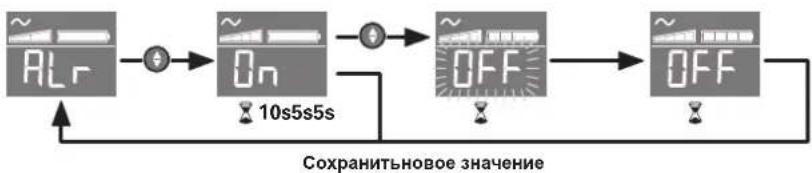
-KK-dncnneBbIKIOaETcnpOTCyTCTBNNAKTNBHOCTNBTEeHHe3MnHT.
(1) B pexnme Hn3k0rO yOBHryBCTBnteNBocTN (Lo) N5P cmoxet BblepkaTb 6oIbwee KOnuheCTBO Kone6aHm MOUHOCTN I ByET peXe nONJb3OBA Tb pecypcbi 6batape. EcnnoonKIOueHHa Harpy3Ka YyBCTBNTeJIbHa K KOleBaHnM MOUHOCTN, INcONJb3yIte cTaHapThbI pexnM (Std).
3.1 PacnakOBka n npOBepKa kOMnJIeKtaun
(1) IV5N 5SC
(2)БыстрызanyckиИнстуркцииnoТexнcke6e3onachoctn
(3) CD ROM c PykoBODCTBOM noIb3ObaTei n IPSS (KoMnJIeKTOM nporpamm nHTeJIeKTyaIbHoro ynpabHeHnI nITaHnEM)
(4)ДBa coeHHTeNbIx Ka6eIЯ ДЯ 3aUIIaemOrO obOpydoBAnHr
(5) KommyHnKaUHOHHK Ka6eJIb RS232
(6)KOMmyHnKaUHOHHK Ka6eJIb USB

3IeMeHTbI yNakOBKn D0JIxHbI yTNIN3nPOBaTbcra B COOTBETCTBm C DeIcTByIOUIMn HOpMaTINBHbIMn IpaBnAMn, KacaIOUIMMCr OTOXoOB.
Ha KaJdOM 3neMeHe TmEeTc rpaHueckn CmBbON yTuIN3aun DnA O6JIeUeHnC0PtnoBKn.
3. YctaHOBka
3.2 NopTbI CBa3n
CoeHHeHne npTa cBra3n RS232 nIu USB
IopTbICB3n RS232 n USB He MoryT pa60TaTb OndOBpeMeHHo.

- Poiocoeunntb kaebnb CBA3n RS232 (5) nIN USB (6) KnoCneObaTeNbHOMy npTy nIN npTy USB kOmnbHotepa.
- CoeHnHTb dpyroKoHeu Ka6eYraCB3n (5)nn (6)c npTOM CB3n USB (1) nn RS232 (2) IVI.
Iocne yctahOBKn nporpamMHOO bcneueHn KOMnaHn EATON dna aDMNHCTpaTNBHO OynpaBHeHn, nepcoHaIN3aun nIn oecneueHn 6e3oNaChocn IV5Pi MoKeT B3aMODeNCTBOBaTb C KOMNbIOTePOM.
4.1 3anyck n HopmaJIbHaJ 3KcIpyatauia
Дязанусяа АБП:
- PpOBepbTe, TTo6bI WHyp NtTaHn I5I 6bl NpokKlIOueH.
- HaximaiTe KhoNky Ha nepeDHe nAHeHn IB TeYeHne He MeHee 2 cekyHd.
- PpOBepnTb HAnuHne akTNBbX TpeBor Ha DncnJe e nepeDne naneN INI.
Ecnn HndkaTOp Tropnt, He npdoJkaTe pa6Oty, noka BCE abapnHbIe CnHaIbI He Ncye3HT. YctpaHNTe npuHHy noBHeAabapnHbIX CnHaIOB, INpN Heo6xOIMOCTNpe3anyCTNe.
- IpoBepbTe, yTo6bI INHdkaTOp nOCToHHO CBeTnncr, yKa3bIBa Ha To, yTo IV5Pi pa6oTaet HopMaIbHo, a Harpy3Kn - 3aNTaHbI N 3aUuIeHbI.
4.2 3anyck N6n Ha 6aTapee

IpeepnObn3oBaHmE 3ToB Bo3MoXHOCTN, IVIHyKHO 3aIITaTb OT cTeBOrIO nCTOUYHkA; npn 3Tom BbIXOd DOnJKeH 6bITb pa3peWHe XOTb 6bl ODNH pa3. 3anyck OT aKKyMylrTopa MOKeT 6bl OTKnHOeH.
ДязanyckaИБпHa6baTapee:
- HaximaiTe KhoNky Ha nepeDne naHe nn IINb do Tex nop, noka dinCnne nepeDne naHe nn INB He 3ACBETITcR.
A6I pKInueckn pa6oTaET B peKImax OxHdaHn I AkkMyJrTopa. HndkaTOp ropnt noctoHHO. ABn npdaet nITahne Ha o6OpydoBaHne.
- Поберпь налчуakнвьхтpeВога дисрпee nepedни naHEn IVI.пepд Tem кak npodokntb pa6oty,peWITE np6bembl,CB3aHHbIe C abapnHbIMn CnHaJIamN.CM."Ponck n yctpaHene HeicnpabHocTe"Ha cTp.10.
4.3 BbIKJIouYeHne IVbI
ДЯ Выкlioуеня IVI:
- HaximaiTe KhoKy Ha nepeDnei naHEn B TeueHne 3 cekyHd. IIN5 NaHET BbIaBaTb 3BykoBoi CnHraJI. 3aTeM A6Pi nepexoDTB pexKIM OxuaHna, a INdkaTopAacHeT.
4.4 Pa6ota oT akKymyIaTOPHOI 6aTapei
IpehexoHa 6aTaapeIO
Korda nchzaet HnpanjkeHne cetn, nooCoeHHHeHoe o6OpyObaHne npdoJkaet noJyatab nItaHne ot I5I. 3Heprna 6epTcra ot akkyMnyTopho 6atapen.
- INHdkaTOP NT NOCTOARHHO.
Kaxdbie 10 cekynd daetc kopoTkn abapnHb3BykoBooCnHaJ.

IopoeDHHHOe K I6Pn 6obopyoBaHne nOyuaet nTahne OT aKKymyIaTOpHoi 6atapen.
PpeynpejckdHne O Hn3KoM ypOBe 3apAKn aKKyMylTopa
- INHdkaTop NT NOCTOARHHO.
- Uepe3 KaJdbIe Tpu CekyHdbI BbIaTeTcB 3BykoBoi CnHaI.

AkkymyIaTOp IMeET Hn3Kn yOboEh 3ap4Kn. BbIKIOUHTe BCE npINIOKeHna Ha noKIOUeHHOM o6OpydoBaHnn, NOckoIbky aBtOMaTHueCKoe BbIKIOUeHne IVIe Hen36ExHo.
Koheu aBTOHOMHO pa6Otbl 6aTape
BceCBeToIONoIbIraChyT.
3BykoBn abapnHb CnHnO TcTByET.
4.5 BocctaHOBJIeHne HapJxKeHHc cTeH
Iocne nCue3HOBeHnHa npRaeHnA cTe A5Pi ABToMaTHuCeCKn nepe3anyckaetc npri erO BOCCTaHOBHeHn (ecNI TOJIbKO 3Ta cyHKnH He 6blna deakTnBupoBaHa npri nepcoHaun3aunn A5Pi), nOBOpdyOBaHne BHOB noLyuaETnTaHne.