
DEEBOT T80 OMNI - Vacuum Cleaner ECOVACS - Free user manual and instructions
Find the device manual for free DEEBOT T80 OMNI ECOVACS in PDF.


| Brand | ECOVACS |
| Model | DEEBOT T80 OMNI (Robot: DEX68, Station: CH2497A) |
| Product type | Robot vacuum and mop with emptying and washing station |
| Robot dimensions (L x W x H) | 353 x 351.5 x 98 mm |
| Station dimensions (L x W x H) | With base: 338 x 459 x 500 mm Without base: 338 x 276 x 500 mm |
| Robot power supply | Rated input 20 V 2 A, charging time ~4h30 |
| Station power supply | 220-240 V ~ 50-60 Hz, power (emptying) 650 W, power (hot water washing) 1650 W |
| Main features | d-ToF laser mapping, TrueDetect 3D obstacle avoidance, AIVI camera, carpet recognition, automatic emptying, automatic hot water mop pad washing, simultaneous vacuuming and mopping |
| Dust disposal | Disposable dust bag (capacity to be verified) in the station, automatic emptying |
| Mopping function | Clean water tank (automatic refill), dirty water tank, rotating mop pad with automatic pad washing |
| Maintenance and cleaning | Empty dustbin weekly, replace dust bag every 2-3 months, clean filter weekly, replace every 3-6 months, clean main brush weekly, replace every 6-12 months, replace mop pad every 1-2 months |
| Safety | Anti-drop sensors (stair detection), anti-collision sensors, carpet detection, automatic stop when lifted, indoor use only |
| Spare parts and repairability | Accessories available at https://www.ecovacs.com, battery replaceable only by a professional, contact customer service for replacement |
| General information | Wi-Fi 2.4 GHz connectivity, ECOVACS HOME app, voice control, Bluetooth compatible. Weight not specified. Warranty and recycling according to EU directives |
Frequently Asked Questions - DEEBOT T80 OMNI ECOVACS
User questions about DEEBOT T80 OMNI ECOVACS
0 question about this device. Answer the ones you know or ask your own.
Ask a new question about this device
Download the instructions for your Vacuum Cleaner in PDF format for free! Find your manual DEEBOT T80 OMNI - ECOVACS and take your electronic device back in hand. On this page are published all the documents necessary for the use of your device. DEEBOT T80 OMNI by ECOVACS.
USER MANUAL DEEBOT T80 OMNI ECOVACS
For the Instruction Manual in further languages, visit: https://www.ecovacs.com
IMPORTANT SAFETY INSTRUCTIONS
IMPORTANT SAFETY INSTRUCTIONS
When using an electrical Appliance, basic precautions should always be followed, including the following:
READ ALL INSTRUCTIONS BEFORE USING THIS APPLIANCE SAVE THESE INSTRUCTIONS
-
This Appliance can be used by children aged from 8 years and above and persons with reduced physical, sensory, or mental capabilities or lack of experience and knowledge if they have been given supervision or instruction concerning use of the Appliance in a safe way and understand the hazards involved. Children shall not play with the Appliance. Cleaning and user maintenance shall not be made by children without supervision.
-
Clear the area to be cleaned. Remove power cords and small objects from the floor that could entangle the Appliance. Tuck rug fringe under the rug base, and lift items such as curtains and tablecloths off the floor.
-
If there is a drop off in the cleaning area due to a step or stairs, you should operate the Appliance to ensure that it can detect the step without falling over the edge. It may become necessary to place a physical barrier at the edge to keep the unit from falling. Make sure the physical barrier is not a trip hazard.
- Only use as described in this manual. Only use attachments recommended or sold by the manufacturer.
- For INDOOR household use ONLY. Do not use the Appliance in outdoor, commercial, or industrial environments.
- Do not use without Dust Bin and/or filters in place.
- Do not operate the Appliance in an area where there are lit candles or fragile objects.
- Keep hair, loose clothing, fingers, and all parts of body away from any openings and moving parts.
- Do not operate the Appliance in a room where an infant or child is sleeping.
- Do not use and store in extremely hot or cold environments (below -5^/23^ or above 40^/104^ ). Please charge the robot in temperature above 0^/32^ and below
40^ / 104^
- Do not use Appliance on wet surfaces or surfaces with standing water.
- Do not allow the Appliance to pick up large objects like stones, large pieces of paper, or any item that may clog the Appliance.
- Do not use Appliance to pick up flammable or combustible materials such as gasoline, printer or copier toner, or use in areas where they may be present.
- Do not use Appliance to pick up anything that is burning or smoking, such as cigarettes, matches, hot ashes, or anything that could cause a fire.
- Do not put objects into the suction intake. Do not use if the suction intake is blocked. Keep the intake clear of dust, lint, hair, or anything that may reduce air flow.
- If the power cord is damaged, it must be replaced by the manufacturer or its service agent in order to avoid a hazard.
- Turn OFF the power switch before cleaning or maintaining the Appliance.
- The lithium battery type suitable for CH2497A is Max. 8 cells, max. nominal voltage DC 14.4V,
rated capacity 5,800mAh. The battery must be removed and discarded according to local laws and regulations before disposal of the Appliance.
-
Please dispose of used batteries according to local laws and regulations.
-
Do not incinerate the Appliance even if it is severely damaged. The batteries can explode in a fire.
-
The Appliance must be used in accordance with the directions in this Instruction Manual. ECOVACS HOME Service Robotics cannot be held liable or responsible for any damages or injuries caused by improper use.
-
The robot contains batteries that are only replaceable by skilled persons. To replace the robot's battery, please contact Customer Service.
-
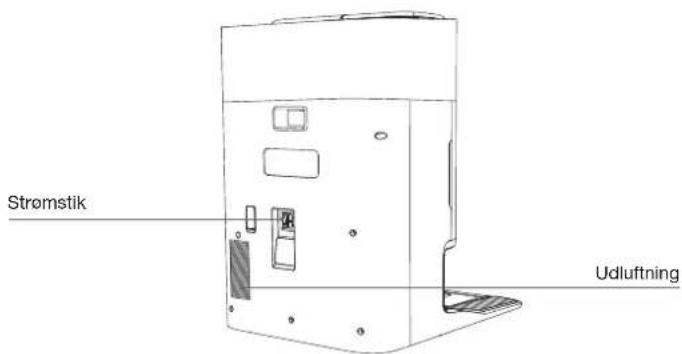
Please make sure your power supply source voltage matches the power voltage marked on the OMNI Station.
-
Use only the original rechargeable battery and OMNI Station provided with the Appliance from the manufacturer. Non-rechargeable batteries are prohibited.
-
Take care not to damage the power cord. Do not pull on or carry the Appliance or OMNI
Station by the power cord, use the power cord as a handle, close a door on the power cord, or pull power cord around sharp edges or corners. Do not run Appliance over the power cord. Keep power cord away from hot surfaces.
- Do not use the OMNI Station if it is damaged. The power supply is not to be repaired and not to be used any longer if it is damaged or defective.
- Do not use with a damaged power cord or receptacle. Do not use the Appliance or OMNI Station if it is not working properly, has been dropped, damaged, left outdoors, or come in contact with water. It must be repaired by the manufacturer or its service agent in order to avoid hazards.
- The plug must be removed from the receptacle before cleaning or maintaining the OMNI Station.
- Remove the Appliance from the OMNI Station, and turn OFF the power switch to the Appliance before removing the battery for disposal of the Appliance.
-
When not using the OMNI Station for a long period of time, please unplug it.
-
If the robot will not be used for a long time, power OFF the robot for storage and unplug the OMNI Station.
- WARNING-Add clean water into the clean tank only.
- WARNING: For the purposes of recharging the battery, only use the detachable supply unit CH2497A provided with the Appliance.
To satisfy RF exposure requirements, a separation distance of 20 cm or more should be maintained between this device and persons during device operation.
To ensure compliance, operations at closer than this distance is not recommended. The antenna used for this transmitter must not be co-located in conjunction with any other antenna or transmitter.
Device Update
Typically, some devices are updated bi-monthly, but not always so specific.
Some devices, especially those that went on sale more than three years ago, will only be updated if a critical vulnerability is found and fixed.
 | Caution: hot surface |
 | Short-circuit-proof safety isolating transformer |
 | Switch mode power supply |
 | For indoor use only |
| [XXZ8] | Direct current |
| [Z7C0] | Alternating current |
 | This product conforms to the applicable EC Directives. |
 | Before charging, read the instructions. |
 | Polarity of the charging port |
 | Time-lag miniature fuse-link |
The remote surveillance is for the absolute private use of non-public, private owned places for the pure self-protection and single control intended only. Please be aware of the local data protection based legal obligations in case of use. No surveillance of public places, especially with clandestine intent and/or on the part of the employer without justified reasons. Such not justified use is in the risk and responsibility of the user only.
European Union Compliance Statement Information on Disposal for Users of Waste Electrical & Electronic Equipment
This symbol on the product or on its packaging indicates that used electrical and electronic products should not be mixed with unsorted municipal waste.
For proper treatment, it is your responsibility to dispose of your waste equipment by arranging to return it to designated collection points.
Disposing of this product correctly will help save valuable resources and prevent any potential negative effects on human health and the environment, which could otherwise arise from inappropriate waste handling.
To return your used device, please use the return and collection systems or contact the retailer where the product was purchased, which is free of charge, please contact your local authority for further details of your nearest designated collection point.
Penalties may be applicable for incorrect disposal of this waste, in accordance with your national legislation.
Information on Disposal for Users of used batteries

This symbol means that batteries and accumulators, at their end-of-life, should not be mixed with unsorted municipal waste. Your participation is an important part of the effort to minimize the impact of batteries and accumulators on the environment and on human health. For proper recycling you can return this product or the batteries or accumulators it contains to your supplier or to a designated collection point, which is free of charge.
Disposing of this product correctly will help save valuable resources and prevent any potential negative effects on human health and the environment, which could otherwise arise from inappropriate waste handling.
Penalties may be applicable for incorrect disposal of this waste, in accordance with your national legislation. there are separate collection systems for used batteries and accumulators.
Please, dispose of batteries and accumulators correctly at your local community waste collection/recycling center.
Restriction of the use of certain hazardous substances (RoHS) Directive
ECOVACS HOME Service Robotics Co., Ltd. hereby declares the whole product including parts (cables, cords, and so on) meets the requirements of RoHS Directive 2011/65/EU and amendment Commission Delegated Directive (EU) 2015/863 on the restriction of the use of certain hazardous substances in electrical and electronic equipment ("RoHS recast" or "RoHS 2.0").
Radio Equipment Directive
ECOVACS HOME Service Robotics Co., Ltd. hereby declares that the product listed in this section comply with the essential requirements and other relevant provisions of the Radio Equipment Directive 2014/53/EU.
Europe Authorised Representative:
ECOVACS HOME Service Robotics Co., Ltd. hereby declares that the product comply with the essential requirements and other relevant provisions of the RoHS Directive 2011/65/EU and amendment Commission Delegated Directive (EU) 2015/863, the Radio Equipment Directive 2014/53/EU.
The declaration of conformity can be viewed at the following address: https://www.ecovacs.com/global/compliance.
PACKAGE CONTENTS
1 PACKAGE CONTENTS
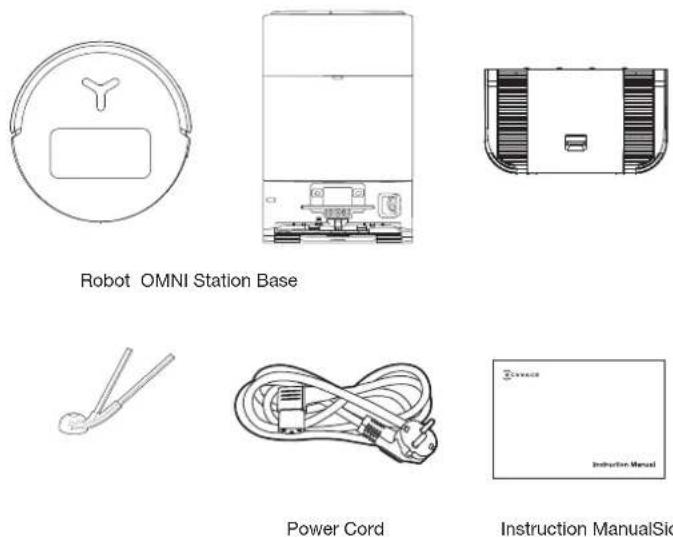
Instruction ManualSide Brush
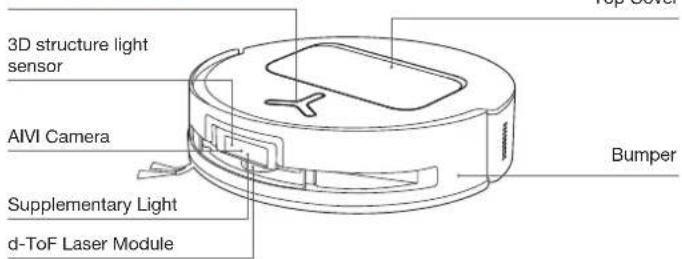
② Product Diagram
1. Robot Front View
Button on the robot
Short Press: Start/Pause
Long Press for 3s: Return to charge
Double tap: Roller Mop Release/Retract
(Robot not in the Station)
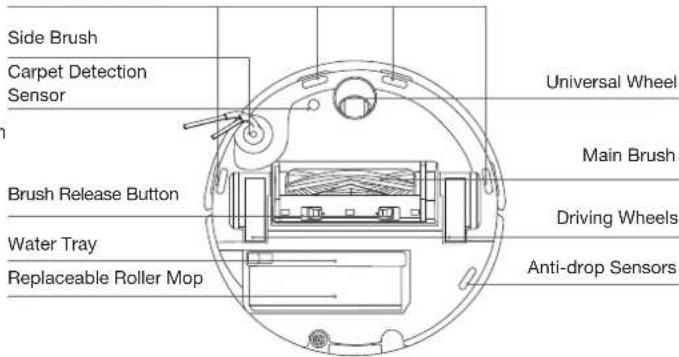
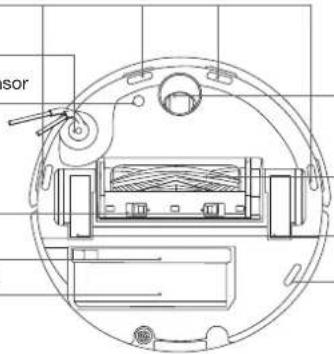
2. Robot Bottom View
Anti-drop Sensors
Note:
*Figures and illustrations are for reference only and may differ from actual product appearance. Product design and specifications are subject to changes without notice.
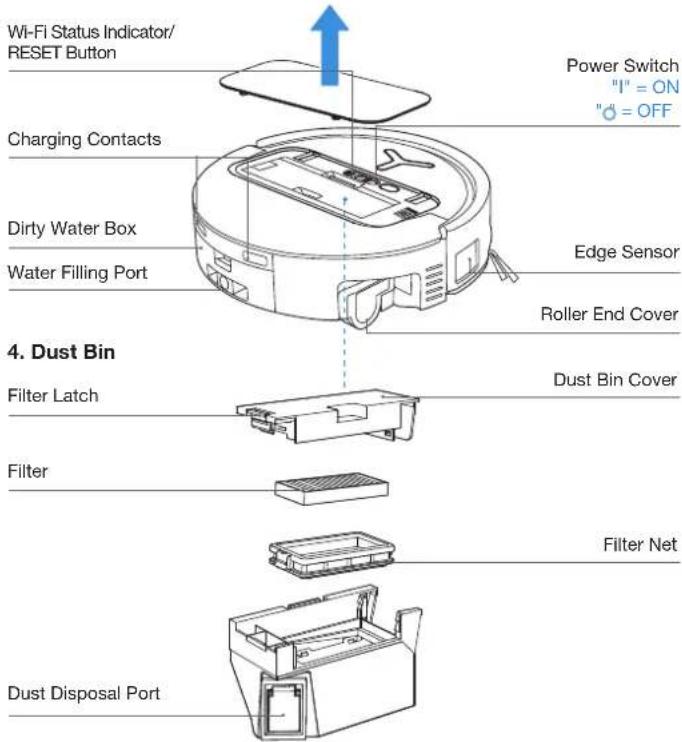
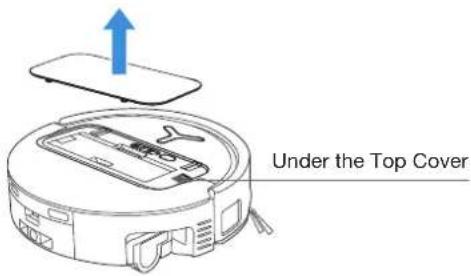
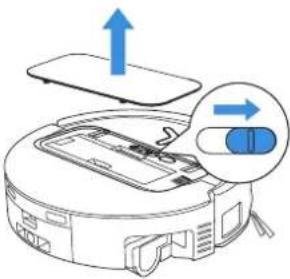
3. Internal View (Under the Cover)
RESET Button
Network Setup: Press the RESET Button and follow the voice prompt to set up the network. Restore to default settings: Long press the RESET Button for 5 seconds. After you hear the voice prompt, the startup music will be played and the robot will be restored to default settings.
- OMNI Station Front View
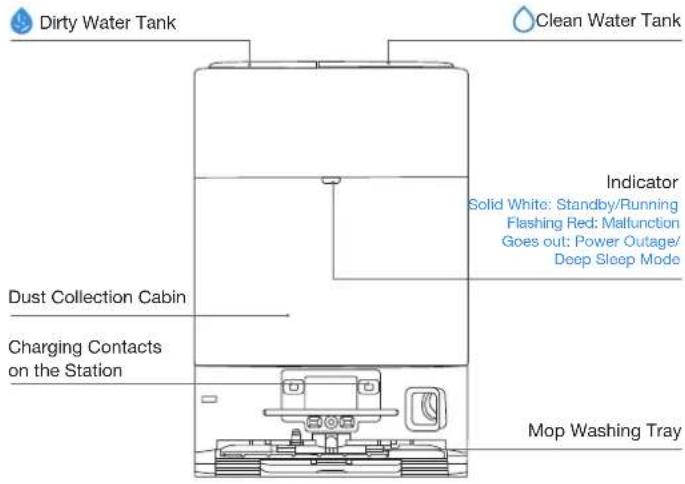
Note:
- If the Indicator flashes red, go to the ECOVACS HOME App for details about the malfunction. - If the robot cannot charge, wipe the corresponding Charging Contacts on the OMNI Station with a dry cloth.
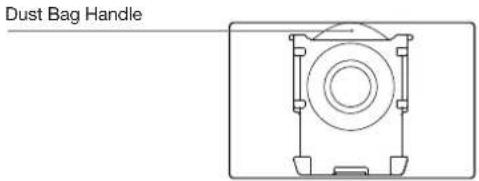
- Dust Bag
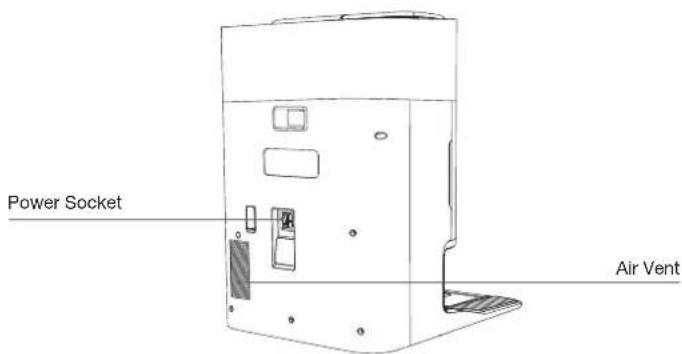
- OMNI Station Back View
- Sensors
| Product Diagram Functional Description | |
| d-ToFLaser Module | Laser Ranging is applied to measure the distance between the robot and surrounding objects based on the time difference of reflection, allowing the module to map against the objects around while the robot is moving. The detection range is 12 m. |
| TrueDetect 3DSensor | With Infrared Ranging-detection and the concept of similar triangles, the sensor emits infrared rays and receives the light from the objects ahead to calculate the distance between the object and the robot. When the sensor detects an object nearby, the robot will automatically take a turn to avoid bumping into the object. The detection range is 0.3 m. |
| Anti-drop Sensors | Infrared Ranging is applied by the sensor at the bottom of the robot to measure the height between the bottom of the robot and the ground. When at the top of the stairs, for example, with a height above 55mm on white-colored ground or a height above 30mm on black-colored ground, the robot will stop advancing, fulfilling the feature of Anti-drop. |
| Carpet Detection Sensor | The ultrasound probe can emit ultrasonic waves with a frequency of 300KHZ. The energy of the ultrasonic waves can be absorbed by carpets. If the reflected energy is below the threshold, the robot will recognize the presence of a carpet. According to ECOVACS lab tests, currently, over 50 types of carpets available on the market can be identified. |
| Anti-collision Sensor | When the transmitted signal is blocked by an object, the signal receiver will not be able to receive it. With this principle, the robot will avoid obstacles when encountering them. |
| Edge Sensor | With ToF distance measurement, the robot can detect the distance between itself and objects on its right side. When there is a wall or obstacle on the right side, the robot will perform edge cleaning to avoid missing spots or collisions. |
| AIVI Camera | Use AI cameras to collect images of the surrounding environment. ^Realize video recording. Through interaction with MIC, remote video call can be realized(For some models). |
NOTES BEFORE CLEANING
1 Warnings
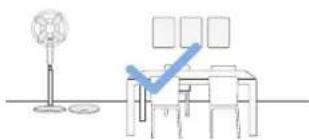
natural_image
Simple line drawing of a desk with chairs and a checkmark, no text or symbols presentPrepare the Area
Tidy up the area to be cleaned by putting furniture, such as chairs, in their proper place.
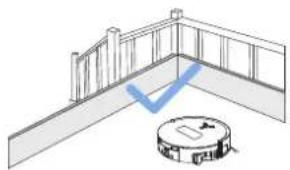
natural_image
Architectural diagram showing a balcony with railing and a circular robot base (no text or symbols)Set up Protective Barriers
It may be necessary to place a physical barrier at the edge of a steep drop to stop the robot from falling over the edge.
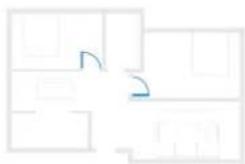
natural_image
Abstract geometric layout with intersecting lines and shapes (no text or symbols)Keep Doors Open
During the first use, make sure each room door is open to help the robot fully explore your house.
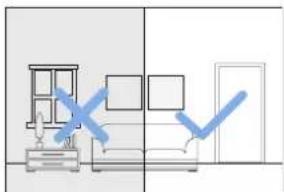
natural_image
Interior view of a living room with furniture and a door, showing a blue checkmark indicating selection or confirmation (no text or symbols present)Provide Sufficient Lighting
The robot can avoid shoes, sockets and cords etc., and make sure all areas to be cleaned are well illuminated, which can improve obstacle avoidance.
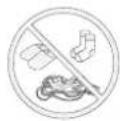
Put away objects including cables, cloths and slippers, etc. on the floor to improve the cleaning efficiency.
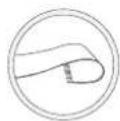
Before using the product on a rug or carpet with tasseled edges, please fold the rug and tuck the tassles under the rug.
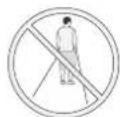
Please do not stand in tight spaces such as doorways and hallways, and make sure not to block the robot's path when it's identifying areas.

Ensure the clarity of the robot's vision and avoid scratching or smudging the AI camera lens with fingerprints or oily stains. Use a clean, soft cloth to wipe the camera, instead of cleaning agents, detergents, or sprays.
② Quick Start
Before using, please remove all protective materials from the robot and OMNI Station.
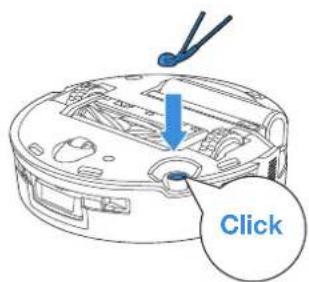
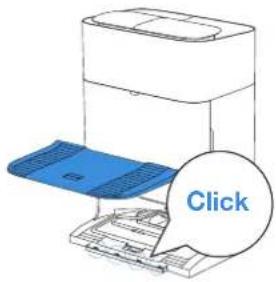
1. Installation
The sound of Click indicates proper installation.
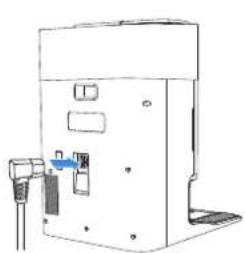
2. Power Cord Connection and Station Placement
Place the Station against a wall on a level, hard ground. Ensure there are no objects within 0.05 m on either side and 0.8 m in front of it.
natural_image
Line drawing of a mechanical device with ports and mounting bracket (no text or symbols)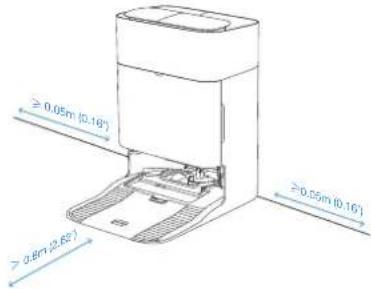
Note:
- If there are reflective objects such as mirrors and skirting lines near the OMNI Station, the bottom 14 cm of them should be covered.
- Do not place the OMNI Station under direct sunlight.
- Place the Station in a location with a strong Wi-Fi signal.
③ Power ON and Charge the Robot
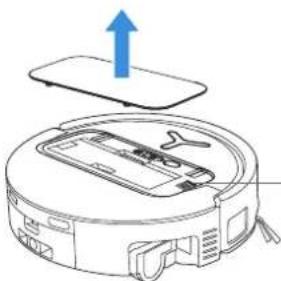
Turn on the Power Switch under the robot's cover('I' indicates power on, and 'O' indicates power off). Place the robot in front of the Station, ensuring the Station is connected to a power supply. Use the ECOVACS HOME App to recall the robot to start charging at the OMNI Station, or long press the robot button (for 3 seconds, and it will return to the Station to charge.
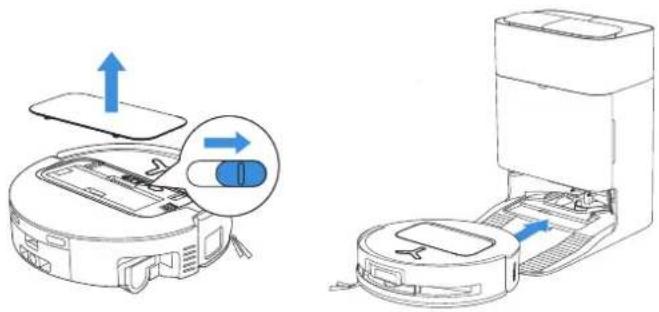
Note:
• The robot can't be charged when the power is turned off.
• After the robot finishes its cleaning task, it is recommended not to power it off but to keep it charging, to better prepare for the next cleaning session.
- It is recommended that the robot start cleaning from the OMNI Station. Do not move the OMNI Station while cleaning.
4 Download the ECOVACS HOME App
Download the ECOVACS HOME App to enjoy more features.
You may scan the QR Code on the robot to download the App.
Or search for the ECOVACS HOME in your mobile App store to download the App.



ECOVACS HOME
Note: Follow the guide of the App to register, log In, and connect the product with the App.
5Connect Robot with App
Via Bluetooth: Turn on the robot and mobile phone Bluetooth. Allow the App to obtain mobile phone Bluetooth permission. Tap to scan the QR Code on the robot or tap or Add in the App to find the nearby robot.
Via Wi-Fi: You can also choose to connect the robot with the App through other methods according to the prompts on the App's page.
Note: Please connect via Bluetooth for a better experience.
Wi-Fi Network Requirements:
- You are using a 2.4GHz or 2.4/5 GHz mixed network.
- Your router supports 802.11b/g/n and IPv4 protocol.
- Do not use a VPN (Virtual Private Network) or Proxy Server.
- Do not use a hidden network.
• WPA and WPA2 using TKIP, PSK, AES/CCMP encryption. - WEP EAP (Enterprise Authentication Protocol) is not supported.
- Use Wi-Fi channels 1-11 in North America and channels 1-13 outside North America (refer to local regulatory agency).
- If you are using a network extender/repeater, the network name (SSID) and password are the same as your primary network.
- Please enable the WPA2 on your router
Wi-Fi Indicator Light
| White Flashing Slow Disconnected to Wi-Fi | |
| White Flashing Fast Connecting | |
| Solid White Connected to Wi-Fi |
Please note that to access smart features such as remote startup, voice interaction, 2D/3D map display and control settings, and personalized cleaning (features may vary depending on the product), you'll need to download and use the ECOVACS HOME App, which receives constant updates. You must agree to our Privacy Policy and User Agreement before we can process some of your basic and necessary information and enable you to operate the product via the ECOVACS HOME App. Without your agreement, some of the aforementioned smart features cannot be accessed through the ECOVACS HOME App. Nevertheless, you can still use the product's basic functions for manual operation.
Network Interface Information
| Name Description | |
| Bluetooth | Enable Bluetooth to connect the robot to the network during the network setup process. |
| Wi-Fi* | Facilitate data transfer between the app and the robot, enabling control of the robot through the app. |
| ECOVACS HOME App | ECOVACS products offer smart functions such as network setup, mapping, and cleaning mode selection (specific to each product). To utilize these features, users need to download and use the official ECOVACS HOME App. |
* The DEEBOT series robotic vacuum cleaners are designed for domestic cleaning scenarios. A home Wi-Fi network is required for operation, and anti-DDOS protection needs to be configured by users through route settings.
⑥ Fill Clean Water Tank and Cleaning Solution (sold separately)
Fill the Clean Water Tank with water. If desired, add the appropriate amount of Cleaning Solution using the bottle cap. Secure the tank's cover, gently shake to mix, and then use.
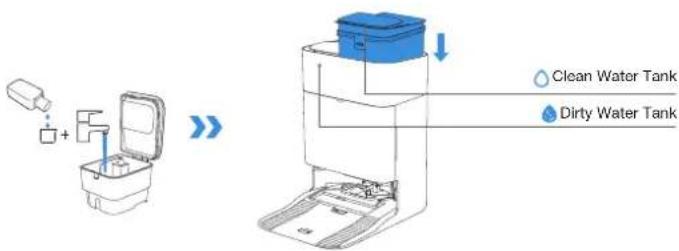
Note:
- Use a clean, dry cloth to wipe off the water on the surface of the tank before putting it in place.
- Please lock the top covers of the Water Tanks tightly before use.
- The water drops in the Water Tank are left over from the function test, please rest assured to use
- For optimal cleaning results, it is recommended to use only ECOVACS Cleaning Solution. It is sold separately and can be purchased at https://www.ecovacs.com.
7 Start Cleaning
1. Start Mapping
Start mapping via ECOVACS HOME App.
When creating a map for the first time, please follow the robot to help eliminate some minor issues. For example, the robot may get stuck under the furniture. Please refer to the following solutions:
- Raise the low sitting furniture if possible;
2.Cover the bottom of the furniture; - Set up Virtual Boundary via the App.
When mapping, the robot will explore the house environment automatically. The exploration path may be different from cleaning path.
2. Start Cleaning
- The robot's water tank is automatically refilled through the OMNI Station. Manual refilling is not needed.
- When Mopping, the robot will recognize floor types and is able to lift Mops automatically when encountering carpets. Please do not use the robot on shaggy rugs or carpets with fibres longer than 10 mm. It is recommended to fold up the shaggy rugs with fibres longer than 10 mm during the cleaning process, or go to Map > Carpet Cleaning Strategy in the ECOVACS HOME App to set the shaggy carpeted area as a No-Entry Zone.
Before cleaning for the first time, please make sure the robot is in the OMNI Station and fully charged. Tap button on the robot to start cleaning. You can also use the ECOVACS HOME App to start cleaning.
3. Pause
Tap 🔊 on the robot to pause while it is working. You can also use the ECOVACS HOME App to pause the robot.
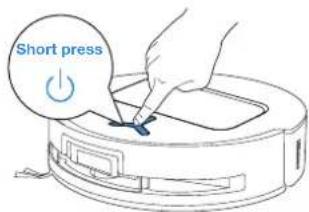
4. Wake up
After pausing for a while, all indicator lights on the robot will go out. To wake up the robot, short press ⏻
5. Return to OMNI Station
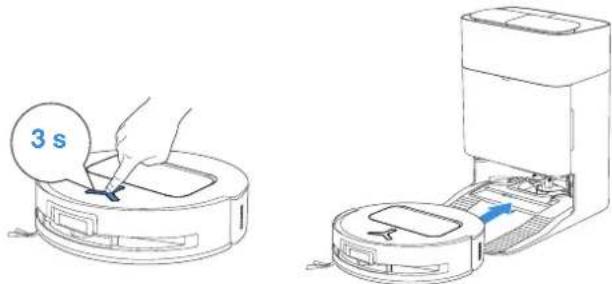
Use the ECOVACS HOME App or long press the robot button for 3 seconds to recall the robot back to the Station for charging.
6. Deep Sleep Mode
The robot will enter Deep Sleep Mode to protect the battery if it stays outside the OMNI Station for about 10h. Please switch OFF and ON to wake up the robot.
natural_image
Illustration of a robotic vacuum cleaner with airflow indicators (no text or symbols)Regular Maintenance
① Maintenance Frequency
To ensure optimal performance, maintain and replace parts at the following frequencies:
| Part Maintenance | Frequency | Replacement Frequency |
| Replaceable Roller Mop Every week | Every 1-2 months | |
| Water Tray Every week / | ||
| Dirty Water Box Every week / | ||
| Dust Bag / Every 2-3 months | ||
| Side Brush Every 2 weeks | Every 3-6 months | |
| Main Brush Every week Every 6-12 months | ||
| Filter | Every week Every 3-6 months | |
| Edge Sensor Universal Wheel Anti-drop Sensors Bumper Charging Contacts on Robot Charging Contacts on OMNI Station d-ToF Laser Module AIVI Camera | Approx. every month | / |
| Clean Water Tank | Every 3 months | / |
| Dirty Water Tank | Every month | / |
| Dust Container Inside | Every month | / |
| Body and Bottom of Station | Every month | / |
| Mop Washing Tray | Every 5 months | / |
② Dust Bin
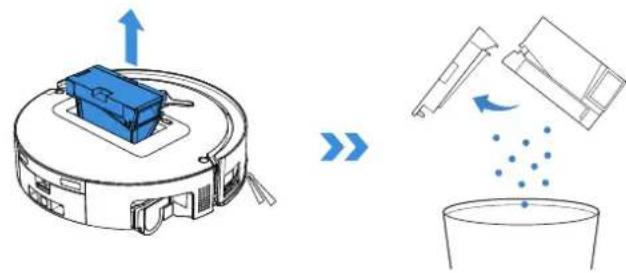
- Remove the Dust Bin and then open its cover to empty the Dust Bin.
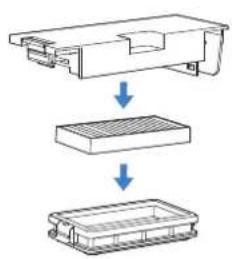
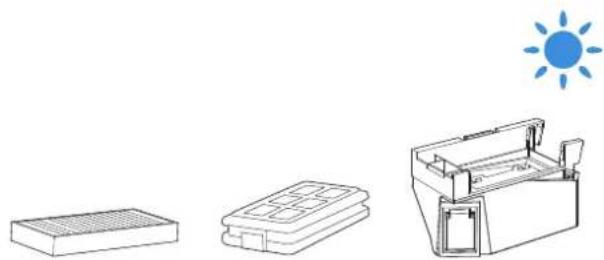
- Open the Dust Bin Cover to remove the Filter and Filter Net.
flowchart
graph TD
    A["Top Component"] --> B["Grid"]
    B --> C["Product"]
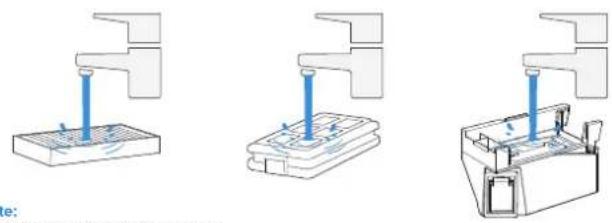
- You can rinse the components. Afterwards, give them a good shake to remove leftover water droplets.
natural_image
Three technical diagrams showing mechanical assembly steps with no visible text or symbolsNote:
- Please rinse the Filter with water.
- Do not use fingers or brushes to clean the Filter.
- Air-dry the Dust Bin and Filter.
natural_image
Illustration of three basic household appliances: a rectangular box, a closed storage unit, and an open refrigerator with a sun symbol above (no text or labels)Completely dry the Filter before use.
③ Main Brush and Side Brush
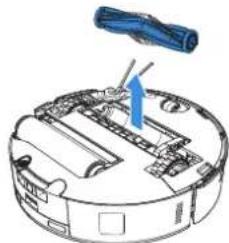
Clean the Main Brush.
- Remove the cover on the Main Brush.
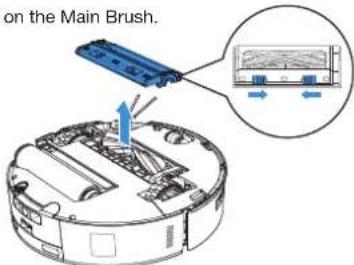
- Remove and clean the Main Brush.
natural_image
Diagram of a robotic vacuum cleaner with a blue tool inserted, showing internal components and no text or symbols.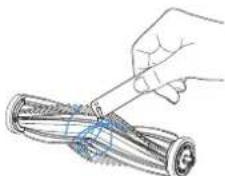
natural_image
Illustration of a hand using a tool to cut or spread a cylindrical object, no text or symbols present- Remove, clean and dry the Brush Comb.
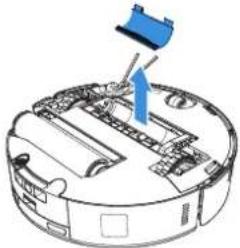
natural_image
Diagram of a robotic vacuum cleaner with blue component and arrow indicating motion (no text or symbols)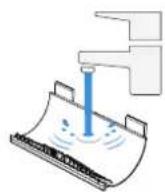
- Install the Brush Comb, Main Brush and Main Brush Cover.
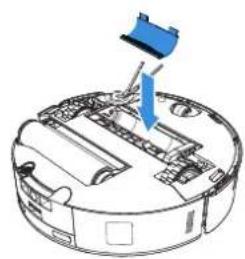
natural_image
Diagram of a robotic vacuum cleaner with a blue component inserted, showing internal components and wiring (no text or labels)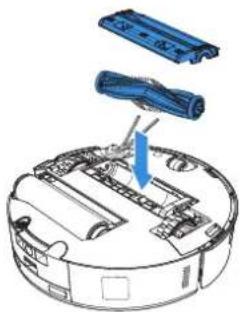
natural_image
Diagram of a robotic vacuum cleaner with blue components and a blue arrow indicating motion (no text or symbols)Clean the Side Brush.
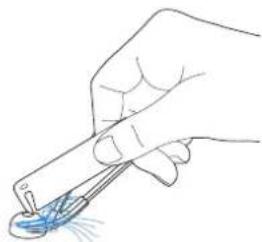
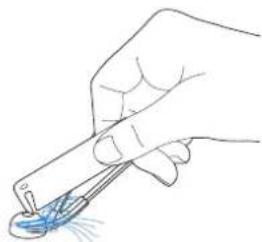
Remove and clean the Side Brush.
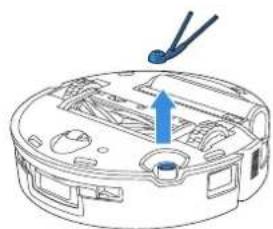
natural_image
Line drawing of a device interior with a blue arrow pointing to a component (no text or symbols)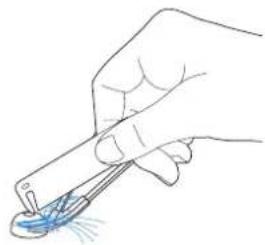
natural_image
Hand holding a pen tip with a blue droplet on the surface, no text or symbols visibleNote: Explore more Multi-Function Cleaning Tools in the ECOVACS HOME App or at https://www.ecovacs.com.
4 Roller Mop, Water Tray and Dirty Water Box.
Clean the Roller Mop.
- Double Tap button to release Roller Mop components.
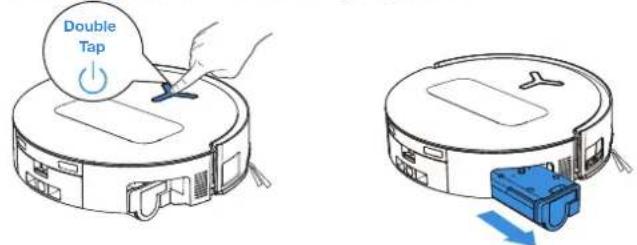
Note: Please avoid excessive force when handling the roller; it should be removed and placed with care.
- Press the unlock button to remove the Roller.
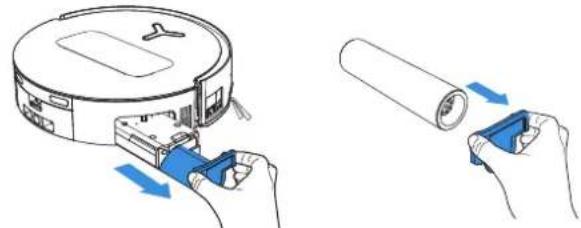
natural_image
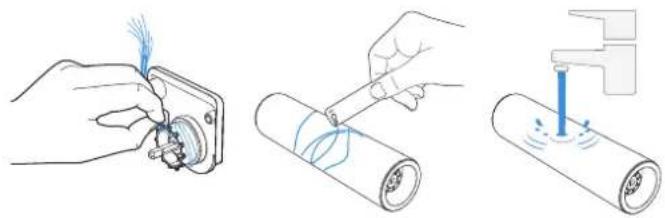
Illustration showing two hands installing a device with blue connectors and arrows indicating process (no text or symbols)- Clean the Roller Mop.
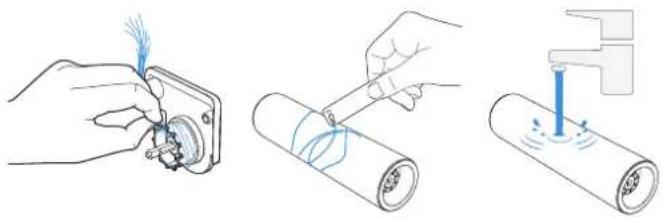
natural_image
Three-step diagram showing hands using a tool to adjust a component, then applying force to a rolled cylindrical device (no text or symbols present)- Clean inside the Roller.

natural_image
Two-step diagram showing a robotic device being inserted into a circular housing, with no visible text or symbols.Note: Do not use water to clean the main body.
- Push Roller Mop into Roller End Cover and double tap button to retract.
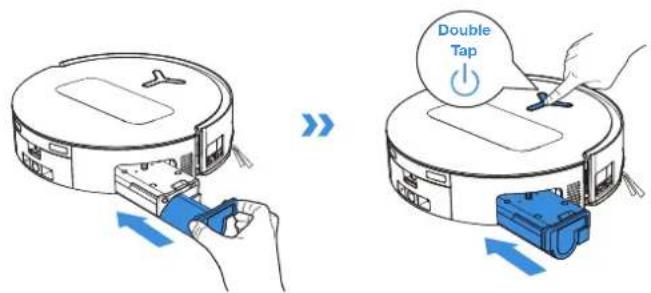
Clean the Water Tray Clean the Dirty Water Box
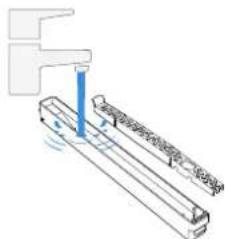
- Remove the Water Tray.
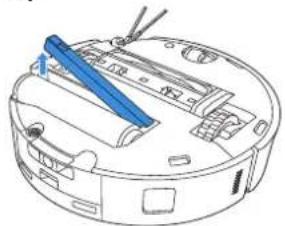
natural_image
Line drawing of a robotic vacuum cleaner with blue tool handle (no text or symbols)Note: A small amount of residual water may leak out when flipping the robot if it's not in drying mode.
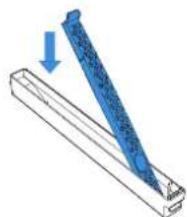
- Remove and clean the Water Tray Components.
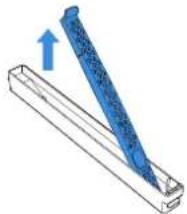
natural_image
Diagram of a blue pen or tool inserted into a rectangular container with an upward arrow indicating direction (no text or symbols present)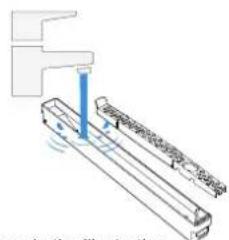
natural_image
Pure mechanical diagram showing a shaft and lever assembly without any text, numbers, or symbols- Please install the Water Tray Components as shown in the illustration.
natural_image
Diagram of a blue tool being inserted into a rectangular block, with an arrow indicating the direction (no text or symbols present)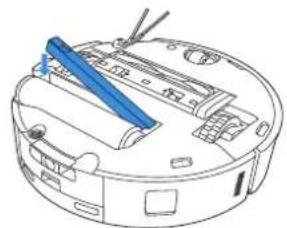
natural_image
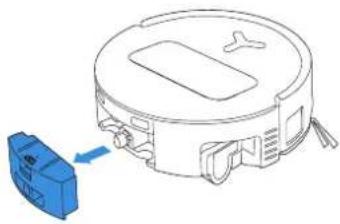
Line drawing of a robotic vacuum cleaner with blue tool handle (no text or symbols)- Remove the Dirty Water Box and the Filter.
natural_image
Line drawing of a robotic vacuum cleaner with a blue component attached (no text or symbols)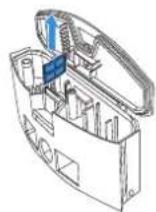
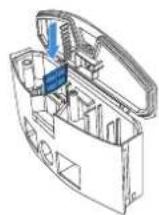
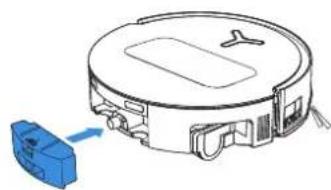
- Clean the Filter, Box and Sewage Outlet.
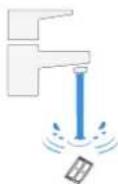
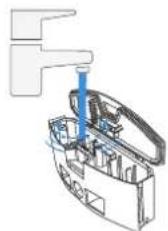
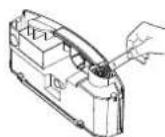
- Reinstall the Filter, press securely and then reattach the Dirty Water Box Cover.
natural_image
Line drawing of a robotic vacuum cleaner with a blue component attached (no text or symbols)⑤ Other Components
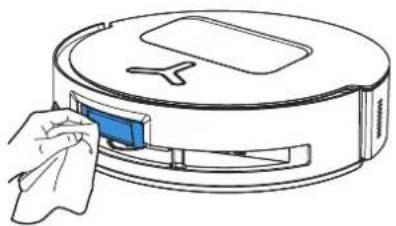
Clean the Sensor Lens
natural_image
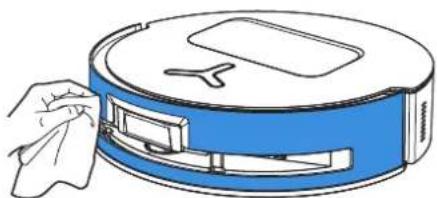
Line drawing of a robotic vacuum cleaner with a hand cleaning the air (no text or symbols)Clean the Bumper
natural_image
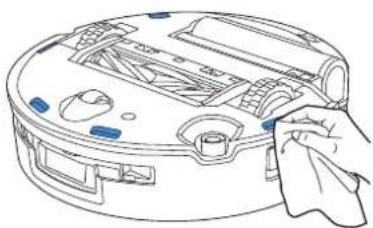
Illustration of a hand cleaning a blue cylindrical device with a handle (no text or symbols)Use a dry cloth when cleaning the Anti-drop Sensors and Bumper to prevent water damage.
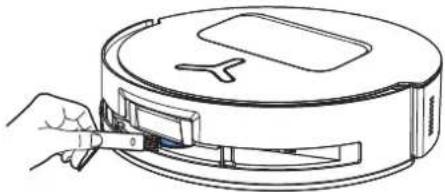
natural_image
Line drawing of a hand inserting a small component into a circular device (no text or symbols)Note: Rotate the Module lens to the front and clean it gently with a brush when cleaning the Laser Module.
Clean Charging Contacts
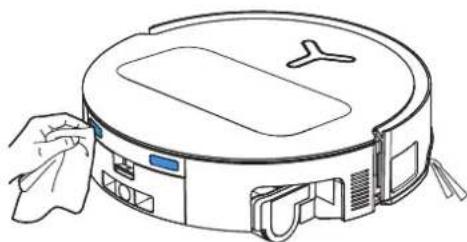
natural_image
Line drawing of a robotic vacuum cleaner with a hand cleaning the air (no text or symbols)Note: Wipe the contacts with a dry cloth. Avoid using wet cloth to prevent water damage.
Clean Edge Sensor
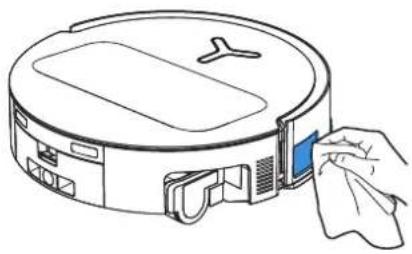
natural_image
Line drawing of a robotic vacuum cleaner with a hand inserting a blue clip (no text or symbols)Clean the Anti-drop Sensors
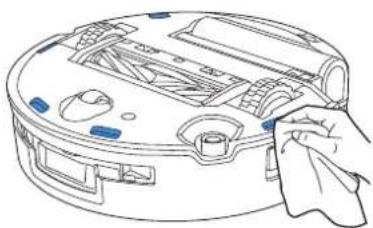
natural_image
Line drawing of a robotic vacuum cleaner with handle and control panel (no text or symbols)Note: Use dry cloth when cleaning the Charging Contacts to prevent water damage.
Clean the Universal Wheel
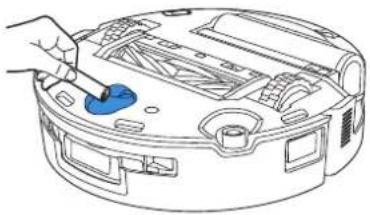
natural_image
Line drawing of a robotic device with a blue tool inserted, showing internal components and no text or symbols.Clean the Driving Wheels

natural_image
Line drawing of a hand using a tool to adjust or install a circular device component (no text or symbols visible)⑥ Mop Washing Tray and Station Base
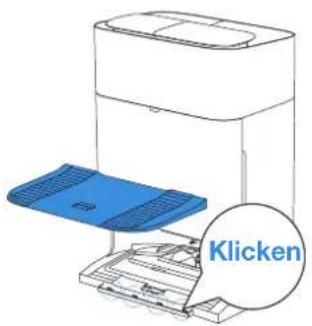
- Remove and clean the Mop Washing Tray and Station Base.
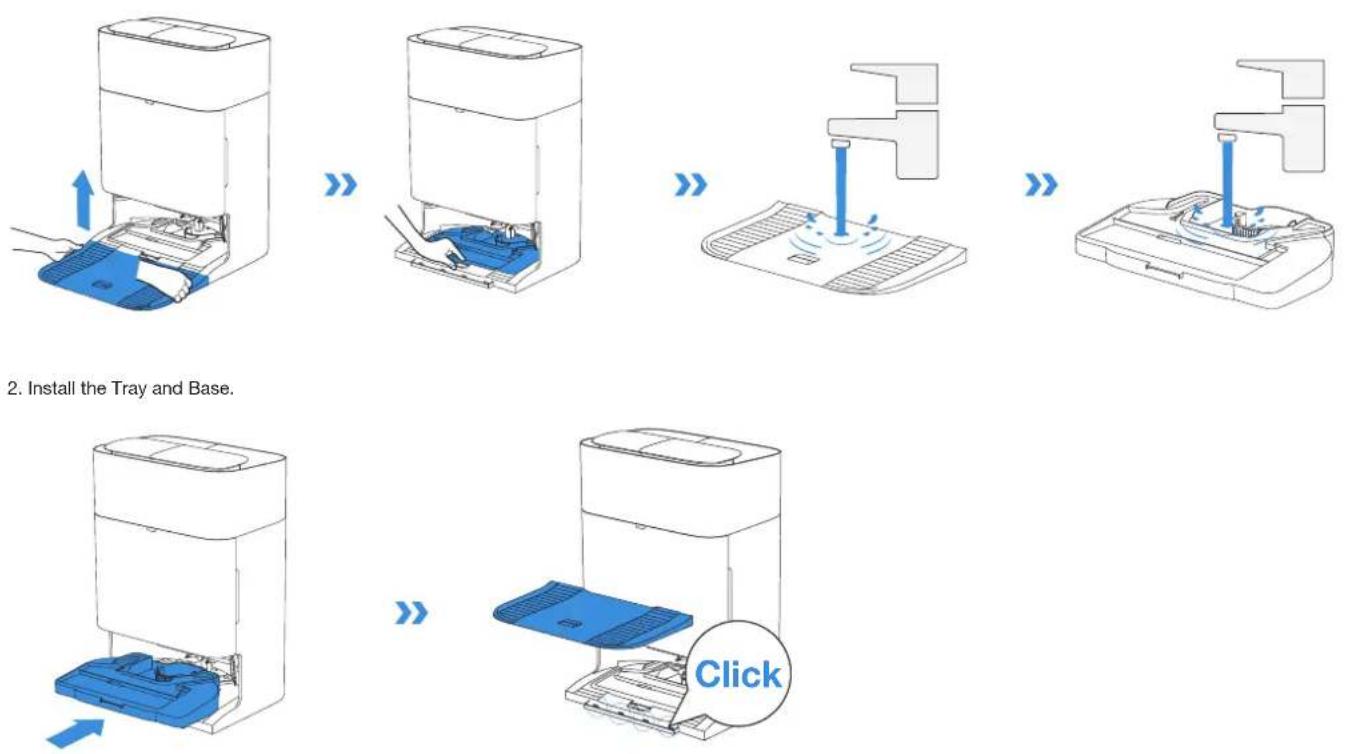
- Install the Tray and Base.
Note: Please install the Tray and Base properly to prevent malfunction.
7 Dust Bag
- Remove the Dust Container Cover. 3. Clean the Dust Container with a dry cloth, install a new Dust Bin, and confirm proper installation with a secure click sound.
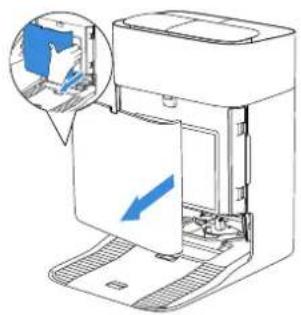
natural_image
Diagram of a printer with an open lid and paper tray, showing internal components and a magnified inset of the printer's window (no text or symbols present)- Remove the Disposable Dust Bag in the direction of the arrow and discard it.
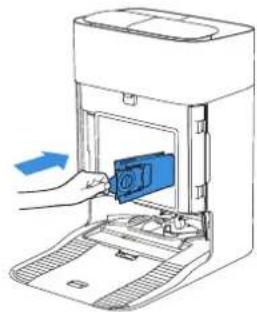
natural_image
Diagram of a printer's internal structure showing a blue component being inserted into a paper holder (no text or symbols visible)- Return Dust Bag and press the cover firmly to secure it in position.
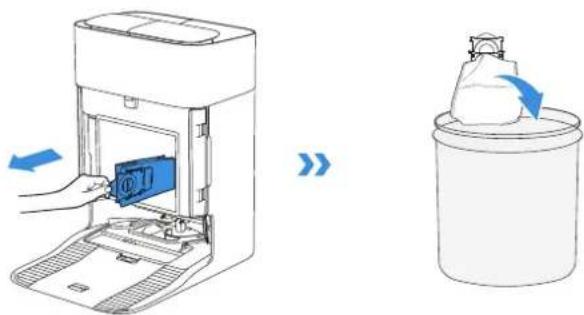
Note: Hold the Handle to lift out the Dust Bag, which can effectively prevent dust leakage.
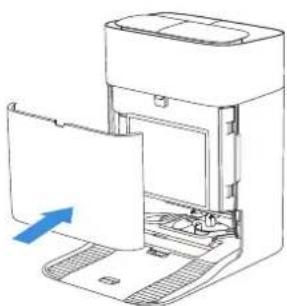
natural_image
Diagram of a printer or scanner device with an open lid and a blue arrow indicating the paper's direction (no text or symbols present)8 Storage
Please fully charge and switch OFF the robot before storage. Please recharge it every 1.5 months to prevent the battery from over-discharging.
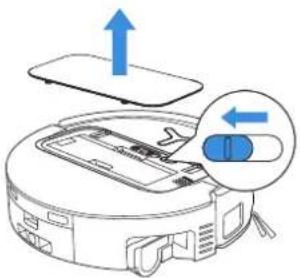
Please note that the robot cannot charge when powered OFF.
• After the robot finishes its cleaning task, it is recommended not to power it off but to keep it charging, to better prepare for the next cleaning session.
- If the battery is over-discharged or not used for a long time, the robot may not be charged. Please contact ECOVACS for help. Do not disassemble battery by yourself.
- If you do not use the product for a long time, keep the Dirty Water Box, Water Tanks empty and the Roller Mop dry.
TROUBLESHOOTING
For the following possible issue, refer to the corresponding solutions.
| No. | Malfunction Possible Cause Solution | ||
| 1 | The robot is not able to connect to the ECOVACS HOME App. | Incorrect Wi-Fi username or password entered. Enter the | correct Wi-Fi username and password. |
| The robot is not within range of your home Wi-Fi signal. | Make sure the robot is within range of your home Wi-Fi signal. Try to stay as close to the router as possible. | ||
| The robot is not in the configuration state. | Press the Reset Button to connect the robot to your phone by Bluetooth. If failed, please press the Reset Button + ⏻ and to connect via the ECOVACS HOME App. | ||
| There is no home Wi-Fi on the Wi-Fi list. | Check if the Wi-Fi name contains special characters. Please do not use special characters like ! @#& ¥%^.Do not use a 5 Ghz network. | ||
| Incorrect App installed. Please download and install the E | COVACS HOME App. | ||
| 2 | Unable to create the furniture map in the App. | Move the robot when cleaning might cause the map to be lost. | During cleaning, do not move the robot. |
| Auto cleaning is not finished. | Make sure the robot automatically return to the OMNI Station after cleaning. | ||
| 3 | The Side Brush drops out of place during use. | The Side Brush is not properly installed. During cleaning, d | do not move the robot. |
| 4 | No signal found. Unable to return to the Station. | The Station is incorrectly placed. | Please place the Station correctly according to the instructions in the [Quick Start] section. |
| The Station is out of power or moved. | Check whether the OMNI Station is connected to the power supply. Do not move the OMNI Station. | ||
| The robot does not start cleaning from the OMNI Station. | It is recommended that the robot starts cleaning from the OMNI Station. | ||
| The docking route is blocked. For example, the door is closed to the room where the Station is placed. | Keep the charging route clear. | ||
| No. | Malfunction Possible Cause | Solution | |
| 5 | The robot returns to the Station before it has finished cleaning. | The room is so large that the robot needs to return to recharge. | Please enable auto resume. For more details, please follow the App instructions. |
| In highly complex home layouts, cleaning efficiency may decrease, possibly resulting in incomplete cleaning. | Simplify your home layout. | ||
| 6 | The robot is unable to charge. | The robot is not switched ON. | Switch ON the robot. |
| The robot's Charging Contacts are not connected to the OMNI Station's Charging Contacts. | Make sure that the robot's Charging Contacts have connected to the Station's Charging Contacts and flashes. Check whether the robot's and OMNI Station's Charging Contacts are dirty. Please clean these parts according to the instructions in the [Regular Maintenance] section. | ||
| The OMNI Station is not connected to the power supply. Make sure the OMNI Station is connected to power supply. | |||
| Base has not been installed in place. Refer to the [Quick Start] | section for correct installation. | ||
| 7 | The robot is very loud during cleaning. | The Main Brush/Side Brush is tangled, or the Dust Bin/Filter is blocked. | It is recommended to clean the Main Brush, Side Brush, Dust Bin, Filter, etc. regularly. |
| The robot is in Strong Mode. Switch to Standard Mode. | |||
| 8 | The robot gets stuck while working and stops. | The robot is tangled with objects on the floor (electrical wires, curtains, carpet fringing, etc.). | The robot will try various ways to free itself. If its attempts fail, manually remove the obstacles and restart. |
| The robot might be stuck under furniture with an entrance of similar height. | Please raise the furniture, set a physical barrier, or set a virtual boundary via the ECOVACS HOME App. | ||
| The robot is stuck in a narrow area. | Tidy up your home, set a physical barrier, or set a virtual boundary via the ECOVACS HOME App. | ||
| No. M | Malfunction Possible Cause | Solution | |
| 9 | During cleaning, the robot may encounter issues like a disorderly route, biased movement, repeated cleaning over the same spots, and missing small areas. (If there is a large area that has not been cleaned temporarily, the robot will automatically clean the missed area. Sometimes the robot will re-enter a cleaned room, which may not be repeated cleaning, but the robot finds any missed area.) | Objects such as wires and slippers placed on the ground block the robot. | Before cleaning, please tidy up scattered wires, slippers, and other objects on the ground as possibly can. If there is any area missed during cleaning, the robot will correct it automatically. Please refrain from interfering (such as moving the robot or blocking its route). |
| The Driving Wheels may slip on the ground when the robot climbs steps, thresholds, and door bars, which can affect its judgement of the entire home environment. | It is recommended to close the door of the affected area and clean it separately. After cleaning, the robot will return to its starting location. | ||
| On freshly waxed or polished floors, as well as smooth tiles, there may be less friction between the Driving Wheels and the floor. | Please wait for the wax to dry before cleaning. | ||
| Due to variations in home layouts, some areas cannot be entered by the robot. | Tidy up your home to ensure that the robot can enter the areas to be cleaned. | ||
| 10 Delay in remote control. | The Wi-Fi signal is poor, causing the video loading to be slow. | Use the robot in areas with good Wi-Fi signal. | |
| 11 | After returning to the OMNI Station, the robot does not empty its Dust Bin. | The Auto-Empty function has not been turned on in the ECOVACS HOME App. | Turn on the auto-empty function in the ECOVACS HOME App. |
| Manually moving the robot back to the Station may not trigger the auto-empty function. | It is recommended to allow The robot return to the OMNI Station on its own. Please do not manually move it. | ||
| In Do Not Disturb mode, the robot will not empty the dust after returning back to the OMNI Station. | Turn off Do Not Disturb in the ECOVACS HOME App or manually start dust-emptying. | ||
| The Station detects a decrease in empty efficiency. | Replace the Dust Bag according to the [Regular Maintenance] section and close the Dust Collection Cabin. If the Dust Bag is not full when prompted by the App, you can put it back again. | ||
| If the above possible causes have been ruled out, components of the Station may be abnormal. | Please contact customer service for assistance. | ||
| No. | Malfunction Possible Cause Solution | ||
| 12 | Auto-empty unsuccessful. | The Station detects a decrease in empty efficiency. | Replace the Dust Bag according to the [Regular Maintenance] section and close the Dust Collection Cabin. If the Dust Bag is not full when prompted by the App, you can put it back again. |
| The outlet of the Dust Bin is blocked by foreign objects. | Remove the Dust Bin and clear the foreign objects on the outlet. | ||
| 13 | The inner side of the Dust Collection Cabin is dirty. | Fine particles pass through the Dust Bag and accumulate on the inner side of the Dust Collection Cabin. | Clean the inner side of the Dust Collection Cabin. |
| The Dust Bag is broken. Check and replace the Dust Bag. | |||
| The Dust Bag is not properly installed. Please install the | Dust Bag properly. | ||
| The Dust Container Cover is not closed. Please check if | the Dust Container Cover is closed properly. | ||
| 14 | Dust leakage occurs while the robot is working | The outlet of the Dust Bin is blocked by foreign objects. | Remove the Dust Bin and clear the foreign objects on the outlet. |
| 15 | Roller Mop will not rotate. | Roller Mop is not correctly installed. | Install the Roller Mop properly according to the [REGULAR MAINTENANCE] section. |
| Roller Mop is blocked by foreign objects. Clean and install | [REGULAR MAINTENANCE] section. | ||
| 16 | The Driving Wheel is stuck. | The Wheel is entangled or stuck due to foreign objects. | Rotate and press the Driving Wheel to check for any wrapping or obstruction by foreign objects. If any foreign objects are found, please clean them promptly. If this issue persists, please contact customer service for assistance. |
| No. | Malfunction Possible Cause | Solution | |
| 17 | The Mop Washing Tray is full of water and can't be emptied. A voice prompt reports Mop Washing Tray malfunction. | The Dirty Water Tank is not properly installed. Tap down on the | the Dirty Water Tank to ensure it is properly installed. |
| The sealing plugs in the Dirty Water Tank are not installed properly. | Make sure that the two sealing plugs are properly installed. | ||
| Mop Washing Tray is not properly installed. | Follow the App instructions to see if the Station can drain properly. If draining attempts fail, please check for possible foreign objects between the Dirty Water Tank and the Station. | ||
| Mop Washing Tray Base gets dirty. | Ensure that there is no foreign object in the suction port of the Mop Washing Tray. | ||
| Check if the floating ball gets stuck when there is no water in the Mop Washing Tray Base. | Take out the Mop Washing Tray to put the floating ball back in place. | ||
| The OMNI Station cannot pump water normally. | Put the robot into the Station and double tap ⏻ , if the issue persists, please contact our customer service for help. | ||
| The suction port of the Mop Washing Tray is blocked by foreign objects. | Ensure that there is no foreign object in the suction port of the Mop Washing Tray. | ||
| The voice alert persists after all the above solutions are tried. | Power off and on the Station. If this issue persists, please contact customer service for assistance. | ||
| 18 | Dirty Water Box malfunction. | The drainage outlet of Dirty Water Box gets blocked and the Draining Pole can't work normally. | Remove and empty the Dirty Water Box, and then rinse it and reinstall. If this issue persists, please contact customer service for assistance. |
Please contact our customer service for assistance if the problem persists despite the recommended solutions.
TECHNICAL SPECIFICATIONS
| Model DEX68 | |||
| Rated Input 20 V 2 A Charging Time about 4.5 h | --- | ||
| Station Model CH2497A | |||
| Rated Input 220-240 V | ~ 50-60 Hz Rated Output 20 V 2 A | --- | |
| Rated Input Current (Charging) 0.5 A Power (Emptying) | 650 W | ||
| Power (Hot Water Washing Mop) | 1650 W | ||
| Robot Dimensions (L*W*H mm) | 353*351.5*98mm | ||
| Station Dimensions (L*W*H mm) | 338*459*500mm (with base)338*276*500mm (without base) | ||
Output power of the wireless module is less than 100 mW.
Note: Technical and design specifications may be changed for continuous product improvement.
Explore more accessories at https://www.ecovacs.com.
natural_image
Line drawing of a robotic vacuum cleaner with a blue upward arrow indicating airflow or movement (no text or symbols)Please use the mobile camera to scan the QR code and obtain the user guide.
Europe Authorised Representative:
natural_image
Technical line drawing of a mechanical component with concentric circles and mounting brackets (no text or symbols)natural_image
Simple line drawing of a desk with a checkmark and a stand, no text or symbols presentnatural_image
Diagram of a room corner with railing and a circular object below (no text or symbols)natural_image
Abstract geometric layout with intersecting lines and shapes (no text or symbols)natural_image
Interior view of a room with furniture and a door, showing no text or symbolsHinweis:
Regelmäßige Wartung
flowchart
graph TD
    A["Top Component"] --> B["Bottom Plastic Sheet"]
    B --> C["Final Plastic casing"]
natural_image
Three technical diagrams showing mechanical assembly steps with no visible text or symbolsHinweis:
natural_image
Illustration of three household appliances under a sun, no text or symbols presentnatural_image
Diagram of a robotic vacuum cleaner with a blue tool inserted, showing internal components and no text or symbols.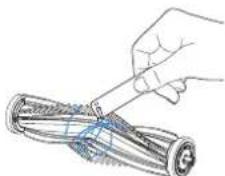
natural_image
Illustration of a hand using a tool to cut a cylindrical object (no text or symbols visible)natural_image
Diagram of a robotic vacuum cleaner with blue component, showing internal structure without any text or symbols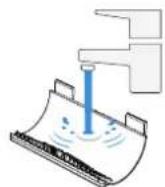
natural_image
Diagram of a robotic vacuum cleaner with a blue component inserted, showing internal components and wiring (no text or labels)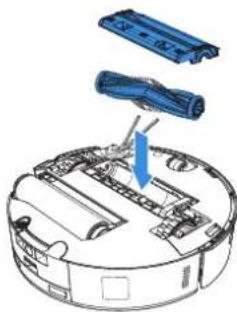
natural_image
Diagram of a robotic vacuum cleaner with blue components and a blue arrow indicating assembly (no text or symbols present)natural_image
Diagram of a robotic device with a blue arrow indicating a component or operation, no text or symbols present.》
natural_image
Hand holding a pen tip with a blue liquid droplet inside, no text or symbols visiblenatural_image
Illustration showing a robotic vacuum cleaner performing a roll-up operation with blue clamps (no text or symbols)natural_image
Three-step diagram showing hands using a tool to adjust a component, then applying a spring or spring spike (no text or symbols present)natural_image
Illustration of a robotic device being processed, showing hand positioning and blue component (no text or symbols)natural_image
Line drawing of a robotic vacuum cleaner with a blue tool inserted (no text or symbols)natural_image
Diagram of a blue tool inserted into a rectangular block, with an upward arrow indicating direction (no text or symbols)》
natural_image
Pure technical diagram of a mechanical assembly without any text, numbers, or symbolsnatural_image
Diagram of a blue pen being inserted into a rectangular block, with an arrow indicating the insertion direction (no text or symbols present)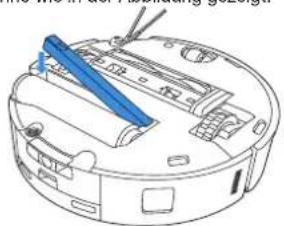
natural_image
Line drawing of a robotic vacuum cleaner with blue tool handle (no text or symbols)natural_image
Diagram of a robotic vacuum cleaner with a blue box attached to its side (no text or symbols present)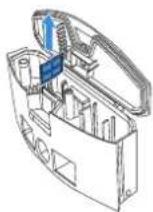
natural_image
Diagram of a robotic vacuum cleaner with a blue component attached to the side (no text or symbols)natural_image
Line drawing of a robotic vacuum cleaner with a cloth clip, no text or symbols presentnatural_image
Illustration of a hand cleaning a blue cylindrical device with a handle (no text or symbols)natural_image
Line drawing of a robotic vacuum cleaner with a hand adjusting its component (no text or symbols)natural_image
Line drawing of a robotic vacuum cleaner with a hand cleaning the air (no text or symbols)natural_image
Line drawing of a robotic vacuum cleaner with a hand inserting a blue clip (no text or symbols)natural_image
Line drawing of a robotic vacuum cleaner with handle and control panel (no text or symbols)natural_image
Line drawing of a robotic device with a blue tool inserted, showing internal components and no text or symbols.natural_image
Line drawing of a hand using a blue tool to adjust or install a device on a circular base (no text or symbols)6 Moppwanne
natural_image
Diagram of a printer with blue internal components and an arrow indicating insertion (no text or symbols)》
natural_image
Diagram of a printer or printer with an open lid and paper tray, showing internal components and a magnified inset (no text or symbols)natural_image
Line drawing of a printer with a blue internal component and directional arrows indicating motion (no text or symbols)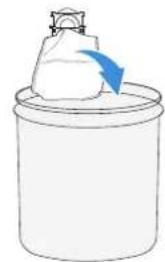
natural_image
Simple line drawing of a container with a white object and a blue arrow pointing to it (no text or symbols)natural_image
Illustration of a hand inserting a device into a machine (no text or symbols visible)natural_image
Diagram of a printer or printer device with an open lid and a blue arrow indicating a loading or movement (no text or symbols present)8 Lagerung
natural_image
Line drawing of a robotic vacuum cleaner with blue arrows indicating airflow or movement (no text or symbols)natural_image
Line drawing of a robotic vacuum cleaner with an upward arrow indicating motion (no text or symbols)https://www.ecovacs.com/global/compliance.
CONTENU DU COLIS
① CONTENU DU COLIS
natural_image
Technical line drawing of a mechanical component with concentric circles and mounting brackets (no text or symbols)natural_image
Simple line drawing of a desk with a checkmark and a stand, no text or symbols presentPréparer la zone
natural_image
Architectural diagram showing a balcony with railing and a circular robot base (no text or symbols)natural_image
Abstract geometric layout with intersecting lines and shapes (no text or symbols)natural_image
Interior view of a living room with furniture and a door, showing a blue checkmark indicating selection or confirmation (no text or symbols present)natural_image
Line drawing of a mechanical device with a blue arrow pointing to a component (no text or symbols)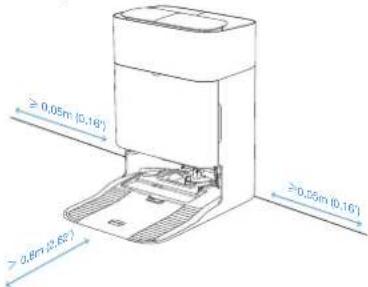
Remarque :
natural_image
Diagram showing two views of a robotic vacuum cleaner with blue arrows indicating airflow direction (no text or symbols present)Remarque :
natural_image
Diagram of a robotic vacuum cleaner with blue arrows indicating airflow direction (no text or symbols)Entretien régulier
natural_image
Three technical diagrams showing mechanical assembly with blue rods and a base plate, no text or symbols present.Remarque :
natural_image
Illustration of three basic household appliances: a rectangular box, a closed storage unit, and an open refrigerator with a sun symbol above (no text or labels)natural_image
Diagram of a robotic vacuum cleaner with a blue tool inserted, showing internal components and a blue arrow indicating the component (no text or symbols present)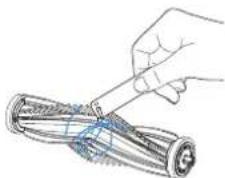
natural_image
Hand using a tool to tie a rolled-up cylindrical object (no text or symbols visible)natural_image
Diagram of a robotic vacuum cleaner with a blue component inserted, showing internal structure without any text or symbols.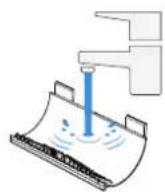
natural_image
Technical line drawing of a circular device with internal components and a blue arrow indicating direction (no text or symbols)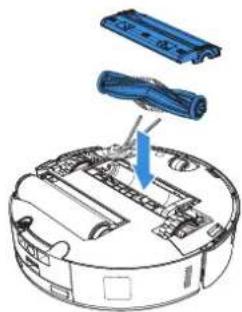
natural_image
Diagram of a robotic vacuum cleaner with blue components and a blue arrow indicating motion (no text or symbols)natural_image
Diagram of a device interior with a blue arrow indicating a component or feature, no text or symbols present.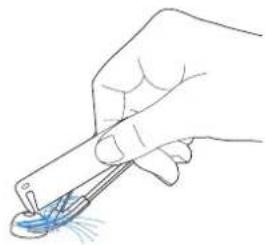
natural_image
Hand holding a pen tip with a blue droplet on the surface, no text or symbols visiblenatural_image
Illustration showing a robotic device being inserted into a paper roll, with hands holding blue clips (no text or symbols present)natural_image
Three-step diagram showing hands using a tool to adjust a component, then applying force to a rolled cylindrical device (no text or symbols present)natural_image
Line drawing showing two views of a robotic device with a blue internal component, no text or symbols presentnatural_image
Line drawing of a robotic vacuum cleaner with blue tool handle (no text or symbols)natural_image
Diagram of a blue pen or tool with an upward arrow, placed on a rectangular base (no text or symbols)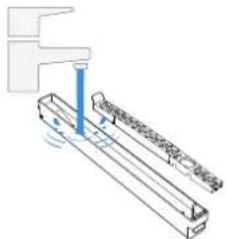
natural_image
Technical line drawing of a mechanical assembly with no visible text or symbolsnatural_image
Diagram of a blue pen inserted into a rectangular container with an arrow indicating direction (no text or symbols)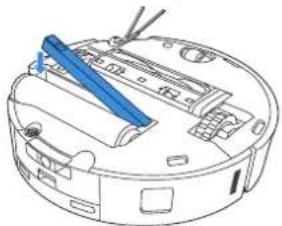
natural_image
Line drawing of a robotic vacuum cleaner with blue tool handle (no text or symbols)natural_image
Diagram of a robotic vacuum cleaner with a blue component inserted, showing no text or symbols.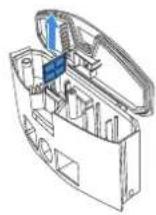
natural_image
Line drawing of a robotic vacuum cleaner with a blue component attached (no text or symbols)⑤ Autres composants
natural_image
Line drawing of a robotic vacuum cleaner with a hand cleaning the air (no text or symbols)natural_image
Illustration of a hand cleaning a blue cylindrical device with a handle (no text or symbols)natural_image
Line drawing of a robotic vacuum cleaner with a hand adjusting its component (no text or symbols)natural_image
Line drawing of a robotic vacuum cleaner with cleaning components (no text or symbols)natural_image
Line drawing of a robotic vacuum cleaner with a hand inserting a blue clip (no text or symbols)natural_image
Line drawing of a robotic vacuum cleaner with handle and control panel (no text or symbols)natural_image
Line drawing of a robotic device with a blue tool inserted, showing internal components and no text or symbols.natural_image
Line drawing of a hand using a tool to adjust or install a circular device component (no text or symbols visible)natural_image
Diagram of a printer with a paper roll and arrow indicating print direction (no text or symbols)natural_image
Diagram showing a hand inserting a plastic bag into a device, next to a empty container with arrows indicating flow (no text or symbols)natural_image
Diagram of a printer's internal structure showing a blue component being inserted, with no visible text or symbols.natural_image
Diagram of a printer or scanner device with an open lid and internal components, showing no text or symbols.8 Stockage
natural_image
Line drawing of a robotic vacuum cleaner with an upward arrow indicating motion (no text or symbols)natural_image
Simple line drawing of a desk with chairs and a checkmark, no text or symbols presentPreparare l'area
natural_image
Diagram of a room corner with railing and a circular object below (no text or symbols)natural_image
Abstract geometric layout with intersecting lines and shapes (no text or symbols)natural_image
Interior view of a living room with furniture and a door, showing no text or symbolsnatural_image
Line drawing of a mechanical device with a blue arrow pointing to a component (no text or symbols)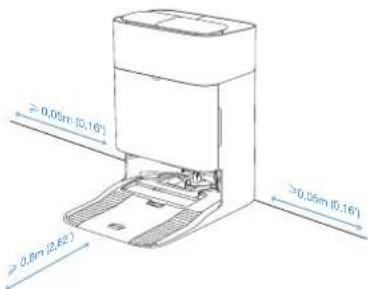
Nota:
Nota:
flowchart
graph TD
    A["Component"] --> B["Plastic Sheet"]
    B --> C["Plastic Box"]
natural_image
Three technical diagrams showing mechanical assembly steps with no visible text or symbolsNota:
natural_image
Illustration of three basic household appliances: a rectangular box, a closed storage unit, and a portable device with a sun symbol above (no text or labels)natural_image
Diagram of a robotic vacuum cleaner with a blue tool inserted, showing internal components and no text or symbols.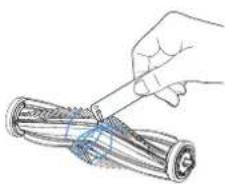
natural_image
Hand holding a pen applying material to a rolled-up battery (no text or symbols visible)natural_image
Diagram of a robotic vacuum cleaner with a blue component inserted, showing internal structure without any text or symbols.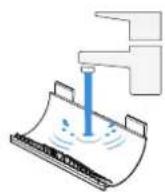
natural_image
Diagram of a robotic vacuum cleaner with a blue component inserted, showing internal components and wiring (no text or labels)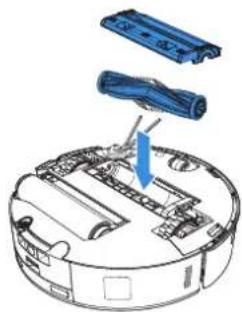
natural_image
Diagram of a robotic vacuum cleaner with blue components and a blue arrow indicating motion (no text or symbols)natural_image
Diagram of a device interior with a blue arrow indicating a component (no text or symbols present)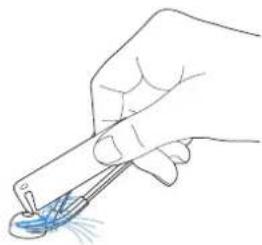
natural_image
Hand holding a pen tip with blue liquid being applied (no text or symbols visible)natural_image
Three-step diagram showing hands using a tool to adjust a component, then applying liquid to a cylindrical tube (no text or symbols present)natural_image
Two-step diagram showing a hand inserting a device into a circular device, with no visible text or symbols.natural_image
Line drawing of a robotic vacuum cleaner with blue tool handle (no text or symbols)natural_image
Diagram of a blue pen-like object inserted into a rectangular base, with an upward arrow indicating direction (no text or symbols)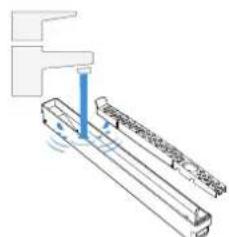
natural_image
Pure mechanical assembly diagram without any text, numbers, or symbolsnatural_image
Diagram of a blue tool interacting with a rectangular block, showing a downward arrow (no text or symbols present)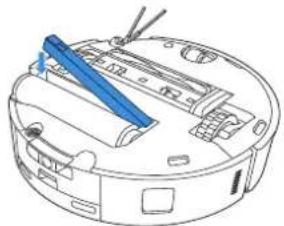
natural_image
Line drawing of a robotic vacuum cleaner with blue tool handle (no text or symbols)natural_image
Diagram showing a robotic vacuum cleaner with blue components and a close-up of its internal casing (no text or symbols)natural_image
Technical line drawing of a mechanical device with a blue lever and open lid (no text or symbols)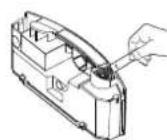
natural_image
Technical line drawing of a robotic vacuum cleaner with a blue component attached (no text or symbols)⑤ Altri componenti
natural_image
Line drawing of a robotic vacuum cleaner with a hand cleaning the air (no text or symbols)natural_image
Illustration of a hand cleaning a blue cylindrical device with a handle (no text or symbols)natural_image
Line drawing of a hand inserting a small component into a circular device (no text or symbols)natural_image
Line drawing of a robotic vacuum cleaner with a hand cleaning the air (no text or symbols)natural_image
Line drawing of a robotic vacuum cleaner with a hand inserting a blue clip (no text or symbols)natural_image
Line drawing of a robotic vacuum cleaner with handle and control panel (no text or symbols)natural_image
Line drawing of a robotic device with a blue tool inserted, showing internal components and no text or symbols.Pulire le ruote motrici
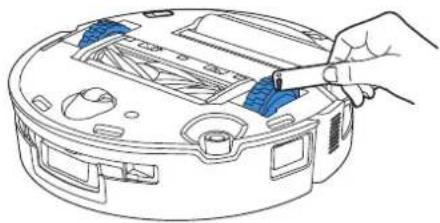
natural_image
Line drawing of a hand using a blue tool to adjust or install a device on a circular base (no text or symbols)natural_image
Illustration of a printer with a blue paper feed being inserted, showing internal components and a blue upward arrow (no text or symbols)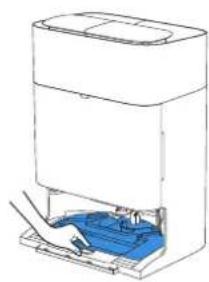
natural_image
Line drawing of a device with a blue internal component and a rectangular top (no text or symbols)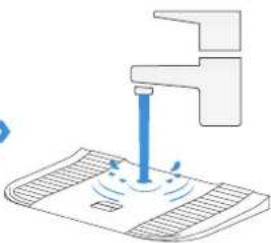
natural_image
Illustration of a faucet dispensing liquid into a surface with motion lines (no text or symbols)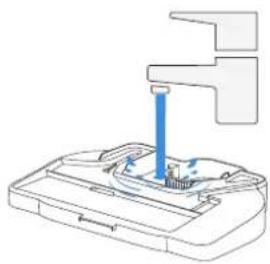
natural_image
Diagram of a mechanical device with a blue tool inserted into a housing (no text or symbols visible)natural_image
Line drawing of a printer with blue internal components and an upward arrow indicating motion (no text or symbols)》
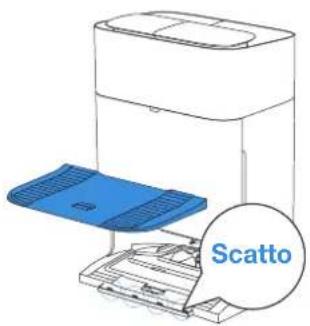
natural_image
Diagram of a printer or printer with a paper roll and paper tray, showing internal components without any text or symbols.natural_image
Illustration of a hand inserting a blue device into a machine (no text or symbols visible)natural_image
Diagram of a printer or printer device with an open lid and a blue arrow indicating the paper's front cover (no text or symbols present)8 Conservazione
natural_image
Line drawing of a robotic vacuum cleaner with blue arrows indicating airflow or movement (no text or symbols)natural_image
Line drawing of a robotic vacuum cleaner with an upward arrow indicating motion (no text or symbols)natural_image
Technical line drawing of a mechanical component with concentric circles and mounting brackets (no text or symbols)natural_image
Simple line drawing of a desk with chairs and a checkmark, no text or symbols presentFörbered området
natural_image
Architectural diagram showing a balcony with railing and a circular robot base (no text or symbols)natural_image
Abstract geometric layout with intersecting lines and shapes (no text or symbols)natural_image
Interior view of a living room with furniture and a door, showing a blue checkmark indicating selection or confirmation (no text or symbols present)Observera:
Observera:
natural_image
Three technical diagrams showing a mechanical assembly with three views (top, front, side), no text or symbols present.Observera:
natural_image
Illustration of three basic household appliances: a rectangular box, a closed storage unit, and an open refrigerator with a sun symbol above (no text or labels)natural_image
Diagram of a robotic vacuum cleaner with a blue tool inserted, showing internal components and no text or symbols.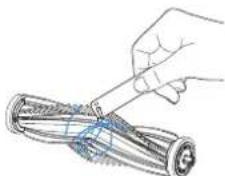
natural_image
Illustration of a hand using a tool to cut a cylindrical object (no text or symbols visible)natural_image
Diagram of a robotic vacuum cleaner with a blue arrow indicating motion (no text or symbols present)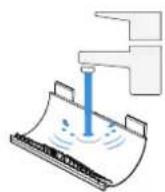
natural_image
Diagram of a robotic vacuum cleaner with a blue component inserted, showing internal components and wiring (no text or labels)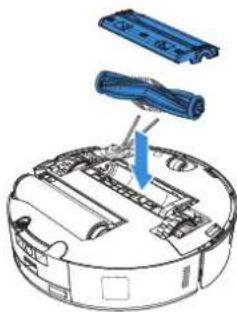
natural_image
Diagram of a robotic vacuum cleaner with blue components and a blue arrow indicating assembly (no text or symbols present)Rengör sidoborsten.
natural_image
Line drawing of a device interior with a blue arrow indicating a component (no text or symbols present)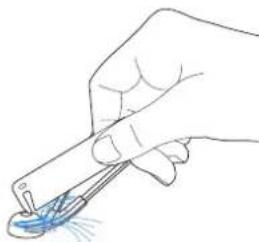
natural_image
Hand holding a pen tip with a blue droplet on the tip, no text or symbols visibleObservera: Utforska fler multifunktionella rengöringsverktyg i ECOVACS HOME-appen eller på https://www.ecovacs.com.
natural_image
Illustration showing a robotic vacuum cleaner being inserted into a rolled document using a blue clamp (no text or symbols present)- Rengör rullMoppen.
natural_image
Three-step diagram showing hands using a tool to adjust a component, then applying force to a rolled cylindrical device (no text or symbols present)natural_image
Illustration of a robotic device with hands operating it, showing internal components and a close-up view (no text or symbols)natural_image
Line drawing of a robotic vacuum cleaner with a blue tool inserted, showing internal components and wiring (no text or symbols)natural_image
Diagram of a blue pen or tool inserted into a rectangular container with an upward arrow indicating direction (no text or symbols present)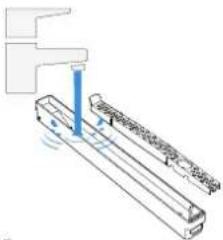
natural_image
Pure technical diagram of a mechanical assembly with no visible text, numbers, or symbolsnatural_image
Diagram of a blue tool being inserted into a rectangular block, with an arrow indicating the direction (no text or symbols present)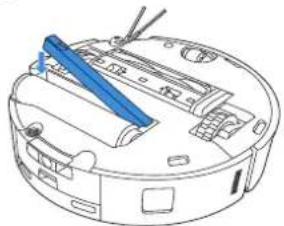
natural_image
Line drawing of a robotic vacuum cleaner with blue tool handle (no text or symbols)natural_image
Line drawing of a robotic vacuum cleaner with a blue component attached (no text or symbols)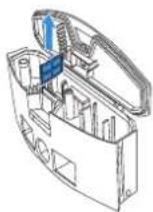
natural_image
Line drawing of a robotic vacuum cleaner with a blue component attached (no text or symbols)5 Andra komponenter
natural_image
Line drawing of a robotic vacuum cleaner with a hand cleaning the air (no text or symbols)natural_image
Illustration of a hand cleaning a blue cylindrical device with a handle (no text or symbols)natural_image
Line drawing of a robotic vacuum cleaner with a hand adjusting its component (no text or symbols)Observera:
natural_image
Line drawing of a robotic vacuum cleaner with a hand cleaning the air (no text or symbols)natural_image
Line drawing of a robotic vacuum cleaner with a hand inserting a blue clip (no text or symbols)natural_image
Line drawing of a robotic vacuum cleaner with handle and control panel (no text or symbols)natural_image
Line drawing of a robotic device with a blue tool inserted, showing internal components and no text or symbols.natural_image
Line drawing of a hand using a tool to adjust or install a circular device component (no text or symbols visible)6 Mopptvättbricka
natural_image
Diagram of a printer with a paper feed into the opening, showing internal components and a magnified inset (no text or symbols)natural_image
Diagram of a printer's internal structure showing a blue component being inserted into a paper holder (no text or symbols visible)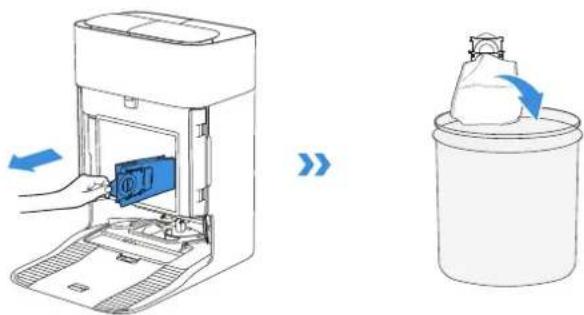
natural_image
Diagram of a printer or scanner device with an open lid and a blue arrow indicating the paper's direction (no text or symbols present)8 Förvaring
natural_image
Line drawing of a robotic vacuum cleaner with an upward arrow indicating motion (no text or symbols)https://www.ecovacs.com/global/compliance.
PAKKENS INNHOLD
1 PAKKENS INNHOLD
natural_image
Technical line drawing of a circular robotic vacuum cleaner (no text or symbols)Toppdeksel
Støtfanger
Universalhjul
Hovedbørste
Kjørehjul
Anti-fallsensorer
Merk:
natural_image
Technical line drawing of a mechanical component with concentric circles and mounting brackets (no text or symbols)natural_image
Simple line drawing of a desk with a checkmark and a stand, no text or symbols presentForbered området
natural_image
Simple line drawing of a balcony with railing and a circular object below (no text or symbols)Sett opp beskyttelsesbarrierer
natural_image
Abstract geometric layout with intersecting lines and shapes (no text or symbols)Hold dørene åpne
natural_image
Interior view of a room with furniture and a door, showing no text or symbolsMerk:
Merk:
Jevnlig vedlikehold
1 Vedlikeholdshyppighet
flowchart
graph TD
    A["Component with top and bottom parts"] --> B["Grid with top part"]
    B --> C["Storage unit with bottom part"]
natural_image
Three technical diagrams showing mechanical assembly steps with no visible text or symbolsMerk:
natural_image
Illustration of three basic household appliances: a rectangular box, a closed storage unit, and an open refrigerator with a sun symbol above (no text or labels)natural_image
Diagram of a robotic vacuum cleaner with a blue tool inserted, showing internal components and no text or symbols.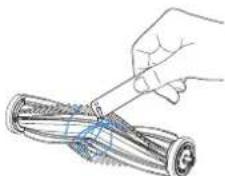
natural_image
Illustration of a hand using a tool to cut or spread cylindrical objects (no text or symbols visible)natural_image
Diagram of a robotic vacuum cleaner with blue component and arrow indicating motion (no text or symbols)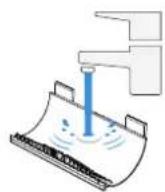
natural_image
Diagram of a robotic vacuum cleaner with a blue component inserted, showing internal components and wiring (no text or labels)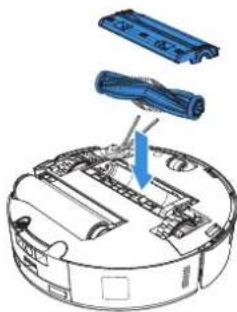
natural_image
Diagram of a robotic vacuum cleaner with blue components and a blue arrow indicating assembly (no text or symbols present)natural_image
Diagram of a robotic device with a blue arrow indicating a component or operation, no text or symbols present.》
natural_image
Hand holding a pen tip with a blue liquid droplet inside, no text or symbols visible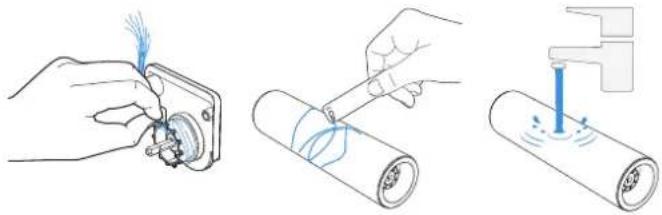
natural_image
Three-step diagram showing hands using a tool to adjust a component, then applying liquid to a cylindrical tube (no text or symbols present)natural_image
Illustration of a robotic device being processed, showing internal components and a close-up view (no text or symbols)natural_image
Line drawing of a robotic vacuum cleaner with blue tool handle (no text or symbols)natural_image
Diagram of a blue pen inserted into a rectangular container with an upward arrow indicating force (no text or symbols)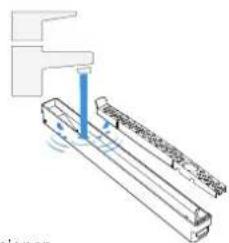
natural_image
Technical line drawing of a mechanical assembly with no visible text or symbolsnatural_image
Diagram of a blue tool being inserted into a rectangular block, with an arrow indicating the direction (no text or symbols present)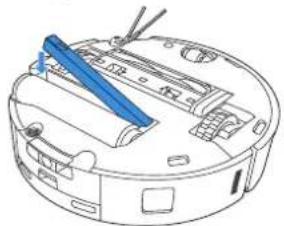
natural_image
Line drawing of a robotic vacuum cleaner with blue tool handle (no text or symbols)natural_image
Line drawing of a robotic vacuum cleaner with a blue component attached (no text or symbols)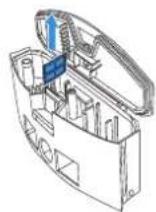
natural_image
Line drawing of a robotic vacuum cleaner with a blue component attached (no text or symbols)5 Andre komponenter
natural_image
Line drawing of a robotic vacuum cleaner with a hand cleaning the air (no text or symbols)natural_image
Illustration of a hand cleaning a blue cylindrical device with a handle (no text or symbols)natural_image
Line drawing of a hand using a tool to adjust or install a circular device component (no text or symbols visible)natural_image
Line drawing of a robotic vacuum cleaner with a hand cleaning the air (no text or symbols)natural_image
Line drawing of a robotic vacuum cleaner with a hand inserting a blue clip (no text or symbols)Rengjør anti-fallsensorene
natural_image
Line drawing of a robotic vacuum cleaner with handle and control panel (no text or symbols)natural_image
Line drawing of a robotic device with a blue tool inserted, showing internal components and no text or symbols.natural_image
Line drawing of a hand inserting a blue tool into a device casing (no text or symbols)⑥ Vaskebrett for Mopp
natural_image
Diagram of a printer or scanner device with an open lid and internal components, showing no text or symbols.natural_image
Illustration of a printer's internal structure with a hand inserting a blue plastic component (no text or symbols visible)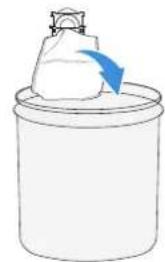
natural_image
Simple line drawing of a container with a lid and a white object inside, no text or symbols present.natural_image
Diagram of a printer's internal structure showing a blue component being inserted into a paper holder (no text or symbols visible)natural_image
Diagram of a printer or printer device with an open lid and internal structure, showing no text or symbols.8 Lagring
natural_image
Line drawing of a robotic vacuum cleaner with an upward arrow indicating motion (no text or symbols)natural_image
Technical line drawing of a mechanical component with concentric circles and mounting brackets (no text or symbols)- OMNI-Station set bagfra
natural_image
Simple line drawing of a desk with a checkmark and a stand, no text or symbols presentForbered området
natural_image
Architectural diagram showing a balcony with railing and a circular robot base (no text or symbols)natural_image
Abstract geometric layout with intersecting lines and shapes (no text or symbols)Hold dine døre åbne
natural_image
Interior view of a living room with furniture and a door, showing a blue checkmark indicating selection or adjustment (no text or symbols present)natural_image
Line drawing of a mechanical device with a blue arrow pointing to a component (no text or symbols)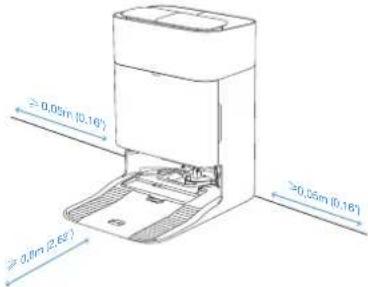
Bemaerk:
Bemærk:
natural_image
Three technical diagrams showing mechanical assembly steps with no visible text or symbolsnatural_image
Simple line drawings of three household appliances: a rectangular box, a closed storage unit, and an open refrigerator with a sun symbol above (no text or labels)natural_image
Diagram of a robotic vacuum cleaner with a blue tool inserted, showing internal components and wiring (no text or labels)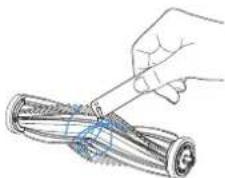
natural_image
Illustration of a hand using a tool to cut or disassemble a cylindrical object (no text or symbols visible)natural_image
Diagram of a robotic vacuum cleaner with a blue arrow indicating motion direction (no text or symbols present)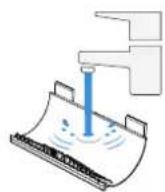
natural_image
Technical line drawing of a circular mechanical device with internal components and a blue arrow indicating direction (no text or symbols)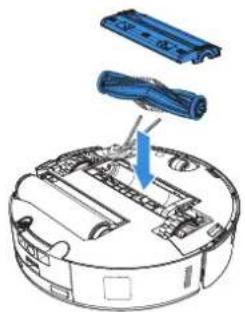
natural_image
Diagram of a robotic vacuum cleaner with blue components and a blue arrow indicating motion (no text or symbols)natural_image
Technical line drawing of a mechanical device with internal components and a blue arrow indicating direction (no text or symbols)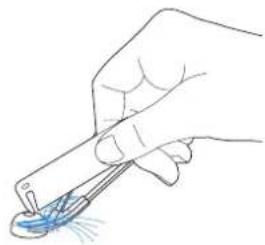
natural_image
Hand holding a pen tip with a blue droplet on the surface, no text or symbols visiblenatural_image
Illustration showing two hands installing a device component with blue arrows indicating direction (no text or symbols present)- Rengør rulleMoppen.
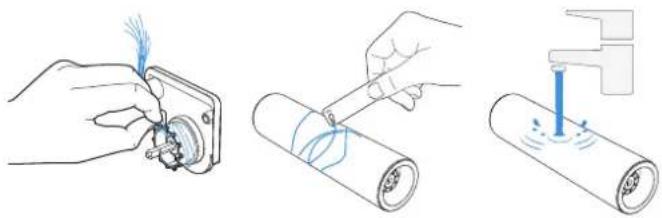
natural_image
Three-step diagram showing hands using a tool to adjust a component, then applying a spring or spring stroke to a cylindrical object (no text or symbols present)natural_image
Two-step diagram showing a hand inserting a device into a circular device, with no visible text or symbols.natural_image
Line drawing of a robotic vacuum cleaner with a blue tool inserted (no text or symbols)natural_image
Diagram of a blue pen or tool inserted into a rectangular container with an upward arrow indicating direction (no text or symbols present)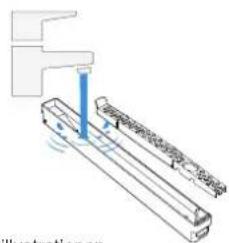
natural_image
Diagram of a mechanical assembly with no visible text or symbols- Installér vandbakke-komponenterne som vist på illustrationen.
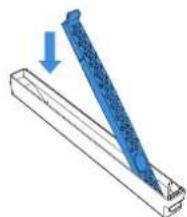
natural_image
Diagram of a blue tool being inserted into a rectangular block, with an arrow indicating the direction (no text or symbols present)
natural_image
Line drawing of a robotic vacuum cleaner with blue tool handle (no text or symbols)natural_image
Line drawing of a robotic vacuum cleaner with a blue component attached (no text or symbols)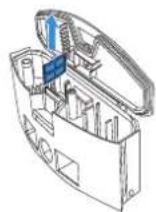
natural_image
Line drawing of a robotic vacuum cleaner with a blue component attached (no text or symbols)5 Andre komponenter
Rengør sensorlinsen
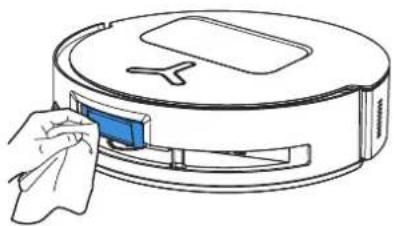
natural_image
Line drawing of a robotic vacuum cleaner with a hand cleaning the air (no text or symbols)Rengør stødfangeren
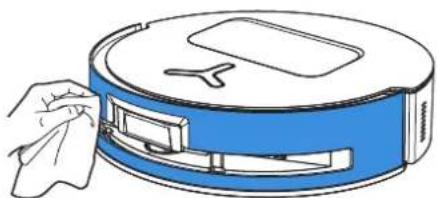
natural_image
Illustration of a hand cleaning a blue cylindrical device with a handle (no text or symbols)natural_image
Line drawing of a robotic vacuum cleaner with a hand adjusting its component (no text or symbols)natural_image
Line drawing of a robotic vacuum cleaner with a hand cleaning the air (no text or symbols)natural_image
Line drawing of a robotic vacuum cleaner with a hand inserting a blue clip (no text or symbols)natural_image
Line drawing of a robotic vacuum cleaner with handle and control panel (no text or symbols)natural_image
Line drawing of a robotic device with a blue tool inserted, showing internal components and no text or symbols.Rengør kørehjulene
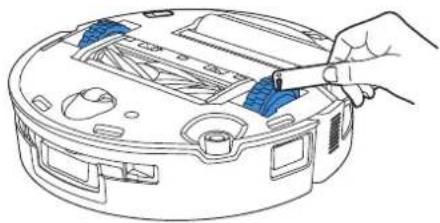
natural_image
Line drawing of a hand using a tool to clean or adjust a circular device (no text or symbols visible)6 Moppens vaskebakke
natural_image
Diagram of a printer with an open lid and paper tray, showing internal components and a magnified inset of the printer's window (no text or symbols present)natural_image
Diagram of a printer's internal structure showing a blue component being inserted into a paper holder (no text or symbols visible)natural_image
Diagram of a printer or printer device with an open lid and internal components, showing no text or symbols.8 Opbevaring
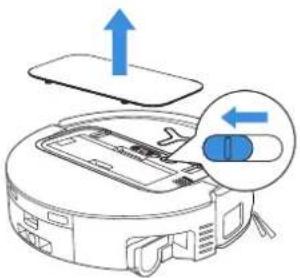
natural_image
Line drawing of a robotic vacuum cleaner with an upward arrow indicating motion (no text or symbols)natural_image
Simple line drawing of a circular object with a Y-shaped top and a rectangular base (no text or symbols)Robotti
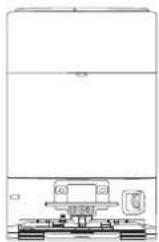
OMNI Station
-asema
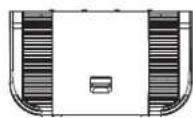
Alusta
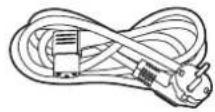
Virtajohto
OpaskirjaSivuharja
Huomaa:
natural_image
Technical line drawing of a mechanical component with concentric circles and mounting brackets (no text or symbols)natural_image
Simple line drawing of a desk with chairs and a checkmark, no text or symbols presentValmistele alue
natural_image
Diagram of a room corner with railing and a circular object below (no text or symbols)Aseta suojaesteet
natural_image
Abstract geometric layout with intersecting lines and shapes (no text or symbols)Pidä ovet auki
natural_image
Interior view of a room with furniture and a door, showing no text or symbolsnatural_image
Technical line drawing of a mechanical device with a blue arrow pointing to a component (no text or symbols)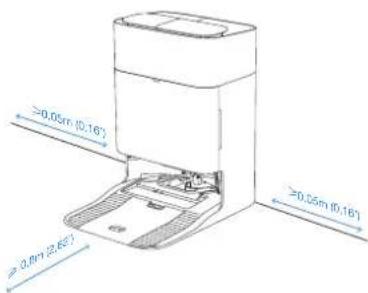
Huomaa:
Huomaa:
Säännöllinen huolto
① Huoltotaajuus
flowchart
graph TD
    A["Component with top and bottom parts"] --> B["Grid with two layers"]
    B --> C["Storage unit with one layer"]
natural_image
Three technical diagrams showing mechanical assembly steps with no visible text or symbolsnatural_image
Illustration of three household appliances under a sun (no text or symbols)natural_image
Diagram of a robotic vacuum cleaner with a blue tool inserted, showing internal components and no text or symbols.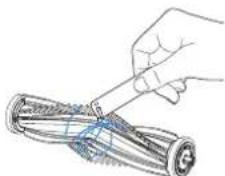
natural_image
Illustration of a hand using a tool to cut a cylindrical object (no text or symbols visible)natural_image
Diagram of a robotic vacuum cleaner with blue component, showing internal structure without any text or symbols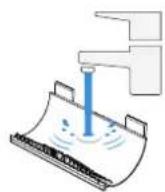
natural_image
Diagram of a robotic vacuum cleaner with a blue component inserted, showing internal components and wiring (no text or labels)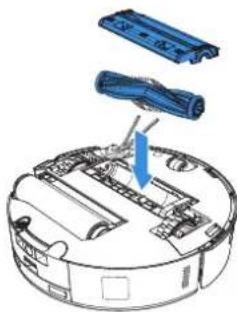
natural_image
Diagram of a robotic vacuum cleaner with blue components and a blue arrow indicating assembly (no text or symbols present)Puhdista sivuharja.
natural_image
Diagram of a robotic device with a blue arrow indicating a component or operation, no text or symbols present.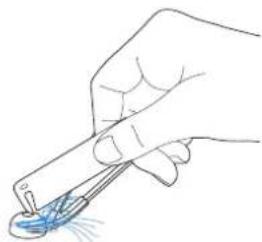
natural_image
Hand holding a pen tip with a blue liquid droplet inside, no text or symbols visiblenatural_image
Illustration showing two hands installing a device with blue adjustment blocks, next to a rolled paper (no text or symbols present)- Puhdista rullaMoppi.

natural_image
Three-step diagram showing hands using a tool to adjust a component, then applying a spring or spring spike onto a cylindrical object (no text or symbols present)natural_image
Two-step diagram showing a robotic device being processed, with no visible text or symbols.natural_image
Line drawing of a robotic vacuum cleaner with blue tool handle (no text or symbols)natural_image
Diagram of a blue pen inserted into a rectangular container with an upward arrow indicating direction (no text or symbols)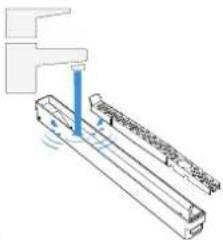
natural_image
Pure technical diagram of a mechanical assembly without any text, numbers, or symbolsnatural_image
Diagram of a blue tool being inserted into a rectangular block, with a blue arrow indicating direction (no text or symbols present)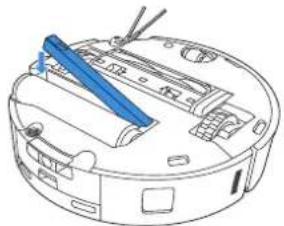
natural_image
Line drawing of a robotic vacuum cleaner with blue tool handle (no text or symbols)natural_image
Line drawing of a robotic vacuum cleaner with a blue component attached (no text or symbols)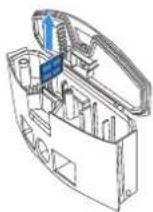
natural_image
Diagram of a robotic vacuum cleaner with a blue component attached to it (no text or symbols present)5 Muut osat
natural_image
Line drawing of a robotic vacuum cleaner with a hand cleaning the air (no text or symbols)Puhdista puskuri
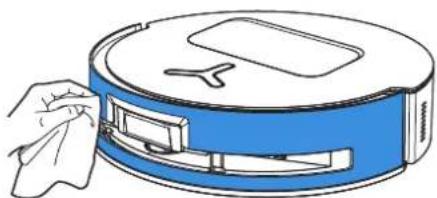
natural_image
Illustration of a hand cleaning a blue cylindrical device with a handle (no text or symbols)natural_image
Line drawing of a robotic vacuum cleaner with a hand adjusting its component (no text or symbols)natural_image
Line drawing of a robotic vacuum cleaner with a hand cleaning the air (no text or symbols)natural_image
Line drawing of a robotic vacuum cleaner with a hand inserting a blue clip (no text or symbols)natural_image
Line drawing of a robotic vacuum cleaner with handle and control panel (no text or symbols)natural_image
Line drawing of a robotic device with a blue tool inserted, showing internal components and no text or symbols.Puhdista vetopyörät
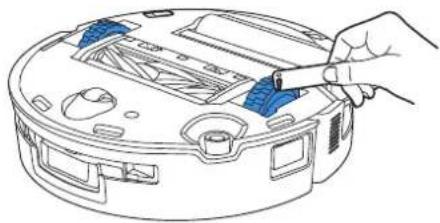
natural_image
Line drawing of a hand inserting a blue tool into a device casing (no text or symbols)6 Mopin pesualusta
natural_image
Illustration of a printer with a blue paper feed being inserted, showing internal components and a blue upward arrow (no text or symbols)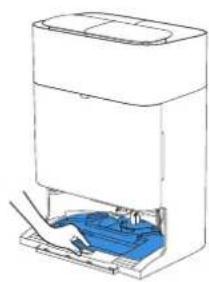
natural_image
Line drawing of a multi-tiered electronic device with blue internal components (no text or symbols)
natural_image
Illustration of a faucet with water droplets on a surface (no text or symbols)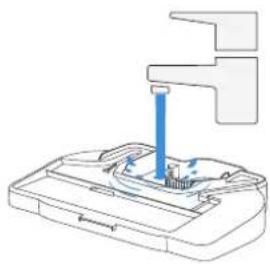
natural_image
Diagram of a mechanical device with a blue tool inserted into a housing (no text or symbols visible)natural_image
Line drawing of a printer with blue internal components and an upward arrow indicating motion (no text or symbols)》
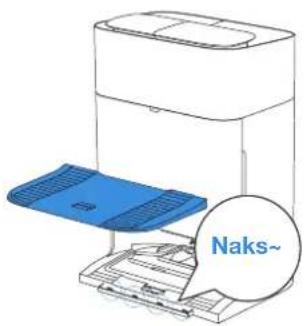
natural_image
Diagram of a printer with an open lid and paper tray, showing internal components and a magnified inset of the printer's window (no text or symbols present)natural_image
Illustration of a printer's internal structure with a hand inserting a blue component (no text or symbols visible)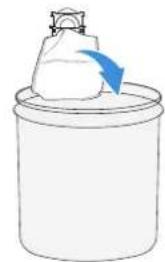
natural_image
Simple line drawing of a container with a white object and a blue arrow pointing to it, no text or symbols present.natural_image
Illustration of a hand inserting a blue component into a device (no text or symbols visible)natural_image
Diagram of a device with an open lid and blue arrow indicating direction (no text or symbols)8 Varastointi
natural_image
Line drawing of a robotic vacuum cleaner with an upward arrow indicating motion (no text or symbols)natural_image
Simple line drawing of a circular object with a Y-shaped top and a rectangular base (no text or symbols)Robot OMNI
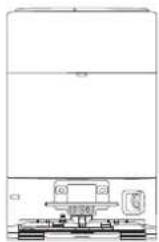
İstasyonu Altlik
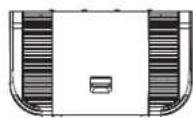
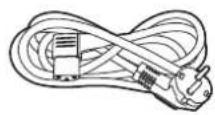
Güç Kablosu
natural_image
Technical line drawing of a mechanical component with concentric circles and mounting brackets (no text or symbols)natural_image
Simple line drawing of a desk with a checkmark and a stand, no text or symbols presentAlanı Hazırlayın
natural_image
Simple line drawing of a balcony with railing and a circular object below (no text or symbols)natural_image
Abstract geometric layout with intersecting lines and shapes (no text or symbols)natural_image
Interior view of a living room with furniture and a door, showing a blue checkmark indicating selection or adjustment (no text or symbols present)Not:
Not
Düzenli Bakım
① Bakım Sıklığı
natural_image
Three technical diagrams showing mechanical assembly steps with no visible text or symbolsnatural_image
Illustration of three household appliances: a rectangular box, a closed storage unit, and an open refrigerator with a sun symbol above (no text or labels)natural_image
Diagram of a robotic vacuum cleaner with a blue tool inserted, showing internal components and no text or symbols.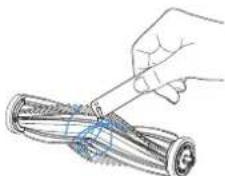
natural_image
Illustration of a hand using a tool to cut or spread a cylindrical object, no text or symbols presentnatural_image
Diagram of a robotic vacuum cleaner with a blue arrow indicating motion direction (no text or symbols)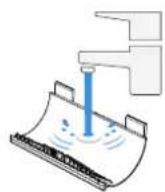
natural_image
Technical line drawing of a circular device with internal components and a blue arrow indicating direction (no text or symbols)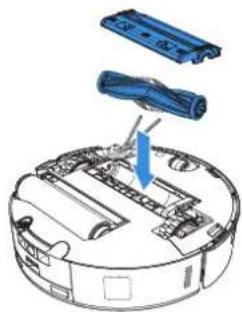
natural_image
Diagram of a robotic vacuum cleaner with blue components and a blue arrow indicating motion (no text or symbols)natural_image
Line drawing of a device interior with a blue arrow indicating a component (no text or symbols present)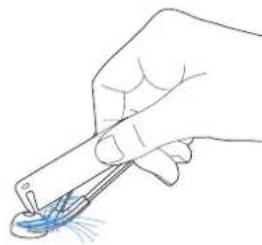
natural_image
Hand holding a tool near a blue contact lens (no text or symbols visible)natural_image
Illustration showing two hands installing a device with blue connectors and arrows indicating motion (no text or symbols)natural_image
Three-step diagram showing hands using a tool to adjust a component, then applying force to a rolled cylindrical device (no text or symbols present)natural_image
Two-step diagram showing a hand inserting a device into a circular device, with no visible text or symbols.natural_image
Line drawing of a robotic vacuum cleaner with a blue tool inserted (no text or symbols)natural_image
Diagram of a blue pen or tool inserted into a rectangular container with an upward arrow indicating direction (no text or symbols present)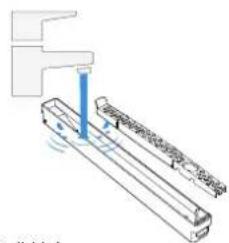
natural_image
Technical line drawing of a mechanical assembly with no visible text or symbolsnatural_image
Diagram of a blue tool being inserted into a rectangular block, showing force direction (no text or symbols)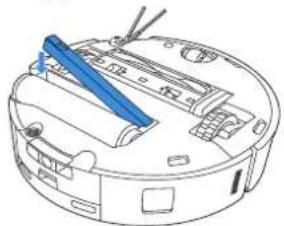
natural_image
Line drawing of a robotic vacuum cleaner with blue tool handle (no text or symbols)natural_image
Line drawing of a robotic vacuum cleaner with a blue component attached (no text or symbols)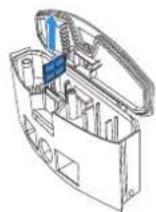
natural_image
Line drawing of a robotic vacuum cleaner with a blue component attached (no text or symbols)5 Diğer Bileşenler
natural_image
Line drawing of a robotic vacuum cleaner with a hand cleaning the air (no text or symbols)Tamponu temizleme
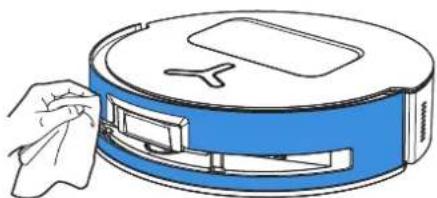
natural_image
Illustration of a hand cleaning a blue cylindrical device with a handle (no text or symbols)natural_image
Line drawing of a robotic vacuum cleaner with a hand adjusting its component (no text or symbols)natural_image
Line drawing of a robotic vacuum cleaner with a hand cleaning the air (no text or symbols)natural_image
Line drawing of a robotic vacuum cleaner with a hand inserting a blue clip (no text or symbols)natural_image
Line drawing of a robotic vacuum cleaner with handle and control panel (no text or symbols)natural_image
Line drawing of a robotic device with a blue tool inserted, showing internal components and no text or symbols.natural_image
Line drawing of a hand using a tool to adjust or install a circular device component (no text or symbols visible)6 Paspas Yıkama Tepsisi
natural_image
Diagram of a printer or printer with an open door and internal mechanism, showing no text or symbols.natural_image
Diagram of a printer's internal structure showing a blue component being inserted into a paper holder (no text or symbols visible)natural_image
Diagram of a printer or printer device with an open lid and internal components, showing no text or symbols.8 Saklama
natural_image
Line drawing of a robotic vacuum cleaner with an upward arrow indicating motion (no text or symbols)No.518 Songwei Road, Wusongjiang Industry Park, Guoxiang Street,
Wuzhong District, Suzhou, Jiangsu, China.
451-2488-0030