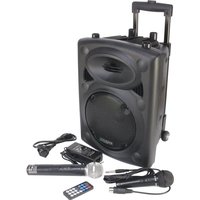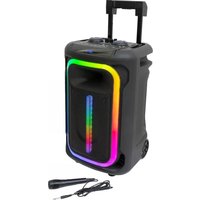
MOBILE800 - Speaker IBIZA SOUND - Free user manual and instructions
Find the device manual for free MOBILE800 IBIZA SOUND in PDF.


| Brand | Ibiza Sound |
| Model | MOBILE800 |
| Product type | Active portable Bluetooth speaker with battery |
| Dimensions (L x W x H) | 350 x 300 x 590 mm |
| Weight | 11.35 kg |
| Power supply | AC adapter 15V=2A; Lead-acid battery 12V 7Ah |
| Power consumption | 30 W |
| Power (peak) | 800 W |
| Speaker | 12" (30 cm) |
| Connectivity | Bluetooth 5.0 (range not specified), microphone input (2 x 6.35 mm jack), guitar input, AUX 3.5 mm, USB, microSD |
| Main functions | TWS (wireless stereo), Echo and Delay effects, mic priority, X-Bass, light mode, recording, repeat, auto standby |
| Battery life | Not specified (approximately 4 to 6 hours depending on use) |
| Operating temperature | 5 °C to 35 °C |
| Protection rating | Indoor use only |
| Housing material | ABS plastic and metal grille |
| Color | Black |
| Included accessories | AC adapter, power cable, wired microphone |
| Cleaning and maintenance | Wipe with a dry, lint-free cloth. Do not use abrasive products. |
| Important safety instructions | Keep away from rain and moisture. Do not expose to extreme temperatures. Maintain a minimum distance of 0.5 m around the device for ventilation. |
| Spare parts and repairability | The device contains no user-serviceable parts. Contact customer service for any repairs. |
| General information | Complies with CE standards. Recyclable according to WEEE directive. Manufacturer: LOTRONIC SA, Belgium. |
Frequently Asked Questions - MOBILE800 IBIZA SOUND
User questions about MOBILE800 IBIZA SOUND
0 question about this device. Answer the ones you know or ask your own.
Ask a new question about this device
Download the instructions for your Speaker in PDF format for free! Find your manual MOBILE800 - IBIZA SOUND and take your electronic device back in hand. On this page are published all the documents necessary for the use of your device. MOBILE800 by IBIZA SOUND.
USER MANUAL MOBILE800 IBIZA SOUND
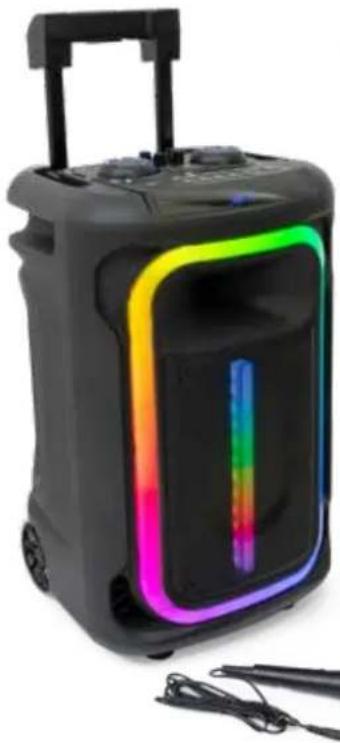
AVEC TWS, EFFETS LUMINEUX, MICRO
& TROLLEY
Ref.
MOBILE800
natural_image
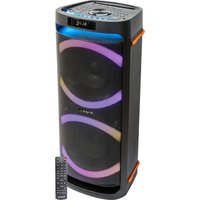
Black handheld electronic device with colorful ambient lighting and a vertical color bar (no visible text or symbols)
Download the manual in other languages from our website
MANUAL
EN - INSTRUCTION MANUAL - p. 3
FR - MANUEL D'UTILISATION - p. 6
UK CA Accordance with the requirements of UK standard

The product is for indoor use only

This marking indicates that this product should not be disposed with other household wastes throughout the EU. To prevent possible harm to the environment or human health from uncontrolled waste disposal, recycle it responsibly to promote the sustainable reuse of material resources. To return your used device, use use the return and collection systems or contact the retailer where the product was purchased. They can see this product for environmentally safe recycling.
This device has been designed in accordance with the European EcoConception Directive. The goal is to reduce the power consumption of devices. It is therefore equipped with an automatic standby system. After 10 minutes without any action or sound broadcast, it will automatically go into standby mode. To restart it, you will have to turn off the device with the on / off button and wait 1 minute before turning it on again.
IMPORTANT SAFETY INSTRUCTIONS AND DANGER WARNINGS
- Please read the manual carefully and keep it for future reference.
- All safety instructions and warnings must be adhered to. They are part of the manual and must be kept with it.
- Any guarantee claims are rendered invalid if damage occurs due to non-observance of these operating instructions. We assume no liability for any consequent damage.
- We assume no liability for personal injury or damage to property caused by incorrect handling or disrespect of the safety instructions. Any guarantee claims expire in such cases.
- Unauthorized conversions and/or modifications of the device are not permitted for safety and licensing reasons (CE).
- The device is approved for operation in dry, closed rooms only. Do not operate the device nearby water, such as in bathrooms or nearby swimming pools.
• To reduce the risk of fire or electrical shock, do not expose this device to rain or moisture. - The device may not be exposed to extreme temperatures (< +5°C / > +35°C), strong vibrations or heavy mechanical strain during operation.
- The device shall not be exposed to dripping or splashing and no recipients filled with liquids, such as vases, shall be placed on the device. Make sure that no foreign objects nor liquids can enter the enclosure through openings.
- The device must only be connected to a power supply of the type described.
- Do not remove the cover or back, as there are no user-serviceable parts inside.
- Do not use the device in a tropical climate. Only for use in temperate climates.
- Please place the device on a level, stable platform. Never place the device on an unstable or movable surface. The device might fall and injure persons or get damaged.
- Keep a minimum distance of 0.5m around the device to ensure sufficient ventilation and avoid overheating.
CHARGING THE BATTERY
Insert the small connector of the adaptor into the Charging port (2) on the top of the speaker. Insert the large connector into a wall outlet.
The display (29) shows the progression of the charging process. When all segments appear in the battery icon, the battery is fully charged. The charging indicator (3) will be red when charging.
IMPORTANT NOTE ON LEAD-ACID BATTERIES
-
PRIOR to using the unit for the first time, please charge fully the battery without any interruption.
-
Charge the battery regularly after each use. Don't wait until it is discharged!
-
DON'T allow the battery to discharge completely! Once the battery is fully discharged, the current drain for recharging will be so high that it will damage the charger and/or the power supply of the unit.
-
If you don't use the unit for a longer period of time, please CHARGE THE BATTERY COMPLETELY AT 100% and check/charge it once per month otherwise the battery will be out of use.
The life time of the battery depends on the observance of these recommendations.
** BATTERIES ARE NOT COVERED BY THE WARRANTY **
WE CANNOT BE HELD RESPONSIBLE FOR DAMAGED BATTERIES FURTHER TO THE NON-OBSERVANCE OF THESE BASIC RULES.
DESCRIPTION OF THE TOP PANEL CONTROLS & CONNECTORS
| 1. ON / OFF 11.MIC VOL 21.VOL | ||
| 2. DC 15V Charging Port 12. TREBLE 22.BASS | ||
| 3. Charging Indicator 13. DELAY- / DELAY+ 23.REPEAT | ||
| 4. MIC Input 2 14. Next Folder 24.MIC PRI | ||
| 5. MIC Input 1 15. Previous Folder 25.X-BASS | ||
| 6. Guitar Input 16. MODE 26.LED MODE | ||
| 7. AUX 17. Previous Track 27.TWS | ||
| 8. USB | 18. Next Track | 28.REC |
| 9. TF | 19. Play / Pause | 29.Display |
| 10. ECHO | 20. GT VOL |
BASIC FUNCTIONS
BLUETOOTH OPERATION
1) ON/OFF switch: Press switch (1) to turn on. The display will show "bt" in the centre. "BT" will flash slowly in the lower left corner to indicate that the speaker is on. Press again to turn off.
2) Activate the Bluetooth function on your external Bluetooth device and search for "MOBILE-800". If requested, enter the password "0000". After a successful pairing, a tone will be heard.
MIC INPUT
WARNING: Turn the speaker's volume knob all the way to the left to prevent any feedback or loud pops when connecting the microphone.
Insert a standard 6.35mm connector of a wired microphone (included) into the microphone input jack (4) and (5) on the top of the speaker. Control the microphone volume with the knob (11).
GUITAR INPUT
Insert a standard connector of a Guitar into the Guitar input jack (6) on the top of the speaker. Control the guitar volume with knob (20).
USE WITH A WIRED DEVICE
To use the speaker as a wired device, plug one connector of the 3.5mm audio cable into the 3.5mm auxiliary audio input jack (7) on the speaker. Plug the other connector into the headphone jack of your media-playing device. Press the button MODE (16) to switch into LINE mode. The display (29) will show "LINE". Use the controls of your wired device to control playback.
USB INPUT
Insert USB device into USB port (8) to play music stored on the drive. The play will start automatically.
MICRO SD INPUT (TF)
Insert a microSD card into the TF port (9) to play music stored on the drive. The play will start automatically.
ECHO(10)
Use this knob (10) to set the ECHO of the microphone. It can be used in conjunction with button (13) to control the delay of the echo. The higher the value, the more echo you will get.
TREBLE
Use the knob (12) to control the treble of speaker.
BASS
Use the knob (22) to control the basses of the speaker.
DELAY - / DELAY + (13) USED WITH KNOB (10)
Used with knob (10), this knob will control the delay of the mic echo effect. The higher the value, the more echo you will get.
PREVIOUS FOLDER(15) / NEXT FOLDER (14)
Press to switch to previous or next folder. These buttons only apply to USB and TF mode.
MODE
Press this button (16) to toggle between modes: BT, AUX, USB, TF
PREVIOUS TRACK / PREV
Short press this button (17) to move back through the playlist in BT, USB and TF MODE, long press this button to rewind music in USB and TF mode.
NEXT TRACK / NEXT
Short press the button (18) move forward through the playlist in BT, USB and TF MODE, long press this button to fast forwarder music in USB and TF mode.
PLAY/PAUSE (PL/PA)
Short press this button (19) to play and pause the music.
VOLUME ADJUSTMENT
Turn the VOLUME knob (21) to control the music volume.
REPEAT
Short press this button (23) to activate the REPEAT function. When the display shows "ONE", the current track will be repeated once. When the display shows "ALL", all tracks will be repeated. This applies only for USB and microSD mode.
MIC PRI
Short press this button to activate MIC Priority. The display will show "P ON". Short press this button to cancel MIC Priority and the display will show "POFF". MIC PRI means that the volume of the music will decrease when you speak into the microphone (included) and resume to normal level when your don't speak anymore into the microphone.
X-BASS (25)
This button will control the heavy basses of the music. Short press this button and the display will show "5 on" which means that the function is active. Short press again and the display will show "OFF" which means that this function is deactivated.
LIGHT MODE (26)
Short press to cycle through the light modes and turn on the light. Long press to turn off the light.
TWS
Short press this button (27) on one speaker box. The display will show "bt5t" in the centre and then "bt". The other speakerbox will always display "bt" in the centre. The two speaker boxes will pair automatically in TWS mode. The lower left corner of the display will always show "BT" and on the other unit "BT" will flash in the lower left corner, which means that pairing was successful. You need to select only once "MOBILE-800" and connect to it. Press this button of one speaker boxes to cancel the TWS function.
REC (28)
The recording function only works in USB/TF mode. You can record only the sound of the microphone. Long press to start recording. Short press to stop recording and play the records. Press again to play the music in USB/TF.
SPECIFICATIONS
Input voltage....15V=2A
Consumption....30W
Built-in battery....Lead-acid 12V=7Ah
Bluetooth freq range 2402-2480MHz
Max. RF emission of BT 0.99dBm
Dimensions 350 x 300 x 590mm
Weight....11.35kg
ENCEINTE BLUETOOTH AUTONOME ACTIVE 12"/30CM 800W AVEC TWS, EFFETS LUMINEUX, MICRO & TROLLEY
EXPLICATION DES SYMBOLES

REPRODUCIR/PAUSAR (PL/PA)
RIPRODUCI/PAUSA (PL/PA)
EU Declaration of Conformity
Hereby we, LOTRONIC SA
Avenue Zénobe Gramme, 9
1480 SAINTES
Belgique
+32.2.390.91.91
Certify and declare under our sole responsibility that the following product:
Trade name: IBIZA
Product name: Portable speaker
Type or model: MOBILE800
Conforms to the essential requirements of the RED directive 2014/53/EU, ErP directive 2009/125/EC, Commission Regulation (EC) No 2019/1782, 2011/65/EU RoHS directive, the Commission Delegated Directive (EU) 2015/863 and the battery directive 2006/66/EC, based on the following specifications applied:
Place and date of issue:
Saintes ( Belgium ), on 15/03/2023
Manuel De Sousa
Quality Manager
natural_image
Abstract pattern of green dots arranged in a horizontal row (no text or symbols)
natural_image
Pixelated green letter '0' on white background, no text or symbols present
natural_image
Abstract pattern of green dots on white background (no text or symbols)
View the product on our website
Imported from China by LOTRONIC S.A.
Avenue Zénobe Gramme 9
B-1480 Saintes

FR
©Copyright LOTRONIC 2023