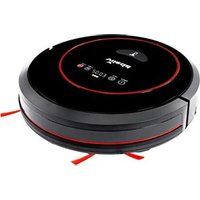
VR 302 - Robot vacuum Vileda - Free user manual and instructions
Find the device manual for free VR 302 Vileda in PDF.


| Brand | Vileda |
| Model | VR 302 |
| Product type | Robot vacuum |
| Dimensions (diameter x height) | 34 x 9 cm |
| Weight | 3.5 kg |
| Power supply | Li-ion battery 2150 mAh, 14.6 V DC |
| Nominal power | 22 W |
| Charger input voltage | 100-240 V AC |
| Charging time | 240 to 300 minutes |
| Battery life in Eco mode | 90 minutes |
| Battery life in MAX mode | 60 minutes |
| Cleaning modes | Eco, MAX, Spot, Scheduling |
| Movement modes | Automatic, Spiral, Zig-Zag |
| Package contents | Robot, docking station, charger, remote control (AAA batteries included), 2 side brushes, manual |
| Dust bin capacity | Approximately 300 ml (estimation) |
| Filtration | Primary mesh filter + high-performance filter (dry washable) |
| Recommended maintenance | Empty the bin after each use; clean filters once a week (twice with pets); clean brushes once a week; clean sensors and wheels once a month |
| Safety | Anti-drop sensors (stairs), soft bumper, automatic shut-off when lifted |
| Warranty | 2 years (excluding wear parts) |
| Available spare parts | Filters, side brushes, main brush, battery (Li-ion), charger |
| Intended use | Indoor, domestic, hard floors and short-pile carpets |
Frequently Asked Questions - VR 302 Vileda
User questions about VR 302 Vileda
0 question about this device. Answer the ones you know or ask your own.
Ask a new question about this device
Download the instructions for your Robot vacuum in PDF format for free! Find your manual VR 302 - Vileda and take your electronic device back in hand. On this page are published all the documents necessary for the use of your device. VR 302 by Vileda.
USER MANUAL VR 302 Vileda
User & care guide • Manuale dell'Utilizzatore • Bedienungs- und Pflegeanleitung • Manual del usuario • Manual do Utilizador Manuel de l'Utilisateur • Gebruikershandleiding • Kullanici Kilavuzu

Thank you for choosing our new Vileda VR 302 robotic vacuum cleaner. VR 302 will become your reliable partner for daily cleaning, helping remove the dirt, dust and hair so you don't have to.
Contents
| Quick Start Guide | 2 | |
| 1. General Warnings | 3 | |
| 2. Getting to know VR 302 | 7 | |
| 3. Product Operation | 9 | |
| 3.1 Battery charging & recharging | 10 | |
| 3.2 Turning on and off | 11 | |
| 3.3 Cleaning modes & movement patterns | 11 | |
| 3.4 Scheduling | 12 | |
| 4. Maintenance | 13 | |
| 4.1 Cleaning dust bin and filters | 13 | |
| 4.2 Cleaning main brush and side brushes | 15 | |
| 4.3 Cleaning Sensors and Wheels | 16 | |
| 4.4 Cleaning driving wheels and center wheel | 16 | |
| 4.5 Battery Removal | 16 | |
| 5. Troubleshooting | 17 | |
| 6. Environmental and product recycling | 18 | |
| 7. Technical product specification | 18 | |
| 8. Vileda product guarantee | 19 | |
Quick Start Guide
1. General Warnings
IMPORTANT:
Read all instructions before use. Retain instructions for future reference.
WARNING:
Use the Robot only as described in this manual. Failure to follow all instructions listed below may result in electric shock, fire and/or serious injury.
When using any electrical Robot, basic safety precautions should always be observed, including the following, in order to reduce the risk of fire, electrical shock, leaking batteries or personal injury.
USE RESTRICTIONS:
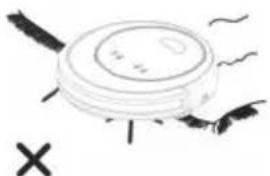
- When starting the robot, always place it in the middle of a room or surface, at least half a meter away from any cliffs.
- Only for indoor use. Do not use outdoors or on balconies.
- Intended for domestic use only.
- Robot is not a toy. Do not sit or stand on it. Small children and pets should be supervised when the robot is cleaning.
- Do not let the Robot pick up anything that is flammable, burning or smoking.
- Do not use this Robot to pick up anything wet.
- Do not use on long-pile carpet or on wet floors, like bathroom or laundry.
- Use this product in temperature from 10°C to 35°C. Do not use this product in high-temperature environment or under baking sunlight for a long time.
- Before using, pick up objects like clothing, loose papers, pull cords for blinds or curtains, power cords, and any fragile objects as they may entangle with the cleaning brushes.
- WARNING: Black or dark coloured types of floors and stairs could reduce the reliability of cliff sensors. Test with your specific floor and stairs before use.
PERSONAL SAFETY:
- The intended use is described in this manual. The use of any accessory or attachment or the performance of any operation with this Robot other than those recommended in this instruction manual may present a risk of personal injury.
- Children must be supervised to ensure they do not play with the Robot.
- This Robot may only be used by children aged from 8 years and above and persons with reduced physical, sensory or mental capabilities or lack of experience and knowledge if they have been given proper supervision or proper instruction concerning use of the Robot in a safe way and understand the hazards involved.
- Children shall not play with the appliance. The Robot should only be used as intended.
- Cleaning and user maintenance shall not be made by children without supervision.
- Store in a dry place.
- Store out of reach of children.
- Use only with the attachments recommended by the manufacturer.
- Do not use without the filter in place.
- Keep the product and all accessories away from fire, hot surfaces and any flammables.
- Do not immerse the Robot in water or other liquid.
ELECTRICAL SAFETY INSTRUCTIONS:
- Never modify the charger in any way.
- The charger has been designed for a specific voltage. Always check that the main voltage is the same as that stated on the rating plate.
- Only use the charger supplied with the product. Do not attempt to use the charger with any other product nor attempt to charge this product with another charger.
-
Before use, check the charger cord for signs of damage or ageing.
-
Do not abuse the charger cord; never carry the charger by the cord.
- Do not over-bend the power cord or pressure the power cord with heavy or sharp objects.
- Never pull the charger cord to disconnect from a socket; grasp the charger and pull to disconnect.
- Keep the charger cord away from hot surfaces and sharp edges.
- Do not handle the charger or the Robot with wet hands.
- Do not store or charge the Robot outdoors.
- Unplug the charger before cleaning or maintaining.
Product contains electronic parts. DO NOT submerge it or spray it with water. Clean with a dry cloth only.
BATTERY USE AND CARE:
- WARNING: For the purposes of recharging the battery, only use the detachable supply unit (model no. GQ15-240060-AG / GQ15-240060-AB / GQ12-240060-AG / GQ12-240060-AB / NLB060240W1U3 / NLB060240W1E3) provided with this appliance.
- Only use the battery supplied with the product or provided by the manufacturer.
- Leaks from battery cells can occur under extreme conditions. If the liquid gets on the skin, wash it immediately with soap and water. If the liquid gets into the eyes, flush them immediately with clean water for a minimum of 10 minutes and seek medical attention.
- This product contains Lithium-Ion batteries. Do not incinerate batteries or expose to high temperatures, as they may explode.
- When the battery pack is not in use, keep away from other metal objects such as: paper clips, coins, keys, nails, screws or other small metal objects that can make a connection from one terminal to another.
- Shorting the battery terminals may cause fire.
-
The battery must be removed from the Robot before it is discarded.
-
The battery is to be disposed of safely and in accordance with Environmental and Product Recycling, as per page 18 of this Manual. The battery must not be disposed of with household waste.
- The Robot must be disconnected from the main supply when removing the battery.
- WARNING: If the battery is damaged in any way, do not attempt to recharge it. Contact Vileda customer service address (see last page).
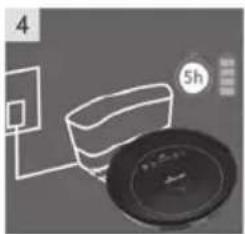
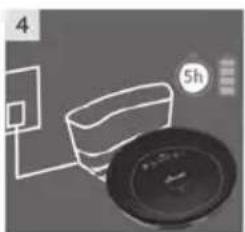
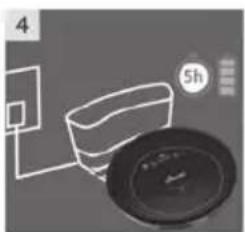
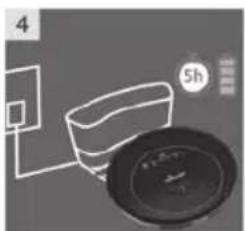
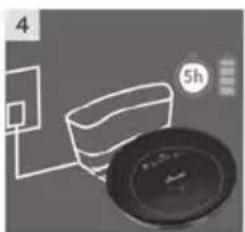
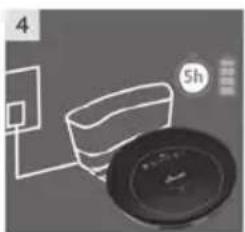
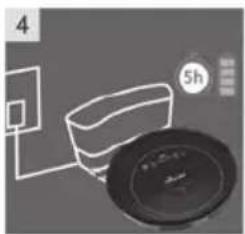
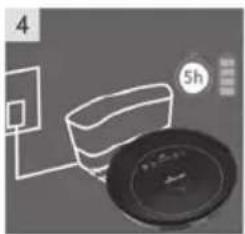
- Charge the battery for 5 hours before first use. After the first use, charging time is about 4-5 hours.
- If the robot is not to be used more than 3 months, charge it directly by power adapter for 5hrs.
- WARNING: Turn the robot's main power switch to OFF when transporting or when in storage, otherwise the battery may become damaged.
- Only use the charger provided with the product. Do not attempt to use the charger with any other product nor attempt to charge this product with another charger as this may damage the product and the battery, and will invalidate your guarantee.
- WARNING: Only use a replacement battery as supplied by Vileda.
SERVICE:
- Before using the Robot and after any impact, check for signs of wear or damage.
- Do not use the Robot if any part is damaged or defective.
- Repairs should only be carried out by an approved service agent or a suitably qualified person.
- Never modify the Robot in any way as this may increase the risk of personal injury.
- Only use replacement parts or accessories provided or recommended by Vileda.
2. Getting to know VR 302
2.1 CONTENT
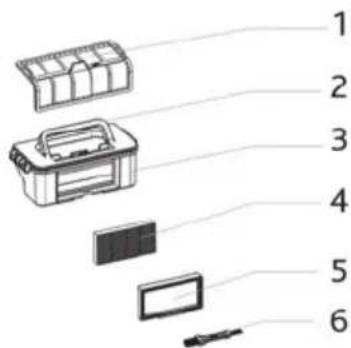
1 | 2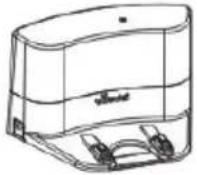 | 3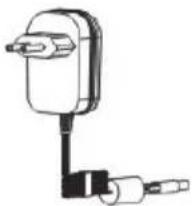 |
4 | 5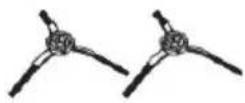 | 6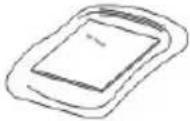 |
Package Contents:
- Robot Main Body
- Docking Station
- Charger Cable + Adaptor
- Remote Control incl. 2 Batteries
- 2 Sidebrushes (left + right, marked by "L" and "R" on the sidebrushes)
- User Manual
2.2 PRODUCT FEATURES AND FUNCTIONS
TOP VIEW
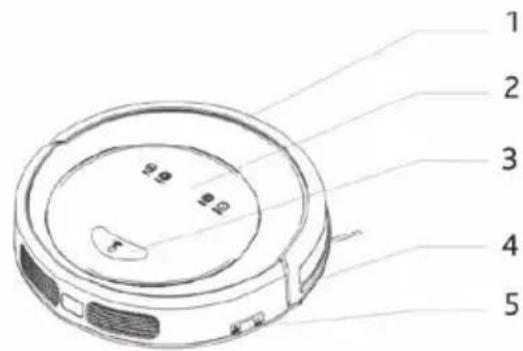
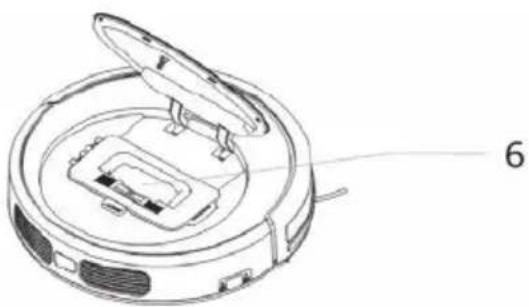
- Soft bumper
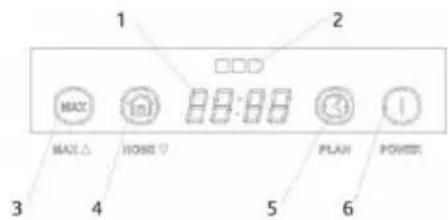
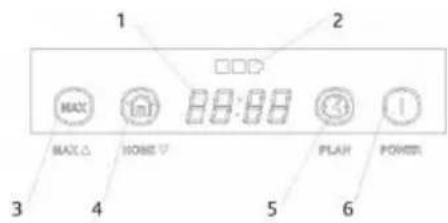
- LED display
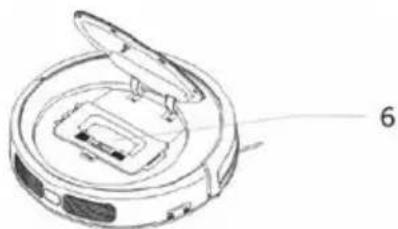
- Push button for opening the dust bin cover
- Bumper strip with sensors
- Main power switch
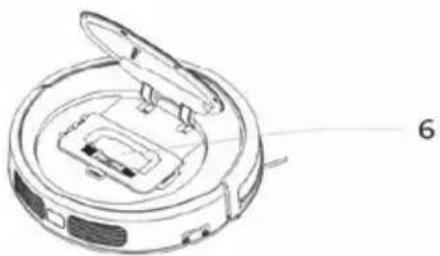
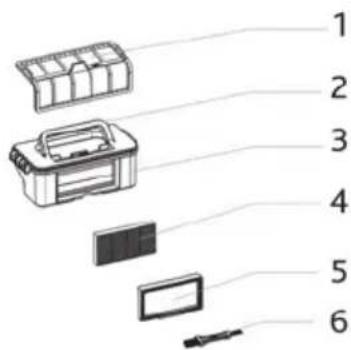
- Dust bin
LED DISPLAY
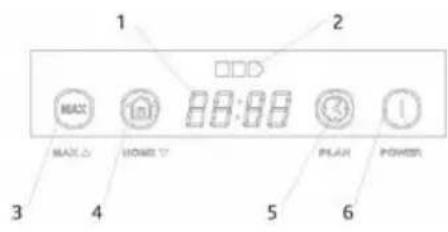
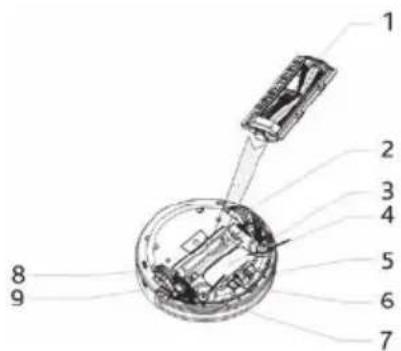
BOTTOM VIEW
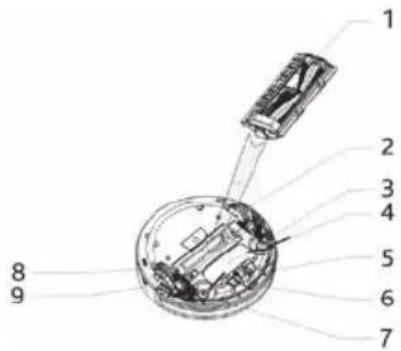
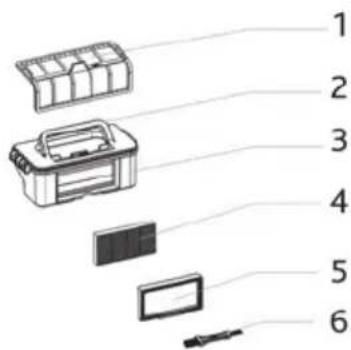
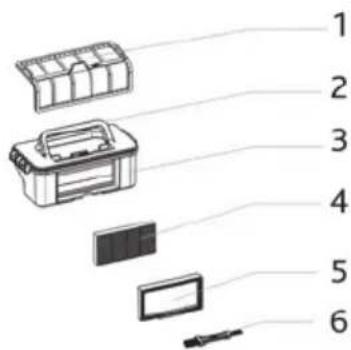
DUST BIN
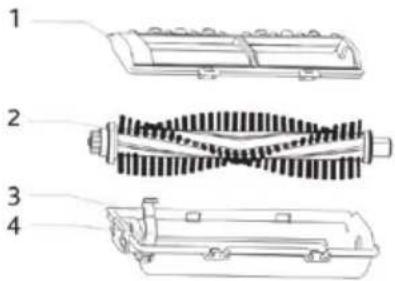
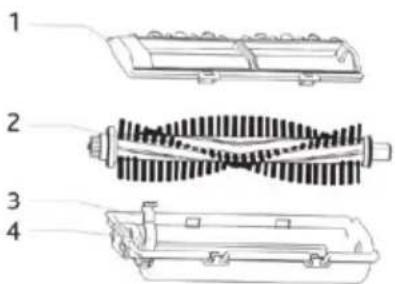
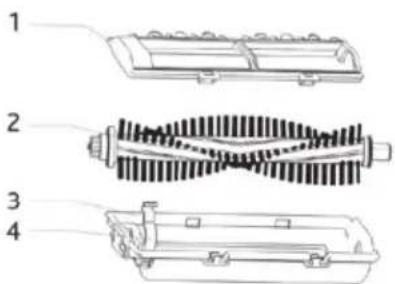
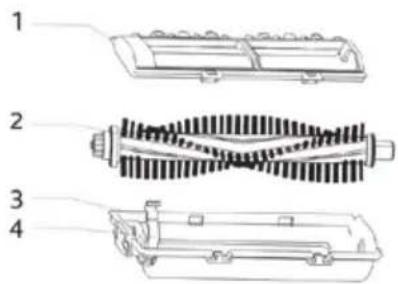
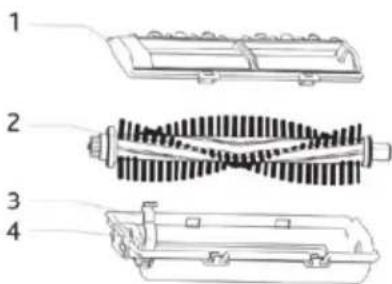
MAIN BRUSH KIT
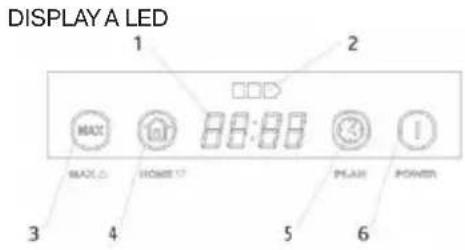
- LED panel, it shows the time, time setting and common error codes by using numbers, letters or graphs. The overview for the different commands can be found on page 12.
- Battery Indiciation
- MAX mode button / Increase number when scheduling cleaning or setting the time.
- Home button to find docking station and charge / Decrease number when scheduling cleaning
- Scheduling function button
-
Eco cleaning / ON-OFF / Sleep Mode (hold for 3 seconds)
-
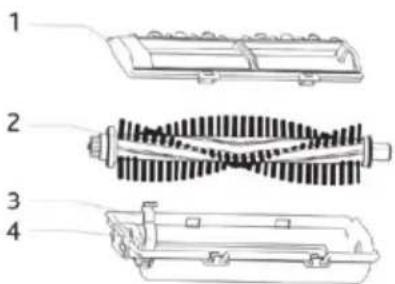
Main brush kit
- Left wheel
- Left side brush (marked with printed "L" on sidebrush)
- Battery Cover
- Front wheel
- Charging poles for automated charging in the dockingstation
- Right side brush (marked with printed "R" on sidebrush)
- Charging port
-
Right wheel
-
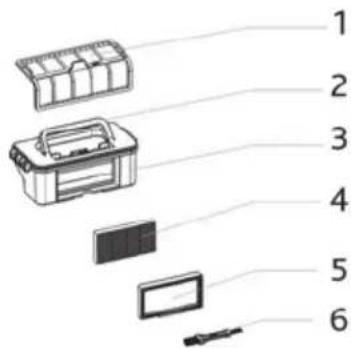
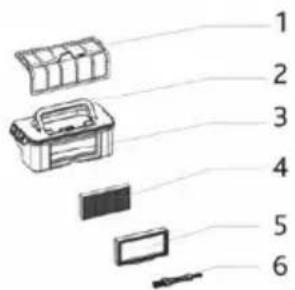
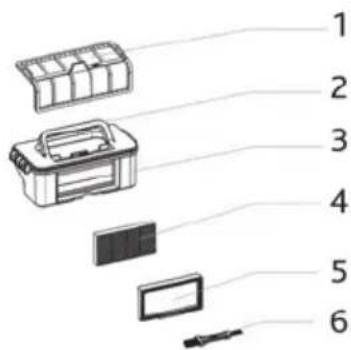
Primary mesh filter
- Handle
- Dust Bin
- Secondary high efficiency fine dust filter
- High efficiency filter frame
-
Maintenance brush
-
Main brush cover plate
- Main brush
- Main brush holder
- Main brush retainer
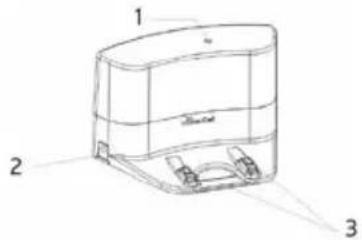
DOCKING STATION
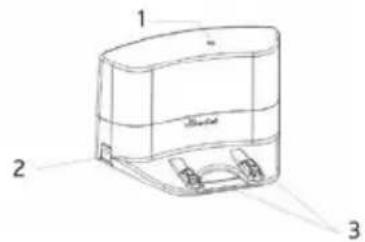
- Power indicator
- Charging socket
- Charging poles
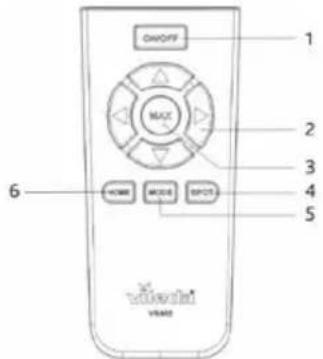
REMOTE CONTROL
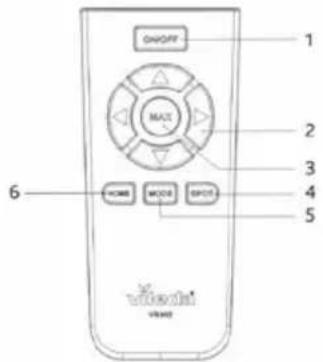
- Power button / ON-OFF
- Arrow keys for navigation of the robot
- MAX mode button
- Spot mode button
- Cleaning mode button
- Home / Auto charging button
!
HOW TO SET UP YOUR REMOTE CONTROL
• Install two AAA type batteries into the remote controller before use.
- Remove the batteries if the remote controller will be left unused for a long period.
- If you use the remote controller near the charging station, the robot may not recognize the command and may not work
3. Product Operation
TIPS BEFORE THE FIRST USE
Before you use the robot for the first time, make sure your home is ready and safe to use it:
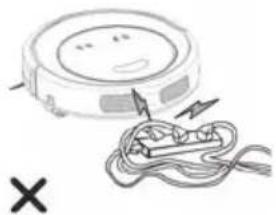
Remove power cords and small objects from the floor.
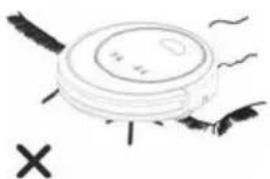
The device is not suitable for long piled carpets.
3.1 Battery charging & recharging
CHARGING BATTERY:
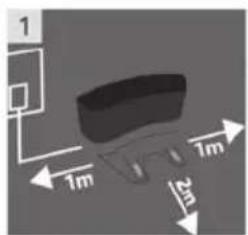
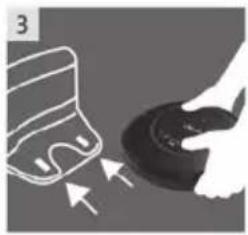
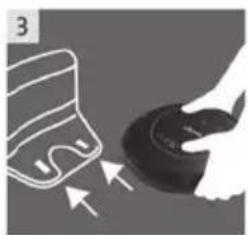
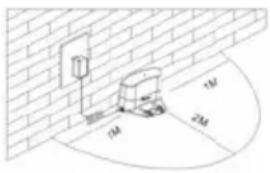 | 1. Placement of docking stationPlace the docking station against the wall and remove obstacles about 1 meter at two sides and about 2 meters in front of the docking station. |
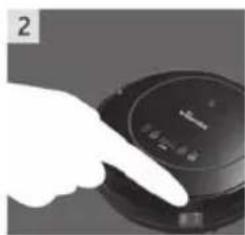
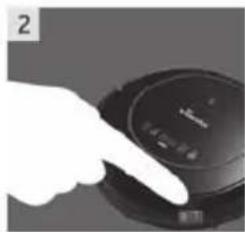
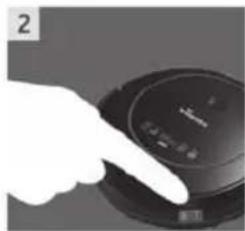
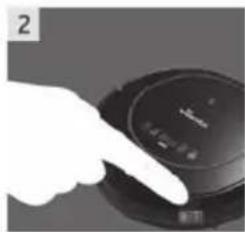
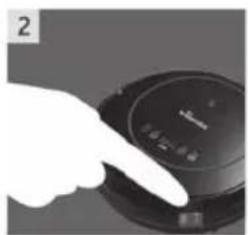
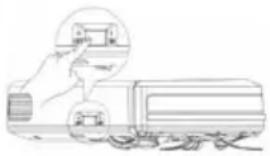 | 2. If the robot is powered off, switch on the robot by pressing the power switch at the right side of the robot. |
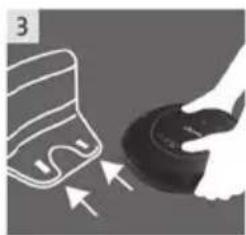
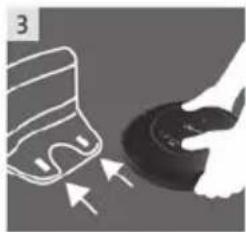
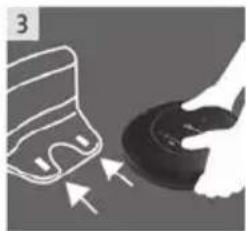
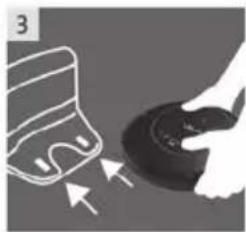
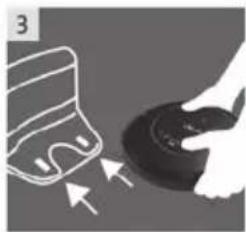
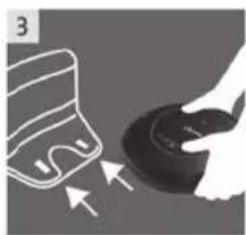
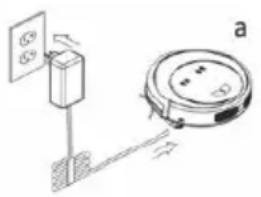 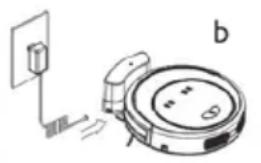 | 3. Charge the robot in either way as shown on the left.a. Plug the adapter into the robot and the other end to power socket as shown in Fig.a.b. Press the button on either the robot or the remote control to operate the robot to go to the charging home base for recharging as shown in Fig.b.4. During charging the battery indication will build up the three bars of the battery in a row. When fully charged all three battery blocks will be illuminated permanently. |
BATTERY INDICATION:
The battery indication is build in three blocks:
- Three blocks illuminated: Battery is fully charged and full Eco program (90 min) or MAX mode (60 min) can be used.
- Two blocks illuminated: Battery is half charged for up to 45min runtime in eco mode.
- One block illuminated: Battery level is low. Recommended to start charging.
- One block blinking: Battery needs to be charged. No cleaning mode possible.
!
TIPS TO EXTEND THE BATTERY LIFE:
• Before first use, charge the robot for 5hrs.
- Charge the robot as soon as battery power is low.
- The robot will return to the docking station automatically when cleaning is finished or battery power is low. Therefore the docking station has to be plugged into the socket.
- If the robot is not to be used for a long time, fully charge the battery, turn the power switch off, remove and store it in a cool, dry place.
- If the robot is not used more than 3 months, charge it directly by power adapter for 5hrs.
3.2 Turning on and off
1. STARTING UP
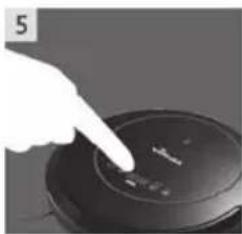
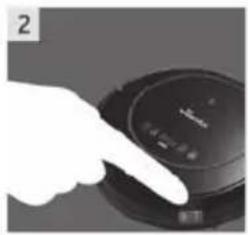
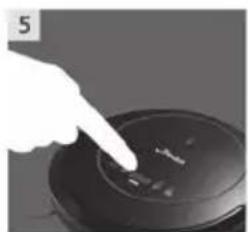
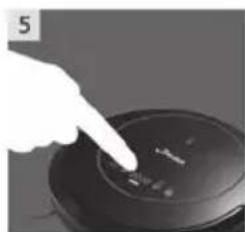
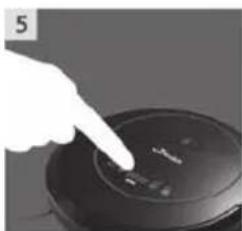
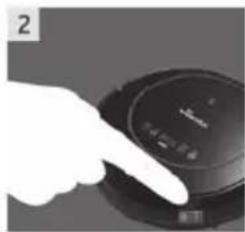
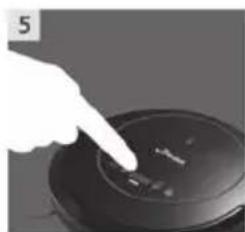
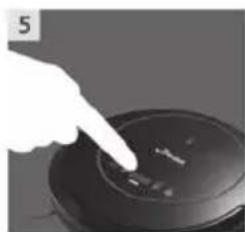
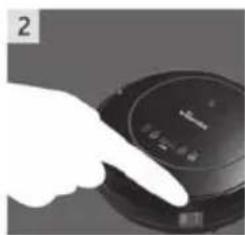
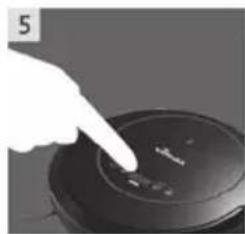
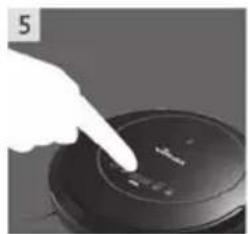
To turn your VR 302 on, switch the ON/OFF button on the right side of the device. You will hear a welcome melody and the LED display will be illuminated. To start the standard or intensive cleaning cycle press the "POWER" or "MAX" button on either the LED display or the remote control.
To pause the robot press the "POWER" button again.
NOTE: when starting the robot, always place it in the middle of a room or surface, at least half a meter away from any cliffs.
2. STANDBY
Standby means, the robot's main power is turned on, and the robot is ready to use. Through one of the following methods, you can change into standby mode:
- When robot is cleaning, press "POWER" button on main body to pause robot and enter standby mode.
- When cleaning, press the ON/OFF on remote controller to pause the robot to enter standby.
3. SLEEP MODE
In sleep mode, the robot's display will turn dark (but robot is not powered off).
In order to save power, you can turn the robot into sleep mode from standby mode via either of the following methods:
a. Long press "POWER" button on main body for 3 seconds, robot will enter into sleep mode.
b. Robot will automatically enter sleeping if power is low when in standby mode.
4. POWER OFF
To turn the device off, switch the ON/OFF button on the right side of the robot.
3.3 Cleaning modes & movement patterns
THE ROBOT IS EQUIPPED WITH FOUR DIFFERENT CLEANING MODES
| 1. Eco Cleaning Mode | The robot cleans the room automatically and adjust its cleaning pattern according to the room’s architecture. The Eco mode balances energy consumption and the cleaning performance. |
| 2. MAX Cleaning Mode The | the robot will increase it’s suction power and slow down in speed to reach the peak performance and clean dirtier areas thoroughly.NOTE: On carpet it is recommended to always use MAX mode to achieve best results. |
3. Spot Cleaning Mode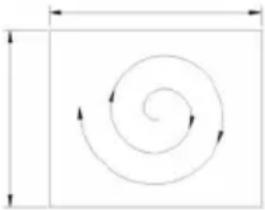 | In this mode, the robot will clean intensively in a spiral way with more suction power. This mode is created for picking up dirt on a limited area of around 1,20 m x 1,20m. The mode lasts 90 seconds.When activated in standby the robot will start and stop at the same position. When activated while the robot is already cleaning the robot will continue cleaning after the Spot cleaning mode has finished. |
| 4. Scheduling mode | After scheduled, the robot will leave the dockingstation and start working daily in the Eco mode at the scheduled time. |
THE ROBOT IS EQUIPPED WITH THREE DIFFERENT MOVEMENT PATTERNS:
Automatic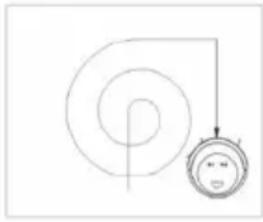 | 1. In this mode, the robot will clean the area automatically and adjust its cleaning behavior based on specific situations. |
Spiral cleaning mode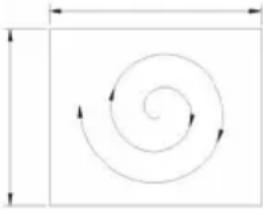 | 2. In this mode, robot takes the starting point as the center, then turns outward in a spiral action, suitable for an open area. |
Zig-zag mode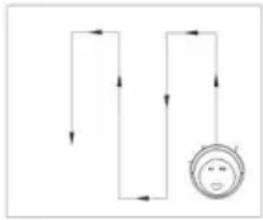 | 3. The robot will automatically go into Zig-Zag cleaning when it detects an open area or an environment with less obstacles. |
!
TIP FOR ADAPTING THE CLEANING PATTERN
Press "mode" button on the remote control to select the cleaning pattern.
The chosen mode will be displayed on the LED display of the robot:
Mode no. 1111 shows on robot led display: intensive spiral cleaning mode;
Mode no. 2222 shows on robot led display: automatic cleaning mode;
Mode no. 3333 shows on robot led display: fast spiral cleaning mode;
Mode no. 4444 shows on robot led display: zig-zag cleaning mode.
3.4 Scheduling
Schedule the robot to start cleaning automatically at a certain time every day.
NOTE: The robot can only be set when it's in standby or charging on docking station. If the robot is in sleep mode, long press "POWER" button on main body or ON/OFF on remote controller to wake it up. If the robot is in cleaning mode, pause it before scheduling.
SCHEDULING ON THE ROBOT DISPLAY
-
Time Clock Setting
-
Press “PLAN” button shortly to enter time setting mode. The LED panel will show the current time. The left two numbers on LED panel will flash, press “MAX” or “HOME” to increase or decrease hours.
- Press “POWER” button to enter the minute-setting, the right two numbers on LED panel will flash, press “MAX” or “HOME” to increase or decrease minutes.
- Press "POWER" button to confirm and save the setting.
-
Press "PLAN" button to quit the time setting mode.
-
Setting scheduling time (keep the robot in standby or charging on station)
- Press “PLAN” button long to enter scheduling setting, the left two numbers on LED panel will flash, press “MAX” or “HOME” to increase or decrease hours.
- Press "POWER" button to enter the minute-setting, the right two numbers on LED panel will flash, press "MAX" or "HOME" to increase or decrease minutes.
- Press "POWER" button to confirm and save the setting.
- At last, press "PLAN" button to quit the time setting mode.
Note: If machine is in real time setting, pls press "POWER" button to quit the real time setting, then long press "PLAN" button to enter scheduling setting.
3. Cancel scheduling
- Set the scheduling time to 00:00 in scheduling setting.
!
TIPS FOR EASY SCHEDULING
- The scheduling time uses the machine's time as a reference so before scheduling, please set the robot's time clock to be the same as real time.
- Once scheduled the machine will start cleaning at the time automatically when the main switch is switched on. The programmed time will remain saved even when switching the device off.
4. Maintenance
TIPS FOR BEST PERFORMANCE
To keep your Vileda robot at the best level of performance, it is recommended to maintain the robot regularly.
| Robot Part Care Frequency Replacement | Frequency | |
| Dust Bin After every uses - | ||
| High efficiency filter and Mesh Filter | Once per week (twice per week in home with pets) | High efficiency filter: Every 3 months / Mesh Filter: Every 6 months |
| Side Brush and Main brush Once per week | week (twice per week in home with pets) | Every 6-12 months |
| Front Wheel and Driving Wheels Cliff Sensors Charging Contacts | Once per month - |
4.1 Cleaning dust bin and filters
Empty and clean dust bin after each use following the steps as shown in the below figures.
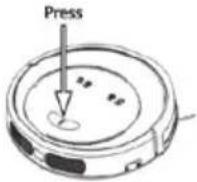 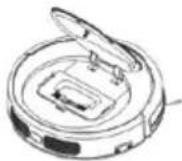 | Press PUSH to open the cover. |
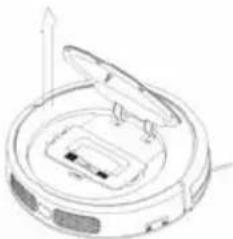 | Take out the dust bin |
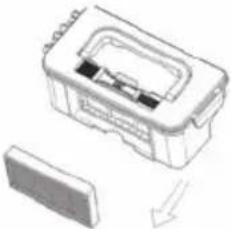 | Take out the high efficiency fine dust filter |
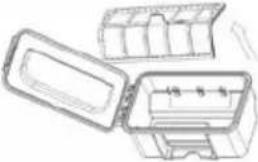 | Open dust bin cover, take out the primary mesh filter |
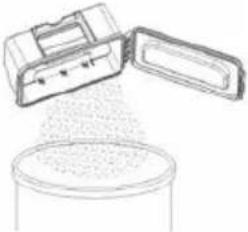 | Empty the dust bin |
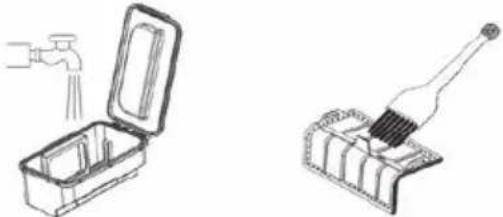 | Wash the dust bin and primary mesh filter or clean it with the maintenance brush. The high efficiency filter can softly be beaten to release fine dust gathered. Do not wash the filter. |
 | Install the primary mesh filter, maintenance brush and high efficiency filter back into the dust bin, when fully dried. |
!
TIPS FOR THE FILTER USAGE:
- Wash primary mesh filter after 15\~30 days of use. Maximum life span for filters is 12-24 months
- Re-install the dustbin and primary filter after they're fully dry
- Do not dry the filters under intense sunlight directly
- Don't wash the high efficiency filter under water
- Spare parts can be bought separately. Further information can be found at the Vileda service or on the Vileda website
4.2 Cleaning main brush and sidebrushes
CLEANING OF SIDEBRUSHES
Check the sidebrushes after every use and remove dust and dirt stuck to the sidebrushes. Maximum life span for sidebrush is 6 - 12 months.
NOTE: Before replacing sidebrushes, please pay attention to the left mark and the right mark on sidebrushes, which match with the 'L'/'R' mark on the bottom base of robot.
CLEANING OF MAIN BRUSH
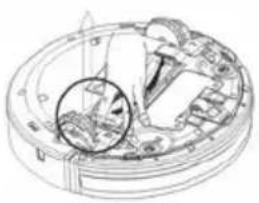 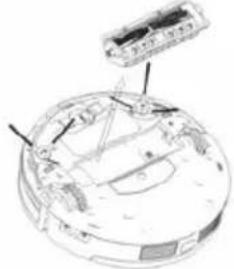 | Release the clamp on the right side of the main brush kit and take it out of the robot |
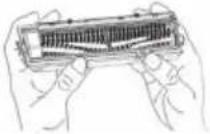 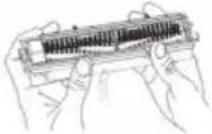 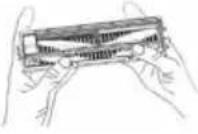 | Open the main brush cover1. Let the lid of the main brush face yourselves.2. Both hands thumb holding the lid of the main brush, push the red part up.3. Remove the cover of main brush. |
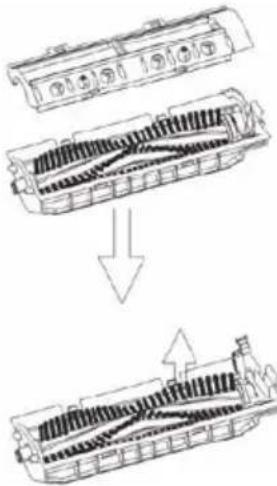 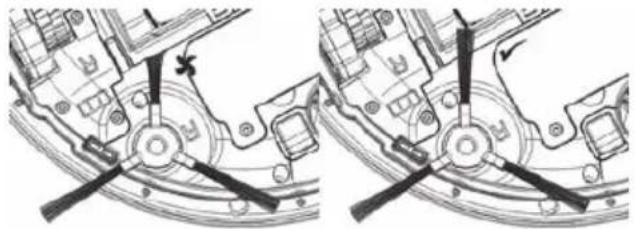 | Remove the main brush1. Lever the red main brush retainer.2. Remove the main brush from the holder.3. Clean the brush and the brush holder, by either using the maintenance brush or running water.NOTE: If hair is knotted on the main brush, you can use small scissors to cut and remove easily.4. Re-install the main brush in the original order of disassembly after it is fully dry.5. Check if sidebrush can rotate free. Take care that the sidebrushes are not trapped by the main brush kit. |
4.3 Cleaning Sensors and Wheels
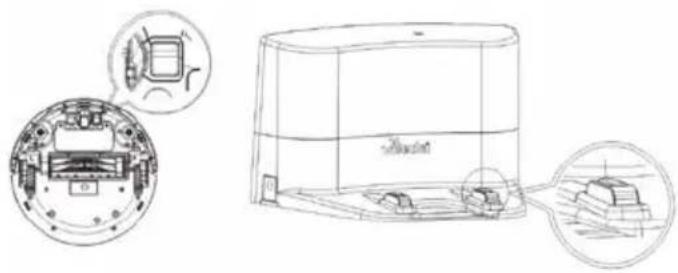
Once per month slightly wipe all the sensors as well as the charging poles from the dockingstation with a soft cleaning cloth or tool.
NOTE: Keep the robot and sensors dry and avoid to be affected with damp.
4.4 Cleaning driving wheels and center wheel
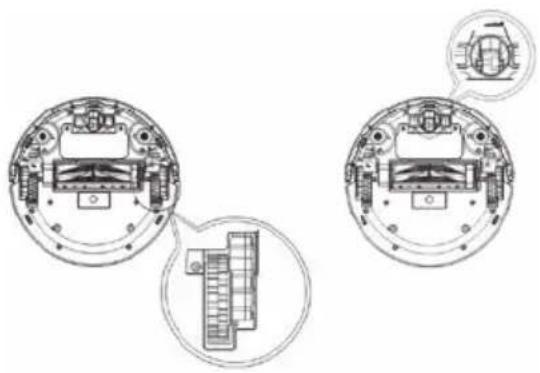
Monthly remove hair and dust from the left, right and center wheel with the maintenance brush or a soft cleaning tool.
4.5 Battery Removal
In case you want to replace the battery of VR 302, please make sure you use only a battery provided by the manufacturer.
- Make sure the device is switched off at the main switch.
- Remove the screws on battery cover with a screw driver.
- Remove the battery cover.
- Lift the battery and remove it from the housing.
- Unplug the wire connector that links the battery and robot.
5. Troubleshooting
| Problem Possible reason Possible solution | ||
| Robot is not running • Battery is too low. • Dust bin is not inserted (correctly). | • Recharge the battery for 5 hours. • Insert the dust bin. | |
| Low or no suction • Dust bin is full. | • Filter is blocked with dirt. • Suction port is blocked. • Filter is missing. | • Empty dust bin. • Clean the filter with brush. • Clear the port with brush. • Put filter back in place. |
| Abnormal movement • Wheels are dirty. • Cliff sensors are dirty. | • Clean wheels. • Clean cliff sensors. | |
| Error sound is occurring | • In combination with shown on the display: low power. • Robot is stuck. • Wheels are blocked. | • Recharge the battery for 5 hours. • Put the robot in a safe place or clean its bottom sensors. • Clean the wheels, including the front wheel. |
| Low battery after charging or no charging possible | • Main on/off switch at the robot is off. • Charger or battery is defective. | • Turn on main switch / “on/off” to enable charging. • Contact the Vileda service (address see last page). |
| Display shows the error code “A / U / B / F” | • Suction passage blocked. • Clean suction passage with the main brush. | |
| Display shows the error code “A / U / B / N” | • Dust bin not placed in position or robot without dust bin. | • Put back dust bin and place it in position. |
| Display shows the error code “E / R / R / O” | • Main switch is switched off, no charging possible. | • Switch the main switch on and continue charging the robot. |
| Display shows the error code “E / various / various / various” | • Device off the ground or sensors jammed or dirty. | • Put robot on solid ground. • Check sensitivity of the front bumper. • Clean bottom anti-drop sensor lens. • Clean front bumper sensor lens. |
| Display shows the error code “L / various / various / various” | • Motors overloaded or jammed. • | Check if fan opening is free and clean dust bin. • Check if wheels or brush unit is stuck or wired by obstacles. |
If above described solutions do not work, please try switching off VR 302, switch it on and check again. For further help, technical advice, or to order spare or replacement parts contact Vileda (address see last page).
6. Environmental and product recycling
The Vileda vacuum cleaning robot VR 302 fulfils the EU directive 2012/19/EC, covering electrical and electronic appliances and the management of its disposal.
The packaging material is entirely recyclable, and marked with the recycling symbol. Follow local regulations for scrapping. Keep the packaging materials (plastic bags, polystyrene parts, etc.) out of children's reach, as they are potentially dangerous.
When the product has reached the end of its life please do not dispose of it with general household waste. To prevent possible harm to the environment or human health from uncontrolled waste disposal, recycle it responsibly to promote the sustainable reuse of material resources.

The symbol identifies the Vileda VR302 as a product submitted to the regime of selective electrical appliance recycling collection.
The product contains a Li-Ion battery which should not be disposed of with general household waste. Deposit the battery in an official collection point for its recycling.
Batteries can be detrimental for the environment and can explode if they are exposed to high temperatures. The violation of these precautions could cause fire and / or serious injuries.
For more detailed information about treatment, recovery and recycling of this Robot, please contact your local city office, your household waste disposal service or the shop where you purchased the product.
For example, disposal of the Robot and any part of it may need to be taken to a Designated Collection Facility.
7. Technical product specification
| Model 0769-01 | |
| Mechanical Specifications Size 34 x 9 cm | Weight 3,5 KG |
| Electrical Specifications Rated Voltage 14,6 V DC | Rated Power 22 WBattery Li-ion 2.150 mAh |
| Battery Li-ion 2.150 mAh | |
| Charging Time 240-300 min | |
| Charger Specifications Rated Input Voltage (V AC) 100 | -240Rated Output Voltage (V DC) 24Rated Output Current (A) 0.6 |
8. Vileda product guarantee
A. SCOPE
- By this Guarantee, Vileda guarantees the product to be free from defects in materials and workmanship at the date of original purchase for a period of two years from that date. The Vileda company that provides and will honour this Guarantee is designated in this Guarantee or accompanying leaflets or can be found on our website www.vileda.com.
- If within the guarantee period the product is determined to be defective (at the date of original purchase) due to improper materials or workmanship, Vileda or an authorized service network member in the Guarantee Area will, without charge for labour or parts, repair or (at Vileda's discretion) replace the product or its defective parts subject to the terms and limitations below. Vileda may replace defective products or parts with new or refurbished products or parts. All products and parts replaced become the property of Vileda.
- This guarantee does not cover:
a) periodic maintenance and repair or parts replacement due to wear and tear.
b) consumables (components that are expected to require periodic replacement during the lifetime of a product such as pads).
c) damage or defects caused by use, operation or treatment of the product inconsistent with normal personal or domestic use.
d) damage or changes to the product as a result of:
I. misuse, including:
- treatment resulting in physical, cosmetic or surface damage or changes to the product;
- failure to install or use the product for its normal purpose or in accordance with Vileda instructions on installation or use;
- failure to maintain the product in accordance with Vileda instructions on proper maintenance;
- installation or use of the product in a manner inconsistent with the technical or safety laws or standards in the country where it is installed or used;
II. use of the product with accessories, peripheral equipment and other products of a type, condition and standard other than prescribed by Vileda;
III. repair or attempted repair by persons who are not Vileda or authorized service network members;
IV. Accidents, fire, liquids, chemicals, other substances, flooding, vibrations, excessive heat, improper ventilation, power surges, excess or incorrect supply or input voltage, radiation, electrostatic discharges including lighting, other external forces and impacts.
B. TERMS
- Guarantee services will be provided only if the original invoice or sales receipt (indicating the date of purchase, model name and dealer's name) is presented with the defective product within the guarantee period. Vileda may refuse free-of-charge guarantee service if these documents are not presented or if they are incomplete or illegible. This Guarantee will not apply if the model name or serial number on the product has been altered, deleted, removed or made illegible.
- This Guarantee does not cover transport costs and risks associated with transport of your product to and from Vileda or the service agent.
- We would like to inform you that the diagnosis fee of your product shall be paid by you if the diagnosis of your product proves that you will not be entitled to a repair under this guarantee (for whatever reason) to rectify the defect or your product is working properly and no hardware fault could be designed.
C. EXCLUSIONS AND LIMITATIONS
- Except as stated above, Vileda makes no guarantee (express, implied, statutory or otherwise) regarding product quality, performance, accuracy, reliability, fitness for a particular purpose, or otherwise.
- Vileda does not take responsibility for secondary or indirect damages caused by the incorrect use of the product. Save as set out elsewhere in this clause the responsibility of Vileda will not exceed the purchase price of the product. If you have any doubts referring to the correct use of the product or referring to the guarantee, call Vileda Customer Service.
- Nothing in this guarantee is intended to restrict Vileda's liability for death, personal injury or damage to private property caused by the goods proving defective while in the consumer's use as a result of Vileda's negligence.
D. YOUR LEGAL RIGHTS RESERVED
As a consumer, you have legal rights in relation to goods that are faulty or not as described. Advice about your legal rights is available from your local Citizens Advice Bureau or Trading Standards Office. Nothing in this guarantee will affect these rights.
E. YOUR GUARANTOR
The guarantee for this product is provided and will be honoured by Freudenberg Household Products, Vileda House, 2 Chichester Street, Rochdale, Lancashire, OL16 2AX.www.vileda.com/uk Tel: 0345 7697356.

KIT SPAZZOLA PRINCIPALE
BASE DI RICARICA
TELECOMANDO
LED ANZEIGE
SCHMUTZBEHÄLTER
RECIPIENTE DE POLVO
KIT DE CEPILLO PRINCIPAL
For more detailed information about treatment, recovery and recycling of this Robot, please contact your local city office, your household waste disposal service or the shop where you purchased the product.
For example, disposal of the Robot and any part of it may need to be taken to a Designated Collection Facility.
1. Avisos gerais
IMPORTANTE:
DEPÓSITO DE SUJIDADE
CONJUNTO DA ESCOVA PRINCIPAL
Freudenberg Home and Cleaning
Solutions Ibérica, S.L.
Apartado 12170
1061-001 Lisboa Códex, PT
www.vileda.com/pt
BAC À POUSSIÈRE
KIT DE BROSSE PRINCIPALE
LED DISPLAY
ONDERAANZICHT
STOFBAK
3.1 Batterij laden
LADEN VAN DE BATTERIJ:
If above described solutions do not work, please try switching off VR 302, switch it on and check again. For further help, technical advice, or to order spare or replacement parts contact Vileda (address see last page).
6. Afvalverwerking, productrecycling
Avenue André Ernst, 14
4800 Verviers
Belgique/België
www.vileda.be
www.vileda.nl

1. Genel uyarılar
ÖNEMLİ:
TOZ HAZNESİ
ANA FIRÇA KİTİ
KOLAY PROGRAMLAMA İPUÇLARI
6. Environmental and product recycling


- GENERAL WARNINGS
- IMPORTANT
- WARNING
- USE RESTRICTIONS
- PERSONAL SAFETY
- ELECTRICAL SAFETY INSTRUCTIONS
- BATTERY USE AND CARE
- SERVICE
- GETTING TO KNOW VR 302
- 2.1 CONTENT
- PACKAGE CONTENTS
- 2.2 PRODUCT FEATURES AND FUNCTIONS
- HOW TO SET UP YOUR REMOTE CONTROL
- PRODUCT OPERATION
- TIPS BEFORE THE FIRST USE
- 3.1 BATTERY CHARGING & RECHARGING
- CHARGING BATTERY
- BATTERY INDICATION
- 3.2 TURNING ON AND OFF
- STARTING UP
- STANDBY
- SLEEP MODE
- POWER OFF
- 3.3 CLEANING MODES & MOVEMENT PATTERNS
- THE ROBOT IS EQUIPPED WITH FOUR DIFFERENT CLEANING MODES
- THE ROBOT IS EQUIPPED WITH THREE DIFFERENT MOVEMENT PATTERNS
- 3.4 SCHEDULING
- SCHEDULING ON THE ROBOT DISPLAY
- CANCEL SCHEDULING
- TIPS FOR EASY SCHEDULING
- MAINTENANCE
- TIPS FOR BEST PERFORMANCE
- 4.1 CLEANING DUST BIN AND FILTERS
- TIPS FOR THE FILTER USAGE
- 4.2 CLEANING MAIN BRUSH AND SIDEBRUSHES
- CLEANING OF SIDEBRUSHES
- 4.3 CLEANING SENSORS AND WHEELS
- 4.4 CLEANING DRIVING WHEELS AND CENTER WHEEL
- 4.5 BATTERY REMOVAL
- TROUBLESHOOTING
- ENVIRONMENTAL AND PRODUCT RECYCLING
- TECHNICAL PRODUCT SPECIFICATION
- VILEDA PRODUCT GUARANTEE
- SCOPE
- TERMS
- EXCLUSIONS AND LIMITATIONS
- YOUR LEGAL RIGHTS RESERVED
- YOUR GUARANTOR
- RECIPIENTE DE POLVO
- KIT DE CEPILLO PRINCIPAL
- AVISOS GERAIS
- IMPORTANTE
- 3.1 BATTERIJ LADEN
- AFVALVERWERKING, PRODUCTRECYCLING
- GENEL UYARILAR
- ÖNEMLİ
- KOLAY PROGRAMLAMA İPUÇLARI
Brand : Vileda
Model : VR 302
Category : Robot vacuum