
G20 Lite - Vacuum Cleaner Xiaomi - Free user manual and instructions
Find the device manual for free G20 Lite Xiaomi in PDF.
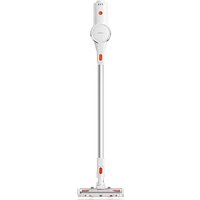


| Brand | Xiaomi |
| Model | G20 Lite |
| Product type | Cordless vacuum cleaner |
| Model (code) | C203 |
| Rated voltage | 22.2 V= |
| Rated power | 215 W |
| Charging voltage | 27.0 V= |
| Net weight | 2.4 kg |
| Battery | Rechargeable lithium-ion |
| Charging time | Approximately 5 hours |
| Runtime | Not specified (estimated: approx. 20-30 min depending on mode) |
| Noise level | Not specified |
| Dust container capacity | Approximately 0.5 L (estimated) |
| Filtration | Washable filter, pre-filter and post-filter |
| Included accessories | Extension rod, 2-in-1 brush nozzle, electric brush bar, wall mount with screws, power adapter (BLJ15WJ270050P-V or AD-D0752700050EU01) |
| Suction modes | Turbo and Standard |
| Battery indicator | Indicator light (blinking/on depending on state) |
| Recommended use | Indoor, hard floors (marble, parquet) and short-pile carpet |
| Charging temperature | 0°C to 35°C |
| Storage temperature | Cool, dry place, away from sunlight |
| Maintenance | Cleaning of dust container, filter and brush; washable filter (drying 24h) |
| Safety | Automatic shutdown in case of blockage; battery protection; do not immerse |
| Warranty | Limited warranty in accordance with local legislation; Xiaomi spare parts |
| Repairability | Battery replaceable by a professional; spare parts available |
Frequently Asked Questions - G20 Lite Xiaomi
User questions about G20 Lite Xiaomi
0 question about this device. Answer the ones you know or ask your own.
Ask a new question about this device
Download the instructions for your Vacuum Cleaner in PDF format for free! Find your manual G20 Lite - Xiaomi and take your electronic device back in hand. On this page are published all the documents necessary for the use of your device. G20 Lite by Xiaomi.
USER MANUAL G20 Lite Xiaomi
Xiaomi Vacuum Cleaner G20 Lite User Manual
This product is for household use only. Read this manual carefully before use, and retain it for future reference.
This appliance can be used by children aged from 8 years and above and persons with reduced physical, sensory or mental capabilities or lack of experience and knowledge if they have been given supervision or instruction concerning use of the appliance in a safe way and understand the hazards involved. Children shall not play with the appliance. Cleaning and user maintenance shall not be made by children without supervision.
This appliance contains batteries that are only replaceable by skilled persons.
The appliance is only to be used with the power supply unit provided with the appliance.
This vacuum is for indoor use only. Do not use or install it in outdoor, industrial, or commercial environments.
A hazard may occur if the appliance runs over the supply cord.
The plug must be removed from the socket-outlet before cleaning or maintaining the appliance.
To reduce the risk of fire, explosion, or personal injury, check before use to make sure the power supply is undamaged. Do not use the vacuum if the power adapter is damaged.
If the charger or battery becomes damaged, it must be replaced with a genuine component purchased from the manufacturer or after-sales service department.
Make sure to turn the vacuum cleaner off before cleaning or replacing the roller brush.
The electric brush bar, the extension rod, and the vacuum cleaner are electrically conductive and should not be immersed in water or other liquids. Make sure the filter, pre-filter and post-filter are thoroughly dry after cleaning.
To prevent injury, turn off the vacuum cleaner and remove the electric brush bar before cleaning and maintenance. Do not use the vacuum cleaner before installing the electric brush bar, dust compartment cover, filter, pre-filter, and post-filter properly.
Periodically check the extension rod and do not use it if it is damaged.
Neither use the vacuum cleaner to pick up flammable or explosive liquids such as gasoline, nor other liquids such as water or toxic liquids like bleach, ammonia, and drain cleaners.
- Do not use the vacuum to clean up toner used in laser printers and copiers, as toner may cause fire or explosion.
- Do not use the vacuum cleaner to pick up drywall particles, ashes like fireplace ash, or smoking or burning materials such as coal, cigarette butts or matches.
- Do not use the vacuum cleaner to pick up sharp or hard objects, such as glass, nails, screws, or coins, which may damage the product.
- Do not use the vacuum cleaner to clean stains of thick oily substances, strong adhesives, or dyes, such as shoe polish, paints, and pigments.
- Keep hair, loose clothing, fingers, and other parts of the body away from the vacuum cleaner's openings and moving parts.
- Do not point the suction opening, extension rod, or other accessories at your eyes or ears or put them in your mouth.
- Do not put any object into the vacuum cleaner's openings, nor use the vacuum cleaner with any opening blocked. Keep free of dust, lint, hair, or other items which may reduce the suction power of the vacuum cleaner.
- Do not lean the vacuum cleaner on unstable objects such as chairs or tables to prevent damage or injury caused by it falling off.
- Do not charge or store the vacuum near heat sources or in humid areas, such as by a radiator or in a kitchen or bathroom.
- Do not expose the appliance or battery to excessive temperatures.
- Be aware of the risk of terminals of the battery-operated appliance or battery being short-circuited by metal objects.
- Only use replacement parts that are approved by Xiaomi.
- In the event of a battery leak, avoid contact with the liquid and dispose of the battery at a government-approved recycling facility. In case of contact with eyes, rinse with plenty of water and seek medical attention immediately.
- Please be extra careful when using the vacuum cleaner to clean stairs.
- Fire Hazard Warning: Do not apply any type of fragrance to the vacuum cleaner's pre-filter and post-filter. These types of products are known to contain flammable chemicals which may cause the vacuum cleaner to catch fire.
- Strictly follow the instructions in this user manual to charge the vacuum at an ambient temperature of 0°C to 35°C. Improper charging may result in damage to the battery.
- Please strictly follow the instructions in this user manual when using the vacuum cleaner. Users are responsible for any loss or damage that may arise from improper use of the vacuum cleaner.
- WARNING: Only use the supply unit provided with this appliance.
- WARNING: For the purposes of recharging the battery, only use the detachable supply unit provided with this appliance.
• Use only with BLJ15WJ270050P-V or AD-D0752700050EU01 supply unit.
Regulatory Compliance Information

EU Declaration of Conformity
We, Beijing Shunzao Technology Co., Ltd., hereby declare that this equipment is in compliance with the applicable Directives and European Norms, and amendments. The full text of the EU declaration of conformity is available at the following internet address: http://www.mi.com/global/service/support/declaration.html

WEEE Disposal and Recycling Information
All products bearing this symbol are waste electrical and electronic equipment (WEEE as in directive 2012/19/EU) which should not be mixed with unsorted household waste. Instead, you should protect human health and the environment by handing over your waste equipment to a designated collection point for the recycling of waste electrical and electronic equipment, appointed by the government or local authorities. Correct disposal and recycling will help prevent potential negative consequences to the environment and human health. Please contact the installer or local authorities for more information about the location as well as terms and conditions of such collection points.
Product Overview
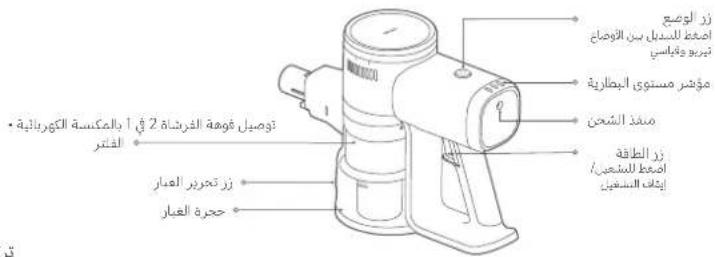
Vacuum Cleaner
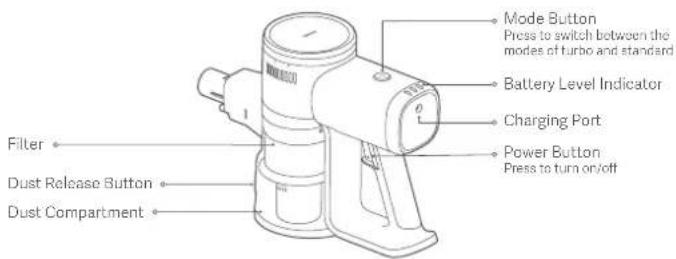
Accessory List
Extension Rod
Power Supply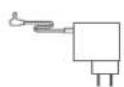
2-in-1 Brush Nozzle
Electric Brush Bar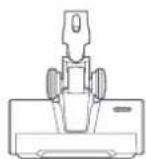
Wall Storage Mount (including screw × 2, wall plug × 2)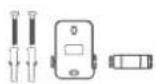
Note: Illustrations of product, accessories, and user interface in the user manual are for reference purposes only. Actual product and functions may vary due to product enhancements.
How to Install
Installing the accessories onto the vacuum cleaner
- Connecting extension rod to vacuum cleaner and electric brush bar

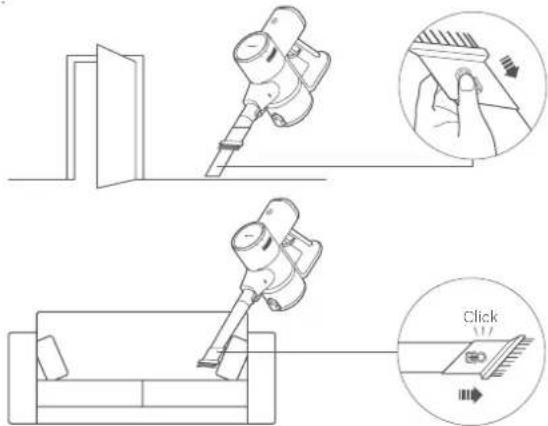
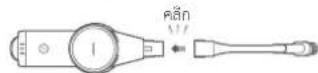
- Connecting 2-in-1 brush nozzle to vacuum cleaner
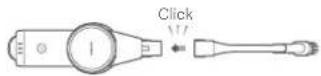
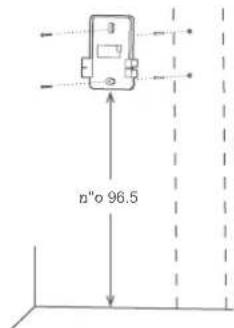
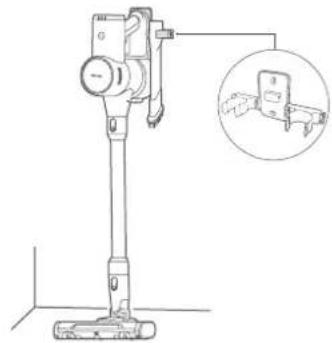
Installing the wall storage mount
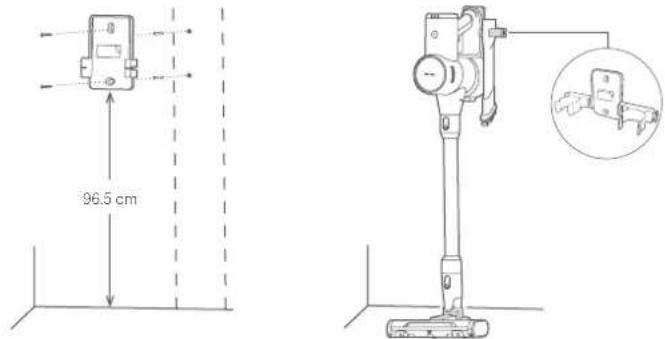
- Choose a cool and dry place with an electrical outlet nearby. Before installing, make sure that there are not any wires or pipes in the wall directly behind where the mount will be installed.
- The distance between the bottom of the wall storage mount and the ground is recommended to be 96.5 cm.
- Hold the wall storage mount in position, and make marks on the wall according to the holes on the mount.
- Use a power drill with an 8 mm drill bit to drill a hole approximately 40 mm deep in each marked position, then insert a wall plug into each hole.
- Align the mounting holes on the wall storage mount with the holes on the wall, and then use the included screws to secure the mount to the wall.
Charging
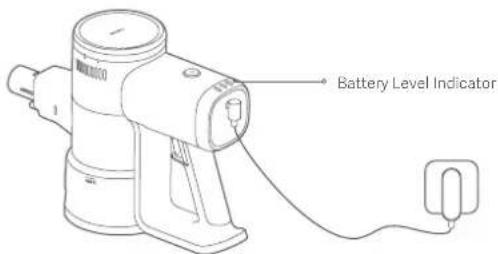
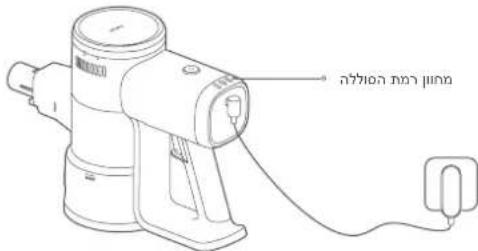
Battery level indicator status description
Off


Working
○
Low battery
○ ○
○ Nearly full
○ ○
Half battery
Charging

Low battery
○ ○

○
Half battery
○ ○
○ Fully charged
Notes:
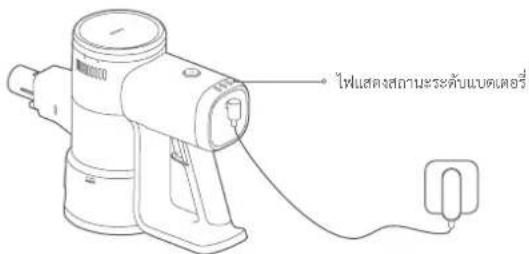
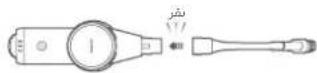
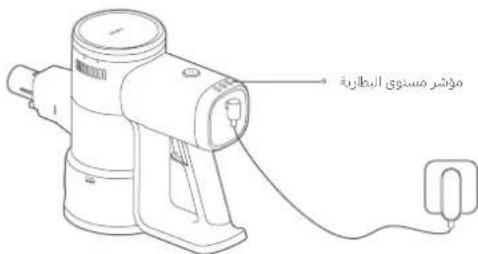
- Fully charge the vacuum cleaner before using it for the first time. This will take about 5 hours.
- The vacuum cleaner cannot be used while charging.
- Once the vacuum cleaner is fully charged, the indicator will turn off after 20 seconds, and the vacuum cleaner will then enter the energy-saving mode.
- Vacuuming at the highest suction level for a prolonged period will cause the battery to heat up, which may increase the charging time. Before charging the vacuum cleaner, it is better to cool it down for 30 minutes.
How to Use
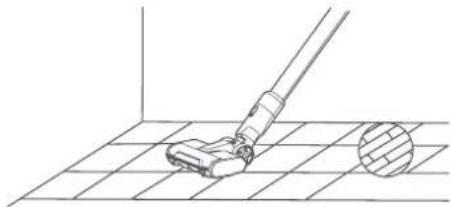
Electric Brush Bar
For cleaning marble, wood, and short pile carpeted floors.
2-in-1 Brush Nozzle
Suitable for cleaning places with crevices, such as keyboards, curtains, sofas, ceilings, corners, and car interiors.
Note: To avoid potential safety hazards, do not expose the vacuum cleaner to direct sunlight or store it in environments with high temperatures like inside a car in summer.
Care & Maintenance
CAUTIONS:
- Before care and maintenance, unplug the power supply and make sure the vacuum cleaner is turned off. • Always use genuine parts to ensure normal operation and to keep your warranty valid.
- If the filter, pre-filter, post-filter, extension rod, or 2-in-1 brush nozzle is blocked, the vacuum cleaner will stop working. Before using the vacuum cleaner again, turn it off and clean the blocked part.
- If the brush bar gets blocked, it will stop working but the vacuum cleaner itself will not. Before using the vacuum cleaner again, turn it off and clean the brush bar.
- Before cleaning, remove the brush head from the vacuum cleaner to prevent accidentally turning on the vacuum cleaner, which can cause injury.
- If the vacuum cleaner will not be used for an extended period, fully charge it and disconnect it from the power then store it in a cool, low-humidity environment away from direct sunlight.
- To avoid over-discharging the battery, recharge the vacuum cleaner at least once every three months.
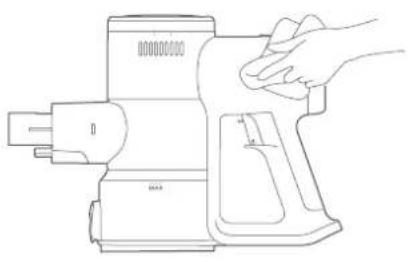
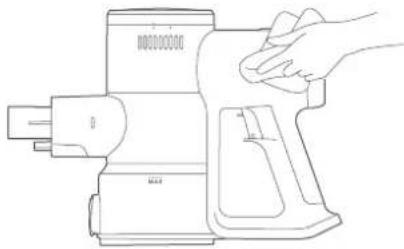
Cleaning the Vacuum Cleaner
Wipe the vacuum cleaner with a soft, dry cloth.
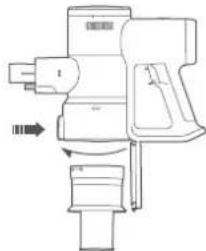
Cleaning the dust compartment
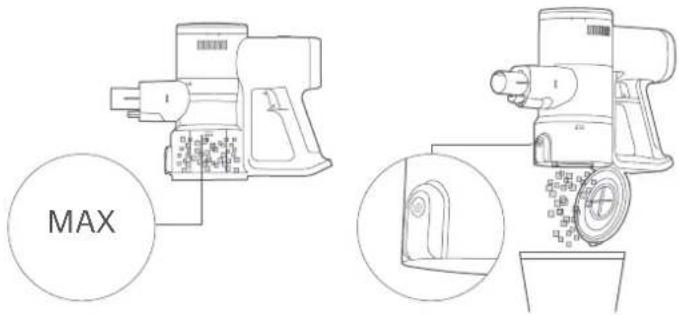
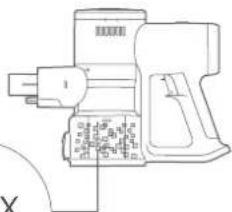
Before cleaning the dust compartment, disconnect the power supply and remove the extension rod. The vacuum's cleaning ability will be reduced if the dust compartment is filled to the "MAX" mark. To regain performance, empty the dust compartment.
- Empty the dust compartment; Hold the dust compartment over a trash bin, then press the dust release button to empty out the contents.
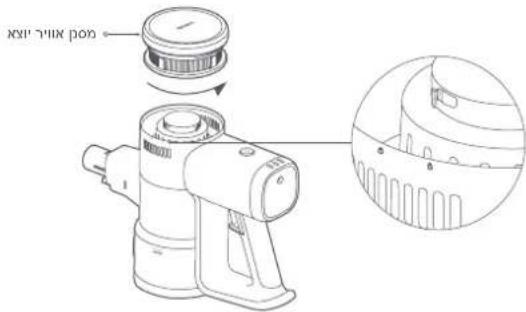
Cleaning the filter assembly
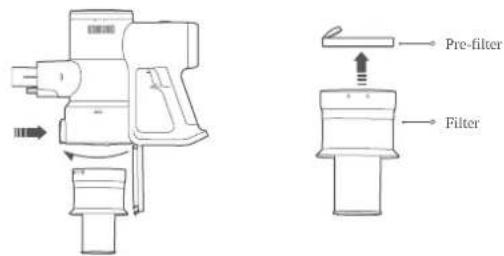
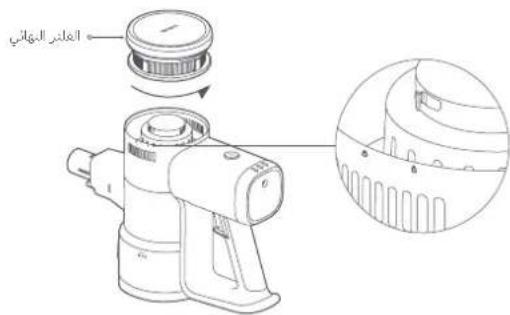
- Press the dust release button to open the dust compartment, turn the filter as illustrated to remove it, then remove the pre-filter from the filter.
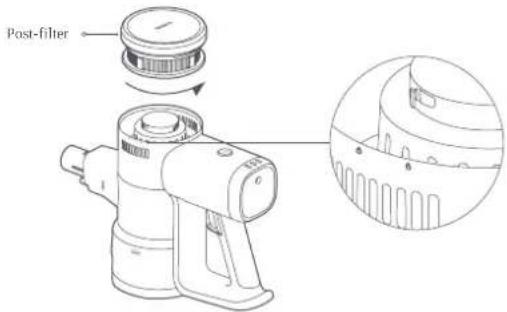
- Turn the post-filter as illustrated to remove it.
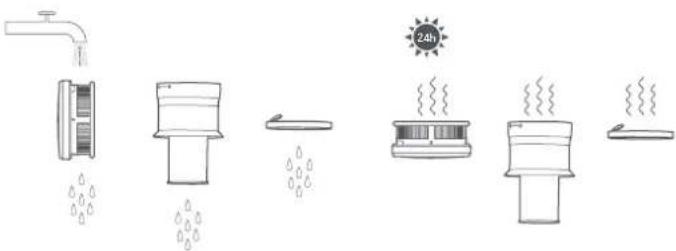
- Rinse the filter, pre-filter, and post-filter under running tap water until clean, then set them aside to fully dry for at least 24 hours.
Notes:
- Never soak the filter, pre-filter, and post-filter.
- When cleaning the post-filter, rinse it repeatedly and tap its edge lightly to remove any dust and debris until it is clean.
- Do not clean the pre-filter and post-filter with your hands, a brush, or a sharp object to prevent damage.
- If the suction power is still significantly reduced after the pre-filter and post-filter are cleaned, you can try to purchase and replace them with genuine ones.
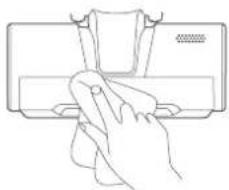
Cleaning the electric brush bar
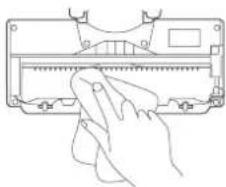
- Place the brush bar upside down and press the roller brush release button to unlock the roller brush and remove it.
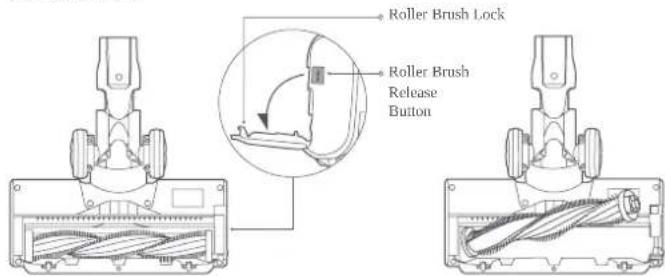
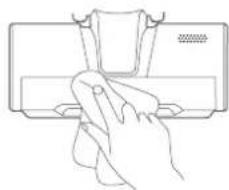
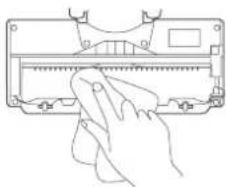
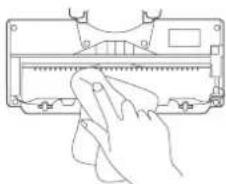
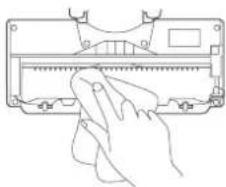
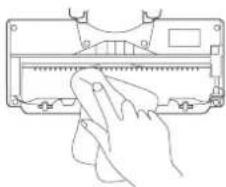
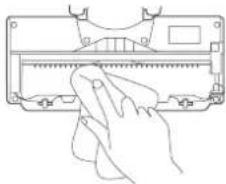
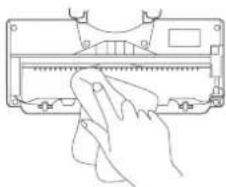
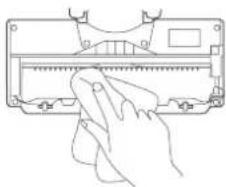
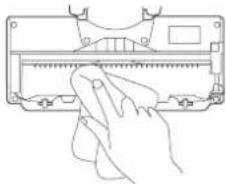
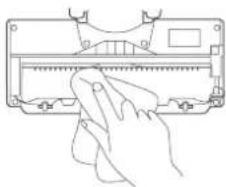
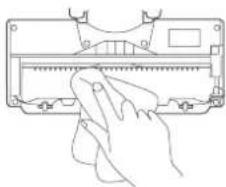
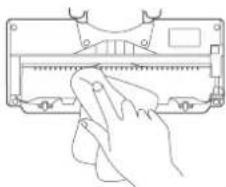
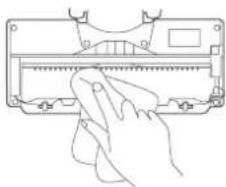
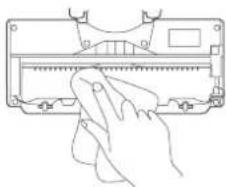
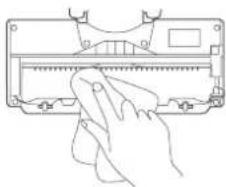
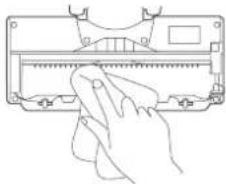
- Use a dry cloth or paper towel to wipe dust and debris from the suction opening and the transparent cover.
Note: Do not clean the electric brush bar with water as it has a built-in motor.
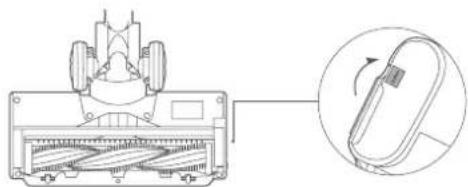
- Reinstall the roller brush, and press the lock to lock it into place.
Common Issue
| Common Issue Possible Cause Solution | ||
| The vacuum cleaner does not work. | Battery is depleted. Charge the vacuum cleaner before use. | |
| The suction opening, air duct, pre-filter, or post-filter is blocked. | Check and clean immediately. | |
| The filter, pre-filter, or post-filter is not installed in place. | Check and install in place. | |
| The battery temperature protection is triggered. | Wait until the battery temperature returns to normal, then resume use. | |
| The suction power reduces. | The dust compartment is full, or the pre-filter or the post-filter is blocked. | Check and clean immediately. |
| Brush head is clogged. Clean the brush head. | ||
| Low battery life. | Battery is not fully charged. | Charge the vacuum cleaner before use. |
| The dust compartment is full, or the pre-filter or the post-filter is blocked. | Check and clean immediately. | |
| Brush head is clogged. Clean the brush head. | ||
| The roller brush does not rotate. | The roller brush is stuck by foreign objects. | Remove any foreign object, and then resume use. |
| The high-temperature protection for the brush bar's motor is triggered. | Wait for the temperature of the brush bar's motor to return to normal before use. | |
| The conductive contacts are dirty. | Wipe the contacts with a soft dry cloth and try again. | |
| Unable to charge. | The power supply being used is not genuine. | Only use the genuine power supply to charge the vacuum cleaner. |
| The battery charges slowly. | The battery temperature protection is triggered. | Wait until the battery temperature returns to normal, then resume use |
Note: If the solutions above do not resolve the issue, please contact the after-sales service team.
Troubleshooting
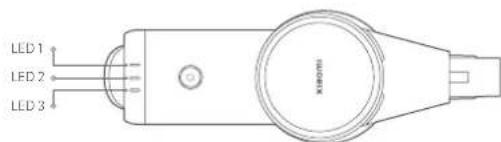
If the vacuum cleaner is not working properly, the battery level indicator will display an error message. Refer to the table below for troubleshooting.
| Error message Possible Cause Solution | ||
| LED 1, LED 2 and LED 3 blink three times simultaneously. | Power supply error | Only use the genuine power supply to charge the vacuum cleaner. |
| The battery temperature protection is triggered. | Wait for the temperature of the brush bar's motor to return to normal before use. | |
| Battery cell error | Contact the after-sales service team | |
| Temperature sensor error | ||
| Motor error | ||
| LED 1 blinks ten times. | Battery Depleted | Only use the genuine power supply to charge the vacuum cleaner. |
Specifications
| Xiaomi Vacuum Cleaner G20 Lite | |||
| Name | Cordless Vacuum Cleaner | Model | C203 |
| Rated Voltage | 22.2 V ≈ | Rated Power | 215 W |
| Charging Voltage | 27.0 V ≈ | Net Weight | 2.4 kg |
| Power consumption | off mode:≤0.5W | Time to enter the Condition | off mode:≤20 min |
| Electric Brush Bar | |||
| Model | C203-DS | Rated Voltage | 22.2 V ≈ |
| Rated Power | 15 W | ||
| Power Supply | |||
| Manufacturer | Zhongshan Baolijin Electronic Co., Ltd. | ||
| Model | BLJ15WJ270050P-V | Average Active Efficiency | 85.9% |
| Rated Input | 100–240 V ~ 50/60 Hz 0.5 A | Efficiency at Low Load (10%) | 73.2% |
| Rated Output | 27.0 V ≈ 0.5 A 13.5 W | No-load Power Consumption | 0.09 W |
| Manufacturer | Shenzhen AMC Technology Co., Ltd. | ||
| Model | AD-D0752700050EU01 | Average Active Efficiency | 84.5% |
| Rated Input | 100–240 V ~ 50/60 Hz 0.8 A | Efficiency at Low Load (10%) | 75.5% |
| Rated Output | 27.0 V ≈ 0.5 A 13.5 W | No-load Power Consumption | 0.09 W |
Note: Model BLJ15WJ270050P-V and AD-D0752700050EU01 are both applicable for the vacuum cleaner, and only one comes with the package.
The rechargeable lithium-ion battery pack of this vacuum cleaner contains chemicals that may pollute the environment. Before disposing of the vacuum cleaner, remove the batteries and then discard them at an appropriate recycling facility.
• The battery must be removed from the appliance before it is scrapped. - The appliance must be disconnected from the supply mains when removing the battery. •The battery is to be disposed of safely.
CAUTIONS:
- Make sure the vacuum cleaner is disconnected from power and the batteries are fully drained before battery removal. • Take the removed batteries to the professional recycling facility to properly dispose of them.
- Do not leave the batteries in a high-temperature environment; otherwise, they may explode.
- In the event of a battery leak, avoid contact with the liquid. If the liquid enters the eyes, rinse with plenty of water and seek medical attention immediately.
Steps to Remove the Battery:
- Remove the back covers of the vacuum cleaner and the handle, and remove the micro switch from the handle.
- Use a screwdriver to remove the screws in the vacuum cleaner, then unplug the wires and take out the battery pack assembly.
- Unscrew the two screws above the circuit board of the battery pack assembly.
- Remove the upper and lower covers on the circuit board and battery pack, and take out the batteries.
WARRANTY NOTICE
THIS WARRANTY GIVES YOU SPECIFIC RIGHTS, AND YOU MAY HAVE OTHER RIGHTS CONVEYED BY LAWS OF YOUR COUNTRY, PROVINCE OR STATE. INDEED, IN SOME COUNTRIES, PROVINCES OR STATES, CONSUMER LAW MAY IMPOSE A MINIMUM WARRANTY PERIOD. OTHER THAN AS PERMITTED BY LAW, XIAOMI DOES NOT EXCLUDE, LIMIT OR SUSPEND OTHER RIGHTS YOU MAY HAVE. FOR A FULL UNDERSTANDING OF YOUR RIGHTS WE INVITE YOU TO CONSULT THE LAWS OF YOUR COUNTRY, PROVINCE OR STATE.
1. LIMITED PRODUCT WARRANTY
Xiaomi warrants that the Products are free from defects in materials and workmanship under normal use and in accordance with the respective Product user manual, during the Warranty Period. The duration and conditions related to the legal warranties are provided by respective local laws. For more information about the consumer warranty benefits, please refer to Xiaomi's official website https://www.mi.com/global/support/warranty. Xiaomi warrants to the original purchaser that its Xiaomi Product will be free from defects in materials and workmanship under normal use in the period mentioned above. Xiaomi does not guarantee that the operation of the Product will be uninterrupted or error free. Xiaomi is not liable for damages arising from non-compliance with the instructions related to the use of the Product.
2. REMEDIES
If a hardware defect is found and a valid claim is received by Xiaomi within the Warranty Period, Xiaomi will either (1) repair the product at no charge, (2) replace the product, or (3) refund the Product, excluding potential shipping costs.
3. HOW TO OBTAIN WARRANTY SERVICE
To obtain warranty service, you must deliver the Product, in its original packaging or similar packaging providing an equal degree of Product protection, to the address specified by Xiaomi. Except to the extent prohibited by applicable law, Xiaomi may require you to present proofs or proof of purchase and / or comply with registration requirements before receiving warranty service.
4. EXCLUSIONS AND LIMITATIONS
Unless otherwise stipulated by Xiaomi, this Limited Warranty applies only to the Product manufactured by or for Xiaomi and identifiable by the trademarks, trade name or "Xiaomi" or "Mi" logo. The Limited Warranty does not apply to any (a) Damage due to acts of nature or God, for example, lightning strikes, tornadoes, flood, fire, earthquake or other external causes; (b) Negligence; (c) Commercial use; (d) Alterations or modifications to any part of the Product; (e) Damage caused by use with non-Xiaomi products; (f) Damage caused by accident, abuse or misuse; (g) Damage caused by operating the Product outside the permitted or intended uses described by Xiaomi or with improper voltage or power supply; or (h) Damage caused by service (including upgrades and expansions) performed by anyone who is not a representative of Xiaomi. It is your responsibility to backup any data, software, or other materials you may have stored or preserved on the product. It is likely that the data, software or other materials in the equipment will be lost or reformatted during the service process, Xiaomi is not responsible for such damage or loss. No Xiaomi reseller, agent, or employee is authorized to make any modification, extension, or addition to this Limited Warranty. If any term is held to be illegal or unenforceable, the legality or enforceability of the remaining terms shall not be affected or impaired. Except as prohibited by laws or otherwise promised by Xiaomi, the after-sales services shall be limited to the country or region of the original purchase. Products which were not duly imported and/or were not duly manufactured by Xiaomi and/or were not duly acquired from Xiaomi or a Xiaomi's official seller are not covered by the present warranties. As per applicable law you may benefit from warranties from the non-official retailer who sold the product. Therefore, Xiaomi invites you to contact the retailer from whom you purchased the product. The present warranties do not apply in Hong Kong and Taiwan.
5. IMPLIED WARRANTIES
Except to the extent prohibited by applicable law, all implied warranties (including warranties of merchantability and fitness for a particular purpose) will have a limited duration up to a maximum duration of this limited warranty. Some jurisdictions do not allow limitations on the duration of an implied warranty, so the above limitation will not be applied in these cases.
6. DAMAGE LIMITATION
Except to the extent prohibited by applicable law, Xiaomi shall not be liable for any damages caused by accidents, indirect, special or consequential damages, including but not limited to loss of profits, revenue or data, damages resulting from any breach of express or implied warranty or condition, or under any other legal theory, even if Xiaomi has been informed of the possibility of such damages. Some jurisdictions do not allow the exclusion or limitation of special, indirect, or consequential damages, so the above limitation or exclusion may not apply to you.
7. XIAOMI CONTACTS
For customers, please visit the website: https://www.mi.com/global/support/warranty
The contact person for the after-sale service may be any person in Xiaomi's authorized service network, Xiaomi's authorized distributors or the final vendor who sold the products to you. If in doubt please contact the relevant person as Xiaomi may identify.
2-in-1 brush nozzle
Care and maintenance
NOTICES:
Common problem
Frequent problems
2-in-1 brush nozzle
Care and maintenance
PRECAUTIONS:
Frequent problem
Common problems
- IMPLIED WARRANTIES
Common problem
- IMPLIED WARRANTIES
For customers, visit the website: https://www.mi.com/global/support/warranty
Cleaning the dust collector
Cleaning the turbo brush
Typical problem
2-in-1 brush nozzle
Common problem
https://www.mi.com/global/support/warranty.
http://www.mi.com/global/service/support/declaration.html

Maintenance
WARNINGS:
General Issues
http://www.mi.com/global/service/support/declaration.html

WEEE
(2 × 0.77, 2 × 0.77)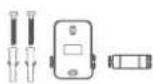
1-2 2
.73195117 31
Nozel Sikat 2-in-1
Cleaning the dust compartment
Cleaning the electric brush blades
General Issues
Website: https://www.mi.com/id
| 1 Jakarta Mi Exclusive Center - Jakarta | Ruko Imperial Blok C10, JI. Daan Mogot No. 136, RT.3/RW.5, Kalideres, Kota Jakarta Barat, DKI Jakarta 11850/087874559850 | ||
| 2 Jakarta Mi Exclusive Center - Jakarta | ITC Cempaka Mas Lt. 6 Pusat Komputer Blok H07-14, JI. Letjend Suprapto, Jakarta Pusat/087811120698 | ||
| 3 Serang Mi Exclusive Center - Serang | Jl. Jendral Ahmad Yani No. 134, Sumurpecung, Serang, Banten 42117/081311785865 | ||
| 4 Banda Aceh | Mi Exclusive Center - Banda Aceh | Jl. T. Panglima Polem No. 93, Peunayong, Kec. Kuta Alam, Kota Banda Aceh, Aceh 24415, Indonesia/082316025258 | |
| 5 | Tanjung Pinang | Mi Exclusive Center - Tanjung Pinang | Ruko Bintan Center No. 8, JI. D.I Panjaitan KM. 9, Air Raja, East Tanjungpinang, Tanjung Pinang City, Riau Islands 29125/083809906454 |
| 6 Padang Mi Exclusive Center - Padang | Jl. Veteran No. 24B, Purus, Kec. Padang Bar., Kota Padang, Sumatera Barat (Seberang SDN 64 Purus Kota Padang)/081365054699 | ||
| 7 Jambi Mi Exclusive Center - Jambi | Jl. Jend. Sudirman No. 11, Tambak Sari, Kec. Jambi Sel., Kota Jambi, Jambi 36122/082182183120 | ||
| 8 Bengkulu | Mi Exclusive Center - Bengkulu | Jl. Letjen Suprapto No. 53, RT: 05/RW: 02, Anggut Dalam, Kec. Ratu Samban, Kota Bengkulu, Bengkulu 38222/081373051363 | |
| 9 | Bandar Lampung | Mi Exclusive Center - Bandar Lampung | Jl. Kartini No. 60, Palapa, Tanjung Karang Pusat, Kota Bandar Lampung, Lampung 35116/081927657991 |
| 10 | Pangkal Pinang | Mi Exclusive Center - Pangkal Pinang | Jl. Soekarno Hatta No.24, Bukitintan,irimaya, Pangkal Pinang/081919489698 |
| 11 | Pontianak | Mi Exclusive Center - Pontianak | Jl. Sultan Abdurrahman No. 38B, Pontianak Selatan, Pontianak, Kalimantan Barat 78113/085943129411 |
| 12 | Palangkaraya | Mi Exclusive Center - Palangkaraya | Jl. Tjilik Riwut KM 1 No. 5, Palangka, Kec. Jekan Raya, Kota Palangka Raya, Kalimantan Tengah 74874/081779579717 |
| 13 | Balikpapan | Mi Exclusive Center - Balikpapan | Jl. Jenderal Sudirman, Ruko Bandar No. 09, Klandasan Ilir, Balikpapan Kota, Balikpapan City, East Kalimantan/082149092541 |
| 14 | Tarakan Mi Exclusive Center - Tarakan | Jl. Yos Sudarso No. 05, Solumit Pantai, Tarakan Tengah, Kota Tarakan, Kalimantan Utara/087846089152 | |
| 15 | Mataram | Mi Exclusive Center - Mataram | Ruko Blok H, Jl. Sriwijaya No. 177, Pagesangan Timur, Mataram, NTB 83115/087855649752 |
| 16 | Manokwari | Mi Exclusive Center - Manokwari | Jl. Trikora Wosi No. 136, Wosi, Manokwari Barat, Manokwari, Papua Barat 98312/082239233145 |
| 17 | Surabaya | Mi Exclusive Center - Surabaya | WTC e-mall lantai 4 - Galeria nomor 4028, Jalan Pemuda Nomor 27-31, Surabaya /087808785078 |
| 18 | Bandung | Mi Exclusive Center - Bandung | Istana Bandung Electronic Center unit L3 A-07, Jl.Purnawarman 13-15, Bandung 40117 /087722633666 |
| 19 Medan | Mi Exclusive Center - Medan | Plaza Medan Fair lantai IV island #1, JI.Jend. Gatot subroto no.30, Medan 20113 /082276059692 |
| 20 Tasikmalaya | Mi Exclusive Center - Tasikmalaya | Jl. Hz. Mustofa no. 376 Kel. Tugujaya, Kec. Cihideung. Tasikmalaya /085324108525 |
| 21 Banjarmasin | Mi Exclusive Center - Banjarmasin | Jl. Ahmad Yani KM.2 No 69, Sungai Baru, Banjarmasin Tengah, Kota Banjarmasin, Kalimantan Selatan 70122 /085349962036 |
| 22 Depok | Mi Exclusive Center - Depok | Depok Town Square Blok GE 2 No.3 Jl. Margonda Raya No.1 Depok 16424/081287801500 |
| 23 Malang | Mi Exclusive Center - Malang | Ruko Grand Soekarno Hatta Kavling 4 Jl. Soekarno Hatta, Mojolangu, Kec. Lowokwaru, Kota Malang, Jawa Timur 65142/0341-4373002 |
| 24 Semarang | Mi Exclusive Center - Semarang | Jl. Dr. Cipto No. 169B, Karangturi, Semarang 50124/024-76440074 |
| 25 Serpong | Mi Exclusive Center - Serpong | Ruko Sinpasa Blok SG2 No. 9, Gading Serpong, Tangerang 15810/081356276525 |
| 26 Fatmawati | Mi Exclusive Center - Fatmawati | Ruko ITC Fatmawati No.21 Cipete, Kebayoran Baru, Jakarta Selatan 12150/021-7399200 |
| 27 Surabaya | Mi Exclusive Center - Surabaya | Plaza Marina Lt.3 Kav. M1, Jl. Margorejo Indah 97-99, Surabaya 60238/031-8470323 |
| 28 Jakarta | Mi Exclusive Center - Jakarta | Ruko ITC Roxy Mas Blok B2 No.6 Jl. KH Hasyim Ashari - Jakarta Pusat,10150 / 021-22635377 |
| 29 Yogyakarta | Mi Exclusive Center - Yogyakarta | Ruko Gondomanan Square, Kav. 5, JI.Bridjen Katamso No. 37, Yogyakarta 55121/0274-2871837 |
| 30 Bekasi Mi Exclusive Center - Bekasi | Mega Bekasi Hypermall Lt.II Blok G2 No.10, JI. Jend. Ahmad Yani No. 1, Bekasi 17144/021-89451132 | |
| 31 Bogor Mi Exclusive Center - Bogor | Jl. Raya Pajajaran No.17B, Samping Panasonic Center, Warung Jambu, Bogor 16161/0251-8576499 | |
| 32 Kediri Mi Exclusive Center - Kediri | Jl. Pemuda No. 11C, Ngadirejo Kediri 64122/0354-2892552 | |
| 33 Batam Mi Exclusive Center - Batam | Komplek Lucky Plaza Batam Lt.2 No.12A, Nagoya, Batam 29444/0778-4882573 | |
| 34 Palembang | Mi Exclusive Center - Palembang | Internasional Plaza Lt.1 No. 2 (Samping Bakmi Naga), Palembang 30121/0711-360378 |
| 35 Pekanbaru | Mi Exclusive Center - Pekanbaru | Jl. Dr.Setia Budhi No. 84, Rintis, Pekanbaru-Riau 28141/0761-8405996 |
| 36 Cirebon Mi Exclusive Center - Cirebon | Komplek Ruko CSB, Blok Green Ville No. 23 JI. Cipto Mangunkusumo, Cirebon 45131/0231-8806703 | |
| 37 Solo Mi Exclusive Center - Solo | Komplek The Park, Blok C No. 16 JI. Ir. Soekarno, Sukoharjo-Solo Baru 57552/0271-5772234 | |
| 38 Makassar | Mi Exclusive Center - Makassar | Ruko Bulusaraung Square No. A8, JI. Bulusaraung, Makassar 90157/0411-3638826 |
| 39 | Bali Mi Exclusive | Center - Bali | Jl. Teuku Umar No. 74XX/121, Denpasar Barat, Bali 80114 /0895-4137-39385 |
| 40 | Maluku Mi Exclusive Center - Sirimau | JL.Cengkeh No 6 Kecamatan Sirimau Kelurahan Honipopu/082399108882 | |
| 41 | Gorontalo Mi Exclusive Center - Kabila | Jln H Nani Wartabone Kota Gorontalo/0822 9667 0203 | |
| 42 | Sulawesi Tengara | Mi Exclusive Center - Kendari | JL.Sorumba,Komplek Ruko Sentra GMT, No.2D/0812402572444 |
| 43 | Nusa Tengara Timur | Mi Exclusive Center - Oebobo Jlcakdoko no.34/081339591169 | |
| 44 | Sulawesi Barat | Mi Exclusive Center - Mamuju | JL. Diponegoro A7, Mamuju/082291970542 |
| 45 | Papua Mi Exclusive Center - Jayapura | Jl. Abepura, Wahno, Abepura, Kota Jayapura, Papua, 99224/0811-2541-606 | |
| 46 | Sulawesi Utara | Mi Exclusive Center - Manado | Ruko Mega Mas Blok A1 No. 20, Jl. Pierre Tendean, Kota Manado, Sulawesi Utara 0813-5595-1686 |
| 47 | Sulawesi Tengah | Mi Exclusive Center - Palu | Jl. Kimaja, Kel. Besusu barat, Kec, Palu timur, palu Sulawesi Tengah/0822-1058-1804 |
| 48 | Maluku Utara | Mi Exclusive Center - Ternate | Jl. Hasan Esa, Takoma, Ternate Tengah, Kota Ternate, Maluku Utara/ 0896-8132-7540 |
| Pusat Layanan Multibrand | |||
| 1 Medan TAM Multibrand - Medan | Plaza Medan Fair Lt. 4 No. 278-279HPC Tahap IV, JI. Gatot SubrotoNo.30, Medan - Sumatera Utara20113 / (62-61) 80512213 | ||
| Xiaomi Vacuum Cleaner G20 Lite | |||
| Nama | Cordless Vacuum Cleaner | Model | C203 |
| Tegangan Pengenal | 22.2 V --- | Daya Terukur | 215 W |
| Tegangan Pengisian Daya | 27.0 V --- | ||
| Konsumsi Daya | Mode mati: ≤0,5 W | Waktu untuk Memasuki Kondisi | Mode mati: ≤20 mnt |
| Power Supply | |||
| Produsen | Zhongshan Baolijin Electronic Co., Ltd. | ||
| Model | BLJ15WJ270050P-V | ||
| Masukan Nominal | 100–240 V ~ 50/60 Hz 0.5 A | ||
| Keluaran Nominal | 27.0 V --- 0.5 A 13.5 W | ||
Model: C203
K3L Goods Registration Number: 23-L-002344
MKG: IMKG.2668.12.2023
Address: 101, 1st floor, Building 1, No.16, Anningzhuang East Road, Haidian District, 100089 Beijing,
PEOPLE'S REPUBLIC OF CHINA
Charging
Common problems
Care and Maintenance
WARNING:
Common problems
https://www.mi.com/global/support/warranty.
Beijing Shunzao Technology Co., Ltd. Publisher: http://www.mi.com/global/service/support/declaration.html

Power source
Suction nozzle
2-in-1 brush nozzle

Cleaning the filter assembly
Warnings:
2-in-1 brush nozzle
Care and maintenance
WARNING:
Common problems
Common problem
- IMPLIED WARRANTIES
Common problem
Manufactured for: Xiaomi Communications Co., Ltd. Manufactured by: Beijing Shunzao Technology Co., Ltd. (a Mi Ecosystem company)
Address: 101, 1st floor, Building 1, No.16, Anningzhuang East Road, Haidian District, 100089 Beijing, PEOPLE'S REPUBLIC OF CHINA For further information, please go to www.ml.com User Manual Version: V3.0
101, 1st floor, Building1, No.16, Anningzhuang East Road, Haidian District, 100089 Beijing, PEOPLE'S REPUBLIC OF CHINA www.mi.com User Manual Version: V3.0
UK REP. Xiaomi Technology UK Limited Davidson House, Forbury Square, Reading, Berkshire RG1 3EU contact@support.mi.com

E-manual QR Code
BHR8195EU-IB


- THIS PRODUCT IS FOR HOUSEHOLD USE ONLY. READ THIS MANUAL CAREFULLY BEFORE USE, AND RETAIN IT FOR FUTURE REFERENCE
- REGULATORY COMPLIANCE INFORMATION
- PRODUCT OVERVIEW
- HOW TO INSTALL
- CHARGING
- BATTERY LEVEL INDICATOR STATUS DESCRIPTION
- HOW TO USE
- CARE & MAINTENANCE
- CAUTIONS
- CLEANING THE VACUUM CLEANER
- CLEANING THE DUST COMPARTMENT
- CLEANING THE FILTER ASSEMBLY
- CLEANING THE ELECTRIC BRUSH BAR
- TROUBLESHOOTING
- STEPS TO REMOVE THE BATTERY
- WARRANTY NOTICE
- LIMITED PRODUCT WARRANTY
- REMEDIES
- HOW TO OBTAIN WARRANTY SERVICE
- EXCLUSIONS AND LIMITATIONS
- IMPLIED WARRANTIES
- DAMAGE LIMITATION
- XIAOMI CONTACTS
- CARE AND MAINTENANCE
- NOTICES
- COMMON PROBLEM
- PRECAUTIONS
- CLEANING THE DUST COLLECTOR
- CLEANING THE TURBO BRUSH
- IN-1 BRUSH NOZZLE
- MAINTENANCE
- WARNINGS
- CLEANING THE ELECTRIC BRUSH BLADES
- WARNING
Brand : Xiaomi
Model : G20 Lite
Category : Vacuum Cleaner