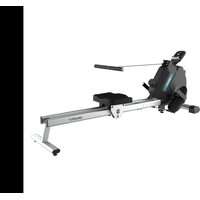
Drumfit Rower 5500 Regatta - Rowing Machine CECOTEC - Free user manual and instructions
Find the device manual for free Drumfit Rower 5500 Regatta CECOTEC in PDF.


| Brand | Cecotec |
| Model | Drumfit Rower 5500 Regatta |
| Product type | Magnetic resistance rower |
| Dimensions (L × W × H) | 1600 × 540 × 640 mm |
| Weight | 23.5 kg |
| Maximum user weight | 120 kg |
| Use | Domestic use only |
| Resistance | Magnetic, 16 adjustable levels |
| Display | LCD monitor with modes SCAN, TMR, SPM, DST, CAL, STROKES, Total STROKES |
| Power supply | 2 AAA batteries (not included) |
| Main components | Main frame, sliding rail, saddle, footrests, front/rear stabilizers, handlebar |
| Assembly | Requires assembly by user (tools included) |
| Adjustments | Resistance via knob (+/-); time, distance, calories, strokes configurable |
| Maintenance | Clean with damp cloth; check screws every week |
| Storage | Away from sunlight, dry place; transport on front stabilizer wheels |
| Safety | Free space >0.6 m; use by adults; stop if pain |
| Warranty | Contact Cecotec customer service at +34 9 63 21 07 28 |
Frequently Asked Questions - Drumfit Rower 5500 Regatta CECOTEC
User questions about Drumfit Rower 5500 Regatta CECOTEC
0 question about this device. Answer the ones you know or ask your own.
Ask a new question about this device
Download the instructions for your Rowing Machine in PDF format for free! Find your manual Drumfit Rower 5500 Regatta - CECOTEC and take your electronic device back in hand. On this page are published all the documents necessary for the use of your device. Drumfit Rower 5500 Regatta by CECOTEC.
USER MANUAL Drumfit Rower 5500 Regatta CECOTEC
natural_image
DrumFit stationary exercise machine with visible branding and lever mechanism (no text or symbols on the device itself)DRUMFIT
Safety instructions 6
- Parts and components 37
- Before use 38
- Appliance assembly 38
- Operation 39
- Information on exercising 41
- Cleaning and maintenance 41
- Technical specifications 42
- Disposal of old electrical and electronic appliances 42
- Technical support and warranty 43
- Copyright 43
SOMMAIRE
natural_image
Technical line drawing of a robotic vehicle with articulated arms and wheels, shown from two different angles (no text or symbols present)Please, keep this instruction manual in a safe place for future reference or new users.
- Read these instructions carefully before assembling or using your rowing machine. These instructions contain important information that will help you get the best out of your equipment.
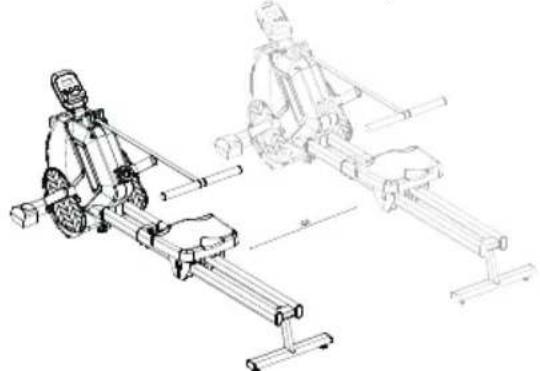
- The free space shall not be less than 0,6 m larger than the training area in the directions from which the equipment is accessed. The free space shall also include the area for emergency dismounting. For equipment located next to each other, the value of the free space may be shared.
natural_image
Technical line drawing of a robotic device with two views: top shows a horizontal arm, bottom shows a vertical rail system (no text or symbols)- This machine can be used by children aged 14 years and above and persons with reduced physical, sensory, or mental capabilities or lack of experience and knowledge if they have been given supervision or instruction concerning the use of the machine in a safe way and understand the hazards involved. Children must not play with the machine. Cleaning and user maintenance should not be carried out by unsupervised children.
- Warning: Incorrect or excessive training can lead to health injuries.
- Warning: If any of the adjustment devices are protruding, they may interfere with the user's movement.
- Warning: The equipment must be installed on a stable and level surface..
- This appliance is designed for domestic use only and is not intended for bars, restaurants, farmhouses, hotels, motels, and offices.
- Safe and efficient use can be only achieved if the machine is properly assembled, maintained, and used.
- It is your responsibility to make sure every user is informed
about the warnings and precautions stated in this instruction manual.
- Before starting a training session, it is recommended that you consult your doctor if you have any adverse health or physical condition that may pose a risk to your safety or make it difficult to use the machine properly. Your doctor's advice is essential if you are taking medication that affects your heart rate, blood pressure, or cholesterol level.
- Be aware of your body signals. Incorrect or excessive exercise can deteriorate your health. Stop exercising if you experience any of the following symptoms: pain, tightness in your chest, irregular heartbeat, extreme shortness of breath, dizziness, or nausea. If you experience any of these conditions, you should consult your doctor before continuing with your training.
- Warning: The safety level of the equipment can only be maintained if it is regularly checked for damage and wear.
- Warning: Replace faulty components immediately and/or keep the equipment out of use until repaired.
- Pay special attention to the components that are most susceptible to mechanical wear.
- Keep children and animals away from the assembling area, as small parts could cause risk of suffocation if swallowed.
- Keep children and pets away from the machine. Do not allow children to use and/or play with the machine. It is designed for adults only.
- Use the machine on a solid, flat, stable surface with a protective floor covering or carpet.
- Make sure the screws and nuts are securely tightened before using the machine.
- Use the machine as indicated in this instruction manual. If you find any defective parts when assembling or testing
the machine, or if it emits an unusual noise during use, stop using it. Do not use the machine until the problem has been solved.
- Wear suitable clothing when using the machibe. Avoid wearing baggy clothing, as it may get stuck or hinder the movement of the equipment.
- If repairs are required, please consult your supplier for further information or contact Cecotec Customer Service.
- The bike is not suitable for therapeutic use.
- Be careful when moving or lifting the machine to avoid injuring your back.
INSTRUCTIONS DE SÉCURITÉ
natural_image
Technical line drawing of a robotic arm and its internal components (no text or symbols)natural_image
Technical line drawing of a robotic vehicle with two views: top shows a motor, bottom shows a stationary platform (no text or symbols)natural_image
Technical line drawing of a robotic platform with two views (top and side), no text or symbols presentnatural_image
Technical line drawing of a mechanical device with two views (top and side), no text or symbols present.natural_image
Technical line drawing of a robotic mobility device with two views (top and side), no text or symbols present.natural_image
Technical line drawing of a robotic mobility device with two views (no text or symbols)natural_image
Technical line drawing of a robotic rover with articulated arms and a separate view showing the same mechanical assembly (no text or symbols present)- LCD monitor
- Main frame
- Resistance device
- Front foot stabiliser
- Pedals
- Seat cushion
- Slideway
- Rear foot stabiliser
- Non-slip foot pad
- Handlebar
Assembly kit. Fig. 2
S1. M12*160mm hex screws (x2)
S2. M8*50mm hex screws (x2)
S3. M8*16mm hex screws (x8)
S4. M6*25mm hex screws (x2)
S5. ∅8 Curve washer (x4)
S6. ∅8 Flat washer (x6)
S7. ∅8 Spring washer (x10)
S8. ∅6 Flat washer (x2)
S9. ∅6 Spring washer (x2)
S10. 5 mm Allen wrench (x1)
S11. Spanner (x1)
Fig. 3
A. LCD monitor
B. Main frame
C. Pedals
D. Seat cushion
E. Rear foot stabiliser
F. Front foot stabiliser
G. Pedal crossbar
H. Seat cushion stabiliser
I. Rower slideway
Please note
The graphics in this manual are schematic representations and may not exactly match the appliance.
ENGLISH
2. BEFORE USE
- This appliance is packaged in a way as to protect it during transport. Take the device out of its box and remove all packaging materials. You can keep the original box and other packaging elements in a safe place. This will help you prevent damage to the device when transporting it in the future. In case the original packaging is disposed of, make sure all packaging materials are recycled accordingly.
- Make sure all parts and components are included and in good conditions. If there is any piece missing or in bad conditions, contact the Official Cecotec Technical Support Service immediately.
3. APPLIANCE ASSEMBLY
Front foot stabiliser installation. Fig. 4
-
Align the main frame screw holes (B) with the front foot stabiliser screw holes (F). Install the hex screws (S2), flat washers (S6) and spring washers (S7) and tighten the assembly using the 5 mm Allen wrench (S10) provided.
-
Attach the pedal crossbar (G) to the main frame (B) and tighten the pre-installed screws and nuts.
Pedal installation.Fig. 5
Attach the pedals (C) to the main frame (B) and tighten the hex screw (S1) using the spanner (S11) provided.
Note
distinguish pedals between left (L) and right (R). Do not install them in the wrong position.
Seat cushion stabiliser installation. Fig. 6
-
Align the screw holes of the slideway (I) with those of the rear foot stabiliser (E). Install the hex screws (S4), flat washers (S8) and spring washers (S9) and tighten the assembly using the 5 mm Allen key (S10) provided.
-
Install the seat cushion stabiliser (H) onto the slideway (I) in the right direction.
Seat cushion and slideway installation. Fig. 7
-
Attach the slideway (I) to the main frame (B) in the right direction and tighten the assembly with the hex screws (S3) and flat washers (S6) provided.
-
Attach the seat cushion (D) to the seat cushion stabiliser (H) and tighten with the hex screws (S3), flat washers (S6) and spring washers (S7) provided.
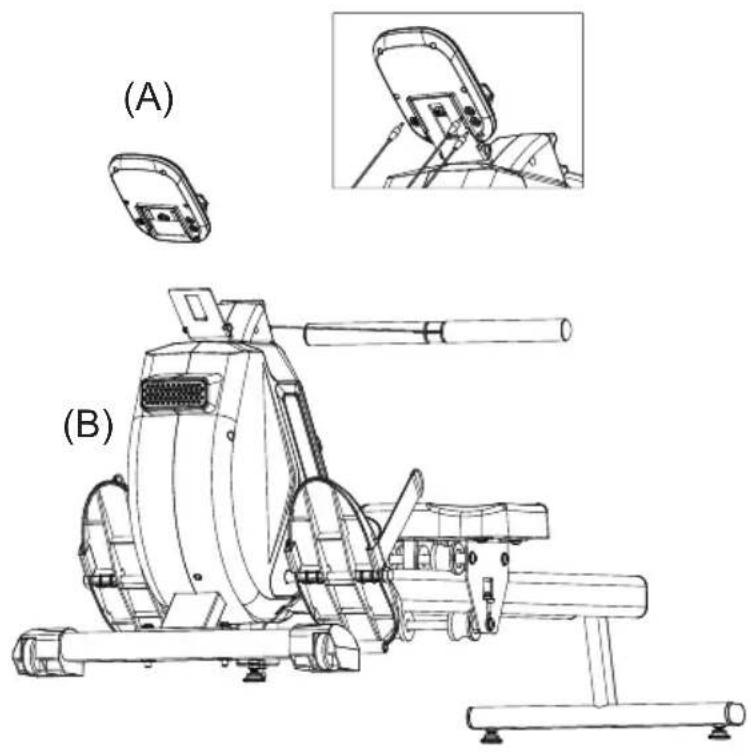
LCD monitor installation.Fig. 8
-
Insert two AAA batteries into the LCD monitor.
-
Install the monitor (A) onto the main frame (B).
- Connect the connection cable of the rowing machine to the corresponding sockets of the LCD monitor.
4. OPERATION
Fig. 9
-
Reset key
-
Mode key
-
Set key
After powering on the LCD monitor, the full screen display lasts for 1 second, and the screen enters the default SCAN mode.
SCAN Mode
- In SCAN mode, the monitor displays the following cycles: SCAN+TMR, SCAN+SPM, SCAN+DST, SCAN+CAL, SCAN+STROKES, SCAN+Total STROKES. The display will automatically and alternately switch to the next content displayed every 5 seconds.
- The RESET and SET functions will not be available.
- Press the MODE key to exit the SCAN mode and select the desired display mode from the following functions: SCAN, TMR, SPM, DST, CAL, STROKES and Total STROKES.
- After turning on the monitor, the display enters the SCAN mode.
Indoor Rower Icon
The rowing machine icon is always displayed in the lower left corner of the screen.
STOP Icon
The monitor will display "STOP" when you stop rowing and the machine is not in use for 4 seconds, and will disappear when you start rowing again.
TMR Mode
- It displays the rowing time.
- Press the SET key to set the time values, ranging from 0:00 to 99:00. Each time you press the key, the time increases by 1 minute. Once you have finished setting the target time, press the MODE key to confirm and exit the setting mode.
- If you do not perform any operation within 30 seconds, the display will exit the setting mode and the current setting value will be maintained.
- Press and hold the SET key for 3 seconds to continuously increase the numerical values. Release the SET key and the numerical value will immediately stop increasing.
- Press the RESET key to reset the TMR values to zero. Press and hold the RESET key to reset and restart the TMR values.
ENGLISH
SPM Mode
- It displays the rowing speed or cadence (60SPM≈15KM/H).
- The RESET and SET functions will not be available.
DST Mode
- It displays the rowing distance travelled in km (1 back and forth≈0.0015KM).
- Press the SET key to set the distance values, ranging from 0:00 to 99:00. Each time you press the key, the distance increases by 0.1 km. Once you have finished setting the target distance, press the MODE key to confirm and exit the setting mode.
- If you do not perform any operation within 30 seconds, the display will exit the setting mode and the current setting value will be maintained.
- Press and hold the SET key for 3 seconds to continuously increase the numerical values. Release the SET key and the numerical value will immediately stop increasing.
- Press the RESET key to reset the DST values to zero. Press and hold the RESET key to reset and reset the DST values.
CAL Mode
- It displays the calories burned (40calories≈1KM).
- Press the SET key to set the calorie values, ranging from 0 to 9900. Each time you press the key, the value increases by 5 calories. Once you have finished setting the target calories burned, press the MODE key to confirm and exit the setting mode.
- If you do not perform any operation within 30 seconds, the display will exit the setting mode and the current setting value will be maintained.
- Press and hold the SET key for 3 seconds to continuously increase the numerical values. Release the SET key and the numerical value will immediately stop increasing.
- Press the RESET key to reset the CAL values to zero. Press and hold the RESET key to reset and reset the CAL values.
STROKES Mode
- It displays the number of rowing strokes.
- Press the SET key to set the calorie values, ranging from 0 to 9900. Each time you press the key, the value increases by 100. Once you have finished setting the target time, press the MODE key to confirm and exit the setting mode.
- If you do not perform any operation within 30 seconds, the display will exit the setting mode and the current setting value will be maintained.
- Press and hold the SET key for 3 seconds to continuously increase the numerical values. Release the SET key and the numerical value will immediately stop increasing.
- Press the RESET key to reset the STROKES values to zero. Press and hold the RESET key to reset and reset the STROKES values.
TOTAL STROKES Mode
- It displays the total number of rowing strokes. Even if you press and hold the MODE key, the values will not be reset to zero.
- They will only be cleared when the battery runs out of power. The RESET and SET functions will not be available.
Resistance adjustment Fig. 10
- To increase the resistance, turn the resistance device clockwise (+).
- To decrease the resistance, turn the resistance device counterclockwise (-).
- There are 16 different levels of magnetic resistance.
5. INFORMATION ON EXERCISING
A proper workout should consist of the following three phases:
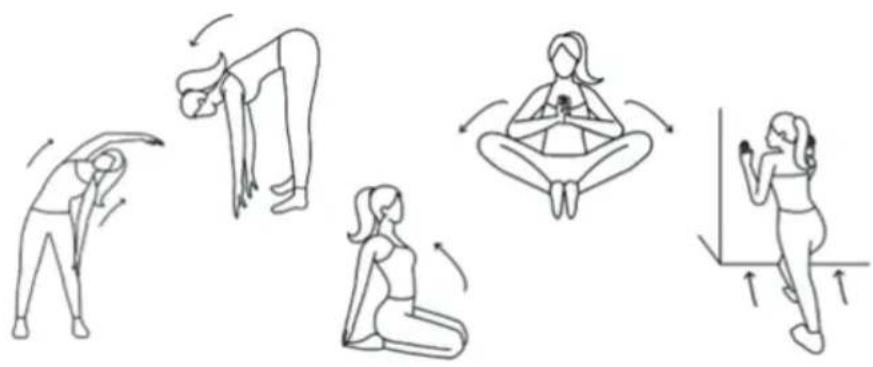
- Warm-up: consists of a session of stretching and low-intensity exercise lasting 5 to 10 minutes. A proper warm-up increases your body temperature, heart rate, and circulation in preparation for exercise. Fig. 11
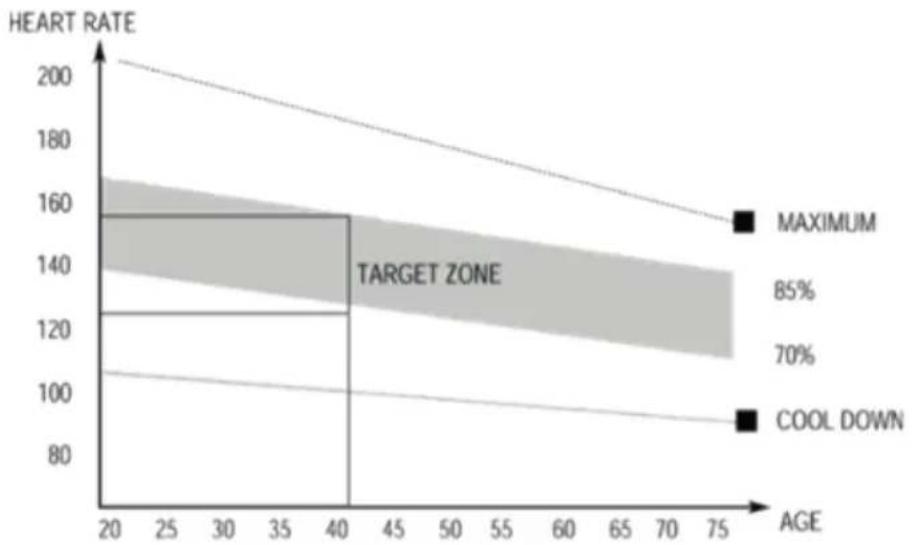
- Training: consisting of 20 to 30 minutes of exercise. (Note: during the first few weeks of exercise do not keep your heart rate high for more than 20 minutes). Fig. 12
- Cool-down: 5 to 10 minutes of stretching exercises. This will increase the flexibility of your muscles and will help prevent injuries. Fig. 11
Workout routine
- To maintain or improve your physical condition, exercise three times per week, with at least one day of rest between workouts.
- After a few months of regular exercise, you may exercise up to five times a week, if desired. Keep in mind that the key to success is making exercise a regular and enjoyable part of your everyday life.
6. CLEANING AND MAINTENANCE
- To clean the rowing machine use a soft, clean, damp cloth.
- Do not use abrasive cleaning agents or solvents to clean plastic parts.
- Wipe off any accumulated perspiration from the machine after each use.
- Be careful not to allow too much moisture to enter the monitor, as this may cause the electronic components to fail.
- Keep the rowing machine out of direct sunlight to prevent damage or deterioration.
- Make sure to tighten the screws, nuts and pedals of the rowing machine on a weekly basis.
Transporting
- Hold the rear foot stabiliser with both hands until the wheels on the front stabiliser make contact with the ground.
ENGLISH
- Pull or push the rowing machine to the desired storage place before folding it. Do not let go of the rowing machine during transportation.
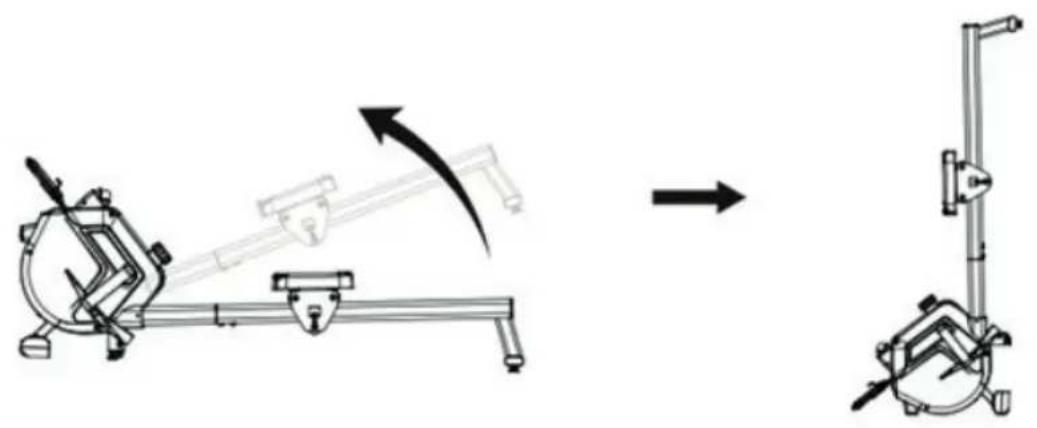
StorageFig. 13
Store the rowing machine in a clean and dry place, out of the reach of children and pets.
7. TECHNICAL SPECIFICATIONS
Product reference: 07213
Product: Drumfit Rower 5500 Regatta
Maximum user weight: 120Kg
Class: HC
1600 mm × 540 mm × 640 mm
23,5 kg
Technical specifications may change without prior notification to improve product quality.
Made in China | Designed in Spain
8. DISPOSAL OF OLD ELECTRICAL AND ELECTRONIC APPLIANCES
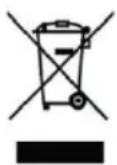
This symbol indicates that, according to the applicable regulations, the product and/or batteries must be disposed of separately from household waste. When this product reaches the end of its shelf life, you should dispose of the cells/batteries/accumulators and take them to a collection point designated by the local authorities.
Consumers must contact their local authorities or retailer for information
concerning the correct disposal of old appliances and/or their batteries.
Compliance with the above guidelines will help protecting the environment.
9. TECHNICAL SUPPORT AND WARRANTY
Cecotec shall be liable to the end user or consumer for any lack of conformity that exists at the time of delivery of the product under the terms, conditions, and deadlines established by the applicable regulations.
It is recommended that repairs be carried out by qualified personnel.
If at any moment you detect any problem with your product or have any doubt, do not hesitate to contact the official Cecotec Technical Support Service at +34 963 210 728.
10. COPYRIGHT
The intellectual property rights over the texts in this manual belong to CECOTEC INNOVACIONES, S.L. All rights reserved. The contents of this publication may not, in whole or in part, be reproduced, stored in a retrieval system, transmitted, or distributed by any means (electronic, mechanical, photocopying, recording or similar) without the prior authorization of CECOTEC INNOVACIONES, S.L.
FRANÇAIS
1. PIÈCES ET COMPOSANTS
Img. 1
Fig./Img./Abb./Afb./Rys.1

Fig./Img./Abb./Afb./Rys.2
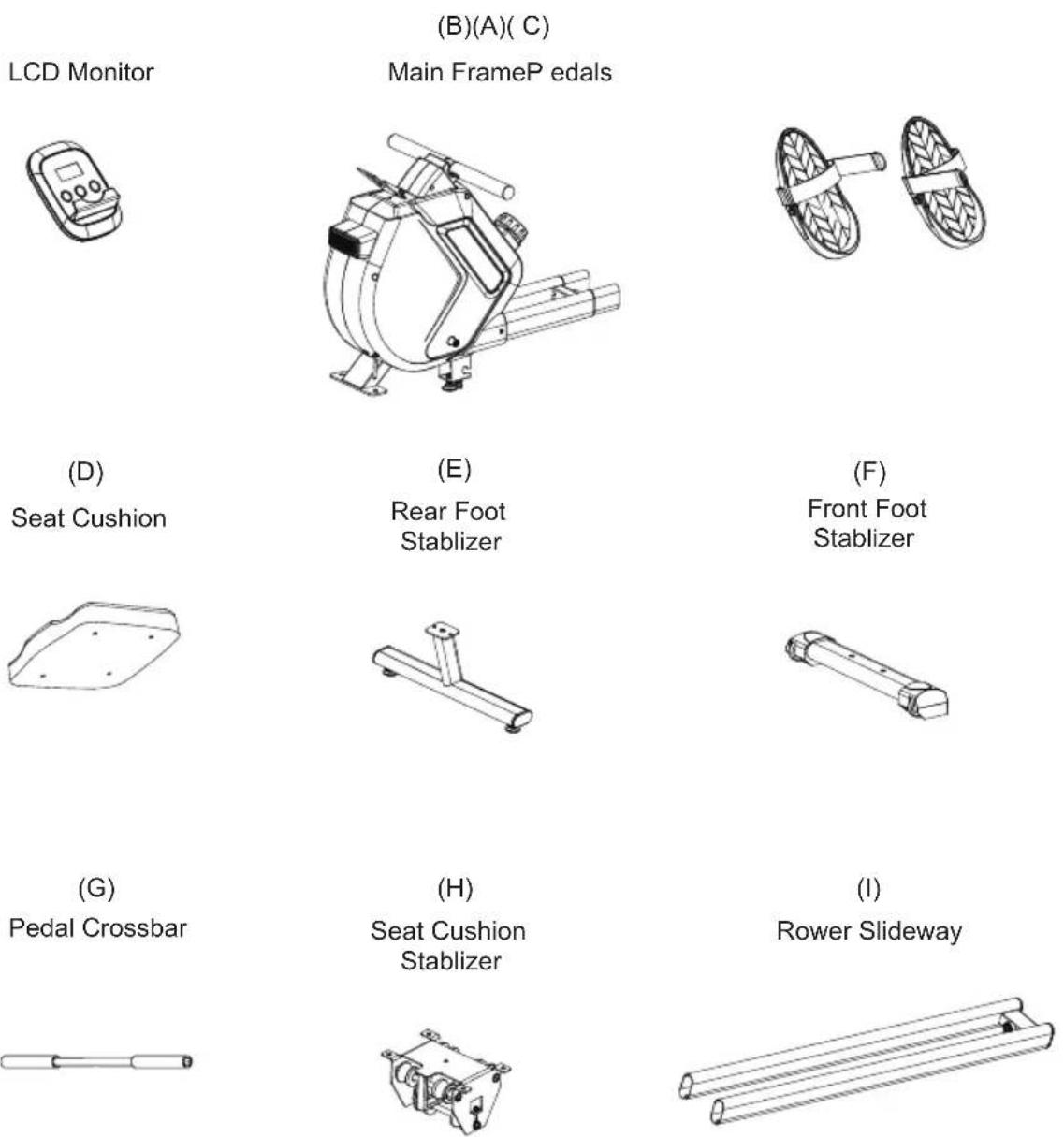
Fig./Img./Abb./Afb./Rys. 3
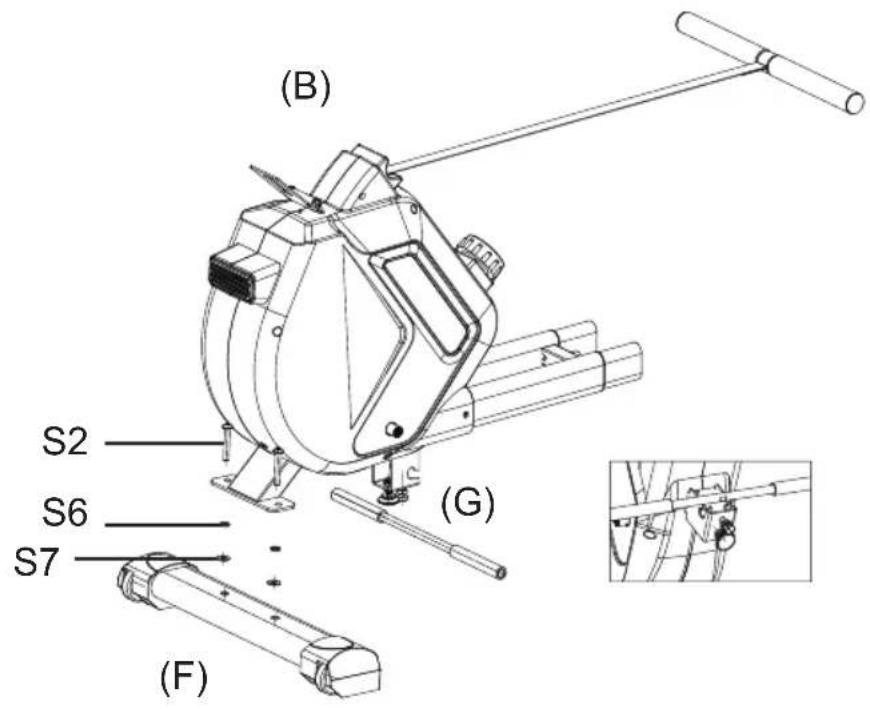
Fig./Img./Abb./Afb./Rys. 4
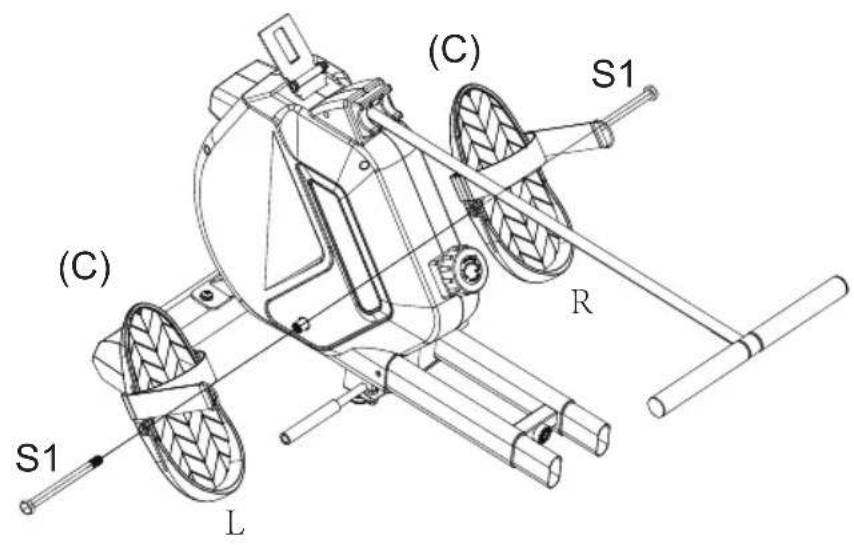
Fig./Img./Abb./Afb./Rys.5
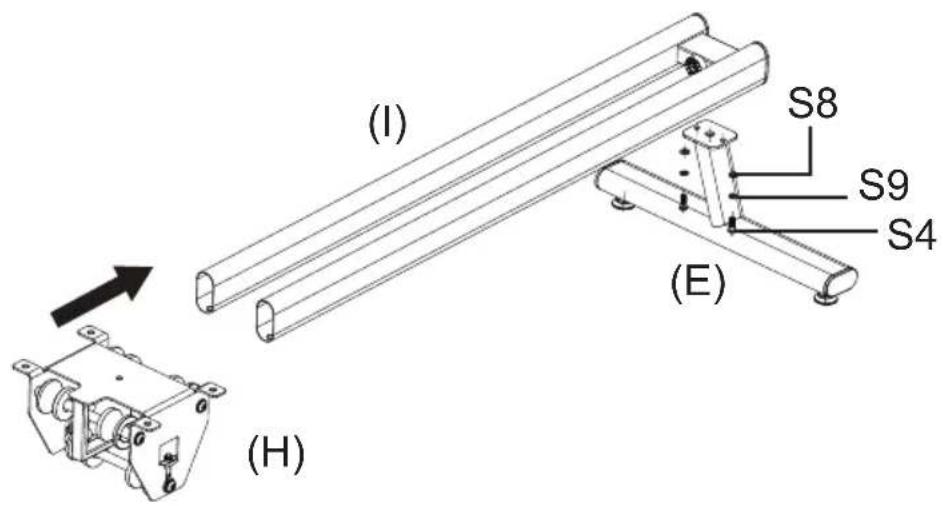
Fig./Img./Abb./Afb./Rys. 6
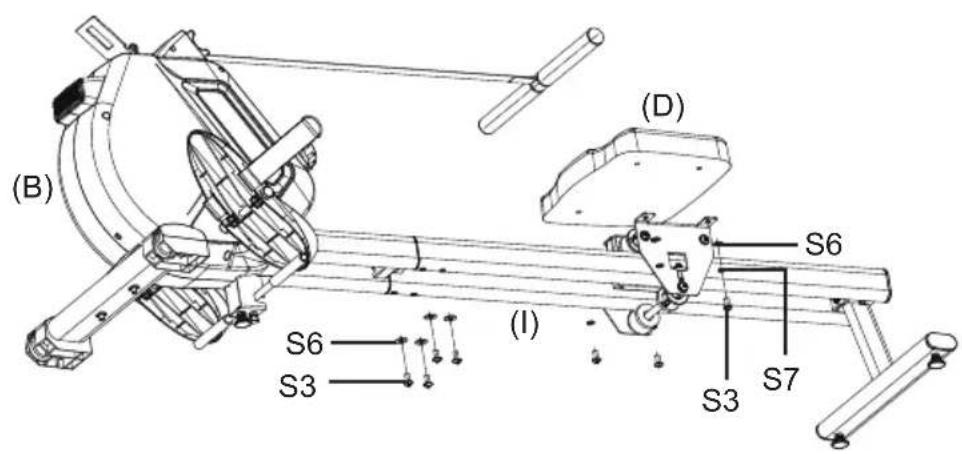
Fig./Img./Abb./Afb./Rys.7
natural_image
Technical line drawing of a mechanical device with labeled sections (A) and (B), showing internal components and assembly (no text or symbols beyond labels)Fig./Img./Abb./Afb./Rys. 8
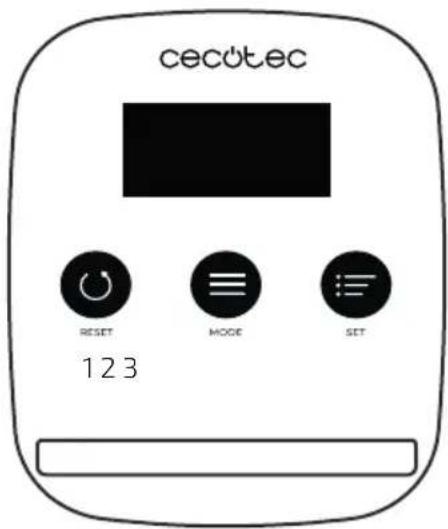
Fig./Img./Abb./Afb./Rys. 9
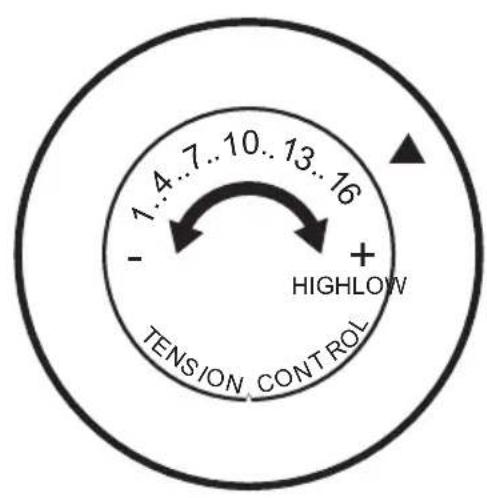
Fig./Img./Abb./Afb./Rys.10
natural_image
Illustration of five sequential yoga or stretching exercises in different poses, showing forward bend, backbend, crossbow, yoga posture, and leg extension (no text or symbols)Fig./Img./Abb./Afb./Rys.11
line
| AGE | HEART RATE | | --- | --- | | 20 | 160 | | 40 | 160 | | 75 | 160 |Fig./Img./Abb./Afb./Rys.12
natural_image
Mechanical assembly diagram showing a rotating platform with a lever mechanism, before and after assembly (no text or labels)Fig./Img./Abb./Afb./Rys.13
www.cecotec.es

- SOMMAIRE
- INSTRUCTIONS DE SÉCURITÉ
- Assembly kit. Fig. 2
- Fig. 3
- Please note
- ENGLISH
- BEFORE USE
- APPLIANCE ASSEMBLY
- Front foot stabiliser installation. Fig. 4
- Pedal installation.Fig. 5
- Note
- Seat cushion stabiliser installation. Fig. 6
- Seat cushion and slideway installation. Fig. 7
- LCD monitor installation.Fig. 8
- OPERATION
- Fig. 9
- SCAN Mode
- Indoor Rower Icon
- STOP Icon
- TMR Mode
- SPM Mode
- DST Mode
- CAL Mode
- STROKES Mode
- TOTAL STROKES Mode
- Resistance adjustment Fig. 10
- INFORMATION ON EXERCISING
- Workout routine
- CLEANING AND MAINTENANCE
- Transporting
- TECHNICAL SPECIFICATIONS
- DISPOSAL OF OLD ELECTRICAL AND ELECTRONIC APPLIANCES
- TECHNICAL SUPPORT AND WARRANTY
- COPYRIGHT
- FRANÇAIS
- PIÈCES ET COMPOSANTS
- Img. 1
Brand : CECOTEC
Model : Drumfit Rower 5500 Regatta
Category : Rowing Machine