Sonic Pearl - Toothbrush Create - Free user manual and instructions
Find the device manual for free Sonic Pearl Create in PDF.


| Product type | Sonic toothbrush |
| Brand | Create |
| Model | Sonic Pearl |
| Dimensions (approx.) | Handle : 15 cm ; Head : 2.5 cm ; Total length : 17.5 cm |
| Weight (approx.) | 100 g |
| Power supply | Rechargeable via charging base with power cable |
| Charging time | 24 hours |
| Battery life | Approximately 6 weeks (normal use) |
| Brushing modes | 5 modes : Clean, Whiten, Polish, Massage, Sensitive |
| Movement speeds | Clean : 31 000/min ; Whiten : 41 000/min ; Polish : 48 000/min ; Massage : 31 000/min ; Sensitive : 31 000/min |
| Integrated timer | 2-minute cycle with a 1-second pause every 30 seconds |
| LED indicator | Solid blue during charging ; turns off when fully charged |
| Water resistance | Waterproof handle (use in the bathroom, but not under water) |
| Handle material | Plastic, non-slip finish |
| Brush head | Replaceable (reference not specified) |
| Included accessories | Handle, charging base, power cable, brush head (1) |
| Maintenance | Rinse head and handle under running water ; do not immerse charger ; dry before recharging |
| Safety | Automatic shut-off after 2 min ; do not use in the bath ; do not drop in water |
| Recycling | Do not throw away with household waste (in accordance with the WEEE Directive) |
Frequently Asked Questions - Sonic Pearl Create
User questions about Sonic Pearl Create
0 question about this device. Answer the ones you know or ask your own.
Ask a new question about this device
Download the instructions for your Toothbrush in PDF format for free! Find your manual Sonic Pearl - Create and take your electronic device back in hand. On this page are published all the documents necessary for the use of your device. Sonic Pearl by Create.
USER MANUAL Sonic Pearl Create
natural_image
Line drawing of a standard electric toothbrush with a power button and screw base (no text or symbols)Sonic Pearl
User manual | Manual de instrucciones
CREATE CREATE TE CREATE CRE CREATE CREATE TE CREATE CRE CREATE CREATE TE CREATE CRE CREATE CREATE TE CREATE CRE CREATE CREATE TE CREATE CRE CREATE CREATE TE CREATE CRE CREATE CREATE TE CREATE CRE CREATE CREATE TE CREATE CRE CREATE CREATE TE CREATE CRE CREATE CREATE TE CREATE CRE CREATE CREATE TE CREATE CRE CREATE CREATE TE CREATE CRE CREATE CREATE TE CREATE CRE
CREATE CREATI
ATE CREATE CR
CREATE CREATI
ATE CREATE CR
CREATE CREATI
ATE CREATE CR
CREATE CREATI
ATE CREATE CR
CREATE CREATI
ATE CREATE CR
CREATE CREATI
ATE CREATE CR
CREATE CREATI
ATE CREATE CR
CREATE CREATI
ATE CREATE CR
CREATE CREATI
ATE CREATE CR
CREATE CREATI
ATE CREATE CR
CREATE CREATI
ATE CREATE CR
CREATE CREATI
ATE CREATE CR
CREATE CREATI
ATE CREATE CR
CREATE CREATI
ATE CREATE CR
CREATE CREATI
ATE CREATE CR
CREATE CREATI
ATE CREATE CR
INDEX
ENGLISH
Parts list 6
Security information 7
Connection and charging 9
Brushing technique 9
Brushing modes 9
How to switch between brushing modes 10
Cleaning recommendations 11
Head change 11
ESPAÑOL
Thank you for choosing our sonic toothbrush. Before using the appliance, and to ensure the best use, carefully read these instructions. The safety precautions enclosed herein reduce the risk of death, injury and electrical shock when correctly adhered to. Keep the manual in a safe place for future reference, along with the completed warranty card, purchase receipt and package. If applicable, pass these instructions on to the next owner of the appliance.
Always follow basic safety precautions and accident prevention measures when using an electrical appliance. We assume no liability for customer failing to comply with these requirements.
PARTS LIST
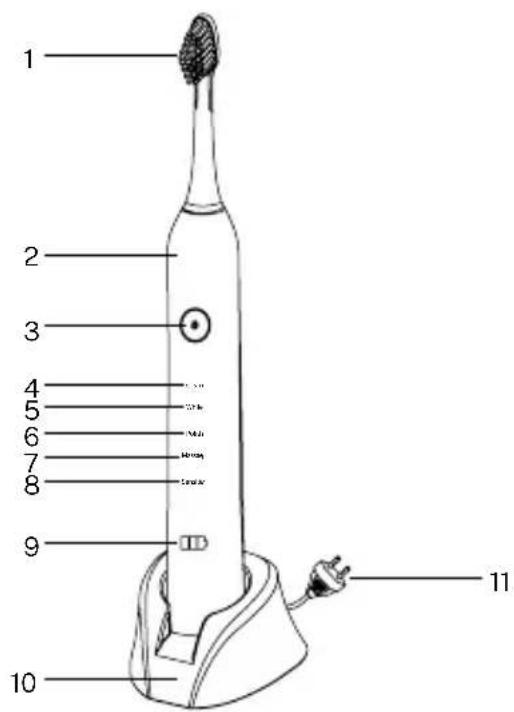
- Head
- Massage mode
- Mango 8. Sensitive teeth mode
- Power button and change 9. Power and battery light
modes 10. Charging dock - Cleaning mode 11. Power cord
- Whitening mode
- Polishing mode
When using any electrical appliance, basic safety precautions should always be observed.
- Toothbrushes can be used by children and persons with reduced physical, sensory or mental capabilities or lack of experience and knowledge if they have been given supervision or instruction concerning use of the appliance in a safe way and understand the hazards involved.
- Cleaning and user maintenance shall not be made by children without supervision.
- The appliance is only to be used with the power supply unit provided with the appliance.
- The power cord cannot be replaced. If the cord is damaged the appliance should be scrapped.
• Children shall not play with the appliance. - The power cord cannot be replaced. If the cord is damaged the appliance should be scrapped.
- The appliance is only to be used with the power supply unit provided with the appliance.
• Always unplug this product immediately after using. - Do not use while bathing. Do not place or store product where it could fall or be pulled onto a tub or sink.
- Do not place in or drop into water or other liquid. Do not reach for a product that has fallen into water, unplug immediately.
- Do not leave the appliance plugged after use. Unplug from outlet when not in use and before servicing.
WARNING: Use the toothbrush only as described in this manual. Use only accessories recommended by the manufacturer.
- Do not use with damaged cord or plug. If Appliance is not working as it should, has been dropped, damaged,
left outdoors or dropped into water, return it to a service center.
- Do not pull or carry by cord, use cord as a handle, close a door on cord, or pull cord around sharp edges or corners.
- Do not run Appliance over cord. Keep cord away from heated surfaces.
- Do not unplug by pulling on cord. To unplug, grasp the plug, not the cord.
- Do not handle plug or Appliance with wet hands.
- Turn off all controls before unplugging.
- Never block the air openings of the product or place it on a soft surface, such as a bed or couch, where the air openings may be blocked. Keep the air openings free of lint, hair and the like.
- Never use while sleeping or drowsy.
- Do not use outdoors or operate where aerosol (spray) products are being used or where oxygen is being administered.
- Connect this product to a properly grounded outlet only.
- This product has no user serviceable parts.
- Store the charging unit onto a dry and safe place when it is not in use.
- Untwist the power cord before use.
- In case the product fails to function, you should not dismantle, exchange or manipulate any part of it, otherwise there is risk of an electric shock. You should take it to the seller.
- If the supply cord is damaged, it must be replaced by the manufacturer in order to avoid a hazard.
- If the product is dropped, the brush head should be replaced before the next use even if no damage is visible.
- Remove the plug from the power outlet to save energy, or leave it and keep the brush in the charging base, there is no risk of overcharging the battery.
- This toothbrush has a waterproof handle. It is electrically safe and designed to be used in the bathroom.
- But it should not be used while underwater.
- A full charge takes at least 24 hours and allows approximately 6 working weeks.
- The constant blue LED light indicates that it is charging. Once fully recharged, the light automatically turns off.
BRUSHING TECHNIQUE
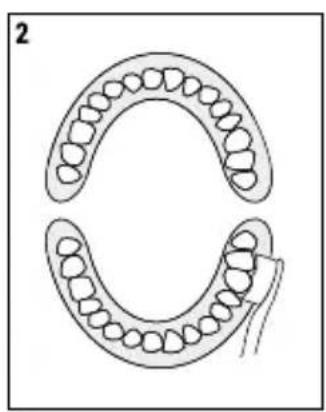
- Brush your teeth one by one guiding the brush head.
- Hold the brush head in each quadrant for 30 seconds before moving to the next quadrant. The toothbrush will pause for one second to warn the user to change zones and then continue to run.
- Brush the gums too. Start with the outer part of the tooth, then the inner part and, finally, the chewing areas.
- Do not scrub or press the brush hard, just let the brush do its job.
Important: After 2 minutes of brushing, the too-
BRUSHING MODES
This toothbrush offers different brushing modes for various oral care needs:
- Cleaning: Up to 31,000 movements per minute offers exceptional oral cleaning.
- Whitening: Up to 41,000 movements per minute eliminates microscopic plaque and bacteria left by other toothbrushes.
- Polishing: Up to 48,000 movements per minute, twice as much plate is eliminated at a higher speed.
- Massage: Up to 31,000 movements per minute, from strongest to weakest and vice versa, the gums are stimulated gently.
- Sensitive: With 31,000 smooth movements per minute, it offers a gentle cleaning of the most sensitive areas.
HOW TO SWITCH BETWEEN BRUSHING MODES
- Press the power and mode selection button. Keep the button pressed and the operating sequence will turn on every time you press the button, first the cleaning mode, then the whitening mode, then the polishing mode, the massage mode, the sensitive mode and finally it will turn off.
- The device will turn off when you press any of the modes for more than 5 seconds. The toothbrush turns on with cleaning mode by default the first time you press the button.
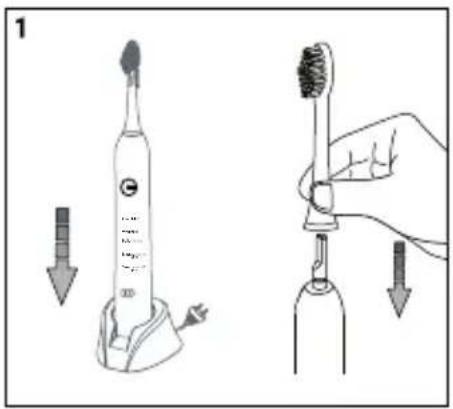
- Place a brush head on the handle. You can use any type of toothpaste. To avoid splashing, place the brush head on your teeth before turning it on.
- Place the bristles of the brush on the surface of your teeth with a little angle towards the gums.
- Press the button to turn on the toothbrush.
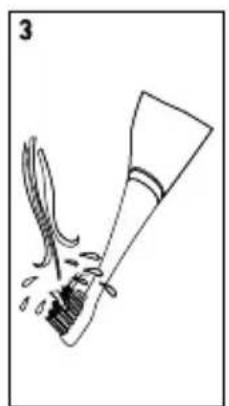
• After brushing, remove the toothbrush head and wash both the head and the handle with running water and dry them.
natural_image
Diagram of two dental arches with teeth and jawbone structures (no text or labels)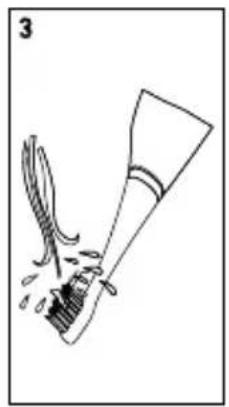
natural_image
Simple line drawing of a brush and ink stroke, no text or symbols present• After brushing, clean the brush head carefully under running water.
- This product contains a rechargeable battery to protect the environment.
Important: Do not clean the charging base by immersing it in water or under running water. Remove the head from the handle and clean both parts separately under running water. Dry them after connecting the toothbrush to the charging base.
- Before cleaning the charging base, be sure to unplug the adapter. Use only a dry or damp cloth to clean the surface of the charging unit.
- Place the charging base in a dry and safe place.
- Do not plug in the charging base until it is completely dry.
HEAD CHANGE
With use, the head bristles lose their effectiveness as they wear, reducing the cleaning ability of the brush.
It is recommended to change your toothbrush head every three months or when you see the bristles start to wear down.
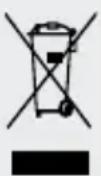
This marking indicates that this product should not be disposed with other household wastes throughout the EU. To prevent possible harm to the environment or human health from uncontrolled waste disposal, recycle it responsibly to promote the sustainable re-use of material resources. To return your used device, please use the return and collection systems or contact the retailer from where the product was purchased. They can take this product for environmental safe recycling.
ESPAÑOL
natural_image
Diagram of two dental arches with teeth and jaw structures (no text or labels)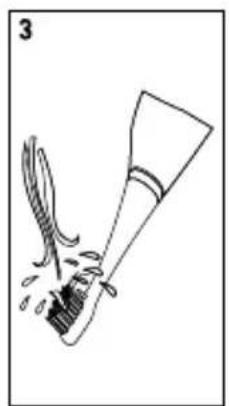
natural_image
Simple line drawing of a brush and ink stroke, no text or symbols presentnatural_image
Diagram of two dental arches with teeth and jaw structures, no text or labels present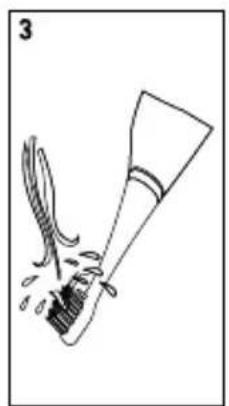
natural_image
Simple line drawing of a brush and ink stroke, no text or symbols presentnatural_image
Diagram of two dental arches with teeth and jawbone structures (no text or labels)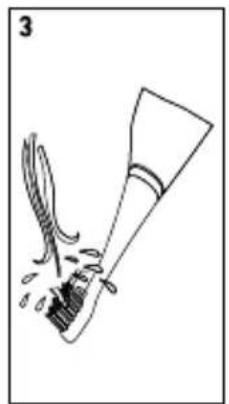
natural_image
Simple line drawing of a brush and ink stroke, no text or symbols presentRECOMMANDATIONS DE NETTOYAGE
natural_image
Diagram of two dental arches with teeth and jawbone structures (no text or labels)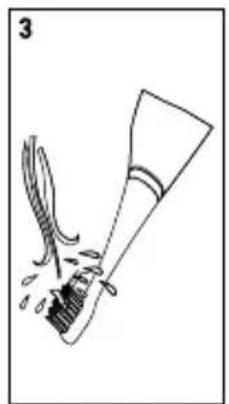
natural_image
Simple line drawing of a brush and ink stroke, no text or symbols presentnatural_image
Diagram of two symmetrical mechanical or dental components with circular features, no text or symbols present
natural_image
Simple line drawing of a shoe being cut with a knife, no text or symbols presentnatural_image
Diagram of two dental arches with teeth and jawbone structures (no text or labels)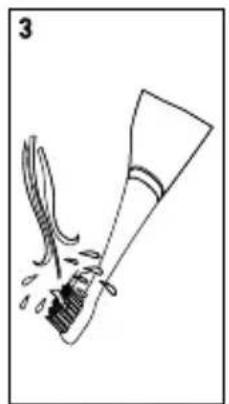
natural_image
Simple line drawing of a brush and ink stroke, no text or symbols presentnatural_image
Diagram of two dental arches with teeth and jaw structures (no text or labels)