Sonic Beauty - Toothbrush Create - Free user manual and instructions
Find the device manual for free Sonic Beauty Create in PDF.


| Product Type | 3-in-1 Sonic Toothbrush |
| Brand | Create |
| Model | Sonic Beauty |
| Functions | Tooth brushing, face cleansing, anti-aging eye massage |
| Technology | Sonic pulsation (12,000 pulsations/min) |
| Intensity levels | Adjustable (+/-) |
| Timer | 2 minutes with 30-second intervals |
| Automatic shut-off | After 3 minutes of inactivity |
| Battery | Lithium 3.7V, 420mAh |
| Charging | USB DC 5V, charging time ~1 hour, battery life ~120 minutes |
| Waterproof rating | IPX7 (waterproof) |
| Handle material | Silicone |
| Interchangeable heads | Yes (toothbrush head, face brush head, massage head) |
| Bristle material | Silicone + DuPont nylon |
| Tongue cleaner | Included (on the back of the dual brush head) |
| Weight (approx.) | Approximately 150g |
| Handle dimensions (approx.) | Approximately 18 cm |
| Safety | BPA-free, phthalate-free |
| Maintenance | Wash with warm water, air dry. Do not use alcohol, gasoline, or acetone. |
| Warranty | Warranty card included (to be filled out) |
Frequently Asked Questions - Sonic Beauty Create
User questions about Sonic Beauty Create
0 question about this device. Answer the ones you know or ask your own.
Ask a new question about this device
Download the instructions for your Toothbrush in PDF format for free! Find your manual Sonic Beauty - Create and take your electronic device back in hand. On this page are published all the documents necessary for the use of your device. Sonic Beauty by Create.
USER MANUAL Sonic Beauty Create
natural_image
Line drawing of a toothbrush with three buttons (positive, neutral, negative) and a textured cap on the handle (no text or symbols)TOOTHBRUSH | ANTI-WRINKLE MASSAGER
| FACIAL CLEANER
CEPILLO DE DIENTES | MASAJEADOR
Facial cleaning routine 8
Anti-aging mode for eyes 9
Charging 9
Maintenance and safety 9
Troubleshooting 10
ESPAÑOL
Thank you for choosing our sonic toothbrush. Before using the appliance, and to ensure the best use, carefully read these instructions.
The safety precautions enclosed herein reduce the risk of death, injury and electrical shock when correctly adhered to. Keep the manual in a safe place for future reference, along with the completed warranty card, purchase receipt and package. If applicable, pass these instructions on to the next owner of the appliance.
Always follow basic safety precautions and accident prevention measures when using an electrical appliance. We assume no liability for customer failing to comply with these requirements.
SECURITY INFORMATION
Before using this product, always follow these basic precautions:
- Close supervision is recommended when this device is used by, on, or near small children.
- Discontinue use if this product appears damaged in any way (brush head, handle, charger).
- Never use cleaning products containing alcohol, petrol or acetone.
• To avoid the risk of electric shock, this equipment must only be connected to a supply mains with protective earth. - This device is not intended for children under the age of 13, as well as those with reduced physical and mental abilities.
FEATURES
- This toothbrush set includes a whole set of sonic cleansing brush products (electrical toothbrush, facial cleansing brush and anti-wrinkle massage pen), which utilize innovative sonic pulse technology with 12000 high-intensity pu lsations per minute, effectively meet the different oral-care, skin-care and eye-care needs.
- 8 modes to cater to oral-care. skin-care and eye-care needs.
- Silicone material ultra-hygenic: nonporous and quick-drying to prevent bacteria buildup. Up to 10,000 less bacteria. Silicone material is long-lasting and resilient.
- Utmost safety: free of BPA and phtalates. 100% waterproof, safe to use in a bath.
• Waterproof grade: IPX7
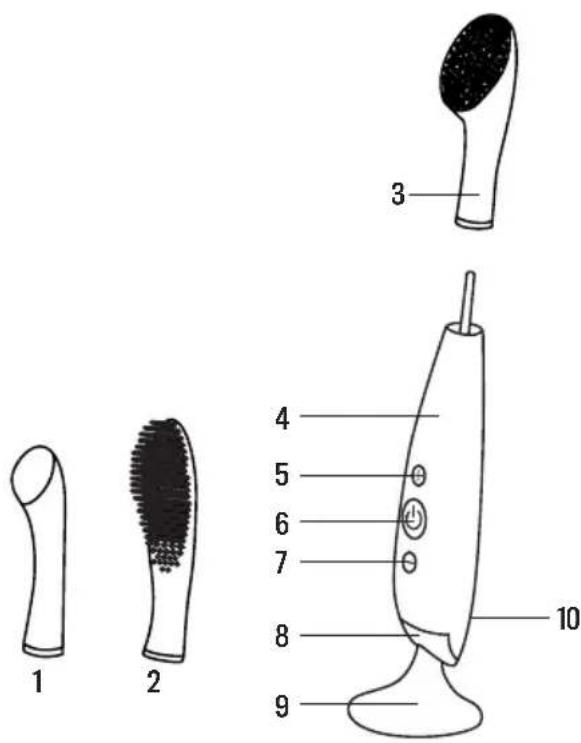
- Massage head
- Silicone/nylon tooth-brush
- Cleansing brush head
- Silicon body
-
Pulsation adjustment (+)
-
Switch button
- Pulsation adjustment (-)
- LED light
- Base
- Charging port
BRUSHING ROUTINE
• We recommend using the toothbrush for 2 minutes for the most effective results.
- Use your regular toothpaste and press the switch button to turn on the device.
- While pressing the switch button, LED light will flash. Press "+" or "-" to adjust
- the device to your preferred intensity (the intensity can be increased or decreased with the “+” or “-” button).
- Every 30 seconds pulsations will pause, indicating it's time to move to the next quadrant of the mouth.
- Make wide, circular movements over the outer and inner surfaces of the teeth and gums. On biting and chewing surfaces, brush backwards and forwards horizontally.
• After 2 minutes, the pulsations will pause 3 times and the LED light will light up, signaling the end of the recommended brushing routine (you may continue brushing your teeth longer if you wish).
- Press the switch button one more time to turn off the device. If you forget to turn off the device, the device will switch itself off after 3 minutes to prevent overuse.
- Rinse with warm water and leave to dry on its base.
ACCESSORIES
Dual brush head
• Material: Silicone + Dupont Ny
- For the people who have more plaque buildup on teeth an seek stronger cleaning yet still require gentle brushing of gums.
- Inner Dupont Nylon bristles deliver stronger brushing of teeth while outer silicone bristles cover the gums to gently clean and massage them.
- Silicone and Dupont Nylon are naturally durable materials.
Tongue cleaner (back side of dual brush head)
- Created to complete an entire oral-care routine, tongue cleaner comfortably and effectively removes food residue and bacteria buildup on the tongue for fresher breath while supporting the overall hygiene of the mouth.
• Nonabrasive and flexible to prevent damage to the tongue.
FACIAL CLEANING ROUTINE
- Use the cleansing brush head.
- Press switch button to turn on the device. While pressing the switch button LED light will flash. Press“+” or “-” to adjust the device to your preferred intensity (the intensity can be increased or decreased with the “+” or “-” button).
- Every 30 seconds pulsations will pause to indicate when to cleanse a new zone. After 2 minutes, the pulsations will pause 3 times and the LED light will light up, signaling the end of the recommended cleansing routine.
- Press the switch button one more time to turn off the device. If you forget to turn off the device, the device will switch itself off after 3 minutes to prevent overuse.
RECOMMENDED CLEANSING WAYS
- Remove all makeup, dampen your face and apply your regular cleansing product.
- Cleanse your chin and cheek using circular movements and repeat on the other side.
- Starting from the center, cleanse your forehead with gentle outward circular strokes.
- Cleanse the nose by gliding up and down one side, then the other side.
- Delicately cleanse the under-eye region using outward strokes. Recommended to use the weak pulsation mode to cleanse the under-eye region.
- Finally, rinse and dry your face. Then, apply your favourite skincare products.
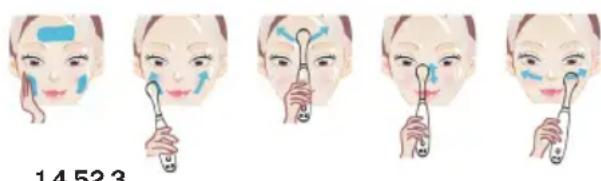
14523
- Use the massage head.
- Press Switch button to turn on the device. While pressing the switch button, LED light will flash. Press "+" or "-" to adjust the device to your preferred intensity (the intensity can be increased or decreased with the "+" or "-" button).
- It is recommended to use the weakest pulsation mode to massage the under-eye region.
RECOMMENDED MASSAGE WAYS
Apply the eye cream or essence from inner corner of the eye to temple.
- Circular movement care: gently use the massage head to make circular movements from the inner corner of the eye to the temple. Repeat for about 5 times on each side.
- Point Pressing care: gently use the massage head to make point pressing from the inner corner of the eye to the eye end. Each point pressing time is about 2 seconds.
- Repeat for 5 times on each side.
- Movement Care: gently use the massage head to make movement care from the center of down eyelid to inner corner of the eye and to the eye end. Repeat for 5 times on each side.
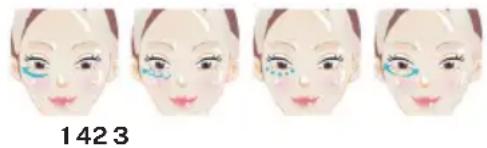
CHARGING
- This Device is using Lithium battery with 3.7V 420MAH, and its cycle life is 5 years.
- Before charging, make sure the charging port and charger are free from water.
- Plug the charger into USB charging port (DC 5V). About one hour of charging delivers a full charge which lasts for 120 min. of use.
- When the battery is low, the LED light will start to flash repeatedly.
- When the battery is fully charged, the LED light will emit a steady light.
- When the rechargeable battery is empty, the motor will stop.
- Caution: DO NOT charge for more than 24 hours. DO NOT use this device when charging.
MAINTENANCE AND SAFETY
- Clean the cleansing brush after each use by washing the brush with warm water.
- Allow the device to air-dry.
- NOTE: Never use cleaning products containing alcohol, petrol or acetone.
REPLACE INTERCHANGEABLE HEADS
- Pull the head upward and insert the replacement until gap is not visible between the head and handle.
Note: Never twist the head when pulling or inserting.
TROUBLESHOOTING
- Is the device not activated when pressing the swtich button?
- Battery is empty. Recharge your device
- The device is locked. Please continuously press "+" and "-" to unlock it.
- Does the device's LED light not blink when charger is connected?
- Battery is fully charged, ready for cleaning routines.
- Charging cable is not properly connected. Check electrical outlet/USB socket and charging port.
- Has the device fallen into water and the charging port is wet?
- Dry off and continue use. This device is completely waterproof (IPX7) and the charging port is fully sealed.
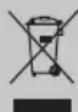
This marking indicates that this product should not be disposed with other household wastes throughout the EU. To prevent possible harm to the environment or human health from uncontrolled waste disposal, recycle it responsibly to promote the sustainable re-use of material resources. To return your used device, please use the return and collection systems or contact the retailer from where the product was purchased. They can take this product for environmental safe recycling.
natural_image
Illustration of a person's face with four sequential frames showing different eye makeup application (no text or symbols)1423
CARGA
14523
natural_image
Four sequential illustrations of a person's face with eyeliner application, showing progressive shading and color (no text or symbols)1423
CARGA
natural_image
Four sequential illustrations of a human face with visible eyelashes and facial features, labeled '1423' below (no text or symbols on the faces themselves)CHARGE
natural_image
Illustration of a person's face with four sequential steps showing different eye makeup application (no text or symbols)1423
CARICARE
natural_image
Four sequential illustrations of a person's face with colored eye makeup application (no text or symbols)1423
BELASTUNG
14523
145