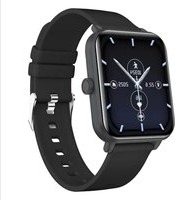
Watch Classic 2 - Smartwatch myPhone - Free user manual and instructions
Find the device manual for free Watch Classic 2 myPhone in PDF.


User questions about Watch Classic 2 myPhone
0 question about this device. Answer the ones you know or ask your own.
Ask a new question about this device
Download the instructions for your Smartwatch in PDF format for free! Find your manual Watch Classic 2 - myPhone and take your electronic device back in hand. On this page are published all the documents necessary for the use of your device. Watch Classic 2 by myPhone.
USER MANUAL Watch Classic 2 myPhone
text_image
Polski English Česky Slovenská Magyar nyelv Deutsch Italiano Español Português Français Eesti keel Lietuvių kalba Latviešu valoda Български език GreekINSTRUKCJA OBSŁUGI myPhone Watch Classic 2
natural_image
Smartwatch with dual clock face and status indicators (no readable text or symbols)natural_image
Black smartwatch with wrist strap and digital display showing time, no visible text or symbols on the device itselfnatural_image
Smartwatch with dual dials and a black strap, showing time and date (no readable text or symbols beyond clock face)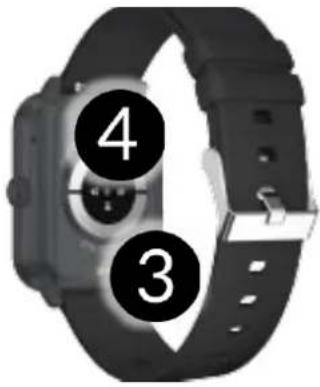
text_image
4 34.2 Ekran zegarka
text_image
1 2 3 4 5 6 7 10324 2.6 2025 126 WEDnatural_image
Hand pressing a button with a green circular icon (no text or symbols)5.2 Przesunięcie
natural_image
Hand pressing a button with a blue curved arrow above it, symbolizing navigation or action (no text or symbols present)text_image
QR code image containing encoded data, no visible human-readable textnatural_image
Simple line drawing of a trash bin with two crossed lines indicating no waste or restriction (no text or symbols)natural_image
Simple line drawing of a trash bin with two crossed lines indicating no waste or discharge (no text or symbols)
www.myphone.pl/support-myphone-watch-cl-2
https://www.myphone.pl/support-warranty/
natural_image
Smartwatch with dual clock face and status indicators (no readable text or symbols)We create for you.
Thank you for choosing a myPhone product. This product has been designed especially for you. We are doing our best to make its use pleasurable and comfortable. We made sure that elegance, functionality and convenience of use were combined with an affordable price.
For the sake of your safety, please read this manual carefully.
Equipment delivery location:
mPTech Sp. z o.o.
Krakowska street 119
50-428 Wrocław
Poland
Helpline: (+48 71) 71 77 400
www.myphone-mobile.com
Manufacturer:
mPTech Sp. z o.o.
Nowogrodzka 31
00-511 Warsaw
Poland
Designed in Poland
Made in China
1. Table of contents
- Table of contents...... 22
- Safety of use.... 23
- Technical Specification 24
3.1 Technical data....24
3.2 Package content ....25
- Arrangement of the smartwatch elements.... 25
4.1 Design of the watch....25
4.2 Watch screen....26
- Using the touch screen 26
5.1 Touch....26
5.2 Swipe....27
- Charging the battery.... 27
- Watch operation.... 28
7.1 Switching the smartwatch on/off....28
7.2 Smartphone connection....28
7.3 Disconnecting with the smartphone....29
7.4 Changing the watch face....29
7.5 Main Desktop....29
7.6 Measuring pulse....30
7.7 Receiving calls/SMS....30
- Troubleshooting 30
- Maintenance of the device.... 31
- Surroundings security 31
- Correct disposal of used equipment.... 32
- Correct disposal of used battery 32
- The use of the manual.... 33
13.1 Consents....33
13.2 Appearance....33
13.3 Trademarks....33
-
The maximum radio frequency power 33
-
Declaration of conformity with European Union Directives.... 33
© 2024 myPhone. All rights reserved. EN
IMPORTANT!
myPhone Watch Classic 2 is not a medical device and therefore cannot replace any medical diagnosis or proper treatment.
2. Safety of use
—DO NOT RISK—
All wireless devices may cause interference to other devices. Do not switch on the device when the use of mobile phones is prohibited (planes, hospitals) or if it might cause interference or danger.
-QUALIFIED SERVICE-
Only qualified personnel or an authorized service center may install or repair this product. Repairing the device by an unqualified or unauthorized service technician may result in damage to the device and void the warranty.
-OPERATION-
The device may be operated by mentally or psychologically disabled people (including children) only under the supervision of persons responsible for their safety or after they have been properly trained and understood how to use the device safely. This device is not a toy.
—WATER AND OTHER LIQUIDS—
The device has resistance certificate IP65. It means that the device is dust-proof and waterproof when all of the seals are intact. We also advise not to expose the watch to water or other fluids for no good reason. Water and other fluids do not have a positive effect on phone electronic components. If wet, wipe and dry the device as soon as possible. Make sure it is dry before connecting the charging cradle to the charging socket of your watch. Plugging the cable into a wet or damp outlet exposes it to slow corrosion and may cause problems with charging the smartwatch. If the following rules are not obeyed and a case of improper use is observed all the complaints concerning the device not being water- or dustproof will not be taken into consideration.
© 2024 myPhone. All rights reserved. EN
-BATTERY AND ACCESSORIES—
The battery can only be replaced by an authorised service centre. Installing an incorrect battery type can cause an explosion. Avoid exposing the battery to very high/low temperatures (below 0°C/32°F and over 40°C/104°F). Extreme temperatures may influence capacity and battery life. Avoid contact with liquids and metal objects as it may cause partial or complete battery damage. Excessive charging the battery can cause damage, therefore do not charge the battery longer than 12 hours (1 day an absolute max.) Please dispose of battery according to the instructions. In case of the charger wire damage, it should be replaced with a new one. Use the original manufacturer's accessories only.
3. Technical Specification
3.1 Technical data
| Model | myPhone Watch Classic 2 |
| Processor | Dual core, 2 x 192MHz |
| Memory | RAM:640KB, ROM: 64MB |
| Display | 1.8” IPS, 240x284 px, Touch screen |
| Connectivity | Bluetooth 5.0 |
| Sensors | Heart rate, saturation and blood pressure |
| Resistance | IP65 |
| Battery | 260 mAh |
| Material | ABS + silicone strap |
| Size | 49.8 x 36.8 x 12.4 mm |
| Weight | 36.7 g |
| Band width | 20 mm |
| Band length | 209 mm |
| Additional functions | Date and time, weather, step and distance measurement, calorie counter, heart rate measurement, saturation measurement, sleep monitoring, stope r/countdown/auto lock, alarm, call/SMS answering, multisport, |
© 2024 myPhone. All rights reserved. EN
| blood pressure, women's health, gaming, stock market, music player control, Ai voice, find phone, calendar, calculator, world time | |
| Compatibility | Android, iOS |
| Application | Smart Time pro |
3.2 Package content
• Smartwatch myPhone Watch Classic 2
- USB cable
- User manual
⚠️ If any of the above items is missing or damaged, please contact your dealer.
⚠️ We advise to keep the container in case of any complaints.
The appearance of the product (shape and colours) and menu may differ from the pictures and illustrations in this manual.
4. Arrangement of the smartwatch elements
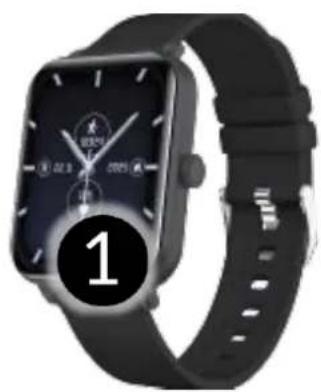
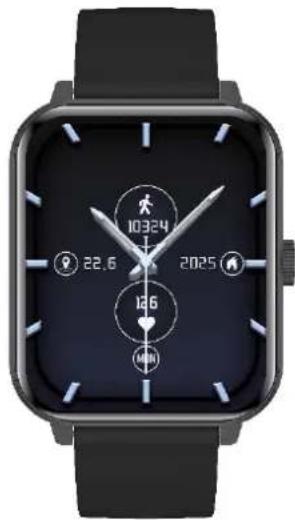
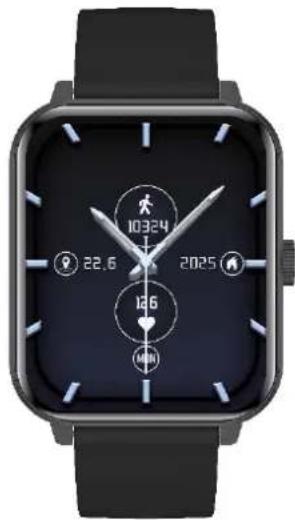
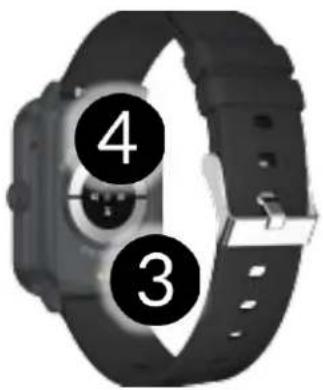
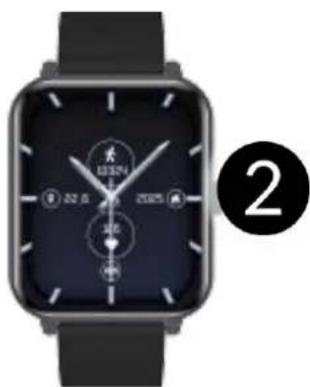
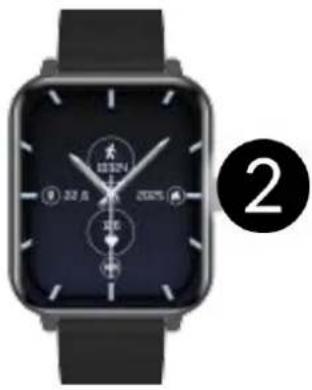
4.1 Design of the watch
natural_image
Black smartwatch with wrist strap and digital display showing time, no visible text or symbols on the device itself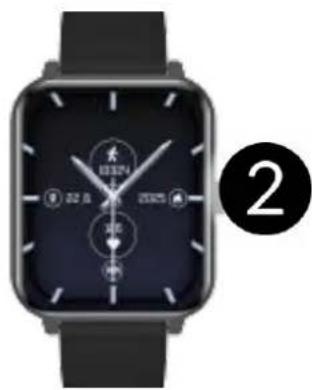
natural_image
Smartwatch with dual dials and a black strap, no visible text or symbols on the device face.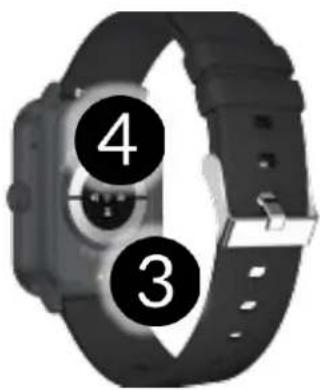
text_image
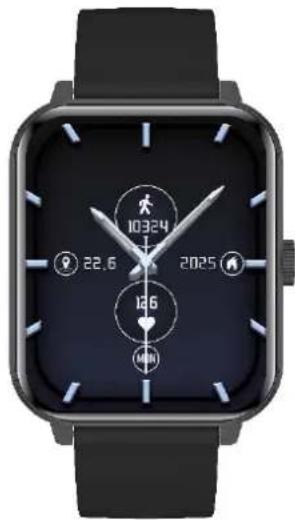
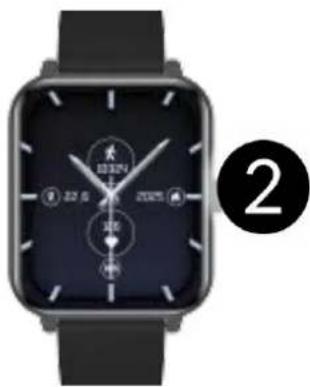
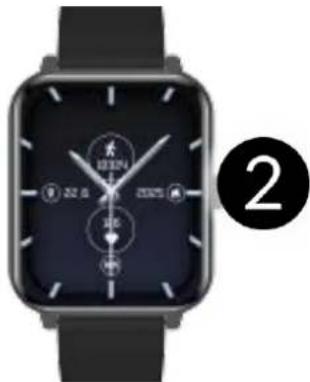
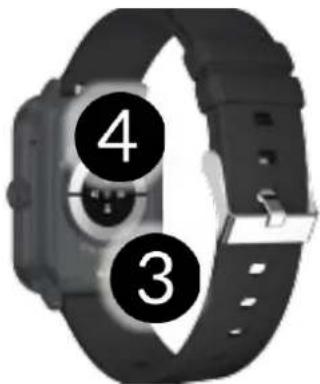
4 3- Display
- Main buton
- Charging sockets
- Set of sensors
© 2024 myPhone. All rights reserved. EN
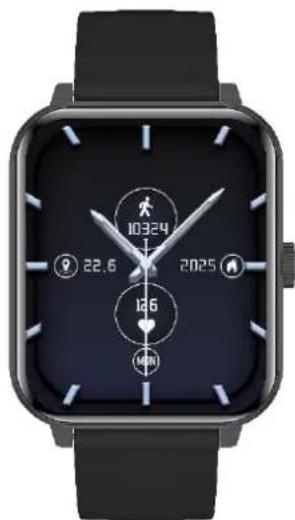
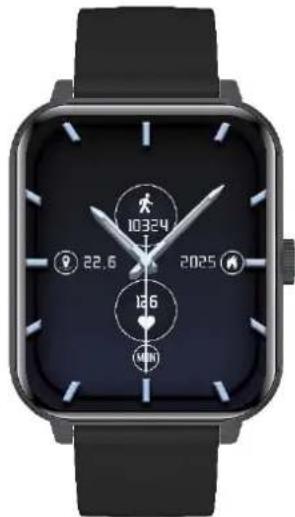
4.2 Watch screen
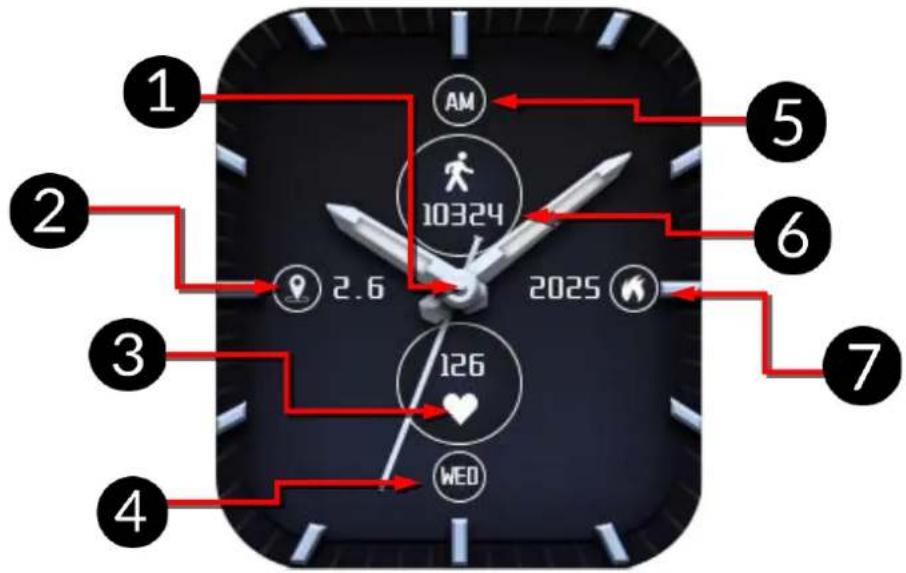
text_image
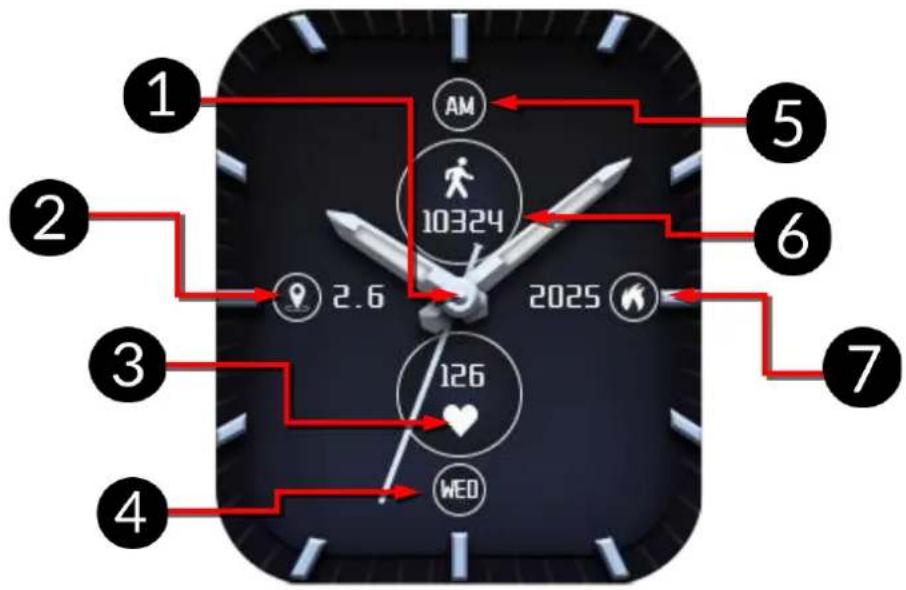
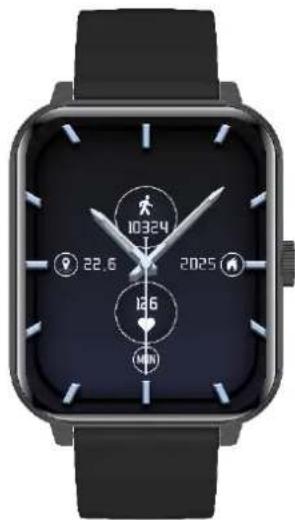
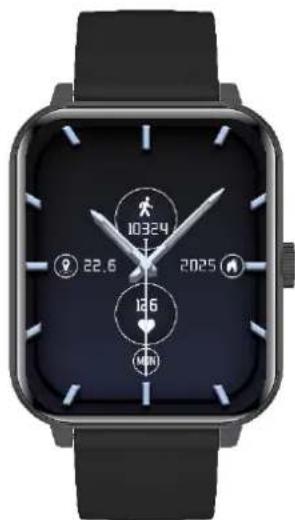
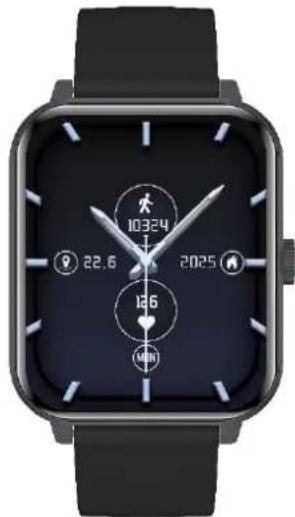
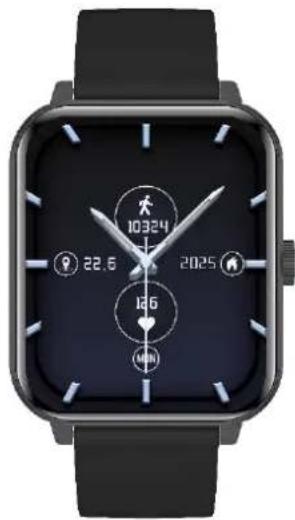
1 2 3 4 5 6 7 10324 2.6 2025 126 WED- Time indication
- Distance traveled
- Heart rate
-
Day of the week
-
Time of day (AM PM)
- Number of steps
- Calories burned
5. Using the touch screen
The touch screen will be turned off after some time of inactivity. To turn on the screen press the main button on the smartwatch.
A touch screen of the device lets you easily select items or perform operations. The touchscreen can be controlled by the following actions.
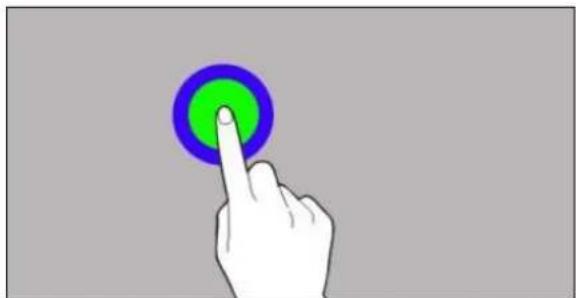
5.1 Touch
Touch once to start an option, start an application, select or launch menu.
natural_image
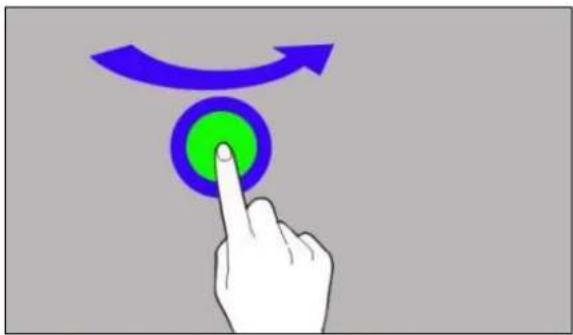
Hand pointing at a green circular button with blue border (no text or symbols)5.2 Swipe
Quickly swipe up, downwards (back to desktop), left or right (changes icon screens) to move the list or screen.
natural_image
Hand pressing a green button with a blue curved arrow above it (no text or symbols)6. Charging the battery
Slide the USB end of the charger into the adapter and connect the other end to the charging sockets on the back of the watch. The cable automatically engages in the correct position thanks to a bipolar magnetic tip. When charging starts, the battery icon of the charging screen will change to an animated (main screen), large animated icon in the middle of the screen (device off).
Charge the battery before the first use. The battery should be charged using the USB cable and charger base provided. Use only chargers and cables approved by the manufacturer. Using incompatible chargers or cables can cause explosion of the battery or damage to your device.
⚠️If there is a problem with the battery or if it needs to be replaced, the device should be delivered to the manufacturer's service centre.
When the battery is fully discharged, the device may not turn on, even if it is plugged and being charged.
Improper connection of the USB plug may damage the device, cable and/or charger. All damages resulting from improper handling are not covered by the warranty.
The device can heat up during charging. It is a regular occurrence and should not affect the stability or performance of the device.
When the icon's animation stops, the battery is fully charged
© 2024 myPhone. All rights reserved. EN
or the power of the source (portable charger, laptop) is depleted and the process can be completed.
⚠️If the device does not charge properly deliver it, with the USB cable included, to a service center of the manufacturer.
7. Watch operation
7.1 Switching the smartwatch on/off
To turn on the device, press and hold the main button on your watch for about 3 seconds.
To turn off the device, press and hold the main button until the message to turn off, reset or restart the device appears. After selecting an option, confirm the selection.
7.2 Smartphone connection
To connect myPhone Watch Classic 2 with a smartphone you need to download a corresponding app. You can download it by scanning the QR code below or the one on the watch. You can also download the app directly from the app store.
text_image
QR code image containing encoded data, no visible human-readable text- Turn on Bluetooth on your phone.
- Launch the installed app and go to the tab: Devices -> Add Device (press +).
- When the app finds available devices, select your watch from the list of available devices.
- On the watch, confirm that you agree to connect to your phone.
© 2024 myPhone. All rights reserved. EN
- In order for the watch to work properly, accept all the required consents that will appear in the application.
- Your watch is paired.
7.3 Disconnecting with the smartphone
- Go to the "Devices" tab in the app, scroll to the very bottom of the tab, click "Disconnect" and "Approve".
- Go to the Bluetooth settings on your phone, click on the name of your watch and then "Forget device".
- Your watch is disconnected.
7.4 Changing the watch face
You can change the appearance of the watch display in the smartwatch. To do this, you need to hold your finger on the active main screen of the watch until the option to select dials appears, then you can choose from five installed dials. After selecting the dial, click to approve it. In the app, you can also change the dials or download new ones. To do this, go to the "Device" tab in the app -> "Watch faces." There you will find many themed dials to choose from. To install a dial, press "Sync" next to the selected dial.
7.5 Main Desktop
You can activate the main desktop of the smartwatch by clicking the smartwatch button. In addition to the time and date, depending on the dial selection, the dashboard can display heart rate measurement, calorie burn counter, distance traveled, watch battery level, phone pairing status time of day and date. Swipe the screen to the left to go sequentially to heart rate measurement information, workout, stress measurement, saturation, sleep measurement, music player, weather information or phone. Swiping the screen up or down takes you to the watch settings or other applications. Clicking the smartwatch button again takes you to the watch's main menu.
© 2024 myPhone. All rights reserved. EN
7.6 Measuring pulse
The watch has built-in function for measuring pulse. To start the measurement, swipe left on the screen to the first tab called "Heart rate".
7.7 Receiving calls/SMS
The watch has a function to receive notifications of incoming calls and SMS, for this the watch must be connected to the phone and permissions must be enabled in the application Devices -> Call Notifications / SMS Notifications.
If notifications will not work check whether the permissions are enabled in the phone settings, to do this, hold down the icon of the watch application on the phone until a message appears, select „About the application” -> „Permissions” -> allow for „SMS and Phone”.
When someone calls us, the watch vibrates, displaying the name of the contact if it is stored in the phone, or the phone number if it is not stored. In addition, a red handset icon will appear, which we can use to reject the call, or a green handset icon, which we can use to answer the call.
To read the message, click on the notification box that appears on the watch or go to the notification center. To do this swipe up when on the home screen.
8. Troubleshooting
In case of problems with the device, please refer to the following tips.
| Watch doesn't turn on | Charge the battery. The device can be switched on when the battery powe level is at least several percent. |
| The watch does not charge | Check that the watch's charging sockets are correctly positioned on the charging ports |
© 2024 myPhone. All rights reserved. EN
| I cannot connect my watch to my smartphone | Check if you have the latest version of the application required to connect your watch to your phone and active Bluetooth. |
| If the problem persists, contact service center. | |
9. Maintenance of the device
To extend the service life of the device:
- Avoid contact with liquids; it can cause damage to electronic components of the device.
- Avoid very high temperatures for it can shorten the life of device electronic components, melt the plastic parts and destroy the battery.
- Do not try to disassemble the device. Tampering with the device in an unprofessional manner may cause serious damage to the device or destroy it completely.
- For cleaning use only a dry cloth. Never use any agent with a high concentration of acids or alkalis.
- Use the original accessories only. Violation of this rule may result in an invalidation of the warranty.
natural_image
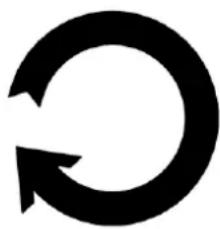
Abstract black circular arrow symbol on white background (no text or symbols)The packaging of the device can be recycled in accordance with local regulations.
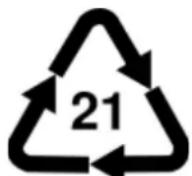
Symbol for cardboard.
PAP
10. Surroundings security
Turn off the device in areas where its use is forbidden or when it may cause interference or danger.
© 2024 myPhone. All rights reserved. EN
| Attention | Statement |
| The manufacturer is not responsible for any consequences caused by improper usage of the device and not obeying the above instructions. | The software version can be upgraded without earlier notice. |
11. Correct disposal of used equipment
natural_image
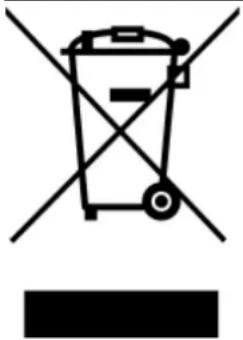
Symbol of a trash bin with crossed lines indicating no waste or discharge, and a solid black rectangle below (no text or labels)The device is marked with a crossed-out garbage bin, in accordance with the European Directive 2012/19/EU on used electrical and electronic Equipment (Waste Electrical and Electronic equipment - WEEE). Products marked with this symbol should not be disposed of or dumped with other household waste after a period of use. The user is obliged to get rid of used electrical and electronic equipment by delivering it to designated recycling point in which dangerous waste are being recycled. Collecting this type of waste in designated locations, and the actual process of their recovery contribute to the protection of natural resources. Proper disposal of used electrical and electronic equipment is beneficial to human health and environment. To obtain information on where and how to dispose of used electrical and electronic equipment in an environmentally friendly manner user should contact their local government office, the waste collection point, or point of sale, where the equipment was purchased.
12. Correct disposal of used battery
natural_image
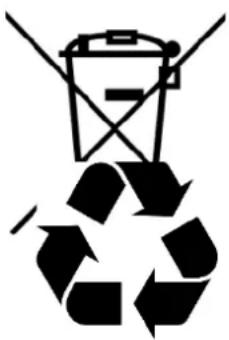
Recycling symbol with a trash can and crossed lines, no text or numbers presentAccording to the EU directive 2006/66/EC with changes contained in EU directive 2013/56/UE on the disposal of batteries, this product is marked with crossed-out garbage bin symbol. The symbol indicates that the batteries used in this product should not be disposed with regular household
© 2024 myPhone. All rights reserved. EN
waste, but treated according to the legal directives and local regulations. It is not allowed to dispose of batteries and accumulators with unsorted municipal waste. Users of accumulators must use the available collection points of these items, which allows them to return, recycle and dispose of the accumulators. Within the EU, the collection and recycling of batteries and accumulators is a subject to separate procedures. To learn more about existing procedures of recycling of accumulators please contact your local office or an institution for waste disposal or landfill.
13. The use of the manual
13.1 Consents
Without prior written consent of the manufacturer, no part of this manual may be photocopied, reproduced, translated or transmitted in any form or by any means, electronic or mechanical, including photocopying, recording or storing in any systems of storing and sharing information.
13.2 Appearance
The device and screen shots contained in this user manual may differ from the actual product. Accessories attached to the set may differ from the illustrations included in manual.
13.3 Trademarks
All brand names and product names are trademarks or registered trademarks of their respective companies.
14. The maximum radio frequency power
| Frequency Range | 2.402 GHz - 2.480 GHz |
| Transmit Power | 2.67-2.83 dBm |
15. Declaration of conformity with European Union
© 2024 myPhone. All rights reserved. EN
Directives
text_image
C€mPTech Ltd. hereby declares that myPhone Watch Classic 2 device is compliant with Directive 2014/53/EU. The full text of the EU Declaration of Conformity is available at
the following Internet address:
www.myphone.pl/support-myphone-watch-cl-2
UŽIVATELSKÁ PŘÍRUČKA myPhone Watch Classic 2
natural_image
Smartwatch with dual clock face and status indicators (no readable text or symbols)Vytvořeno pro Vás.
natural_image
Black smartwatch with wrist strap and digital display showing time, no visible text or symbols on the device itself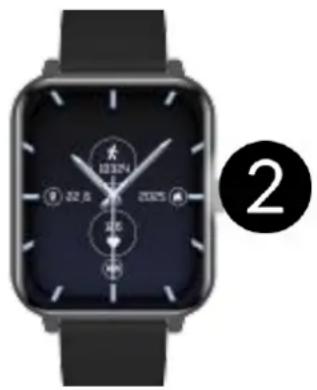
natural_image
Black smartwatch with dual dials and a wrist strap, no visible text or symbols on the device face.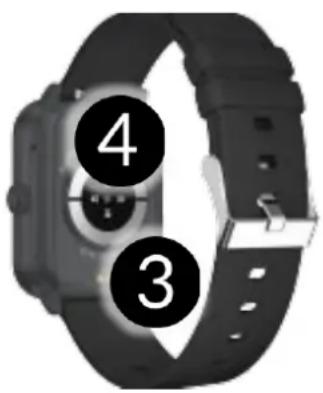
text_image
4 3natural_image
Hand pointing at a green circular button with blue border (no text or symbols)natural_image
Hand pressing a green button with a blue curved arrow above it (no text or symbols)6. Nabíjení baterie
text_image
QR code image containing encoded data, no visible human-readable textnatural_image
Symbol of a trash bin with crossed lines indicating no waste, and a solid black rectangle below (no text or labels)natural_image
Simple line drawing of a trash bin with diagonal lines crossing it, no text or symbols present.
www.myphone.pl/support-myphone-watch-cl-2
UŽÍVATELŠKÁ PRÍRUČKA
myPhone Watch Classic 2
natural_image
Smartwatch with dual clock face and status indicators (no readable text or symbols)Vytvorené pre Vás.
natural_image
Smartwatch with black strap and digital display showing time, no visible text or symbols on the device itself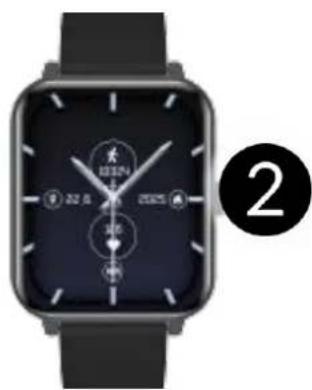
natural_image
Smartwatch with dual dials and wrist strap, no visible text or symbols on the device face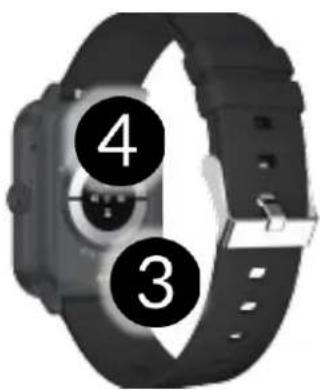
text_image
4 3natural_image
Hand pressing a green button with a blue curved arrow above it (no text or symbols)text_image
QR code image containing encoded data, no visible human-readable textnatural_image
Symbol of a trash bin crossed with a diagonal line, representing waste sorting or disposal (no text or labels)natural_image
Simple line drawing of a trash bin with diagonal lines crossing it, no text or symbols present.
www.myphone.pl/support-myphone-watch-cl-2
HASZNÁLATI ÚTMUTATÓ myPhone Watch Classic 2
natural_image
Smartwatch with dual clock face and status indicators (no readable text or symbols)Önnek készült.
00-511 Warsaw, Poland
natural_image
Black smartwatch with wrist strap and digital display showing 'BEEF' logo, no visible text or symbols on the device itself.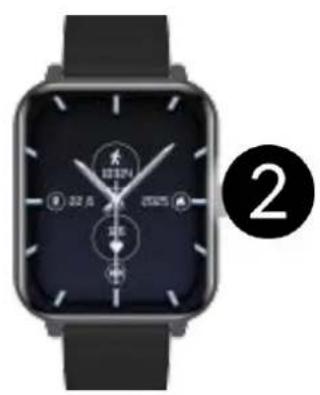
natural_image
Smartwatch with dual dials and a circular dial, displayed on a dark surface (no visible text or symbols)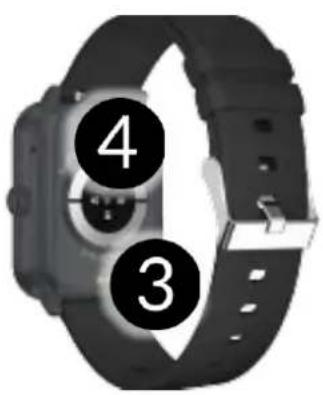
text_image
4 3© 2024 myPhone. Minden jog fenntartva. HU
natural_image
Hand pointing at a green circular button with blue border (no text or symbols)© 2024 myPhone. Minden jog fenntartva. HU
5.2 Lapozás
natural_image
Hand pressing a green button with a blue circular arrow above it (no text or symbols)text_image
QR code image containing encoded data, no visible human-readable textnatural_image
Simple line drawing of a trash bin with crossed lines indicating no waste or discharge (no text or symbols)natural_image
Simple line drawing of a trash bin with diagonal lines crossing it, no text or symbols present.
www.myphone.pl/support-myphone-watch-cl-2
BEDIENUNGSANLEITUNG
myPhone Watch Classic 2
natural_image
Smartwatch with dual clock face and status indicators (no readable text or symbols)© 2024 myPhone. All rights reserved. EN
WICHTIG!
© 2024 myPhone. All rights reserved. EN
© 2024 myPhone. All rights reserved. EN
© 2024 myPhone. All rights reserved. EN
natural_image
Black smartwatch with wrist strap and digital clock display, no visible text or symbols on the device itselfnatural_image
Smartwatch with dual dials and wrist strap, no visible text or symbols on the device face- Ladeports
- Sensoren
text_image
4 3natural_image
Hand pressing a button with a blue arrow and curved arrow above it (no text or symbols)6. Laden des Akkus
text_image
QR code image containing encoded data, no visible human-readable textnatural_image
Simple line drawing of a trash bin with diagonal lines crossing it, no text or symbols present.natural_image
Simple line drawing of a trash bin with diagonal lines crossing it, no text or symbols present.
www.myphone.pl/support-myphone-watch-cl-2
natural_image
Smartwatch with dual clock and finger interface (no readable text or symbols)Creiamo per te.
text_image
Three smartwatches with numbered labels indicating different watch states or features.natural_image
Hand pressing a button with a green circular icon and blue curved arrow above it (no text or symbols)text_image
QR code image containing encoded data, no visible human-readable textnatural_image
Simple line drawing of a trash bin with two crossed lines indicating no waste or prohibition (no text or symbols)natural_image
Simple line drawing of a trash bin with crossed lines indicating no waste or discharge (no text or symbols)www.myphone.pl/support-myphone-watch-cl-2
MANUAL DE USUARIO
myPhone Watch Classic 2
natural_image
Smartwatch with dual clock face and status indicators (no readable text or symbols)Creamos para ti.
natural_image
Black smartwatch with dual clock and wrist strap, no visible text or symbols on the device itself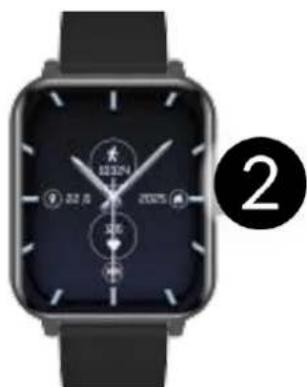
natural_image
Smartwatch with dual dials and a circular dial, no visible text or symbols on the device itself.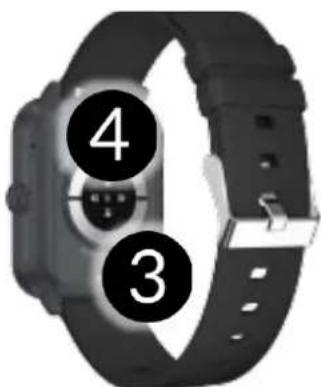
text_image
4 3natural_image
Hand pressing a button with a green circular button and blue curved arrow above it (no text or symbols)text_image
QR code image containing encoded data, no visible human-readable text7.5 Pantalla principal
natural_image
Symbol of a trash bin crossed with no text or numbers, representing waste sorting or disposal (no text present)natural_image
Simple line drawing of a trash bin with diagonal lines crossing it, no text or symbols present.
www.myphone.pl/support-myphone-watch-cl-2
GUIA DO UTILIZADOR
myPhone Watch Classic 2
natural_image
Smartwatch with dual clock face and status indicators (no readable text or symbols)Criamos para si.
natural_image
Black smartwatch with wrist strap and digital display showing time, no visible text or symbols on the device itself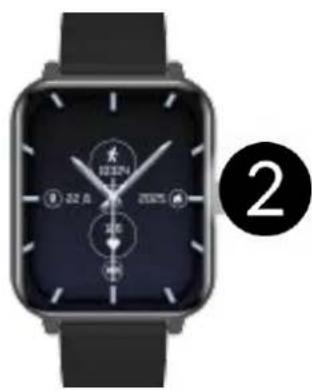
natural_image
Smartwatch with dual dials and a black strap, no visible text or symbols on the device face.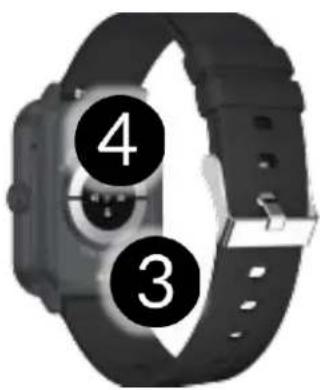
text_image
4 3natural_image
Hand pressing a green button with a blue circular arrow above it, symbolizing navigation or press function (no text or symbols present)text_image
QR code image containing encoded data, no visible human-readable textnatural_image
Symbol of a trash bin crossed with a diagonal line and a horizontal bar below (no text or labels)natural_image
Simple line drawing of a trash bin with two crossed lines (no text or symbols)
www.myphone.pl/support-myphone-watch-cl-2
natural_image
Smartwatch with dual clock face and status indicators (no readable text or symbols)—SERVICE PROFESSIONNEL—
text_image
Three smartwatches with numbered labels indicating different watch states or features.natural_image
Illustration of a hand pressing a green circular button with a blue ring, showing two states of rotation (no text or symbols)text_image
QR code image containing encoded data, no visible human-readable textnatural_image
Simple line drawing of a trash bin with two crossed lines indicating no waste or prohibition (no text or symbols)natural_image
Simple line drawing of a trash bin with two crossed lines indicating no waste or prohibition (no text or symbols)www.myphone.pl/support-myphone-watch-cl-2
KASUTUSJUHEND
myPhone Watch Classic 2
natural_image
Smartwatch with dual clock and finger interface (no visible text or symbols)www.myphone-mobile.com
1. Sisukord
natural_image
Black smartwatch with black strap and digital display showing time, no visible text or symbols on the device itself- Laadimispesad
- Andurid
4.2 Kella ekraan
natural_image
Smartwatch with dual dials and control buttons, no visible text or symbols on the device itself.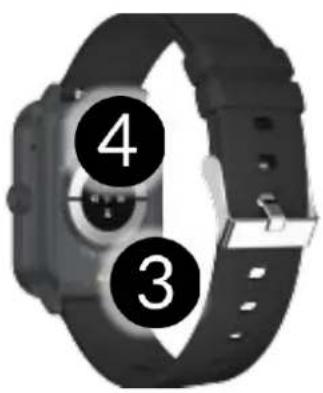
text_image
4 3natural_image
Hand cursor clicking a green circular button with a purple ring (no text or symbols)5.2 Pühkimine
natural_image
Hand pressing a button with a blue curved arrow above it, symbolizing navigation or action (no text or symbols present)text_image
QR code image containing encoded data, no visible human-readable textnatural_image
Simple line drawing of a trash bin with two crossed lines indicating no waste or prohibition (no text or symbols)
natural_image
Simple line drawing of a trash bin with two crossed lines indicating no waste or prohibition (no text or symbols)
www.myphone.pl/support-myphone-watch-cl-2
Naudojimo instrukcija
myPhone Watch Classic 2
natural_image
Smartwatch with dual clock and finger interface (no readable text or symbols)Kuriame Jums.
natural_image
Black smartwatch with wrist strap and digital display showing time, no visible text or symbols on the device itself- Ekranas
- Pagrindinis mygtukas
natural_image
Smartwatch with dual dials and wrist strap, no visible text or symbols on the device facenatural_image
Hand pressing a green button with a blue curved arrow above it (no text or symbols)text_image
QR code image containing encoded data, no visible human-readable textnatural_image
Simple line drawing of a trash bin with two crossed lines indicating no waste or restriction (no text or symbols)
natural_image
Simple line drawing of a trash bin with diagonal lines crossing it, no text or symbols present.www.myphone.pl/support-myphone-watch-cl-2
natural_image
Smartwatch with dual clock and finger interface (no readable text or symbols)Mês radâm Jums.
natural_image
Smartwatch with black strap and digital display showing time, no visible text or symbols on the device itself- Ekrāns
- Sākuma poga
natural_image
Black square smartwatch with dual dials and a circular dial, no visible text or symbols on the device itself.- Uzlādes porti
- Sensoru komplekts
text_image
4 3natural_image
Illustration of a hand pressing a green circular button with a blue arrow indicating rotation (no text or symbols)6. Akumulatora uzlāde
text_image
QR code image containing encoded data, no visible human-readable textnatural_image
Symbol of a trash bin crossed with no text or numbers, representing waste sorting or disposal (no text present)natural_image
Simple line drawing of a trash bin with crossed lines indicating no waste or plastic (no text or symbols)www.myphone.pl/support-myphone-watch-cl-2
natural_image
Smartwatch with dual clock and finger interface (no visible text or symbols)www.myphone-mobile.com
1. Съдържание
natural_image
Black smartwatch with black strap and white dial, no visible text or symbols on the device itself- Дисплей
- Основен буто
natural_image
Smartwatch with dual dials and a black square face, no visible text or symbols on the device itself.natural_image
Illustration of a hand pressing a green circular button with a blue arrow indicating rotation (no text or symbols)text_image
QR code image containing encoded data, no visible human-readable textnatural_image
Simple line drawing of a trash bin with no text or symbols
natural_image
Simple line drawing of a trash bin with two crossed lines indicating no waste or discharge (no text or symbols)
www.myphone.pl/support-myphone-watch-cl-2
ΕΓΧΕΙΡΙΔΙΟ ΧΡΗΣΤΗ
myPhone Watch Classic 2
natural_image
Smartwatch with dual clock face and status indicators (no readable text or symbols)www.myphone-mobile.com
Κατασκευαστής:
mPTech Sp. z o.o.
Nowogrodzka 31
00-511 Βαρσοβία
Πολωνία
natural_image
Smartwatch with black strap and digital display showing navigation icons (no readable text or symbols)- Οθόνη
- Κύριο μπουτόν
natural_image
Smartwatch with dual dials and a black square face, no visible text or symbols on the watch face.natural_image
Hand pointing at a green circular button with blue border (no text or symbols)5.2 Κύλιση
natural_image
Hand pressing a green button with a blue curved arrow above it (no text or symbols)text_image
QR code image containing encoded data, no visible human-readable textThe watch has built-in function for measuring pulse. To start the measurement, swipe left on the screen to the first tab called "Heart rate".
7.5 Μέτρηση παλμών
natural_image
Symbol of a trash bin with crossed lines indicating no waste or discharge, and a solid black rectangle below (no text or labels)natural_image
Simple line drawing of a trash bin with crossed lines indicating no waste or plastic (no text or symbols)www.myphone.pl/support-myphone-watch-cl-2