50PM4700 - Television LG - Free user manual and instructions
Find the device manual for free 50PM4700 LG in PDF.



User questions about 50PM4700 LG
0 question about this device. Answer the ones you know or ask your own.
Ask a new question about this device
Download the instructions for your Television in PDF format for free! Find your manual 50PM4700 - LG and take your electronic device back in hand. On this page are published all the documents necessary for the use of your device. 50PM4700 by LG.
USER MANUAL 50PM4700 LG
User's Guide Specification
| Creator | Adviser | Approver | |
| In chargerDD/MM/YY | Woo Mi-ra/03/12 | Shin Hye-jung22/03/12 | Kim Jong-ok22/03/12 |
1. Model Description
| Model | PM97-Z | Brand | LG | Part number |
| Suffix | MP(EU Suffix) | Product name | 42/50PM47, 50/60PM67, 50/60PM68, 50/60PM97 | MFL67377806(1203-REV01) |
2. Printing Specification
| 1. Trim Size (Format) : 182 mm x 257 mm | |
| 2. Printing ColorsCover : 1 COLOR (BLACK)Inside : 1 COLOR (BLACK) | |
| 3. Stock (Paper)• Cover : Coated paper, S/W 150 g/m2• Inside : Uncoated paper, 백상지 60 g/m2 | |
| 4. Printing Method : Off-set | |
| 5. Bindery : Perfect Bind | |
| 6. Language : ENG/GER/FRE/ITA/SPA/POR/DUT/GRE/HUN/POL/CZE/SLK/ROM/BUL/EST/LIT/LAT/SLV/SER/CRO/ALB/BOS/MAC (23) | |
| 7. Number of pages : 668 | |
| NOTES | “This part contain Eco-hazardous substances (Pb, Cd, Hg, Cr6+, PBB, PBDE, etc.) within LG standard level, Details should be followed Eco-SCM management standard[LG(56)-A-2524].Especially, Part should be followed and controlled the following specification.(1)Eco-hazardous substances test report should be submittedwhen Part certification test and First Mass Production.(2) Especially, Don’t use or contain lead(Pb) and cadmium(Cd) in ink. |
3. Special Instructions
| (1) Origin Notification | |
| * LGEIN : Printed in Indonesia | * LGEWA : Printed in U.K. |
| * LGESP : Printed in Brazil | * LGEMX : Printed in Mexico |
| * LGEND : Printed in China | * LGEIL : Printed in India |
| * LGEMA : Printed in Poland | |
4. Changes
| 13 | ||||
| 12 | ||||
| 11 | ||||
| 10 | ||||
| 9 | ||||
| 8 | ||||
| 7 | ||||
| 6 | ||||
| 5 | ||||
| 4 | ||||
| 3 | ||||
| 2 | ||||
| 1 | 22/03/12 | Woo Mi-ra | EKPC300178 | Manual drawing update (Add sentence related LAN cable standard, Reflect proofred language from foreign branch) |
| Rev. No. | DD/MM/YY | Creator | ECO Number | Change description |
Pagination sheet
| Front Cover (ENG)P/No. | A-2 | A-3 | A-4 | |
| ENG Cover | 2 | ... | 25 | |
| GER Cover | 2 | ... | 25 | |
| FRE Cover | 2 | ... | 25 | |
| ITA Cover | 2 | ... | 25 | |
| SPA Cover | 2 | ... | 25 | |
| POR Cover | 2 | ... | 25 | |
| DUT Cover | 2 | ... | 25 | |
| GRE Cover | 2 | ... | 25 | |
| HUN Cover | 2 | ... | 25 | |
| POL Cover | 2 | ... | 25 | |
| CZE Cover | 2 | ... | 25 | |
| SLK Cover | 2 | ... | 25 | |
| ROM Cover | 2 | ... | 25 |
| BUL Cover | 2 | ... | 25 | Blank | |
| EST Cover | 2 | ... | 25 | Blank | |
| LIT Cover | 2 | ... | 25 | Blank | |
| LAT Cover | 2 | ... | 25 | Blank | |
| SLV Cover | 2 | ... | 25 | Blank | |
| SER Cover | 2 | ... | 25 | Blank | |
| CRO Cover | 2 | ... | 25 | Blank | |
| ALB Cover | 2 | ... | 25 | Blank | |
| BOS Cover | 2 | ... | 25 | Blank | |
| MAC Cover | 2 | ... | 25 | Blank | |
| Making Connect | B-2 | ... | B-65 | Back Cover (ENG) |
OWNER'S MANUAL
PLASMA TV
Please read this manual carefully before operating your set and retain it for future reference.
PM47**
PM67**
PM68**
PM97**
TABLE OF CONTENTS
A-3 SETTING UP THE TV
A-3 Attaching the stand
A-4 Tidying cables
COMMON
LANGUAGE LIST
English
Deutsch
Français
Italiano
Español
Português
Nederlands
Ελληνικά
Magyar
Polski
Česky
Slovenčina
Română
Български
Eesti
Lietuvių k.
Latviešu
Slovenščina
Srpski
Hrvatski
Shqip
Bosanski
Македонски
LANGUAGE
B-1 MAKING CONNECTIONS
B-1 Antenna Connection
B-5 Satellite dish Connection
B-6 HDMI Connection
B-12 - ARC (Audio Return Channel)
B-15 DVI to HDMI Connection
B-18 RGB-PC Connection
B-20 Component Connection
B-24 Composite Connection
B-26 Audio Connection
B-26 - Digital optical audio connection
B-32 USB Connection
B-36 CI module Connection
B-39 Euro Scart Connection
B-63 SPECIFICATIONS
COMMON
SETTING UP THE TV
Image shown may differ from your TV.
Attaching the stand
42/50PM47**, 50/60PM67**
1
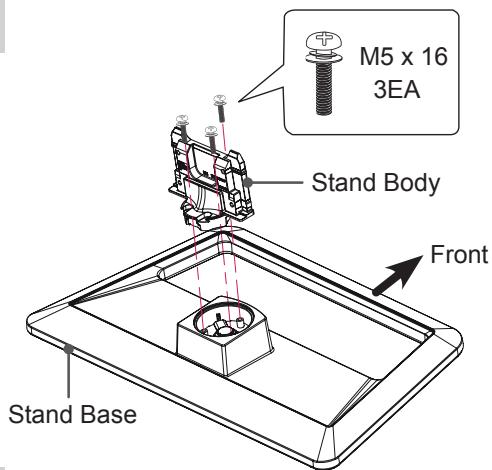
text_image
M5 x 16 3EA Stand Body Front Stand Base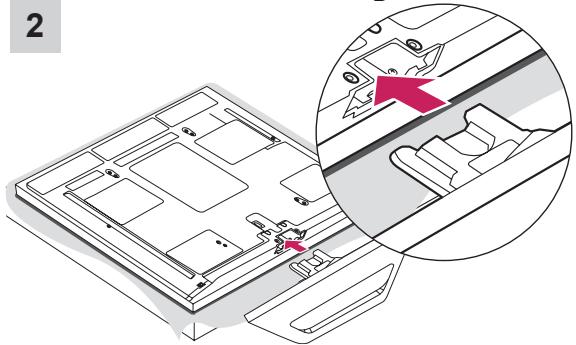
natural_image
Technical diagram of a device with an inset showing a highlighted component (no text or symbols present)3
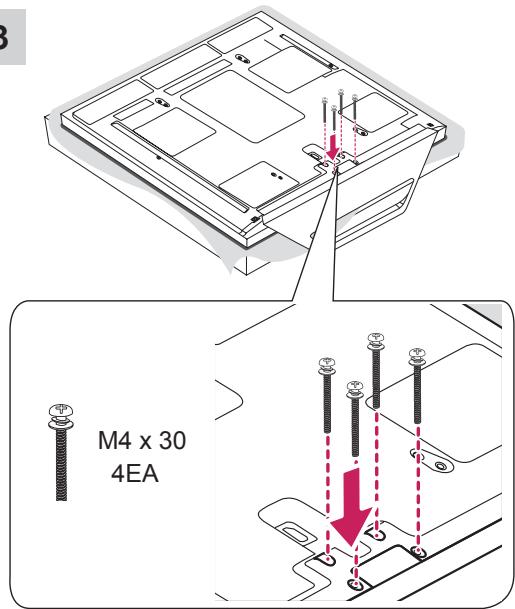
text_image
M4 x 30 4EA50/60PM68**, 50/60PM97**
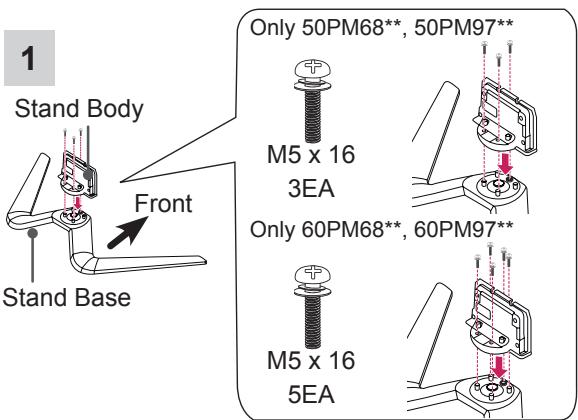
text_image
1 Stand Body Front Stand Base Only 50PM68**, 50PM97** M5 x 16 3EA Only 60PM68**, 60PM97** M5 x 16 5EA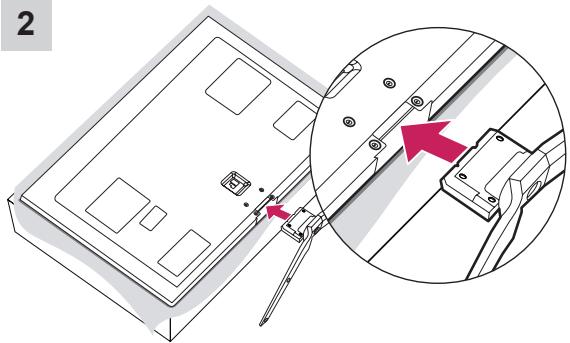
text_image
2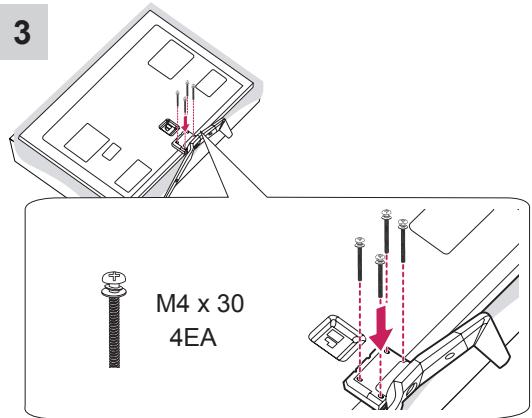
text_image
3 M4 x 30 4EA4
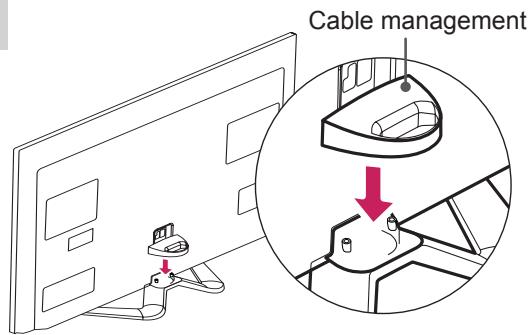
text_image
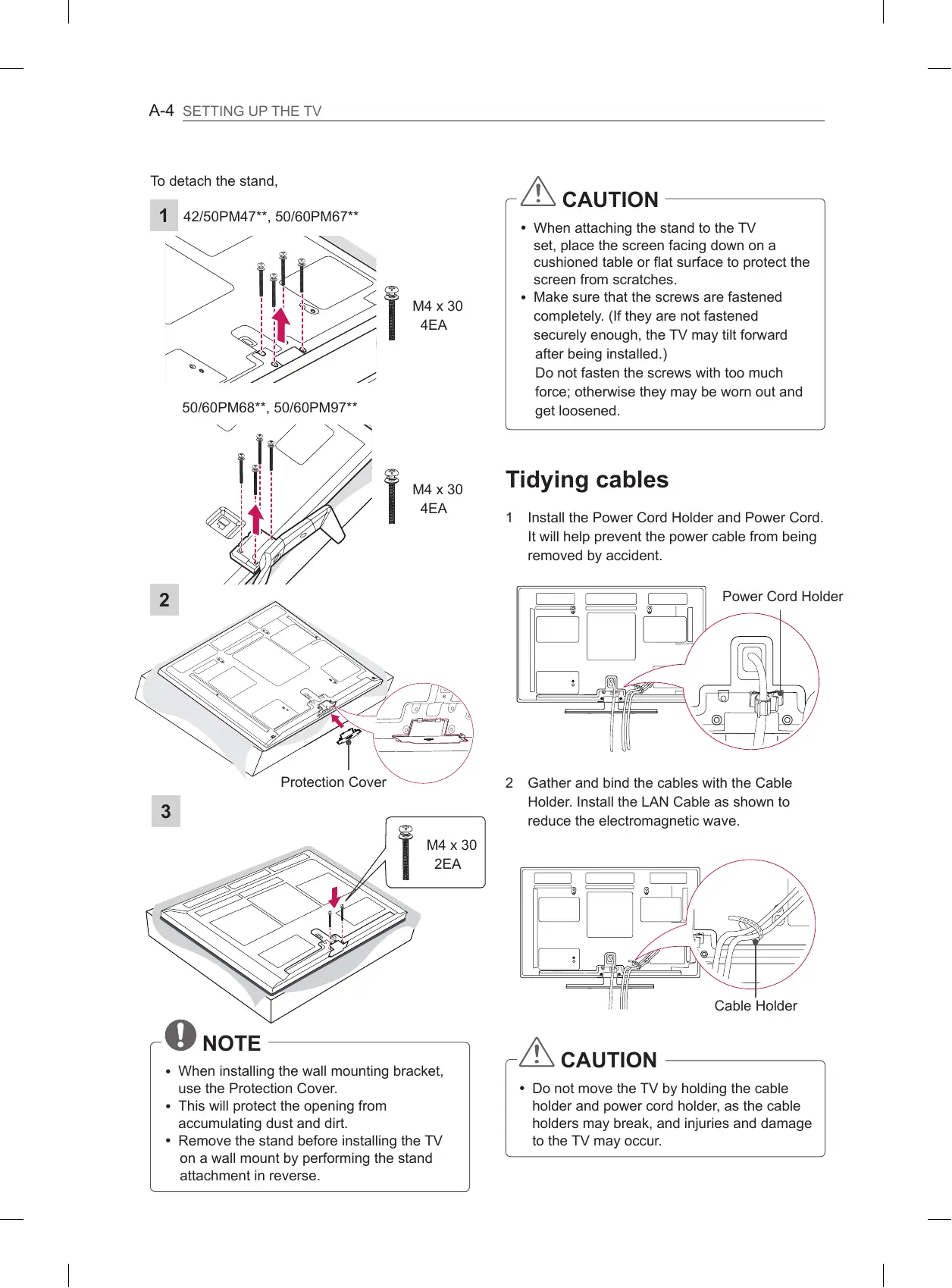
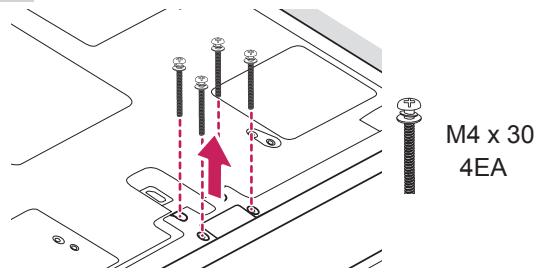
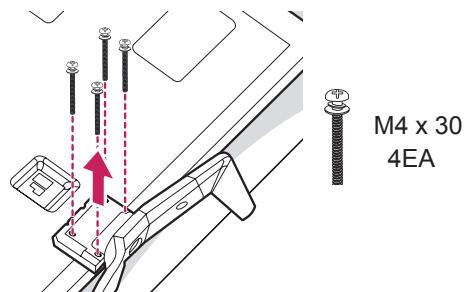
Cable managementTo detach the stand,
1 42/50PM47**, 50/60PM67**
text_image
M4 x 30 4EA50/60PM68**, 50/60PM97**
text_image
M4 x 30 4EA2
text_image
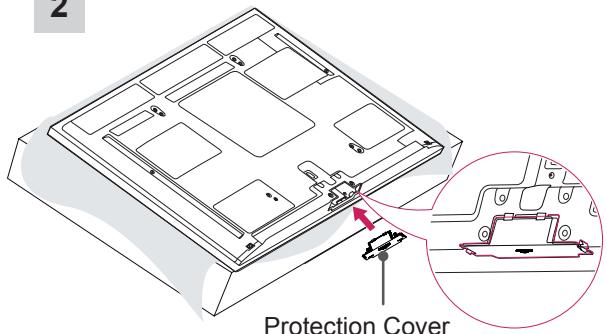
Protection Cover3
text_image
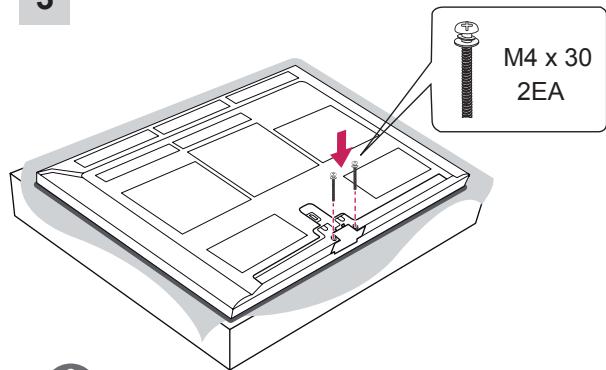
M4 x 30 2EA
NOTE
- When installing the wall mounting bracket, use the Protection Cover.
- This will protect the opening from accumulating dust and dirt.
- Remove the stand before installing the TV on a wall mount by performing the stand attachment in reverse.

CAUTION
- When attaching the stand to the TV set, place the screen facing down on a cushioned table or flat surface to protect the screen from scratches.
- Make sure that the screws are fastened completely. (If they are not fastened securely enough, the TV may tilt forward after being installed.)
Do not fasten the screws with too much force; otherwise they may be worn out and get loosened.
Tidying cables
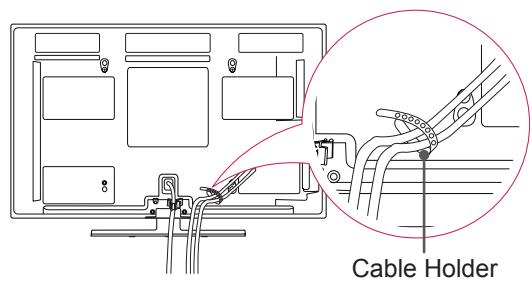
1 Install the Power Cord Holder and Power Cord. It will help prevent the power cable from being removed by accident.
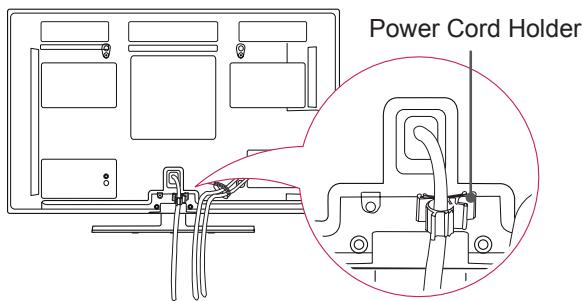
text_image
Power Cord Holder2 Gather and bind the cables with the Cable Holder. Install the LAN Cable as shown to reduce the electromagnetic wave.
text_image
Cable Holder
CAUTION
- Do not move the TV by holding the cable holder and power cord holder, as the cable holders may break, and injuries and damage to the TV may occur.
OWNER'S MANUAL
PLASMA TV
Please read this manual carefully before operating your set and retain it for future reference.
TABLE OF CONTENTS
3 LICENSES
3 OPEN SOURCE SOFTWARE NOTICE
4 SAFETYINSTRUCTIONS
10 - Viewing 3D Imaging (Only 3D models)
12 INSTALLATION PROCEDURE
12 ASSEMBLING AND PREPARING
12 Unpacking
15 Separate purchase
16 Parts and buttons
17 Lifting and moving the TV
18 Mounting on a table
19 Mounting on a wall
20 REMOTE CONTROL
21 MAGIC REMOTE CONTROL FUNCTIONS
22 Registering Magic Remote Control
22 How to use Magic Remote Control
22 Precautions to Take when Using the Magic Remote Control
23 USING THE USER GUIDE
24 MAINTENANCE
24 Cleaning your TV
24 - Screen, frame, cabinet and stand
24 - Power cord
24 TROUBLESHOOTING
25 EXTERNAL CONTROL DEVICE SETUP
25 SPECIFICATIONS

WARNING
- If you ignore the warning message, you may be seriously injured or there is a possibility of accident or death.

CAUTION
- If you ignore the caution message, you may be slightly injured or the product may be damaged.

NOTE
- The note helps you understand and use the product safely. Please read the note carefully before using the product.
LICENSES
Supported licenses may differ by model. For more information about licenses, visit www.lg.com.

DIGITAL PLUS
PULSE
Manufactured under license from Dolby Laboratories. “Dolby” and the double-D symbol are trademarks of Dolby Laboratories.

HIGH-DEFINITION MULTIMEDIA INTERFACE
HDMI, the HDMI logo and High-Definition Multimedia Interface are trademarks or registered trademarks of HDMI Licensing LLC.

HD
ABOUT DIVX VIDEO: DivX® is a digital video format created by DivX, LLC, a subsidiary of Rovi Corporation. This is an official DivX Certified® device that plays DivX video. Visit divx.com for more information and software tools to convert your files into DivX video.
ABOUT DIVX VIDEO-ON-DEMAND: This DivX Certified® device must be registered in order to play purchased DivX Video-on-Demand (VOD) movies. To obtain your registration code, locate the DivX VOD section in your device setup menu. Go to vod.divx.com for more information on how to complete your registration.
"DivX Certified® to play DivX® video up to HD 1080p, including premium content."
"DivX®, DivX Certified® and associated logos are trademarks of Rovi Corporation or its subsidiaries and are used under license."
"Covered by one or more of the following U.S. patents : 7,295,673; 7,460,668; 7,515,710; 7,519,274"


2.0+Digital Out
Manufactured under license under U.S. Patent Nos: 5,956,674; 5,974,380; 6,487,535 & other U.S. and worldwide patents issued & pending. DTS, the Symbol & DTS and the Symbol together are registered trademarks & DTS 2.0+Digital Out is a trademark of DTS, Inc. Product includes software. © DTS, Inc. All Rights Reserved.
OPEN SOURCE SOFTWARE NOTICE
To obtain the source code under GPL, LGPL, MPL and other open source licenses, that is contained in this product, please visit http://opensource.lge.com.
In addition to the source code, all referred license terms, warranty disclaimers and copyright notices are available for download.
LG Electronics will also provide open source code to you on CD-ROM for a charge covering the cost of performing such distribution (such as the cost of media, shipping and handling) upon email request to opensource@lge.com. This offer is valid for three (3) years from the date on which you purchased the product.
SAFETY INSTRUCTIONS
Please read these safety precautions carefully before using the product.


WARNING
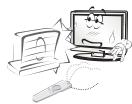
- Do not place the TV and remote control in the following environments:
- A location exposed to direct sunlight
- An area with high humidity such as a bathroom
- Near any heat source such as stoves and other devices that produce heat
- Near kitchen counters or humidifiers where they can easily be exposed to steam or oil
- An area exposed to rain or wind
- Near containers of water such as vases
Otherwise, this may result in fire, electric shock, malfunction or product deformation.
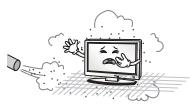
- Do not place the product where it might be exposed to dust.
This may cause a fire hazard.
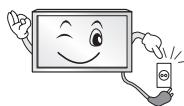
- Mains plug is the disconnecting device. The plug must remain readily operable.
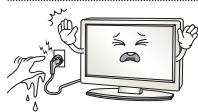
- Do not touch the power plug with wet hands. Additionally, if the cord pin is wet or covered with dust, dry the power plug completely or wipe dust off.
You may be electrocuted due to excess moisture.
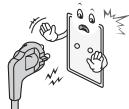
- Make sure to connect the power cable to the grounded current. (Except for devices which are not grounded.)
You may be electrocuted or injured.
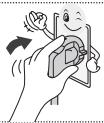
- Fix the power cable completely. If the power cable is not fixed completely, a fire can break out.
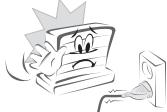
- Ensure the power cord does not come into contact with hot objects such as a heater.
This may cause a fire or an electric shock hazard.
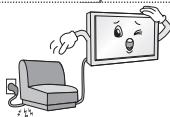
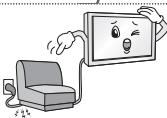
- Do not place a heavy object, or the product itself, on power cables.
Otherwise, this may result in fire or electric shock.
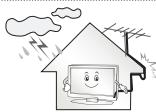
- Bend antenna cable between inside and outside building to prevent rain from flowing in.
This may cause water damaged inside the Product and could give an electric shock.
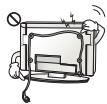
- When mounting a TV it on the wall, make sure not to install TV by hanging power and signal cables on the back of the TV.
It may cause fire, electric shock.
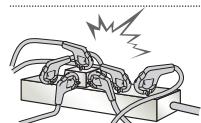
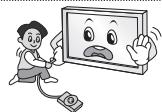
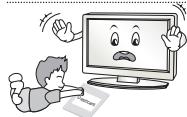
- Do not plug too many electrical devices into a single multiple electrical outlet. Otherwise, this may result in fire due to over-heating.
- Do not drop the product or let it fall over when connecting external devices. Otherwise, this may result in injury or damage to the product.
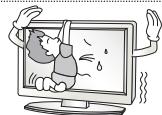
- Keep the packing anti-moisture material or vinyl packing out of the reach of children. Anti-moisture material is harmful if swallowed. If swallowed by mistake, force the patient to vomit and visit the nearest hospital. Additionally, vinyl packing can cause suffocation. Keep it out of the reach of children.
- Do not let your children climb or cling onto the TV. Otherwise, the TV may fall over, which may cause serious injury.
- Dispose of used batteries carefully to protect a child from eating them. In case if they eat it, take them to consult a doctor immediately.
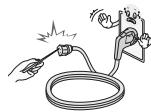
- Do not insert a conductor (like a metal chopstick) into one end of the power cable while the other end is connected to the input terminal on the wall. Additionally, do not touch the power cable right after plugging into the wall input terminal. You may be electrocuted. (Depending on model)
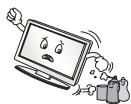
- Do not put or store inflammable substances near the product. There is a danger of explosion or fire due to careless handling of the inflammable substances.

- Do not drop metallic objects such as coins, hair pins, chopsticks or wire into the product, or inflammable objects such as paper and matches. Children must pay particular attention. Electrical shock, fire or injury can occur. If a foreign object is dropped into the product, unplug the power cord and contact the service centre.
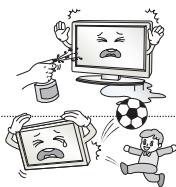
- Do not spray water on the product or scrub with an inflammable substance (thinner or benzene). Fire or electric shock accident can occur.
- Do not allow a impact shock or any objects to fall into the product, and do not drop onto the screen with something. You may be injured or the product can be damaged.
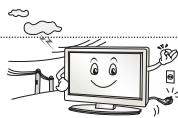
- Never touch this product or antenna during a thunder or lighting storm. You may be electrocuted.
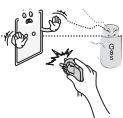
- Never touch the wall outlet when there is leakage of gas, open the windows and ventilate. It may cause a fire or a burn by a spark.
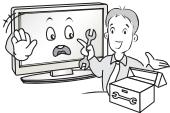 | ·Do not disassemble, repair or modify the product at your own discretion.Fire or electric shock accident can occur.Contact the service center for check, calibration or repair. |
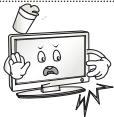 | ·If any of the following occur, unplug the product immediately and contact your local service centre.- The product has been impacted by shock- The product has been damaged- Foreign objects have entered the product- The product produced smoke or a strange smellThis may result in fire or electric shock. |
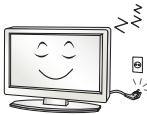 | ·If you don’t intend to use the product for a long time, unplug the power cable from the product.Covering dust can cause a fire, or insulation deterioration can cause electric leakage, electric shock or fire. |
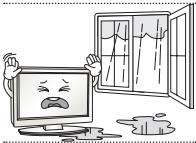 | ·Apparatus shall not be exposed to dripping or splashing and no objects filled with liquids, such as vases, shall be placed on the apparatus. |

CAUTION
natural_image
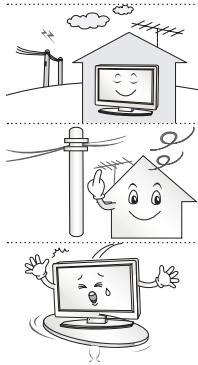
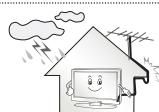
Illustration of three cartoon scenes: a smiling house, a wind turbine with motion lines, and a computer monitor with angry faces (no text or symbols)• Install the product where no radio wave occurs.
- There should be enough distance between an outside antenna and power lines to keep the former from touching the latter even when the antenna falls. This may cause an electric shock.
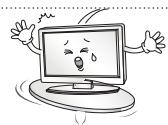
- Do not install the product on places such as unstable shelves or inclined surfaces. Also avoid places where there is vibration or where the product cannot be fully supported. Otherwise, the product may fall or flip over, which may cause injury or damage to the product.
- If you install the TV on a stand, you need to take actions to prevent the product from overturning. Otherwise, the product may fall over, which may cause injury.
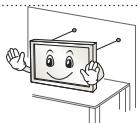
- If you intend to mount the product to a wall, attach VESA standard mounting interface (optional parts) to the back of the product. When you install the set to use the wall mounting bracket (optional parts), fix it carefully so as not to drop.
- Only use the attachments / accessories specified by the manufacturer.
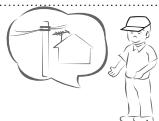
- When installing the antenna, consult a qualified service man. This may create a fire hazard or an electric shock hazard.
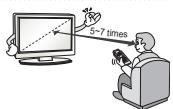
- We recommend that you maintain a distance of at least 5 to 7 times the diagonal screen size when watching TV. If you watch TV for a long period of time, this may cause blurred vision.
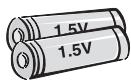
- Only use the specified type of battery. This could cause damage to the remote control.
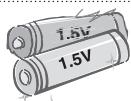
- Do not mix new batteries with old batteries. This may cause the batteries to overheat and leak.
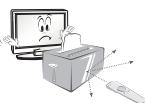
- Make sure there are no objects between the remote control and its sensor.
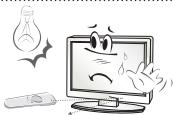
- Signal from the remote control may be disturbed by sun light or other strong light. In this case, darken the room.
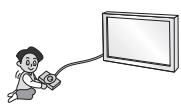
- When connecting external devices such as video game consoles, make sure the connecting cables are long enough. Otherwise, the product may fall over, which may cause injury or damage the product.
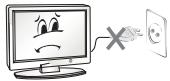 | ·Do not turn the product On/Off by plugging-in or unplugging the power plug to the wall outlet. (Do not use the power plug for switch.)It may cause mechanical failure or could give an electric shock. |
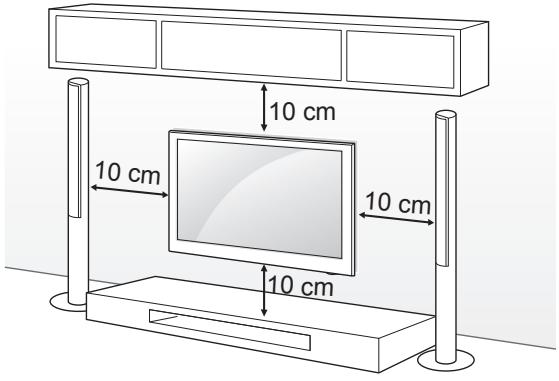
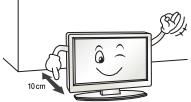 | ·Please follow the installation instructions below to prevent the product from overheating.- The distance between the product and the wall should be more than 10 cm.- Do not install the product in a place with no ventilation (e.g., on a bookshelf or in a cupboard).- Do not install the product on a carpet or cushion.- Make sure the air vent is not blocked by a tablecloth or curtain.Otherwise, this may result in fire. |
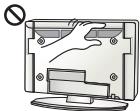 | ·Take care not to touch the ventilation openings when watching the TV for long periods as the ventilation openings may become hot. This does not affect the operation or performance of the product. |
| ·Periodically examine the cord of your appliance, and if its appearance indicates damage or deterioration, unplug it, discontinue use of the appliance, and have the cord replaced with an exact replacement part by an authorized servicer. | |
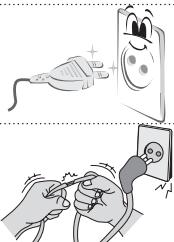 | ·Prevent dust collecting on the power plug pins or outlet.This may cause a fire hazard. |
| ·Protect the power cord from physical or mechanical abuse, such as being twisted, kinked, pinched, closed in a door, or walked upon. Pay particular attention to plugs, wall outlets, and the point where the cord exits the appliance. | |
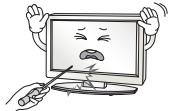 | ·Do not press strongly upon the panel with a hand or sharp object such as nail, pencil or pen, or make a scratch on it. |
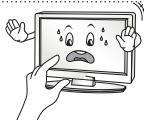 | ·Avoid touching the screen or holding your finger(s) against it for long periods of time. Doing so may produce some temporary distortion effects on the screen. |
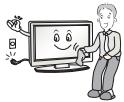 | ·When cleaning the product and its components, unplug the power first and wipe it with a soft cloth. Applying excessive force may cause scratches or discolouration. Do not spray with water or wipe with a wet cloth. Never use glass cleaner, car or industrial shiner, abrasives or wax, benzene, alcohol etc., which can damage the product and its panel.Otherwise, this may result in fire, electric shock or product damage (deformation, corrosion or breakage). |
| ·As long as this unit is connected to the AC wall outlet, it is not disconnected from the AC power source even if you turn off this unit by SWITCH. | |
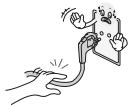 | ·When unplugging the cable, grab the plug and unplug it.If the wires inside the power cable are disconnected, this may cause fire. |
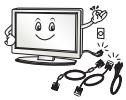 | ·When moving the product, make sure you turn the power off first. Then, unplug the power cables, antenna cables and all connecting cables.The TV set or power cord may be damaged, which may create a fire hazard or cause electric shock. |
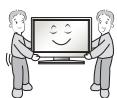

- When moving or unpacking the product, work in pairs because the product is heavy.
Otherwise, this may result in injury.
- Contact the service center once a year to clean the internal parts of the product.
Accumulated dust can cause mechanical failure.
- Refer all servicing to qualified service personnel. Servicing is required when the apparatus has been damaged in any way, such as power supply cord or plug is damaged, liquid has been spilled or objects have fallen into the apparatus, the apparatus has been exposed to rain or moisture, does not operate normally, or has been dropped.
- If the product feels cold to the touch, there may be a small “flicker” when it is turned on. This is normal, there is nothing wrong with product.
- The panel is a high technology display product with resolution of two million to six million pixels. You may see tiny black dots and/or brightly coloured dots (red, blue or green) at a size of 1 ppm on the panel. This does not indicate a malfunction and does not affect the performance and reliability of the product.
This phenomenon also occurs in third-party products and is not subject to exchange or refund.
- You may find different brightness and colour of the panel depending on your viewing position(left/right/top/down).
This phenomenon occurs due to the characteristic of the panel. It is not related with the product performance, and it is not malfunction.
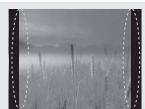
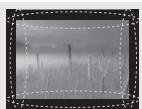
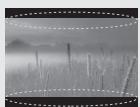
- Displaying a still image (e.g., broadcasting channel logo, on-screen menu, scene from a video game) for a prolonged time may cause damage to the screen, resulting in retention of the image, which is known as image sticking. The warranty does not cover the product for image sticking.
Avoid displaying a fixed image on your television's screen for a prolonged period (2 or more hours for LCD, 1 or more hours for Plasma).
Also, if you watch the TV at a ratio of 4:3 for a long time, image sticking may occur on the borders of the panel.
This phenomenon also occurs in third-party products and is not subject to exchange or refund.
- Generated Sound
“Cracking” noise: A cracking noise that occurs when watching or turning off the TV is generated by plastic thermal contraction due to tempera-ture and humidity. This noise is common for products where thermal deformation is required. Electrical circuit humming/panel buzzing: A low level noise is generated from a high-speed switching circuit, which supplies a large amount of current to operate a product. It varies depending on the product.
This generated sound does not affect the performance and reliability of the product.
Viewing 3D Imaging (Only 3D models)

WARNING
Viewing Environment
- Viewing Time
- When watching 3D contents, take 5 - 15 minute breaks every hour. Viewing 3D contents for a long period of time may cause headache, dizziness, fatigue or eye strain.
Those that have a photosensitive seizure or chronic illness
- Some users may experience a seizure or other abnormal symptoms when they are exposed to a flashing light or particular pattern from 3D contents.
- Do not watch 3D videos if you feel nausea, are pregnant and/or have a chronic illness such as epilepsy, cardiac disorder, or blood pressure disease, etc.
- 3D Contents are not recommended to those who suffer from stereo blindness or stereo anomaly. Double images or discomfort in viewing may be experienced.
- If you have strabismus (cross-eyed), amblyopia (weak eyesight) or astigmatism, you may have trouble sensing depth and easily feel fatigue due to double images. It is advised to take frequent breaks than the average adult.
- If your eyesight varies between your right and left eye, revise your eyesight prior to watching 3D contents.
Symptoms which require discontinuation or refraining from watching 3D contents
- Do not watch 3D contents when you feel fatigue from lack of sleep, overwork or drinking.
- When these symptoms are experienced, stop using/watching 3D contents and get enough rest until the symptom subsides.
- Consult your doctor when the symptoms persist. Symptoms may include headache, eyeball pain, dizziness, nausea, palpitation, blurriness, discomfort, double image, visual inconvenience or fatigue.

CAUTION
Viewing Environment
- Viewing Distance
- Maintain a distance of at least twice the screen diagonal length when watching 3D contents. If you feel discomfort in viewing 3D contents, move further away from the TV.
- Viewing Position
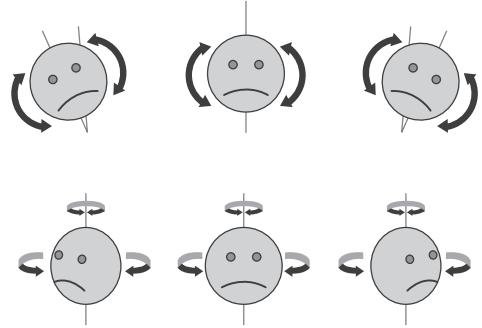
- Face the center of the screen at eye level with the head looking straight ahead. Otherwise, you may not be able to view 3D contents properly.
flowchart
graph TD
    A["Emotional Emotion"] --> B["Stable Expression"]
    B --> C["Rebound Emotion"]
    C --> D["Stable Expression"]
    D --> E["Rebound Emotion"]
    E --> F["Stable Expression"]
    F --> G["Rebound Emotion"]
    G --> H["Stable Expression"]
    H --> I["Rebound Emotion"]
    I --> J["Stable Expression"]
Viewing Age
- Infants/Children
- Usage/ Viewing 3D contents for children under the age of 5 are prohibited.
- Children under the age of 10 may overreact and become overly excited because their vision is in development (for example: trying to touch the screen or trying to jump into it. Special monitoring and extra attention is required for children watching 3D contents.
- Children have greater binocular disparity of 3D presentations than adults because the distance between the eyes is shorter than that of adults. Therefore they will perceive more stereoscopic depth compared to adults for the same 3D image.
- Teenagers
- Teenagers under the age of 19 may react with sensitivity due to stimulation from light in 3D contents. Advise them to refrain from watching 3D contents for a long time when they are tired.
- Elderly
- The elderly may perceive less 3D effect compared to the young. Do not sit closer to the TV than the recommended distance.
Cautions when using the 3D glasses
- Make sure to use LG 3D glasses. Otherwise, you may not be able to view 3D videos properly.
- Do not use 3D glasses instead of your normal glasses, sunglasses or protective goggles.
- Using modified 3D glasses may cause eye strain or image distortion.
- Do not keep your 3D glasses in extremely high or low temperatures. It will cause deformation.
- The 3D glasses are fragile and are easily scratched. Always use a soft, clean piece of cloth when wiping the lenses. Do not scratch the lenses of the 3D glasses with sharp objects or clean/wipe them with chemicals.
- When watching 3D videos under fluorescent lights or with three wave length lamps, you may experience the screen blinking. When this occurs, turn the light off or turn it down.
- Other electronic or communication devices should be turned off or put away from the TV because it can cause interference and prevent the 3D function from working properly.
- When you watch TV lying down, 3D images may look darker or invisible.

NOTE
• Image shown may differ from your TV.
- Your TV's OSD (On Screen Display) may differ slightly from that shown in this manual.
- The available menus and options may differ from the input source or product model that you are using.
- New features may be added to this TV in the future.
- The TV can be placed in standby mode in order to reduce the power consumption. And the TV should be turned off if it will not be watched for some time, as this will reduce energy consumption.
- The energy consumed during use can be significantly reduced if the level of brightness of the picture is reduced, and this will reduce the overall running cost.
INSTALLATION PROCEDURE
1 Open the package and make sure all the accessories are included.
2 Attach the stand to the TV set.
3 Connect an external device to the TV set.
4 Make sure the network connection is available.
You can use the TV network functions only when the network connection is made.
ASSEMBLING AND PREPARING
Unpacking
Check your product box for the following items. If there are any missing accessories, contact the local dealer where you purchased your product. The illustrations in this manual may differ from the actual product and item.

CAUTION
- Do not use any unapproved items to ensure the safety and product life span.
- Any damage or injuries caused by using unapproved items are not covered by the warranty.
- Some models have a thin film attached on to the screen and this must not be removed.
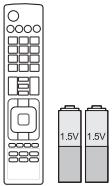 | Remote Control, Batteries (AAA)(See p. 20) | 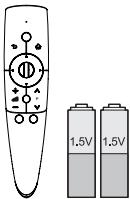 | Magic Remote Control, Batteries (AA)(Only 50/60PM97**) (See p. 21) |
 | Owner's manual | 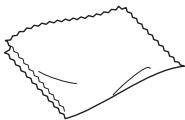 | Polishing cloth(Depending on model)Use this to remove dust from the cabinet. |
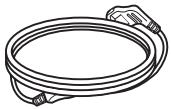 | Power Cord | 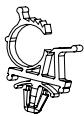 | Power Cord Holder(See p. A-4) |
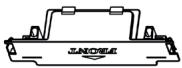 | Protection Cover(See p. A-4) | 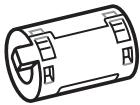 | Ferrite core(Depending on model)(See p. 14) |
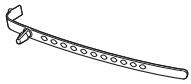 | Cable Holder(Depending on model)(See p. A-4) | 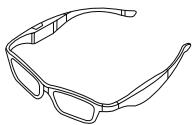 | 3D Glasses(AG-350)(Depending on model) |
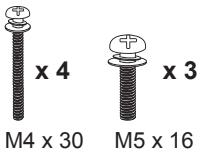 | Screw for assembly(Only 42/50PM47**, 50/60PM67**, 50PM68**, 50PM97**) (See p. A-3) | 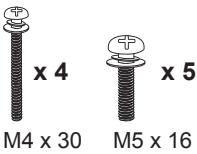 | Screw for assembly(Only 60PM68**, 60PM97**) (See p. A-3) |
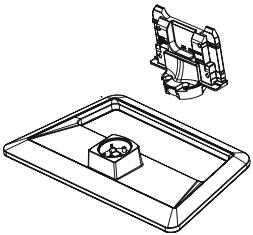 | Stand Body / Stand Base(Only 42/50PM47**, 50/60PM67**) (See p. A-3) | 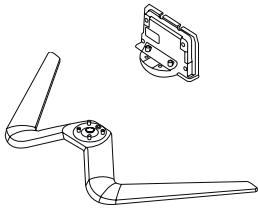 | Stand Body / Stand Base(Only 50/60PM68**, 50/60PM97**) (See p. A-3) |
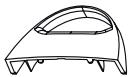 | Cable management(Only 50/60PM68**, 50/60PM97**) (See p. A-3) |
NOTE
- The items supplied with your product may vary depending on the model.
- Product specifications or contents of this manual may be changed without prior notice due to upgrade of product functions.
How to use the ferrite core
1 Use the ferrite core to reduce the electromagnetic interference in the PC audio cable. Wind the PC audio cable on the ferrite core thrice. Place the ferrite core close to the TV.
[to an External device]

[Figure 1]
[to the TV]
[Cross Section of Ferrite Core]
2 Use the ferrite core to reduce the electromagnetic interference in the power cable. Wind the power cable on the ferrite core once. Place the ferrite core close to the TV and a wall plug.
[to a wall plug]

[Figure 2]
[to the TV]
[Cross Section of Ferrite Core]
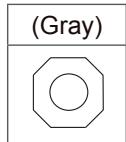
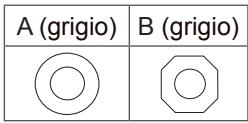
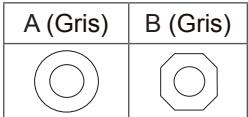
3 Use the ferrite core to reduce the electromagnetic interference in the LAN cable. Wind the LAN cable thrice on the ferrite core. Place the ferrite core close to the TV and an External device.
[to an External device]

text_image
A A B[to the TV]
| A (Gray) | B (Gray) |
[Figure 3]
[Cross Section of Ferrite Core]
4 Use the ferrite core to reduce the electromagnetic interference in the component Y, Pb, Pr, L, R cable. Wind the component Y, Pb, Pr, L, R cable on the ferrite core once. Place the ferrite core close to the TV.
[to an External device]
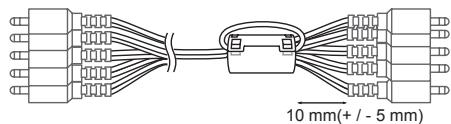
text_image
10 mm(+ / - 5 mm)[Figure 4]
[to the TV]
[Cross Section of Ferrite Core]
- If there are six ferrite cores, follow as shown in Figure 1,2 and 3.
- If there are seven ferrite cores, follow as shown in Figure 1,2,3 and 4.
- For an optimal connection, HDMI cables and USB devices should have bezels less than 10 mm thick and 18 mm width. Use an extension cable that supports USB 2.0 if the USB cable or USB memory stick does not fit into your TV's USB port.
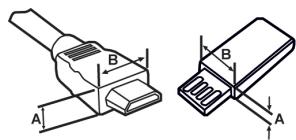
text_image
Technical diagram showing two types of electrical connectors with labeled dimensions A and B*A ≤ 10 mm *B ≤ 18 mm
Separate purchase
Separate purchase items can be changed or modified for quality improvement without any notification.
Contact your dealer to buy these items.
These devices only work with certain models.
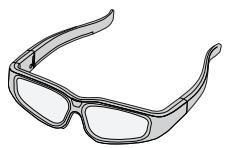
AG-S3**
3D Glasses
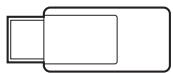
AN-WF100
Wireless LAN
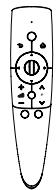
AN-MR300
Magic Remote Control
| Compatibility | PM47** | PM67** | PM68** | PM97** |
| AG-S3**3D Glasses | • | • | • | • |
| AN-WF100Wireless LAN | • | • | ||
| AN-MR300Magic Remote Control | • | • | • | • |
The model name or design may be changed depending on the upgrade of product functions, manufacturer's circumstances or policies.
Parts and buttons
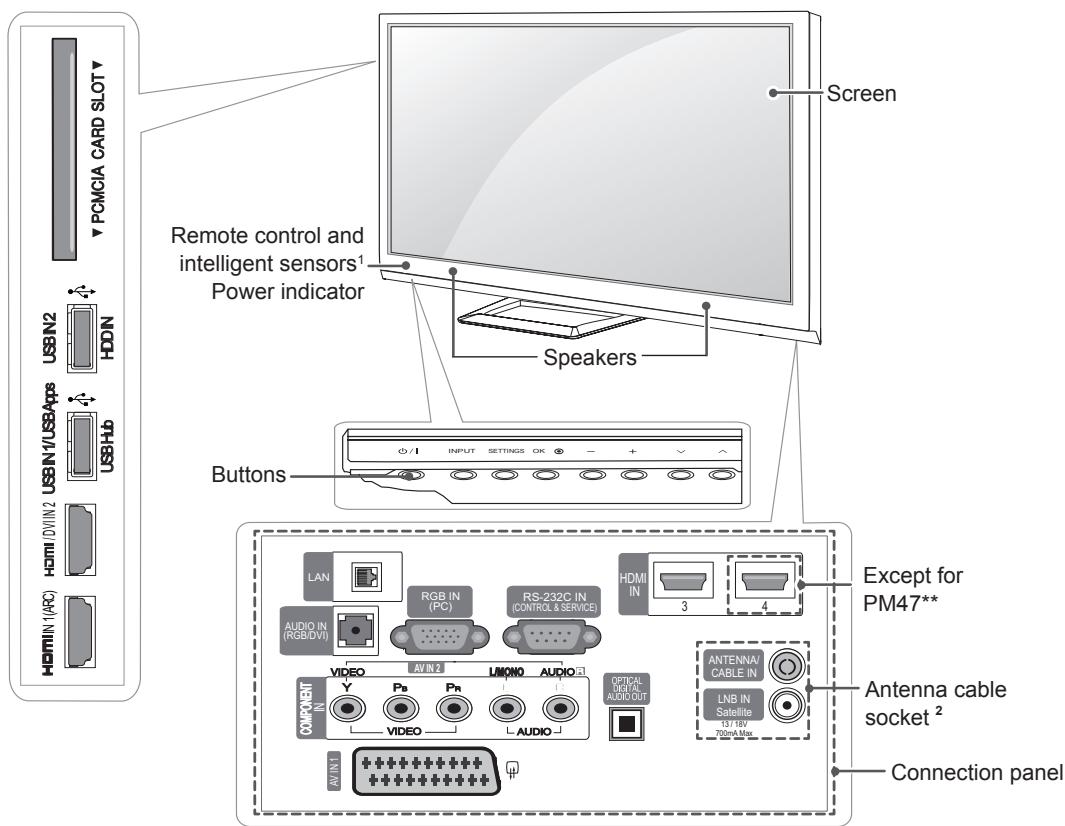
text_image
PCMCIA CARD SLOT USB/N2 HDDN USB/Hb HDMI/D/VIN2 USB/IN1/USA Apps HDMI/IN1(ARC) Remote control and intelligent sensors¹ Power indicator Speakers Buttons Screen ✓ / I INPUT SETTINGS OK - + ✓ / I INPUT Settings OK - + ✓ / I INPUT Settings OK - + ✓ / I INPUT Settings OK - + ✓ / I INPUT Settings OK - + ✓ / I INPUT Settings OK - + ✓ / I INPUT Settings OK - + ✓ / I INPUT Settings OK - + ✓ / I INPUT Settings OK - + ✓ / I INPUT Settings OK - + ✓ / I INPUT Settings OK - + ✓ / I INPUT Settings OK - + ✓ / I INPUT Settings OK - + ✓ / I INPUT Settings OK - + /- / I INPUT Settings OK - + ✓ / I INPUT Settings OK - + ✓ / I INPUT Settings OK - + ✓ / I INPUT Settings OK - + ✓ / I INPUT Settings OK - + ✓ / I INPUT Settings OK - + ✓ / I INPUT Settings OK - + ✓ / I INPUT Settings OK - + ✓ / I INPUT Settings OK - + ✓ / I INPUT Settings OK - + ✓ / I INPUT Settings OK - + ✓ / I INPUT Settings OK - + ✓ / I INPUT SETTLE ✓ / I INPUT SETTLE ✓ / I INPUT SETTLE ✓ / I INPUT SETTLE ✓ / I INPUT SETTLE ✓ / I INPUT SETTLE ✓ / I INPUT SETTLE ✓ / I INPUT SETTLE ✓ / I INPUT SETTLE ✓ / I INPUT SETTLE ✓ / I INPUT SETTLE ✓ / I INPUT SETTLE ✓ / I INPUT SETTLE ✓ / I UNT 2 ✓ / I UNT 2 ✓ / I UNT 2 ✓ / I UNT 2 ✓ / I UNT 2 ✓ / I UNT 2 ✓ / I UNT 2 ✓ / I UNT 2 ✓ / I UNT 2 ✓ / I UNT 2 ✓ / I UNT 2 ✓ / I UNT 2 ✓ / I UNT 2 ✓ /I UNT 2 ✓ /I UNT 2 ✓ /I UNT 2 ✓ /I UNT 2 ✓ /I UNT 2 ✓ /I UNT 2 ✓ /I UNT 2 ✓ /I UNT 2 ✓ /I UNT 2 ✓ /I UNT 2 ✓ /I UNT 2 ✓ /I UNT 2 ✓ /I UNT 3 ✓ /I UNT 3 ✓ /I UNT 3 ✓ /I UNT 3 ✓ /I UNT 3 ✓ /I UNT 3 ✓ /I UNT 3 ✓ /I UNT 3 ✓ /I UNT 3 ✓ /I UNT 3 ✓ /I UNT 3 ✓ /I UNT 3 ✓ /I UNT 3 ✓ /II AN1/2 ✓ /II AN1/2 ✓ /II AN1/2 ✓ /II AN1/2 ✓ /II AN1/2 ✓ /II AN1/2 ✓ /II AN1/2 ✓ /II AN1/2 ✓ /II AN1/2 ✓ /II AN1/2 ✓ /II AN1/2 ✓ /II AN1/2 ✓ /II AN1/2 ✓ /III AN1/2 ✓ /III AN1/2 ✓ /III AN1/2 ✓ /III AN1/2 ✓ /III AN1/2 ✓ /III AN1/2 ✓ /III AN1/2 ✓ /III AN1/2 ✓ /III AN1/2 ✓ /III AN1/2 ✓ /III AN1/2 ✓ /III AN1/2 ✓ /III AN1/470mA Max ✓ /III AN1/470mA Max ✓ /III AN1/470mA Max ✓ /III AN1/470mA Max ✓ /III AN1/470mA Max ✓ /III AN1/470mA Max ✓ /III AN1/470mA Max ✓ /III AN1/470mA Max ✓ /III AN1/470mA Max ✓ /IVAN1/470mA Max ✓ /IVAN1/470mA Max| Button | Description |
| ⏻ / I | Turns the power on or off. |
| INPUT | Changes the input source. |
| SETTINGS | Accesses the main menus, or saves your input and exits the menus. |
| OK Ⓞ | Selects the highlighted menu option or confirms an input. |
| - + | Adjusts the volume level. |
| √ ∧ | Scrolls through the saved programmes. |
1 Intelligent sensor - Adjusts the image quality and brightness based on the surrounding environment.
2 Antenna cable socket - The Antenna cable socket may differ from the model.
Lifting and moving the TV
Please note the following advice to prevent the TV from being scratched or damaged and for safe transportation regardless of its type and size.

CAUTION
- Avoid touching the screen at all times, as this may result in damage to the screen.
- It is recommended to move the TV in the box or packing material that the TV originally came in.
- Before moving or lifting the TV, disconnect the power cord and all cables.
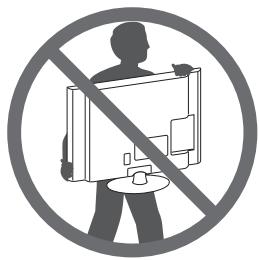
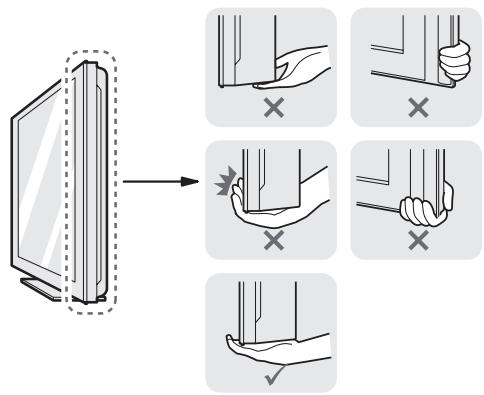
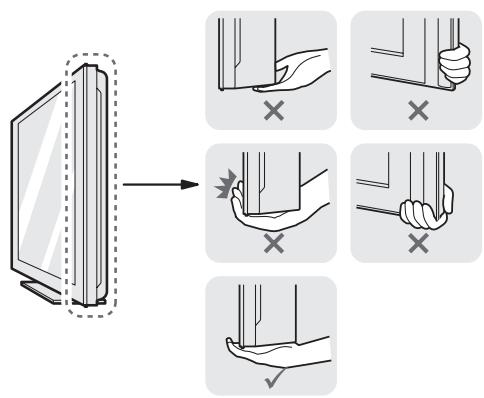
- When holding the TV, the screen should face away from you to avoid damage.
natural_image
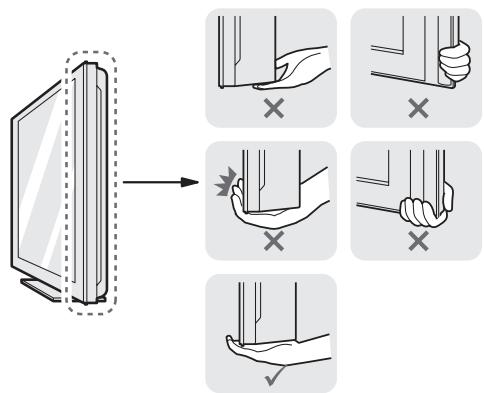
Prohibition sign showing a person holding a computer monitor within a circle (no text or symbols)- Hold the top and bottom of the TV frame firmly. Make sure not to hold the transparent part, speaker, or speaker grill area.

text_image
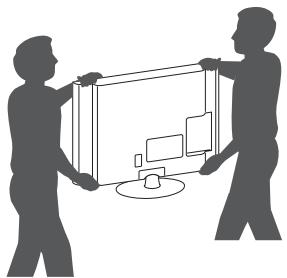
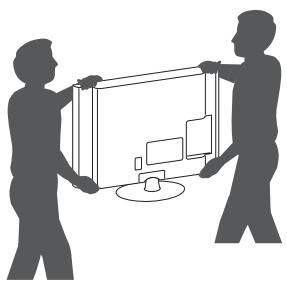
Diagram illustrating hand gesture application on a screen, showing selection of 'X' and confirmation steps.- When transporting a large TV, there should be at least 2 people.
- When transporting the TV by hand, hold the TV as shown in the following illustration.
natural_image
Silhouette of two people exchanging a large screen with a monitor, no text or symbols visible- When transporting the TV, do not expose the TV to jolts or excessive vibration.
- When transporting the TV, keep the TV upright, never turn the TV on its side or tilt towards the left or right.
Mounting on a table
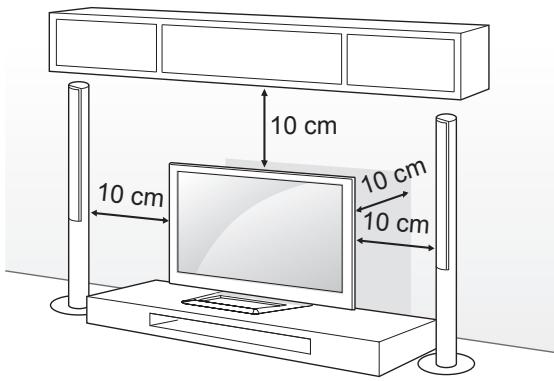
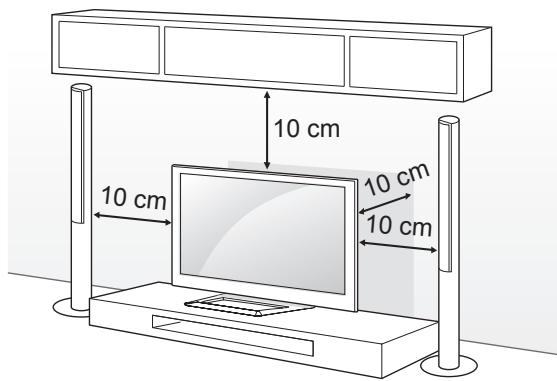
1 Lift and tilt the TV into its upright position on a table.
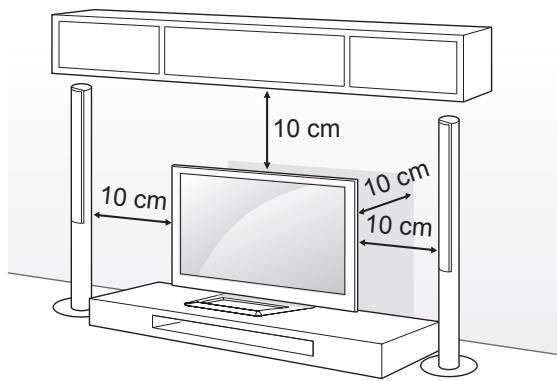
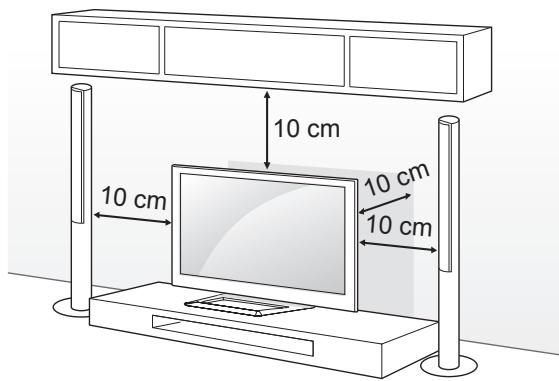
- Leave a 10 cm (minimum) space from the wall for proper ventilation.
text_image
10 cm 10 cm 10 cm 10 cm2 Connect the power cord to a wall outlet.

CAUTION
- Do not place the TV near or on sources of heat, as this may result in fire or other damage.
Adjusting the angle of the TV to suit view
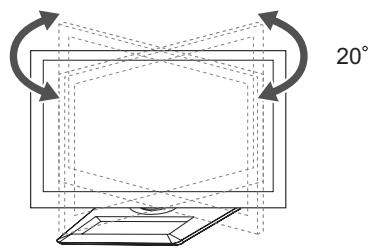
(This feature is not available for all models.) Adjusting the angle of the TV to suit view Swivel 20 degrees to the left or right and adjust the angle of the TV to suit your view.
20^
text_image
20°
CAUTION
When adjusting the angle of the product, watch out for your fingers.
» Personal injury may occur if hands or fingers are pinched. If the product is tilted too much, it may fall, causing damage or injury.
Securing the TV to a wall
(This feature is not available for all models.)

natural_image
Line drawing of a flat-screen TV with a red dotted line indicating a path or trajectory (no text or symbols present)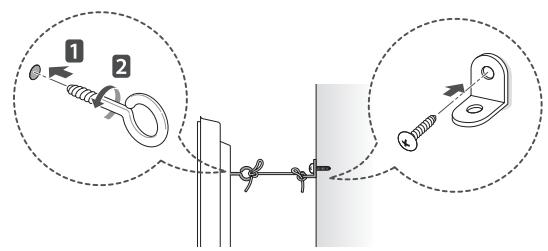
text_image
Diagram illustrating two steps of securing a spring, labeled with numbered instructions and magnified views.1 Insert and tighten the eye-bolts, or TV brackets and bolts on the back of the TV.
- If there are bolts inserted at the eye-bolts position, remove the bolts first.
2 Mount the wall brackets with the bolts to the wall.
Match the location of the wall bracket and the eye-bolts on the rear of the TV.
3 Connect the eye-bolts and wall brackets tightly with a sturdy rope.
Make sure to keep the rope horizontal with the flat surface.

CAUTION
- Make sure that children do not climb on or hang on the TV.

NOTE
- Use a platform or cabinet that is strong and large enough to support the TV securely.
- Brackets, bolts and ropes are not provided. You can obtain additional accessories from your local dealer.
Mounting on a wall
Attach an optional wall mount bracket at the rear of the TV carefully and install the wall mount bracket on a solid wall perpendicular to the floor. When you attach the TV to other building materials, please contact qualified personnel. LG recommends that wall mounting be performed by a qualified professional installer.
text_image
10 cm 10 cm 10 cm 10 cmMake sure to use screws and wall mount bracket that meet the VESA standard. Standard dimensions for the wall mount kits are described in the following table.
Separate purchase(Wall Mounting Bracket)
| Model | 42/50PM47**50PM67**50PM68**50PM97** | 60PM67**60PM68**60PM97** |
| VESA (A x B) | 400 x 400 | 600 x 400 |
| Standard screw | M6 | M8 |
| Number of screws | 4 | 4 |
| Wall mount bracket | PSW400B,PSW400BG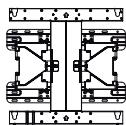 | PSW600B,PSW600BG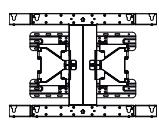 |
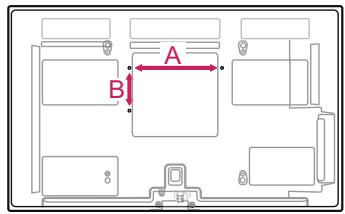
text_image
A B
CAUTION
- Disconnect the power first, and then move or install the TV. Otherwise electric shock may occur.
- If you install the TV on a ceiling or slanted wall, it may fall and result in severe injury. Use an authorised LG wall mount and contact the local dealer or qualified personnel.
- Do not over tighten the screws as this may cause damage to the TV and void your warranty.
- Use the screws and wall mounts that meet the VESA standard. Any damages or injuries by misuse or using an improper accessory are not covered by the warranty.

NOTE
- Use the screws that are listed on the VESA standard screw specifications.
- The wall mount kit includes an installation manual and necessary parts.
- The wall mount bracket is not provided. You can obtain additional accessories from your local dealer.
- The length of screws may differ depending on the wall mount. Make sure to use the proper length.
- For more information, refer to the manual supplied with the wall mount.
REMOTE CONTROL
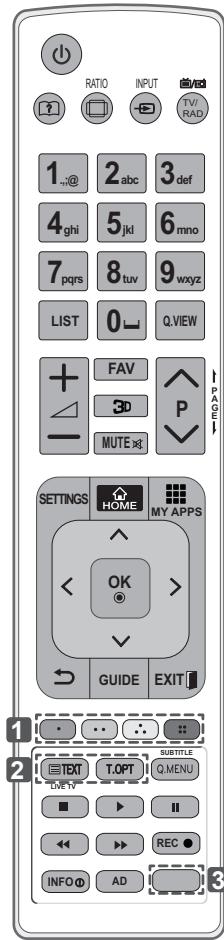
The descriptions in this manual are based on the buttons on the remote control.
Please read this manual carefully and use the TV correctly.
To replace batteries, open the battery cover, replace batteries (1.5 V AAA) matching the ⊕ and ⊖ ends to the label inside the compartment, and close the battery cover. To remove the batteries, perform the installation actions in reverse.
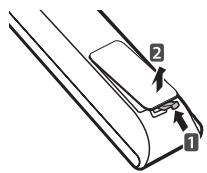

CAUTION
- Do not mix old and new batteries, as this may damage the remote control.
Make sure to point the remote control toward the remote control sensor on the TV.
| ☐ (User Guide)Sees user-guide. |
| ☐ RATIOResizes an image. |
| ▶ INPUTChanges the input source. |
| TV/RAD ☐/☐Selects Radio, TV and DTV programme. |
| LISTAccesses the saved programme list. |
| ☐ (Space)Opens an empty space on the screen keyboard. |
| Q.VIEWReturns to the previously viewed programme. |
| FAVAccesses your favourite programme list. |
| 3DUsed for viewing 3D video. |
| PAGEMoves to the previous or next screen. |
| SETTINGSAccesses the main menus. |
| HOMEAccesses the Home menus. |
| MY APPSShows the list of Apps. |
| Navigation buttons (up/down/left/right)Scrolls through menus or options. |
| OK ☉Selects menus or options and confirms your input. |
| ☐ (Back)Returns to the previous level. |
| GUIDEShows programme guide. |
text_image
RATIO INPUT TV/RAD 1_+@ 2 abc 3 def 4 ghi 5 jkl 6 mno 7 pqrs 8 tuv 9 wxyz LIST 0 Q VIEW FAV 3D P MUTE xj SETTINGS HOME MY APPS OK > GUIDE EXIT TEXT T.OPT SUBTITLE Q.MENU INFO AD| EXIT [ ]Clears all on-screen displays and return to TV viewing. |
| 1 Colour buttonsThese access special functions in some menus.(●: Red, ▼: Green, ◆: Yellow, ◎: Blue) |
| 2 TELETEXT BUTTONSThese buttons are used for teletext.For further details, see the ‘Teletext’ section. |
| SUBTITLERecalls your preferred subtitle in digital mode. |
| Q. MENUAccesses the quick menus. |
| LIVE TVReturn to LIVE TV. |
| Control buttons (■, ▶, II, ◀, ▶)Controls the Premium contents, DVR or Smart Share menus or the SIMPLINK compatible devices (USB or SIMPLINK or DVR). |
| REC ●Uses to adjust DVR menu. |
| INFO1Views the information of the current programme and screen. |
| ADSwitches the Audio Description On or Off. |
| 3 APP/*APP/*Select the MHP TV menu source.(Only Italy) (Depending on model) |
| 3 @ ORANGEDirect access to your internet portal of entertainment and news services developed by Orange. (Only France) |
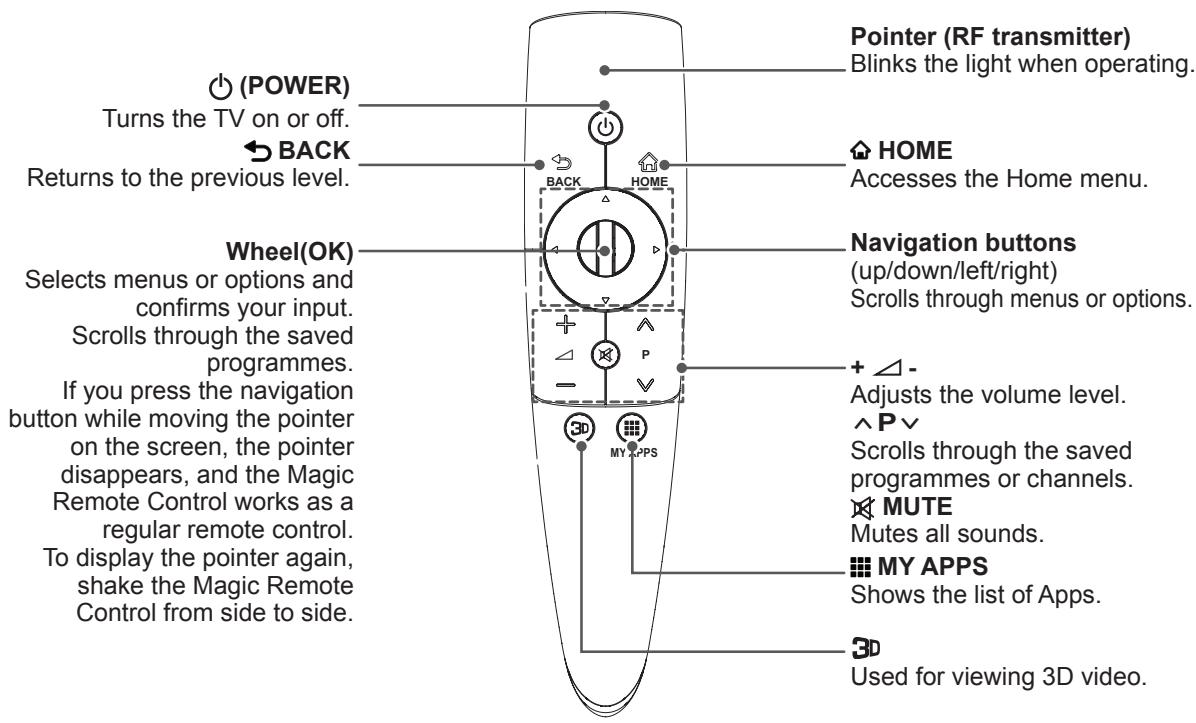
MAGIC REMOTE CONTROL FUNCTIONS
This item is not included for all models.
When the message “Magic Remote Control battery is low. Change the battery.” is displayed, replace the battery.
To replace batteries, open the battery cover, replace batteries (1.5 V AA) matching and ends to the label inside the compartment, and close the battery cover. Be sure to point the remote control toward the remote control sensor on the TV.
To remove the batteries, perform the installation actions in reverse.
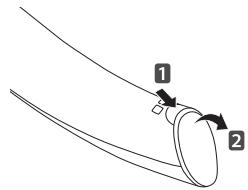
text_image
1 2
CAUTION
- Do not mix old and new batteries, as this may damage the remote control.
- Do not need Magic remote Dongle to operate the magic remote control. The Receiver is built into the TV.
text_image
Pointer (RF transmitter) Blinks the light when operating. (POWER) Turns the TV on or off. BACK Returns to the previous level. HOME Accesses the Home menu. Wheel(OK) Selects menus or options and confirms your input. Scrolls through the saved programmes. If you press the navigation button while moving the pointer on the screen, the pointer disappears, and the Magic Remote Control works as a regular remote control. To display the pointer again, shake the Magic Remote Control from side to side. Navigation buttons (up/down/left/right) Scrolls through menus or options. + - Adjusts the volume level. ^ P ∨ Scrolls through the saved programmes or channels. MUTE Mutes all sounds. MY APPS Shows the list of Apps. 3D Used for viewing 3D video.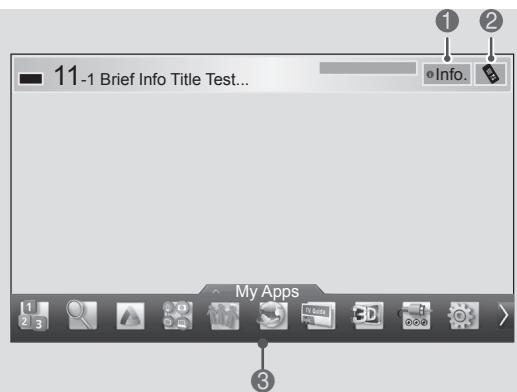
text_image
11-1 Brief Info Title Test... Info. My Apps| 1 | If you press Wheel(OK) on the Magic Remote Control, the following screen appears. Shows information about the current programme and screen. |
| 2 | Pressing this button will display number keypad which you can select programme number. |
| 3 | You can select My Apps Menu. |
Registering Magic Remote Control
It is necessary to ‘pair’ (register) the magic remote control to your TV before it will work.
How to register the Magic Remote Control
| 1 To register automatically, turn the TV on and press the Wheel(OK) button. When registration is completed, the completion message appears on the screen.2 If registration fails, turn the TV off and back on, then press the Wheel(OK) button to complete registration. |
How to re-register the Magic Remote Control
| BACKHOME | 1 Press and hold the BACKand HOMEbuttons together for 5 seconds to reset, then register it by following “How to register the Magic Remote Control” above.2 To re-register the Magic Remote Control, press and hold the BACKbutton for 5 seconds toward the TV. When registration is completed, the completion message appears on the screen. |
How to use Magic Remote Control
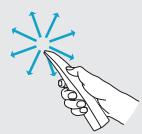
1 If the pointer disappears, move the remote control slightly to left or right. Then, it will automatically appear on the screen.
» If the pointer has not been used for a certain period of time, it will disappear.
2 You can move the pointer by aiming the Pointer Receiver of the remote control at your TV then move it left, right, up or down.
» If the pointer does not work properly, leave the remote control for 10 seconds then use it again.
Precautions to Take when Using the Magic Remote Control
- Use the remote control within the maximum communication distance (10 m). Using the remote control beyond this distance, or with an object obstructing it, may cause a communication failure.
- A communication failure may occur due to nearby devices. Electrical devices such as a microwave oven or wireless LAN product may cause interference, as these use the same bandwidth (2.4 GHz) as the Magic Remote Control.
- The Magic Remote Control may be damaged or may malfunction if it is dropped or receives a heavy impact.
• Take care not to bump into nearby furniture or other people when using the Magic Remote Control. - Manufacturer and installer cannot provide service related to human safety as the applicable wireless device has possibility of electric wave interference.
- It is recommended that an Access Point (AP) be located more than 1 m away from the TV. If the AP is installed closer than 1 m, the Magic Remote Control may not perform as expected due to frequency interference.
USING THE USER GUIDE
User Guide allows you to more easily access the detailed TV information.
1 Press the ⏻ HOME button to access the HOME menu.
2 Select User Guide and press Wheel(OK).
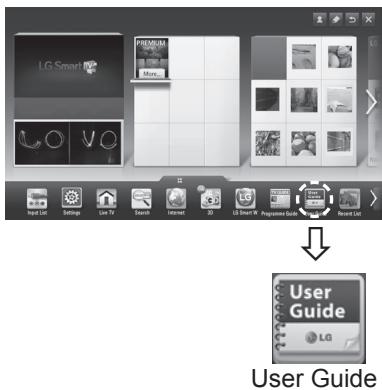
text_image
LG Smart User GuideNOTE
- You can also access the User Guide by pressing ☐(User Guide) in the remote control.
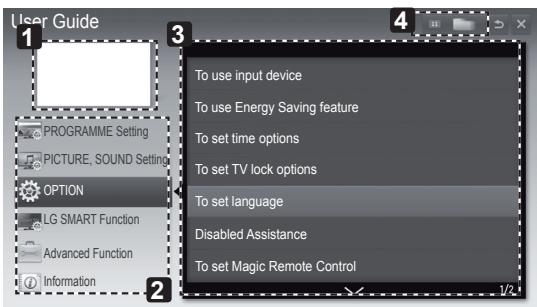
text_image
User Guide PROGRAMME Setting PICTURE, SOUND Settings OPTION LG SMART Function Advanced Function Information To use input device To use Energy Saving feature To set time options To set TV lock options To set language Disabled Assistance To set Magic Remote Control1 Shows the current watching programme or input source screen.
2 Allows to select the category you want.
3 Allows to select the item you want.
You can use ^/∨ to move between pages.
4 Allows to browse the description of the function you want from the index.
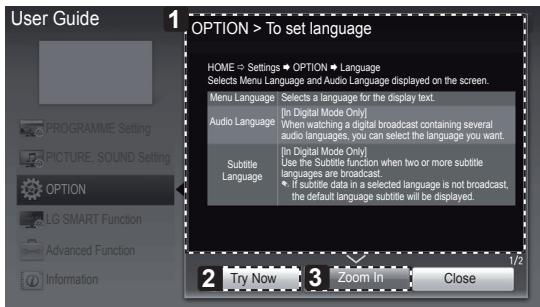
text_image
User Guide 1 OPTION > To set language HOME → Settings → OPTION → Language Selects Menu Language and Audio Language displayed on the screen. Menu Language Selects a language for the display text. Audio Language [In Digital Mode Only] When watching a digital broadcast containing several audio languages, you can select the language you want. Subtitle Language [In Digital Mode Only] Use the Subtitle function when two or more subtitle languages are broadcast. if subtitle data in a selected language is not broadcast, the default language subtitle will be displayed. 2 Try Now 3 Zoom in Close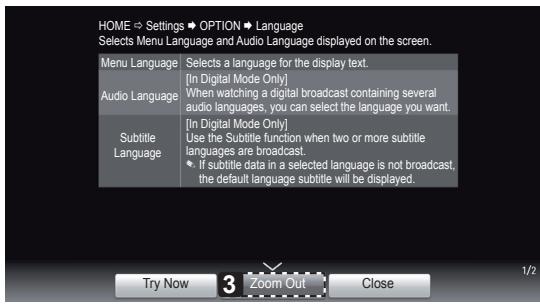
text_image
HOME → Settings → OPTION → Language Selects Menu Language and Audio Language displayed on the screen. Menu Language Selects a language for the display text. Audio Language [In Digital Mode Only] When watching a digital broadcast containing several audio languages, you can select the language you want. Subtitle Language [In Digital Mode Only] Use the Subtitle function when two or more subtitle languages are broadcast. If subtitle data in a selected language is not broadcast, the default language subtitle will be displayed. Try Now 3 Zoom Out Close 1/21 Shows the description of the selected menu. You can use ^/∨ to move between pages.
2 Moves to the selected menu directly from the User Guide.
3 Zooms in or out the screen.
MAINTENANCE
Cleaning your TV
Clean your TV regularly to keep the best performance and to extend the product lifespan.

CAUTION
- Make sure to turn the power off and disconnect the power cord and all other cables first.
- When the TV is left unattended and unused for a long time, disconnect the power cord from the wall outlet to prevent possible damage from lightning or power surges.
Screen, frame, cabinet and stand
- To remove dust or light dirt, wipe the surface with a dry, clean, and soft cloth.
- To remove major dirt, wipe the surface with a soft cloth dampened in clean water or a diluted mild detergent. Then wipe immediately with a dry cloth.

CAUTION
- Avoid touching the screen at all times, as this may result in damage to the screen.
- Do not push, rub, or hit the screen surface with your fingernail or a sharp object, as this may result in scratches and image distortions.
- Do not use any chemicals as this may damage the product.
- Do not spray liquid onto the surface. If water enters the TV, it may result in fire, electric shock, or malfunction.
Power cord
Remove the accumulated dust or dirt on the power cord regularly.
TROUBLESHOOTING
| Problem | Solution |
| Cannot control the TV with the remote control. | Check the remote control sensor on the product and try again.Check if there is any obstacle between the product and the remote control.Check if the batteries are still working and properly installed (⊕ to ⊕, ⊖ to ⊖). |
| No image display and no sound is produced. | Check if the product is turned on.Check if the power cord is connected to a wall outlet.Check if there is a problem in the wall outlet by connecting other products. |
| The TV turns off suddenly. | Check the power control settings. The power supply may be interrupted.Check if the Auto sleep feature is activated in the Time settings.If there is no signal while the TV is on, the TV will turn off automatically after 15 minutes of inactivity. |
| When connecting to the PC (RGB/HDMI DVI), ‘No signal’ or ‘Invalid Format’ is displayed. | Turn the TV off/on using the remote control.Reconnect the RGB/HDMI cable.Restart the PC with the TV on. |
EXTERNAL CONTROL DEVICE SETUP
To obtain the external control device setup information, please visit www.lg.com
SPECIFICATIONS
Product specifications may be changed without prior notice due to upgrade of product functions.
| Wireless LAN module(TWFM-B003D) specification | |
| Standard | IEEE802.11a/b/g/n |
| Frequency Range | 2400 to 2483.5 MHz5150 to 5250 MHz5725 to 5850 MHz |
| Modulation | CCK / OFDM / MIMO |
| Output Power(Typical) | 802.11a: 11 dBm802.11b: 15 dBm802.11g: 13 dBm802.11n - 2.4GHz: 13 dBm802.11n - 5GHz: 13 dBm |
| Data rate | 802.11a/g: 54 Mbps802.11b: 11 Mbps802.11n: 300 Mbps |
| Antenna Gain(Typical) | 2400 to 2483.5 MHz: -2.5dBi5150 to 5250 MHz: -2.2dBi5725 to 5850 MHz: -2.9dBi |
| Occupied bandwidth | 802.11a/b/g: HT20802.11n: HT20/40 |
| Because band channel used by the country could be different, the user can not change or adjust the operating frequency and this product is set for the regional frequency table. | |
| Bluetooth module (BM-LDS302) specification | |
| Standard | Bluetooth Version 3.0 |
| Frequency Range | 2400 ~ 2483.5 MHz |
| Output Power (Max.) | 10 dBm or lower |
| Data rate (Max.) | 3 Mbps |
| Communication Distance | Line of Open Sight approx. 10 m |
| CE | |
BENUTZERHANDBUCH PLASMA-TV
natural_image
Illustration of a wind farm and a house with a smiling computer monitor, connected by a fan (no text or symbols)text_image
Technical diagram showing two types of electrical connectors with labeled dimensions A and B*A ≤ 10 mm *B ≤ 18 mm
Separat erhältlich
natural_image
Prohibition sign showing a person holding a computer monitor, crossed out by a diagonal line (no text or symbols)text_image
Diagram illustrating hand gesture application on a screen, showing selection and confirmation steps with X marksnatural_image
Silhouette of two people holding a large screen with a computer monitor (no text or symbols visible)natural_image
Line drawing of a flat-screen TV with a dashed red oval highlighting the front panel (no text or symbols)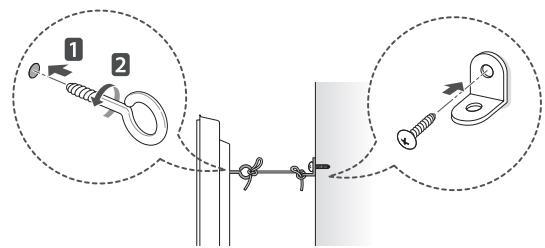
text_image
Diagram illustrating cable fastening technique with labeled components and magnified viewstext_image
Diagram showing two labeled curved lines with arrows indicating direction, possibly illustrating a mechanical or fluid system concept.
VORSICHT
natural_image
Illustration of three cartoon scenes: a house with smiling face, a smiling house with hand gesture, and a computer monitor with angry expression (no text or symbols)natural_image
Illustration showing two steps of installing a cartoon-style electrical outlet, with hands performing maintenance (no text or symbols present)text_image
Technical diagram showing two types of electrical connectors with labeled dimensions A and B*A ≤ 10 mm *B ≤ 18 mm
Achat séparé
natural_image
Prohibition sign showing a person holding a computer monitor, crossed out by a diagonal line (no text or symbols)text_image
Diagram illustrating hand gesture application on a screen, showing selection of 'X' and confirmation steps.natural_image
Silhouette of two people exchanging a large screen with a monitor, no text or symbols visiblenatural_image
Line drawing of a flat-screen TV with a red dotted oval highlighting the front panel (no text or symbols)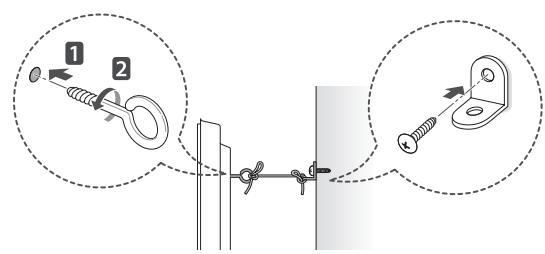
text_image
Diagram illustrating two steps of a hanging hook with labeled components and directional arrowsnatural_image
Illustration of three cartoon scenes: a house with smiling face, a smiling house with hand gesture, and a computer monitor with angry expression (no text or symbols)flowchart
graph TD
    A["Emotion 1: Satisfied, Downward Arrow"] --> B["Emotion 2: Satisfied, Downward Arrow"]
    B --> C["Emotion 3: Satisfied, Downward Arrow"]
    C --> D["Emotion 4: Satisfied, Downward Arrow"]
    D --> E["Emotion 5: Satisfied, Downward Arrow"]
Età di visione
- Bambini
natural_image
Diagram of three labeled mechanical components (A and B) with no visible text or symbols[al televisore]
[Figura 3]
text_image
Technical diagram showing two types of electrical connectors with labeled dimensions A and B*A ≤ 10 mm *B ≤ 18 mm
Acquisto separato
natural_image
Symbol of a person holding a computer monitor crossed out by a diagonal line, no text presenttext_image
Diagram illustrating hand positioning and locking mechanism with labeled icons and checkmark indicatorsnatural_image
Silhouette of two people exchanging a large screen with a monitor, no text or symbols visiblenatural_image
Line drawing of a flat-screen TV with a dashed red dotted line indicating a motion or trajectory (no text or symbols)
text_image
Diagram illustrating cable fastening technique with labeled components and directional arrowsnatural_image
Illustration of a wind farm and a house with a smiling computer monitor, no text or symbols present.flowchart
graph TD
    A["Emotional Emotion"] --> B["Stable Expression"]
    B --> C["Rebound to Down"]
    C --> D["Stable Expression"]
    D --> E["Rebound to Up"]
    E --> F["Stable Expression"]
    F --> G["Rebound to Down"]
    G --> H["Stable Expression"]
    H --> I["Rebound to Up"]
    I --> J["Stable Expression"]
natural_image
Diagram of three labeled mechanical components (A and B) with no text or symbols[Imagen 3]
[a la TV]
text_image
Technical diagram showing two mechanical components with labeled dimensions A and B*A ≤ 10 mm *B ≤ 18 mm
Compra por separado
natural_image
Prohibition sign showing a person holding a computer monitor, crossed out by a diagonal line (no text or symbols)text_image
Diagram illustrating hand gesture changes with magnified views showing correct and incorrect states of a device.natural_image
Silhouette of two people holding a large screen with a computer monitor (no text or symbols visible)natural_image
Line drawing of a flat-screen TV with a red dotted line indicating a path or connection (no text or symbols present)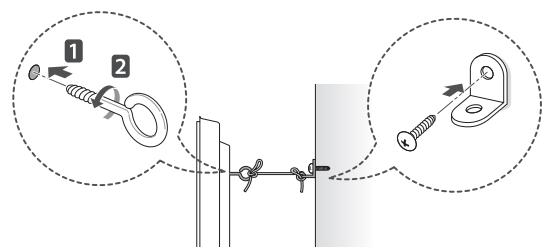
text_image
Diagram illustrating two steps of hanging weights with numbered instructions and magnified viewsMANUAL DE INSTRUÇÕES TV PLASMA
natural_image
Illustration of a hand holding a battery and a sad face emerging from the plug, with no text or symbols present.natural_image
Illustration of three cartoon scenes: a house with smiling face, a smiling house with hand gesture, and a computer monitor with angry expression (no text or symbols)text_image
Technical diagram showing two types of electrical connectors with labeled dimensions A and B*A ≤ 10mm *B ≤ 18mm
natural_image
Prohibition sign showing a person holding a computer monitor, crossed out by a diagonal line (no text or symbols)text_image
Diagram illustrating hand gesture application on a screen, showing selection of 'X' and confirmation steps.natural_image
Silhouette of two people exchanging a large screen with a monitor, no text or symbols visiblenatural_image
Line drawing of a flat-screen TV with a dashed red oval highlighting the front panel (no text or symbols)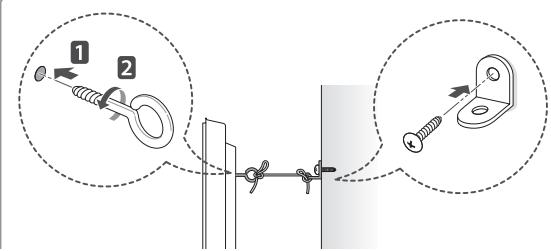
text_image
Diagram illustrating cable fastening technique with labeled components and directional arrowsnatural_image
Illustration of a wind farm and a house with a smiling computer monitor, no text or symbols present.flowchart
graph TD
    A["Emotional Emotion"] --> B["Shift in Positive"]
    B --> C["Reversome to Negative"]
    C --> D["Reversome to Neutral"]
    D --> E["Reversome to Dissatisfied"]
    E --> F["Reversome to Happy or Dissatisfied"]
    F --> G["Reversome to Neutral or Dissatisfied"]
Kijkleeftijd
- Baby's/kinderen
natural_image
Three schematic diagrams of cable or connector assemblies labeled A and B, showing connection details without any text or symbols.[bij de TV]
natural_image
Prohibition sign showing a person holding a computer monitor, crossed out by a diagonal line (no text or symbols)text_image
Diagram illustrating hand positioning and stress application on a screen, with labeled icons and checkmark indicators.natural_image
Silhouette illustration of two people holding a large screen with a monitor, no text or symbols presentnatural_image
Line drawing of a flat-screen TV with a dashed red dotted line indicating a path or trajectory (no text or symbols present)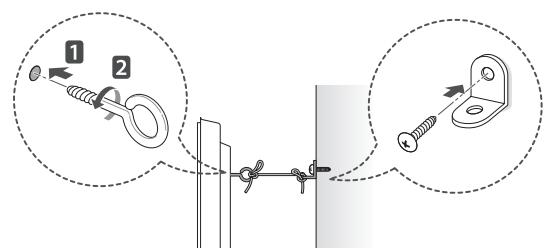
text_image
Diagram illustrating cable fastening technique with labeled components and directional arrows7,295,673; 7,460,668; 7,515,710; 7,519,274"

dts®
2.0+Digital Out
natural_image
Illustration of a cartoon hand holding a device and a sad face emerging from a computer socket (no text or symbols)natural_image
Illustration of three cartoon scenes: a smiling house, a wind turbine with motion lines, and a computer monitor with angry faces (no text or symbols)text_image
Technical diagram showing two types of electrical connectors with labeled dimensions A and B^* A ≤q 10 mm
*B ≧ 18 mm
natural_image
Prohibition sign showing a person holding a computer monitor, crossed out by a diagonal line (no text or symbols)text_image
Diagram illustrating hand positioning and tool application steps, showing a monitor with highlighted section and five labeled action buttons.natural_image
Silhouette of two people holding a large screen with a computer, no text or symbols visibletext_image
10 εK. 10 εK. 10 εK. 10 εK.natural_image
Line drawing of a flat-screen TV with a dashed red oval highlighting the front panel (no text or symbols)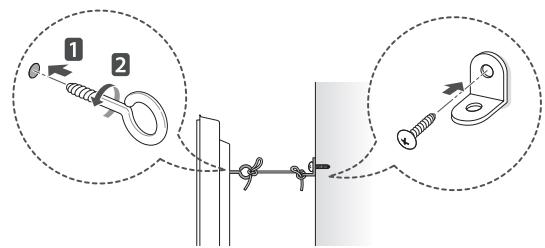
text_image
Diagram illustrating cable fastening technique with labeled components and magnified viewstext_image
10 εK. 10 εK. 10 εK. 10 εK.HOME (AP-XIKH ΣΕΛΙ-ΔΑ)
7,295,673; 7,460,668; 7,515,710; 7,519,274"
natural_image
Illustration of three cartoon scenes: a house with smiling face, a smiling house with hand gesture, and a computer monitor with angry expression (no text or symbols)text_image
Technical diagram showing two types of electrical connectors with labeled terminals A and B*A ≤ 10 mm *B ≤ 18 mm
natural_image
Prohibition sign showing a person holding a computer monitor, crossed out by a diagonal line (no text or symbols)text_image
Diagram illustrating hand gesture application on a screen, showing selection of 'X' and confirmation steps.natural_image
Silhouette of two people holding a large screen with a computer monitor (no text or symbols visible)natural_image
Line drawing of a flat-screen TV with a dashed red dotted line indicating a circular motion around the screen (no text or symbols)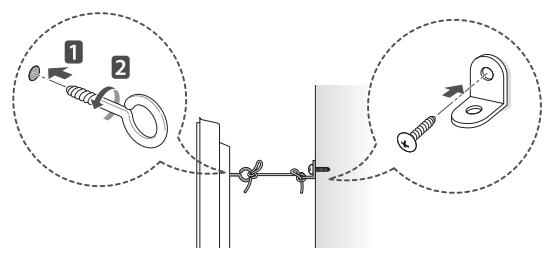
text_image
Diagram illustrating cable fastening technique with labeled components and magnified viewstext_image
Diagram showing two labeled curved lines with arrows and a central circular feature, possibly illustrating a mechanical or fluid dynamics concept.
FIGYELEM
natural_image
Illustration of three cartoon scenes: a smiling house, a wind turbine with motion lines, and a computer monitor with angry faces (no text or symbols)flowchart
graph TD
    A["Emotional Emotion"] --> B["Stable Expression"]
    B --> C["Rebound to Down"]
    C --> D["Stable Expression"]
    D --> E["Rebound to Up"]
    E --> F["Stable Expression"]
    F --> G["Rebound to Down"]
    G --> H["Stable Expression"]
    H --> I["Rebound to Up"]
    I --> J["Stable Expression"]
Wiek widzów
- Niemowlęta/dzieci
text_image
Technical diagram showing two mechanical components with labeled dimensions A and B*A ≤ 10 mm *B ≤ 18 mm
Elementy do nabycia osobno
natural_image
Prohibition sign showing a person holding a computer monitor, crossed out by a diagonal line (no text or symbols)text_image
Diagram illustrating hand gesture application on a screen, showing selection of 'X' and confirmation steps.natural_image
Silhouette of two people exchanging a large screen with a monitor, no text or symbols visiblenatural_image
Line drawing of a 3D TV mounted on a stand with a dashed oval highlighting the front panel (no text or symbols)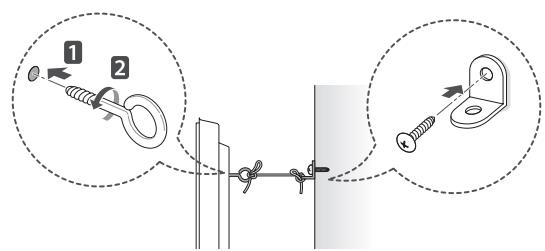
text_image
Diagram illustrating cable mounting technique with labeled components and directional arrowsnatural_image
Illustration of three cartoon scenes: a smiling house, a wind turbine with motion lines, and a computer monitor with angry faces (no text or symbols)text_image
Technical diagram showing two types of electrical connectors with labeled dimensions A and B*A ≤ 10 mm *B ≤ 18 mm
Dokupuje se zvlášť
natural_image
Prohibition sign showing a person holding a computer monitor, crossed out by a diagonal line (no text or symbols)text_image
Diagram illustrating hand gesture application on a screen, showing selection and confirmation steps with X marks.natural_image
Silhouette of two people holding a large screen with a computer monitor (no text or symbols visible)natural_image
Line drawing of a flat-screen TV with a dashed red dotted line indicating a path or trajectory (no text or symbols present)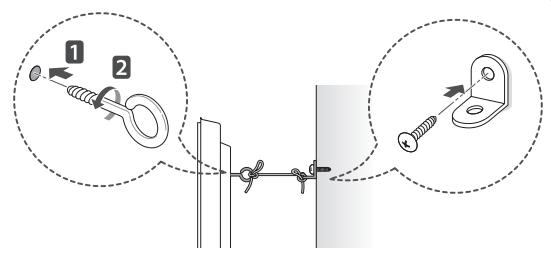
text_image
Diagram illustrating two steps of securing a spring, showing pinning and mounting mechanism with magnified insets.natural_image
Illustration of three cartoon scenes: a house with smiling face, a smiling house with hand gesture, and a computer monitor with angry expression (no text or symbols)text_image
Technical diagram showing two mechanical components with labeled dimensions A and B*A ≤ 10 mm *B ≤ 18 mm
natural_image
Prohibition sign showing a person holding a computer monitor, crossed out by a diagonal line (no text or symbols)text_image
Diagram illustrating hand positioning and tool application steps for a monitor, with labeled icons and checkmark indicators.natural_image
Silhouette of two people holding a large screen with a computer monitor (no text or symbols visible)natural_image
Line drawing of a flat-screen TV with a dotted red line indicating a curved path (no text or symbols)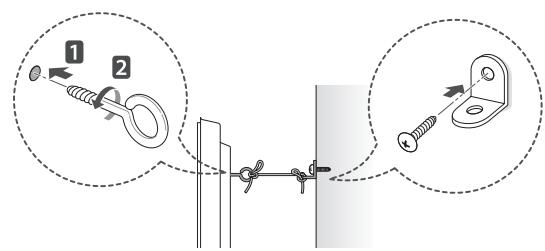
text_image
Diagram illustrating cable fastening technique with labeled components and directional arrowsnatural_image
Illustration of a smart home with a smiling computer and wind turbine, no text or symbols presentnatural_image
Illustration showing two different electrical installation methods: one using a mouse and the other with a tool, both without any text or symbols.flowchart
graph TD
    A["Emotional State 1"] --> B["Emotional State 2"]
    B --> C["Emotional State 3"]
    C --> D["Emotional State 4"]
    D --> E["Emotional State 5"]
    E --> F["Emotional State 6"]
    F --> G["Emotional State 7"]
    G --> H["Emotional State 8"]
    H --> I["Emotional State 9"]
    I --> J["Emotional State 10"]
Vârsta de vizionare
- Bebeluşii/Copiii
text_image
Technical diagram showing two types of electrical connectors with labeled dimensions A and B*A ≤ 10 mm *B ≤ 18 mm
natural_image
Symbol of a person holding a computer monitor crossed out by a diagonal line, no text or numbers present.text_image
Diagram illustrating hand gesture changes in a device, showing selection of 'X' and confirmation check.natural_image
Silhouette of two people holding a large screen with a computer, no text or symbols visiblenatural_image
Line drawing of a flat-screen TV with a dashed red oval highlighting the front panel (no text or symbols)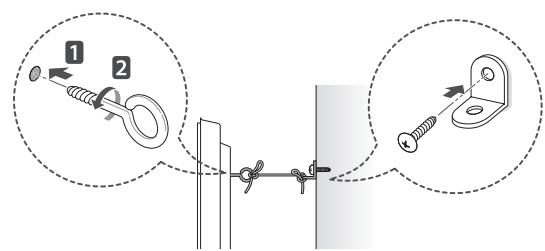
text_image
Diagram illustrating cable fastening technique with labeled components and directional arrowsnatural_image
Illustration of a wind farm and a house with a smiling computer monitor, no text or symbols present.flowchart
graph TD
    A["Emotional State 1"] --> B["Emotional State 2"]
    B --> C["Emotional State 3"]
    C --> D["Emotional State 4"]
    D --> E["Emotional State 5"]
    E --> F["Emotional State 6"]
    F --> G["Emotional State 7"]
    G --> H["Emotional State 8"]
    H --> I["Emotional State 9"]
    I --> J["Emotional State 10"]
Възраст
- Бебета/деца
text_image
Technical diagram showing two types of electrical connectors with labeled dimensions A and B^ A ≤q 10 MM ^ B ≤q 18 MM
Закупува се отделно
natural_image
Prohibition sign showing a person holding a computer monitor, crossed out by a diagonal line (no text or symbols)text_image
Diagram illustrating hand positioning and tool application steps, showing selection of a screen with cross marks.natural_image
Silhouette of two people holding a large screen with a monitor, no text or symbols visiblenatural_image
Line drawing of a flat-screen TV with a red dotted oval highlighting the front panel (no text or symbols)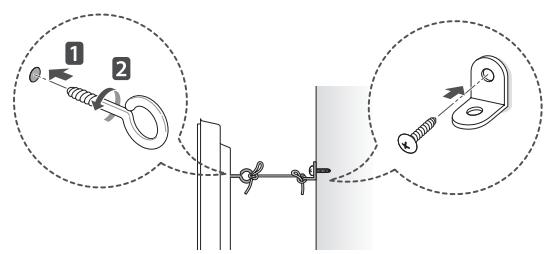
text_image
Diagram illustrating two steps of a hanging hook with labeled components and directional arrowsnatural_image
Illustration of three cartoon scenes: a smiling house, a wind turbine with motion lines, and a computer monitor with angry faces (no text or symbols)text_image
Technical diagram showing two mechanical components with labeled dimensions A and B^* A ≤q 10 mm
*B ≧ 18 mm
Müüakse eraldi
natural_image
Prohibition sign showing a person holding a computer monitor within a circle (no text or symbols)text_image
Diagram illustrating hand gesture application on a screen, showing selection and confirmation steps with X marksnatural_image
Silhouette of two people holding a large screen with a monitor, no text or symbols visiblenatural_image
Line drawing of a flat-screen TV with a dashed red dotted line indicating a path or trajectory (no text or symbols present)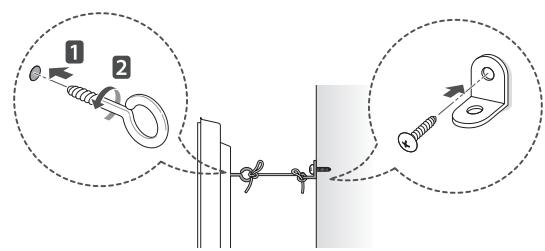
text_image
Diagram illustrating cable fastening technique with labeled components and directional arrowsnatural_image
Illustration of three cartoon scenes: a house with smiling face, a smiling house with wind turbine, and a computer monitor with angry expression (no text or symbols)text_image
Technical diagram showing two mechanical components with labeled dimensions A and B*A ≤ 10 mm *B ≤ 18 mm
Atskiras pirkinys
natural_image
Prohibition sign showing a person holding a computer monitor, crossed out by a diagonal line (no text or symbols)text_image
Diagram illustrating hand gesture application on a screen, showing selection and confirmation steps with X marksnatural_image
Silhouette of two people holding a large screen with a computer monitor (no text or symbols visible)natural_image
Line drawing of a flat-screen TV with a red dotted oval highlighting the front panel (no text or symbols)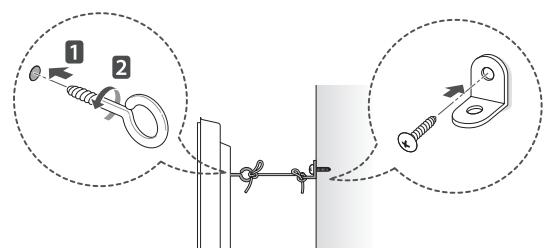
text_image
Diagram illustrating cable fastening technique with labeled components and directional arrows24 PROBLÉMU NOVĚRŠANA
25 ĀRĒJO VADĪBAS IERĪČU IESTATĪŠANA
25 SPECIFIKĀCIJAS

BRĪDINĀJUMS
7,295,673; 7,460,668; 7,515,710; 7,519,274"


2.0+Digital Out
natural_image
Illustration of three cartoon scenes: a smiling house, a wind turbine with motion lines, and a computer monitor with a sad face (no text or symbols)flowchart
graph TD
    A["Emotion 1: Satisfied/Decline"] --> B["Emotion 2: Satisfied/Decline"]
    B --> C["Emotion 3: Satisfied/Decline"]
    C --> D["Emotion 4: Satisfied/Decline"]
    D --> E["Emotion 5: Satisfied/Decline"]
    E --> F["Emotion 6: Satisfied/Decline"]
    F --> G["Emotion 7: Satisfied/Decline"]
    G --> H["Emotion 8: Satisfied/Decline"]
    H --> I["Emotion 9: Satisfied/Decline"]
Skatīšanās vecums
- Zīdaiņi/bērni
natural_image
Symbol of a person holding a computer monitor inside a circle, no text or numbers presenttext_image
Diagram illustrating hand positioning and locking mechanism with labeled icons and checkmark indicatorsnatural_image
Silhouette of two people holding a large screen with a computer monitor (no text or symbols visible)natural_image
Line drawing of a flat-screen TV with a red dotted oval highlighting the front panel (no text or symbols)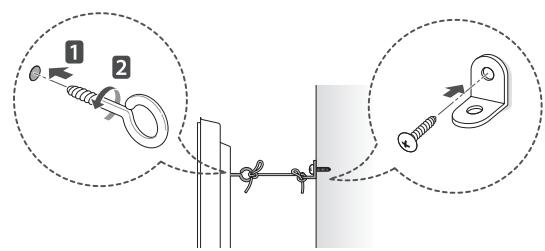
text_image
Diagram illustrating cable fastening technique with labeled components and directional arrowsnatural_image
Illustration of three cartoon scenes: a house with smiling face, a smiling house with hand gesture, and a computer monitor with angry expression (no text or symbols)text_image
Technical diagram showing two types of electrical connectors with labeled dimensions A and B*A ≤ 10 mm *B ≤ 18 mm
Naprodaj ločeno
natural_image
Prohibition sign showing a person holding a computer monitor within a circle (no text or symbols)- Trdno ga držite za spodnji in zgornji del okvira. Pazite, da ga ne boste držali za prozorne dele, zvočnike ali njihove rešetke.
text_image
Diagram illustrating hand gesture application on a screen, showing selection of 'X' and confirmation steps.natural_image
Silhouette of two people holding a large screen with a computer monitor (no text or symbols visible)- Televizor naj med premikanjem ne bo izpostavljen udarcem ali prekomernim tresljajem.
- Med prevozom naj bo televizor obrnjen navzgor. Ne položite ga na bok in ga ne nagnite na levo ali desno stran.
Nameščanje na mizo
1 Dvignite televizor in ga v pokončnem položaju postavite na mizo.
- Za dobro zračenje naj bo televizor od ste- ne oddaljen (najmanj) 10 cm.
text_image
10 cm 10 cm 10 cm 10 cmnatural_image
Line drawing of a flat-screen TV with a red dotted line indicating a path or trajectory (no text or symbols present)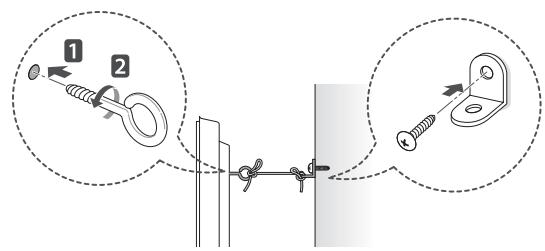
text_image
Diagram illustrating two steps of securing a cable with labeled components and directional arrowsBEZBEDNOSNA UPUTSTVA

natural_image
Illustration of three cartoon scenes: a house with smiling face, a smiling house with hand gesture, and a computer monitor with angry expression (no text or symbols)text_image
Technical diagram showing two types of electrical connectors with labeled dimensions A and B*A ≤ 10 mm *B ≤ 18 mm
Opcioni dodaci
natural_image
Prohibition sign showing a person holding a computer monitor, crossed out by a diagonal line (no text or symbols)- Čvrsto držite gornji i donji deo okvira televizora. Vodite računa da ne držite providni deo, zvučnik ili rešetku zvučnika.
text_image
Diagram illustrating hand gesture application on a screen, showing selection of correct and incorrect actions with X marks.- Transport velikog televizora treba da obavljaju najmanje 2 osobe.
- U slučaju ručnog transporta, televizor držite na način prikazan na sledećoj slici.
natural_image
Silhouette of two people holding a large screen with a computer monitor (no text or symbols visible)- Prilikom transporta televizor ne izlažite udarcima ili prejakim vibracijama.
- Prilikom transporta televizor držite uspravno. Nikad ga ne okrećite na bok i ne naginjite ga nalevo ili nadesno.
Montiranje na sto
1 Podignite i postavite u uspravan položaj na stolu.
- Ostavite prostor od najmanje 10 cm od zida zbog odgovarajuće ventilacije.
text_image
10 cm 10 cm 10 cm 10 cmnatural_image
Line drawing of a flat-screen TV with a dashed red oval highlighting the front panel (no text or symbols)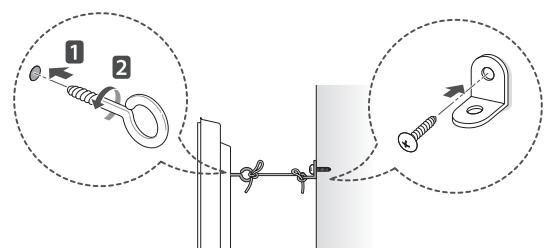
text_image
Diagram illustrating cable fastening technique with labeled components and directional arrows1 Umetnite i pričvrstite zavrtnje s ušicom ili nosače televizora i zavrtnje na zadnjoj strani televizora.
natural_image
Illustration of a hand holding a device with a crown, and a sad computer with a frowning face emerging from the power outlet (no text or symbols)- Gurnite utikač u utičnicu do kraja. Ako to ne učinite, može doći do požara.
- Pripazite da kabel napajanje ne dođe u dodir s vrućim predmetima, primjerice grijačem. To bi moglo dovesti do požara ili opasnosti od strujnog udara
- Na kabele napajanja nemojte postavljati teške predmete niti sam proizvod. U suprotnom može doći do požara ili strujnog udara.
natural_image
Illustration of three cartoon scenes: a house with smiling face, a smiling house with hand gesture, and a computer monitor with angry expression (no text or symbols)flowchart
graph TD
    A["Emotion: Downward, Upward"] --> B["Emotion: Upward, Downward"]
    B --> C["Emotion: Downward, Upward"]
    C --> D["Emotion: Upward, Downward"]
    D --> E["Emotion: Downward, Upward"]
    E --> F["Emotion: Upward, Downward"]
    F --> G["Emotion: Downward, Upward"]
Starost gledatelja
- Dojenčad/djecac
text_image
Technical diagram showing two mechanical components with labeled dimensions A and B*A ≤ 10 mm *B ≤ 18 mm
natural_image
Prohibition sign showing a person holding a computer monitor, crossed out by a diagonal line (no text or symbols)- Čvrsto držite gornji i donji dio televizora. Pazite da ga ne držite za prozirne dijelove, zvučnik ili otvor zvučnika.
text_image
Diagram illustrating hand positioning and locking mechanism with labeled icons and checkmark indicatorsnatural_image
Silhouette of two people exchanging a large screen with a monitor, no text or symbols present- Televizor prilikom prenošenja nemojte izlagati trzajima ni jakim vibracijama.
- Kada prenosite televizor, držite ga uspravno, nemojte ga polagati na bok niti naginjati lijevo ili desno.
Postavljanje na stol
1 Podignite i nagnite televizor u uspravan položaj na stolu.
- Ostavite (minimalno) 10 cm prostora do zida radi odgovarajuće ventilacije.
text_image
10 cm 10 cm 10 cm 10 cmnatural_image
Line drawing of a flat-screen TV with a red dotted oval highlighting the front panel (no text or symbols)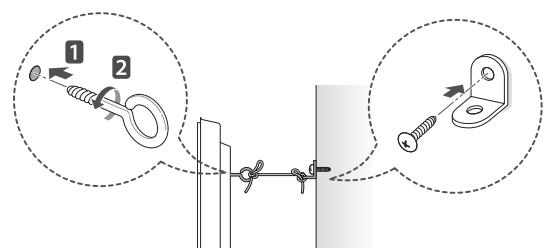
text_image
Diagram illustrating cable fastening technique with labeled components and directional arrows1 Umetnite i pričvrstite okaste vijke ili nosače za televizor i vijke na stražnjoj strani televizora.
- Ako se na mjestu za okaste vijke nalaze neki drugi vijci, izvadite ih.
2 Pričvrstite zidni nosač za zid vijcima.
Pritom poštujte lokacije zidnog nosača i okastih vijaka na stražnjoj strani televizora.
3 Povežite okaste vijke i nosače čvrsto uz pomoć jačeg užeta.
Uže mora biti postavljeno vodoravno u odnosu na ravnu površinu.

OPREZ
natural_image
Illustration of a wind farm and a house with a smiling computer monitor, no text or symbols present.- Instalojeni produktin aty ku nuk ka valë radioje.
flowchart
graph TD
    A["Emotional Face"] --> B["Shift in Positive"]
    B --> C["Rebound to Negative"]
    C --> D["Rebound to Neutral"]
    D --> E["Rebound to Downward"]
    E --> F["Rebound to Downward"]
    F --> G["Rebound to Downward"]
    G --> H["Rebound to Downward"]
    H --> I["Rebound to Downward"]
Mosha e shikimit
- Foshnjat/Fëmijët
text_image
Technical diagram showing two types of electrical connectors with labeled dimensions A and B^A ≤ 10 ~mm ^B ≤ 18 ~mm
Blerje e veçantë
natural_image
Symbol of a person holding a computer monitor inside a circle, no text or numbers presenttext_image
Diagram illustrating hand positioning and locking mechanism with labeled icons and checkmark indicatorsnatural_image
Silhouette of two people exchanging a large screen with a monitor, no text or symbols presentnatural_image
Line drawing of a flat-screen TV with a dashed red oval highlighting the front panel (no text or symbols)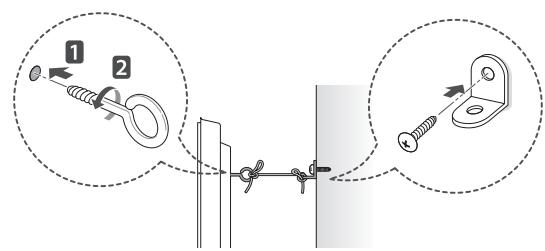
text_image
Diagram illustrating cable fastening technique with labeled components and directional arrowsnatural_image
Illustration of three cartoon scenes: a house with smiling face, a smiling house with hand gesture, and a computer monitor with angry expression (no text or symbols)- Instalirajte uređaj na mjestu na kom nema radijskih valova.
- Između vanjske antene i kablova za napajanje treba biti dovoljno prostora kako antena ne bi dodirivala kable čak i u slučaja pada antene. To može izazvati strujni udar.
- Nemojte instalirati uređaj na mjestima kao što su nestabilne police ili nagnute površine. Također izbjegavajte mjesta na kojima ima vibracija ili tamo gdje uređaj nema puni oslonac. U suprotnom, uređaj može pasti ili se prevrnuti i time izazvati povrede ili oštećenja na proizvodu.
natural_image
Illustration showing two different electrical connections: one with a plug and the other with a switch, both without any text or symbols.- Ne dajte da se na priključcima utikača za napajanje ili utičnici nakuplja prašina. Na taj način možete izazvati požar.
text_image
Technical diagram showing two mechanical components with labeled dimensions A and B*A ≤ 10 mm *B ≤ 18 mm
Odvojena kupovina
natural_image
Prohibition sign showing a person holding a computer monitor, crossed out by a diagonal line (no text or symbols)text_image
Diagram illustrating hand gesture application on a screen, showing selection and confirmation steps with X marks.- Kada vršite transport velikog TV uređaja, trebale bi biti prisutne najmanje dvije osobe.
- Prilikom ručnog transportiranja TV-a, držite ga kao što je prikazano na sljedećoj ilustraciji.
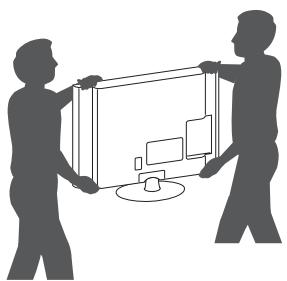
natural_image
Silhouette of two people holding a large screen with a computer monitor (no text or symbols visible)- Prilikom transporta, televizor ne izlažite udarcima ili prejakim vibracijama.
- TV prilikom transporta držite uspravno; nikada ga nemojte okretati na stranu ili naginjati ulijevo ili udesno.
Montiranje na sto
1 Podignite i postavite TV u uspravan položaj na stolu.
- Ostavite prostor od (najmanje) 10 cm od zida zbog odgovarajuće ventilacije.
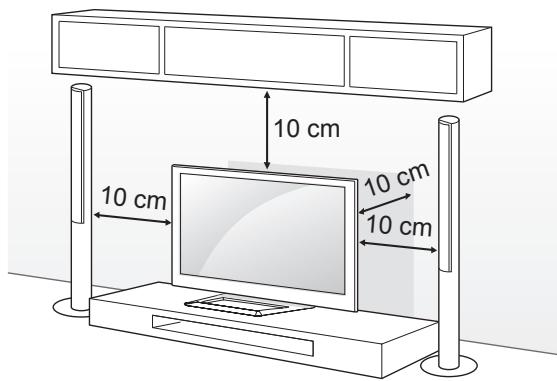
text_image
10 cm 10 cm 10 cm 10 cmnatural_image
Line drawing of a flat-screen TV with a red dotted line indicating a path or trajectory (no text or symbols present)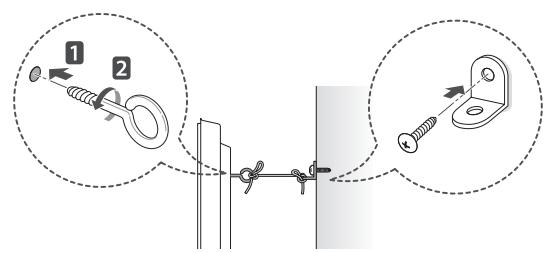
text_image
Diagram illustrating cable fastening technique with labeled components and magnified views1 Umetnite i stegnite okaste vijke ili nosač za TV i vijke na stražnjoj strani TV-a.
- Ako su vijci postavljeni na mjesto okastih vijaka, najprije uklonite te vijke.
2 Montirajte zidne spojnice sa vijcima na zid. Poravnajte poziciju zidne spojnice i okastih vijaka na stražnjem dijelu TV-a.
3 Povežite čvrsto okaste vijke i zidne konzole jakim užetom.
Pazite da uže bude horizontalno u odnosu na ravnu površinu.

OPREZ
- Pazite da se djeca ne penju na TV ili vješaju za njega.

NAPOMENA
- Koristite platformu ili ormarić koji je dovoljno jak i velik da može sigurno podupirati TV.
- Nosači, vijci i konop ne isporučuju se u paketu. Dodatni pribor možete nabaviti kod lokalnog distributera.
Postavljanje na zid
Pažljivo pričvrstite opcionalni zidni nosač na stražnji dio TV-a i postavite zidni nosač na čvrst zid okomito prema podu. Ako TV želite postaviti na neki drugi građevinski materijal, kontaktirajte kvalificirano osoblje.
LG preporučuje da montiranje TV aparata na zid izvrši kvalificirana stručna osoba.
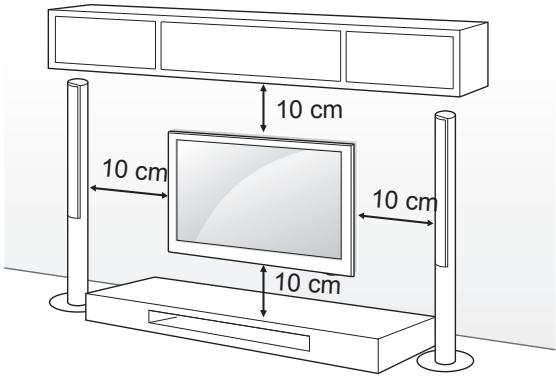
text_image
10 cm 10 cm 10 cm 10 cmPazite da koristite vijke i konzolu zidnog nosača koji ispunjavaju VESA standard. Standardne dimenzije za komplete zidnog nosača opisane su u sljedećoj tabeli.
Kupuje se odvojeno (postolje za postavljanje na zid)
| Model | 42/50PM47**50PM67**50PM68**50PM97** | 60PM67**60PM68**60PM97** |
| VESA (A x B) | 400 x 400 | 600 x 400 |
| Standardni vijak | M6 | M8 |
| Broj vijaka | 4 | 4 |
| Postolje za postavljanje na zid | PSW400B,PSW400BG | PSW600B,PSW600BG |
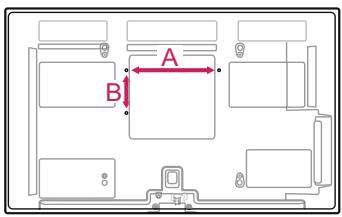
text_image
A BOPREZ
- Najprije isključite napajanje, a zatim pomjerajte ili postavljajte TV. U suprotnom može doći do strujnog udara.
- Ako TV postavite na strop ili ukošen zid, moguće je da uređaj padne i izazove teške povrede.
Koristite odobreni LG zidni nosač i kontaktirajte lokalnog prodavača ili kvalificirano osoblje. - Nemojte suviše pritezati vijke jer to može dovesti do oštećenja televizora i gubitka garancije.
- Koristite vijke i zidne nosače koji ispunjavaju VESA standard. Sva oštećenja ili povrede koje nastanu nepravilnim korištenjem dodatne opreme ili korištenjem nepropisne dodatne opreme nisu pokrivene garancijom.
NAPOMENA
- Koristite vijke koji su na popisu specifikacija za vijke VESA standarda.
- Komplet zidnog nosača sadrži upute za montiranje i neophodne dijelove.
- Zidni nosač je opcionalan. Dodatni pribor možete nabaviti kod lokalnog distributera.
- Dužina vijaka može biti različita ovisno o zidnom nosaču. Pazite da koristite odgovarajuću dužinu.
- Za više informacija pogledajte priručnik koji ste dobili sa zidnim nosačem.
DALJINSKI UPRAVLJAČ
7,295,673; 7,460,668; 7,515,710; 7,519,274"
natural_image
Illustration of three cartoon scenes: a smiling house, a wind turbine with motion lines, and a computer monitor with angry faces (no text or symbols)natural_image
Illustration showing two steps of installing a cartoon-style electrical socket, with no text or symbols present.text_image
Technical diagram showing two types of electrical connectors with labeled dimensions A and B^ A ≤q 10 mm ^ B ≤q 18 mm
Одделно купување
natural_image
Prohibition sign showing a person holding a computer monitor, crossed out by a diagonal line (no text or symbols)text_image
Diagram illustrating hand gesture application on a screen, showing selection of 'X' and confirmation steps.natural_image
Silhouette of two people holding a large screen with a computer, no text or symbols visiblenatural_image
Line drawing of a flat-screen TV with labeled buttons and a dotted red line indicating motion (no text or symbols present)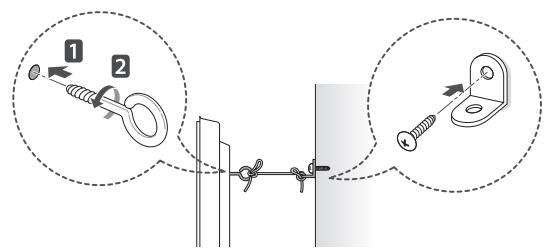
text_image
Diagram illustrating cable fastening technique with labeled components and magnified viewsThis section on MAKING CONNECTIONS mainly uses diagrams for the PM97** models.
Antenna Connection
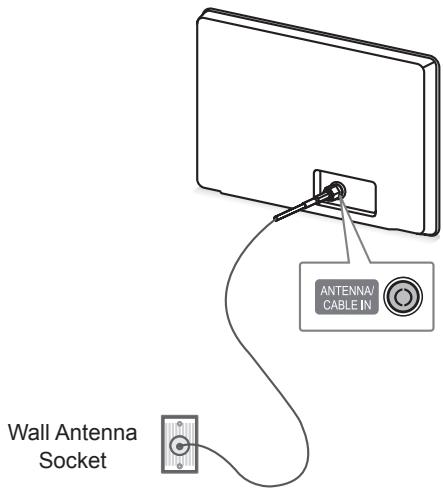
text_image
Antenna CABLE IN Wall Antenna SocketEnglish
Connect the TV to a wall antenna socket with an RF cable (75 ).

NOTE
- Use a signal splitter to use more than 2 TVs.
- If the image quality is poor, install a signal amplifier properly to improve the image quality.
- If the image quality is poor with an antenna connected, try to realign the antenna in the correct direction.
- An antenna cable and converter are not supplied.
Deutsch
Satellite dish Connection
(Only satellite models)
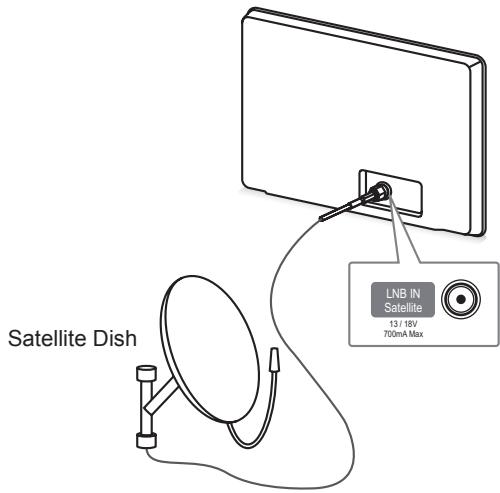
text_image
Satellite Dish LNB IN Satellite 13 / 18V 700mA MaxEnglish
Connect the TV to a satellite dish to a satellite socket with a satellite RF cable (75 ).
Deutsch
Transmits the digital video and audio signals from an external device to the TV. Connect the external device and the TV with the HDMI cable as shown. Choose any HDMI input port to connect. It does not matter which port you use.

NOTE
- It is recommended to use the TV with the HDMI connection for the best image quality.
- Use the latest High Speed HDMI™ Cable with CEC (Customer Electronics Control) function.
- High Speed HDMI™ Cables are tested to carry an HD signal up to 1080p and higher.
- Supported DTV Audio: MPEG, Dolby Digital, Dolby Digital Plus, HE-AAC
- Supported HDMI Audio format : Dolby Digital, PCM (Up to 192 KHz, 32k/44.1k/48k/88k/96k/176k/192k, DTS Not supported.)
Deutsch
ARC (Audio Return Channel)
English
- An external audio device that supports SIMPLINK and ARC must be connected using HDMI IN 1 (ARC) port.
- When connected with a high-speed HDMI cable, the external audio device that supports ARC outputs optical SPDIF without additional optical audio cable and supports the SIMPLINK function.
Deutsch
DVI to HDMI Connection
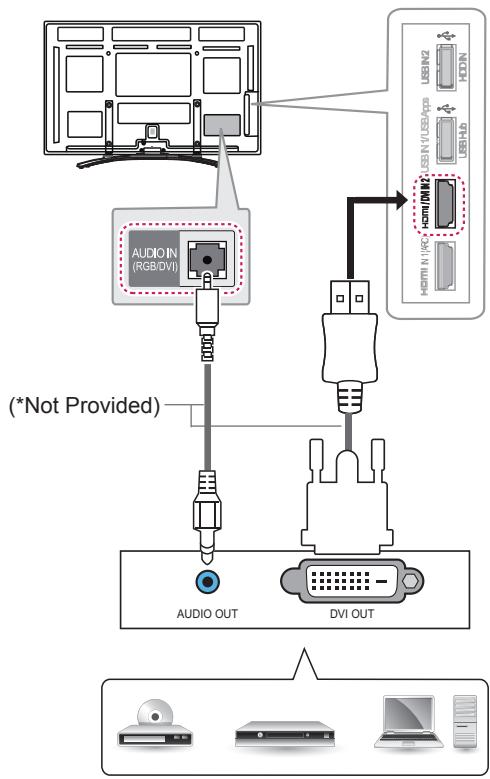
flowchart
graph TD
    A["Audio OUT"] --> B["DVI OUT"]
    C["(*Not Provided)"] --> D["USB IN2 USB/N USB/VIP USB/HB"]
    D --> E["+ HDMI/USB + HDMI/USB"]
    style A fill:#f9f,stroke:#333
    style B fill:#ccf,stroke:#333
    style C fill:#cfc,stroke:#333
    style D fill:#fcc,stroke:#333
    style E fill:#ffc,stroke:#333
DVD / Blu-Ray / PC / HD Cable Box
English
Transmits the digital video signal from an external device to the TV. Connect the external device and the TV with the DVI-HDMI cable as shown. To transmit an audio signal, connect an audio cable. Choose any HDMI input port to connect. It does not matter which port you use.

NOTE
- Depending on the graphics card, DOS mode may not work if a HDMI to DVI Cable is in use.
Deutsch
Transmits the video signal from PC to the TV. To transmit an audio signal, connect an audio cable.
Deutsch
Component Connection
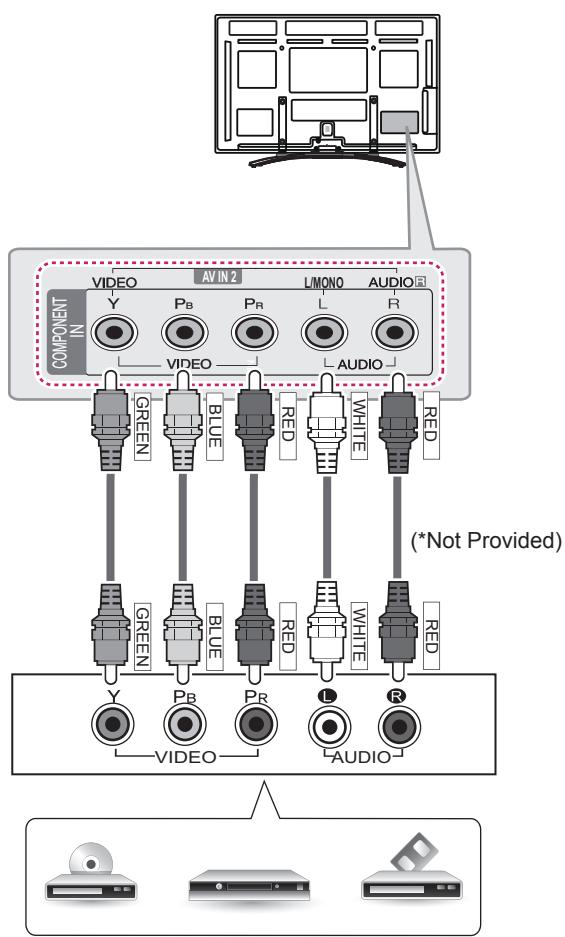
text_image
COMPONENT IN VIDEO AV IN 2 LMONO AUDIO Y PB PR L R VIDEO AUDIO GREEN BLUE RED WHITE RED (*Not Provided) GREEN BLUE RED WHITE RED VIDEO PR L AUDIO RDVD / Blu-Ray / HD Cable Box
English
Transmits analog video and audio signals from an external device to the TV. Connect the external device and the TV with a component cable as shown.

NOTE
- If cables are installed incorrectly, it could case the image to display in black and white or with distorted colour.
Deutsch
Composite Connection
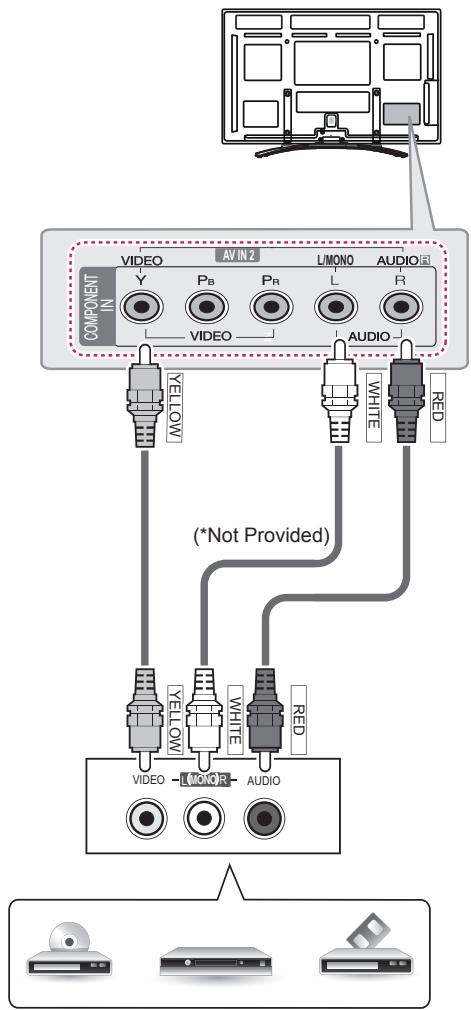
text_image
COMPONENT N VIDEO AV IN 2 L/MONO AUDIO Y PB Pr L R VIDEO AUDIO YELLOW WHITE RED (*Not Provided) VIDEO - MONR - AUDIO VIDEO - MONR - AUDIOVCR / DVD / Blu-Ray / HD Cable Box
English
Transmits analog video and audio signals from an external device to the TV. Connect the external device and the TV with the composite cable as shown.
Deutsch
flowchart
graph TD
    A["Digital Audio System"] --> B["(Not Provided)"]
    B --> C["OPTICAL AUDIO IN"]
English
You may use an optional external audio system instead of the built-in speaker.

NOTE
- If you use an optional external audio device instead of the built-in speaker, set the TV speaker feature to off.
Digital optical audio connection
Transmits a digital audio signal from the TV to an external device. Connect the external device and the TV with the optical audio cable as shown.

NOTE
- Do not look into the optical output port. Looking at the laser beam may damage your vision.
- Audio with ACP (Audio Copy Protection) function may block digital audio output.
Deutsch
Connect a USB storage device such as a USB flash memory, external hard drive, or a USB memory card reader to the TV and access the Smart Share menu to use various multimedia files.

NOTE
- To use a USB Hub device, make sure that it is connected to the USB Hub port.
- Connect the external power source if your USB is needed.
- Some USB Hubs may not work. If a USB device connected using a USB Hub is not detected, connect it to the USB port on the TV directly.
Deutsch
View the encrypted (pay) services in digital TV mode. This feature is not available in all countries.

NOTE
- Check if the CI module is inserted into the PCMCIA card slot in the right direction. If the module is not inserted properly, this can cause damage to the TV and the PCMCIA card slot.
Deutsch
Euro Scart Connection
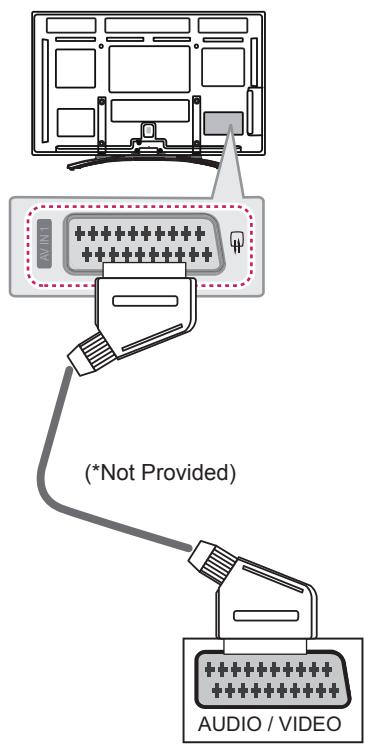
text_image
(*Not Provided) AUDIO / VIDEOEnglish
Transmits the video and audio signals from an external device to the TV set. Connect the external device and the TV set with the euro scart cable as shown. To display images by using progressive scan, make sure to use the euro scart cable.
| Current input mode\Type | AV1(TV Out1) | AV1(When DTV scheduled recording is in progress using recording equipment.) |
| Digital TV | Digital TV | O |
| Analogue TV, AV | Analogue TV | O(The input mode is converted to DTV.) |
| Component / RGB | ||
| HDMI |
1 TV Out : Outputs Analogue TV or Digital TV signals.

NOTE
- Any Euro scart cable used must be signal shielded.
- When watching digital TV in 3D imaging mode, TV out signals cannot be output through the SCART cable. (Only 3D models)
- If you set the 3D mode to On while a scheduled recording is performed on digital TV, monitor out signals cannot be output through the SCART cable, and the recording cannot be performed. (Only 3D models)
Deutsch
Connect various external devices to the TV and switch input modes to select an external device. For more information of external device's connection, refer to the manual provided with each device.
Available external devices are: HD receivers, DVD players, VCRs, audio systems, USB storage devices, PC, gaming devices, and other external devices.

NOTE
- The external device connection may differ from the model.
- Connect external devices to the TV regardless of the order of the TV port.
- If you record a TV program on a DVD recorder or VCR, make sure to connect the TV signal input cable to the TV through a DVD recorder or VCR. For more information of recording, refer to the manual provided with the connected device.
- Refer to the external equipment's manual for operating instructions.
- If you connect a gaming device to the TV, use the cable supplied with the gaming device.
- In PC mode, there may be noise associated with the resolution, vertical pattern, contrast or brightness. If noise is present, change the PC output to another resolution, change the refresh rate to another rate or adjust the brightness and contrast on the PICTURE menu until the picture is clear.
- In PC mode, some resolution settings may not work properly depending on the graphics card.
Deutsch
Product specifications may be changed without prior notice due to upgrade of product functions.
For the power supply and power consumption, refer to the label attached to the product.
| MODELS | 42PM47** | 50PM47** | |
| 42PM4700-ZA42PM470S-ZA42PM470T-ZA | 50PM4700-ZA50PM470S-ZA50PM470T-ZA | ||
| Dimensions(W x H x D) | With stand (mm) | 983.6 x 655.0 x 246.7 | 1168.0 x 758.0 x 297.0 |
| Without stand (mm) | 983.6 x 601.3 x 58 .0 | 1168.0 x 704.0 x 53.0 | |
| Weight | With stand (kg) | 20.6 | 28.2 |
| Without stand (kg) | 19.0 | 25.8 | |
| MODELS | 50PM67** | 50PM68** | |
| 50PM6700-ZA50PM670S-ZD50PM670T-ZA50PM670S-ZA50PM671S-ZA | 50PM6800-ZF50PM680S-ZF50PM680T-ZF | ||
| Dimensions(W x H x D) | With stand (mm) | 1168.0 x 758.0 x 297.0 | 1168.0 x 768.0 x 297.0 |
| Without stand (mm) | 1168.0 x 704.0 x 53.0 | 1168.0 x 704.0 x 53.0 | |
| Weight | With stand (kg) | 28.8 | 28.1 |
| Without stand (kg) | 26.4 | 26.4 | |
| MODELS | 50PM97** | 60PM67** | |
| 50PM9700-ZA50PM970S-ZA50PM970T-ZA | 60PM6700-ZA60PM670S-ZA60PM670T-ZA | ||
| Dimensions(W x H x D) | With stand (mm) | 1168.0 x 765.0 x 297.0 | 1386.8 x 883.2 x 354.7 |
| Without stand (mm) | 1168.0 x 701.0 x 53.4 | 1386.8 x 818.2 x 53.0 | |
| Weight | With stand (kg) | 28.2 | 40.6 |
| Without stand (kg) | 26.5 | 36.4 | |
| MODELS | 60PM68** | 60PM97** | |
| 60PM6800-ZF60PM680S-ZF60PM680T-ZF | 60PM9700-ZA60PM970S-ZA60PM970T-ZA | ||
| Dimensions(W x H x D) | With stand (mm) | 1386.8 x 906.0 x 346.0 | 1386.8 x 897.0 x 346.0 |
| Without stand (mm) | 1386.8 x 818.2 x 53.0 | 1386.8 x 827.2 x 53.4 | |
| Weight | With stand (kg) | 39.8 | 40.2 |
| Without stand (kg) | 36.4 | 36.8 | |
| CI Module Size(W x H x D) | 100.0 mm x 55.0 mm x 5.0 mm | ||
| Environment condition | Operating Temperature | 0 °C to 40 °C | |
| Operating Humidity | Less than 80 % | ||
| Storage Temperature | -20 °C to 60 °C | ||
| Storage Humidity | Less than 85 % | ||
| Satellite Digital TV1 | Digital TV2 | Digital TV | Analogue TV | |
| Television system | DVB-TDVB-CDVB-S/S2 | DVB-T/T2DVB-C | DVB-TDVB-C | PAL/SECAM B/G/D/K,SECAM L/L' |
| Programme coverage | VHF, UHFC-Band, Ku-Band | VHF, UHF | VHF: E2 to E12, UHF :E21 to E69, CATV: S1 toS20, HYPER: S21 to S47 | |
| Maximum number of storable programmes | 6,000 | 1,500 | ||
| External antenna impedance | 75 Ω | |||
1 Only satellite models
2 Only DVB-T2 support models
HDMI/DVI-DTV supported mode
| Resolution | Horizontal Frequency (kHz) | Vertical Frequency (Hz) |
| 720x480 | 31.469 | 59.94 |
| 31.5 | 60 | |
| 720x576 | 31.25 | 50 |
| 1280x720 | 37.5 | 50 |
| 44.96 | 59.94 | |
| 45 | 60 | |
| 1920x1080 | 33.72 | 59.94 |
| 33.75 | 60 | |
| 28.125 | 50 | |
| 26.97 | 23.97 | |
| 27 | 24 | |
| 33.716 | 29.976 | |
| 33.75 | 30.00 | |
| 56.25 | 50 | |
| 67.43 | 59.94 | |
| 67.5 | 60 |
Component port connecting information
| Component ports on the TV | Y | P_B | P_R |
| Video output ports on DVD player | Y | P_B | P_R |
| Y | B-Y | R-Y | |
| Y | Cb | Cr | |
| Y | Pb | Pr |
| Signal | Component |
| 480i/576i | O |
| 480p/576p | O |
| 720p/1080i | O |
| 1080p | O(50 Hz / 60 Hz only) |
3D supported mode
- Media contents and a player need to support HDMI 3D Frame Packing, HDMI 3D Side by Side, HDMI 3D Top & Bottom to play in 3D.
- Video, which is input as HDMI, USB, DLNA, is switched into the 3D screen automatically. (This function does not support all of the 3D video format. The specific 3D video format is not switched into the 3D screen automatically.)
- 2D->3D mode is available to watch for all signals.
- For models supporting WiDi, you can set the 3D mode in the same way as in RGB (PC) mode.
| Input | Signal | Resolution | Horizontal Frequency (kHz) | Vertical Frequency (Hz) | Playable 3D video format |
| HDMI | 480p | 640X480 | 62.938 / 63 | 59.94/ 60 | Frame packing, Line alternative |
| 720X480 | |||||
| 640X480 | 31.469 / 31.5 | Side-by-side(Full), Top-and-Bottom, Side-by-side(half) | |||
| 720X480 | |||||
| 576p | 720X576 | 62.5 | 50 | Frame packing, Line alternative | |
| 31.25 | Side-by-side(Full), Top-and-Bottom, Side-by-side(half) | ||||
| 720p | 1280X720 | 75 | 50 | Frame packing, Line alternative | |
| 89.91/90 | 59.94 / 60 | ||||
| 37.5 | 50 | Side-by-side(Full), Top-and-Bottom Side-by-side(half), Single Frame Sequential | |||
| 44.96 / 45 | 59.94 / 60 | ||||
| 1080i | 1920X1080 | 67.432 / 67.5 | 59.94 / 60 | Frame packing, Field alternative | |
| 56.25 | 50 | Field alternative | |||
| 62.5 | Frame packing | ||||
| 33.72 / 33.75 | 59.94 / 60 | Side-by-side(Full), Top-and-Bottom, Side-by-side(half) | |||
| 28.125 | 50 | ||||
| 1080p | 1920X1080 | 53.946 / 54 | 23.97 / 24 | Frame packing, Line alternative | |
| 67.432/67.5 | 29.976 / 30 | ||||
| 26.97 / 27 | 23.97 / 24 | Side-by-side(Full), Top-and-Bottom, Side-by-side(half), Checkerboard | |||
| 33.716 / 33.75 | 29.976 / 30.00 | ||||
| 56.250 | 50 | Top-and-Bottom, Side-by-side(half), Checkerboard, Single Frame Sequential, Row Interleaving, Column Interleaving | |||
| 67.43 / 67.5 | 59.94 / 60 | ||||
| RGB | 1080p | 1920X1080 | 67.5 | 60 | Side by Side, Top & Bottom |
| Component | 720p | 1280X720 | 37.5 | 50 | Side by Side, Top & Bottom |
| 45 | 60 | ||||
| 1080i | 1920X1080 | 28.125 | 50 | ||
| 33.75 | 60 | ||||
| USB | 1080p | 1920X1080 | 33.75 | 30 | Side by Side, Top & Bottom, Checker Board, Single Frame Sequential, Row Interleaving, Column Interleaving, MPO(Photo)(Photo: Side by Side(half), Top & Bottom) |
| DLNA | 1080p | 1920X1080 | 33.75 | 30 | Side by Side, Top & Bottom, Checker Board, Single Frame Sequential, Row Interleaving, Column Interleaving (Photo: Side by Side(half), Top & Bottom) |
| Signal | Playable 3D video format | ||||
| DTV | 720p, 1080i | Side by Side, Top & Bottom | |||

LG
Life's Good
Record the model number and serial number of the TV.
Refer to the label on the back cover and quote this information to your dealer when requiring any service.
MODEL
SERIAL

Trade Mark of the DVB Digital Video Broadcasting Project (1991 to 1996)
Digital Video Broadcasting
Please contact LG First.
If you have any inquiries or comments,
please contact LG customer information centre.
LG Customer Information Centre
| Country | LG Service | Country | LG Service |
| Österreich | 0 810 144 131 | Nederland | 0900 543 5454 |
| Belgie/Luxemburg | 32 15 200255 | Norge | 800 187 40 |
| Polska | 801 54 54 54 | ||
| България | 07001 5454 | Portugal | 808 78 54 54 |
| Česká Rep. | 810 555 810 | România | 031 228 3542 |
| Danmark | 8088 5758 | Slovensko | 0850 111 154 |
| Suomi | 0800 0 54 54 | España | 902 500 234 |
| France | 3220 dites LG ou tapez 54 | Sverige | 0770 54 54 54 |
| Deutschland | 01803 11 54 11 | Schweiz | 0848 543 543 |
| Еллáða | 801 11 200 900 | United Kingdom | 0844 847 5454 |
| Magyarország | 06 40 54 54 54 | Россия | 8 800 200 7676 |
| Éire | 0818 27 6955 | Эстония | 800 9990 |
| Italia | 199600099 | Украина | 0 800 303 000 |
| Беларусь | 8 820 0071 1111 | Казахстан | 2255 |
| Латвия | 8 0003 271 | Узбекистан | 800 0071 0005 |
| Литва | 8 800 30 800 | Кыргызстан |
www.lg.com