CN 06 060 EА CLOUD AS W - Heating Tesy - Free user manual and instructions
Find the device manual for free CN 06 060 EА CLOUD AS W Tesy in PDF.


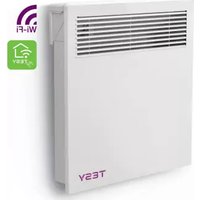
| Product type | Wall-mounted electric convector |
| Power | 600 W |
| Heating volume | 10–23 m³ |
| Heating area | 4–9 m² |
| Power supply | 230 V ~ 50 Hz |
| Protection rating | IP24 (protected against water splashes) |
| Operating modes | Comfort, Eco, Sleep, Delayed start |
| Frost protection | Yes (activates at 5°C) |
| Window/door opening detection | Yes (automatic stop if rapid temperature drop) |
| Child safety | Control panel lock |
| Built-in Wi-Fi | Yes (Cloud model) |
| AirSafe function | Yes (UVA LED for air hygiene) |
| Weekly programming | Yes (24h/7 days, up to 300 setpoints) |
| Adaptive start | Yes (predicts heating time) |
| Installation type | Wall-mounted (mounting with provided brackets) |
| Cleaning | Damp cloth or vacuum cleaner; do not immerse |
| Safety devices | Overheat protection thermocouple, tilt switch (45°) |
Frequently Asked Questions - CN 06 060 EА CLOUD AS W Tesy
User questions about CN 06 060 EА CLOUD AS W Tesy
0 question about this device. Answer the ones you know or ask your own.
Ask a new question about this device
Download the instructions for your Heating in PDF format for free! Find your manual CN 06 060 EА CLOUD AS W - Tesy and take your electronic device back in hand. On this page are published all the documents necessary for the use of your device. CN 06 060 EА CLOUD AS W by Tesy.
USER MANUAL CN 06 060 EА CLOUD AS W Tesy
EN ELECTRIC CONVECTOR HEATER 14-17 Operation and Storage Manual of Convector Heater
1
CN 06 yyz EA CLOUD AS W
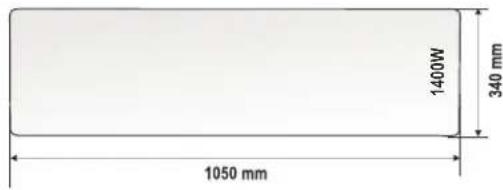
CN 06 140 EA CLOUD AS W GL
2
3
4
5
a

b
6
1 sec
move up/narope/sus/bверх/bropy/gore/rope /hore/w góre/felfele/επάνω / arriba/nach oben/op/aukštyn/uz augšu/ omhoog/upp/opp/rope/gor/para cima/üleminek üles/الإلى الاعلى /nəʊnə/чɛŋlu / Déplacement vers le haut

TESY
![graph TD A["BACK"] --> B["MODE"] B --> C["LOCK"] style A fill:#f9f,stroke:#333 style B fill:#ccf,stroke:#333 style C fill:#fff,stroke:#333](/content/2026/04/694060/images/db3bb6ec88fe7a877e3d9252be75695e5ed1e6d0b7dec220c54a08155d4cf171.jpg)
1 sec
Quick menu / Confirmation / Бързо меню / Потвърждение / Meniu rapid / Confirmare / Быстрое меню / Подтверждение / Швидке меню / Підтвердження / Brzi izbornik/Potvrđivanje / Брзи мени / Потврђивање / Rýchla ponuka / Potvrdenie/Szybkie menu / Potwierdzenie / Gyorsmenü / Megerősítés Грígүро μενού / Емßeβαίωση / Menú rápido / Confirmación/Schnellmenü / Bestätigung / Hurtig menu / Bekræftelse/ Greitas meniu / Patvirtinimas / Ätrá izvělne / apstiprinät/Snelmenu / Bevestiging / Snabbmeny / Bekräftelse/Hurtigmeny/Bekreftelse / Брzo мени / Потврдување/ Hitri meni / Potrditev/Menu rápido / Pikamenüduu/ «Чалай» «Чалай» «Чалай» «Чалай» «Чалай» «Чалай» «Чалай» «Чалай» «Чалай» «Чалай» «Чалай» «Чалай» «Чалай» «Чалай» «Чалай» «Чалай» «Чалай» «Чалай» «Чалай» «Чалай» «Чалай»
3 sec
Full menu/Pълно меню/Meniu complet/Полное меню/ Повне меню/Prošireni izbornik/Kompletan meni/ Kompletná ponuka/Pelne menu/Teljes menü/ПА́нрес μενού/ Menü completo/Hauptmenü/Fuld menu/Pilnas meniu/ Pilna izvělne/Volledig menu/Fullständig meny/Full menu/ Целосно мени/Celoten meni/Menu completo/Täielik menüüü/ Чалкотельная Menyja ٢ /٣/٤/٥/٦/ Lpňq gnugulq / Menu complet
1 sec
choose different mode
A
Predefined functions / Предварително зададени програмни режими / Moduri de program presetate / Заранее заданные программные режимы/ Unaprijed programirani načini rada/Заздалегідь задані програмні режими/ Унапред подешени програмски режими/Prednastavené programovacie režimy/Wcześniej zadany tryb programowy/Előre beállított programmódok/Прокаборюμένες λειτουργίες проγράμματος / Modos de programa preestablecidos/Vorgegebene Betriebsarten/Forudindstillede programtilstande/lš anksto nustatyti programos režimai/Iepriekš iestatiti programmas režimi/Vooraf ingestelde programmamodi/Förinställda programlägen/Forhändsinnstilte programmoduser/ Претходно поставени програмски програмски режими/Prednastavljeni programski načini/Modos previamente configuradosor/ Põhilfunktsioonid / أ Occupant الفرنامع المحمدة مسبقا ورط بزفیم نوره/ Uwhuwuhtu unpulw od bnuqnwju hlu ntduhulutn Modes de fonctionnement prédéfinies
2
Eco mode

Activation/Aktivirané/Activarea/Aktivация/Aktivация/Aktiviranje/Aktivovat/Aktivālas/Everyopoinon/Activar/Einschalten/Aktivering/Jungti/Aktivizēt/Activeren/Aktivering/Aktivering/Aktiviraj/Ativar/Aaktiveerimine/التشيط/الزegovina/Uluunhuwgnlu/Activation
![graph TD A["PROGRAM MODE"] --> B["COMFORT"] B --> C["e ECO"] B --> D["e SLEEP"] C --> E["18°C"] D --> F["23:45"] G["HOURS 07:00"] --> H["MINUTES 07:30"] H --> I["e 18°"] style A fill:#f9f,stroke:#333 style B fill:#ccf,stroke:#333 style C fill:#cfc,stroke:#333 style D fill:#fcc,stroke:#333 style E fi…](/content/2026/04/694060/images/2b1aa2dd8f7979aea42de5861cdd161982c798997b894ae60b9301ea5b98f000.jpg)
Deactivation/Деактивиране/Dezactivarea/Деактивировать/Деактивувати/Deaktiviranje/Деактивирање/Deaktivovaf/Dezaktywacja/Deaktiválás/Aπενεργοποίηση/ Desactivar/Ausschalten/Deaktiver/Išjungti/Deaktivizët/Deactiveren/Avaktivera/Deaktiver/Деактивирање/Deaktiviraj/Desativar/Deaktiveerimine/ ال tangطيل /υμωωμινημιωμημι /Désactivation

1,5 sec
OFF
or/или/sau/или/чи/ili/или/alebo/albo/vagy/ń/o/oder/eller/arba/vai/of/eller/eller/или/oz/ou/või/ɪ /ɪk/ɪŋwʊ/või/ou

choose different mode
3
Sleep mode

Activation/Aktiviranje/Activarea/Aktivация/Aktivация/Aktiviranje/Aktiviranje/Aktivovat/Aktywacja/Aktivalás/Everyopoinon/Activar/Einschalten/Aktivering/Jungti/Aktivizet/Activeren/Aktivering/Aktivering/Aktiviranje/Aktiviraj/Ativar/Aaktiveerimine/التنشط/الز numer/الز numer/الز numer/الز numer/الز numer/الز numer/الز numer/الز numer/الز numer/الز numer/الز numer/الز numer/الز numer/الز numer/الز numer/الز numer/الز numer/الز numer/الز numer/الز numer/الز numer/الز numer/الز numer/الز numer/الز numer/الزNumer/الزNumer/الزNumer/الزNumer/الزNumer/الزNumer/الزNumer/الزNumer/الزNumer/الزNumer/الزNumer/الزNumer/الزNumer/الزNumer/الزNumer/الزNumer/الزNumer/الزNumer/الزNumer/الزNumer/الزNumer/الزNumer/الزNumer/الزNumer/الزNumer/الزNumber/الزNumber/الزNumber/الزNumber/الزNumber/الزNumber/الزNumber/الزNumber/الزNumber/الزNumber/الزNumber/الزNumber/الزNumber/الزNumber/الزNumber/الزNumber/الزNumber/الزNumber/الزNumber/الزNumber/الزNumber/الزNumber/الزNumber/الزNumber/الزNumber/الزNUMBER
![graph TD A["3 sec MODE"] --> B["PROGRAM MODE"] B --> C["e ECO\nSLEEP\nDELAY ST."] C --> D["^ MODE"] D --> E["HOURS\n07:00"] E --> F["^ MODE"] F --> G["MINUTES\n07:45"] G --> H["^ MODE"] H --> I["19°\n23:45"] style A fill:#f9f,stroke:#333 style B fill:#ccf,stroke:#333 style C fill:#cfc,stroke:#333 st…](/content/2026/04/694060/images/e4c12a864b1b3ff437a9c1732acff7d31a9ce89d3affdc8354a5e6475b35c828.jpg)
Deactivation/Деактивиране/Dezactivarea/Деактивировать/Деактивувати/Deaktiviranje/Деактивирање/Deaktivovat/Dezaktywacja/Deaktiválás/Апеверуопoinşon/ Desactivar/Ausschalten/Deaktiver/Išjungti/Deaktivizët/Deactiveren/Avaktivera/Deaktiver/Деактивирање/Deaktiviraj/Desativar/Deaktiveerimine/ ال通报يل /الله/الله/الله/الله/الله/الله/الله/الله/الله/الله/الله/الله/الله/الله/الله/الله/الله/الله/الله/الله/الله/الله/الله/الله/الله/الله/الله/الله/الله/الله/الله/الله/الله/الله

1,5 sec
OFF
or/или/sau/или/чи/ili/или/alebo/albo/vagy/η/o/oder/eller/arba/vai/of/eller/eller/или/oz/ou/või/,/ɪk/ɪpuəl/või/ou

choose different mode
B
Basic modes / Основни режими / Moduri de bază / Основные режимы/Основні режими/Osnovni načini rada / Основни режими / Základné režimy/Tryby podstawowe/Alap módok/Kúpíoi trópoi leitoupyíac / Modos básicos/Hauptbetriebsarten/Basistilstande/Pagrindiniai režimai/Pamatrežimi/Basismodi/Grundläggande lägen/Basismoduser/Modes de base / Baasilised režiimid
1 Heating mode
Activation/Aktiviranje/Activarea/Aktivация/Aktivация/Aktiviranje/Aktiviranje/Aktivovat/Aktivwacja/Aktivalás/Everpolyoinηση/Activar/Einschalten/Aktivering/Jungti/Aktivizet/Activeren/Aktivering/Aktivering/Aktiviraj/Ativar/Aaktiveerimine/###/###/###/###/###/###/###/###/###/###/###/###/###/###/###/###/###/###/###/###/###/###/###/###/###/###/###/###/###/###/###/###/###/###/###/###/###/###/###/###/###/###/###/###/###/###/###/###/###/###/######

1,5 sec
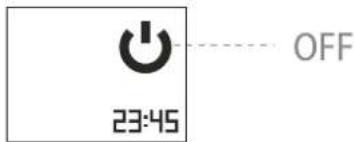
Deactivation/Деактивиране/Dezactivarea/Деактивировать/Деактивувати/Deaktiviranje/Деактивирањe/Deaktivovat/Dezaktywacja/Deaktiválás/Алеваеропoinη/ Desactivar/Ausschalten/Deaktiver/Išjungti/Deaktivizët/Deactiveren/Avaktivera/Deaktiver/Деактивирањe/Deaktiviraj/Desativar/Deaktiveerimine/ التعötيل /Ναψη/υμωνωμηνημωριμί /Désactivation

1,5 sec
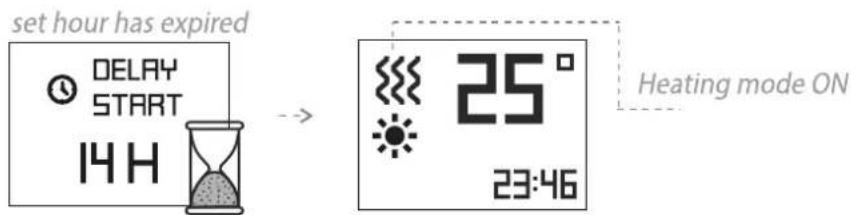
2 Delay start function
Activation/Aktiviranje/Activarea/Aktivация/Aktivация/Aktiviranje/Aktiviranje/Aktivovat/Aktivwacja/Aktivalás/Everpyoloinηση/Activar/Einschalten/Aktivering/jungti/Aktivizet/Activeren/Aktivering/Aktivering/Aktivering/Aktiviraj/Ativar/Aaktiveerimine/###/###/###/###/###/###/###/###/###/###/###/###/###/###/###/###/###/###/###/###/###/###/###/###/###/###/###/###/###/###/###/###/###/###/###/###/###/###/###/###/###/###/###/###/###/###/###/###/###/###/######
![graph LR A["PROGRAM MODE"] --> B["SLEEP"] B --> C["DELAY ST."] C --> D["W.SCHEDULE"] D --> E["DELAY START"] E --> F["14H"] G["DELAY START"] --> H["21°C"] H --> I["21° 11:35"]](/content/2026/04/694060/images/ce966369007ccedecf429a895f51a48f31d783491943cb649e0f9e95ca79cd73.jpg)
Deactivation/Деактивиране/Dezactivarea/Деактивировать/Деактивувати/Deaktiviranje/Деактивирањe/Deaktivovat/Dezaktywacja/Deaktiválás/Алгеверопоignon/ Desactivar/Ausschalten/Deaktiver/Išjungti/Deaktivizet/Deactiveren/Avaktivera/Deaktiver/Деактивирањe/Deaktiviraj/Desativar/Deaktiveerimine/التعطيل / الله/الله/الله/الله/الله/الله/الله/الله/الله
B
Basic modes / Основни режими / Moduri de bazã / Основные режимы/Основні режими/Osnovni načini rada / Основни режими / Základné režimy/Tryby podstawowe/Alap módok/Kúpíotrópoi leitoupyíac / Modos básicos/Hauptbetriebsarten/Basistilstande/Pagrindiniai režimai/Pamatrežimi/Basismodi/Grundläggande lägen/Basismoduser/Modes de base /Baasilised režiimid
3
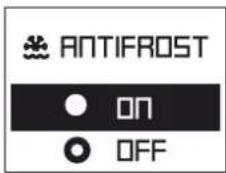
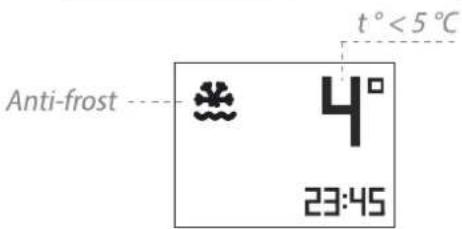
Anti-frost mode

Activation/Aktiviranje/Activarea/Aktivация/Aktivация/Aktiviranje/Aktiviranje/Aktivovat/Aktiywacja/Aktivalás/Everyopoinjón/Activar/Einschalten/Aktivering/Jungti/Aktivizet/Activeren/Aktivering/Aktivering/Aktiviraj/Aktiviraj/Aktiviraj/Aktiviraj/Aktiviraj/Aktiviraj/Aktiviraj/Aktiviraj/Aktiviraj/Aktiviraj/Aktiviraj/Aktiviraj/Aktiviraj/Aktiviraj/Aktiviraj/Aktiviraj/Aktiviraj/Aktiviraj/Aktiviraj/Aktiviraj/Aktiviruj

3 sec
PROGRAM MODE
W.SCHEDULE
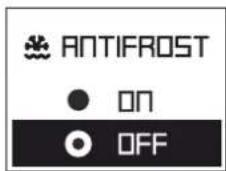
ANTIFROST
TEMP. COR

Deactivation/Деактивиране/Deactivarea/Деактивировать/Деактивувати/Deaktiviranje/Деактивирање/Deaktivovať/Dezaktywacja/Deaktiválás/Aπενεργοποίηση/ Desactivar/Ausschalten/Deaktiver/Išjungti/Deaktivizet/Deactiveren/Avaktivera/Deaktiver/Деактивирање/Deaktiviraj/Desativir/Deaktiveerimine/ التعötيل / النψη/υμωμλυημιωμημι /Désactivation

3 sec
PROGRAM MODE
W.SCHEDULE
ANTIFROST
TEMP. COR

4
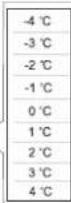
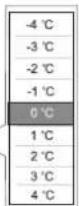
Temperature correction

Activation/Aktivirané/Activarea/Aktivация/Aktivация/Aktiviranje/Aktivovat/Aktywacja/Aktiválás/Evæpyoloinən/Activar/Einschalten/Aktivering/Jungti/Aktivizet/Activeren/Aktivering/Aktivering/Aktiviraj/Aktivar/Aaktiveerimine/التشmit/الزام/الزام/الزام/الزام/الزام/الزام/الزام/الزام/الزام/الزام/الزام/الزام/الزام/الزام/الزام/الزام/الزام/الزام/الزام/الزام/الزام/الزام/الزام/الزام/الزام/الزам

3 sec
PROGRAM MODE
ANTIFROST
TEMP. COR.
AIR SAFE

TEMP.COR.
-2°C

Deactivation/Деактивиране/Dezactivarea/Деактивировать/Деактивувати/Deaktiviranje/Деактивирање/Deaktivovat'/Dezaktywacja/Deaktiválás/Апеверуопoinon/ Desactivar/Ausschalten/Deaktiver/Išjungti/Deaktivizet/Deactiveren/Avaktivera/Deaktiver/Деактивирање/Deaktiviraj/Desativir/Deaktiveerimine/ التعötيل / الزψη/ЦушWWЦунħцΨωgnι Fiji /Désactivation

3 sec
PROGRAM MODE
ANTIFROST
TEMP. COR
AIR SAFE

TEMP.COR.
0°C

B
Basic modes / Ocnobni rejimi / Moduri de bază / Ocnobni pejimi/Ocnobni rejimi/Osnovni načini rada /Ocnobni rejimi / Základné režimy/ Tryby podstawowe/Alap módok/Kúpioi trópoi leitoupyiaç / Modos básicos/Hauptbetriebsarten/Basistilstande/Pagrindiniai režimai/Pamatrežimi/ Basismodi/Grundläggande lägen/Basismoduser/Modes de base /Baasilised režimid
5
Adaptive start Ⓐ
Activation/Aktivirané/Activarea/Aktivация/Aktivация/Aktiviranje/Aktivovat/Aktywacja/Aktivalás/Everyopoinon/Activar/Einschalten/Aktivering/jungti/Aktivizet/Activeren/Aktivering/Aktivering/Aktiviraj/Aktiviraj/Aktiveerimine/الإستعمال/Ujunhuwgnul/Activation

3 sec
PROGRAM MODE

OPEN WIN.

AD. START

ANTIFROST


AD. START

ON

OFF


Deactivation/Деактивиране/Deactivarea/Деактивировать/Деактивувати/Deaktiviranje/Деактивирање/Deaktivovat'/Dezaktywacja/Deaktiválás/Απενεργοποίηση/ Desactivar/Ausschalten/Deaktiver/Išjungti/Deaktivizet/Deactiveren/Avaktivera/Deaktiver/Деактивирање/Deaktiviraj/Desativar/Deaktiveerimine/التعötيل / Νωψ/υμωωμηνημωρημ /Désactivation

3 sec
PROGRAM MODE

OPEN WIN.

AD. START

ANTIFROST


AD. ST

ON

OFF


6
Reset


3 sec
PROGRAM MODE

AD. START
RESET

OPEN WIN


RESET TO FACTORY DEFAULT?

CONFIRM RESET?

SETTINGS CLEARED
7 Keyboard lock
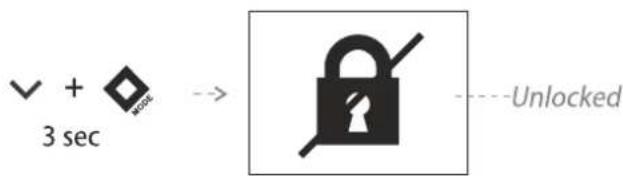
Activation/Aktivirané/Activarea/Aktivация/Aktivация/Aktiviranje/Aktivovat/Aktywacja/Aktivalás/Everypopoinon/Activar/Einschalten/Aktivering/Jungti/Aktivizet/Activeren/Aktivering/Aktivering/Aktiviraj/Ativar/Aaktiveerimine/الإستعمال/Ujunhuwgnul/Activation
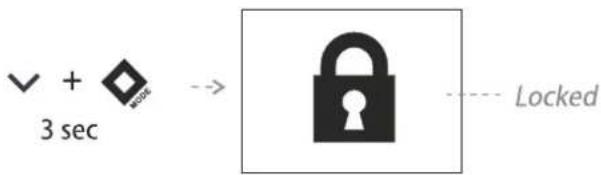
Deactivation/Деактивиране/Deactivarea/Деактивировать/Деактивувати/Deaktiviranje/Деактивирање/Deaktivovat/Deaktywacja/Deaktiválás/Алеваерополіон/ Desactivar/Ausschalten/Deaktiver/Išjungti/Deaktivizet/Deactiveren/Avaktivera/Deaktiver/Деактивирање/Deaktiviraj/Desativar/Deaktiveerimine/ الس適用/UuUuuUunHuhugnLf /Désactivation
B
Basic modes / Ocnovni режимi / Moduri de bazā / Ocnovnne режимi/Ocnovni режимi/Osnovni načini rada /Ocnovni режимi / Základné režimy/ Tryby podstawowe/Alap módok/Kúpíoi trópoi leitoupyiaç / Modos básicos/Hauptbetriebsarten/Basistilstande/Pagrindiniai režimai/Pamatrežimi/ Basismodi/Grundläggande lägen/Basismoduser/Modes de base/Baasilised režimid
8
Open window

Activation/Aktivirané/Activarea/Aktivация/Aktivация/Aktiviranje/Aktivovat/Aktywacja/Aktiválás/Everypopoinon/Activar/Einschalten/Aktivering/Jungti/Aktivizët/Activeren/Aktivering/Aktivering/Aktiviraj/Aktiviraj/Aktiveerimine/التشmit/الزام/الزام/الزام/الزام/الزام/الزام/الزام/الزام/الزام/الزام/الزام/الزام/الزام/الزام/الزام/الزام/الزام/الزام/الزام/الزام/الزام/الزام/الزام/الزام/الزام/الزам

3 sec
PROGRAM MODE
× RESET
OPEN WIN.
DAY TIME


OPEN WIN.
○ on
OFF


Deactivation/Деактивиране/Deactivarea/Деактивировать/Деактивувати/Deaktiviranje/Деактивирање/Deaktivovat'/Dezaktywacja/Deaktiválás/Апеверуопоїног/ Desactivar/Ausschalten/Deaktiver/Išjungti/Deaktivizet/Deactiveren/Avaktivera/Deaktiver/Деактивирање/Deaktiviraj/Desativar/Deaktiveerimine/ التعötيل /Νιγη/υμωμλυηνιμωριμ /Désactivation

3 sec
PROGRAM MODE
× RESET
OPEN WIN.
DAY TIME


OPEN WIN.
● ON
OFF


9
Day and time settings
Day of the week

3 sec
PROGRAM MODE

OPEN WIN
DRY TIME
WII-FI


DAY OF THE WEEK
TIME


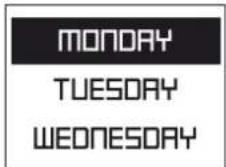


Time

3 sec
PROGRAM MODE

OPEN WIN.
DAY TIME
WII-FI


DAY OF THE WEEK
TIME


![graph LR A["HOURS 11:16"] --> B["◇ MODE"] B --> C["MINUTES 12:45"] C --> D["◇ MODE"] D --> E["◇ BACK"] style A fill:#000,stroke:#fff,color:#fff style C fill:#000,stroke:#fff,color:#fff note right of A (00.00 - 24.00)](/content/2026/04/694060/images/e115b574065af9f1f4c4ce3849f6a137c141f27dc866fff23702b472561dff1b.jpg)
10
Weekly program (24h/7h)

Activation/Aktivirané/Activarea/Aktivация/Aktivация/Aktiviranje/Aktivovat/Aktywacja/Aktivalás/Everyopoinon/Activar/Einschalten/Aktivering/jungti/Aktivizét/Activeren/Aktivering/Aktivering/Aktiviraj/Ativar/Aaktiveerimine/الإستعمال/الإستعمال/Uphunghugnul/Activation
CREATE PROGRAM
![graph TD A["3 sec"] --> B["PROGRAM MODE"] B --> C["DELAY ST. W.SCHEDULE ANTIFROST"] C --> D["CREATE PROGRAM EASE PROGRAM VIEW PROGRAM"] E["DAY OF THE WEEK"] --> F["MONDAY TUESDAY WEDNESDAY"] F --> G["START TIME 12:30"] H["END TIME 15:00"] --> I["TEMPERATURE 22°C"] I --> J["22° 12:35"]](/content/2026/04/694060/images/2c9a5889456ca121500d624b835c56852db6cfa6f83b102d91840bb4ceb98395.jpg)
ERASE PROGRAM
![graph LR A["3 sec MODE"] --> B["PROGRAM MODE"] B --> C["DELAY ST ."] C --> D["W.SCHEDU"] D --> E["ANTIFROST"] E --> F["CREATE PROGRAM"] F --> G["ERASE PROGRAM"] G --> H["VIEW PROGRAM"] H --> I["MONDAY 22°C 9:55 - 17:00"] I --> J["MOOD"]](/content/2026/04/694060/images/34e8c89cc04ab4c5a1d45048e94152cc7dbbb263c68fc92cced63617392fa483.jpg)
VIEW PROGRAM
![graph LR A["3 sec"] --> B["PROGRAM MODE"] B --> C["DELAY ST ."] C --> D["W.SCHEDU"] D --> E["ANTIFROST"] E --> F["CREATE PROGRAM"] F --> G["ERASE PROGRAM"] G --> H["VIEW PROGRAM"] H --> I["MONDAY 22°C 9:55 - 17:00"] I --> J["MOOD"]](/content/2026/04/694060/images/65044049383c3eaa4f06c97f6ff951fc221788ce36b99d898643dfb37dc6b1e1.jpg)
Deactivation/Деактивиране/Deactivarea/Деактивировать/Деактивувати/Deaktiviranje/Деактивирање/Deaktivovat'/Deaktywacja/Deaktiválás/Απενεργοποίηση/ Desactivar/Ausschalten/Deaktiver/Išjungti/Deaktivizet/Deactiveren/Avaktivera/Deaktiver/Деактивирање/Deaktiviraj/Desativar/Deaktiveerimine/التعötيل / Ναψη/υμωμιμημιμωρημι /Désactivation

1,5 sec
OFF
or/или/sau/или/чи/ili/или/alebo/albo/vagy/ń/o/oder/eller/arba/vai/of/eller/eller/или/oz/ou/või/ɪ/ɪx/lquu/või/ou

1 sec choose different mode
B
Basic modes / Ocnovni режимi / Moduri de bază / Ocnovni e режимi/Ocnovni načini rada /Ocnovni режимi / Základné režimy/ Tryby podstawowe/Alap módok/Kúpiotrópois leitoupyiaç / Modos básicos/Hauptbetriebsarten/Basistilstande/Pagrindiniai režimai/Pamatrežimi/ Basismodi/Grundläggande lägen/Basismoduser/Modes de base /Baasilised režiimid
11
Air Safe

Activation/Aktiviranje/Activarea/Aktivация/Aktivация/Aktiviranje/Aktiviranje/Aktivovat/Aktivadas/Aktivadas/Everyonoinon/Activar/Einschalten/Aktivering/Jungti/Aktivizet/Activeren/Aktivering/Aktivering/Aktiviranje/Aktiviraj/Ativar/Aaktiveerimine/ activation

3 sec
PROGRAM MODE
TEMP. COR.
AIR SAFE
A AD. START

AIR SAFE

OFF
Deactivation/Деактивиране/Dezactivarea/Деактивировать/Деактивувати/Deaktiviranje/Деактивирање/Deaktivovat/Dezaktywacja/Deaktiválás/Алеверylonoinşn/ Desactivar/Ausschalten/Deaktiver/Išjungti/Deaktivizet/Deactiveren/Avaktivera/Deaktiver/Деактивирање/Deaktiviraj/Desativar/Deaktiveerimine/ ال加油يل/Uwuuuynhquwnlu /Désactivation

3 sec
PROGRAM MODE
TEMP. COR.
AIR SAFE
A AD. START

AIR SAFE
● ON
OFF

12
Tip-over switch
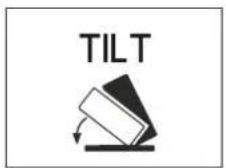
13
Device info

3 sec
PROGRAM MODE

SOUND
DEVICE INFO

COMFORT

CNO6R5
3C:71:BF:85:CO:00 VER 4.73

14
Sound

Activation/Aktiviranje/Activarea/Aktivация/Aktivация/Aktiviranje/Aktiviranje/Aktivovat/Aktivwacja/Aktivalás/Everyopoinon/Activar/Einschalten/Aktivering/Jungti/Aktivizet/Activeren/Aktivering/Aktivering/Aktiviranje/Aktiviraj/Ativar/Aaktiveerimine/التنشاب/الزام/الزام/الزام/الزام/الزام/الزام/الزام/الزام/الزام/الزام/الزام/الزام/الزام/الزام/الزام/الزام/الزام/الزام/الزام/الزام/الزام/الزام/الزام/الزام/الزام/الزам

3 sec
PROGRAM MODE
WII-FI
SOUND
DEVICE INFO

SOUND
5


Deactivation/Деактивиране/Dezactivarea/Деактивировать/Деактивувати/Deaktiviranje/Деактивирање/Deaktivovat/Dezaktywacja/Deaktiválás/Аллеверопoinşən/Desactivar/Ausschalten/Deaktiver/Išjungti/Deaktivizët/Deactiveren/Avaktivera/Deaktiver/Деактивирање/Deaktiviraj/Desativar/Deaktiveerimine/ال通报يل/الزف/v/Uqwwuylunhqlwgnlu /Désactivation

3 sec
PROGRAM MODE
WIFI
SOUND
DEVICE INFO

SOUND
□


B
Basic modes / Ocnobni режимi / Moduri de bazā / Ocnobные режимы/Ocnobni режимi/Osnovni načini rada /Ocnobni режимi / Základné režimy/ Tryby podstawowe/Alap módok/Kúpíoi trópoi leitoupyíac / Modos básicos/Hauptbetriebsarten/Basistilstande/Pagrindiniai režimai/Pamatrežimi/ Basismodi/Grundläggande lägen/Basismoduser/Modes de base /Baasilised režilimid
15
Wi-Fi

Activation/Aktivirané/Activarea/Aktivация/Aktivabia/Aktiviranje/Aktivovat/Aktywacja/Aktivalás/Evepyopoinon/Activar/Einschalten/Aktivering/Jungti/Aktivizët/Activeren/Aktivering/Aktivering/Aktiviraj/Aktiviraj/Aktiveerimine/التش Progressive/UquhluqgnLU/Activation
WI-FI
![graph TD A["3 sec"] --> B["PROGRAM MODE"] B --> C["DAY TIME\nWI-FI\nSOUND"] C --> D["WI-FI LOCAL\nWI-FI ON\nWI-FI OFF"] D --> E["STARTING WI-FI"] E --> F["WI-FI CONNECTED YOURNETWORK"] F --> G["DAY TIME\nWI-FI\nSOUND"] G --> H["22°\n23:45\nWi-Fi ON"]](/content/2026/04/694060/images/f812b5bab480cbd1687d01c3a1de34bbd6f3069d9d71be7578cbb8bb91fd2bc4.jpg)
WI-FI LOCAL
![graph LR A["3 sec"] --> B["PROGRAM MODE"] B --> C["DAY TIME\nWI-FI\nSOUND"] C --> D["WI-FI LOCAL\nWI-FI ON\nWI-FI OFF"] D --> E["Wi-Fi AP MODE\n192.168.4.1"] E --> F["WI-FI CONFIG OK"] F --> G["DAY TIME\nWI-FI\nSOUND"] G --> H["22° 23:45"] H --> I["Wi-Fi Local ON"]](/content/2026/04/694060/images/c8fab9b935f924c62dc61fdc824f4c852fa21788d7ec7fb57c2d3b95f764a6de.jpg)
Deactivation/Деактивиране/Deactivarea/Деактивировать/Деактивувати/Deaktiviranje/Деактивирање/Deaktivovať/Dezaktywacja/Deaktiválás/Апеверопoinηση/Desactivar/Ausschalten/Deaktiver/Išjungti/Deaktivizet/Deactiveren/Avaktivera/Deaktiver/Деактивирање/Deaktiviraj/Desativar/Deaktiveerimine/التعطيل / النوع/النوع/النوع/النوع/النوع/النوع/النوع/النوع/النوع/النوع/النوع/النوع/النوع/النوع/النوع/النوع/النوع/النوع/النوع/النوع/النوع/النوع/النوع/النوع/النوع/النوع

3 sec
![graph LR A["PROGRAM MODE"] --> B["DAY TIME"] B --> C["WI-FI LOCAL"] B --> D["SOUND"] C --> E["WI-FI ON"] C --> F["WI-FI OFF"] G["DAY TIME"] --> H["WI-FI"] H --> I["SOUND"] J["22° 23:45"] --> K["House Icon"]](/content/2026/04/694060/images/7ad31cd16071e54e83e1d838fc9e8fb591e86c1228175bf8e0ebf186325e60db.jpg)
C
Quick menu/Бързо меню/Meniu rapid/Быстрое меню/Швидке меню/Brzi izbornik/Брзи мени/Rýchla ponuka/Szybkie menu/Gyors menü/ Грýоро μενού /Menú rápido/Schnellmenü/Hurtig Menu/Greitas meniu/Åtră izvělne/Snelmenu/Snabbmeny/Hurtigmeny/Menu rapide /Menu rápido/Pikamenüuu
1
Comfort mode


W.SCHEDULE

COMFORT

ECO


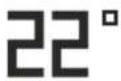
23:45
2
Eco mode


COMFORT

ECO

SLEEP


e

23:45
3
Sleep mode


ECO

SLEEP

DELAY ST.


23:45
4
Delay start function


SLEEP

DELAYST.

W.SCHEDULE


11:35
5
Weekly program (24h/7h)


DELAY ST.

W.SCHEDULE

COMFORT


12:35
IMPORTANT SAFETY MEASURES AND INSTRUCTIONS:

WARNING!
- Please read this manual before operating the appliance and keep it at a safe place for future reference. In case the appliance is obtained by a new owner, it should be transferred together with its manual.
CAUTION: Children under 3 years of age should be kept away from the appliance unless they are under constant supervision. - Children from 3 to 8 years of age are allowed to operate the on/off button ONLY, provided that the appliance is installed and ready for operation and such children have been supervised and instructed in safe operation of the appliance and they understand all related risks.
- Children from 3 to 8 years of age MUST NOT: connect the plug to power sockets, make adjustments, clean it or carry out user maintenance operations.
- This appliance can be used by children older than 8 years of age and by people with reduced physical, sensor and mental capabilities, as well as by people with insufficient experience and knowledge provided they are supervised or instructed in safe operation of the appliance and understand the related risks. Children should not be allowed to play with the appliance. Cleaning and user maintenance operations must not be carried out by children without supervision.
- CAUTION: Some of the appliance parts may get very hot during operation and thus cause burns to users. In case there are children and vulnerable people in the room, special attention should be paid.
●WARNING: Do not cover the appliance in order to prevent overheating!

- The appliance must not be placed right under a socket box!
- If the supply cord is damaged, it must be replaced by the manufacturer, its service agent or similarly qualified persons in order to avoid a hazard.
- Before connecting the appliance to the mains, check if the voltage indicated on its technical plate corresponds to the voltage of the electricity, supplied to your house.
- This appliance shall be used only for the purpose it has been designed and intended for, i.e. heating of domestic premises. The appliance is not intended for commercial/industrial application. Every other use is to be considered improper, and therefore dangerous. The manufacturer doesn't bear responsibility for damages arising from improper and irrational use. Non-adherence to these instructions would render the warranty invalid!
- Do not leave your home while the heater is operating: make sure that the power switch is in OFF position (convector heaters with mechanical control).
- Keep inflammable objects, such as furniture, pillows, bedding, paper, clothes, curtains etc. at a safe distance of at least 100 cm away from the panel heater.
- Do not operate the appliance in areas of use or storage of combustible substances. Do not operate the appliance in areas of combustible media (for example in close proximity to inflammable gases or aerosols) – there is great risk of explosion and fire!
- Do not insert and do not allow foreign objects to enter the ventilation openings (inlet and outlet) because this will cause electric shock, fire or will damage the appliance.
- The appliance is not suitable for animal breeding. The panel heater is intended for domestic/indoor operation only.
- When positioning the appliance, do not cover the safety grilles; do not hamper the incoming and outgoing air flow. All objects must be at a safe distance of at least 1 meter away from the appliance front and sides.
- The most common reason for overheating is dust and fluff deposits in the appliance. Clean the ventilation openings on a regular basis with a vacuum cleaner, but before that it is very important to disconnect the heater from the mains.
- Never touch the appliance with wet or moist hands – there is risk for your life!
- The power socket should be accessible all the time in order to disconnect the power plug when needed as fast as possible! Never pull the power cord or the appliance itself in order to disconnect it from the mains.
- PAY ATTENTION! Outgoing air gets heated during appliance operation (up to more than 100°C).
- If you decide to stop using an appliance of this kind, it is recommended to make it unusable by cutting its power cord after you have disconnected it from the mains. It is advisable all possible risks related to the appliance to be secured, especially in relation to children that may play with out-of-use appliances.
- Warning: Do not use this appliance with a programmer, counter or any other mechanism which could automatically turn on the heater – if the appliance is covered or positioned incorrectly there is a risk of fire.
- Position the power cord in such a way that it does not obstruct the free movement of people and cannot be stepped on! Use only approved extension cords, which are suitable for this appliance, i.e. they have a compliance sign!
- Never move the appliance by pulling its power cord; do not use the power cord for carrying other objects!
- Do not bend the power cord and do not pull it against sharp edges; do not place the power cord on hot surfaces or open fire!
- The scattered UVA light emitted by the device is harmless to the eyes. Looking directly and continuously at UVA light is not recommended and poses risks to your vision.
TECHNICAL PARAMETERS - see Annex I
PACKING
- After unpacking the appliance, check if its contents are intact and if it has not been damaged during transportation! In case a damage or incomplete delivery is found, contact your authorized retailer!
- Do not dispose of the original packing box! It could be used for storage and transportation purposes in order to avoid damages during transportation!
- Disposal of packing material should be done in the appropriate way! Children must be prevented from playing with polyethylene bags!
INSTALLATION INSTRUCTIONS
- This panel heater is designed to be used indoors, mounted on a wall.
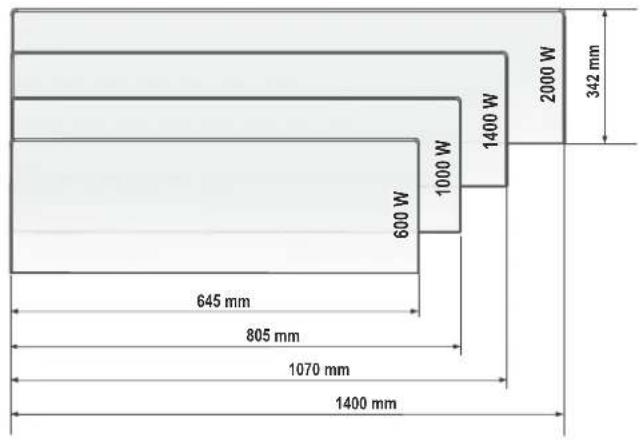
Dimensions of heated volume and heated area of a room / appliance models (fig.1)
| Model Heated volume Heated area | ||
| CN 06 060 EA CLOUD AS W - 600W 10* - 23 m | 3 | 4* - 9 m 2 |
| CN 06 100 EA CLOUD AS W - 1000W 24* - 33 m | 3 | 10* - 13 m 2 |
| CN 06 140 EA CLOUD AS W [GL]- 1400W 34* - 45 m | 3 | 14* - 18 m 2 |
| CN 06 200 EA CLOUD AS W - 2000W 46* - 65 m | 3 | 19* - 26 m 2 |
* Minimum guaranteed heated volume (area) for heating at an average capacity of heat transmission factor λ = 0.5W / (m2K) for a heated room. Higher values of heated volume (area) can be achieved
at an average value of λ = 0.35W / (m2K) . Standard height of heated rooms - 2.5 meters.
Important: In premises bigger than 45 m3 , it is recommended to use a combination of 2 or more convector heaters.
-
Do not position the convector heater under a power socket or electricity connection box.
• DO NOT install/operate the convector heater: -
in places where a draught is present, which could influence the control settings;
- right under a power socket;
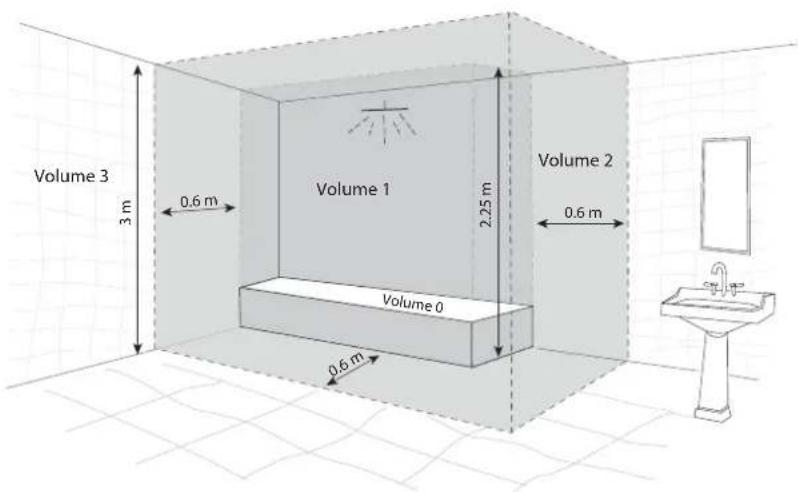
- in "Volume 1" for bathrooms;
-
in "Volume 2" if the control board can be reached by a person who is in a shower or in a bathtub;
-
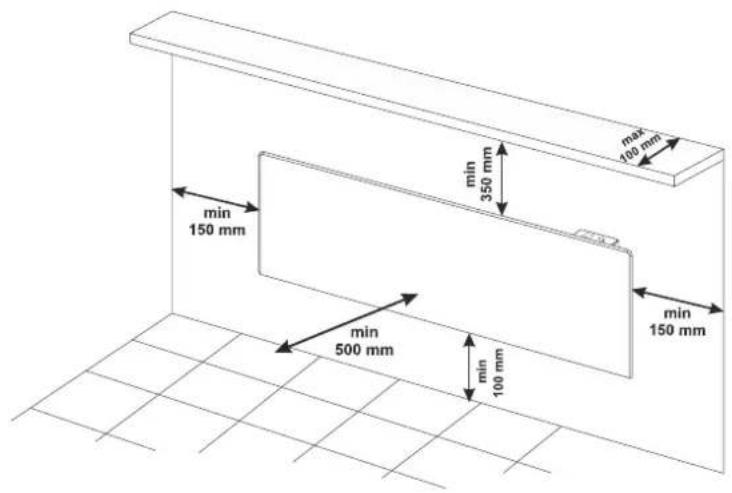
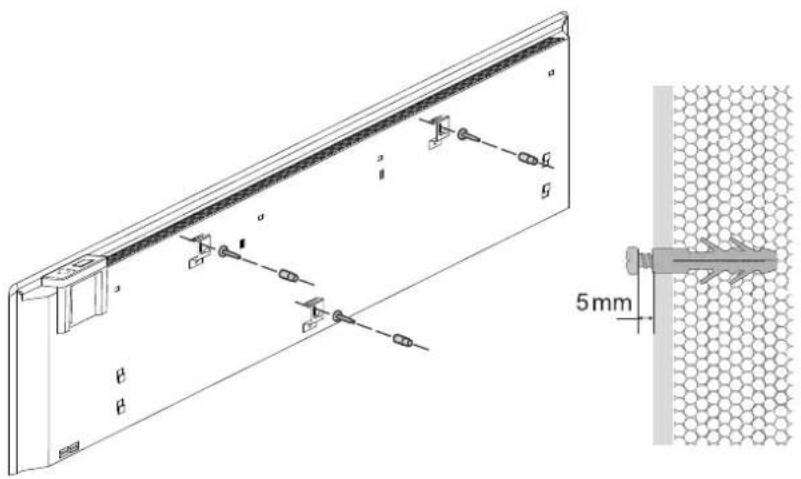
for the wall-mounting of the convector heater, only the wall braces must be used which are delivered together with the appliance. When installing the convector heater, minimum safe distances must be observed (fig.2)
- Select position, and then select 3 points, from the suggested dimensions of the position for drilling (from the attached mounting template), then drill with a suitably drill bit holes in the marked locations on the wall. (fig.3)
- Insert plastic dowels into the holes.
- Screw the screws into the dowels, and let them be submitted at least 5 mm.
- Attach the unit on the screws.
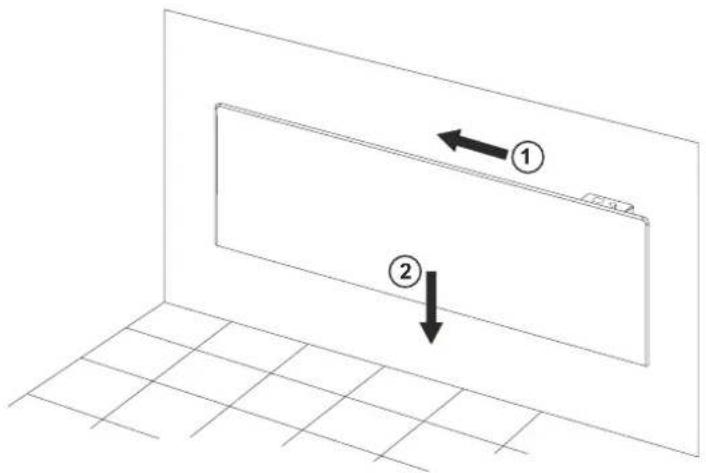
- Move slightly to the left of the appliance and then lower the down to make sure that the screws are right at the top of the channels. (fig.4)
Second installation option:
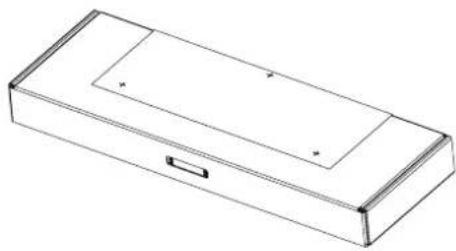
- Place the enclosed mounting template on the box, drill the holes on the top flap of the box, marked with +, in the direction shown in the figure below. (fig.5a)
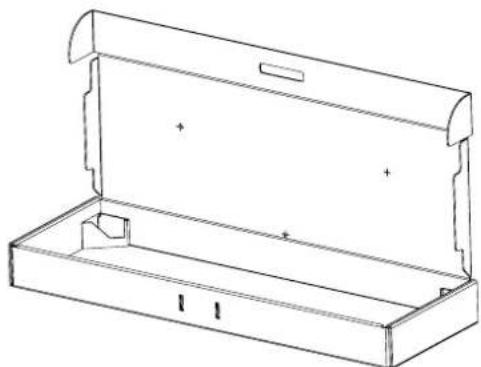
- Open the box and place it on the wall as shown in the figure below. Transfer the marked holes to the wall. (fig.5b)
BATHROOM OPERATION
- The convector heater must be installed in accordance with the normal trade practices and in compliance with the national legislation (EU electricity directives and regulations concerning special installations and places of operation including bathrooms, shower cabins HD60364-7-701(IEC 60364-7-701)). (fig.6)
- In case this convector heater is to be used in a bathroom or other similar room, the following installation requirements must be observed: the convector heater is with IP24 protection (water drops protection). Hence it can be installed in "Volume 2" (see the diagram below) in order to avoid the risk of the control board (power switch and thermo regulator) being reached by a person who is in a shower or a bathtub. The minimum distance between the appliance and a water source should be not less than 1 meter and it is compulsory the appliance to be wall-mounted! If you do not feel sure about the installation of this convector heater in a bathroom, we recommend you to consult a professional electrician.
Note: If the above-mentioned instructions cannot be implemented, it is recommended to install the appliance in "VOLUME 3".
- In wet premises the power source must be installed at a height of at least 25 cm above the floor (bathrooms and kitchens).
- The installation must be equipped with a safety fuse, and the distance between the fuse contacts in disconnected condition should be at least 3 mm.
Thank you for choosing CN06 convector heater. This is a product providing heating in winter depending on the consumers' needs for comfortable room temperature. If operated and taken care of properly in accordance with these instructions, the appliance will provide you with many years of useful operation.
OPERATION INSTRUCTIONS
- Predefined functions:
1.1. Comfort mode ☐ - with On/Off option - allows the user to set a desired temperature when being at home. After once set it and the function is switched On, the appliance will keep the same room temperature each time of usage. This temperature to be set at 23°C by default.
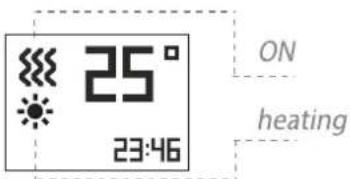
Activation and deactivation of Comfort mode - /Quick start A1/

When the convector is in „Heating mode“, sign „sun“, appears on the display.

1.2. Eco mode e - with On/Off option - allows the user to set a desired temperature when being out of home. After once set it and the function is switched On, the appliance will keep the same room temperature each time of usage. This temperature will be set at 18°C by default. User could also set the time when the appliance to switch to Comfort mode.
Activation and deactivation of Eco mode - /Quick start A2/
When the set time has elapse, the appliance going to Comfort mode !
1.3. Sleep mode with On/Off option – two hours after activation, the convector decreases the set temperature with -3°C under the set temperature in Comfort mode. User could set the time range for operating in Sleep mode then the appliance switches to Comfort mode. By default: 6 hours.
Activation and deactivation of Sleep mode - /Quick start A3/
When the set time has elapse, the appliance going to Comfort mode!
- Basic modes
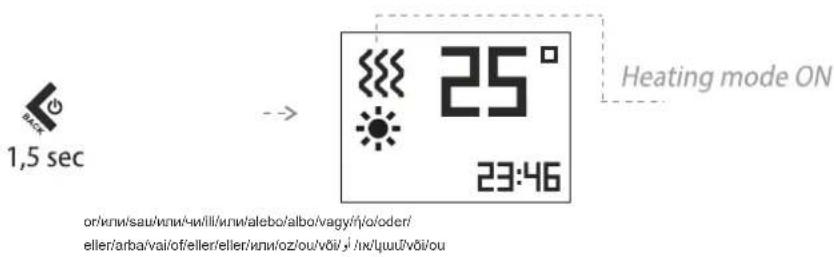
"Heating" mode
Activation and deactivation of Heating mode - /Quick start B1/
The set temperature is indicating in the right. If the room temperature is lower than the set one, the heater will switch automatically on, and a heating sign appear on the display.
Temperature adjustment
By pushing any of the buttons: on, the user enters "Temperature adjustment" mode and the user can change the temperature settings in the desired direction. The new settings are saved and the heater goes automatically into "Heating" mode if any of or buttons get pressed longer than 0.5 sec., the temperature settings will start automatically increase or decrease at a rate of 6 units per second. The range of available temperature settings is from 10 up to 30 degrees.
Delay start function
The delay start function allows the user to set the time at which the convector will switch on and start heating.
Activation and deactivation of Delay start function - /Quick start B2/
When the set time has elapse, the appliance going to Heating mode! Initially a setting of 12 hours is set by default
If any of ∧ or √ buttons is held for more than 0.5 seconds, the time and temperature settings start automatically increase or decrease at a rate of 4 units per second. Confirm with "Mode" button ○ don't press any button for 3 seconds.
If user enters time - 00, this mode will not be implemented. If the "Delay start" mode is already enabled and user selects the "D'elay Start" mode again, it can be changed the remaining time in both possible directions. You can exit this mode by pushing the "On/Off" button. Then convector heater will go into "Heating" mode. The "Delay start" needs to be set from 0 to 96 hours.
Anti-frost mode
If the room temperature falls below 5° C and the convector heater is off, the heater will turn on automatically in order to prevent freezing of the area. Indication – ✉ in left top corner - only when work the anti-frost mode Factory settings of the function is ON (switched On).
Activation and deactivation of Anti-frost mode /Quick start B3/
"Temperature correction for the sensor" function
Due to the specifics of the temperature profile in some premises there may be difference from the temperature shown on the display and the actually measured temperature in the various locations of the heating appliance in the room.
• See the temperature shown on the display of the appliance
- Measure the temperature at a place where the temperature is "comfortable" enough for you (usually at a height of 60 cm from the floor, in sitting positon). If you find a difference within a range of ±4°C, you can set the necessary correction in the convector's menu (It is important to note that this function can be set only after the temperature has become the same all around the room, and depending on the room type, the minimum required time is 7 hours) by entering the temperature difference resulting between the value on the display and the actually measured temperature.
Note: This function is used with the purpose of providing better temperature comfort and energy saving for the user of the electric convector in the room which it is in. A temperature difference greater than ±4 °C from the measured temperature in a specific location in the room indicates that the room where you use the convector in is not well insulated or the temperature is not the same all around the room.
Example: a convector in a room on a stone floor – the convector displays 18° C (the set temperature is 22° C), the actually measured temperature (feeling of reached comfort temperature) is 22° C at a height of 60 cm from the floor - > in this case the convector continues to overheat the room (this is a direct energy loss, but the convector cannot reach the set temperature because it measures the temperature at a low height close to the floor) and it will never switch off. In this case a temperature correction of +4° C needs to be applied to the sensor, thus the convector will display 22° C and it will start switching off, and eventually it will maintain the set temperature of 22° C).
The normal status of the function is 0°C by default
Activation and deactivation of Temperature correction - /Quick start B4/
If the factory reset function is used, the temperature correction has to be set again. The factory setting of its value is 0° C.
Function Adaptive start A
Adaptive start is a function which predicts and initiates the optimal start of heating in order to reach the set-point temperature at the desired time;
Test according to user instruction / documentation. The function is tested in a room with a continuous heat demand of 50 - 60% with reference to the wattage of the test device. The product is working at a comfort temperature 23°C ± 3°C setpoint until stable conditions. This temperature is the reference comfort temperature "Ct". Activate a set-back period of 7h + 2h/-0h per 24h with a set-back of 4°C ± 1°C . The comfort period being 17 - 2h/+0h hours. With the adaptive control activated - let the heater thermostat working during 4 periods (4 x 24 hours) of comfort and low setback cycles. After the latest low setback period finishes the comfort temperature "Ct" should be reached within ± 30 minutes deviation to the time target - with a maximal difference of ± 1°C from the reference comfort temperature "Ct".
- Factory settings of the function is "ON"
Activation and deactivation of Adaptive start - /Quick start B5/
RESET to default settings
If the customer wants reset the convector to factory settings.
Visualization on Display in "RESET" settings /Quick start B6/
After using the reset function, the following functions will be re-set:
- clock time
- temperature correction value 0° C
- function Anti-frost mode is activated
- adaptive start is activated
- weekly program - 24/7 is reset.
Open window/door function

Room temperature control with open window detection - the product is equipped with an integrated electronic device that reduces the heat output when detects an open window or door. A sensor is used to detect eventual drop in the room temperature. If the temperature falls more than 5°C, the convector will switch off by itself. Within 15 min the open window detection should turn the appliance off. When the room temperature rises by at least 0.5°C and the difference from the initial set point is below 5°C, the convector switches itself on with the settings already made. If the temperature does not rise for more than 60 minutes, the convector enters Standby mode. The function is allowed to be cancelled manually.
The function can be switched Off manually.
Activation and deactivation of Open window/door function - /Quick start B8/
Note: When the "Open window" function is enabled, the "Anti-frost" function does not work!
Keyboard lock (Protection from children)
When user turns on this function, all keys of the control panel remain locked. Activation and deactivation of Keyboard lock - /Quick start B7/ Day and time – settings /Quick start B9/
First step or use after factory reset function
Weekly program (timer) 24hours/7days

Min 300 sets of time periods
Electronic thermoregulator with weekly program (timer) 24/7 - electronic room temperature control plus weekly timer means the product is equipped with an electronic device, either integrated or external, which allows the product automatically to vary its heat output over a certain time period. In relation with a certain required level of indoor heating comfort. It allows the setting of timing and temperature levels for a full week. During the 7-day period the settings must allow a variation on a day-to-day basis;
Activation and deactivation of Weekly program - /Quick start B10/
There have three options /Quick start B10/:
- CREATE PROGRAM
- ERASE PROGRAM
- VIEW PROGRAM
The temperature of 22 °C started at 12.30 to 15.00 on Sunday. The convector will heat till reach the settings of the next given point.

If the TIME PERIOD is empty (no time set) – visualization should be

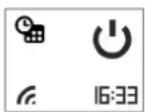
- One step back – with single pushing of ON/OFF button

- No limit of time periods – step is 0.5 hour (30 minutes).
- Adaptive start function is switched on by default.
Function AirSafe – only for models CN 06 xxx EA CLOUD AS W and CN 06 140 EA CLOUD AS W GL
Function Air Safe

The Air safe function Is a result of working together of the module, composed of UVA LEDs and the convector heater.
Advantages of the function:
- Better air hygiene and a healthier environment, thanks to the bactericidal effect of the function.
- Safe operation, even in the presence of people and animals - the light emitted by the module is UVA, which is 95% of the UV light passing through the atmosphere. The reflected UV light in the volume of the housing in which the heater is located has a very low intensity and energy and has no harmful effects on humans, plants and animals.
- Without generation of ozone, hydrogen peroxide, organic or inorganic molecules or ions
- High degree of reduction of bacteria and fungi
- Extremely long service life - over 50,000 hours (over 12 years).
- Quite working mode – natural air flow, through the convector heater
Principle of work of Air safe function
The Air Safe function can be switched on and off by the user through the convector control menu. In order to work, it is necessary the convector to be switched on and heated (the set temperature is higher than the ambient temperature).
When the temperature of the heater rises, the natural air flow starts in the room.
Colder air enters through the lower openings of the convector and passes by the UVA LEDs.
Due to this movement, the molecules of gases, bacteria, micromycetes (fungi) and other microorganisms contained in or carried by the air are irradiated by the combined effect of UVA LED radiation and the infrared radiation of the heater. The continuous passage of the air flow through the volume of the convector provides enough energy to break the connections supporting the structure of harmful microorganisms carried by the air.
As a result of natural convection, after a certain period of time, the air contained in the room completely passes through the volume of the convector, which leads to a reduction of the bacteria and micromycetes contained in it.
Function Air Safe is a protection against harmful organisms such bacteria and fungi. Provides better air hygiene and benefits to a healthier environment.
The function can be switched Off manually.
Activation and deactivation of Air Safe function - /Quick start B11/

Operation of Air Safe must continue for 2 minutes after stopping the heating element, and then turn off.
Built in tip-over switch /Quick start B12/– if the convector tilts with more than 45° or falls down, the power must switch Off and indicate on display “tilt”. After restoring the device to its normal position, operation of the last set function must continue.
Function Wi-Fi - only for models CN 06 xxx EA CLOUD AS W, CN 06 xxx EA CLOUD W and CN 06 140 EA CLOUD AS W GL
Function Wi-Fi

Activation and deactivation of Wi-Fi Function and Wi-Fi Local Function - / Quick start B15/
Work mode of display:
When pressed - backlight intensity - 100%; after 5s - OFF
Sound option

Activation and deactivation of sound function - /Quick start B14/
Device info
Visualization on Display in "Device info"/Quick start B13/
- ID
- MAC address
- Firmware version
Quick menu /Quick start C 1 -5/
Push the "Mode" button to start quick already configured program.
Content function:
- Comfort
- Eco
- Sleep
- Delay start
- Weekly schedule
Exit from the any mode – with single pushing of ON/OFF button

ERRORS MODE:
If the display shows "t1" or "t2", this means that the self-diagnostic system has found a problem with the temperature sensor. "t1" indicates a disconnected cable at the sensor, while "t2" indicates short circuit at the sensor. In this case the electric convector will be automatically switched off and it can be switched on again only after the problem has been fixed. The problem has to be handled by a qualified specialist.
DISCONNECTION FROM THE POWER SUPPLY:
If the electric convector is disconnected from the mains, this will not affect the set temperature and the mode of operation which has been active prior to its disconnection. If for example the convector has been in "Heating" mode, after it has been disconnected and reconnected to the mains, it will continue operating in the same mode with the same set temperature.
The principle of operation of the electric convector with energy-independent memory is to store the settings for 120 minutes guaranteed, and up to 180 minutes not guaranteed.
If the time is more than 120 min the appliance going to Stand by mode.
PROTECTION
- The appliance is equipped with a safety thermo turn-off device, which automatically turns the heater off in cases of extreme temperature of the convector heater /i.e. overheating of the appliance/.
- The safety thermo turn-off device will automatically restore the heater operation when the temperature of the appliance falls below the permissible ultimate values.
CLEANING
- It is compulsory first to turn off the appliance through its power switch and to disconnect it from the power socket. Before starting the cleaning session you should wait until the convector heater cools down in a disconnected state.
- Clean the heater body with damp cloth, vacuum cleaner or a brush.
- Never immerse the appliance into water – there is danger for your life from electric shock!
- Never use gasoline, thinner or hard abrasive products to clean the appliance, because they will damage the appliance coating.
STORAGE
- Before putting the convector heater away let it cool down after you have disconnected it from the power socket
- Use the appliance original packing to store it, if the convector heater will not be in use for a long period of time. By storing the product in its original
packing you protect it from excessive dirt and dust accumulation.
- Never put a hot convector heater in its packing!
- It is necessary the product to be stored at a dry and dark place, protected from direct sun light.
- It is explicitly forbidden to store the convector heater in damp and wet premises.
MAINTENANCE OPERATIONS OF THE APPLIANCE
- In case of appliance malfunction, please contact the authorized service center closest to your location. /service centers are indicated in appliance warranty documents/.
Important: In case of a claim and/or violation of your consumer rights, please contact the supplier of this appliance at the indicated locations or via the Internet page of the company: www.tesy.com

Environment protection instructions
Obsolete electric appliances contain valuable materials and consequently they should not be treated as domestic waste! We ask for your cooperation and your active contribution to protect the resources and the environment. Please submit your out-of-use appliances to the organized buy-back stations (if there are such).
TROUBLESHOOTING
Prior to contacting the Customer Service Center, please check the items in the table below.
| PROBLEM CAUSE SOLUTION | ||
| The appliance doesn't work No power supply from the grid. | Plug into the power outlet and check position of the ON/OFF switch. | |
| Be sure that the product is plugged in and that the electrical outlet is working. | ||
| The temperature may be set too low. Set the temperature to a higher position. | ||
| The "Protection from children" may be activated. See the section "Protection from children" in the user manual. | ||
| The delayed start is working. Press the Turn ON button from control board. | ||
| Room does not get warm enough although the appliance is hot | Appliance overheating. High limit safety cut-out limits heating output. | Eliminate the cause (cover, dirt or obstructions at the air inlet or outlet).Observe minimum clearances according to mounting instructions. |
| Check the Temperature correction for the sensor | See the temperature shown on the display of the appliance. Measure the temperature at a place where the temperature is "comfortable" enough for you. If you find a difference within a range of ±4°C, you can set the necessary correction in the convector's menu by entering the temperature difference resulting between the value on the display and the actually measured temperature. | |
| The heat demand of the room is higher than the appliance output. | Remove heat losses (Close windows and doors. Avoid constant venting.) | |
| Check if the power of your device is adapted to the size of your room. | Recommended an average of 100 W/m2 for a ceiling height of 2,50m or 30W/m3 | |
| Open window/door detection does not respond | Appliance does not detect a pronounced temperature drop due to venting. (Open window/door detection requires previously stable room temperature.) | Avoid obstructions that may prevent normal air exchange between the appliance and the indoor air. |
| Open window/door detection is not enabled Switch on open window/door detection. | ||
| „Adaptive start" function does not work as required | This function works only in weekly mode. Switch on Adaptive start function. | |
| Severely fluctuating room temperature or the appliance learning procedure has not been completed. | Wait a few days for behavior to stabilize. | |
| "Adaptive start" function is not enabled. Switch on the „Adaptive start" function in the menu. | ||
| Display shows "t1" or "t2" | The self-diagnostic system has found a problem with the temperature sensor"t1" indicates a disconnected cable at the sensor"t2" indicates short circuit at the sensor | In this case the electric convector will be automatically switched off and it can be switched on again only after the problem has been fixed by the authorized service representatives.Contact the authorized service center or the retailer you bought the product from. |
| Dirty marks appear on the wall around the device | The dirty marks come as a result of air contamination. | Make sure that some fresh air enters the room regularly, especially if it is used for smoking. |
| The device does not follow internal programming commands | The date and time are not set correctly. | Check the set date and time. |
| The appliance is under Open window/door detection. | Switch off the Open window/door detection. | |
| Sounds/Noises | Emitting faint noises during the heating process and shortly after the set temperature is reached, is not something unusual. | Such effect is in result of the natural materials expansions during the rapid temperature increase and following cooling of the metals used for the product manufacturing. |
| Yellowish stains on the grid | Such stains could be in result of covering the product with wet clothes. | Do not cover the product! Such actions are not allowed, because they block the air convection and will damage the product irreparably, leading to serious risk for your health and properties. |
1. Moduri de program presetate:
Mod Confort (Comfort mode) Mod Eco (Eco mode)
e; Mod „Somn“
(Sleep mode)
Tjedni raspored (tajmer) 24 sata/7 dana

Najmanje 300 postavaka vremenskih razdoblja
POKYNY NA INŠTALÁCIU
KLÜDAS REŽIMU DARBIBÄ:
APPARATENS DIMENSIONER, VÄRMEVOLYM OCH YTA I RUMMET (FIG.1)
| Modell Uppvärmd volym Uppvärmd yta | ||
| CN 06 060 EA CLOUD AS W - 600W 10* - 23 m | 3 | 4* - 9 m2 |
| CN 06 100 EA CLOUD AS W - 1000W 24* - 33 m | 3 | 10* - 13 m2 |
| CN 06 140 EA CLOUD AS W [GL]- 1400W 34* - 45 m | 3 | 14* - 18 m2 |
| CN 06 200 EA CLOUD AS W - 2000W 46* - 65 m | 3 | 19* - 26 m2 |
DIMENSJONER PÅ APPARATET, OPPVARMINGSVOLUM OG AREAL I ROMMET (fig.1)
| Modell Oppvarmet volum Oppvarmet areal | ||
| CN 06 060 EA CLOUD AS W - 600W 10° - 23 m | 2 | 4° - 9 m2 |
| CN 06 100 EA CLOUD AS W - 1000W 24° - 33 m | 3 | 10° - 13 m2 |
| CN 06 140 EA CLOUD AS W [GL]- 1400W 34° - 45 m | 2 | 14° - 18 m2 |
| CN 06 200 EA CLOUD AS W - 2000W 46° - 65 m | 3 | 19° - 26 m2 |
TEHNILISED TUNNUSED - VAATA LISA I
PAKEND
SEADME MÕÖTMED, KÕETAV MAHT JA PINDALA RUUMIS (fig.1)
| Mudel Köetav maht Köetav pindala | ||
| CN 06 060 EA CLOUD AS W - 600W 10* - 23 m | 3 | 4* - 9 m 2 |
| CN 06 100 EA CLOUD AS W - 1000W 24* - 33 m | 3 | 10* - 13 m 2 |
| CN 06 140 EA CLOUD AS W [GL]- 1400W 34* - 45 m | 3 | 14* - 18 m 2 |
| CN 06 200 EA CLOUD AS W - 2000W 46* - 65 m | 3 | 19* - 26 m 2 |
/ ت Connectivity et Engrating Connectivity and the Humiliation of the National Humiliation / Precise Inclusion (Quick start B7)
هو حم Representative Concentrated in the Climate Control and Environmental Protection of the Climate Control and Environmental Protection of the Climate Control and Environmental Protection of the Climate Control and Environmental Protection of the Climate Control and Environmental Protection of the Climate Control and Environmental Protection of the Climate Control and Environmental Protection of the Climate Control and Environmental Protection of the Climate Control and Environmental Protection of the Climate Control and Environmental Protection of the Climate Control and Environmental Protection of the Climate Control and Environmental Protection of the Climate Control and Environmental Protection of the Climate Control and Environmental Protection of the Climate Control and Environmental Protection of the
"Air Safe" إن وضع
بينة أكثر صحة.
.הכלה 5-הכלההוּרָהוּרָהוּרָהוּרָהוּרָהוּרָהוּרָהוּרָהוּרָהוּרָהוּרָהוּרָהוּרָהוּרָהוּרָה
đwuh L onluw lwnqwnlnnlu /Quick start B9/
Unwghu pujl yuw hhuu wyu qnnjwgnluhg htunn oqnwqnndtln
Спрпрешлші ɒnquh (ɪnjuːtən) 24 ดม 7 ɒn

Uwquqnjln 300 dwuwluwuhwnlwbutnh lwnquwnnul Etiynwnlwu gtnuwunqwwnhz 2wpwrwlw duwqnul (pwjutn) 24 dwu 7 on' unwpwnghz uwnpwwnnwod E tiynwnlwu uwnpnu utnwnnguw ywi nphg wdwngufwd, ngn hwnwnwnlpjnlu E wnju unwpwnghshu wunnwnhlnptu ynhtu hn gtnngfuw hqnwnpjnln nn2 dwuwluwuhwnlwoh hwun, lwnwud unwpgunn wnnwdph hwnuwwtunnlpjwi wunhwuh htun: Lu wnju hwnwnwnnpjnlu wdpnz 2wpwrwlw hwun lwnquwnnti dwuwwn u gtnuwunhwuttn: 7 oniu dwuwluwuhwnlwod hwun lwnquwnnulutnp wtung t pnyi wnlu wutuonyw unwptnlpjnlttn:
bpt dwnwllwlywhwnlqudn wwnwnly t (wnwug lwnqwulnnluh
E) ununnwlywnntu lquwnltnuh, nn unwpwgnghqn wugwnlww
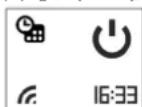
- Uh puyl tuni. wupnu L u h wuqwuf utnutinyl ON/OFF
- συμωλωγωνωνημωδυτή υωνωλωνωνημων ξύμ' υη ρωμη 0,5 συμ ε (30 πωμτ)
- «Unwunwuguw otywnny» hwnwnwnnlejnlun uhwuw o t lwwhwwtu:
Ruwnwwnnlpjnlun «AirSafe» uhwju CN 06 xxx EA CLOUD AS W
LL CN 06 140 EA CLOUD AS W GL
ntuwylutnh hwdwn t

Ruiwunpnlprnlu «AirSafe»
AirSafe RluwnwunnnlprjnlUVA inluwnhnhg lququlwduwh u unwpwgnghsh gtnnghsh hwwwnntn w2huwnwuph wnynlup t:
Wi-Fi L intnwlqw lww hluwnwlnnlprjw wlnhluwgnlu/ wwwllunhlwgnlu -
/Quick start B15/
U2huwuntinl ntduh gnlgwynnlpjnlu\`
Utnutinlg` inluwynpuwu nldn 100 %. 5 quwnjuwuhg htunn wugwnunlu E:
2wju hluwnwulnnlprjnlu

Air Safe hluwnwulnnlpjwu wlynhylwgnlu/wwwwwlunhlwgnlu
/Quick start B14/
Stnblunlajnlu uwnph ubnwptnjw/Quick start B13/
Uyn hwnwunnnlajnlunlu wnlyw untntynlajnlu
- ID
- MAC hwugt
- \$pnunltnh ʊtnuhw
Unwq gnLgwly /Quick start C 1 -5/
TESY
TESY Ltd.
Shumen, 9700, 48 Blvd. Madara,
PHONE: +359 54 859 129,
office@tesy.com
ТЕСИ ООД
9700 гр. Шумен, бул. Мадара 48,
PHONE: +359 54 859 129,
office@tesy.com




- 1 SEC
- 3 SEC
- A
- 2
- ECO MODE
- 3
- SLEEP MODE
- B
- 1 HEATING MODE
- 2 DELAY START FUNCTION
- ANTI-FROST MODE
- 4
- TEMPERATURE CORRECTION
- 5
- ADAPTIVE START Ⓐ
- 6
- 7 KEYBOARD LOCK
- 8
- OPEN WINDOW
- 9
- DAY AND TIME SETTINGS
- 10
- WEEKLY PROGRAM (24H/7H)
- 11
- AIR SAFE
- 12
- TIP-OVER SWITCH
- 13
- DEVICE INFO
- 14
- SOUND
- 15
- WI-FI
- COMFORT MODE
- DELAY START FUNCTION
- IMPORTANT SAFETY MEASURES AND INSTRUCTIONS
- WARNING
- TECHNICAL PARAMETERS - SEE ANNEX I
- PACKING
- INSTALLATION INSTRUCTIONS
- BATHROOM OPERATION
- OPERATION INSTRUCTIONS
- WEEKLY PROGRAM (TIMER) 24HOURS/7DAYS
- ACTIVATION AND DEACTIVATION OF WEEKLY PROGRAM - /QUICK START B10
- FUNCTION AIRSAFE – ONLY FOR MODELS CN 06 XXX EA CLOUD AS W AND CN 06 140 EA CLOUD AS W GL
- FUNCTION AIR SAFE
- ADVANTAGES OF THE FUNCTION
- PRINCIPLE OF WORK OF AIR SAFE FUNCTION
- ACTIVATION AND DEACTIVATION OF AIR SAFE FUNCTION - /QUICK START B11
- FUNCTION WI-FI - ONLY FOR MODELS CN 06 XXX EA CLOUD AS W, CN 06 XXX EA CLOUD W AND CN 06 140 EA CLOUD AS W GL
- FUNCTION WI-FI
- WORK MODE OF DISPLAY
- SOUND OPTION
- ACTIVATION AND DEACTIVATION OF SOUND FUNCTION - /QUICK START B14
- VISUALIZATION ON DISPLAY IN "DEVICE INFO"/QUICK START B13
- QUICK MENU /QUICK START C 1 -5
- ERRORS MODE
- DISCONNECTION FROM THE POWER SUPPLY
- PROTECTION
- CLEANING
- STORAGE
- MAINTENANCE OPERATIONS OF THE APPLIANCE
- ENVIRONMENT PROTECTION INSTRUCTIONS
- TROUBLESHOOTING
- MODURI DE PROGRAM PRESETATE
- TJEDNI RASPORED (TAJMER) 24 SATA/7 DANA
- POKYNY NA INŠTALÁCIU
- KLÜDAS REŽIMU DARBIBÄ
- DIMENSJONER PÅ APPARATET, OPPVARMINGSVOLUM OG AREAL I ROMMET (FIG.1)
- TEHNILISED TUNNUSED - VAATA LISA I
- PAKEND
- ĐWUH L ONLUW LWNQWNLNNLU /QUICK START B9
- СПРПРЕШЛШІ ⱰNQUH (ꞮNJUːTƏN) 24 ดม 7 ⱰN
- LL CN 06 140 EA CLOUD AS W GL
- RUIWUNPNLPRNLU «AIRSAFE
- U2HUWUNTINL NTDUH GNLGWYNNLPJNLU\`
- STNBLUNLAJNLU UWNPH UBNWPTNJW/QUICK START B13
- UNWQ GNLGWLY /QUICK START C 1 -5
- TESY
Brand : Tesy
Model : CN 06 060 EА CLOUD AS W
Category : Heating