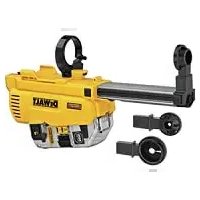
DWH205DH - Vacuum Cleaner DEWALT - Free user manual and instructions
Find the device manual for free DWH205DH DEWALT in PDF.


| Product type | Dust extraction system for rotary hammer drill |
| Brand | DEWALT |
| Model | DWH205DH |
| Tool compatibility | DEWALT DCH263 18V SDS PLUS cordless rotary hammer drill |
| Power supply | 18 V (via power tool) |
| Weight | 1.5 kg |
| Max drill bit diameter (small head) | 12 mm |
| Max drill bit diameter (standard head) | 26 mm |
| Max drill bit diameter (large head) | 38 mm |
| Max drill bit length | 180 mm |
| Max drilling depth | 180 mm |
| Contact pressure | 80 N |
| Filter cleaning mechanism | Air pulse actuated by the tool motor |
| Work light | Integrated, automatic activation when starting |
| Dust collection container | Removable with latch closure |
| Telescopic system | Adjustable in length and depth |
| Maintenance | Regularly empty the container; replace the filter every 350 cycles |
| Cleaning | Damp cloth with mild soap; do not use solvents |
| Safety | Use approved dust mask and safety glasses |
| Intended use | Professional drilling in masonry and concrete with solid bits |
| Prohibitions | Do not use for drilling wood, metal, plastic, or with hollow bits or core bits |
| Certifications | CE, compliance with directives 2006/42/EC, 2014/30/EU, 2011/65/EU |
| Package contents | Extraction system, small head, standard head, instruction manual |
Frequently Asked Questions - DWH205DH DEWALT
User questions about DWH205DH DEWALT
0 question about this device. Answer the ones you know or ask your own.
Ask a new question about this device
Download the instructions for your Vacuum Cleaner in PDF format for free! Find your manual DWH205DH - DEWALT and take your electronic device back in hand. On this page are published all the documents necessary for the use of your device. DWH205DH by DEWALT.
USER MANUAL DWH205DH DEWALT
English (original instructions) 13
Fig. B Fig. C
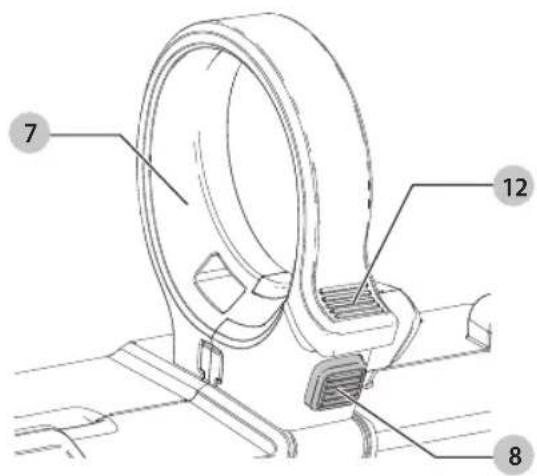
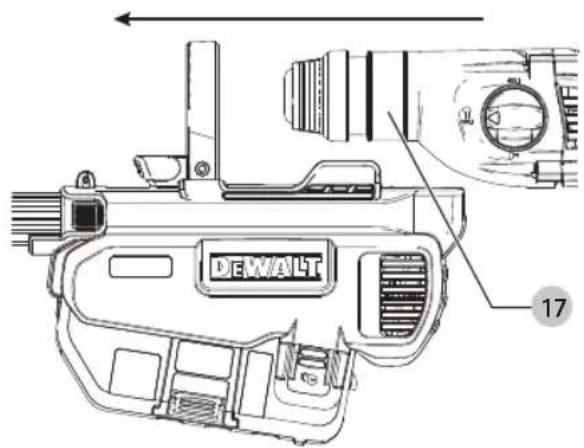
Fig. D Fig. E
natural_image
Technical line drawing of a mounted weapon system with no visible text or symbolsFig. F Fig. G
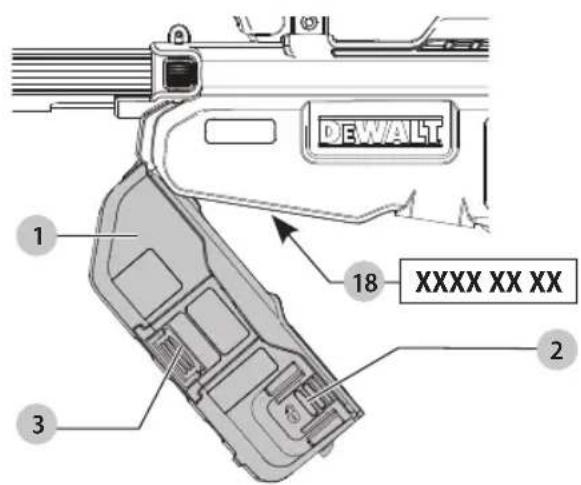
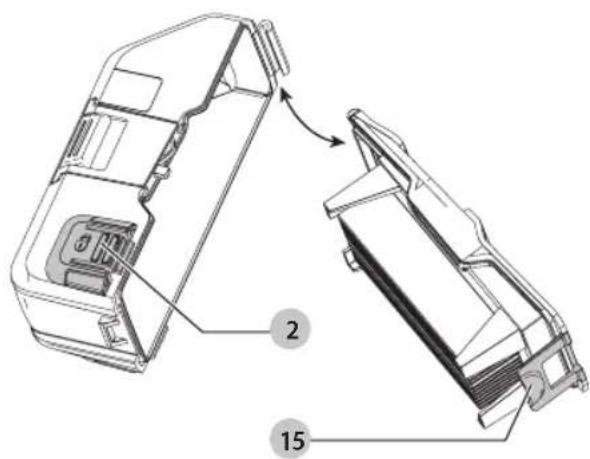
Fig. H
ST∅VOPSAMLINGSSYSTEM DWH205DH
Tillykke!
You have chosen a DEWALT tool. Years of experience, thorough product development and innovation make DEWALT one of the most reliable partners for professional power tool users.
Technical Data
| DWH205DH | ||
| Voltage V | DC | 18 |
| Type 1 | ||
| Contact pressure N 80 | ||
| Small head | ||
| Maximum drill bit diameter mm 12 | ||
| Maximum drill bit length (overall) mm 180 | ||
| Maximum drilling depth mm 180 | ||
| Standard head | ||
| Maximum drill bit diameter mm 26 | ||
| Maximum drill bit length (overall) mm 180 | ||
| Maximum drilling depth mm 180 | ||
| Tool compatibility DCH263 only | ||
| Weight kg 1.5 | ||
EC-Declaration of Conformity
Machinery Directive

Dust Extraction System DWH205DH
DEWALT declares that these products described under
Technical Data are in compliance with: 2006/42/EC, EN60745-1:2009+A11:2010, EN60745-2-6:2010.
These products also comply with Directive 2014/30/EU and 2011/65/EU. For more information, please contact DEWALT at the following address or refer to the back of the manual.
The undersigned is responsible for compilation of the technical file and makes this declaration on behalf of DEWALT.
Markus Rompel
Vice-President Engineering, PTE-Europa
D-65510, Idstein, Germany
07.01.2019

WARNING: To reduce the risk of injury, read the instruction manual.
Definitions: Safety Guidelines
The definitions below describe the level of severity for each signal word. Please read the manual and pay attention to these symbols.
DANGER: Indicates an imminently hazardous situation which, if not avoided, will result in death or serious injury.
WARNING: Indicates a potentially hazardous situation which, if not avoided, could result in death or serious injury.
CAUTION: Indicates a potentially hazardous situation, if not avoided, may result in minor or moderate injury.
NOTICE: Indicates a practice not related to personal injury which, if not avoided, may result in property damage.
Dicates risk of electric shock.
Diabetes risk of fire
Safety Instructions
WARNING! Always observe safety regulations applicable in your country to reduce the risk of fire, electric shock and personal injury.
Read all of this manual carefully before operating the attachment. Also refer to the manual of any power tool that will be used with this attachment.
SAVE THIS MANUAL FOR FUTURE REFERENCE
General Safety Rules
a) Keep work area clear. Cluttered areas and benches invite injuries.
b) Keep children away. Do not let children come into contact with the tool. Supervision is required for those under 16 years of age.
c) Use appropriate tool. The intended use is described in this instruction manual. Do not force small tools or attachments to do the job of a heavy-duty tool. The tool will do the job better and safer at the rate for which it was intended.
WARNING: The use of any accessory or attachment or performance of any operation with this tool, other than those recommended in this instruction manual may present a risk of personal injury.
Additional Specific Safety Rules for Dust Extraction Systems
- Use dust mask to keep residual dust away from airways when drilling and when servicing the tool or accessories.
ENGLISH
• Always use the side handle on the rotary hammer drill, even when the dust extractor is attached.
- Only use if filter is in place.
- Do not use the attachment for drilling applications in wood, steel or plastic.
- Do not use the attachment in core drilling applications.
- Do not use the attachment for chiselling applications.
- Use only power tools recommended by D EWALT with this attachment. For more information about DEWALT power tools compatible with this attachment, please contact your local dealer, refer to the addresses at the back of the manual or visit www.dewalt.com.
- Do not use the tool in damp or wet conditions.
- Do not allow to be used as a toy. Close attention is necessary when used by or near children.
- Use only as described in this manual. Use only manufacturer's recommended attachments.
- Do not put any object into openings. Do not use with any opening blocked; keep free of dust, lint, hair and anything that may reduce air flow.
- Keep hair, loose clothing, fingers and all parts of body away from openings and moving parts.
- Do not use to pick up flammable or combustible liquids, such as gasoline, or use in areas where they may be present.
- Do not use with damaged filter. Replace a damaged filter immediately.
- Never carry the power tool by the dust extraction attachment.
Residual Risks
The following risks are inherent to the use of the dust extraction system:
- Injuries caused by touching the rotating parts or hot parts of the tool
In spite of the application of the relevant safety regulations and the implementation of safety devices, certain residual risks cannot be avoided. These are:
- Impairment of hearing.
- Risk of squeezing fingers when changing the accessory.
• Health hazards caused by breathing dust developed when working in concrete and/or masonry.
Package Contents
The package contains:
1 Dust extraction system
1 Small dust extraction head
1 Standard dust extraction head
1 Instruction manual
- Check for damage to the tool, parts or accessories which may have occurred during transport.
• Take the time to thoroughly read and understand this manual prior to operation.
Markings on Dust Extraction System
The following pictograms are shown on the tool:

Read instruction manual before use.
Date Code Position (Fig. F)
The date code 18, which also includes the year of manufacture, is printed into the housing.
Example:
2019 XX XX
Year of Manufacture
Description (Fig. A)
WARNING: Never modify the power tool or any part of it. Damage or personal injury could result.
1 Dust collection box
2 Dust collection box release buttons
3 Filter cleaning mechanism
4 Depth adjustment button
5 Adjustment for drill bit length button
6 Telescope
7 Dust extractor ring
8 Dust extractor ring release button
9 Worklight
10 Dust extraction head
11 Dust brush
12 Dust extractor ring lock button
Intended Use
Your dust extraction system DWH205DH has been designed for the extraction of dust in professional hammerdrilling in masonry or concrete, and with solid drill bits mounted to the power tool.
DO NOT use for drilling plastic, wood or metal. DO NOT use with hollow bits or core bits.
This dust extraction system will fit the DEWALT DCH263 18 V cordless SDS PLUS hammer
DO NOT use under wet conditions or in the presence of flammable liquids or gases.
The dust extraction system is an attachment for use with professional power tools.
DO NOT let children come into contact with the tool. Supervision is required when inexperienced operators use this tool.
- Young children and the infirm. This appliance is not intended for use by young children or infirm persons without supervision.
- This product is not intended for use by persons (including children) suffering from diminished physical, sensory or mental abilities; lack of experience, knowledge or skills unless they are supervised by a person responsible for their safety. Children should never be left alone with this product.
Worklight (Fig. A)
CAUTION: Do not stare into worklight. Serious eye is it could result.
There is a worklight 9 located on the top of the dust extractor. The worklight is activated when the trigger switch is depressed, and will automatically turn off 20 seconds after the trigger switch is released. If the trigger switch remains depressed, the worklight will remain on.
nOtE: The worklight is for lighting the immediate work surface and is not intended to be used as a flashlight.
ASSEMBLY AND ADJUSTMENTS
WARNING: To reduce the risk of serious personal injury, turn tool off and disconnect tool from power source before making any adjustments or removing/installing attachments or accessories. Be sure the trigger switch is in the OFF position. An accidental start-up can cause injury.
Attaching and Removing the Dust Extraction System
To Attach the Dust Extraction System (Fig. B–D)
WARNING: To reduce the risk of personal injury, youYS operate the tool with the side handle properly installed and securely tightened. Failure to do so may result in the side handle slipping during tool operation and subsequent loss of control. Hold tool with both hands to maximize control.
- Remove the battery pack, drill bit, side handle and the depth adjustment rod, if attached to the rotary hammer.
- Press the dust extractor ring release button 8 to open the dust extractor ring 7.
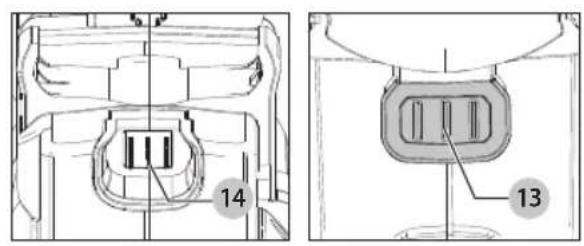
- Holding the front of the dust extractor, insert hammer into the dust extractor as shown in Figure C, ensuring that the dust extractor ring sits on the collar of the hammer 17 and the electrical connectors 13 on the hammer align with the electrical connectors on the dust extractor 14 (Fig. D). The electrical connectors must be clean.
nOtE: Do not hold the dust extractor by the dust collection box when attaching it to the hammer.
- With the hammer fully inserted in the dust extractor, press the dust extractor ring lock button 12 to close. It will click in place when secure.
- Install the side handle on the hammer.
- Test to see if the dust extractor is properly installed on the rotary hammer:
a. Install the dust extractor.
b. Start your drilling operation and stop after 6 mm.
c. Lift the tool and check if the dust extraction is working.
d. If the dust extractor is operating properly continue your work.
To Remove the Dust Extraction System (Fig. B, C)
To remove the dust extraction system:
- Remove the side handle from the hammer.
- Press the dust extractor ring release button 8 to open the dust extractor ring 7 and slide the hammer from the dust extractor.
The side handle must be removed to store the dust extractor properly in the kitbox.
Attaching and Removing Small and Standard Extraction Heads (Fig. H)
WARNING: Wear approved eye protection and approved mask when performing this procedure.
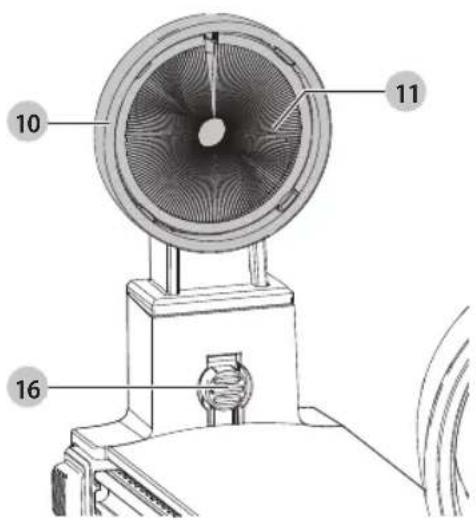
The dust brush 11 will wear during use and will need to be replaced at the same time as the filter.
- Insert the dust extraction head
10 into the end of the
telescope as shown in Figure H. The head will snap into place. - To remove a dust extraction head from the unit, press and hold the release button 16. Pull the dust extraction head up and off.
OPERATION
Instructions for Use
WARNING: Always observe the safety instructions and applicable regulations.
WARNING: To reduce the risk of serious personal injury, turn tool off and disconnect tool from power source before making any adjustments or removing/installing attachments or accessories. Be sure the trigger switch is in the OFF position. An accidental start-up can cause injury.
WARNING: For your own safety, read the tool instruction mental before using any accessory. Failure to heed these warnings may result in personal injury and serious damage to the tool and the accessory. When servicing this tool, use only identical replacement parts.
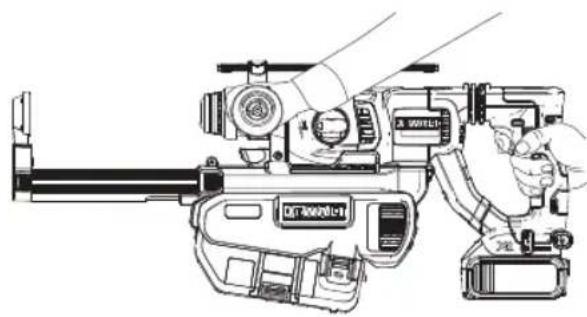
Proper Hand Position (Fig. E)
WARNING: To reduce the risk of serious personal injury, ALWAYS use proper hand position as shown.
WARNING: To reduce the risk of serious personal injury, ALWAYS hold securely in anticipation of a
sudden reaction.
Proper hand position requires one hand on the main handle and one hand on the side handle of the hammer. The side handle must be installed for proper use.
Switch
The extraction system automatically starts when the rotary hammer is turned on and stops after a few seconds when the hammer turns off.
Filter Cleaning Mechanism
The filter cleaning mechanism is a feature that uses the motor in the rotary hammer to force air through the filter. Refer to Emptying the Dust Collection Box for instructions on proper use.
Electronic Switch-Off Delay
After turning the rotary hammer off, the extraction system will run for a few seconds longer to vacuum the remaining dust particles in the internal parts and collect the dust in the dust collection box.
Adjusting the Telescope to Match the Drill Bit Length (Fig. A)
- Insert the appropriate drill bit.
- Pull the telescope 6 out and hold it at the maximum length of travel.
- Press and hold the adjustment for drill bit length button 5 on the side of the dust extractor and retract the telescope so that the dust extractor head 10 meets the end of the drill bit.
- Release the adjustment for drill bit length button and telescope. The telescope will click and lock in position.
- To reset the telescope press the adjustment for drill bit length button and extend the telescope out as far as it will go. Release the adjustment for drill bit length button and telescope.
Adjusting the Drill Bit Depth (Fig. A)
- Insert the appropriate drill bit.
- Retract the telescope 6 so that the required length of drill bit is protruding past the dust extractor head 10 and matches the desired hole depth.
- Press and hold the depth adjustment button 4 and slide it back along the length of the telescope as far as it will go.
- Release the depth adjustment button and the telescope. The telescope will now not extend past the set depth.
- To reinstate the maximum drilling depth press and hold the depth adjustment button and slide it all the way to the end of the telescope. Release the depth adjustment button.
Emptying the Dust Collection Box (Fig. F, G)
WARNING: Wear approved eye protection and approved eye mask when performing this procedure.
CAUTION: Do not clean with water or compressed air.
The dust collection box 1 should be emptied as soon as the performance has noticeably decreased or is full.
- Press the dust collection box release buttons 2 and pull the dust collection box away from the dust extraction system. Once the catch mechanism is clear of the dust extraction system the upper joint will also release allowing the dust collection box to be removed completely.
- To empty the dust collection box 1 position it over a suitable container to catch the dust contained within it. Lift up the assembly release latch 15 to open the dust collection box, separating the canister from the lid. Gently tapping the dust collection box will encourage any dust trapped within the filter to also be removed. Once the filter lid and canister are empty reattach them, ensuring the assembly release latch 15 is securely fastened. Refer to Figure G.
-
To reattach the dust collection box to the dust extraction system first insert the rounded profile of the upper joint into the recess on the dust extraction system. Pivot the dust collection box down so that the release buttons click back into place. Refer to Figure F.
-
With the dust collection box properly installed, depress the filter cleaning mechanism 3 and pull the trigger on the tool. Allow the system to run for 5 seconds and release trigger. This should be done after every emptying of the dust collection box.
MAINTENANCE
Your DEWALT power tool has been designed to operate over a long period of time with a minimum of maintenance. Continuous satisfactory operation depends upon proper tool care and regular cleaning. Empty the dust extractor periodically or when the performance has noticeably decreased.
WARNING: To reduce the risk of serious personal injury, turn tool off and disconnect tool from power source before making any adjustments or removing/installing attachments or accessories. Be sure the trigger switch is in the OFF position. An accidental start-up can cause injury.
Replacing the Dust Collection Box Filter Assembly (Fig. F)
WARNING: Wear approved eye protection and approved a mask when performing this procedure.
NOTE: The filter should be replaced after every 350 full-to-empty filter box emptying cycles.
- Press the dust collection box release buttons 2 and pull the dust collection box away from the dust extraction system. Once the catch mechanism is clear of the dust extraction system the upper joint will also release allowing the dust collection box to be removed completely.
- Discard dust collection box 1 replace with a new filter box.
- Reattach the dust collection box to the dust extraction system. First insert the rounded profile of the upper joint into the recess on the dust extraction system. Pivot the dust collection box down so that the release buttons click back into place.

Lubrication
Your dust extractor requires no additional lubrication.

Cleaning
WARNING: Wear approved eye protection and approved mask when performing this procedure.
WARNING: Do not use a brush or compressed air to clean the dust collector or filter.
WARNING: Never use solvents or other harsh chemicals for cleaning the non-metallic parts of the dust extractor. These chemicals may weaken the materials used in these parts. Use a cloth dampened only with water and mild soap. Never let any liquid get inside the dust extractor; never immerse any part of the dust extractor into a liquid.
During intensive use the dust collector becomes clogged with dust. Refer to Replacing The Dust Collector Box Filter Assembly, under Maintenance.
Optional Accessories
WARNING: Since accessories, other than those offered by DEWALT, have not been tested with this product, use of such accessories with this tool could be hazardous. To reduce the risk of injury, only DEWALT recommended accessories should be used with this product.
Consult your dealer for further information on the appropriate accessories.
Protecting the Environment

Separate collection. Products and batteries marked with this symbol must not be disposed of with normal household waste.

Products and batteries contain materials that can
be recovered or recycled reducing the demand for raw materials. Please recycle electrical products and batteries according to local provisions. Further information is available at www.2helpU.com.
Vice-President Engineering, PTE-Europa
DEWALT, Richard-Slinger-Strase 11,
D-65510, Idstein, Germany
07.01.2019

Toz Emme Sistemi DWH205DH


- ST∅VOPSAMLINGSSYSTEM DWH205DH
- Tillykke!
- EC-Declaration of Conformity
- Machinery Directive
- Dust Extraction System DWH205DH
- Definitions: Safety Guidelines
- Safety Instructions
- SAVE THIS MANUAL FOR FUTURE REFERENCE
- General Safety Rules
- Additional Specific Safety Rules for Dust Extraction Systems
- ENGLISH
- Residual Risks
- Package Contents
- Markings on Dust Extraction System
- Date Code Position (Fig. F)
- Description (Fig. A)
- Intended Use
- Worklight (Fig. A)
- ASSEMBLY AND ADJUSTMENTS
- Attaching and Removing the Dust Extraction System
- To Attach the Dust Extraction System (Fig. B–D)
- To Remove the Dust Extraction System (Fig. B, C)
- Attaching and Removing Small and Standard Extraction Heads (Fig. H)
- OPERATION
- Instructions for Use
- Proper Hand Position (Fig. E)
- Switch
- Filter Cleaning Mechanism
- Electronic Switch-Off Delay
- Adjusting the Telescope to Match the Drill Bit Length (Fig. A)
- Adjusting the Drill Bit Depth (Fig. A)
- Emptying the Dust Collection Box (Fig. F, G)
- MAINTENANCE
- Replacing the Dust Collection Box Filter Assembly (Fig. F)
- Lubrication
- Cleaning
- Optional Accessories
- Protecting the Environment
- Toz Emme Sistemi DWH205DH
Brand : DEWALT
Model : DWH205DH
Category : Vacuum Cleaner