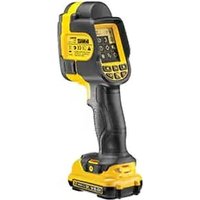
DCT416 - Thermometer DEWALT - Free user manual and instructions
Find the device manual for free DCT416 DEWALT in PDF.


| Brand | DeWalt |
| Model | DCT416 |
| Category | Infrared thermometer |
| Power supply type | Li-Ion 10.8 V battery (DCB121/DCB123) |
| Temperature measurement range | -10 °C to 250 °C (14 °F to 480 °F) |
| Accuracy | ±2 °C below 100 °C, ±2 % above 100 °C |
| Adjustable emissivity | 0.10 to 1.00 in steps of 0.01 |
| Display | 55.9 mm color TFT LCD with backlight |
| Field of view | 20° x 20° |
| Spatial resolution (IFOV) | 25 mm at 1 m |
| Spectral response | 8 μm to 12 μm |
| Permissible relative humidity | 10 to 90 % non-condensing |
| Image storage | micro SD card (included), bitmap format |
| Operating time | Approximately 10 hours |
| Weight (without battery) | 0.5 kg |
| Operating temperature range | -5 °C to 45 °C |
| Storage temperature range | -20 °C to 60 °C |
| Special functions | Visual/thermal image blending, color palettes, hot/cold spot tracking |
| Safety | Automatic shutdown after 10 min, overload and overheat protection |
| Maintenance and cleaning | Clean with a damp cloth and mild soap; do not use solvents on the lens |
| Spare parts and repairability | No user-serviceable parts; optional accessories (belt hook) |
| Warranty | 1 year comprehensive, 30 day satisfaction, 1 year free maintenance (upon presentation of proof of purchase) |
Frequently Asked Questions - DCT416 DEWALT
User questions about DCT416 DEWALT
0 question about this device. Answer the ones you know or ask your own.
Ask a new question about this device
Download the instructions for your Thermometer in PDF format for free! Find your manual DCT416 - DEWALT and take your electronic device back in hand. On this page are published all the documents necessary for the use of your device. DCT416 by DEWALT.
USER MANUAL DCT416 DEWALT
English (original instructions)
natural_image
Line drawing of a handheld device with a lock and handle (no text or symbols)Figure 2
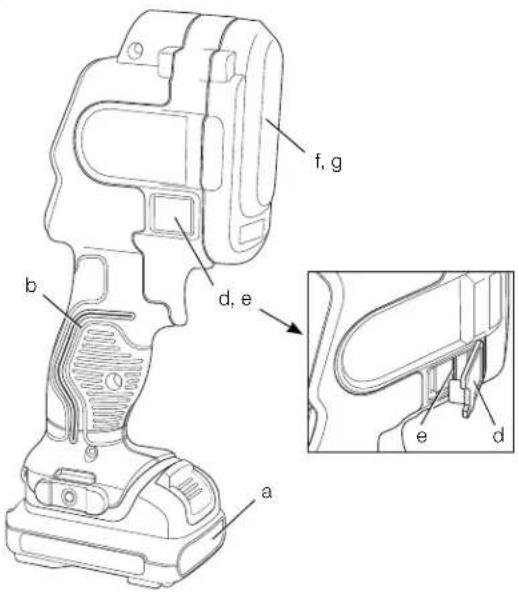
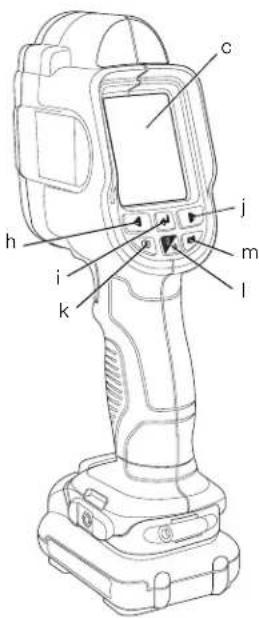
Figure 3
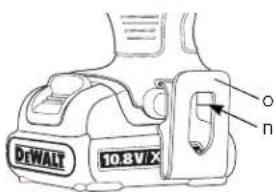
Figure 4
DANSK
TRÅDL∅S ELEKTRONISK TERMOMETER DCT416
Tillykke!
Billedblanding
MENUVALGMULIGHEDER
- Tryk på valgknappen (i) for at bekræfte valget.
- Tryk på pilen frem (j) eller tilbage (h) for at rulle gennem gemte billeder.
- Tryk på valgknappen (i) for at gå til undermenuen for sletning.
- Tryk på pilen frem (j) eller tilbage (h) for at markere gem på SD kort eller slet.
Bildmischung
MENÜPTIONEN
DEUTSCH
DEUTSCH
You have chosen a DEWALT tool. Years of experience, thorough product development and innovation make DEWALT one of the most reliable partners for professional power tool users.
Technical Data
| DCT416 | ||
| Voltage | V_DC | 10.8 |
| Type | 1 | |
| Battery type | Li-Ion | |
| Screen size mm | 55.9 | |
| Color TFT LCD with Backlight | ||
| Weight (without battery pack) kg | 0.5 | |
| Run-Time Approx. 10 hours | ||
| Temperature Range (Operating) | -5 °C to 45 °C (23 °F to 113 °F) | |
| Temperature Range (Storage) | -20 °C to 60 °C (-4 °F to 140 °F) | |
| Temperature Measurement Range | -10 °C to 250 °C (14 °F to 480 °F) | |
| Relative Humidity | 10 to 90%, non-condensing | |
| Spectral Response | 8μm to 12μm | |
| Field of View | 20° x 20° | |
| IFOV (Instantaneus Field of View) | 25 mm at 1 m (1" at 39.3") | |
| Accuracy | Below 100 °C (212 °F) +/- 2 °C (+/- 3.6 °F)Above 100 °C (212 °F) +/- 2 °C (+/- 3.6 °F)of reading, Ambient temperature for stated accuracy 23 °C (73.4 °F). | |
| Emissivity | 0.1 to 1.0, adjustable in 0.01 increments | |
| Temperature scales | °C or °F | |
| Battery pack | DCB121 | DCB123 |
| Battery type | Li-Ion | Li-Ion |
| Voltage | V_DC | 10.8 |
| Capacity | A_H | 1.3 |
| Weight | kg | 0.2 |
| Charger | DCB100 | DCB105 | |||
| Mains voltage V_AC | 230 | 230 | |||
| Battery type | Li-Ion | Li-Ion | |||
| Approx. charging time | min | 40(1.3 Ah battery packs) | 40(1.5 Ah battery packs) | 30(1.3 Ah battery packs) | 30(1.5 Ah battery packs) |
| Weight | kg | 0.3 | 0.49 | ||
Fuses
| Europe | 230 V tools | 10 Amperes, mains |
| U.K. & Ireland | 230 V tools | 3 Amperes, in plugs |

WARNING: This is a Class A product. In a domestic environment this product may cause radio interference in which case the user may be required to take adequate measures.

WARNING: Increased electrostatic voltage may cause display to fail and all unsaved data will be lost. If the screen freezes, remove the 10.8 V battery pack to reset the unit. Reinsert the battery pack and press the power on button.
Definitions: Safety Guidelines
The definitions below describe the level of severity for each signal word. Please read the manual and pay attention to these symbols.

DANGER: Indicates an imminently hazardous situation which, if not avoided, will result in death or serious injury.

WARNING: Indicates a potentially hazardous situation which, if not avoided, could result in death or serious injury.

CAUTION: Indicates a potentially hazardous situation which, if not avoided, may result in minor or moderate injury.
NOTICE: Indicates a practice not related to personal injury which, if not avoided, may result in property damage.
ENGLISH
Denotes risk of electric shock.
Denotes risk of fire.

WARNING: To reduce the risk of injury, read the instruction manual.
Important Safety Instructions
- Read these instructions.
- Keep these instructions.
- Heed all warnings.
• Follow all instructions. - Only use attachments/accessories specified by the manufacturer.
- Refer all servicing to qualified service personnel. Servicing is required when the apparatus has been damaged in any way, the apparatus has been exposed to rain or moisture, does not operate normally, or has been dropped.
SAVE ALL WARNINGS AND INSTRUCTIONS FOR FUTURE REFERENCE
Work Area Safety
a) Keep work area clean and well lit. Cluttered or dark areas invite accidents.
b) Keep children and bystanders away while operating an imaging thermometer. Distractions can cause you to lose control.
Personal Safety
a) Stay alert, watch what you are doing and use common sense when operating an imaging thermometer. Do not use an imaging thermometer while you are tired or under the influence of drugs, alcohol or medication. A moment of inattention while operating the imaging thermometer. may result in serious personal injury.
b) Do not overreach. Keep proper footing and balance at all times. This enables better control of the imaging thermometer in unexpected situations.
Use and Care
a) Store an idle imaging thermometer out of the reach of children and do not allow persons unfamiliar with the imaging thermometer or these instructions to operate the imaging thermometer. The
imaging thermometer may be dangerous in the hands of untrained users.
b) Use the imaging thermometer, accessories, etc. in accordance with these instructions, taking into account the working conditions and the work to be performed. Use of the imaging thermometer for operations different from those intended could result in a hazardous situation.
Battery Tool Use and Care
a) Recharge only with the charger specified by DEWALT. A charger that is suitable for one type of battery pack may create a risk of fire when used with another battery pack.
b) When battery pack is not in use, keep it away from other metal objects like paper clips, coins, keys, nails, screws, or other small metal objects that can make a connection from one terminal to another. Shorting the battery terminals together may cause burns or a fire.
c) Under abusive conditions, liquid may be ejected from the battery; avoid contact. If contact accidentally occurs, flush with water. If liquid contacts eyes, additionally seek medical help. Liquid ejected from the battery may cause irritation or burns.
Safety Information for Imaging Thermometers
WARNING: Do not disassemble or modify the imaging thermometer. There are no serviceable parts inside. If you need assistance, contact your local dealer.
- Do not operate the imaging thermometer in explosive atmospheres, such as in the presence of flammable liquids, gases, or dust. Imaging thermometers create sparks which may ignite the dust or fumes.
- The imaging thermometer should only be used with specifically designated DEWALT batteries. Use of any other batteries may create a risk of fire.
- Store the imaging thermometer out of reach of children and other untrained persons. Tools are dangerous in the hands of untrained users.
- Do not remove or deface warning labels.
ENGLISH
- Do not use imaging thermometer for testing temperatures of cooked or uncooked food.
- Do not touch surfaces to confirm hot temperature readings.
- Do not use for taking human or animal body temperatures.
- To avoid damaging the imaging thermometer or the equipment under test, protect them from the following:
- EMF (electromagnetic fields) like from arc welders, induction heaters, etc.
- ESD (electrostatic discharge).
- Thermal shock (caused by abrupt ambient temperature changes for highest accuracy; allow 30 minutes for the imaging thermometer to stabilize before use).

WARNING: Burn hazard. The reading may not be accurate if the imaging thermometer is in the presence of strong electromagnetic fields (such as arc welders, induction heaters, ratio transmitters, etc.). Do not use the imaging thermometer under these conditions.

IG: The imaging thermometer measures surface temperature only. Objects behind the surface may have significantly different temperatures, posing a burn or frostbite hazard.

IG: See emissivity information for actual temperatures. Reflective objects result in lower than actual temperature measurements and can pose a burn hazard.

IG: Do not expose imaging thermometer to excessive heat such as sunshine, fire or the like.

N: When not in use, place imaging thermometer on its side on a stable surface where it will not cause a tripping or falling hazard.
Some tools with large battery packs will stand upright on the battery pack but may be easily knocked over.
NOTICE: Modifications not authorised by the manufacturer may void user's authority to operate this device.
NOTICE: To avoid damage to the imaging thermometer, do not leave it exposed to high temperature environments or heat sources, for example, in a vehicle in the sun. Always
operate the imaging thermometer within the operating range noted in the specification chart.
NOTICE: Do not point the imaging thermometer (with or without the lens cover engaged) at the sun or other intensive energy sources that emit laser radiation. This can damage the detector inside the imaging thermometer and can effect the accuracy.
MICRO SD MEMORY CARD

VG: Choking hazard. The micro SD memory card is a small part that could lead to a choking hazard and is not intended for children.
NOTICE: It is recommended to use the micro SD memory card supplied with the imaging thermometer. DEWALT does not warrant the use or reliability of other aftermarket cards with different brands or capacities. It is also recommended to frequently transfer the saved images to a computer as a backup.
Residual Risks
In spite of the application of the relevant safety regulations and the implementation of safety devices, certain residual risks cannot be avoided. These are:
– Risk of personal injury due to prolonged use.
- Risk of personal injury due to unintentional contact with current-carrying parts during the work process.
Markings on Imaging Thermometer
The following pictograms are shown on the imaging thermometer:

Read instruction manual before use.
DATE CODE POSITION
The date code, which also includes the year of manufacture, is printed into the housing surface that forms the mounting joint between tool and battery.
Example:
2012 XX XX
Year of Manufacture
ENGLISH
Important Safety Instructions for All Battery Chargers
SAVE THESE INSTRUCTIONS: This manual contains important safety and operating instructions for the DCB100 and DCB105 battery chargers.
- Before using charger, read all instructions and cautionary markings on charger, battery pack, and product using battery pack.

WARNING: Shock hazard. Do not allow any liquid to get inside charger. Electric shock may result.

N: Burn hazard. To reduce the risk of injury, charge only DEWALT rechargeable batteries. Other types of batteries may burst causing personal injury and damage.

CAUTION: Children should be supervised to ensure that they do not play with the appliance.
NOTICE: Under certain conditions, with the charger plugged in to the power supply, the charger can be shorted by foreign material. Foreign materials of a conductive nature such as, but not limited to, grinding dust, metal chips, steel wool, aluminum foil, or any buildup of metallic particles should be kept away from charger cavities. Always unplug the charger from the power supply when there is no battery pack in the cavity. Unplug charger before attempting to clean.
- DO NOT attempt to charge the battery pack with any chargers other than the ones in this manual. The charger and battery pack are specifically designed to work together.
- These chargers are not intended for any uses other than charging DEWALT rechargeable batteries. Any other uses may result in risk of fire, electric shock or electrocution.
- Do not expose charger to rain or snow.
- Pull by plug rather than cord when disconnecting charger. This will reduce risk of damage to electric plug and cord.
- Make sure that cord is located so that it will not be stepped on, tripped over, or otherwise subjected to damage or stress.
-
Do not use an extension cord unless it is absolutely necessary. Use of improper extension cord could result in risk of fire, electric shock, or electrocution.
-
Do not place any object on top of charger or place the charger on a soft surface that might block the ventilation slots and result in excessive internal heat. Place the charger in a position away from any heat source. The charger is ventilated through slots in the top and the bottom of the housing.
- Do not operate charger with damaged cord or plug — have them replaced immediately.
- Do not operate charger if it has received a sharp blow, been dropped, or otherwise damaged in any way. Take it to an authorised service centre.
- Do not disassemble charger; take it to an authorised service centre when service or repair is required. Incorrect reassembly may result in a risk of electric shock, electrocution or fire.
- In case of damaged power supply cord the supply cord must be replaced immediately by the manufacturer, its service agent or similar qualified person to prevent any hazard.
- Disconnect the charger from the outlet before attempting any cleaning. This will reduce the risk of electric shock. Removing the battery pack will not reduce this risk.
- NEVER attempt to connect 2 chargers together.
- The charger is designed to operate on standard 230 V household electrical power. Do not attempt to use it on any other voltage. This does not apply to the vehicular charger.
SAVE THESE INSTRUCTIONS
Chargers
The DCB100 and DCB105 chargers accept 10.8 V Li-Ion batteries.
These chargers require no adjustment and are designed to be as easy as possible to operate.
Charging Procedure (fi g. 1)
- Plug the charger into an appropriate outlet before inserting battery pack.
- Insert the battery pack (a) into the charger. The red (charging) light will blink continuously indicating that the charging process has started.
- The completion of charge will be indicated by the red light remaining ON continuously. The pack is fully charged and may be used at this time or left in the charger.
NOTE: To ensure maximum performance and life of Li-Ion batteries, charge the battery pack fully before first use.
Charging Process
Refer to the table below for the state of charge of the battery pack.
State of charge
| charging | - | - | - | - | |
| fully charged | |||||
| hot/cold pack delay — — — — | |||||
| replace battery pack •••••••••••• | |||||
Hot/Cold Pack Delay
When the charger detects a battery that is too hot or too cold, it automatically starts a Hot/Cold Pack Delay, suspending charging until the battery has reached an appropriate temperature. The charger then automatically switches to the pack charging mode. This feature ensures maximum battery life.
LI-ION BATTERY PACKS ONLY
Li-Ion batteries are designed with an Electronic Protection System that will protect the battery against overloading, overheating or deep discharge.
The tool will automatically turn off if the Electronic Protection System engages. If this occurs, place the Li-Ion battery on the charger until it is fully charged.
Important Safety Instructions for All Battery Packs
When ordering replacement battery packs, be sure to include catalog number and voltage.
The battery pack is not fully charged out of the carton. Before using the battery pack and charger, read the safety instructions below. Then follow charging procedures outlined.
READ ALL INSTRUCTIONS
- Do not charge or use battery in explosive atmospheres, such as in the presence of flammable liquids, gases or dust. Inserting or removing the battery from the charger may ignite the dust or fumes.
- Never force battery pack into charger. Do not modify battery pack in any way to fit into a non-compatible charger as battery pack may rupture causing serious personal injury.
- Charge the battery packs only in D EWALT chargers.
- DO NOT splash or immerse in water or other liquids.
- Do not store or use the tool and battery pack in locations where the temperature may reach or exceed 40 °C (105 °F) (such as outside sheds or metal buildings in summer).

WARNING: Never attempt to open the battery pack for any reason. If battery pack case is cracked or damaged, do not insert into charger. Do not crush, drop or damage battery pack. Do not use a battery pack or charger that has received a sharp blow, been dropped, run over or damaged in any way (i.e., pierced with a nail, hit with a hammer, stepped on). Electric shock or electrocution may result. Damaged battery packs should be returned to service centre for recycling.

CAUTION: When not in use, place tool on its side on a stable surface where it will not cause a tripping or falling hazard. Some tools with large battery packs will stand upright on the battery pack but may be easily knocked over.
SPECIFIC SAFETY INSTRUCTIONS FOR LITHIUM ION (Li-Ion)
- Do not incinerate the battery pack even if it is severely damaged or is completely worn out. The battery pack can explode in a fire. Toxic fumes and materials are created when lithium ion battery packs are burned.
- If battery contents come into contact with the skin, immediately wash area with mild soap and water. If battery liquid gets into the eye, rinse water over the open eye for 15 minutes or until irritation ceases. If medical attention is needed, the battery electrolyte is composed of a mixture of liquid organic carbonates and lithium salts.
- Contents of opened battery cells may cause respiratory irritation. Provide fresh air. If symptoms persist, seek medical attention.

WARNING: Burn hazard. Battery liquid may be flammable if exposed to spark or flame.
Battery Pack
BATTERY TYPE
The DCT416 operates on 10.8 volt battery packs.
ENGLISH
Storage Recommendations
- The best storage place is one that is cool and dry, away from direct sunlight and excess heat or cold. For optimum battery performance and life, store battery packs at room temperature when not in use.
- For long storage, it is recommended to store a fully charged battery pack in a cool, dry place out of the charger for optimal results.
NOTE: Battery packs should not be stored completely depleted of charge. The battery pack will need to be recharged before use.
Labels on Charger and Battery Pack
In addition to the pictographs used in this manual, the labels on the charger and the battery pack show the following pictographs:

Read instruction manual before use.

Battery charging.

Battery charged.

Battery defective.

Hot/cold pack delay.

Do not probe with conductive objects.

Do not charge damaged battery packs.

Use only with DEWALT battery packs, others may burst, causing personal injury and damage.

Do not expose to water.

Have defective cords replaced immediately.

Charge only between 4 °C and 40 °C.

Discard the battery pack with due care for the environment.

Do not incinerate the battery pack.

See Technical data for charging time.

Only for indoor use.
Package Contents
The package contains:
1 Imaging thermometer
1 Micro SD memory card
1 10.8 V XR lithium-ion battery pack
1 Charger
1 Instruction manual
1 Exploded drawing
NOTE: Battery packs and chargers are not included with N-models.
- Check for damage to the tool, parts or accessories which may have occurred during transport.
• Take the time to thoroughly read and understand this manual prior to operation.
Description (fi g. 2)

WARNING: Never modify the imaging thermometer or any part of it. Damage or personal injury could result.
a. 10.8 V XR lithium-ion battery pack
b. Handle
c. Screen
d. Micro SD card slot cover
e. Mirco SD card slot
f. Lens
g. Lens cover

Back Arrow Button: Press this button to navigate backward.
i. Select Button: Press this button to confirm a selection.
j. Forward Arrow Button: Press this button to navigate forward.
k. Image Blend Adjust Button: Press this button to change the percentage blend between the visual and thermal images.
1.

Menu/Power Button: Press this button to power the unit on (hold for 0.5 seconds) or off (hold for 3 seconds). When the unit is powered on, press this button to view the menu options.


Photo Capture Button: Press this button for taking a photo.
INTENDED USE
The imaging thermometer measures radiated energy from an object's surface and then uses those measurements to display an image and estimate temperature.
Photos can be taken and then saved (bitmap format) on a micro SD card.
The imaging thermometer can be used for inspections and trouble shooting of electrical systems, HVAC, plumbing, mechanical equipment, residential buildings or automotive systems.
The imaging thermometer is a professional tool.
DO NOT let children come into contact with the tool. Supervision is required when inexperienced operators use this tool.
Electrical Safety
The charger has been designed for one voltage only. Always check that the battery pack voltage corresponds to the voltage on the rating plate. Also make sure that the voltage of your charger corresponds to that of your mains.

Your DEWALT charger is double insulated in accordance with EN 60335; therefore no earth wire is required.
If the supply cord is damaged, it must be replaced by a specially prepared cord available through the DEWALT service organisation.
Mains Plug Replacement (U.K. & Ireland Only)
If a new mains plug needs to be fitted:
- Safely dispose of the old plug.
- Connect the brown lead to the live terminal in the plug.
- Connect the blue lead to the neutral terminal.
WARNING: No connection is to be made to the earth terminal.
Follow the fitting instructions supplied with good quality plugs. Recommended fuse: 3 A.
Using an Extension Cable
An extension cord should not be used unless absolutely necessary. Use an approved extension cable suitable for the power input of your charger (see Technical Data). The minimum conductor size is 1 mm ^2 ; the maximum length is 30 m.
When using a cable reel, always unwind the cable completely.
ASSEMBLY AND ADJUSTMENTS

WARNING: Always turn the imaging thermometer off before inserting or removing the battery pack.

WARNING: Use only DEWALT battery packs and chargers.
Belt Hook (fi g. 3)
(Optional Accessory)

IG: To reduce the risk of serious personal injury, DO NOT suspend the imaging thermometer overhead or suspend objects from the belt hook. ONLY hang imaging thermometer's belt hook from a work belt.

JG: To reduce the risk of serious personal injury, ensure the screw (n) holding the belt hook is secure.
IMPORTANT: When attaching or removing the belt hook, use only the screw that is provided.
The belt hook (o) can be attached to either side of the tool using only the screw (n) provided, to accommodate left- or right-handed users. If the hook is not desired at all, it can be removed from the tool.
To move belt hook (o), remove the screw (n) that holds the belt hook in place then reassemble on the opposite side.
OPERATION
Instructions for Use

IG: Always observe the safety instructions and applicable regulations.
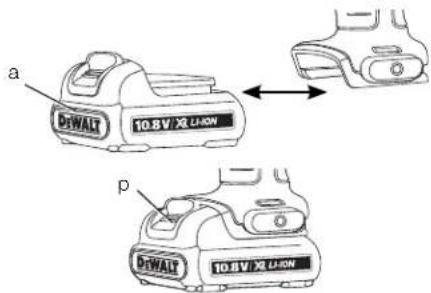
Inserting and Removing the Battery Pack from the Imaging Thermometer (fi g. 4)
NOTE: Make sure your battery pack is fully charged.
ENGLISH
TO INSTALL THE BATTERY PACK INTO THE TOOL HANDLE
- Align the battery pack (a) with the rails inside the handle.
- Slide it firmly into place until you hear the lock snap into place.
TO REMOVE THE BATTERY PACK FROM THE TOOL
- Press the release button (p) and firmly pull the battery pack out of the imaging thermometer handle.
- Insert battery pack into the charger as described in the charger section of this manual.
Getting Started (fi g. 2)
- Slide lens cover (g) down to expose the lens.
Power On/Off
- To turn on the imaging thermometer, push the menu/power button (I) and hold for 0.5 seconds.
- To turn off the imaging thermometer, push the menu/power button (I) and hold for 3 seconds.
INITIAL SETUP
Date and Time Setup
The first time the imaging thermometer is powered on, it will prompt to set the time and date. After the initial setup, the time and date can be changed through the menu navigation.
- Press the forward (j) or back (h) arrow to highlight the field to change.
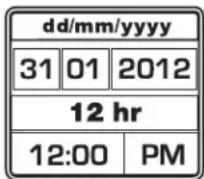
- Press the select button (i) to activate the field. The field will turn green.
- Press the forward (j) or back (h) arrow to change the activated field.
- Press the select button (i) to save the changes.
- Repeat the steps above to change the remaining fields.
- Press the menu/power button (I) to exit.
BASIC OPERATION
Main Viewing Screen
The main screen includes several sections:
r. Scanned Area Image
s. Temperature Measurement at Center of Image (+)
t. Emissivity Setting
u. Battery Fuel Gauge
v. Temperature Color Scale
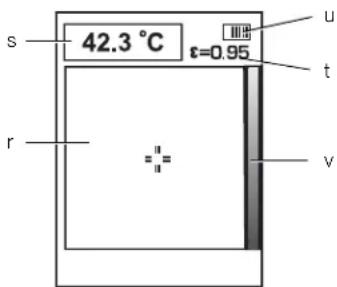
Image Blend
The DCT416 Imaging Thermometer has the ability to display both a visual image and an infrared image. The images can also be blended on the display to provide an overlay of the thermal image on top of the visual image. A blended image can be helpful in diagnosing trouble spots or communicating with customers.
To change the blend setting, push the image blend adjust button (k). The image blend can be pushed repeatedly to cycle through the following options for display settings:
100%
Visual
75% Visual, 25% Thermal
50% Visual, 50% Thermal
25% Visual, 75% Thermal
100%
Thermal
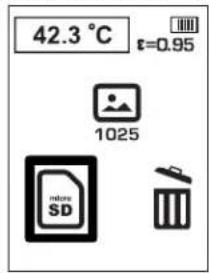
Take and Store Photos (fig. 2)
Make sure a micro SD card is installed in order to save a photo. Open micro SD card slot cover (d) and insert the micro SD card into the slot (e).
- Push photo capture button (m).
- The displayed image will freeze for 3 seconds in order to review the photo.
- Press the forward (j) or back (h) arrow to highlight save to SD card or delete.
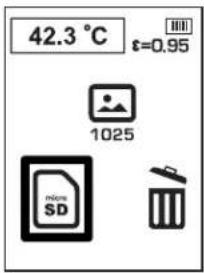
- Press the select button (i) to confirm selection.
- After completion of save or delete, the imaging thermometer will automatically return to the main viewing screen.
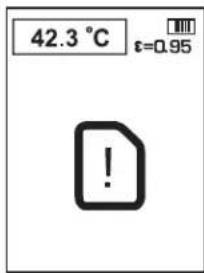
NOTE: If no SD card is installed or if there is a problem with the SD card, the below communication will appear.
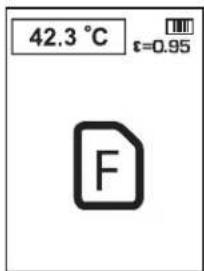
NOTE: If the SD card is full, the below communication will appear.
MENU OPTIONS
NOTE: At any time, pushing the menu/power button (I) will return to the previous menu.
To View Photos
- Press the menu/power button (I).
- Press the forward (j) or back (h) arrow to highlight the folder option in the menu.
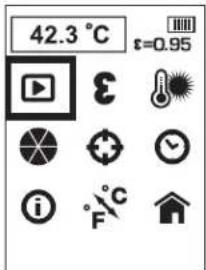
- Press the select button (i) to confirm selection.
- Press the forward (j) or back (h) arrow to scroll through saved images.
- Press the select button (i) to go to the delete sub-menu.
- Press the forward (j) or back (h) arrow to to highlight save to SD card or delete.
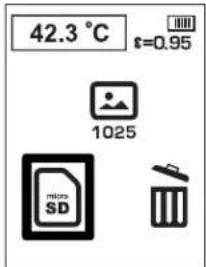
- Press the select button (i) to confirm selection.
- After completion of save or delete, the imaging thermometer will automatically return to the next sequential image.
Emissivity
Emissivity describes the energy-emitting characteristics of materials. Most organic materials and painted or oxidized surfaces have an emissivity of about 0.95 which is the default setting. It is recommended to compensate for inaccurate readings that may result from measuring materials with low emissivity values such as shiny metal surfaces. Cover these surfaces with masking tape or flat black paint (< 148 °C/300 °F) and use the default (0.95) setting. Allow time for the tape or paint to reach the same temperature as the surface beneath it and then measure the temperature of the tape or painted surface.
If you cannot paint or use tape, then you can compensate your measurements with the emissivity selector. Even with the adjustable emissivity, it can be difficult to get a completely accurate infrared
ENGLISH
measurement of a target with a shiny or metallic surface. Experimentation may be required to benchmark temperatures, and experience will help you choose the best setting for specific measurements.
The imaging thermometer has emissivity adjustable from 0.1 to 1.0 in increments of 0.01. Refer to the
Nominal Emissivity Table in this manual. The reference to emissivity settings in the table are suggestions for typical situations and your particular situation may differ.
NOTE: Calibration of this product was performed at 0.95 emissivity.
| NOMINAL EMISSIVITY VALUE | |
| MATERIAL VALUE | |
| Carbon-filled surface 0.98 | |
| Frost crystals 0.98 | |
| Human skin 0.98 | |
| Slate 0.97 | |
| Water, distilled 0.96 | |
| Ice, smooth 0.96 | |
| Soil, saturated with water 0.95 | |
| Carbon candle soot 0.95 | |
| Glass, polished plate 0.94 | |
| Paint, oil 0.94 | |
| Brick, red 0.93 | |
| Paper, white bond 0.93 | |
| Concrete | 0.92 |
| Soil, dry | 0.92 |
| Plaster, rough coat | 0.91 |
| Wood, planed oak | 0.90 |
| Earthenware, glazed | 0.90 |
| Snow, granular | 0.89 |
| Silica, glazed | 0.88 |
| Cuprous Oxide at 38 °C | 0.87 |
| Emery Corundum | 0.86 |
| Snow | 0.85 |
| Stainless, oxidized at 800 °C | 0.85 |
| Iron, oxidized at 500 °C | 0.84 |
| Cuprous Oxide at 260 °C | 0.83 |
| Snow, fine particles | 0.82 |
| Brass, unoxidized | 0.81 |
| Glass, convex D | 0.80 |
| Steel, oxidized | 0.79 |
| Copper, heavily oxidized | 0.78 |
| Cloth, cotton | 0.77 |
| Sand | 0.76 |
| Silica, unglazed | 0.75 |
| Iron, oxidized at 100 °C | 0.74 |
| Coating No. C20A | 0.73 |
| Basalt | 0.72 |
| Carbon, graphitized at 500 °C | 0.71 |
| Red Rust | 0.70 |
| Iron sheet, heavily rusted | 0.69 |
| Water | 0.67 |
| Black Loam 0.66 | |
| Cement, white | 0.65 |
| Iron cast, oxidized 0.64 | |
| Lead, oxidized at 1100 °C | 0.63 |
| Zirconia on inconel | 0.62 |
| Cu-Zn, brass oxidized | 0.61 |
| Inconel sheet at 760 °C | 0.58 |
| Marble, smooth white | 0.56 |
| All anodized chromic acid | 0.55 |
| Iron cast, polished | 0.21 |
| Brass, rubbed 80 grit emery | 0.20 |
| Stainless steel, 18-8 buffed | 0.16 |
| Aluminium as received | 0.09 |
| Steel, polished | 0.07 |
| Aluminium, polished sheet | 0.05 |
| Copper, polished | 0.05 |
| Brass, highly polished | 0.03 |
To Change Emissivity
- Press the menu/power button (I).
- Press the forward (j) or back (h) arrow to highlight the emissivity option in the menu.
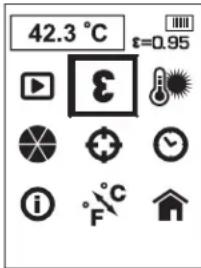
- Press the select button (i) to confirm selection.
- Press the forward (j) or back (h) arrow to adjust the emissivity setting. The emissivity can be adjusted in increments of 0.01 from 0.10 to 1.00.
- Press the the select button (i) to confirm the emissivity setting.
- After saving the emissivity setting, the imaging thermometer will automatically return to the main menu screen.
Background Temperature
For more accurate temperature measurements, it is recommended to set the background (or reflected temperature). This is especially important when the object being measured is at a significantly different temperature than ambient or if the object being measured has a low emissivity.
Setting the background temperature will help compensate for the radiation from the surroundings.
To Change Background Temperature
- Press the menu/power button (I).
- Press the forward (j) or back (h) arrow to highlight the background temperature option in the menu.
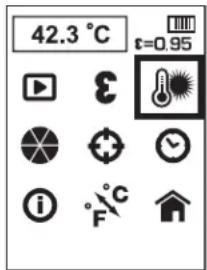
-
Press the select button (i) to confirm selection.
-
Press the forward (j) or back (h) arrow to adjust the background temperature. The background temperature can be adjusted in 1 degree increments.
-
Press the select button (i) to confirm the background temperature setting.
-
After saving the background temperature setting, the imaging thermometer will automatically return to the main menu screen.
To Change Color Palette
- Press the menu/power button (I).
- Press the forward (j) or back (h) arrow to highlight the color palette option in the menu.
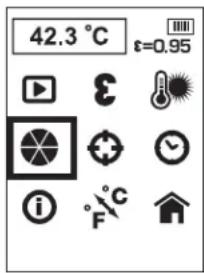
-
Press the select button (i) to confirm selection.
-
Press the forward (j) or back (h) arrow to scroll through the color palette options. The five palette choices include: Ironbow, White Hot, Black Hot, Rainbow, and High Contrast.
-
Press the select button (i) to confirm the color palette setting.
-
After saving the color palette setting, the imaging thermometer will automatically return to the main menu screen.
To Change the Tracking Setting
When the tracking feature is on, the imaging thermometer will locate the hottest (red o) and coldest (blue o) spot in the displayed area. The imaging thermometer can moved to align the center measurement spot (+) to the desired location.
NOTE: The displayed temperature always corresponds to the center (+).
- Press the menu/power button (I).
- Press the forward (j) or back (h) arrow to highlight the tracking option in the menu.
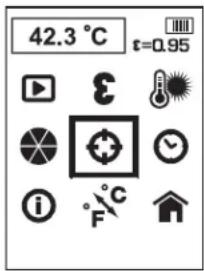
- Press the select button (i) to confirm selection.
- Press the forward (j) or back (h) arrow to turn on or off the tracking feature.
- Press the select button (i) to confirm the tracking feature setting.
- After saving the tracking feature setting, the imaging thermometer will automatically return to the main menu screen.
To Set Date and Time
- Press the menu/power button (I).
- Press the forward (j) or back (h) arrow to highlight the date and time option in the menu.
ENGLISH
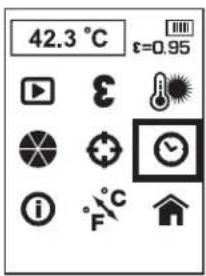
-
Press the select button (i) to confirm selection.
-
Press the forward (j) or back (h) arrow to highlight the field to change.
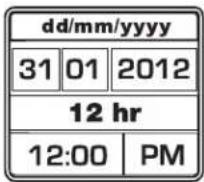
-
Press the select button (i) to activate the field. The field will turn green.
-
Press the forward (j) or back (h) arrow to change the activated field.
-
Press the select button (i) to save the changes.
-
Repeat the steps above to change the remaining fields.
-
Press the menu/power button (I) to exit.
To View Information
-
Press the menu/power button (I).
-
Press the forward (j) or back (h) arrow to highlight the information option in the menu.
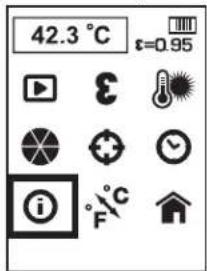
-
Press the select button (i) to confirm selection
-
The imaging thermometer will display the software version.
-
Press the menu/power button (I) to exit.
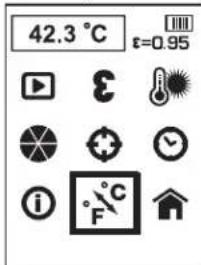
To Change Temperature Scales
-
Press the menu/power button (I).
-
Press the forward (j) or back (h) arrow to highlight the C / F option in the menu.
-
Press the select button (i) to confirm selection
-
Press the forward (j) or back (h) arrow to highlight either C or F.
-
Press the select button (i) to confirm selection.
-
After saving the temperature scale setting, the imaging thermometer will automatically return to the main menu screen.
Return to the Main Viewing Screen
-
Press the menu/power button (I).
-
Press the forward (j) or back (h) arrow to highlight the home option in the menu.
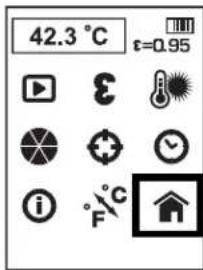
- Press the select button (i) to confirm selection.
To Download Images to Computer
The imaging thermometer records both the thermal and visual image for each saved photo. Images are saved in bitmap format.
The micro SD card can be transferred to a computer to view the images.
Report Writing Software
The imaging thermometer utilises report writing software to produce professional reports. The software can be downloaded from www.dewalt.eu or www.2helpU.com.
To Turn Off Imaging Thermometer
-
To turn off the imaging thermometer, push the menu/power button (I) and hold for 3 seconds. The imaging thermometer will also automatically turn off after 10 minutes of non-use.
-
Slide lens cover (g) up to protect lens when not in use.
Operating Tips
- Use only DEWALT 10.8 V lithium-ion battery.
- Ensure the DEWALT battery is in good working condition.
- Avoid sudden changes in temperature such as when entering or leaving a heated building on a cold day as this can cause condensation inside the imaging thermometer. To prevent condensation, place the imaging thermometer in the kitbox or a plastic bag before exposing it to sudden changes in temperature.
MAINTENANCE
Your DEWALT imaging thermometer has been designed to operate over a long period of time with a minimum of maintenance. Continuous satisfactory operation depends upon proper tool care and regular cleaning.
The charger and battery pack are not serviceable. There are no serviceable parts inside.

Cleaning

WARNING: Blow dirt and dust off with clean, dry air at least once a week. To minimize the risk of eye injury, always wear proper eye protection when performing this.
WARNING: Never use solvents or other harsh chemicals for cleaning the non-metallic parts of the tool. These chemicals may weaken the materials used in these parts. Use a cloth dampened only with water and mild soap. Never let any liquid get inside the tool; never immerse any part of the tool into a liquid.

WARNING: Do not apply solvents to the lens as this may cause damage. Do not clean the infrared lens too vigorously as this can damage the delicate anti-reflective coating.
CHARGER CLEANING INSTRUCTIONS

WARNING: Shock hazard. Disconnect the charger from the AC outlet before cleaning. Dirt and grease may be removed from the exterior of the charger using a cloth or soft non-metallic brush. Do not use water or any cleaning solutions.
Optional Accessories

WARNING: Since accessories, other than those offered by DEWALT, have not been tested with this product, use of such accessories with this tool could be hazardous. To reduce the risk of injury, only DEWALT recommended accessories should be used with this product.
RECOMMENDED ACCESSORIES
Consult your dealer for further information on the appropriate accessories.
Troubleshooting
• Make sure the lens cover (g) is open.
• Make sure the 10.8 V battery is charged.
- Make sure the battery is installed on the handle set when in use.
- If the screen freezes, remove the 10.8 V battery pack to reset the unit. Reinsert the battery pack and press the power on button.
KEY NOTES IF HAVING TROUBLE TAKING MEASUREMENT
- Make sure to apply masking tape or flat black paint to surfaces that are highly reflective (use the default 0.95 emissivity setting).
- Make sure to have the correct emissivity for the material you are testing. Refer to Emissivity and Nominal Emissivity Table.
- Clean the material before testing if there is heavy dirt, grease, etc.
Protecting the Environment
Separate collection. This product must not be disposed of with normal household waste.
ENGLISH
Should you find one day that your DEWALT product needs replacement, or if it is of no further use to you, do not dispose of it with household waste. Make this product available for separate collection.

Separate collection of used products and packaging allows materials to be recycled and used again. Re-use of recycled materials helps prevent environmental pollution and reduces the demand for raw materials.
Local regulations may provide for separate collection of electrical products from the household, at municipal waste sites or by the retailer when you purchase a new product.
DEWALT provides a facility for the collection and recycling of DEWALT products once they have reached the end of their working life. To take advantage of this service please return your product to any authorised repair agent who will collect them on our behalf.
You can check the location of your nearest authorised repair agent by contacting your local DEWALT office at the address indicated in this manual. Alternatively, a list of authorised DEWALT repair agents and full details of our after-sales service and contacts are available on the Internet at: www.2helpU.com.

Rechargeable Battery Pack
This long life battery pack must be recharged when it fails to produce sufficient power on jobs which were easily done before. At the end of its technical life, discard it with due care for our environment:
- Run the battery pack down completely, then remove it from the tool.
- Li-lon cells are recyclable. Take them to your dealer or a local recycling station. The collected battery packs will be recycled or disposed of properly.
GUARANTEE
DEWALT is confident of the quality of its products and offers an outstanding guarantee for professional users of the product. This guarantee statement is in addition to and in no way prejudices your contractual rights as a professional user or your statutory rights as a private non-professional user. The guarantee is valid within the territories of the Member States of the European Union and the European Free Trade Area.
• 30 DAY NO RISK SATISFACTION GUARANTEE •
If you are not completely satisfied with the performance of your DEWALT tool, simply return it within 30 days, complete with all original components, as purchased, to the point of purchase, for a full refund or exchange. The product must have been subject to fair wear and tear and proof of purchase must be produced.
• ONE YEAR FREE SERVICE CONTRACT •
If you need maintenance or service for your DEWALT tool, in the 12 months following purchase, you are entitled to one service free of charge. It will be undertaken free of charge at an authorised DEWALT repair agent. Proof of purchase must be produced. Includes labour. Excludes accessories and spare parts unless failed under warranty.
• ONE YEAR FULL WARRANTY •
If your DEWALT product becomes defective due to faulty materials or workmanship within 12 months from the date of purchase, DEWALT guarantees to replace all defective parts free of charge or – at our discretion – replace the unit free of charge provided that:
• The product has not been misused;
- The product has been subject to fair wear and tear;
• Repairs have not been attempted by unauthorised persons;
• Proof of purchase is produced;
- The product is returned complete with all original components.
If you wish to make a claim, contact your seller or check the location of your nearest authorised DEWALT repair agent in the DEWALT catalogue or contact your DEWALT office at the address indicated in this manual. A list of authorised DEWALT repair agents and full details of our after-sales service is available on the Internet at: www.2helpU.com.