304258 - Irrigation timer Brandson - Free user manual and instructions
Find the device manual for free 304258 Brandson in PDF.


User questions about 304258 Brandson
0 question about this device. Answer the ones you know or ask your own.
Ask a new question about this device
Download the instructions for your Irrigation timer in PDF format for free! Find your manual 304258 - Brandson and take your electronic device back in hand. On this page are published all the documents necessary for the use of your device. 304258 by Brandson.
USER MANUAL 304258 Brandson
text_image
QR code image containing encoded data, no visible human-readable textENG: Current drivers, user manuals and other relevant documents for this product can be found on our homepage.
other
| Time | Frequency | Run Time | |------|-----------|----------| | 1 | 72 | ON | | 2 | 48 | ON | | 3 | 3 | ON | | 4 | 24 | ON | | 5 | 24 | ON | | 6 | 12 | ON | | 8 | 8 | ON | | 10 | 6 | ON | | 12 | 4 | ON | | 15 | 20 | ON | | 18 | 8 | ON | | 20 | 4 | ON | | 24 | 24 | ON | | 30 | 6 | ON | | 35 | 8 | ON | | 40 | 12 | ON | | 45 | 18 | ON | | 50 | 3 | ON | | 55 | 6 | ON | | 60 | 8 | ON | | 65 | 12 | ON | | 70 | 18 | ON | | 75 | 3 | ON | | 80 | 6 | ON | | 85 | 8 | ON | | 90 | 12 | ON | | 95 | 18 | ON | | 100 | 3 | ON | | 105 | 6 | ON | | 110 | 8 | ON | | 115 | 12 | ON | | 120 | 18 | ON | | 125 | 3 | ON | | 130 | 6 | ON | | 135 | 8 | ON | | 140 | 12 | ON | | 145 | 18 | ON | | 150 | 3 | ON | | 155 | 6 | ON | | 160 | 8 | ON | | 165 | 12 | ON | | 170 | 18 | ON | | 175 | 3 | ON | | 180 | 6 | ON | | 185 | 8 | ON | | 190 | 12 | ON | | 195 | 18 | ON | | 200 | 3 | ON | | - | - | ON | | - | - | OFF | | - | - | OFF | | - | - | OFF | | - | - | OFF | | - | - | OFF | | - | - | OFF | | - | - | OFF | | - | - | OFF | | - | - | OFF | | - | - | OFF | | - | - | OFF: Off| | - | - | OFF: Off| | - | - | OFF: Off| | - | - | OFF: Off| | - | - | OFF: Off| | - | - | OFF: Off| | - | - | OFF: Off| | - | - | OFF: Off| | - | - | OFF: Off| | - | - | OFF: Off| | | - | - | OFF: Off| | - | - | OFF: Off| | - | - | OFF: Off| | - | - | OFF: Off| | - | - | OFF: Off| | - | - | OFF: Off| | - | - | OFF: Off| | - | - | OFF: Off| | - | - | OFF: Off|Beispiel 2:
gauge
| Metric | Value | |--------|-------| | Frequency | 72 | | Frequency | 48 | | Frequency | 24 | | Frequency | 12 | | Frequency | 8 | | Frequency | 6 | | Frequency | 4 | | Frequency | 3 | | Frequency | 2 | | Frequency | 1 | | Frequency | 2 | | Run Time | ON | | Run Time | OFF | | Run Time | 1min | | Run Time | ON | | Run Time | OFF | | Run Time | ON | | Run Time | OFF | | Run Time | ON | | Run Time | OFF | | Run Time | ON | | Run Time | OFF | | Run Time | ON | | Run Time | OFF | | Run Time | ON | | Run Time | OFF | | Run Time | ON | | Run Time | OFF | | Run Time | ON | | Run Time | OFF | | Run Time | ON | | Run Time | OFF | | RunTime | ON | | RunTime | OFF | | RunTime | ON | | RunTime | OFF | | RunTime | ON | | RunTime | OFF | | RunTime | ON | | RunTime | OFF | | RunTime | ON | | RunTime | OFF | | RunTime | ON | | RunTime | OFF | | RunTime | ON | | RunTime | OFF | | RunTime | ON | | RunTime | OFF | | RunTime | ON | | RunTime | OFF | | | Delay | - |gauge
| Frequency | Week | Reset | 1Hour | | --------- | ---- | ----- | ----- | | 1 | 72 | 48 | 2 | | 2 | 48 | 24 | 3 | | 3 | 24 | 12 | 4 | | 4 | 12 | 8 | 6 | | 5 | ON | OFF | 1min | | 6 | ON | ON | 120 | | 7 | ON | ON | 90 | | 8 | ON | ON | 60 | | 9 | ON | ON | 30 | | 10 | ON | ON | 15 | | 11 | ON | ON | ON | | 12 | ON | ON | ON | | 13 | ON | ON | ON | | 14 | ON | ON | ON | | 15 | ON | ON | ON | | Delay | | | |Thank you for choosing a Brandon product. Please read the following user manual carefully so that you can enjoy the purchased product for a long time. Before using the product, first check that the delivered item is complete, accurate and undamaged.
1. Scope of delivery
• Watering control system
• 1/2" plug for hose connector
• 1/2" connection adapter
- User manual
2. Technical data
| Operating voltage 3 V | |
| Battery type Two 1.5V AAA | batteries |
| Connections | Water connection 3/4" (inlet / without adapter)Water discharge 3/4" (outlet / without adapter) |
| Dimensions (H x W x D) 140 | mm x 90 mm x 110 mm |
| Features • Manual operation | Adjustable watering program |
3. Product details
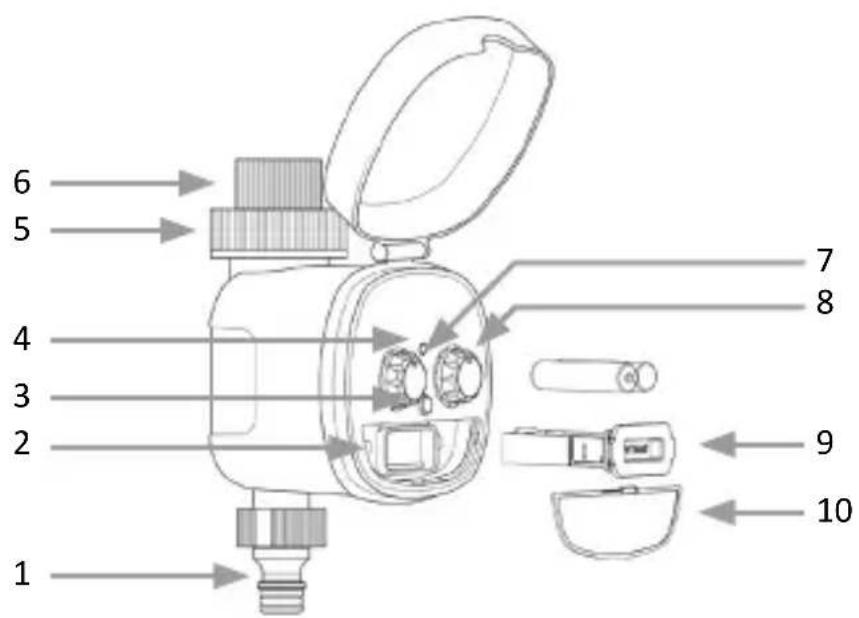
text_image
6 5 4 3 2 1 7 8 9 10| 1 Plug for hose connection |
| 2 Battery compartment |
| 3 Delay button |
| 4 LED indicator, lights up every 4 seconds |
| 5 1" connection adapter (remove adapter to use 3/4") |
| 6 3/4" connection adapter |
| 7 Frequency, watering interval from 1 hr. up to 1 week |
| 8 Duration, watering between 1-120 minutes |
| 9 Battery compartment |
| 10 Battery compartment cover |
4. Replacing the battery
As soon as the indicator starts flashing, the battery level is too low.
Insert two 1.5V batteries (LR03/AAA). Place the battery compartment back completely and close the battery compartment cover.
Caution! Use only new batteries. Do NOT use rechargeable batteries. Test the product by turning the duration knob to the "ON" position. You should hear the sound of the motor within 10-15 seconds. Check if the batteries have been inserted properly if you do not hear any sound.
Move the duration knob to the "OFF" position before connecting.
5. Configuring the program
- Determine how you want to water. Possible cycle combinations can be found in the following pictures.
- Adjust the frequency (left dial) and duration (right dial). Determine how often and how long you want to water.
NOTE: The first watering cycle begins after the number of hours that was configured for frequency.

Caution! The frequency should always be longer than the duration. (Example: Frequency=1H, Duration=90 minutes is an invalid setting).
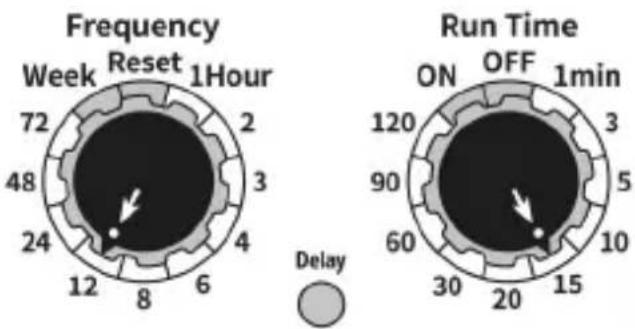
Example 1:
To water 2 times a day for 15 minutes, adjust the frequency to 12 and the duration to 15. The first watering cycle starts 12 hours after the dials are adjusted.
other
| Frequency | Week | Reset | 1Hour | | --------- | ---- | ----- | ----- | | 1 | 72 | 48 | 2 | | 2 | 48 | 24 | 3 | | 3 | 24 | 12 | 4 | | 4 | 12 | 8 | 6 | | 5 | ON | OFF | 1min | | 6 | ON | ON | 120 | | 7 | ON | ON | 90 | | 8 | ON | ON | 60 | | 9 | ON | ON | 30 | | 10 | ON | ON | 15 | | 11 | ON | ON | 10 | | 12 | ON | ON | ON | | 13 | ON | ON | ON | | 14 | ON | ON | ON | | 15 | ON | ON | ON | | Delay | | | |Example 2:
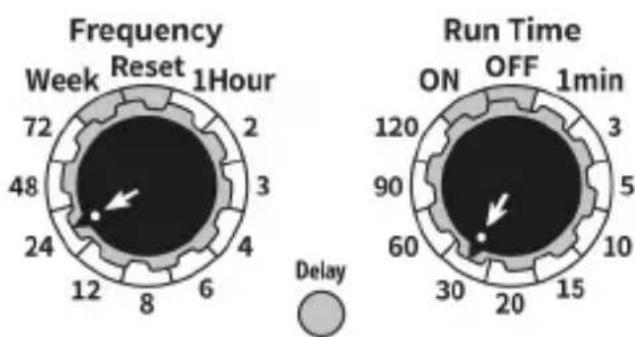
To water once a day for 30 minutes, adjust the frequency to 24 and the duration to 30. The first watering cycle starts 24 hours after the dials are adjusted.
other
| Frequency | Week | Reset | 1Hour | | --------- | ---- | ----- | ----- | | 72 | | | | | 48 | | | | | 24 | | | | | 12 | | | | | 8 | | | | | 6 | | | | | 4 | | | | | 2 | | | | | 1 | | | | | Delay | | | | | Run Time | ON | OFF | 1min | | ---------- | ---- | ----- | ----- | | | 120 | | 3 | | | 90 | | 5 | | | 60 | | 10 | | | 30 | | 15 | | | 20 | | | | | | | |To make changes after the original settings:
- Wait for at least 3 seconds until the timer detects the new settings after each change. This is indicated by the LED display which flashes rapidly.
- Changing the frequency or the duration changes the previous start time. This means that the next watering cycle time is recalculated.
Delay function
You can delay the cycle start time using the delay function. To do this, press the centre button for about 3 seconds until all the LEDs glow continuously.
By pressing the middle button again, the start time can be delayed by 1 hr each time the button is pressed.
The start time can be delayed by a maximum of 23 hours.
Example 3:
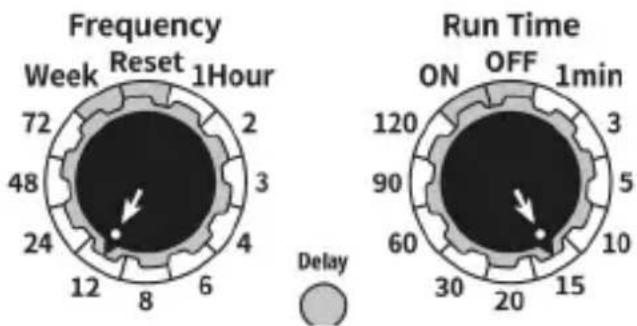
The current time is 8:00 a.m, your setting is Frequency = 24 and Duration = 15. This means that watering is activated every 24 hours for 15 minutes. The watering is activated every day at 8:00 a.m in the morning. However, if you want to activate the timer at 10:00 a.m every day, then the start time has to be delayed by 2 hours.
Now press the delay button for about 3 seconds till the LED glows continuously. Then press the button again 2 times to delay the timer by 2 hours. The device then starts the watering cycle with a delay of 2 hours at 10:00 a.m every 24 hours.
other
| Metric | Value | |--------|-------| | Frequency | 72 | | Week | 48 | | Reset | 24 | | 1Hour | 12 | | Delay | - | | Run Time | ON | | ON | 120 | | OFF | 90 | | 1min | 60 | | 3 | 30 | | 5 | 20 | | 10 | 15 | | End Point | 120 |6. Manual operation
- To start manual watering, set the duration to ON.
- To stop manual watering, set the duration to OFF.
After finishing the manual mode, set the duration back to the desired settings.
7. Additional safety instructions
- The timer is water resistant, NOT water proof. The timer has to be installed above ground and vertically to the tap. Do not immerse the device in water!
- DO NOT pull the hose when it is connected to the watering control system to avoid damage to the timer
- This timer is intended for outdoor use, to control watering systems.
- The device should not be used for industrial purposes
- The water pressure is between 0 bar and 8 bar (0 psi to 116 psi). Use it only with clean water and fresh water, the water temperature has to be above 1^ and below 60^ .
- Protect the timer during winter season or from frost. Disassemble the device from the tap and drain all the water from it. Remove the batteries and keep the device and the batteries safely at home.
- Always keep the cover closed to prevent water from entering.
- Do not use the device if it has fallen down or has been subject to impact.
- Ensure that you clean the filter regularly if it is dirty.
8. Cleaning
Clean the filter in the water tap connection regularly to prevent your watering system computer from clogging.
9. Safety instructions and disclaimer
Never attempt to open the appliance to carry out repairs or modifications. Avoid contact with the mains voltage. Do not short-circuit the product. The appliance is not frost-proof. Store the appliance away from water and frost in winter. Keep the appliance away from high temperatures. Do not expose the device to sudden changes in temperature or strong vibrations, as this could damage the electronic components. Check the device for any damage before using it. The device should not be used if it was subject to impact or has been damaged in some other manner. Please comply with the local regulations and restrictions. Do not use the device for purposes other than those described in the user manual. This product is not a toy. Keep it out of the reach of children or mentally disabled persons. Any repair or modification to the device, which is not carried out by the original supplier, will void any warranty and guarantee claims. The product should be used only by persons who have read and understood this user manual. The specifications of the device may be changed without any special prior notice.
10. Disposal instructions
In line with the European WEEE directive, electrical and electronic devices should not be disposed of along with domestic waste. Their components have to be separately sent for recycling or disposal, because improper disposal of toxic and dangerous components may permanently damage the environment. According to the electrical and electronic equipment act (ElektroG), you are obliged (as a consumer) to return (free of charge) all electrical and electronic devices to the manufacturer, the point of sale or public collection points at the end of their service life. The relevant local laws regulate the details in this regard. The symbol displayed on the product, in the user manual or/and on the packaging refers to these regulations. With this manner of sorting, recycling and disposal of used devices, you make an important contribution towards protecting our environment.
11. Instructions for battery disposal
In conjunction with the sale of batteries along with the supply of devices that include batteries, the supplier is obliged to point out the following to the customer: The customer is legally obliged to return used batteries. He can return used batteries which the supplier offers or has offered as new batteries in his assortment free of charge to the supplier's dispatch warehouse (shipping address). The symbols shown on the batteries indicate the following: Pb = battery contains more than 0.004 percent lead by weight, Cd = battery contains more than 0.002 percent cadmium by weight, Hg = battery contains more than 0.0005 percent mercury by weight.
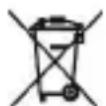
The symbol of the crossed-out dustbin means that the battery may not be disposed of in household waste.


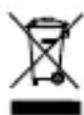
WEEE directive: 2012/19/EU
WEEE Register no.: DE 67896761
The company WD Plus GmbH hereby certifies that the device 304258 complies with the fundamental requirements and all other relevant stipulations. A complete conformity statement can be obtained from: WD Plus GmbH, Wohlenbergstraße 16, 30179 Hanover
other
| Time | Frequency | Run Time | |------|-----------|----------| | 1 | 72 | ON | | 2 | 48 | ON | | 3 | 3 | ON | | 4 | 24 | ON | | 5 | 12 | ON | | 6 | 8 | ON | | 7 | 6 | ON | | 8 | 4 | ON | | 9 | 2 | ON | | 10 | 1 | ON | | 11 | 0 | ON | | 12 | 0 | ON | | 13 | 0 | ON | | 14 | 0 | ON | | 15 | 0 | ON | | 16 | 0 | ON | | 17 | 0 | ON | | 18 | 0 | ON | | 19 | 0 | ON | | 20 | 0 | ON | | 21 | 0 | ON | | 22 | 0 | ON | | 23 | 0 | ON | | 24 | 0 | ON | | 25 | 0 | ON | | 26 | 0 | ON | | 27 | 0 | ON | | 28 | 0 | ON | | 29 | 0 | ON | | 30 | 0 | ON | | 31 | 0 | ON | | 32 | 0 | ON | | 33 | 0 | ON | | 34 | 0 | ON | | 35 | 0 | ON | | 36 | 0 | ON | | 37 | 0 | ON | | 38 | 0 | ON | | 39 | 0 | ON | | 40 | 0 | ON | | 41 | 0 | ON | | 42 | 0 | ON | | 43 | 0 | ON | | 44 | 0 | ON | | 45 | 0 | ON | | 46 | 0 | ON | | 47 | 0 | ON | | 48 | 0 | ON | | 49 | 0 | ON | | 50 | 0 | ON | | 51 | 0 | ON | | 52 | 0 | ON | | 53 | 0 | ON | | 54 | 0 | ON | | 55 | 0 | ON | | 56 | 0 | ON | | 57 | 0 | ON | | 58 | 0 | ON | | 59 | 0 | ON | | 60 | 0 | ON | | 61 | 0 | ON | | 62 | 0 | ON | | 63 | 0 | ON | | 64 | 0 | ON | | 65 | 0 | ON | | 66 | 0 | ON | | 67 | 0 | ON | | 68 | 0 | ON | | 69 | 0 | ON | | 70 | 0 | ON | | 71 | 0 | ON | | 72 | 0 | ON | | 73 | 0 | ON | | 74 | 0 | ON | | 75 | 0 | ON | | 76 | 0 | ON | | 77 | 0 | ON | | 78 | 0 | ON | | 79 | 0 | ON | | 80 | 0 | ON | | 81 | 0 | ON | | 82 | 0 | ON | | 83 | 0 | ON | | 84 | 0 | ON | | 85 | 0 | ON | | 86 | 0 | ON | | 87 | 0 | ON | | 88 | 0 | ON | | 89 | 0 | ON | | 90 | 0 | ON | | ... (Delay) - All values are estimated based on the chart labels. The data is presented in two columns: 'Week' and 'Run Time'. The values represent the frequency of occurrences at specific time points. The 'ON' and 'OFF' columns represent the run time.Esempio 2:
other
| Frequency | Week | Reset | 1Hour | | --------- | ---- | ----- | ----- | | 72 | | | | | 48 | | | | | 24 | | | | | 12 | | | | | 8 | | | | | 6 | | | | | 4 | | | | | 2 | | | | | 1 | | | | | 0 | | | | | 0 | ON | OFF | ON | | 0 | OFF | ON | ON | | 0 | ON | OFF | ON | | 0 | ON | OFF | ON | | 0 | ON | ON | ON | | 0 | ON | ON | ON | | 0 | ON | ON | ON | | 0 | ON | ON | ON | | 0 | ON | ON | ON | | 0 | ON | ON | ON | | 0 | ON | ON | ON | | 0 | ON | ON | AN | | 0 | ON | ON | AN | | 0 | ON | ON | AN | | 0 | ON | ON | AN | | 0 | ON | ON | AN | | 0 | ON | ON | AN | | 0 | ON | ON | AN | | 0 | ON | ON | AN |other
| Metric | Value | |------------|-------| | Frequency | 72 | | Frequency | 48 | | Frequency | 24 | | Frequency | 12 | | Frequency | 8 | | Frequency | 6 | | Frequency | 4 | | Frequency | 2 | | Frequency | 1 | | Run Time | ON | | Run Time | OFF | | Run Time | ON | | Run Time | OFF | | Run Time | ON | | Run Time | OFF | | Run Time | ON | | Run Time | OFF | | Run Time | ON | | Run Time | OFF | | Run Time | ON | | Run Time | OFF | | Run Time | ON | | Run Time | OFF | | RunTime | ON | | RunTime | OFF | | RunTime | ON | | RunTime | OFF | | RunTime | ON | | RunTime | OFF | | RunTime | ON | | RunTime | OFF | | RunTime | ON | | RunTime | OFF | | RunTime | ON | | RunTime | OFF | | RunTime | ON | | RunTime | OFF |other
| Metric | Value | |--------|-------| | Frequency | 72 | | Frequency | 48 | | Frequency | 24 | | Frequency | 12 | | Frequency | 8 | | Frequency | 6 | | Frequency | 4 | | Frequency | 3 | | Frequency | 2 | | Frequency | 1 | | Frequency | 0 | | Run Time | ON | | Run Time | OFF | | Run Time | 1min | | Run Time | ON | | Run Time | OFF | | Run Time | ON | | Run Time | OFF | | Run Time | ON | | Run Time | OFF | | Run Time | ON | | Run Time | OFF | | Run Time | ON | | Run Time | OFF | | Run Time | ON | | Run Time | OFF | | Run Time | ON | | Run Time | OFF | | Run Time | ON | | Run Time | OFF | | Run Time | ON | | Run Time | OFF | | RunTime | ON | | RunTime | OFF | | RunTime | ON | | RunTime | OFF | | RunTime | ON | | RunTime | OFF | | RunTime | ON | | RunTime | OFF | | RunTime | ON | | RunTime | OFF | | RunTime | ON | | RunTime | OFF | | RunTime | ON | | RunTime | OFF | | RunTime | ON | | RunTime | OFF | | RunTime | ON | | RunTime | OFF | | | Delay | - |MO-FR 9:30am - 18pm CET

text_image
QR code image containing encoded data, no visible human-readable textbrandson-equipment.de