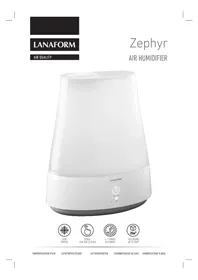
Zephyr - Air Humidifier LANAFORM - Free user manual and instructions
Find the device manual for free Zephyr LANAFORM in PDF.


User questions about Zephyr LANAFORM
0 question about this device. Answer the ones you know or ask your own.
Ask a new question about this device
Download the instructions for your Air Humidifier in PDF format for free! Find your manual Zephyr - LANAFORM and take your electronic device back in hand. On this page are published all the documents necessary for the use of your device. Zephyr by LANAFORM.
USER MANUAL Zephyr LANAFORM
natural_image
White LANAFORM® water purifier with ON/OFF control knob (no text or symbols on body)
COOL
VAPOUR
1 Diffuser sprinkler tip
2 Upper cover
3 Water reservoir
4 On/Off key
5 Intensity adjustment key
6 Demineralisation cartridge (filter)
7 Water reservoir cap
FR COMPOSANTS
natural_image
White plastic spray filter component with labeled parts 6 and 7 (no text or symbols on body)2/56 LANAFORM® "Zephyr"
cs SOUCÁSTI
natural_image
Hand pouring liquid from a white container into a white plastic container (no text or symbols visible)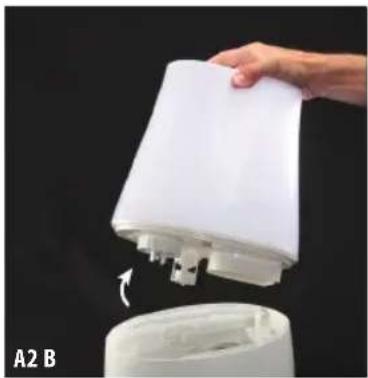
natural_image
Hand holding a white spray bottle with a valve, partially submerged in a container (no text or symbols visible)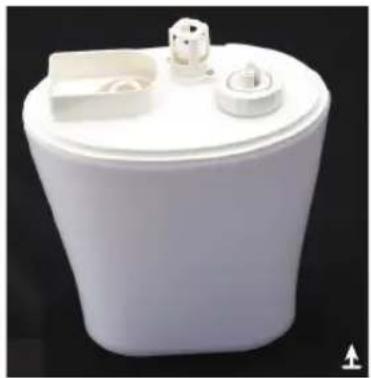
natural_image
White plastic toilet with lid and side outlet, shown against black background (no text or symbols visible)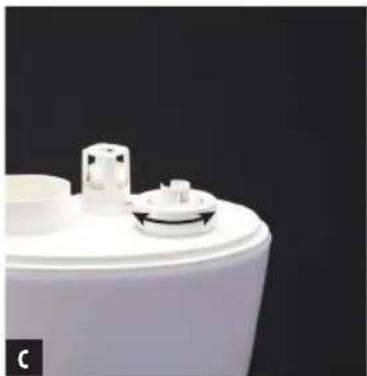
natural_image
Close-up of a white cylindrical container with a small side panel and a curved top, against a dark background (no text or symbols visible)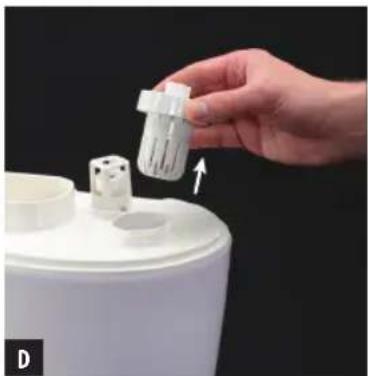
natural_image
Hand placing a white plastic container into a white cylindrical container, with an arrow indicating the component (no text or symbols visible)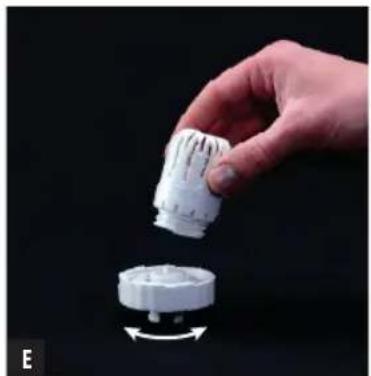
natural_image
Hand holding a white plastic component with a circular base, against a black background (no text or symbols visible)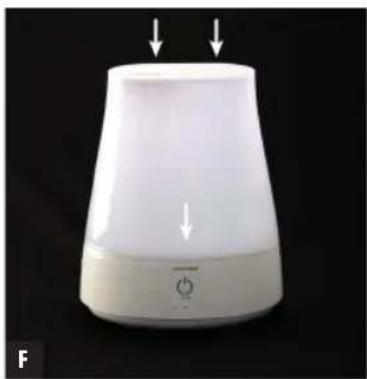
natural_image
White cylindrical device with two downward arrows pointing to its top surface, labeled 'F' in the corner (no text or symbols on the device itself)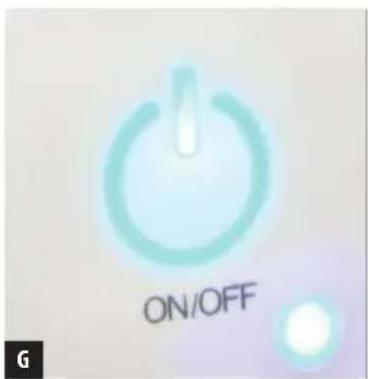
text_image
ON/OFF G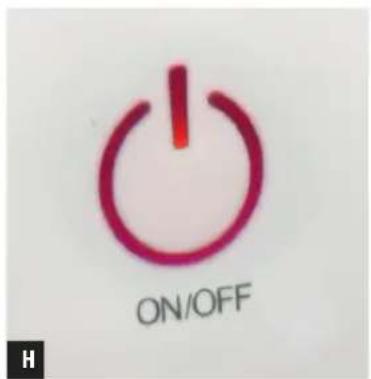
text_image
ON/OFF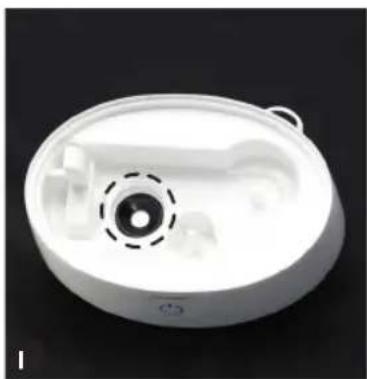
natural_image
White plastic medical device casing with central circular component and dashed centerline (no text or symbols visible)EN Instructions
The photographs and other images of the product in this manual and on the packaging are as accurate as possible, but do not claim to be a perfect reproduction of the product.
Thank you for purchasing the Zephyr cool vapour humidifier by LANAFORM. The Zephyr humidifier helps you to restore a proper humidity level and eliminate discomfort associated with dry air. The ventilation system diffuses water in the form of cool vapour and thereby provides the required level of humidity.
PLEASE READ ALL INSTRUCTIONS, AND PARTICULARLY THE RECOMMENDATIONS FOR BASIC SAFETY BEFORE USING THE HUMIDIFIER
- This device is not intended for use by people, including children, with reduced physical, sensory or mental capabilities, or people with a lack of experience or knowledge, unless someone responsible for their safety can supervise or instruct them beforehand on how to use the device. Children should be supervised to make sure they do not play with the device.
- Use this device only according to the instructions given in this manual.
- Check that your mains voltage is the same as that of your device.
• Always place the Zephyr humidifier on a hard, flat and horizontal surface. Keep it away from walls (at least 15 cm) and heat sources such as stoves, radiators, etc.
▲ If it is not placed on a horizontal surface, the device may not work properly.
- Do not connect or disconnect the plug of the device with wet hands.
- If the power cable is damaged, it must be replaced by a similar cable available from the supplier or the supplier's after-sales department.
- Do not leave the device exposed to direct sunlight.
- Fill the reservoir with clean distilled or demineralised water.
- Do not take apart either the device as a whole or even its base unit.
- Do not switch on the device when there is no water in the reservoir.
- Do not shake the device. This could cause the water to spill over into the base unit and prevent the device from working.
- Never touch the water or components when the unit is running.
- If there is an unusual smell when the device is being used as described in this manual, switch off the device, unplug it and have it examined by the supplier or the supplier's after-sales department.
- Do not use essential oils with this device.
- Do not pour hot water, i.e. water with a temperature greater than 40^ into the reservoir.
- Unplug the device before cleaning it or removing the reservoir.
- Do not wash the entire unit with water and do not immerse it in water. Consult the cleaning instructions in this manual.
- Never scrape the transducer with a hard tool. The Zephyr humidifier must be cleaned regularly. To do this, consult the cleaning instructions in this manual and follow them.
- Immediately unplug a device that has fallen into water before retrieving it.
- An electrical device should never remain connected unsupervised. Unplug it when you are not using it.
- Keep the power cable away from hot surfaces.
-
Never use this device in a room in which aerosols (sprays) are used or in a room in which oxygen is administered.
-
Use the humidifier only when it is filled with water.
- Do not put items of clothing or towels on top of the device. If the vapour emission sprinkler tip is obstructed, this may cause the device to malfunction.
- Never point the vapour emission sprinkler tip towards electrical devices, books or wooden objects that could present a risk of mould.
- When moving the device, lift it up by the base and not by the water reservoir.
- Do not use the humidifier if the air in the room is already sufficiently humid (relative humidity of at least 50% ). The ideal relative humidity level for human comfort is between 45% and 55% . Excess humidity manifests itself in condensation on cold surfaces or on cold walls in the room. To correctly measure the room's humidity, use a hygrometer available in most specialist shops and hypermarkets.
- The Zephyr humidifier is designed for indoor and domestic use only.
- Use only the accessories supplied with this device. The use of any unauthorised accessory will not be covered by the warranty.
INSTRUCTIONS FOR USE
Before using the humidifier for the first time :
Remove the humidifier from its original packaging and make sure that it does not have any faults. If you notice any faults, return the humidifier to the supplier or the supplier's after-sales department.
Place the Zephyr humidifier in the room half an hour before switching it on so that it can adjust to room temperature.
The temperature of the room must always be between 5^ C and 40^ C, and the temperature of the water must be less than 40^ C.
Fitting the demineralisation filter :
Attach the demineralisation filter to the inner wall of the reservoir cap by turning it in a clockwise direction as shown in Figure 2, Item (E). Conversely, to remove the demineralisation filter, turn it anticlockwise.
How to use the device :
- Remove the vapour emission sprinkler tip and the upper cover of the reservoir (Figure 2.A.1). Then remove the reservoir (Figure 2.A.2) and keep it upside down (Figure 2.B). Turn the reservoir cap in an anti-clockwise direction to open it (Figure 2.C&D). Then pour clean distilled or demineralised water into the reservoir. Replace the cap and turn in a clockwise direction to close it tightly (Figure 2.C).
- Fit the reservoir correctly onto the base of the device and replace the upper cover and the vapour emission sprinkler tip (Figure 2.F).
- Make sure your hands are completely dry when connecting and disconnecting the device.
- Once the humidifier is switched on, keep your finger on the On/Off key for a few seconds (Figure 2.G).
- The humidifier is now working. Press the On/Off key repeatedly (Figure 2.G) to adjust the emission of cool vapour to one of the three available intensity levels (Low/Medium/High). The corresponding LED indicator will light up (Figure 2.G).
-
When there is no water left in the reservoir, the humidifier stops and the indicator lights up red on the On/Off key (Figure 2.H).
-
Important notes :
- Use only clean distilled or demineralised water in order to avoid any malfunction.
- Do not pour water into the diffuser sprinkler tip in order to avoid any malfunction and risk of fire.
- Make sure the reservoir cap is tightly closed after filling in order to avoid any leakage or electric shocks.
- The reservoir must be kept clean. If there is any dirt on the vapour emission diffuser sprinkler tip, clean it with a brush or a damp cloth.
Even though there is a safety device that stops the transducer from working, do not leave the device connected when you are not using it.
MAINTENANCE AND STORAGE
• Always switch off the humidifier before performing any maintenance or storage activities.
- If the water contains too much calcium and magnesium, it may deposit a "white powder" in the device. If this foam is deposited on the transducer (ceramic ring emitting ultrasounds – Figure 2.1), this will prevent the Zephyr humidifier from working properly.
MAINTENANCE
We recommend :
1 Using clean distilled or demineralised water each time the device is used.
2 Cleaning the reservoir every 2 days and cleaning the transducer every week.
3 Cleaning the device (see explanations below) and making sure that all of its parts are completely dry when it is not in use.
To clean the transducer (ceramic ring – Figure 2.1):
1 Place 2 to 5 drops of vinegar on the surface of the transducer and leave for 2 to 5 minutes.
2 Brush the foam off the surface using a soft brush. Do not use a hard tool to scrape the surface.
3 Rinse the reservoir of the base in clean water.
Do not use soap, solvent or spray cleaner to clean the transducer.
To clean the basin
1 Clean the basin with water using a soft cloth, and use vinegar if there are any foam or limescale deposits on the inside.
2 Rinse the basin in clean water.
To clean the vapour emission sprinkler tip on the device :
1 Clean it with a brush or damp cloth.
2 Rinse the vapour emission sprinkler tip in clean water.
STORAGE
Having cleaned and dried the device, store it in a dry, cool place out of the reach of children.
TROUBLESHOOTING
In the event of a malfunction under normal conditions of use, please refer to the following table :
| Issues Possible causes Solutions | ||
| No operating indicator light, no vapour | No voltage, no current | Check that the device is connected and that there is no mains fault |
| Red indicator light, no vapour | No water in the reservoir | Pour clean distilled or demineralised water into the reservoir |
| The vapour has an unpleasant odour | The device is new | Drain the water from the reservoir and leave the reservoir to air out for at least 12 hours |
| The water is contaminated or has been in the reservoir too long | Unplug the device, drain the water from the reservoir, rinse and clean the reservoir, and fill the reservoir with demineralised or distilled water | |
| Low vapour intensity The vapour emission | sprinkler tip is obstructed | Unplug the device and clean the vapour emission sprinkler tip |
| Unusual noise occurs during operation | The device is on an unstable or non-flat surface | Unplug the device and place it on a flat, stable surface |
ADVICE REGARDING THE DISPOSAL OF WASTE
All the packaging is composed of materials that pose no hazard for the environment and which can be disposed of at your local sorting centre to be used as secondary raw materials. The cardboard may be disposed of in a paper recycling bin. The packaging film must be taken to your local sorting and recycling centre.
When you have finished using the device, please dispose of it in an environmentally friendly way and in accordance with the law.
LIMITED WARRANTY
LANAFORM guarantees this product against any material or manufacturing defect for a period of two years from the date of purchase, except in the circumstances described below.
The LANAFORM guarantee does not cover damage caused as a result of normal wear to this product. In addition, the guarantee covering this LANAFORM product does not cover damage caused by abusive or inappropriate or incorrect use, accidents, the use of unauthorized accessories, changes made to the product or any other circumstance, of whatever sort, that is outside LANAFORM's control.
LANAFORM may not be held liable for any type of circumstantial, indirect or specific damage.
All implicit guarantees relating to the suitability of the product are limited to a period of two years from the initial date of purchase as long as a copy of the proof of purchase can be supplied.
On receipt, LANAFORM will repair or replace your appliance at its discretion and will return it to you. The guarantee is only valid through LANAFORM's Service Centre. Any attempt to maintain this product by a person other than LANAFORM's Service Centre will render this guarantee void.
BESCHRÄNKTE GARANTIE
dennes garantiservice.
MANUFACTURER & IMPORTER
LANAFORM SA
POSTAL ADDRESS