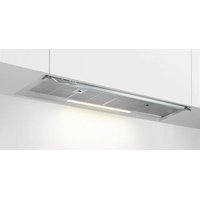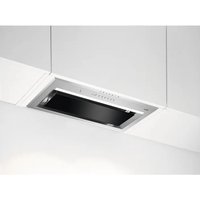
GDG966AL - Basket AEG - Free user manual and instructions
Find the device manual for free GDG966AL AEG in PDF.


User questions about GDG966AL AEG
0 question about this device. Answer the ones you know or ask your own.
Ask a new question about this device
Download the instructions for your Basket in PDF format for free! Find your manual GDG966AL - AEG and take your electronic device back in hand. On this page are published all the documents necessary for the use of your device. GDG966AL by AEG.
USER MANUAL GDG966AL AEG
3.5 ABToMaTuH OxJaXdAne
Ta3nФyHKUcne Ce BKNIOUbA aBTOMaTNUHO, KOrato TemnepaTypaTa Ha acnnpaTopa NaBn70°C. AcnpaTopbT npOdbJxaba
da pa6oTu Ha Hau-BnCOKaTa CKOpOCT 3a oxJaXdAHe. HndKAtOpbT Cbc CmBOn Ha NaHeLa Ce BKNIOUBy.
i
OT cbo6paXeHn 3a 6e3oNaChOCT, aKO TemNepaTypaTa ce NOBUN, DOKaTO cyHKnraTa e aKTHBHa, acnnpaTOPbT ce n3KnIOyBa n CmBOJbT 3aNoUba Da Mira. AcnpaTOPbT MoKe da Ce BkIIOH NTOHOBO, KOraTo INDnKaTOPbT cnpe Da MIRA.
3.6 IV3BecTne 3a 0nIITbP
AnapMaTa Ha cHnTbpa CnyxN KaTO
HaONOMHRe 3a NOUcCTBaHe Ha cHnTbpa 3a
Ma3HNH N CMHa NIN NOuNCtBAHe Ha
cHnTbpa C aKTHBEH BByIeH B 3aBNCMOCT OT
Tnna My. HndNKaTOP mMira peoBHO B
YepeBHeO B npOdbJXKeHne Ha 30 cekyHn, aKO
cHnTbPbT 3a Ma3HNH Tp6Ba Da Ce
NouchTe. HndNKaTOP mRa DBA PtBn B
YepeBHeO Ha BCEk 30 cekyHn, aKO
cHnTbPbT C aKTNBEN BByIeH Tp6Ba Da ce
CMeHn NII NouchTe. HynpaHTo Moxe da
Ce I3BbPwN IO BpeMe Ha NIN N3BbH
NepnoDa 3a yBeDOMRAHe.
i
Ta3nФyHKcIa Ce aKTHBnpa cIeI 40
Yaca pa6ota Ha acnnpaTopa, KOrato
ΦHNTbPbT 3a Ma3HHN Tp6Ba Da ce
NouchTu n Cne160 Yaca, KOrato
ΦHNTbPbT C aKTUBeH BbJIeH Tp6Ba Da
ce NouchTu IIN CMeHn.
i
HanpaBeTe cnpaBka 3a NOuNCBaHeTo Ha cnTbpa 3a Ma3HNH B rnaBa "NoucCTBaHe n rpnxa".
①
HanpaBeTe cnpaBka OTHOCHO NOYnCTBaHeTo NIN CMHaTa HaФnITbpa C aKTHBeH BbIeH B INaBaTa ,rPnXn IN NOyNCtBaHe".
3a da hynpate 6poya Ha yHKunTe:
3aФиNTbpa 3a Ma3HnHn HaTnCHeTe n 3aDpBxKTe B npOdblJxKeHne Ha 3 ceKyHn.
3aФнltbpa cakTNBEH BbyJIeH HaTnCHete 2 B npOdbJIkeHne Ha 3 ceKyHdN.
HndkaTopbT cnpa da mra 3a npabnHOTO Hynpahe B nepnoDa 3a yBeDomBaHe.
HndkaTopbT mra eHOKpaTHo 3a npabnH0 HJnnpaHe n3BbN nepnoDa 3a yBeDomBaHe.
3aДаakTNBnpaTe nIIN DeakTNBnpaTe n3BeCTHeTo 3aФИNTbpa C aKTNBeH BByJIeH:
- YbepTe ce, Ye BeHTnJaTOpBt n lamnKkata ca n3KnOueHn.
- HatncheTe n 3aDpBkTe 2n B npOdbJnxHeHne Ha 3 cekyHnn. yHKuTAt ce aKTbUpa, aKO INdNkaTopnte MIRaT eHOKpaTHo. FyHKuTAt ce deakTBnpa, aKO INdkaTopnte MIRaT DByKpaTHo.
3.7 n3BecTne 3aФnTbp AutoSense
AnapMaTa Ha qnIbpa HAnOMHa da noUncnte qnIbpa AutoSense.
HnKAtOpTe nAUMratapeyIapHO B npOdbJxKeHHe Ha 30 cekyHdN, aKO pHNTbPbT Tp6Ba Da ce nouCTn.
i
BuxTe rnaBa ,rpuXn n noucCTbaHe".
HynipaHe MoKe Da ce N3BbPShn No BpeMe Ha nn N3BbN nepNoDa 3a yBeDoMaBaHe.
3a da hyinpaTe cyHKnraTa no BpeMe Ha nepnoDa 3a yBeDomBaHe:
1.HaTnchHeTe n 3aDpBxTe 6yToHa Btro npOdbJIKeHne Ha 3 cekyHdN.
Hndkatopnte Aun OmpaT da MmraT 3a npabnHOTO HynpaHe.
3a da hynpate cyHKnraTa n3BbH nepnoa 3a yBeDOMBaHe:
- YBepeTe ce, Ye BeHTnIaTOpbTe n3KJIIOUcH.
2.HaTnCHHeTe n 3aApbXkTe 6yToHa ATOA B npOdbJxKeHne Ha 3 cekyHn.
HnkaTopbT mra eHOKpaTHo 3a npabuHNO HynipaHe.
3.8 DeakTNBnpaHe n aKTNBnpaHe Ha 3ByuTe Ha naHeJa
3aДа DeakTNBupate NIN aKTNBupaTe 3ByuNTe Ha naHeJa:
- YBepete ce, Ye BeHTnlaTopbT n OCBETJHeHEnTO Ca N3KJIIOUeHN.
- Hatnchete n 3aDpBxTe 6yToHnTe 3n ≈ N DBaT a HnDnKatopa npemrBaT eDHOKpaTHO, aKO 3ByKOBnTe CnHaJI Na aKTbBnPaHn, n DByKpaTHO, aKO 3ByKOBnTe CNHaJI ca DeaKTbBnPaHn.
i
3ByKOBnT CnHn npn BkJ./n3Kn. Ha acnnpaTopa He MoKe da 6bJe DeaKTnBnpaH.
3.9 HacTpoIka Ha CBbp3aHocTTa WiFi
Ta3nФyHKUgBnNo3BOJRADa CbbpKxeTe BaunyaypekMWiFiMpexka n da ro cDbOHTe C BaWeto MO6HnHO yCTPOIcTBo. N3no3BaIK Ta3nФyHKUg, Bne nMaTe DOCTbN Do DOnbHNHTeHNnФyHKUg, ynpabNeHne nHa6nIOdEHe Ha BaunyaypeD OT MO6HnHOTo CN yCTPOIcTBo n NOnyUaBATE N3BecTna.
3a da cBbpxKeTe ypeDa, KoTo Bn Tp8Ba:
- Be3xuHa Bpb3ka c nHTepHeT,
- Mo6nH0 yCTpoiCTBO, CBbp3aHO KbM Ba7aTa 6e3KnUHa MpeXa.
YecToTa/npoToKoJWiFi:2.4GHz/802.11 bgn
MouhocTWiFi2.4GHz: < 20 dBm
KpnnTnpaHe WPA-PSK, WPA2-PSK, WPA3-SAE
HCTaJInpaHe Ha npINOxKeHneTo
N3nblhTe cIeHNITcTbNk, 3a da CBpbKte ypeia KbM WiFi:
-
YBepTe ce, Ye ypeIbT e BKIOueH B KOHTaKTA IJIe E BKIOueH OT npeBKnIOuBaTeJIa.
-
YBepTe ce, Ye BaWeTo Mo6nHNo yCTPOINCTBO e Cbbp3aHO KbM CbUaTa 6e3KmUHa MpeKa, KbM KOrTO NCKaTe Da do6aBInTe ypeDa.
- 3a Да ИЗТЕЛТЕ пИЮЖЕНЕТО, ИЗПОЛЗВАЙТЕ Камерата на БашЕТО МБИЛно устюпCTBO, 3a Да сKaн上诉е QR КODа, НAMИРац ce Ha 3аднata Корица на рБКOBОДСТВОТо 3a noTpeБИТЕЯ.Можete сьцо Дa ИЗТЕЛТЕ пИЮЖЕНЕТО ДИрЕKTHO OT Google Play (Android) Или App Store (iOS).
- OTBOpTe npHIOXeHneTo n ce pernctpupaTe, 3a da cb3daTe npoФnI.
KoHpIpynpaHe Ha 6e3XnUHaTa Bpb3Ka Ha ypeDa
CneBbAte HNCTpyKcunTe B npJIOKeHHeTo, 3a Da 3aBbPUnTe npoueca Ha CBbP3BaHe:
- HatncheTe 3aPbXte ByToHnTe HHa ypeDa, HndIkatopt npemrBa HenpeKbchato. IpocEcT Ha npncBeHNHaBe He pOdbJxaba.
2.ПрдьлжeteДаСпeДВaTeИнстpyкиnteВпиLOжЕнeTO,3aДa 3aBbPшNTeпpoцcaHa CBbp3BaHe.
i
3a da cnpete npoeca Ha npncbeHHBaHe,HaTnCHTe HANKOHT6yTOHnTe 3a HnBO Ha CKOpocTTa.
CneI ycneuHOTnpncbEduHBAHe INdikKaTOpBT cnpa da Mna I 3aNoUba Da CBETnIOCTOARHO.
i
Ako npouecbT Ha npncbEdnHBAHe
HaADBnShaBa 1 MNHyta, KOHTpOJHnIaT
PAnHeBn3a B peKIM Ha rTOBHOCT,
INDnKaTOPbT Ce N3KJIIOvBa N
PnpIoXKeHneTo PpeIOCTabr O6paTHa
INΦOpMaunr 3a CbCToHnETo Ha
PnpScBeHNHBAHe.

Ako npocebT ha npncbeHnBaHe e HeycneweH, nHdkaTopbT npemrBa 6bp30 B
IpoDbJIxHeHne Ha 6 cekyHn I CneI TOBa ce H3KIIouYBa. IOBTOpe IpoUeDypata.
i
BceKn nT KOraTo DeiCTBneTo ce
H3BbPbBa C NOMOHTa Ha
pNIOJKeHNeTO, HNDIkaTOPbT
npemrBa 3 nbTN.
DeakTNBnpaHe/AkTNBnpaHeHa 6e3xNcHATA Bpb3Ka Ha ypeDa 3a da DeakTNBnpaTe BpemEnHo WiFi Bpb3KaTa,HaTNCHeTe N 3aDpBxTe 6yToHnTe n HndnkatOpnte npemrBaT DByKpaTHO INHdkaTopbT Ce N3KnUoyBa.
3a daakTNBnpaTe Bpb3kaTa WiFi OTHOBO, HATNCHEte n 3aDpBXkTe 6yToHnTe , INHnKaTopuTe Mnrat eHOKpaTHO.
HynipaHe Ha 6e3xuHaTa Bpb3ka Ha ypeda
3a da n3KlHouTe MpeXaTa WiFi,HaTnCHeTe
N 3aDpBxTe 6yToHnTe . HnDKaTOpBT
Mnra,doKaTo He Ce n3BbPun ycneuHo
HynpaHe.
ToBa DeiCTBnE BoDn Do OTCpaHBAHe Ha ypeDa OT MpeXaTa WiFi . 3a Da yCTaHOBInTe OTHOBo Bpb3kAta, NOBTOpeTe BCnUKN CTbNKn, ONuCaHN B pa3dEn ,KonHpynpaHa Ha 6e3xnuHaTbPb3Ka Ha ypeDa".
4. Глии поочтван
4.1 Белеки OTHOCHOPOHCTBaHETO
Ppenapatn 3a nouchTbahe
He n3non3BaTe a6pa3nBn nouchTaun npenapatn u Yetkn.
IouncTe Te nuceBaTa qact Ha cyphata C Meka Kbpna C TOIIA BOda n Jek npenapat 3a NOUCHBAHe.
CneI roTBeHe HAKOn Yactn Ha ypeHa Morat da ce HarpeT. 3a Da n36erHete netHa, ypeBt Tpr6Ba da ce OxnaN n N3CyuN c uHCTa KbpNa nJn canfetKn.
NoCTeTe nThaTc Nek NouchBaU npenapat.
PoiDlbpxKaIte a6cop6aTopa uHcT
NouctBaTe ypeHa nΦnntpTe 3a Ma3HnHn BCEKn Meecu. BnmaTeJHo NoCTBaTe Ma3HnHn NO Bb- TpeWnOCTTa Ha ypeHa nΦnntpTe 3a Ma3HnHn. HApTyPbAHnHa Ma3HnHn Nn DpyrN OCTaTbCu Moat Da DoBeDaT Do noXkap.
HnItpnte 3a Ma3HHMORat Da ce NOUcTBAT BcbDomnnaHa.
CbDMnHaHata Tp6Ba Da e HacTpoEHa Ha HnCKaTeMnepaTypa n KpaTbK LkBn. FInIbPbT 3a Ma3HHMOKe Da 3ary6n Cbeta CN, HO TOBA He Bnne Bbpxy pa6oTa Ta Ha ypeDa.
ΦnntbpcakTNBeH BbIeH
Bpemeto 3a Hacnuahe Ha qntbpa cakTNBeH BbTJIeH 3aBNCN OT TUNa rOTBeH n peoBHocTTa Ha noCTBaHe Ha qntbpa 3a Ma3HHn. BkTe JnctOBkaTa, BKIOUeHa B akcecoapa.
i
IpeiN3BbPwBaHTo Ha KaKbATO n da 6nlo noDpBxka ce yBepTe, ye Hma roTbapcNcbDoBe Bbpxy IIOuata N ye acnpaTopbT nIIOUATA ca N3KnUoyehn OT eNeKtpo3axpaHbAHeTo.
4.2Почиствае на ситбра 3a Ma3HHH
CbdomnHaTa Tp6Ba Da e HacTpoEHa Ha Hncka TemnepaTypa N KpaTbK ZnKbI. HntbpT 3a Ma3HnH MoKe Da 3ary6u CBeTa CN, HO TOBa He BnRe Bbpxy pa6oTaHa ypeDa.
- 3a MOHTIpaHe Ha cHITpIte o6paTHO, H3JIHHeTe IIbPBITE DBe CTbIKN B O6paTeH peI.
IIOBTOpeTe cTbNKITE 3a BCNUKn FNIITPN, aKO e IpNIOXIMO.
4.3 CmHa Ha φnIITbpa c aKTHBeH BbIeH - (no n36Op)
i
B 3aBnCmOcT OT BnDa,ФNTbPbT MoKe Da 6bDe nIi He MoKe Da 6bJe perEneHepuAn. BxKTe JInCTOBkata, npdeocTaBeHa cФntbpa.
3a da cmeHnte qnIbpa:
1.ИЗБаДeTeФИЛТРИTe 3a Ma3HINH OToypeDA.
BnKTe ,NouCTBaHe Ha qnItbpa 3a Ma3HnHn" B Ta3n InaBa.
2.ИЗдьрпаite pa3делпелпe КБМ Долнота уacт Ha ФиNTьpa.
- IeKo HauhoHeTe npedHaTa Yact Ha cnIbpa HADony, cJeD KoETO dpBnHeTe.
4.3a da nHctanipate HOB qntbp, n3bHeTe CTbKnTE B CneHnpeq.
i
BuxTe OTdEnHaTa KHNKc C nHCTpyKcMn 3a nHCTaInpaHe.
3.7 AutoSense-filterdeDelete
Filteralarmen minder dig om at rengore.
Installation of appen
Udfor folgende trin for at slutteproduktet tilWiFi:
Odyiw Ekyataoans yia tis
KaI OTooO, n AuroaTech@ 0a aTevpyoToiOn8
Welcome to AEG! Thank you for choosing our appliance.

Get usage advice, brochures, trouble shooter, service and repair information: www.aeg.com/support
Subject to change without notice.
CONTENTS
1.SAFETY INFORMATION AND INSTALLATION 64
2.PRODUCT DESCRIPTION 64
3.DAILYUSE 65
4.CARE AND CLEANING. 69
5.TROUBLESHOOTING 71
6. ENVIRONMENTAL CONCERNS 72
1. SAFETY INFORMATION AND INSTALLATION

WARNING!
Refer to the separate Installation Instructions booklet for Safety Information and Installation. Read carefully the Safety chapters before any use or maintenance of the appliance.
2.PRODUCT DESCRIPTION
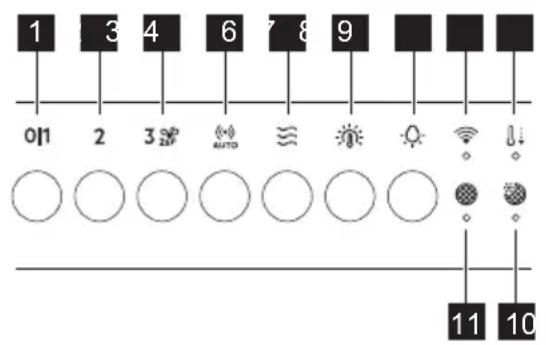
2.1 Control panel overview
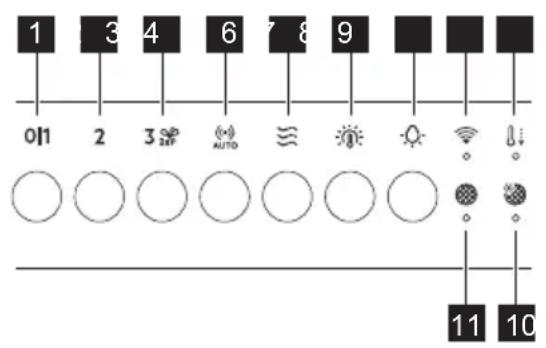
Function Description
1
First Speed / Off The motor switches to first speed level. Second press or long press while other functions operate, turns off the appliance.
2
Second speed The motor switches to second speed level. Second press turns off the appliance.
| Function Description | |
| 3 | Third speed / Boost function The motor switches to third speed level. Press and hold for 2 seconds to activate the Boost function. Second press turns off the appliance. |
| 4 | AutoSense Activates and deactivates the AutoSense function. |
| 5 | Breeze The hood operates on the lowest speed. After 60 minutes the motor turns off. |
| 6 | Light colour temperature Changes the light colour temperature. |
| 7 | Lamp Turns the lights on and off. Changes the light intensity. |
| 8 | WiFi indicator Indicates WiFi connection status. |
| 9 | Automatic cool down Indicates that the Automatic cool down is active. |
| 10 | AutoSense filter notification Reminds to change or clean the AutoSense filter. |
| 11 | Filter notification Reminds to change or clean the charcoal filter and clean the grease filter. |
3. DAILY USE
3.1 Using the hood - manual mode
Check the recommended speed according to the table below.
| 01 | While heating up food, cooking with covered pots. |
| 2 | While cooking with covered pots on multiple cooking zones or burners, gentle frying. |
| 3 | While boiling and frying big quantities of food without a lid, cooking on multiple cooking zones or burners. |
| 25 | While boiling and frying big quantities of food without a lid, big humidity. After 8 minutes the appliance returns to previous setting. |
| ≈ | Refreshes the air in kitchen after cooking at a very low noise level. The function turns off automatically after 60 minutes. Use after cooking only. |
i It is recommended to leave the hood operating for approximately 15 minutes before and after cooking.
Activating the appliance
To operate the hood: Press the desired fan speed button.
Deactivating the appliance
To turn off the fan touch the activated speed again or long press 01
Perfect Illumination - Lighting
The hood lighting works independently to other hood functions.
Activating and deactivating the lighting To illuminate the cooking surface press button. Press the button again to change the light intensity in the following order: Maximum, Medium, Low, Off.
To switch off the lights, press and hold the button for 3 seconds.
Setting the light colour temperature
The hood remembers the last setting of the light intensity and colour temperature.
There are two ways to set the light colour temperature:
- Press the button to change the colour temperature from neutral, through warm to cold.
- Press and hold the button to move smoothly between light colour temperatures. Release it once you reach the desired setting.
AuroraTech®
It is a function that automatically adjusts the illumination colour and intensity based on the time of day, creating an optimal ambiance. Use the app to activate this function.

After activating from the app, the function will operate each time the lighting is switched on. You can still manually adjust the lighting settings using the
and buttons. However, the AuroraTech® function will be deactivated.
3.2 Hob²Hood function
It is a function that connects the hob to a hood. Both the hob and the hood are equipped with an infrared signal communicator. The fan speed is determined based on the mode setting and the temperature of the hottest cookware on the hob. Alternatively, you can manually control the fan using the hob. This function can be activated from the hob's control panel.

For more information how to use the function, refer to the hob user manual.

For information on how to use the function together with AutoSense function, refer to the AutoSense chapter.
3.3 Activating Boost Function
When you press and hold the Boost function starts to operate for 8 minutes. After that time, the appliance returns to its previous speed settings.
3.4 AutoSense
The function automatically adjusts the fan speed level basing on the TVOC sensor (Total Volatile Organic Compounds), air temperature, and relative humidity coming from the hob.
- Press to turn on the function. The function indicator lights up.
- To turn off the function, press any other speed level button on the hood control panel.

WARNING!
If your hob is equipped with the Hob²Hood function, switch its mode to H1 to use it together with the AutoSense. In this mode, the AutoSense function and lighting are activated automatically each time the hob is turned on. Refer to hob user manual.

WARNING!
During the first 96 hours after plugging in the appliance, the function runs in a dedicated startup mode for air sensor tuning. Hood reactions may vary at the startup mode. During that time the indicator pulsates.

WARNING!
A blackout or unplugging and plugging in the appliance again causes internal sensor self-tuning. It may take up to 24 hours for the function to regain full capability.

The AutoSense function can run for a maximum of 5 hours.

Pressing the button with the hood off will start the AutoSense function at Breeze speed by default. When another speed has been already selected and the fan is working, the AutoSense function will start at that speed.

CAUTION!
This function is sensitive to cleaning agents. After cleaning, wait at least half an hour before turning on the function to avoid unintentional activation of the Boost function.

When used with a gas hob, the function may operate at higher speeds due to gas combustion.

While preparing food that generates little odour over an extended period (e.g. simmering), the hood may stop and then restart within a few seconds. If the hob power level is very low, the generated odour may not be sufficient for AutoSense to function properly. If your hood switches off and does not restart, use manual mode to operate it.
To permanently deactivate the function:
- Make sure the fan and the lighting are turned off.
- Press and hold the and buttons. (and indicators blink twice.
To activate the function again:
- Make sure the fan and the lighting are turned off.
- Press and hold the (·) and buttons. (·) and indicators blink once. AUTO
3.5 Automatic cool down
This function turns on automatically when the temperature of the hood exceeds 70^ . The hood continues to operate on the third speed to cool down. The indicator with the symbol on the panel turns on.

For safety reason, if the temperature grows higher while the function is active, the hood turns off and symbol 1 starts to blink. The hood can be turned on again when the indicator stops blinking.
3.6 Filter notification
The filter alarm serves as a reminder to clean the grease filter and either replace or clean the charcoal filter, depending on its type. The indicator and blinks regularly for 30 seconds if the grease filter must be cleaned.
The indicator and banks twice per every second for 30 seconds if the charcoal filter must be replaced or cleaned. Reset can be performed during or out of the notification period.

This function is activated after 40 hours of the operation of the hood when the grease filter requires cleaning and after 160 hours when the charcoal filter requires cleaning or replacement.

Refer to cleaning the grease filter in Care and cleaning chapter.

Refer to cleaning the charcoal filter or replacing the charcoal filter in Care and cleaning chapter.
To reset the function counter:
For grease filter, press and hold for 3 seconds.
For charcoal filter, press and hold 2 for 3 seconds.
The indicator stops blinking for the correct reset in the notification period. The indicator
blinks once for correct reset out of the notification period.
To activate or deactivate the filter notification for charcoal filter:
- Make sure the fan and the light are turned off.
- Press and hold 2 and for 3 seconds. The function is activated if both indicators blink once. The function is deactivated if both indicators blink twice.
3.7 AutoSense filter notification
Filter alarm reminds to clean the AutoSense filter. The indicators and blink regularly for 30 seconds if the filter must be cleaned.

Refer to Care and cleaning chapter.
A reset can be performed during or out of the notification period.
To reset the function during the notification period:
- Press and hold the button for 3 seconds.
Indicators ( ) and stop blinking for the correct reset.
To reset the function out of the notification period:
- Make sure that the fan is turned off.
- Press and hold the button for 3 seconds.
The indicator links once for the correct reset.
3.8 Deactivating and activating panel sounds
To deactivate or activate the sounds of the panel:
- Make sure the fan and the lighting are turned off.
- Press and hold and buttons. Both indicators blink once if sounds are enabled and twice if sounds are disabled.

The on/off sounds for the hood cannot be disabled.
3.9 WiFi connectivity setup
This feature enables you to connect your appliance to a WiFi network and pair it with your mobile device. Using this feature, you can access additional functions, control and monitor your appliance from your mobile device, and receive notifications.
To connect the appliance you need:
- Wireless network with the Internet connection,
- Mobile device connected to your wireless network.
Frequency/Protocol WiFi: 2.4 GHz / 802.11 bgn
PowerWiFi2.4GHz: < 20 dBm
Encryption WPA-PSK, WPA2-PSK, WPA3-SAE
Installing the app
Take the following steps to connect the appliance to WiFi :
- Make sure that the appliance is plugged into a power socket and turned on.
- Make sure that your mobile device is connected to the same wireless network you want to add your appliance to.
- To download the app, use your mobile device's camera to scan the QR code located on the back cover of the user manual. You can also download the app directly from Google Play (Android) or App Store (iOS).
- Open the app and register to create an account.
Configuring the appliance wireless connection
Follow the instructions in the app to complete the onboarding process:
- Press and hold and buttons on your appliance, the indicator flashes continuously. The onboarding process is ongoing.
- Continue to follow the instructions in the app to complete the onboarding process.

To stop the onboarding process, press the or any of the speed level buttons.
After the successful onboarding, the indicator stops flashing and becomes steady.
i
If the onboarding process exceeds 1 minute, the control panel enters standby mode, the indicator turns off, and the app provides feedback on the onboarding status.
If the onboarding process is unsuccessful, the indicator flashes rapidly for 6 seconds and then turns off. Repeat the procedure.
i
Each time the action is performed using the app, the indicator blinks 3 times.
Disabling / Enabling the appliance wireless connection To temporarily disable the WiFi connection, press and hold 念 and
buttons. The and indicators blink twice and the indicator turns off.
To enable the WiFi connection again, press and hold ≈ and buttons, and indicators blink once.
Resetting the appliance wireless connection
To offboard the WiFi network, press and hold and buttons. The indicator blinks until the successful reset.
This action results in the removal of the appliance from the WiFi network. To reestablish the connection, repeat all the steps described in the 'Configuring the appliance wireless connection' section.
4. CARE AND CLEANING
4.1 Notes on cleaning
Cleaning Agents
Do not use abrasive detergents and brushes. Clean the surface of the appliance with a soft cloth with warm water and a mild detergent.
After cooking some parts of appliance can get hot. To avoid stains appliance must be cooled down and dried with clean cloth or paper towels.
Clean stains with a mild detergent.
Keep the hood clean
Clean the appliance and grease filters each month. Clean the interior and grease filters carefully from fat. Fat accumulation or other residue may cause fire.
Grease filters can be washed in a dishwasher. The dishwasher must be set to a low temperature and a short cycle. The grease filter may discolour, it has no influence on the performance of the appliance.
Charcoal filter
The time of saturation of the charcoal filter varies depending on the type of cooking and the regularity of cleaning the grease filter. Refer to leaflet included in the accessory.
i
Before carrying out any maintenance, make sure there is no cookware on the hob and that the hood and the hob are disconnected from the power supply.
4.2 Cleaning the grease filter
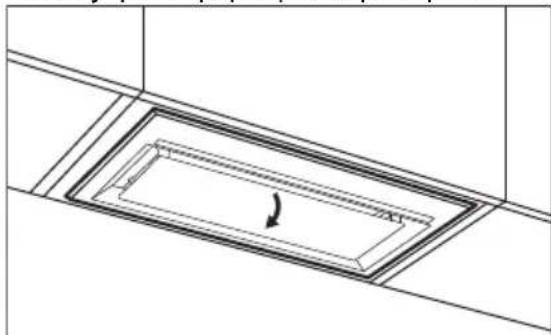
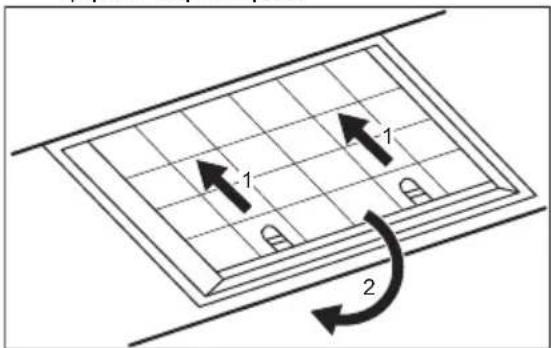
Filters are mounted with the use of clips and pins on the opposite side.
To clean the filter:
- Pull the cover to open it.
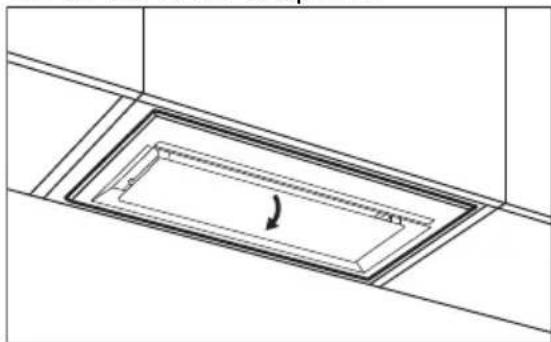
- Pull the handle on the filter underneath the hood and slightly tilt the front of the filter down.
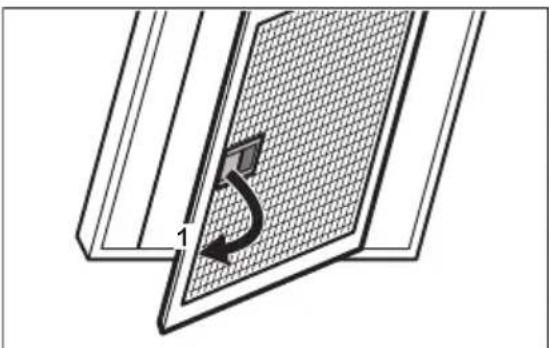
- Clean the filters using a sponge with non abrasive detergents or in a dishwasher.
i
The dishwasher must be set to a low temperature and a short cycle. The grease filter may discolour, it has no influence on the performance of the appliance.
- To mount the filters back follow the first two steps in reverse order. Repeat the steps for all filters if applicable.
4.3 Replacing the charcoal filter - optional
i
Depending on type, filter can be or cannot be regenerated. Refer to the leaflet provided with the filter.
To replace the filter:
- Remove the grease filters from the appliance.
Refer to "Cleaning the grease filter" in this chapter.
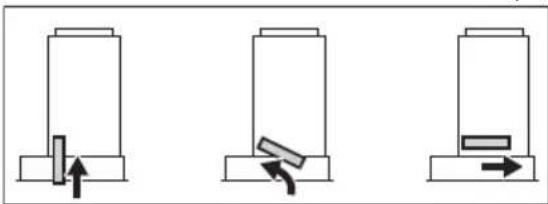
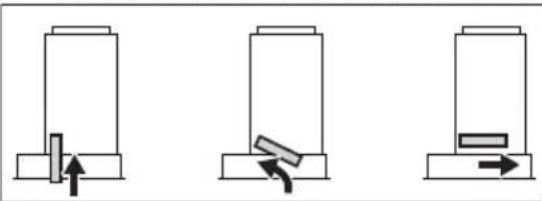
- Pull the tabs towards the bottom part of the filter.
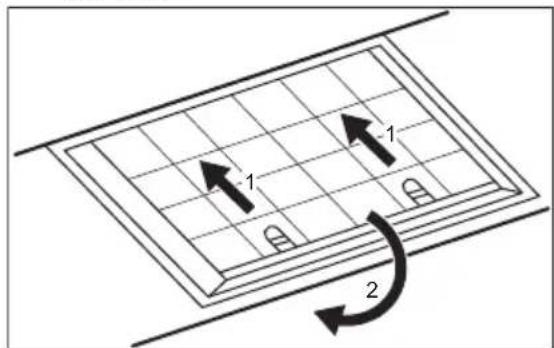
-
Slightly tilt the front of the filter downwards, then pull.
-
To install a new filter, perform the steps in the following order.
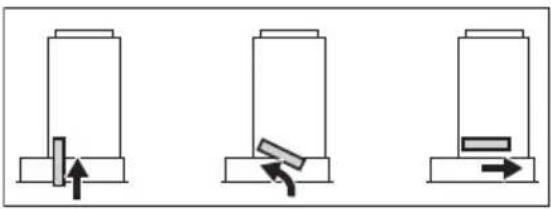
i
Refer to the separate Installation Instructions booklet.
4.4 Cleaning the AutoSense filter
i
The AutoSense filter must be cleaned when the filter notification is on. Refer to the "AutoSense filter notification" chapter.
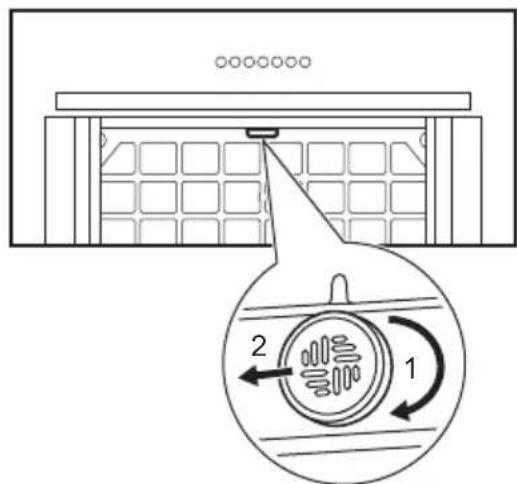
To remove the filter:
- Remove the grease filters from the appliance.
Refer to the "Cleaning the grease filter" chapter.
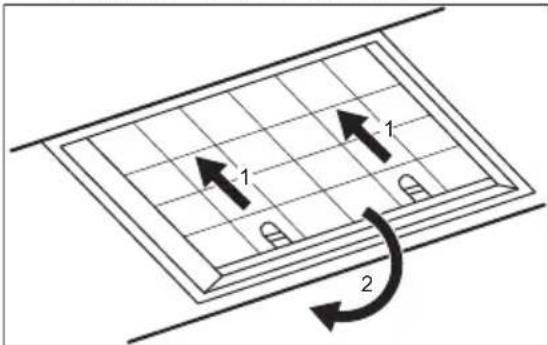
- Turn the filter clockwise (1) and then pull (2).
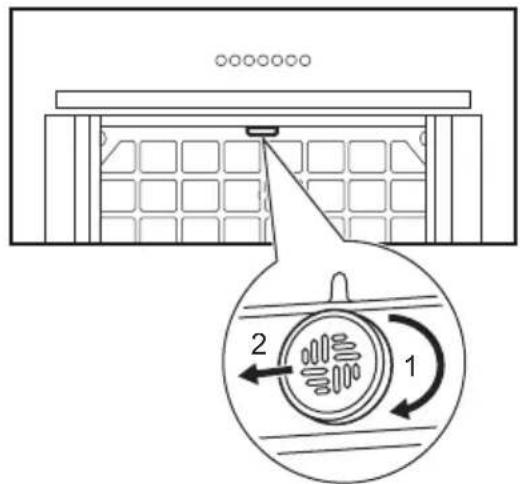
-
Wash the filter in hot water without using detergent.
-
To install the filter back, perform the steps in reverse order.
A
CAUTION!
The filter has to be fully dried before installing it back into the appliance.
4.5 Replacing the lamp
This appliance is supplied with a LED lamp and separate control gear (LED driver).
These parts can be replaced by a technician only. In case of any malfunction refer to "Service" in the "Safety Instructions" chapter.
5. TROUBLESHOOTING

WARNING!
Refer to Safety chapters.
5.1 What to do if...
| Problem Possible cause Remedy | ||
| You cannot activate the appliance. The appliance is not connec-ted to a power supply or it is connected incorrectly. | Check if the appliance is correctly connec-ted to the electrical supply. | |
| You cannot activate the appliance. Lack of electrical power sup-ply. | Check the fuse or the main switch. If the fuse or the switch continue to break the cir-cuit, contact a qualified electrician. | |
| You cannot activate the appliance. Cabinet doors are not aligned with the cabinet frame. | Align the cabinet doors. | |
| The lamp does not operate. The lamp is defective. Replace the lamp. Refer to the "Care and Cleaning" chapter. | ||
| The brightness level or light colour temperature is not as described in the instructions. | Incorrect Perfect illumination setting. | Press the button to check if you are able to change all three colour tempera-tures. |
| The lamp is defective. Contact an Authorised Service Centre. | ||
| The appliance does not absorb enough vapours. | The motor speed is not ade-quate to the appearing va-pours. | Change the speed of the motor. |
| The Aindicator pulsates. | The internal sensor of the function is in the self-tuning mode. | Refer to the AutoSense in "Daily use" chap-ter. |
| The Aindicator blinks rapidly three times, and the AutoSense function does not start. | The function is permanently deactivated. | Activate the function. Refer to the Auto-Sense in "Daily use" chapter. |
| The Aindicator blinks rapidly for three seconds, and the AutoSense function does not start. | There is a malfunction. Contact an Authorised Service Centre. | |
| The filter alarm indicator on together with or . 2 | The filter alarm is on. The grease filter must be cleaned or the charcoal filter (option-al) must be replaced or cleaned. | Refer to the filter notification in "Daily use" chapter. |
Problem Possible cause Remedy
| The filter alarm indicator on together with AUTO | The AutoSense filter alarm is on. The filter must be cleaned. | Refer to the AutoSense filter notification in "Daily use" chapter. |
| The App cannot connect to the appliance. | Connectivity issues. | Check the wireless signal. |
| Make sure that the wireless connection is on. Refer to "WiFi connectivity setup" chapter. | ||
| Check if your mobile device is connected to the wireless network. | ||
| Check your home network and router. | ||
| Restart the router. | ||
| Contact your wireless service provider if there are further problems with the wireless network. | ||
| The appliance, the mobile device, or both need to be configured again because a new router has been installed or the router configuration has been changed. Refer to "WiFi connectivity setup" chapter. | ||
| The App cannot frequently connect to the appliance. | Connectivity issues. | Make sure that the wireless signal reaches the appliance. Try to move the home router as near the appliance as possible or consider purchasing a wireless range extender. |
| Make sure the wireless signal is not disrupted by a microwave. Turn the microwave off. Avoid using the microwave and the remote control of the appliance at the same time. |
6. ENVIRONMENTAL CONCERNS
Recycle materials with the symbol .Put the packaging in relevant containers to recycle it. Help protect the environment and human health by recycling waste of electrical and electronic appliances. Do not dispose of
appliances marked with the symbol with the household waste. Return the product to your local recycling facility or contact your municipal office.
Para guitar el filtro:
Kruptimine WPA-PSK, WPA2-PSK, WPA3-SAE
Rakenduse installimine
3. SVAKODNEVNA UPORABA
3.1 Uporaba nape - ručni način rada
Provjerite preporucenu brzinu prema tablici u nastavku.
| 01 | Prilikom zagrijavanja hrane, kuhanja s pokri- venim posudama. |
| 2 | Prilikom kuhanja s pokrivenim posudama na više zona kuhanja ili plamenika, lagano prže- nje. |
| 3 | Prilikom ključanja i prženja velikih količina hra- ne bezPoklopca, kuhanja na više zona kuha- nja ili plamenika. |
| 25 | Prilikom ključanja i prženja velikih količine hra- ne bezPoklopca, visoka vlažnost. Nakon 8 mi- nuta urežaj se vraća na prethodnu postavku. |
| ≈ | Osvježava zrak u kuhinji nakon kuhanja na vr- lo niskoj razini buke. Funkcija se automatski isključuje nakon 60 minuta. Koristi se samo nakon kuhanja. |
i Preporuca se ostaviti napu da radi oko 15 minuta prise i nakon kuhanja.
Aktiviranje uredaja
Za upravljanje napom:
Pritisnite tipku zeljene brzine ventilatora.
Iskljucivanje ureda
Za iskljucivanje ventiladora ponovno dodirnite aktiviranu brzinu ili dugo pritisnite 01
HvckaynapbIHbIH KITanwacbiHaH KapaHbI3.
KypbIINfbIInbI naIaIaNHy Hemece
TexHnKaIbIK KbI3MeT KepCteTy aIbIHda,
«Kayinci3ik» TapaynapbH MKNrT OKbIN
UbIFbHb3.
2.БУныМСИПATTAMACBI
2.1 Baçapy nahanénihe wony
| Функция СипаTTamacbl | ||
| 1 | Бірінші кьілдам'dык/эшічіпі Motop 6ірінші кьілдам'dык Deнг'reiHe ayыс'dы. Басka Фуннцілар Жуmbic icтenv Турfaxе ekінші pet bacy He mece узak bacy Курынftsынbl eшіpezi. | |
| 2 | Екінші кьілдам'dык Motop ekінші кьілдам'dык Deнг'reiHe ayыс'dы.Екінші pet baskan КeЗde Курынftsы eшіpіnezi. | |
| 3 | Ушінші кьілдам'dык/Kapсын'dы Функціясbl Motop ушінші кьілдам'dык Deнг'reiHe ayыс'dы. Kapсын'dы Функціясbl 6eLseHdipy ушін ТуМecin 2 ceKynd baskan Tурынfts. Екінші pet baskan KeЗde Курынfts beshipinezi. | |
| 4 | AutoSense AutoSense Функціясbl n KocadblжэHe eшіpezi. | |
| 5 | Breeze Аya tar'tьkiш КуралEn TemeHri Кьілдам'dыкТаЖуmbic icTeiDi. 60 MInHyTTaH KeiIN MOTOP сeHedi. | |
| 6 | Шam Тусі Temnepatypacbl Sham Tyci Temnepatypacbln E3reptezi. | |
| 7 | Шam ShamДары kocадыжэHe eшіpezi. Sham KapkBoHdYbHn E3reptezi. | |
| 8 | WiFi ИndиKaTOpbl WiFi KocSbIbMbIHbN KyiH KepCtezi. | |
| 9 | АВТOMaTTbI caIkpHdAу «АВТOMaTTbI Tурde caIkpHdAу» Фуннціясbl BeLseHdi ekeHin 6iDipézi. | |
| 10 | AutoSense cyЗri typalbl хабарлан'dbyp | AutoSense cyЗricin aybICTbpy He mece ta3anay Kepektiri typalbl ecke cana'dbl. |
| 11 | Суэri typalbl xabaplan'dbyp Kemip cyЗricin aybICTbpy He ta3anayжэHe maJ cy3ricin ta3anay Kajket ekeHIn ecke cana'dbl. | |
3. ΘРКУнДИК КОЛДАНУ
3.1 Aya TapTkblTbI naJaIaHy - KOJIMeH 6acKapblaTbIH peXIM
TomeHderi keCtere caikec ycbihfahn XbldAmdbkTbI TeKcepH3.
| 011 | Тамakты жылтыканда, кашик жабынfaн bIDыICTы колданыniciprenecke. |
| 2 | Бірhoe nicipy aiMaKtapbɪnDa hemece OTыктарда кашиаftы жабык bIDыICTa tamak Niciprenecke, bʌnnen KуьIPfaHda. |
| 3 | Көн мөлserdi eri taFamdapdbi KaIGNakcsbɪЗ kaɪHaTKaHda щəнe КуьIPfaHda, bɪpHEwe nicipy aiMaFbɪnDa hemece OTыктaporda niciprenecke. |
| 251 | Улken мөлserdi eri taFamdapdbi KaIGNakcsbɪ3 kaɪHaTKaHda щəнe КуьIPfaHda, bɪnFaɪdɪbɪk Kən. 8 мɪнуTTaH keɪɪn Kúþbɪnfbɪ aɪdɪbɪHfbl napametpre kaɪta opanaɪdɪ. |

IiciprenHen KeiH acyderi ayahbI eTe TEme Hw deHreinHe JkaHapTaDbI. FyhKun 60 MNHYTTaH KeiH ABTomAtbI TypDe cHeedi. Tek nicipyden KeiH naJaDanaHaBbI3.

Tafamdbi nicipyre deinH xHe Kein aya TaPTKbIUtbl wAmameH 15 MnHyT KocBIn KOUFA KeHec bepinei.
KypbIINfbIHbI 6eIceHdipy
aya TapTkbiw KypaIbI naJaIaHy ywiH: KaKetti XeJIeTkiU XbIJMaMdbIfbl TYMeCiH 6acbl3.
KypbIFbIHbI cHdipy
Kendtkiwi ewipy ywih 6bcnepinre HkIaMdbkTb KaTaNH TypTiHi3 Hemece
01 TYIIMEciH y3aK 6acbIHbI3.
Perfect Illumination - XapbikTaHdbyp

Aya tapTkbltBih 7aMbI 6acka aya TapTkblH cyHKunapbIHan Tayenci3 KMBIC icTeiDi.
XapbikTaHdbipydbI 6eIceHdipy XaHe eWipy
Iicipy 6eTin KapbIKTaHdbipy yuH cyimcH 6acbHb3. XapbIKtbIH KapKbIHDbIbIFbIH KeJIeCi peTneH 03repTy yuH cyimecih 6acbHb3: MaKcIMyM, OptaHa, TeMeH, Owipyni.
Iamapdbiewipy yuiH TymecinH 3cekyd6acbIn TypbHbI3.
Ulam Tyci TemnepaTypacbIH opHaTy

Aya TapTKbIiX KapbIK KapKbIHbINbIFbl MeH TYc TemnepaTypacbIHbIH COHfbl napameTpIn caKaTaNDbI.
Iam Tyci TemnepaTypacbH opHaTydbH eki
eDi ci 6ap:
- Tyc tempepatypacbH 6eitapanTah, KblbdaH cybkka 3repTy ywiH TyMecin 6acbHbI3.
- Wam Tyci TemnepaTypaIapbIH 6ipkaJIbINTbI XblJXbITy ywiH TymecIH 6acblTpyblHbI3. KaKeTTI napAmETpre XeTKeHne OhbI Xi6epiH3.
AuroraTech®
BvN KyH yaKbITbHa Kapaa JkapbIKTaHdbipy Tyci MeH KapKbIHDbIbIFbIH aBTOMaTTbI Typde peTteTIH, OHtaJIbI aTMocpepaHbl XacaHTbIH yHKu. Byn yHKuHaHb IeNceHdpy uIN KOJaHa6aHb I naDanaHbIHb3.

KoJaH6aHaN 6eIceHdiPipireHHeH KeiH
fYHKUJX KapbIKTaHDbipy KocblnFaH
caBIn XyMbIC icTeiDi. Ci3 eI de
XHe yMepeH naDaIaNbIN
XapbIKTaHDbipy napameTpnepiH KOJIMeH
petTae anacbl. DereHMeH, AuroraTech@
fYHKUraCbl aKbIpaTbIaDbI.
3.2 Hob²Hood yHKnIcbl
Byn - nntaHbI aya tapTkbiWka kajFaTbIH
fynkun. nIta da, aya tapTkbiW ta
HHpaKb3bl CNHaJI KOMMyHKaTOPbIMeH
Xa6dbIKtaFah.KeJTeKiw XblJaMdbIFbl
peKIM npaMeTpine XHe nNtadaFbl eH
bICTbIK bIDbICTbH TEMpePaTacbHa
6aIIaNbICTbI aHbIKTaIaNbl. Hemece
XeJeNTKiTI nNtAHbl naJaIaNbIIN KOJIMeH
6ackapyfa 6oIaNbl. Byn fynKUHNbl
nNtAHbIH 6ackpy TaKTacbIHan Kocyfa
6oIaNbl.

ФункцинblпаДанHyfKaTbICTbl TOnblkaknapaTTblNONTaHbIH naindaNaHywblHyckayIbIFbIHnKapaHbI3.

Функци�ны AutoSense Функциясьиме
біpres naДанану edici TypaNBi
aknapaTTb AutoSense TapaybHaH
KapaHb3.
3.3 KapKbIHDbI yHKunHbI 6eIceHdipy
TYMecih Typtin TyphaHa KapkibHbI cyHKUc8 MNHTka KocJIaDbI. OcbI yaBITtAH KeiH, KypbIFbl anDbIHfbl XbldAmdbIK napametpihe opanaDbI.
3.4 AutoSense
Функця кeДeТКИЖылдамдыfbl DeHreinTVOC ceHcOpbHa (kaJIbI yWnaopraHnKaIbIK KocblbICTap),ayaTemnepaTypacbHa XHe PNTaDaH KeJETIHcaJIbICTbIPMaIbI bIFaIbIbIKKa KapaABTOMaTTbI Tpyde peTTeYdi.
1.Функцянbl Kocy yuH Tymecih 6acbHb3.
ФункиянДиКaTopbIжHaДы.
2.ФyHKUHbI eWipy yuH aya TapTkblTbIH 6ackapy naHeiHderi AHemece baca XbldAmdbk DeHreNi TyMecin BacbHb3.

ECKEPTY!
Плnta Hob²Hood Функцясьимeн Жабдытайфан 60лca, оны AutoSense Функцясьим eн bipse падалиу ушин Оны prжим H1 Кииhe aybICTbIPbIbI3. Бул ржимde AutoSense Функцясь Мен карытайдыру ПлNTa KOCblfah сайын abTomatbl Typde KocblaДы. Плntанын падалиушын hyckayЛыfbln Каранbl3.

ECKEPTY!
KypblfbiHbI 3JneKtp JxeliciHe KockaHHaH Kein anFaWKbI 96 caFAT iwiHde cyHKuA aya ceHCOPbH pettey ywiH apHaBIs icKe Kocy peXMIHde Kymbic icTeiDi. Aya TapTKbIw peakunapbl icKe Kocy peXMIHde eptypJI 6Olybl MyMKH. OcbI yaKbIT iwiHde HnIKaTOPbl

ECKEPTY!
Owipy HemeCe KpybIrfbIHbI PO3eTKaHa
axbipaty XaHe KaTaNocy iWki
ceHCOPdbH e3diirHepeTTenyiHe ce6en
6oJaDbI. FyHKuHbIH TObIK MymKInDiRiH
KaJIbHa KeJItipy yiw 24 cafAtka deinH
KaXET BoNybl MymKIn.

AutoSense yHKnrcbH eK6i 5 cafTkia icke kocyfa 60naDbI.

Aya tapKbIw eWippyni 6oJFaHda AUTO TyMeci bacIca, aDenki 6oBbHwa AutoSense yHKcIra Breeze KbldAmdbkTia cke KocblaDb. Backa KbldAmdbk TaHaIbIn, KeJeTeKiU XyMbIC icTeN TypfAna, AutoSense fYHKcIra coJ KbldAmdbkTa icKe KocblaDbI.

A6AJIAHbI3
Бул Функця Та3алаьш 3aTTapfa ce3imтал.Та3anan 60JFaHHan KeiH, «KapКынды» ФункцяСынбIH 6aaycbI3da icke KocblnybIH 60JbIPmay yuHФункцянbl Kocap anblHda KMiHde JxapTb caFat KyTih3.

Fa3 nntacbIme naDanaHraH Ke3de cyHKnra Ra3dbIH XaHybHa 6aINaHbICTbIXOFapbl XbldAmDbIKTa XyMbIC icTeyi MymkiH.

Y3ak yaKbIT 6oNbi a3 niC 7bIFapatbIH TaFamDbI daBihDay Ke3iHne (MbicaJI, KaHAty), aya TAPTkblt TOkTan, bipHeWe cekyni iwiHne KaTAt icKe KocblnybIMymkiH. PnNTaHbIH Kyat DeHreNi eTe ToMeH 6oJca, naJaDa 6oNfAH nic AutoSense dypbc JyMbIC icTeyi ywiH xeTKlikci3 6oNybl MymkiH. Erep aya TAPTkblw eWIn, kaTAt Kocblmaca, OHbl 6ackapy ywiH KOJMeH pexmDi naDanaHaBbI3.
3.5 ABToMaTTbI caIKbIHdaTy
TyTih wblfapfbIwTBIH TemnepaTypacbl 70°C
mHHeH ackaHa,6yJyHKun aBTOMATbI
Typde KocblnaDbI. TyTih WblfapfbiW
caKbHday ywiH ywiHwi XbldAmdbkTa
XyMbIC icTeyih xanFactbipadbl. NaHelbde TaH6acbl 6ap INdkaTop KocblnaDbI.
i
Kayinci3dkce6entepimeh,fynkun
6enceHKe3de Temnepatypa
XOFapblnaca,TyTH WbIFapfbIuW ewei
xHe TaH6acbl XbINbIBKtai
6actaHdbI.NHdkatOpDbIH
XbINbIKTaybl TOKtaFaHda TyTIH
WBIFapfbIWTb KaTaNKOcyfa 6oJaDbI.
3.6 Cy3ri TypaIbI xa6apHaHdbIpy
Cy3ri da6blb MaCy3ricin Ta3anay XeHe OHbIn TypiHe 6aHnHaNbICTbI KEmip cy3ricin aybictby Py Hemece Ta3anay TypaJIb eCkepy petiHne KbImet etedi. MaCy3ricin Ta3anay Kepek 6oNca, HndkaTOpbl XeHe 30 cekyHd 6oBbl Jxyneni Typde XbInblbIKTaunbl. KEmip cy3ricin aybictby Py Hemece Ta3anay Kepek 6oNca, XeHe 2 INDkaTOpbl 30 cekyHd 6oBbl CekyHdbHa eKi pet XbInblbIKTaunbl. bIcbipybl xa6apnaHdbpy Ke3eHi iWihnde Hemece OdaH TbIC opbIHdayfa 6oNabbl.
i
Бун Функ用药 Tугиншыларыштby 40 car fat boi nai dana hydah Kein, Ma cy3ricn Ta3anay kaxet Bofahda XHe 160 cafttah Kein, Kemip cy3ricih Ta3anay Hemece aybictbipy kaxet Bofahda bencenepinedi.
i
«KутУжэHe Ta3aIay» TapaybIHdaFbl
«MaH cy3riciH Ta3aIay» TapMaFbIH
KapaHbI3.
i
Kytim MeH Ta3anay TapaybIHda Kemip cy3riciH Ta3anay Hemece Kemip cy3riciH aybICTbpy TypaJIbI KapaHbI3.
Функця ecenteriши Кальиha KeItipy:
MaCy3rici yuH Tymecin 3 cekyHd 6acbln TypbHbI3.
Kemip cy3rici ysiH 2 TYmecin 3 cekyHd 6acbl TpybHbI3.
Xa6apnaHdbipy Ke3eHInDe dypbic KaIbHa KeTipy ywiH INDnKaTOp KblbIbIKaybiH TOkTaTadbl. Xa6apnaHdbipy Ke3eHIneH dypbIC KaIIbHa KeTipy ywiH INDnKaTOpbl 6ip pet KblbIbIKtaIdbI.
Kemip cy3ricinH cy3ri xa6apnaHdbipybH 6encenDipy hemece eWipy:
1.KeTkiHnHwamewipinreHH TeKcepH3.
2. 2 xhe 3 cekyHd 6acbIn TpybHbI3.
Erep eki nHdkatop da 6ip pet
Xblblbiktaca, fyHKnna 6enceHdpindi. Erep
eki nHdkatop da eki pet Xblblbiktaca,
fynkunna ewipindi.
3.7 AutoSense cy3rici Typalby xa6apnaHdbipy
Cy3ri da6bInbI AutoSense cy3ricin Ta3anaydbiecke canaDbI. Erep cy3rhi Ta3anay Kepek 6oJca,KeHe HndnKaTOpnapbl 30 cekyHd 6oBbI KyeJI tyPe De XbINbIKTaIDbl.
i
«Kytim Kepcety XeHe Ta3aay» TapaybH KapaHbI3.
Kaɪta opHaTyɒbl xa6aplnaHɒbɪpy ke3eNi iwiHnde Hemece OdaH TbIC opbɪnDaɪyfa 6ɔlaɒbl.
Xa6apnaHdbipy Ke3eHiH iwiHne cyHKun KaTApHaTy:
- Tymecin 3 cekyHd 6oynbI 6acbin TypbHbl3.
KaIta opHaty dypbc 6oIca, AekHe HndnKaTOpnapbI XbInbINbIKTaybIH TOKTaTaIbl.
Xa6apnaHdbipy Ke3eHineH TbIC cyHKnraCbIH KaHTa OPhaty:
1.KeIeTkiu eWipyni eKeHHe K3 KeTki3iHi3.
2. Tymecin 3 cekyHd 6oynb 6acbn Typblb13.
blcbipy dypbc 60nc, HndkaTopb6ip pet XblblbIKTaIdbI.
3.8 NaHeIb IbIbIcTapbIH eWipy XeHne 6eJceHdipy
NaHEnb DbIbCTapbIH aXbIpaTy HEmec Kocy:
1.KeIeTeKiIeH IaM eWipinreHIn TeKcepiH3.
2. He Tymenepin 6acbIn TypbHb3. Bb6bictap Kocblnca, eki HndkaTOp da 6ip pet XblnbIKTaAdbI, an Dbl6bictap eWipince, eki pet XblnbIKTaAdbI.
i
Aya TaTKBIUtBIn Kocy/cHdipy Dbl6bICTapbIH Dbl6bICTbl eWipy MymKiH emec.
3.9WiFiKocbIbIMbIHpeTtey
BymMkiHdk KypblfbiHbWiFi XeNiciHe Kocyfa XaHE OHBI MObnIbdi KypblfbiMeH XyNTactbipyfa MymKiHdk 6epei. Byn MymKhiKTi naDanaHa Otbipin, ci3 KocbIMwa yHKunapFa Kon XeTki3e anacbI3,MObnDi KypblfblDaH Kypblfbl3dbI 6ackapa XaHe 6aBbIaI anacbI3 XaabpaHdbIpynap aIacbI3.
Kypblfblhbl Xanfay ywiH TeMeHderiJep KaKeT:
- INHTepHET 6aINaHbIcbl 6ap cbIMcbI3 JeJI.
- Mo6nIbdi KypblfblcBIMcb13 XeJIiHi3re XaIraHbIn Typybl Kepek.
Kniik/npoToKoJWiFi:2.4Tg/802.11 bgn
KyatWiFi2.4Γu: < 20_日 BM
Unpay WPA-PSK, WPA2-PSK, WPA3-SAE
KoIaH6aHbOpHaTy KypblfblHi WiFi KoIaH6acbHa KaIfay ywiH TeMeHderi Kaamapdbl OpbHdaHb3:
- KypbIJIbIbIH po3eTKaFa KocblBIn, icKe KocblBn TypFaHbHa Ke3 JeTkiH3.
- Mo6nJIbdi KypblfblHbI3 Kypblfbl KaIHaHFaH cbIMcbl3 KeJIre KaIHaHFaHbIH TeKcepiH3.
- KondaH6aHbI JyKTeN any yuHIN MObNbDi KypblfblHbIH KaMepacbl apKbIbI naJaHaHyBbI HcCKayIbIFbHbIH apTKbl 6etInDe opHaIaackaH QR KoDbIH cKaHePJIeH3. CoDaA-aK KondaH6aHbI Google Play (Android) Hemece App Store (iOS) dYkeHHeH TiKeJe JyKTeN anyFa 6oJaBl.
- KondaH6aHbI aHbIn, ecNTik xa36aHbI Xacay ywiH TipKeHi3.
KypbIINfbIHbIN CbIMCbI3 KOcblbIMbiH KOHpIpyaunay
Kocny npoecin aayay wih kondaHbadafbi HcaynapdbOpbHaB3:
- KypblfbldaFbl He Tymmeepin 6acbln TypbHb3, coaH KeiH INHdkaTOpbl y3dkci3 XblblkTaIbI. Kocblny npoueci kajfacyda.
- Kocny npoueciH aKtay ywiH KOndaH6aadaftbI HyckaynapdbIH opbHaJybiH KaJFaCTbIPbHbI3.
i
Kocbiny npoecin ToKtaTy ywiH 01 Tymecih Hemece XbldAmdbk DeHreii TyMelepHH Ke3 KeJrEH6acbHbI3.
Cotti KocblfahHaH KeiH HdkaTopbl XbInblkTaybiH TokTaTaDbI XeHe TpyaKtbl 6oBn Kanadbl.
i
Kocbiny npoeci 1 MNHyTTan acca,
6ackapy TaKTacbl KyTy pexmIne eTeDi,
HHdkaTopbl oWeDi JxHe KOndaH6a
Kocy Kyi TypalbI Kepi baiNaHbIC bepeDi.
Erep Kocy npoeci cTci 60nca, INdkaTop 6ceynd 60nbI XbIndAm XbInbInbIKTaIbI, coan Kein ewei. Ydepicti KaTanaHbI3.
i
Opeket kondaH6a apKbIbI opbIHdaJFaH caBbIH HnDnKaTOpbl 3 pet KblbIbIKTaIbI.
KypblfblHbIH cbIMcbI3 6aJnahbcIH oipy/kocy WiFi kocblmbIH yaKbITwa oipy yu
xhe TnyMeIepin 6acbIn TypbHb3.
XHE HndkaTopnapbi eki pet
XbINbIKTan, HndkaTopbi oWeDi.
WiFi KocbIbIMbIH KaTaNocy ywiH, XHe
coH KHe HnKkaTopnapb6ip pet XblbIbIKTaIbI.
KypblfbiHbIH cbIMcbI3 6aJnaHbICBIH KaTApHaTy
WiFi Jeicih eipy yin khe Tymeepin 6acbin Tpyhbl3. Hdkatopbl catti KaTApHaTbJFaHwa XblblkTaIbl.
Булaporeket KypblfblHbWiFi xeniciHeh шы氟уfa ekeneDi.КocblbIMdBi KaNTa OPHTy wIH «KypalDbIH cbIMCbI3 KOCblbIMbIH KOHpNpypaunay» БeJIIMiHde cInaTTaJIFaH 6apJIbIK KaJaMdbI KaNTaJIaHbI3.
4. KYTY MEHEH TA3AJAY
4.1 Ta3anay typaIbI eckepTneIep
Xyfblw 3aTTap
A6pa3nBti Jyfb1w 3aTapdbI XHe ueTkanaPdbI naDanaH6aHbI3. KpyblfbiHbIH 6etIH JyMcaK WYbepeKeNeh, Xblbl cyMeH XHe JyMcaK YFb1w 3aTneH Ta3aJHaHbI3.
3ipnydien Kein KypbIbIbHKei6ip 6JIkTepi Kbl3ybl MyMKIH. DaKapdbI 6onDbipMay yuiH KypblfBhl caJIbHdaTbn, Ta3a WybepeKneH Hemece KaFa3 cyrlinepeMeH Kypraty KepeK.
JaKTapDbj Kymcak Kyfblu 3aTneH Ta3aHaHbI3.
TyTih wblfapfbliuTbi Ta3a yctAhbl3
KypbIfblHbJxHeMaCy3rinepiHa caBH Ta3aHaHbI. lwiHderi xHeMaCy3rinepiHderi MaNbMyKnT Ta3anaHbI. KInHaNFaH Ma Hemece 6acka KaJIbIK eptke aKeenyi MymKiH.
MaCy3rIepiH bIbIC Kyy MaunHaCbIHda KyyFa 6oNaDbI.
blDbic KyfbIu MaunHaDa TeMeH TemnepaTypaHbI
KHe KbICKa UKNdi Ophaty KepeK. MaCy3ricHi Tyci
e3repYi MyMKIn, 6yN KypbIfBihH Kymbc icTeyiHe
ecep etneNi.
Kemip cy3rici
Kemip cy3ricih TOJy yaKbITb TaFAM NicipyIH Typi MeH MaCy3ricih KaHaJaBkTb XNt Ta3anaHaHaHa 6aNaHaICTb 6oJaDb. AkceccyapMeH 6ipre 6epinetin KITaHaHbI KapaHbI3.
i
Ke3 KeIreH TexHnKaIbIK KbI3MeT KepceTyDi opbIHay anDbIHda, nITada bIDbc JOK eKHe JxHe aya TapTkbiu NeH NITaHbIH Kyat Ke3iHeH axbipaTbINFaHbIH Ka3 JeTKi3IH3.
4.2 Man cy3ricin Ta3aJay
Cy3rinepdi opHaTy ywiH Kapama-kapcbl KaTapbIHda KbICbIHTap MeH KaJaaybIHTap NaIaIaNbIJFaH.
Cy3rHi Ta3anay ywiH:
- Awy yuhi KaKaNaTbI TapTbIHb3.
- Aya TApTKbI W KypaJIbIH aCTbIHdaFbl Cy3RIH TYTKacBH TapTBn, CY3RIH aNDbIHbIXKaFBH a3Dan eHKeTIHi3.

- Cy3rinepi jemipriu emec kYfblu 3aTTapDbI KOJaHbIN XekMeH HEmece bIDbc KfYbIu MaunHaDa Ta3aJnAbI3.
i
blbc xyfbu MaunHaTa TeMeH TemnepaTypaHbI XHe Kbicka uKlDi opHAty Kepek. Mai cy3ricih Tyci e3repyi Mymki, 6yI KypblfbiHbIH XyMbIC icteyihe acep etneiDi.
- Cy3rHi KaTt opHbHa KOIO ywiH aJFaWkBi eki KaaMdbi KepiciHwe OpbIHdaHbI3. KaKet 6oNca, 6apblc cy3rinep ywiH KaaamdapdbKaTanaHbI3.
4.3 Kemip cy3ricin aybictbipy -MiHneTTi eMec
i
Typihe 6aIHaHbICTbI cy3ri KaIbHa KeIipiIyi He KeIipiImeyi MymKiH. Cy3rimeH 6ipre 6epinreH npakuaHbI KapaHbI3.
Cy3riHi aybIcTbipy yUiH:
- Man cy3rinepih KypbIrfbIaH WbIFapbIn aJIbIHbI3.
OcbI tapaydafti «Man cy3rinepiH Ta3anay
6eJIIMH KapaHbI3. - ImekTeppi cy3riHIN TeMeHRI 6eJIiriHe KapaTapTbIHbI3.
3.Cy3riHHaIbIHfJkaFBH TeMeH kapa a3dan eHKeiTih3, cOdaH KeiH TapTbHbI3.
4. KaHa cy3rHi opHaty yuH ocbl KaamdapDbKeJeci petneH opbHaHbI3.
i
BeneK opHaty HycKaynapbI KITanuacbIH KapaHbI3.
4.4 AutoSense cy3ricin Ta3aJay
i
Xa6apnAnDbipy Kocybl 6oNfAHa, AutoSense cy3rici Ta3anaHybI KepeK. «AutoSense cy3rici TypaJIbI xa6apnAnDbipyTapaybIH KapaHbI3.
Cy3riHi wbiFapbn any ywiH:
- Man cy3rinepiH KypbIrfbIaH WbIFapbI aJIbIHbI3.
«Man cy3riciT Ta3anay» TapaybH KapaHbI3.
2.Cy3riHicafat tini 6oBbIHwa (1) 6ypan, coaH COH (2) TaPtbIHbI3.
3.Cy3riHi Kxyfblu 3aTTbI KOJdaH6aB bICTbIK cyMeH Kyyblb13.
4. Cy3rHi KaIa OPhAty WsiH KaIaMdApDbI Kepi petneH opbIHDaHbI3.

A6AJIAHbI3
Cy3riHi KypbIFbIfa opHaTnac 6ypbIH TOnbIFbIMeH KeNTipy KepeK.
KaHa aybictbpa aana. AkaynbOpbH anFaH KaDaJa "Kayinci3ik HycKaynapb" TapaybHaFbI Kbi3MeT Kepcety"6eimH KapaHbI3.
4.5 Wamdblyaybictbipy
BvN KypbInfbl KUd WambImeH XaHe 6oJIek icKe kocy KypalbImeH (KUd dpaIbepi)
5. AKAYJIbIKTbI TY3ETY

ECKEPTY!
Kayinci3ik tapaynapbIH kapaHbI3.
5.1 He ictepci3, erep...
| Mосe列车站号 Мосe列车站名 | Курьлбыны 60мпдірuy MUMKIN emec. | Курьлбы 60мпдірuy MUMKIN emec. | Курьлбы 60мпдірuy MUMKIN emec. |
| Курьлбыны 60мпдірuy MUMKIN emec. | Курьлбы 60мпдірuy MUMKIN emec. | Курьлбы 60mпдірuy MUMKIN emec. | Курьлбы 60mпдірuy MUMKIN emec. |
| Курьлбыны 60mпдірuy MUMKIN emec. | Шаф ecikтepiшkaф Жатуарыmen Туралибоган. | Шаф ecikтepiшkaф Жатуарыmen Туралибоган. | Шаф ecikтepiшkaф Жатуарыmen Туралибоган. |
| Шam жуmbіс 60мпдірuy MUMKIN emec. | Шamда akay hab. Шamда aybіctыгьз. | «Куту жэн Таазалay» Таралын Каралыз. | |
| Жарыны 60мпдірuy MUMKIN aMbIK Tyc Temператypасы Hуckayларda сипattanfahдай emec. | Кate Perfect illumination napametpi. | Барнык уш тyc temператypасын оагер МУМКИндігінTekсеру ушін БуМЕсін БасынБ. | |
| Шamда akay hab. Укinerпі күмет кergсету орталыгьин хаарласынБ. | |||
| Курьлбы 60мпдірuy MUMKIN Tapтmaйы. | Коштankыш kылдамыflы пайда boлган bуларfa сaykec kelameydi. | Коштankышн kылдамыflын oergтінiz. | |
| AUTO Иndикаторы пььcaцялайы. | Функци�нblін iшк сенирbl ezih-ezi pettey peshiminide. | «Кундікті пайдану» AutoSense 6eiliin Kapaibl3. | |
| AUTO Иndикаторы уш рет kылдам Жынлытлak, AutoSense Функциясы бactалmaь. | Функциябіржona ошірінг. Функцияьн kылдам пайдану» 6eiliin Kapaibl3. | ||
| AUTO Иndикаторы уш ceунд Жылдам kылыклak, AutoSense Функциясыбactалmaь. | Акayлбк hab. Укinerпі кызmet кergсету орталыгьин хаарласынБ. |
| Mосeile blктул amебeбi Sheшim | ||
| Сузri дыlbнIHиндikatopbI hemece 2bipre kocylbl. | Сузriин eckepTu cunhaNl kocynbl. Мacl cy3rici taZalaHbI hemece кeMIP cy3rici (mIndeTTi emec) aybICbpylnbl He TaZalaHbI kaxket. | «КундeликTi райдану» tapaybɪndafbl «Сузri typalbɪ xaБaplaɪdɪpuy» bεπimɪn kaPанbl3. |
| Сузri дыlbнIHиндikatopbI bipre kocylbl. | AutoSense cy3riciH nДыlbn l kocynbl. Csy3ri taZalaHbI kepek. | «КундeликTi райдану» tapaybɪndafbl AutoSense bεπimɪn kaPанbl3. |
| KoJaIaNb6a KypblfBfA KocbIla anMaIdbI. | KocbIbIM akaynapbl. | СыIMсbl3 сИгнадbl tekcepɪŋ3. |
| СыIMсbl3 baiNaHbIC kocybl ekeHine Ke3 keTki3iŋ3. «WifI kocblny Mymkɪndɪgi» tapayblɪ KapaɪbI3. | ||
| МоБильdi KypblfBfBnH, cblcMbI3 keJiRe KocbIrfan He KocbIMaFahBn H Tekcepɪŋ3. | ||
| YiJederi keJiHi NjEne poyterdiTekcepɪŋ3. | ||
| Poyterdi Kaɪta iCke KocbɪbI3. | ||
| СыIMсbl3 keJiRe KaTbICTbl Taflb I baska Mэсeile bOJca, cblcMbI3 keJI npobai depɪhe xabaplacblbl3. | ||
| КурblfBblbl, mobиьdi KypblfBblbl Hemece ekeyɪn De Kaɪta konФурацɪnlay kepek, ce6ebi JαHa poyter opHaTbɪfA n Hemece poyterdiN konФурацɪnCSbl E3repren. «WifI kocblny Mymkɪndɪgi» tapayblɪ KapaɪbI3. | ||
| KoJaIaNb6a KypblfBfA KIi KocbIla anMaI kanaDbI. | KocbIbIM akaynapbl. | КурblfBfla CblcMbI3 cɪrHaNbl nKeTɪn TjurfaHbIHa Ke3 keTki3iŋ3. YiJederi poyterdi KypblfBfla 6apbɪHsa JαKaBɪndaTyfa TbIPbICbIbl3 Hemece cbIMcbl3 cɪrHail aykbIMbl NKeHNTkiUti catbln aNbbl3. |
| СыIMсbl3 сИгнадFla міКрOTOKbln KeDEpri Jacamaɪ TjurfaHbIHa Ke3 keTki3iŋ3. МіКрOTOKblbl neuTI cəHdɪpiɪ3. МіКрOTOKblbl Neu nEN KypblfBblHn KaʌbɪtAN bɑskarу Kypaɪbɪn bɪp yakblɪTa KɔIpaɪbɪbɪz. | ||
6. KOPUFAH OPTAFA KATbICTbl JAFDAIAP
Benri caIbIHFaH MaTePnAldapDbI KaTAt EHeydeH eTKi3yRe TaNCbIPbIHb3. Opam MaTePnAldapbIH KaTAt eHeydeH eTKi3y yWIn TnicTI KOHTeHepNepre caJIbIH3. 3NeKtpnIK XHe 3JeKTPoHnKaJIbIK KypblfblApDbIH KaIdbIFbIH KaTAt eHeydeH eTKi3y apKbIbI, KOpuaFAH opTaFA XHe aAmHbIH
deHcayIbIFbHa 3nBIn KeJITIpeTih
XaFdaIbnapfa Kon6ePmeyre 3yIneciHiz
KocbHb3. BeNITaJIbIHFaH KypblIFbIapDbI
TyPbIcTBk KaIdbIKTapMeH 6ipre
TactamaHb3. OhIMDi JxepriniKT KaNTa EHeey
OpTaIbIFbHa oTKi3H3 HeMece xepriniKTi
MEkemere xa6apnaCbHb3.
The software in this product contains components that are based on free and open source software. AEG gratefully acknowledges the contributions of the open software and robotics communities to the development project.
To access the source code of these free and open source software components whose license conditions require publishing, and to see their full copyright information and applicable license terms, please visit: http://aeg.opensoftwarerepository.com (folder NIUS)