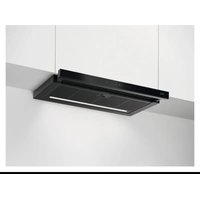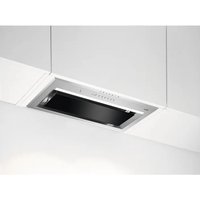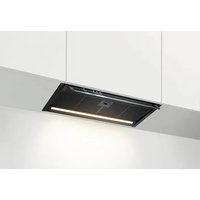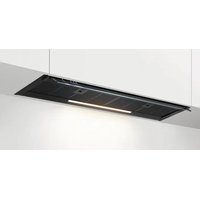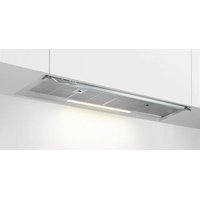
DGK6281HM - Basket AEG - Free user manual and instructions
Find the device manual for free DGK6281HM AEG in PDF.

 FR
FR
 BG
BG
 CS
CS
 DA
DA
 DE
DE
 EL
EL
 EN
EN
 ES
ES
 ET
ET
 FI
FI
 HU
HU
 IT
IT
 KK
KK
 LT
LT
 LV
LV
 MK
MK
 NL
NL
 NO
NO
 PL
PL
 PT
PT
 RO
RO
 RU
RU
 SK
SK
 SL
SL
 SQ
SQ
 SR
SR
 SV
SV
 TR
TR
 UK
UK
User questions about DGK6281HM AEG
0 question about this device. Answer the ones you know or ask your own.
Ask a new question about this device
Download the instructions for your Basket in PDF format for free! Find your manual DGK6281HM - AEG and take your electronic device back in hand. On this page are published all the documents necessary for the use of your device. DGK6281HM by AEG.
USER MANUAL DGK6281HM AEG
natural_image
Simple line drawing of a chimney with three dots on the base (no text or symbols)DGK6681HM
DGK6981HM
DGK6281HM
text_image
Diagram illustrating mechanical assembly steps with labeled components and directional indicators4. ОПИСАНИЕ НА УРЕДА
natural_image
Simple line drawing of a mechanical component with an arrow indicating rotation (no text or symbols)natural_image
Front view of a server rack with grid pattern and indicator lights (no text or symbols)
natural_image
Diagram of a solar panel with a grid pattern and a curved arrow indicating rotation (no text or symbols)text_image
Diagram illustrating mechanical assembly steps with labeled components and directional indicators4. POPIS SPOTŘEBIČE
natural_image
Simple line drawing of a mechanical component with an arrow indicating rotational motion (no text or symbols)natural_image
Diagram of a front panel with grid pattern and labeled section '1°' (no text or symbols beyond label)
natural_image
Diagram of a solar panel with a curved arrow indicating rotation or movement, no text or symbols presenttext_image
Diagram illustrating a mechanical device with labeled parts and directional arrows, including a 3D object being turned into a trash bin.4. PRODUKTBESKRIVELSE
4.1 Oversigt over betjeningspanel
text_image
1 3 5 6 5natural_image
Simple line drawing of a mechanical component with an arrow indicating rotational motion (no text or symbols)natural_image
Technical line drawing of a rectangular device with grid pattern and labeled dimension '1°' (no text or symbols beyond basic geometry)
natural_image
Diagram of a solar panel with a curved arrow indicating rotation or movement, no text or symbols presentnatural_image
Simple line drawing of a mechanical component with an arrow indicating rotational motion (no text or symbols)natural_image
Front view of a server rack with grid layout and indicator lights (no text or symbols)
natural_image
Diagram of a solar panel with a curved arrow indicating rotation or movement, no text or symbols presentnatural_image
Symbol of a trash bin crossed out by a diagonal line, indicating no waste or discharge (no text or labels present)natural_image
Recycling symbol with three arrows forming a triangle (no text or labels)The Ground Truth image displays a single, solid horizontal line. According to Rule 2 (UNDERSCORE & LINE RULES), this is a stylistic or background line, not a placeholder underscore. Therefore, the OCR result must ignore it and output nothing or only meaningful text. The provided OCR content is "\_\_\_\_", which consists of four underscores. This is an incorrect interpretation of the line as a placeholder, violating the rule that stylistic lines must be ignored. The OCR has hallucinated placeholder underscores where none should exist in the GT. Hence, the OCR result is inconsistent with the Ground Truth.
text_image
Diagram illustrating a mechanical device with labeled parts and directional indicators, including a waste bin, hand gesture, and timer.natural_image
Simple line drawing of a mechanical component with an arrow indicating rotational motion (no text or symbols)natural_image
Diagram of a grid-patterned device with a labeled component '1' (no text or symbols beyond the label)
natural_image
Diagram of a solar panel with a curved arrow indicating rotation or movement, no text or symbols presentThank you for choosing this AEG product. We have created it to give you impeccable performance for many years, with innovative technologies that help make life simpler – features you might not find on ordinary appliances. Please spend a few minutes reading to get the very best from it.
Visit our website to:

Get usage advice, brochures, trouble shooter, service and repair information:
www.aeg.com/support

Register your product for better service:
www.registeraeg.com

Buy Accessories, Consumables and Original spare parts for your appliance:
www.aeg.com/shop
CUSTOMER CARE AND SERVICE
Always use original spare parts.
When contacting our Authorised Service Centre, ensure that you have the following data available: Model, PNC, Serial Number.
The information can be found on the rating plate.

Warning / Caution-Safety information

General information and tips

Environmental information
Subject to change without notice.
CONTENTS
- SAFETY INFORMATION...... 56
- SAFETY INSTRUCTIONS.... 59
- INSTALLATION....60
- PRODUCT DESCRIPTION....61
- DAILY USE....61
- CARE AND CLEANING.... 63
- TROUBLESHOOTING....64
- ENVIRONMENTAL CONCERNS....65
1. ⚠ SAFETY INFORMATION
Before the installation and use of the appliance, carefully read the supplied instructions. The manufacturer is not responsible for any injuries or damage that are the result of incorrect installation or usage. Always keep the instructions in a safe and accessible location for future reference.
1.1 Children and vulnerable people safety
- This appliance can be used by children aged from 8 years and above and persons with reduced physical, sensory or mental capabilities or lack of experience and knowledge if they have been given supervision or instruction concerning the use of the appliance in a safe way and understand the hazards involved. Children of less than 8 years of age and persons with very extensive and complex disabilities shall be kept away from the appliance unless continuously supervised.
- Children should be supervised to ensure that they do not play with the appliance.
- Keep all packaging away from children and dispose of it appropriately.
- Keep children and pets away from the appliance when it operates.
- Children shall not carry out cleaning and user maintenance of the appliance without supervision.
1.2 General Safety
- This appliance is intended for domestic use above hobs, cookers and similar cooking devices.
- This appliance is designed for single household domestic use in an indoor environment.
- This appliance may be used in, offices, hotel guest rooms, bed & breakfast guest rooms, farm guest houses and other similar accommodation where such use does not exceed (average) domestic usage levels.
- Before carrying out any maintenance, disconnect the appliance from the power supply.
- CAUTION: Accessible parts may become hot during use with cooking appliances.
- Use only the fixing screws supplied with the appliance if not supplied, use the screws recommended in the installation instructions. Install the appliance in a safe and suitable place that meets installation requirements.
- WARNING: Failure to install the screws or fixing device in accordance with these instructions may result in electrical hazards.
- Do not use adhesives to fix the appliance.
- The minimum distance between the hob surface on which the pans stand and the lower part of the appliance shall be at least 65 cm, unless otherwise specified in the installation instructions for the appliance or hob.
- The discharge of air must comply with local authorities regulations.
- Ensure good air ventilation in the room where the appliance is installed to avoid the backflow of gases into the room from appliances burning gas or other fuels, including open fires.
- Make sure that the ventilation openings are not blocked and the air collected by the appliance is not conveyed into a duct used to exhaust smoke and steam from other appliances (central heating systems, thermosiphons, water-heaters, etc.).
- When the appliance operates with other appliances the maximum vacuum generated in the room should not exceed 0.04 mbar.
- If the supply cord is damaged, it must be replaced by the manufacturer, its Authorised Service Centre or similarly qualified persons to avoid an electrical hazard.
- If the cord set is damaged, it must be replaced by a special cord set available from the manufacturer or its Authorised Service Centre.
- If the appliance is connected directly to the power supply, the electrical installation must be equipped with an isolating device that allows to disconnect the appliance from the mains at all poles. Complete disconnection must comply with conditions specified in the overvoltage category III. The means for disconnection must be incorporated in the fixed wiring in accordance with the wiring rules.
- Do not flambé under the appliance.
- Do not use to exhaust hazardous or explosive materials and vapours.
- Clean the appliance regularly with a soft cloth to prevent the deterioration of the surface material.
- Do not use a steam cleaner, water spray, harsh abrasive cleaners or sharp metal scrapers to clean the surface of the appliance. Use only neutral detergents.
- Clean grease filters regularly (at least every 2 months) and remove grease deposits from the appliance to prevent the risk of fire.
- Use a cloth to clean the interior of the appliance.
2. SAFETY INSTRUCTIONS
2.1 Installation

WARNING!
Risk of injury, electric shock, fire, burns or damage to the appliance.
- Only a qualified person must install this appliance.
- Do not install or use a damaged appliance.
- Follow the installation instructions supplied with the appliance.
• Always take care when moving the appliance as it is heavy. Always use safety gloves and enclosed footwear. - Before installing the appliance remove all the packaging, the labelling and the protective film.
- Do not install the exhaust air into a wall cavity, unless the cavity is designed for that purpose.
2.2 Electrical connection

WARNING!
Risk of fire and electric shock.
- All electrical connections should be made by a qualified electrician.
-
Make sure that the parameters on the rating plate are compatible with the electrical ratings of the mains power supply.
-
If the symbol ( ) not printed on the rating plate, the appliance must be earthed.
• Always use a correctly installed shockproof socket. - Do not let the electricity mains cable tangle.
- Do not use multi-plug adapters and extension cables.
- If the mains socket is loose, do not connect the mains plug.
- Do not pull the mains cable to disconnect the appliance. Always pull the mains plug.
- The shock protection of live and insulated parts must be fastened in such a way that it cannot be removed without tools.
- Make sure the appliance is installed correctly. Loose and incorrect electricity mains cable can make the terminal become too hot.
- Connect the appliance at the end of the installation. Make sure that there is access to the mains after the installation.
2.3 Use

WARNING!
Risk of injury, burns and electric shock.
- This appliance is for cooking purpose only. Do not use the appliance for other purpose.
- Do not change the specification of this appliance.
- Do not operate the appliance with wet hands or when it has contact with water.
- Use only the accessories supplied with the appliance.
- Keep flames or heated objects away from fats and oils during cooking and frying.
- Do not use uncovered electric grills.
- Do not use the appliance as a storage surface.
- Do not use magnifying glasses, binoculars or similar optical devices to look directly at the lighting of the appliance.
- If the appliance works with other devices, the maximum developed pressure must not exceed 4 Pa (4x10⁻⁵ bar).
2.4 Service
• To repair the appliance contact the Authorised Service Centre. Use original spare parts only.
- Concerning the lamp(s) inside this product and spare part lamps sold separately:
These lamps are intended to withstand extreme physical conditions in household appliances, such as temperature, vibration, humidity, or are intended to signal information about the operational status of the appliance. They are not intended to be used in other applications and are not suitable for household room illumination.
2.5 Disposal

WARNING!
Risk of injury or suffocation.
- Contact your municipal authority for information on how to dispose of the appliance.
- Disconnect the appliance from the mains supply.
- Cut off the mains electrical cable close to the appliance and dispose of it.
3. INSTALLATION

WARNING!
Refer to Safety chapters.
3.1 Installation instructions

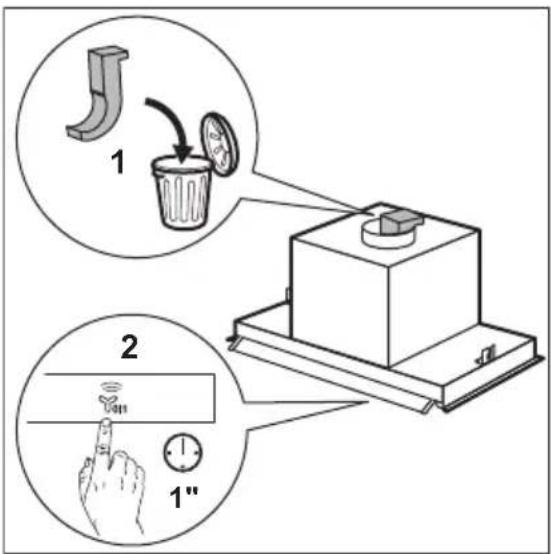
WARNING!
Before connection to electricity make sure the blower support has been removed from the motor.
text_image
Diagram illustrating mechanical assembly steps with labeled components and directional indicators4. PRODUCT DESCRIPTION
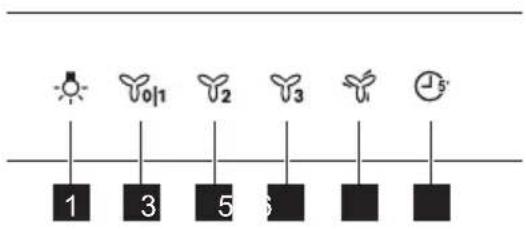
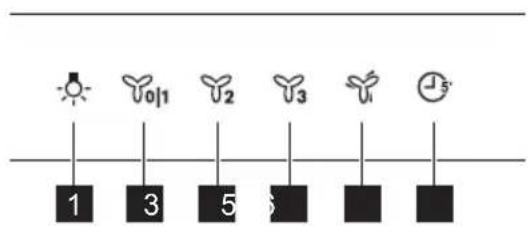
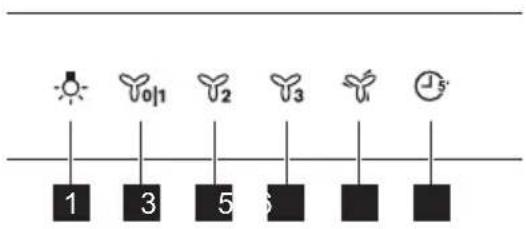
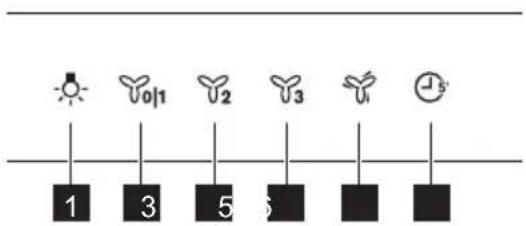
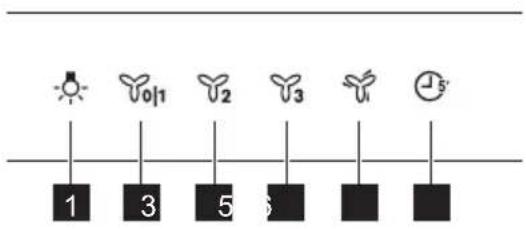
4.1 Control panel overview
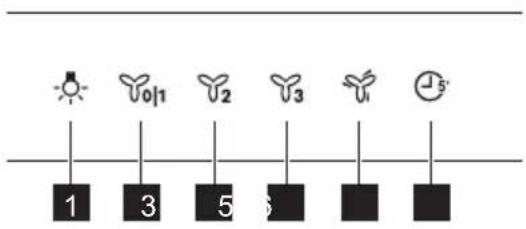
text_image
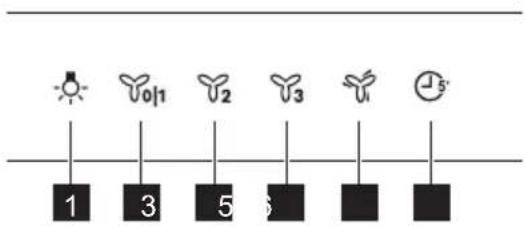
1 3 5 6 5| Function Description | |
| 1 | Lamp Turns the lights on and off. |
| 2 | First speed / Off The motor switches to first speed level. Second press turns off the appliance. |
| 3 | Second speed The motor switches to second speed level. |
| 4 | Third speed The motor switches to third speed level. |
| 5 | Maximum speed The motor switches to maximum speed level. After 5 minutes appli-ance switches to third speed. |
| 6 | Timer Turns off the appliance after 5 minutes. Reminds to clean or replace the filter. Refer to Filter notification in Daily use chapter. |
5. DAILY USE
5.1 Using the hood
Check the recommended speed according to the table below.
| Y011 | While heating up food, cooking with covered pots. |
| Y2 | While cooking with covered pots on multiple cooking zones or burners, gentle frying. |
| Y3 | While boiling and frying big quantities of food without a lid, cooking on multiple cooking zones or burners. |
| While boiling and frying big quantities of food without a lid, big humidity. |

It is recommended to leave the hood operating for approximately 15 minutes after cooking.

The control Panel is a sensor field. To operate the hood touch the symbol exactly in the middle for at least 1 second.
To operate the hood:
- Open the glass with control panel symbols.
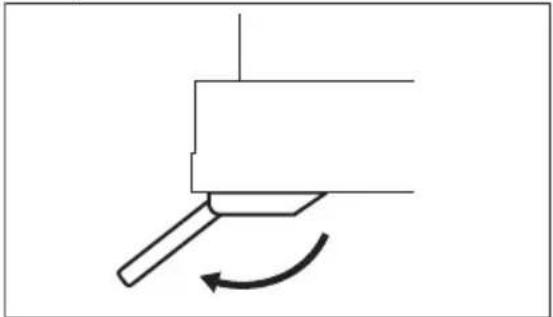
natural_image
Simple line drawing of a mechanical component with an arrow indicating rotational motion (no text or symbols)- Touch the to switch on the appliance.
- If needed, change the speed by touching the desired symbol.
To turn off the appliance touch 01 again.
5.2 Timer
This function allows to turn off the appliance after 5 minutes of operating. The function can be used only if the appliance operates on first 3 motor speeds.
- Touch the symbol.
Timer starts to flash.
- After 5 minutes the appliance turns off.
To turn off the function touch 📋 again.
5.3 Hob ^2 Hood function
It is an automatic function which connects the hob with a hood. Both the hob and the hood have an infrared signal communicator. Speed of the fan is defined automatically on basis of mode setting and temperature of the hottest cookware on the hob. You can also operate the fan using the hob manually. The function can be activated from panel of the hob.
Led lamp switches on when the connection is established between the hob and hood.

The element underneath the hood (1) is a signal receiver of the function.
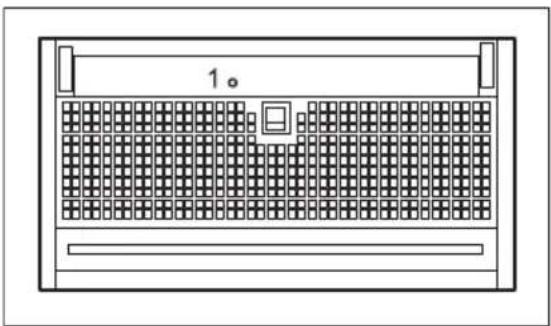
natural_image
Front view of a computer rack with a grid-patterned front panel and indicator lights (no text or symbols)
For more information how to use the function refer to the hob user manual.
5.4 Filter notification
Filter alarm reminds to change or clean the charcoal filter and clean the grease filter.
• After 40 hours of usage, the symbol turns on for 30 seconds. The grease filter must be cleaned.
• After 160 hours of usage, the symbol flashes for 30 seconds. The grease filter must be cleaned and charcoal filter must be replaced or cleaned.

Refer to cleaning the grease filter in care and cleaning chapter.

Refer to cleaning the charcoal filter or replacing the charcoal filter in care and cleaning chapter.
To reset the function touch ⏻ for 3 seconds.
6. CARE AND CLEANING
6.1 Notes on cleaning

Cleaning Agents
Do not use abrasive detergents and brushes.
Clean the surface of the appliance with a soft cloth with warm water and a mild detergent.
After cooking some parts of appliance can get hot. To avoid stains appliance must be cooled down and dried with clean cloth or paper towels.
Clean stains with a mild detergent.
Keep the hood
clean
Clean the appliance and grease filters each month. Clean the interior and grease filters carefully from fat. Fat accumulation or other residue may cause fire.
Grease filters can be washed in a dishwasher.
The dishwasher must be set to a low temperature and a short cycle. The grease filter may discolour, it has no influence on the performance of the appliance.
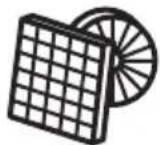
Charcoal filter
The time of saturation of the charcoal filter varies depending on the type of cooking and the regularity of cleaning the grease filter.
6.2 Cleaning mode
Cleaning mode blocks the functionality of control panel for 5 minutes. When active, touching symbols has no effect.

Hob2Hood function is disabled when cleaning mode is active.
- To activate the mode touch and hold and ④ for 1 second.

and turns on.
- To deactivate the mode touch and hold the symbols again for 1 second.
and turns off.
6.3 Cleaning the grease filter
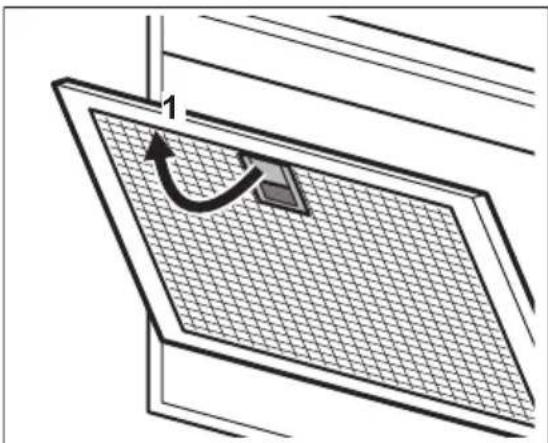
Filters are mounted with the use of clips and pins on the opposite side.
To clean the filter:
- Pull the handle on the filter underneath the hood (1) and slightly tilt the front of the filter down.
natural_image
Diagram of a solar panel with a curved arrow indicating rotation or movement, no text or symbols present- Clean the filters using a sponge with non abrasive detergents or in a dishwasher.

The dishwasher must be set to a low temperature and a short cycle. The grease filter may discolour, it has no influence on the performance of the appliance.
- To mount the filters back follow the first two steps in reverse order.
Repeat the steps for all filters if applicable.
6.4 Replacing the charcoal filter - optional 📁

WARNING!
Depending on type, filter can be or cannot be regenerated. Refer to the leaflet provided with the filter.
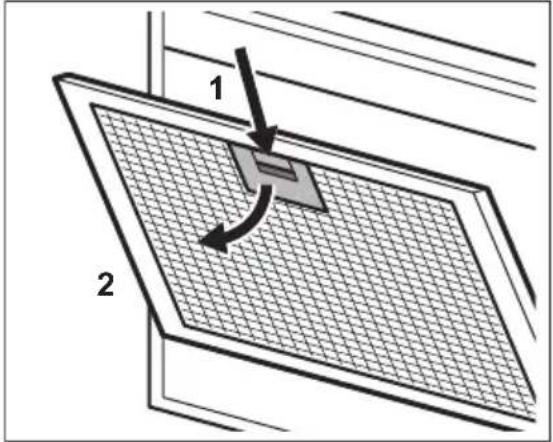
To replace the filter:
- Remove the grease filters from the appliance.
Refer to "Cleaning the grease filter" in this chapter. - Press the handle of the mounting clip on the filter panel underneath the hood (1).
text_image
1 2- Slightly tilt the front of the filter downwards (2), then pull.
Repeat the first two steps for all filters.
4. To install a new filter, perform the same steps in reverse order.
In any case, it is necessary to replace the filters at least every four months.
6.5 Replacing the lamp
This appliance is supplied with a LED lamp and separate control gear (LED driver). These parts can be replaced by a technician only. In case of any malfunction refer to "Service" in the "Safety Instructions" chapter.
7. TROUBLESHOOTING

WARNING!
Refer to Safety chapters.
7.1 What to do if...
Problem Possible cause Remedy
| You cannot activate the appliance. The appliance is not connected to a power supply or it is connected incorrectly. | Check if the appliance is correctly connected to the electrical supply. |
| You cannot activate the appliance. The fuse is blown. Make sure that the fuse is the cause of the malfunction. If the fuse is blown again and again, contact a qualified electrician. | |
| You cannot activate the appliance. Cabinet doors are not aligned with the cabinet frame. | Align the cabinet doors. |
| Problem Possible cause Remedy | ||
| You cannot activate the appliance. The glass panel is not fully opened. Fully open the glass panel. Refer to daily use chapter. | ||
| You cannot activate the appliance or functions. | Incorrect usage of control panel. Touch the symbols on the control panel directly in the middle for at least 1 second to activate appliance or function. | |
| The lamp does not operate. The lamp is defective. Replace the lamp. Refer to the "Care and Cleaning" chapter. | ||
| The appliance does not absorb enough vapours. | The motor speed is not adequate to the appearing vapours. | Change the speed of the motor. |
| The appliance activate itself or change function itself | There is a big condensation of va-pour on the glass. | Clean the glass from the water, ven-tilate the kitchen and increase the speed of the hood. |
| The filter alarm indicator is on. | The filter alarm is on. The grease fil-ter must be cleaned or the charcoal filter (optional) must be replaced or cleaned. | Refer to the filter notification in "Dai-ly use" chapter. |
8. ENVIRONMENTAL CONCERNS
Recycle materials with the symbol Put the packaging in relevant containers to recycle it. Help protect the environment and human health by recycling waste of electrical and electronic appliances. Do not dispose of
appliances marked with the symbol with the household waste. Return the product to your local recycling facility or contact your municipal office.
text_image
Diagram illustrating a mechanical device with labeled parts and directional arrows, including a drop in waste and a finger pressing the button.natural_image
Simple line drawing of a mechanical component with an arrow indicating rotation (no text or symbols)natural_image
Diagram of a grid-patterned device with a labeled component '1' (no text or symbols beyond the label)i
natural_image
Diagram of a solar panel with a curved arrow indicating rotation or movement, no text or symbols presenttext_image
Diagram illustrating a mechanical device with labeled parts and directional arrows, including a drop in waste into a cup and a finger pressing a button.4. TOOTE KIRJELDUS
natural_image
Simple line drawing of a mechanical component with an arrow indicating rotational motion (no text or symbols)natural_image
Front view of a server rack with grid pattern and indicator lights (no text or symbols)
natural_image
Diagram of a solar panel with a curved arrow indicating rotation or movement, no text or symbols present1. ⚠TURVALLISUUSTIEDOT
text_image
Diagram illustrating a mechanical device with labeled parts and directional arrows, including a drop in waste and a finger pressing a button.4. TUOTEKUVAUS
natural_image
Simple line drawing of a mechanical component with an arrow indicating rotational motion (no text or symbols)natural_image
Diagram of a grid-patterned device with a labeled component '1' (no text or symbols beyond the label)
natural_image
Diagram of a solar panel with a curved arrow indicating rotation or movement, no text or symbols presenttext_image
Diagram illustrating mechanical assembly steps with labeled components and directional indicators4. DESCRIPTION DE L'APPAREIL
natural_image
Simple line drawing of a mechanical component with an arrow indicating rotational motion (no text or symbols)natural_image
Diagram of a server rack with grid layout and labeled component '1°' (no text or symbols beyond label)
natural_image
Diagram of a solar panel with a curved arrow indicating rotation or movement, no text or symbols presenttext_image
Diagram illustrating mechanical assembly steps with labeled components and directional arrows4. OPIS PROIZVODA
4.1 Pregled upravljačke ploče
text_image
1 3 5 6 4| Funkcija Opis | |
| 1 | Žarulja Uključuje i isključuje svjetlo. |
| 2 | Prva brzina / Isključeno Motor prebacuje na prvu razinu brzine. Drugi pritisak isključuje uređaj. |
| 3 | Druga brzina Motor prebacuje na drugu razinu brzine. |
| 4 | Treća brzina Motor prebacuje na treću razinu brzine. |
| 5 | Maksimalna brzina Motor se prebacuje na maksimalnu razinu brzine. Nakon 5 minuta uređaj prebacuje na treću brzinu. |
| 6 | Tajmer Isključuje uređaj nakon 5 minuta. Podsjeća na čišćenje ili zamjenu fil-tra. Pogledajte Obavijest o filtru u poglavlju Svakodnevna uporaba. |
5. SVAKODNEVNA UPORABA
5.1 Uporaba nape
natural_image
Simple line drawing of a mechanical component with an arrow indicating rotational motion (no text or symbols)natural_image
Technical line drawing of a rectangular device with grid pattern and labeled component '1°' (no text or symbols beyond basic geometry)
Za više informacija o uporabi funkcije, pogledajte korisnički priručnik ploče.
natural_image
Diagram of a solar panel with a curved arrow indicating rotation or movement, no text or symbols present- Očistite filtre pomoću spužve s neabrazivnim deterdžentima ili u perilici posuđa.
i
text_image
Diagram illustrating a mechanical device with labeled parts and directional arrows, including a hand gesture and a recycling bin.4. TERMÉKLEÍRÁS
natural_image
Simple line drawing of a mechanical component with an arrow indicating rotation (no text or symbols)natural_image
Technical line drawing of a front panel with grid pattern and labeled dimension (no text or symbols beyond basic lines)i
natural_image
Diagram of a solar panel with a curved arrow indicating rotation or movement, no text or symbols presenttext_image
Diagram illustrating mechanical assembly steps with labeled components and directional indicatorsnatural_image
Pure mechanical diagram showing a lever and curved arrow without any text or symbolsnatural_image
Diagram of a server rack with grid layout and indicator lights (no text or symbols)
natural_image
Diagram of a solar panel with a curved arrow indicating rotation or movement, no text or symbols presenttext_image
Diagram illustrating mechanical assembly steps with labeled components and directional indicatorsnatural_image
Simple line drawing of a mechanical component with an arrow indicating rotation (no text or symbols)natural_image
Front view of a server rack with a grid-patterned front panel and indicator lights (no text or symbols)
natural_image
Diagram of a solar panel with a curved arrow indicating rotation or movement, no text or symbols presenttext_image
Diagram illustrating a mechanical device with labeled parts and directional indicators, including a drop in waste bin and a finger pressing a button.4. GAMINIO APRAŠYMAS
4.1 Valdymo skydelio apžvalga
text_image
1 3 5 6 5natural_image
Simple line drawing of a mechanical component with an arrow indicating rotational motion (no text or symbols)natural_image
Diagram of a server rack with grid layout and indicator lights (no text or symbols)
natural_image
Diagram of a solar panel with a curved arrow indicating rotation or movement, no text or symbols presenttext_image
Diagram illustrating a mechanical device with labeled parts and directional indicators, including a drop, trash bin, and hand gesture.4. IZSTRĀDĀJUMA APRAKSTS
natural_image
Simple line drawing of a tool interacting with a rectangular block, showing a curved arrow indicating rotation (no text or symbols)natural_image
Diagram of a server rack with grid layout and labeled component '1' (no text or symbols beyond label)
natural_image
Diagram of a solar panel with a curved arrow indicating rotation or movement, no text or symbols presenttext_image
Diagram illustrating a mechanical device with labeled parts and directional indicators, including a drop in waste bin and a finger pressing a button.4. ОПИС НА ПРОИЗВОДОТ
natural_image
Pure mechanical diagram showing a lever and curved arrow without any text or symbolsnatural_image
Front view of a server rack with grid pattern and indicator lights (no text or symbols)
natural_image
Diagram of a solar panel with a grid pattern and a curved arrow indicating rotation (no text or symbols)text_image
Diagram illustrating mechanical assembly steps with labeled components and directional indicators4. BESCHRIJVING VAN HET PRODUCT
natural_image
Simple line drawing of a mechanical component with an arrow indicating rotational motion (no text or symbols)natural_image
Front view of a server rack with grid pattern and indicator lights (no text or symbols)
natural_image
Diagram of a solar panel with a curved arrow indicating rotation or movement, no text or symbols present7. PROBLEEMOPLOSSING

WAARSCHUWING!
text_image
Diagram illustrating a mechanical device with labeled parts and directional arrows, including a drop in a waste bin and a finger pressing a button.4. PRODUKTBESKRIVELSE
4.1 Oversikt over betjeningspanel
text_image
1 3 5 6 5natural_image
Simple line drawing of a mechanical component with an arrow indicating rotation (no text or symbols)- Berør forlå slå på apparatet.
- Om ønskelig kan du endre hastigheten ved å berøre tilsvarende symbol.
natural_image
Diagram of a server rack with grid pattern and labeled component '1' (no text or symbols beyond label)
Hob2Hood function is disabled when cleaning mode is active.
natural_image
Diagram of a solar panel with a curved arrow indicating rotation or movement, no text or symbols presenttext_image
Diagram illustrating a mechanical device with labeled parts and directional indicators, including a drop, trash bin, and finger press.4. OPIS URZADZENIA
natural_image
Simple line drawing of a mechanical component with an arrow indicating rotational motion (no text or symbols)natural_image
Diagram of a grid-patterned server rack with a central control panel (no text or symbols)
natural_image
Diagram of a solar panel with a curved arrow indicating rotation or movement, no text or symbols presenttext_image
Diagram illustrating a mechanical device with labeled parts and directional indicators, including a drop in waste bin and a finger pressing a button.natural_image
Simple line drawing of a mechanical component with an arrow indicating rotation (no text or symbols)natural_image
Front view of a server rack with a grid-patterned front panel and indicator lights (no text or symbols)
natural_image
Diagram of a solar panel with a curved arrow indicating rotation or movement, no text or symbols presenttext_image
Diagram illustrating a mechanical device with labeled parts and instructions for turning a component, including a drop, press, and finger gesture.4. DESCRIEREA PRODUSULUI
natural_image
Simple line drawing of a mechanical component with an arrow indicating rotation (no text or symbols)natural_image
Front view of a server rack with grid pattern and indicator lights (no text or symbols)i
natural_image
Diagram of a solar panel with a grid pattern and a curved arrow indicating rotation (no text or symbols)text_image
Diagram illustrating a mechanical device with labeled parts and control buttons, including a drop in waste bin and a finger pressing a button.4. ОПИСАНИЕ ПРИБОРА
natural_image
Simple line drawing of a mechanical component with an arrow indicating rotational motion (no text or symbols)natural_image
Diagram of a server rack with grid layout and indicator lights (no text or symbols)i
natural_image
Diagram of a solar panel with a grid pattern and a curved arrow indicating rotation (no text or symbols)text_image
Diagram illustrating a mechanical device with labeled parts and instructions for turning a component, including a drop, press, and finger gesture.4. POPIS VÝROBKU
natural_image
Simple line drawing of a mechanical component with an arrow indicating rotation (no text or symbols)natural_image
Diagram of a grid-patterned device with a labeled component '1°' (no text or symbols beyond the label)i
natural_image
Diagram of a solar panel with a grid pattern and a curved arrow indicating rotation (no text or symbols)text_image
Diagram illustrating a mechanical device with labeled parts and directional arrows, including a drop in waste into a cup and a finger pressing a button.4. OPIS IZDELKA
natural_image
Simple line drawing of a mechanical component with an arrow indicating rotational motion (no text or symbols)- Z dotikom tipke vklopite napravo.
- Po potrebi z dotikom želenega simbola spremenite hitrost.
Za izklop naprave se ponovno dotaknite simbola 🚱11.
5.2 Časovnik
natural_image
Front view of a computer chassis with grid-patterned panel and labeled component '1' (no text or symbols on diagram)
natural_image
Diagram of a solar panel with a curved arrow indicating rotation, no text or symbols presenttext_image
Diagram illustrating a mechanical device with labeled parts and instructions for turning a component, including a drop, press, and finger gesture.4. PËRSHKRIM I PRODUKTIT
natural_image
Simple line drawing of a mechanical component with an arrow indicating rotational motion (no text or symbols)natural_image
Front view of a server rack with grid pattern and indicator lights (no text or symbols)i
natural_image
Diagram of a solar panel with a grid pattern and a curved arrow indicating rotation (no text or symbols)text_image
Diagram illustrating a mechanical device with labeled parts and directional indicators, including a drop in waste bin and a finger pressing a button.4. ОПИС ПРОИЗВОДА
4.1 Преглед командне табле
text_image
1 3 5 6 5natural_image
Simple line drawing of a tool with an arrow indicating rotation (no text or symbols)natural_image
Front view of a server rack with a grid-patterned front panel and indicator lights (no text or symbols)
natural_image
Diagram of a solar panel with a curved arrow indicating rotation or movement, no text or symbols presenttext_image
Diagram illustrating a mechanical device with labeled parts and directional arrows, including a 3D model and a hand gesture.4. PRODUKTBESKRIVNING
natural_image
Simple line drawing of a mechanical component with an arrow indicating rotational motion (no text or symbols)natural_image
Front view of a server rack with grid pattern and indicator lights (no text or symbols)
natural_image
Diagram of a solar panel with a curved arrow indicating rotation or movement, no text or symbols presenttext_image
Diagram illustrating mechanical assembly steps with labeled components and directional arrows4. ÜRÜN TANIMI
4.1 Kontrol paneline genel bakış
text_image
1 3 5 6 5natural_image
Simple line drawing of a mechanical component with an arrow indicating rotation (no text or symbols)natural_image
Front view of a server rack with grid pattern and indicator lights (no text or symbols)
natural_image
Diagram of a solar panel with a curved arrow indicating rotation or movement, no text or symbols presenttext_image
Diagram illustrating a mechanical device with labeled parts and control buttons, including a 3D model and two instructional diagrams.4. ОПИС ВИРОБУ
natural_image
Simple line drawing of a mechanical component with an arrow indicating rotational motion (no text or symbols)natural_image
Diagram of a server rack with grid layout and labeled component '1' (no text or symbols beyond label)
natural_image
Diagram of a solar panel with a grid pattern and a curved arrow indicating rotation (no text or symbols)natural_image
Diagram of a solar panel with a curved arrow indicating rotation or movement, no text or symbols present6.2 وضع التنظيف
natural_image
Line drawing of a server rack with grid pattern and labeled component '1°' (no text or symbols beyond basic label)
natural_image
Simple line drawing of a mechanical component with an arrow indicating rotational motion (no text or symbols)5.4 إشعار الفلتر
text_image
Diagram illustrating mechanical assembly steps with labeled components and directional indicatorsتحذیر