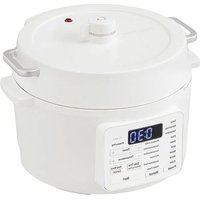
PC-MA3 - Rice cooker WOOZOO - Free user manual and instructions
Find the device manual for free PC-MA3 WOOZOO in PDF.


User questions about PC-MA3 WOOZOO
0 question about this device. Answer the ones you know or ask your own.
Ask a new question about this device
Download the instructions for your Rice cooker in PDF format for free! Find your manual PC-MA3 - WOOZOO and take your electronic device back in hand. On this page are published all the documents necessary for the use of your device. PC-MA3 by WOOZOO.
USER MANUAL PC-MA3 WOOZOO
For indoor/household use
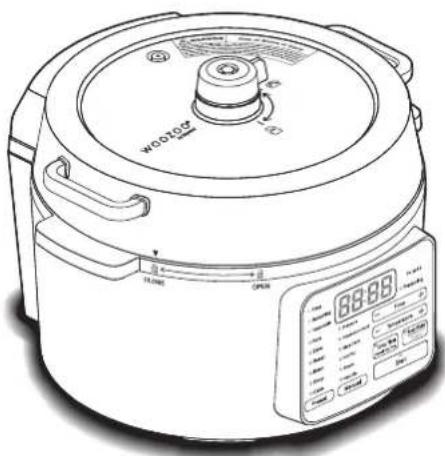
Multi Cooker PC-MA3
User manual
natural_image
Line drawing of a rice cooker with digital display and control panel (no text or symbols)Contents
Specifications....2
Safety precautions....3
Precautions for use....9
Cooking....10
Parts....11
Weight and lid 14
How to use Preset menu (rice)....15
How to use Preset menu
(stew, roast, bean, soup)....19
How to use Preset menu (cake)....21
How to use Cooking using the delay timer .....23
How to use Manual menu (pressure)......25
How to use Manual menu (temperature cook) ....27
How to use Manual menu (slow cook)....29
How to use Manual menu (hot pot)....32
How to use Manual menu (steam)....33
How to use Manual menu (heat up)....35
Maintenance and cleaning 36
Troubleshooting....38
Specifications
| Rated voltage 220-240V~ | ||
| Rated frequency 50Hz | ||
| Rated input 800W | ||
| Cooking rice capacity | Rinse free/ white | 4 servings |
| Brown rice 4 servings | ||
| Operating pressure 70kPa | ||
| Cooking capacity 2.0L | ||
| Full water capacity 3.0L | ||
| Dimensions (approximate) | W300×D288×H224mm | |
| Product weight (approximate) | 3.9kg | |
| Power cord (approximate) | Length: 2.0m (Inserted power supply) | |
※ Product specifications are subject to change without prior notice.
Safety precautions
In order to avoid injury or unnecessary property loss, carefully read the following "Safety precautions" before use. The following safety precautions are divided under two headings: "Warning" and "Attention". These precautions are important for safe and proper use. Be sure to follow them.
Symbols definition

Indicates reminder and warning.

Indicates DO NOT.

Indicates ALWAYS DO.

Warning
Improper operation may cause death or serious injury.
Pressure cook
When using the pressure cooking, because of high temperature and high pressure internally it can be dangerous if this product is operated incorrectly. Be sure to confirm the following before use.

Be sure to
● Make sure that the anti-block and the steam passage are not damaged or blocked up
● Make sure that the weight and the anti-block cap are in place before use
Or it may cause injury or burns.
Weight
Float valve

Anti-block
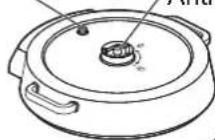
Anti-block cap

Sealing gasket
Float valve cap
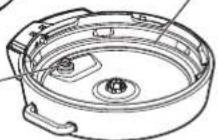
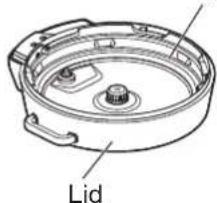
● Make sure that there are no food remnants stuck to the lid, main unit, the inner pot, or the sealing gasket
Or it may cause injury or burns. If there are any grains of rice or bits of food that are stuck on, they must be removed before closing the lid.
Sealing gasket
text_image
Lid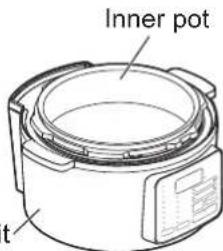
text_image
Inner pot tMain unit

Be sure to
● Make sure that the lid is closed tightly
Or it may cause injury or burns.
Rotate when lining up with this mark.
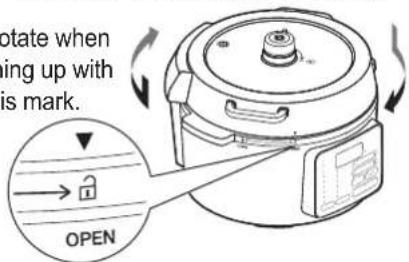
text_image
rotate when ing up with is mark. OPEN
Prohibited
- Do not put in more ingredients than the amount specified
Or it may cause injury or burns. Rinse free/white side
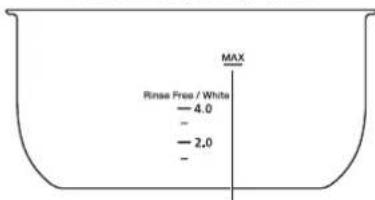
text_image
Rinse Free / White - 4.0 - 2.0 -Do not put in ingredients that exceed the maximum amount marked (all types of cooking)
Brown rice side
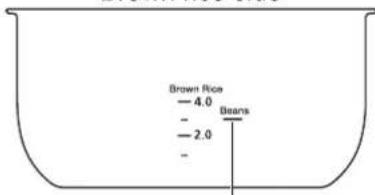
text_image
Brown Rice - 4.0 - - 2.0 BeansFor things where the quantity increases when cooking (such as beans or noodles), do not put in more than here
Safety precautions continued
Pressure cook continued

Prohibited
- Do not use pressure cooking for the following types of things (Examples of foods that should not be cooked in the pressure cook mode)
- Foods that have large amounts of oil
- Foods that have baking soda or that make bubbles or foam
- Stew and other foods that thicken or are sticky
The steam passage might get blocked and steam might burst out, which could cause injury or burns.

Prohibited
- Do not broil or heat without water
Or it may cause an accident.
● Make sure that the anti-block and the float valve steam passage are not being blocked Do not put food that is still in a plastic bag in the multi cooker. If the steam passage is blocked, it could cause overheating or an accident.
Correct use of power plug and cord

Be sure to
- Remove dust from the power plug regularly
Dust buildup can cause fire or electric shock due to insulation failures.
- Insert the power plug properly into the power socket
Or it may cause fire or electric shock due to a short circuit.

Unplug the product
● Make sure to unplug the power plug from the power socket before performing any repairs or checks, or moving the product Or it may result in electric shock or injury.

Avoid contact with wet hands
- Do not insert or unplug the power plug with wet hands
Or it may result in electric shock, burns or injury.

Prohibited
- Do not charge up the product with the power cord tangled
Or it may cause burns or fire. Do not use with the electrical cord tied up in a knot or bundled.
● The product can only be powered by 220-240V\~ currents
Or it may cause a fire or electric shock.

Prohibited
- Do not damage the power cord
- Do not stretch the power cord when moving or storing it
Do not damage, process, forcefully bend, pull, twist, pinch or squeeze the power cord, or place heavy objects on it. Or it may cause fire or electric shock due to damage to the power cord.
- Do not use the product with a damaged power cord or plug, or that plugs into a power socket loosely Or it may cause a fire or electric shock due to a short circuit. If the power cord is damaged, check with the shop where you purchased the product or with Iris Ohyama France SAS by calling the consultation number.
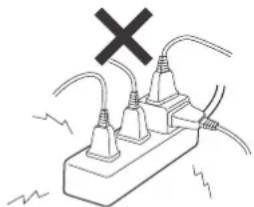
- Do not use in a way that exceeds the rating specifications of power sockets or extension cords Or it may cause fire.
natural_image
Simple line drawing of an electrical plug with a black X mark above it, no text or symbols present.- Do not let infants or young children to lick the power plug Or it may cause injury or electric shock.
When cooking

Prohibited
- Do not ever open the lid
- Do not move the product
- Keep your face and hands away from the weight and the float valve Or it may cause burns or accidents.
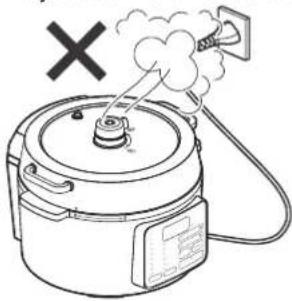
- Do not expose the power cord or power plug to steam Or it may cause fire or electric shock.
natural_image
Line drawing of a rice cooker with steam rising and a 'X' symbol indicating no heat or smoke (no text or labels)
Avoid getting the product wet
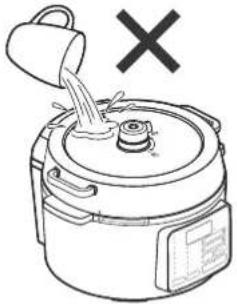
● Do not spray water on the main unit
- Do not wash the main unit with water
Or it may cause a power leak or a short circuit, which may cause fire or electric shock.
natural_image
Line drawing of a rice cooker with a bucket pouring liquid into the top pan, marked with an 'X' symbol (no text or labels present)
Prohibited
- Do not use this product for anything other than what is stated in this manual
Or it may cause fire, burns, electric shock or injury.
- Do not use the product for commercial purposes or anything other than for household use
This product was designed for household use. If the product is used for commercial purposes or anything other than for household use, it may cause fire.
Follow the procedures below to release the pressure and open the lid

Be sure to
- When you're cooking using this product
①Press the keep warm/cancel button to stop the pressure cook
②Lid the top of the weight with a wet towel, lid your hands with mitts or pot holders and turn the weight pressure release knob to the air exhausting side (
③ Once steam is no longer coming out, take the towel and make sure that the float valve has gone down
④ Refer to the after cooking part and open the lid slowly Do not try to force the lid open, or the food inside may burst out, which may cause burns.
● Hands must be covered with mitts or pot holders
- When switching over the weight pressure release knob, do not touch anything other than the pressure release knob part Or it may cause burns.
After cooking

Be sure to
● Pressure still stays inside the pot after cooking
- When opening the lid after cooking, put the weight on the air exhausting side (💡) is to let the steam out, and make sure that the float valve has gone down
- Open the lid slowly and gradually while making sure that there is no steam coming out of the gap between the lid and the main unit
- When turning and opening the lid, if it feels like there is resistance, do not try to force the lid open; instead wait for a moment before continuing to open, or else put the weight back on the sealed side (again and refer to how to open the lid when cooking to release the pressure If there is still some remaining pressure inside the pot, the lid may fly off and food cooking inside the multi cooker could boil out explosively, causing burns or accidents.
Safety precautions continued

Unplug the product
- In case of abnormality or malfunctioning, immediately stop using, then turn off the power supply and pull out the plug from the power socket Or it may cause smoke, fire or electric shock.
[Examples of abnormalities]
- Abnormal sounds or peculiar smells
- Abnormal heating up of the power plug and cord
- Charges and uncharges intermittently whenever the power cord is moved
- There is a burning, painful sensation caused by electric shocks when touching the product with hands
→Stop using and check with the shop where you purchased the product or with Iris Ohyama France SAS by calling the consultation number for such matters.

Be sure to
● The appliance is only to be used with the unit provided

Be sure to
- Keep the appliance and its cord out of reach of children less than 8 years

Be sure to
- Read all the instructions

Be sure to
- Do not let children near the pressure cooker when in use

Be sure to
- Do not put the pressure cooker into a heated oven

Do not
disassemble
- Do not disassemble, repair or modify the product by yourself Or it may cause fire, electric shock or injury.
Check with the shop where you purchased the product or with Iris Ohyama France SAS by calling the consultation number for repair-related matters.

Prohibited
- Do not allow children or other users who require assistance to operate the product alone, and do not allow young children or infants to touch the product Or it may cause electric shock, injury or burns.
This product must be used with the assistance of a guardian or helper who understands how to use it safely.

Be sure to
● This appliance can be used by children aged from 8 years and above and persons with reduced physical, sensory or mental capabilities or lack of experience and knowledge if they have been given supervision or instruction concerning use of the appliance in a safe way and understand the hazards involved. Children shall not play with the appliance. Cleaning and user maintenance shall not be made by children unless they are older than 8 and supervised

Prohibited
- Do not fill the cooker beyond 2/3 of its capacity. When cooking foodstuffs which expand during cooking, such as rice or dehydrated vegetables, do not fill the cooker to more than half of its capacity

Be sure to
● Use the appropriate heat source(s) according to the instructions for use
IMPORTANT PRECAUTIONS

Be sure to
- Move the pressure cooker under pressure with the greatest care. Do not touch hot surfaces, Use the handles and knobs. If necessary, use protection

Prohibited
- Do not use the pressure cooker for a purpose other than the one for which it is intended

Be sure to
● This appliance cooks under pressure. Scalds may result from inappropriate use of the pressure cooker. Make sure that the cooker is properly closed before applying heat. see "Instructions for use"

Be sure to
● Never force open the pressure cooker. Do not open before making sure that its internal pressure has completely dropped. see the "Instructions for use"

Prohibited
● Never use your pressure cooker without adding water, this would seriously damage it

Be sure to
● After cooking meat with a skin (e.g. ox tongue) which may swell under the effect of pressure, do not prick the meat while the skin is swollen; you might be scalded

Be sure to
● Before each use, check that the valves are not obstructed. See the Instructions for use

Prohibited
● Never use the pressure cooker in its pressurized mode for deep or shallow frying of food

Prohibited
- Do not tamper with any of the safety systems beyond the maintenance instructions specified in the instructions for use

Be sure to
Only use manufacturer's spare parts in accordance with the relevant model. In particular, use a body and a lid from the same manufacturer indicated as being compatible
KEEP THESE INSTRUCTIONS

Attention
Warnings for when improper use of this product could cause injuries or damage to property.

Do not touch
● During and after use, do not touch parts of the product that are hot Or it may cause burns. Wait until it has cooled down before any cleaning or maintenance of the product.
During use

Prohibited
- Do not lid with a dish towel or anything else Or it may cause accidents or fire due to overheating.

Prohibited
- Do not use any cooking pots other than the inner pot which is specifically for that use - Do not use the inner pot from the multi cooker on gas stoves, burners or any other cooking utensils Or it may cause fire.

Be sure to
- When cooking doughy food, gently shake the cooker before opening the lid to avoid food ejection.
Safety precautions
continued

Unplug the product
● Make sure to unplug the product by pulling on the plug; never unplug it by pulling on the power cord
Or it may cause fire or electric shock because of damage to the power cord.
- If you do not use the product for a long time, make sure to unplug the power cord
It may cause fire or electric shock due to power leaks from aging insulation.

Prohibited
- Do not use any power cords other than the accessory
- Do not use the attached power cords in other machines Or it may cause fire.
Correct disposal of this product
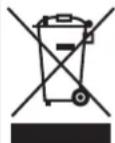
This marking indicates that this product should not be disposed with other household wastes throughout the EU. To prevent possible harm to the environment or human health from uncontrolled waste disposal, recycle it responsibly to promote the sustainable reuse of material resources. To return your used device, please use the return and collection systems or contact the retailer where the product was purchased. They can take this product for environmental safe recycling
When moving or transporting

Be sure to
● make sure to hold the main unit by the handles
If the product is held and moved by another part (such as the lid handle), it may fall down and cause burns or injury.

Prohibited
- Do not swing the multi cooker around, drop it, or strike it with heavy blows
Or it may cause fire or electric shock due to damage.

Avoid getting the product wet
- Do not use near any wet areas where is water, or near to fire
Or it may cause electric shock due to a short circuit.

Prohibited
- Do not use on floors or on the ground
- Do not use the product on any unstable surfaces, or on anything that is heat sensitive Or it may cause fire.
- Do not use the product on a narrow shelf or in any other cramped space If the control panel or the power cord is exposed to steam, it could cause a fire or electric shock.
- Do not block the air intake or outlet on the bottom Do not use on surfaces such as carpets, vinyl cloth, aluminum foil, towels, etc. Or it may overheat and cause a fire.
Precautions for use
- Remove any food that has gotten stuck on. If the lid has not been closed properly, the food inside might boil over, it might not may as deliciously as it could otherwise, and the multi cooker could even malfunction.
● The coating on the inside of the inner pot in the multi cooker gets consumed with use and might even peel off, but it is harmless to the human body. If the coating has peeled off entirely, make a request to exchange for another inner pot sold separately. When requesting other items sold separately, contact Iris Ohyama France SAS by calling the consultation number.
● The inner pot may get discolored with use, but this will not affect its cooking performance. -
When first beginning to use, there may be a smell of plastic or rubber. This will gradually dissipate with use.
-
Do not use the product near a radio or TV. Otherwise electromagnetic interference from the TV or radio could affect the use of the product.
● There will be a beeping sound to alert you to things such as when buttons were operated, when cooking was finished, and when the lid was opened. -
Do not lid with a dish towel during use. Or it may cause disfiguring or discoloration.
● In order to prevent damage to the inner pot and prevent the coating from peeling off, observe the following. -
Do not put any vinegar or alkali in the inner pot
- Do not broil
- Do not use spatulas or spoons that are made of metal
- When cleaning, do not use any hard scrub brushes or anything other than a sponge
- Do not put any eating utensils or other hard objects in the inner pot
- Do not put in the dishwasher
● When opening the lid, the inner pot may be lifted with the lid.
Put the inner pot and lid back into the cooker and sway quietly from side to side to remove the inner pot.
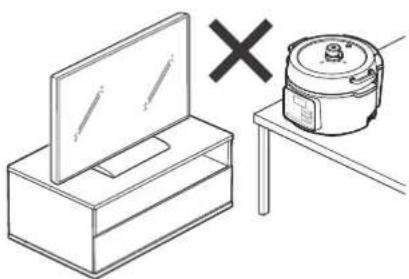
natural_image
Simple line drawing of a box with a monitor and a cooking pot on a table, no text or symbols present.Disposal
● Dispose of the product and packing materials in accordance with local regulations.
Cooking
Preset menu 6 modes
| Rice Pressure cooking | |
| Stew Pressure cooking | |
| Roast Pressure cooking | |
| Bean Pressure cooking | |
| Soup Pressure cooking | |
| Cake Non pressure cooking |
Manual menu 6 modes
| Pressure | Pressure cooking allows to cook faster and to make the ingredients tender.※ Pressure increasing/decreasing time will be added to the set cooking time on the display. |
| Temperature cook | Non pressure cooking.Temperature range: 70°C-100°C. |
| Slow cook | Slow cook without pressure.Temperature range: 30°C-70°C. |
| Hot pot | Remove the lid and use this product as a cooking pot. |
| Steam | Steam cooking. Pour water in the inner pot and put ingredients in the steam rack included in the package. |
| Heat up | Simmering/browning. Remove the lid before start to cook. |
Pressure cook
● After putting seasoning, stir ingredients thoroughly from the bottom of the inner pot.
If seasonings do not get mixed in well with water, the sensor will not be able to properly detect the temperature of the ingredients, and they might not get cooked properly.
● Line up and cut each type of ingredient up into a suitable size.
Ingredients that get heated up easily can be cut into larger pieces, while those that do not get heated up easily should be cut into smaller pieces; make sure that everything gets cooked evenly and uniformly.
- With pressure cook, ingredients will quickly get boiled and become soft. Heating over a long time may result in ingredients becoming overly soft.
Select pressure cook or other cooking methods based on ingredients and recipes.
Parts
E
text_image
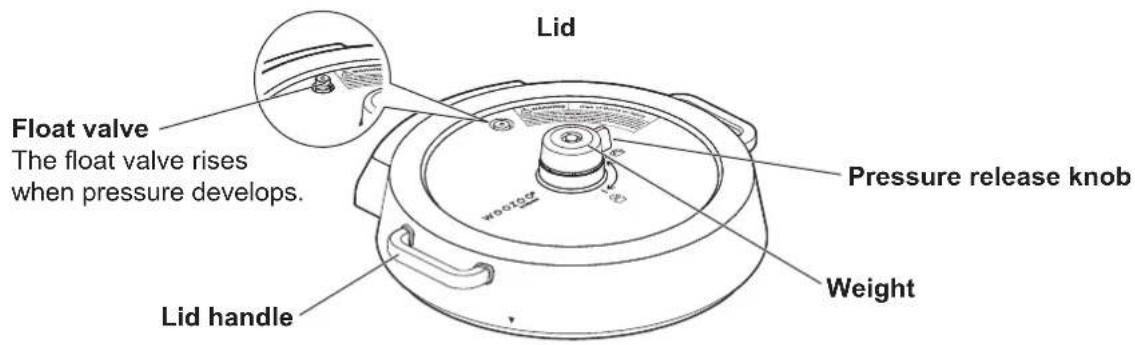
Lid Float valve The float valve rises when pressure develops. Lid handle Pressure release knob WeightInner pot
natural_image
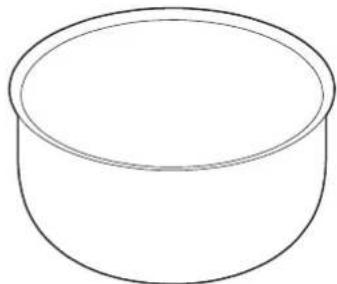
Simple line drawing of a cylindrical container (no text or symbols)Main unit
text_image
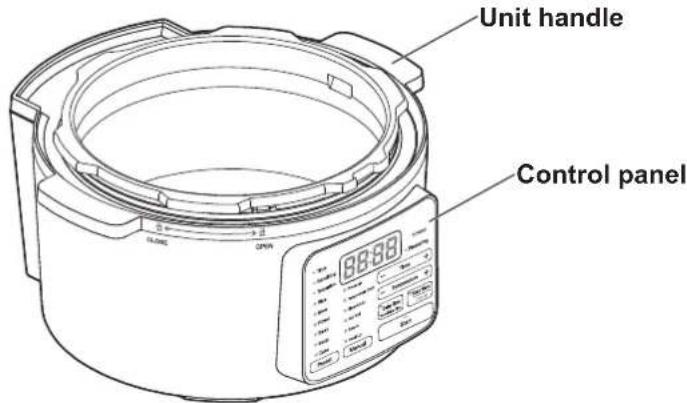
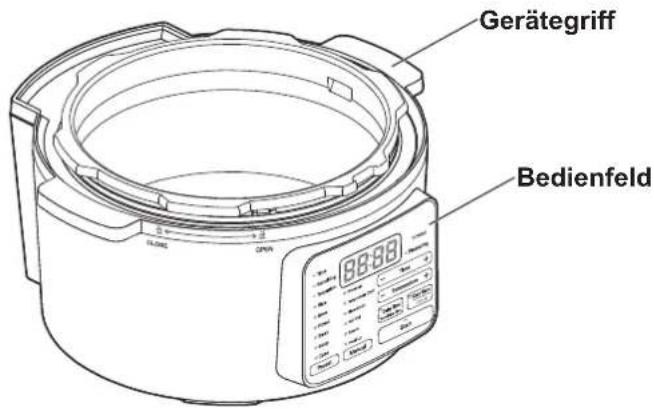
Unit handle Control panelParts continued
■ Inside of main unit
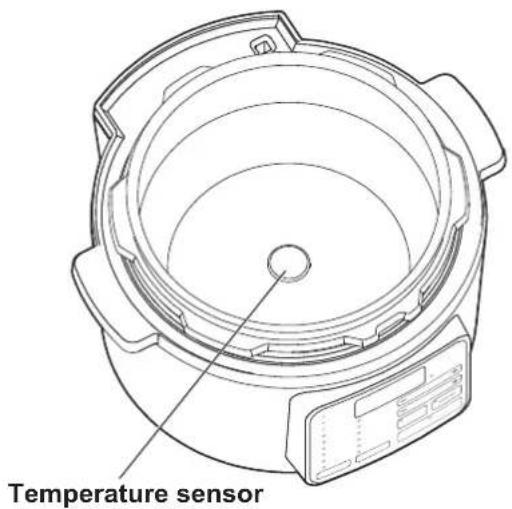
text_image
Temperature sensorBack
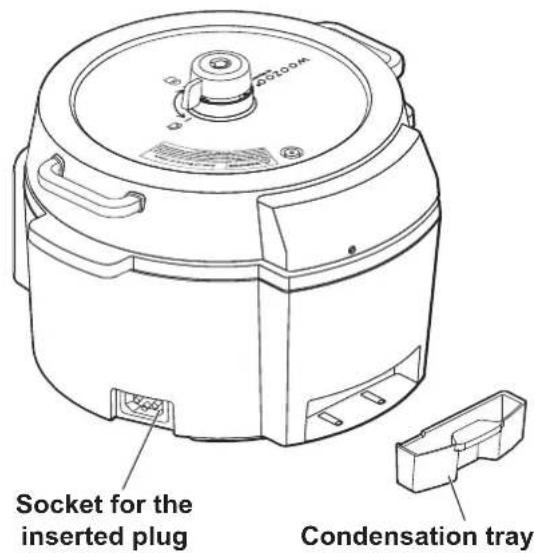
text_image
SO2LOOK Socket for the inserted plug Condensation trayBottom of lid
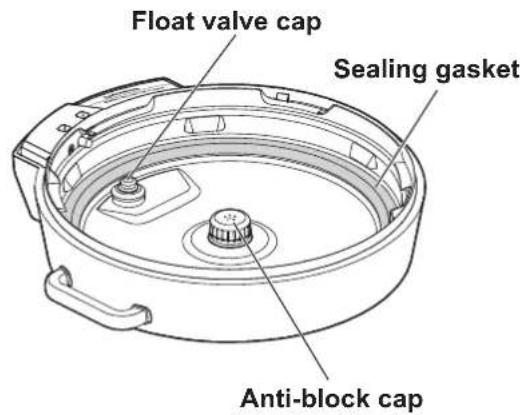
text_image
Float valve cap Sealing gasket Anti-block capAccessories
Measuring cup
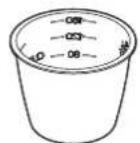
For rice (1 serving)
Steam rack
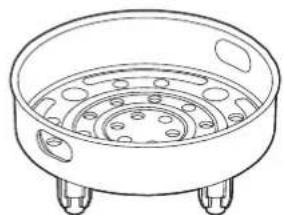
natural_image
Line drawing of a circular basin with four legs and central perforated plate (no text or symbols)
● The sealing gasket must be in place while cooking.
Cooking without the sealing gasket may result in overheating and malfunctioning.
Detachable power cord
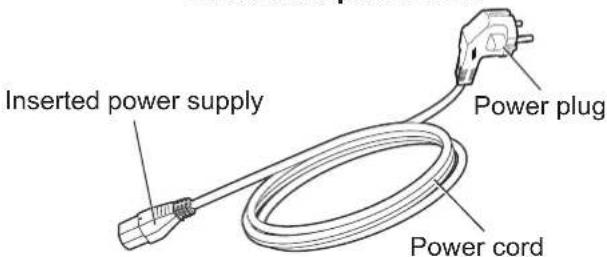
text_image
Inserted power supply Power plug Power cordControl panel
Temperature/time display
The cooking time or cooking temperature is displayed. It will display the remaining cooking time.
Time setting button
After selecting the manual menu, the cooking time can be changed by pressing this button.
※Does not respond when hot pot or heat up mode is selected.
Pressuring indicator lamp
This lamp will light up during cooking once the cooking pressure has been reached.
= Time
= Remaining
- Temperature
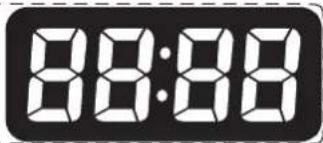
text_image
88:88PC-MA3
Pressuring
Rice
Stew
Roast
- Bean
- Soup
- Cake
Preset
Pressure
Temperature Cook
Slow Cook
Hot Pot
Steam
- Heat Up
Manual

Time

Temperature

Remaining Time
Keep Warm
Cancel
Start
Manual menu indicator lamp/button
Press this button to change to manual menu.
Start indicator lamp/button
Press this button to start cooking for the selected menu.
Temperature adjustment button
If temperature cook or slow cook is selected, the cooking temperature can be changed by pressing this button.
If hot pot or heat up is selected, the heating power can be adjusted by pressing this button.
Preset menu indicator Delay timer indicator lamp/button
lamp/button
Press this button to change to preset menu.
Press this button to set delay timer. Delay timer is available for all the preset menus and pressure and temperature cook in the manual menu.
When delay timer is available for the mode you select, this lamp will blink. Use the time setting button to set the remaining time.
Keep warm/cancel button
When cooking is finished, this lamp will light up and start to keep warm (except Slow Cook, Hot Pot, Steam, Heat Up). Press this button when the indicator lamp is on, and the keep warm function will be cancelled. Press this button during operation, and operation will be cancelled.
Weight and lid
The weight
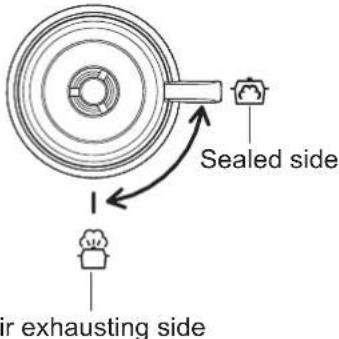
- For pressure cooking, the pressure release knob on the weight should be on the sealed side (☐).
text_image
Sealed side air exhausting side- For non pressure cooking, the pressure release knob on the weight should be on the air exhausting side (💡).
| Preset Menu | Pressure release knob on the weight |
| Rice Sealed side | (💡) |
| Stew Sealed side | (💡) |
| Roast Sealed side | (💡) |
| Bean Sealed side | (💡) |
| Soup Sealed side | (💡) |
| Cake Air exhausting side | (💡) |
| Manual menu | Pressure release knob on the weight |
| Pressure Sealed side (💡) | |
| Temperature cook | Air exhausting side (💡) |
| Slow cook Air exhausting side (💡) | |
| Hot pot No lid | |
| Steam Air exhausting side (💡) | |
| Heat up No lid | |
- When setting up the weight, push it in firmly from the top.
Lid
How to open

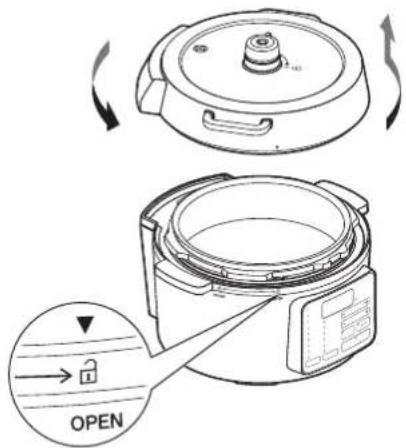
- When opening the lid, make sure that cooking has stopped, and then remove the pressure by taking the pressure release knob on the weight and putting it on the air exhausting side (💡). - Before opening, make sure that the pressuring indicator lamp has gone out, and that the float valve has gone down
Holding the lid handle, rotate counter clockwise, line up the ▼ mark on the lid with the mark (☐) on the main unit, and lift the lid up.
text_image
Diagram showing a cooking pot with a lid and open lid, labeled in English and Chinese.How to close
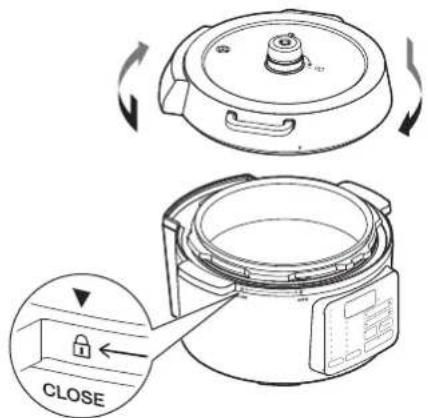
Line up the ▼ mark on the lid with the mark (☐) on the main unit, hold the lid handle and rotate clockwise until it stops (until it is in the (☐) position)
text_image
CLOSEHow to use Preset menu (rice)
This mode can be used to cook rice.
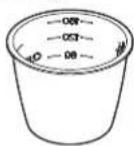
1 Measure rice into the measuring cup that comes with the multi cooker
- This measuring cup, when filled up, is exactly 1 serving.
2 Wash the rice
1 Put the rice in a bowl with plenty of water at first and stir well, and then discard the water immediately
2 Use the fingers to wash so that the rice gets stirred lightly
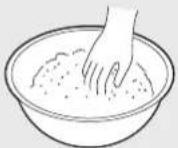
3 Add water and stir thoroughly, then throw away water
4 Repeat steps 2 and 3 for 2-4 times
5 Finally, rinse off quickly 2-3 times with plenty of water, and then drain out the water
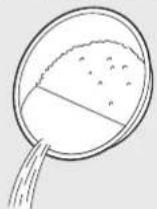
※ Rinse free rice may make the water turn white. If you cook the rice without washing it, it may spill or burn. If the water becomes white, wash it lightly once or twice.
※ Do not wash with hot water.
※ Wash rice quickly.
※ If you wash the rice forcefully or put it in a colander after washing it, the rice may crack and you may not be able to cook it well.
※ If rice has not been washed enough, it might boil over.
3 Adding water
- Put the washed rice in the inner pot, and fill water up to an appropriate level.
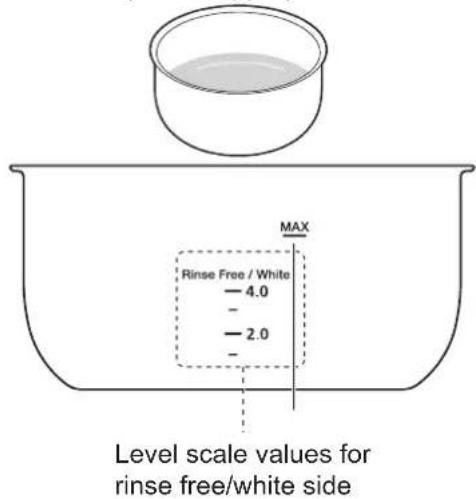
text_image
Level scale values for rinse free/white side※ The firmness of the rice may differ depending on types of rice.
※ If increasing or decreasing the amount of water, adjust the level within a range of 1-3 mm from the amount that was measured out.
※ If too much water is put in, the rice might boil over.
※ For brown rice, use the scale "Brown Rice" on the inner pot.
※ Use water that is at a temperature between 5-35°C.
※ Do not use alkaline ionized water. Or it may cause discoloring or odors.
How to use Preset menu (rice) continued
4 Install the inner pot in place and close the lid
- Wipe up any grains of rice or water droplets on the outside of the inner pot and the inside of the main unit.
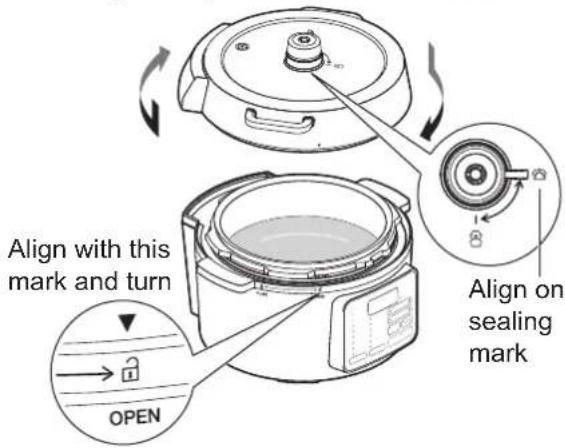
• Make sure that the rice is even and level. - Line up the ▼ mark on the lid with the mark on the main unit ( ), hold the lid handle and rotate clockwise until it stops (until it is in the ( ) position).
• Make sure that the weight is set up firmly in the anti-block.
• Take the pressure release knob on the weight and put it on sealed side (☐).
text_image
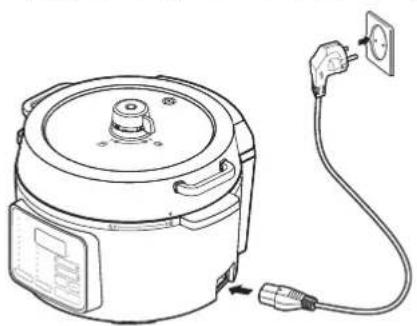
Align with this mark and turn OPEN Align on sealing mark5 Connect the power cord
Insert the power supply into the socket on the right side of the main unit, and insert the power plug securely into a socket nearby.
natural_image
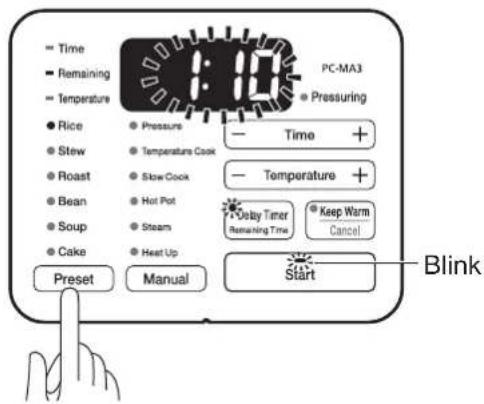
Line drawing of a portable electric cooker with attached power outlet (no text or symbols)6 Press the preset menu button and select rice
- The rice indicator lamp will light up, and the remaining cooking time will blink.
- The Start indicator lamp and the Delay Timer indicator lamp will blink.
text_image
Time Remaining Temperature Rice Stew Roast Bean Soup Cake Preset Pressure Temperature Cook Slow Cook Hot Pot Steam Heat Up PC-MA3 Pressuring Time + Temperature + Delay Timer Remaining Time Keep Warm Cancel Start Blink7 Press the start button
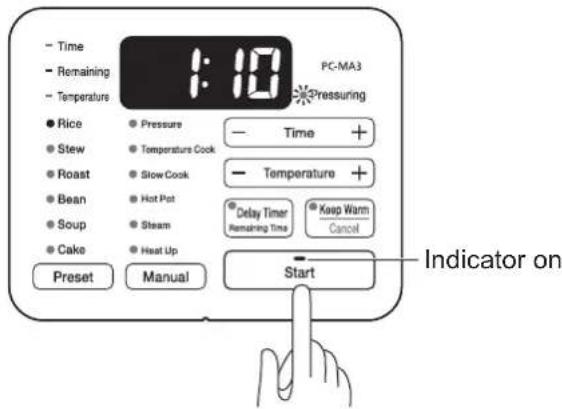
- The start indicator lamp will light up, and cooking will start.
- The remaining cooking time will be displayed.
text_image
Time Remaining Temperature Rice Stew Roast Bean Soup Cake Preset Pressure Temperature Cook Slow Cook Hot Pot Steam Heat Up PC-MA3 Pressuring Temperature + Delay Timer Remaining Time Keep Warm Cancel Start Indicator on※ Cooking time is a reference only and can vary depending on the volume of ingredients and its use environment.
※ During cooking, the displayed cooking time may be shortened suddenly or countdown may stop for a few minutes, but they are not abnormal.
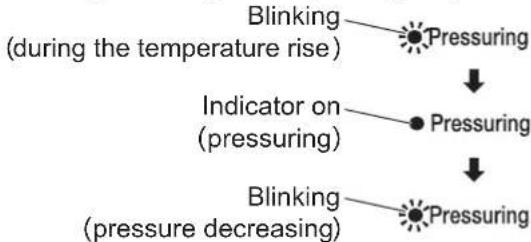
- When cooking starts, pressure cooking lamp will blink. When steam is generated at pressures, the lamp will light up.
flowchart
graph TD
    A["Blinking (during the temperature rise)"] --> B["Pressuring"]
    C["Indicator on (pressuring)"] --> D["Pressuring"]
    E["Blinking (pressure decreasing)"] --> F["Pressuring"]
- When pressured, the float valve will come out from the surface of the lid.
- When pressured, steam will come out from float valve. Align the pressure release knob of weight on the sealing mark (☐) Align on sealing mark to adjust the pressure by the effects of the weight and control the volume of steam.
- When opening the lid during cooking, press keep warm/cancel button and open the lid after the float valve drops all the way down.
- Pressing keep warm/cancel button during cooking will turn off pressure cooking indicator lamp. Before opening the lid, make sure that the float valve drops all the way down.
• To remove pressure forcibly, remove steam in accordance with safety precautions (P5).

● To remove steam before complete depressurization, open it in accordance with When opening the lid during cooking (P5).
Opening it forcibly may cause contents in the pot to splatter and cause a burn.
8 Once cooking is finished, immediately separate out the rice from the inner pot
- Once cooking is finished, it will make a sound to remind.
- Keep warm lamp will light up and the elapsed time will be displayed from the start of keeping the food warm.

text_image
Time Remaining Temperature Rice Stew Roast Bean Soup Cake Preset Pressure Temperature Cook Slow Cook Hot Pot Steam Heat Up PC-MA3 Pressuring Time + Temperature + Delay Timer Remaining Time Keep Warm Cancel Start Indicator on※ Keep warm function will turn off after 12 hours.
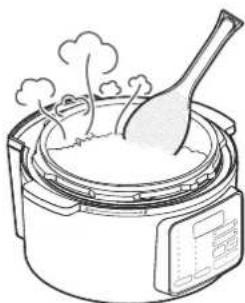
natural_image
Line drawing of a rice cooker with a spoon and steam rising (no text or symbols)※ After the rice has been cooked, stirring rice gently allows to get rid of excess water.
※ Use a spatula to separate out the rice. If a spoon is used, it will crush the grains of rice, and the rice will not be as good.
How to use
Preset menu (rice) continued
About the keep warm function
- For rice that has other things cooked into it or that has seasonings added in, do not keep warm, or it may dry out, get discolored, or have a strange smell.
- Even when keeping warm, mix the rice up from the bottom of the inner pot from time to time, and keep separating out all the rice from the inner pot.
- When there is only a small quantity of rice, push it to the center of the inner pot and keep warm, and eat as soon as possible.
- If leftover rice is kept warm for a long time, it may turn yellow and harden, and drops of water from condensation may drip down and make the rice soggy.
- It's recommended not to keep the food warm for a long time, lid the food with a plastic wrap and store it in a refrigerator ※ Cold rice cannot be warmed up with the keep warm function.
■ How to turn off the keep warm function
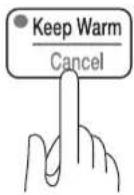
Press the keep warm/cancel button.
- The keep warm indicator lamp will turn off, and the settings will return to the previous mode.
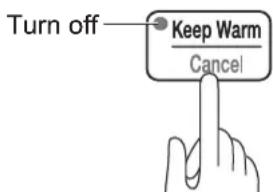
text_image
Turn off Keep Warm Cancel- To keep warm again, press the keep warm/cancel button. The keep warm indicator lamp will light up, and it will start keeping warm.
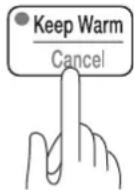
■ If you want to cancel an operation that is in progress
Press the keep warm/cancel button.
- The operation will be cancelled, and the settings will return to the previous mode.
After use
After you have finished using, unplug the power cord and clean the main unit once it has cooled.
How to use Preset menu (stew, roast, bean, soup)
This is the preset menu for pressure cooking.
1 Put ingredients to the inner pot
- Line up and cut each type of ingredient up into a suitable size.
- Ingredients that get heated up easily can be cut into larger pieces, while those that do not get heated up easily should be cut into smaller pieces; make sure that everything gets cooked evenly and uniformly.
- Mix in and stir well any seasonings that are down at the bottom of the inner pot. If seasonings do not get mixed in well with water, the sensor will not be able to properly detect the temperature of the ingredients, and they might not get cooked properly.
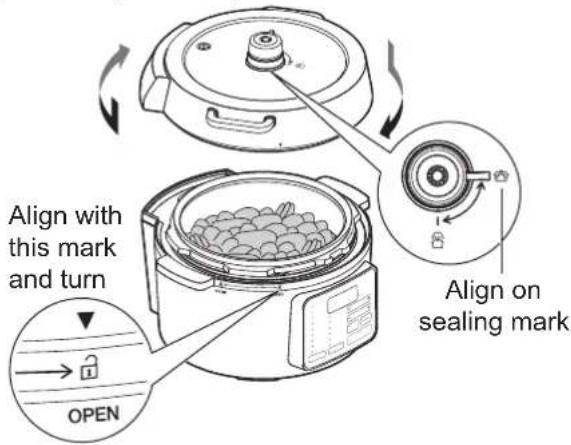
2 Install the inner pot in place, and close the lid
- Line up the ▼ mark on the lid with the mark on the main unit (☐), hold the lid handle and rotate clockwise until it stops (until it is in the (☐) position)
• Make sure that the weight is set up firmly in the anti-block. - The pressure release knob on the weight should be on the sealed side (☐).
[For example: stew]
text_image
Align with this mark and turn Open Align on sealing mark3 Connect the power cord
Insert the power supply into the socket on the right side of the main unit of the multi cooker, and insert the power plug securely into a socket nearby.
4 Press the preset menu button and select menu
• The remaining cooking time will blink.
- The Start indicator lamp and the Delay Timer indicator lamp will blink.
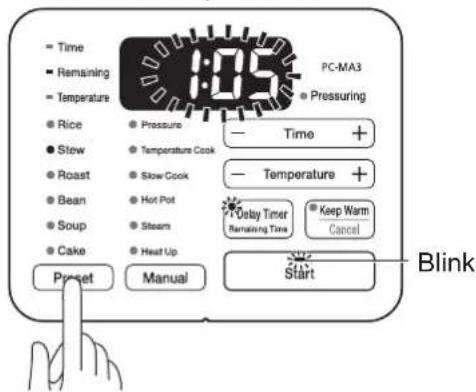
text_image
Time Remaining Temperature Rice Stew Roast Bean Soup Cake Pressure Temperature Cook Slow Cook Hot Pot Steam Heat Up Preset Manual PC-MA3 Pressuring Time + Temperature + Delay Timer Remaining Time Keep Warm Cancel Start Blink5 Press the start button
- The start indicator lamp will light up, and cooking will start.
• The cooking duration will be displayed.
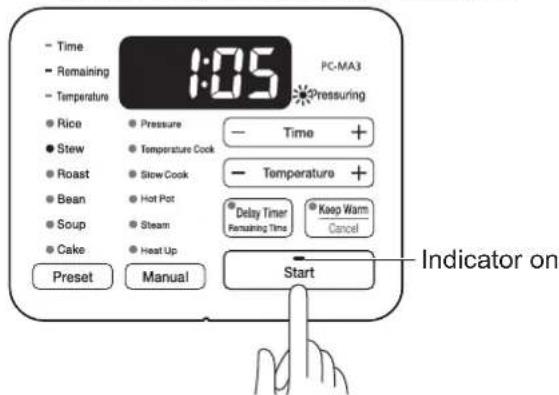
text_image
Time Remaining Temperature Rice Stew Roast Bean Soup Cake Preset Pressure Temperature Cook Slow Cook Hot Pot Steam Heat Up PC-MA3 Pressuring Time + Temperature + Delay Timer Remaining Time Keep Warm Cancel Start Indicator on※ Cooking time is a reference only and can vary depending on the volume of ingredients and its use environment.
※ During cooking, the displayed cooking time may be shortened suddenly or countdown may stop for a few minutes, but they are not abnormal.
How to use Preset menu (stew, roast, bean, soup) continued
- When cooking starts, pressure cooking lamp will blink. When steam is generated at pressures, the lamp will light up.

flowchart
graph TD
    A["Blinking (during the temperature rise)"] --> B["Pressuring"]
    C["Indicator on (pressuring)"] --> D["Pressuring"]
    E["Blinking (pressure decreasing)"] --> F["Pressuring"]
- When pressured, the float valve will come out from the surface of the lid.
- Once pressure is being applied, then steam will come out of the anti-block. When the pressure release knob on the weight goes over to the sealed side (☑), the pressure will be adjusted due to the effect of the weight, and the amount of steam can be controlled.
- When opening the lid during cooking, press keep warm/cancel button and open the lid after the float valve drops all the way down.
- Pressing keep warm/cancel button during cooking will turn off pressure cooking indicator lamp. Before opening the lid, make sure that the float valve drops all the way down.
- To remove the pressure forcibly, turn the pressure release knob on the weight to the air exhausting side (P5) to let out the steam.

- When letting out steam before the pressure has been reduced completely, refer to page 5 how to open the lid when cooking and open the lid in accordance with those instructions.
Do not try to force the lid open, or the food inside may burst out, and it may cause burns.
After cooking is finished
After the cooking cycle has completed, the cooker will beep.
- Once cooking is finished, it will make a sound to remind.
※ After 12 hours, the keep warm function will turn off.
■ If you want to turn off the keep warm function
After the cooking cycle has completed, press the keep warm/cancel button.
- The keep warm indicator lamp will go out, and the settings will return to the previous mode.
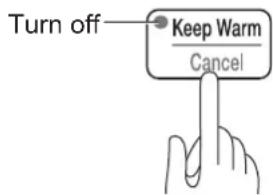
text_image
Turn off Keep Warm Cancel- To keep warm again, press the keep warm/cancel button. The keep warm indicator lamp will come on, and it will start keeping warm.
■ If you want to cancel an operation that is in progress
Press the keep warm/cancel button.
- The operation will be cancelled, and the settings will return to the previous mode.
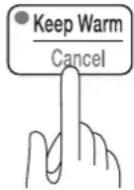
After use
After you have finished using, unplug the power cord and clean the main unit once it has cooled.
How to use Preset menu (cake)
This is the preset menu without pressure cooking.
1 Put ingredients to the inner pot
- Please refer to the recipe for materials and methods.
2 Install the inner pot in place, and close the lid
- Line up the ▼ mark on the lid with the mark on the main unit (☐), hold the lid handle and rotate clockwise until it stops (until it is in the (☐) position)
- Make sure that the weight is set up firmly in the anti-block.
- The pressure release knob on the weight should be on the air exhausting side (💡).

text_image
Align with this mark and turn OPEN The air exhausting mark3 Connect the power cord
Insert the power supply into the socket on the right side of the main unit of the multi cooker, and insert the power plug securely into a socket nearby.
4 Press the preset menu button and select menu
• The remaining cooking time will blink.
- The Start indicator lamp and the Delay Timer indicator lamp will blink.
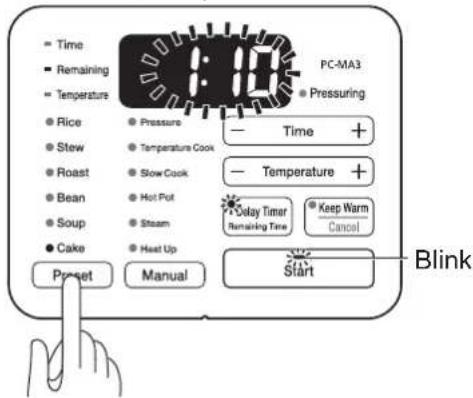
text_image
Time Remaining Temperature Rice Stew Roast Bean Soup Cake Pressure Temperature Cook Slow Cook Hot Pot Steam Heat Up Preset Manual PC-MA3 Pressuring Temperature + Delay Timer Remaining Time Keep Warm Cancel Start Blink5 Press the start button
- The start indicator lamp will light up, and cooking will start.
• The cooking duration will be displayed.
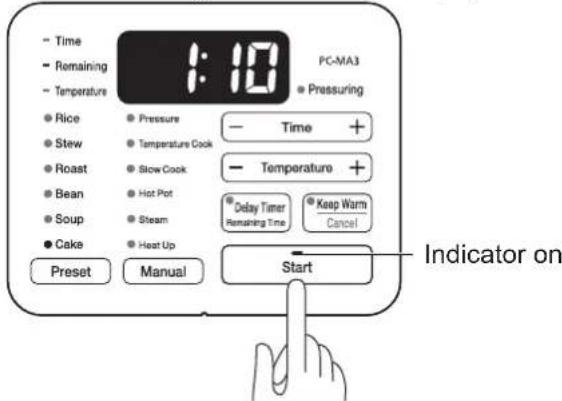
text_image
Time Remaining Temperature Rice Stew Roast Bean Soup Cake Preset Pressure Temperature Cook Slow Cook Hot Pot Steam Heat Up PC-MA3 Pressuring Time + Temperature + Delay Timer Remaining Time Keep Warm Cancel Start Indicator on※ Cooking time is a reference only and can vary depending on the volume of ingredients and its use environment.
※ During cooking, the displayed cooking time may be shortened suddenly or countdown may stop for a few minutes, but they are not abnormal.
How to use Preset menu (cake) continued
After cooking is finished
After the cooking cycle has completed, the cooker will beep.
- Once cooking is finished, it will make a sound to remind.
※ After 12 hours, the keep warm function will turn off.
■ If you want to turn off the keep warm function
After the cooking cycle has completed, press the keep warm/cancel button.
- The keep warm indicator lamp will go out, and the settings will return to the previous mode.
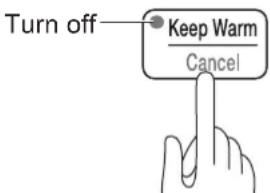
text_image
Turn off Keep Warm Cancel- To keep warm again, press the keep warm/cancel button. The keep warm indicator lamp will come on, and it will start keeping warm.
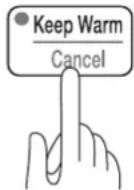
■ If you want to cancel an operation that is in progress
Press the keep warm/cancel button.
- The operation will be cancelled, and the settings will return to the previous mode.
After use
After you have finished using, unplug the power cord and clean the main unit once it has cooled.
How to use Cooking using the delay timer
You can use the delay timer by setting the remaining cooking time.
※ The timer is available for rice, stew, roast, bean, soup, cake, pressure and temperature cook.
1 Put the ingredients in the inner pot, set it up in place, and close the lid
- Line up the ▼ mark on the lid with the mark on the main unit (☐), hold the lid handle and rotate clockwise until it stops (until it is in the (☐) position).
• Make sure that the weight is set up firmly in the anti-block. - Position the pressure release knob accordingly (see P14).
2 Connect the power cord
Insert the power supply into the socket on the right side of the main unit, and insert the power plug securely into a socket nearby.
3 Select a desired menu.
- Select a mode from rice, stew, roast, bean, soup, cake in the preset menu, or pressure, temperature cook in the manual menu.
4 Press the delay timer button
- The delay timer indicator lamp will light up, and the remaining time will blink.
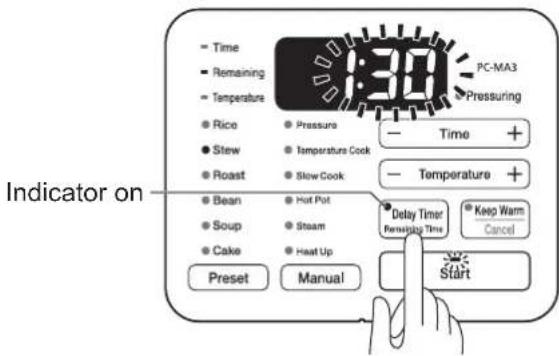
text_image
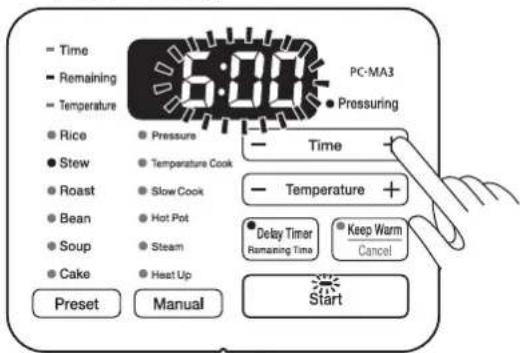
PC-MA3 Pressuring Time Remaining Temperature Rice Pressure Stew Temperature Cook Roast Slow Cook Temperature + Bean Hot Pot Soup Steam Cake Heat Up Delay Timer Removing Time Keep Warm Cancel Preset Manual Start Indicator on5 Press the time setting button to set the time
- Timer setting can be done in the unit of 30 minutes for the following ranges.
Rice, Stew, Roast, Bean, Cake
→1 hours 30 minutes \~ 14 hours (1:30 \~ 14:00)
Soup, Pressure
→1 hours \~ 14 hours (1:00 \~ 14:00)
Temperature Cook
→0.5 hour \~ 14 hours (0:30 \~ 14:00)
text_image
Time Remaining Temperature Rice Stew Roast Bean Soup Cake Preset Pressure Temperature Cook Slow Cook Hot Pot Steam Heat Up PC-MA3 Pressuring Time Temperature + Delay Timer Remaining Time Keep Warm Cancel StartHow to use Cooking using the delay timer continued

Press the start button
- The start indicator lamp will light up, and the timer is set.
- The remaining cooking time will be displayed.
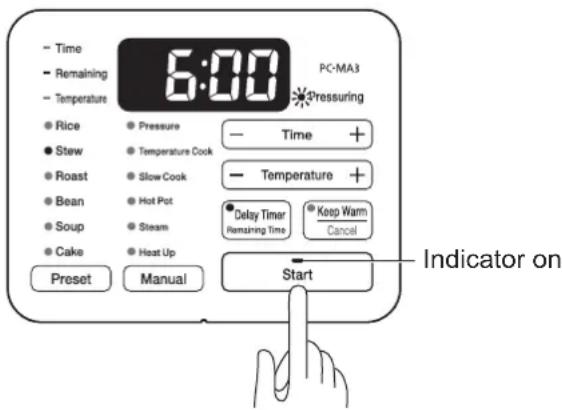
text_image
Time Remaining Temperature 5:00 PC-MA3 Pressuring Rice Stew Roast Bean Soup Cake Preset Pressure Temperature Cook Slow Cook Hot Pot Steam Heat Up Delay Timer Remaining Time Keep Warm Cancel Start Indicator on- For rice, when the start button is pressed, the delay timer will start to count down. Rice will be finished cooking at the programmed time.
- For other available menus, cooking will start immediately when the start button is pressed. The ingredients will be reheated at the programmed time.
After cooking is finished
Once cooking is finished, it will make a sound to remind.
- Will go on the keep warm mode, and the keep warm indicator lamp will light up.
※ Regarding how to keep warm, refer to the description for each menu.

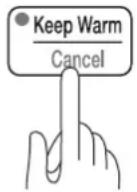
If you want to turn off the timer during the operation.
Press the keep warm/cancel button.
- The operation will be cancelled, and the settings will return to the previous mode.

After use
After you have finished using, unplug the power cord, and clean the main unit once it has cooled.
How to use Manual menu (pressure)
This is a manual menu for pressure cooking.
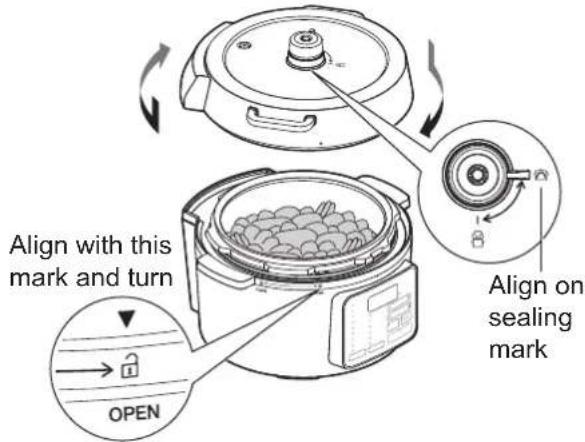
1 Put ingredients to the inner pot and place the pot to the cooker, then close the lid
- Line up the ▼ mark on the lid with the mark on the main unit (☐), hold the lid handle and rotate clockwise until it stops (until it is in the (☐) position).
• Make sure that the weight is set up firmly in the anti-block. - The pressure release knob on the weight should be on the sealed side (☐).
text_image
Align with this mark and turn OPEN Align on sealing mark2 Connect the power cord
Insert the power supply into the socket on the right side of the main unit of the multi cooker, and insert the power plug securely into a socket nearby.
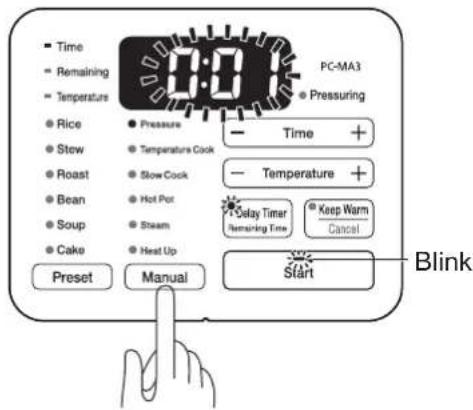
3 Press manual menu button to select pressure cook
- Pressure cook indicator lamp will light up and the remaining cooking time will blink.
- Start indicator lamp will blink.
text_image
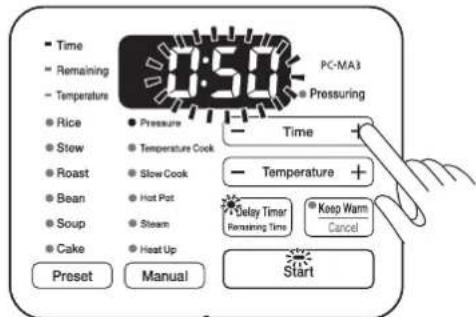
Time Remaining Temperature Rice Stew Roast Bean Soup Cake Preset Pressure Temperature Cook Slow Cook Hot Pot Steam Heat Up PC-MA3 Pressuring Time + Temperature + Delay Timer Remaining Time Keep Warm Cancel Start Blink4 Set the cooking time by pressing the time setting -/+ buttons
- Set in the range of 1 minute to 2 hours (0:01\~2:00).
| Set unit | 1~10 min Unit: 1 min |
| 10~30 min Unit: 5 min | |
| 30 min~1 hour Unit: 10 min | |
| 1~2 hours Unit: 30 min |
text_image
PC-MA3 Time Remaining Temperature Rice Stew Roast Bean Soup Cake Preset Manual Pressure Temperature Cook Slow Cook Hot Pot Steam Heat Up PC-MA3 Pressuring Time Temperature + Delay Timer Remaining Time Keep Warm Cancel Start● The pressures increasing/decreasing time will be added to the set cooking time.
How to use
Manual menu (pressure) continued
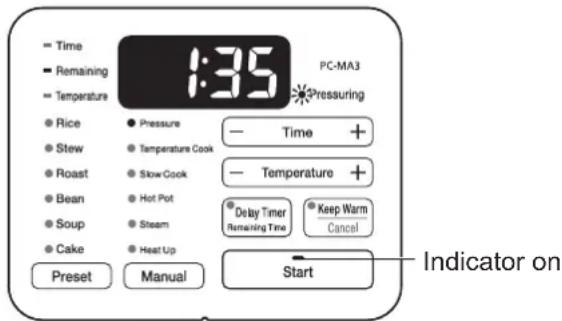
5 Press the start button
- The start indicator lamp will light up, and cooking will start.
- The remaining cooking time will be displayed.
text_image
Time Remaining Temperature 1:35 PC-MA3 Pressuring Rice Stew Roast Bean Soup Cake Pressure Temperature Cook Slow Cook Hot Pot Steam Heat Up Delay Timer Remaining Time Keep Warm Cancel Preset Manual Start Indicator on※ Cooking time is a reference only and can vary depending on the volume of ingredients and its use environment.
※ During cooking, the remaining cooking time may be shortened suddenly or countdown may stop for a few minutes, but they are not abnormal.
- Once cooking has started, the pressuring indicator lamp will blink. Once there is enough steam inside and pressure is being applied, then the indicator lamp will light up (not blinking).
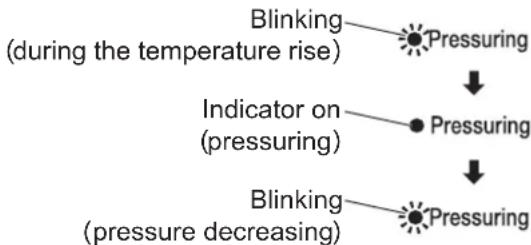
flowchart
graph TD
    A["Blinking (during the temperature rise)"] --> B["Pressuring"]
    C["Indicator on (pressuring)"] --> D["Pressuring"]
    E["Blinking (pressure decreasing)"] --> F["Pressuring"]
- Once pressure is being applied, then the float valve will go up toward the top of the lid.
- Once pressure is being applied, then steam will come out of the anti-block. When the pressure release knob on the weight goes over to the sealed side (☐), the pressure will be adjusted due to the effect of the weight, and the amount of steam can be controlled.
- When opening the lid while cooking, press the keep warm/cancel button, and then wait until the pressuring indicator lamp has completely gone out and the float valve has gone down before opening.
- Pressing keep warm/cancel button during cooking will turn off pressure cook indicator lamp. Before opening the lid, make sure that the float valve drops all the way down.
- To remove the pressure forcibly, turn the pressure release knob on the weight to the side of air exhausting side (see page 5) to let out the steam.
- When letting out steam before the pressure has been reduced completely, refer to page 5 how to open the lid when cooking and open the lid in accordance with those instructions.
Do not try to force the lid open, or the food inside may burst out, causing burns.
After cooking is finished
After the cooking cycle has completed, the cooker will beep.
- Before opening the lid, first make sure that the pressuring indicator lamp has completely turned off, and the float valve has gone down.
■ About the keep warm function
After the cooking cycle has completed, the keep warm indicator light will light up, and it will begin keeping warm.
※ After 12 hours, the keep warm function will turn off.
■ If you want to cancel an operation in progress
Press the keep warm/cancel button.
- The operation will be cancelled, and the settings will return to the previous mode.

After use
Unplug the cord and allow the cooker to cool naturally before cleaning.
How to use Manual menu (temperature cook)
This is the menu for cooking without pressure.
1 Put ingredients to the inner pot and place the pot to the cooker, then close the lid
- Mix in and stir well any seasonings that are down at the bottom of the inner pot. If seasonings do not get mixed in well with water, the sensor will not be able to properly detect the temperature of the ingredients, and they might not get cooked properly.
- Line up the ▼ mark on the lid with the mark on the main unit (☐), hold the lid handle and rotate clockwise until it stops (until it is in the (☐) position)
• Make sure that the weight is set up firmly in the anti-block. - The pressure release knob on the weight should be on the air exhausting side (💡).
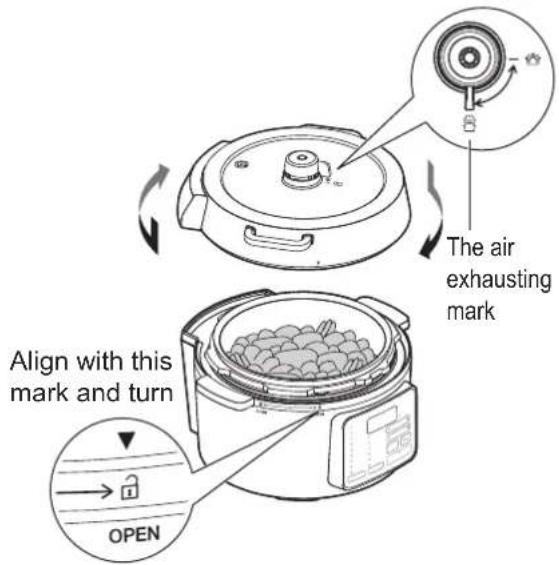
text_image
The air exhausting mark Align with this mark and turn OPEN2 Connect the power cord
Insert the power supply into the socket on the right side of the main unit of the multi cooker, and insert the power plug securely into a socket nearby.
3 Press the manual menu button and select temperature cook
- The temperature cook indicator lamp will light up, and the cooking temperature will flash.
• The start indicator light will blink.
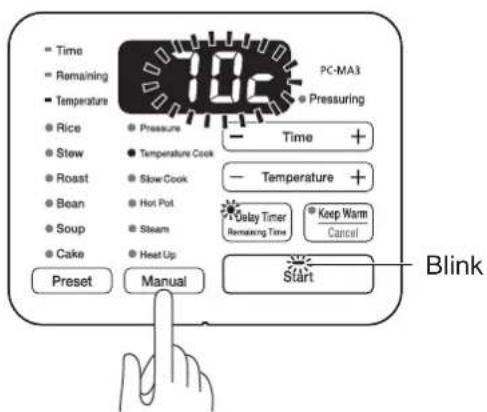
text_image
Time Remaining Temperature Rice Stew Roast Bean Soup Cake Preset Pressure Temperature Cook Slow Cook Hot Pot Steam Heat Up Manual PC-MA3 Pressuring Time + Temperature + Delay Timer Remaining Time Keep Warm Cancel Start Blink4 Press the temperature control -/+ button to set the cooking temperature
- The cooking temperature can be set from 70°C to 100°C, in units of 5°C.
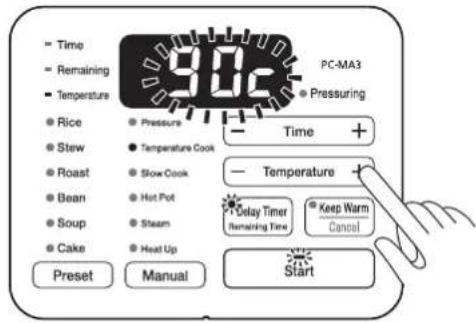
text_image
Time Remaining Temperature Rice Stew Roast Bean Soup Cake Preset Pressure Temperature Cook Slow Cook Hot Pot Steam Heat Up PC-MA3 Pressuring Time + Temperature Delay Timer Remaining Time Keep Warm Cancel StartHow to use Manual menu (temperature cook)
5 Press the time setting -/+ button to set the cooking time
- Pressing the time setting button will change to time setting.
- Set in the range of 1 minute to 14 hours (0:01\~14:00).
| Set unit | 1~10 min Unit: 1 min |
| 10~30 min Unit: 5 min | |
| 30 min~1 hour Unit: 10 min | |
| 1~14 hours Unit: 30 min |
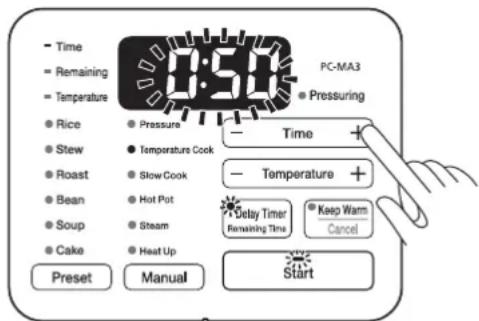
text_image
Time Remaining Temperature Rice Stew Roast Bean Soup Cake Preset Pressure Temperature Cook Slow Cook Hot Put Steam Heat Up PC-MA3 Pressuring Time Temperature Delay Timer Remaining Time Keep Warm Cancel Start※ Pressing the temperature button will change to temperature-setting.
6 Press the start button
- The start indicator lamp will light up, and cooking will start.
- The remaining cooking time will be displayed.
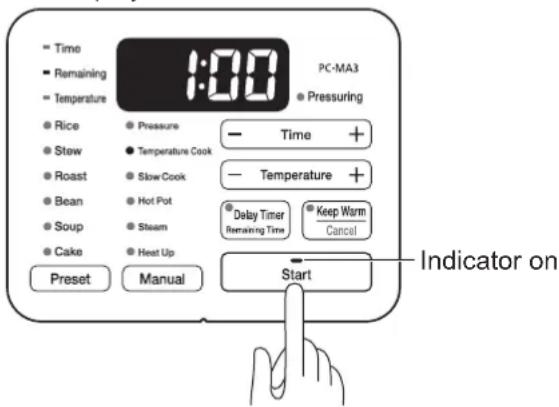
text_image
Time Remaining Temperature Rice Stew Roast Bean Soup Cake Preset Pressure Temperature Cook Slow Cook Hot Pot Steam Heat Up PC-MA3 Pressuring Time + Temperature + Delay Timer Remaining Time Keep Warm Cancel Start Indicator on※ Cooking time is a reference only and can vary depending on the volume of ingredients and its use environment.
※ During cooking, the displayed cooking time may be shortened suddenly or countdown may stop for a few minutes, but they are not abnormal.
After cooking is finished
Once cooking is finished, it will make a sound to remind.
■ About the keep warm function
After the cooking cycle has completed, the keep warm indicator light will come on, and it will begin keeping warm.
• After 12 hours, the keep warm function will turn off.
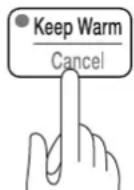
■ If you want to cancel an operation in progress
Press the keep warm/cancel button.
- The operation will be cancelled, and the settings will return to the previous mode.
After use
Unplug the power cord and clean the main unit once it has cooled.
How to use
Manual menu (slow cook)

Caution
Precautions concerning slow cook
● The temperature of ingredients during cooking must be as following:
- During heating, the temperature in the center of the pot is 35\~52°C within 170 minutes.
- During cooling after cooking, the temperature in the center of the pot is 25\~55°C within 200 minutes.
Heating within 170 minutes
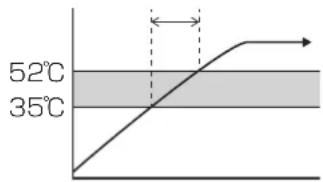
text_image
52°C 35°CCooling within 200 minutes
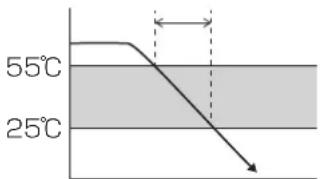
text_image
55°C 25°C● Use fresh ingredients. Use a new plastic bag for each cooking.
- When cooking meat, be sure to cut the meat into pieces.
- When you serve food to those who may have weak immune system such as pregnant women, infants or elderly people, be sure to carefully check the cooking and food conditions and their health conditions. If you have any concerns, do not serve them.
1 Put ingredients to the inner pot
For slow cook
- Put ingredients back to room temperature and place them with seasoning in a plastic bag with a zipper. Leave 1 cm open in the zipper. Sink the bag slowly to the container with water to remove air due to water pressure, then close the zipper completely.
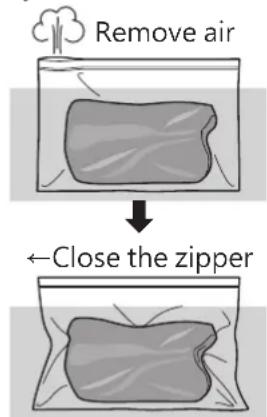
text_image
Remove air ←Close the zipper- Use scissors to cut sharp fins of fish. remove as many bones as possible as they may tear a hole in a plastic bag.
※ Use a new plastic bag for each cooking. - Add water to the inner pot. Water must be added until ingredients sink below the water completely.
- Sink the plastic bag containing ingredients in the water. If it floats, use a weight to sink it.
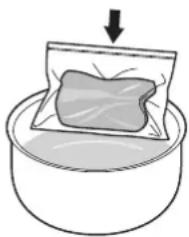
natural_image
Illustration of a bag being placed in a container with an arrow indicating downward motion (no text or symbols)How to use Manual menu (slow cook) continued
2 Place the inner pot to the cooker and close the lid
- Line up the ▼ mark on the lid with the mark on the main unit (☐), hold the lid handle and rotate clockwise until it stops (until it is in the (☐ position)
• Make sure that the weight is set up firmly in the anti-block. - The pressure release knob on the weight should be on the air exhausting side (✗).
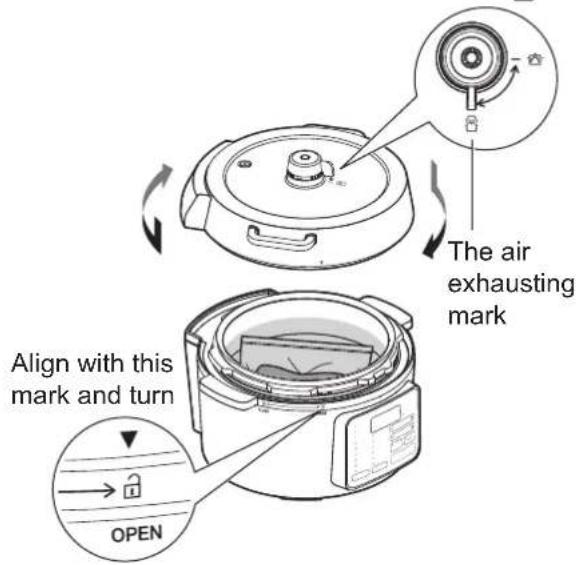
text_image
The air exhausting mark Align with this mark and turn OPEN3 Connect the power cord
Insert the power supply into the socket on the right side of the main unit of the multi cooker, and insert the power plug securely into a socket nearby.
4 Press the manual menu button to select slow cook
- Slow cook indicator lamp will light up and cooking temperature will blink.
• The start indicator lamp will blink.
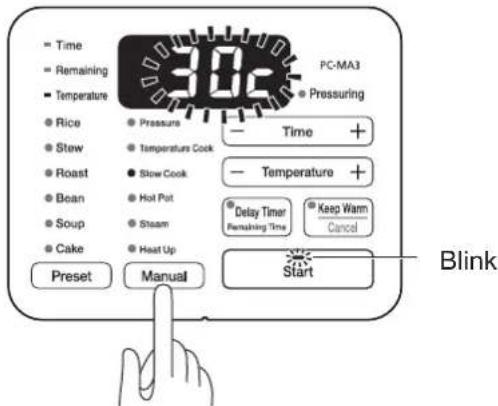
text_image
Time Remaining Temperature Rice Stew Roast Bean Soup Cake Preset Pressure Temperature Cook Slow Cook Hot Pot Steam Heat Up Manual PC-MA3 Pressuring Time + Temperature + Delay Timer Remaining Time Keep Warm Cancel Start Blink5 Press the temperature control -/+ button to set the cooking temperature
- Set in the range of 30 to 70^ C by 5^ C .
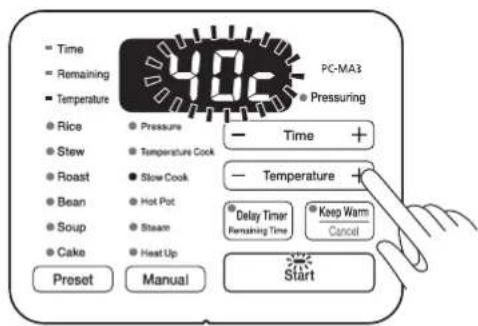
text_image
Time Remaining Temperature Rice Stew Roast Bean Soup Cake Preset Pressure Temperature Cook Slow Cook Hot Pot Steam Heat Up Preset Manual PC-MA3 Pressuring Time + Temperature + Delay Timer Remaining Time Keep Warm Cancel Start
Press the time setting -/+ button to set the cooking time
- Pressing the time setting button will change to time setting.
- Set in the range of 1 minute to 14 hours (0:01\~14:00).
| Set unit | 1~10 min Unit: 1 min |
| 10~30 min Unit: 5 min | |
| 30 min~1 hour Unit: 10 min | |
| 1~14 hours Unit: 30 min |
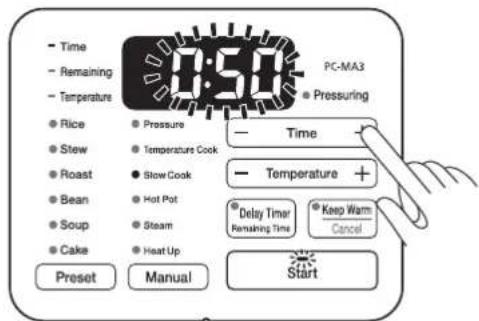
text_image
Time Remaining Temperature Rice Stew Roast Bean Soup Cake Preset Pressure Temperature Cook Slow Cook Hot Pot Steam Heat Up PC-MA3 Pressuring Time Temperature + Delay Timer Remaining Time Keep Warm Cancel Start※ Pressing the temperature button will change to temperature setting.

Press the start button
- The start indicator lamp will light up, and cooking will start.
- The remaining cooking time will be displayed.
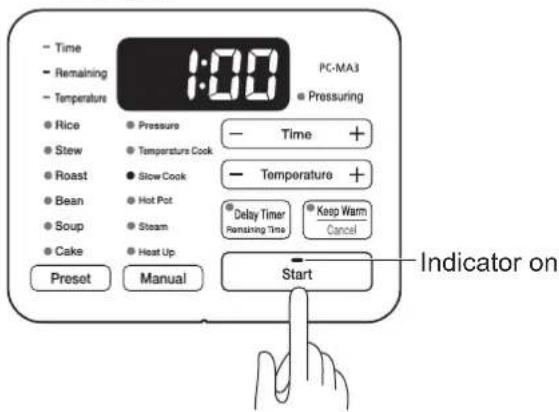
text_image
Time Remaining Temperature 1:00 PC-MA3 Pressuring Rice Stew Roast Bean Soup Cake Preset Pressure Temperature Cook Slow Cook Hot Pot Steam Heat Up Delay Timer Remaining Time Keep Warm Cancel Start Indicator on※ Cooking time is a reference only and can vary depending on the volume of ingredients and its use environment.
During cooking, the displayed cooking time may be shortened suddenly or countdown may stop for a few minutes, but they are not abnormal.
After cooking is finished
Once cooking is finished, it will make a sound to remind.
- Cool cooked food at a low temperature as soon as possible. If cooled in room temperature, it can give bacteria more time to grow.
- Cool fermented food in a refrigerator as soon as possible. If you leave it at room temperature, food may ferment too much and the taste will be spoiled.
- Do not use the keep warm function for slow cooking.

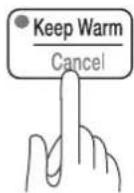
If you want to cancel an operation in progress
Press the keep warm/cancel button.
- The operation will be cancelled, and the settings will return to the previous mode.

After use
Unplug the cord and allow the cooker to cool naturally before cleaning.
How to use Manual menu (hot pot)
Open the lid. It can be used as a cooking pot.
1 Open the lid, put ingredients to the inner pot and set it to the cooker

natural_image
Line drawing of a rice cooker with food inside, no text or symbols present2 Connect the power cord
Insert the power supply into the socket on the right side of the main unit, and insert the power plug securely into a socket nearby.
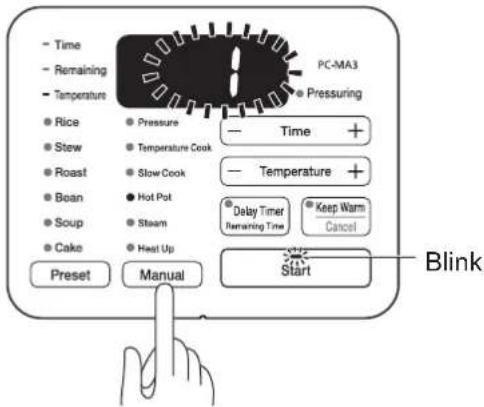
3 Press the manual menu button and select the pot mode
- The hot pot indicator lamp will light up, and the start indicator light will blink.
text_image
PC-MA3 Temperature Time Remaining Pressure Rice Stew Roast Bean Soup Cake Preset Manual Pressuring Temperature Cook Slow Cook Hot Pot Steam Heat Up Balance + Time + Temperature + Dabby Timer Remaining Time Keep Warm Cancel Start Blink4 Press the temperature control -/+ button to set the heating level
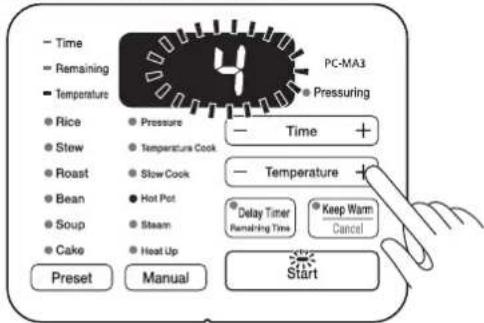
- Set in the range of 1 to 5.
text_image
Time Remaining Temperature Rice Stew Roast Bean Soup Cake Preset Pressure Temperature Cook Slow Cook Hot Pot Steam Heat Up PC-MA3 Pressuring Time + Temperature Delay Timer Remaining Time Keep Warm Cancel Start5 Press the start button
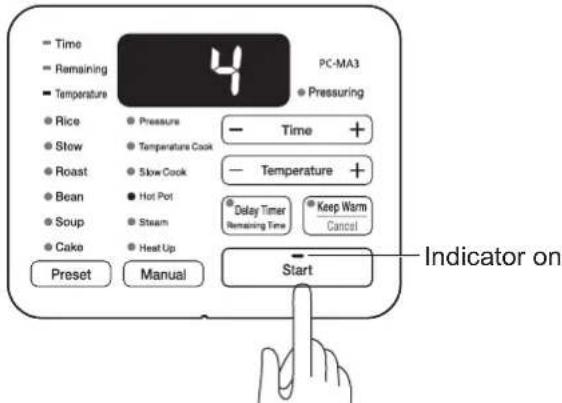
- The start indicator lamp will light up, and it will begin heating.
text_image
Time Remaining Temperature Rice Stow Roast Bean Soup Cake Preset Pressure Temperature Cook Slow Cook Hot Pot Steam Heat Up PC-MA3 Pressuring Time + Temperature + Delay Timer Remaining Time Keep Warm Cancel Start Indicator on- If the pot is too light for the sensor to register, an error could occur.
- If no operation is performed for 2 hours, cooking will stop automatically.
- If the heat is set to level 4 or 5 and the unit receives no further input for 30 minutes, the unit will reduce the level to 3 automatically.
■ End heating, if you want to cancel an operation in progress
Press the keep warm/cancel button.
- Heating will stop (operation will be cancelled) and return to the previous mode.
After use
After you have finished using, unplug the power cord and clean the main unit once it has cooled.
How to use Manual menu (steam)
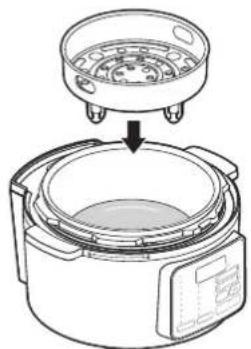
Steam cooking using the steam rack that comes with the multi cooker.
- When using the steam rack, steam will go up into the air, so be careful not to block the steam vent.
1 Set the inner pot, add water (approximately 200mL) and set the steam rack
natural_image
Illustration of a rice cooker with a lid and lid removed from its side, showing internal components (no text or symbols)2 Lay the ingredients out in a row on the steam rack, and close the lid
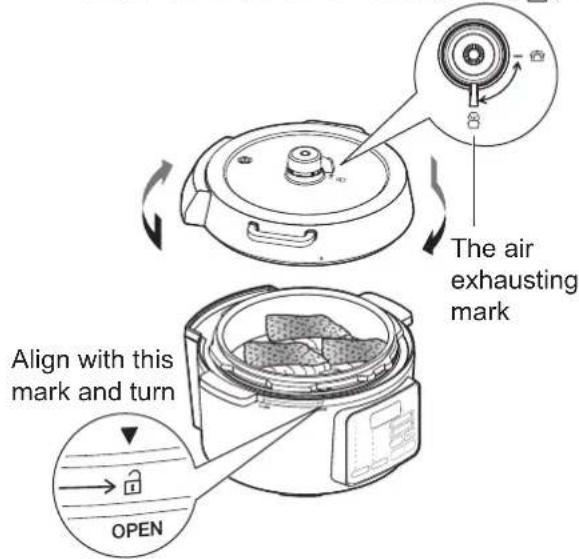
- Line up the ▼ mark on the lid with the mark on the main unit (☐), hold the lid handle and rotate clockwise until it stops (until it is in the (☐) position)
- Make sure that the weight is set up firmly in the anti-block.
- The pressure release knob on the weight should be on the air exhausting side (💡).
text_image
The air exhausting mark Align with this mark and turn OPENHow to use Manual menu (steam) continued
3 Connect the power cord
Insert the power supply into the socket on the right side of the main unit of the multi cooker, and insert the power plug securely into a socket nearby.
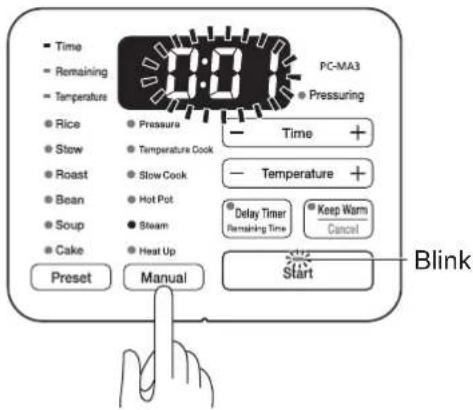
4 Press the manual menu button and select steam cook
- The steam cook indicator lamp will light up, and the cooking time will blink.
• The start indicator lamp will blink.
text_image
Time Remaining Temperature Rice Stow Roast Bean Soup Cake Preset Pressure Temperature Cook Slow Cook Hot Pot Steam Heat Up Manual PC-MA3 Pressuring Temperature + Delay Timer Remaining Time Keep Warm Cancel Start Blink5 Press the time setting -/+ button to set the cooking time
- Set in the range of 1 minute to 2 hours. (0:01\~2:00)
| Set unit | 1~10 min Unit: 1 min |
| 10~30 min Unit: 5 min | |
| 30 min~1 hour Unit: 10 min | |
| 1~2 hours Unit: 30 min |
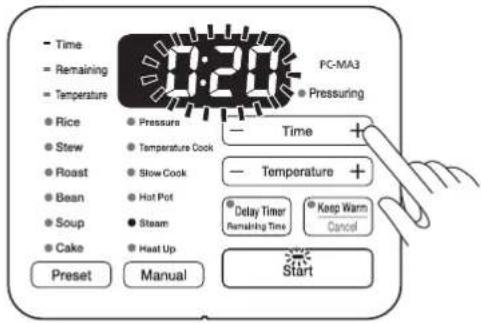
text_image
Time Remaining Temperature Rice Stew Roast Bean Soup Cake Preset Pressure Temperature Cook Stow Cook Hot Pot Steam Heat Up PC-MA3 Pressuring Time + Temperature + Delay Timer Remaining Time Keep Warm Cancel Start6 Press the start button
- The start indicator lamp will light up, and cooking will start. - The remaining cooking time will be displayed.
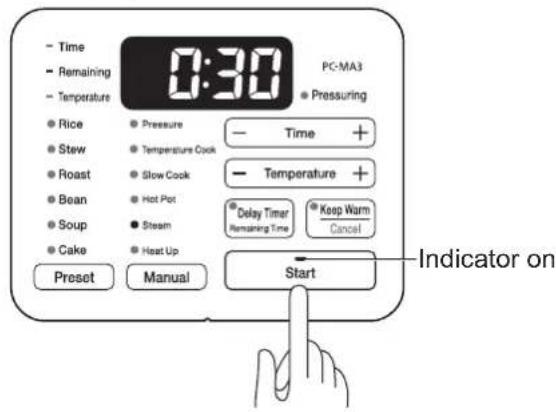
text_image
Time Remaining Temperature Rice Stew Roast Bean Soup Cake Preset Pressure Temperature Cook Slow Cook Hot Pot Steam Heat Up PC-MA3 Pressuring Time + Temperature + Delay Timer Remaining Time Keep Warm Cancel Start Indicator on※ Cooking time is a reference only and can vary depending on the volume of ingredients and its use environment.
During cooking, the displayed cooking time may be shortened suddenly or countdown may stop for a few minutes, but they are not abnormal.
After cooking is finished
Once cooking is finished, it will make a sound to remind.
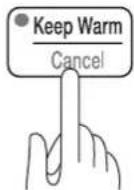
■ If you want to cancel an operation in progress
After the cooking cycle has completed, press the keep warm/cancel button.
- The operation will be cancelled, and the settings will return to the previous mode.
After use
After you have finished using, unplug the power cord and clean up.
How to use Manual menu (heat up)
Open the lid. It can be used to simmer or brown.
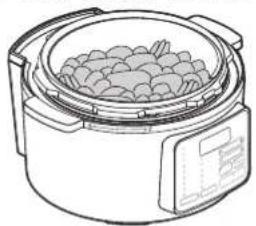
1 Open the lid, put ingredients to the inner pot and set it to the cooker
natural_image
Line drawing of a rice cooker with food inside, no text or symbols present2 Connect the power cord
Insert the power supply into the socket on the right side of the main unit, and insert the power plug securely into a socket nearby.
3 Press the manual menu button and select the heat up mode
- The heat up indicator lamp will light up, and the start indicator lamp will blink.
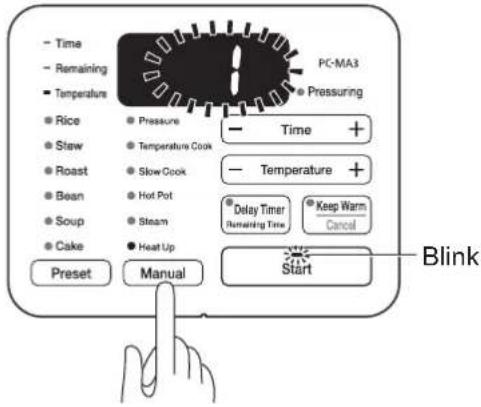
text_image
Time Remaining Temperature Rice Stew Roast Bean Soup Cake Preset Pressure Temperature Cook Slow Cook Hot Pot Steam Heat Up Manual PC-MA3 Pressuring Temperature + Delay Timer Remaining Time Keep Warm Cancel Start Blink4 Press the temperature control -/+ button to set the heating level
- Set in the range of 1 to 5.
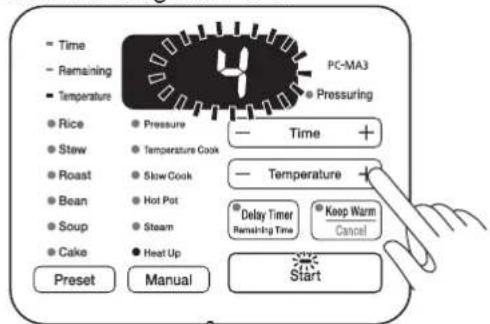
text_image
Time Remaining Temperature Rice Stew Roast Bean Soup Cake Preset Pressure Temperature Cook Slow Cook Hot Pot Steam Heat Up PC-MA3 Pressuring Time + Temperature Delay Timer Remaining Time Keep Warm Cancel Start5 Press the start button
- The start indicator lamp will light up, and it will begin heating.
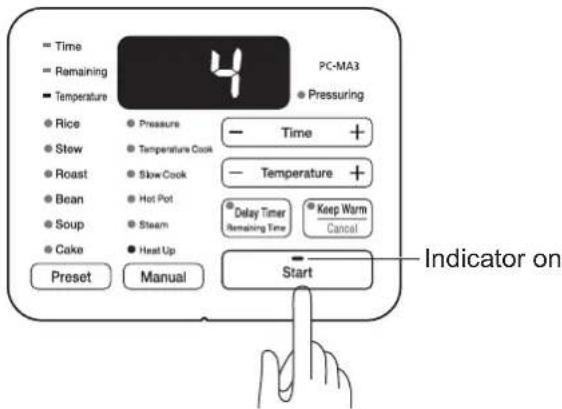
text_image
= Time == Remaining ■ Temperature ● Rice ● Stew ● Roast ● Bean ● Soup ● Cake Preset Pressure Temperature Cook Slow Cook Hot Pot Steam Heat Up PC-MA3 ● Pressuring — Time + — Temperature + Delay Timer Remaining Time Keep Warm Cancel Start Indicator on- If the pot is too light for the sensor to register, an error could occur.
- If no operation is performed for 2 hours, cooking will stop automatically.
- If the heat is set to level 4 or 5 and the unit receives no further input for 30 minutes, the unit will reduce the level to 3 automatically.
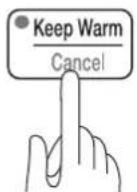
■ End heating, if you want to cancel an operation in progress
Press the keep warm/cancel button.
- Heating has been ended (operation has been cancelled) and return to the previous mode.
After use
After you have finished using, unplug the power cord and clean up.
Maintenance and cleaning

● Before doing any maintenance or cleaning, make sure that any cooking and keeping warm have finished, the power cord is unplugged, and the inner pot and main unit have cooled off sufficiently.
- Do not wash the main unit of the multi cooker with water.
● Clean and maintain after every use.
- Do not use cleaning agents that are strongly acidic or that have strong alkalinity, and do not use chemical agents, bleach, metal scrub brushes, nylon scrub brushes, or abrasive sponges.
- If there are any stains, grease or food stuck on tightly, soak in warm water for a while and then wash.
- When trying to remove stains, grease or food that are stuck on tightly, do not use knives or other hard objects.
Inner pot, lid, sealing gasket
Wash with a neutral cleaning agent that is for kitchen use, and rinse off with water
• Take the sealing gasket out and wash separately.
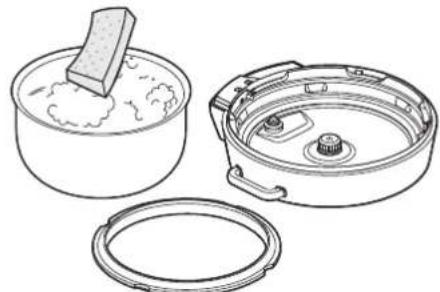
natural_image
Line drawings of three kitchenware containers: a bowl with a lid, a lid with a knob, and a lid with a handle (no text or symbols)※ Do not use metal spatulas, metal scrub brushes, nylon scrub brushes, the nylon side of sponges, or cleansers.
※ After washing with water, dry off thoroughly.
※ After drying everything off, set up everything back in place and do not forget the sealing gasket.
※ Do not store in a place with high humidity or store away if still dirty, or it may cause corrosion.
Main unit
Take out the inner pot and wipe it with a cloth that has been wrung out
※ If there are any stains, grease or food stuck on the temperature sensor it could malfunction, so it must be cleaned off before use.
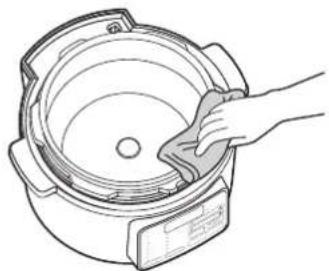
natural_image
Line drawing of a hand cleaning a large cylindrical container (no text or symbols)Condensation tray
Lift a handler (①), pull it to remove the condensation tray and water (②), throw away accumulated steam water and wash it with water
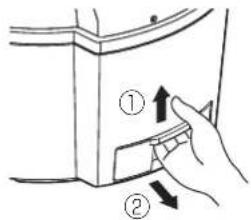
text_image
Diagram showing a hand pressing down on a device component with numbered callouts indicating step ① and step ②.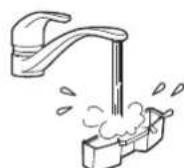
※ After washing, dry off thoroughly and then put back in place.
Steam rack
Wash with a neutral cleaning agent that is for kitchen use, and rinse off with water
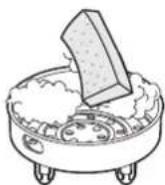
※ After washing, dry off thoroughly.
Weight, anti-block
Use a toothpick to remove any sediment or anything else that has gotten stuck inside the valve.
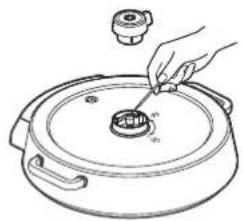
natural_image
Line drawing of a hand using a tool to clean or inspect a lid on a large pot (no text or symbols)Anti-block cap
Remove, wash with a neutral cleaning agent that is for kitchen use, and rinse off with water.
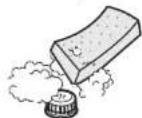
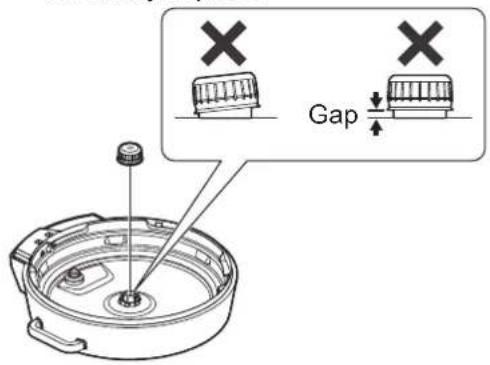
※ After washing and drying off thoroughly, do not forget to set up in place.
※ When setting up into place, make sure that there is no gap or crack between the cap and the lid, and that the cap is not askew; it will make a clicking sound when it is finally in place.
text_image
GapFloat valve
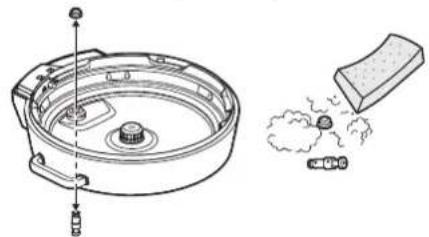
Take out, and use a toothpick to remove any sediment or anything else that has gotten stuck inside.
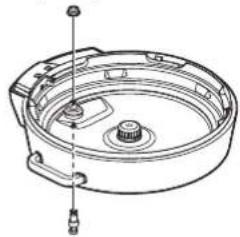
• To clean and maintain the float valve, first remove the float valve cap from the inside of the lid, then pull the pin out from the lid.
natural_image
Technical line drawing of a mechanical component with exploded view and close-up of a textured block (no text or symbols)- Also, remove any sediment or anything else that has gotten stuck inside the hole from which the float valve was removed.
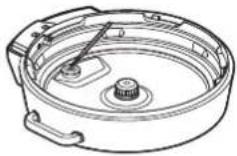
※ After cleaning and maintenance, do not forget to set up in place.
natural_image
Technical line drawing of a mechanical component with no visible text or symbolsTroubleshooting
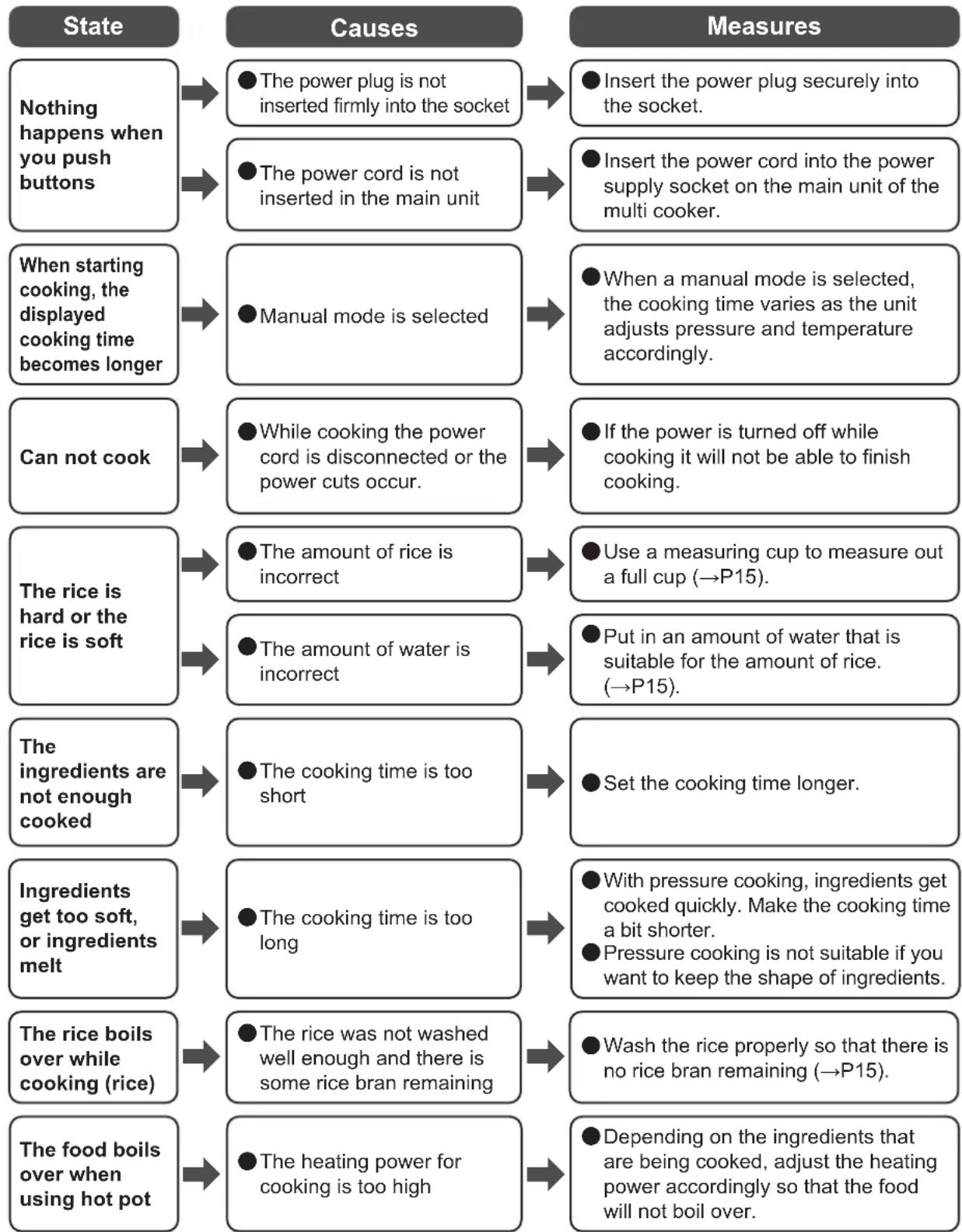
Confirm the following problems after reading the operation manual carefully before you entrust to repair it.
flowchart
graph TD
    A["Nothing happens when you push buttons"] --> B["● The power plug is not inserted firmly into the socket"]
    B --> C["● Insert the power plug securely into the socket."]
    A --> D["● The power cord is not inserted in the main unit"]
    D --> E["● Insert the power cord into the power supply socket on the main unit of the multi cooker."]
    F["When starting cooking, the displayed cooking time becomes longer"] --> G["● Manual mode is selected"]
    G --> H["● When a manual mode is selected, the cooking time varies as the unit adjusts pressure and temperature accordingly."]
    I["Can not cook"] --> J["● While cooking the power cord is disconnected or the power cuts occur."]
    J --> K["● If the power is turned off while cooking it will not be able to finish cooking."]
    L["The rice is hard or the rice is soft"] --> M["● The amount of rice is incorrect"]
    M --> N["● Use a measuring cup to measure out a full cup (→P15)."]
    L --> O["● The amount of water is incorrect"]
    O --> P["● Put in an amount of water that is suitable for the amount of rice. (→P15)."]
    Q["The ingredients are not enough cooked"] --> R["● The cooking time is too short"]
    R --> S["● Set the cooking time longer."]
    T["Ingredients get too soft, or ingredients melt"] --> U["● The cooking time is too long"]
    U --> V["● With pressure cooking, ingredients get cooked quickly. Make the cooking time a bit shorter.<br>● Pressure cooking is not suitable if you want to keep the shape of ingredients."]
    W["The rice boils over while cooking (rice)"] --> X["● The rice was not washed well enough and there is some rice bran remaining"]
    X --> Y["● Wash the rice properly so that there is no rice bran remaining (→P15)."]
    Z["The food boils over when using hot pot"] --> AA["● The heating power for cooking is too high"]
    AA --> AB["● Depending on the ingredients that are being cooked, adjust the heating power accordingly so that the food will not boil over."]
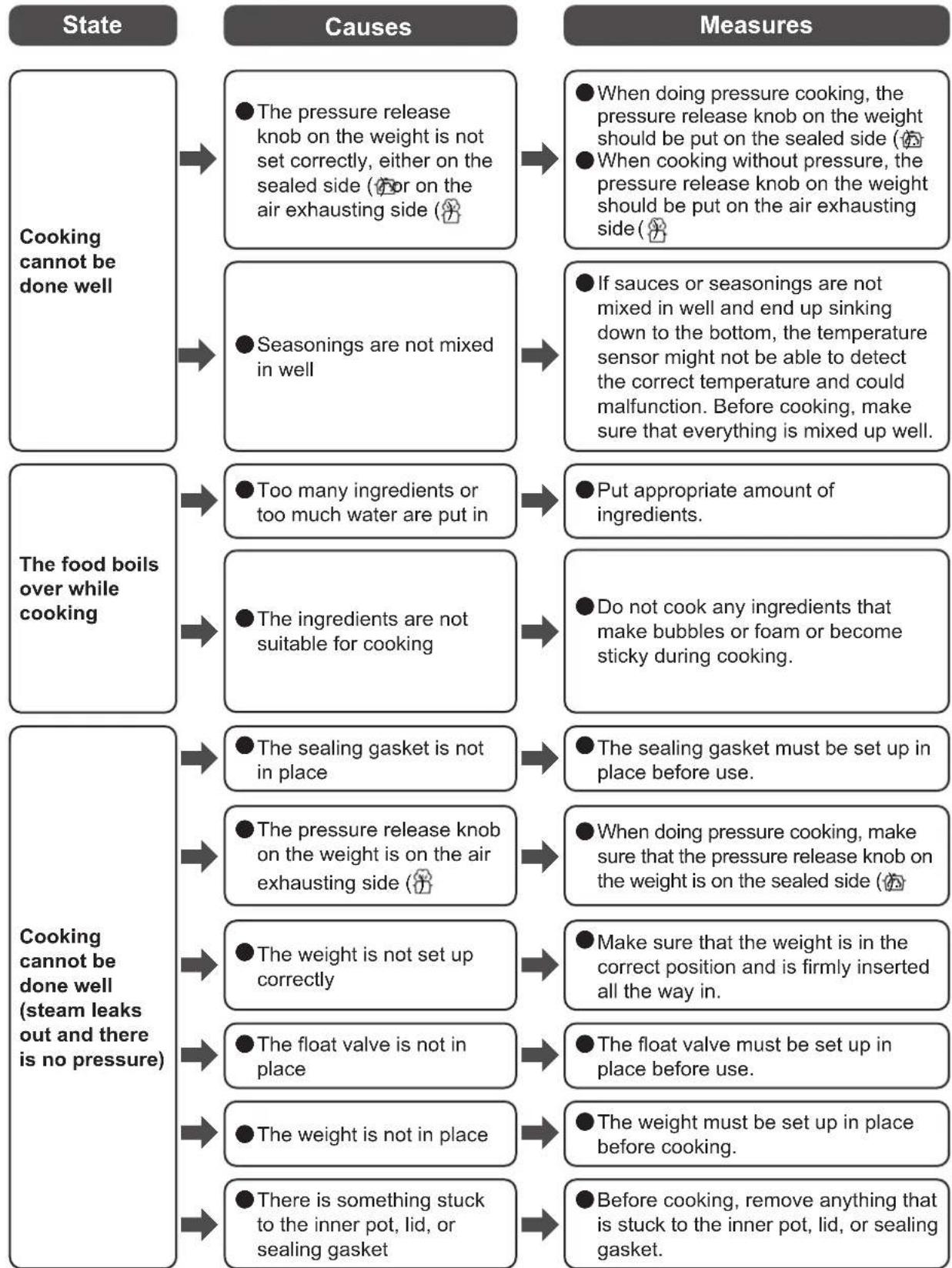
flowchart
graph TD
    A["State"] --> B["Cooking cannot be done well"]
    B --> C1["● The pressure release knob on the weight is not set correctly, either on the sealed side (or on the air exhausting side)"]
    C1 --> D1["● When doing pressure cooking, the pressure release knob on the weight should be put on the sealed side (using a cooking without pressure, the pressure release knob on the weight should be put on the air exhausting side)"]
    C --> D2["● Seasonings are not mixed in well"]
    D2 --> E1["● If sauces or seasonings are not mixed in well and end up sinking down to the bottom, the temperature sensor might not be able to detect the correct temperature and could malfunction. Before cooking, make sure that everything is mixed up well."]
    A --> F["The food boils over while cooking"]
    F --> G1["● Too many ingredients or too much water are put in"]
    G1 --> H1["● Put appropriate amount of ingredients."]
    F --> G2["● The ingredients are not suitable for cooking"]
    G2 --> I1["● Do not cook any ingredients that make bubbles or foam or become sticky during cooking."]
    A --> J["Cooking cannot be done well (steam leaks out and there is no pressure)"]
    J --> K1["● The sealing gasket is not in place"]
    K1 --> L1["● The sealing gasket must be set up in place before use."]
    J --> K2["● The pressure release knob on the weight is on the air exhausting side (using a cooking method)"]
    K2 --> L2["● When doing pressure cooking, make sure that the pressure release knob on the weight is on the sealed side (using a cooking method)"]
    J --> K3["● The weight is not set up correctly"]
    K3 --> L3["● Make sure that the weight is in the correct position and is firmly inserted all the way in."]
    J --> K4["● The float valve is not in place"]
    K4 --> L4["● The float valve must be set up in place before use."]
    J --> K5["● The weight is not in place"]
    K5 --> L5["● The weight must be set up in place before cooking."]
    J --> K6["● There is something stuck to the inner pot, lid, or sealing gasket"]
    K6 --> L6["● Before cooking, remove anything that is stuck to the inner pot, lid, or sealing gasket."]
Troubleshooting continued
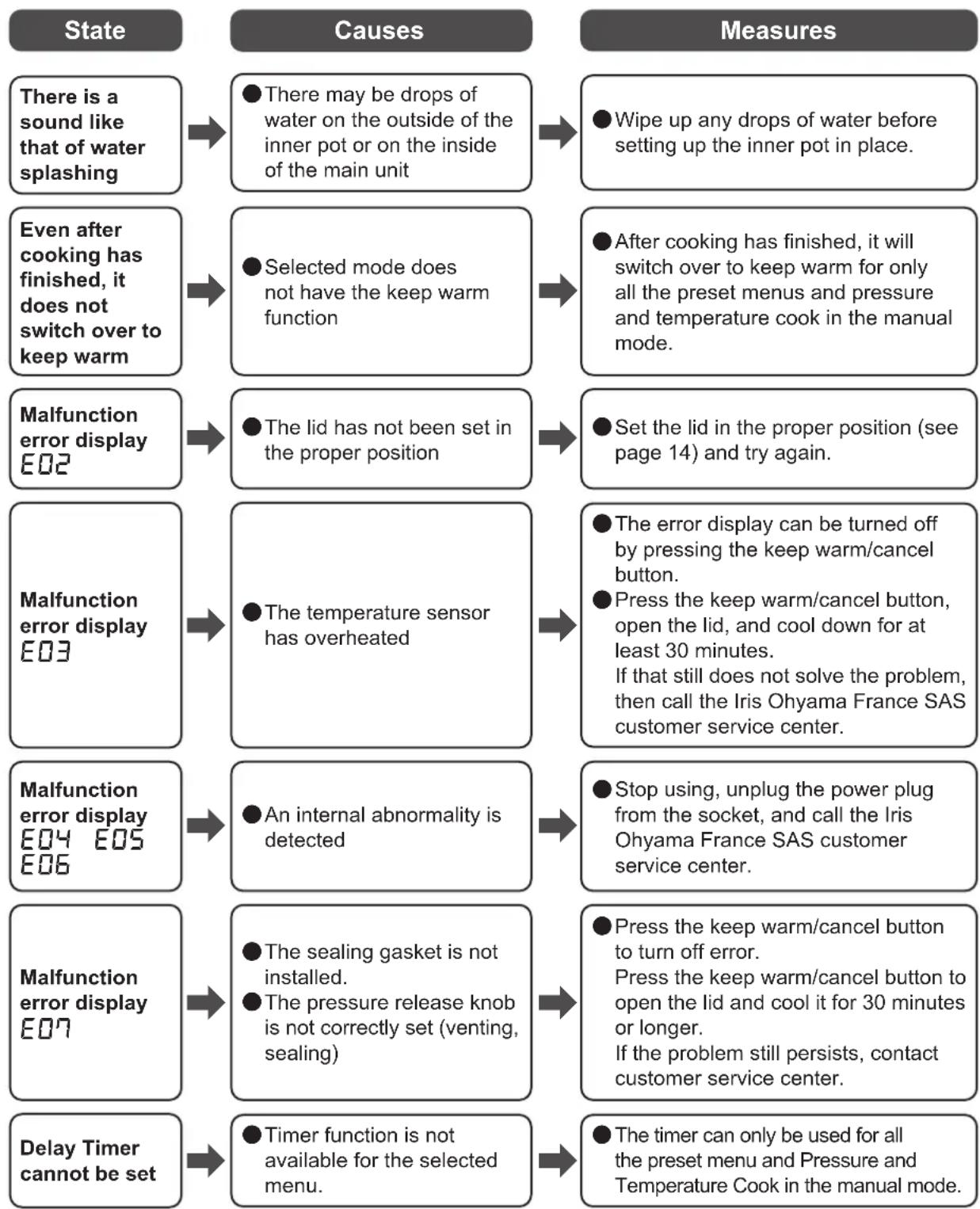
flowchart
graph TD
    A["State"] --> B["Causes"]
    B --> C["Measures"]

    A1["There is a sound like that of water splashing"] --> B1["● There may be drops of water on the outside of the inner pot or on the inside of the main unit"]
    B1 --> C1["● Wipe up any drops of water before setting up the inner pot in place."]

    A2["Even after cooking has finished, it does not switch over to keep warm"] --> B2["● Selected mode does not have the keep warm function"]
    B2 --> C2["● After cooking has finished, it will switch over to keep warm for only all the preset menus and pressure and temperature cook in the manual mode."]

    A3["Malfunction error display E02"] --> B3["● The lid has not been set in the proper position"]
    B3 --> C3["● Set the lid in the proper position (see page 14) and try again."]

    A4["Malfunction error display E03"] --> B4["● The temperature sensor has overheated"]
    B4 --> C4["● The error display can be turned off by pressing the keep warm/cancel button.<br>● Press the keep warm/cancel button, open the lid, and cool down for at least 30 minutes.<br>If that still does not solve the problem, then call the Iris Ohyama France SAS customer service center."]

    A5["Malfunction error display E04 E05 E06"] --> B6["● An internal abnormality is detected"]
    B6 --> C6["● Stop using, unplug the power plug from the socket, and call the Iris Ohyama France SAS customer service center."]

    A6["Malfunction error display E07"] --> B7["● The sealing gasket is not installed.<br>● The pressure release knob is not correctly set (venting, sealing)"]
    B7 --> C7["● Press the keep warm/cancel button to turn off error.<br>Press the keep warm/cancel button to open the lid and cool it for 30 minutes or longer.<br>If the problem still persists, contact customer service center."]

    A7["Delay Timer cannot be set"] --> B8["● Timer function is not available for the selected menu."]
    B8 --> C8["● The timer can only be used for all the preset menu and Pressure and Temperature Cook in the manual mode."]
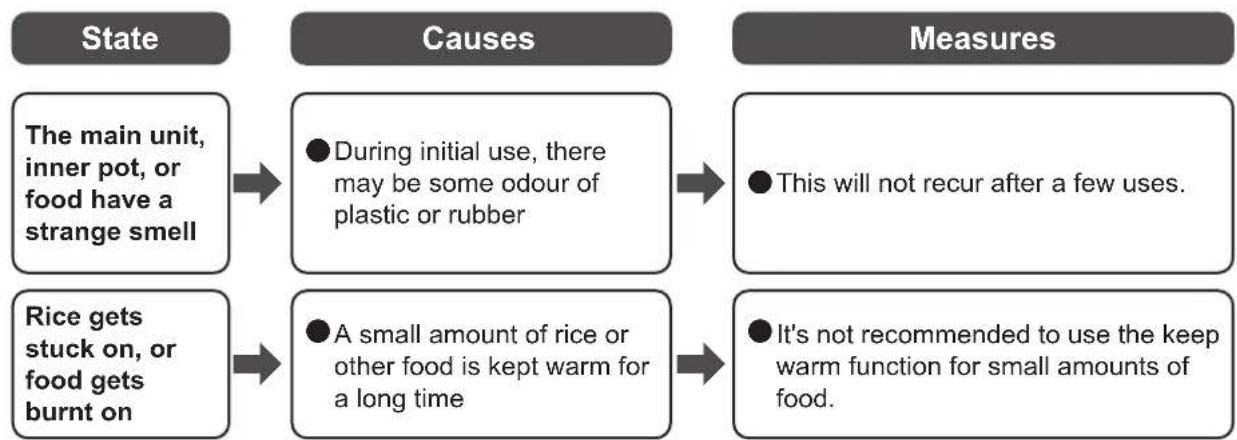
flowchart
graph LR
    A["State"] --> B["The main unit, inner pot, or food have a strange smell"]
    B --> C["Causes"]
    C --> D["During initial use, there may be some odour of plastic or rubber"]
    D --> E["Measures"]
    E --> F["This will not recur after a few uses."]
    A --> G["Rice gets stuck on, or food gets burnt on"]
    G --> H["A small amount of rice or other food is kept warm for a long time"]
    H --> I["It's not recommended to use the keep warm function for small amounts of food."]
E
If you still cannot solve the problem
Contact the store where you bought it or Iris Ohyama France SAS customer service center.
Iris Ohyama France customer service E-mail
CustomerService@iriseurope.fr

Warning
- Do not try to disassemble, repair or transform the product without approval.
Multicooker
PC-MA3
Bedienungsanleitung
text_image
WOO200 15.000 68.88 C: 3.00 C: 2.00 C: 1.00 C: 0.50 C: 0.25 C: 0.10 C: 0.05 C: 0.01 C: 0.005 C: 0.001 C: 0.0005 C: 0.0001 C: 0.00005 C: 0.00001 C: 0.000005 C: 0.000001 C: 0.0000005 C: 0.0000001 C: 0.00000005 C: 0.00000001 C: 0.000000005 C: 0.000000001 C: 0.0000000005 C: 0.0000000001 C: 0.00000000005 C: 68.88 C: 3.88 C: 2.88 C: 1.88 C: 1.28 C: 4.28 C: 7.28 C: 12.28 C: 16.28 C: 24.28 C: 32.28 C: 48.28 C: 66.28 C: 84.28 C: 162.28 C: 244.28 C: 332.28 C: 496.28 C: 672.28 C: 848.28 C: 1336.28 C: 1972.28 C: 2694.28 C: 3596.28 C: 4798.28 C: 6196.28 C: 7994.28 C: 9996.28 C: 13994.28 C: 19996.28 C: 26998.28 C: 35996.28 C: 47994.28 C: 61992.28 C: 79994.28 C: 99996.28 C: 139994.28 C: 199996.28 C: 269998.28 C: 359996.28 C: 479994.28 C: 619992.28 C: 799994.28 C: 999996.28 C: 1399998.28 C: 1999996.28 C: 2699994.28 C: 3599992.28 C: 4799994.28 C: 6199996.28 C: 7999994.28 C: 9999996.28 C: 13999994.28 C: 19999996. C: 26999994. C: 35999996. C: 47999994. C: 61999996. C: 79999994. C: 99999996. C: 139999994. C: 19999996. C: 26999994. C: 35999996. C: 47999994. C: 61999996. C: 74777777. C: 87777777. C: 137777777. C: 177777777. C: 217777777. C: 257777777. C: 317777777. C: 367777777. C: 417777777. C: 467777777. C: 517777777. C: 567777777. C: 617777777. C: 667777777. C: 717777777. C: 767777777. C: 817777777. C: 867777777. C: 136555555. C: 163555555. C: 181555555. C: 183555555. C: 183555555. C: 183555555. C: 183555555. C: 183555555. C: 183555555. C: 183555555. C: 183555555. C : C : C : C : C : C : C : C : C : C : C : C : C : C : C : C : C : C : C : C : C : C : C : C : C : C : C : C : C : C : C : C : C : C : C : C : C : C : C : C : C : C : C : C : C : C : C : C : C : C : C : N/AInhalt
Technische Daten 44
text_image
Brown Rice - 4.0 - - 2.0 Beansnatural_image
Simple line drawing of an electrical plug with three connectors and a black X mark, no text or symbols present.natural_image
Line drawing of a rice cooker with steam rising and a 'X' symbol indicating no heat or smoke (no text or labels)natural_image
Line drawing of a rice cooker with water being poured into it, marked with an 'X' symbol (no text or labels present)
Verboten
natural_image
Simple line drawing of a box with a monitor and a rice cooker on a table, no text or symbols present.Entsorgung
natural_image
Simple line drawing of a cylindrical container (no text or symbols)Hauptgerät
natural_image
Line drawing of a mechanical component with four legs and central plate (no text or symbols)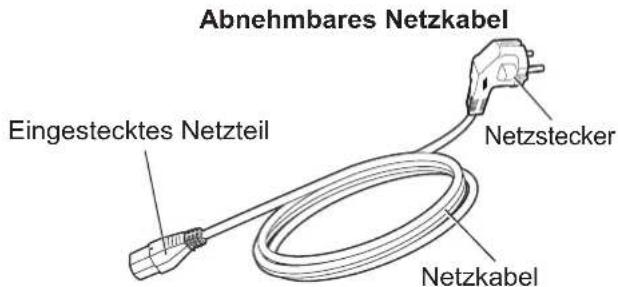
Rice
Stew
Roast
- Bean
- Soup
- Cake
Preset
Pressure
Temperature Cook
Slow Cook
Hot Pot
- Steam
- Heat Up
Manual

Time

Temperature

Keep Warm
Remaining Time
Cancel
Start
Anzeigelampe/Taste Manual (Manuelles Menü)
text_image
Diagram showing a kitchen appliance with a lock mechanism and an open button labeled 'OPEN'natural_image
Line drawing of a portable appliance with a power outlet and cable, no text or symbols presenttext_image
Time Remaining Temperature Rice Stew Roast Bean Soup Cake Preset Pressure Temperature Cook Slow Cook Hot Pot Steam Heat Up PC-MA3 Pressuring Temperature + Delay Timer Remaining Time Keep Warm Cancel Start Blinktnatural_image
Line drawing of a rice cooker with a spoon and smoke rising from its side (no text or symbols)text_image
Time Remaining Temperature Rice Stew Roast Bean Soup Cake Pressure Temperature Cook Slow Cook Hot Pot Steam Heat Up Reset Manual PC-MA3 Pressuring Temperature + Delay Timer Remaining Time Keep Warm Cancel Start Blinkttext_image
Time Remaining Temperature Rice Stew Roast Bean Soup Cake Preset Pressure Temperature Cook Slow Cook Hot Pot Steam Heat Up PC-MA3 Pressuring Time Temperature + Delay Timer Remaining Time Keep Warm Cancel StartVerwendung
text_image
Time Remaining Temperature Rice Stow Roast Bean Soup Cake Preset Pressure Temperature Cook Slow Cook Hot Pot Steam Heat Up PC-MA3 Pressuring Temperature + Delay Timer Remaining Time Keep Warm Cancel Start Blinkttext_image
Time Remaining Temperature Rice Stew Roast Bean Soup Cake Preset Pressure Temperature Cook Slow Cook Hot Pot Steam Heat Up PC-MA3 Pressuring Time Temperature + Delay Timer Remaining Time Keep Warm Cancel Starttext_image
Time Remaining Temperature Rice Stew Roast Bean Soup Cake Preset Pressure Temperature Cook Slow Cook Hot Pot Steam Heat Up PC-MA3 Pressuring Time + Temperature + Delay Timer Remaining Time Keep Warm Cancel Start Blinkttext_image
Time Remaining Temperature Rice Stew Roast Bean Soup Cake Preset Pressure Temperature Cook Slow Cook Hot Pot Steam Heat Up PC-MA3 Pressuring Time + Temperature Delay Timer Remaining Time Keep Warm Cancel StartVerwendung
Manual (Manuelles Menü) (Temperature Cook (Temperaturgaren))

text_image
Time Remaining Temperature Rice Stew Roast Bean Soup Cake Preset Pressure Temperature Cook Slow Cook Hot Pot Steam Heat Up PC-MA3 Pressuring — Time + — Temperature + Delay Timer Remaining Time Keep Warm Cancel Startnatural_image
Illustration of a bag being placed in a bowl with an arrow indicating downward motion (no text or symbols)Verwendung
natural_image
Line drawing of a microwave oven with lid and base, showing internal components (no text or symbols)text_image
Time Remaining Temperature Rice Stew Roast Bean Soup Cake Preset Pressure Temperature Cook Slow Cook Hot Pot Steam Heat Up Manual PC-MA3 Pressuring Temperature + Delay Timer Remaining Time Keep Warm Cancel Start Blinkt5
text_image
Time Remaining Temperature Rice Stew Roast Bean Soup Cake Preset Pressure Temperature Cook Slow Cook Hot Pot Steam Heat Up PC-MA3 Pressuring Time + Temperature + Delay Timer Remaining Time Keep Warm Cancel Start
text_image
Time Remaining Temperature Rice Stew Roast Bean Soup Cake Preset Pressure Temperature Cook Slow Cook Hot Pot Steam Heat Up PC-MA3 Pressuring - Time - Temperature + Delay Timer Remaking Time Keep Warm Cancel Startnatural_image
Line drawing of a rice cooker with food inside, no text or symbols presenttext_image
Time Remaining Temperature Rice Stew Roast Bean Soup Cake Preset Pressure Temperature Cook Stow Cook Hot Pot Steam Heat Up Preset Manual Start PC-MA3 Pressuring Time + Temperature Delay Timer Remaining Time Keep Warm Cancel Startnatural_image
Line drawing of a rice cooker with a lid and base, showing internal components (no text or symbols)text_image
Time Remaining Temperature Rice Stew Roast Bean Soup Cake Preset Pressure Temperature Cook Slow Cook Hot Pot Steam Heat Up PC-MA3 Pressuring Time Temperature Delay Timer Remaining Time Keep Warm Cancel Startnatural_image
Line drawing of a rice cooker with steamer inside (no text or symbols)text_image
PC-MA3 Time Remaining Temperature Rice Stew Roast Bean Soup Cake Preset Pressure Temperature Cook Stew Cook Hot Pot Steam Heat Up Pressuring Temperature Delay Timer Remaining Time Keep Warm Cancel Startnatural_image
Line drawing of three kitchenware containers: a bowl with dough, a lid, and a lid (no text or symbols)natural_image
Line drawing of a hand cleaning a large cylindrical object with a cloth (no text or symbols)Kondensatbehälter
text_image
Diagram showing a hand pressing down on a device component with numbered parts and directional arrows indicating movement.
natural_image
Line drawing of a cooking pot with a hand holding a tool, no text or symbols presentAntiblockierkappe
natural_image
Technical line drawing of a mechanical component with exploded view and close-up of internal components (no text or symbols)natural_image
Technical line drawing of a mechanical component with no visible text or symbolsProblembehandlung
text_image
Brown Rice - 4.0 - - 2.0 Beansnatural_image
Simple line drawing of an electrical plug with a black X mark above it, no text or symbols present.natural_image
Line drawing of a rice cooker with steam rising and a 'X' mark indicating no smoke or heat (no text or symbols on the diagram itself)natural_image
Line drawing of a rice cooker with a handle and lid, marked with an 'X' symbol (no text or labels present)
Interdit
natural_image
Simple line drawing of a box with a monitor and a cooking pot on a table, no text or symbols present.Mise au rebut
natural_image
Simple line drawing of a cylindrical container (no text or symbols)Unité principale
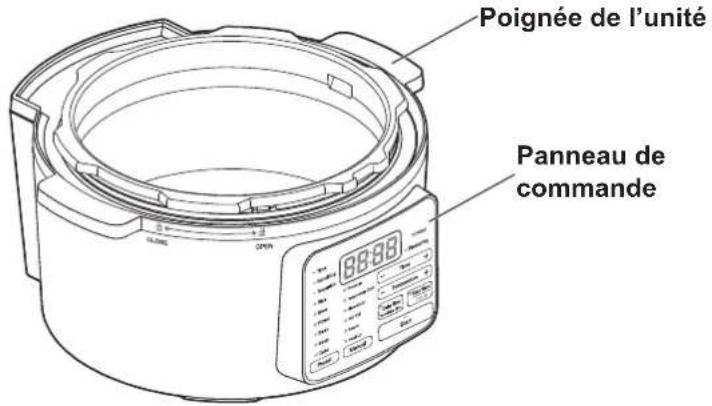
natural_image
Line drawing of a plateau vapeur with four legs and central perforated casing (no text or symbols)Rice
Stew
Roast
- Bean
- Soup
- Cake
Preset
Pressure
Temperature Cook
Slow Cook
Hot Pot
Steam
- Heat Up
Manual

Time


Temperature


Delay Timer Remaining Time

Keep Warm Cancel
Start
text_image
Diagram showing a cooking pot with rotating lid and open lid, labeled with 'OPEN' button and directional arrows.Fermeture
natural_image
Line drawing of a rice cooker with attached power outlet (no text or symbols)text_image
Time Remaining Temperature Rice Stew Roast Bean Soup Cake Preset Pressure Temperature Cook Slow Cook Hot Pot Steam Heat Up PC-MA3 Pressuring Time + Temperature + Delay Timer Remaining Time Keep Warm Cancel Start Clignotetext_image
= Time == Remaining == Temperature ● Rice ● Stew ● Roast ● Bean ● Soup ● Cake Preset Pressure Temperature Cook Slow Cook Hot Pot Steam Heat Up PC-MA3 Pressuring — Time + — Temperature + Delay Timer Remaining Time Keep Warm Cancel — Startnatural_image
Line drawing of a rice cooker with a spoon and steam rising (no text or symbols)text_image
Time Remaining Temperature Rice Stew Roast Bean Soup Cake Pressure Temperature Cook Slow Cook Hot Pot Steam Heat Up Preset Manual PC-MA3 Pressuring Time + Temperature + Delay Timer Remaining Time Keep Warm Cancel Start Clignotetext_image
PC-MA3 - Time - Remaining - Temperature ● Rice ● Stew ● Roast ● Bean ● Soup ● Cake Preset Pressure Temperature Cook Slow Cook Hot Pot Steam Heat Up Pressuring - Time + - Temperature + Delay Timer Remaining Time Keep Warm Cancel Start Clignotetext_image
Time Remaining Temperature Rice Stew Roast Bean Soup Cake Preset Pressure Temperature Cook Slow Cook Hot Pot Steam Heat Up PC-MA3 Pressuring Time Temperature + Delay Timer Remaining Time Keep Warm Cancel StartUtilisation
text_image
Time Remaining Temperature Rice Stew Roast Bean Soup Cake Preset Pressure Temperature Cook Slow Cook Hot Pot Steam Host Up PC-MA3 Pressuring Time + Temperature + Delay Timer Remaining Time Keep Warm Cancel Start Clignotetext_image
Time Remaining Temperature Rice Stew Roast Bean Soup Cake Preset Pressure Temperature Cook Slow Cook Hot Pot Steam Heat Up PC-MA3 Pressuring — Time — Temperature + Delay Timer Remaining Time Keep Warm Cancel Startnatural_image
Line drawing of a cooking pot with food inside, no text or symbols presenttext_image
Time Remaining Temperature Rice Stew Roast Bean Soup Cake Preset Pressure Temperature Cook Slow Cook Hot Pot Steam Heat Up PC-MA3 Pressuring Time + Temperature + Delay Timer Remaining Time Keep Warm Cancel Start Clignotetext_image
Time Remaining Temperature Rice Stew Roast Bean Soup Cake Preset Pressure Temperature Cook Slow Cook Hot Pot Steam Heat Up PC-MA3 Pressuring Time + Temperature Today Timer Remaining Time Keep Warm Cancel Starttext_image
Time Remaining Temperature Rice Stew Roast Bean Soup Cake Preset Pressure Temperature Cook Slow Cook Hot Pot Steam Heat Up PC-MA3 Pressuring Time Temperature + Delay Timer Remaining Time Keep Warm Cancel Startnatural_image
Illustration of a bag being placed in a bowl with an arrow indicating downward motion (no text or symbols)natural_image
Line drawing of a kitchen appliance with a lid and side panel (no text or symbols)text_image
Time Remaining Temperature Rice Stew Roast Bean Soup Cake Preset Pressure Temperature Cook Stow Cook Hot Pot Steam Heat Up PC-MA3 Pressuring Time + Temperature + Delay Timer Remaining Time Keep Warm Cancel Start Clignotetext_image
Time Remaining Temperature Rice Stew Roast Bean Soup Cake Preset Pressure Temperature Cook Slow Cook Hot Pot Steam Heat Up PC-MA3 Pressuring Time + Temperature + Delay Timer Remaining Time Keep Warm Cancel Starttext_image
Time Remaining Temperature Rice Stew Roast Bean Soup Cake Preset Pressure Temperature Cook Slow Cook Hot Pot Steam Heat Up PC-MA3 Pressuring — Time — Temperature + Delay Timer Remaining Time Keep Warm Cancel Startnatural_image
Line drawing of a kitchen electric cooker with food inside (no text or symbols)text_image
Time Remaining Temperature Rice Stew Roast Bean Soup Cake Preset Pressure Temperature Cook Stow Cook Hot Pot Steam Heat Up PC-MA3 Pressuring Temperature Delay Timer Remaining Time Keep Warm Cancel Startnatural_image
Line drawing of a rice cooker with a lid and base, showing internal components (no text or symbols)text_image
Time Remaining Temperature Rice Stow Roast Bean Soup Cake Preset Pressure Temperature Cook Slow Cook Hot Pot Steam Heat Up Manual PC-MA3 Pressuring Time + Temperature + Delay Timer Remaining Time Keep Warm Cancel Start Clignotetext_image
PC-MA3 Time Remaining Temperature Rice Stew Roast Bean Soup Cake Pressur Temperature Cook Slow Cook Hot Pot Steam Delay Timer Remaining Time Keep Warm Cancel Start Preset Manualnatural_image
Line drawing of a cooking pot with food inside, no text or symbols presenttext_image
Time Remaining Temperature Rice Stew Roast Bean Soup Cake Preset Pressure Temperature Cook Slow Cook Hot Pot Steam Heat Up PC-MA3 Pressuring Time + Temperature Delay Timer Remaining Time Keep Warm Cancel Startnatural_image
Line drawing of three kitchenware components: a bowl with a lid, a lid with a central knob, and a side cover (no text or symbols)natural_image
Line drawing of a hand cleaning a cylindrical container with a cloth (no text or symbols)text_image
Diagram showing a hand pressing down on a device component with numbered arrows indicating motion or force direction.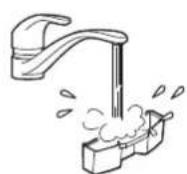
natural_image
Line drawing of a hand using a tool to clean or inspect a circular object on a pot (no text or symbols)natural_image
Technical line drawing of a mechanical component with a close-up view showing internal parts and a powder swab (no text or symbols)natural_image
Technical line drawing of a mechanical component with no visible text or symbolsDépannage
text_image
Recipiente interior Tapa Unidad principal
Importante
text_image
Brown Rice - 4.0 - - 2.0 Beansnatural_image
Simple line drawing of an electrical plug with a black X mark above it, no text or symbols present.natural_image
Line drawing of a rice cooker with steam rising and a 'X' symbol indicating no heat or smoke (no text or labels)natural_image
Line drawing of a rice cooker with a bucket pouring liquid into the cup, marked with an 'X' symbol (no text or labels present)
Prohibido
natural_image
Simple line drawing of a box with a monitor and a rice cooker on a table, no text or symbols present.Eliminación
natural_image
Simple line drawing of a cylindrical container (no text or symbols)Unidad principal
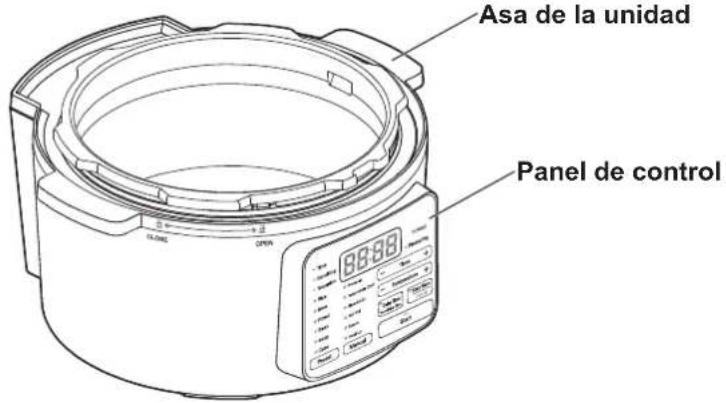
natural_image
Line drawing of a circular basin with four legs and central perforated plate (no text or symbols)
text_image
Time Remaining Temperature 88:88 PC-MA3 Pressuring Rice Stew Roast Bean Soup Cake Preset Pressure Temperature Cook Slow Cook Hot Pot Steam Heat Up Manual - Time + - Temperature + Delay Timer Remaining Time Keep Warm Cancel - Starttext_image
Diagram showing a cooking pot with labeled open status and directional arrows indicating rotation and opening.Cierre
natural_image
Line drawing of a rice cooker with attached power outlet and cable (no text or symbols)text_image
Time Remaining Temperature 0H PC-MA3 Pressuring Rice Stew Roast Bean Soup Cake Preset Pressure Temperature Cock Slow Cook Hot Pot Steam Heat Up Delay Timer Penshing Time Keep Warm Cancel Start Indicator encendidonatural_image
Line drawing of a rice cooker with a spoon and steam rising from its side (no text or symbols)text_image
Apagar Keep Warm Canceltext_image
Time Remaining Temperature Rice Stew Roast Bean Soup Cake Preset Pressure Temperature Cook Stow Cook Hot Put Steam Heat Up Manual PC-MA3 Pressuring — Time + — Temperature + Delay Timer Remaining Time Keep Warm Cancel Start Parpa- deandotext_image
Time Remaining Temperature Rice Stew Roast Bean Soup Cake Preset Pressure Temperature Cook Stew Cook Hot Pot Steam Heat Up PC-MA3 Pressuring Time + Temperature + Delay Timer Remaining Time Keep Warm Cancel Start Indicator encendidotext_image
Apagar Keep Warm Canceltext_image
Time Remaining Temperature Rice Stew Roast Bean Soup Cake Preset Pressure Temperature Cook Slow Cook Hot Pot Steam Heat Up PC-MA3 Pressuring Time + Temperature + Delay Timer Remaining Time Keep Warm Cancel Start Indicator encendidotext_image
Apagar Keep Warm Canceltext_image
Time Remaining Temperature Rice Stew Roast Bean Soup Cake Preset Pressure Temperature Cook Slow Cook Hot Pot Steam Heat Up PC-MA3 Pressuring Time Temperature + Delay Timer Remaining Time Keep Warm Cancel StartFuncionamiento
text_image
Time Remaining Temperature Rice Stew Roast Bean Soup Cake Preset Pressure Temperature Cook Slow Cook Hot Pot Steam Heat Up PC-MA3 Pressuring — Time + — Temperature + Delay Timer Remaining Time Keep Warm Cancel Start Indicator encendidotext_image
Time Remaining Temperature Rice Stew Roast Bean Soup Cake Preset Pressure Temperature Cook Stew Cook Hot Pot Steam Heat Up Preset Manual Start PC-MA3 Pressuring — Time — Temperature + — Temperature + Delay Timer Remaining Time Keep Warm Cancel Starttext_image
Time Remaining Temperature Rice Stew Roast Bean Soup Cake Preset Pressure Temperature Cook Slow Cook Hot Pot Steam Heat Up PC-MA3 Pressuring Time + Temperature + Delay Timer Remaining Time Keep Warm Cancel Start Parpa- deandotext_image
Time Remaining Temperature Rice Stew Roast Bean Soup Cake Preset Pressure Temperature Cook Slow Cook Hot Pot Steam Heat Up PC-MA3 Pressuring Time + Temperature Delay Timer Remaining Time Keep Warm Cancel StartFuncionamiento
text_image
PC-MA3 Time Remaining Temperature Rice Stew Roast Bean Soup Cake Preset Pressure Temperature Cook Slow Cook Hot Pot Steam Heat Up Pressuring Temperature + Delay Timer Remaining Time Keep Warm Cancel Starttext_image
Time Remaining Temperature 1:00 PC-MA3 Pressuring Rice Stew Roast Bean Soup Cake Preset Pressure Temperature Cook Slow Cook Hot Pot Steam Heat Up Start Delay Timer Remaining Time Keep Warm Cancel Indicator encendido Manualnatural_image
Illustration of a bag being placed in a bowl with an arrow indicating downward motion (no text or symbols)Funcionamiento
text_image
Time Remaining Temperature Rice Stew Roast Bean Soup Cake Preset Pressure Temperature Cook Stow Cook Hot Pot Steam Heat Up Manual PC-MA3 Pressuring Time + Temperature + Delay Timer Remaining Time Keep Warm Cancel Start Parpa- deandotext_image
Time Remaining Temperature Rice Stew Roast Bean Soup Cake Preset Pressure Temperature Cook Slow Cook Hot Pot Steam Heat Up PC-MA3 Pressuring Time + Temperature + Delay Timer Remaining Time Keep Warm Cancel Starttext_image
Time Remaining Temperature Rice Stew Roast Bean Soup Cake Preset Pressure Temperature Cook Slow Cook Hot Pot Steam Heat Up PC-MA3 Pressuring Time Temperature + Delay Timer Remaining Time Keep Warm Cancel Startnatural_image
Line drawing of a rice cooker with lid and side panel (no text or symbols)text_image
PC-MA3 Temperature Rice Stew Roast Bean Soup Cake Preset Pressure Temperature Cook Slow Cook Hot Pot Steam Heat Up Manual Pressuring Temperature + Delay Timer Remaining Time Keep Warm Cancel Start Parpa- deandotext_image
PC-MA3 Time Remaining Temperature Rice Stew Roast Bean Soup Cake Preset Pressure Temperature Cook Slow Cook Hot Pot Steam Heat Up Delay Timer Remanoring Time Keep Warm Cancel Pressuring + - Time + - Temperature - Starttext_image
Time Remaining Temperature Rice Stew Roast Bean Soup Cake Preset Pressure Temperature Cook Slow Cook Hot Pot Steam Heat Up PC-MA3 Pressuring — Time + — Temperature + Delay Timer Remaining Time Keep Warm Cancel Start Indicator encendidonatural_image
Line drawing of a rice cooker with a lid and base, showing internal components (no text or symbols)text_image
Alinear co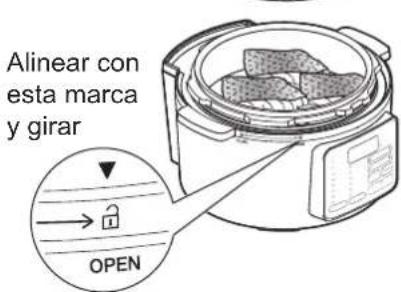
text_image
PC-MA3 Time Remaining Temperature Rice Stew Roast Bean Soup Cake Preset Pressure Temperature Cook Slow Cook Hot Pot Steam Heat Up Manual Pressuring Temperature + Temperature + Delay Timer Remaining Time Keep Warm Cancel Start Parpa- deandotext_image
Time Remaining Temperature Rice Stew Roast Bean Soup Cake Preset Manual PC-MA3 Pressuring Pressure Temperature Cook Slow Cook Hot Pot Steam Delay Timer Remaining Time Keep Warm Cancel Startnatural_image
Line drawing of a rice cooker with food inside (no text or symbols)text_image
PC-MA3 Pressuring Time Remaining Temperature Rice Stew Roast Bean Soup Cake Preset Pressure Temperature Cook Slow Cook Hot Pot Steam Heat Up Manual Start Delay Timer Remaining Time Keep Warm Cancel Parpa- deandotext_image
PC-MA3 Time Remaining Temperature Rice Stew Roast Bean Soup Cake Preset Pressure Temperature Cook Slow Cook Hot Pot Steam Heat Up Pressuring Temperature Delay Timer Remaining Time Keep Warm Cancel Starttext_image
Time Remaining Temperature Rice Stew Roast Bean Soup Cake Preset Pressure Temperature Cook Slow Cook Hot Pot Steam Heat Up PC-MA3 Pressuring Time + Temperature + Delay Timer Remaining Time Keep Warm Cancel Start Indicator encendidonatural_image
Line drawing of a cooking pot with lid and side view, no text or symbols presentnatural_image
Line drawing of a hand cleaning a large cylindrical container (no text or symbols)text_image
Diagram showing a hand pressing down on a device component with numbered arrows indicating motion or force direction.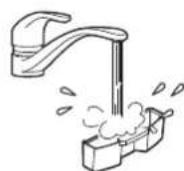
natural_image
Line drawing of a hand using a tool to clean or inspect a lid on a large pot (no text or symbols)Tapón antibloqueo
natural_image
Technical line drawing of a mechanical component with a close-up view showing internal structure and exhaust (no text or symbols)natural_image
Technical line drawing of a mechanical component with no visible text or symbolstext_image
Line drawing of a rice cooker with control panel and digital display showing temperature readingSommario
Specifiche tecniche.... 170
text_image
Brown Rice - 4.0 - - 2.0 Beansnatural_image
Simple line drawing of an electrical plug with three connectors and a black X mark above (no text or symbols)natural_image
Line drawing of a rice cooker with steam rising and a 'X' symbol indicating no heat or smoke (no text or labels)natural_image
Line drawing of a rice cooker with a lid and handle, marked with an 'X' symbol (no text or labels present)
Vietato
natural_image
Simple line drawing of a box with an open lid and a rice cooker on a table, no text or symbols present.Smaltimento
natural_image
Simple line drawing of a cylindrical container (no text or symbols)
Unità principale
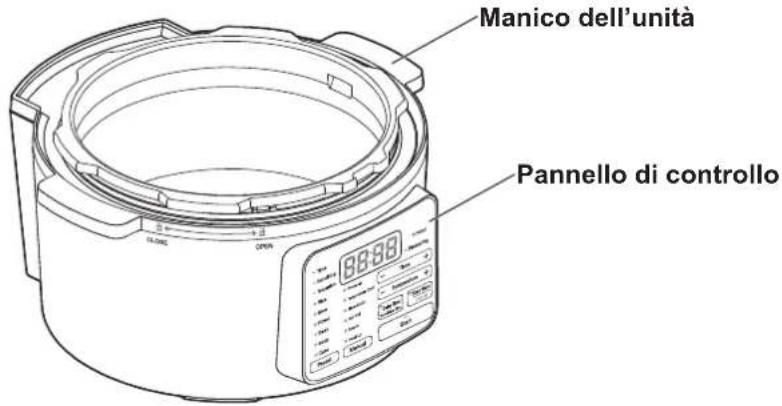
natural_image
Line drawing of a circular basin with four legs and central plate (no text or symbols)Rice
Stew
Roast
- Bean
- Soup
- Cake
Preset
Pressure
Temperature Cook
Slow Cook
Hot Pot
Steam
- Heat Up
Manual

Time

Temperature

Keep Warm
Remaining Time
Cancel
Start
Spia/pulsante del menu manuale
text_image
Diagram showing a cooking pot with open lid and directional arrows indicating rotation and opening states.Come chiuderlo
natural_image
Line drawing of a portable appliance with attached power outlet and cable (no text or symbols)text_image
Time Remaining Temperature Rice Stew Roast Bean Soup Cake Preset Pressure Temperature Cook Slow Cook Hot Pot Steam Heat Up PC-MA3 Pressuring Time + Temperature + Delay Timer Remaining Time Keep Warm Cancel Start Lam- peggiatext_image
Time Remaining Temperature 1:10 PC-MA3 Pressuring Rice Stew Roast Bean Soup Cake Preset Pressure Temperature Cook Stow Cook Hot Pot Steam Heat Up Delay Timer Remaining Time Keep Warm Cancel Start Spia accesanatural_image
Line drawing of a rice cooker with a spoon and steam rising (no text or symbols)text_image
Spento Keep Warm Canceltext_image
Time Remaining Temperature Rice Stew Roast Bean Soup Cake Pressure Temperature Cook Slow Cook Hot Pot Steam Heat Up Preset Manual PC-MA3 Pressuring Time + Temperature + Delay Timer Remaining Time Keep Warm Cancel Start Lam- peggia
text_image
Spento Keep Warm Canceltext_image
Spento Keep Warm Canceltext_image
Spia accesa = Time ■ Remaining ■ Temperature ● Rice ● Stew ● Roast ● Bean ● Soup ● Cake Preset Manual PC-MA3 Pressuring Temperature Cook Slow Cook Hot Pot Steam Heat Up Delay Timer Remaining Time Keep Warm Cancel Starttext_image
Time Remaining Temperature Rice Stew Roast Bean Soup Cake Preset Pressure Temperature Cook Slow Cook Hot Pot Steam Heat Up PC-MA3 Pressuring Time Temperature + Delay Timer Remaining Time Keep Warm Cancel StartModalità d'uso
text_image
Time Remaining Temperature Rice Stew Roast Bean Soup Cake Preset Pressure Temperature Cook Slow Cook Hot Pot Steam Heat Up PC-MA3 Pressuring Time + Temperature + Delay Timer Remaining Time Keep Warm Cancel Start Lam- peggiatext_image
Time Remaining Temperature Rice Stew Roast Bean Soup Cake Preset Pressure Temperature Cook Slow Cook Hot Pot Steam Heat Up Preset Manual PC-MA3 Pressuring — Time — Temperature + Delay Timer Remaining Time Keep Warm Cancel Starttext_image
= Time ■ Remaining ■ Temperature ● Rice ● Stew ● Roast ● Bean ● Soup ● Cake Preset Pressure Temperature Cook Slow Cook Hot Pot Steam Heat Up PC-MA3 Pressuring — Time + — Temperature + Delay Timer Remaining Time Keep Warm Cancel Start Spia accesatext_image
Time Remaining Temperature Rice Stew Roast Bean Soup Cake Preset Pressure Temperature Cook Slow Cook Hot Pot Steam Heat Up PC-MA3 Pressuring Time + Temperature + Delay Timer Remaining Time Keep Warm Cancel Start Lam- peggiatext_image
Time Remaining Temperature Rice Stew Roast Bean Soup Cake Preset Pressure Temperature Cook Slow Cook Hot Pot Steam Heat Up PC-MA3 Pressuring Time + Temperature Delay Timer Remaining Time Keep Warm Cancel Starttext_image
PC-MA3 Time Remaining Temperature Rice Stew Roast Bean Soup Cake Preset Pressure Temperature Cook Slow Cook Hot Pot Steam Heat Up Pressuring Time Temperature Delay Timer Remaining Time Keep Warm Cancel Starttext_image
Time Remaining Temperature 1:00 PC-MA3 Pressuring Rice Stew Roast Bean Soup Cake Preset Pressure Temperature Cook Slow Cook Hot Pot Steam Heat Up Delay Timer Remaining Time Keep Warm Cancel Start Spia accesanatural_image
Illustration of a bag being placed in a bowl with an arrow indicating downward motion (no text or symbols)Modalità d'uso
text_image
Time Remaining Temperature Rice Stew Roast Bean Soup Cake Preset Pressure Temperature Cock Stow Cook Hot Pot Steam Heat Up PC-MA3 Pressuring — Time + — Temperature + Delay Timer Remaining Time Keep Warm Cancel Start Lam- peggiatext_image
Time Remaining Temperature Rice Stew Roast Bean Soup Cake Preset Pressure Temperature Cook Slow Cook Hot Pot Steam Heat Up PC-MA3 Pressuring Time + Temperature + Delay Timer Remaining Time Keep Warm Cancel Start
text_image
Time Remaining Temperature Rice Stew Roast Bean Soup Cake Preset Pressure Temperature Cook Slow Cook Hot Pot Steam Heat Up PC-MA3 Pressuring Time Temperature + Delay Timer Remaining Time Keep Warm Cancel Starttext_image
Time Remaining Temperature 100 PC-MA3 Pressuring Rice Stew Roast Bean Soup Cake Preset Pressure Temperature Cook Slow Cook Hot Pot Steam Heat Up Delay Timer Remaining Time Keep Warm Cancel Start Spia accesanatural_image
Line drawing of a cooking pot with food inside, no text or symbols presenttext_image
PC-MA3 Pressure Time + Temperature Rice Stew Roast Bean Soup Cake Preset Pressure Temperature Cook Slow Cook Hot Pot Steam Heat Up Preset Manual Temperature + Delay Time Remaining Time Keep Warm Cancel Start Lam- peggiatext_image
Time Remaining Temperature Rice Stew Roast Bean Soup Cake Preset Pressure Temperature Cook Stow Cook Hot Pot Steam Heat Up PC-MA3 Pressuring Time + Temperature Delay Timer Remaining Time Keep Warm Cancel Startnatural_image
Line drawing of a rice cooker with a lid and base, showing internal components (no text or symbols)text_image
Allineare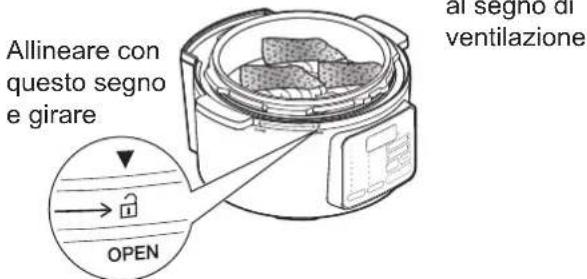
text_image
Time Remaining Temperature Rice Stew Roast Bean Soup Cake Preset Pressure Temperature Cook Slow Cook Hot Pot Steam Heat Up Manual PC-MA3 Pressuring Time + Temperature + Delay Timer Remaining Time Keep Warm Cancel Start Lam- peggiatext_image
Time Remaining Temperature Rice Stew Roast Bean Soup Cake Preset Pressura Temperature Cook Slow Cook Hot Pot Steam Heat Up PC-MA3 Pressuring Time + Temperature + Delay Timer Remaining Time Keep Warm Cancel Startnatural_image
Line drawing of a rice cooker with lid and side-mounted dish (no text or symbols)text_image
Time Remaining Temperature Rice Stew Roast Bean Soup Cake Preset Pressure Temperature Cook Slow Cook Hot Pot Steam Heat Up PC-MA3 Pressuring Time + Temperature + Delay Timer Remaining Time Keep Warm Cancel Start Lam- peggiatext_image
Time Remaining Temperature Rice Stew Roast Bean Soup Cake Preset Pressure Temperature Cook Slow Cook Hot Pot Steam Heat Up PC-MA3 Pressuring Time + Temperature Delay Timer Remaining Time Keep Warm Cancel Starttext_image
Time Remaining Temperature Rice Stew Roast Bean Soup Cake Preset Pressure Temperature Cook Slow Cook Hot Pot Steam Heat Up PC-MA3 Pressuring Time + Temperature + Delay Timer Remaining Time Keep Warm Cancel Start Spia accesanatural_image
Line drawing of a cooking pot with lid and lid, showing interior components (no text or symbols)natural_image
Line drawing of a hand cleaning a large cylindrical container (no text or symbols)text_image
Diagram showing a hand pressing down on a device component with numbered callouts indicating step ① and step ②.
natural_image
Line drawing of a hand using a tool to clean or inspect a small object on a large pot (no text or symbols)natural_image
Technical line drawing of a mechanical component with exploded view and close-up of internal components (no text or symbols)natural_image
Technical line drawing of a mechanical component with no visible text or symbolsSpecificaties....212
Veiligheid....213
(Pressure (Snelkoken))......235
(Slow Cook (Sudderen))......239
(Hot Pot (Kookpot))......242
Gebruiksinstructes Menu Manual (Handmatig)
(Steam (Stomen)) 243
(Heat Up (Opwarmen))......245
text_image
Brown Rice - 4.0 - - 2.0 Beansnatural_image
Simple line drawing of an electrical outlet with three outlets and a cross symbol (no text or labels)natural_image
Line drawing of a rice cooker with steam rising and a 'X' symbol indicating no heating or discharge (no text or labels)natural_image
Line drawing of a rice cooker with a bucket pouring liquid into the cup, marked with an 'X' symbol (no text or labels present)
Verboden
natural_image
Simple line drawing of a box with a lid and a rice cooker on a table, no text or symbols present.Afvoer
natural_image
Simple line drawing of a cylindrical container (no text or symbols)Behuizing
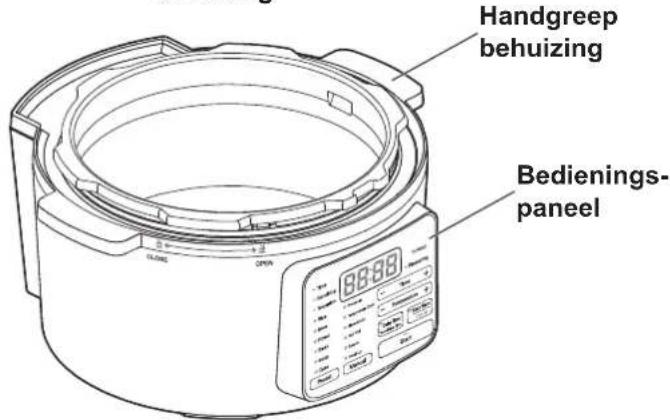
text_image
Handgreep behuizing Bedienings- paneelOnderdelen vervolg
In de behuizing
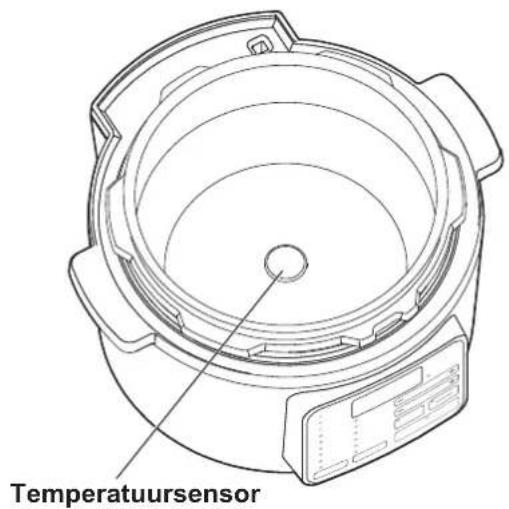
natural_image
Line drawing of a stoommandje appliance with four legs and central basin (no text or symbols)Afneembaar netsnoer
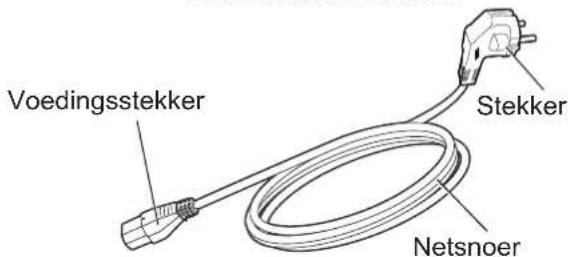
text_image
Voedingsstekker Stekker NetsnoerBedieningspaneel
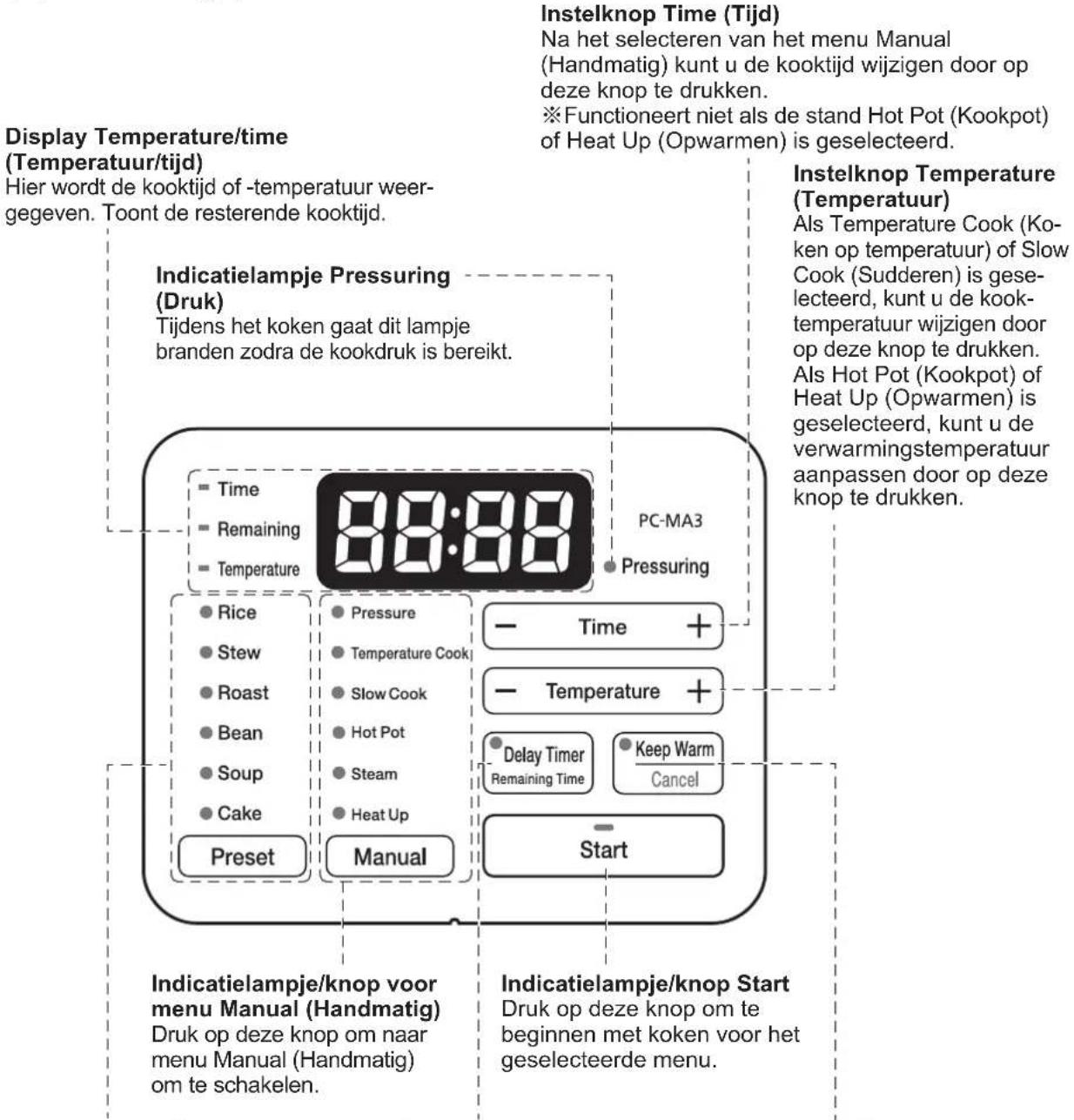
text_image
Diagram showing a cooking appliance with open lid and lock mechanism, labeled in English.Sluiten
natural_image
Line drawing of a rice cooker with attached power outlet and cable (no text or symbols)text_image
Time Remaining Temperature Rice Stew Roast Bean Soup Cake Preset Pressure Temperature Cook Slow Cook Hot Pot Steam Heat Up PC-MA3 Pressuring — Time + — Temperature + Delay Timer Remaining Time Keep Warm Cancel Start Knipperttext_image
Time Remaining Temperature Rice Stew Roast Bean Soup Cake Preset Pressure Temperature Cook Slow Cook Hot Pot Steam Heat Up PC-MA3 Pressuring Temperature + Time + Temperature + Delay Timer Remaining Time Keep Warm Cancel Start Indicator brandttext_image
Time Remaining Temperature Rice Stew Roast Bean Soup Cake Pressure Temperature Cook Slow Cook Hot Pot Steam Heat Up Preset Manual PC-MA3 Pressuring Temperature + Delay Timer Remaining Time Keep Warm Cancel Start Indicator brandtnatural_image
Line drawing of a rice cooker with steam rising from its side (no text or symbols)text_image
Time Remaining Temperature Rice Stew Roast Bean Soup Cake Preset Pressure Temperature Cook Slow Cook Hot Pot Steam Heat Up PC-MA3 Pressuring — Time + — Temperature + Delay Timer Remaining Time Keep Warm Cancel Start Knipperttext_image
Time Remaining Temperature 1:05 PC-MA3 Pressuring Rice Stew Roast Bean Soup Cake Preset Pressure Temperature Cook Slow Cook Hot Pot Steam Heat Up Start Delay Timer Remaining Time Keep Warm Cancel Indicator brandt Manualtext_image
Time Remaining Temperature Rice Stew Roast Bean Soup Cake Preset Manual 1:10 PC-MA3 Pressuring Pressure Temperature Cook Slow Cook Hot Pot Steam Heat Up Start Indicator brandt Delay Timer Remaining Time Keep Warm Canceltext_image
Indicator brandt Time Remaining Temperature Rice Stew Roast Bean Soup Cake Preset Manual Pressure Temperature Cook Slow Cook Hot Pot Steam Heat Up PC-MA3 Pressuring — Time + — Temperature + Delay Timer Remaining Time Keep Warm Cancel Starttext_image
= Time ■ Remaining ■ Temperature ● Rice ● Stew ● Roast ● Bean ● Soup ● Cake Preset Pressure Temperature Cook Slow Cook Hot Pot Steam Heat Up PC-MA3 ● Pressuring — Time — Temperature + Delay Timer Remaining Time Keep Warm Cancel StartGebruiksinstructies
text_image
Time Remaining Temperature 5:00 PC-MA3 Pressuring Rice Stew Roast Bean Soup Cake Preset Pressure Temperature Cook Slow Cook Hot Pot Steam Heat Up Start Delay Timer Remaining Time Keep Warm Cancel Indicator brandttext_image
Time Remaining Temperature Rice Stew Roast Bean Soup Cake Preset Pressure Temperature Cook Slow Cook Hot Pot Steam Heat Up PC-MA3 Pressuring — Time + — Temperature + Delay Timer Penshing Time Keep Warm Cancel Start Knipperttext_image
Time Remaining Temperature Rice Stew Roast Bean Soup Cake Preset Manual PC-MA3 Pressuring Pressure Temperature Cook Slow Cook Hot Pot Steam Heat Up Preset Start Temperature + Delay Timer Remaining Time Keep Warm Cancel PC-MA3text_image
Time Remaining Temperature Rice Stew Roast Bean Soup Cake Preset Pressure Temperature Cook Slow Cook Hot Pot Steam Heat Up PC-MA3 Pressuring Temperature + Delay Timer Remaining Time Keep Warm Cancel Start Indicator brandttext_image
Time Remaining Temperature Rice Stew Roast Bean Soup Cake Preset Pressure Temperature Cook Slow Cook Hot Pot Steam Heat Up PC-MA3 Pressuring Time + Temperature + Delay Timer Remaining Time Keep Warm Cancel Start Knipperttext_image
Time Remaining Temperature Rice Stew Roast Bean Soup Cake Preset Pressure Temperature Cook Slow Cook Hot Pot Steam Heat Up PC-MA3 Pressuring Temperature Delay Timer Remaining Time Keep Warm Cancel StartGebruiksinstructies
Menu Manual (Handmatig) (Temperature Cook (Koken op temperatuur))
text_image
Time Remaining Temperature Rice Stew Roast Bean Soup Cake Preset Pressure Temperature Cook Slow Cook Hot Pot Steam Heat Up PC-MA3 Pressuring Time Temperature Delay Timer Remaining Time Keep Warm Cancel Starttext_image
Time Remaining Temperature 1:00 PC-MA3 Pressuring Rice Stew Roast Bean Soup Cake Preset Pressure Temperature Cook Slow Cook Hot Pot Steam Heat Up Delay Timer Remaining Time Keep Warm Cancel Start Indicator brandtnatural_image
Illustration of a bag being placed in a bowl with an arrow indicating downward motion (no text or symbols)Gebruiksinstructies
Menu Manual (Handmatig) (Slow Cook (Sudderen)) vervolg
text_image
Time Remaining Temperature Rice Stew Roast Bean Soup Cake Preset Pressure Temperature Cook Slow Cook Hot Pot Steam Heat Up Manual PC-MA3 Pressuring Time + Temperature + Delay Timer Remaining Time Keep Warm Cancel Start Knipperttext_image
Time Remaining Temperature Rice Stew Roast Bean Soup Cake Preset Pressure Temperature Cook Slow Cook Hot Pot Steam Heat Up PC-MA3 Pressuring Time + Temperature + Delay Timer Remaining Time Keep Warm Cancel Starttext_image
Time Remaining Temperature Rice Stew Roast Bean Soup Cake Preset Pressure Temperature Cook Slow Cook Hot Pot Steam Heat Up PC-MA3 Pressuring — Time — Temperature + Delay Timer Remaining Time Keep Warm Cancel Starttext_image
Time Remaining Temperature Rice Stew Roast Bean Soup Cake Preset Pressure Temperature Cook Slow Cook Hot Pot Steam Heat Up PC-MA3 Pressuring — Time + — Temperature + Delay Timer Remaining Time Keep Warm Cancel Start Indicator brandtnatural_image
Line drawing of a cooking pot with food inside, no text or symbols presenttext_image
Time Remaining Temperature Rice Stew Roast Bean Soup Cake Preset Pressure Temperature Cook Stow Cook Hot Pot Steam Heat Up Preset Manual PC-MA3 Pressuring Time + Temperature Delay Timer Remaining Time Keep Warm Cancel Starttext_image
Time Remaining Temperature Rice Stew Roast Bean Soup Cake Preset Pressure Temperature Cook Slow Cook Hot Pot Steam Heat Up PC-MA3 Pressuring Temperature + Delay Timer Remaining Time Keep Warm Cancel Start Indicator brandtnatural_image
Line drawing of a rice cooker with a lid and base, showing internal components (no text or symbols)text_image
Time Remaining Temperature Rice Stow Roast Bean Soup Cake Preset Pressure Temperature Cook Slow Cook Hot Pot Steam Heat Up PC-MA3 Pressuring Time + Temperature + Delay Timer Remashing Time Keep Warm Cancel Start Knipperttext_image
Time Remaining Temperature Rice Stew Roast Bean Soup Cake Preset Pressure Temperature Cook Slow Cook Hot Pot Steam Heat Up PC-MA3 Pressuring Time + Temperature + Delay Timer Remaining Time Keep Warm Cancel Starttext_image
Time Remaining Temperature 0:30 PC-MA3 Pressuring Rice Stew Roast Bean Soup Cake Preset Pressure Temperature Cook Slow Cook Hot Pot Steam Heat Up Preset Manual Temperature + Delay Timer Remaining Time Keep Warm Cancel Start Indicator brandtnatural_image
Line drawing of a rice cooker with food inside, no text or symbols presenttext_image
PC-MA3 Time Remaining Temperature Rice Stew Roast Bean Soup Cake Preset Pressure Temperature Cook Slow Cook Hot Pot Steam Heat Up Pressuring Temperature + Delay Timer Remaining Time Keep Warm Cancel Start Knipperttext_image
PC-MA3 Time Remaining Temperature Rice Stew Roast Bean Soup Cake Preset Pressure Temperature Cook Slow Cook Hot Pot Steam Heat Up Pressuring Time + Temperature Delay Timer Remaining Time Keep Warm Cancel Starttext_image
Time Remaining Temperature Rice Stew Roast Bean Soup Cake Preset Pressure Temperature Cock Slow Cock Hot Pot Steam Heat Up PC-MA3 Pressuring — Time + — Temperature + Delay Timer Remaining Time Keep Warm Cancel Start Indicator brandtnatural_image
Line drawing of three kitchen utensils: a bowl with a lid, a lid with a central knob, and a lid with a handle (no text or symbols)natural_image
Line drawing of a hand cleaning a large cylindrical container (no text or symbols)Condensbakje
text_image
Diagram showing a hand pressing down on a device component with numbered callouts indicating step ① and step ②.
natural_image
Line drawing of a hand pouring liquid into a lid on a pot (no text or symbols)Antiblokkeerkapje
natural_image
Technical line drawing of a mechanical component with a close-up view of a textured block (no text or symbols)natural_image
Technical line drawing of a mechanical component with no visible text or symbolsProblemen oplossen
(Stew (Potrawka), Roast (Pieczeń), Bean (Fasola),
Soup (Zupa)) 271
(Steam (Na parze))......285
text_image
Brown Rice - 4.0 - - 2.0 Beansnatural_image
Simple line drawing of an electrical plug with a black X mark above it, no text or symbols present.natural_image
Line drawing of a rice cooker with steam rising and a 'X' symbol indicating no heating or disinfection (no text or labels)natural_image
Line drawing of a rice cooker with a bucket pouring liquid into the cup, marked with an 'X' symbol (no text or labels present)
Nie wolno
natural_image
Simple line drawing of a box with a monitor and a rice cooker on a table, no text or symbols present.Utylizacja
natural_image
Simple line drawing of a cylindrical container (no text or symbols)Jednostka główna
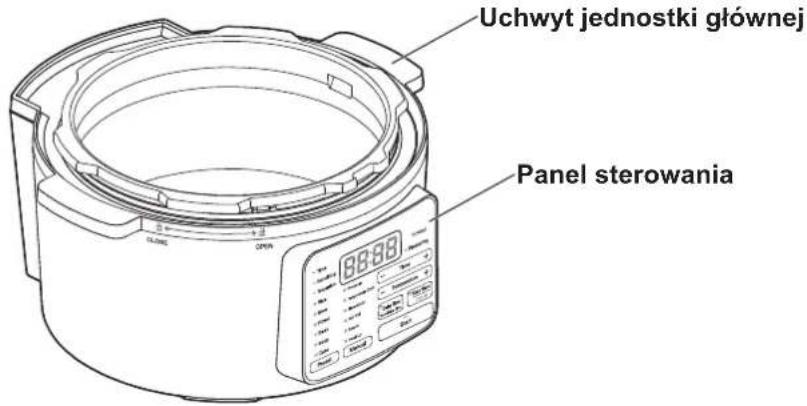
Rice
Stew
Roast
- Bean
- Soup
- Cake
Preset
Pressure
Temperature Cook
Slow Cook
Hot Pot
- Steam
- Heat Up
Manual

Time

Temperature

Keep Warm
Remaining Time
Cancel
Start
text_image
Diagram showing a cooking pot with open lid and lock mechanism, labeled 'OPEN'Jak zamknąć
natural_image
Line drawing of a rice cooker with attached power outlet and cable (no text or symbols)text_image
Time Remaining Temperature Rice Stew Roast Bean Soup Cake Preset Pressure Temperatures Cook Slow Cook Hot Pot Steam Heat Up PC-MA3 Pressuring — Time + — Temperature + Delay Timer Remaining Time Keep Warm Cancel Start Miganatural_image
Line drawing of a rice cooker with steam rising from its side (no text or symbols)text_image
Time Remaining Temperature Rice Stew Roast Bean Soup Cake Preset Pressure Temperature Cook Slow Cook Hot Pot Steam Heat Up PC-MA3 Pressuring — Time + — Temperature + Delay Timer Remaining Time Keep Warm Cancel Start Migatext_image
Time Remaining Temperature Rice Stew Roast Bean Soup Cake Pressure Temperature Cook Slow Clock Hot Pot Steam Heat Up Preset Manual PC-MA3 Pressuring — Time + — Temperature + Delay Timer Remaining Time Keep Warm Cancel Start Migatext_image
Time Remaining Temperature Rice Stew Roast Bean Soup Cake Preset Pressure Temperature Cook Slow Cook Hot Pot Steam Heat Up PC-MA3 Pressuring Time Temperature + Delay Timer Remaining Time Keep Warm Cancel StartSposób użycia
text_image
Time Remaining Temperature Rice Stew Roast Bean Soup Cake Preset Pressure Temperature Cook Slow Cook Hot Pot Steam Heat Up PC-MA3 Pressuring Time + Temperature + Delay Timer Remaining Time Keep Warm Cancel Start Migatext_image
Time Remaining Temperature Rice Stew Roast Bean Soup Cake Preset Pressure Temperature Cook Slow Cook Hot Pot Steam Heat Up PC-MA3 Pressuring Time Temperature + Delay Timer Remaining Time Keep Warm Cancel Starttext_image
Time Remaining Temperature Rice Stew Roast Bean Soup Cake Preset Pressure Temperature Cook Slow Cook Hot Pot Steam Heat Up PC-MA3 Pressuring Time + Temperature + Delay Timer Removing Time Keep Warm Cancel Start Migatext_image
Time Remaining Temperature Rice Stew Roast Bean Soup Cake Preset Pressure Temperature Cook Slow Cook Hot Pot Steam Heat Up PC-MA3 Pressuring Time Temperature Delay Timer Remaining Time Keep Warm Cancel Startnatural_image
Simple line drawing of a bag being placed in a basin with an arrow indicating downward motion (no text or symbols)Sposób użycia
natural_image
Line drawing of a microwave oven with lid and control panel (no text or symbols)text_image
Time Remaining Temperature Rice Stew Roast Bean Soup Cake Preset Pressure Temperature Cook Slow Cook Hot Pot Steam Heat Up Manual PC-MA3 Pressuring — Time + — Temperature + Delay Timer Remaining Time Keep Warm Cancel Start Migatext_image
Time Remaining Temperature Rice Stew Roast Bean Soup Cake Preset Pressure Temperature Cock Slow Cook Hot Pot Steam Heat Up PC-MA3 Pressuring Time + Temperature Delay Timer Remaining Time Keep Warm Cancel Starttext_image
- Time - Remaining - Temperature ● Rice ● Stew ● Roast ● Bean ● Soup ● Cake Preset Pressure Temperature Cook ● Slow Cook ● Hot Pot ● Steam ● Heat Up PC-MA3 ● Pressuring - Time - Temperature + ● Delay Timer Remaining Time ● Keep Warm Cancel Startnatural_image
Line drawing of a cooking pot with food inside, no text or symbols presenttext_image
Time Remaining Temperature Rice Stew Roast Bean Soup Cake Preset Pressure Temperature Cook Stow Cook Hot Pot Steam Heat Up Preset Manual Start PC-MA3 Pressuring Time + Temperature Delay Timer Removing Time Keep Warm Cancel Startnatural_image
Line drawing of a rice cooker with a lid and base, showing internal components (no text or symbols)natural_image
Line drawing of a kitchen appliance with a knife cutting through it (no text or symbols)text_image
Time Remaining Temperature Rice Stew Roast Bean Soup Cake Preset Pressura Temperature Cook Slow Cook Hot Pot Steam Heat Up Manual PC-MA3 Pressuring Temperature + Delay Timer Remaining Time Keep Warm Cancel Start Migatext_image
Time Remaining Temperature Rice Stew Roast Bean Soup Cake Preset Pressure Temperature Cook Slow Cook Hot Pot Steam Heat Up PC-MA3 Pressuring Time + Temperature + Delay Timer Remaining Time Keep Warm Cancel Startnatural_image
Line drawing of a cooking pot with food inside, no text or symbols presenttext_image
PC-MA3 Pressureing Time Remaining Temperature Rice Staw Roast Bean Soup Cake Preset Pressure Temperature Cook Slow Cook Hot Pot Steam Heat Up Delay Timer Remaining Time Keep Warm Cancel Start Migatext_image
Time Remaining Temperature Rice Stew Roast Bean Soup Cake Preset Pressure Temperature Cook Slow Cook Hot Pot Steam Heat Up PC-MA3 Pressuring Time Temperature Delay Timer Remaining Time Keep Warm Cancel Starttext_image
= Time == Remaining ■ Temperature ● Rice ● Stew ● Roast ● Bean ● Soup ● Cake Preset Manual PC-MA3 Pressuring Time + Temperature Cook Stew Cook Hot Pot Steam Heat Up Delay Timer Remaining Time Keep Warm Cancel Start Lampka włączonanatural_image
Line drawing of three kitchenware containers: a bowl with dough, a lid with a handle, and a lid with a knob (no text or symbols)natural_image
Line drawing of a hand cleaning a large cylindrical container (no text or symbols)text_image
Diagram showing a hand pressing down on a device component with numbered callouts indicating step ① and step ②.
natural_image
Technical line drawing of a mechanical component with exploded view and close-up of a textured block (no text or symbols)natural_image
Technical line drawing of a mechanical component with no visible text or symbolstext_image
Brown Rice - 4.0 - - 2.0 Beansnatural_image
Simple line drawing of an electrical plug with three connectors and a black X mark above (no text or symbols)natural_image
Line drawing of a rice cooker with steam rising and a 'X' symbol indicating no heating or disinfection (no text or symbols present)natural_image
Line drawing of a rice cooker with a bucket pouring liquid into the pot, marked with an 'X' symbol (no text or labels present)
Förbjudet
natural_image
Illustration of a kitchen appliance with a monitor and a rice cooker, no text or symbols presentKassering
natural_image
Simple line drawing of a cylindrical container (no text or symbols)Huvudenhet
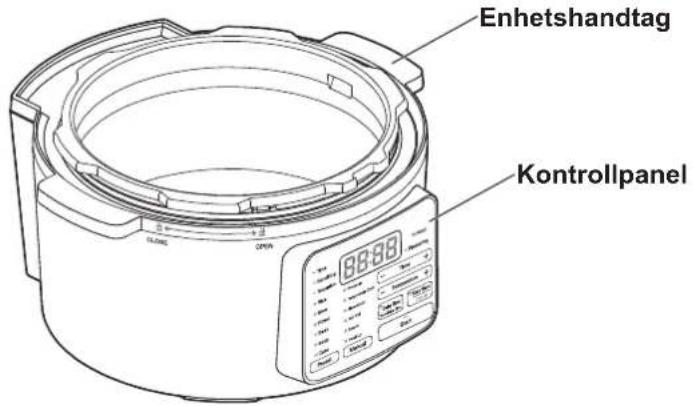
text_image
Enhetshandtag KontrollpanelDelar fortsatt
natural_image
Line drawing of a cylindrical appliance with four legs and internal compartments (no text or symbols)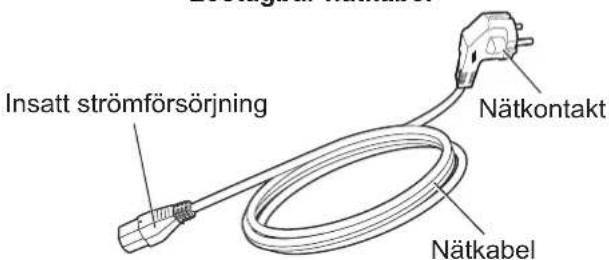
text_image
Time Remaining Temperature 88:88 PC-MA3 Pressuring Rice Stew Roast Bean Soup Cake Preset Pressure Temperature Cook Slow Cook Hot Pot Steam Heat Up Manual Delay Timer Remaining Time Keep Warm Cancel StartTemperaturjusterings-knapp
text_image
Diagram showing a cooking pot with open lid and directional arrows indicating rotation and opening states.Stänga
natural_image
Line drawing of a portable appliance with attached power outlet and cable (no text or symbols)text_image
Time Remaining Temperature Rice Stew Roast Bean Soup Cake Preset Pressure Temperature Cook Slow Clock Hot Pot Steam Heat Up PC-MA3 Pressuring Time + Temperature + Delay Timer Remaining Time Keep Warm Cancel Start Blinkanatural_image
Line drawing of a rice cooker with a spoon and steam rising (no text or symbols)text_image
Time Remaining Temperature Rice Stew Roast Bean Soup Cake Pressure Temperature Cook Show Cook Hot Pot Steam Heat Up Preset Manual PC-MA3 Pressuring Time + Temperature + Delay Timer Remaining Time Keep Warm Cancel Start Blinkatext_image
Time Remaining Temperature Rice Stew Roast Bean Soup Cake Pressure Temperature Cook Slow Cook Hot Pot Steam Heat Up Preset Manual PC-MA3 Pressuring Temperature + Delay Timer Remaining Time Keep Warm Cancel Start Blinkatext_image
Time Remaining Temperature Rice Stew Roast Bean Soup Cake Preset Pressure Temperature Cook Slow Cook Hot Pot Steam Heat Up PC-MA3 Pressuring Time Temperature + Delay Timer Remaining Time Keep Warm Cancel StartAnvändning
text_image
Time Remaining Temperature Rice Stew Roast Bean Soup Cake Preset Pressure Temperature Cook Slow Cook Hot Pot Steam Heat Up PC-MA3 Pressuring Time + Temperature + Delay Timer Remaining Time Keep Warm Cancel Start Blinkatext_image
Time Remaining Temperature Rice Stew Roast Bean Soup Cake Pressure Temperature Cook Slow Cook Hot Pot Steam Heat Up Preset Manual Start PC-MA3 Pressuring Time Temperature + Delay Timer Remaining Time Keep Warm Cancel Starttext_image
Time Remaining Temperature Rice Stew Roast Bean Soup Cake Preset Pressure Temperature Cook Slow Cook Hot Pot Steam Heat Up PC-MA3 Pressuring Time + Temperature + Delay Timer Removing Time Keep Warm Cancel Start Blinkatext_image
Time Remaining Temperature Rice Stew Roast Bean Soup Cake Preset Pressure Temperature Cook Slow Cook Hot Pot Steam Heat Up PC-MA3 Pressuring Time + Temperature Delay Timer Remaining Time Keep Warm Cancel StartAnvändning
Manual (manuell) meny (temperaturtillagning)
text_image
PC-MA3 Time Remaining Temperature Rice Stew Roast Bean Soup Cake Preset Pressure Temperature Cook Slow Cook Hot Pot Steam Heat Up Pressuring Temperature + Delay Timer Remaining Time Keep Warm Cancel Startnatural_image
Illustration of a bag being placed on a plate in a bowl, with an arrow indicating downward motion (no text or symbols)
text_image
Rikta in enatural_image
Line drawing of a microwave oven with a lid and cooling screen (no text or symbols)text_image
Time Remaining Temperature Rice Stew Roast Bean Soup Cake Pressure Temperature Cook Stow Cook Hot Pot Steam Heat Up Preset Manual PC-MA3 Pressuring Time + Temperature + Delay Timer Remaining Time Keep Warm Cancel Start Blinkatext_image
Time Remaining Temperature Rice Stew Roast Bean Soup Cake Preset Pressure Temperature Cook Slow Cook Hot Pot Steam Heat Up PC-MA3 Pressuring Time + Temperature + Delay Timer Remaining Time Keep Warm Cancel Starttext_image
Time Remaining Temperature Rice Stew Roast Bean Soup Cake Preset Pressure Temperature Cook Slow Cook Hot Pot Steam Heat Up PC-MA3 Pressuring — Time — Temperature + Delay Timer Remaining Time Keep Warm Cancel Startnatural_image
Line drawing of a rice cooker with food inside, no text or symbols present2 Anslut nätkabeln
text_image
PC-MA3 Pressureing Time Remaining Temperature Rice Stew Roast Bean Soup Cake Preset Pressure Temperature Cook Slow Cook Hot Pot Steam Heat Up Blinka Start Delay Timer Remaining Time Keep Warm Canceltext_image
Time Remaining Temperature Rice Stew Roast Bean Soup Cake Preset Pressure Temperature Cook Stow Cook Hot Pot Steam Heat Up PC-MA3 Pressuring Time + Temperature Delay Timer Remaining Time Keep Warm Cancel Startnatural_image
Line drawing of a cooking appliance with a lid and base, showing a step-down view (no text or symbols)text_image
Rikta in etext_image
Time Remaining Temperature Rice Stow Roast Bean Soup Cake Preset Pressure Temperature Cook Slow Cook Hot Pot Steam Heat Up Manual PC-MA3 Pressuring Temperature + Delay Timer Remaining Time Keep Warm Cancel Start Blinkatext_image
Time Remaining Temperature Rice Stew Roast Bean Soup Cake Preset Pressura Temperature Cock Slow Cook Hot Pot Steam Heat Up PC-MA3 Pressuring Time + Temperature + Delay Timer Remaining Time Keep Warm Cancel Startnatural_image
Line drawing of a rice cooker with food inside, no text or symbols present2 Anslut nätkabeln
text_image
Time Remaining Temperature Rice Staw Roast Bean Soup Cake Preset Pressure Temperature Cook Slow Cook Hot Pot Steam Heat Up PC-MA3 Pressuring Time + Temperature + Delay Timer Remaining Time Keep Warm Cancel Start Blinkatext_image
Time Remaining Temperature Rice Stew Roast Bean Soup Cake Preset Pressure Temperature Cook Stew Cook Hot Pot Steam Heat Up PC-MA3 Pressuring Time + Temperature Delay Timer Remaining Time Keep Warm Cancel Starttext_image
= Time = Remaining Temperature Rice Stew Roast Bean Soup Cake Preset Pressure Temperature Cook Slow Cook Hot Pot Steam Heat Up PC-MA3 Pressuring Time + Temperature + Delay Timer Remaining Time Keep Warm Cancel Start Indikator pånatural_image
Line drawing of three kitchen utensils: a bowl with a lid, a lid with a central knob, and a lid with a handle (no text or symbols)natural_image
Line drawing of a hand cleaning a large cylindrical container (no text or symbols)Kondensbricka
text_image
Diagram showing a hand pressing a button on a device with numbered labels ① and ② indicating different states or components.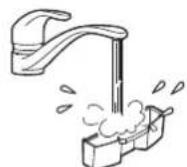
natural_image
Line drawing of a hand holding a small object over a lid, with no visible text or symbolsAntiblockeringslock
natural_image
Technical line drawing of a mechanical component with exploded view and close-up of a textured block (no text or symbols)natural_image
Technical line drawing of a mechanical component with no visible text or symbolsFelsökning
Iris Ohyama France SAS
990 Avenue Marguerite Perey 77127 Lieusaint FRANCE
t: +33 (0) 1 60 60 58 58
Iris Ohyama UK LIMITED
89 Spa Road London United Kingdom SE16 3SG
www.iriseurope.com
874439
040522-ZXY-DIM-02