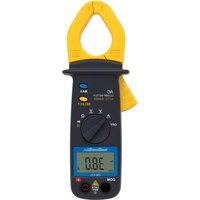
CM610 - Measuring equipment MULTIMETRIX - Free user manual and instructions
Find the device manual for free CM610 MULTIMETRIX in PDF.


| Product Type | Digital Clamp Multimeter |
| Brand | Multimetrix |
| Model | CM610 |
| Dimensions (L x W x H) | 189 x 71 x 37 mm |
| Weight (with batteries) | 200 g |
| Power Supply | 2 x 1.5 V AAA/LR3 batteries |
| Battery Life (VDC measurement) | 400 h (alkaline) / 200 h (standard) |
| Display | LCD 2000 counts (3 ½ digits) |
| Installation Category | CAT III 300 V |
| Measurement Functions | DC voltage (200 mV to 600 V), AC voltage (2 V to 600 V), AC current (200 A / 600 A), resistance (200 Ω to 20 MΩ), diode test, continuity test |
| Measurement Mode | True RMS |
| Special Functions | Auto-ranging, auto power off (15 min), overrange indication (----), MAX function (maximum value) |
| Sampling Rate | Approx. 3 measurements per second |
| Maximum Jaw Opening | 30 mm |
| Operating Conditions | 0 to 50 °C, RH < 80% |
| Storage Conditions | -10 to 60 °C, RH < 70% |
| Protection Rating | Double insulation |
| Safety Standards | EN 61010-1, EN 61010-2-032, EN 61010-2-033 |
| Maintenance | Clean with a damp cloth soaked in soapy water. Do not use solvents or abrasives. |
| Warranty | Manufacturer's warranty against defects in material and workmanship. After-sales service: 02.31.64.51.55 (mainland France) |
| Supplied Accessories | 2 AAA batteries, 2 test leads, 1 instruction manual, 1 protection |
Frequently Asked Questions - CM610 MULTIMETRIX
User questions about CM610 MULTIMETRIX
0 question about this device. Answer the ones you know or ask your own.
Ask a new question about this device
Download the instructions for your Measuring equipment in PDF format for free! Find your manual CM610 - MULTIMETRIX and take your electronic device back in hand. On this page are published all the documents necessary for the use of your device. CM610 by MULTIMETRIX.
USER MANUAL CM610 MULTIMETRIX
GENERAL SAFETY AND GUARANTEE CONDITIONS
1. PRECAUTIONS DURING USE
- Please read the safety instructions below before using the instrument to avoid any accidental injuries, such as burns or electric shocks.
- You must observe the instructions preceded by the symbol

1.1 DEFINITION OF THE INSTALLATION CATEGORIES (Cf. CEI 664-1)
- CAT I: Circuits protected by devices restricting temporary excessive voltages to a low level. E.g.: protected electronic circuits
- CAT II: Power circuits for domestic appliances or similar equipment, which may be subject to medium level temporary excessive voltages. E.g.: power supplies for domestic appliances and portable power tools
- CAT III: Power circuits for powerful machinery, which may be subject to significant temporary excessive voltages. E.g.: power supplies for industrial machinery and equipment
1.2 NORMS
- Please refer to the norms and installation categories mentioned in the specific instructions for each unit.
1.3 EXPLANATION OF THE SYMBOLS
| Symbol | Definition | Symbol | Definition |
 | Instrument with double insulation | Fuse | |
 | Alternating current (AC) | CE approved | |
 | Direct current (DC) | According to WEEE directive 2002/96/EC | |
 | Warning! Please refer to the operating instructions. | Do not apply around or remove from hazardous live conductors | |
 | Earth |
1.4 FOR WORKING SAFELY

- Take particular care with voltages in excess of 30 VAC RMS and 50 VDC.
- Never work above the indicated maximum voltage ranges, particularly as regards the Earth.
- When measuring the intensity, always check that the value for the current to be measured is compatible with the size of the instrument. For instruments fitted with fuses, check the fuses' condition before taking any measurements. Only replace worn-out fuses with the fuses recommended in the product's instruction manual.
- Never use the instrument in a damp or dusty environment.
- Never use the instrument without wearing electrician's gloves and the other safety equipment recommended by the legislation.
-
Never move your fingers outside the guard for the contact points.
-
Never touch any metal part of the contact points with your finger.
- Check the mechanical and electrical condition of the power cables and the contact points before taking any measurements. Any power cables or contact points that are damaged must be replaced immediately. Never use the instrument if it is damaged.
- Never work with the instrument's rear casing open.
- Never change the batteries while the power cables are connected.
- Do not use the instrument in, or expose it to, direct sunlight, high temperatures or high levels of humidity.
■ Never alter the internal electronic circuits. - Do not remove the casing; only the battery compartment cover may be opened.
■ Never alter the internal electronic circuits.
1.5 OTHER SAFETY RECOMMENDATIONS
- For instruments of installation categories I and II, never work on equipment that could generate voltage spikes (motors, etc.).
- When measuring in the manual range, always start with the maximum range and then select the most appropriate range.
- First of all connect the black contact point and then the red one.
- Disconnect the power cables before changing function.
- First of all disconnect the red contact point and then the black one.
- Use and install batteries that comply with the instructions in the user's manual for the product you have purchased.
- Check that there is no voltage present before using the · and functions.
2. GUARANTEE
The instrument is guaranteed against any material or manufacturing fault in accordance with the General Sales Conditions. During the guarantee period, the instrument may only be repaired by the manufacturer, who reserves the right either to proceed to repair the product or replace it in whole or in part. If any equipment is returned to the manufacturer, the customer is responsible for paying the outward transport costs. The guarantee does not apply in the case of:
- Improper use of the instrument or its use with incompatible equipment.
- Modification of the instrument without express authorisation from the manufacturer's technical departments.
- Any work being performed on the instrument by anyone not formally approved by the manufacturer.
- Any adaptation for any particular application not provided for in the instrument's definition or the operating instructions.
- An impact, a fall or drenching in water.
- Information and contact details for our After-Sales Services: contact your distributor.
3. UNPACKING AND REPACKING
All the equipment has been checked mechanically and electrically before dispatch.
However, you are advised quickly to check for any damage during transport. Should this be the case, inform the freight forwarder immediately of your reservations.
If you are sending anything back, please use the original packaging and attach a note indicating the reason for the return.
4. MAINTENANCE
4.1 METROLOGICAL CHECKS
As with any measuring or testing instrument, periodic checking is required. Information and contact details are available on request or contact your distributor.
4.2 SERVICING
Periodically clean your multimeter with a cloth dampened with soapy water. Do not use abrasives or solvents.
4.3 REPAIRS OUTSIDE METROPOLITAN FRANCE.
For any work under or outside the guarantee, the instrument must be returned to the distributor.
5. STORAGE
Remove the batteries and store them separately if you measuring instrument has not been used for more than 60 days.
USE
6. INTRODUCTION
6.1 THE FRONT FACE
| No. | Function |
| 1. | Black negative COM terminal (-) |
| 2. | Liquid crystal display:- CM600 / CM610: 3 1⁄2 digits (1999 points)- CM625: 4 digits (4369 points)'----': current and voltage measurements exceed the range |
| 3. | Function rotary selector switchOFF : Multimeter offA : AC current (CM600 and CM610: 600 A and CM625: 400 A)A : DC current(only on CM625: 400 A)V : AC voltage on CM600, CM610and CM625 (600 V)V : DC voltage on CM600, CM610 and CM625 (600 V)Ω : Resistance (only on CM600 and CM610: 20 MΩ)Ω ••): Resistance and continuity(only on CM625: 40 MΩ)•• : Diode and continuity test(only on CM600 and CM610) |
| 4. | Trigger for opening the clamp |
| 5. | When measuring, your hand must always be behind this protective guard. |
| 7. | For maximum accuracy, the conductor must be located in the centre of this area during measurement. |
| 8. | MAXbutton (CM600 and CM610): this shows the maximum value, automatically updated, for theA∨∨functions. Theiconis displayed when the function is activated: pressing it again cancels the function. |
| 9. | SELECT button.CM600 and CM610: Alternately selects diode test→or continuity test→)CM625: Alternately selects measurement of:- the DC current or reset (40 ADC range);- the resistance or continuity test .→) |
| 10. | Red positive terminal (+). |
| 11. | CM625: indicates the clamp’s orientation. |
| 12. | HOLDbutton (CM625)This holds the measurement (Data Hold); theDHicon appears when the function is activated. Pressing the button again cancels the function. Automatic shutdownAUTO POWER OFF(25) is deactivated in this mode. |
6.2 THE DISPLAY
| No. | Function |
| 13. | Continuity |
| 14. | Negative value |
| 15. | AC |
| 16. | DC |
| 17. | Low batteries |
| 18. | Max. value |
| 19. | Diode test |
| No. | Function |
| 20. | Resistance |
| 21. | Current voltage |
| 22. | Max. value |
| 23. | Auto ranges |
| 24. | Hold value |
| 25. | Auto shutdown |
| CM625 only |
6.3 THE REAR FACE
| No. | Function |
| 27. | Safety text |
| No. | Function |
| 28. | Battery compartment |
7. USE
7.1 TO USE THE CLAMP-ON METER
Set the selector (3) to any position other than OFF.
7.2 TO STOP THE CLAMP-ON METER
Set the selector (3) to OFF.
Automatic shutdown
The multimeter shuts down automatically 10 minutes after the last measurement; the buzzer sounds one minute before shutdown. Pressing any button except SELECT restarts the multimeter.
Cancelling automatic shutdown (CM625 only)
- Set the selector (3) to OFF.
- Hold down the HOLD button and set the selector (3) to any position other than OFF.
The AUTO POWER OFF icon disappears and automatic shutdown is deactivated.
Restarting automatic shutdown (CM625 only)
-
Set the selector (3) to OFF.
-
Set the selector (3) to any position other than OFF.
The AUTO POWER OFF icon appears and automatic shutdown is reactivated.
7.3 TO MEASURE VOLTAGE

Please read the safety recommendations before use.
Automatic measurement ranges:
- CM600 and CM610: 200 mVDC to 600 VDC (5 ranges) and 2 VAC to 600 VAC (4 ranges)
- CM625: 4 VDC to 600 VDC (4 ranges) and 4 VAC to 600 VAC (4 ranges)
-
Set the selector (3) to the Voltage symbol.
-
Insert the black connector into the COM terminal (1), the red connector into the + terminal (10) and take the voltage reading once it has stabilised.
When the AUTO icon (23) is displayed, the multimeter determines the optimum measurement range.
If “----” is displayed, the capacity has been exceeded.
- CM600 and CM610: to display the maximum value, see §.7.9.
- CM625: to store the maximum reading, see §. 7.10.
- Set the selector to OFF.
7.4 TO MEASURE DC CURRENT (CM625)

Please read the safety recommendations before use.
Automatic measurement ranges:
CM625: 40 ADC or 400 ADC (2 ranges)
- Set the commutator (3) to Zero A.
- Press the SELECT button (9) to set zero.
Setting zero can only be activated on the 40 A range.
- Press the trigger (4) to open the clamp (6) and position the conductor in the centre of the clamp (Fig. 4).
NB: never insert two + and - conductors from the same circuit in the clamp; the reading will be zero.
- Take the current reading once it has stabilised.
If “----” is displayed, the capacity has been exceeded.
To store the maximum reading, see §. 7.10.
- Open the clamp, release the conductor and set the selector to OFF.
7.5 TO MEASURE THE AC CURRENT
Automatic measurement ranges:
CM600 and CM610: 200 AAC or 600 AAC (2 ranges)
CM625: 40 AAC or 400 AAC (2 ranges)
- Set the selector (3) to . A
The icons (15 and 21) appear.
- Press the trigger (4) to open the clamp (6) and position a conductor in the centre of the clamp (29).
NB: never insert two + and - conductors from the same circuit in the clamp; the reading will be zero.
- Take the current reading once it has stabilised.
If “----” is displayed, the capacity has been exceeded.
- CM600 & CM610: to display the maximum value, see §.7.9.
- CM600 & CM610: to store the maximum reading, see §. 7.10.
- Open the clamp, release the conductor and set the selector to OFF.
7.6 TO MEASURE THE RESISTANCE

Please read the safety recommendations before use.
There must be no voltage in the circuit.
Automatic measurement ranges:
- CM600 & CM610: 200 Ω or 20 MΩ (6 ranges)
- CM625: 400 Ω or 40 MΩ (6 ranges)
- CM600 & CM610: set the selector (3) to .
CM625: set the selector (3) to . Ω
- Insert the black connector into the COM terminal (1), the red connector into the + terminal (10) and take the voltage reading.
If OL is displayed, the capacity has been exceeded.
- Set the selector to OFF.
7.7 DIODE TEST (CM600 & CM610)

Please read the safety recommendations before use.
There must be no voltage in the circuit.
- Set the commutator to

- Proceed to test directly.
Connect the black contact to the cathode and the red contact to the anode. The measurement is 0.5 to 0.7V for a silicon diode and 0.2 to 0.3V for a germanium diode. A value close to zero indicates a short-circuit. OL indicates a diode has shorted out.
- Proceed to test in reverse.
Connect the black contact to the anode and the red contact to the cathode. A correct diode will show OL. The diode is defective if a voltage is displayed.
- Set the selector to OFF.
7.8 CONTINUITY TEST

Please read the safety recommendations before use. There must be no voltage in the circuit.
- CM600 & CM610: Set the selector (3) to ▶ and press SELECT to display (13).
CM625: Set the selector (3) to and press SELECT to display (13).
- Insert the black cable in the COM terminal (1), the red cable in the + terminal (10) and apply the contact points to the circuit to be checked.
The buzzer sounds when the circuit to be checked is DC or has a resistance of less than 90 ± 40 (CM600 & CM610) or 50 ± 25 (CM625).
- Set the selector to OFF.
7.9 MAX FUNCTION (DISPLAYS MAX. VALUE – (CM600 & CM610)
- Set the selector to


and press MAX.
The icon appears (18).
- Take the measurement.
The maximum measurement will be updated automatically.
- Press MAX to deactivate the MAX function.
7.10 HOLD FUNCTION (STORES THE READING IN MEMORY - CM625)
- Apply the contact points to the circuit to be checked.
The maximum measurement will be updated automatically.
- Press the HOLD button during the measurement.
The D-H (Data Hold) icon (24) appears and the measurement is stored.
The automatic shutdown function is deactivated.
- To deactivate the D-H function, press HOLD.
8. TO REPLACE THE BATTERIES

Please read the safety recommendations before use. There must be no voltage in the circuit.
The batteries must be replaced when the + - icon (17) is displayed:
- Disconnect the contact points.
- Set the commutator to OFF.
-
Remove the fixing screws and the battery compartment cover. Replace both the 1.5V AAA / LR3 batteries, paying careful attention to the polarities.
-
Replace the cover and fasten the screws.
NB: Remove the batteries if the multimeter will not be used for a prolonged time.
9. CHARACTERISTICS
9.1 GENERAL
| Value measurements | CM600, CM610 & CM625: DC and AC voltages, AC current, resistance, continuity testCM600 & CM610: diode testCM625: DC current |
| Measurement methods | CM610 & CM625 :True RMS AC (true effective voltage) |
| Display | CM600 & CM610: 2000 pointsCM625: 4369 points |
| Polarity indication | “-” sign |
| Additional selectable functions | Automatic range selectionAutomatic shutdown (active or not)Display of capacity being exceededCM600 & CM610: maximum measurement (Max Hold)CM625: measurement storage (Data Hold) |
| Battery low charge indication | Low battery symbol |
| Sampling frequency | CM600 & CM610: approx. 3 x per sec.CM625: approx. twice per sec. |
| Maximum opening of jaws | 30 mm |
| Use | 0 to 50°C (32°F - 122°F). RH < 80%, no condensation |
| Storage | -10°C to 60°C (14 - 140°F); RH < 70%, no condensation and with the battery removed |
| Power supply | 2* 1.5V LR3 type batteries (AAA) |
| Autonomy (when measuring Volts DC) | CM600 & CM610: 400 hours (alkaline battery) or 200 hours (standard battery)CM625: 100 hours (alkaline battery) |
| Dimensions and weight (with batteries) | 189 x 71 x 37mm (L x W x H)CM600 & CM610: 200 gCM625: 220 g |
| Pollution level | 2 |
| Electrical safety | IEC 61010-1 - IEC 61010-2-032 - IEC 61010-2-033300 V CAT III |
| Delivered with the instrument | 2* 1.5V AAA / LR3 type batteries2 power cables1 set of operating instructions1 protective device |
9.2 REFERENCE CONDITIONS
Reference conditions: 18°C - 28°C; RH < 80 %, no condensation
See table on page 42.
7.8 TEST DI CONTINUITÀ